
H-CMD7071 - Car Radio HYUNDAI - Free user manual and instructions
Find the device manual for free H-CMD7071 HYUNDAI in PDF.


| Product Type | Car Radio with DVD Player |
| Brand | Hyundai |
| Model | H-CMD7071 |
| Power Supply | 12V DC (Negative Ground) |
| Fuse Rating | 15A |
| Maximum Power Output | 50W x 4 channels |
| Dimensions (W x H x D) | 178 x 50 x 165 mm |
| Working Temperature Range | -10°C to +60°C |
| FM Frequency Range | 65.0 – 74.0 / 87.5 – 108.0 MHz |
| MW Frequency Range | 522 kHz – 1620 kHz |
| Disc Formats Supported | DVD, SVCD, VCD, CD, MP3, CD-R, CD-RW, DVD±R |
| Audio Output Level | 2Vrms (±3dB) |
| Video Output Level | 1.0Vp-p 75 ohms |
| TV System | NTSC / PAL switchable |
| Screen Saver | Activates after 5 minutes of idle |
| Anti-theft System | Detachable front panel |
| Remote Control Battery | CR2025 3V lithium |
| Installation Opening Thickness | 4.75 – 5.56 mm |
| Mounting Angle | 0 to ±30 degrees |
| Cleaning Instructions | Cabinet: soft cloth with mild soap; Discs: wipe from center to edge |
| Safety Precautions | Disconnect battery before installation; do not disassemble; use correct fuse |
| Repair | Consult dealer or qualified technician; do not open covers |
| Included Accessories | Remote control, mounting collar, trim plate, ISO connector, T-Keys |
Frequently Asked Questions - H-CMD7071 HYUNDAI
User questions about H-CMD7071 HYUNDAI
0 question about this device. Answer the ones you know or ask your own.
Ask a new question about this device
Download the instructions for your Car Radio in PDF format for free! Find your manual H-CMD7071 - HYUNDAI and take your electronic device back in hand. On this page are published all the documents necessary for the use of your device. H-CMD7071 by HYUNDAI.
USER MANUAL H-CMD7071 HYUNDAI
Thank you for purchasing our product. For safety, it is strongly recommended to read this manual carefully before connecting, operating and/or adjusting the product and keep the manual for reference in the future.
Table of contents
Table of contents 2
Important safeguards 3
Installation/Connections 4
Panel controls....7
Remote control....10
Battery information of remote controller....11
Glossary 12
Features....13
Compatible discs 14
General operation....16
Digital tuner 18
DVD/VCD/CD/MP3/CD-R 20
Built-in player setup (On the remote control)....27
Anti-theft system....34
Handling discs....35
Cleaning....35
Troubleshooting guide....36
Specification 37
Important safeguards
- Using the device at temperature below -10°C may cause the breakage of the device. BEFORE USING PLEASE HEAT UP THE PASSENGER COMPARTMENT TO THE RECOMMENDED TEMPERATURE!
- Read carefully through this manual to familiarize yourself with this high-quality sound system.
- Disconnect the vehicle's negative battery terminal while mounting and connecting the unit.
- When replacing the fuse, be sure to use one with an identical amperage rating. Using a fuse with a higher amperage rating may cause serious damage to the unit.
. DO NOT attempt to disassemble the unit. Laser beams from the optical pickup are dangerous to the eyes. - Make sure that pins or other foreign objects do not get inside the unit; they may cause malfunctions, or create safety hazards such as electrical shock or laser beam exposure.
- If you have parked the car for a long time in hot or cold weather, wait until the temperature in the car becomes normal before operating the unit.
. DO NOT open covers and do not repair yourself. Consult the dealer or an experienced technician for help. - Make sure you disconnect the power supply and aerial if you will not be using the system for a long period or during a thunderstorm.
- Make sure you disconnect the power supply if the system appears to be working incorrectly, is making an unusual sound, has a strange smell, has smoke emitting from it or liquids have got inside it. Have a qualified technician check the system.
- The unit is designed for negative terminal of the battery, which is connected to the vehicle metal. Please confirm it before installation.
- Do not allow the speaker wires to be shorted together when the unit is switched on. Otherwise it may overload or burn out the power amplifier.
- Do not install the detachable panel before connecting the wire.
Installation/Connections
First complete the electrical connections, and then check them for correctness.
Installation opening
This unit can be installed in any dashboard having an opening as shown below. The dashboard should be 4.75 - 5.56 mm thick in order to be able to support the unit.
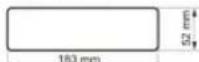
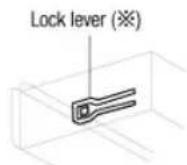
- Insert mounting collar into the dashboard, and bend the mounting tabs out with a screwdriver.
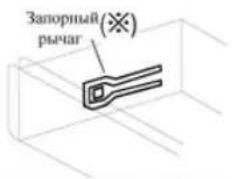
Make sure that lock lever (※) is flush with the mounting collar (not projecting outward).
- Secure the rear of the unit.
After fixing mounting bolt and power connector, fix the rear of the unit to the car body by rubber cushion.
- Insert trim plate.
When you prepare to insert trim plate, please check it's direction. Once it was up side down, it cannot be fixed.
IMPORTANT: Remove these two screws before installation. Otherwise, the DVD Player will not work

Electrical connections
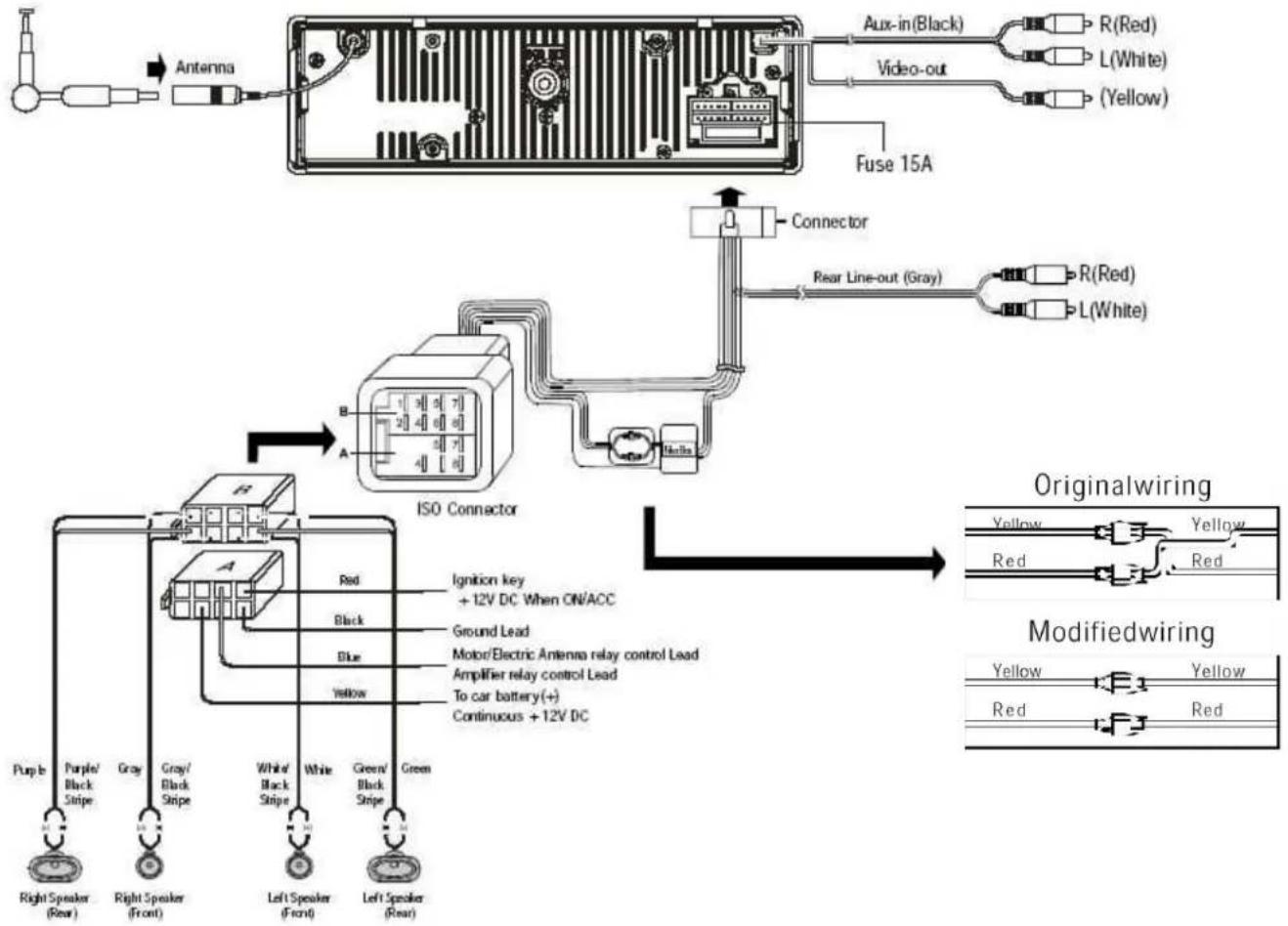
flowchart
graph TD
    A["Antenna"] --> B["Fuse 15A"]
    B --> C["Connector"]
    C --> D["ISO Connector"]
    D --> E["Original wiring"]
    D --> F["Modified wiring"]

    subgraph OriginalWiring
        G["Aux-in(Black)"] --> H["R(Red)"]
        G --> I["L(White)"]
        G --> J["(Yellow)"]
    end

    subgraph ModifiedWiring
        K["Purple"] --> L["Right Speaker (Rear)"]
        M["Purple/Black Stripe"] --> N["Gray"]
        O["Gray/Black Stripe"] --> P["Right Speaker (Front)"]
        Q["White/Black Stripe"] --> R["Left Speaker (Front)"]
        S["White"] --> T["Left Speaker (Rear)"]
        U["Green/Black Stripe"] --> V["Green"]
        W["Ignition key +12V DC When ON/ACC"] --> X["Ground Lead"]
        Y["Motor/Electric Antenna relay control Lead"] --> Z["Amplifier relay control Lead"]
        AA["To car battery(+)"] --> AB["Continuous +12V DC"]
    end
Do not interchange the connection of the wiring!!!
For some car models you may need to modify wiring of the supplied power cord as illustrated (modified wiring), or else the memory of the unit may be lost after you power off. Contact your authorized car dealer before installing this unit.
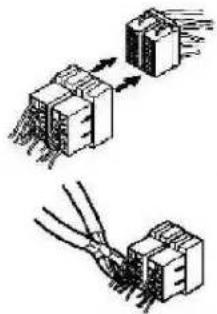
Using the ISO Connector
natural_image
Diagram showing two mechanical or electrical components with wires and connectors, no text or symbols present-
If your car is equipped with the ISO connector, then connect the ISO connectors as illustrated.
-
For connections without the ISO connectors, check the wiring in the vehicle carefully before connecting, incorrect connection may cause serious damage to this unit.
Cut the connector, connect the colored leads of the power cord to the car battery as shown in the colour code table below for speaker and power cable connections.
| Location FUNCTION | ||
| Connector A Connector B | ||
| 1 Rear Right(+)---Purple | ||
| 2 Rear Right(-)---Purple/Black Stripe | ||
| 3 Front Right(+)---Gray | ||
| 4 | Battery 12V (+)/yellow | Front Right(-)---Gray/Black Stripe |
| 5 | Auto Antenna/blue | Front Left(+)---White |
| 6 | Front Left((-)---White/Black Stripe | |
| 7 | ACC+/red | Rear Left(+)---Green |
| 8 | Ground/black | Rear Left(-)---Green/Black Stripe |
Panel controls
Front panel
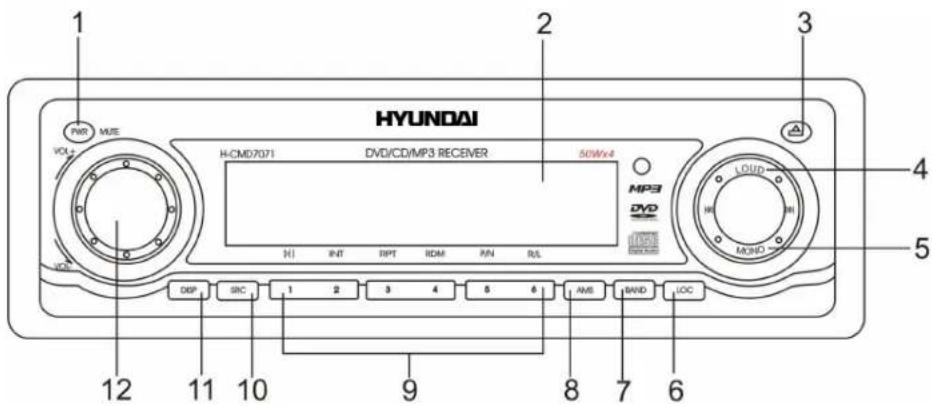
- POWER BUTTON.
Press POWER/MUTE in 1 second to MUTE ON, press it again 1 second to MUTE OFF.
Press more than 2 seconds POWER/MUTE to power off.
-
LCD (LIQUID CRYSTAL DISPLAY).
-
OPEN BUTTON.
Press it to flip down the front panel and you can insert the disc into the compartment or press the EJ button to eject the disc from the disc compartment.
-
LOUDNESS
-
FM STEREO/MONO
-
LOCAL/DX BUTTON
-
BAND BUTTON.
Press it repeatedly to select your desired radio band during RADIO mode.
-
AMS BUTTON (AUTO-PRESET/PRESET SCAN).
-
PRESET STATION [1-6] AND RPT, RDM BUTTONS.
-
Disc playback: Play/ Pause.
- Disc playback: Intro play (10 seconds).
- Disc playback: Track repeat play.
- Disc playback: Track random play.
- VIDEO MODE BUTTON (PAL/NTSC).
-
AUDIO CHANEL SWITCH BUTTON (L/R/ST).
-
SRC BUTTON. Press it to select RADIO, CD or AUX mode.
- DISPLAY SWITCH
- VOLUME-UP/DOWN, MENU-UP/DOWN.
Back of the front panel
Press the ⚠ button to open the panel and press ▲ to eject the disc.
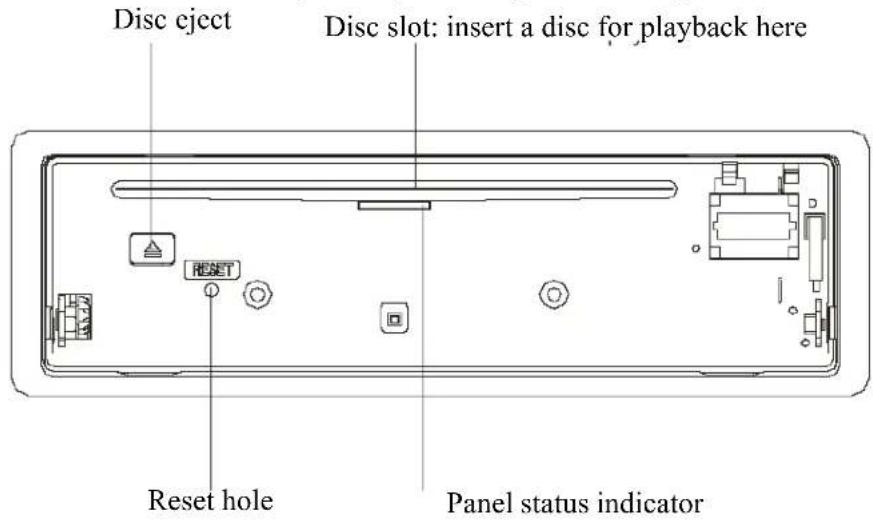
Note: Pressing the RESET hole will erase the clock setting and stored stations.
Panel status indicator lights up when you slide the panel down; flashes when you remove the panel.
ISO connector
PLEASE USE ONLY ORIGINAL CONNECTOR WHICH GOES WITH SET.

flowchart
graph TD
    A["ANTENNA PLUG"] --> B["ISO CONNECTOR"]
    C["TO CAR BATTERY MEMORY B+"] --> D["YELLOW"]
    E["BLACK(GND)"] --> F["RED"]
    G["POWER ACC"] --> H["FRONT 4 ohm"]
    G --> I["LEFT SP"]
    G --> J["REAR 4 ohm"]
    K["Video (Black)"] --> L["Aux-in (Black)"]
    M["LINE-OUT REAR GREY"] --> N["RED R"]
    O["BLUE AMP&ANT CONTROL"] --> P["GREY"]
    Q["PURPLE"] --> R["PURPLE / BLACK"]
    S["WHITE"] --> T["WHITE / BLACK"]
    U["GREEN"] --> V["GREEN / BLACK"]
Note:
- In spite of having any kinds of speaker system, must use 4 ohms impedance of speaker to reduce the distortion during high volume level.
Remote control
- ZOOM button
- TITLE button
- Power on/off
- Setup button
- Directional buttons for menu selection
- ENTER button
- PROGRAM button
- Digit area
- SELECT button (to select basic sound setting options)
- VOLUME button
- MUTE button
- RADIO TUNE/SEARCH button
- Select subtitle language
- SRC button
- REPEAT button
- A B button
- STOP button
- PLAY/PAUSE button
- GOTO button
- MENU PBC button
- On Screen Display button
- AUDIO button
- DISPLAY button
- ANGLE button 25. VIDEO mode/RADIO band button

Battery information of remote controller

-
Press the catch and at the same time pull out the battery tray.
-
Insert the 1 x lithium battery, type CR 2025 3V battery with the stamped (+) mark facing upward. Insert the battery tray into the remote control.
WARNING: Store the battery where children cannot reach. If a child accidentally swallows the battery, consult a doctor immediately.
Do not recharge, short, disassemble or heat the battery or dispose it in a fire.
Do not expose or bring into contact the battery with other metallic materials. Doing this may cause the battery to give off heat, crack or start a fire.
When throwing away or saving the battery, wrap it in tape and insulate; otherwise, the battery may give off heat, crack or start a fire.
Glossary
PBC (Playback Control)
Playback Control is a menu recorded on the disc with SVCD or VCD2.0 format. For the discs contained PBC, it can playback interactive software with the menu displayed on TV. And if the disc contains still images, it can playback high definition of still image.
Title
The title is the important part of DVD disc. The memory volume of the disc is rather big, that makes possible to record several films on one disc. For example, if a disc contains three films, they may be divided into Title 1, Title 2 and Title 3. You can easy use the functions of looking-for.
Chapter
A title can be divided into several blocks, so that every block can be operated as a unit, the unit is called chapter. The chapter contains a unit at least.
Track
It is the biggest component of VCD. Generally, every song of karaoke disc is a track.
Features
Fully compatible
Fully compatible with the most popular discs' formats such as DVD, CD, CD-R (containing MP3, JPEG), CD-RW represented in the market.
Upgrade intelligently
Support the function of upgrading the software for playing discs of new formats to keep up with the market competition.
Strong output function
The player has an analogue audio output of 2 channels, digital audio output and video output of complex video.
Supports picture CD, Photo CD
Fully compatible with Picture CD and Photo CD without setting additional software. It automatically activates the media player menu to process.
Screen saver
Supports the screen saver function. If there is no operation or no disc during 5 minutes, the player will automatically turn into the state of screen saver. It can prolong the serviceability of the player.
Compatible discs
DVD Video
DVD disc include video and audio data. The data can be contained by the 12 cm diameter of DVD disc is 7 times of one can be contained by the common CD-R disc. Its maximum continuous playback time can be up to 2 hours (one of double-sided disc can be up to 4 hours). DVD disc sort as 4 kinds of ones: single-layer and double-layers and single-sided, single layer and double-sided, double-layers and double-sided disc.
SVCD
Super VCD disc adopt MPEG-II compression way. It can provide better quality of video than VCD disc. And it can record 2 stereo audio track. Super VCD disc can also supports wide screen.
VCD2.0
Compare with VCD1.1 disc, VCD2.0 disc has a playback list. Generally, Karaoke disc with VCD2.0 format has a PBC menu.
VCD1.1
Picture CD disc its size is same as audio CD disc include audio and video data. The maximum playback time of the standard 12 cm of disc with VCD1.1 is 74 minutes.
DVCD
Compatible with DVCD disc. DVCD disc is high density of VCD disc. Compared with VCD disc, a DVCD disc can contain more data.
CD-DA
Compatible with CD-DA disc. CD-DA disc include audio data. The maximum playback time of the standard 12 cm of CD-DA disc is 74 minutes.
MP3/JPEG
Compatible with CD-R/CD-RW/CD-ROM discs contained files with MP3/JPG format. Also supports JPG pictures playback with MP3 tracks as background music, provides fine video and audio effect.
Picture-CD
Compatible with Picture-CD disc. Do not need setting the additional software. Picture-CD is a disc format that stores photo with electronic file format developed by Kodak company.
Photo-CD
Compatible with Photo-CD disc. Do not need setting the additional soft ware. Photo-CD is a disc format that stores photo with electronic file format developed by Konica company.
CD-R/CD-RW
Compatible with CD-R/CD-RW disc with ISO9660 specification include the format of MP3, JPG, JPEG, Ac3, PCM, MPG, MPE.
DVD+/-R
Compatible with DVD+/-R disc with UDF specification include the format of MP3, JPG, JPEG, Ac3, PCM, MPG, MPE.
General operation
Power button
Press 📍 button on the front panel or any other button on the panel except 🔒 to turn on the unit. Press 📍 to switch the set to POWER OFF. When you switch off the system or car ignition, the settings, tuner presets and the volume level will be retained in the unit's memory.
SRC button
Press SRC button once or more to select your desired function: DISC, RADIO, Aux (Aux-in), Tuner (Radio). If you select Radio mode, press BAND once or more to select FM1, FM2, FM3, FM(OIRT), MW1, MW2.
Vol knob button

Push the VOL control to select VOL/BAS/TRE/BAL/FAD, rotate the control to adjust.
| VOL | 63 |
| BRS | -7 + 1 |
| TRE | -7 + 1 |
| BAL | L7 R7 |
- VOLUME control
Display shows the volume level VOL and number from 0 to 63. - BASS control (will be available when DSP is OFF)
Display shows the BASS level - TREBLE control (will be available when DSP is OFF)
Display shows the TREBLE level - BALANCE control
Display shows the BALANCE level

- FADER control Display shows the FADER level
Push the knob for more then 2 seconds to select EQ/BEEP/24 HOURS/VOL LAST.
Rotate the knob to select EQ (NORMAL/POP/ROCK/CLASSIC), Beep (ON/OFF), A-Vol, Vol (LAST/ADJ).
Loud key function
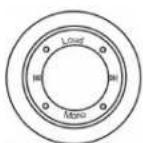
On the panel
Press LOUD to select LOUDNESS on or off. LOUD ON or LOUD OFF appears on the display.
Adjusting clock

On the panel
Setting the clock time
-
Press DISP to enter the clock display mode.
-
Press DISP again for more than 2 seconds to select the hour setting.
-
Rotate the control clockwise to set the hours or counterclockwise to set the minutes.
-
Press DISP again or twice to exit the clock setting.
See the clock during receiving radio and playing
-
Press DISP the screen displays the clock over 5 second.
-
Repeat ifneed.

On the remote control
Reset
Press ⬆ to open the panel and press the RESET hole to restore the unit to the original factory settings.
Mute
Press POWER/MUTE in 1 second to MUTE ON, press it again 1 second to MUTE OFF.
Press more than 2 seconds POWER/MUTE to power off.
Display blinks MUTE.
Digital tuner
Radio reception
FM1-FM2-FM3-FM (OIRT)-MW1-MW2
FMI 100.9
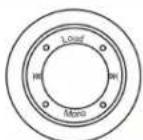
- Press to power on, then press SRC once or more to select radio source.
Press BAND once or more to select FM1, FM2, FM3, FM (OIRT), MW1, MW2. Display shows wave band, frequency, and preset station number if already stored
- Tuning to stations: you can tune to your stations manually or by automatic search tuning.
Press down on ◀◀ or ▶▶ (◀◀ or ▶▶ on the remote control) and release button when the frequency in the display starts running, the radio automatically tunes to a station of sufficient reception.
- Repeat step 2 if necessary until you find the desired station.
To tune to a weak station, press on ◀◀ or ▶▶ (◀◀ or ▶◀ on the remote control) briefly and repeatedly until you have found optimal reception.
Programming tuner stations
You can store up to a total of 36 radio stations in the memory (18 FM, 6 FM (OIRT) and 12MW), manually or automatically.
Manual programming
BAND
On the panel control
BAND
- Tune to your desired station, then press and hold station digit button ① more than 2
seconds, the desired station is stored in station①
-
Repeat step 1 if necessary until all desired station are stored in station②-⑥
-
Press BAND to select FM1, FM2, FM3, FM (OIRT), MW1, MW2, repeat step 1,2.
On the remote control
AMS: Auto memory store
AMS
be On the panel control
-
Press AMS briefly to scan the preset station for 5 seconds each.
-
Press and hold AMS more than 2 seconds, the 6 strongest available stations will be automatically saved in the memory of preset button①-⑥. The first preset station will played after all stations are stored automatically.
Changing tuning grid (some versions only)
FM(Europe) : 50KHz scan search. FM(OIRT) : 30KHz scan search. MW: 1KHz scan search mechanically, 9KHz scan search automatically. Usually the frequency in your area has been preset.
Discs for playback
- This set can play all digital audio CD, HDCD, CD-R/RW, MP3, WMA, VCD, SVCD, DVD, DVD-ROM.
..The following file types are supported:
Audio files: MP3 (*.mp3)
WMA (*.wma)
Video files: MP4 (*.avi)
MPEG 2(*.vob)
MPEG 1(*.dat)
Picture file: JPEG (*.jpg)
..ISO 9660 or ISO 9660 +Joliet format - Max. 30 characters
..Max. Track number is 448
..Max. nested directory is 8 levels
..The max. album number is 99
..The max. length of each track is 99 minutes 59 seconds
..Supported sampling frequency for MP3 disc :8KHz to 48 (44.1KHz preferably) KHz
..Supported bit-rates of MP3 disc are: 32 - 320 kbps (128 kbps preferably).
- Following formats are NOT supported *.ACC, *.DLF, *.M3U, *.PLS, MP3 PRO, files with DRM.
..Open session discs are NOT supported.
Playing a disc
Load: Press 📁 button to slide down the panel. Insert the disc with the printed side facing upward into the slot.
Eject: Press 📁 button to slide down the panel. Press ⚠ button to eject the disc.

- When disc inserted, display shows LOAD.
For MP3 or disc with mixed files, reading time may exceed 1 minute.
-
ERROR will be displayed if error found in disc operation.
-
For VCD/CD, VCD or CD icon will appear on the display.
-
While MP3/WMA/MP4 files playback, MP3 icon will appear on the display.
-
For DVD, DVD icon will appear on the display and TITLE appears.
Press ENTER or ▶II to start playback.
- Playback starts from the beginning of the 1st track automatically.
-For MP3-CD, the current album list and the track list will be displayed on the TV screen.
The current selected music is highlighted.
-To ensure good system performance, wait until the unit finishes reading the disc information before proceeding.
-The current track number and elapsed time appear on the panel display.
Note: if your CD disc includes several folders with MP3, JPEG files, then you should operate with this CD only having TV monitor. You can see folders' names on the screen of the monitor.
Selecting a desired track/fast forward or backward
To select a desired track
Press ◀◀ or ▶▶ on the panel repeatedly (or use digits 0 - 9 buttons or press ⏻ 10* and the digit buttons ⏻, ▶▶ on the remote control) until the desired track or chapter appears on the display, push ENTER or ▶▶ to confirm. If playback is stopped, press ▶▶ start playback.
Fast forward / backward during playback
Press and hold ◀◀ or ▶▶ on the panel (or press ⏻or ⚠on the remote control) for more than 2 seconds once or more to select X2,X4,X8 (for DVD: X2,X4,X16,X100) to fast backward or forward skip during playback.
-During the fast forward or backward operation, press ◀◀ or ▶▶ or ▶▶ briefly to playback again.
-During the fast forward or backward operation, the volume will be muted.
Intro (for CD/VCD only)
You can play the beginning of every track for 10 seconds in sequence.
- During playback, press INT once.
-INT icon will appear on the display. - Press again to select the current track.
Random track playback (for CD/MP3/VCD only)
You can play all the tracks in random order.
- During playback, press RDM once or more.
- RDM icon will appear on the display.
- Press again to select normal playback.
Adjusting the TV system

Before viewing the Video CD or DVD, ensure that the unit is switched to corresponding PAL or NTSC system of your TV set (except for Multi - system TV). Press P/N button on the panel, to switch between NTSC and PAL TV system.
PBC

On the remote control
Playback Control ( For VCD only ):
Playing a Video CD with PBC
-
If you insert a VCD with PBC, playback starts from the beginning of the 1st track automatically.
-
Press MENU (on the remote control) to activate interactive menu on screen during playback.
If the menu consists of a list of titles, you can select a sequence directly.
- Press⑩ Display shows 1-. Press digits 0 - 9 on the remote control to select your choice.
The VCD starts playing the selected sequence automatically or press ⏻ to confirm the selected track for playback. If a menu consists of more than one page, press ◀◀ or ▶▶ on the panel (or press ⏻or ⏻on the remote control) to go through the pages.
-
Press RETURN on the remote control to return to the previous VCD disc MENU level. It is functional only for VCDs when PBC is switched on.
-
Press (on the remote control) again to cancel Playing a Video CD with PBC
GOTO

Press GOTO button on the remote control, track or DVD title/chapter and time display on the top of the screen. Current item is highlighted. Use ◀/▶ to select desired item. Press ENTER to confirm.
On the remote control
Repeat A→B

On the remote control
Selected the setting of repeat A→B repeat.
- SET A: set the A location.
- SET B: set the B location (automatically); repeats the A→B.
- OFF: cancel A→B settings.
Repeat

RPT
3
On the remote control
On the panel
You can play the current track, the program or the whole disc repeatedly.
- During playback, press RPT once or more.
- RPT icon will appear on the display.
-For VCD/CD/MP3: LCD display appears RPT ONE →RPT ALL→ RPT OFF
-For DVD :LCD display appears RPTCHP →RPT TLE →RPT OFF
Note: If you do not select on RPT, when the entire disc or TITLE playback has finished. The system will stop. If no other control, after 5 minutes the unit will into standby mode.
Pause
H1

On the panel

On the remote control
-During playback, press ▶II to pause/ freeze picture on the TV screen.
- The sound will be muted.
-Display "PAUSE" in the TV screen, display and blink "PAUSE" in the LCD screen. Press ▶ again to continue playback.
Stop


On the remote control
-During playback, press Ⓞ playback will be stopped.
Press ▶ again to continue playback.
Selecting different audio modes (for VCD only)


On the On the panel remote control
Press L/R/ST on the panel control or AUDIO on the remote control repeatedly to select the following modes:
Lch → Rch → STEREO On the LCD represents channel left/channel right / dual channel on a bilingual VCD or mono left / mono right / stereo on single language VCD.
Changing the Spoken language (for DVD only)
On DVD a spoken language can be selected by pressing L/R/ST on the panel control or on the remote control depending on the title itself. During playback press [AUDIO] button on the remote control to select a desired one among disc-supported languages. If no operation within 1 secs, audio description will disappear.
Changing the Subtitle Language (for DVD only)

Subtitle language is in disc initiation setting during playback. Press [SUB-TITLE] button on the remote control to switch among disc-supported languages. If the disc only supports one subtitle, the function will not work. If no operation within 5 secs, language description will disappear.
Using the TITLE /MENU (for DVD only)


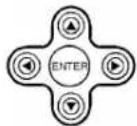
A DVD-Video is divided into long sections of a picture or a music piece called titles. The Title menu is useful when the DVD title contains several titles; the desired title or chapter can also be selected using the title menu.
- Press TITLE/MENU.
The title menu appears on the TV screen. The contents of the menu varies from disk to disk.
- Press to make a selection. Depending on the disk, number
buttons may be used to select the title.
- Press ENTER. The player starts playing the selected title.
Changing Angle (for DVD only)

On the remote control
If DVD discs support multi-angle playback, press [ANGLE] button which on the remote control to playback images in different camera angles. If discs don't support multi-angle playback, this function will not work. If no operation within 1 secs, angle description will disappear.
Changing zoom

Press ZOOM. The picture will be enlarged accordingly.
Built-in player setup (On the remote control)


Press SETUP button on the remote control to display setup screen, use ◀▶, ENTER buttons to select the desired item:
System, Language, Audio, Video, Digital.
System setup
TV system
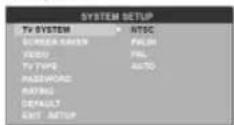
Select the TV system in the setting menu.
Screen saver
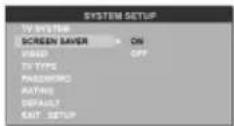
The screen saver appears if disc stop last more than 3 minutes. Original setting: On.
Video output mode
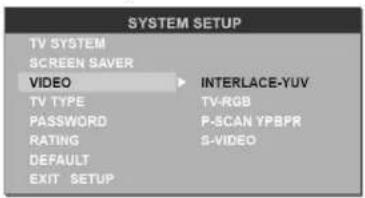
Original setting: INTERLACE-YUV.
Setting TV type
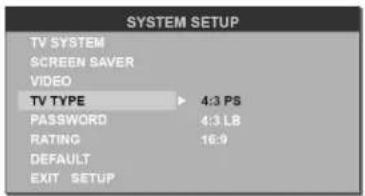
Select TV type to watch wide screen movies.
4:3 Pan Scan: For 4:3 TV, left and right edges will be cut.
4:3 Letter Box: For 4:3 TV, black bars will appear on top and bottom.
16:9: For 16:9 wide screen TV.
Setting password
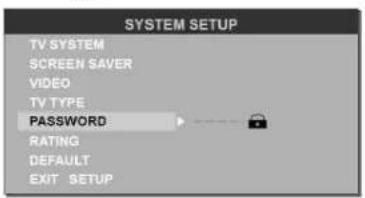
Original password is 0000.
Setting rating
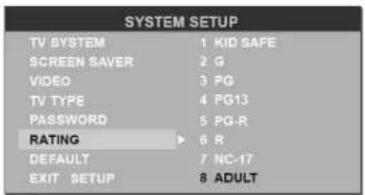
The rating of the disc is from 1 to 8:
(1) with the most limits when playing.
(8) with the least limits when playing.
Original setting: 8
Note: The rating can be selected only under the password unlocked status, and the limits can be worked only under the password locked status.
Load default
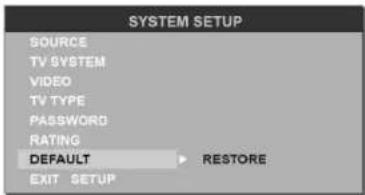
If this item is selected, the unit will return to original setting.
Language setup
Setting the on-screen display language
![LANGUAGE SETUP OSD LANGUAGE ▶ ENGLISH AUDIO LANG GERMAN SUBTITLE LANG SPANISH MENU LANG FRENCH DIVX[R] VOD PORTUGUESE EXIT SETUP RUSSIAN](/content/2026/06/1188041/images/41d4356b126c4e95159e07f1e9d830b3454937c2465980e6a4e3b6f718a171c0.jpg)
Select the language to be used for the on-screen display.
Setting the audio language
![LANGUAGE SETUP OSD LANGUAGE CINESE AUDIO LANG ENGLISH SUBTITLE LANG JAPAN MENU LANG FRENCH DIVX[R] VOD SPANISH EXIT SETUP PORTUGUESE LATIN GERMAN](/content/2026/06/1188041/images/07d01ca466df4d17369f70ce76276600ccf26b6923b796d865c30e5fccb89e59.jpg)
Select the language to be used for the audio. You can select a preferred audio from those included on the DVD video disk. (The screen on your player may have difference with the screen shown here)
Setting the subtitle language

Setting the menu language
![LANGUAGE SETUP OSD LANGUAGE CINESE AUDIO LANG ENGLISH SUBTITLE LANG JAPANESE MENU LANG FRENCH DIVX[J] VOD SPANISH EXIT SETUP PORTUGUESE GERMAN LATIN](/content/2026/06/1188041/images/c2132c057fa48430ed13764e4e28240f4886122bed3c97367b499b4205491f38.jpg)
Audio setup
Digital output
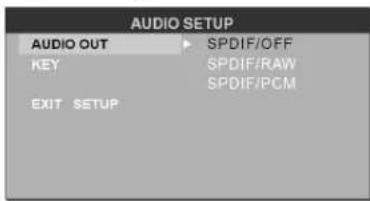
Select the language to be used for the Subtitles. You can select a preferred subtitle from those included in the DVD Video disk.
(The screen on your player may have difference with the screen shown here)
Select the language to be used for the Menu. You can select a preferred audio from those included on the DVD video disk.
(The screen on your player may have difference with the screen shown here.)
Note: The DIVX[R] VOD item is not available for this model.
Select digital output format.
APDIF/OFF: There is no signal output from coaxial or optical output.
SPDIF/RAW: When the unit is connected with the amplifier by coaxial or optical connector, please select this mode.
SPDIF/PCM: When the unit is connected with the two-channel digital stereo amplifier, please select this mode.
Setting volume
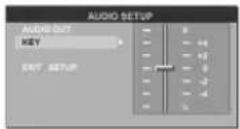
Setup the volume with the ▲/▼ buttons.
Video setup
Brightness
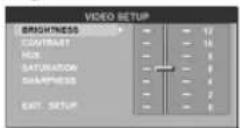
Set the brightness of the video output with ▲/▼.
Contrast
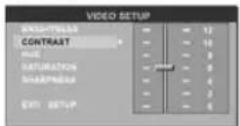
Set the contrast of the video output with ▲/▼.
Hue

Set the hue of the video output with ▲/▼.
Saturation

Set the saturation of the video output with ▲/▼.
Sharpness

Set the sharpness of the video output with ▲/▼.
Digital setup
Output mode
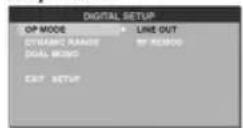
Select the output mode:
LINE OUT: Compress the input signal. The volume is small.
RF REMOD: The volume is large.
Dynamic range

When you select the compressed mode as "line out", select it to adjust the compression proportion and get the different compressed effect.
When select FULL, the audio signal is minimum; when select OFF, the audio signal is maximum.
Dual mono
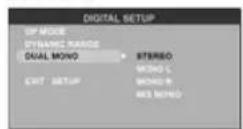
Select the audio channel from STEREO, MONO L, MONO R and MIX MONO.
Anti-theft system
Removing the panel
- Press button to switch off the power of the unit.
- Press button to flip down the panel.
- Hold the middle of the panel. Take off one end, and then take off the other end.
- Place the panel into the case and take it with you when you leave the car.
Install the panel
- Hold the panel and ensure the panel faces toward you, and set the right side of the panel in the panel bracket.
- Press the right side of the panel until it locks.
Remove the unit
- Remove the panel and the trim plate.
- Insert both T-Keys into hole on the front of the set until they lock.
- Pull out the unit.
Handling discs
..Dirty, scratched or warped discs may cause skip ping or noise.
..Handle the disc only by the edges. To keep clean do not touch its surface.
..Discs should be stored in their cases after use to avoid scratches.
..Do not expose discs to direct sunlight, high humidity, high temperature or dust.


- Prolonged exposure to extreme temperature can wrap the disc (such as leaving the discs in your car during summertime).
- Do not stick or write anything on either side of disc. Sharp writing instruments, or the inks used in some felt-tip pens, may damage its surface.
• DO NOT touch the unlabeled side. DO NOT attach any seal, label or data protection sheet to either side of a disc.
Cleaning
1. Cleaning the cabinet
Wipe with a soft cloth. If the cabinet is very dampen (not dropping wet) the cloth with a weak solution of soapy water, and then wipe clean.
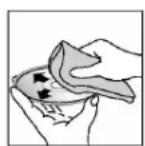
2. Cleaning discs
Fingerprints should be carefully wiped from the surface of disc with a soft cloth. Unlike conventional records, compact discs have no grooves to collect dust and macroscopic dirt, so gently wiping them with a soft cloth should
remove must panicles. Wipe in a straight motion from the center to the edge.
Never use thinner benzine, record cleaner or anti static spray on a compact disc. Such chemicals can damage its plastic surface.

Troubleshooting guide
| Symptom | Cause | Solution |
| GeneralNo power | The car ignition is not on.The fuse is blown. | If the power supply is properly connected to the car accessory switch the ignition key to “ACC”.Replace the fuse. |
| DiscDisc cannot be loaded. | Presence of disc inside the player. | Remove the disc in the player then put a new upward. |
| Disc cannot be read. | Inserting the disc in upside down.Compact disc is extremely dirty or defective.Temperature inside the car is too high. | Insert the compact disc with the label facing upward.Clean the disc or try to play a new one.Cool off until the ambient temperature returns to normal. |
| No sound | Volume is in minimum.Wiring is not properly connected. | Adjust volume to a desired level.Check wiring connection. |
| The operation keys do not work. | The built-in microcomputer is not operating properly due to noise.Front panel is not properly fix into its place. | Press the RESET button.Reinstall the front panel. |
| Sound skips. | The installation angle is more than 30 degrees.The disc is extremely dirty or defective. | Adjust the installation angle to less than 30 degrees.Clean the compact disc/try to play a new one. |
| The radio does not work.the radio station automatic selection does not work. | The antenna cable is not connected the signals are too weak. | Insert the antenna cable firmly select a station manually. |
Specification
| General. Power supply: | 12V DC |
| Current consumption/Fuse: | max. 15A/ 15 A |
| Maximum power output: | 50Wx4 channels |
| Dimensions (W x H x D) | 178 x 50 x 165 mm |
| Working temperature range: | -10°C - +60°C |
| FM Stereo Radio. Frequency range: | 65.0 – 74.0/87.5 - 108.0 MHz |
| Usable sensitivity/ I.F. Frequency: | 3 uV/ 10.7 MHz |
| MW Section. Frequency range: | 522 kHz-1620 kHz |
| DVD Deck Specification Format | DVD/SVCD/VCD/CD/MP3/CD-R /CD-RW/DVD±R |
| Video System/ Audio System | Standard NTSC/PAL / 24 bit/96 KHz |
| Loading System | Auto Loading |
| Mounting Angle | 0 to +/-30 |
| Video Specification | |
| Video System | 16:9 and 4:3 |
| Video Output level | 1.0Vp-p 75 ohms |
| Horizontal Resolution | 500 |
| Audio Specification | |
| Maximum Output | 2Vrms(+/-3dB) |
| Frequency Response | 20 to 20KHz |
| S/N Ratio(A-vtd)/ Separation | 60dB/ 50dB |
| Line out. Output: | CD max 2000 mV |
Specifications are subject to change without notice. Mass and dimension are approximate.
FM1-FM2-FM3-FM (OIRT)-MW1-MW2

- Table of contents
- Important safeguards
- Installation/Connections
- Installation opening
- Using the ISO Connector
- Panel controls
- Front panel
- ISO connector
- Note:
- Remote control
- Battery information of remote controller
- Glossary
- PBC (Playback Control)
- Title
- Chapter
- Track
- Features
- Fully compatible
- Upgrade intelligently
- Strong output function
- Supports picture CD, Photo CD
- Screen saver
- Compatible discs
- DVD Video
- SVCD
- VCD2.0
- VCD1.1
- DVCD
- CD-DA
- MP3/JPEG
- Picture-CD
- Photo-CD
- CD-R/CD-RW
- DVD+/-R
- General operation
- Power button
- SRC button
- Vol knob button
- Loud key function
- Adjusting clock
- Reset
- Mute
- Digital tuner
- Radio reception
- Programming tuner stations
- Manual programming
- AMS: Auto memory store
- Changing tuning grid (some versions only)
- Discs for playback
- Playing a disc
- To select a desired track
- Fast forward / backward during playback
- Intro (for CD/VCD only)
- Random track playback (for CD/MP3/VCD only)
- Adjusting the TV system
- PBC
- GOTO
- Repeat A→B
- Repeat
- Pause
- Stop
- Selecting different audio modes (for VCD only)
- Changing the Spoken language (for DVD only)
- Changing the Subtitle Language (for DVD only)
- Using the TITLE /MENU (for DVD only)
- Changing Angle (for DVD only)
- Changing zoom
- Built-in player setup (On the remote control)
- System setup
- Video output mode
- Setting TV type
- Setting password
- Setting rating
- Load default
- Language setup
- Setting the on-screen display language
- Setting the audio language
- Setting the subtitle language
- Setting the menu language
- Audio setup
- Digital output
- Setting volume
- Video setup
- Brightness
- Contrast
- Hue
- Saturation
- Sharpness
- Digital setup
- Output mode
- Dynamic range
- Dual mono
- Anti-theft system
- Removing the panel
- Install the panel
- Remove the unit
- Handling discs
- Cleaning
- Cleaning the cabinet
- Cleaning discs
Brand : HYUNDAI
Model : H-CMD7071
Category : Car Radio