
CNDV-900HD - GPS and Navigation Systems PIONEER - Free user manual and instructions
Find the device manual for free CNDV-900HD PIONEER in PDF.


| Product type | Navigation software and database update disc |
| Compatible models | AVIC-HD1BT, AVIC-HD3, AVIC-HD3II |
| Disc content | Cartographic database (April 2008), Gracenote database (300,000 albums), POI (5.6 million points of interest) |
| Disc format | Update disc (likely DVD-ROM) |
| Main functions | Map, POI, and music database update; new voice command features; 2D/3D map mode; time restriction; address and POI navigation |
| Update duration | Approximately 3 hours for the database, 10 minutes for the system program |
| Power requirement | Vehicle running (ignition on) to avoid power cutoff |
| Maintenance and cleaning | Clean the disc with a soft, dry cloth if necessary; avoid scratches |
| Safety | Never turn off the ignition during phase 2 (risk of failure); use the parking brake; park in a safe place |
| Spare parts and repairability | No user-replaceable parts; in case of issues, contact the dealer or an authorized Pioneer center |
| General information | Requires a media number (card provided) and a password obtained online; the Media Number card is irreplaceable |
| Dimensions | Standard disc (12 cm diameter) |
| Weight | Approximately 15 g (disc only) |
Frequently Asked Questions - CNDV-900HD PIONEER
User questions about CNDV-900HD PIONEER
0 question about this device. Answer the ones you know or ask your own.
Ask a new question about this device
Download the instructions for your GPS and Navigation Systems in PDF format for free! Find your manual CNDV-900HD - PIONEER and take your electronic device back in hand. On this page are published all the documents necessary for the use of your device. CNDV-900HD by PIONEER.
USER MANUAL CNDV-900HD PIONEER
Upgrade Instructions and Operation Manual Addendum
CNDV-900HD
Visit www.pioneer.co.uk (or www.pioneer.eu) to register your product
- DO NOT LOSE SUPPLIED "MEDIA NUMBER CARD". If "MEDIA NUMBER CARD" is lost, re-creation of the "MEDIA NUMBER" is not possible. Also you must submit the "MEDIA NUMBER CARD" for repairs. The card is necessary as proof of authenticity if service is required (including recovery).
- This package is unique, and cannot be installed on more than one unit.
-
Web-connected computer is required for online issuance of password.
-
Read the entire manual before upgrading the programme of your navigation system.
- The screens shown in the examples may differ from the actual screens.
The actual screens may be changed without notice for performance and function improvements.
Models to be upgraded
This package can upgrade the software programme and database of the following models:
AVIC-HD1BT, AVIC-HD3, AVIC-HD3II
Manual overview
This manual is a supplementary document that summarises the points that will be renewed after upgrading your navigation system by using this package.
The operations other than those described in this manual are basically the same as those at the time you purchased the hardware. Use "Operation Manual"included in the hardware package as your primary reference.
For customers using AVIC-HD1BT
By upgrading the navigation system with these discs, the points described in this manual are changed.
For customers using AVIC-HD3
By upgrading the navigation system with these discs, following points are changed.
- Map database and Gracenote® Database are renewed.
- "Driver's View" mode on the map view and the [3D] setting in "Close Up View" are not available.
For customers using AVIC-HD3II
By upgrading the navigation system with these discs, following points are changed.
- Map database and Gracenote® Database are renewed.
Be sure to read the following descriptions
Licence Agreement
This provides a licence agreement of this software. Be sure to read this before using the software.
About the Database
This provides the date when the Map Database was recorded.
Copyright
This provides the copyright of the Map Database.
Other Precautions
This provides the important precautions for using this software.
PIONEER CNDV-900HD
THIS IS A LEGAL AGREEMENT BETWEEN YOU, AS THE END USER, AND PIONEER CORP. (JAPAN) ("PIONEER"). PLEASE READ THE TERMS AND CONDITIONS OF THIS AGREEMENT CAREFULLY BEFORE USING THE SOFTWARE INSTALLED ON THE PIONEER PRODUCTS. BY USING THE SOFTWARE INSTALLED ON THE PIONEER PRODUCTS, YOU AGREE TO BE BOUND BY THE TERMS OF THIS AGREEMENT. THE SOFTWARE INCLUDES A DATABASE LICENCED BY THIRD PARTY SUPPLIER(S) ("SUPPLIER"), AND YOUR USE OF THE DATABASE IS COVERED BY THE SUPpliers' SEPARATE TERMS, WHICH ARE ATTACHED TO THIS AGREEMENT (refer to "Tele Atlas End User Licensing Terms"). IF YOU DO NOT AGREE WITH ALL OF THESE TERMS, PLEASE RETURN THE PIONEER PRODUCTS (INCLUDING THE SOFTWARE, AND ANY WRITTEN MATERIALS) WITHIN FIVE (5) DAYS OF RECEIPT OF THE PRODUCTS, TO THE AUTHORISED PIONEER DEALER FROM WHICH YOU PURCHASED THEM.
1. GRANT OF LICENCE
Pioneer grants to you a non-transferable, non-exclusive licence to use the software installed on the Pioneer products (the "Software") and the related documentation solely for your own personal use or for internal use by your business, only on such Pioneer products.
You shall not copy, reverse engineer, translate, port, modify or make derivative works of the Software. You shall not loan, rent, disclose, publish, sell, assign, lease, sub LICence, market or otherwise transfer the Software or use it in any manner not expressly authorised by this agreement. You shall not derive or attempt to derive the source code or structure of all or any portion of the Software by reverse engineering, disassembly, decompilation, or any other means. You shall not use the Software to operate a service bureau or for any other use involving the processing of data for other persons or entities.
Pioneer and its licensor(s) shall retain all copyright, trade secret, patent and other proprietary ownership rights in the Software. The Software is copyrighted and may not be copied, even if modified or merged with other products. You shall not alter or remove any copyright notice or proprietary legend contained in or on the Software.
You may transfer all of your licence rights in the Software, the related documentation and a copy of this Licence Agreement to another party, provided that the party reads and agrees to accept the terms and conditions of this Licence Agreement.
2. DISCLAIMER OF WARRANTY
The Software and related documentation are provided to you "AS IS". PIONEER AND ITS LICENSOR(S) (for the purpose of provisions 2 and 3, Pioneer and its licensor(s) shall be collectively referred to as "Pioneer") MAKES AND YOU RECEIVE NO WARRANTY, WHETHER EXPRESS OR IMPLIED, AND ALL WARRANTYES OF MERCHANTABILITY AND FITNESS FOR ANY PARTICULAR PURPOSE ARE EXPRESSLY EXCUSED. SOME COUNTRIES DO NOT ALLOW EXCLUSION OF IMPLIED WARRANTY, SO THE ABOVE EXCLUSION MAY NOT APPLY TO YOU.
The Software is complex and may contain some non-conformities, defects or errors. Pioneer does not warrant that the Software will meet your needs or expectations, that operation of the Software will be error free or uninterrupted, or that all non-conformities can or will be corrected. Furthermore, Pioneer does not make any representations or warranties regarding the use or results of the use of the Software in terms of its accuracy, reliability or otherwise.
3. LIMITATION OF LIABILITY
IN NO EVENT SHALL PIONEER BE LIABLE FOR ANY DAMAGES,CLAIM OR LOSS INCurred BY YOU (INCLUDING, WITHOUT LIMITATION, COMPENSATORY, INCIDENTAL, INDIRECT, SPECIAL, CONSEQUENTIAL, OR EXEMPLARY DAMAGES, LOST PROFITS, LOST SALES OR BUSINESS, EXPENDITURES, INVESTMENTS, OR COMMITMENTS IN CONNECTION WITH ANY BUSINESS,
LOSS OF ANY GOODWILL, OR DAMAGES) RESULTING FROM THE USE OF OR INABILITY TO USE THE SOFTWARE, EVEN IF PIONEER HAS BEEN INFORMED OF, KNEW OF, OR SHOULD HAVE KNOWN OF THE LIKELIHOOD OF SUCH DAMAGES. THIS LIMITATION APPLIES TO ALL CAUSES OF ACTION IN THE AGGREGATE, INCLUDING WITHOUT LIMITATION BREACH OF CONTRACT, BREACH OF WARRANTY, NEGLIGENCE, STRICT LIABILITY, MISREPRESENTATION, AND OTHER TORTS. IF PIONEER'S WARRANTY DISCLAIMER OR LIMITATION OF LIABILITY SET FORTH IN THIS AGREEMENT SHALL OR FOR ANY REASON WHATSOEVER BE HELD UNENFORCEABLE OR INAPPLICABLE, YOU AGREE THAT PIONEER'S LIABILITY SHALL NOT EXCEED FIFTY PERCENT (50%) OF THE PRICE PAID BY YOU FOR THE ENCLOSED PIONEER PRODUCT.
Some countries do not allow the exclusion or limitation of incidental or consequential damages, so the above limitation or exclusion may not apply to you. This warranty disclaimer and limitation of liability shall not be applicable to the extent that any provision of this warranty is prohibited by any country or local law which cannot be pre-empted.
4. EXPORT LAW ASSURANCES
You agree and certify that neither the Software nor any other technical data received from Pioneer, nor the direct product thereof, will be exported outside the country or district (the "Country") governed by the government having jurisdiction over you (the "Government") except as authorised and as permitted by the laws and regulations of the Government. If the Software has been rightfully obtained by you outside of the Country, you agree that you will not re-export the Software nor any other technical data received from Pioneer, nor the direct product thereof, except as permitted by the laws and regulations of the Government and the laws and regulations of the jurisdiction in which you obtained the Software.
5. TERMINATION
This Agreement is effective until terminated. You may terminate it at any time by destroying
the Software. The Agreement also will terminate if you do not comply with any terms or conditions of this Agreement. Upon such termination, you agree to destroy the Software.
6. MISCELLANEOUS
This is the entire Agreement between Pioneer and you regarding its subject matter. No change in this Agreement shall be effective unless agreed to in writing by Pioneer. If any provision of this Agreement is declared invalid or unenforceable, the remaining provisions of this Agreement shall remain in full force and effect.
Tele Atlas End User Licensing Terms
THIS IS A LEGAL AGREEMENT (THE "AGREEMENT") BETWEEN YOU, THE END USER, AND PIONEER and its licensors of Data product (sometimes collectively "Licensors"). BY USING YOUR COPY OF THE LICENCED DATA, YOU AGREE TO THE TERMS AND CONDITIONS OF THIS AGREEMENT.
1. Grant of Licence.
Licensors grant you a non-transferrable, nonexclusive licence to use the map data and business points of interest information (the "POIs"), (together, the "Data") contained on these discs, solely for personal, non-commercial use and not to operate a service bureau or for any other use involving the processing of data of other persons or entities. You may make one (1) copy of the Data for archival or backup purposes only but you may not otherwise copy, reproduce, modify, make derivative works, derive the structure of or reverse engineer the Data. The Data is restricted for use with the PIONEER Product(s). The Data contains confidential and proprietary information and materials, and may contain trade secrets, so you agree to hold the Data in confidence and in trust and not to disclose the Data or any portions in any form, including by renting, leasing, publishing, leasing, subs LICensing or transferring the Data to any third party. You are explicitly prohibited from downloading the digital maps and
programmes contained in the Data or from transferring these to another data carrier or computer. You are prohibited from using the POIs (i) to create mailing lists or (ii) for other such similar uses.
2. Ownership.
The Data is copyrighted by the Licensors and the Licensors retain all ownership rights in the Data. You agree not to alter, remove, obliterate, or obscure any copyright notice or proprietary legend contained in or on the Data. The current copyrights are as follows:
Data Source © 2009 Tele Atlas
© BEV, GZ 1368/2003
DAV
© IGN France Michelin data © Michelin 2009
Ordnance Survey of Northern Ireland
© Norwegian Mapping Authority, Public Roads Administration /
Mapsolutions
© Swisstopo
This product includes mapping data licenced from Ordnance Survey with the permission of the Controller of Her Majesty's Stationery Office. © Crown copyright and/or database right 2009. All rights reserved. Licence number 100026920.
3. Warranty Disclaimer.
THE DATA IS PROVIDED ON AN "AS IS" AND "WITH ALL FAULTS BASIS" AND PIONEER, ITS LICENSORS, AND ITS LICENCED DISTRIBUTORS AND SUPPLIER (COLLECTIVELY, "SUPPLIER") EXPRESSLY DISCLAIM ALL OTHER WARRANTYES, EXPRESS OR IMPLIED, INCLUDING BUT NOT LIMITED TO, THE IMPLIED WARRANTYES OF NONINFRINGEMENT, MERCHANTABILITY, EFFECTIVENESS, COMPLETENESS, ACCURACY, TITLE AND FITNESS FOR A PARTICULAR PURPOSE. PIONEER, ITS LICENSORS AND SUPpliers DO NOT WARRANTY THAT THE DATA WILL MEET YOUR REQUIREMENTS OR THAT THE
OPERATION OF THE DATA WILL BE UNINTERRUPTED OR ERROR FREE. NO ORAL OR WRITTEN ADVICE GIVEN BY PIONEER, ITS LICENSORS, SUPPLIERS OR ANY OF THEIR RESPECTIVE EMPLOYEES CREATES A WARRANTY OR IN ANY WAY INCREASES PIONEER', ITS LICENSORS OR SUPPLIERS LIABILITY AND YOU MAY NOT RELY ON ANY SUCH INFORMATION OR ADVICE. THIS DISCLAIMER IS AN ESSENTIAL CONDITION OF THIS AGREEMENT AND YOU ACCEPT THE DATA ON THIS BASIS.
4. Limitation of Liability.
IN NO EVENT SHALL PIONEER, ITS LICENSORS' OR SUPPLIER' AGGREGATE LIABILITY FOR ALL MATTERS ARISING OUT OF THE SUBJECT MATTER OF THIS AGREEMENT, WHETHER IN CONTRACT, TORT OR OTHERWISE, EXCEED THE AMOUNT PAID BY YOU FOR YOUR COPY OF THE PIONEER DATA. PIONEER, ITS LICENSORS AND SUPPLIERS SHALL NOT BE LIABLE IN ANY MATTER TO YOU FOR ANY SPECIAL, INDIRECT, CONSEQUENTIAL OR INCIDENTAL DAMAGES (INCLUDING DAMAGES FOR LOSS OF BUSINESS PROFITS, BUSINESS INTERRUPTION, LOSS OF BUSINESS INFORMATION, AND THE LIKE) ASING OUT OF THIS AGREEMENT OR THE USE OF OR INABILITY TO USE THE DATA, EVEN IF PIONEER, ITS LICENSORS OR SUPPLIERS HAVE BEEN ADVISED OF THE POSSIBILITY OF SUCH DAMAGES.
5. Termination.
This Agreement will terminate immediately and automatically, without notice, if you breach any term of this Agreement. You agree that in the event of termination of the Agreement, you shall return the Data (including all documentation and all copies) to PIONEER and its suppliers.
6. Indemnity.
You agree to indemnify, defend and hold PIONEER, its Licensors, and its suppliers (including their respective licensors, suppliers, assignees, subsidiaries, affiliated companies, and the respective officers, directors, employees, shareholders, agents
and representatives) free and harmless from and against any liability, loss, injury (including injuries resulting in death), demand, action, cost, expense, or claim of any kind or character, including but not limited to attorney's fees, arising out of or in connection with any use or possession by you of the Data.
7. Additional Provisions with respect to the Great Britain Data and Northern Ireland data only.
a You are prohibited from removing or obscuring of any copyright, trademark or restrictive legend belonging to Ordnance Survey.
b The Data may include the data of licensors, including Ordnance Survey. Such Data is provided on an "AS IS" AND "WITH ALL FAULTS BASIS" and the licensors EXPRESSLY DISCLAIM ALL WARRANTYES, EXPRESS OR IMPLIED, INCLUDING BUT NOT LIMITED TO, THE IMPLIED WARRANTYES OF NONINFRINGE-MENT, MERCHANTABILITY, QUALITY, EFFECTIVENESS, COMPLETENESS, ACCURACY, TITLE AND FITNESS FOR A PARTICULAR PURPOSE. THE ENTIRE RISK AS TO THE QUALITY AND PERFORMANCE OF THE DATA PRODUCT RESTS WITH YOU. ORDNANCE SURVEY DOES NOT WARRANTY THAT THE DATA WILL MEET YOUR REQUIREMENTS, OR COMPLETE OR ACCURATE OR UP TO DATE OR ACCURATE OR THAT THE OPERATION OF THE DATA WILL BE UNINTERRUPTED OR ERROR FREE. NO ORAL OR WRITTEN ADVICE GIVEN BY ORDNANCE SURVEY, PIONEER OR ITS LICENSORS AND EMPLOYEES CREATES A WARRANTY OR IN ANY WAY INCREASES ORDNANCE SURVEY'S LIABILITY AND YOU MAY NOT RELY ON ANY SUCH INFORMATION OR ADVICE. This is an essential condition of the Agreement and You accept the Data on that basis.
c IN NO EVENT SHALL ORDNANCE SURVEY BE LIABLE TO YOU FOR MATTERS ARISING OUT OF THE SUBJECT MATTER OF THE
AGREEMENTS, WHETHER IN CONTRACT, TORT OR OTHERWISE. THE LICENSORS SHALL NOT BE LIABLE TO YOU FOR ANY SPECIAL, INDIRECT, CONSEQUENTIAL, OR INCIDENTAL DAMAGES (INCLUDING DAMAGES FOR LOSS OF BUSINESS PROFITS, BUSINESS INTERRUPTION, LOSS OF BUSINESS INFORMATION, AND THE LIKE) ARISING OUT OF THE AGREEMENT OR THE USE OF OR INABILITY TO USE THE DATA, EVEN IF THEY HAVE BEEN ADVISED OF THE POSSIBILITY OF SUCH DAMAGES.
d You are prohibited from using the Data in any printed, published form that results in derivative products to be distributed freely or sold to the public without the prior permission of Ordnance Survey.
e You shall indemnify and hold harmless Ordnance Survey from and against any claim, demand or action, irrespective of the nature of the claim, demand or action alleging loss, costs, damages, expenses, or injury (including injury from death) resulting from your authorised or unauthorised use, possession, modification, or alteration of the Data.
f End User accepts the obligation to, on request, provide Ordnance Survey with information on what products and/or services containing and/or derived from the Licenced Products they produce.
g You are liable to Ordnance Survey in the event of discovery of breach of the aforementioned contractual terms.
8. Additional Provisions with respect to the Denmark Data only.
You shall be prohibited from using the Data to create maps within telephone books, telephone books or other products similar to telephone books (e.g. directories), including such products in digital form.
9. Additional Provisions with respect to the Norway Data only.
You shall be prohibited from using the Data to create general purpose printed or digital maps, which are similar to the basic national products of the Norwegian Mapping Authority. (Any derivative product of the Data of Norway
shall be regarded as similar to the basic national products of the Norwegian Mapping Authority if such derivative product has a regional or national coverage, and at the same time has a content, scale and format that are similar to the basic national products of the Norwegian Mapping Authority.)
10. Additional Provisions with respect to the Poland Data only.
You shall be prohibited from using the Data to create printed maps.
11. Miscellaneous.
This is the exclusive and complete Agreement between the Licensors and you regarding its subject matter. Nothing in this Agreement shall create a joint venture, partnership or principal-agent relationship between the Licensors and you. Sections 2 - 4 and 6 - 11 shall survive the expiration or termination of this Agreement.
This Agreement may be amended, altered, or modified only by PIONEER. You may not assign any part of this Agreement without PIONEER' prior written consent. You acknowledge and understand that the Data may be subject to restrictions on exportation and agree to comply with any applicable export laws. In the event that any provision or part of a provision of this Agreement is determined to be invalid, illegal, or unenforceable, such provision or part thereof shall be stricken from this Agreement and the remainder of this Agreement shall be valid, legal, and enforceable to the maximum extent possible. Any notice under this Agreement shall be delivered by courier to PIONEER, Attention Legal Department.
About the data for the Map Database
- This database was developed and recorded up to April 2008. Changes to streets/highways made after that time may not be reflected in this database.
- It is strictly prohibited to reproduce and use any part or the whole of this map in any form without permission from the copyright owner.
- If the local traffic regulations or conditions deviate from this data, follow the local traffic regulations (such as signs, indications, etc.) and conditions (such as construction, weather, etc.).
- The traffic regulation data used in the map database applies only to standard sized passenger vehicles. Note that regulations for larger vehicles, motorbikes, and other non-standard vehicles are not included in the database.
Gracenote® Database
- Part of the data cannot be acquired. The contents of the data in the Gracenote® Database included in the hard disk drive are not 100% guaranteed.
- The Gracenote® Database included in the hard disk drive contains the titles for the 300 000 most frequently accessed albums worldwide as of April 2009.
Music recognition technology and related data are provided by Gracenote.
Copyright
Data Source © 2009 Tele Atlas
BEV, GZ 1368/2003
DAV
© IGN France Michelin data © Michelin 2009
Ordnance Survey of Northern Ireland
© Norwegian Mapping Authority, Public Roads Administration /
Mapsolutions
© Swisstopo
This product includes mapping data licenced from Ordnance Survey with the permission of the Controller of Her Majesty's Stationery Office. © Crown copyright and/or database right 2009. All rights reserved. Licence number 100026920.
© 2009 INIncrement P CORP. ALL RIGHTS RESERVED.
- Should the navigation system fail to operate properly, contact your dealer or nearest authorised Pioneer Service Station.
- Do not lose the supplied Media Number Card (MEDIA NUMBER CARD). If the Media Number Card is lost, reissue of the Media Number (MEDIA NUMBER) is not possible. Also you must submit the Media Number Card when repairs are needed. The card is necessary as proof of authenticity if service is required (including recovery).
Setting items to be deleted and initialised
The following settings and items are cleared or returned to the default after upgrade. (The settings and items are not listed below will be retained.)
Map function:
View mode and scale setting on the map, direction of the map
Route Setting:
Current route and guidance status
[Destination] menu:
- The history of "Auto fill-in function" for cities and streets
- Sorting order selected in [Address Book]
- The settings of [Options] ([Route Overview])
[Info/Phone] menu:
[Traffic Settings]
[Map] menu:
All settings
[Settings] menu:
[Volume], [Regional settings] (except for [Language])
[Vehicle Dynamics]:
Right and left gauge type, [Adjust Style]
Others:
Learnt data used in [Learning Route]
The user data stored in the hard disc drive of the unit may be erased if unexpected error occurs during software installation. Pioneer is not responsible for any data loss or unavailability of user data.
Visit our website
Visit us at the following site:
www.pioneer.co.uk
- Register your product. We will keep the details of your purchase on file to help you refer to this information in the event of an insurance claim such as loss or theft.
Checking the device number
First, check your device number (DEVICE NUMBER, displayed such as Device# or Device Number) of your navigation system for later procedures. To display the device number, do the following.
- Turn your navigation system on.
- Press the MENU button to display the navigation menu.
Navigation menu appears.
- Touch the key in the following order in the navigation menu.
[Settings] [Hardware] [Service Info Screen] - Write down your "Device Number" onto the supplied "MEDIA NUMBER CARD" to avoid mistakes.
Also write down "Version" information which would be used to confirm completion of the update.
Getting the password for authentication
For upgrade, an unique password issued online is necessary. Access the website with your PC and get your password.
The following information is required.
- Media Number (MEDIA NUMBER) printed on supplied Media Number Card (MEDIA NUMBER CARD).
-
Device Number (DEVICE NUMBER) of your navigation system
-
Access on the following website to issue your password.
http://www.pioneer.eu/software
For issuing the password, follow the instruction on the website.
- Record the password that you received.
You need to input this password accurately. Write down your password to avoid mistakes.
This section describes the upgrade procedures for your navigation system.
The update has two phases.
Important notice:
For users who use AVIC-HD3II or use the system upgraded to CNDV-800HD, updating another software programme will begin first. Note the same limitations written in Phase 2 when updating the programme.
Phase 1; Update the database
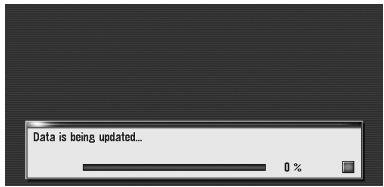
In this phase, take notice of the followings:
- All the functions other than AM and FM are disabled during update. You can perform simplified operations by using the TRK (▲) button and VOL (▼/▲) button. (We recommend changing the AV source to AM or FM before you start the update.)
- The update takes approximately 3 hours in total.
- If you turn the ignition switch off (the navigation system turns off) or eject the upgrade disc, the update resumes when the navigation system turns on or the disc is reinserted.
Phase 2; Update the system programme
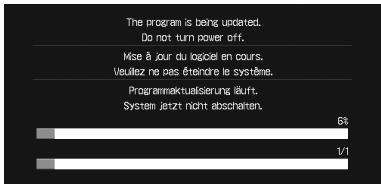
In this phase, take notice of the followings:
- No functions are available.
- The update takes approximately 10 minutes.
- NEVER stop the engine of your vehicle nor turn off the power supply to the navigation system until the installation is completed. Turning the power off in this phase causes a malfunction or failure of the navigation system.
Upgrade procedures
- Park your vehicle in a safe place.
Leave the engine on, and make sure that the handbrake is applied.
- Press the MAP button to display the current location.
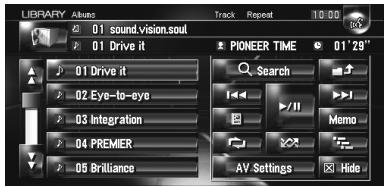

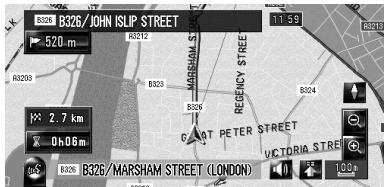
Be sure to display the map of current position. The updating cannot start at the other screens, such as the scroll mode, the navigation menu and AV screen.
3. Press OPEN CLOSE button and insert the upgrade disc into the disc loading slot.
CAUTION
For users who use AVIC-HD3II or use the system upgraded to CNDV-800HD, updating another software programme will begin first.
While this screen is visible, NEVER switch the key position from ACC or turn off the navigation system.
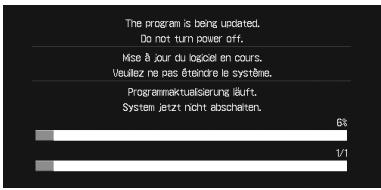
After the system is complete, the navigation system restarts.

Check the details of the caution message and touch [OK].
The users who use other models can skip this caution and proceed to next step.
The message confirming whether or not to start the update will appear.
If the message doesn't appear, eject the disc and display the map of current position and then reinsert the disc.
4. Touch [Yes].
![PIONEER CNDV-900HD - Touch [Yes]. - 1](/content/2025/01/118733/images/25196bb491d4a174550dfe4eecd9fbdde6272036772f340d01494b1222c49be3.jpg)
To cancel the update, touch [No].
5. Touch [Yes].
![PIONEER CNDV-900HD - Touch [Yes]. - 1](/content/2025/01/118733/images/cc67b701e356854f763c4630ca80556d98632c4855a0b318084b444a2238f98f.jpg)
The message "Password obtained from Pioneer should be entered to update. Have you obtained the password? Please press "Cancel" to stop update." appears. To start the updating, touch [Yes].
Alternative options:
[No]
Shows "Device Number" (Device#) of your navigation system.
[Cancel]
Cancel the update.
6. Enter the password for authentication that you obtained, then touch [OK].
![PIONEER CNDV-900HD - Enter the password for authentication that you obtained, then touch [OK]. - 1](/content/2025/01/118733/images/278a679aae69658d49f42197e9f937551c2e2a96b78ea659abe66712a0b1f336.jpg)
After you touch [OK], the system starts the authentication. When the authentication is finished properly, the message for confirmation will appear.
7. Touch [Yes] to start the update.
![PIONEER CNDV-900HD - Touch [Yes] to start the update. - 1](/content/2025/01/118733/images/87b02a6cf07d042fb1bbd0e9d3676acb46c71074604b40c0946569d990438541.jpg)
The navigation system restarts and then the installation begins.
After you touch [Yes] in this screen, you cannot abort the updating until the installation of the system programme finishes.
The update takes approximately 3 hours in total.
![PIONEER CNDV-900HD - Touch [Yes] to start the update. - 2](/content/2025/01/118733/images/7b287a3c6a5da7083e7278911a1353b87094f67e861757cde3bf88ccbbb0aa18.jpg)
![PIONEER CNDV-900HD - Touch [Yes] to start the update. - 3](/content/2025/01/118733/images/3b194b87621da9e4441fdffce3a3dc22d7ab02da159b86b9b0919b71bbfe0cef.jpg)
When the installation of "Disc 1" is finished, the message that "Disc 2" is required appears. After replacing the disc, the installation proceeds. When the update of map database is completed, the finished message appears.
8. Touch [OK] to restart the system.
![PIONEER CNDV-900HD - Touch [OK] to restart the system. - 1](/content/2025/01/118733/images/2a76fba0459c865f1b57290a8e4bf3d1c17b1eea37fec47dc2dc888ec1fc35f3.jpg)
After touching [OK], the installation of system programme begins.
CAUTION
While this screen is visible, NEVER switch the key position from ACC or turn off the navigation system.
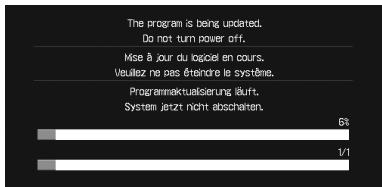
After the installation is complete, the navigation system restarts.
9. Check the details of the caution message and touch [OK].
10. Touch [OK].
The map of your surroundings is displayed. You can operate the navigation system by touching keys displayed on the screen as usual.
11. Press the OPEN CLOSE button and press the EJECT button to eject the upgrade disc.
Checking whether the upgrade was done properly
Display "Service Information" screen to compare the current version number with the previous one.
For more details of the operation, refer to "Checking the device number".
If you upgrade your navigation system by these discs, the system will have the following changes.
Renewal data
The following data are updated:
- Map database
- Gracenote® Database
POI data coverage
Approximately 5.6 million POIs are included in the database.
Some facilities and categories used in POI Search, Vicinity Search, and Overlay POI will be modified.
For the additional categories that can be used on the voice recognition, see "Category list for vicinity search (Renewal)".
Some POI information may not be accurate or may become inaccurate through the passage of time. Please directly contact the POI to verify the accuracy of the information about the POI which appears in this database. POI information is subject to change without notice.
Renewed points after upgrading AVIC-HD1BT
By upgrading AVIC-HD1BT with these discs, the following operations are changed.
□ Settings marked with an asterisk (*) show that these are default or factory settings.
Keyboard operation
Input screen of "Address Search" and "POI Search"
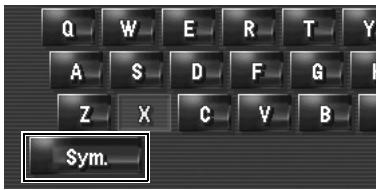
[Others], [Sym.], [0-9]:
Touch to toggle the selection.
Input screen for "Address Book", "Phone Book", "LIBRARY (Music Library)"
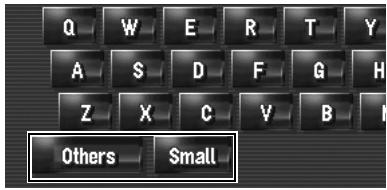
[Others], [0-9]:
Touch to toggle the selection.
[Small], [Caps.]:
This is a new feature. Either lowercase or uppercase letters can be selected. Touch to toggle the selection.
Time restrictions
This is a new feature. This setting controls whether streets or bridges have traffic restrictions during a certain time should be taken into account.
If you want to set your route to avoid opened bridges, select [On].
- Touch the key in the following order in the navigation menu.
[Destination] [Route Overview] [Options]
-
[Route Overview] is active only when the route is set.
-
Touch [Time restrictions] to change the route calculation conditions.
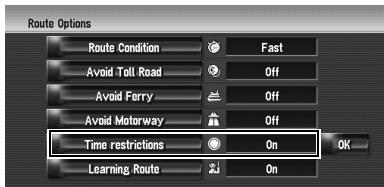
Touching this option switches the setting On or Off.

[On]*:
Calculate a route while avoiding streets or bridges with traffic restrictions during a certain time.
![PIONEER CNDV-900HD - [On]*: - 1](/content/2025/01/118733/images/454ba54d4fb9a793457a8ca3aff13b47df6ca09c5baa2b26e382af1f0eedf001.jpg)
[Off]:
Calculate a route while ignoring traffic restrictions.
3. Touch [OK].
The route is recalculated, and "Route confirmation screen" appears.
The system may calculate a route that includes streets or bridges that are subject to traffic restrictions during a certain time even if [On] is selected.
CAUTION
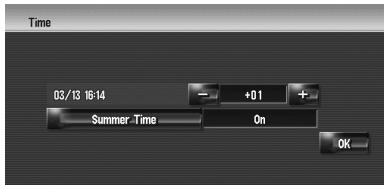
If the time difference is not set correctly, the navigation system cannot consider traffic regulations correctly. Set the time difference correctly. (For details, refer to Operation Manual of your navigation system.)
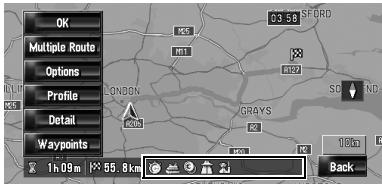
shows for routes that contain streets or bridges that are subject to traffic regulations during a certain time when the setting [Time restrictions] is [On].
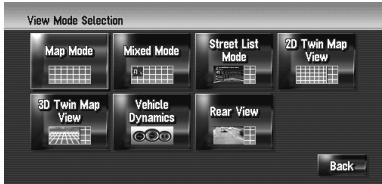
2D Twin Map View and 3D Twin Map View
Either "2D Twin Map View" or "3D Twin Map View" can directly be selected in "View Mode Selection" screen.
- Press the MAP button to display a map of the area around your current position.
- Press the MAP button again.
- Touch the mode name to select the mode you want to display.
2D Twin Map View
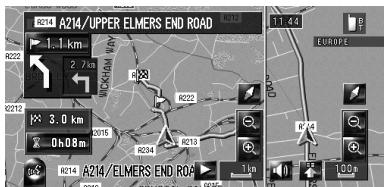
The 2D map appears on the left screen.
3D Twin Map View
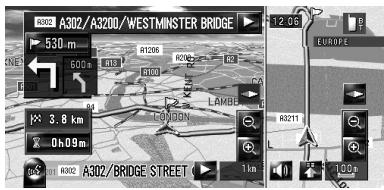
The 3D map appears on the left screen.
Touching anywhere on the map changes the map to "Scroll mode".
Address Book Icon
You can select whether to display the Address Book Icon on the map.
- When you select [Address Book Icon Display] in [Short-Cut Selection], you can switch this setting with the shortcut menu.
- Touch the key in the following order in the navigation menu.
[Map] [Displayed Info]
- Touch [Address Book Icon].
Each time you touch the key changes that setting.
[On]*:
Displays the icon on the map.
[Off]:
Hides the icon from the map.
- Even if [Address Book Icon] is set to [Off], the alarm sounds when you approach the registered location and the set image pops up. To turn off the sound output and image pop up, select [No Sound] and [No Picture] for the entry.
If you set (dot), the registered name of that entry can be displayed on the map. The
registered name does not appear if [Address Book Icon] is set to [Off].
3D Landmark
You can select whether to display the 3D Landmark on the map.
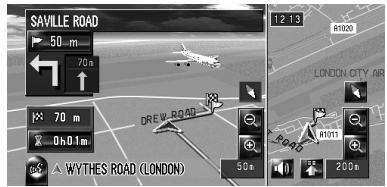
- Touch the key in the following order in the navigation menu.
[Map] [Displayed Info]
- Touch [3D Landmark].
Each time you touch the key changes that setting.
[On]*:
Displays the 3D Landmark on the map.
[Off]:
Hides the 3D Landmark on the map.
3D Landmark only appears when the view mode is [3D Twin Map View] and the map scale is set to 200 m (0.25 mile) or lower.
Traffic event icon and line
Middle-sized icon is displayed on the map scale between 2km to 5km (1 mile to 2.5 miles).
The traffic-related items can be shown on "City Map".
Hands-free phoning
Device name
The default device name displayed on the mobile phone changes [PIONEER NAVI] to [PIONEER HDD NAVI]. (If you already connected the Bluetooth unit, the name already set remains. If you restore the default setting, the device name becomes [PIONEER HDD NAVI].)
The display of "Unknown" user
Depending on the caller ID service, the phone number of the received call may not be displayed. [Unknown] appears instead.
Editing the entry in "Phone Book"
You can edit [Pronunciation] to be used for voice recognition along with [Name], [Phone #], or [Picture].
- Touch [Info/Phone] in the Navigation menu, and touch [Phone Menu].
- Touch [Phone Book].
- Touch or [Add].
The edit screen appears.
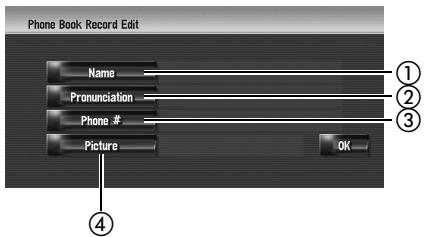
① Name
Enter the name to be displayed in the phone book. If you enter the name for new entry, you can select whether you use this entry as voice commands.
② Pronunciation
You can enter the desired pronunciation independently from the name. The registered pronunciation is used for voice recognition.
Up to 40 characters can be input for the pronunciation.
If "Pronunciation" is blank, you cannot use the item as a voice command.
Depending on which language is being switched to, you may not be able to use the registered pronunciation without modification.
③ Phone #
These operations are the same as before upgrade.
④ Picture
These operations are the same as before upgrade.
Changing a name
1. Touch [Name], then touch [Yes].
The message confirming whether or not to register the entered name as voice command is displayed. When not registering a name as a voice command, select [No].
2. Enter a new name, then touch [OK].
![PIONEER CNDV-900HD - Enter a new name, then touch [OK]. - 1](/content/2025/01/118733/images/b24a3d33bd99feeccea53221ea2a4e7ecbb51b62826e09b2b3207735e9cc2b31.jpg)
The current name appears in the text box.
3. If the pronunciation is suitable, touch [Yes].
The details you set are registered, and "Phone Book Record Edit" screen appears.
Alternative options:
[No]:
Completes the registration without editing the pronunciation.
[Repeat]:
You can reconfirm the pronunciation of the name you entered.
No sounds can be output during
![PIONEER CNDV-900HD - If the pronunciation is suitable, touch [Yes]. - 1](/content/2025/01/118733/images/fb6a353df2cc80cc5b22df32e6d0f02d8e4cb664210cf3a5efc5c2853f552677.jpg)
□ If the pronunciation is not the desired one, edit the characters so that the pronunciation matches your desired pronunciation.
- When you confirm the pronunciation, is shown on the left side of the location name displayed in the entries of "Phone Book". This icon indicates that this name can be used as a voice command during voice operation.
Changing a pronunciation
1. Touch [Pronunciation].
2. Enter a new pronunciation, then touch [OK].
The current pronunciation appears in the text box (if already set).
3. If the pronunciation is suitable, touch [Yes].
The details you set are registered, and "Phone Book Record Edit" screen appears.
Alternative options:
[No]:
Cancels the editing.
[Repeat]:
You can reconfirm the pronunciation of the name you entered.
Setting the time difference
The time difference can be set from -4 to +9 hours.
Changing the Background Picture
The customising of Splash Screen is added. The operation is the same as [Navigation Background] or [AV Background]. Please refer to the operation manual of the navigation system to operate.
Splash Screen:
The screen that appears when the Navigation system starts up.
Precautions when changing the Splash Screen
The following is the default splash screen for the Navigation System.
[PIONEER Original]
![PIONEER CNDV-900HD - [PIONEER Original] - 1](/content/2025/01/118733/images/325e665f998b0d7cbeb6fbacb6ecc60ff2ca54e8f0ec1101f08747dcfd85865a.jpg)
If an image other than the one shown above is previously set (such as an image from the
dealer or other source) and you change the splash screen once, you must use the CD-R (RW) where the image is recorded to restore the previous splash screen.
DVD playback
Touching or resumes normal playback at a desired point during continuous fast reverse/fast forward (when or is shown).
□ You can also perform these operations by using TRK (▶) button.
The following messages may be displayed in the updating.
There are occasions when you may see error messages other than those shown here. In such a case, follow the instructions given on the display.
| Message | When | What to do |
| Inserted disc is invalid. Please confirm that the disc is correct. | If you insert a disc upside down. | Insert the disc with the label upward. |
| If the disc is dirty. | Clean the disc and retry. | |
| If extreme vibration occurs continuously. | Retry in vibration-free condition. | |
| If the disc is cracked or otherwise damaged. | Consult your dealer. | |
| An error occurred and the update failed. Update is restarted by pressing “Retry”. | If the disc is dirty. | Clean the disc and retry. |
| Unexpected error occurred in the update process. | Consult your local Pioneer dealer if this message persist. |
Additional Voice Operations
Terms written in italics are voice commands.
- When upgrading AVIC-HD3 or AVIC-HD3II, there are no changes to voice operations.
□ You can skip the commands with the mark (^*) . For example, in case search by Point of interest, the system can recognise the command even if you say "POI" without saying "Destination".
Dialled with the pronunciation of the entry in Phone Book
Call* Telephone Book
Notes:
- The voice operations related to the telephone are available only using hands-free phoning feature of this system and is unavailable during a call.
- For
shown above, say the registered pronunciation. For example, if the registered pronunciation in the entry of phone book is "My friend" and you want to operate "Telephone Book", say "My friend".
Making phone call to your home
Call* → Call Home → Touch VOICE icon to call your home (Only when the phone number is registered in your home.)
Search by city centre
Destination* POI <City Centre Location Screen (A)
Notes:
- Select the country manually before the voice operation.
- If the language and country are not selected in the correct combination, search cannot be performed. (The following table indicates the countries that can be selected for the search depending on which language is selected.)
- For
shown above, say their city name directly. For example, if the city name is "London" and you want to operate "Search by city centre", say "London".
| (Language] in [Regional Settings] | The country you can search |
| English, Swedish, Danish, Norwegian | UK (United Kingdom, Great Britain, England) |
| Dutch, Flemish | NL (Netherlands) |
| Spanish, Portuguese | E (Spain, Andorra) |
| German | A (Austria), D (Germany) |
| French | L (Luxembourg), F (France, Monaco) |
| Italian | I (Italy, San Marino, Vatican City) |
Operating the view mode
Map Operation* Change View Mode* Map Mode, 2D Twin Map View, 3D Twin Map View, Street List Mode, Mixed Mode, Rear View, Vehicle Dynamics Map screen will be changed to selected view mode.
Notes:
- Underlined commands are renewed.
"Driver's View" is not available.
Recalculating the route
Route Options → Change Route → Rerouting, Use Main Road, Use Fast Route, Use Short Route, Use Motorway, Avoid Motorway, Use Ferry, Avoid Ferry, Use Toll Road, Avoid Toll Road → If the route already set, touch VOICE icon to recalculate.
Note:
- Underlined commands are renewed.
Added commands (Only for AVIC-HD1BT)
| Preferential voice command | Other voice command |
| Back | Return, Before |
| Set As Destination | Set, Go, Route To Destination, Begin Guidance, Start |
| POI | Point Of Interest, Points Of Interest, Business Listing |
| Address Book | Registered Points, My Addresses, Search By Address Book |
| Vicinity Search | Vicinity, Search Around, Search In Vicinity |
| 2D Twin Map View | 2D Twin, 2D Split |
| 3D Twin Map View | 3D Twin, 3D Split |
| Use Fast Route | Fast Route, Fastest Route |
| Use Short Route | Short Route, Shortest Route |
| Traffic Information | Traffic, View Traffic Info, Display Traffic Information, Current Traffic Information, Display Traffic Condition |
| Traffic On Route List | On Route List, Route List, Traffic On Route |
| Call | Dial, Ring, Dial Out, Place A Call, Make A Call |
| Call Phone Number | Call By Number, Call Number, Call By Phone Number, Call Using Phone Number |
| Navigation Screen | Navigation, Navi |
| AV Screen | AV, Audio |
| Change Source | Next Source, Source Change |
| CD | Change To CD, Switch To CD |
| DVD | Change To DVD, Switch To DVD |
| TV | Change To TV, Switch To TV |
| AM | Change To AM, Switch To AM |
| FM | Change To FM, Radio |
| Music Library | Change To Music Library, Switch To Music Library |
| Music Search | Search My Music, Search Music |
| Album | Search By Album, Search Album |
| Artist | Search By Artist, Search Artist |
| Genre | Search By Genre, Search Genre |
| Track Search | Search By Track |
| iPod | Change To iPod, Switch To iPod |
Unavailable command
| Preferential voice command | Other voice command |
| Driver's view | Driver, 3D |
Category list for vicinity search (Renewal)
| Category name | Old | New |
| Petrol Station | DEA | (Not available.) |
| PNN | (Not available.) | |
| Shopping | Children's Wear | (Not available.) |
| Office Equipment and Stationery | (Not available.) | |
| Sport | Horse-Riding | (Not available.) |
| Car Dealer | MERCURY | (Not available.) |
| Automotive | General Car Repair and Servicing | (Not available.) |
PIONEER CORPORATION
PIONEER ELECTRONICS (USA) INC.
P.O. Box 1540, Long Beach, California 90801-1540, U.S.A.
TEL: (800) 421-1404
PIONEER EUROPE NV
Haven 1087, Keetberglaan 1, B-9120 Melsele, Belgium
TEL: (0) 3/570.05.11
PIONEER ELECTRONICS ASIACENTRE PTE. LTD.
253 Alexandra Road, #04-01, Singapore 159936
TEL: 65-6472-7555
PIONEER ELECTRONICS AUSTRALIA PTY. LTD.
178-184 Boundary Road, Braeside, Victoria 3195, Australia
TEL: (03) 9586-6300
PIONEER ELECTRONICS OF CANADA, INC.
300 Allstate Parkway, Markham, Ontario L3R OP2, Canada
TEL: 1-877-283-5901
PIONEER ELECTRONICS DE MEXICO, S.A. de C.V.
Blvd. Manuel Avila Camacho 138 10 piso
Col. Lomas de Chapultepec, Mexico, D.F. 11000
TEL: 55-9178-4270
先锋股份有限公司
總公司:台北市中山北路二段44號13樓
電話:(02)2521-3588
先鋒電子(香港)有限公司
- CNDV-900HD
- Models to be upgraded
- Manual overview
- For customers using AVIC-HD1BT
- For customers using AVIC-HD3
- For customers using AVIC-HD3II
- Be sure to read the following descriptions
- Licence Agreement
- About the Database
- Copyright
- Other Precautions
- PIONEER CNDV-900HD
- GRANT OF LICENCE
- DISCLAIMER OF WARRANTY
- LIMITATION OF LIABILITY
- EXPORT LAW ASSURANCES
- TERMINATION
- MISCELLANEOUS
- Tele Atlas End User Licensing Terms
- Grant of Licence.
- Ownership.
- Warranty Disclaimer.
- Limitation of Liability.
- Termination.
- Indemnity.
- Additional Provisions with respect to the Great Britain Data and Northern Ireland data only.
- Additional Provisions with respect to the Denmark Data only.
- Additional Provisions with respect to the Norway Data only.
- Additional Provisions with respect to the Poland Data only.
- Miscellaneous.
- About the data for the Map Database
- Gracenote® Database
- Setting items to be deleted and initialised
- Map function:
- Route Setting:
- [Destination] menu:
- [Info/Phone] menu:
- [Map] menu:
- [Settings] menu:
- [Vehicle Dynamics]:
- Others:
- Visit our website
- www.pioneer.co.uk
- Checking the device number
- Getting the password for authentication
- Important notice:
- Phase 1; Update the database
- Phase 2; Update the system programme
- Upgrade procedures
- Press OPEN CLOSE button and insert the upgrade disc into the disc loading slot.
- CAUTION
- Touch [Yes].
- Touch [Yes].
- Enter the password for authentication that you obtained, then touch [OK].
- Touch [Yes] to start the update.
- Touch [OK] to restart the system.
- Check the details of the caution message and touch [OK].
- Touch [OK].
- Press the OPEN CLOSE button and press the EJECT button to eject the upgrade disc.
- Checking whether the upgrade was done properly
- Renewal data
- POI data coverage
- Renewed points after upgrading AVIC-HD1BT
- Keyboard operation
- Time restrictions
- [On]*:
- [Off]:
- Touch [OK].
- 2D Twin Map View and 3D Twin Map View
- 2D Twin Map View
- 3D Twin Map View
- Address Book Icon
- 3D Landmark
- Traffic event icon and line
- Hands-free phoning
- Device name
- The display of "Unknown" user
- Editing the entry in "Phone Book"
- Changing a name
- Touch [Name], then touch [Yes].
- Enter a new name, then touch [OK].
- If the pronunciation is suitable, touch [Yes].
- Changing a pronunciation
- Touch [Pronunciation].
- Enter a new pronunciation, then touch [OK].
- Setting the time difference
- Changing the Background Picture
- Splash Screen:
- Precautions when changing the Splash Screen
- [PIONEER Original]
- DVD playback
- Additional Voice Operations
- Dialled with the pronunciation of the entry in Phone Book
- Notes:
- Making phone call to your home
- Search by city centre
- Operating the view mode
- Recalculating the route
- Note:
- Added commands (Only for AVIC-HD1BT)
- Unavailable command
- PIONEER CORPORATION
Brand : PIONEER
Model : CNDV-900HD
Category : GPS and Navigation Systems