
20FT3010 - Tracking PHILIPS - Free user manual and instructions
Find the device manual for free 20FT3010 PHILIPS in PDF.


| Product Type | CRT Television |
| Brand | Philips |
| Model | 20FT3010 |
| Screen Size (diagonal) | 20 inches (51 cm) |
| Display Technology | CRT |
| Aspect Ratio | 4:3 |
| Resolution (typical) | 640 x 480 pixels |
| Weight | Approximately 18 kg |
| Dimensions (W x H x D) | 500 x 450 x 450 mm |
| Power Consumption | 70 W (typical) |
| Input Connections | RF antenna input, composite video (RCA) |
| Audio Output | 2 x 5W speakers |
| Remote Control | Included (standard IR remote) |
| On-Screen Menu | Yes |
| Sleep Timer | Yes |
| Channel Memory | Up to 100 channels |
| Safety Features | Automatic degaussing, X-ray protection |
Frequently Asked Questions - 20FT3010 PHILIPS
User questions about 20FT3010 PHILIPS
0 question about this device. Answer the ones you know or ask your own.
Ask a new question about this device
Download the instructions for your Tracking in PDF format for free! Find your manual 20FT3010 - PHILIPS and take your electronic device back in hand. On this page are published all the documents necessary for the use of your device. 20FT3010 by PHILIPS.
USER MANUAL 20FT3010 PHILIPS
Institutional Television
www.itv.philips.com
PRELIMINARY
20FT3010/37
Directions For Use
20" LCD Monitor with iFace™ and Philips ITV SmartPort
for health care applications

natural_image
Front view of a white electronic device with a blank screen and 'PHOUST' branding (no additional text or symbols visible)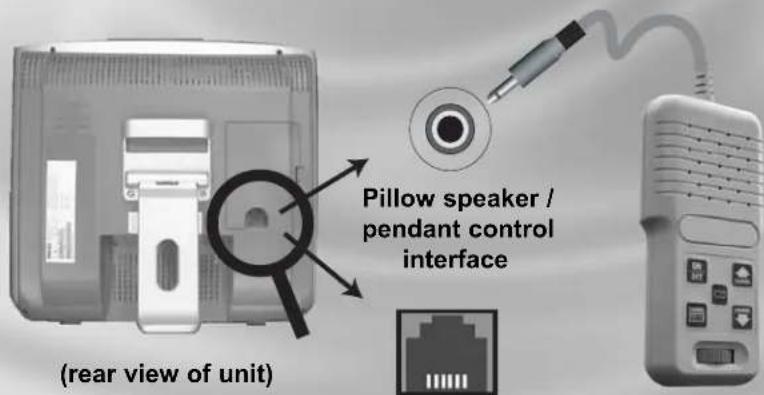
Pillow speaker / pendant control (not included)
Philips SmartPlug ™
Let's make things better.

PHILIPS
IMPORTANT SAFETY INSTRUCTIONS
Read before operating equipment
- Read these instructions.
- Keep these instructions.
- Heed all warnings.
- Follow all instructions.
- Do not use this apparatus near water.
- Clean only with a dry cloth.
- Do not block any of the ventilation openings. Install in accordance with the manufacturers instructions.
- Do not install near any heat sources such as radiators, heat registers, stoves, or other apparatus (including amplifiers) that produce heat.
- Do not defeat the safety purpose of the polarized or grounding type plug. A polarized plug has two blades with one wider than the other. A grounding type plug has two blades and third grounding prong. The wide blade or third prong are provided for your safety. When the provided plug does not fit into your outlet, consult an electrician for replacement of the obsolete outlet.
- Protect the power cord from being walked on or pinched particularly at plugs, convenience receptacles, and the point where they exit from the apparatus.
-
Only use attachments/accessories specified by the manufacturer.
-
Use only with a cart, stand, tripod, bracket, or table specified by the manufacturer, or sold with the apparatus. When a cart is used, use caution when moving the cart/apparatus combination to avoid injury from tip-over.
-
Unplug this apparatus during lightning storms or when unused for long periods of time.
-
Refer all servicing to qualified service personnel. Servicing is required when the apparatus has been damaged in any way, such as power-supply cord or plug is damaged, liquid has been spilled or objects have fallen into apparatus, the apparatus has been exposed to rain or moisture, does not operate normally, or has been dropped.
-
This product may contain lead and mercury. Disposal of these materials may be regulated due to environmental considerations. For disposal or recycling information, please contact your local authorities or the Electronic Industries Alliance: www.elae.org
-
Damage Requiring Service - The appliance should be serviced by qualified service personnel when:
A. The power supply cord or the plug has been damaged; or
B. Objects have fallen, or liquid has been spilled into the appliance; or
C. The appliance has been exposed to rain; or
D. The appliance does not appear to operate normally or exhibits a marked change in performance; or
E. The appliance has been dropped, or the enclosure damaged.
- Tilt/Stability - All televisions must comply with recommended international global safety standards for tilt and stability properties of its cabinet design.
- Do not compromise these design standards by applying excessive pull force to the front, or top, of the cabinet which could ultimately overturn the product.
- Also, do not endanger yourself, or children, by placing electronic equipment/toys on the top of the cabinet. Such items could unsuspectingly fall from the top of the set and cause product damage and/or personal injury.
-
Wall or Ceiling Mounting - The appliance should be mounted to a wall or ceiling only as recommended by the manufacturer.
-
Power Lines - An outdoor antenna should be located away from power lines.
-
Outdoor Antenna Grounding - If an outside antenna is connected to the receiver, be sure the antenna system is grounded so as to provide some protection against voltage surges and built up static charges. Section 810 of the National Electric Code, ANSI/NFPA No. 70-1984, provides information with respect to proper grounding of the mast and supporting structure, grounding of the Icad-in wire to an antenna discharge unit, size of grounding connectors, location of antenna-discharge unit, connection to grounding electrodes, and requirements for the grounding electrode. See Figure below.
-
Object and Liquid Entry - Care should be taken so that objects do not fall and liquids are not spilled into the enclosure through openings.
-
Battery Usage CAUTION - To prevent battery leakage that may result in bodily injury, property damage, or damage to the unit:
- Install all batteries correctly, with + and - aligned as marked on the unit
- Do not mix batteries (old and new or carbon and alkaline, etc.)
- Remove batteries when the unit is not used for a long time.
Note to the CATV system installer: This reminder is provided to call the CATV system installer's attention to Article 820-40 of the NEC that provides guidelines for proper grounding and, in particular, specifies that the cable ground shall be connected to the grounding system of the building, as close to the point of cable entry as practical.
EXAMPLE OF ANTENNA GROUNDING AS PER NEC

ELECTRIC SERVICE EQUIPMENT
Know these
safety symbols

CAUTION
RISK OF ELECTRIC SHOCK DO NOT OPEN

CAUTION: TO REDUCE THE RISK OF ELECTRIC SHOCK, DO NOT REMOVE COVER (OR BACK). NO USER SERVICEABLE PARTS INSIDE. REFER SERVICING TO QUALIFIED SERVICE PERSONNEL.
This "bolt of lightning" indicates uninsulated material within your unit which may cause an electrical shock. For the safety of everyone in your household, please do not remove product covering.
The "exclamation point" calls attention to features for which you should read the enclosed literature closely to prevent operating and maintenance problems.
WARNING: To reduce the risk of fire or electric shock, this appliance should not be exposed to rain or moisture and objects filled with liquids, such as vases, should not be placed on this apparatus.
CAUTION: To prevent electric shock, match wide blade of plug to wide slot, and fully insert.
| A/V Audio / video. | |
| CVBS | Composite Video Blanking Sync. Also known as "composite" or "AUX" video. In this method of video connection, the color, luminance and synchronization signals are combined on one wire. |
| DCM | Data Communications Module. General term for devices that communicate with Philips Institutional Television products by means of the Philips ITV SmartPort. |
| DFU | Directions For Use. User documentation. Also (formerly) known as "IB", "Instruction Booklet". |
| Display Monitor In this documentation, the non-Iconnized television display monitor itself. | |
| FTV Flat television (plasma or LCD television display monitor). | |
| hciFace, hiFace® Hospital version(s) of iFace. | |
| H-M Link® | Hotel-mode link. Control interface based on a subset of Philips SmartPort, for hospitality in-room television applications. |
| iFace® | Infra-red interface. Internally-installed ITV intelligent interface module that adds Philips SmartPort connectivity to display products that do not have built-in SmartPort. |
| irFace® Alternate name for iFace. | |
| IR | Infra-red, long-wavelength optical energy invisible to the human eye. In this document, denotes wireless remote controls. In some contexts, can also refer to wired (non-optical) un-modulated TTL RC signals. |
| ITV | Institutional Television. Commercial / non-consumer business unit of Philips Consumer Electronics Co., a division of Koninklijke Philips Electronics N.V., its products, and its intellectual property. |
| Jack | A receptacle connector that typically resides on a panel built into an electrical or electronic device. |
| LCD | Liquid-crystal display. An image-display technology that achieves a thin panel form factor and low power consumption. |
| NA, N/A Not available, not applicable. | |
| NC, N/C Not connected, no connection. | |
| Off See "Standby". | |
| On | A state of operation in which the unit (television) is connected to an AC power source, in active use, and capable of responding to queries or commands from a control device (IR remote control) and/or DCM. |
| OSD | On-Screen Display. Text characters that are generated by the display monitor's or set-top box's character generator. Used to display menus, status, closed-captioning, channel, etc. |
| Plug Connector, usually on a cable, that connects to a socket receptacle connector. | |
| RC Remote control. Also see IR. | |
| RC-5, RC-6 | Philips IR remote control communication protocols. |
| RJ-11 / RJ-12 | Registered Jack 11 / 12. Modular telephone-style connector with 4 / 6 electrical conductors. |
| SmartPort® | Philips ITV proprietary three-wire synchronous serial communications and control interface. AKA SmartPlug. |
| Socket | Receptacle connector on a cable or jack panel that connects to a plug. |
| Standby | Typically referred to as "off". A state of operation, characterized by relatively low power consumption, in which the unit (television) is connected to an AC power source, but not in active use, and capable of responding to queries or commands from a local keypad (if enabled), a control device and/or a DCM. |
| S-Video | Super-Video, sometimes referred to as Y/C Video, is a video signal connection method in which the luminance (Y) signal and chrominance (C) signal are conveyed on separate signal paths in order to achieve picture quality that is significantly improved over CVBS (see CVBS). |
| TTL | Transistor-Transistor Logic, a common semiconductor technology. Also denotes the signal voltages corresponding to digital information ("0" or "1"), such as that in wired remote-control commands. |
| YPbPr | Component video, a video signal connection method in which the luminance (Y) signal, the Pb (blue), and Pr (red) signals are conveyed on separate signal paths. Sync and green signal components are present on Y. |
Product Description
The 20FT3010/37 is a specialized television product configuration consisting of a Philips 20" LCD television / monitor (20PF7835) equipped with an intelligent interface board (iFace™) that adds Philips ITV SmartPort™ compatibility. hiFace makes it possible to offer a cost-effective LCD television display solution for use with Philips ITV-compatible SmartPort™ data communication modules (DCM) for hospitality / pay-per-view, health-care, audio/visual, and other non-consumer applications.
Important Product Application and Warranty Information
The 20FT3010/37 is neither marketed, sold, nor intended for consumer applications. The 20FT3010/37 is neither marketed, sold, nor intended to be considered, neither expressly or by implication, as capable of being converted or re-configured for consumer applications. The warranty does not apply to, and is void for, units that have been altered, converted, re-configured, or modified in any way without prior written authorization from Philips Institutional Television.
20FT3010/37
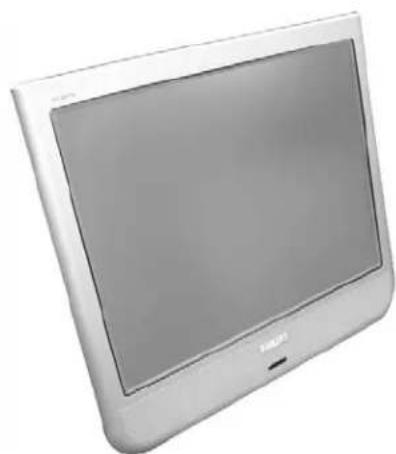
natural_image
Exterior view of a silver CRT television displaying (no visible text or symbols)Front view
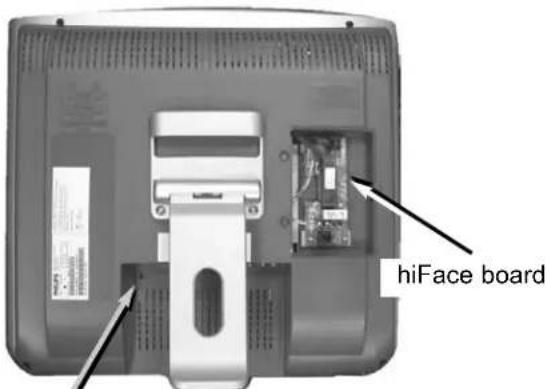
Rear view (IFACE / HIFACE cover removed)

LCD monitor A/V jack panel
Product Accessories
Included Accessories
The 20FT3010/37 includes the following accessories:

natural_image
Black rectangular electronic device with a USB cable and connector, isolated on white background (no text or symbols visible)Power adapter
Input: 100-240 VAC, 50/60 Hz; IEC connector
Output: 24 VDC @ 5A, coaxial plug
Agencies: UL, CE, NOM

natural_image
Illustration of a gray electrical outlet plug with two terminal leads (no text or symbols)Power adapter cable
AC mains, 6 ft
Hospital grade 3-prong plug, IEC socket
Certification(s): CSA33169CLASS584103
CSA33169CLASS584202
ULE55349SPV1

natural_image
Illustration of a USB audio jack with two leads and a coiled cable (no text or symbols)Pillow Speaker / Pendant Extension Cable
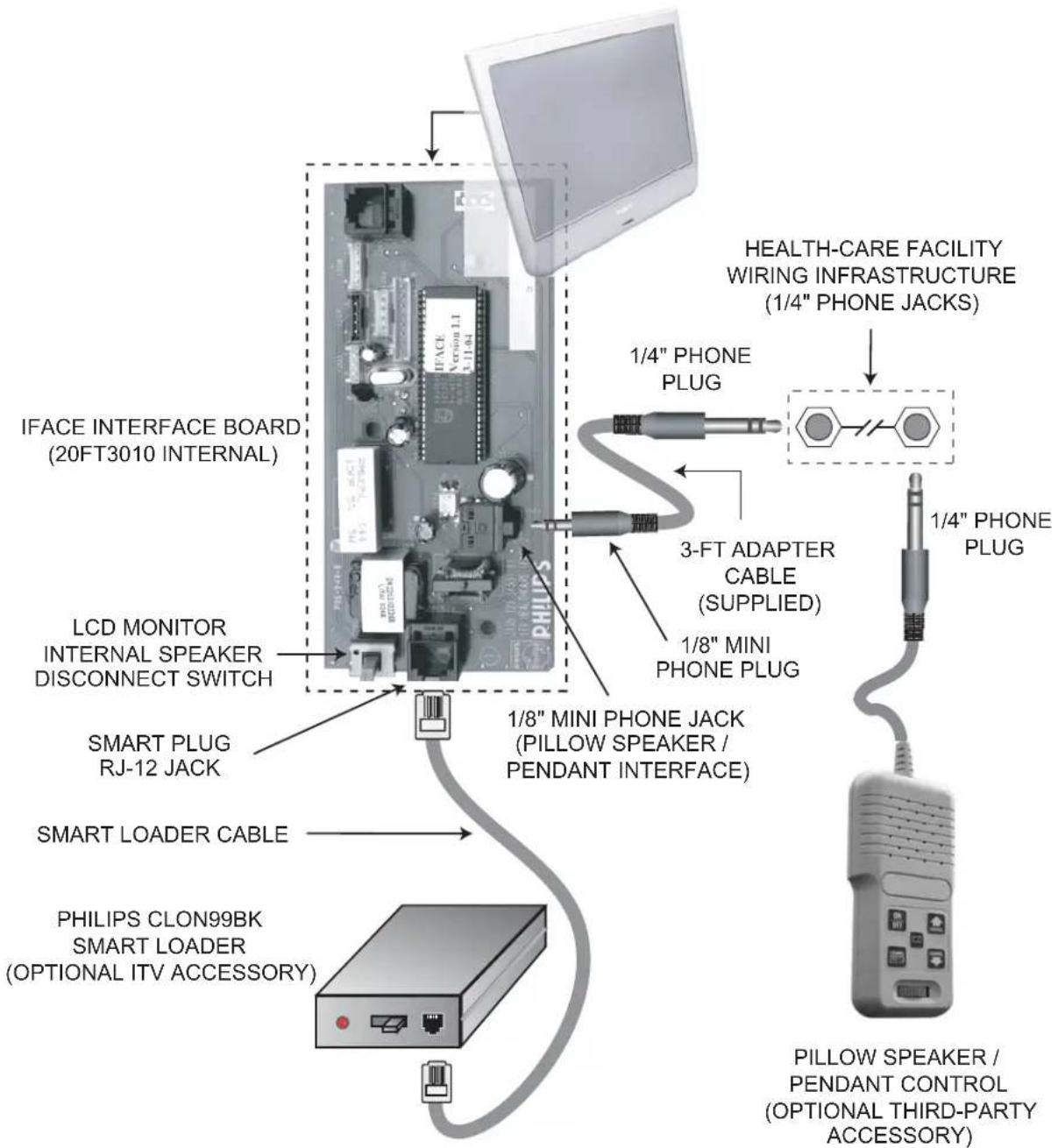
1/8" mini stereo phone plug to 1/4" stereo phone plug, 3-ft, 3-conductor cable (adapts IFACE / HIFACE 1/8" mini stereo phone jack to pillow speaker
20FT3010/37 A/V Jack Panel Connection Information
The 20FT3010/37 connects to the AC mains and audio / video signal sources as shown.

LCD monitor jack panel (A / V)
- AC mains adapter 24 volts DC, center- (+) positive.
- RF television signal.
- FM radio signal.
- Right audio channel from CVBS or component ("YPbPr") video source.
- Left audio channel from CVBS or component ("YPbPr") video source.
- CVBS video.
- Y (luminance, green, and sync) of YPbPr component video.
- Pb (blue) component pf YPbPr component video.
- Pr (red) component pf YPbPr component video.
20FT3010/37 iFace / hiFace Connection Information
The following diagram illustrates the connections to the iFace / hiFace module.
Philips ITV General Information
Philips Institutional TV Software
Typical Philips Institutional Televisions can be configured to operate in either "Consumer" or "Commercial" operational modes. However, the 20FT3010/37 hiFace-based ITV product is primarily intended to operate in the Commercial mode. Consumer-mode operation is not intended for the 20FT3010/37, because it is based on a consumer product (20PF7835) that is adapted for commercial use by means of the hiFace module.
Commercial Mode
The configuration of Commercial mode features requires a Philips ITV master setup remote (RG4172BK or RC2573GR, optional accessory). When the television is in Commercial mode, access to its operation from its keyboard or from a guest-mode remote can be restricted, depending upon the settings of the Institutional TV features. For examples, the unit's keyboard controls can be "locked-out" (rendered inoperable), only certain channels can be selected, and the volume can be limited to a given range.

natural_image
Two Philips TV remote control units shown side by side, one with a keypad and buttons, the other with a keypad and control buttons (no visible text or symbols on the devices themselves)RG4172BK RC2573GR
Philips ITV master setup remotes
Identifying the Operational Mode: To identify the television's operational mode, a system 7 (commercial setup mode) master setup remote must be used. With the setup remote in setup mode (RG4172BK: press TV SETUP, or RC2573: place switch in SETUP position), press Recall. The following information will appear on-screen, depending upon the version of iFace / HcIface.
NOTE: There are currently two versions of the 20FT3010/37. The respective versions are as indicated in the last line of the respective SYSTEM STATUS.
SYSTEM STATUS
MODE COMMERCIAL
CHANNEL TV 12 (ANTENNA)
DCM OFF
| CODES | 96 | 1 | 98 | 48 | 8 | |||
| 0 | 200 | 32 | 32 | 34 |
SIGNAL TUNED
OP HRS 000Bh
IFACE 1.01
MODE COMMERCIAL
CHANNEL AV2 (AV2)
DCM OFF
| CODES | 44 | 0 | 34 | 48 | 8 | |||
| 0 | 200 | 32 | 32 | 32 |
OP HRS 000Bh
HCIFACE 0.07 / 1.00
Philips ITV Setup Menu
You can access the Philips ITV TV Setup Menu using the "M" key on a Philips ITV master setup remote control that is in setup mode. The following setup menus are available on the 20FT3010/37. Please note that these menus are generated by hiFace / iFace module, not by the LCD television monitor. The factory default settings are shown. For detailed descriptions of the setup menu items, please refer to the section HIFACE / ITV SETUP MENU ITEM DESCRIPTIONS.
NOTE: There are currently two versions of the 20FT3010/37, depending upon the version of the resident HCIFACE / IFACE module. The menus of the respective versions differ as indicated below. The versions are distinguishable as described in the earlier section IDENTIFYING THE OPERATIONAL MODE. Functional differences in the setup menu are noted in the section entitled IFACE* / HIFACE* ITV SETUP MENU ITEM DESCRIPTIONS.
TV SETUP MENU
| MENU ITEM | IFACE 1.01 | HCIFace 0.07 / 1.00 | SETTINGS / OPTIONS DEFAULT SETTING | |
| LANGUAGE | √ | √ | ENGLISH / ESPANOL / FRANÇAIS ENGLISH | |
| CHANNEL INSTALL | √ | √ | > CHANNEL INSTALL | |
| CURRENT RING | √ | √ | > CHANNELS 2 -13 | |
| SWITCH ON CHANNEL | √ | √ | STANDARD / AV1 / AV1YC / AV2 / AV2YC / CV1 / TV 1-125 | STANDARD |
| POWER ON | √ | √ | STANDARD / FORCED | STANDARD |
| CHANNEL DISPLAY | √ | × | NUMBER / LABEL / ALL / NONE | ALL |
| KEYBOARD LOCK | √ | √ | ON / OFF | OFF |
| ESP | √ | √ | 1-99 / OFF | OFF |
| WELCOME MESSAGE | √ | × | > | OFF |
| CHANNEL GUIDE | √ | √ | POWER ON / OFF / ON | OFF |
| REMINDER | √ | × | ON / OFF | OFF |
| 3 DIGIT ENTRY | √ | √ | ON / OFF | OFF |
| A/CH A/V SWITCH | √ | × | ON / OFF | OFF |
| AV LOCK | × | √ | ON / OFF | OFF |
| IFACE CONTROL | √ | × | ON / OFF | ON |
| SECURITY | √ | √ | STANDARD / HIGH | STANDARD |
| EXIT | > |
20FT3010/37 setup menu
Note: AV1YC / AV2 / AV2YC appear in the menu, but are not applicable to the 20FT3010/37
* HIFACE: SERIAL NUMBER DK1A IFACE: SERIAL NUMBER DK1B
IFACE / HIFACE ITV Setup Menu Item Descriptions
LANGUAGE
SETUP x CONSUMER x FEATURES MENU
An on-screen LANGUAGE option is available. You can set the TV's on-screen menu to appear in English, French, or Spanish text. With the Main Menu on-screen, press the Menu button repeatedly, or use the Cursor Up and Down buttons, to select LANGUAGE with the TV's highlight control bar. Press Cursor Right (++) or Left (<-) on the remote to select English, French (FRANCAIS), or Spanish (ESPANOL). Text in the on-screen Menu will appear in the selected language.
CHANNEL INSTALL
SETUP x CONSUMER x FEATURES MENU
When CHANNEL INSTALL is highlighted, use Channel Up/Down, or enter the desired channel number using the Number buttons you wish to edit. The following control items, contained within the Channel Installation menu, will affect the chosen channel. CHANNEL - When CHANNEL is selected, use Channel Up/Down, or enter the desired channel number using the Number buttons.
| CHANNEL INSTALLATION | |
| CHANNEL | AV1 / AV1YC / AV2 / AV2YC / CVI / TV 1-125 |
| CHANNEL RING 1 | SAVED / DELETED |
| CHANNEL RING 2 | SAVED / DELETED |
| CHANNEL RING 3 | SAVED / DELETED |
| CHANNEL RING 4 | SAVED / DELETED |
| INPUT | AV1 / AV1YC / AV2 / AV2YC / CVI / TV 1-125 |
| LABEL | (----) |
| AUTO PROGRAM* | > |
| EXIT | > |
*NOT AVAILABLE ON HCIFACE 0.07 / HIFACE 1.0
Note: Inputs in italics appear in the menu, but are not implemented.
- AV1 refers to the CVBS input on the 20FT3010 jack panel.
· AV1YC, AV2, and AV2YC appear in the menu but are not implemented.
A “channel” can be either an RF channel (1-125) or a video input (AV1, CVI). RF channels (1 - 125) can select ANTENNA (normal mode), or be re-directed to (i.e. used to select) a video input. In other words, Channel 3 could select AV1, Channel 4 could select CVI, etc. This re-direction is sometimes referred to as channel mapping. However, video inputs can select only a video input (AV1 / CVI). Video inputs cannot be mapped to ANTENNA. - Note: The screen will blank momentarily, and there will be a short delay, when you step through the CHANNEL and INPUT selections.
CHANNEL RING 1-4 CHANNEL RING determines the channels or inputs that are accessible by means of the television's keyboard (if it is not locked out) or from a guest-mode remote control. When CHANNEL RING 1, 2, 3, or 4 is highlighted, press the Cursor Right (++) or Left (<-) buttons on the remote to choose SAVED or DELETED. When SAVED is selected, the channel will remain in, or be added to, the respective channel ring. When DELETED is selected, the channel will be removed from the respective channel ring and will not appear when TV channels are scanned (using the Channel +,- buttons). Each of the four channel rings can be programmed individually, but only one channel ring can be in effect at any given time. The channel ring that is currently in effect is specified in the setup menu CURRENT RING item (see CURRENT RING).
INPUT - When INPUT is highlighted, press the Cursor Right (++) or Left (<-) buttons on the remote to select ANTENNA, FRONT, AUX, S-VIDEO input signal options. INPUT directs the TV to select the specific indicated input whenever this channel is tuned. See CHANNEL, above.
LABEL - When LABEL is highlighted, press the Cursor Right (++) button on the remote to select the first character space area. Then press the Cursor Up and Down buttons to scroll through the list of available letter characters/numbers/ & symbols provided for your labeling use. Press the Cursor Right (++) button to highlight the next character space and continue to repeat the process until the complete label or channel title has been entered. The Channel Label will appear in the corner of the TV screen beside the selected channel number.
AUTO PROGRAM - When AUTO PROGRAM is highlighted, press the Cursor Right (++) or Left (<-) buttons to begin an automatic channel search for all available received signal programs. Any channels found will be SAVED in the TV's program memory. NOTE: The AUTO PROGRAM feature is not available in HCIFACE 0.07 / HIFACE 1.0.
IFACE / HIFACE ITV Setup Menu Item Descriptions (continued)
CURRENT RING\* (1 / 2 / 3 / 4)
SETUP x CONSUMER FEATURES MENU
Determines which of the four channel rings is currently in effect. The current channel ring can also be selected by means of the RESET button on the setup remote (when the setup remote is in setup mode). Also see CHANNEL INSTALL.
SWITCH ON CHANNEL* (STANDARD/AV1/ AV1YC/ AV2/AV2YC/CVI/TV 1-125) SETUP x CONSUMER _ FEATURES MENU Applicable to / available in Commercial Mode / setup menu only. If SWITCH ON CHANNEL is set to STANDARD, the channel to which the television will be adjusted at power-on will be the last channel / input to which it was tuned when the television was last powered off. If SWITCH ON CHANNEL is set to a particular input or channel, that will be the input or channel to which the television will be tuned at power-on. Note: AV1YC / AV2 / AV2YC are not applicable to the 20FT3010/37.
POWER ON\* (STANDARD / FORCED)
SETUP x_CONSUMER FEATURES MENU_
Applicable / available only to the Commercial Mode / setup menu. When POWER ON is set to FORCED, the television will automatically power-up whenever it is supplied with mains power. With POWER ON set to FORCED, the television will remain powered on long as mains power is applied, and cannot be turned off with a guest-mode remote, or with the television's keyboard (even if the keyboard is not locked out). When POWER ON is set to STANDARD, the television will remain in standby mode (i.e. off) when AC power is applied or resumed, until the unit is powered on.
CHANNEL DISPLAY\* (NUMBER / LABEL / ALL / NONE)
SETUP x_CONSUMER FEATURES MENU
Applicable to / available in Commercial Mode / setup menu only. CHANNEL DISPLAY determines the channel information (NUMBER and / or LABEL), if any, that is displayed briefly whenever the channel is changed. Also see LABEL in CHANNEL INSTALLATION. Also see REMINDER.
KEYBOARD LOCK\* (OFF / ON)
SETUP x_CONSUMER FEATURES MENU_
Applicable to / available in Commercial Mode / setup menu only. If KEYBOARD LOCK is set to ON, the television will not respond to commands from its local keyboard (power, channel, volume, etc.). When KEYBOARD LOCK is set to ON, the television responds to commands from its local keyboard (power, channel, volume, etc.)
ESP\* (OFF / 1 - 99)
SETUP x CONSUMER FEATURES MENU
Applicable / available only to the Commercial Mode / setup menu. ESP (Energy Savings Programmability), if not OFF, determines the number of hours (1 - 99) the television will remain powered on after the most recent front panel keyboard or remote control command. NOTE: If POWER ON (see POWER ON STANDARD / FORCED) is set to FORCED, ESP has no effect.
WELCOME MESSAGE\* (>)
SETUP x CONSUMER _ FEATURES MENU
Applicable / available only to the Commercial Mode / setup menu. The WELCOME MESSAGE feature makes it possible for an on-screen message to appear whenever the television is first turned on. The message will remain until any front-panel keyboard command or remote control command is received. The WELCOME MESSAGE sub-menu is shown below.
| WELCOME MESSAGE | |
| MESSAGE | OFF / ON |
| LINE 1 | (20 CHARACTERS) |
| LINE 2 | (20 CHARACTERS) |
| CLEAR | > |
| EXIT | > |
Use cursor-up and cursor-down to select the WELCOME MESSAGE sub-menu item. While Line 1 or Line 2 of the WELCOME MESSAGE message is highlighted, use cursor-left and cursor-right to enter and exit message-edit mode and position the cursor within the line of the message content. Use cursor-up and cursor-down to change the character at the current position. Press RECALL on the Setup Remote to exit the editing mode and resume WELCOME MESSAGE sub-menu item selection. NOTE: WELCOME MESSAGE, when ON, overrides CHANNEL GUIDE at power-on, if the latter has been enabled.
* COMMERCIAL FEATURE
IFACE / HIFACE ITV Setup Menu Item Descriptions (continued)
CHANNEL GUIDE\* (OFF / ON / POWER ON)
SETUP x CONSUMER _ FEATURES MENU
Applicable to / available in only to the Commercial Mode / setup menu. CHANNEL GUIDE provides an on-screen list of all channels / inputs currently saved in the channel ring (see CHANNEL INSTALL) and their corresponding labels (see CHANNEL INSTALL), for any channels / inputs to which labels have been assigned. When CHANNEL GUIDE is ON, the channel guide appears when a remote control CH GDE command is received. When CHANNEL GUIDE is set to POWER ON, the channel guide appears when the television is first powered on, as well as when a remote control CH GDE command is received. When CHANNEL GUIDE is OFF, the channel guide never appears.
REMINDER\* (OFF / ON)
SETUP x_CONSUMER _ FEATURES MENU_
The REMINDER feature, when ON, causes the television to constantly display the currently-tuned channel / input and/or its label (if one has been assigned, see CHANNEL INSTALLATION) in the upper-left-hand corner of the screen. When REMINDER is OFF, the channel number / label will only appear briefly immediately after channel / input is selected. NOTE: The REMINDER feature is available in the television's commercial-mode TV SETUP and CONSUMER menus.
3-DIGIT ENTRY\* (OFF / ON)
SETUP x CONSUMER FEATURES MENU
Applicable / available only to the Commercial Mode / setup menu. Determines whether two or three remote-control digit commands initiate a channel-tune command. When OFF, tuning will occur upon the reception of two remote-control digit commands. When ON, tuning will occur upon the reception of three remote-control digit commands.
A/CH A/V SWITCH\* (OFF / ON)
SETUP x_CONSUMER FEATURES MENU
Alternate channel Audio / Video switching. Available in / applicable to Commercial Setup Menu / Commercial Mode. When A/CH A/V SWITCH is OFF, the remote-control A / CH (alternate channel) command causes the television to select the channel / input that was selected just prior to the currently-selected one. When A/CH A/V SWITCH is ON, the remote-control A / CH (alternate channel) command causes the television to successively switch between all A/V inputs currently saved in the Channel Ring and the television's most-recently-tuned RF channel.
IFACE CONTROL (OFF / ON)
SETUP x CONSUMER FEATURES MENU
Applicable only to IFACE-2-based products, such as the 20FT3010/37 (IFACE 1.01). IFACE CONTROL is normally ON during typical operation in Institutional Television applications. When IFACE CONTROL is ON, the IFACE module intercepts and processes remote-control keystrokes, thus preventing the display monitor from receiving them and processing them directly. When IFACE control is OFF, the IFACE module does not intercept or send IR commands to the display monitor, so that the monitor can be configured. Please refer to the section entitled TECHNICAL INFORMATION: LCD PANEL MENU ACCESS in this documentation.
AV LOCK (OFF / ON)
SETUP x CONSUMER FEATURES MENU
Applicable only to HCIFACE-0.07-based products, such as the 20FT3010/37 (HCIFACE 0.07). HCIFACE 0.07 displays its menus using the monitor's AV2 input. If the display monitor were inadvertently switched to a different input / channel, the HCIFACE menu would no longer be visible, and this would make it impossible to perform service configuration changes to the HCIFACE and/or monitor. When AV LOCK is ON, the HCIFACE 0.07 does not send IR commands to the display monitor, so that the monitor can remain tuned to the AV2 video input. For additional information, please refer to the section entitled TECHNICAL INFORMATION: LCD PANEL MENU ACCESS in this documentation.
SECURITY \* (STANDARD / HIGH)
SETUP x CONSUMER FEATURES MENU
Available in / applicable to Commercial Setup Menu / Commercial Mode. When SECURITY is set to STANDARD, access to the television's Commercial Setup Menu is possible with a guest-mode remote control, by means of the following remote-control keystrokes: 3 1 9 7 5 3 MUTE.
Note: The SECURITY item itself does not appear when the Commercial Setup Menu is invoked in this manner. This feature can only be changed with a Master Setup Remote.
* COMMERCIAL FEATURE
Health-Care Pendant / Pillow Speaker Operation
The Philips 20FT3010/37 Institutional Television product can be used in hospitals and other medical facilities. It is compatible with a type of device known as a “pillow speaker” or “pendant control”. This device contains a built-in speaker for bedside audio, while also providing television power, channel, and volume control functions, all by means of a three-conductor cable. Examples of two such devices are described herein. The following products are manufactured by Curbell Industries (www.curbell.com), Orchard Park, NY.

"Analog" style pillow-speaker control
The “analog” version of the pillow speaker, as it is sometimes referred to, provides a built-in speaker, a volume control, and one dual-purpose button that both selects the TV channel, and powers the television on and off.
If the television is in the standby state (power off), a single press of the channel / power button will turn the unit on.
When the television is on, each press of the button increments the currently-tuned channel.
If the television is on, it will power off when the channel / power button remains depressed for four successive channel increments (the television will power off after the fourth channel increment).
NOTE: Analog-style controls tend to exhibit a relatively slow response time to channel commands. This is normal, and is not indicative of a system problem.

"Digital" style pillow speaker control
One example of a so-called “digital” version of the pillow speaker provides a built-in speaker, a volume control, and dedicated buttons that perform the following functions, as indicated.
• Power on/off
- Channel up
- Channel down
- Closed-caption
- Channel guide
LCD Panel Menu Access
There are three levels of menus that provide access to setup and control of the 20FT3010/37.
-
LCD Main Menu: The lowest menu level is the LCD main menu, which contains the menu items: picture & sound settings, and tuner mode. This menu is normally not accessible and must be reached by the instructions below. Philips iTV recommends that the factory-setup picture and sound settings be kept. Also note that the current volume level is used as the MAX volume when the "hotel mode" is activated.
-
LCD Hotel Mode Menu: The next menu level is the LCD hotel mode menu, which contains the following additional menu items: ON CHANNEL, CHANNEL BLANK, KEYBOARD LOCK, OSD display, and ON VOLUME. Of these settings, only ON VOLUME is usable, since the highest level or hiFace module software will override hotel mode menu items. This menu is normally not accessible and must be reached by the instructions below. ITV recommends that ON VOLUME is the only menu item set. The units are set at ON VOLUME level "50", as set at the factory.
-
hiFace Menu: The highest menu level is the hiFace module menu, which contains most of the standard iTV features: CHANNEL RING, AUTO-PROGRAMMING, KEYBOARD LOCK, ESP, WELCOME MESSAGE, CHANNEL GUIDE, REMINDER, SECURITY, etc. The menu items missing are the volume controls (MAX / ON). These are available in the menu levels previously discussed, but cannot be cloned. Only the menu items at this highest level can be cloned. The additional menu setting is HIFACE CONTROL. This item must be ON for the hiFace module to control the panel and activate the SmartPort. The only time that this menu item should be set to OFF, is when one accesses the service mode or accessing the other two levels.
-
With iTV setup remote (in setup mode), press MENU button.
- Cursor down through setup menu, set IFACE CONTROL OFF (IFACE 1.01) or AV LOCK ON (HCIFACE 0.07). Then EXIT menu.
| TV SETUP MENU | |
| CHANNEL DISPLAY ALL | |
| KEYBOARD LOCK OFF | |
| ESP OFF | |
| WELCOME MESSAGE > | |
| CHANNEL GUIDE OFF | |
| REMINDER OFF | |
| 3 DIGIT ENTRY | OFF |
| A/CH A/V SWITCH | OFF |
| IFACE CONTROL | OFF |
IFACE 1.01
| TV SETUP MENU | |
| LANGUAGE | ENGLISH |
| CHANNEL INSTALL | > |
| CURRENT RING | 1 |
| SWITCH ON CHANNEL | STANDARD |
| POWER ON | STANDARD |
| ESP | OFF |
| CHANNEL GUIDE | ON |
| 3 DIGIT ENTRY | OFF |
| AV LOCK | ON |
HCIFACE 0.07
- After the hiface control menu item is OFF, the IR switch should be set to the "out" position (see below) to prevent the IR from reaching the hiFace module. This allows easy access to the other menu levels. Please note that this switch must be set to the "in" position when the hiFace module is active.

ENABLE IR ON LCD PANEL BY PUSHING SWITCH OUT WITH 30mm-LONG PAPER CLIP OR RIGID WIRE.
LCD Panel Menu Access (continued)
- With iTV setup remote (in guest mode), enter 31-97-53- mute.
- Cursor down menu. Set HOTEL MODE to OFF.

- Cursor down to last menu item and store settings.
| HOTEL MODE SETUP MENU | |
| CHANNEL BLANK OFF | |
| KEYBOARD LOCK OFF | |
| ON VOLUME 50 | |
| OSD DISPLAY ON | |
| STORE STORE | |
- With iTV setup remote in guest mode, press MENU button. Make desired changes.

Now follow the steps below to reverse the process to return the unit to HIFACE / IFACE-ready operation.
- Set volume to desired level for maximum.
- With iTV setup remote (in guest mode) enter 31-97-53- mute.
- Set Hotel Mode to ON.
- Store settings.
- Push switch in.
- With iTV setup remote (in setup mode) press MENU button.
- Set HIFACE CONTROL to ON. Exit menu.
- Ready for external control.
CLEANING & CARE
• To avoid possible shock hazard, please be sure that the television is unplugged from the electrical outlet before cleaning.
- When cleaning the television screen, take care not to scratch or damage the screen surface (avoid wearing jewelry or using anything abrasive). Wipe the front of the screen with a clean cloth dampened with water. Use even, easy, vertical strokes when cleaning.
- Gently wipe the cabinet surfaces with a clean cloth or sponge dampened in a solution of cool clear water. Use a clean dry cloth to dry the wiped surfaces.
- Occasionally vacuum the ventilation holes or slots in the cabinet back.
- Never use thinners, insecticide sprays, or other chemicals on or near the cabinet, as they might cause permanent marring of the cabinet finish.
END-OF-LIFE DISPOSAL
This Philips Institutional Television product and its packaging contain materials that can be recycled and re-used. Specialized companies can recycle your product to increase the amount of reusable materials and minimize the amounts which need to be properly disposed.
- This product might also use batteries which should not be thrown away when depleted, but should be handed in and disposed of as small chemical waste.
- Please find out about the local regulations regarding the disposal of the television, batteries, and packaging materials whenever you replace existing equipment.
LIMITED WARRANTY
COLOR TELEVISION
One Year Free Labor; One Year Free Service on Parts (Two Years Free Service on Color Picture Tube) IMPORTANT NOTE: Please refer to Product Application & Warranty Info. earlier in this documentation.
WHO IS COVERED?
You must have proof of purchase to receive warranty service. A sales receipt or other document showing that you purchased the product is considered proof of purchase.
WHAT IS COVERED?
Warranty coverage begins the day you buy your product. For one year thereafter, all parts will be repaired or replaced, and labor is free. From one to two years from the day of purchase, you pay for the replacement or repair of all parts except the picture tube, and for all labor charges. After two years from the day of purchase, you pay for the replacement or repair of all parts, and for all labor charges. All parts, including repaired and replaced parts, are covered only for the original warranty period. When the warranty on the product expires, the warranty on all replaced and repaired parts also expires.
WHAT IS EXCLUDED?
Your warranty does not cover:
- labor charges for installation or setup of the product, adjustment of customer controls on the product, and installation or repair of antenna systems outside of the product.
- product repair and/or part replacement because of misuse, accident, unauthorized repair or other cause not within the control of Philips Consumer Electronics Company.
- reception problems caused by signal conditions or cable or antenna systems outside the unit.
- a product that requires modification or adaptation to enable it to operate in any country other than the country for which it was designed, manufactured, approved and/or authorized, or repair of products damaged by these modifications.
- incidental or consequential damages resulting from the product. (Some states do not allow the exclusion of incidental or consequential damages, so the above exclusion may not apply to you. This includes, but is not limited to, prerecorded material, whether copyrighted or not copyrighted.)
WHERE IS SERVICE AVAILABLE?
Warranty service is available in all countries where the product is officially distributed by Philips Consumer Electronics Company. In countries where Philips Consumer Electronics Company does not distribute the product, the local Philips service organization will attempt to provide service (although there may be a delay if the appropriate spare parts and technical manual(s) are not readily available).
MAKE SURE YOU KEEP...
Please keep your sales receipt or other document showing proof of purchase. Attach it to this owner's manual and keep both nearby. Also keep the original box and packing material in case you need to return your product. BEFORE REQUESTING SERVICE... Please check your owner's manual before requesting service. Adjustments of the controls discussed there may save you a service call.
TO GET WARRANTY SERVICE IN U.S.A., PUERTO RICO OR U.S. VIRGIN ISLANDS...
Contact a Philips factory service center (see enclosed list) or authorized service center to arrange repair.
(In U.S.A., Puerto Rico and U.S. Virgin Islands, all implied warranties, including implied warranties of merchantability and fitness for a particular purpose, are limited in duration to the duration of this express warranty. But, because some states do not allow limitations on how long an implied warranty may last, this limitation may not apply to you.)
TO GET WARRANTY SERVICE IN CANADA...
Please contact Philips at:
800-661-6162 (French Speaking) (within Canada only) 800-531-0039 (English Speaking)
(In Canada, this warranty is given in lieu of all other warranties. No other warranties are expressed or implied, including any implied warranties of merchantability or fitness for a particular purpose. Philips is not liable under any circumstances for any direct, indirect, special, incidental or consequential damages, howsoever incurred, even if notified of the possibility of such damages.)
REMEMBER...
Please record the model and serial numbers found on the product below. Also, please fill out and mail your warranty registration card promptly. It will be easier for us to notify you if necessary.
MODEL #
SERIAL #
www.itv.philips.com
INDEX
20FT3010/37, HIFACE/IFACE VERSIONS .....9
3-DIGIT ENTRY....12
A/CH A/V SWITCH 12
A/VJACK PANEL CONNECTIONS....6
ACCESSORIES....5
AUTO PROGRAM 10
AV LOCK (OFF/ ON) 12
CHANNEL....10
CHANNEL DISPLAY....11
CHANNEL GUIDE 12
CHANNEL INSTALL 10
CHANNEL MAPPING 10
CHANNEL RING....10
CLEANING & CARE....16
CONNECTIONS, A/V....6
CONNECTIONS, IFACE....7
CURRENT RING 10-11
CVBS 3
DFU 3
DISPOSAL, END-OF-LIFE 16
ESP (ENERGY SAVINGS PROGRAMMABILITY) .....11
GLOSSARY 3
HCIFACE/ HIFACE 0.07 ......10
HIFACE 3
HIFACE CONTROL 12
HOSPITAL GRADE 3-PRONG PLUG ....5
HOTEL MODE 15
HOTEL MODE SETUP MENU 15
IFACE 3-4
IFACE CONTROL....12, 14
IFACE MENU....14
IFACE-READY OPERATION, RETURN TO....15
INPUT 10
IR SWITCH 14
IRFACE 3
JACK PANEL 4
KEYBOARD LOCK 11
LABEL....10
LANGUAGE....10
LCD PANEL MENU ACCESS....14
LIMITED WARRANTY 16
MAIN MENU, LCD....14
MASTER SETUP REMOTES....8
MENU, LCD HOTEL MODE 14
OPERATIONAL MODE....8
OUTDOOR ANTENNA GROUNDING 2
PENDANT / PILLOW SPEAKER....13
POWER ADAPTER 5
POWER ADAPTER CABLE 5
POWER ON (STANDARD / FORCED) 11
PRODUCT APPLICATION AND WARRANTY INFO. ...4
PRODUCT DESCRIPTION 4
RC2573GR 8
REMINDER....12
RG4172BK....8
SAFETY INSTRUCTIONS....2
SECURITY....12
SETUP MENU 9
SETUP MENU ITEM DESCRIPTIONS ....10
STORE (SETTINGS, HOTEL MODE) 15
SWITCH ON CHANNEL....11
SYSTEM STATUS 8
VERSIONS, IFACE / HIFACE....9
WELCOME MESSAGE 11
YPBPR....3,6


- PRELIMINARY
- Directions For Use
- 20" LCD Monitor with iFace™ and Philips ITV SmartPort
- IMPORTANT SAFETY INSTRUCTIONS
- Read before operating equipment
- Product Description
- Important Product Application and Warranty Information
- Product Accessories
- Included Accessories
- 20FT3010/37 A/V Jack Panel Connection Information
- 20FT3010/37 iFace / hiFace Connection Information
- Philips ITV General Information
- Philips Institutional TV Software
- Commercial Mode
- SYSTEM STATUS
- Philips ITV Setup Menu
- 20FT3010/37 setup menu
- IFACE / HIFACE ITV Setup Menu Item Descriptions
- LANGUAGE
- CHANNEL INSTALL
- IFACE / HIFACE ITV Setup Menu Item Descriptions (continued)
- CURRENT RING\* (1 / 2 / 3 / 4)
- POWER ON\* (STANDARD / FORCED)
- CHANNEL DISPLAY\* (NUMBER / LABEL / ALL / NONE)
- KEYBOARD LOCK\* (OFF / ON)
- ESP\* (OFF / 1 - 99)
- WELCOME MESSAGE\* (>)
- CHANNEL GUIDE\* (OFF / ON / POWER ON)
- REMINDER\* (OFF / ON)
- 3-DIGIT ENTRY\* (OFF / ON)
- A/CH A/V SWITCH\* (OFF / ON)
- IFACE CONTROL (OFF / ON)
- AV LOCK (OFF / ON)
- SECURITY \* (STANDARD / HIGH)
- Health-Care Pendant / Pillow Speaker Operation
- LCD Panel Menu Access
- LCD Panel Menu Access (continued)
- CLEANING & CARE
- END-OF-LIFE DISPOSAL
- LIMITED WARRANTY
- COLOR TELEVISION
- WHO IS COVERED?
- WHAT IS COVERED?
- WHAT IS EXCLUDED?
- WHERE IS SERVICE AVAILABLE?
- MAKE SURE YOU KEEP...
- TO GET WARRANTY SERVICE IN U.S.A., PUERTO RICO OR U.S. VIRGIN ISLANDS...
- TO GET WARRANTY SERVICE IN CANADA...
- REMEMBER...
- INDEX
Brand : PHILIPS
Model : 20FT3010
Category : Tracking