
MTP T 15HD RS - AV Transmitter Extron - Free user manual and instructions
Find the device manual for free MTP T 15HD RS Extron in PDF.


| Product Type | Twisted Pair Transmitter for High Resolution Video and RS-232 Serial Link |
| Model | MTP T 15HD RS |
| Brand | Extron |
| Dimensions (H x W x D) | 1.7" x 4.3" x 3.0" (44 mm x 109 mm x 76 mm) |
| Weight | 0.5 lb (0.23 kg) |
| Power Supply | External 12 VDC, 1.0 A max; included desktop power supply |
| Input Connectors | 1x 15-pin HD (video input), 1x 3.5 mm 3-pin captive screw (RS-232) |
| Output Connectors | 1x 15-pin HD (loop-through monitor output), 1x RJ-45 (twisted pair output) |
| Video Formats Supported | VGA, Component, S-Video, Composite up to 1920x1200 and HDTV 1080p |
| Maximum Transmission Distance | Up to 1000 ft (300 m) with pre-peak on for composite/S-video; up to 500 ft (150 m) for 1024x768 |
| Pre-Peaking | Adjustable via rear panel switch to compensate for long cable runs |
| EDID Management | Front panel rotary switch with 16 positions; supports recording from display or selecting pre-programmed EDID |
| Serial Communication | Bidirectional RS-232 up to 38,400 baud; supports full/half duplex, software flow control |
| Front Panel Controls | Power LED, Record LED and button, vertical frequency DIP switch, EDID select rotary, level and peaking knobs |
| Rear Panel Controls | Pre-Peak switch |
| Mounting Options | Tabletop, under-desk, rack mount, projector mount (kits sold separately) |
| Compliance | FCC Class A, UL listed, CE compliant |
| Operating Temperature | 32°F to 122°F (0°C to 50°C) |
| Warranty | 3 years parts and labor |
Frequently Asked Questions - MTP T 15HD RS Extron
User questions about MTP T 15HD RS Extron
0 question about this device. Answer the ones you know or ask your own.
Ask a new question about this device
Download the instructions for your AV Transmitter in PDF format for free! Find your manual MTP T 15HD RS - Extron and take your electronic device back in hand. On this page are published all the documents necessary for the use of your device. MTP T 15HD RS by Extron.
USER MANUAL MTP T 15HD RS Extron
High Resolution Video and Serial Link
MTP Transmitters and Receivers


Safety Instructions
Safety Instructions • English
WARNING: This symbol, , When used on the product, is intended to alert the user of the presence of uninsulated dangerous voltage within the product's enclosure that may present a risk of electric shock.
ATTENTION: This symbol, △ when used on the product, is intended to alert the user of important operating and maintenance (servicing) instructions in the literature provided with the equipment.
For information on safety guidelines, regulatory compliances, EMI/EMF compatibility, accessibility, and related topics, see the Extron Safety and Regulatory Compliance Guide, part number 68-290-01, on the Extron website, www.extron.com.
Chinese Traditional (繁體中文)
This equipment has been tested and found to comply with the limits for a Class A digital device, pursuant to part 15 of the FCC rules. The Class A limits provide reasonable protection against harmful interference when the equipment is operated in a commercial environment. This equipment generates, uses, and can radiate radio frequency energy and, if not installed and used in accordance with the instruction manual, may cause harmful interference to radio communications. Operation of this equipment in a residential area is likely to cause interference. This interference must be corrected at the expense of the user.
NOTE: This unit was tested with shielded I/O cables on the peripheral devices. Shielded cables must be used to ensure compliance with FCC emissions limits. For more information on safety guidelines, regulatory compliances, EMI/EMF compatibility, accessibility, and related topics, see the “Extron Safety and Regulatory Compliance Guide” on the Extron website.
Conventions Used in this Guide
Notifications
The following notifications are used in this guide:
CAUTION: A caution indicates a situation that may result in minor injury.
ATTENTION: Attention indicates a situation that may damage or destroy the product or associated equipment.
NOTE: A note draws attention to important information.
Specifications Availability
Product specifications are available on the Extron website, www.extron.com.
Copyright
© 2014 Extron Electronics. All rights reserved.
Trademarks
All trademarks mentioned in this guide are the properties of their respective owners.
The following registered trademarks (R), registered service marks (SM), and trademarks (TM) are the property of RGB Systems, Inc. or Extron Electronics:
| Registered Trademarks (8) |
| AVTrac, Cable Cubby, CrossPoint, eBUS, EDID Manager, EDID Minder, Extron, Flat Field, GlobalViewer, Hideaway, Inline, IP Intercom, IP Link, Key Minder, Locklt, MediaLink, PlenumVault, PoleVault, PowerCage, PURE3, Quantum, SoundField, SpeedMount, SpeedSwitch, System INTEGRATOR, TeamWork, TouchLink, V-Lock, VersaTools, VN-Matrix, VoiceLift, WallVault, WindoWall, XTP and XTP Systems |
| Registered Service Mark (SM) : S3 Service Support Solutions |
| Trademarks (TM) |
| AAP, AFL (Accu-Rate Frame Lock), ADSP (Advanced Digital Sync Processing), Auto-Image, CDRS (Class D Ripple Suppression), DDSP (Digital Display Sync Processing), DMI (Dynamic Motion Interpolation), Driver Configurator, DSP Configurator, DSVP (Digital Sync Validation Processing), FastBite, FOXBOX, IP Intercom HelpDesk, MAAP, MicroDigital, ProDSP, QS-FPC (QuickSwitch Front Panel Controller), Scope-Trigger, SIS, Simple Instruction Set, Skew-Free, SpeedNav, Triple-Action Switching, XTRA, ZipCaddy, ZipClip |
Contents
Introduction 1
About this Guide....1
About the MTP Transmitters and Receivers ..... 1
Twisted Pair Cable Advantages....2
Transmission Distance 3
Installation and Operation 5
Installation and Operation Overview....5
Installation 5
Front Panel Features....6
Transmitter Rear Panel Features 9
Receiver Rear Panel Features....11
Power Supply Wiring and Grounding 12
Twisted Pair Cable Termination 14
Skew Delay Compensation....15
SEQ Receiver Skew Compensation......15
Non-SEQ Receiver Skew Compensation ... 15
EDID Configuration....16
Recording a Display EDID 16
Using a Pre-Programmed or
User-Recorded EDID 16
Mounting....17
Tabletop Placement....17
Under Desk and Furniture Mounting 17
Rack Mounting 17
UL Guidelines for Rack Mounting......17
Rack Mounting Procedure 18
Back of the Rack Mounting Procedure ..... 18
Projector Mounting 18
Introduction
This section gives an overview of the user guide and describes the
MTP 15HD RS series of transmitters and receivers. Topics covered include:
- About this Guide
- About the MTP Transmitters and Receivers
• Transmission Distance
About this Guide
This guide contains installation, configuration, and operation information for Extron MTP transmitters and receivers that are compatible with:
- Extron Enhanced Skew-Free AV UTP cable
- Category (CAT) 5, 5e, and 6 shielded twisted pair (STP), unshielded twisted pair (UTP), or foil shielded twisted pair (FTP) cable.
This guide details the installation and operation of the following products:
• MTP T 15HD RS twisted pair (TP) transmitter
- MTP RL 15HD RS receiver with loop-through output
- MTP RL 15HD RS SEQ receiver with loop-through output and skew equalization
In this guide:
- The term "transmitter" refers specifically to the MTP T 15HD RS transmitter.
- The term "receiver" refers to either of the receiver models — the MTP RL 15HD RS or MTP RL 15HD RS SEQ.
- The term "SEQ receiver" refers specifically to the MTP RL 15HD RS SEQ receiver with skew equalization capabilities.
About the MTP Transmitters and Receivers
The Extron MTP T 15HD RS transmitter and MTP RL 15HD RS and MTP RL 15HD RS SEQ receivers are a system for long-distance distribution of VGA or other high resolution video and RS-232 serial communications.
The MTPs are a part of the Extron compact line of basic distribution amplifiers, switchers, transmitters, receivers, and associated video accessories.
High resolution video is sent to the MTP transmitter on a 15-pin HD connector. The transmitter passes RS-232 serial data or control signals on a 3.5 mm 3-pin captive screw connector. The video is converted by the transmitter and RS-232 signals to proprietary signals and outputs them to the compatible MTP receiver on an RJ-45 connector. The transmitter also makes the input video available for local use on a 15-pin HD connector.
The transmitted proprietary signal is sent to the receiver on an RJ-45 connector and is converted back into its high resolution video and mono audio components. The receiver auto-detects the incoming video format, enabling the signal to be output on the appropriate pins of the 15-pin HD connector, while the two sets of identical mono audio signals are output on a single 3.5 mm captive screw connector (A series only; RS series outputs on an RS-232 connection).
The RS-232 portion of the twisted pair link:
- Can be bidirectional in a one-receiver system; that is, the receiver can receive commands from the transmitter and pass RS-232 responses to the transmitter.
• Supports software flow control (XON, XOFF).
NOTE: Hardware flow control is not supported.
• Supports full duplex and half duplex operation.
- Supports any baud rate (up to 38,400), data bits, parity, stop bits, and data format without configuration.
NOTE: Higher rates are possible, but performance will vary as a function of baud rate and twisted pair cable length.
The receiver also buffers the proprietary input signal and sends it to another compatible MTP receiver or to a daisy chain of receivers.
NOTES:
- The transmitter provides pre-peaking, which boosts the signal before it is transmitted. The buffered output on the receiver does not provide any pre-peaking control. The total recommended distance (see the table on page 4) for an entire daisy chain is the same as for a single transmitter and receiver. The Pre-Peak switch on the transmitter has the same effect on the recommended transmission distance for a daisy chain as for a single transmitter and receiver.
- Up to eight receivers can be connected in series using the Buffered Output connectors, provided that the total distance from the twisted pair output of the transmitter to the last receiver in the chain does not exceed the recommended distance for the resolution being used.
The SEQ receiver also corrects the skew delay commonly encountered when CAT 5, 5e, or 6 cables are used for RGB video, component video, and S-video transmission.
NOTE: An SEQ receiver should not be necessary when Extron Enhanced Skew-Free AV UTP cable is used.
Each MTP transmitter and receiver model is shipped with an external desktop 12 VDC power supply that accepts 100 VAC to 240 VAC, 50-60 Hz input.
Twisted Pair Cable Advantages
Twisted pair cable is smaller, lighter, more flexible, and less expensive than coaxial cable. Termination of the cable with RJ-45 connectors is simple, quick, and economical.
Transmission Distance
The maximum distance is determined by the frequency and resolution of the signal that is input to the transmitter. The table on page 4 specifies the recommended maximum transmission distances and transmitter Pre-Peak switch positions (see item E on page 10) using Extron Enhanced Skew-Free AV UTP cable or CAT 5, 5e, or 6 cable, terminated with RJ-45 connectors.
NOTES:
- The transmitter and receiver are designed for and perform best with Extron Enhanced Skew-Free AV UTP cable terminated in accordance with the TIA/EIA T 568 A wiring standard. CAT 5, 5e, and 6 cables are acceptable, but less preferable. We also recommend the use of pre-terminated and tested cables. Cables terminated on site should be tested before use to ensure that they comply with Category 5 specifications.
- The recommendations shown in the table on page 4 apply for a single transmitter and receiver and for a daisy chain. For example, the maximum suggested range for 1024 x 768 video is 300 feet (90 m) with the Pre-Peak switch off and 500 feet (150 m) with the Pre-Peak switch on, whether the system consists of one transmitter and one receiver or a transmitter and three daisy-chained receivers.
- Extron recommends using at least 25 feet of twisted pair cable between the transmitter and the first receiver.
- For daisy-chained units, the first receiver in the chain must be at least 100 feet (30 m) from the transmitter when the Pre-Peak switch is on.
- For daisy-chained units, any receiver in the chain closer than 350 feet (105 m) may experience some form of over-peaking when the Pre-Peak switch is on. An overpeaked image may appear bloomed.
| Video Format | Pre-Peak Off | Pre-Peak On | Max. Distance (High Quality) | Max. Distance (Variable Quality) |
| Composite, S-video, Component | 800' (245 m) | 1000' (300 m) | ||
| 640x480 | <300' (90 m) | >350' (105 m) | 700' (215 m) | 750' (240 m) |
| 800x600 | <300' (90 m) | >350' (105 m) | 550' (165 m) | 650' (200 m) |
| 1024x768* | <300' (90 m) | >350' (105 m) | 500' (150 m) | 600' (185 m) |
| 1280x960* | <300' (90 m) | >350' (105 m) | 400' (120 m) | 500' (150 m) |
| 1280x1024* | <250' (75 m) | >300' (90 m) | 350' (105 m) | 450' (135 m) |
| 1360x765 | <250' (75 m) | >300' (90 m) | 400' (120 m) | 500' (150 m) |
| 1365x768 | <250' (75 m) | >300' (90 m) | 400' (120 m) | 450' (135 m) |
| 1366x768 | <250' (75 m) | >300' (90 m) | 400' (120 m) | 450' (135 m) |
| 1400x1050 | <250' (75 m) | >300' (90 m) | 350' (105 m) | 400' (120 m) |
| 1440x900 | <250' (75 m) | >300' (90 m) | 350' (105 m) | 400' (120 m) |
| 1600x1200* | <250' (75 m) | >300' (90 m) | 300' (90 m) | 450' (135 m) |
| 1920x1200 | <250' (75 m) | >300' (90 m) | 300' (90 m) | 400' (120 m) |
| 2048x1080 | <250' (75 m) | >300' (90 m) | 300' (90 m) | 400' (120 m) |
| HDTV 720p | <250' (75 m) | >300' (90 m) | 400' (120 m) | 500' (150 m) |
| HDTV 1080i | <250' (75 m) | >300' (90 m) | 300' (90 m) | 400' (120 m) |
| HDTV 1080p | <250' (75 m) | >300' (90 m) | 300' (90 m) | 400' (120 m) |
Figure 1. Recommended Pre-Peak Switch Positions and Transmission Distances at 60 Hz
NOTES:
- Resolutions marked with an asterisk (*) in the table above have the same range specifications at 75 Hz.
- It is possible to exceed the recommended distance, but image quality may be reduced.
Installation and Operation
This section provides information on:
• Installation and Operation Overview
- Front Panel Features
• Transmitter Rear Panel Features
- Receiver Rear Panel Features
• Power Supply Wiring and Grounding
• Twisted Pair Cable Termination
- Skew Delay Compensation
• EDID Configuration
Installation and Operation Overview
Follow the steps below to properly install and operate any of the Extron MTP 15HD RS transmitters and receivers.
ATTENTION: Installation and service must be performed by authorized personnel.
Installation
- Power off all MTPs and devices. Make sure that the input sources, the MTP, and the output sources are all powered off and all power sources and signal cables are disconnected.
- Connect the transmitter inputs (see Transmitter Rear Panel Features on page 9).
- Connect twisted pair (TP) cables between the MTP units (see Transmitter Rear Panel Features on page 9 and Receiver Rear Panel Features on page 11).
- Connect the receiver outputs (see Receiver Rear Panel Features on page 11).
- Configure the receiver DIP switches (see Front Panel Features on page 6).
- Configure the EDID (see Front Panel Features on page 6 and EDID Configuration on page 16).
- Connect the power supply and turn on all devices (see Power Supply Wiring and Grounding on page 12).
- Adjust the level and peaking (see Front Panel Features on page 6).
- Adjust the skew delay control (see Front Panel Features on page 6).
- If applicable, mount the MTPs (see Mounting on page 17).
Front Panel Features
See figure 2 and the following descriptions to identify the front panel features on the transmitter and receiver.


A Power LED
B Record LED
Record button
D Vertical frequency DIP switch
EDID select rotary switch
F Level control
G Peaking control
H Select button (SEQ model only)
Red, Green, and Blue LEDs (SEQ model only)
J Delay (skew adjustment) control (SEQ model only)
K DIP switches (RL receivers only)
Figure 2. MTP Front Panels
Power LED — The LED indicator lights when the unit is receiving power.
Record LED — The LED indicator flashes red during the EDID recording process to indicate a new EDID being written to memory. The LED returns to a solid green after the write completes.
Record button — The recessed record button initiates recording of the EDID of a display device (connected to the loop-through output) to user-programmable memory position 0 on the rotary switch (E).
D Vertical frequency DIP switch — The first DIP switch selects the vertical frequency for the pre-programmed EDID. When switched to Off (default position), the EDID selected by the rotary positions 1 through E are based on 60 Hz. When switched to On, they are based on 50 Hz. The second DIP switch, marked Spare, is not used.
NOTE: When the EDID select rotary switch (E) is in position 0 or F, the setting of the first DIP switch is not applicable because the user-recorded or attached display EDID is being used.
EDID select rotary switch — The rotary switch selects specific pre-programmed or user-recorded EDID settings. Position 0 of this 16 position rotary switch selects the user-recorded EDID. Position F passes the EDID from the display connected to the loop-through output back to the input. Positions 1 through E select pre-programmed EDID resolutions.
NOTE: The refresh rate of the pre-programmed EDID resolutions is selected using the first DIP switch (D).
Level control — The level control alters the video output voltage to affect the brightness of the displayed image. Adjust the knob while viewing the displayed image to set the level that provides the best picture quality.
NOTE: For best results when using an RL receiver, connect a load to the buffered output on the receiver before adjusting the level.
G Peaking control — Peaking affects the sharpness of a picture. Increased peaking can compensate for mid and high frequency detail loss from low bandwidth system components or capacitance in long cables. The minimum setting (at the counterclockwise limit) provides no peaking. The maximum setting (at the clockwise limit) provides 100% peaking. Adjust this control to obtain the optimum picture sharpness.
NOTE: To avoid possible video signal loss due to errors in the video format detection, always begin with the unit set at minimal level and peaking, then increase values as necessary.
H Select button (SEQ model only) — This recessed button selects the Red, Green, or Blue video signal to adjust and reset all three video signals to a skew delay of zero nanoseconds.
Use a small screwdriver to press and release this button to cycle among selecting the red, green, or blue video signal. The selected signal is indicated by the red, green, and blue LEDs (①).
NOTE: The SEQ receiver automatically saves the setting for the video signal that is being deselected when you push this button or when the selection times out after 10 seconds.
Press and hold this button for approximately 3 seconds to set the skew delay for red, green, and blue to zero. The red, green, and blue LEDs (1) all turn off. Release the button.
Red, Green, and Blue LEDs (SEQ model only) — These LEDs indicate the video signal that is selected by the Select button (H) for skew adjustment using the Delay control (J). The LED of the selected color flashes when skew compensation for the selected video signal has reached the minimum or maximum limit.
Delay (skew adjustment) control (SEQ model only) — This control delays the selected red, green, or blue video signal by up to 62 nanoseconds. The delay is applied in incremental, 2-nanosecond steps. Rotate the control counterclockwise to reduce the delay or clockwise to increase the delay.
NOTES:
- The control turns smoothly; it does not have mechanical steps or high and low limit stops.
- Watch the displayed image to observe the steps of delay.
- The selected red, green, or blue LED (①) flashes to indicate that the control has reached the minimum (counterclockwise rotation) or maximum (clockwise rotation) limit.
K DIP switches (RL receivers only) — A 5-pole DIP switch configures the features of the MTP receivers.
- Horizontal sync (H Sync +) switch — Set this switch On (up) for positive horizontal sync or Off (down) for negative sync.
- Vertical sync (V Sync +) switch — Set this switch On (up) for positive vertical sync or Off (down) for negative sync.
NOTE: Most devices use negative sync for H Sync and V Sync.
- S-Video switch — This switch sets which pins of the 15-pin HD connector S-video is output on.
- Set this switch On (up) to output chroma on pin 3 and luma on pin 2.
- Set this switch Off (down) to output chroma on pin 1 and luma on pin 2.
• End Unit switch — Set this switch On (up) if either of the following is true:
• The receiver being configured is the only receiver connected to the transmitter.
• The receiver being configured is the last receiver in a daisy-chained system.
Set the End Unit switch Off (down) on the receiver being configured if there are one or more receivers connected to the Buffered Output RJ-45 connector (see Ⓗ on page 11).
- BI-232 switch — Set this switch On (up) for bidirectional communication or Off (down) for unidirectional communication.
Transmitter Rear Panel Features
See figure 3 and the following descriptions to identify the rear panel features on the MTP T 15HD RS transmitter.
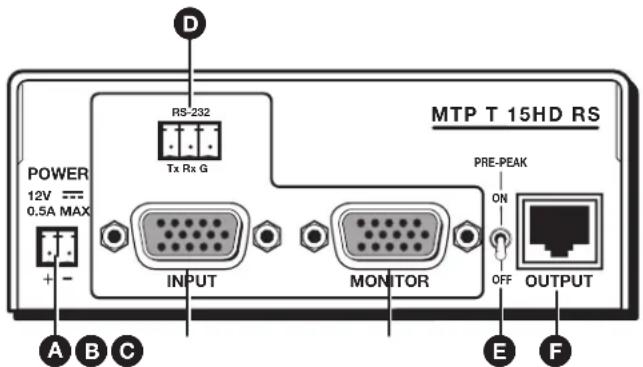
A Power Connector
B Input video connector
© Monitor (loop-through output) connector
D RS-232 connector
E Pre-Peak switch
F Output connector
Figure 3. Transmitter Rear Panel
NOTE: Control signal ground pins may be labeled as ☑ or "G". Audio ground pins may be labeled as ☑ or ▼ The wiring and function are the same, whichever way your product is labeled.
Power connector — Plug the included external 12 VDC power supply into this 2-pole captive screw connector (see Power Supply Wiring on page 12 to wire the connector).
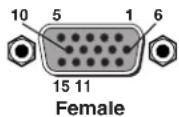
B Input video connector — Connect a video source to this 15-pin HD connector for high resolution video input (see figure 4).

Figure 4. 15-pin HD Connector
NOTES:
- Input only sync signals (no video signals) on the sync pins (13 and 14).
- For component video, use the R (R-Y) and R return pins (pins 1 and 6), G (Y) and G return pins (pins 2 and 7), and B (B-Y) and B return pins (pins 3 and 8). For S-video, use the R, R return (C-chroma), G, and G return (Y-luma) pins.
- For composite video, use the G pin and the associated return pin. For additional genlocked video signals, use the R, B, and associated return pins.
Monitor (loop-through output) connector — Connect a video monitor to this 15-pin HD connector for buffered, high resolution video loop-through output.
RS-232 connector — Connect a serial communications port to this 3.5 mm, 3-pole captive screw connector for bidirectional RS-232 communication. Wire the connector as shown in figure 5.
Connected RS-232
Device Pins
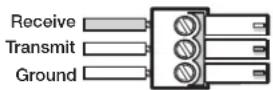
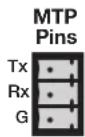
Figure 5. RS-232 Connector Wiring
E Pre-Peak switch — The Pre-Peak switch alters the twisted pair signal output to correct for long cable runs (see the table on page 4 for suggested switch settings based on the transmitted video format and transmission distance).
NOTES:
- The length of the exposed wires in the stripping process is critical. The ideal length is 3/16 inches (5 mm). If the exposed section is longer, the exposed wires may touch, causing a short circuit between them. If it is shorter, the wires can be easily pulled out, even if tightly fastened by the captive screws.
- Do not tin the wires. Tinned wire does not hold its shape and can become loose over time.
F Output connector — Connect one end of a twisted pair cable to this RJ-45 female connector on the transmitter. Connect the opposite end of the same twisted pair cable to the RJ-45 female connector on the receiver (see Twisted Pair Cable Termination on page 14 to wire the RJ-45 connectors).
ATTENTION: Do not connect these devices to a computer data or telecommunications network.
Receiver Rear Panel Features
See figure 6 and the following descriptions to identify the rear panel features on the MTP RL 15HD RS receiver.

Figure 6. Receiver Rear Panel
NOTE: Control signal ground pins may be labeled as ☑ or "G". Audio ground pins may be labeled as ☑ or ▼ The wiring and function are the same, whichever way your product is labeled.
Power connector — Plug the included external 12 VDC power supply into this 2-pole captive screw connector.
ATTENTION: Before wiring the connector, read the notes, attentions, and warnings in the Power Supply Wiring and Grounding section on the next page.
B Input connector — Connect one end of the TP cable from the transmitter or from the buffered output connector of an RL receiver to this RJ-45 female connector.
Buffered output connector — Connect one end of a TP cable to this female RJ-45 connector. Connect the opposite end of the same TP cable from the receiver to the Input RJ-45 female connector on another receiver (see Twisted Pair Cable Termination on page 14 to wire the RJ-45 connectors).
ATTENTION: Do not connect these devices to a computer data or telecommunications network.
D Output video connector — Connect a projector or other high resolution video device to this 15-pin HD connector.
NOTES:
- The video auto detection feature is sensitive to video signals with high levels, over-peaked signals, or both, which may result in video detection issues.
- Input only sync signals (no video signals) on the sync pins (13 and 14).
- For component video, use the R (R-Y) and R return pins (pins 1 and 6), G (Y) and G return pins (pins 2 and 7), and B (B-Y) and B return pins (pins 3 and 8). For S-video, use the R, R return (C-chroma) (or B, B return [see S-Video switch of K on page 8]), G, and G return (Y-luma) pins.
- For composite video, use the G pin and the associated return pin. For additional genlocked video signals, use the R, B, and associated return pins.
E RS-232 connector — Connect a serial communications port to this 3.5 mm, 3-pole captive screw connector for bidirectional RS-232 communication. Wire the connector as shown in figure 5 on page 9.
Power Supply Wiring and Grounding
Figure 7 shows how to wire and ground the connector.
CAUTION: Failure to follow these instructions may result in minor injury. The two power cord wires must be kept separate while the power supply is plugged in. Disconnect the power before wiring.
ATTENTION:
- Power supply voltage polarity is critical. Incorrect voltage polarity can damage the power supply and the transmitter or receiver. Identify the power cord negative lead by the ridges on the side of the cord.
- To verify the polarity before connection, plug in the power supply with no load and check the output with a voltmeter.
- The length of the exposed (stripped) copper wires is important. The ideal length is 3/16 inches (5 mm). Longer bare wires can short together. Shorter wires are not as secure in the connector and could be pulled out.
Extron twisted pair products can be adversely affected by electrostatic discharge (ESD) if they are not grounded correctly. To prevent malfunctions or product damage, an installer can correctly ground an Extron twisted pair product by following the diagram in figure 7.
Ground the power port by inserting one end of the grounding wire to the negative or ground pin on the power input connector.
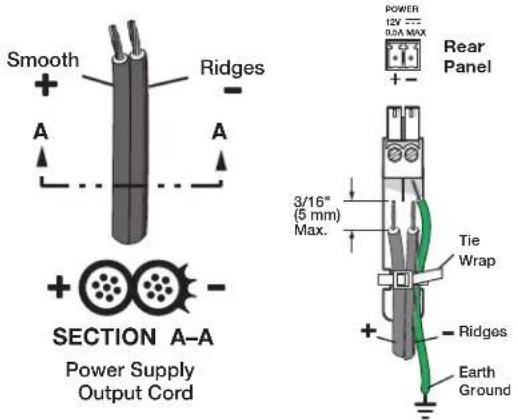
Figure 7. Power Connector Wiring and Grounding
NOTE: Do not tin the power supply leads before installing in the captive screw connector. Tinned wires are not as secure in the connectors and could be pulled out of the connector.
ATTENTION:
- This product is intended to be supplied by a Listed Power Unit marked "Class 2" or "LPS", rated 12 VDC, maximum 1.0 A. Always use a power supply supplied or specified by Extron. Use of an unauthorized power supply voids all regulatory compliance certification and may cause damage to the supply and the end product.
- The installation must always be in accordance with the applicable provisions of National Electrical Code ANSI/NFPA 70, article 725, and the Canadian Electrical Code part 1, section 16. The power supply shall not be permanently fixed to building structure or similar structure.
- Unless otherwise stated, the AC/DC adapters are not suitable for use in air handling spaces or in wall cavities. The power supply is to be located within the same vicinity as the Extron AV processing equipment in an ordinary location, Pollution Degree 2, secured to the equipment rack within the dedicated closet, podium, or desk.
As an alternative, an Extron PS 124 Universal 12 VDC Power Supply can power multiple MTPs or other Extron 12 VDC devices using only one AC power connector.
Twisted Pair Cable Termination
Figure 8 details the recommended termination of twisted pair cables with RJ-45 connectors in accordance with the TIA/EIA-T568A or TIA/EIA-T568B wiring standards. You can use either standard with CAT 5, 5e, and 6 cable, but ensure that you use the same standard on both ends of the cable.

| Pin | TIA/EIA-T568A Signalre color | TIA/EIA-T568B Wire color | |
| 1 | White-green | White-orange | Red/V. sync + |
| 2 | Green | Orange | Red/V. sync - |
| 3 | White-orange | White-green | Mono audio + |
| 4 | Blue | Blue | Green + |
| 5 | White-blue | White-blue | Green - |
| 6 | Orange | Green | Mono audio - |
| 7 | White-brown | White-brown | Blue/H. sync + |
| 8 | Brown | Brown | Blue/H. sync - |
| NOTE: When using Enhanced Skew-Free AV UTP cable, use the TIA/EIA-T568A standard only. | |||
Figure 8. Twisted Pair Cable Termination Diagram
NOTES:
- RJ-45 termination with CAT 5, 5e, or 6 cable must comply with the TIA/EIA-T568A or TIA/EIA-T568B wiring standards for all connections.
- RJ-45 termination with Skew-Free AV UTP cable must comply with TIA/EIA-T568A only.
- For proper grounding of shielded twisted pair cable, ensure the shield around each wire pair is all tied to the RJ-45 connectors on both ends, in accordance with the connector specifications provided by the manufacturer.
- Extron Enhanced Skew-Free AV cable is not recommended for Ethernet/LAN applications. This cable is specially designed for compatibility with Extron Twisted Pair products that are wired using the TIA/EIA-T568A standard.
- The green, brown, and blue wire pairs of this cable have virtually identical lengths and should be used to transmit the RGB signals.
- The orange wire pair of this cable has a different length and should not be used to transmit the RGB signals.
Skew Delay Compensation
CAT 5, 5e, and 6 cable can lead to registration errors between the red, green, and blue video signals. Pair skew can be measured with test equipment or identified by viewing a crosshatch test pattern with a critical eye to determine if either the red, green, or blue video image leads (appears to the left of) the other two video images.
NOTE: Unless the twisted pair cable is changed, the skew adjustment should need to be made only once, during installation.
SEQ Receiver Skew Compensation
The SEQ receiver has built-in skew compensation capabilities.
Adjust the equalization as follows:
- Zero the skew delay for red, green, and blue as follows:
a. Use a small screwdriver to press and hold the Select button for three seconds. The red, green, and blue LEDs all go out.
b. Release the Select button.
- Use UTP cable test equipment or examine the displayed video image with a critical eye to determine which video signal — red, green, or blue — is most shifted to the left.
NOTE: A crosshatch test pattern or a black background with vertical white lines is ideal for determining skew.
- Adjust the leftmost video signal as follows:
NOTE: The SEQ receiver cannot shift the rightmost video image to the left.
a. Use a small screwdriver to press and release the Select button until the LED lights for the left-shifted color — Red, Green, or Blue.
b. Slowly rotate the Delay control clockwise while monitoring the display. Observe that the leftmost color shifts rightward one step at a time. Continue to rotate the control until that color is properly converged.
NOTE: A 2-nanosecond adjustment is very fine. Up to 10 nanoseconds of delay may be necessary to visually detect a change in the display.
c. Use a small screwdriver to press the Select button one more time to save the most recent adjustment or allow the 10-second time-out to elapse.
- If the remaining colors are left shifted, repeat steps 2 and 3.
Non-SEQ Receiver Skew Compensation
Try the following methods to minimize or eliminate pair skew:
- Switch to Extron Enhanced Skew-Free AV UTP cable.
- Add a skew compensation cable equal to the length of pair skew to the output of the receiver.
- Install an SEQ 100 15HD Skew Equalizer to the video output of the receiver and adjust the skew for the leading video image.
EDID Configuration
The MTP 15HD RS transmitter can either record EDID from a display device, or a pre-programmed EDID can be selected using the rotary and DIP switches.
Recording a Display EDID
- Turn the rotary switch to position 0.
NOTE: The vertical frequency DIP switch has no effect in this mode.
- Connect the display device to the local monitor output connector.
NOTE: The MTP 15HD transmitter should be supplying the necessary 5 VDC to power on the display. However, to ensure that EDID is being transmitted, power on the display.
-
When ready to record to memory, press and release the recessed record button (see C on page 6) to begin the recording process. The Record LED (see B on page 6) flashes red rapidly during recording, then returns to solid green after recording is completed. At this time, the display can be disconnected. Connect the source device to the input connector.
-
Power on or restart the source device if necessary.
Using a Pre-Programmed or User-Recorded EDID
-
If you have not already done so, connect the source device to the MTP 15HD transmitter. Do not power on the source device at this time.
-
Set the front panel DIP switch (see ☑ on page 6) to the required frequency (50 or 60 Hz).
-
Set the rotary dial (see E on page 7) to the required position (see the table below). Positions 1 through E are factory installed. Position 0 is for user-recorded EDID information. Position F passes the EDID from the display connected to the loop-through output directly back to the input.
| Switch Position | Resolution |
| 0 User-recorded EDID | |
| 1 800x600 | |
| 2 1024x768 (default) | |
| 3 1280x720 | |
| 4 1280x768 | |
| 5 1280x800 | |
| 6 1280x1024 | |
| 7 1360x768 | |
| 8 1366x768 | |
| 9 1400x1050 | |
| A 1400x900 | |
| B 1600x1200 | |
| C 1680x1050 | |
| D 1920x1080 | |
| E 1920x1200 | |
| F Local monitor pass-through | |
Mounting
This section outlines the various mounting options available for the MTP 15HD RS Series transmitters and receivers:
- Tabletop Placement
• Under-Desk and Furniture Mounting - Rack Mounting
- Projector Mounting
Tabletop Placement
Attach the four provided rubber feet to the bottom of the unit and place it in any convenient location.
Under Desk and Furniture Mounting
Mount the unit under a desk or podium using an optional Extron under desk mounting kit (see www.extron.com).
To mount the unit, follow the instructions provided with the mounting kit.
Rack Mounting
UL Guidelines for Rack Mounting
The following Underwriters Laboratories (UL) guidelines are relevant to the safe installation of these products in a rack:
- Elevated operating ambient temperature — If the unit is installed in a closed or multi-unit rack assembly, the operating ambient temperature of the rack environment may be greater than room ambient temperature. Therefore, install the equipment in an environment compatible with the maximum ambient temperature (TMA = +122 °F, +50 °C) specified by Extron.
- Reduced air flow — Install the equipment in the rack so that safe operation and adequate air flow is provided to the unit.
- Mechanical loading — Mount the equipment in the rack so that a hazardous condition is not achieved due to uneven mechanical loading.
- Circuit overloading — Connect the equipment to the supply circuit and consider the effect that circuit overloading might have on overcurrent protection and supply wiring. Consider the equipment nameplate ratings when addressing this concern.
- Reliable earthing (grounding) — Maintain reliable grounding of rack-mounted equipment. Pay particular attention to supply connections other than direct connections to the branch circuit (such as the use of power strips).
Rack Mounting Procedure
These units can be mounted with optional rack systems listed on the website (see www.extron.com).
To mount the unit on a rack shelf, follow the instructions provided with the shelf accessories.
Back of the Rack Mounting Procedure
The MTP can be mounted to the rear of a rack using an optional back of rack mounting kit (see www.extron.com). The kit allows the product to be vertically mounted to the front or rear rack supports and facing either towards the front or the rear of the rack.
To mount the unit, follow the instructions provided with the kit.
Projector Mounting
Mount the unit onto a projector using an optional Extron pole mount kit. To mount the unit, follow the instructions provided with the pole mount kit.
Extron Warranty
Extron Electronics warrants this product against defects in materials and workmanship for a period of three years from the date of purchase. In the event of malfunction during the warranty period attributable directly to faulty workmanship and/or materials, Extron Electronics will, at its option, repair or replace said products or components, to whatever extent it shall deem necessary to restore said product to proper operating condition, provided that it is returned within the warranty period, with proof of purchase and description of malfunction to:
USA, Canada, South America, and Central America:
Extron Electronics
1230 South Lewis Street
Anaheim, CA 92805
U.S.A.
Japan:
Extron Electronics, Japan
Kyodo Building, 16 Ichibancho
Chiyoda-ku, Tokyo 102-0082
Japan
Europe and Africa:
Extron Europe
Hanzeboulevard 10
3825 PH Amersfoort
The Netherlands
China:
Extron China
686 Ronghua Road
Songjiang District
Shanghai 201611
China
Asia:
Extron Asia Pte Ltd
135 Joo Seng Road, #04-01
PM Industrial Bldg.
Singapore 368363
Singapore
Middle East:
Extron Middle East
Dubai Airport Free Zone
F12, PO Box 293666
United Arab Emirates, Dubai
This Limited Warranty does not apply if the fault has been caused by misuse, improper handling care, electrical or mechanical abuse, abnormal operating conditions, or if modifications were made to the product that were not authorized by Extron.
NOTE: If a product is defective, please call Extron and ask for an Application Engineer to receive an RA (Return Authorization) number. This will begin the repair process.
USA: 714.491.1500 or 800.633.9876
Europe: 31.33.453.4040
Asia: 65.6383.4400
Japan: 81.3.3511.7655
Units must be returned insured, with shipping charges prepaid. If not insured, you assume the risk of loss or damage during shipment. Returned units must include the serial number and a description of the problem, as well as the name of the person to contact in case there are any questions.
Extron Electronics makes no further warranties either expressed or implied with respect to the product and its quality, performance, merchantability, or fitness for any particular use. In no event will Extron Electronics be liable for direct, indirect, or consequential damages resulting from any defect in this product even if Extron Electronics has been advised of such damage.
Please note that laws vary from state to state and country to country, and that some provisions of this warranty may not apply to you.
| Extron Headquarters+1.800.633.9876 (Inside USA/Canada Only)Extron USA - West Extron USA - East+1.714.491.1500 +1.919.850.1000+1.714.491.1517 FAX +1.919.850.1001 FAX | Extron Europe+800.3987.6673(Inside Europe Only)+31.33.453.4040+31.33.453.4050 FAX | Extron Asia+65.6383.4400+65.6383.4864 FAX | Extron Japan+81.3.3511.7656+81.3.3511.7656 FAX | Extron China+86.21.3760.1568+86.21.3760.1566 FAX | Extron Middle East+971.4.299.1800+971.4.299.1880 FAX | Extron Korea+82.2.3444.1571+82.2.3444.1575 FAX | Extron India1.800.3070.3777(Inside India Only)+91.80.3055.3777+91.80.3055.3737 FAX |


- Safety Instructions
- Safety Instructions • English
- Chinese Traditional (繁體中文)
- Conventions Used in this Guide
- Notifications
- Specifications Availability
- Copyright
- Trademarks
- Contents
- Introduction 1
- Installation and Operation 5
- Mounting....17
- Introduction
- About this Guide
- About the MTP Transmitters and Receivers
- NOTES:
- Twisted Pair Cable Advantages
- Transmission Distance
- Installation and Operation
- Installation and Operation Overview
- Installation
- Front Panel Features
- Transmitter Rear Panel Features
- Receiver Rear Panel Features
- Power Supply Wiring and Grounding
- ATTENTION:
- Twisted Pair Cable Termination
- Skew Delay Compensation
- SEQ Receiver Skew Compensation
- Non-SEQ Receiver Skew Compensation
- EDID Configuration
- Recording a Display EDID
- Using a Pre-Programmed or User-Recorded EDID
- Mounting
- Tabletop Placement
- Under Desk and Furniture Mounting
- Rack Mounting
- UL Guidelines for Rack Mounting
- Rack Mounting Procedure
- Back of the Rack Mounting Procedure
- Projector Mounting
- Extron Warranty
- USA, Canada, South America, and Central America:
- Japan:
- Europe and Africa:
- China:
- Asia:
- Middle East:
Brand : Extron
Model : MTP T 15HD RS
Category : AV Transmitter