HDFC-100-15 - Accessoires et périphériques informatiques Opticis - Free user manual and instructions
Find the device manual for free HDFC-100-15 Opticis in PDF.


User questions about HDFC-100-15 Opticis
0 question about this device. Answer the ones you know or ask your own.
Ask a new question about this device
Download the instructions for your Accessoires et périphériques informatiques in PDF format for free! Find your manual HDFC-100-15 - Opticis and take your electronic device back in hand. On this page are published all the documents necessary for the use of your device. HDFC-100-15 by Opticis.
USER MANUAL HDFC-100-15 Opticis
System Requirements for Setup 1-2
Installation 1-3
Troubleshooting, Maintenance, Technical Support 1-4
Product Specifications 1-5
Warranty Information 1-6
Pictorials
Figure 1 – General connection diagram of HDFC-100 1-1
Welcome!
Congratulations on your purchase of the Stretch HDMI™ HDFC-100, Active Optical Cable for HDMI. This manual contains information that will assist you in installing and operating the product.
Product Description
Shipping Group
☐ HDFC-100, Active Optical Cable: One (1) unit, length as your inquire.
□ User's Manual
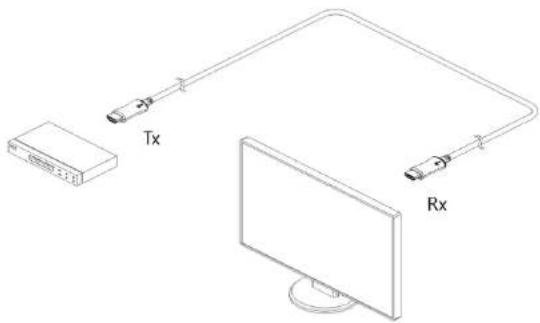
Example : DVD and HDTV Set-up
□ Tx : DVD, Blu-ray, PC, Set-top box, Video game console
□ Rx : HDTV, Computer monitor, Projector
Figure 1 – General connection diagram of HDFC-100
1-0 Manual Contents
1-1 Welcome, Product Description
System Requirements for Setup
□ Hardware requirements
■ You have to have a HDMI multimedia systems (DVD, AV Receiver, STB etc.) or graphic cards. It should support the maximum graphic resolution feature of TVs to be connected.
■ No special requirements memory size, CPU speed and chipsets, if you've already properly installed your HDMI systems.
□ Software requirements
■ No special restrictions, if you've already properly installed your HDMI / DVI systems.
☐ AC/DC Power Adapter Technical Advisory
The HDFC-100 is designed to use +5V internal power supplied through a HDMI pin (#18) from the graphic source port. To plug the Tx module into HDMI source makes the Rx module supplied over a copper wire of the hybrid cable.
Installation
Important: Please use the installation procedure below. Improper or no operation may result if the start-up sequence is not correctly followed.
Step 1
Carefully unpack the contents of the shipping group.
Step 2
Plug directly the HDMI plug of the Tx side of HDFC-100 into the HDMI receptacle of HDMI source (DVDP or Set-top Box) without power up of TV and HD devices. Do NOT recommend to use any intermediate cable or adapter between them. It may deteriorate the signal transmission performance.
Step 3
Plug the HDMI plug of the Rx side of HDFC-100 into the HDMI receptacle of a TV. Do NOT recommend to use any intermediate cable or adapter between them. It may deteriorate the signal transmission performance.
Step 4
Power ON the device of a HDMI source and a TV and check the blue power LED on Tx and Rx ON.
Step 5
If the system does not work properly, go to page 1-4, trouble shooting.
Note: HDFC-100 can utilize either the +5V power supplied through a HDMI pin (#18) from the HDMI source or the +5V power adaptor. Nonetheless, you have to confirm the power being capable to supply more than 500mA.
Note: Many HDMI sources are able to supply sufficiently DC power to operate HDFC-100.
1-2 System Requirements for Setup
1-3 Installation
Troubleshooting
The display displays only black screen.
Ensure that the HDMI ports are firmly plugged in to the HDMI source and display. Ensure that the Tx and Rx module plugged correctly to the HDMI source and display respectively. Ensure that blue power LED on Tx and Rx module are live.
Check if the HDMI source and display are powered on and properly booted. Reset the system by de-plugging and re-plugging the Tx HDMI port or Rx HDMI port.
Re-boot up the system while connecting the optical HDMI cable system.
Screen is distorted or displays noises.
Ensure connections of both plugs while disconnecting and reconnecting the optical HDMI cables.
Maintenance
No special maintenance is required for the optical HDMI cables. Ensure that the cables and power modules are stored or used in a benign environment free from liquid or dirt contamination.
There are no user serviceable parts. Refer all service and repair issues to Opticis.
Technical Support and Service
For commercial or general product support, contact your reseller. For technical service, contact Opticis by email techsupp@opticis.com or visit its website at www.opticis.com.
Product Specifications
HDFC-100 Optical HDMI Extension Cable
☐ Compliance with HDMI standard: support up to HDMI 2.0(4:2:0 color code) with 36-bit color depth and DVI 1.0 (DDC2B), fully implemented by fiber-optic communication.
☐ Extension limit: 150m (492feet) for 4K 60Hz(4:2:0), 4K 30Hz(4:4:4), 36bit color depth. (ARC mode: 20m)
☐ Graphic Transmission Bandwidth: 3.4Gbps bandwidth per graphic channel.
☐ Hybrid Fiber-optic Cable: Flame retardant PVC employing 4 fiber strands and 6 shielded copper wires.
□ Tensile load: 196N
■ Minimum bending radius: 78mm
(usually safe in assuming a minimum long-term low-stress radius not less than 15 times the cable diameter. ; EIA/TIA 568 For Fiber Optics
■ Outer diameter of cable: 5.2mm
□ Mechanical specifications of Tx and Rx module parts
■ Dimensions: 19.6mm / 11.5mm / 42.7mm (W/H/D)
□ Environmental Specifications
■ Operating temperature: 0°C to 70°C
■ Storage temperature: - 30°C to 70°C
■ Humidity: 10% to 90%
□ Certifications: CE / FCC
1-4 Troubleshooting, Maintenance, Technical Support
1-5 Product Specifications
Warranty Information
1 (One) Year Warranty
Opticis warrants this optical HDMI extension cable to be free from defects in workmanship and materials, under normal use and service, for a period of one (1) year from the date of purchase from Opticis or its authorized resellers.
If a product does not work as warranted during the applicable warranty period, Opticis shall, at its option and expense, repair the defective product or part, deliver to customer an equivalent product or part to replace the defective item, or refund to customer the purchase price paid for the defective product.
All products that are replaced will become the property of Opticis.
Replacement products may be new or reconditioned.
Any replaced or repaired product or part has a ninety (90) day warranty or the reminder of the initial warranty period, whichever is longer.
Opticis shall not be responsible for any software, firmware, information, or memory data of customer contained in, stored on, or integrated with any products returned to Opticis for repair under warranty or not.
Warranty Limitation and Exclusion
Opticis shall have no further obligation under the foregoing limited warranty if the product has been damaged due to abuse, misuse, neglect, accident, unusual physical or electrical stress, unauthorized modifications, tampering, alterations, or service other than by Opticis or its authorized agents, causes other than from ordinary use or failure to properly use the Product in the application for which said Product is intended.
Dispose of Old Electrical & Electronic Equipment
(Applicable in the European Union and other European countries with separate systems)

This symbol on the product or on its packaging indicates that this product shall not be treated as household waste. Instead it shall be handed over to the applicable collection point for the recycling of electrical and electronic equipment. By ensuring this product is disposed of correctly, you will help prevent potential negative consequences for the environment and human health, which could otherwise be caused by inappropriate waste handling of this product.
The recycling of materials will help to conserve natural resources. For more detailed information about recycling of this product, please contact your local city office, your household waste disposal service or the shop where you purchased the product.
1-6 Warranty Information
© 2016 Opticis Co., Ltd. All Rights Reserved Revision 1.1. 12, Oct, 2016
Opticis Locations
Headquarters
Opticis Co., Ltd.
# 16Fl, Kins Tower
8 Sungnam-daero, 331 beon-gil.
Bundang-gu.
Seongnam-si, Gyunggi-do, 13558
South Korea
Te I: +82 (31) 719-8033
Fax: +82 (31) 719-8032
www.opticis.com
For order support, please contact your Distributor or Reseller.
For technical support, check with the Opticis web site www.opticis.com or contact techsupp@opticis.com