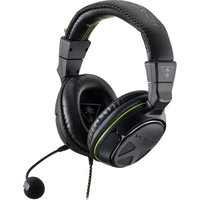
ZBX0HW68912 - Headphones TURTLE BEACH - Free user manual and instructions
Find the device manual for free ZBX0HW68912 TURTLE BEACH in PDF.


| Product Type | Wired Gaming Headset |
| Brand | Turtle Beach |
| Model | Ear Force XO FOUR (ZBX0HW68912) |
| Compatibility | Xbox One, Mobile Devices (via 3.5mm) |
| Speaker Diameter | 50 mm |
| Speaker Frequency Response | 20 Hz – 20 kHz |
| Microphone Type | Detachable Boom Condenser Mic |
| Microphone Frequency Response | 100 Hz – 10 kHz |
| Earcup Style | Around-Ear (Circumaural) |
| Sound Pressure Level (SPL) | 120 dB @ 1 kHz |
| Total Harmonic Distortion (THD) | < 1% |
| Headphone Cable Length | 3 ft (0.91 m) with 3.5mm plug |
| Weight | 10.6 oz (301 g) |
| Controls | Volume Up/Down, Chat/Game Balance, Mic Mute (on Xbox One Audio Adapter) |
| Connection to Xbox One | Xbox One Audio Adapter (included) to controller |
| Main Features | Immersive audio, social chat, mobile use, comfortable leather headband and mesh ear cushions |
| Cleaning | Wipe with a dry, soft cloth. Do not use liquids. |
| Safety Warning | Risk of hearing damage if used at high volume for extended periods. Start at low volume. |
| Spare Parts / Replaceable | Detachable microphone boom, ear cushions (subject to wear) |
| Warranty | Limited 1-year warranty for defects in materials and workmanship |
Frequently Asked Questions - ZBX0HW68912 TURTLE BEACH
User questions about ZBX0HW68912 TURTLE BEACH
0 question about this device. Answer the ones you know or ask your own.
Ask a new question about this device
Download the instructions for your Headphones in PDF format for free! Find your manual ZBX0HW68912 - TURTLE BEACH and take your electronic device back in hand. On this page are published all the documents necessary for the use of your device. ZBX0HW68912 by TURTLE BEACH.
USER MANUAL ZBX0HW68912 TURTLE BEACH
natural_image
Black XOFOUR headband with green accent lines, no visible text or symbols on the device itself.
TURTLE BEACH™
1 IN GAMING AUDIO
Designed for

XBOX ONE
natural_image
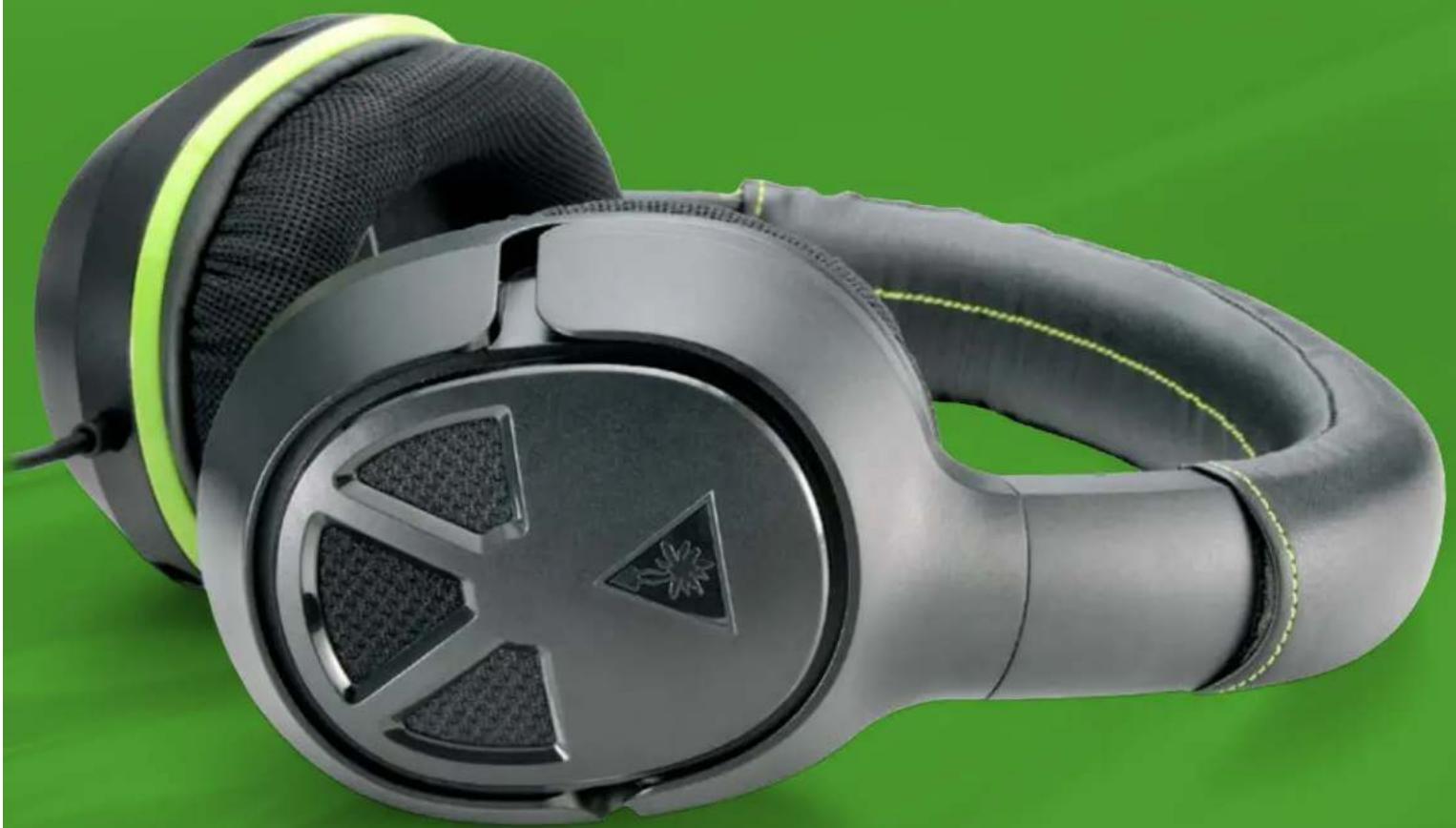
Close-up of a black and white headband headset with green accents, resting on a solid green background (no text or symbols visible)Congratulations on your purchase of the Turtle Beach Ear Force XO FOUR headset from Turtle Beach. You'll enjoy powerful gaming audio and chat on the Xbox One as well as for mobile gaming. Turtle Beach brings over 35 years of expertise to transforming your listening experience. Welcome to Turtle Beach!
natural_image
Close-up of a car's dashboard with green glass and black buttons, no visible text or symbolsTable of Contents
Package Contents P4
About the Ear Force XO FOUR Headset P5
Parts and Controls P6
Setup and Connections: Xbox One Consoles P7
Setup and Connections: Mobile Sources P9
Specifications P10
Troubleshooting Tips P11
Important Safety Information P12
Compliance / Conformity P13
Warranty P16
Package Contents
For our Knowledgebase and Technical Support please visit turtlebeach.com/support

natural_image
Line drawing of a pair of hard hat binders with star-shaped buttons (no text or symbols)A

natural_image
Top-down schematic of a vehicle dashboard with four compartments and control buttons (no text or symbols)B

C
XO FOUR Headset Detachable Boom Mixbox One Audio Adapter

D

natural_image
Two electronic device connectors shown side by side, one with USB port and black cable, the other with a separate port (no text or symbols)E
Turtle Beach Sticker USB Micro Cable
About the Ear Force XO FOUR Headset
The Ear Force® XO FOUR is the perfect audio upgrade for the Xbox One™ delivering high quality sound to get the most from your games, music, TV and movies. Stay connected to friends through Xbox LIVE® and Skype™ with clear, crisp chat audio and microphone clarity only Turtle Beach headsets deliver.
FEATURES

natural_image
Product collage showing front, side, top, and back views of a smart home with headphones and gaming consoles (no text or symbols visible)Be immersed.
Headphones are tuned to provide the highest quality audio from the Xbox One™ Audio Adapter.
Be social.
High-quality removable mic for chat on Xbox One™, Skype™ and Xbox LIVE®.
Be in control.
Adjust game and chat volume for the perfect audio mix.
Be mobile.
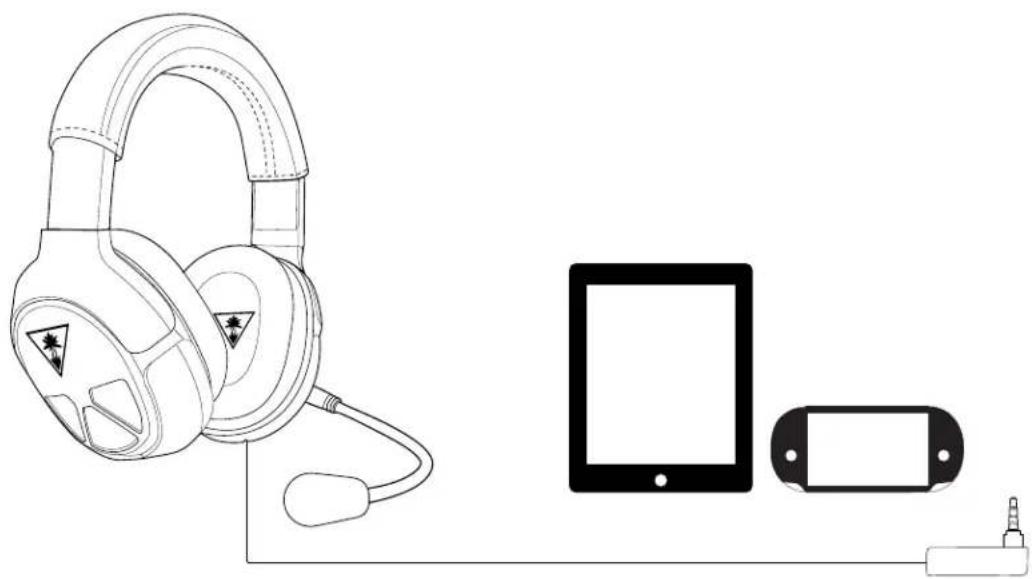
Use the XO FOUR anywhere with your tablet or portable game consoles.
Be comfortable and stylish
A soft, comfortable leather headband and mesh ear cushions provide all-day comfort. New headset look and feel complements iconic design of Xbox One™.
Be entertained.
Headsets aren't just great for games. Enjoy your favorite movies and TV shows with superior quality sound. Then crank up your tunes from music services like Xbox Music™ or Skype™ with friends!
Parts and Controls
Xbox One Audio Adapter
Mic Mute
Press to turn off the microphone.
Press again to turn it back on.
(LED will glow when muted)
Chat/Game Balance Buttons
Adjust the relative volume level to emphasize either Game (controller icon) or Chat (person icon).
Volume Up
Press to increase overall game and chat volume.

Setup and Connections: Xbox One Consoles
The Ear Force XO FOUR headset is supplied with a convenient Xbox One Audio Adapter that plugs directly into the Xbox One controller (not supplied with the headset). The adapter places game volume, chat volume and mic mute controls right where your thumbs can operate them.
Updating the Xbox One controller firmware

To use the adapter with an Xbox One controller, you first need to update the controller firmware. Perform the following steps.
- Make sure your console is on and you're signed in and connected to Xbox Live.
Note: It's important to connect to Xbox Live because your console will need the latest system update, which contains the newest controller software. If you've connected recently, your Xbox One is probably already up to date, but you should connect anyway just to be sure. If your console needs an update, you'll be prompted to install one. - Open the battery compartment on the back of the controller and remove the batteries.
- Plug the Xbox One Audio Adapter into the bottom of your controller.
- Plug in your XO FOUR (a headset is required to be plugged in so the adapter will turn on).
- Plug the big end of the included USB cable into the port on the side of the console.
- Plug the small end of the USB cable into the top of the controller.
- Instructions to install the update should automatically be displayed. Follow the instructions, and don't disconnect the USB cable while the update is in progress.
- When the update is complete, unplug the USB cable and put the batteries back into your controller.
- Press the Xbox button on the Wireless Controller to turn it on. Your controller is now up-to-date, and you're ready to use your Xbox One Audio Adapter.
Note: You only need to update your controller one time, but if you plan to use the Xbox One Audio Adapter with other Xbox One Controllers, you'll need to do this process for each controller, always make sure that all connections are firmly inserted.
Setup and Connections: Xbox One Consoles
Connecting to the Xbox One controller
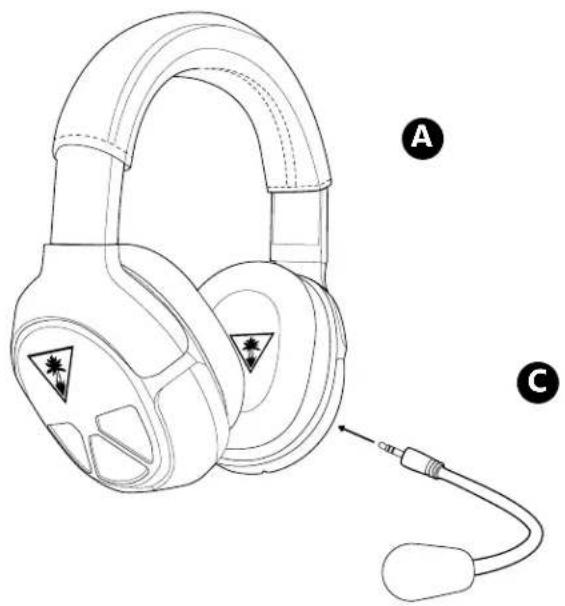
- Insert the microphone boom plug into the jack on the left earcup of the headset

natural_image
Line drawing of a pair of headphones with labeled parts A and C (no text or symbols on the devices themselves)- Insert the Xbox One Audio Adapter into the Xbox One Controller.
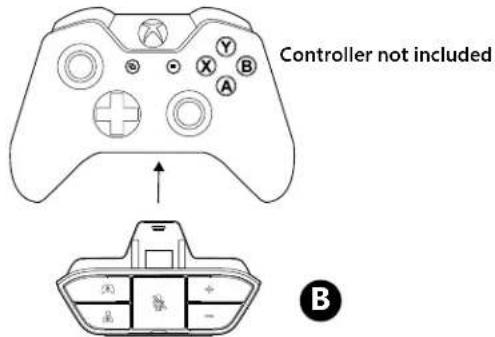
- Insert the cable from your headset into the headset jack of the Xbox One Audio Adapter.
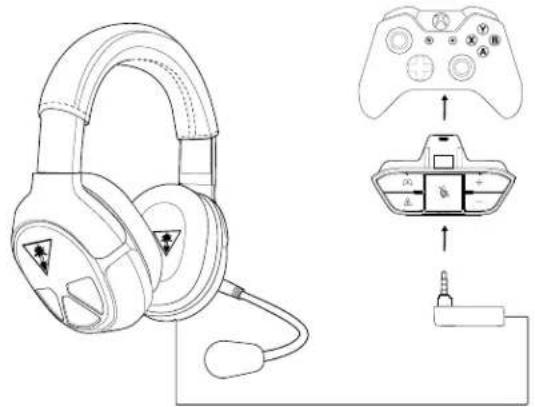
NOTE: For reliable sound, confirm that all connections are firmly inserted.
Setup and Connections: Mobile Sources
- Insert the microphone boom into the jack on the left earcup of the headset.
natural_image
Line drawing of a pair of headphones with earplands and a cord, labeled A and C (no text or symbols on the devices themselves)- Insert the cable from your headset into the headphone jack of your mobile device.
natural_image
Line drawing of headphones connected to a tablet and a battery (no text or symbols)Specifications
- Speaker diameter: 50 mm
- Speaker frequency response: 20 Hz — 20 kHz
- Condenser microphone frequency response: 100 Hz — 10 kHz
- Earcup style: Around-ear
- Sound pressure level: 120 dB @ 1 kHz
- Total harmonic distortion: <1%
- Headphone cable: 3 feet (0.91 m) with stereo 3.5 mm plug
- Weight: 10.6 oz. (301 g)
- Xbox One audio/mic connection: Xbox One Audio Adapter

natural_image
Line drawing of a pair of headphones with triangular head designs and star patterns (no text or symbols)Troubleshooting Tips
No sound/low sound
| Possible cause Solution | |
| Volume control turned down Press | the Volume Up button on the Xbox One Audio AdapterIf necessary, press the Game button of the Chat/Game Mix. |
| Loose connector Confirm that each plug is inserted firmly and fully. | |
Microphone not working
| Possible cause Solution | |
| Microphone muted Press the Mic | Mute button on the Xbox One Audio Adapter. |
| Mic boom loose | Confirm that the mic boom is fully inserted into the jack on the left earcup. |
No chat volume/low chat volume
| Possible cause Solution | |
| Chat volume control turned down | Press the Chat Button on the Chat/Game Mix of the Xbox One Audio Adapter. |
| Loose connector Confirm that each plug is inserted firmly and fully. | |
If your issue is not resolved by these steps, please visit turtlebeach.com/support
Important Safety Information
To avoid potential damage to the device, always disconnect all cables before transporting it.
WARNING: Permanent hearing damage can occur if a headset is used at high volumes for extended periods of time, so it is important to keep the volume at a safe level. Over time, your ears adapt to loud volume levels, so a level that may not cause initial discomfort can still damage your hearing. If you experience ringing in your ears after listening with the headset, it means the volume is set too loud. The louder the volume is set, the less time i takes to affect your hearing. So, please take care to listen at moderate levels.
- Before placing a headset on your ears, turn the volume down completely, then slowly increase it to a comfortable level.
- Turn down the volume if you can't hear people speaking near you.
- Avoid turning up the volume to block out noisy surroundings.
Regulatory Compliance Statements for the XO FOUR Models
Federal Communications Commission (FCC) Compliance Notices
Class B Interference Statement
This equipment has been tested and found to comply with the limits for a Class B digital device, pursuant to Part 15, Subpart B of the FCC Rules. These limits are designed to provide reasonable protection against harmful interference in a residential installation. This equipment generates, uses, and can radiate radio frequency energy and, if not installed and used in accordance with the instructions, may cause harmful interference to radio communications. However, there is no guarantee that interference will not occur in a particular installation. If this equipment does cause harmful interference to radio or television reception, which can be determined by turning the equipment off and on, the user is encouraged to try to correct the interference by one or more of the following measures:
- Reorient or relocate the receiving antenna.
- Increase the separation between the equipment and receiver.
- Connect the equipment into an outlet on a circuit different from that to which the receiver is connected.
- Consult the dealer or an experienced radio/TV technician for help.
FCC Caution:
This device complies with Part 15 of the FCC Rules. Operation is subject to the following two conditions: (1) This device may not cause harmful interference, and (2) this device must accept any interference received, including interference that may cause undesired operation.
Canadian ICES Statements
Canadian Department of Communications Radio Interference Regulations
This digital apparatus does not exceed the Class B limits for radio-noise emissions from a digital apparatus as set out in the Radio Interference Regulations of the Canadian Department of Communications. This Class B digital apparatus complies with Canadian ICES-003.
European Union and European Fair Trade Association (EFTA) Regulatory Compliance
This equipment may be operated in the countries that comprise the member countries of the European Union and the European Fair Trade Association. These countries, listed below, are referred to as The European Community throughout this document:
AUSTRIA, BELGIUM, BULGARIA, CYPRUS, CZECH REPUBLIC, DENMARK, ESTONIA, FINLAND, FRANCE, GERMANY, GREECE, HUNGARY, IRELAND, ITALY, LATVIA, LITHUANIA, LUXEMBOURG, MALTA, NETHERLANDS, POLAND, PORTUGAL, ROMANIA, SLOVAKIA, SLOVENIA, SPAIN, SWEDEN, UNITED KINGDOM, ICELAND, LICHTENSTEIN, NORWAY, SWITZERLAND
Declaration of Conformity
Marking by this symbol:

indicates compliance with the Essential Requirements of the EMC Directive of the European Union (2004/108/EC). This equipment meets the following conformance standards:
Safety: EN 60950-1: 2006 + A11: 2009 + A1: 2010 + A12: 2011 (T-Mark License)
Also Licensed for Standards:
IEC 60950-1: 2005 (2nd Edition) + Am 1: 2009 (CB Scheme Report/Certificate),
UL 60950-1: 2007 R12.11 (NRTL License),
CAN/CSA-C22.2 No. 60950-1-07 + A1: 2011 (SCC License)
EN 50332-1: 2000, EN 50332-2: 2003
Additional licenses issued for specific countries available on request
Emissions: EN 55022: 2010, CISPR: 2008
Immunity: EN 55024: 2010, EN 55024: 2010,
EN61000-4-2: (2008-12), EN61000-4-3: (2010-04), EN61000-4-4: (2011-03),
EN 61000-4-6: (2005), EN 61000-4-8: (2009-09)
These products are licensed, as required, for additional country specific standards
for the International Marketplace. Additional issued licenses available upon request.
The products are licensed, as required, for additional country specific standards for the International
Marketplace. Additional issued licenses available upon request.
Environmental: Low Voltage Directive 2006/95/EC, RoHS 2011/65/EU,
REACH 2006/1907/EC, WEEE 2012/19/EU, Packaging 94/62/EC
Warning!
This is a Class B product. In a domestic environment, this product may cause radio interference, in which case, the user may be required to take appropriate measures.
Achtung!
This symbol on the product or its packaging indicates that this product must not be disposed of with your other household waste. Instead, it is your responsibility to dispose of your waste equipment by handing it over to a designated collection point for the recycling of waste electrical and electronic equipment. The separate collection and recycling of your waste equipment at the time of disposal will help conserve natural resources and ensure that it is recycled in a manner that protects human health and the environment. For more information about where you can drop off your waste for recycling, please contact your local authority, or where you purchased your product.

Japan Compliance Statement
This is a Class B product based on the standard of the VCCI Council. If this is used near a radio or television receiver in a domestic environment, it may cause radio interference. Install and use the equipment according to the instruction manual.
Korean Compliance Statement
B급 기기 (가정용 방송통신기자재)
(Broadcasting Communication Equipment for Home Use)
As an electromagnetic wave equipment for home use (Class B), this equipment is intended to use mainly for home use and may be used in all regions.
LIMITED ONE YEAR WARRANTY FOR TURTLE BEACH PRODUCTS:
Voyetra Turtle Beach, Inc. ("VTB") warrants to the original end-user purchaser ("Purchaser") that the retail Turtle Beach hardware product herein ("Product") will be free of defects in materials and workmanship for a period of one year from the date of purchase by the Purchaser ("Warranty Period"). Any Extended Warranty or Service Plans purchased through a Retail store are not honored by VTB. The Warranty refers to the repair/replacement of a defective product during this period and not a refund.
This limited warranty is extended only to the original Purchaser of a new product, which was not sold "AS IS". It is not transferable or assignable to any subsequent purchaser. This limited warranty is applicable only in the country or territory where the Product was purchased from an authorized VTB retailer and does not apply to a Product that has been purchased as used or refurbished or was included as part of a non-VTB product.
WARRANTY SERVICE:
In the USA and CANADA Warranty Service is provided by our Turtle Beach USA offices and in all other Countries it is provided by our local International Distributors when available. Refurbished/Recertified products are sold on an AS IS basis with a 90-day Warranty or less in accordance with each vendor's policy.
VTB does not warrant uninterrupted or error-free operation of the Product and is under no obligation to support the Product for all computer operating systems or future versions of such operating systems.
If a defect should occur during the Warranty Period, Purchaser must contact VTB to obtain a Return Merchandise Authorization ("RMA") number on the basis of the dated purchase receipt. Purchaser will be responsible for shipping costs incurred in returning the defective Product to an authorized VTB service center, or to the repair facility located at VTB's corporate headquarters. VTB will not be responsible for other products or accessories included with the defective Product sent to VTB. The RMA number must be clearly indicated on the outside of the package. Packages without an RMA number will be refused by VTB or its representatives and returned to sender at the sender's expense.
In the event of a defect, Purchaser's sole and exclusive remedy, and VTB's sole liability, is expressly limited to the correction of the defect by adjustment, repair, or replacement of the Product at VTB's sole option and expense. VTB owns all Products it has replaced and all parts removed from repaired Products. VTB uses new and reconditioned parts made by various manufacturers in performing warranty repairs and building replacement products. If VTB repairs or replaces a product, the original Warranty Period is not extended, however, VTB warrants that repaired or replacement parts will be free from defects in material and workmanship for a period of thirty (30) days from the date of repair or replacement, or for the remainder of the Warranty Period, whichever is greater.
This warranty does not apply to any Product that has had its serial number altered, removed or defaced, or any Product damage caused by shipping, improper storage, accident, problems with electrical power, abuse, misuse, neglect, ordinary wear, acts of God (e.g. flood), failure to follow directions, improper maintenance, use not in accordance with product instructions, unauthorized modification or service of the Product or damage resulting from the use of the Product with hardware, software or other products not provided by or specifically recommended by VTB.
NOTES:
- Replacement Parts and accessories that are subject to "wear and tear" such as earpads, mic foam covers, talkback cables, etc. have a three (3) month Warranty.
- Replacement Parts for Discontinued Products are sold on an AS IS basis, they are not supported and come with a 30 day Warranty.
THIS LIMITED WARRANTY IS PURCHASER'S SOLE AND EXCLUSIVE REMEDY AND IS IN LIEU OF ALL OTHER WARRANTIES, EXPRESS OR IMPLIED. TO THE EXTENT PERMITTED BY APPLICABLE LAW, VTB HEREBY DISCLAIMS THE APPLICABILITY OF ANY IMPLIED WARRANTY OF MERCHANTABILITY, FITNESS FOR A PARTICULAR PURPOSE OR USE FOR THE PRODUCT. IF SUCH A DISCLAIMER IS PROHIBITED BY APPLICABLE LAW, THE IMPLIED WARRANTY IS LIMITED TO THE DURATION OF THE FOREGOING LIMITED WRITTEN WARRANTY.
IN NO EVENT SHALL VTB BE LIABLE FOR ANY INDIRECT, INCIDENTAL, SPECIAL, PUNITIVE OR CONSEQUENTIAL DAMAGES, OR DAMAGES, INCLUDING BUT NOT LIMITED TO ANY LOST PROFITS, DATA, OR LOSS OF USE, ANY THIRD PARTY CLAIMS, AND ANY INJURY TO PROPERTY OR BODILY INJURY (INCLUDING DEATH) TO ANY PERSON, ARISING FROM OR RELATING TO THE USE OF THIS PRODUCT OR ARISING FROM BREACH OF THE WARRANTY, BREACH OF CONTRACT, NEGLIGENCE, TORT, OR STRICT LIABILITY, EVEN IF VTB HAS BEEN ADVISED OF THE POSSIBILITY OF SUCH DAMAGES.
This warranty supersedes all prior agreements or understandings, oral or written, relating to the Product, and no representation, promise or condition not contained herein will modify these terms. Some states do not allow the exclusion or limitation of incidental or consequential damages, so the above exclusion or limitation may not apply to you. This warranty gives you specific legal rights. You may also have other rights, which vary from state to state. Any action or lawsuit for breach of warranty must be commenced within eighteen (18) months following the purchase of the Product.
EXCLUSIONS FROM LIMITED WARRANTY:
This Limited Warranty shall not apply and VTB has no liability under this Limited Warranty if the Turtle Beach Product:
- is used for commercial purposes such as "LAN, Call Centers" (including rental or lease);
- is modified or tampered with;
- is damaged by Acts of God, power surge, misuse, abuse, negligence, accident, wear and tear, mishandling, misapplication, or other causes unrelated to defective materials or workmanship;
- serial number is defaced, altered or removed;
- is not used in accordance with the documentation and use instructions; or
- is repaired, modified or altered by other than authorized repair centers.
- is no longer available because it was discarded.

Watch Turtle Beach product training videos at: youtube.com/TurtleBeachVideos

Product support and warranty information: TurtleBeach.com/support
- IN GAMING AUDIO
- Table of Contents
- Package Contents
- About the Ear Force XO FOUR Headset
- FEATURES
- Be immersed.
- Be social.
- Be in control.
- Be mobile.
- Be comfortable and stylish
- Be entertained.
- Parts and Controls
- Xbox One Audio Adapter
- Mic Mute
- Chat/Game Balance Buttons
- Volume Up
- Setup and Connections: Xbox One Consoles
- Updating the Xbox One controller firmware
- Connecting to the Xbox One controller
- Setup and Connections: Mobile Sources
- Specifications
- Troubleshooting Tips
- Important Safety Information
- Regulatory Compliance Statements for the XO FOUR Models
- Federal Communications Commission (FCC) Compliance Notices
- Class B Interference Statement
- FCC Caution:
- Canadian ICES Statements
- European Union and European Fair Trade Association (EFTA) Regulatory Compliance
- Declaration of Conformity
- Achtung!
- Japan Compliance Statement
- Korean Compliance Statement
- LIMITED ONE YEAR WARRANTY FOR TURTLE BEACH PRODUCTS:
- WARRANTY SERVICE:
- NOTES:
- EXCLUSIONS FROM LIMITED WARRANTY:
Brand : TURTLE BEACH
Model : ZBX0HW68912
Category : Headphones