CopyCentre C3545 RX - Copier XEROX - Free user manual and instructions
Find the device manual for free CopyCentre C3545 RX XEROX in PDF.


| Product Type | Digital Copier (CopyCentre C3545 RX) |
| Brand | Xerox |
| Copy Speed (B&W / Colour) | 45 ppm / 35 ppm |
| Maximum Duty Cycle | Up to 135,000 pages per month |
| Standard Paper Input Capacity | 50-sheet DADF, 100-sheet Bypass Tray, 520-sheet Paper Tray (total 670 sheets) |
| Optional Max Paper Input | Up to 3,140 sheets (with High Capacity Feeder) |
| Output Capacity (Standard) | 400-sheet Offsetting Centre Catch Tray (200 sheets with finisher) |
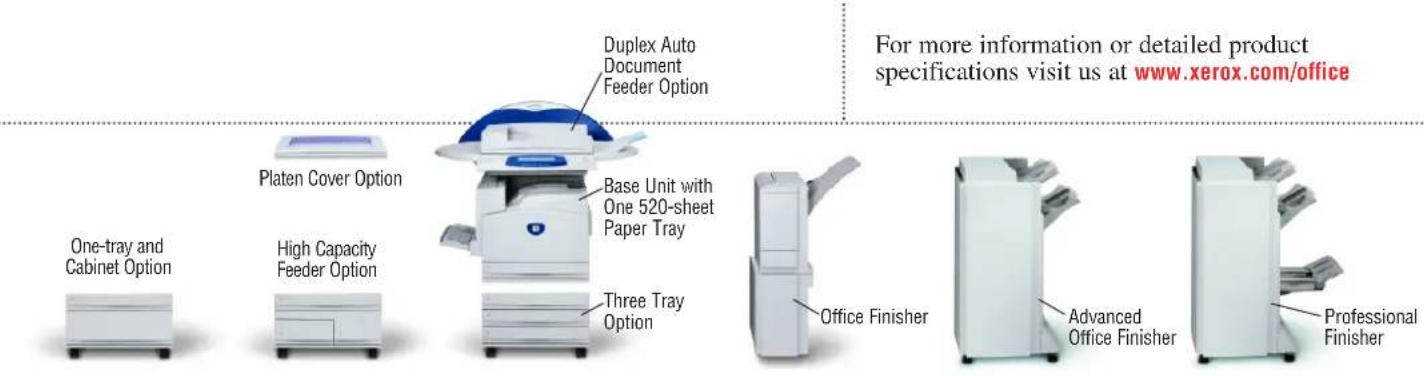
| Finisher Options | Office Finisher (stapling), Advanced Office Finisher (stapling + hole punch), Professional Finisher (stapling + hole punch + booklet maker + V-fold) |
| Memory | 256 MB RAM + 30 GB Hard Disk Drive |
| First Page Out Time (B&W / Colour) | 6.1 seconds / 8.5 seconds |
| Copy Resolution | 600 x 600 dpi |
| Print Resolution (Optional) | 600 x 600 dpi, 1200 x 1200 dpi (not on A3) |
| Processor | 733 MHz Intel Celeron |
| Standard Connectivity (Print/Scan) | 10/100 BaseT Ethernet, 10Base2, 10Base5 (via adapter), USB (optional), Wireless 802.11b (third-party) |
| Fax Options | Walk-up Fax (33.6 Kbps, 1 or 2 lines), Network Server Fax, Internet Fax |
| Scan Options | Scan to PC Desktop, E-mail, Network Scanning with CentreWare Scanning Services |
| Security Features | Image Overwrite Protection, Secure Print, Secure Fax, Network Authentication, NIAP Common Criteria |
| Copy Features | Auto duplex, colour touch screen, electronic pre-collation, auto tray selection, booklet creation, multi-up, covers insertion, store/recall jobs |
| Print Features (Optional) | Secure print, delay print, booklet creation, watermark, image quality adjustments, transparency interleave |
| Supported Media Weight (All Trays) | Up to 220 gsm |
| Maximum Paper Size | A3 |
| Colour Use Control | Password protected or group-based access; costs only for colour pages used |
| Service and Support | Unrivalled customer support network; genuine Xerox supplies available |
Frequently Asked Questions - CopyCentre C3545 RX XEROX
User questions about CopyCentre C3545 RX XEROX
0 question about this device. Answer the ones you know or ask your own.
Ask a new question about this device
Download the instructions for your Copier in PDF format for free! Find your manual CopyCentre C3545 RX - XEROX and take your electronic device back in hand. On this page are published all the documents necessary for the use of your device. CopyCentre C3545 RX by XEROX.
USER MANUAL CopyCentre C3545 RX XEROX
Plus colour
when you needit
Keeps your Office
performing
WorkCentre® Pro
C2128 / C2636 / C3545
advanced multifunction system
CopyCentre®
C2128 / C2636 / C3545
digital copier
At Xerox we continue to create innovative multifunction systems with unparalleled performance, versatility and intelligence that break through your office productivity barriers.
Xerox delivers the right solution
Whether you need full-featured copying, network printing, e-mail, fax, scan capabilities or digital copying only, with Xerox, you have options. And you can count on us to deliver the exact configuration your office requires. Not to mention the exceptional print quality you expect.
Even more versatility
You can choose the output speed and configuration that meet your needs. And take advantage of network connectivity tools that help you produce and distribute your documents more efficiently. We've even included a wide array of media handling and advanced finishing options to further enhance your office productivity.
On top of all this
We've packed in today's most crucial high performance, high impact feature – colour. You choose when you need it, where you need it and as much as you need of it. Brilliant.
Get the functionality
you need
Whether you're looking for a digital copier or a full-featured multifunction system – or capabilities in between – Xerox innovation delivers all the performance and essential features you need. Robust and reliable, modular and upgradeable, these products are designed to meet your needs today – and into the future.
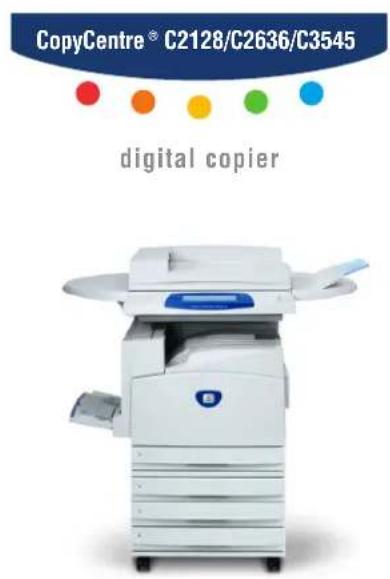
For full-featured copying choose a high-speed CopyCentre Digital Copier.
- Black and white copying and optional fax for your everyday needs
• Full-colour copying when you choose
• Automatic duplex capability makes copying two-sided documents faster and easier
• Advanced finishing options save time, money and ensure professional results
• Electronic sorting, booklet creation, queue management, build job, programme ahead and more - All the traditional features of your black and white copier like multi-up, image repeat, booklet scanning, reduce/enlarge, covers, transparency interleaf, negative image and more...with the power of colour
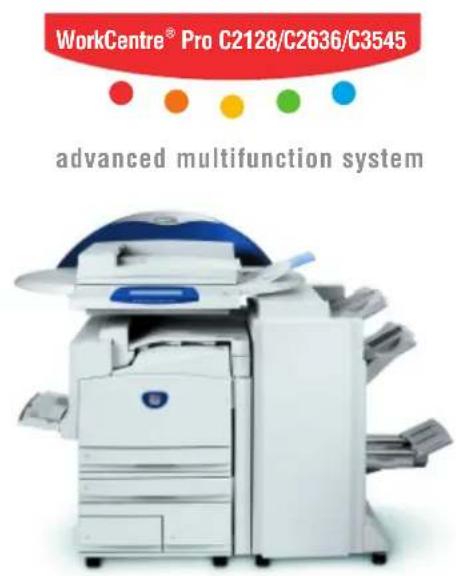
Combines powerful capabilities into an intelligent multitasking unit. Your office benefits from Xerox innovation that bridges the hard copy and digital worlds.
- All the features of the CopyCentre, plus...
• Network printing meets large workgroup requirements for speed, efficiency and security -
Scan to desktop, network file server and to document management applications
-
Internet fax, network server fax, embedded fax increase efficiency, enhance security and decrease costs
• E-mail integration for fast distribution of documents
• Network management tools enable simple installation and worry-free administration
Outstanding productivity.
Uncompromising quality.
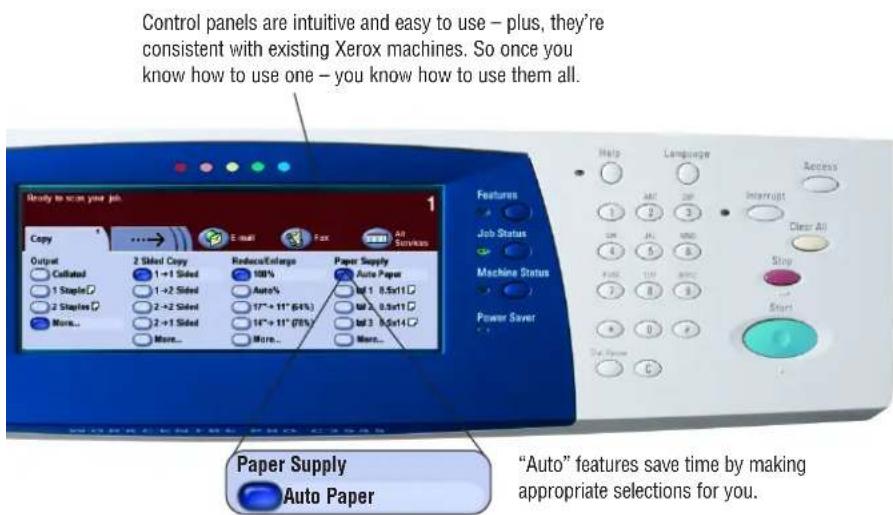
Stay on the fast track
Have deadlines to meet? Don't worry. Quick digital processing, multi-tasking capabilities and an easy-to-operate interface help you get the job done on time, every time.
- Choice of print and copy speeds up to 45 ppm black and white and 35 ppm colour meet the demands of busy workgroups.
- True multi-tasking operation means multiple users can scan, process, print, transmit faxes and manage the queue at the same time – a helpful feature in maximising business efficiency.
- Technical advances, a short paper path and fewer moving parts prevent paper jams, reduce service calls and extend operating life.
- State-of-the-art design and engineering makes these devices extremely reliable. You are alerted ahead of time when to replace consumables. These SMart Kit components are easy to change and have high yields, keeping downtime to a minimum.
Print to impress.
The proof is in the printout – impeccable detail, sharp images, outstanding colour. Printing so clear, it makes a remarkable impression.
- 1200 x 1200 dpi resolution makes images sharp and clear. An impressive image can speak volumes for presentations.
- Single-pass technology improves image quality and the Trickle Charge Development system maintains print consistency all day long – you won't have to do a quality check at the eleventh hour.
- Remarkable detail, subtle half-tones and clarity of fine lines – our next-generation Emulsion Aggregate Toner delivers it. Plus, printed paper is easy to write on and posting notes adhere properly.
- With Intermediate Belt Transfer, you get better registration and more consistent image transfer on all media. The results? Outstanding quality and longer lasting part life – another cost efficiency for you.
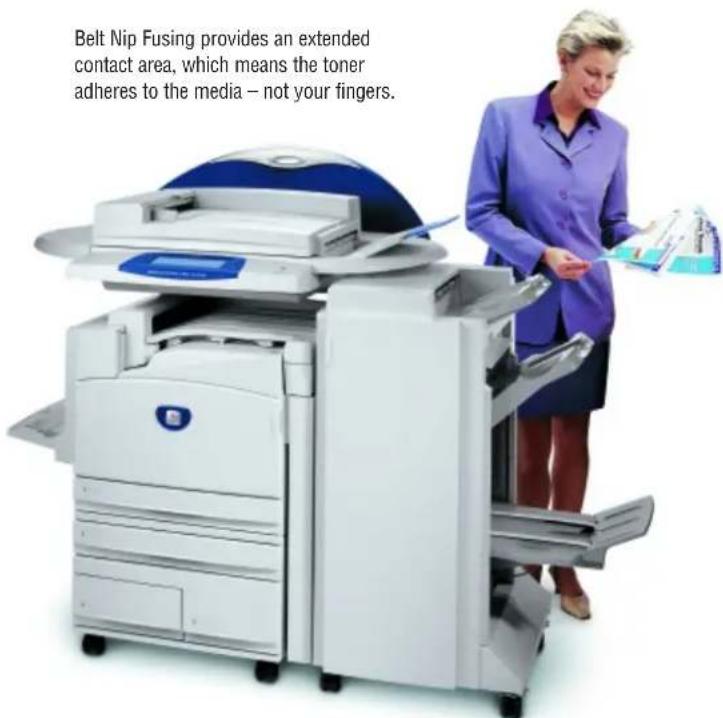
Belt Nip Fusing provides an extended contact area, which means the toner adheres to the media – not your fingers.
Versatility that makes
natural_image
Exterior view of a white and blue medical or office scanner with a dome-shaped top (no visible text or symbols)

Copy

Scan


Fax
Flexible fit your needs.
These copiers and multifunction systems are great at adapting to change. If your business grows, they can grow with you. Modularity of design makes it easy to upgrade or customise with more powerful features and functionality – you've got plenty of options.
- Started off with a CopyCentre digital copier and need more functionality? No problem. You can upgrade to a WorkCentre Pro advanced multifunction system.
- Rather just add on features? You can do that too. Choose flexible fax options including PSTN fax; versatile scan options including e-mail; or other options including additional memory, USB printing or enablement for third party access control devices and coin machines.
work easier.
Advanced finishing and paper handling options
Produce professional documents in-house quickly and easily. Our finishers eliminate the effort and expense of collation, folding and stapling by doing it for you.
natural_image
Exterior view of a modern office typewriter with a blue dome cover (no visible text or symbols)Office Finisher
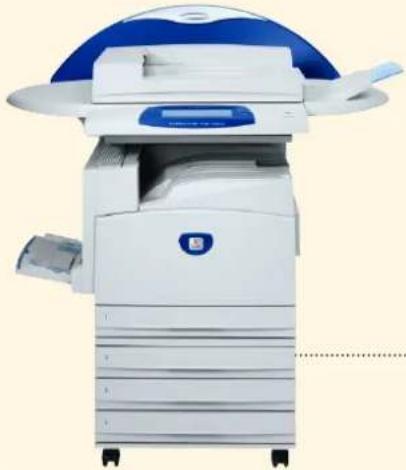
provides 50-sheet multi-position stapling.
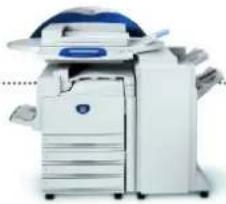
natural_image
Exterior view of a white office machine with blue and white panels (no visible text or symbols)Advanced Office Finisher offers increased finishing capacity, 50-sheet multiposition stapling, and hole punch.
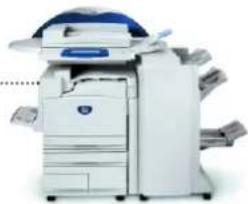
natural_image
Exterior view of a modern office typewriter with a blue dome cover (no visible text or symbols)Professional finisher
adds finishing capacity, saddle-stitched booklets, V-fold brochures, plus stapling and hole punch.

Sort and collate
Save valuable time

Stapling
Multiple position and placement to enhance usability

Hole punch
Finish the document ready for binding

Folding
V-fold brochures are printed, folded and ready for distribution
Booklet
Saddle-stitch booklets in-house to reduce costs and eliminate delays
Three tray configurations are available. All offer an array of media and size choices and automatic paper selection.
- If you're printing a lot, why keep reloading paper or switching media in the trays? Both CopyCentre or WorkCentre Pro offer tray options that support 1,140 sheets, 2,180 sheets or 3,140 sheets.
- Our trays support a wide range of media – from heavyweight (up to 220 gsm in all trays) to A3-size paper. So if you're making a booklet, use a heavier cover to add impact. For knockout performance and the most reliable feeding, try our full line of Xerox papers and printing media.
Robust security features
Security is always a concern. And we don't take any chances. We provide a host of standard and optional security features that let you restrict access, track usage and protect your data.
• Image Overwrite Protection deletes images on the hard drive after job completion.
• Network Authentication restricts access to scan, e-mail or server fax features.
- Secure Print and Secure Fax hold jobs until an authorised user releases them for printing.
• NIAP Common Criteria Certification meets international IT security standards.
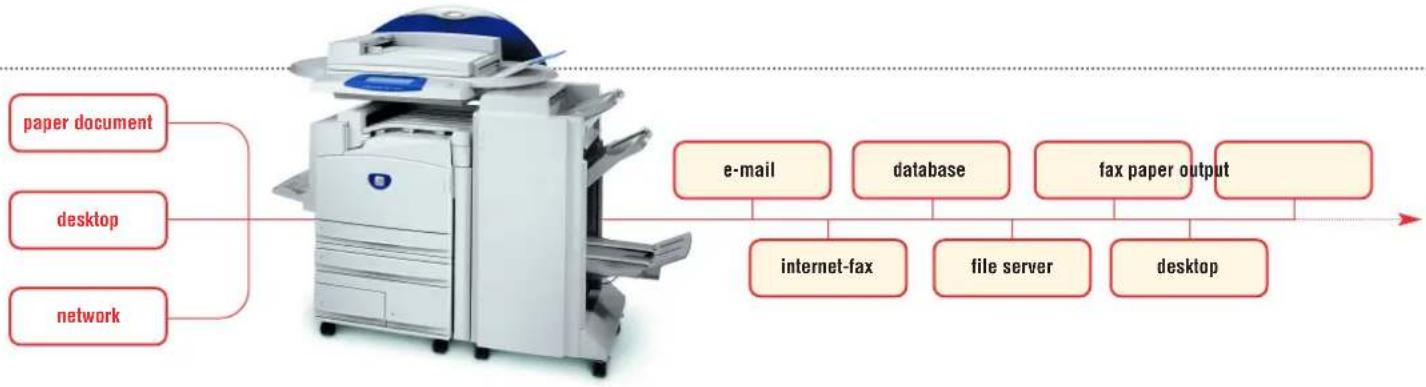
flowchart
graph LR
    A["paper document"] --> B["Paper"]
    C["desktop"] --> B
    D["network"] --> B
    B --> E["e-mail"]
    B --> F["database"]
    B --> G["fax paper output"]
    E --> H["internet-fax"]
    F --> I["file server"]
    G --> J["desktop"]
Go from paper to digital to anywhere
When it comes to workflows, there's even more versatility and options. You can convert paperwork to digital files. Then distribute them anywhere – in any format. Or just store them on the network for your next big meeting. It's up to you.
- Scan to PC desktop, network file server, document management system, e-mail, fax, or to almost any other destination with high-quality, ultra-compressed colour, grey scale or black and white.
- Internet and e-mail network capabilities allow immediate delivery to numerous recipients worldwide, efficiently and inexpensively.
• E-mail integration with your servers allows easy search of e-mail addresses when distributing a document.
- CentreWare® Scanning Services software converts, distributes and routes scanned documents to where they're needed, in whatever format required.
Network device management tools
Keeping control of your network is easy.
We give you everything you need to manage and monitor your networked devices.
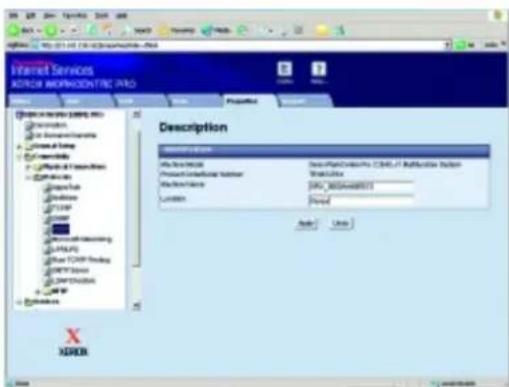
- Xerox CentreWare® software, for example CentreWare Web, simplifies installation and network administration and provides quick access to device and job status, accounting information and more.
• Built-in Web pages allow you to manage, configure and troubleshoot devices from anywhere using a web browser.
Leverage your investments
By exploring our versatile fax options you can choose the fax solution that makes the most of your investment.
- Telephone fax is available for your CopyCentre and WorkCentre Pro to enable traditional fax workflows.
- Choose internet fax to avoid costly long distance charges and busy signals by sending documents via the network.
- Fax server integration eliminates the need for dedicated phone lines by leveraging a network fax server.
More integrated value-added solutions
Flexible, open architecture allows easy integration with leading third-party software developers. An array of Xerox partner solutions are available to enhance the functionality of your Xerox multifunction system, including:
- Faxing. Integrate network fax capabilities, including desktop control, to increase your efficiency and save money.
- Accounting. Streamline and digitise processes such as billing, identify savings opportunities, find new sources of value, and simplify work processes.
- Scanning. Provide digital safeguarding to allow scan and secure transmission of highly sensitive documents by fax or e-mail.
Black and white performance and features.
Plus, convenient colour.
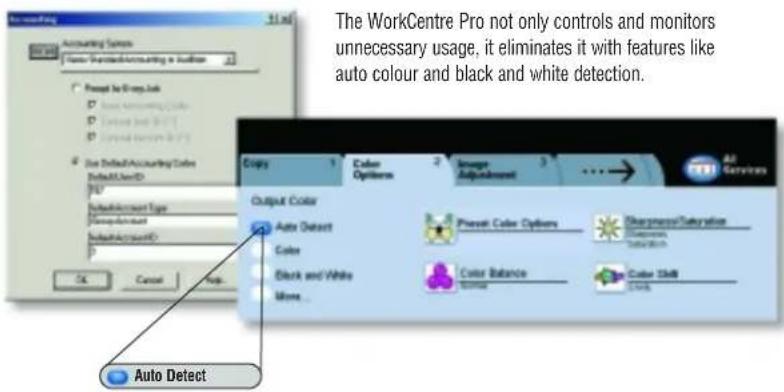
Colour makes perfect business sense
Enjoy all the features of traditional black and white devices – with the added bonus of colour. We make colour selectable only when you need it. You'll find colour on the CopyCentre and WorkCentre Pro to be much less expensive – and faster – than a typical inkjet printer or taking the job to offsite copy shops.
- You can create cost efficiencies by doing most of your copying and printing in black and white.
- You're only charged for colour when you use colour. Individual colour pages within a document are charged at the colour rate – everything else at the black and white rate.
- Black and white print costs are comparable to other black and white systems in this speed range.
- Access to colour options can be password protected or granted to specific groups – so you're in control of who uses it.
- Internal Auditron limits, tracks usage, and generates reports of walkup copy and print features.
Command attention with colour
Use it a little – or a lot. But most importantly, use colour when it counts. To add impact to critical documents. Or to help readers retain information. It's a powerful feature and it can dramatically increase your effectiveness in business situations.
• Studies show motivation and response to sales messages increase up to 80% when featured in colour.
- 75% of companies with in-house colour capability say they would feel inconvenienced without it.
- 83% of business professionals believe colour in logos and presentations makes them appear more successful.
- Readership and message recall increase by 80% when colour is used to highlight key information.
| CONFIGURATIONS | CopyCentre® C2128 | CopyCentre® C2636 | CopyCentre® C3545 | WorkCentre® Pro C2128 | WorkCentre® Pro C2636 | WorkCentre® Pro C3545 | |
| Speed (black and white / colour) | 28 / 21 ppm | 36 / 26 ppm | 45 / 35 ppm | 28 / 21 ppm | 36 / 26 ppm | 45 / 35 ppm | |
| Maximum Duty cycle | Up to 135,000 pages per month | ||||||
| Paper Handling Paper input | 50-sheet Duplex Automatic Document Feeder, 100-sheet Bypass Tray, 520-sheet Paper TrayOne Tray Module with Cabinet option (Total 1,140 sheets):Adds one 520-sheet Paper TrayThree Tray Module option (Total 2,180 sheets):Adds three 520-sheet Paper TraysHigh Capacity Feeder option (Total 3,140 sheets):Adds one 520-sheet Paper Tray and two Trays with total 2,000-sheet capacity | ||||||
| Paper output Standard | 400-sheet Offsetting Centre Catch Tray (200 sheets with finisher option) | ||||||
| Optional | Office Finisher: 1,000-sheet stacker, 50-sheet multi-position staplingAdvanced Office Finisher: 3,000-sheet stacker and 500-sheet top tray, 50-sheet multi-position stapling and hole punchProfessional Finisher: 1,500-sheet stacker and 500-sheet top tray, 50-sheet multi-position stapling and hole punch, saddle-stitch booklet maker, V-fold brochure maker | ||||||
| Copy Pre-collation memory | 256 MB plus 30 GB hard disk drive | ||||||
| First page out time | 6.1 seconds black and white / 8.5 seconds colour | ||||||
| Copy Resolution | 600 x 600 dpi | ||||||
| Copy Features | Auto duplex, colour touch screen interface, electronic pre-collation, automatic tray selection; build job, negative/mirror image, automatic booklet creation, multi-up, auto RE, mixed-size originals, auto registration, covers insertion, sample set, bound copying, store and recall job programming | ||||||
| Print Print Resolution | NA | 600 x 600 dpi, 1200 x 1200 dpi ^1 | |||||
| Processor / PDL | NA | 733 MHz Intel ^TM Celeron ^TM / PostScript ^TM 3rdand PCL5c emulations | |||||
| Connectivity | NA | 10/100 BaseT Ethernet, 10Base2,10Base5 (via adapter), USB (optional), Wireless Ethernet 802.11b (via third-party adapters) | |||||
| Print Features | Secure print, delay print, sample set, booklet creation, cover selection, paper selection by attribute, multi-up, watermark, banner sheets, image quality, fit to new paper size, transparency interleave, output tray selection, store and recall driver settings | ||||||
| Fax Fax Options | Walk-up fax (33.6 Kbps, one-line and two-line options) | Walk-up Fax, Network Server Fax, Internet Fax | |||||
| Scan Scan Options | NA | Scan-to-E-mail, Network Scanning with E-mail, Scan to PC Desktop, CentreWare Scanning ServicesVarious Xerox Partner Solutions | |||||
| Other Options | Foreign Device Interface, Image Overwrite Security | Foreign Device Interface, Image Overwrite Security, Network Accounting Enablement, 128 MB Memory Upgrade | |||||
Unrivalled service and support.
Behind every Xerox product is a large network of customer support that's unrivalled in the industry and available when you need it. Xerox service professionals use leading-edge technologies to keep you up and running. They're even linked to the engineers who designed your product, so you can be confident when you choose Xerox. Genuine Xerox supplies are always easily available.

United Kingdom & Eire
Tel: 00 800 9000 9090
1200 x 1200 dpi not supported on A3 paper
© 2004 XEROX CORPORATION. All rights reserved. XEROX ^® The Document Company ^® , the digital X ^® . WorkCentre ^® . CopyCentre ^® and CentreWare ^® are trademarks of or licensed to XEROX CORPORATION. In support of Xerox's environmental leadership goals, these models may contain some recycled components that are reconditioned. ENERGY STAR ^® is a U.S. registered mark. As an ENERGY STAR ^® Partner, Xerox Corporation has determined that these products meet the ENERGY STAR ^® guidelines for energy efficiency. Product information and/or specifications are subject to change without notice. 11/05 W45BR-01EC
- Keeps your Office
- performing
- WorkCentre® Pro
- CopyCentre®
- Xerox delivers the right solution
- Even more versatility
- On top of all this
- Get the functionality
- you need
- For full-featured copying choose a high-speed CopyCentre Digital Copier.
- Combines powerful capabilities into an intelligent multitasking unit. Your office benefits from Xerox innovation that bridges the hard copy and digital worlds.
- Outstanding productivity.
- Uncompromising quality.
- Stay on the fast track
- Print to impress.
- Versatility that makes
- Flexible fit your needs.
- work easier.
- Advanced finishing and paper handling options
- Robust security features
- Go from paper to digital to anywhere
- Network device management tools
- Leverage your investments
- More integrated value-added solutions
- Black and white performance and features.
- Plus, convenient colour.
- Colour makes perfect business sense
- Command attention with colour
- Unrivalled service and support.
Brand : XEROX
Model : CopyCentre C3545 RX
Category : Copier