
VS0116 - KVM switch ATEN - Free user manual and instructions
Find the device manual for free VS0116 ATEN in PDF.


| Product Type | 16-Port Video Splitter with Audio |
| Brand | ATEN |
| Model | VS0116 |
| Video Bandwidth | 250 MHz |
| Maximum Resolution | 1920 x 1440 @ 60Hz |
| Supported Video Modes | VGA, SVGA, XGA, SXGA, Multisync |
| DDC Support | DDC, DDC2, DDC2B (Port 1 only) |
| Audio Support | Stereo audio via 3.5mm jacks |
| Number of Output Ports | 16 (video + audio) |
| Maximum Cascading Depth | 3 levels (supports thousands of monitors) |
| Maximum Cable Distance (splitter to monitor) | 65 meters |
| Video Gain Adjustment | Low, Medium, High settings |
| Housing Material | Metal (all metal exterior) |
| Rack Mountable | Yes, 19" (1U) |
| Dimensions (L x W x H) | 43.2 x 15.7 x 4.4 cm |
| Weight | 2.8 kg |
| Power Supply | DC 5.3V, 2.4A adapter |
| Power Consumption | 3.3W max |
| Operating Temperature | 0°C to 50°C |
| Storage Temperature | -20°C to 60°C |
| Humidity | 0% to 80% RH, non-condensing |
| Regulatory Compliance | FCC Class A, RoHS |
| Package Contents | VS-0116 unit, VGA/audio cable (1.8m), power adapter, rack mount kit, quick start guide, user manual |
| Maintenance | Clean with dry cloth; avoid liquids. No user-serviceable parts inside. |
| Safety | Use only supplied power adapter. Ensure all devices are properly grounded. Do not disassemble. |
| Spare Parts & Repairability | Power adapter available. Contact dealer for repairs; no user-replaceable internal parts. |
Frequently Asked Questions - VS0116 ATEN
User questions about VS0116 ATEN
0 question about this device. Answer the ones you know or ask your own.
Ask a new question about this device
Download the instructions for your KVM switch in PDF format for free! Find your manual VS0116 - ATEN and take your electronic device back in hand. On this page are published all the documents necessary for the use of your device. VS0116 by ATEN.
USER MANUAL VS0116 ATEN
natural_image
Black rectangular electronic device labeled '16_VIDEO SPLITTER' with visible branding and control buttons (no readable text beyond branding)USER MANUAL
VS-0116
Read this guide thoroughly and follow the installation and operation procedures carefully in order to prevent any damage to the units and/or any devices that connect to them.
This package contains:
◆ 1 VS-0116 16 Port Video Splitter with Audio
◆ 1 VGA/Audio Cable (1.8m)
◆ 1 Power Adapter
◆ 1 Rack Mount Kit
◆ 1 Quick Start Guide
◆ 1 User Manual
If anything is damaged or missing, contact your dealer.
Copyright© 2006 ATEN® International Co., Ltd.
Manual Part No. PAPE-1277-100G
Printing Date: 03/2006
ATEN and the ATEN logo are trademarks of ATEN International Co., Ltd. All rights reserved. All other trademarks are the property of their respective owners.
Note: This is an FCC Class A product. In a domestic environment this product may cause radio interference in which case the user may be required to take adequate measures.
This equipment has been tested and found to comply with the limits for a Class A digital device, pursuant to Part 15 of the FCC Rules. These limits are designed to provide reasonable protection against harmful interference when the equipment is operated in a commercial environment. This equipment generates, uses and can radiate radio frequency energy and, if not installed and used in accordance with the instruction manual, may cause harmful interference to radio communications. Operation of this equipment in a residential area is likely to cause harmful interference in which case the user will be required to correct the interference at his own expense.
This product is RoHS compliant.
OVERVIEW
The VS-0116 16 Port Video Splitter with Audio duplicates the video and audio signals from an input source (i.e. a computer) and routes them to up to 16 output devices (monitors, projectors, etc.). Furthermore, it can be cascaded to additional ATEN video splitters to support thousands of monitors.
The VS-0116 goes beyond being merely a duplicator, however, in that it also enhances the video signals over distances up to 65 meters.
The VS-0116 provides fast, flexible, reliable solutions for installations that require audio-visual information to be delivered to multiple destinations – such as:
- Broadcasting information to public locations (news, airline and train schedule and arrival/departure information)
♦ Sporting events
◆ Theater and lecture overflow rooms - Classroom and company training facilities.
The VS-0116 is your best choice to achieve multiple, high-resolution video signals over long distances.
FEATURES
◆ Supports up to 250 MHz bandwidth
◆ High resolution video—1920x1440@60Hz
◆ Supports VGA, SVGA, XGA, SXGA, and Multisync video cards and monitors
◆ Supports DDC, DDC2, DDC2B (Port 1 only)
♦ Stereo audio support
- Maintains high video resolution over long distances
◆ Duplicates and enhances video signals up to 65m (max.)
◆ Cascades 3 levels to support thousands of monitors
- Adjustable video gain ensures high quality video
Hot pluggable
- All metal exterior case
- No additional hardware or software needed
♦ Rack mountable in 19" system rack (1U)
APPLICATIONS
- Ideal for Public Broadcasting, Remote Monitoring, and Classroom and Training Facilities
- Cost effective solutions for professional applications, school campuses and large scale video splitting
◆ Perfect for television wall displays, computer shops, and individual seat mounted video displays in buses and trains
SYSTEM REQUIREMENTS
- A VGA, SVGA, XGA, SXGA, or Multisync monitor for each output port you will be using capable of the highest resolution that you will be using in the installation.
◆ Speakers for each output port you will be using (optional). - A video cable with HDB-15 connectors (male on one end and female on the other end) for the computer you will be installing.
◆ An audio cable for the computer you will be installing.
Note: 1. If you connect a DDC type monitor, all other monitors must be able to support the highest resolution that the DDC monitor can provide.
2. These products are designed for VGA, SVGA, XGA, SXGA, and Multisync monitors. They are neither suitable for CGA and EGA monitors nor should they be used with MONO type monitors that use digital video signals.
3. For best video quality, we recommend using ATEN brand video cables.
VS-0116 FRONT VIEW
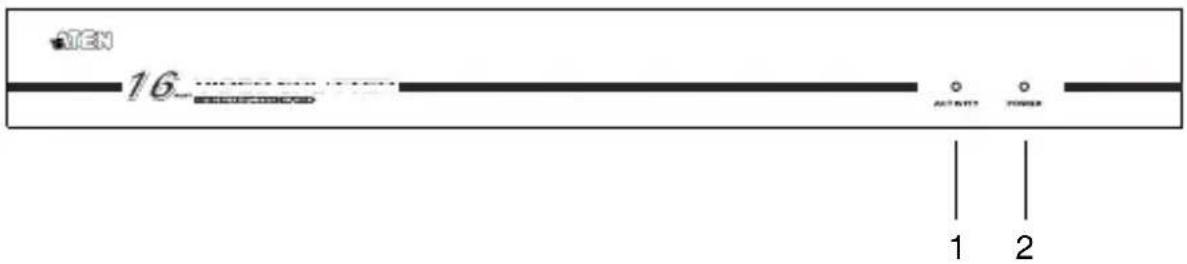
| No. | Description Function |
| 1 | Activity LED Lights to indicate that the unit is in use. |
| 2 | Power LED Lights to indicate that the unit is receiving power. |
VS-0116 REAR VIEW
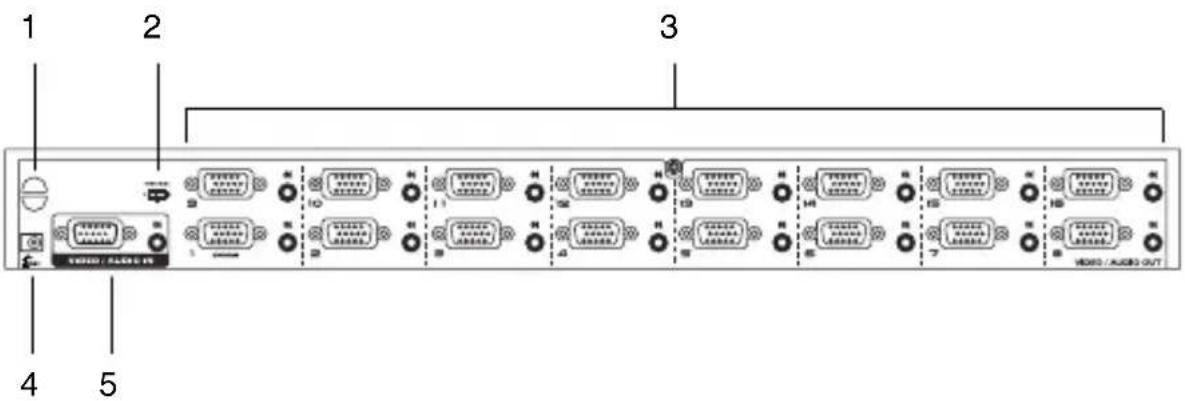
| No. | Description Function | |
| 1 | Cable Tie Slot Attach a cable tie here to fasten the cables. | |
| 2 | Video Gain Switch Low, Medium, and High settings provide fine tuning of the VGA video signal quality. | |
| 3 | Video / Audio Output Ports | The video and audio cables from the monitors and speakers plug into any available ports.* |
| 4 | Power Jack The Power Adapter cable plugs in here. | |
| 5 | Video / Audio Input Port | If this is a stand alone (Single Stage) unit, or the First Stage unit of a cascaded installation, the cables from the computer's video and speaker output ports plug in here.If this is a cascaded unit, the cables from one of the Video/Audio Output ports of the parent unit plug in here. |
* If you connect a DDC type monitor, all other monitors must be able to support the highest resolution that the DDC monitor can provide.
HARDWARE INSTALLATION
BEFORE YOU BEGIN

- Make sure that the power to all the devices you will be connecting up has been turned off.
- Make sure that all devices you will be connecting up are properly grounded.
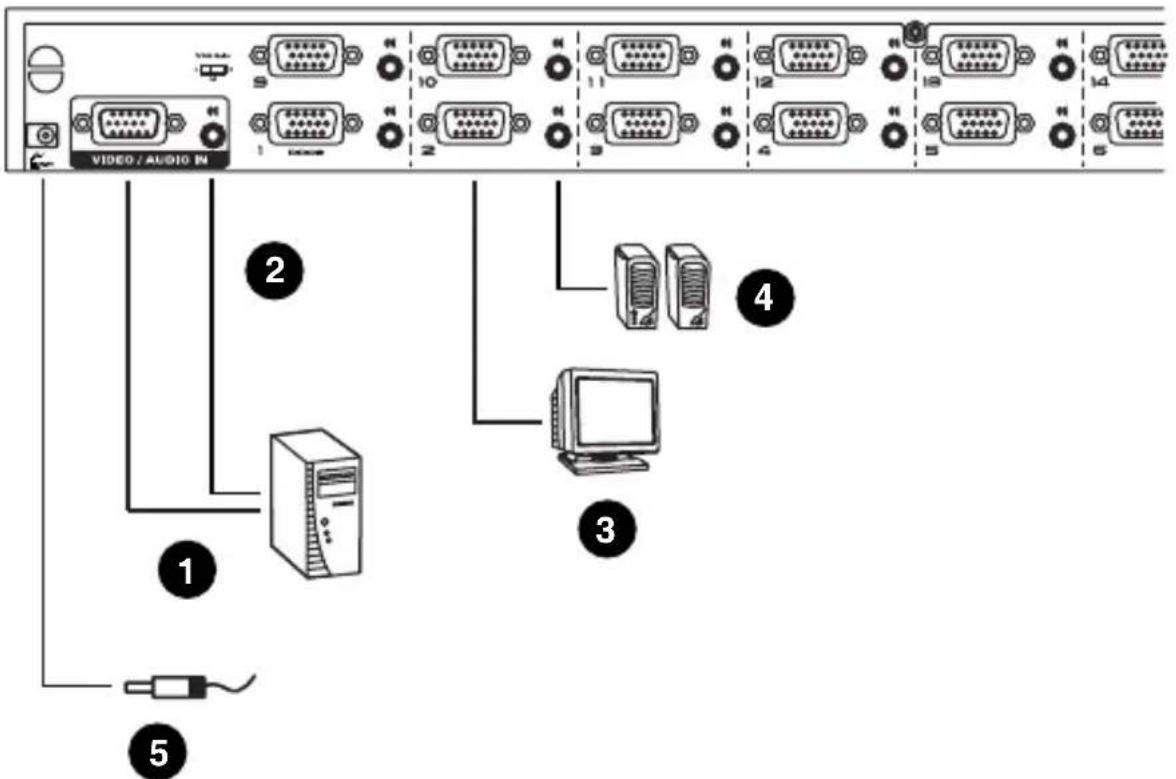
SINGLE STAGE
Setting up the Video Splitter is simply a matter of plugging in the cables. Refer to the installation diagram on the next page (the numbers in the diagram correspond to the numbered steps) and do the following:
- Use a high density HDB-15 male/female VGA cable to connect the computer's video port to the video input port on the VS-0116.
- Use a male/male audio cable to connect the computer's speaker port to the audio input port on the VS-0116.
- Connect a monitor to any available video output port on the VS-0116.
- Connect speakers to the audio output port that corresponds to the video output port you connected in step 3.
Note: Repeat steps 3 and 4 for any additional monitor(s) and speakers that you wish to connect.
- Plug the power adapter that came with the VS-0116 into an AC power source, then plug the power adapter cable into the splitter's Power Jack.
- Power on the attached equipment.
Single Stage Installation Diagram:
CASCADING
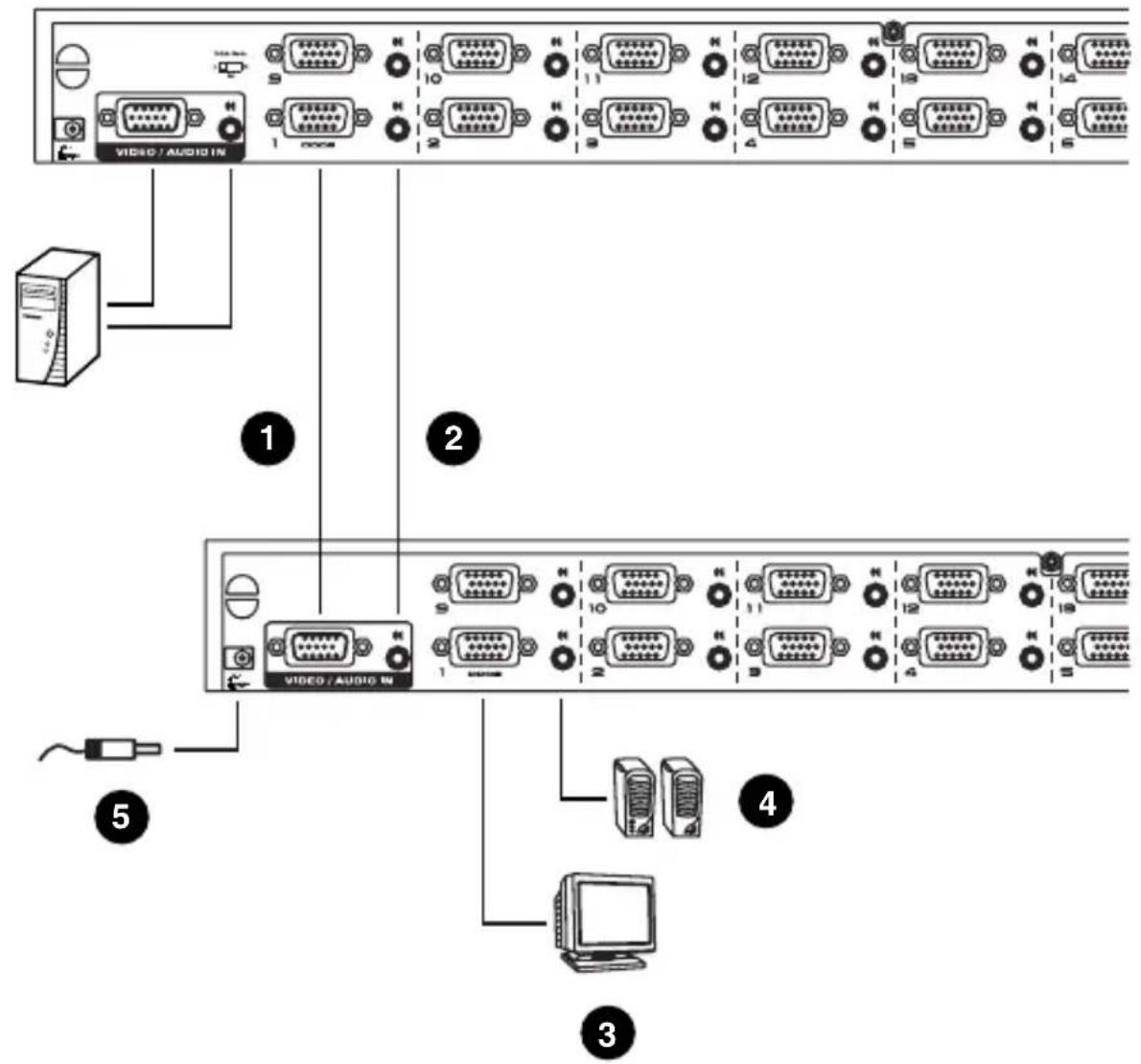
To provide video display to additional monitors, the VS-0116 supports cascading up to 3 levels of video splitters.
Cascading additional Video Splitters involves the following six steps. Refer to the installation diagram on the next page (the numbers in the diagram correspond to the numbered steps) and do the following:
- Use a high density HDB-15 male/female VGA cable to connect a video output port on the parent video splitter to the video input port on the child VS-0116.
- Use a male/male audio cable to connect an audio output port on the parent video splitter to an audio input port on the child VS-0116.
Note: Repeat steps 1 and 2 for any additional video splitter(s) you wish to cascade.
-
Connect a monitor to any available video output port on the child VS-0116.
-
Connect speakers to the audio output port that corresponds to the video output port you connected to in step 3.
Note: Repeat steps 3 and 4 for any additional monitor(s) and speakers that you wish to connect.
-
Plug the power adapter(s) that came with the VS-0116(s) into an appropriate AC power source, then plug the power adapter cable(s) into the Video Splitter's power jack(s).
-
Power on the attached equipment.
Cascaded Installation Diagram:
| Model VS-0116 | |||||
| Connection Computer 1 | |||||
| Monitors 16 | |||||
| Connectors Input 1 x HDB-15 (male) | 1 x 3.5mm Mini Stereo Jack (female) | ||||
| Output 16 x HDB-15 (female) | 16 x 3.5mm Mini Stereo Jack (female) | ||||
| Power DC Jack | |||||
| LEDs Activity 1 (green) | |||||
| Power 1 (blue) | |||||
| Signal Type VGA | |||||
| Video Bandwidth 250 MHz | |||||
| Cable Distance (splitter to monitor) | 65m (maximum) | ||||
| Video 1920x1440@60Hz; DDC2B (Port 1 only) | |||||
| Power Supply | DC 5.3V, 2.4A | ||||
| Power Consumption | 3.3W (maximum) | ||||
| Environment | Operating Temperature | 0°~50°C | |||
| Storage Temperature | -20°~60°C | ||||
| Humidity | 0 ~ 80% RH, Non-condensing | ||||
| Physical Properties | Housing | Metal | |||
| Weight 2.8 kg | |||||
| Dimensions (L x W x H) | 43.2 x 15.7 x 4.4 cm | ||||
| Pin Signal Pin Signal Pin Signal | |||||
| 1 Red Video 6 Analog Ground 11 ID0 | |||||
| 2 Green Video 7 Analog Ground 12 ID1 | |||||
| 3 Blue Video 8 Analog Ground 13 Horizontal Sync | |||||
| 4 ID2 9 NC 14 Vertical Sync | |||||
| 5 | Ground | 10 | Ground | 15 | ID3 |
GETTING HELP
If you need to contact ATEN technical support with a problem, visit our website at www.aten.com.
LIMITED WARRANTY
IN NO EVENT SHALL THE DIRECT VENDOR'S LIABILITY EXCEED THE PRICE PAID FOR THE PRODUCT FROM DIRECT, INDIRECT, SPECIAL, INCIDENTAL, OR CONSEQUENTIAL DAMAGES RESULTING FROM THE USE OF THE PRODUCT, DISK, OR ITS DOCUMENTATION.
The direct vendor makes no warranty or representation, expressed, implied, or statutory with respect to the contents or use of this documentation, and especially disclaims its quality, performance, merchantability, or fitness for any particular purpose.
The direct vendor also reserves the right to revise or update the device or documentation without obligation to notify any individual or entity of such revisions, or update. For further inquiries, please contact your direct vendor.
Brand : ATEN
Model : VS0116
Category : KVM switch