
Stream 8 5901ca - Tablet HP - Free user manual and instructions
Find the device manual for free Stream 8 5901ca HP in PDF.


| Product Type | Tablet |
| Model | HP Stream 8 5901ca |
| Processor | Intel Z3735G 1.30 GHz (1.80 GHz burst mode) quad-core |
| Display | 8.0-inch (1280x800) IPS LED multi-touch, tempered glass, anti-glare |
| Memory | 1 GB DDR3L (onboard, non-accessible) |
| Storage | 32 GB eMMC |
| Cameras | Front: 2.0 MP fixed-focus; Rear: 5.0 MP auto-focus |
| Audio | Two speakers, one microphone, CTIA headset jack |
| Wireless Connectivity | WLAN 802.11 b/g/n, Bluetooth 4.0, 3G (GSM/WCDMA), GPS |
| Ports | Micro USB 2.0 (charging & data), headphone/mic combo, microSD up to 32 GB |
| Battery | 1-cell 4000 mAh, non-removable, USB charging |
| Power Adapter | 5 V / 2 A AC adapter |
| Operating System | Microsoft Windows 8.1 |
| Sensors | Accelerometer, G-sensor, GPS (59xx models) |
| Dimensions (Portrait) | 20.9 cm x 12.4 cm x 0.9 cm (8.2 in x 4.9 in x 0.4 in) |
| Weight | 410 g (0.90 lb) for 59xx models |
| Operating Temperature | 5°C to 35°C (41°F to 95°F) |
| Serviceability (User Replaceable) | AC adapter and USB cable |
| Maintenance & Cleaning | Wipe with a soft, dry cloth. Avoid liquids and abrasive cleaners. |
| Safety Warning | Do not block air vents; use on hard flat surface. Avoid skin contact with AC adapter during use. |
| Spare Parts (Major) | Back cover, middle frame, battery, system board, display assembly, speakers, cameras, antennas |
Frequently Asked Questions - Stream 8 5901ca HP
User questions about Stream 8 5901ca HP
0 question about this device. Answer the ones you know or ask your own.
Ask a new question about this device
Download the instructions for your Tablet in PDF format for free! Find your manual Stream 8 5901ca - HP and take your electronic device back in hand. On this page are published all the documents necessary for the use of your device. Stream 8 5901ca by HP.
USER MANUAL Stream 8 5901ca HP
HP Stream 8 Tablet (model numbers 58xx and 59xx)
Maintenance and Service Guide IMPORTANT! This document is intended for HP authorized service providers only.
© Copyright 2014 Hewlett-Packard Development Company, L.P.
Bluetooth is a trademark owned by its proprietor and used by Hewlett-Packard Company under license. Intel is a U.S. registered trademark of Intel Corporation. Microsoft and Windows are U.S. registered trademarks of Microsoft Corporation. SD Logo is a trademark of its proprietor.
The information contained herein is subject to change without notice. The only warranties for HP products and services are set forth in the express warranty statements accompanying such products and services. Nothing herein should be construed as constituting an additional warranty. HP shall not be liable for technical or editorial errors or omissions contained herein.
First Edition: October 2014
Document Part Number: 791739-001
Product notice
This guide describes features that are common to most models. Some features may not be available on your tablet.
Software terms
By installing, copying, downloading, or otherwise using any software product preinstalled on this tablet, you agree to be bound by the terms of the HP End User License Agreement (EULA). If you do not accept these license terms, your sole remedy is to return the entire unused product (hardware and software) within 14 days for a refund subject to the refund policy of your place of purchase.
For any further information or to request a full refund of the tablet, please contact your local point of sale (the seller).
Safety warning notice

WARNING! To reduce the possibility of heat-related injuries or of overheating the device, do not place the device directly on your lap or obstruct the device air vents. Use the device only on a hard, flat surface. Do not allow another hard surface, such as an adjoining optional printer, or a soft surface, such as pillows or rugs or clothing, to block airflow. Also, do not allow the AC adapter to contact the skin or a soft surface, such as pillows or rugs or clothing, during operation. The device and the AC adapter comply with the user-accessible surface temperature limits defined by the International Standard for Safety of Information Technology Equipment (IEC 60950).
Table of contents
1 Product description .... 1 2 External component identification .... 3 3 Illustrated parts catalog .... 5
Locating the model number, product number, and serial number 5
Tablet major components 6
Miscellaneous parts 7
Sequential part number listing 9
4 Removal and replacement preliminary requirements 14
Tools required 14
Service considerations 14
Plastic parts 14
Cables and connectors 14
Grounding guidelines 15
Electrostatic discharge damage 15
Packaging and transporting guidelines 16
Workstation guidelines 16
5 Removal and replacement procedures 18
Tablet component replacement procedures 18
Back cover 18
Middle frame 20
Battery 21
3G antenna board 22
Rear-facing webcam 24
Front-facing webcam 26
Button board 27
Display panel cable 28
Speakers 29
System board 30
WWAN antenna 33
WLAN antenna 34
6 Using HP PC Hardware Diagnostics (UEFI) 36
Downloading HP PC Hardware Diagnostics (UEFI) to a USB device 36
7 Specifications 37
8 Backup and recovery 38
Backing up your information 38
Performing a system recovery 38
Changing the boot device order 39
Using Windows Refresh or Windows Reset 39
9 Power cord set requirements 40
Requirements for all countries 40
Requirements for specific countries and regions 40
10 Recycling 42
Index 43
1 Product description
| Category Description | |
| Product Name HP Stream 8 Tablet model number 59xx (3G compatible) | |
| HP Stream 8 Tablet model number 58xx (Wi-Fi compatible) | |
| Processor | Intel® Z3735G 1.30-GHz (1.80-GHz burst mode) quad core processor soldered-on-circuit (SoC) |
| Panel | 8.0-in (1280×800), AntiGlare (AG), In panel switching (IPS), light-emitting diode (LED), multi-touch, wide-viewing angle, 5-point capacitive, auto-rotate (selectable), tempered-glass, backlit, TouchScreen display panel |
| Memory On-board; non-accessible | |
| 1-GB DDR3L | |
| Mass storage Supports 32-GB eMMC | |
| Audio and video Two speakers | |
| One microphone | |
| CTIA headset only | |
| Supports MP3, OGG, Flac, AAC, and AMR | |
| 2.0-MP, fixed-focus front-facing webcam | |
| 5.0-MP, auto-focus rear-facing webcam | |
| Supports MPEG1, MPEG2, MPEG4-XVID, H264, H263, WMV7/8/9, VC-1, VP8, AVS, MJPEG, VP6, WMV1/2, DIVX | |
| Supports JPG, BMP, GIF, and PNG photos | |
| Sensor Accelerometer | |
| G-sensor | |
| GPS (HP Stream 8 Tablet model numbers 59xx only) | |
| SAR (HP Stream 8 Tablet model numbers 59xx only) | |
| Wireless networking Integrated wireless options: | |
| WLAN: 802.11 b/g/n | |
| 3G data: GSM 900-/1800- or 850-/1900-MHz | |
| WCDMA: 900-/2100- or 850-/1900-MHz | |
| Bluetooth: 4.0, WAPI, diversity antenna | |
| Wi-Fi variant only, WLAN: 802.11 b/g/n | |
| WWAN: Huawei MU739 | |
| External expansion Integrated micro SD Card Reader expandable to 32-GB | |
| Ports | Audio: headphone jackMicro USB 2.0 port supporting charging and data |
Power requirements Supports a 1-cell, 4000-mAh battery (non-removable), USB charging
Category Description
Supports a 5-V/2-A AC adapter with DC plug and localized cable plug support
Operating system Preinstalled: Microsoft Windows 8.1
Serviceability End user replaceable part: AC adapter and USB cable
2 External component identification
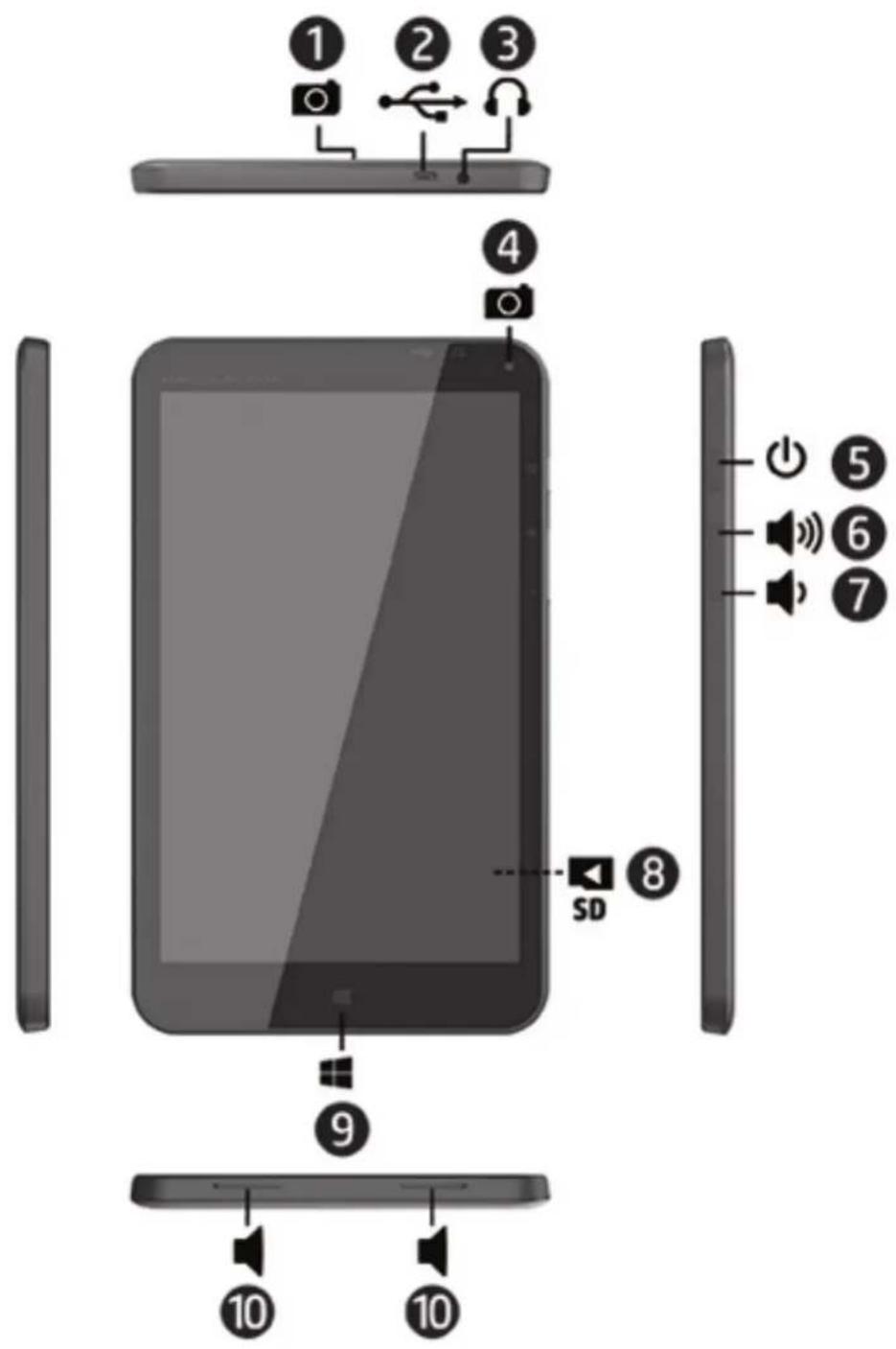
| Item Description Item Description | |
| (1) Rear-facing webcam (6) Volume up button | |
| (2) Micro USB 2.0 port (7) Volume down button | |
| (3) Audio-out (headphone)/Audio-in (microphone) jack | (8) Micro SD Card Reader slot |
| (4) Front-facing webcam (9) Windows button | |
| (5) Power button (10) Speakers (2) | |
3 Illustrated parts catalog

NOTE: HP continually improves and changes product parts. For complete and current information on supported parts for your tablet, go to http://partsurfer.hp.com, select your country or region, and then follow the on-screen instructions.
Locating the model number, product number, and serial number
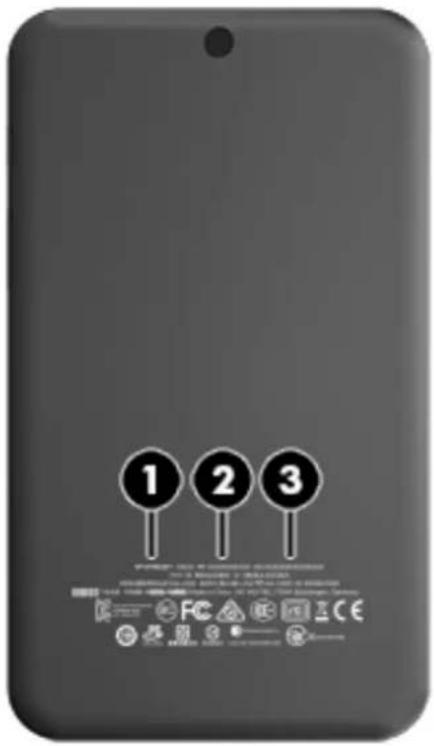
The tablet model number (1), product number (2), and serial number (3) are located on the tablet back cover. This information may be needed when travelling internationally or when contacting support.
Tablet major components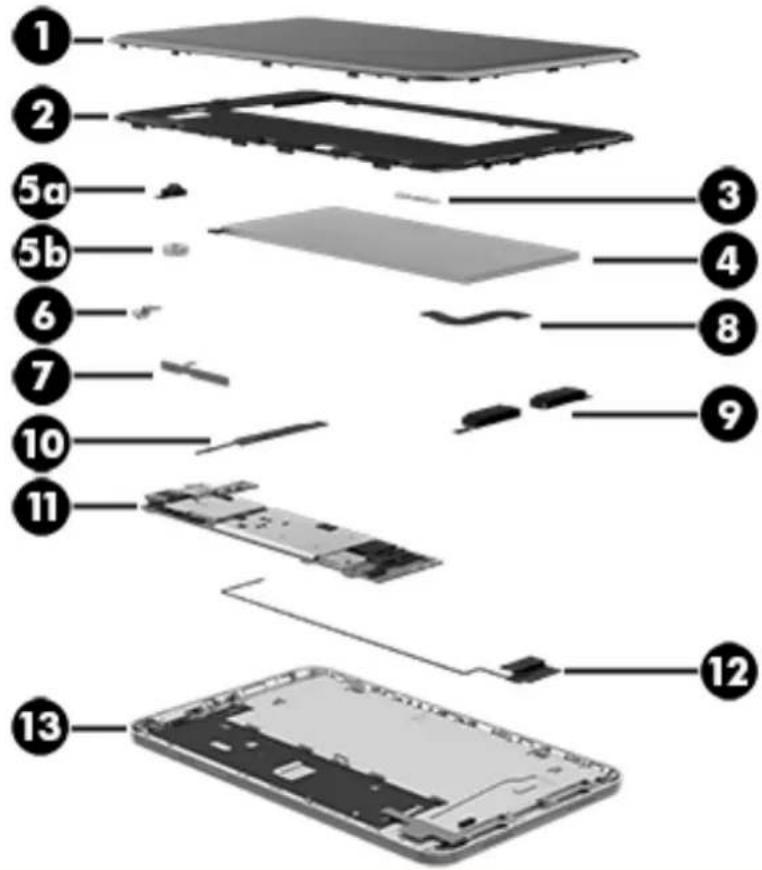
| Item Component Spare part number | ||
| (1) Back cover 796809-001 | ||
| (2) Middle frame: | ||
| For use on HP Stream 8 Tablet 59xx models 796810-002 | ||
| For use on HP Stream 8 Tablet 58xx models 796810-001 | ||
| (3) 3G antenna board (for use only on HP Stream 8 Tablet 59xx models; includes double-sided adhesive) | 796813-001 | |
| (4) Battery, 4000-mAh, USB-charging (includes cable and double-sided adhesive) 795066-001 | ||
| (5a) Rear-facing webcam (5.0-MP, auto-focus; includes cable and double-sided adhesive) | 796815-001 | |
| (5b) Rear-facing webcam bracket 796816-001 | ||
| (6) Front-facing webcam (2.0-MP, fixed-focus; includes cable) 796814-001 | ||
| Front-facing webcam shield (not illustrated) 796817-001 | ||
| (7) Button board (includes cable, power button actuator, and volume button actuators) | 800024-001 | |
| (8) Display panel cable 796819-001 | ||
| (9) Speakers (include left and right speakers and cables) 796818-001 | ||
| (10) WLAN antenna (includes cable, transceiver, and double-sided adhesive) 796822-001 | ||
| (11) System board equipped with an Intel Z3735G 1.30-GHz (1.80-GHz burst mode) quad core processor, a graphics subsystem with UMA memory, 1.0-GB of system memory, 32-GB eMMC storage, and the Microsoft Windows 8.1 operating system: | ||
| For use on HP Stream 8 Tablet 59xx models in Asia Pacific countries and regions (includes 3G connectivity) | 796812-371 | |
| For use on HP Stream 8 Tablet 59xx models in Europe, the Middle East, and Africa (includes 3G connectivity) | 796812-021 | |
| For use on HP Stream 8 Tablet 59xx models in Latin America (includes 3G connectivity) 796812-161 | ||
| For use on HP Stream 8 Tablet 59xx models in North America (includes 3G connectivity) 796812-001 | ||
| For use on HP Stream 8 Tablet 59xx models in the People's Republic of China (includes 3G connectivity) | 796812-AA1 | |
| For use on HP Stream 8 Tablet 58xx models in Asia Pacific countries and regions (includes Wi-Fi connectivity) | 799858-371 | |
| For use on HP Stream 8 Tablet 58xx models in North America (includes Wi-Fi connectivity) 799858-001 | ||
| For use on HP Stream 8 Tablet 58xx models in the People's Republic of China (includes Wi-Fi connectivity) | 799858-AA1 | |
| (12) WWAN antenna (includes cable, transceiver, and double-sided adhesive) 796823-001 | ||
| (13) Display panel assembly, 8.0-in (1280×800), AG, IPS, LED, multi-touch, wide-viewing angle, 5-point capacitive, auto-rotate (selectable), tempered-glass, backlit, TouchScreen (includes bezel and TouchScreen cable) | 796811-001 | |
Miscellaneous parts
| Component Spare part number | |
| 5-V / 2-A AC adapter: | |
| For use in Australia 757043-001 | |
| For use in Europe 747779-001 | |
| For use in India 757282-001 | |
| For use in North America 745229-001 | |
| For use in the People's Republic of China 757280-001 | |
| For use in the United Kingdom 747780-001 | |
| HP Stream 8 Tablet 59xx model equipped with a 8.0-in (1280×800), AG, IPS, LED, multi-touch, wide-viewing angle, 5-point capacitive, auto-rotate (selectable), tempered-glass, backlit, TouchScreen display panel, an Intel Z3735G 1.30-GHz (1.80-GHz burst mode) quad core processor, a graphics subsystem with UMA memory, 1.0-GB of system memory, 32-GB eMMC storage, 3G connectivity, and the Microsoft Windows 8.1 operating system: | |
| For use in the Adriatics region (English with multiple local languages) | 794636-F81 |
| For use in Africa (English with multiple local languages) | 794636-DE1 |
| For use in Asia Pacific countries and regions | 794636-371 |
| For use in the Baltic region (English with multiple local languages) | 794636-DT1 |
| For use in Belgium 794636-A41 | |
| For use in Bulgaria 794636-261 | |
| For use in Canada 794636-DB1 | |
| For use in the Czech Republic and Slovakia 794636-FL1 | |
| For use in Denmark, Finland, and Norway 794636-DH1 | |
| For use in Europe, the Middle East, and Africa 794636-021 | |
| For use in France 794636-051 | |
| For use in Germany 794636-041 | |
| For use in Greece 794636-151 | |
| For use in Hong Kong 794636-AC1 | |
| For use in Hungary 794636-211 | |
| For use in Israel 794636-BB1 | |
| For use in Italy 794636-061 | |
| For use in Latin America 794636-161 | |
| For use in the Netherlands 794636-331 | |
| For use in North America | 794636-001 |
| For use in the People's Republic of China | 794636-AA1 |
| For use in Poland | 794636-241 |
| For use in Portugal | 794636-131 |
| For use in Romania | 794636-271 |
| For use in Russia | 794636-251 |
| For use in Saudi Arabia | 794636-DL1 |
| For use in Singapore | 794636-AF1 |
| For use in South Korea | 794636-AD1 |
| For use in Spain 794636-071 | |
| For use in Switzerland | 794636-BG1 |
| For use in the United Kingdom | 794636-031 |
| HP Stream 8 Tablet 58xx model equipped with a 8.0-in (1280×800), AG, IPS, LED, multi-touch, wide-viewing angle, 5-point capacitive, auto-rotate (selectable), tempered-glass, backlit, TouchScreen display panel, an Intel Z3735G 1.30-GHz (1.80-GHz burst mode) quad core processor, a graphics subsystem with UMA memory, 1.0-GB of system memory, 32-GB eMMC storage, Wi-Fi connectivity, and the Microsoft Windows 8.1 operating system: | |
| For use in Asia Pacific countries and regions | 794635-371 |
| For use in Canada 794635-DB1 | |
| For use in North America | 794635-001 |
| For use in the People's Republic of China | 794635-AA1 |
Component Spare part number
Screw Kit 796824-001
USB extension cable 745230-001
Sequential part number listing
| Spare part number Description |
| 745229-001 5-V / 2-A AC adapter for use in North America |
| 745230-001 USB extension cable |
| 747779-001 5-V / 2-A AC adapter for use in Europe |
| 747780-001 5-V / 2-A AC adapter for use in the United Kingdom |
| 757043-001 5-V / 2-A AC adapter for use in Australia |
| 757280-001 5-V / 2-A AC adapter for use in the People's Republic of China |
| 757282-001 5-V / 2-A AC adapter for use in India |
| 794635-001 HP Stream 8 Tablet 58xx model equipped with a 8.0-in (1280×800), AG, IPS, LED, multi-touch, wide-viewing angle, 5-point capacitive, auto-rotate (selectable), tempered-glass, backlit, TouchScreen display panel, an Intel Z3735G 1.30-GHz (1.80-GHz burst mode) quad core processor, a graphics subsystem with UMA memory, 1.0-GB of system memory, 32-GB eMMC storage, Wi-Fi connectivity, and the Microsoft Windows 8.1 operating system for use in North America |
| 794635-371 HP Stream 8 Tablet 58xx model equipped with a 8.0-in (1280×800), AG, IPS, LED, multi-touch, wide-viewing angle, 5-point capacitive, auto-rotate (selectable), tempered-glass, backlit, TouchScreen display panel, an Intel Z3735G 1.30-GHz (1.80-GHz burst mode) quad core processor, a graphics subsystem with UMA memory, 1.0-GB of system memory, 32-GB eMMC storage, Wi-Fi connectivity, and the Microsoft Windows 8.1 operating system for use in Asia Pacific countries and regions |
| 794635-AA1 HP Stream 8 Tablet 58xx model equipped with a 8.0-in (1280×800), AG, IPS, LED, multi-touch, wide-viewing angle, 5-point capacitive, auto-rotate (selectable), tempered-glass, backlit, TouchScreen display panel, an Intel Z3735G 1.30-GHz (1.80-GHz burst mode) quad core processor, a graphics subsystem with UMA memory, 1.0-GB of system memory, 32-GB eMMC storage, Wi-Fi connectivity, and the Microsoft Windows 8.1 operating system for use in the People's Republic of China |
| 794635-DB1 HP Stream 8 Tablet 58xx model equipped with a 8.0-in (1280×800), AG, IPS, LED, multi-touch, wide-viewing angle, 5-point capacitive, auto-rotate (selectable), tempered-glass, backlit, TouchScreen display panel, an Intel Z3735G 1.30-GHz (1.80-GHz burst mode) quad core processor, a graphics subgroup with UMA memory, 1.0-GB of system memory, 32-GB eMMC storage, Wi-Fi connectivity, and the Microsoft Windows 8.1 operating system for use in Canada |
| 794636-001 HP Stream 8 Tablet 59xx model equipped with a 8.0-in (1280×800), AG, IPS, LED, multi-touch, wide-viewing angle, 5-point capacitive, auto-rotate (selectable), tempered-glass, backlit, TouchScreen display panel, an Intel Z3735G 1.30-GHz (1.80-GHz burst mode) quad core processor, a graphics subgroup with UMA memory, 1.O-GB of system memory, 32-GB eMMC storage, 3G connectivity, and the Microsoft Windows 8.1 operating system for use in North America |
| 794636-021 HP Stream 8 Tablet 59xx model equipped with a 8.0-in (1280×800), AG, IPS, LED, multi-touch, wide-viewing angle, 5-point capacitive, auto-rotate (selectable), tempered-glass, backlit, TouchScreen display panel, an Intel Z3735G 1.30-GHz (1.80-GHz burst mode) quad core processor, a graphics subsystem with UMA memory, 1.O-GB of system memory, 32-GB eMMC storage, 3G connectivity, and the Microsoft Windows 8.1 operating system for use in Europe, the Middle East, and Africa |
| 794636-031 HP Stream 8 Tablet 59xx model equipped with a 8.0-in (1280×800), AG, IPS, LED, multi-touch, wide-viewing angle, 5-point capacitive, auto-rotate (selectable), tempered-glass, backlit, TouchScreen display panel, an Intel Z3735G 1.30-GHz (1.80-GHz burst mode) quad core processor, a graphics subsystem with |
Spare part number Description
| UMA memory, 1.0-GB of system memory, 32-GB eMMC storage, 3G connectivity, and the Microsoft Windows 8.1 operating system for use in the United Kingdom | |
| 794636-041 HP Stream 8 | Tablet 59xx model equipped with a 8.0-in (1280×800), AG, IPS, LED, multi-touch, wide-viewing angle, 5-point capacitive, auto-rotate (selectable), tempered-glass, backlit, TouchScreen display panel, an Intel Z3735G 1.30-GHz (1.80-GHz burst mode) quad core processor, a graphics subsystem with UMA memory, 1.0-GB of system memory, 32-GB eMMC storage, 3G connectivity, and the Microsoft Windows 8.1 operating system for use in Germany |
| 794636-051 HP Stream 8 | Tablet 59xx model equipped with a 8.0-in (1280×800), AG, IPS, LED, multi-touch, wide-viewing angle, 5-point capacitive, auto-rotate (selectable), tempered-glass, backlit, TouchScreen display panel, an Intel Z3735G 1.30-GHz (1.80-GHz burst mode) quad core processor, and the Microsoft Windows 8.1 operating system for use in France |
| 794636-061 HP Stream 8 | Tablet 59xx model equipped with a 8.0-in (1280×800), AG, IPS, LED, multi-touch, wide-viewing angle, 5-point capacitive, auto-rotate (selectable), tempered-glass, backlit, TouchScreen display panel, an Intel Z3735G 1.30-GHz (1.80-GHz burst mode) quad core processor, graphic subsystem with UMA memory, 1.0-GB of system memory, 32-GB eMMC storage, 3G connectivity, and the Microsoft Windows 8.1 operating system for use in Italy |
| 794636-071 HP Stream 8 | Tablet 59xx model equipped with a 8.0-in (1280×800), AG, IPS, LED, multi-touch, wide-viewing angle, 5-point capacitive, auto-rotate (selectable), tempered-glass, backlit, TouchScreen display panel, an Intel Z3735G 1.30-GHz (1.80-GHz burst mode) quad core processor, abstract graphics subsystem with UMA memory, 1.0-GB of system memory, 32-GB eMMC storage, 3G connectivity, and the Microsoft Windows 8.1 operating system for use in Spain |
| 794636-131 HP Stream 8 | Tablet 59xx model equipped with a 8.0-in (1280×800), AG, IPS, LED, multi-touch, wide-viewing angle, 5-point capacitive, auto-rotate (selectable), tempered-glass, backlit, TouchScreen display panel, an Intel Z3735G 1.30-GHz (1.80-GHz burst mode) quad core processor, diagram subsystem with UMA memory, 1.0-GB of system memory, 32-GB eMMC storage, 3G connectivity, and the Microsoft Windows 8.1 operating system for use in Portugal |
| 794636-151 HP Stream 8 | Tablet 59xx model equipped with a 8.0-in (1280×800), AG, IPS, LED, multi-touch, wide-viewing angle, 5-point capacitive, auto-rotate (selectable), tempered-glass, backlit, TouchScreen display panel, an Intel Z3735G 1.30-GHz (1.80-GHz burst mode) quad core processor,a graphics subsystem with UMA memory, 1.0-GB of system memory, 32-GB eMMC storage, 3G connectivity, and the Microsoft Windows 8.1 operating system for use in Greece |
| 794636-161 HP Stream 8 | Tablet 59xx model equipped with a 8.0-in (1280×800), AG, IPS, LED, multi-touch, wide-viewing angle, 5-point capacitive, auto-rotate (selectable), tempered-glass, backlit, TouchScreen display panel, an Intel Z3735G 1.30-GHz (1.80-GHz burst mode) quad core processor,a graphic subsystem with UMA memory, 1.0-GB of system memory, 32-GB eMMC storage, 3G connectivity, and the Microsoft Windows 8.1 operating system for use in Latin America |
| 794636-211 HP Stream 8 | Tablet 59xx model equipped with a 8.0-in (1280×800), AG, IPS, LED, multi-touch, wide-viewing angle, 5-point capacitive, auto-rotate (selectable), tempered-glass, backlit, TouchScreen display panel, an Intel Z3735G 1.30-GHz (1.80-GHz burst mode) quad core processor,a diagrams subsystem with UMA memory, 1.0-GB of system memory, 32-GB eMMC storage, 3G connectivity, and the Microsoft Windows 8.1 operating system for use in Hungary |
| 794636-241 HP Stream 8 | Tablet 59xx model equipped with a 8.0-in (1280×800), AG, IPS, LED, multi-touch, wide-viewing angle, 5-point capacitive, auto-rotate (selectable), tempered-glass, backlit, TouchScreen display panel, an Intel Z3735G 1.30-GHz (1.80-GHz burst mode) quad core processor,a diagram subsystem with UMA memory, 1.0-GB of system memory, 32-GB eMMC storage, 3G connectivity, and the Microsoft Windows 8.1 operating system for use in Poland |
| 794636-251 HP Stream 8 | Tablet 59xx model equipped with a 8.0-in (1280×800), AG, IPS, LED, multi-touch, wide-viewing angle, 5-point capacitive, auto-rotate (selectable), tempered-glass, backlit, TouchScreen display panel, an Intel Z3735G 1.30-GHz (1.80-GHz burst mode) quad core processor,and graphics subsystem with UMA memory, 1.0-GB of system memory, 32-GB eMMC storage, 3G connectivity, and the Microsoft Windows 8.1 operating system for use in Russia |
| Spare part number Description |
| 794636-261 HP Stream 8 Tablet 59xx model equipped with a 8.0-in (1280×800), AG, IPS, LED, multi-touch, wide-viewing angle, 5-point capacitive, auto-rotate (selectable), tempered-glass, backlit, TouchScreen display panel, an Intel Z3735G 1.30-GHz (1.80-GHz burst mode) quad core processor, a graphics subsystem with UMA memory, 1.0-GB of system memory, 32-GB eMMC storage, 3G connectivity, and the Microsoft Windows 8.1 operating system for use in Bulgaria |
| 794636-271 HP Stream 8 Tablet 59xx model equipped with a 8.0-in (1280×800), AG, IPS, LED, multi-touch, wide-viewing angle, 5-point capacitive, auto-rotate (selectable), tempered-glass, backlit, TouchScreen display panel, an Intel Z3735G 1.30-GHz (1.80-GHz burst mode) quad core processor, a graphics subsystem with UMA memory, 1.0-GB of system memory, 32-GB eMMC storage, 3G connectivity, and the Microsoft Windows 8.1 operating system for use in Romania |
| 794636-331 HP Stream 8 Tablet 59xx model equipped with a 8.0-in (1280×800), AG, IPS, LED, multi-touch, wide-viewing angle, 5-point capacitive, auto-rotate (selectable), tempered-glass, backlit, TouchScreen display panel, an Intel Z3735G 1.30-GHz (1.80-GHz burst mode) quad core processor, a graphics subsystem with UMA memory, 1.0-GB of system memory, 32-GB eMMC storage, 3G connectivity, and the Microsoft Windows 8.1 operating system for use in the Netherlands |
| 794636-371 HP Stream 8 Tablet 59xx model equipped with a 8.0-in (1280×800), AG, IPS, LED, multi-touch, wide-viewing angle, 5-point capacitive, auto-rotate (selectable), tempered-glass, backlit, TouchScreen display panel, an Intel Z3735G 1.30-GHz (1.80-GHz burst mode) quad core processor, a graphicsub system with UMA memory, 1.0-GB of system memory, 32-GB eMMC storage, 3G connectivity, and the Microsoft Windows 8.1 operating system for use in Asia Pacific countries and regions |
| 794636-A41 HP Stream 8 Tablet 59xx model equipped with a 8.0-in (1280×800), AG, IPS, LED, multi-touch, wide-viewing angle, 5-point capacitive, auto-rotate (selectable), tempered-glass, backlit, TouchScreen display panel, an Intel Z3735G 1.30-GHz (1.80-GHz burst mode) quad core processor, a graphics subgroup with UMA memory, 1.0-GB of system memory, 32-GB eMMC storage, 3G connectivity, and the Microsoft Windows 8.1 operating system for use in Belgium |
| 794636-AA1 HP Stream 8 Tablet 59xx model equipped with a 8.0-in (1280×800), AG, IPS, LED, multi-touch, wide-viewing angle, 5-point capacitive, auto-rotate (selectable), tempered-glass, backlit, TouchScreen display panel, an Intel Z3735G 1.30-GHz (1.80-GHz burst mode) quad core processor, a graphics subset with UMA memory, 1.0-GB of system memory, 32-GB eMMC storage, 3G connectivity, and the Microsoft Windows 8.1 operating system for use in the People's Republic of China |
| 794636-AC1 HP Stream 8 Tablet 59xx model equipped with a 8.0-in (1280×800), AG, IPS, LED, multi-touch, wide-viewing angle, 5-point capacitive, auto-rotate (selectable), tempered-glass, backlit, TouchScreen display panel, an Intel Z3735G 1.30-GHz (1.80-GHz burst mode) quad core processor, a graphics nssystem with UMA memory, 1.0-GB of system memory, 32-GB eMMC storage, 3G connectivity, and the Microsoft Windows 8.1 operating system for use in Hong Kong |
| 794636-AD1 HP Stream 8 Tablet 59xx model equipped with a 8.0-in (1280×800), AG, IPS, LED, multi-touch, wide-viewing angle, 5-point capacitive, auto-rotate (selectable), tempered-glass, backlit, TouchScreen display panel, an Intel Z3735G 1.30-GHz (1.80-GHz burst mode) quad core processor, a graphics rssystem with UMA memory, 1.0-GB of system memory, 32-GB eMMC storage, 3G connectivity, and the Microsoft Windows 8.1 operating system for use in South Korea |
| 794636-AF1 HP Stream 8 Tablet 59xx model equipped with a 8.0-in (1280×800), AG, IPS, LED, multi-touch, wide-viewing angle, 5-point capacitive, auto-rotate (selectable), tempered-glass, backlit, TouchScreen display panel, an Intel Z3735G 1.30-GHz (1.80-GHz burst mode) quad core processor, a graphics sssystem with UMA memory, 1.0-GB of system memory, 32-GB eMMC storage, 3G connectivity, and the Microsoft Windows 8.1 operating system for use in Singapore |
| 794636-BB1 HP Stream 8 Tablet 59xx model equipped with a 8.0-in (1280×800), AG, IPS, LED, multi-touch, wide-viewing angle, 5-point capacitive, auto-rotate (selectable), tempered-glass, backlit, TouchScreen display panel, an Intel Z3735G 1.30-GHz (1.80-GHz burst mode) quad core processor, a graphics tssystem with UMA memory, 1.0-GB of system memory, 32-GB eMMC storage, 3G connectivity, and the Microsoft Windows 8.1 operating system for use in Israel |
| 794636-BG1 HP Stream 8 Tablet 59xx model equipped with a 8.0-in (1280×800), AG, IPS, LED, multi-touch, wide-viewing angle, 5-point capacitive, auto-rotate (selectable), tempered-glass, backlit, TouchScreen display panel, an Intel Z3735G 1.30-GHz (1.80-GHz burst mode) quad core processor, a graphics issystem with |
Spare part number Description
| UMA memory, 1.0-GB of system memory, 32-GB eMMC storage, 3G connectivity, and the Microsoft Windows 8.1 operating system for use in Switzerland | |
| 794636-DB1 HP Stream 8 Tablet 59xx model equipped with a 8.0-in (1280×800), AG, IPS, LED, multi-touch, wide-viewing angle, 5-point capacitive, auto-rotate (selectable), tempered-glass, backlit, TouchScreen display panel, an Intel Z3735G 1.30-GHz (1.80-GHz burst mode) quad core processor, a graphics subsystem with UMA memory, 1.0-GB of system memory, 32-GB eMMC storage, 3G connectivity, and the Microsoft Windows 8.1 operating system for use in Canada | |
| 794636-DE1 HP Stream 8 Tablet 59xx model equipped with a 8.0-in (1280×800), AG, IPS, LED, multi-touch, wide-viewing angle, 5-point capacitive, auto-rotate (selectable), tempered-glass, backlit, TouchScreen display panel, an Intel Z3735G 1.30-GHz (1.80-GHz burst mode) quad core processor, a graphics subsystem with UMA memory, 1.0-GB of system memory, 32-GB eMMC storage, 3G connectivity, and the Microsoft Windows 8.1 operating system for use in Africa (English with multiple local languages) | |
| 794636-DH1 HP Stream 8 Tablet 59xx model equipped with a 8.0-in (1280×800), AG, IPS, LED, multi-touch, wide-viewing angle, 5-point capacitive, auto-rotate (selectable), tempered-glass, backlit, TouchScreen display panel, an Intel Z3735G 1.30-GHz (1.80-GHz burst mode) quad core processor, a graphics subsystem with UMA memory, 1.0-GB of system memory, 32-GB eMMC storage, 3G connectivity, and the Microsoft Windows 8.1 operating system for use in Denmark, Finland, and Norway) | |
| 794636-DL1 HP Stream 8 Tablet 59xx model equipped with a 8.0-in (1280×800), AG, IPS, LED, multi-touch, wide-viewing angle, 5-point capacitive, auto-rotate (selectable), tempered-glass, backlit, TouchScreen display panel, an Intel Z3735G 1.30-GHz (1.80-GHz burst mode) quad core processor, a graphics subgroup with UMA memory, 1.0-GB of system memory, 32-GB eMMC storage, 3G connectivity, and the Microsoft Windows 8.1 operating system for use in Saudi Arabia | |
| 794636-DT1 HP Stream 8 Tablet 59xx model equipped with a 8.0-in (1280×800), AG, IPS, LED, multi-touch, wide-viewing angle, 5-point capacitive, auto-rotate (selectable), tempered-glass, backlit, TouchScreen display panel, an Intel Z3735G 1.30-GHz (1.80-GHz burst mode) quad core processor, a graphics subset with UMA memory, 1.0-GB of system memory, 32-GB eMMC storage, 3G connectivity, and the Microsoft Windows 8.1 operating system for use in the Baltics region (English with multiple local languages) | |
| 794636-F81 HP Stream 8 Tablet 59xx model equipped with a 8.0-in (1280×800), AG, IPS, LED, multi-touch, wide-viewing angle, 5-point capacitive, auto-rotate (selectable), tempered-glass, backlit, TouchScreen display panel, an Intel Z3735G 1.30-GHz (1.80-GHz burst mode) quad core processor, a graphics subject with UMA memory, 1.0-GB of system memory, 32-GB eMMC storage, 3G connectivity, and the Microsoft Windows 8.1 operating system for use in the Adriatics region (English with multiple local languages) | |
| 794636-FL1 HP Stream 8 Tablet 59xx model equipped with a 8.0-in (1280×800), AG, IPS, LED, multi-touch, wide-viewing angle, 5-point capacitive, auto-rotate (selectable), tempered-glass, backlit, TouchScreen display panel, an Intel Z3735G 1.30-GHz (1.80-GHz burst mode) quad core processor, a graphics nssubsystem with UMA memory, 1.0-GB of system memory, 32-GB eMMC storage, 3G connectivity, and the Microsoft Windows 8.1 operating system for use in the Czech Republic and Slovakia | |
| 795066-001 Battery (4000-mAh, USB-charging and double-sided adhesive) | |
| 796809-001 Back cover | |
| 796810-001 Middle frame for use on HP Stream 8 Tablet 58xx models | |
| 796810-002 Middle frame for use on HP Stream 8 Tablet 59xx models | |
| 796811-001 Display panel assembly (8.0-in (1280×800), AG, IPS, LED, multi-touch, wide-viewing angle, 5-point capacitive, auto-rotate (selectable), tempered-glass, backlit, TouchScreen) | |
| 796812-001 System board equipped with an Intel Z3735G 1.30-GHz (1.80-GHz burst mode) quad core processor, a graphics subsystem with UMA memory, 1.0-GB of system memory, 32-GB eMMC storage, 3G connectivity, and the Microsoft Windows 8.1 operating system for use on HP Stream 8 Tablet 59xx models in North America | |
| 796812-021 System board equipped with an Intel Z3735G 1.30-GHz (1.80-GHz burst mode) quad core processor, a graphics subsystem with UMA memory, 1.0-GB of system memory, 32-GB eMMC storage, 3G connectivity, and the Microsoft Windows 8.1 operating system for use on HP Stream 8 Tablet 59xx models in Europe, the Middle East, and Africa | |
| Spare part number Description | |
| 796812-161 System board equipped with an Intel Z3735G 1.30-GHz (1.80-GHz burst mode) quad core processor, a graphics subsystem with UMA memory, 1.0-GB of system memory, 32-GB eMMC storage, 3G connectivity, and the Microsoft Windows 8.1 operating system for use on HP Stream 8 Tablet 59xx models in Latin America | |
| 796812-371 System board equipped with an Intel Z3735G 1.30-GHz (1.80-GHz burst mode) quad core processor, a graphics subsystem with UMA memory, 1.0-GB of system memory, 32-GB eMMC storage, 3G connectivity, and the Microsoft Windows 8.1 operating system for use on HP Stream 8 Tablet 59xx models in Asia Pacific countries and regions | |
| 796812-AA1 System board equipped with an Intel Z3735G 1.30-GHz (1.80-GHz burst mode) quad core processor, a graphics subsystem with UMA memory, 1.0-GB of system memory, 32-GB eMMC storage, 3G connectivity, and the Microsoft Windows 8.1 operating system for use on HP Stream 8 Tablet 58xx models in the People's Republic of China | |
| 796813-001 3G antenna board (for use only on HP Stream 8 Tablet 59xx models; includes double-sided adhesive) | |
| 796814-001 2.0-MP, fixed-focus, front-facing webcam (includes cable) | |
| 796815-001 5.0-MP, auto-focus, rear-facing webcam (includes cable and double-sided adhesive) | |
| 796816-001 Rear-facing webcam bracket | |
| 796817-001 Front-facing webcam shield | |
| 796818-001 Speakers (includes left and right speakers and cables) | |
| 796819-001 Display panel cable | |
| 796820-001 Side key cable | |
| 796821-001 3G antenna cable | |
| 796822-001 WLAN antenna (includes cable and transceiver) | |
| 796823-001 WWAN antenna (includes cable, transceiver, and double-sided adhesive) | |
| 796824-001 Screw Kit | |
| 799858-001 System board equipped with an Intel Z3735G 1.30-GHz (1.80-GHz burst mode) quad core processor, a graphics subsystem with UMA memory, 1.0-GB of system memory, 32-GB eMMC storage, Wi-Fi connectivity, and the Microsoft Windows 8.1 operating system for use on HP Stream 8 Tablet 58xx models in North America | |
| 799858-371 System board equipped with an Intel Z3735G 1.30-GHz (1.80-GHz burst mode) quad core processor, a graphics subsystem with UMA memory, 1.0-GB of system memory, 32-GB eMMC storage, Wi-Fi connectivity, and the Microsoft Windows 8.1 operating system for use on HP Stream 8 Tablet 58xx models in Asia Pacific countries and regions | |
| 799858-AA1 System board equipped with an Intel Z3735G 1.30-GHz (1.80-GHz burst mode) quad core processor, a graphics subsystem with UMA memory, 1.0-GB of system memory, 32-GB eMMC storage, Wi-Fi connectivity, and the Microsoft Windows 8.1 operating system for use on HP Stream 8 Tablet 58xx models in the People's Republic of China | |
| 800024-001 Button board (includes cable, power button actuator, and volume button actuators) | |
| 800025-001 Volume button board | |
4 Removal and replacement preliminary requirements
Tools required
You will need the following tools to complete the removal and replacement procedures:
• Magnetic screwdriver • Phillips PO screwdriver • Plastic case utility tool
Service considerations
The following sections include some of the considerations that you must keep in mind during disassembly and assembly procedures.

NOTE: As you remove each subassembly from the tablet, place the subassembly (and all accompanying screws) away from the work area to prevent damage.
Plastic parts

CAUTION: Using excessive force during disassembly and reassembly can damage plastic parts. Use care when handling the plastic parts. Apply pressure only at the points designated in the maintenance instructions.
Cables and connectors

CAUTION: When servicing the tablet, be sure that cables are placed in their proper locations during the reassembly process. Improper cable placement can damage the tablet.
Cables must be handled with extreme care to avoid damage. Apply only the tension required to unseat or seat the cables during removal and insertion. Handle cables by the connector whenever possible. In all cases, avoid bending, twisting, or tearing cables. Be sure that cables are routed in such a way that they cannot be caught or snagged by parts being removed or replaced. Handle flex cables with extreme care; these cables tear easily.
Grounding guidelines
Electrostatic discharge damage
Electronic components are sensitive to electrostatic discharge (ESD). Circuitry design and structure determine the degree of sensitivity. Networks built into many integrated circuits provide some protection, but in many cases, ESD contains enough power to alter device parameters or melt silicon junctions.
A discharge of static electricity from a finger or other conductor can destroy static-sensitive devices or microcircuitry. Even if the spark is neither felt nor heard, damage may have occurred.
An electronic device exposed to ESD may not be affected at all and can work perfectly throughout a normal cycle. Or the device may function normally for a while, then degrade in the internal layers, reducing its life expectancy.

CAUTION: To prevent damage to the tablet when you are removing or installing internal components, observe these precautions:
Keep components in their electrostatic-safe containers until you are ready to install them.
Before touching an electronic component, discharge static electricity by using the guidelines described in this section.
Avoid touching pins, leads, and circuitry. Handle electronic components as little as possible.
If you remove a component, place it in an electrostatic-safe container.
The following table shows how humidity affects the electrostatic voltage levels generated by different activities.

CAUTION: A product can be degraded by as little as 700 V.
| Typical electrostatic voltage levels | |
| Relative humidity | |
| Event 10% 40% 55% | |
| Walking across carpet 35,000 V 15,000 V 7,500 V | |
| Walking across vinyl floor 12,000 V 5,000 V 3,000 V | |
| Motions of bench worker 6,000 V 800 V 400 V | |
| Removing DIPS from plastic tube 2,000 V 700 V 400 V | |
| Removing DIPS from vinyl tray 11,500 V 4,000 V 2,000 V | |
| Removing DIPS from Styrofoam | 14,500 V 5,000 V 3,500 V |
| Removing bubble pack from PCB | 26,500 V 20,000 V 7,000 V |
| Packing PCBs in foam-lined box | 21,000 V 11,000 V 5,000 V |
Packaging and transporting guidelines
Follow these grounding guidelines when packaging and transporting equipment:
• To avoid hand contact, transport products in static-safe tubes, bags, or boxes. - Protect ESD-sensitive parts and assemblies with conductive or approved containers or packaging. - Keep ESD-sensitive parts in their containers until the parts arrive at static-free workstations. - Place items on a grounded surface before removing items from their containers. • Always be properly grounded when touching a component or assembly. - Store reusable ESD-sensitive parts from assemblies in protective packaging or nonconductive foam. - Use transporters and conveyors made of antistatic belts and roller bushings. Be sure that mechanized equipment used for moving materials is wired to ground and that proper materials are selected to avoid static charging. When grounding is not possible, use an ionizer to dissipate electric charges.
Workstation guidelines
Follow these grounding workstation guidelines:
• Cover the workstation with approved static-shielding material. - Use a wrist strap connected to a properly grounded work surface and use properly grounded tools and equipment. • Use conductive field service tools, such as cutters, screw drivers, and vacuums. - When fixtures must directly contact dissipative surfaces, use fixtures made only of static-safe materials. - Keep the work area free of nonconductive materials, such as ordinary plastic assembly aids and Styrofoam. - Handle ESD-sensitive components, parts, and assemblies by the case or PCM laminate. Handle these items only at static-free workstations. - Avoid contact with pins, leads, or circuitry. • Turn off power and input signals before inserting or removing connectors or test equipment.
Equipment guidelines
Grounding equipment must include either a wrist strap or a foot strap at a grounded workstation.
- When seated, wear a wrist strap connected to a grounded system. Wrist straps are flexible straps with a minimum of one megohm ±10% resistance in the ground cords. To provide proper ground, wear a strap snugly against the skin at all times. On grounded mats with banana-plug connectors, use alligator clips to connect a wrist strap.
- When standing, use foot straps and a grounded floor mat. Foot straps (heel, toe, or boot straps) can be used at standing workstations and are compatible with most types of shoes or boots. On conductive floors or dissipative floor mats, use foot straps on both feet with a minimum of one megohm resistance between the operator and ground. To be effective, the conductive must be worn in contact with the skin.
The following grounding equipment is recommended to prevent electrostatic damage:
- Antistatic tape • Antistatic smocks, aprons, and sleeve protectors • Conductive bins and other assembly or soldering aids • Nonconductive foam • Conductive tabletop workstations with ground cords of one megohm resistance • Static-dissipative tables or floor mats with hard ties to the ground Field service kits • Static awareness labels • Material-handling packages • Nonconductive plastic bags, tubes, or boxes • Metal tote boxes • Electrostatic voltage levels and protective materials
The following table lists the shielding protection provided by antistatic bags and floor mats.
Material Use Voltage protection level
| Antistatic plastics Bags 1,500 V |
| Carbon-loaded plastic Floor mats 7,500 V |
| Metallized laminate Floor mats 5,000 V |
5 Removal and replacement procedures
This chapter provides removal and replacement procedures for authorized service provider only parts.

CAUTION: Tablet components described in this chapter should only be accessed by an authorized service provider. Accessing these parts can damage the tablet and void the warranty.

NOTE: HP continually improves and changes product parts. For complete and current information on supported parts for your tablet, go to http://partsurfer.hp.com, select your country or region, and then follow the on-screen instructions.
Tablet component replacement procedures
There are as many as 13 screws that must be removed, replaced, and/or loosened when servicing the tablet. Make special note of each screw size and location during removal and replacement.
Back cover
Description Spare part number
| Back cover 796809-001 | |
| Display panel assembly, 8.0-in (1280×800), AG, IPS, LED, multi-touch, wide-viewing angle, 5-point capacitive, auto-rotate (selectable), tempered-glass, backlit, TouchScreen (includes bezel and TouchScreen cable) | 796811-001 |
Before disassembling the tablet, follow these steps:
- Turn off the tablet. If you are unsure whether the tablet is off or in Hibernation, turn the tablet on, and then shut it down through the operating system.
- Disconnect the power from the tablet by unplugging the power cord from the tablet.
- Disconnect all external devices from the tablet. Remove the back cover:

CAUTION: Before turning the tablet upside down, make sure the work surface is clear of tools, screws, and any other foreign objects. Failure to follow this caution can result in damage to the display panel.
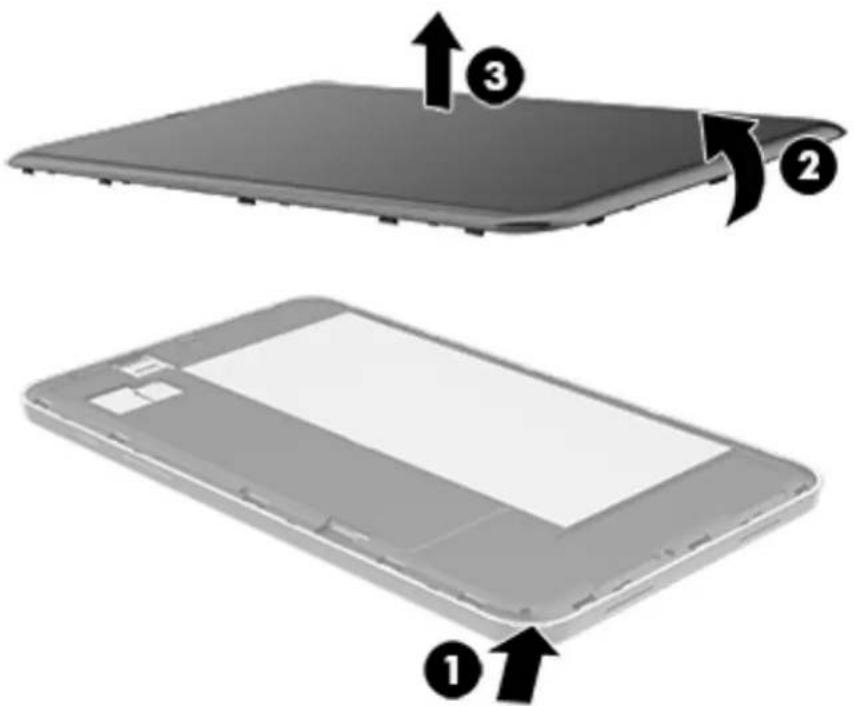
- Place the tablet on a flat surface, display panel side down, with the power button toward you.
- Use the finger notch (1) in the front left corner of the back cover to lift the front edge (2) of the back cover until it separates from the display panel assembly.
- Remove the back cover (3).
Reverse this procedure to install the back cover.
Description Spare part number
For use on HP Stream 8 Tablet 59xx models 796810-002
For use on HP Stream 8 Tablet 58xx models 796810-001
Before removing the middle frame, follow these steps:
- Turn off the tablet. If you are unsure whether the tablet is off or in Hibernation, turn the tablet on, and then shut it down through the operating system.
- Disconnect the power from the tablet by unplugging the power cord from the tablet.
- Disconnect all external devices from the tablet.
- Remove the back cover (see Back cover on page 18).
Remove the middle frame:
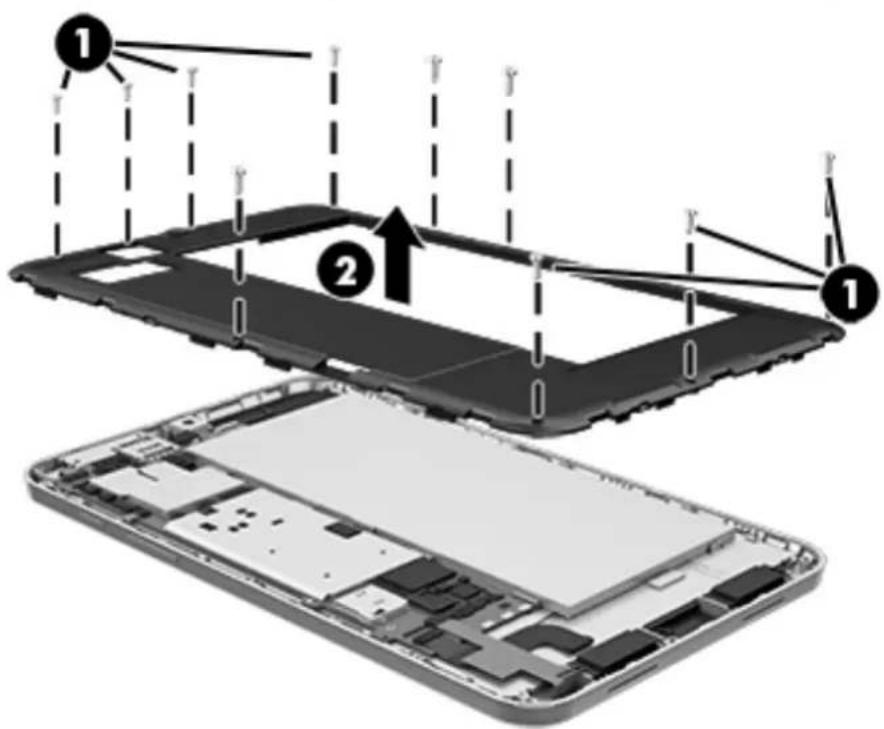
- Remove the ten Phillips PM1.3×4.5 screws (1) that secure the middle frame to the display panel assembly.
- Remove the middle frame (2).
Reverse this procedure to install the middle frame.
Battery
Description Spare part number
Battery, 4000-mAh, USB-charging, (includes cable and double-sided adhesive) 795066-001
Before removing the battery, follow these steps:
- Turn off the tablet. If you are unsure whether the tablet is off or in Hibernation, turn the tablet on, and then shut it down through the operating system.
- Disconnect the power from the tablet by unplugging the power cord from the tablet.
- Disconnect all external devices from the tablet.
- Remove the back cover (see Back cover on page 18).
WARNING! To reduce potential safety issues, use only the battery provided with the tablet, a replacement battery provided by HP, or a compatible battery purchased from HP.
CAUTION: Removing a battery that is the sole power source for the tablet can cause loss of information. To prevent loss of information, save your work or shut down the tablet through Windows before removing the battery.
Remove the battery:
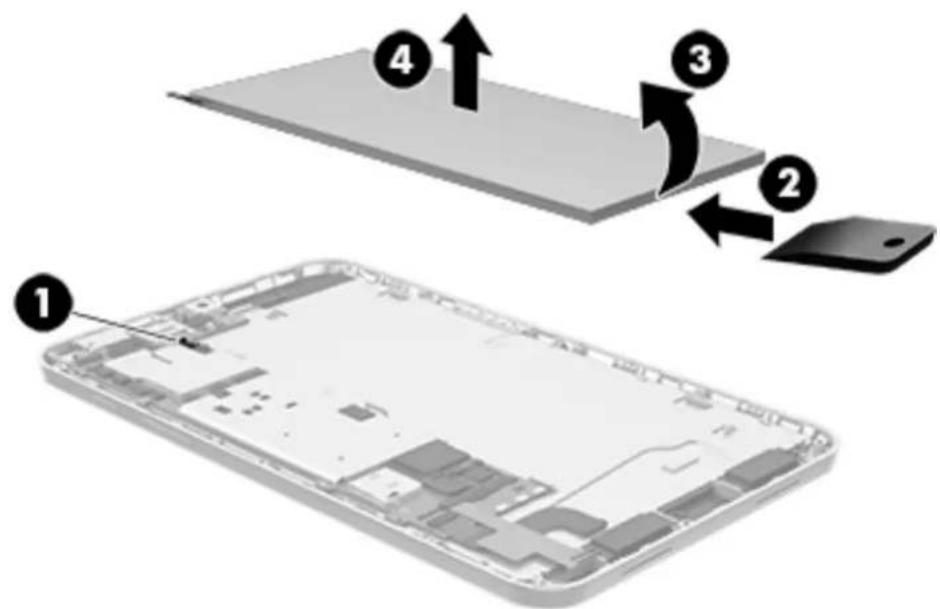
- Disconnect the battery cable (1) from the system board.
- Use a case utility tool (2) or similar thin plastic tool to detach the battery (3) from the display panel assembly. (The battery is attached to the display panel assembly with double-sided adhesive.)
- Remove the battery (4).
Reverse this procedure to install the battery.
3G antenna board

NOTE: This section applies only to HP Stream 8 Tablet 59xx models.
Description Spare part number
3G antenna board 796813-001
Before removing the 3G antenna board, follow these steps:
- Shut down the tablet. If you are unsure whether the tablet is off or in Hibernation, turn the tablet on, and then shut it down through the operating system.
- Disconnect all external devices connected to the tablet.
- Disconnect the power from the tablet by first unplugging the power cord from the AC outlet and then unplugging the AC adapter from the tablet.
- Remove the back cover (see Back cover on page 18).
- Remove the middle frame (see Middle frame on page 20).
- Disconnect the battery cable from the system board (see Battery on page 21).
Remove the 3G antenna board:
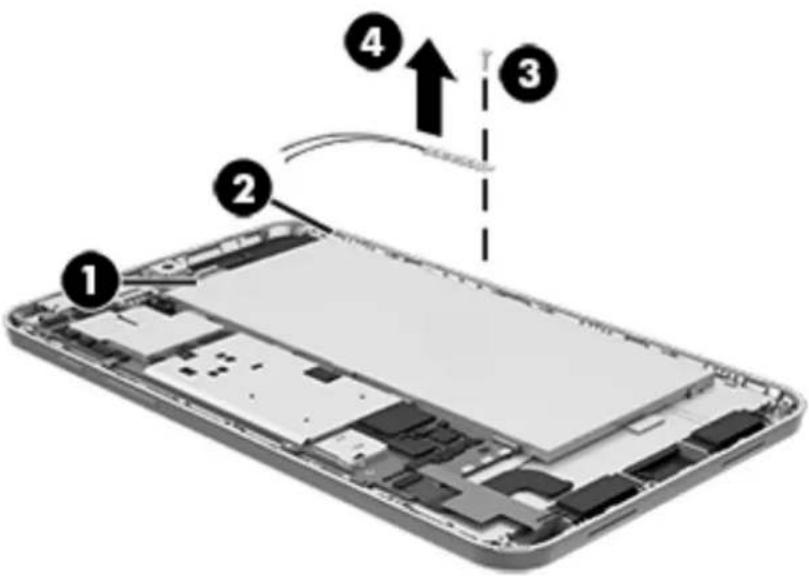
- Disconnect the 3G antenna cables (1) from the system board 3G terminals.
- Release the 3G antenna cable from the retention clip (2) built into the display panel assembly.
- Remove the Phillips PM1.3×2.4 screw (3) that secures the 3G antenna board to the display panel assembly.
- Detach the 3G antenna board (4) from the display panel assembly. (The 3G antenna board is attached to the display panel assembly with double-sided adhesive.)
- Remove the 3G antenna board and cables. Reverse this procedure to install the 3G antenna board.
Description Spare part number
Rear-facing webcam (5.0-MP, auto-focus) 796815-001
Before removing the rear-facing webcam, follow these steps:
- Shut down the tablet. If you are unsure whether the tablet is off or in Hibernation, turn the tablet on, and then shut it down through the operating system.
- Disconnect all external devices connected to the tablet.
- Disconnect the power from the tablet by first unplugging the power cord from the AC outlet and then unplugging the AC adapter from the tablet.
- Remove the back cover (see Back cover on page 18).
- Remove the middle frame (see Middle frame on page 20).
- Disconnect the battery cable from the system board (see Battery on page 21).
Remove the rear-facing webcam:
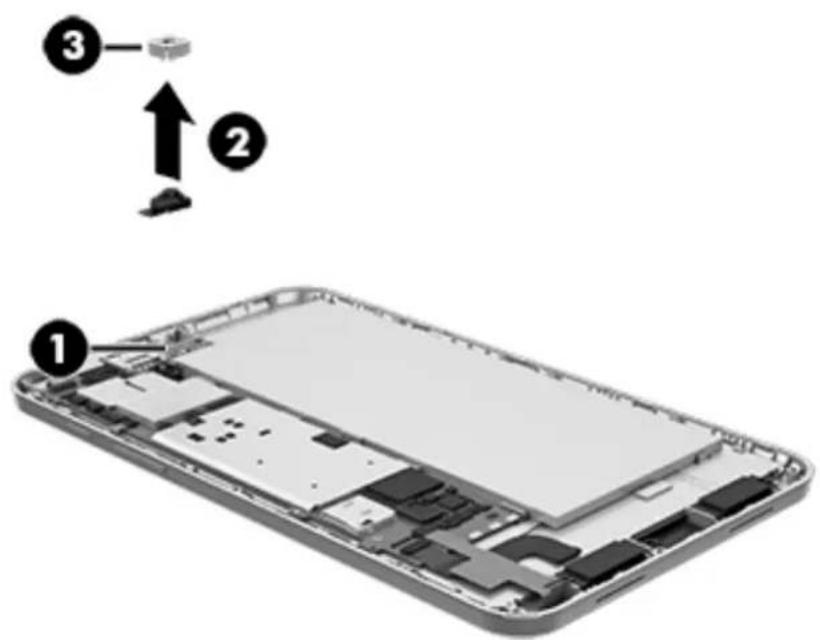
- Disconnect the rear-facing webcam cable (1) from the system board.
- Detach the rear-facing webcam (2) from the display panel assembly. (The rear-facing webcam is attached to the display panel assembly with double-sided adhesive.)
- Remove the rear-facing webcam bracket (3).
The rear-facing webcam bracket is available using spare part number 796816-001.
- Remove the rear-facing webcam, bracket, and cable.
Reverse this procedure to install the rear-facing webcam.
Front-facing webcam
Description Spare part number
Front-facing webcam (2.0-MP, fixed-focus) 796814-001
Before removing the rear-facing webcam, follow these steps:
- Shut down the tablet. If you are unsure whether the tablet is off or in Hibernation, turn the tablet on, and then shut it down through the operating system.
- Disconnect all external devices connected to the tablet.
- Disconnect the power from the tablet by first unplugging the power cord from the AC outlet and then unplugging the AC adapter from the tablet.
- Remove the back cover (see Back cover on page 18).
- Remove the middle frame (see Middle frame on page 20).
- Disconnect the battery cable from the system board (see Battery on page 21).
Remove the front-facing webcam:
- Disconnect the front-facing webcam cable (1) from the system board.
- Remove the front-facing webcam (2) and cable.

Reverse this procedure to install the front-facing webcam.
Description Spare part number
Button board (includes cable, power button actuator, and volume button actuators) 800024-001
Before removing the button board, follow these steps:
- Shut down the tablet. If you are unsure whether the tablet is off or in Hibernation, turn the tablet on, and then shut it down through the operating system.
- Disconnect all external devices connected to the tablet.
- Disconnect the power from the tablet by first unplugging the power cord from the AC outlet and then unplugging the AC adapter from the tablet.
- Remove the back cover (see Back cover on page 18).
- Remove the middle frame (see Middle frame on page 20).
- Disconnect the battery cable from the system board (see Battery on page 21).
Remove the button board:
- Release the ZIF connector (1) to which the button board cable is attached, and then disconnect the button board cable from the system board.
- Remove the button board (2) and cable.

Reverse this procedure to install the button board.
Display panel cable
Description Spare part number
Display panel cable 796819-001
Before removing the display panel cable, follow these steps:
- Shut down the tablet. If you are unsure whether the tablet is off or in Hibernation, turn the tablet on, and then shut it down through the operating system.
- Disconnect all external devices connected to the tablet.
- Disconnect the power from the tablet by first unplugging the power cord from the AC outlet and then unplugging the AC adapter from the tablet.
- Remove the back cover (see Back cover on page 18).
- Remove the middle frame (see Middle frame on page 20).
- Disconnect the battery cable from the system board (see Battery on page 21).
Remove the display panel cable:
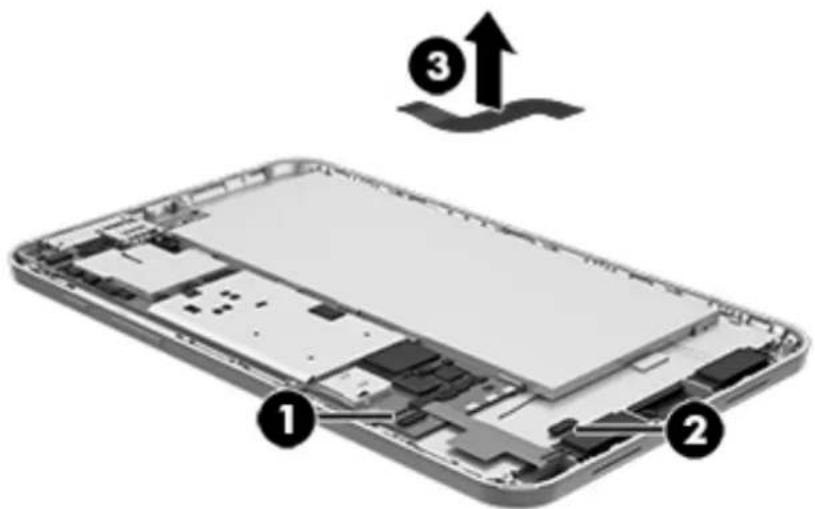
- Release the ZIF connector (1) to which the display panel cable is attached, and then disconnect the button board cable from the system board.
- Release the ZIF connector (2) to which the display panel cable is attached, and then disconnect the button board cable from the display panel assembly.
- Remove the display panel cable (3).
Speakers
Description Spare part number
Speakers (include left and right speakers and cables) 796818-001
Before removing the speakers, follow these steps:
- Shut down the tablet. If you are unsure whether the tablet is off or in Hibernation, turn the tablet on, and then shut it down through the operating system.
- Disconnect all external devices connected to the tablet.
- Disconnect the power from the tablet by first unplugging the power cord from the AC outlet and then unplugging the AC adapter from the tablet.
- Remove the back cover (see Back cover on page 18).
- Remove the middle frame (see Middle frame on page 20).
- Disconnect the battery cable from the system board (see Battery on page 21).
Remove the speakers:
- Unsolder the red and black speaker cables (1) from the system board speaker contact points.

NOTE: When installing the speakers, the red speaker cables are soldered to the system board "positive" speaker terminals. The black speaker cables are soldered to the system board "negative" speaker terminals.
- Remove the speakers (2).

Reverse this procedure to install the speakers.
System board

NOTE: The system board spare part kit is equipped with an Intel Z3735G 1.30-GHz (1.80-GHz burst mode) quad core processor, a graphics subsystem with UMA memory, 1.0-GB of system memory, 32-GB eMMC storage, and the Microsoft Windows 8.1 operating system.
| Description Spare part number | |
| For use on HP Stream 8 Tablet 59xx models in Asia Pacific countries and regions (includes 3G connectivity) | 796812-371 |
| For use on HP Stream 8 Tablet 59xx models in Europe, the Middle East, and Africa (includes 3G connectivity) | 796812-021 |
| For use on HP Stream 8 Tablet 59xx models in Latin America (includes 3G connectivity) 796812-161 | |
| For use on HP Stream 8 Tablet 59xx models in North America (includes 3G connectivity) 796812-001 | |
| For use on HP Stream 8 Tablet 59xx models in the People's Republic of China (includes 3G connectivity) 796812-AA1 | |
| For use on HP Stream 8 Tablet 58xx models in Asia Pacific countries and regions (includes Wi-Fi connectivity) | 799858-371 |
| For use on HP Stream 8 Tablet 58xx models in North America (includes Wi-Fi connectivity) 799858-001 | |
| For use on HP Stream 8 Tablet 58xx models in the People's Republic of China (includes Wi-Fi connectivity) | 799858-AA1 |
Before removing the system board, follow these steps:
- Turn off the tablet. If you are unsure whether the tablet is off or in Hibernation, turn the tablet on, and then shut it down through the operating system.
- Disconnect the power from the tablet by unplugging the power cord from the tablet.
- Disconnect all external devices from the tablet.
- Remove the back cover (see Back cover on page 18).
- Remove the middle frame (see Middle frame on page 20).
- Disconnect the battery cable from the system board (see Battery on page 21).
Remove the system board:
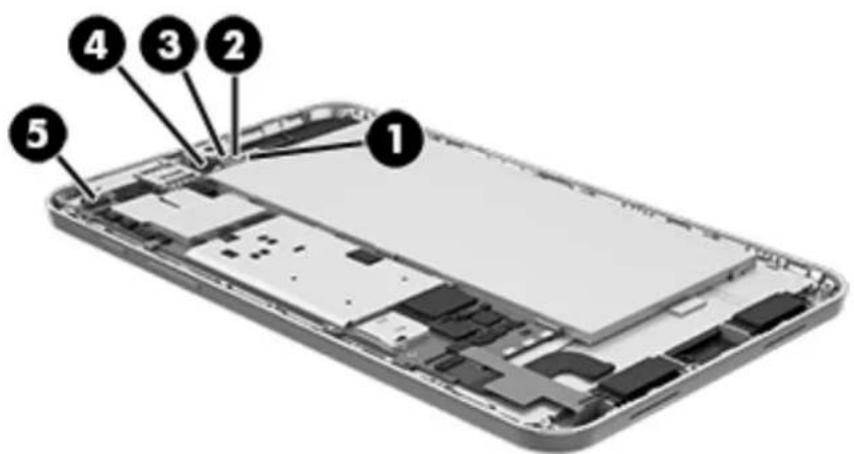
- Disconnect the 3G antenna cables (1) from the system board 3G terminals.
- Disconnect the WWAN antenna cable (2) from the system board WWAN terminal.
- Disconnect the WLAN antenna cable (3) from the system board WLAN terminal.
- Disconnect the rear-facing webcam cable (4) from the system board.
- Disconnect the front-facing webcam cable (5) from the system board.
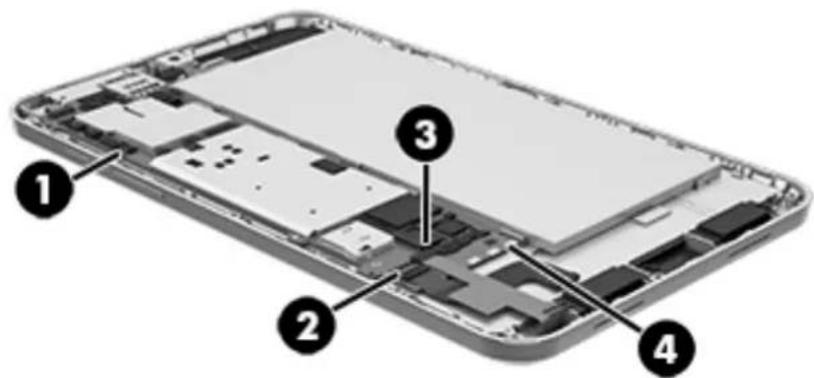
- Release the ZIF connector (1) to which the button board cable is attached, and then disconnect the button board cable from the system board.
- Release the ZIF connector (2) to which the display panel cable is attached, and then disconnect the display panel cable from the system board.
- Release the ZIF connector (3) to which the TouchScreen board cable is attached, and then disconnect the TouchScreen board cable from the system board.
- Unsolder the red and black speaker cables (4) from the system board speaker contact points (see Front-facing webcam on page 26).
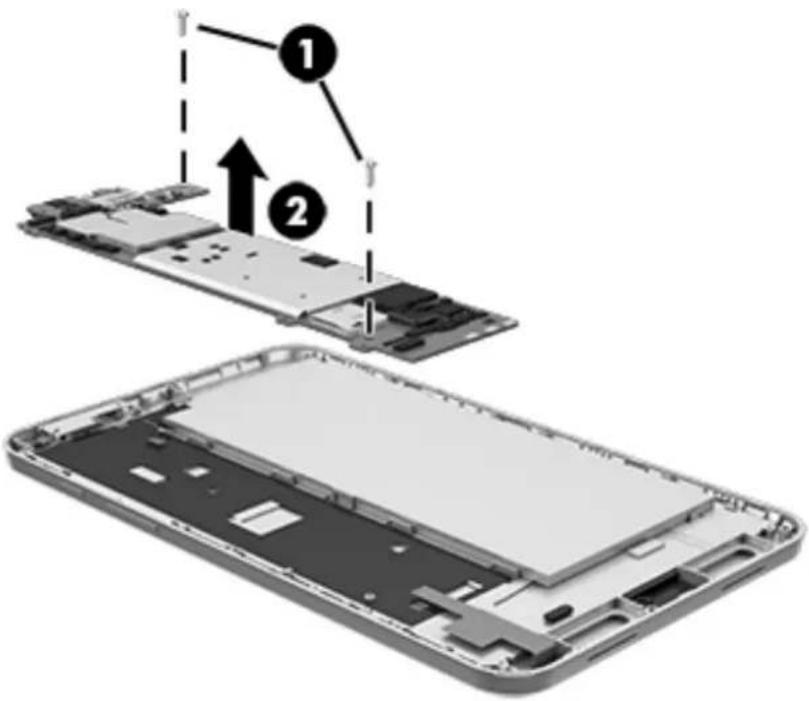
- Remove the two Phillips PM1.3×1.6 screws (1) that secure the system board to the display panel assembly.
- Remove the system board (2).
Reverse this procedure to install the system board.
WWAN antenna
Description Spare part number
WWAN antenna (includes cable, transceiver, and double-sided adhesive) 796823-001
Before removing the WWAN antenna, follow these steps:
- Shut down the tablet. If you are unsure whether the tablet is off or in Hibernation, turn the tablet on, and then shut it down through the operating system.
- Disconnect all external devices connected to the tablet.
- Disconnect the power from the tablet by first unplugging the power cord from the AC outlet and then unplugging the AC adapter from the tablet.
- Remove the back cover (see Back cover on page 18).
- Remove the middle frame (see Middle frame on page 20).
- Disconnect the battery cable from the system board (see Battery on page 21).
- Remove the system board (see System board on page 30).
Remove the WWAN antenna:
- Detach the WWAN antenna transceiver from the display panel assembly. (The WWAN antenna transceiver is attached to the display panel assembly with double-sided adhesive.)

- Remove the WWAN antenna cable and transceiver.
Reverse this procedure to install the WWAN antenna.
WLAN antenna
Description Spare part number
WLAN antenna (includes cable, transceiver, and double-sided adhesive) 796822-001
Before removing the WLAN antenna, follow these steps:
- Shut down the tablet. If you are unsure whether the tablet is off or in Hibernation, turn the tablet on, and then shut it down through the operating system.
- Disconnect all external devices connected to the tablet.
- Disconnect the power from the tablet by first unplugging the power cord from the AC outlet and then unplugging the AC adapter from the tablet.
- Remove the back cover (see Back cover on page 18).
- Remove the middle frame (see Middle frame on page 20).
- Disconnect the battery cable from the system board (see Battery on page 21).
- Remove the system board (see System board on page 30).
Remove the WLAN antenna:
- Release the WLAN antenna cable from the retention clips (1) built into the display panel assembly.
- Detach the WLAN antenna transceiver (2) from the display panel assembly. (The WLAN antenna transceiver is attached to the display panel assembly with double-sided adhesive.)

- Remove the WLAN antenna cable and transceiver.
Reverse this procedure to install the WLAN antenna.
6 Using HP PC Hardware Diagnostics (UEFI)
HP PC Hardware Diagnostics is a Unified Extensible Firmware Interface (UEFI) that allows you to run diagnostic tests to determine whether the tablet hardware is functioning properly. The tool runs outside the operating system so that it can isolate hardware failures from issues that are caused by the operating system or other software components.
To start HP PC Hardware Diagnostics (UEFI):
- Turn off the tablet.
- Press and hold the Volume down button.
- While continuing to hold the Volume down button, press the Power button to turn on the tablet. The Startup menu is displayed.
- Press f2 at the bottom of the screen.
- When the diagnostic tool opens, select the type of diagnostic test you want to run, and then follow the on-screen instructions.

NOTE: If you need to stop a diagnostic test, press esc.
Downloading HP PC Hardware Diagnostics (UEFI) to a USB device

NOTE: Instructions for downloading HP PC Hardware Diagnostics (UEFI) are provided in English only.
There are two options to download HP PC Hardware Diagnostics to a USB device:
Option 1: HP PC Diagnostics homepage—Provides access to the latest UEFI version
- Go to http://hp.com/go/techcenter/pcdiags.
- Tap the UEFI Download link, and then select Run. Option 2: Support and Drivers pages—Provide downloads for a specific product for earlier and later versions
- Go to http://www.hp.com.
- Tap Support, located at the top of the page, and then tap Download Drivers.
- In the text box, enter the product name, and then tap Go. -or- Tap Find Now to let HP automatically detect your product.
- In the Diagnostic section, tap HP UEFI Support Environment.
-or-
- Tap Download, and then select Run.
7 Specifications
| Metric U.S. | ||
| Dimensions (portrait orientation) | ||
| Height 20.9 cm 8.2 in | ||
| Width 12.4 cm 4.9 in | ||
| Depth 0.9 cm 0.4 in | ||
| Weight (HP Stream 8 Tablet 59xx model) 410 g 0.90 lb | ||
| Weight (HP Stream 8 Tablet 58xx model) 405 g 0.89 lb | ||
| Operating voltage and current 5 V dc @ 3A - 15W | ||
| NOTE: This product is designed for IT power systems in Norway with phase-to-phase voltage not exceeding 240 V rms. | ||
| NOTE: The tablet operating voltage and current can be found on the system regulatory label. | ||
| Temperature | ||
| Operating 5°C to 35°C 41°F to 95°F | ||
| Nonoperating -20°C to 60°C -4°F to 140°F | ||
| Relative humidity (non-condensing) | ||
| Operating 10% to 90% | ||
| Nonoperating 5% to 95% | ||
| Maximum altitude (unpressurized) | ||
| Operating | -15 m to 3,048 m | -50 ft to 10,000 ft |
| Nonoperating | -15 m to 12,192 m | -50 ft to 40,000 ft |
| NOTE: Applicable product safety standards specify thermal limits for plastic surfaces. The device operates well within this range of temperatures. | ||
8 Backup and recovery
To protect your information, use Windows backup and restore utilities to back up individual files and folders, back up your entire hard drive, or create system restore points. In case of system failure, you can use the backup files to restore the contents of your tablet.
- Swipe from the right edge of the touch screen to display the charms, tap Search, and then tap the search box.
- In the search box, type restore, and then select from the list of displayed options.

NOTE: For detailed instructions on various backup and restore options, perform a search for these topics in Windows Help and Support.
In case of system instability, HP recommends that you print the recovery procedures and save them for later use.

NOTE: Windows includes the User Account Control feature to improve the security of your tablet. You may be prompted for your permission or password for tasks such as installing software, running utilities, or changing Windows settings. For more information, see Windows Help and Support.
Backing up your information
Recovery after a system failure is as good as your most recent backup. You should create system repair media and your initial backup immediately after initial system setup. As you add new software and data files, you should continue to back up your system on a regular basis to maintain a reasonably current backup.
For more information on the Windows backup features, see Windows Help and Support.
Performing a system recovery
In case of system failure or instability, the tablet provides the following tools to recover your files:
- Windows recovery tools: You can use Windows Backup and Restore to recover information you have previously backed up. You can also use Windows Automatic Repair to fix problems that might prevent Windows from starting correctly.

NOTE: If you are unable to boot (start up) your tablet, contact support.
Changing the boot device order
To change the boot order so that you can boot from an external device:

NOTE: An external flash drive is required to perform this procedure.
- If possible, back up all personal files.
- Shut down the tablet.
- Connect the external flash drive.
- Turn off the tablet.
- Press and hold the Volume down button.
- While continuing to hold the Volume down button, press the Power button to turn on the tablet. The Startup menu is displayed.
- Tap F9 Boot Options.
- Select the external flash drive as the boot device.
- Restart the tablet.
Using Windows Refresh or Windows Reset
When your tablet is not working properly and you need to regain system stability, the Windows Refresh option allows you to start fresh and keep what is important to you. The Windows Reset option allows you to perform detailed reformatting of your tablet, or remove personal information before you give away or recycle your tablet.
For more information on these features, see Windows Help and Support.
9 Power cord set requirements
The wide-range input feature of the tablet permits it to operate from any line voltage from 100 to 120 volts AC, or from 220 to 240 volts AC.
The 2-conductor power cord set included with the tablet meets the requirements for use in the country or region where the equipment is purchased.
Power cord sets for use in other countries and regions must meet the requirements of the country or region where the tablet is used.
Requirements for all countries
The following requirements are applicable to all countries and regions:
The length of the power cord set must be at least 1.0 m (3.3 ft) and no more than 2.0 m (6.5 ft).
All power cord sets must be approved by an acceptable accredited agency responsible for evaluation in the country or region where the power cord set will be used.
Requirements for specific countries and regions
| Country/region Accredited agency |
| Argentina IRAM |
| Australia SAA |
| Austria OVE |
| Belgium CEBEC |
| Brazil ABNT |
| Canada CSA |
| Chile IMQ |
| Denmark DEMKO |
| Finland FIMKO |
| France UTE |
| Germany VDE |
| India ISI |
| Israel SII |
| Italy IMQ |
| Japan JIS |
| The Netherlands KEMA |
| New Zealand SANZ |
| Norway NEMKO |
| The People's Republic of China CCC |
| Saudi Arabia SASO |
| Singapore PSB |
| South Africa SABS |
| South Korea KTL |
| Sweden SEMKO |
| Switzerland SEV |
| Taiwan BSMI |
| Thailand TISI |
| The United Kingdom ASTA |
| The United States UL |
10 Recycling
When a non-rechargeable or rechargeable battery has reached the end of its useful life, do not dispose of the battery in general household waste. Follow the local laws and regulations in your area for battery disposal.
HP encourages customers to recycle used electronic hardware, HP original print cartridges, and rechargeable batteries. For more information about recycling programs, see the HP Web site at http://www.hp.com/recycle.
Index
Symbols/Numerics
3G antenna board
removal 22
spare part number 6, 13, 22
3G antenna cable, spare part number 13
A
AC adapter, spare part numbers 7, 9
antenna
removal 33, 34
spare part numbers 7, 13, 33, 34
audio, product description 1
audio-in (microphone) jack, location 4
audio-out (headphone) jack, location 4
B
back cover
removal 18
spare part number 6, 12, 18
battery
removal 21
spare part number 6, 12, 21
button board
removal 27
spare part number 6, 13, 27
buttons
power 4
volume down 4
volume up 4
Windows 4
C
cables, service considerations 14
connectors, service considerations 14
D
display panel assembly, spare part number 7, 12, 18
display panel cable
removal 28
spare part number 6, 13, 28
display panel, product description 1
E
electrostatic discharge 15
equipment guidelines 17
external expansion, product description 1
F
front-facing webcam
location 4
removal 26
spare part number 6, 13, 26
front-facing webcam shield, spare part number 6, 13
G
grounding guidelines 15
guidelines
equipment 17
grounding 15
packaging 16
transporting 16
workstation 16
H
headphone (audio-out) jack 4
J
jacks
audio-in (microphone) 4
audio-out (headphone) 4
M
mass storage device, product description 1
memory module, product description 1
microphone (audio-in) jack, location 4
microphone, product description 1
middle frame
removal 20
spare part numbers 6, 12, 20
model name 1
0
operating system, product description 2
P
packaging guidelines 16
plastic parts, service
considerations 14
ports
product description 1 USB 4
power button 4
power cord, set requirements 40
power requirements, product description 1
processor, product description 1
product description audio 1
display panel 1
external expansion 1
mass storage 1
memory module 1
microphone 1
operating system 2
ports 1
power requirements 1
processors 1
product name 1
sensor 1
serviceability 2
video 1
wireless networking 1
product name 1
R
rear-facing webcam
location 4
removal 24
spare part number 6, 13, 24
rear-facing webcam bracket removal 25 spare part number 6, 13, 25
S
Screw Kit, spare part number 9, 13 SD Card Reader slot 4
sensor, product description 1
service considerations cables 14 connectors 14 plastic parts 14
serviceability, product description 2
side key cable, spare part number 13
Speaker Kit, spare part number 6, 13, 29
speakers location 4 removal 29 spare part number 6, 13, 29
system board removal 30 spare part numbers 7, 12, 13, 30
T
tablet major components 6 spare part numbers 7, 8, 9, 10, 11, 12 specifications 37
tools required 14 transporting guidelines 16
U
USB extension cable, spare part number 9 USB port 4
v
video, product description 1 volume button board, spare part number 13 volume down button 4 volume up button 4
W
webcam removal 24, 26 spare part numbers 6, 13, 24, 26
Windows button 4
wireless antenna removal 33, 34 spare part numbers 7, 13, 33, 34
wireless networking, product description 1
WLAN antenna removal 34 spare part number 7, 13, 34
workstation guidelines 16
WWAN antenna removal 33 spare part number 7, 13, 33


- HP STREAM 8 TABLET (MODEL NUMBERS 58XX AND 59XX)
- PRODUCT NOTICE
- SOFTWARE TERMS
- SAFETY WARNING NOTICE
- TABLE OF CONTENTS
- PRODUCT DESCRIPTION
- CATEGORY DESCRIPTION
- EXTERNAL COMPONENT IDENTIFICATION
- ILLUSTRATED PARTS CATALOG
- LOCATING THE MODEL NUMBER, PRODUCT NUMBER, AND SERIAL NUMBER
- REMOVAL AND REPLACEMENT PRELIMINARY REQUIREMENTS
- TOOLS REQUIRED
- SERVICE CONSIDERATIONS
- PLASTIC PARTS
- CABLES AND CONNECTORS
- GROUNDING GUIDELINES
- ELECTROSTATIC DISCHARGE DAMAGE
- PACKAGING AND TRANSPORTING GUIDELINES
- WORKSTATION GUIDELINES
- EQUIPMENT GUIDELINES
- REMOVAL AND REPLACEMENT PROCEDURES
- TABLET COMPONENT REPLACEMENT PROCEDURES
- BACK COVER
- BATTERY
- DESCRIPTION SPARE PART NUMBER
- G ANTENNA BOARD
- FRONT-FACING WEBCAM
- DISPLAY PANEL CABLE
- SPEAKERS
- SYSTEM BOARD
- WWAN ANTENNA
- WLAN ANTENNA
- USING HP PC HARDWARE DIAGNOSTICS (UEFI)
- DOWNLOADING HP PC HARDWARE DIAGNOSTICS (UEFI) TO A USB DEVICE
- SPECIFICATIONS
- BACKUP AND RECOVERY
- BACKING UP YOUR INFORMATION
- PERFORMING A SYSTEM RECOVERY
- CHANGING THE BOOT DEVICE ORDER
- USING WINDOWS REFRESH OR WINDOWS RESET
- POWER CORD SET REQUIREMENTS
- REQUIREMENTS FOR ALL COUNTRIES
- RECYCLING
- INDEX
- SYMBOLS/NUMERICS
- A
- B
- C
- D
- E
- F
- G
- H
- J
- M
- P
- R
- S
- T
- U
- V
- W
Brand : HP
Model : Stream 8 5901ca
Category : Tablet