VIP-480L - Intercom Valcom - Free user manual and instructions
Find the device manual for free VIP-480L Valcom in PDF.


User questions about VIP-480L Valcom
0 question about this device. Answer the ones you know or ask your own.
Ask a new question about this device
Download the instructions for your Intercom in PDF format for free! Find your manual VIP-480L - Valcom and take your electronic device back in hand. On this page are published all the documents necessary for the use of your device. VIP-480L by Valcom.
USER MANUAL VIP-480L Valcom
VIP-480L IP Paging Horn
INTRODUCTION
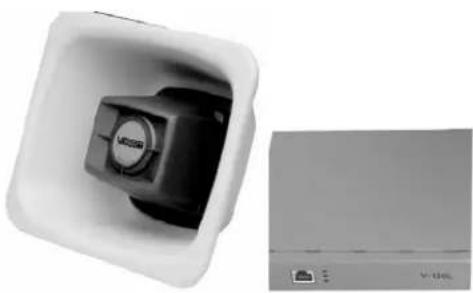
The VIP-480L IP Paging Horn is a self contained paging system which enables voice paging up to 1200 feet from an Ethernet connection. The VIP-480L consist of a high efficiency 3 Watt Class-D Horn and a VIP-LLE Network Extender allowing stand alone capability when used with a SIP Phone System or can be accessed from a variety of Valcom managed VoIP products.
SPECIFICATIONS
Access Methods
• PBX, FXO Port w/VIP-811
• POTS telephone set w/VIP-811
• PBX, FXS Port w/VIP-821
• Valcom M Cast Page Group
• SIP
Features
• RJ-45 network connection
• LED Status Indicator
• Network activity LEDs
• 802.3af compliant
• High Efficiency Class-D 3 Watt Amplifier
Dimensions/Weight (HORN)
- 6.8"H x 8.3"W x 3.3" D (17.3cm H x 21.1cm W x 8.4cm D)
• 2.1 lbs. (0.95 kg)
Network Extender (VIP-LLE)
- 1.30" H x 6.10" W x 6.00" D
(3.51 cm H x 15.72 cm W x 13.51 cm D)
• Weight: 0.85 lbs. (0.39 kg)
natural_image
White square device with black control knob and indicator lights, next to a gray server unit (no visible text or symbols)Nominal Specifications – HORN
Input Impedance: 600 Ohms Input Level:
Output Impedance: 600 Ohms Output Level:
Nominal Specifications – VIP-LLE
Via 802.3af PoE Ethernet Switch: Class 3 (12.95W)
Environment
Temperature: 0 to +40°C Humidity: 0 to 85% non-precipitating
Packing List
| Qty | Item |
| 1 | VIP-LLE Network Extender |
| 1 | 3 Watt High Efficiency Horn |
| 1 | VSP Document |
| 2 | Mounting Brackets |
| 1 | VIP Quick Start Guide |
| 4 | Rubber Feet |
| 4 | Wood Screws |
| 1 | RJ-45 Termination Block |
| 1 | RJ-45 Patch Cable |
| 1 | “C” Clamp |
INSTALLATION
FCC Information
This equipment has been tested and found to comply with the limits for a Class A digital device, pursuant to Part 15 of the FCC Rules. These limits are designed to provide reasonable protection against harmful interference when the equipment is operated in a commercial environment. This equipment generates, uses and can radiate radio frequency energy and if not installed and used in accordance with the instruction manual, may cause harmful interference to radio communications. Operation of this equipment in a residential area may cause harmful interference in which case the user will be required to correct the interference at his own expense.
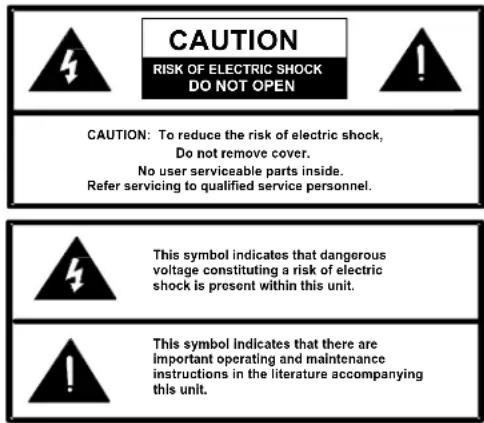
Precautionary Designations
text_image
CAUTION RISK OF ELECTRIC SHOCK DO NOT OPEN CAUTION: To reduce the risk of electric shock, Do not remove cover. No user serviceable parts inside. Refer servicing to qualified service personnel. This symbol indicates that dangerous voltage constituting a risk of electric shock is present within this unit. This symbol indicates that there are important operating and maintenance instructions in the literature accompanying this unit.Mounting (VIP-LLE)
The VIP-LLE Network Extender is designed for wall or shelf mounting and must be within 300 feet of the network switch.
Shelf: Provided with the VIP-LLE Network Extender are four rubber stick on feet. Peel these feet off their carrier backing and place at the four corners of the bottom of the unit.
Wall: Using the brackets and wood screws provided, secure the VIP-LLE Network Extender to the wall.
Mounting (HORN)
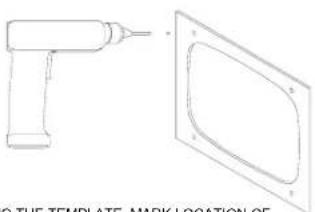
FLUSH MOUNT
Using the template packaged with the speaker, draw the speaker outline on the wall to be cut. Make appropriate wiring connections and test the speaker for operation. Using appropriate mounting screws (not furnished) drill and mount the flange as shown.
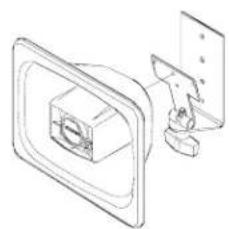
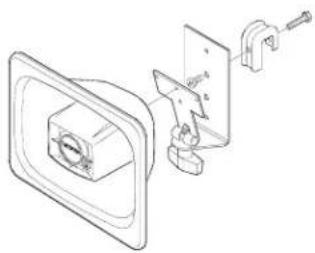
UNIVERSAL BRACKET
Loosen or separate the universal bracket leaves by loosening or removing the handle and hardware. Using the back leaf as a template, mark the wall through the mounting holes, drill and mount to the wall using appropriate screws (not furnished) or mount directly to a junction box. Mount the T-bracket to the back of the horn as shown using the (2) 12 inch screws provided.
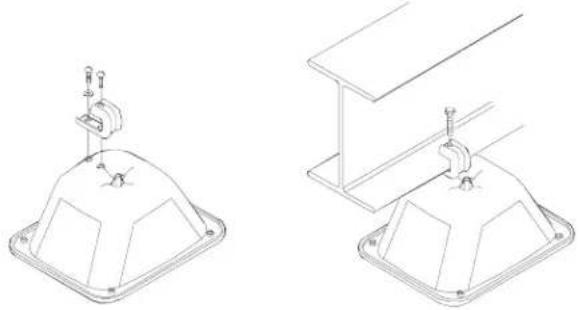
"C" CLAMP FOR "I" BEAM MOUNTING
A "C" clamp is provided with the horn to allow mounting to a beam. Place the bolt through the hole in the bottom of the base to secure the "C" clamp to the beam. It is suggested that the horn be mounted to the underside of the "I" beam to provide maximum positioning adjustments. Mount (2) 12 inch screws provided.
Interconnections
The only method of powering a VIP-480L IP Paging Horn is via a power over Ethernet switch or power injector meeting the 802.3af specification.
Make all required signal connections before connecting to Ethernet switch or power injector meeting the 802.3af specification. Power is supplied to the horn assembly via the VIP-LLE Network Extender.
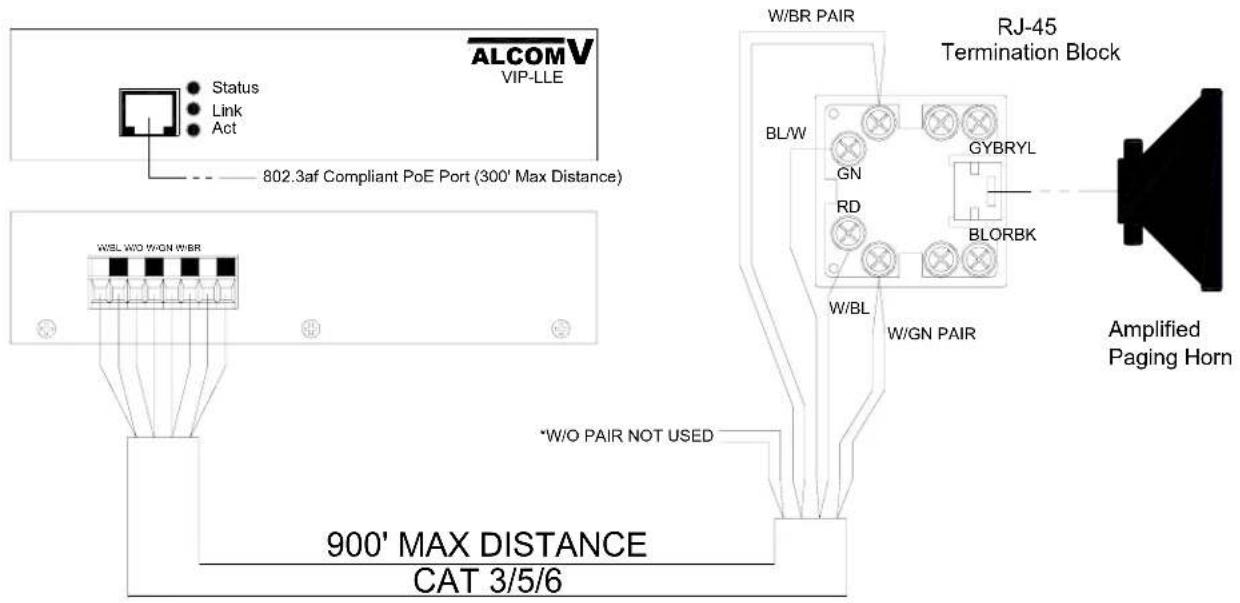
Network Connection (Fig. 1)
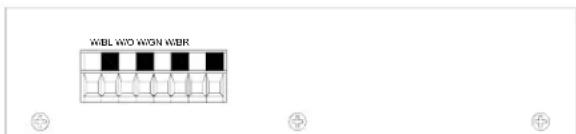
The VIP-LLE Network Extender has one CAT-5 RJ-45 "NETWORK" connector and one CAT-5 color-coded connector on the rear panel.
Use the supplied CAT-5 patch cable to connect the NETWORK connector of the VIP-LLE Network Extender to a 802.3af compliant PoE port (300 feet maximum distance).
Signal Connections (Fig. 1)
Connect CAT-5 cable from the rear panel color coded connector of the VIP-LLE Network Extender to the supplied RJ-45 terminal block (900 feet maximum distance). Using the supplied CAT-5 patch cable to connect to RJ-45 connector to horn to RJ-45 termination block.
Status Indicator Lights
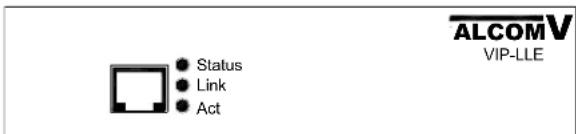
The VIP-LLE Network Extender has 3 status indication lights:
STATUS: Flashes during normal operation, and solid when unit in reset.
LINK: Indicates 100 Mbit Ethernet connection when illuminated. No activity indicates 10 Mbit connection.
ACT: Indicator flashes to indicate network activity.
Operation:
Provides paging from SIP connection or from another Valcom VIP unit. Interface to customer telephone system can be via SIP registration, FXO port (with VIP-811), or FXS port (with VIP-821).
text_image
ALCOMV VIP-LLE Status Link ActFront View
text_image
WIBL W/O W/ON W/BRRear View
TECHNICAL ASSISTANCE
Assistance in troubleshooting is available from the factory. Call (540) 563-2000 and press 1 for Technical Support or via email at support@valcom.com.
When requesting assistance, you should include all available information. It is strongly suggested that you go to the web site and follow the trouble resolution procedure at http://voip.valcom.com.
Valcom equipment is not field repairable. Valcom, Inc. maintains service facilities in Roanoke, VA. Should repairs be necessary, attach a tag to the unit clearly stating your company name, address, phone number, contact person and the nature of the problem. Send the unit to:
Valcom, Inc.
Repair & Return Dept.
5614 Hollins Road
Roanoke, Va. 24019-5056
UNIVERSAL BRACKET
natural_image
Technical line drawing of a mechanical assembly with a central component and mounting bracket (no text or symbols)SURFACE MOUNTED WITH A UNIVERSAL MOUNTING BRACKET
natural_image
Technical line drawing of a mechanical clamp assembly with no visible text or symbolsUNIVERSAL BRACKET WITH CLAMP
"C" CLAMP FOR "I" BEAM MOUNTING
natural_image
Technical line drawings of two mechanical components with mounting holes and mounting brackets (no text or symbols)ATTACH CLAMP TO HORN ATTACH FLEXHORN TO BEAM
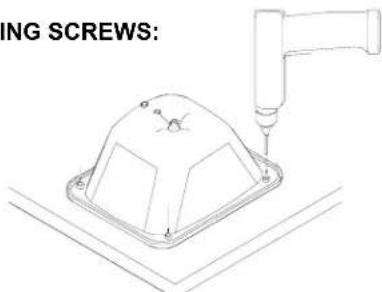
FLUSH MOUNT USING MOUNTING SCREWS:
natural_image
Technical line drawing of a tool and a template with mounting bracket (no text or symbols)USING THE TEMPLATE, MARK LOCATION OF OPENING AND MOUNTING HOLES ON WALL. DRILL HOLES APPROPRIATE TO MOUNTING HARDWARE AND CUT OUT THE OPENING.
text_image
ING SCREWS:HOLDING FLEXHORN FIRMLY AGAINST A FLAT SURFACE, DRILL THROUGH EACH MOUNTING BOSS AS SHOWN.
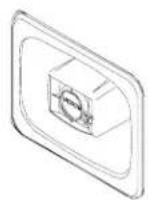
FLUSH MOUNTING IN A STUD WALL INSTALLED WITH MOUNTING SCREWS OR CONSTRUCTION CEMENT.
text_image
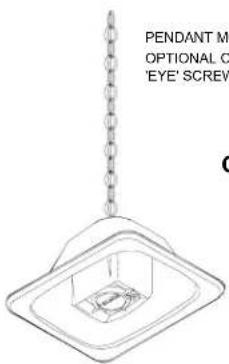
PENDANT M OPTIONAL C 'EYE' SCREWPENDANT MOUNTING WITH
OPTIONAL CHAIN AND
'EYE' SCREW
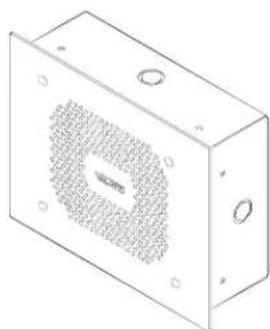
OTHER MOUNTING OPTIONS:
natural_image
Isometric line drawing of a rectangular electronic enclosure with a perforated top surface and mounting holes (no text or symbols)OPTIONAL V-9805 VANDAL RESISTANT ENCLOSURE
text_image
ALCOMV VIP-LLE Status Link Act 802.3af Compliant PoE Port (300' Max Distance) W/BR PAIR BL/W GN RD W/BL W/GN PAIR RJ-45 Termination Block GYBRYL BLORBK W/O PAIR NOT USED *W/O PAIR NOT USED 900' MAX DISTANCE CAT 3/5/6 Amplified Paging HornFIGURE 1
VALCOM LIMITED WARRANTY
Valcom, Inc. warrants its products to be free from defects in materials and workmanship under conditions of normal use and service for a period of one year from the date of shipment. The obligation under this warranty shall be limited to the replacement, repair or refund of any such defective device within the warranty period, provided that:
- inspection by Valcom, Inc. indicates the validity of the claim;
- the defect is not the result of damage, misuse, or negligence after the original shipment;
- the product has not been altered in any way or repaired by others and that factory sealed units are unopened (a service charge plus parts and labor will be applied to units defaced or physically damaged);
- freight charges for the return of products to Valcom are prepaid;
- all units 'out of warranty' are subject to a service charge. The service charge will cover minor repairs (major repairs will be subject to additional charges for parts and labor).
This warranty is in lieu of and excludes all other warranties, expressed or implied and in no event shall Valcom, Inc. be liable for any anticipated profits, consequential damages, loss of time or other losses incurred by the buyer in connection with the purchase, operation, or use of the product.
This warranty specifically excludes damage incurred in shipment. In the event a product is received in damaged condition, the carrier should be notified immediately. Claims for such damage should be filed with the carrier involved in accordance with the F.O.B. point.
Headquarters:
Valcom, Inc.
5614 Hollins Road
Roanoke, VA 24019-5056
Phone: (540) 563-2000
FAX: (540) 362-9800