
WRS005 - Loudspeaker TIC - Free user manual and instructions
Find the device manual for free WRS005 TIC in PDF.


| Brand | TIC |
| Model | WRS005 |
| Product Type | Wireless Outdoor/Indoor Speaker |
| Dimensions (Single Speaker) | 9.4 x 9.4 x 7.4 inches |
| Weight (Single) | 6 lbs |
| Weight (Pair) | 16 lbs |
| Power Source (Speaker) | 9V DC via included transformer or 6x AAA batteries |
| Power Source (Transmitter) | 4.5V DC via included transformer |
| Power Source (Remote Control) | 1x A23 battery |
| Audio Input Connection | 3.5mm jack (cables to RCA and 3.5mm included) |
| Wireless Frequency | 2.4 GHz (2400–2483 MHz) |
| Number of Channels | 8 (auto-lock) |
| Transmitter Range | Up to 300 ft (unobstructed) |
| Remote Control Range | Up to 80 ft (unobstructed) |
| Speaker Driver | 5" Dual Cone |
| Impedance | 8 Ohms |
| Sensitivity | 84dB ±3dB @ 1W/1M |
| Continuous Power Output | 2.5W |
| Peak Power Output | 5W |
| Frequency Response | 90Hz – 18kHz |
| Enclosure Material | Aerospace-grade Teflon-sealed multi-layer composite |
| Finish Options | Canyon (CN) or Slate (SL) Stone |
| Weather Resistance | Weatherproof (not waterproof) |
| FCC Compliance | Part 15 Class B |
| Warranty | 1 year (standard), optional 3 or 5 year |
Frequently Asked Questions - WRS005 TIC
User questions about WRS005 TIC
0 question about this device. Answer the ones you know or ask your own.
Ask a new question about this device
Download the instructions for your Loudspeaker in PDF format for free! Find your manual WRS005 - TIC and take your electronic device back in hand. On this page are published all the documents necessary for the use of your device. WRS005 by TIC.
USER MANUAL WRS005 TIC
TIC Wireless Speakers
Indoor – Outdoor Wireless Speakers
TIC Outdoor Wireless Speakers = Weatherproof Design
"State of the Art" 2.4GHz! operation
8 channel auto-locking functionality
“Safe” 9v speaker transformers power supply included or uses 6xAA batteries
➢ Transmitter mains transformer 120v/ 4.5v
Full featured remote control included
Remote control power 1x23A battery
"Mini Rock" transmitter unit included
300ft.! (unobstructed) transmitter range
80ft.! (unobstructed) Remote Control range
5" Dual Cone Speaker Drivers
Aerospace grade, Teflon© sealed, multi-layer composite cabinetry
➢ Canyon (CN) or Slate (SL) Stone finish
Perfect! for TV, Stereo's, iPods, MP3's, Computers or almost any music source
TIC Wireless Installation & Owners Guide

Important Safety & Regulatory Information
Important Safety Instructions
* Keep, read & follow all instructions taking note of all safety instructions or warnings.
* Do not open this device except for appropriate battery installation or replacement. There are no serviceable parts inside. Refer servicing to qualified TIC personnel only.
* The unit is classified Weatherproof, having a general resistance to average outside elements and is not Waterproof. The unit should never be submerged or exposed to large amounts of water. Care should particularly be taken with the unit's power supplies which are not resistant.
* Clean this device with a dry or slightly dampened cloth only.
* Do not install this device near any heat sources.
* Unplug this device when not in use or during unusual weather conditions.
* Protect this device power supply cords or transformers from abrasions, being walked on, pinched, crushed or abraded in any way.
* Use caution when operating any mains (110/ 120v+) power supply.
* Do not expose this device to extreme weather conditions, storms, lighting, or temperatures: below 32^ F/ 0^ C or above 122^ F/ 50^ C.
* Do not expose this device to solvents, including cleaning solvents or garden fertilizers or other products that contain solvents or powerful chemicals.
* The general TIC Warranty issued with this product does not cover third party equipment including any batteries used with this product nor the extended use of batteries or any third party equipment used with this product.
* WARNING! To avoid possible suffocation and injury please keep all plastic bags away from children or pets!
Declaration of FCC Conformity
This device is in conformance with part 15 of the FCC Rules and Regulations for Information Technology Equipment. Operation of this product is subject to the following two conditions; (1) this device may not cause harmful interference, and (2) this device must accept any interference received, including interference that may cause undesired operation.
TIC INC., Model (M-216) WRS010 wireless speakers.
Federal Communications Commission Part 15 Class B. RSZ06060204.
Note: If interference with another device is experienced please connect this equipment into an outlet on a circuit different from the device that is experiencing interference and/or move this unit's transmitter well away from the device suffering interference.
For Your Records
| Manufacturer | TIC INC. | TIC Contact | www.ticcorp.com(800) SPX-OMNI |
| Model # | WRS/ GS500 | Serial # | ...... |
| Dealer Name | ...... | Dealer Contact | ...... |
| Purchase Date | ...... | Invoice/ Receipt# | ...... |
TIC recommends you keep your sales receipt and warranty literature together with this owners guide for safe keeping and future reference. Thank you for your purchase!
Table of Contents
| Important Safety & Regulatory Information | 1 |
| For your Records etc. | 2 |
| Index & Introduction to your new Wireless Speakers | 2 |
| Component List | 4 |
| QUICK START – Simple 8 step installation | 4 |
| Power Options for your Wireless Speakers | 5 |
| Important Note on Batteries | 6 |
| Connecting the Transmitter to your Music Source | 7 |
| Using your Remote Control | 8 |
| Installation Prep | 9 |
| General Installation | 10 |
| Maintenance | 11 |
| Customer Service | 11 |
| Warranty | 11 |
| Troubleshooting | 12 |
| Technical Specifications | 14 |
Introduction to Your TIC Wireless Speakers
Thank You! for your purchase of another fine TIC product. Your New TIC wireless speakers allow you to enjoy indoor or outdoor music without the hassle of wires, running or hiding hundreds of feet of speaker wire. TIC wishes you to enjoy many years of musical pleasure from your convenient and easy to use TIC wireless speakers.
TIC Wireless Speaker(s) Components
| TIC Wireless Speakers | wireless speakers |  |
| TIC Speakers power supplies | X2 transformer cables |  |
| TIC Battery compartment modules | X2 takes 6x AAA batteries |  |
| TIC Remote Control | X1 full feature |  |
| TIC Broadcast Transmitter | X1 omni-directional |  |
| TIC Transmitter power supply | X1 transformer cable |  |
| Music source cables | 3.5mm x2,3.5mm to “Y” RCA |  |
Power Options for your TIC Wireless Speakers
There are two options to power your TIC wireless speakers;
-
You may use Batteries to power your wireless speakers. Please review the batteries use note below.
-
You may also use the included 120v mains power cable / transformer to power your wireless speakers.

natural_image
Close-up of a black cylindrical battery with three leads (no visible text or symbols)Use 120v AC Or Batteries

natural_image
Two identical electrical socket symbols with a circular base, no text or labels present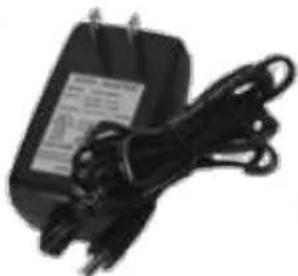
natural_image
Black electrical adapter with coiled cable and power plug (no visible text or symbols)An Important Note on using Batteries
Your TIC wireless speakers use standard C-cell batteries. The wireless speaker(s) battery module uses 6x AAA batteries. The Remote Control unit uses 1x A23 battery available in most drug stores.
WARNING! do not mix battery types e.g. zinc with alkaline batteries or new and used batteries. Do not leave batteries in this product for long periods of time. The Red LED will light and warn of power loss or fluctuation.

Connecting the Transmitter to your music source
TIC's unique omni-directional mini-rock transmitter with 8 channel auto-lock functionality
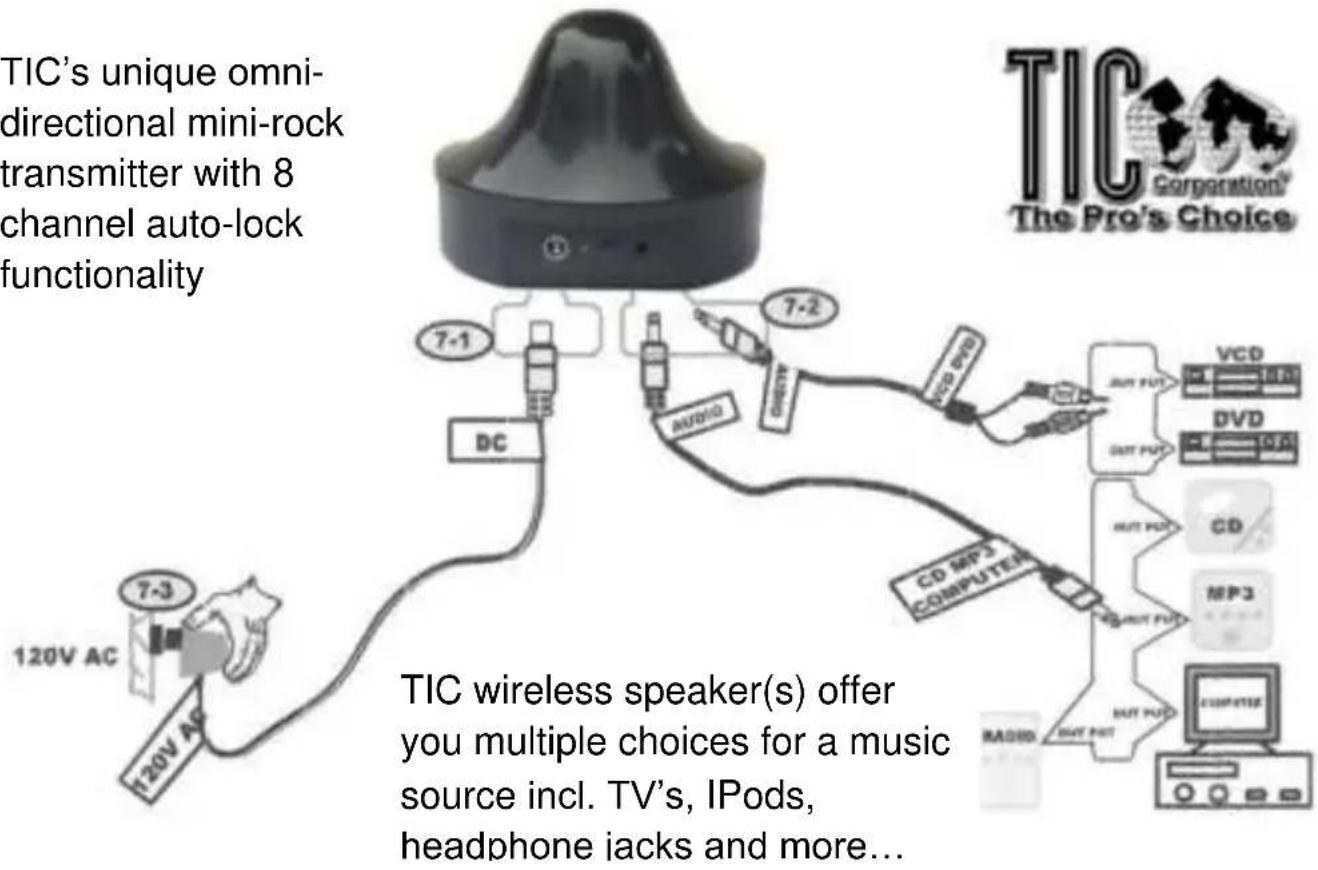
Note: Always make sure you are using an operational audio output. Common color coding for RCA type plug use with audio outputs are Red & White. There are basically two types of audio outputs you will use; fixed level audio outputs are unaffected by the units volume control and are preferred. Variable level audio outputs like headphone jacks and others can be adjusted by the music sources volume control and care must be taken to ensure they are set loud enough to be transmitted to the wireless speakers.
Wireless Remote Control
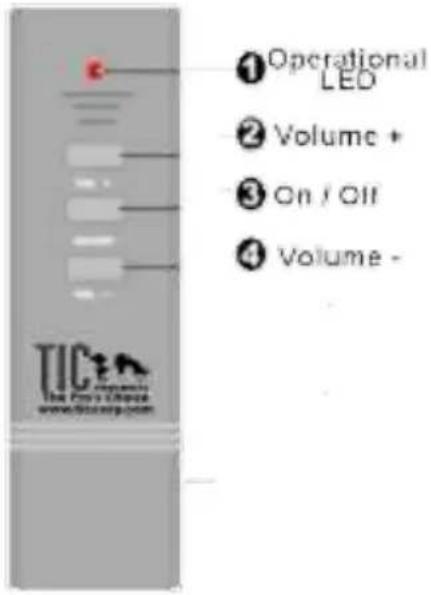
TIC wireless speaker(s) Remote Control has an unobstructed range of approximately 80'/30M.
- Carefully remove the rear battery cover and only use 1xMN21/23 or 23A battery.
- Point the remote directly at the wireless speakers, switch speakers on/off or adjust volumes up or down.
- You will note the Red LED flash as the remote buttons are operated.
Note: if the Red LED light dims or does not flash in operation replace the remote controls battery as this could cause intermittent or poor operation.
Simple 8 Step Quick Start Guide!
- Carefully unpack your new TIC wireless speakers and check all components included, carefully. (Listed under Components above)

natural_image
Simple line drawing of a box with an open lid and a stack of papers or materials on top (no text or symbols)
natural_image
Illustration of a person standing inside a circular target with a magnifying glass (no text or symbols)
- Before exterior placement & installation; place your new wireless speaker(s) near a 120v AC mains socket, find their transformer/ mains power supply(s) cord and plug them in carefully.

natural_image
Cross-sectional diagram of a biological structure with a central cell and surrounding tissue (no text or labels)-
Lift the unit(s) and switch-on with the silicone covered rocker switch. You should see the Green LED light up. Note: the Red LED light next to it only lights when warning of low power. This is useful when the units are running on battery power.
-
Now that the units are plugged in and "on", Green light lit, find the Remote Control. Remove the battery cover and place the battery (23A) in the remote control carefully noting the battery is aligned the right way. Press the "ON" button on the remote control; you should see a Red LED light on the Remote flash as you do this, ensuring the remote is powered

- Simultaneously with your pressing the ON switch of the remote control you should hear a "pop" or feedback sound from your wireless speaker(s). This ensures the units are powered, working and waiting to receive a wireless signal from the broadcast transmitter.
natural_image
Close-up of a black, smooth, dome-shaped object with a small circular base and a small square mark at the bottom (no text or symbols visible)-
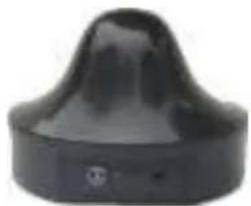
Now go to the wireless broadcast Transmitter. Find the transmitters mains/transformer power supply and plug in. Attach the other end to the transmitter and you should see a Green LED light showing the unit is powered and ready to transmit.
-
There are two music source cables supplied with your TIC wireless speaker(s). Note: the transmitter only takes a 3.5mm jack input. (1) This cable supplied is a 3.5mm jack to 3.5mm jack that is useful for connecting your wireless speaker(s) transmitter to CD, MP3, IPods, computers, headphones and other modern devices which have a 3.5mm jack output connection. (2) This connection cable supplied has a 3.5mm jack at one end for the transmitter connection and a "Y" type, 2x RCA plugs at the other. This cable is useful for connecting your transmitter to RCA type plug outputs like those found on TV's, audio amplifiers, AV receivers and devices which only have RCA plug type audio outputs. Note: such audio outputs usually follow the standard audio output color code of Red & White.

- It is important you ensure your choice of music source or connection method is operating and producing a signal the transmitter can broadcast to the speaker(s). A quick check method is prior to plugging in the transmitter make sure the chosen music source is producing sound normally. An earphone connection is the easiest way as the music will stop when connected in this fashion and you can ensure the signal passes to the transmitter. Please ensure sufficient Volume is being produced, the right “mode” if any, is chosen and that the “mute” switch is not on.
Once connected properly sit back and enjoy!

natural_image
Illustration of a person relaxing on a lounge with musical notes floating nearby (no text or symbols)Enjoy a Quality Outdoor Music Room!
Note: If you have more than one TIC wireless speaker. It is possible for your wireless speakers to become “Out of Phase” where switching “On” using the Remote Control switches on one speaker but not the other. In this case, remove the batteries, completely power down the system. Plug in the speakers together, switch on using the rocker switch, then switch on using the remote. You should hear the unit(s) “pop” or a feedback noise as power surges through the internal amplifier. The units have now regained phase.
Exterior Installation
Some general notes should you install your TIC wireless speaker(s) outdoors.

-
Select a reasonably level surface for the installation of your new TIC outdoor speakers. For surface speakers this will prevent movement or excessive vibration during use. This will also ensure more uniform sound dispersion and better speaker resonance.
-
*Wireless: In normal circumstances we suggest placing the transmitter at a height of 1 meter above the receiving units. (Because land will absorb radio waves produced by the transmitter) Within the maximum area of coverage (unobstructed), the zero boundary point is 100 meters or approx. 300 ft.. Reception will gradually decay when it is beyond the zero boundary point. At this time you can raise the speaker, such as place it at a height of 12'' / 30 CM+ above the earth. The reception of the wireless rock speakers will be greatly improved.
-
Do not place your TIC outdoor speakers in a depression or area where water pools or in the direct path of garden sprinklers.
-
Wherever possible avoid long term exposure of your new TIC outdoor speakers to excessive high temperatures, chlorinated solvents, acids such as those often contained in fertilizers and other solvents which have the potential to eventually wear the internal components prematurely.
-
There is no requirement for customer to open this unit for any kind of operation or maintenance. Doing so will void the warranty.
-
Ensure the base main power switch is in the "off" position when not in use, otherwise the unit still consumes power in the "stand by" mode.
-
Avoid any shocks, high vibration, collisions or sudden impacts to the speaker unit or any of its components
Disclaimer
TIC Corporation will in no way be held responsible for the improper or unsecured installation of this product. Any and all damage arising from the installation or use of this product is the purchaser and final installer's so responsibility. TIC will also not be held responsible for the improper use or exposure to water of any power supply, supplied with TIC products.
Maintenance
Periodic or occasional maintenance of your TIC products in general cannot hurt and may help greatly. Inspect the installation area regularly, removing any dirt, dust or particulate matter from impeding or building up around the TIC product. The unit may be cleaned using a soft slightly damp cloth with very mild detergents like dishwashing liquid if desired. Keep away from audio inputs or output jacks. In very cold climates with moderate to heavy snowfall or rain an old trick from the major theme parks we supply worldwide is to place a plastic bag or waterproof cover over the unit for the winter season or periods it may be not in use or in unusually wet weather conditions.
Customer Service
For any additional help, please contact TIC Corporation at (800) SPX-OMNI, or on line at www.ticcorp.com, by email at info@ticcorp.com where we would be happy to assist you at any time. Also please visit our website www.ticcorp.com/ for FAQ (frequently asked questions) about your TIC product and full contact information.
Should you desire a return material authorization please send an email to rma@ticcorp.com and mention your problem including a copy of your receipt and any other information you can supply.
Warranty Notes
TIC Corporation offers a full, UCC approved, one year full parts and labor warranty (see enclosure) on all its products as standard however there are other 3 and 5 year warranties in use with various TIC authorized Dealers worldwide. Please check your enclosed Warranty card or your Dealer receipt to find out which one applies to you. Also please note TIC Corporation General Terms & Conditions posted on our website at www.ticcorp.com/tic_terms.htm for further information.
| The following troubleshooting notes list some of the more common installation questions received. You may always call (800) SPX-OMNI for more advice or see our website FAQ atwww.ticcorp.com/troubleshooting_wireless_speakers.htm. | |
| No Sound? | Transmitter is not initialized. Re-check that the transmitter is powered (green LED) |
| Check the audio signal source both to and from the Transmitter. Try another cable or music source output channel to ensure integrity | |
| Check the music source used is powered “on”, is not on mute, has no headphones attached and that the channel used for transmission (usually A or B) is in operation or the correct Mode is selected | |
| Refer to the owners guide that came with your music source to ensure your using an active “output” channel | |
| Check that the Remote Control “on” switch is operational | |
| Check the volume control on the Remote and at the music source is loud enough to be heard | |
| If using Batteries ensure all batteries used are new and inserted correctly (+,-). Also ensure the battery pack contacts are making good connection inside the speaker battery compartment | |
| Check the Green indicator light on the base of your speakers is lit and they are operational | |
| Check that the Red indicator light is not lit or signaling power issues | |
| No sound, poor sound or distorted sound | Speaker Red LED is flashing, dim or on. Change batteries or re-check power supply |
| Check the range by temporarily moving the transmitter near the speakers | |
| Lift the Transmitter height | |
Installation Notes
Make any Installation notes here
| TIC Wireless Speaker Technical Specifications | |
| Accessories Included | 1x 3.5mm to 3.5mm digital cable1x 3.5mm to 2x RCA type plugs |
| Audio Inputs | Analog / digital: IPods, CD's, MP3's, receiver amplifiers, TV's, AVR's, phono's, DVD's, portable stereos etc. |
| Selectable RF Channels | 8 switchable channels |
| Broadcast Frequency Range | 2400 – 2483 MHz |
| Transmitter Voltage | DC 4.5v 500mA |
| Receiver Voltage | DC 9v 800mA |
| Power Consumption | 300-600mA |
| Impedance | 8 Ohms |
| Sensitivity @ 1W / 1M | 84db ±3db |
| Continuous / Peak | 2.5 – 5W |
| Frequency Response | 90Hz – 18kHz |
| Transmitter Range | 100m / 300ft. (unobstructed) |
| Remote Control Range | 30m / 80ft. (unobstructed) |
| Battery Life | Approx. 4 – 6 hrs. |
| Unit Size | 9.4 x 9.4 x 7.4 or 8.4x8.4x9 in. |
| Pack Size | 18 x 10 x 8.5 or 14x10x10 in. (pair) |
| Pack Weight | 16 Lbs. or 6 Lbs. |
| TIC Corporation engages in continual product research and development, new materials, production methods and design improvements. TIC Corporation, their Agents, Representatives and Distributors therefore reserve all rights to change or improve product specifications without notice. | |
| TIC Corporation15224 East Stafford StreetCity of Industry, CA. 91744-4418 U.S.A.Tel: (626) 968-0211 (5 lines) Fax: (626) 968-1363Email:info@ticcorp.com Web:www.ticcorp.com | |
TIC Corporation


- TIC Wireless Speakers
- TIC Wireless Installation & Owners Guide
- Important Safety & Regulatory Information
- Important Safety Instructions
- Declaration of FCC Conformity
- For Your Records
- Introduction to Your TIC Wireless Speakers
- TIC Wireless Speaker(s) Components
- Power Options for your TIC Wireless Speakers
- An Important Note on using Batteries
- Connecting the Transmitter to your music source
- Wireless Remote Control
- Simple 8 Step Quick Start Guide!
- Exterior Installation
- Disclaimer
- Maintenance
- Customer Service
- Warranty Notes
- Installation Notes
- TIC Corporation
Brand : TIC
Model : WRS005
Category : Loudspeaker