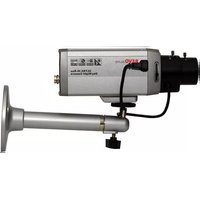
REXN600-1 - Security Camera REVO - Free user manual and instructions
Find the device manual for free REXN600-1 REVO in PDF.


| Product Type | Security Camera (Color CCD Camera) |
| Brand | REVO |
| Model | REXN600-1 |
| Image Sensor | 1/3" SONY Super-HAD Color CCD |
| Resolution | 600 TV Lines (Color) |
| Min. Illumination | 0.1 lux (Color), 0.04 lux (B/W) @ F1.2, 50 IRE |
| Video Output | 1.0 Vp-p, 75 ohm, composite |
| Lens Mount | C/CS mount (CS adapter ring included) |
| Auto Iris Lens Support | DC or Video type, 4-pin connector |
| Sync System | Internal / Line lock |
| Electronic Shutter | 1/60 to 1/120,000 sec |
| Power Supply | DC12V or AC24V (±10%), 4.5W |
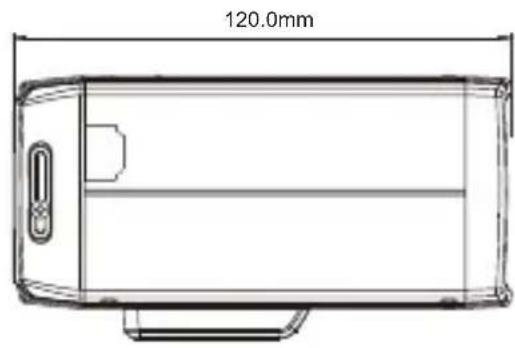
| Dimensions (W x H x D) | 66 x 56 x 120 mm |
| Weight | 250 g |
| Operating Temperature | -10°C to +50°C |
| Operating Humidity | 0% to 96% (non-condensing) |
| Communication Control | RS-485 (Fastrax, Pelco-D, Pelco-P) |
| Key Functions | OSD, Day/Night, Motion Detection, Privacy Mask (24 zones), 3D-DNR, Eclipse, DRC, BLC, AGC, Sense-up (x2~x256), White Balance, Mirror, Zoom (x4), Pan/Tilt (x2) |
| Safety Certifications | FCC Class A, CE (ICES-003) |
| Maintenance & Cleaning | Use a dry soft cloth; mild detergent if needed. Avoid strong solvents. |
| Spare Parts / Repairability | Lens not included. Internal repairs by qualified service personnel only. |
Frequently Asked Questions - REXN600-1 REVO
User questions about REXN600-1 REVO
0 question about this device. Answer the ones you know or ask your own.
Ask a new question about this device
Download the instructions for your Security Camera in PDF format for free! Find your manual REXN600-1 - REVO and take your electronic device back in hand. On this page are published all the documents necessary for the use of your device. REXN600-1 by REVO.
USER MANUAL REXN600-1 REVO
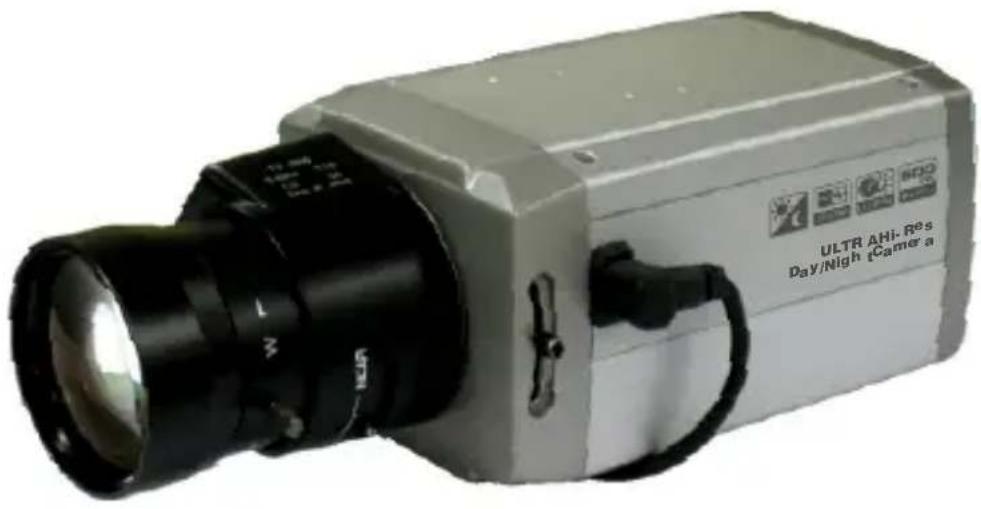
UltraHighResolution ColorCamera
WARNINGSANDCAUTIONS:
TO REDUCE THE RISK OF FIRE OR ELECTRIC SHOCK, DO NOT EXPOSE THIS PRODUCT TO RAIN OR MOISTURE.DONOTINSERTANYMETALLICOBJECTSTHROUGHTHEVENTILATIONGRILLSOR OTHEROPENINGSONTHEEQUIPMENT.
CAUTION:
EXPLANATIONOFGRAPHICAL SYMBOLS

Thelightningflashwitharrowheadsymbol, withinanequilateraltriangle, is intended to alert the userto the presence of uninsulated "dangerous voltage" within the product's enclosure that may be sufficient magnitude to constitute a risk of electric shock topersons.

Theexclamationpointwithinanequilateraltriangleisintendedtoalerttheuserto thepresenceofimportantoperatingandmaintenance(servicing)instructionsinthe literatureaccompanyingtheproduct.
PRECAUTIONS
Safety
Installation
Shouldanyliquidorsolidobjectfallintothecabinet, unplugtheunitandhaveitcheckedbythequalified personnelbeforeoperatingitanyfurther.
Unplugtheunitfromthewallouletifitisnotgoingto beusedforseveraldaysormore. Todisconnectthe cord, pullitoutbytheplug. Neverpullthecorditself.
Allowadequateaircirculationtopreventinternalheat build-up.Donotplacetheunitonsurfaces(rugs, blankets,etc.)ornearmaterials(curtains,draperies) thatmayblocktheventilationholes.
Heightandverticallinearitycontrolslocatedatthe rearpanelareforspecialadjustmentsbyqualified personnelonly.
Donotinstalltheunitinanextremelyhotor humidplaceorinaplacesubjecttoexcessive dust,mechanicalvibration.
Theunitisnotdesignedtobewaterproof. Exposuretorainorwatermaydamagetheunit.
Cleaning
Cleantheunitwithaslightlydampsoftcloth. Useamildhouseholddetergent.Neveruse strongsolventssuchasthinnerorbenzineas theymightdamagethefinishoftheunit.
Retaintheoriginalcartonandpacking materialsforsafetransportofthisunitinthe future.
FCCCOMPLIANCESTATEMENT
FCC INFORMATION : THIS EQUIPMENT HAS BEEN TESTED AND FOUND TO COMPLY WITH THE LIMITS FOR A CLASS A DIGITAL DEVICE, PURSUANTTOPART 1 50FTHEFCCRULES. THESE LIMITSAREDESIGNEDTOPROVIDEREASONABLEPROTECTION AGAINST HARMFUL INTERFERENCE WHEN THE EQUIPMENT IS OPERATED IN A COMMERCIAL ENVIRONMENT. THIS EQUIPMENT GENERATES, USES, AND CAN RADIATERADIOFREQUENCY ENERGY AND IF NOT I INSTALLED AND USED IN ACCORDANCE WITH THE INSTRUCTION MANUAL, MAY CAUSE HARMFUL INTERFERENCE TORADIOCOMMUNICATIONS. OPERATION OF THIS EQUIPMENT IN A RESIDENTIAL AREA IS LIKELY TO CAUSE HARMFUL INTERFERENCE IN WHICH CASETHEUSERWILL B EREQUIRED TO CORRECT THE INTERFERENCE AT H ISOWNEXPENSE.
CAUTION : CHANGES OR MODIFICATIONS NOT EXPRESSLY APPROVED BY THE PARTY RESPONSIBLE FOR COMPLIANCE COULD VOID THE USER'S AUTHORITY TO OPERATE THE EQUIPMENT.
THISCLASSADIGITALAPPARATUSCOMPLIESWITHCANADIAN ICES-003. CET APPAREIL NUMÉRIQUE DE LA CLASSE A EST CONFORME À LA NORMENMB-003DUCANADA.
CECOMPLIANCESTATEMENT
WARNING
ThisisaClassAproduct.Inadomesticenvironmentthisproduct maycauseradiointerferenceinwhichcasetheusermayberequired totakeadequatemeasures.
IMPORTANTSAFEGUARDS
- Readtheseinstructions.
- Keeptheseinstructions.
- Heedallwarnings.
4.Followallinstructions. - Donotusethisapparatusnearwater.
-
Cleanonlywithdrycloth.
-
Donotblockanyventilationopenings.Installinaccordancewiththe m anufacturer'sinstructions.
-
Donotinstallnearanyheatsourcessuchasradiators,heatregisters, s toves,orotherapparatus(includingamplifiers)thatproduceheat.
-
Donotdefeatthesafetypurposeofthepolarizedorgrounding-type plug. A polarized plug has two blades with one wider than the other. A grounding type plug has two blades and a third grounding prong. The wide blade or the third prong are provided for your safety. If the p rvidedplugdoesnotfitintoyouroutlet,consultanelectricianfor replacementoftheobsoleteoutlet.
-
Protect the power cord from being walked on or pinched particularly a t plugs, conveniencereceptacles, and the point where they exit from the heapparatus.
-
Only use attachments/accessories specified by the manufacturer.
-
Use only with the cart, stand, tripod, bracket, ortables specified by the manufacturer, or sold with the apparatus. When a cart is used, use caution when moving the cart/apparatus combination to avoid injury from tip-over.
-
Unplugthisapparatusduringlightningstormsorwhenunusedfor longperiodsoftime.
-
Referallservicingtoqualifiedservicepersonnel.Servicingis r equiredwhentheapparatushasbeendamagedinanyway,suchas p ower-supplycordorplugisdamaged,liquidhasbeenmoisture,does n otoperatenormally,orhasbeendropped.
-
CAUTIONTHESESERVICINGINSTRUCTIONSAREFORUSEBY QUALIFIED SERVICE PERSONNEL ONLY. TO REDUCE THE RISK OF ELECTRIC SHOCK DO NOT PERFORM ANY SERVICING OTHER THANTHATCONTAINEDINTHEOPERATINGINSTRUCTIONS U NLESSYOUQREQUALIFIEDTODOSO.
-
Use Certified/Listed Class 2 powersource only.
TABLEOFCONTENTS
INTRODUCTION1
CAMERAOVERVIEW2
CONTENTSOFPACKAGE3
CAMERAADJUSTMENT3
CONTROLANDCONNECTIONS/DAY&NIGHTINPUTTERMINALS8 ....
LENS10
SPECIFICATIONS11
The cameraprovideshigh-qualityimagesusingSONYCCDtechnologiespecially designedforclosed-circuittelevision(CCTV)andsecuritysurveillance applications.
Features:
- Highresolutionandhighperformance1/3"SONYSuperHADCCD Technology
• Excellentpicturequality
• 600lines(Color)ofresolution
0.1lux(Color),0.04lux(B/W)@F1.250IRESensitivity (Senseupx256- 0.0004lux(Color),0.0001lux(B/W)) - Autoelectronicshutter[1/60(1/50)\~1/120,000]andmanualelectronic shuttermodes
- OSD(OnScreenDisplay)
3DDNRFunction - Eclipse
• DRC(DynamicRangeControl)
• Autoandmanualwhitebalancemodes
• BLC(BackLightCompensation) - Day&Night(Auto/DAY/NIGHT/EXT) (EXT:D&NWithICRmodeloption)
- PrivateMask(24position,BW,Color,Mosaic)
AGC(AutoGainControl) - Sense-up(x2\~x256)
• MIRROR(NORMAL/MIRROR/VERTICAL/ROTATE)
• VIDEOOUT(BNC, UTP(option)) - MotionDetection
- Internal/AClinelock
• RS485CONTROL - CompatiblewithvideoorDC-typelenswithOSDselect.
- QuickconnectforvideoorDClenswith4-pinconnector.
• Operatesin12VDCor24VAC
• UseCertified/ListedClass2powersupplyonly.
SIDEVIEW
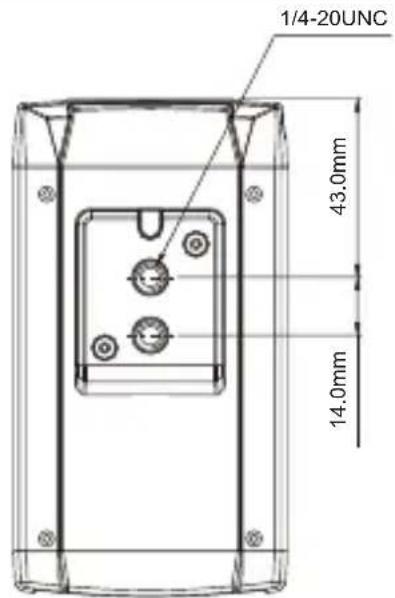
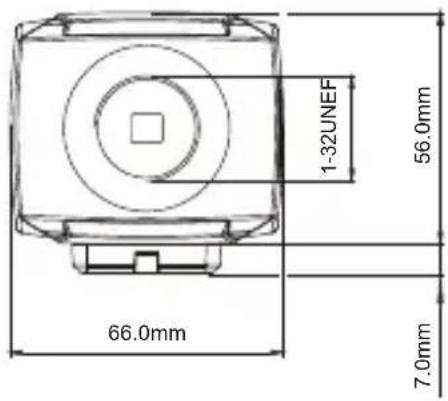
FRONTVIEW
BOTTOMVIEW
REARVIEW
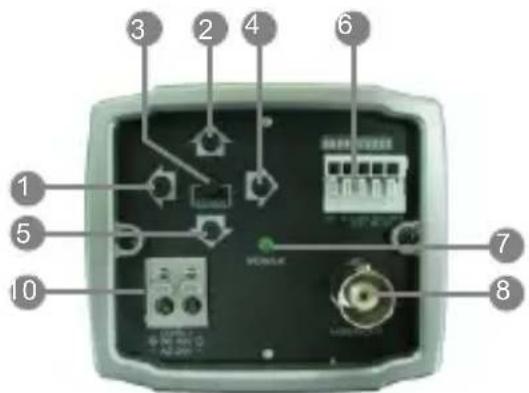
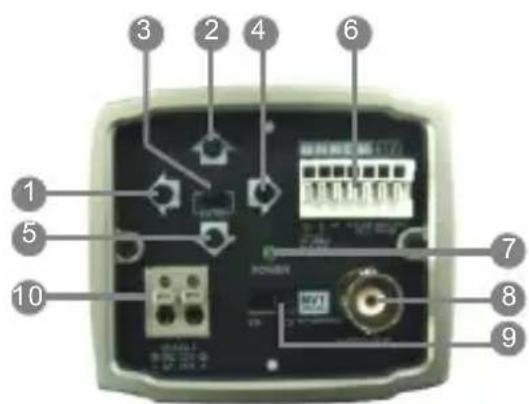
1LeftButton
2UpButton
3EnterButton
4RightButton
5DownButton
⑥ Day/NightExternalInput ALARMOUT
RS-485
UTPVideoOutput(option)
7 PowerIndicator
8 V ideoOutConnector(BNC)
UTPorBNCTransformationSwitch(option)
10 AC/DCCompatibleInputTerminal
*, -UTI9Option
Installationofthecameramustbeperformedbyqualifiedservicepersonnelinaccordance withallocalandnationalelectricalandmechanicalcodes.
Carefullyremovethecolorcameraanditsaccessoriesfromthecarton andverifythattheywerenotdamagedinshipment.
Thecontentsofthepackageincludes:
1.ColorCCDcamera
2. Mini-DINconnector(forvideo-ordc-typeauto-irislens)
3.CSadapterringforCmounting"C"lenses
4. Thismanual
CAMERAADJUSTMENT
OSDMAINSCREEN
1) EXPOSURE, WHITEBAL, DAY/NIGHT, MOTION, PRIVACY, OPTION and DISPLAYhasaSUBMENU. [UP] / [DOWN] of Cursor.
AndSUBMENUSisdisplayedby[LEFT]/[RIGHT].
2)SYNC:AUTOorINTcanbeselected.
3) When making INITIAL from USER to DEFAULT, all data is initialized.
4) To EXIT themenuusethe[LEFT]/[RIGHT] buttons when EXIT is highlighted.
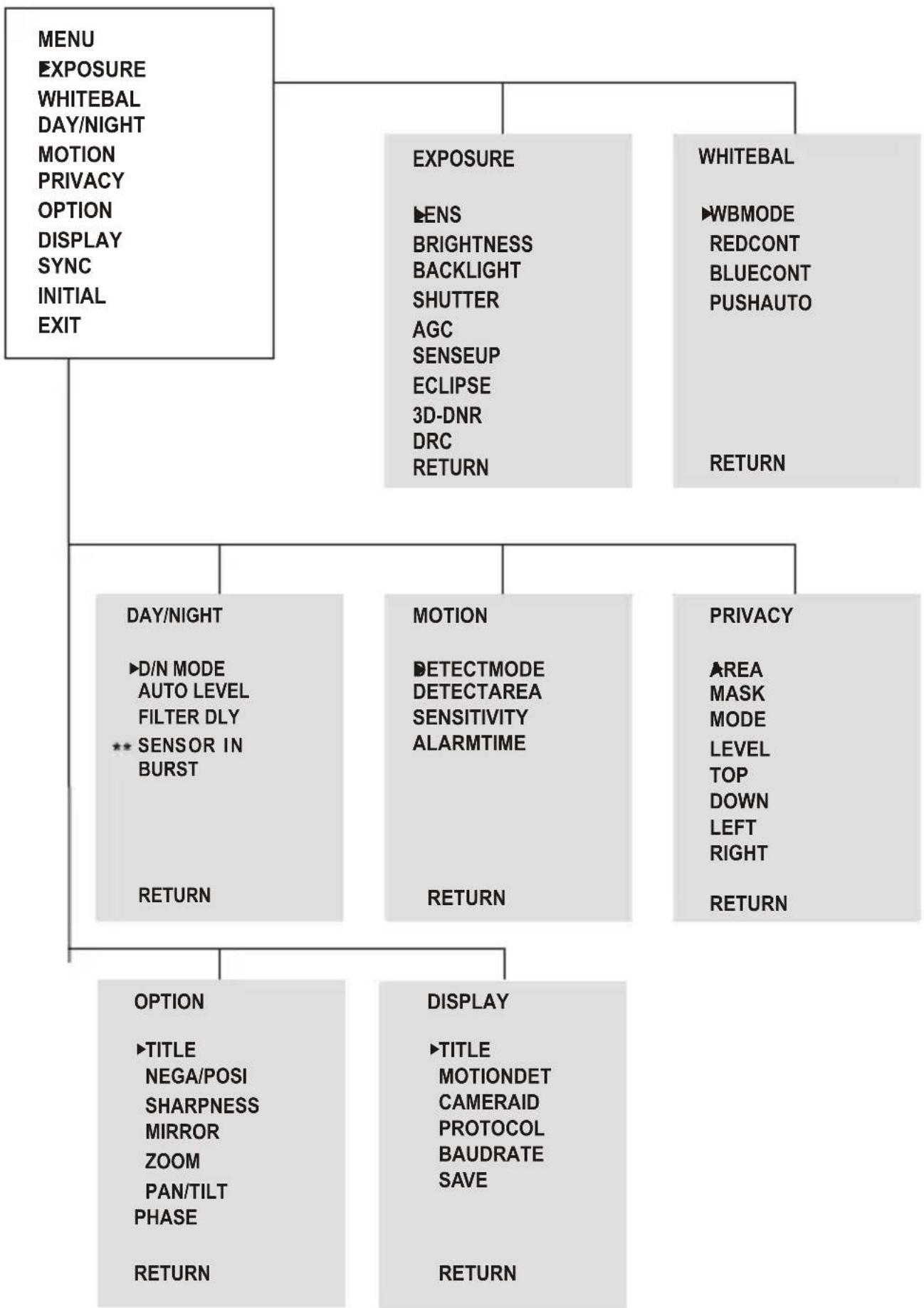
flowchart
graph TD
    A["MENU\nEXPOSURE\nWHITEBAL\nDAY/NIGHT\nMOTION\nPRIVACY\nOPTION\nDISPLAY\nSYNC\nINITIAL\nEXIT"] --> B["EXPOSURE\nSENS\nBRIGHTNESS\nBACKLIGHT\nSHUTTER\nAGC\nSENSEUP\nECLIPSE\n3D-DNR\nDRC\nRETURN"]
    A --> C["WHITEBAL\nWBMODE\nREDCONT\nBLUECONT\nPUSHAUTO\nRETURN"]
    B --> D["DAY/NIGHT\n▶D/N MODE\nAUTO LEVEL\nFILTER DLY\n** SENSOR IN\nBURST\nRETURN"]
    B --> E["MOTION\nDETECTMODE\nDETECTAREA\nSENSITIVITY\nALARMTIME\nRETURN"]
    B --> F["PRIVACY\nAREA\nMASK\nMODE\nLEVEL\nTOP\nDOWN\nLEFT\nRIGHT\nRETURN"]
    D --> G["OPTION\n▶TITLE\nNEGA/POSI\nSHARPNESS\nMIRROR\nZOOM\nPAN/TILT\nPHASE\nRETURN"]
    E --> H["DISPLAY\n▶TITLE\nMOTIONDET\nCAMERAID\nPROTOCOL\nBAUDRATE\nSAVE\nRETURN"]
**SENSOR IN : Only D&N with ICR model
Pressthe[LEFT]or[RIGHT]buttontoaccessthe"EXPOSURE"mode.
| 1)LENS | DC,Video,ELCcanbeselected. |
| 2)BRIGHTNESS | 0to60canbeselected.*LevelsettingisavailableinDC,Video,ELCmode. |
| 3)BACKLIGHT | ONorOFFcanbeselected.(BLClevel,location)*Preventssuchabacklighteffecttosecureaclearimageunder allilluminationenvironments. |
| 4)SHUTTER | 1/60(1/50),FLC,1/250,1/500,1/1000,1/2000,1/4000,1/100001/30000,1/60000,1/120000sec.*WhenLENSisDCorVIDEO,itispossibletoselectit.AnotherbecomesNOTUSE. |
| 5)AGC | AGCOFF,LOW,MID,HIGHcanbeselected.*Asthelevelofgainincreases,thescreengetsbrighterandthelevelOfnoisealsoincreases. |
| 6)SENSEUP | OFF,x2,x4,x8,x16,x32,x64,x128,x256canbeselected.*SENSEUPhelpsmaintainabright,clearscreenimage byautomaticallydetectingchangeintheleveloflight |
| 7)ECLIPSE | ONorOFFcanbeselected.*Thefunctionimprovestheidentificationcapabilityofsubjectsfacing abrightlylitsituationbyfilteringoutthestrengthofthelight. |
| 8)3D-DNR | OFF,LOW,MID,HIGHcanbeselected.*Reducesthenoiseonthescreenunderlowlightcondition |
| 9)DRC | ONor OFF*Thefunctionotvisiblybrightenasubjectinadarkarea |
| 10)RETURN | ReturntoMAINMENU. |
Pressthe[LEFT]or[RIGHT]buttontoaccessthe"WHITEBALANCE"mode.
| 1)WBMODE | |
| -ATW | Thismodecanbeusedwithinthecolortemperaturerange 1.800^ 10.500^ |
| -AWC | Pleasepressthe[LEFT]or[RIGHT]buttoninthePUSHAUTOmodewhilethecameraisdirectedatapieceofwhilepapertoobtaintheoptimumstateundercurrentillumination.Iftheenvironmentincludingthelightsourceschanged,youhavetoadjusttheWhitebalanceagain. |
| -MANUAL | Manualmode.UsercanchangeRandBGainmanually. |
| -INDOOR | Setthecolortemperatureto 3200^ |
| -OUTDOOR | Setthecolortemperatureto 6300^ |
| 2)REDCONT | AdjustRedGainValue(0~127)Canbeadjustwhileinmanualmode. |
| 3)BLUECONT | AdjustBLUEGainValue(0~127)Canbeadjustwhileinmanualmode. |
| 4)PUSHAUTO | WhenitisAWC,OFFtoPUSHcanbeselected. |
| 5)RETURN | ReturntoMAINMENU. |
Pressthe[LEFT]or[RIGHT]buttontoaccessthe"DAY/NIGHT"mode.
| 1)D/NMODE | AUTO,DAY,NIGHT,EXTcanbeselected. |
| -AUTO | Thiscamerahasafunctionwhichautomaticallychangesto theappropriatemodeforday-timeornight-time. |
| -DAY | Inthismode,thecameraoutputsthevideoimageonlyincolor. |
| -NIGHT | Inthismode,thecameraoutputsthevideoimageonlyinblackandwhite. |
| -EXT | Inthismode,anexternalsignalchangesthecameraoutputfromthe COLORmodetoBWmodeandback.*EXT:OnlyD&NwithICRModel(Option) |
| 2)AUTOLEVEL | When set to AUTO, the 0 to 3 values can be selected.*AGCLOW:0AGCMID:0~1AGCHIGH:0~3 |
| 3)FILTERDLY | WhensettoAUTO,4to10canbeselected.WhenAGCisOFF,NOTUSED.*Adjustthedelaytimeoffiltermovementwhenchanging fromontoofforofftoon . |
| 4)SENSORIN | WhenitisEXT,NoorNCCanbeselected.* SENSORIN:OnlyD&nwithICRModel.(Option) |
| 5)BURST | WhenitisDAY,NotUse.AnothermodebecomesONorOFFcanbeselected. |
| 6)RETURN | ReturntoMAINMENU. |
Pressthe[LEFT]or[RIGHT]buttontoaccessth"MOTION"mode.
| 1)DETECTMODE | ONorOFFcanbeselected.*TurningonbecomesinvalidwhiledisplayingOSD.However,itbecomeseffectiveonlyatMOTIONAREA. |
| 2)DETECTAREA | MOTIONAREAisdisplayed. |
| 3)SENSITIVITY | 0to8canbeselected. |
| 4)ALARMTIME | 1to60seccanbeselected. |
| 5)RETURN | ReturntoMAINMENU. |
Pressthe[LEFT]or[RIGHT]buttontoaccessthe"PRIVACY"mode.
| 1)AREA | 1to24canbeselected. |
| 2)MASK | ONorOFFcanbeselected. |
| 3)MODE | WhenMASKisON,BW,MOSAIC,COLORcanbeselected. |
| 4)LEVEL | -BW:0to15canbeselected.-MOSAIC:SMALLorMIDDLEorLARGEcanbeselected.-COLOR:RED,BLUE,GREEN,YELLOW,CYAN,MAGENTA canbeselected. |
| 5)TOP | WhenMASKisON,3to124(NTSC)or6to150(PAL)canbeselected. |
| 6)DOWN | WhenMASKisON,5to126(NTSC)or8to152(PAL)canbeselected. |
| 7)LEFT | WhenMASKisON,0to187(NTSC)or0to185(PAL)canbeselected. |
| 8)RIGHT | WhenMASKisON,2to189(NTSC)or2to187(PAL)canbeselected. |
| 9)RETURN | ReturntoMAINMENU. |
Pressthe[LEFT]or[RIGHT]buttontoaccessthe"OPTION"mode.
1)TITLE
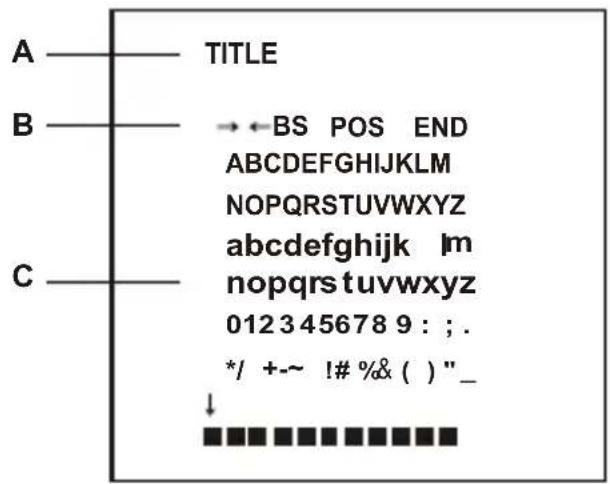
A. TITLE
B. CommandLine
← :Movetoleft
→ :Movetoright
BS: Erasealeftcharacter
POS: Changethepositionofthetitle
END:End
C. CharacterTable
:brank
- :space
2) NEGA/POSI NEGAorPOSI can be selected.
3) SHARPNESS0 to 15 can be selected.
4) MIRROR NORMAL, MIRROR, VERTICAL, ROTATE can be selected.
-MIRRORHorizontalimageinversion
-VERTICAL V erticalimageinversion
-ROTATEHorizontalimageandVerticalimageinversion
5) ZOOM 0FF(x1) and ON1 to ON8(x4) can be selected. When PAN/TILT is ON, it is NOT USE.
6) PAN/TILT OFF or ON(x2) can be selected. *WhenOSDMENUisOFFandPAN/TILTisON, o p erateby[UP],[DOWN],[LEFT],[RIGHT].
7) PHASE Sync phase is adjustable in line lock mode (Auto mode) 0\~524(NTSC)or0\~624(PAL).
8)RETURNReturntoMAINMENU
Pressthe[LEFT]or[RIGHT]buttontoaccessthe"DISPLAY"mode.
1) TITLE ON or OFF can be selected.
2) MOTION DET ON or OFF can be selected.
3) CAMERA ID Select the camera ID. (001 - 254)
4) PROTOCOL Select operating protocol
FASTRAX : Fastrax protocol.
PELCO-D : PELCO-D protocol.
PELCO-P : PELCO-P protocol.
5) BAUDRATE Select serial communication speed. (2400 / 4800 / 9600 / 19200)
6) SAVE Save the changed parameters of CAMERA ID, PROTOCOL, BAUDRATE.
7) RETURN Return to MAIN MENU.
CONTROLANDCONNECTIONS/DAY&NIGHT INPUT/ALARMOUTTERMINALS-(UTPMODEL)
| 1234 | 5 | 6 | 7 | |||
| TPVIDEO O UTPUTD&N | COM | ALARM | RS-485 | |||
| ⊖ | ⊕ | INGND | OUT | RS 4 85+(RX) | RS 4 85-(TX) | |
*3Pin : Only D&N with ICR model option (DDN model : NC)
1) CAMERACONTROL
- 6PIN:RS485+
- 7PIN:RS485 -
2) DAY&NIGHTINPUTTerminal (Only D&N with ICR model option)
ToselectDay/Nightmodeusingexternalequipment,connectcontrollinetotheappropriateterminal.
• DAY&NIGHTEXTERNALINPUT(2pin)
ItisthefunctionthatcanbeswitchedtoDAYModeorNIGHTModebyreceivingthe D&Non/offsignalfromexternallightsensororIRLEDLAMP.WhenD&NModeisset "EXT"ontheOSDmenuofthecamera.
BNC: This BNC connector provides a 1.0 Vp-p/75 ohms composite video Signal.
UTP : Unshielded Twisted Pair video Transmission for effective installation(option).
1PIN:TPVIDEOOUTPUT
⊕
2PIN:TPVIDEOOUTPUT
⊕
CONTROLANDCONNECTIONS/DAY&NIGHT INPUT/ALARMOUTTERMINALS-(W/OUTP M ODEL)
| 1 | 2 | 3 | 4 | 5 |
| D&N | COM | ALARM | RS-485 | |
| INGND | OUT | RS 4 85+(RX) | RS 4 85-(TX) | |
*1Pin : Only D&N with ICR model option (DDN model : NC)
1) CAMERACONTROL
4PIN:RS485+
5PIN:RS485 -
2) DAY&NIGHTINPUTTerminal (Only D&N with ICR model option)
ToselectDay/Nightmodeusingexternalequipment,connectcontrolline
totheappropriateterminal.
• DAY&NIGHTEXTERNALINPUT(2pin)
ItisthefunctionthatcanbeswitchedtoDAYModeorNIGHTModebyreceivingthe D&Non/offsignalfromexternallightsensororIRLEDLAMP.WhenD&NModeisset "EXT"ontheOSDmenuofthecamera.
BNC: This BNC connector provides a 1.0 Vp-p/75 ohms composite video Signal.
Thelensisnotsuppliedwiththiscamera.Purchasealenssuitableforyourenvironment. ThiscameraacceptstheautoirislensandbothC-andCS-mountlens.
\*Notes\*
ForusingmainfunctionsitisrecommendedtouseAutolrisLenswithDCtype. Ifthelensismarkedwithfingerprintsothermarks,theimagequalitymightbepoor. Itisrecommendedtouseahighqualitylenstoimprovetheimagequalityunder lowillumination.
-
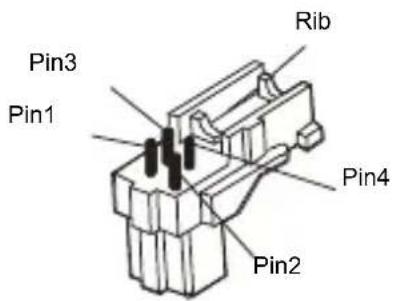
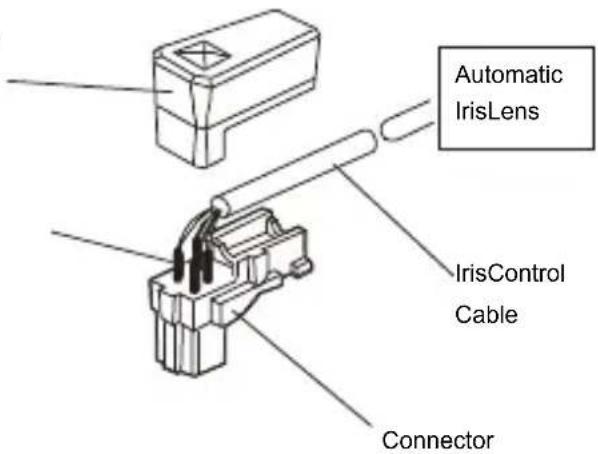
Removethecoverfromtheirislensplugsupplied, and solderthelenscabletotheplugas shown below.
-
Videotype:
Pin1---Red(Powersource)
Pin2---N.C
Pin3---White(Videosignal)
Pin4---Black(GND)
- DCtype:
Pin1---Damping-
Pin2---Damping+
Pin3---Drive+
Pin4---Drive-
Heat
Connector
Cover
Shrinkable
Tubes
2.Removetheprotectivecap,andattachthelenstothecamerabyturningclockwise.
| MODEL | NTSC | PAL | ||
| POWER | Powersource | DC12V/AC24V10% | ||
| Powerconsumption | 4.5Watts | |||
| GENERAL | Imagesensor | 1/3"SONYSuper-HADColorCCD | ||
| Totalnumberofpixels | 811(H)x508(V) | 795(H)x596(V) | ||
| Scanningsystem | 2:1interlace | |||
| Scanningfrequency | 15.734KHz(H),59.94Hz(V) | 15.625KHz(H),50Hz(V) | ||
| Sync.system | Internal/Linelock | |||
| Electronicshutter | 1/60~1/120,000sec1/50~1/120,000sec | |||
| Resolution | 600TVLines(Color) | |||
| Min.illumination | 0.1lux(Color),0.04lux(B/W)@F1.250IRE(Senseupx256- 0.0004lux(Color),0.0001lux(B/W)) | |||
| Videooutput | 1.0Vp-p(75ohm,composite) | |||
| S/NRatio | Morethan55dB(AGCOFF,SenseupOFF) | |||
| CameraControl | RS485(Fastrax,PelcoD,PelcoP),TACTSwitch | |||
| FUNCTION | AutoExposure | 1/60(1/50)/FLICKERLESS/MANUALSHUTTER(1/250,1/500,1/1000,/1/2000,1/4000,1/10000,1/30000,1/60000,1/120000) | ||
| Lens | DC/VIDEO/ELC | |||
| BLC | ON/OFF(Position,Level) | |||
| AGC | OFF/LOW/MIDDLE/HIGH | |||
| Sense-up | OFF/x2~x256 | |||
| Eclipse | OFF/ON | |||
| 3D-DNR | OFF/LOW/MIDDLE/HIGH | |||
| DRC | ON/OFF | |||
| WhiteBalance | ATW/AWC/MANUAL/INDOOR/OUTDOOR | |||
| Day&Night | AUTO/DAY/NIGHT/EXT (EXT:D&NwithICRmodeloption) | |||
| Motiondetection | OFF/ON(Sensitivity&AlarmtimeSelective) | |||
| Privacyzone | OFF/ON(24point,MaskBW,Color,Mosaic) | |||
| DisplayTitle | OFF/ON | |||
| VideoPicture | POSI/NEGA | |||
| Brightness | 0~60 | |||
| Sharpness | 0~15 | |||
| Mirror | NORMAL/MIRROR/VERTICAL/ROTATE | |||
| Zoom | OFF/ON(x4)/PAN&TILT(x2) | |||
| Sync | INT/AUTO | |||
| CameraID | 1~254 | |||
| Baudrate | 2400/4800/9600/19200 | |||
| IREXTIN | NC/NO (Only D&N with ICR model option) | |||
| Preset | INTIAL/EXIT(Autosave)/RETURN | |||
| CONNECTOR & ETC. | Powerinput | 2-PinTerminalblock | ||
| Videooutput | BNC,UTP(option) | |||
| Autoirisoutput | 4-PinTerminaldinjack(standardconnection) | |||
| Lensmount | C/CSmount(Selectedthroughbackfocus) | |||
| Mountinghole | 1/4"-20UNC(toporbottom) | |||
| Operatingtemperature | -10°C~+50C[14F~122F] | |||
| Operatinghumidity | 0~96%(non-condencing) | |||
| Externaldimension | 66(W)x56(H)x120(D)mm | |||
| Weight | 250g | |||
- UltraHighResolution ColorCamera
- WARNINGSANDCAUTIONS:
- CAUTION:
- EXPLANATIONOFGRAPHICAL SYMBOLS
- PRECAUTIONS
- Safety
- Installation
- Cleaning
- FCCCOMPLIANCESTATEMENT
- CECOMPLIANCESTATEMENT
- WARNING
- IMPORTANTSAFEGUARDS
- TABLEOFCONTENTS
- Features:
- CAMERAADJUSTMENT
- OSDMAINSCREEN
- CONTROLANDCONNECTIONS/DAY&NIGHT INPUT/ALARMOUTTERMINALS-(UTPMODEL)
- 1) CAMERACONTROL
- 2) DAY&NIGHTINPUTTerminal (Only D&N with ICR model option)
- • DAY&NIGHTEXTERNALINPUT(2pin)
- CONTROLANDCONNECTIONS/DAY&NIGHT INPUT/ALARMOUTTERMINALS-(W/OUTP M ODEL)
- \*Notes\*
Brand : REVO
Model : REXN600-1
Category : Security Camera