ST128PRO - NAS StarTech.com - Free user manual and instructions
Find the device manual for free ST128PRO StarTech.com in PDF.


User questions about ST128PRO StarTech.com
0 question about this device. Answer the ones you know or ask your own.
Ask a new question about this device
Download the instructions for your NAS in PDF format for free! Find your manual ST128PRO - StarTech.com and take your electronic device back in hand. On this page are published all the documents necessary for the use of your device. ST128PRO by StarTech.com.
USER MANUAL ST128PRO StarTech.com
High Resolution Video Splitter
text_image
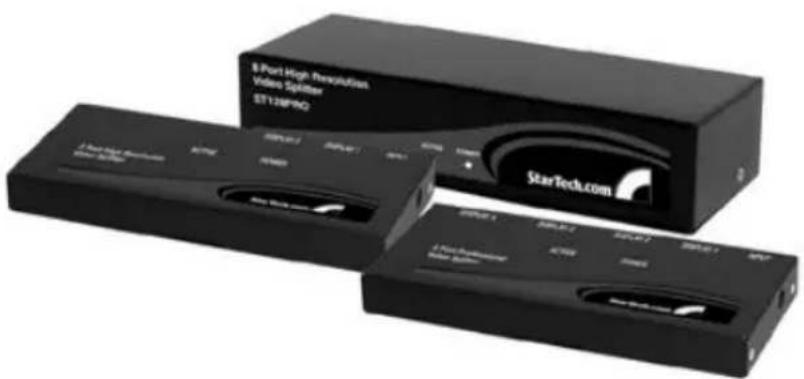
8 Port High Resolution Video Splitter ST128F90 StarTech.com 8 Port High Resolution Video Splitter ST128F90 8 Port High Resolution Video Splitter ST128F90 8 Port High Resolution Video SplitterUser's Manual
ST122PRO
ST124PRO
ST128PRO
Introduction
The StarTech.com ST122PRO, ST124PRO and ST128PRO Video Splitters broadcast and boost one VGA signal source for 2, 4 or 8 VGA monitors respectively. There is no software or interface card to install. Just connect the cables, power up the system and you are ready to have duplicated VGA images for multiple monitors with excellent quality. Superb high-bandwidth circuit enables a high resolution VGA signal of up to 300Mhz (with the ST122PRO and ST124PRO) to be displayed on multiple monitors.
Application
■ Presentations
■ Exhibits
■ Demonstrations
■ Trade shows
■ Monitor testing and burn-in
■ Business meetings
Features
■ Duplicate VGA input to multiple VGA outputs
■ Effective transmission distance: 65M (210ft)
■ Automatic power-save when VGA input is lost
■ Applicable to VGA, SVGA and multi-sync monitors
■ Cascaded operation for increased VGA outputs
■ Crisp and clear VGA images
Connection
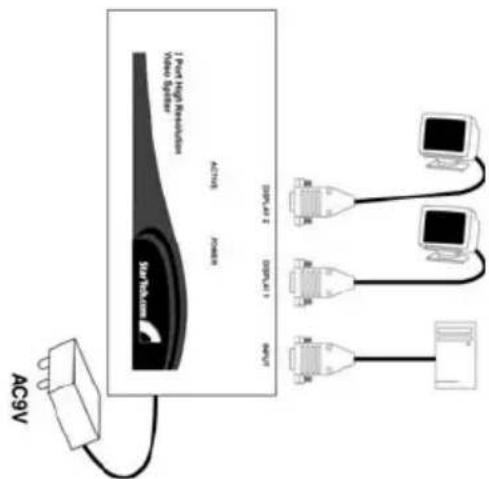
One length of HDB15 male-to-female cable is required to connect from the Video Splitter Input to a computer's VGA output. Multiple monitors should be connected to the Video Splitter's output port as shown below.
text_image
AC9V 1 Port High Resolution Video Splitter AC9V Power DC-3000000 DC-3000000 DC-3000000 DC-3000000 DC-3000000 DC-3000000 DC-3000000 DC-3000000 DC-3000000 DC-3000000 DC-300000 DC-30000 DC-3000 DC-300 DC-30 DC-30 DC-30 DC-30 DC-30 DC-30 DC-30 DC-30 DC-30 DC-30 DC-30 DC-30 DC-30 DC-30 DC-30 DC-30 DC-30 DC-30 DC-30 DC-30 DC-25 DC-25 DC-25 DC-25 DC-25 DC-25 DC-25 DC-25 DC-25 DC-25 DC-25 DC-25 DC-25 DC-25 DC-25 DC-25 DC-25 DC-25 DC-25 DC-25 DC-24 DC-24 DC-24 DC-24 DC-24 DC-24 DC-24 DC-24 DC-24 DC-24 DC-24 DC-24 DC-24 DC-24 DC-24 DC-24 DC-24 DC-24 DC-24 DC-24 DC-23 DC-23 DC-23 DC-23 DC-23 DC-23 DC-23 DC-23 DC-23 DC-23 DC-23 DC-23 DC-23 DC-23 DC-23 DC-23 DC-23 DC-23 DC-23 DC-23 DC-22 DC-22 DC-22 DC-22 DC-22 DC-22 DC-22 DC-22 DC-22 DC-22 DC-22 DC-21 DC-21 DC-21 DC-21 DC-21 DC-21 DC-21 DC-21 DC-21 DC-21 DC-21 DC-21Figure 1: ST122PRO Connection

flowchart
graph TD
    A["AC9V"] --> B["4 Port High Resolution Video Splitter"]
    B --> C["128V/4""]
    B --> D["60V/4""]
    B --> E["40V/4""]
    B --> F["30V/4""]
    B --> G["10V/4""]
    B --> H["8V/4""]
    C --> I["Computer"]
    D --> J["Computer"]
    E --> K["Computer"]
    F --> L["Computer"]
    G --> M["Computer"]
    H --> N["Computer"]
Figure 2: ST124PRO Connection

flowchart
graph TD
    A["AC 9V"] --> B["Power Supply"]
    B --> C["Influt"]
    C --> D["OUT 5"]
    C --> E["OUT 6"]
    C --> F["OUT 7"]
    C --> G["OUT 8"]
    C --> H["OUT 1"]
    C --> I["OUT 2"]
    C --> J["OUT 3"]
    C --> K["OUT 4"]
    C --> L["Out 5"]
Figure 3: ST128PRO Connection
Operation
ACTIVE LED turns on when there is a VGA signal at the Input port.
POWER LED turns on when the Video Splitter is powered up by the AC 9V power adapter.
Specifications
| ST122PRO | ST124PRO | ST128PRO | |
| No. of VGA output 2 4 8 | |||
| Signal bandwidth 350 MHz 350 MHz | 300 MHz | ||
| Signal Type VGA, SVGA, Multisync | |||
| LED POWER (green) x 1ACTIVE (amber) x 1 | |||
| Cable Length 65M (210ft.) - Maximum | |||
| Connector Input Output | HDB15 M x 1HDB15 F x 2 | HDB15 M x 1HDB15 F x 4 | HDB15 M x 1HDB15 F x 8 |
| Power Consumption | AC 9V, 200mA, normal operation10mA, power save mode | ||
| Enclosure Metal | |||
Revised: December 11, 2001
Limited Warranty
IN NO EVENT SHALL THE DIRECT VENDOR'S LIABILITY FOR DIRECT OR INDIRECT, SPECIAL, INCIDENTAL OR CONSEQUENTIAL DAMAGES, LOSS OF PROFIT, LOSS OF BUSINESS, OR FINANCIAL LOSS WHICH MAY BE CAUSED BY THE USE OF THE PRODUCT EXCEEDS THE PRICE PAID FOR THE PROCUDT.
The direct vendor makes no warranty or representation, expressed or implied with respect to the contents or use of this documentation, and especially disclaims its quality, performance, merchantability, or fitness for any particular purpose.
The direct vendor also reserves the right to revise or update the product or documentation without obligation to notify any user of such revisions or updates. For further information, please contact your direct vendor.