
VDOE527WH - Oven VIKING - Free user manual and instructions
Find the device manual for free VDOE527WH VIKING in PDF.


| Product Type | Professional Built-In Electric Double Oven |
| Model | VDOE527WH |
| Brand | Viking |
| Dimensions (Approx.) | 27" W x 48.5" H x 24" D |
| Weight (Approx.) | 200 lbs |
| Power Supply | 240 VAC, 40-50 Amp circuit |
| Cooking Modes | 9 modes including Bake, TruConvec, Convection Bake, Convection Roast, Convection Broil, High-Broil, Medium-Broil, Low-Broil, Proofing (French Door), Steam Clean (French Door) |
| Heating Elements | Split bake and broil elements; dual broil elements; rear convection element |
| Fan | Reversing convection fan, 2x larger than standard |
| Rack Positions | 6 adjustable positions with TruGlide racks |
| Control Type | Analog knobs with digital timing center (Select models) or analog clock (Premiere) |
| Self-Clean | Pyrolytic self-clean cycle (3.5 hours) except on French Door upper/single oven |
| Steam Clean | Available on French Door models only (20 minutes) |
| Interior Light | Halogen lights with reduced glare |
| Meat Probe | Built-in probe with automatic temperature control (Premiere/French Door models) |
| Door Type | Standard single or double doors (French door option available) |
| Oven Capacity (Each) | Approximately 4.8 cu. ft. per oven |
| Safety Features | Automatic door latch during self-clean; child lock; cool-touch surfaces |
| Cleaning | Self-clean, steam clean, or manual cleaning with non-abrasive cleaners |
| Warranty | 2 years full; 5 years limited on heating elements |
Frequently Asked Questions - VDOE527WH VIKING
User questions about VDOE527WH VIKING
0 question about this device. Answer the ones you know or ask your own.
Ask a new question about this device
Download the instructions for your Oven in PDF format for free! Find your manual VDOE527WH - VIKING and take your electronic device back in hand. On this page are published all the documents necessary for the use of your device. VDOE527WH by VIKING.
USER MANUAL VDOE527WH VIKING
natural_image
Exterior view of a stainless steel double oven with control knobs and a brand logo (no visible text or symbols on the oven itself)5 SERIES
Professional Built-In Electric Single and Double Ovens
VSOE130 / VSOE527 / VSOE530 VDOE130 / VDOE527 / VDOE530
natural_image
Exterior view of a stainless steel oven with dual doors and control knobs (no visible text or symbols)7 SERIES
Professional Built-In Electric Single and Double French Door Ovens
VSOF7301 / VDOF7301
Congratulations
Your purchase of this product attests to the importance you place upon the quality and performance of the major appliances you use. With minimal care, as outlined in this guide, this product is designed to provide you with years of dependable service. Please take the few minutes necessary to learn the proper and efficient use and care of this quality product.
Some of the key features of this appliance include:
- A broad range of baking and broiling modes – up to 9 cooking modes in all - to make even your most challenging baking projects a success.
- Split baking and broiling elements – which reduces preheating time and provides greater control and more even heating.
- A reversing fan which is 2 times larger than most on the market – this allows you to cook foods more thoroughly and evenly – even when baking large quantities.
- Four convection modes offering greater air circulation to shorten cooking times and cook foods more evenly.
- Dual broiling elements producing intense radiant heat for faster broiling and a larger coverage area.
- Three broiling modes including a new low-broil mode for delicate broiling and top-browning.
- A lighting system which provides more light with less glare.
- A profiled, hidden bake element for easier cleaning.
- Six adjustable rack positions with the largest usable baking space available in this class.
Your complete satisfaction is our ultimate goal. If you have any questions or comments about this product, please contact the dealer from whom you purchased this product – or contact our consumer support center at 1-888-845-4641.
We appreciate your choosing a Viking Range, LLC product and hope that you will again select our products for your other major appliance needs. For more information about the complete selection of products, visit us on vikingrange.com.
Table of Contents
Getting Started
Important Safety Instructions 4
Built-In Oven Features 5
Product Controls
Oven Control Panel 6
Setting the Clock 9
Oven Settings & Functions 10
Clocks & Timers 13
Probe Function 16
Cooking Tips
Cooking with Your Oven 17
Conventional/Convection Cooking 17
Preheat 18
Conventional Baking Chart 19
Convection Baking Chart 20
Solving Baking Problems 21
Roasting Instructions 22
Using Meat Probe 22
Conventional Roasting Chart 23
Convection Roasting Chart 24
Broiling Instructions 25
Broiling Chart 26
Convection Dehydrate and Defrost 26
Product Care
Cleaning and Maintenance 27
Replacing Light 29
Trouble Shooting 29
Service Information 30
Warranty 31
WARNING
If the information in this manual is not followed exactly, a fire or explosion may result causing property damage, personal injury or death.
WARNING
NEVER use this appliance as a space heater to heat or warm the room. Doing so may result in carbon monoxide poisoning and overheating of the oven.
WARNING
Do not use commercial oven cleaners inside the oven. Use of these cleaners can produce hazardous fumes or can damage the porcelain finishes.
WARNING
NEVER cover any slots, holes or passages in the oven bottom or cover an entire rack with materials such as aluminum foil. Doing so blocks air flow through the oven and may cause carbon monoxide poisoning. Aluminum foil linings may also trap heat, causing a fire hazard.
WARNING
To avoid sickness and food waste when using automatic time baking:
- Do not use foods that will spoil while waiting for cooking to start, such as dishes with milk or eggs, cream soups, custards, fish, pork, poultry, or foods with stuffing.
- Any food that has to wait for cooking to start should be very cold or frozen before it is placed in the oven.
- Do not use foods containing baking powder or yeast when automatic time baking. They will not rise properly.
- Do not allow food to remain in the oven for more than two hours after the end of the cooking cycle.
WARNING
To avoid sickness and food waste, do not allow defrosted food to remain in the oven for more than two hours.
WARNING
STATE OF CALIFORNIA PROP 65
The California Safe Drinking Water and Toxic Enforcement Act requires the Governor of California to publish a list of substances known to the state to cause cancer, birth defects or other reproductive harm and requires businesses to warn customers of potential exposure to such substances. Self-clean ovens can cause low-level exposure to some of these substances, including carbon monoxide, during the cleaning cycle. Exposure can be minimized by venting with an open window or using a ventilation fan or hood
Important Safety Instructions
Read before operating your oven.
- Use this appliance only for its intended use as described in this manual. Never use your appliance for warming or heating the room. This is based on safety considerations.
- Your unit should be installed by a qualified technician. The appliance must be installed and electrically grounded according to local codes.
- Do not attempt to repair or replace any part of this appliance unless specifically recommended in this manual. All servicing should be referred to a qualified technician. Warranty service must be performed by an authorized service agency.
- Children should not be left alone in the kitchen while the oven is in use. CAUTION: Do not store items of interest to children over the unit. Children climbing to reach items could be seriously injured.
- This appliance is not intended for use by persons (including children) whose physical, sensory or mental capabilities are different or are reduced, or lack of experience or knowledge, unless such persons receive supervision or training for the operation of the appliance by a person responsible for their safety. Children should be monitored to ensure that they do not utilize devices as a toy
- Do not hang on door or allow children to swing on doors.
- GREASE - Grease is flammable and should be handled carefully. Do not use water on grease fires. Flaming grease can be extinguished with baking soda or, if available, multipurpose dry chemical or foam type extinguisher. Let fat cool before attempting to handle it. Do not allow grease to collect around the oven or in vents. Wipe up spillovers immediately.
- Loose-fitting or hanging garments should never be worn while using the appliance. Do not drape towels or materials on oven door handles. These items could ignite and cause burns.
- Use only dry potholders. Moist or damp potholders on hot surfaces may result in burns from steam. Do not let potholder touch hot surface areas. Do not use a towel or other bulky cloth.
- Keep area clean and free from combustible materials, gasoline, and other flammable liquids. Never use your oven as a storage space. Combustible items (paper, plastic, etc.) may ignite and metallic items may become hot and cause burns.
- WARNING: French Door Models - DO NOT operate without control knobs in proper place. With the knobs removed, the LED lights surrounding the knobs are visible and may cause permanent damage to the eyes.
- Do not heat unopened food containers; buildup of pressure may cause the container to explode and result in injury.
- Always position oven racks in desired location while oven is cool. If rack must be moved while oven is hot, do not let potholder contact hot heating element in oven.
- Use care when opening oven door. Let hot air or steam escape before removing or replacing food. Hot air or steam can cause burns to hands, face and/or eyes.
- Keep oven vents unobstructed. The oven vent is located at the front of the oven and vents into the room.
- Do not clean door gasket. It is essential for a good tight seal. Care should be taken not to rub, damage, or move the gasket.
- No commercial oven cleaner or oven liner protective coating such as aluminum foil should be used in or around any part of the oven. Improper oven liners may result in a risk of electric shock or fire. Keep oven free from grease buildup.
- Before self-cleaning the oven, remove broiler pan, broiler grid, oven racks, and other utensils. Do not use your oven to clean other parts. A fan noise should be heard during the cleaning cycle. If not, call service before self-cleaning again.
- DO NOT TOUCH HEATING ELEMENTS OR INTERIOR SURFACES OF OVEN. Heating elements may be hot even though they are dark in color. Interior surfaces of an oven become hot enough to cause burns. During and after use, do not touch or let clothing or other flammable materials contact heating elements or interior surfaces of oven until they have had sufficient time to cool. Other surfaces of the oven may become hot enough to cause burns, such as the oven vent opening, the surface near the vent opening, and the oven door window.
SAVE THESE INSTRUCTIONS
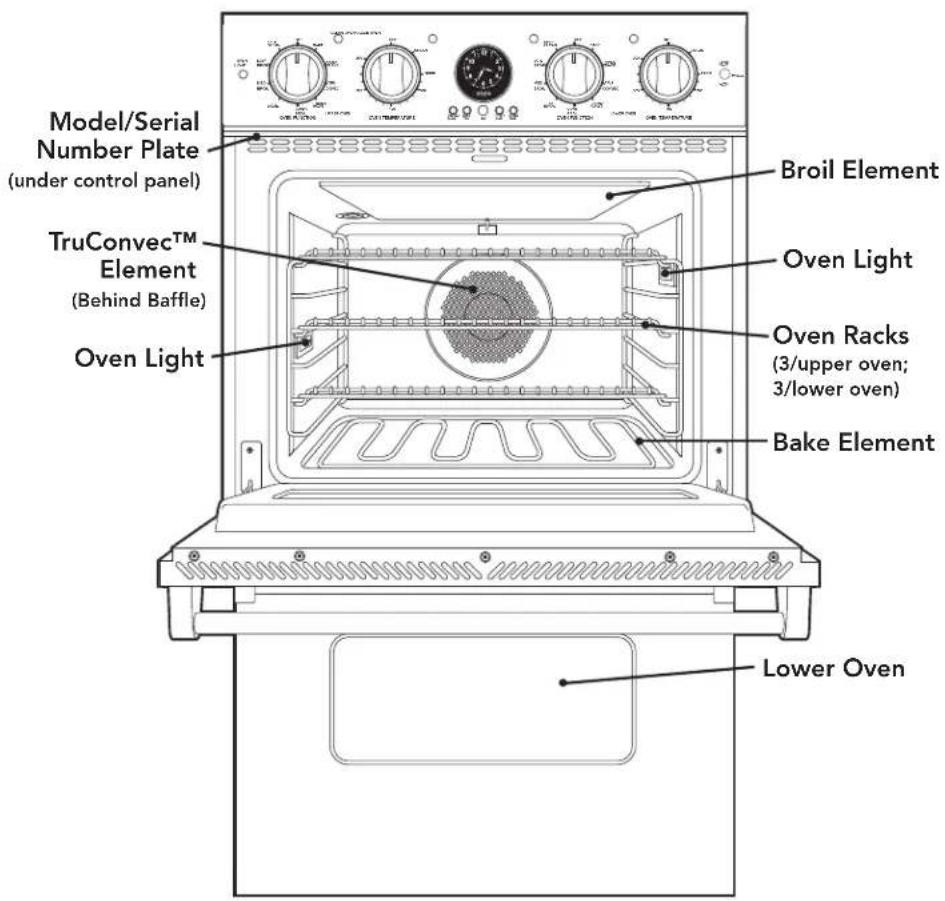
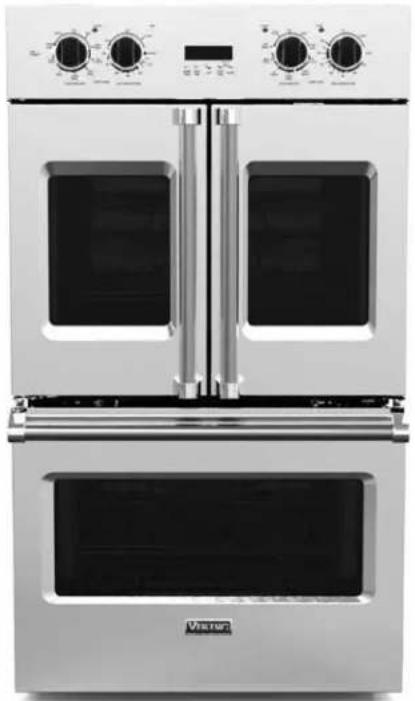
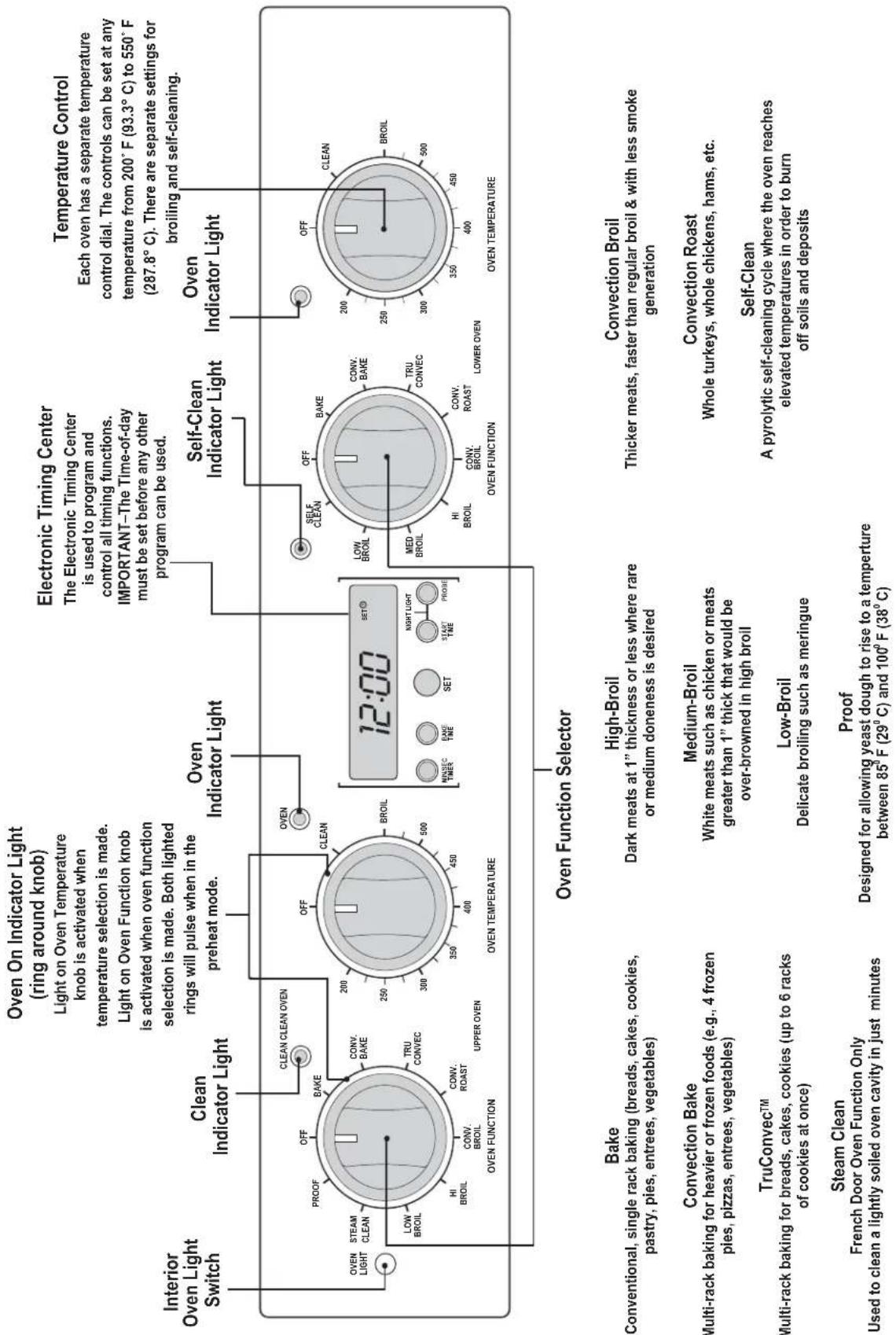
Premiere Professional double oven is shown above.
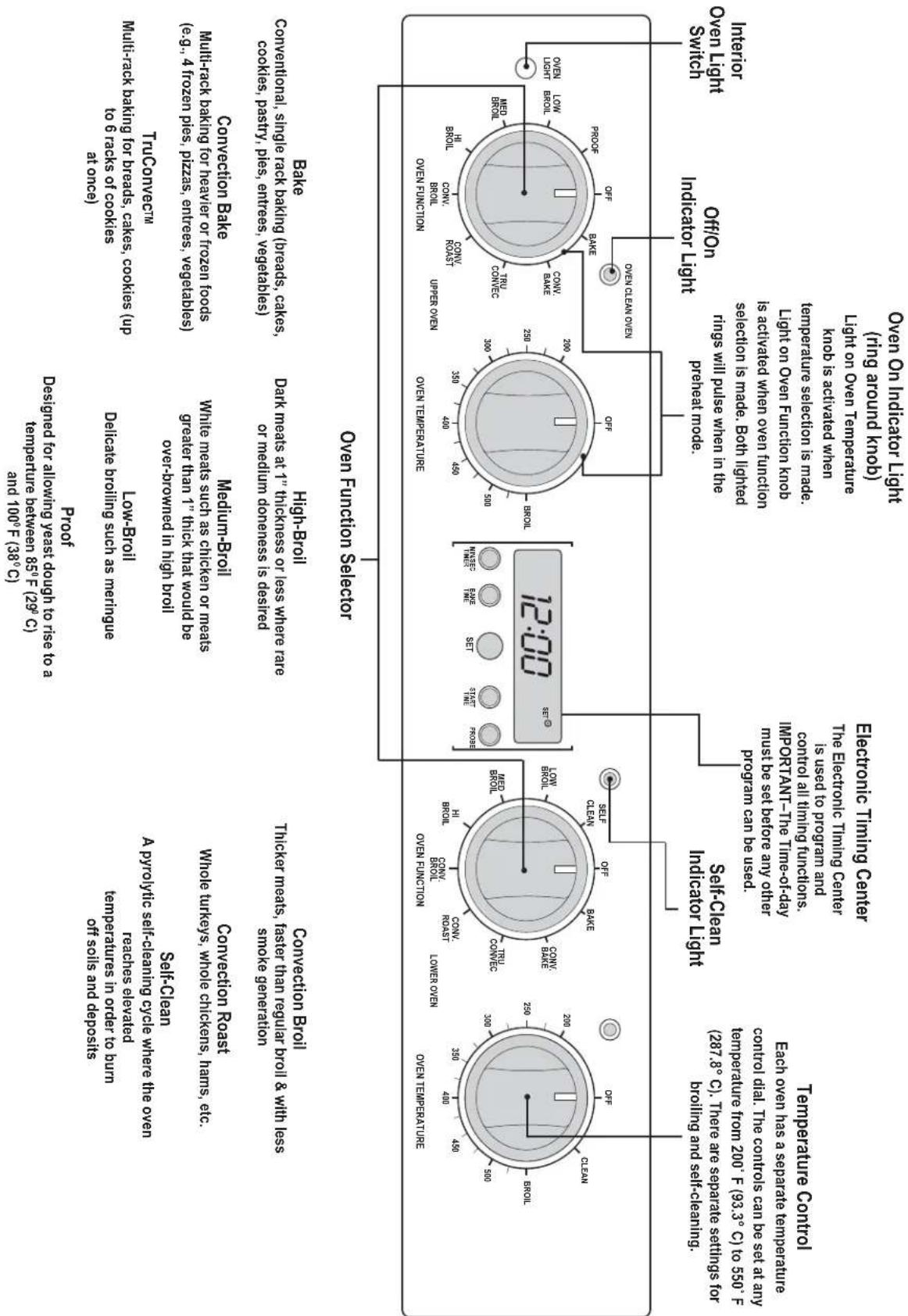
The Select Professional double oven control panel is shown above.
flowchart
graph TD
    A["Interior Oven Light Switch"] --> B["Off/On Indicator Light"]
    B --> C["Electronic Timing Center"]
    C --> D["Seif-Clean Indicator Light"]
    D --> E["Over Temperature"]
    D --> F["Over Function Selector"]
    F --> G["12:00"]
    G --> H["Over Temperature"]
    G --> I["Over Function"]
    H --> J["Balance"]
    H --> K["Conventional, Single rack baking (breads, cakes, cookies, pasty, pies, entrees, vegetales)"]
    H --> L["TruConnectin Multi-rack baking for brands, cakes (up to 6 racks of cooks at once)"]
    H --> M["Conversion Bake Multi-rack baking for heater or frozen foods (e.g., 4 frozen pies, pizzas, entrees, vegetales)"]
    H --> N["Conversion Bake Convertible"]
    I --> O["Over Function"]
    I --> P["Over Temperature"]
    I --> Q["Over Function"]

    style A fill:#f9f,stroke:#333
    style B fill:#f9f,stroke:#333
    style C fill:#ccf,stroke:#333
    style D fill:#cfc,stroke:#333
    style E fill:#fcc,stroke:#333
    style F fill:#cff,stroke:#333
    style G fill:#ffc,stroke:#333
    style H fill:#fcf,stroke:#333
    style I fill:#cff,stroke:#333
    style J fill:#ffc,stroke:#333
    style K fill:#ffc,stroke:#333
    style L fill:#ffc,stroke:#333
    style M fill:#ffc,stroke:#333
    style N fill:#ffc,stroke:#333
    style O fill:#ffc,stroke:#333
    style P fill:#ffc,stroke:#333
    style Q fill:#ffc,stroke:#333

    subgraph Temperature Control
        A1["Each oven has a separate temperature control dial. The controls can be set at any temperature from 200 F (93.3° C) to 550 F (287.8° C). There are separate settings for broiling and self-cleaning."]
    end

    subgraph Electronic Timing Center
        C1["The Electronic Timing Center is used to program and control all timing functions. IMPORTANT-THI Time-of-day must be set before any other program can be used."]
    end

    subgraph Seif-Clean Indicator Light
        D1["Lower Oven"]
        D2["Over Temperature"]
        D3["Over Function"]
        D4["Over Temperature"]
        D5["Over Temperature"]
        D6["Over Temperature"]
        D7["Over Temperature"]
        D8["Over Temperature"]
        D9["Over Temperature"]
        D10["Over Temperature"]
        D11["Over Temperature"]
        D12["Over Temperature"]
        D13["Over Temperature"]
        D14["Over Temperature"]
        D15["Over Temperature"]
        D16["Over Temperature"]
        D17["Over Temperature"]
        D18["Over Temperature"]
        D19["Over Temperature"]
        D20["Over Temperature"]
        D21["Over Temperature"]
        D22["Over Temperature"]
        D23["Over Temperature"]
        D24["Over Temperature"]
        D25["Over Temperature"]
        D26["Over Temperature"]
        D27["Over Temperature"]
        D28["Over Temperature"]
        D29["Over Temperature"]
        D30["Over Temperature"]
        D31["Over Temperature"]
        D32["Over Temperature"]
        D33["Over Temperature"]
        D34["Over Temperature"]
        D35["Over Temperature"]
        D36["Over Temperature"]
        D37["Over Temperature"]
        D38["Over Temperature"]
        D39["Over Temperature"]
        D40["Over Temperature"]
        D41["Over Temperature"]
        D42["Over Temperature"]
        D43["Over Temperature"]
        D44["Over Temperature"]
        D45["Over Temperature"]
        D46["Over Temperature"]
        D47["Over Temperature"]
        D48["Over Temperature"]
        D49["Over Temperature"]
        D50["Over Temperature"]
        D51["Over Temperature"]
        D52["Over Temperature"]
        D53["Over Temperature"]
        D54["Over Temperature"]
        D55["Over Temperature"]
        D56["Over Temperature"]
        D57["Over Temperature"]
        D58["Over Temperature"]
        D59["Over Temperature"]
        D60["Over Temperature"]
        D61["Over Temperature"]
        D62["Over Temperature"]
        D63["Over Temperature"]
        D64["Over Temperature"]
        D65["Over Temperature"]
        D66["Over Temperature"]
        D67["Over Temperature"]
        D68["Over Temperature"]
        D69["Over Temperature"]
        D70["Over Temperature"]
        D71["Over Temperature"]
        D72["Over Temperature"]
        D73["Over Temperature"]
        D74["Over Temperature"]
        D75["Over Temperature"]
        D76["Over Temperature"]
        D77["Over Temperature"]
        D78["Over Temperature"]
        D79["Over Temperature"]
        D80["Over Temperature"]
    end

    subgraph Refrigerator Light
        B1["Off/On Indicator Light"] --> C1
        C1 --> C2
        C2 --> C3
        C3 --> C4
        C4 --> C5
        C5 --> C6
        C6 --> C7
        C7 --> C8
        C8 --> C9
        C9 --> C10
        C10 --> C11
        C11 --> C12
        C12 --> C13
        C13 --> C14
        C14 --> C15
        C15 --> C16
        C16 --> C17
        C17 --> C18
        C18 --> C19
        C19 --> C20
        C20 --> C21
        C21 --> C22
        C22 --> C23
        C23 --> C24
        C24 --> C25
        C25 --> C26
        C26 --> C27
        C27 --> C28
        C28 --> C29
        C29 --> C30
        C30 --> C31
        C31 --> C32
        C32 --> C33
        C33 --> C34
        C34 --> C35
        C35 --> C36
        C36 --> C37
        C37 --> C38
        C38 --> C39
        C39 --> C40
        C40 --> C41
        C41 --> C42
        C42 --> C43
        C43 --> C44
        C44 --> C45
        C45 --> C46
        C46 --> C47
        C47 --> C48
        C48 --> C49
        C49 --> C50
        C50 --> C51
    end

    subgraph Interior Light
        B1 --> B2 --> B3 --> B4 --> B5 --> B6 --> B7 --> B8 --> B9 --> B10 & B11 & B12 & B13 & B14 & B15 & B16 & B17 & B18 & B19 & B20 & B21 & B22 & B23 & B24 & B25 & B26 & B27 & B28 & B29 & B30 & B31 & B32 & B33 & B34 & B35 & B36 & B37 & B38 & B39 & B40 & B41 & B42 & B43 & B44 & B45 & B46 & B47 & B48 & B49 & B50 & B51 & B52 & B53 & B54 & B55 & B56 & B57 & B58 & B59 & B60 & B61 & B62 & B63 & B64 & B65 & B66 & B67 & B68 & B69 & B70 & B71 & B72 & B73 & B74 & B75 & B76 & B77 & B78 & B79 & B80 & B81 & B82 & B83 & B84 & B85 & B86 & B87 & B88 & B89 & B90 & B91 & B92 & B93 & B94 & B95 & B96 & B97 & B98 & B99 & B100 & B101 & B102 & B103 & B104 & B105 & B106 & B107 & B108 & B109 & B110 & B111 & B112 & B113 & B114 & B115 & B116 & B117 & B118 & B119 & B120 & B121 & B122 & B123 & B124 & B125 & B126 & B127 & B128 & B129 & B130 & B131 & B132 & B133 & B134 & B135 & B136 & B137 & B138 & B139 & B140 & B141 & B142 & B143 & B144 & B145 & B146 & B147 & B148 & B149 & B150 & B151 & B152 & B153 & B154 & B155 & B156 & B157 & B158 & B159 & B160 & B161 &
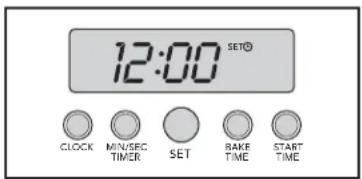
Digital Display (Select Models)
The time-of-day must be set before any other program can be used. When your oven is first connected to the power in your home, the timer display will show --:--.
To program the time-of-day:
- Press the "CLOCK"* button once. 12:00 will be displayed with the word SET in the upper right corner.
- Turn the "SET" knob until the correct time-of-day is displayed. AM and PM are not indicated.
- Press the "CLOCK" button again. The word SET will disappear and the correct time is now set into the timer.
The time-of-day can be changed by following steps 1 through 3. It cannot be changed while there is a Bake Hours or Start Time cycle programmed into the timer.
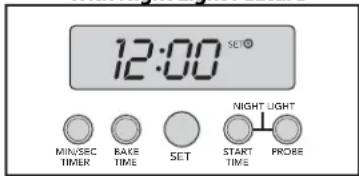
Digital Display (French Door Models)
- Press and hold the "min/sec timer" and "bake time" buttons simultaneously.
- Turn the "Set" knob to set the digital clock.
- Release the "min/sec timer" and "bake time" buttons.
With Night Light Feature
Analog Display (Premiere Models)
Synchronizing the analog and digital clocks:
NOTE: It is important to always synchronize the analog and digital clocks before setting the time-of-day.
- Press and release the "start time" button. NOTE: This is only necessary after a power outage or for the first time to set the clock.
- Press and hold the "min/sec timer" and start time buttons simultaneously.
- Turn the "Set" knob to move the hands on the analog clock to 30 minutes ahead of the current time. Release hold from "start time" and "min/sec timer" buttons.
- After several seconds, the display will blink. Press and hold the "min/sec timer" button and turn the "Set" knob to set the digital clock so that it matches exactly with the analog clock. The clocks are now synched and you can now set the time of day.
The time-of-day must be set before any other program can be used.
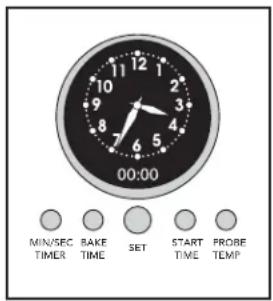
Setting the time-of-day:
- Push and hold the "min/sec timer" and "bake time" buttons simultaneously.
- Turn the "Set" knob until correct time is displayed on the digital clock.
- Release hold from "min/sec timer" and "bake time" buttons. The analog clock's time will automatically set to match the digital clock.
*NOTE: The PROBE function is included on Premiere Models.
Oven Settings and Functions
WARNING
FRENCH DOOR MODELS
Make sure control knobs are in proper place before using oven. With the knobs removed, the LED lights around the knobs are visible and may cause permanent damage to your eyes. Exposure to LED lights can cause irreparable harm to the retina of the human eye.
Temperature Control
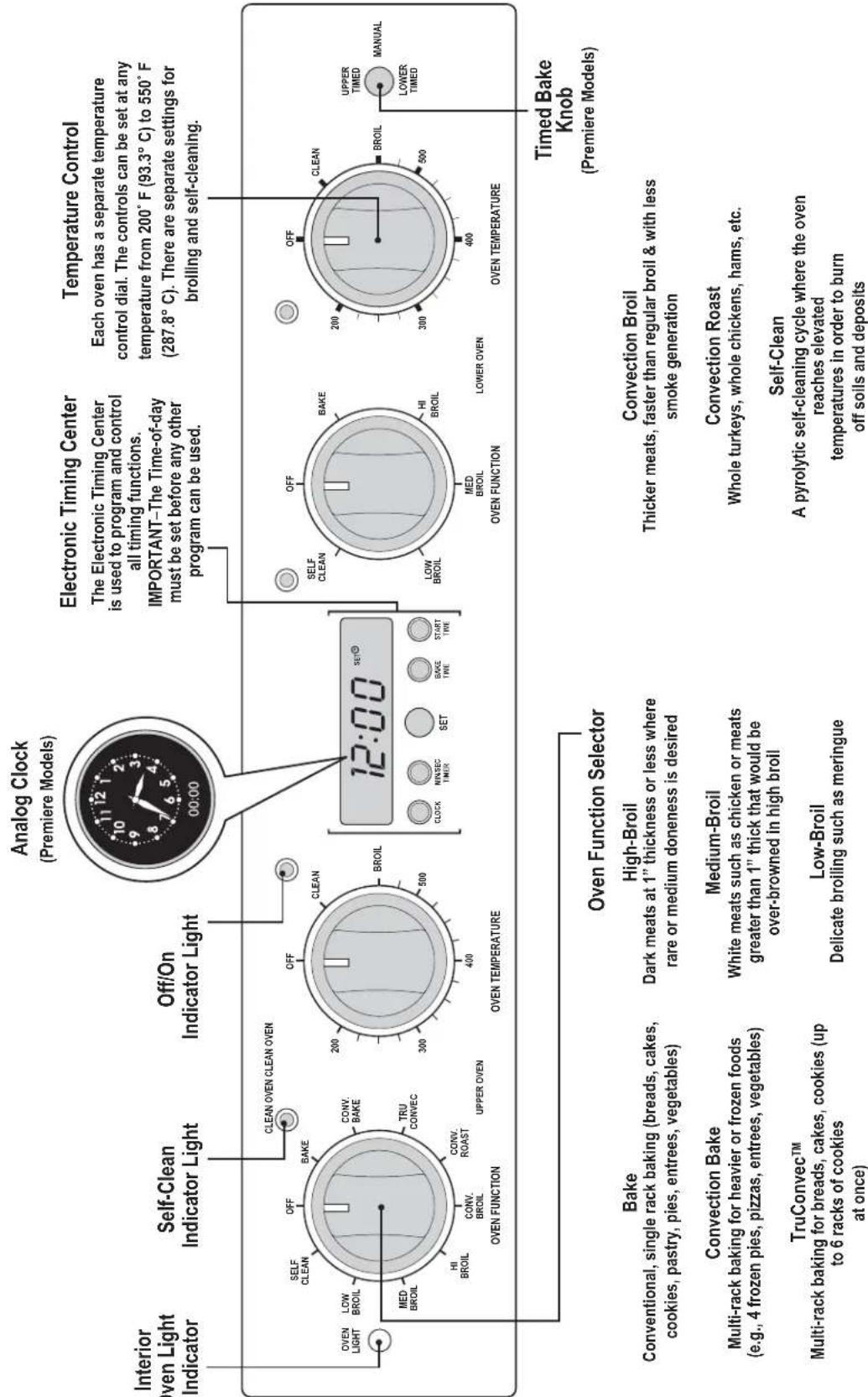
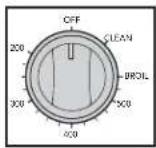
Each oven has a separate temperature control dial and a separate oven function selector. The controls can be set at any temperature from 200^ F ( 93.3^ C) to 550^ F ( 287.8^ C). There are separate settings for broiling and self-cleaning. Always be sure the controls are in the OFF position when the ovens are not in use.
Interior Oven Light Control
The upper and lower ovens have interior oven lights that are controlled by one switch on the control panel. Push the switch to turn the interior oven lights on and off.
Two-Element Bake
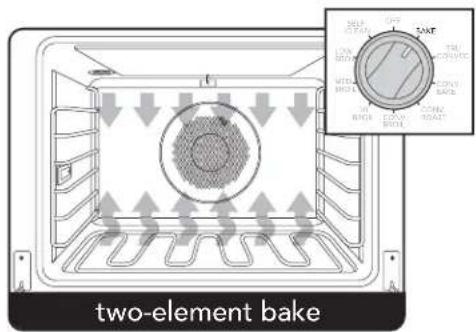
Full power heat is radiated from the bake element in the bottom of the oven cavity and supplemental heat is radiated from the broil element. This function is recommended for single rack baking. Many cookbooks contain recipes to be cooked in the conventional manner. Conventional baking/ roasting is particularly suitable for dishes that require a high temperature. Use this setting for baking, roasting, and casseroles.
TruConvec™
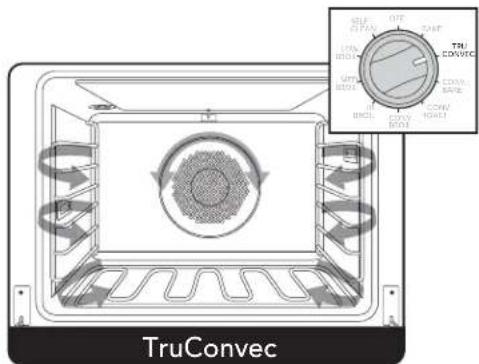
The rear element only operates at full power. There is no direct heat from the bottom or top elements. The motorized fan in the rear of the oven circulates air in the oven cavity for even heating. Use this setting for foods that require gentle cooking such as pastries, souffles, yeast breads, quick breads and cakes. Breads, cookies, and other baked goods come out evenly textured with golden crusts. No special bakeware is required. Use this function for single rack baking, multiple rack baking, roasting, and preparation of complete meals. This setting is also recommended when baking large quantities of baked goods at one time.
Convection Bake
The bottom element operates at full power, and the top broil element operates at supplemental power. The heated air is circulated by the motorized fan in the rear of the oven providing a more even heat distribution. This even circulation of air equalizes the temperature throughout the oven cavity and eliminates the hot and cold spots found in conventional ovens. A major benefit of convection baking is the ability to prepare food in quantity using multiple racks – a feature not possible in a standard oven. When roasting, cool air is quickly replaced, searing meats on the outside and retaining more juices and natural flavor on the inside with less shrinkage. With this heating method, foods can be baked and roasted at the same time with minimal taste transfer, even when different dishes are involved, such as cakes, fish or meat. The hot air system is especially economical when thawing frozen food. Use this setting for baking and roasting.
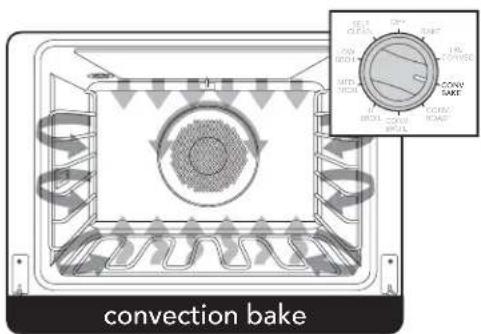
Oven Settings and Functions
Convection Roast\*
The convection element runs in conjunction with the inner and outer broil elements. The reversible convection fan runs at a higher speed in each direction. This transfer of heat (mainly from the convection element) seals moisture inside of large roasts. A time savings is gained over existing, single fan convection roast modes. Use this setting for whole turkeys, whole chickens, hams, etc.
Convection Broil\*
The top element operates at full power. This function is exactly the same as regular broiling with the additional benefit of air circulation by the motorized fan in the rear of the oven. Smoke is reduced since the airflow also reduces peak temperatures on the food. Use this setting for broiling thick cuts of meats.
*This function uses a high-speed convection fan for optimum cooking performance. Some noise may be noticed from this high fan speed. This is normal.
High-Broil
Heat radiates from both broil elements, located in the top of the oven cavity, at full power. The distance between the foods and the broil elements determines broiling speed. For "fast" broiling, food may be as close as 2 inches (5 cm) to the broil element. "Fast" broiling is best for meats where "rare to medium" doneness is desired. Use this setting for broiling small and average cuts of meat.
Medium-Broil
Inner and outer broil elements pulse on and off to produce less heat for "slow" broiling. Allow about 4 inches (10 cm.) between the top surface of the food and the broil element. "Slow" broiling is best for chicken and ham in order to broil food without over-browning it. Use this setting for broiling small and average cuts of meat.
Low-Broil
This mode uses only a fraction of the available power to the inner broil element for delicate top-browning. The inner broil element is on for only part of the time. Use this setting to gently brown meringue on racks 3 or 4 in 3-4 minutes.
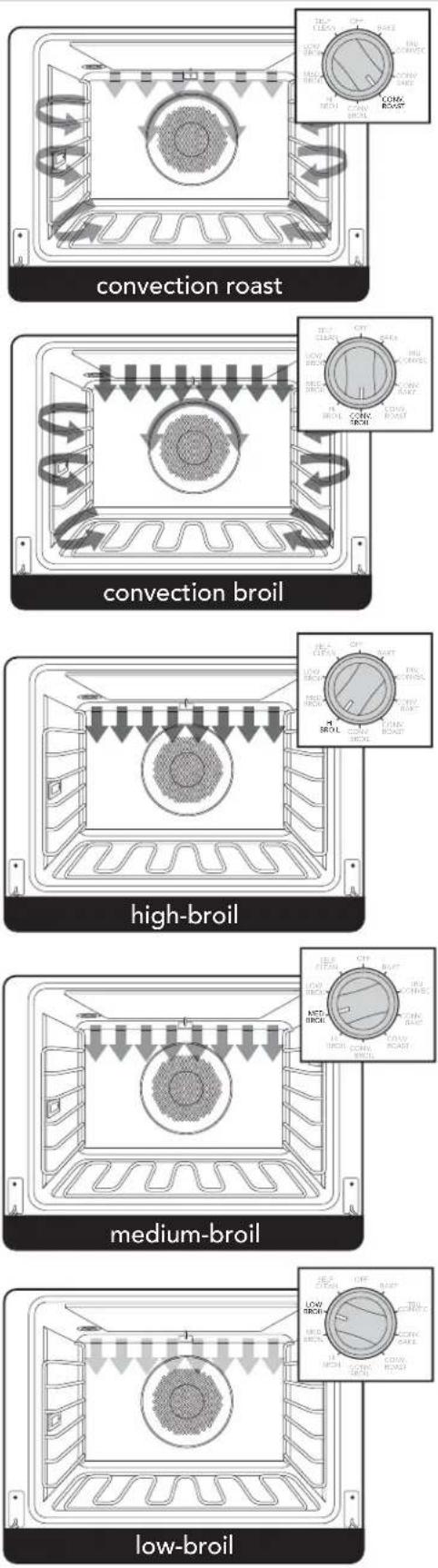
Oven Settings and Functions
Proofing
(French Door model only)
This setting is designed for allowing yeast dough to rise to a temperature between 85^ F ( 29^ C) and 100^ F ( 38^ C). Yeast doughs rise or "proof" best when the temperature is between 85^ F ( 29^ C) and 100^ F ( 38^ C). To make sure the dough is warm enough, cover the bowl loosely with plastic wrap and/or cloth towel. Turn the oven function selector to "PROOF". Turn Temperature control until the oven light comes on (typically around 200
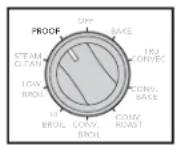
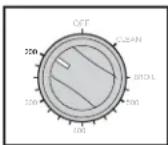
degrees on the knob setting). Note that the Proof function is designed to keep the oven between 85^ F and 100^ F regardless of what temperature the knob is set at. Place the bowl on the center rack of the oven and close door. When you think the dough has doubled in size, lightly poke 2 fingers about 1/2'' (1.3 cm) into the dough. If the indentation remains, the dough has risen enough.
Steam Clean (French Door model only)
The Steam Clean feature is designed for light oven cleaning. Turn the oven function selector to "STEAM CLEAN" and the temperature control to "CLEAN". A complete Steam Clean cycle will take a total of 20 minutes.
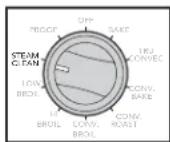
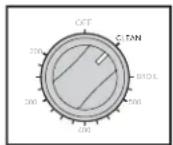
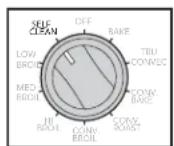
Self-Clean (All models except French Door upper/single oven)
The pyrolytic self-cleaning cycle is designed to eliminate the need for scrubbing and scouring food baked onto the oven interior. During this cycle, the oven reaches elevated temperatures in order to burn off soils and deposits. An integral smoke eliminator reduces odors associated with the soil burn-off. A powder ash residue is left in the bottom of the oven after completion of the self-clean cycle. When the oven has cooled, remove any ash from oven surfaces with a damp sponge or cloth.
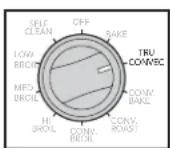
Convection Dehydrate
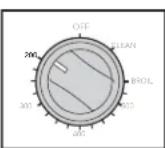
With the selector set to TruConvec and the temperature control on 200^ F ( 93.3^ C), warm air is circulated by a motorized fan in the rear of the oven. Over a period of time, the water is removed from the food by evaporation. Removal of water inhibits growth of microorganisms and retards the activity of enzymes. It is important to remember that dehydration does not improve the quality, so only fresh, top-quality foods should be used.
Convection Defrost
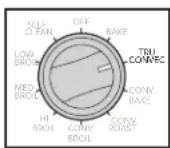
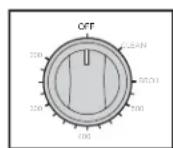
With the selector set to TruConvec and the temperature control off, air is circulated by a motorized fan in the rear of the oven. The fan accelerates natural defrosting of the food without heat. To avoid sickness and food waste, do not allow defrosted food to remain in the oven for more than two hours.
Clocks and Timers
(Digital Display - Select / French Door Models)
Electronic Timing Center
Digital Display
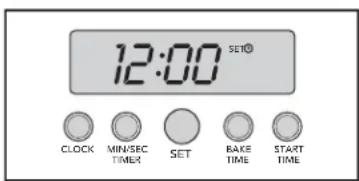
The Electronic Timing Center is used to program and control all timing functions. It has five display and programming modes that are activated by the four push buttons and the "SET" knob. Both the Bake Time mode and the Min/Sec Timer mode can be used to time cooking periods. These features can even be used at the same time when both ovens are in use. However, only Bake Time and Self-Cleaning (Select model only) modes shut the oven off automatically when the timed program is over. For example, you can time bake a casserole in the upper oven using the Bake Time mode, while broiling in the lower oven using the Min/Sec Timer. One oven can also be cleaned while timing foods in the other oven using the Min/Sec Timer.
Select Models
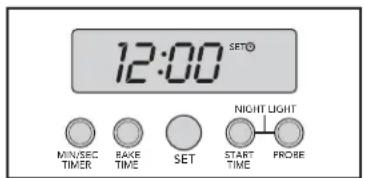
French Door Models (with Night Light feature)
Setting the Min/Sec Timer
The Min/Sec Timer is designed for accurate timing and is ideal for baking delicate items such as biscuits, cookies, and popovers, and for precise broiling. The Min/Sec Timer can be used at the same time the Bake Hours or Start Time functions are in use. It can be used for timing up to 24 hours. When setting the timer, the time displayed will increase in 1 minute increments. When the timer counts down to 1 minute, the timer alarm will give two short beeps and the display changes from hours:minutes to seconds only.
To program the Min/Sec Timer
- Press the "MIN/SEC TIMER" button. The timer will display :00 and the word TIMER will be displayed in the lower right corner.
- Turn the "SET" knob until the desired duration time is displayed.
The Min/Sec Timer is now programmed. The alarm will sound at the end of the countdown. The program can be cancelled anytime by setting the remaining time to :00. To change back to the time-of-day, press the "CLOCK" button on Select models or "PROBE" on French Door models. Notice that a small clock will be displayed in the upper right corner to indicate that a program is in progress. The display will return automatically to the Min/Sec Timer after a few seconds.
Timer Alarm
At the end of a Min/Sec Timer program or Bake Hours program, the alarm will consist of three beeps followed by two beeps every 10 seconds until the "MIN/SEC TIMER" button is pressed. Whenever a valid function key is pressed or when a control function starts automatically, one beep will be sounded. When an invalid function key is pressed, two beeps will be sounded.
Setting the Automatic Start Time Bake Program
The Bake Hours and Start Time modes of the timer can be used to automatically turn the oven on and off at a preselected time. The Automatic Time Bake program is ideal for foods with no danger of spoilage during the time the oven is left off.
To Set The Automatic Time Bake Program:
1. Set the start time:
A) For Single Ovens – Program the start time by pressing the "START TIME" button and turning the "SET" knob until the desired start time is displayed. This is the time of day you want the food to begin cooking.
B) For Double Ovens – Press the "START TIME" button once to set the starting time for the upper oven (UPPER OVEN will show on the display). Press the "START TIME" button twice to set the starting time for the lower oven (LOWER OVEN will show on the display). Then program the start time by turning the "SET" knob until the desired start time is displayed. This is the time of day you want the food to begin cooking.
Clocks and Timers
(Digital Display - Select / French Door Models)
2. Set the desired baking time:
Once the start time is set, the display will switch to :00 and
the words SET, COOK and TIME will appear on the right side of the display. You will now enter the desired baking time. Add 30 minutes to the desired bake time to allow for preheat.
Turn the "SET" knob until the desired baking time is displayed in hours and minutes. Once the desired bake time is set, the word SET will disappear and the word DELAY will appear in the display indicating that the Bake Hours program has been set.
NOTE: For Double Ovens, the word DELAY will show with either UPPER OVEN or LOWER OVEN depending on which oven has been selected.
-
Set the Oven Function selector to the desired function - BAKE, CONVECTION BAKE, OR TRUCONVEC™, etc.
-
Set the temperature control knob to the desired baking temperature.
-
The automatic time bake program is now set!
NOTE: The display will continue to show the amount of bake time that was programmed (this will remain until the programmed start time is reached). You can return the display to clock mode by pressing the "CLOCK" button on the Select models or "PROBE" on the French door models. Notice that a small clock will be displayed in the upper right corner to indicate that a program is in progress. Switch back to the timer mode by pressing the "BAKE HOURS" button.
- When the specified time is reached, the oven will automatically turn on. It will bake for the programmed amount of time at the selected temperature.
NOTE: At one minute from the end of the specified bake program, the oven timer will beep once. At the end of the specified bake program, the oven will automatically turn off and the timer will sound a series of three beeps. This will continue until the "START TIME" button is pressed. The display will then return to displaying the time.
NOTE: Setting the remaining duration time to :00 will cancel the Automatic Bake program.
Sabbath Mode (Digital Display Select models only)
To set the Sabbath Mode
- Press the "CLOCK" button until it beeps.
- Turn SET knob until SAB appears in the display.
- Press the "CLOCK" button to toggle between NO or ON. NO is the default setting.
- After selecting ON, turn SET knob to done.
- Press "CLOCK" button to clear display.
To remove Sabbath Mode
Follow the same steps above and select the NO setting.
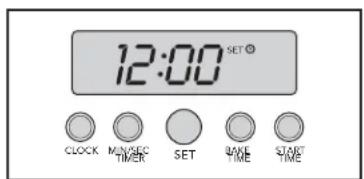
Select Models
Night Light (French Door model only)
To activate the nightlight feature, press the "START TIME" and "PROBE" buttons and hold for 3 seconds. To turn the nightlight feature off, press the same two buttons and hold for 3 seconds
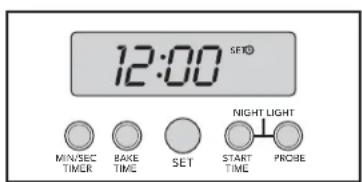
Clocks and Timers
(Analog Clock - Premiere Models)
Setting the Min/Sec Timer
The Min/Sec Timer is designed for accurate timing and is ideal for baking delicate items such as biscuits, cookies, and popovers, and for precise broiling. The Min/Sec timer can be used at the same time the Bake Hours or Start Time functions are in use. It can be used for timing up to 24 hours.
To program the Min/SecTimer
- Push and release the "min/sec timer" button.
- Rotate "Set" knob until desired duration of time is displayed. Timer starts seconds after "Set" knob stops rotating. A tone indicates the timer has started.
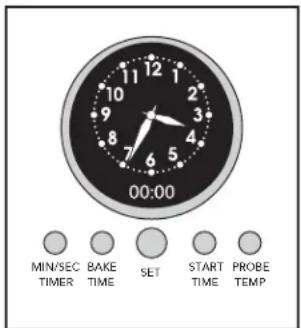
When the timer has one minute remaining, the timer will sound twice and begin to countdown by seconds. A tone will sound three times indicating the time is complete and twice every ten seconds after completion until timer function is cleared.
NOTE: Press any function button to clear a completed cycle or function.
Setting the Bake Time Program
The Bake Time program is used for controlled timing of baked or roasted foods. At the end of the timed cycle, the oven automatically turns off.
Setting the Automatic Start Time Bake Program
The Bake Time program is used for controlled timing of baked or roasted foods. At the end of the timed cycle, the oven automatically turns off
To Set The Bake Time Program
- Turn the TIMED BAKE knob to "timed" for single ovens or "upper timed" or "lower timed" position, for double ovens.
- Set the Oven Function Selector to the BAKE, CONVECTION BAKE, or TRUCONVEC ^™ position, depending upon the type of baking being used.
- Set the temperature control knob to the desired temperature and allow for preheating.
- Press and release the bake hours button. The timer will display :00 with the words SET and COOK/TIME in the digital display.
- Turn the "Set" knob until the desired baking time is displayed in hours and minutes. Once set, a tone will sound and the cook time/remaining time and the word COOK will be displayed.
The word COOK will flash and the tone will sound three times when the time is completed; oven will turn off. The tone will sound twice every ten seconds after completion until timer function is cleared.
To set the Automatic Time Bake Program
1. Set the start time:
A) For Single Ovens – Turn the TIMED BAKE knob to "timed". Program the start time by pressing the "start time" button and turning the "Set" knob until the desired start time is displayed and a tone is heard. This is the time of day you want the food to begin cooking. B) For Double Ovens – (Press the "start time" button once to set the starting time for the upper oven. Press the "start time" button twice to set the starting time for the lower oven). Then program the start time by turning the "Set" knob until the desired start time is displayed. This is the time of day you want the food to begin cooking.
2. Set the desired baking time:
Once the start time is set, the display will switch to :00 and the words SET, COOK and TIME will appear on the right side of the display. You will now enter the desired baking time. Turn the "Set" knob until the desired baking time is displayed in hours and minutes. Once the desired bake time is set, a tone will be heard and the word SET will disappear and the word DELAY will appear in the display indicating that the Bake Hours program has been set.
NOTE: For Double Ovens, the word DELAY will show depending on which oven has been selected.
Clocks and Timers
(Analog Clock - Premiere Models)
- Set the Oven Function selector to the desired function – BAKE, CONVECTION BAKE, OR TRUCONVEC™, etc.
- Set the temperature control knob to the desired baking temperature.
- The automatic time bake program is now set!
NOTE: The display will continue to show the amount of bake time
that was programmed (this will remain until the programmed start time is reached). You can return the display to clock mode by pressing the "probe/temp" button – Notice that a small clock will be displayed in the upper right corner to indicate that a program is in progress. Switch back to the timer mode by pressing the "bake hours" button.
- When the specified time is reached, the oven will automatically turn on. It will bake for the programmed amount of time at the selected temperature.
NOTE: At one minute from the end of the specified bake program, the oven timer will beep once. At the end of the specified bake program, the oven will automatically turn off and the timer will sound a series of three beeps. This will continue until the "start time" button is pressed. The display will then return to displaying the time.
NOTE: Setting the remaining duration time to :00 will cancel the Automatic Bake program.
Meat Probe Functions
Probe Function
(Premiere/French Door Models)
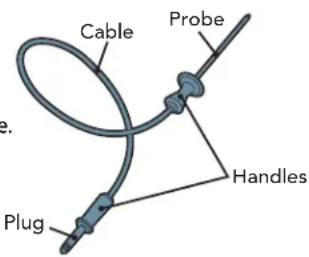
The meat probe takes the guesswork out of roasting by cooking foods to the ideal internal temperature. Your Viking oven's built-in probe will help you prepare meats exactly as you want them.
To Set the Automatic Probe Function
- Plug probe into the outlet located on left interior wall of the oven and close oven door, leaving the meat probe end outside of the oven. NOTE: If the probe is not plugged into the oven when starting a probe function, the display will flash "no probe". (Premiere models only)
- Select cooking function and set temperature.
- Press the "PROBE" or "PROBE TEMP" button (depending on model).
- Turn the "SET" knob to the desired internal temperature. The word PROBE and the desired internal temperature will be displayed on the lower right of the clock. On Double Ovens, the manual/timed control must be turned to "upper timed." NOTE: It is recommended to set the internal temperature about 10 degrees lower than actual desired internal temperature. The meat will continue to cook when removed from the oven and will reach desired internal temperature while "standing".
- Once the oven is preheated, open the oven door. Using a pot holder, carefully slide out the oven rack. Place the roasting pan on the rack, insert probe into meat. Carefully slide rack back into oven and close the door.
The word PROBE flashes and tone sounds three times when desired temperature is reached. The tone will sound twice every ten seconds after completion until probe function is closed.
WARNING
To avoid sickness and food waste when using automatic time baking:
- Do not use foods that will spoil while waiting for cooking to start, such as dishes with milk or eggs, cream soups, custards, fish, pork, poultry, or foods with stuffing.
- Any food that has to wait for cooking to start should be very cold or frozen before it is placed in the oven.
- Do not use foods containing baking powder or yeast when automatic time baking. They will not rise properly.
- Do not allow food to remain in the oven for more than two hours after the end of the cooking cycle.
Cooking with your Oven
Rack Positions
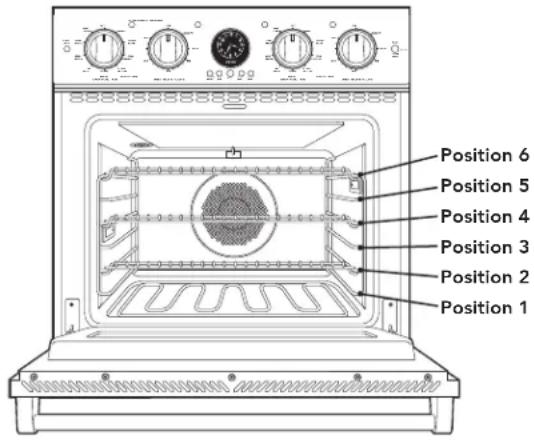
Each oven is equipped with tilt-proof racks and at least one TruGlide rack. With the TruGlide rack, the bottom section remains in the oven and the top section smoothly glides outward when pulled. This reduces the chances of spills and makes removing heavy items from the oven much easier. Below is a list of how many TruGlide racks are found in each oven. Please note that the TruGlide rack can be used in any of the six rack positions.
- Select Single and Double Ovens – One TruGlide rack (upper oven only in double ovens)
- Premiere/French Door Single Ovens – Two TruGlide racks
- Premiere /French Door Double Ovens – Three TruGlide racks (two in upper oven and one in lower oven)
All ovens have six rack positions. Position 6 is the farthest from the oven bottom. Position 1 is the closest to the oven bottom. The racks can be easily removed and arranged at various levels. For best results with conventional baking, do not use more than one rack at a time. It is also recommended, when using two racks, to bake with the racks in positions 2 and 4 or positions 3 and 5.
- Arrange the oven racks in the desired positions BEFORE heating the oven. If cooking on two racks at the same time, use rack positions 2 and 4 or positions 3 and 5.
- Turn the Oven Function selector to desired function. Cooking starts immediately and stops when the Oven Function selector is turned to OFF.
- Set the Temperature Control to the desired temperature.
- Place the food in the oven after the Oven Indicator light goes out.
Conventional/Convection Cooking
Because of variations in food density, surface texture and consistency, some foods may be prepared more successfully using the conventional bake setting. For this reason, conventional baking is recommended when preparing baked goods such as custard. The user may find other foods that are also prepared more consistently in conventional bake. This is perfectly normal. Convection cooking is a cooking technique which utilizes fan forced air to circulate heat throughout the entire oven cavity creating the optimum cooking environment. Cooking with convection is intended when performing multi-rack baking and for baking heavier foods. Below are some tips which will allow you to get the best results out of your oven when cooking with convection.
- As a general rule, reduce the temperature by 25^ (10^) when using a convection cooking function.
- Cooking times for standard baking and convection baking will be the same. However, if using convection to cook a single item or smaller load then it is possible to have 10 - 15% reduction in cooking time. (Remember convection cooking is designed for multi-rack baking or cooking large loads).
- If cooking items which require longer than 45 minutes then it is possible to see a 10% - 15% reduction in cooking time. This is especially true for large items cooked in the convection roast function.
•A major benefit of convection cooking is the ability to prepare foods in quantity. The uniform air circulation makes this possible. Foods that can be prepared on two or three racks at the same time include: pizza, cakes, cookies, biscuits, muffins, rolls, and frozen convenience foods. - For three-rack baking, use any combination of rack positions 2, 3, 4, and 5. For two-rack baking, use rack positions 2 and 4 or positions 3 and 5. Remember that the racks are numbered from bottom to top.
- Items cooked in a convection function can be easily over baked. This being the case, it is usually a good idea to pull items out of the oven just before they seem to be done. Items will continue to cook right after they are set out of the oven.
- Some recipes, especially those that are homemade, may require adjustment and testing when converting from standard to convection modes. If unsure how to convert a recipe, begin by preparing the recipe in conventional bake. After achieving acceptable results, follow the convection guidelines listed for the similar food type. If the food is not prepared to your satisfaction during this first convection trial, adjust only one recipe variable at a time (cooking time, rack position, or temperature) and repeat the convection test. Continue adjusting one recipe variable at a time until satisfactory results are achieved.
Cooking with your Oven
Baking Tips
- Make sure the oven racks are in the desired position before you turn on the oven.
- Do not open the door frequently during baking. Look through the door window to check doneness whenever possible. If you must open the door, the best time is during the last quarter of the baking time.
- Bake to the shortest time suggested and check for doneness before adding more time. For baked goods, a stainless steel knife placed in the center of the product should come out clean when done.
- Use the pan size and type recommended by the recipe to ensure best results. Cakes, quick breads, muffins, and cookies should be baked in shiny, reflective pans for light, golden crusts. Avoid the use of old, darkened pans. Warped, dented, stainless steel and tin-coated pans heat unevenly and will not give uniform baking results.
Pan Placement Tips
- When using large (15" x 13") flat pans or trays that cover most of the rack, rack positions 2 or 3 produce the best results.
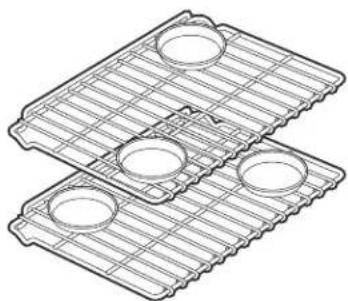
- When baking on more than one rack, it is recommended to use one of the convection modes and the 2nd and 4th position or the 3rd and 5th position for more even baking. When baking on three racks, use any combination of positions 2, 3, 4, and 5 for more consistent results.
- Stagger pans in opposite directions when two racks and several pans are used in conventional bake. If possible, no pan should be directly above another.
- Allow 1 to 2 inches of air space around all sides of each pan for even air circulation.
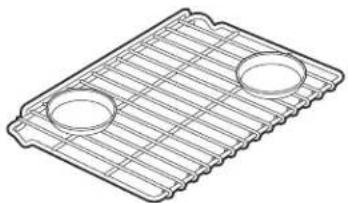
Single Rack Pan Placement
natural_image
Line drawing of a grid-patterned metal tray with two circular holes (no text or symbols)Multiple Rack Pan Placement
natural_image
Three identical wire mesh plates with circular cutouts, arranged diagonally (no text or symbols)Preheat / No Preheat
Preheat - Used in all Baking modes except Convection Bake
For best results, it is extremely important that you preheat your oven to the desired cooking temperature before placing food items in the oven to begin cooking. In many cooking modes, partial power from the broiler is used to bring the oven to the preheat temperature. Therefore, placing food items in the oven during preheat mode is not recommended. The Viking Rapid Ready™ Preheat System is engineered so that the oven is brought to the desired set temperature in a manner which will provide the optimum cooking environment based on the selected cooking mode in the shortest possible time.
For instance, the preheat mode for TruConvec™ is designed to be brought up to the set point temperature in a different manner than the preheat mode for BAKE. This is because TRUCONVEC is designed for multi-rack baking. So it is extremely critical that all rack positions have reached the desired cooking temperature. As a result, it is normal for oven to take slightly longer for the oven to preheat to 350°F (180°C) in TRUCONVEC mode when compared to the amount of time it takes to preheat to 350°F (180°C) in B-AKE mode.
Also, preheat time can vary based on some external factors such as room temperature and power supply. A significantly colder room temperature or a power supply less than 240 VAC can lengthen the time it takes for the oven to reach the desired set temperature.
Note: Certain functions include a PREHEAT cycle. Once set temperature has been reached, the oven will automatically exit PREHEAT and follow NORMAL OPERATION mode.
No Preheat Option - Convection Bake Mode only
- Turn oven to Convection Bake and select the desired temperature (lower temperature by 25 degrees for convection setting).
- Place the food item/dish in the oven on the middle oven rack (single rack baking only).
- Check food occasionally to monitor the cooking process. Most of the time, the food will cook for the same amount of time and sometimes slightly faster than usual.
Conventional Baking Chart
| Food (mins) Pan | Size Position Temp | Single Rack Time | ||
| BREADS | ||||
| Biscuits Cookie Sheet 3 or 4 375° F (191°C) | 23-28 | |||
| Yeast Loaf Loaf Pan 3 or 4 375 | °F (191°C) | 30 - 35 | ||
| Yeast Rolls Cookie Sheet 3 or 4 400 | °F (205°C) | 12 - 15 | ||
| Nut Bread Loaf Pan 3 or 4 375 | °F (191°C) | 30 - 35 | ||
| Cornbread 8" x 8" 3 or 4 400 | °F (205°C) | 20 - 25 | ||
| Gingerbread 8" x 8" 3 or 4 350 | °F (177°C) | 35 - 40 | ||
| Muffins | Muffin Tin 3 or 4 400 | °F (191°C) | 17 - 22 | |
| Corn Muffins | Muffin Tin 3 or 4 375 | °F (191°C) | 17 - 22 | |
| CAKES | ||||
| Angel food | Tube pan | 1 or 2 350 | °F (177°C) | 35 - 45 |
| Bundt Tube pan | 2 | 350 | °F (177°C) | 40 - 50 |
| Cupcakes | Muffin pan | 3 or 4 350 | °F (177°C) | 17 - 22 |
| Layer, Sheet | 13" x 9" | 3 or 4 350 | °F (177°C) | 40 - 50 |
| Layer, Two 9" round 3 or 4 350 | °F (177°C) | 30 - 35 | ||
| Pound | Loaf pan | 3 350 | °F (177°C) | 60 - 65 |
| COOKIES | ||||
| Brownies | 13" x 9" | 3 or 4 350 | °F (177°C) | 25 - 28 |
| Choc. Chip Cookie Sheet 3 or 4 375 | °F (191°C) | 12 - 15 | ||
| Sugar | Cookie Sheet 3 or 4 350 | °F (177°C) | 10 - 12 | |
| PASTRY | ||||
| Cream Puffs | Cookie Sheet 3 or 4 400 | °F (205°C) | 30 - 35 | |
| PIES | ||||
| Crust, Unfilled | 9" Round | 3 or 4 425 | °F (218°C) | 10 - 12 |
| Crust, Filled | 9" Round | 3 or 4 375 | °F (191°C) | 55 - 66 |
| Lemon Meringue | 9" Round | 3 or 4 350 | °F (177°C) | 12 - 15 |
| Pumpkin | 9" Round | 3 or 4 400 | °F (177°C) | 55 - 65 |
| Custard | 6 - 4 oz cups | 3 or 4 350 | °F (177°C) | 35 - 40 |
| ENTREES | ||||
| Egg Rolls | Cookie Sheet 3 or 4 400 | °F (205°C) | 12 - 15 | |
| Fish Sticks Cookie Sheet 3 or 4 425 | °F (218°C) | 18 - 21 | ||
| Lasagna, frz | Cookie Sheet 3 or 4 375 | °F (191°C) | 65 - 75 | |
| Pot Pie | Cookie Sheet 3 or 4 400 | °F (205°C) | 35 - 40 | |
| Gr. Peppers Stuffed | 13" x 9" | 3 or 4 375 | °F (191°C) | 65 - 70 |
| Quiche | 9" Round | 3 or 4 400 | °F (205°C) | 25 - 30 |
| Pizza, 12" | Cookie Sheet 3 or 4 400 | °F (205°C) | 15 - 20 | |
| Mac. & Cheese, frz | Cookie Sheet 3 or 4 375 | °F (191°C) | 60 - 65 | |
| VEGETABLES | ||||
| Baked Potatoes | On Rack | 3 or 4 375 | °F (191°C) | 60 - 65 |
| Spinach Souffle | 1 qt. Casserole | 3 or 4 350 | °F (177°C) | 45 - 50 |
| Squash | Cookie Sheet 3 or 4 375 | °F (191°C) | 50 - 55 | |
| French Fries | Cookie Sheet 3 or 4 425 | °F (218°C) | 15 - 20 | |
Convection Baking Chart
| Food | Pan | Single Rack Time Size | Position | (minutes) | Notes Temp |
| BREADS | |||||
| Frozen Biscuits Cookie | Sheet 2 & 4 / 1, 3, & 5 | 350°F (177°C) | 23 - 28 | ||
| Yeast Loaf Loaf Pan 3 | or 4 | 350°F (177°C) | 30 - 35 | ||
| Yeast Rolls Cookie Sheet | 2 & 4 / 1, 3, & 5 | 375°F (191°C) | 12 - 15 | ||
| Nut Bread Loaf Pan 3 | or 4 | 350°F (177°C) | 30 - 35 | ||
| Cornbread 8" x 8" 2 & 4 | 375°F (191°C) | 20 - 25 | |||
| Gingerbread 8" x 8" 2 & 4 | 325°F (163°C) | 35 - 40 | |||
| Muffins Muffin Tin 2 & 4 / 1, 3, & 5 | 375°F (191°C) | 17 - 22 | Rec. TruConvec | ||
| Corn Muffins Muffin Tin 2 & 4 / 1, 3, & 5 | 350°F (177°C) | 17 - 22 | Rec. TruConvec | ||
| CAKES | |||||
| Angel food | Tube pan | 1 or 2 | 325°F (163°C) | 30 - 35 | Rec. TruConvec |
| Bundt | Tube pan | 3 or 4 | 325°F (163°C) | 35 - 40 | Rec. TruConvec |
| Cupcakes | Muffin pan | 2 & 4 / 1, 3, & 5 | 325°F (163°C) | 15 - 17 | |
| Layer, Sheet | 13" x 9" | 2 & 4 | 325°F (163°C) | 30 - 32 | Rec. TruConvec |
| Layer, Two | 9" round | 2 & 4 | 325°F (163°C) | 25 - 30 | Rec. TruConvec |
| Pound | Loaf pan | 3 | 325°F (163°C) | 5 - 50 | |
| COOKIES | |||||
| Brownies | 13" x 9" | 2 & 4 | 325°F (163°C) | 25 - 28 | |
| Choc. Chip | Cookie Sheet | 1 - 5 | 350°F (177°C) | 10 - 12 | Rec. TruConvec |
| Sugar | Cookie Sheet | 1 - 6 | 325°F (163°C) | 10 - 15 | Rec. TruConvec |
| PIES | |||||
| Crust, Unfilled 9" Round | 2 & 4 | 400 | °F (205°C) | 7 - 9 | |
| Crust, Filled | 9" Round | 2 & 4 | 350°F (177°C) | 55 - 65 | |
| Lemon Meringue | 9" Round | 2 & 4 | 325°F (163°C) | 4 - 5 | |
| Pumpkin | 9" Round | 2 & 4 | 325°F (163°C) | 55 - 65 | |
| Custard | 6 - 4oz cups | 2 & 4 | 325°F (163°C) | 30 - 35 | |
| ENTREES | |||||
| Egg Rolls | Cookie Sheet | 2 or 4 | 375°F (191°C) | 12 - 15 | |
| Fish Sticks | Cookie Sheet | 2 or 4 | 400°F (205°C) | 18 - 21 | |
| Lasagna, frz | Cookie Sheet | 2 or 4 | 350°F (177°C) | 60 - 70 | |
| Pot Pie | Cookie Sheet | 2 or 4 | 375°F (191°C) | 35 - 40 | |
| Gr. Peppers Stuffed | 13" x 9" | 2 or 4 | 350°F (177°C) | 60 - 70 | |
| Quiche | 9" Round | 2 or 4 | 375°F (191°C) | 25 - 30 | |
| Pizza, 12" | Cookie Sheet | 2 or 4 | 375°F (191°C) | 15 - 20 | |
| Mac. & Cheese, frz | Cookie Sheet | 2 or 4 | 350°F (177°C) | 60 - 65 | |
| VEGETABLES | |||||
| Baked Potatoes | On Rack | 2 or 4 | 350°F (177°C) | 60 - 65 | |
| Spinach Souffle | 1 qt.Casserole 2 or 4 | 325 | °F (163°C) | 45 - 50 | |
| Squash Cookie Sheet | 2 or 4 | 350 | °F (177°C) | 50 - 55 | |
| French Fries | Cookie Sheet | 2 or 4 | 400°F (205°C) | 15 - 20 | |
Solving Baking Problems
Baking problems can occur for many reasons. Check the Baking Problem chart for the causes and recommended remedies for the most common problems. It is important to remember that the temperature setting and cooking times you are accustomed to using with your previous oven may vary slightly from those required with this oven. If you find this to be true, it is necessary for you to adjust your recipes and cooking times accordingly.
COMMON BAKING PROBLEM / REMEDIES
| PROBLEM CAUSE REMEDY | ||
| Cakes burned on the sides or not done in center | 1. Oven was too hot2. Wrong pan size 2. Use recom. pan size3. Too many pans 3. Reduce no. of pans | 1. Reduce temperature2. Use recom. pan size3. Too many pans 3. Reduce no. of pans |
| Cakes crack on top | 1. Batter too thick2. Oven too hot 2. Reduce temperature3. Wrong pan size 3. Use recom. pan size | 1. Follow recipe Add liquid2. Use recom. rack position3. Use recom. pan size |
| Cakes are not level | 1. Batter uneven2. Oven or rack not level 2. Level oven or rack3. Pan was warped 3. Use proper pan | 1. Distribute batter even2. Use recom. pan size3. Use recom. pan size4. Adjust to conventional or convection setting as needed5. Use proper pan |
| Food too brown on bottom too often | 1. Oven door opened check food2. Dark pans being used3. Incorrect rack position4. Wrong bake setting5. Pan too large | 1. Use recom. rack position2. Allow oven to preheat3. Use recom. pan size4. Adjust to conventional or convection setting as needed5. Use proper pan |
| Food too brown on top | 1. Rack position too high2. Oven not preheated3. Sides of pan too high | 1. Use recom. rack position2. Allow oven to preheat3. Use recom. pan size4. Adjust to conventional or convection setting as needed5. Use proper pan |
| Cookies too flat | 1. Hot cookie sheet | 1. Allow sheet to cool between batches |
| Pies burned around edges | 1. Oven too hot2. Too many pans used3. Oven not preheated | 1. Reduce temperature2. Reduce no. of pans3. Allow oven to preheat |
| Pies too light on top | 1. Oven not hot enough2. Too many pans used3. Oven not preheated | 1. Increase temperature2. Reduce no. of pans3. Allow oven to preheat |
Roasting Instructions
Always use the broiler pan and grid supplied with each oven. The hot air must be allowed to circulate around the item that is being roasted. Do not cover what is being roasted. Convection roasting seals in juices quickly for a moist, tender product. Poultry will have a light, crispy skin and meats will be browned, not dry or burned. Cook meats and poultry directly from the refrigerator. There is no need for meat or poultry to stand at room temperature.
- As a general rule, to convert conventional recipes to convection recipes, reduce the temperature by 25^ (-3.9^) and the cooking time by approximately 10 to 15% .
• Always roast meats fat side up in a shallow pan using a roasting rack. No basting is required when the fat side is up. Do not add water to the pan as this will cause a steamed effect. Roasting is a dry heat process. - Poultry should be placed breast side up on a rack in a shallow pan. Brush poultry with melted butter, margarine, or oil before and during roasting.
- For convection roasting, do not use pans with tall sides as this will interfere with the circulation of heated air over the food.
- When using a meat thermometer, insert the probe halfway into the center of the thickest portion of the meat. (For poultry insert the thermometer probe between the body and leg into the thickest part of the inner thigh.) The tip of the probe should not touch bone, fat, or gristle to ensure an accurate reading. Check the meat temperature halfway through the recommended roasting time. After reading the thermometer once, insert it 14 inch (1.3 cm) further into the meat, then take a second reading. If the second temperature registers below the first, continue cooking the meat.
- Roasting times always vary according to the size, shape and quality of meats and poultry. Less tender cuts of meat are best prepared in the conventional bake setting and may require moist cooking techniques. Remove roasted meats from the oven when the thermometer registers 5^ (2°C) to 10^ (4°C) lower than the desired doneness. The meat will continue to cook after removal from the oven. Allow roasts to stand 15 to 20 minutes after roasting in order to make carving easier.
- If using a cooking bag, foil tent, or other cover, use the conventional bake setting rather than either convection setting.
Using the Meat Probe
(Premiere/French Door Models)
For many foods, especially roasts and poultry, internal food temperature is the best test for doneness. The meat probe takes the guesswork out of roasting by cooking foods to the exact doneness you want. NOTE: Double oven models have a probe in the upper oven only.
Use of probes other than the one provided with this product may result in damage to the probe. Use the handles of the probe and plug when inserting and removing them from the meat and outlet.
- To avoid damaging your probe, do not use tongs to pull on the cable when removing.
- To avoid breaking the probe, make sure food is completely defrosted before inserting.
- To prevent possible burns, do not unplug the probe from the outlet until the oven has cooled.
- Never leave the probe inside the oven during a self-cleaning cycle.
- Do not store the probe in the oven.
After preparing the meat and placing on broiler pan, follow these steps for proper probe placement.
- Lay the probe on the outside of the meat along the top or side and mark with your finger where the edge of the meat comes to on the probe. The point should rest in the center of the thickest meaty part of the roast.
- Insert the probe completely into the meat. It should not touch the bone, fat or gristle. For roasts with no bone, insert the probe into the meatiest part of the roast. For bone-in ham or lamb, insert the probe into the center of the lowest large muscle or joint. Insert the probe into the meatiest part of the inner thigh from below and parallel to the leg of a whole turkey.
- When setting the probe temperature, it is recommended to set the temperature about 10^ (4°C) lower than desired internal temperature. The meat will continue to cook when removed from the oven and will reach the desired doneness while "standing".
Conventional Roasting Chart
| Food Weight Temp (min/lb) | Position Temp | Time Rack | Internal | ||
| BEEF | |||||
| Rib Roast | |||||
| Rare | 3 - 6 lbs | 325°F (163°C) | 25 - 30 | 2 | 140°F (60°C) |
| Medium | 3 - 6 lbs | 325°F (163°C) | 30 - 35 | 155°F (68°C) | |
| Well done | 3 - 6 lbs | 325°F (163°C) | 35 - 40 | 170°F (77°C) | |
| Rump Roast | |||||
| Medium | 3 - 6 lbs | 325°F (163°C) | 35 - 40 | 2 | 155°F (68°C) |
| Well done | 3 - 6 lbs | 325°F (163°C) | 40 - 45 | 170°F (77°C) | |
| Tip Roast | |||||
| Medium | 3 - 6 lbs | 325°F (163°C) | 40 - 45 | 2 | 155°F (68°C) |
| Well done | 3 - 6 lbs | 325°F (163°C) | 45 - 50 | 170°F (77°C) | |
| LAMB | |||||
| Lamb Leg | 3 - 6 lbs | 325°F (162°C) | 30 - 40 | 2 | 180°F (82°C) |
| PORK | |||||
| Pork Loin | 3 - 6 lbs | 325°F (162°C) | 35 - 40 | 2 | 180°F (82°C) |
| Pork Chops 1" thick | 350°F (177°C) | 55 - 60 total time | 3 | 180°F (82°C) | |
| Ham, fully 8 - 12 lbs Cooked | 325 | °F (163°C) | 17 - 20 | 1 | 130°F (54°C) |
| POULTRY | |||||
| Chicken, Whole | 3 - 6 lbs 375 | °F (191°C) | 30 - 35 | 1 | 180°F (82°C) |
| Turkey, Unstuffed | 10 - 16 lbs | 325°F (163°C) | 15 - 20 | 1 | 180°F (82°C) |
| Turkey | 20 - 24 lbs | 325°F (163°C) | 15 - 20 | 1 | 180°F (82°C) |
| Turkey, Stuffed | 10 - 16 lbs | 325°F (163°C) | 17 - 22 | 1 | 180°F (82°C) |
| Turkey, Stuffed | 20 - 24 lbs | 325°F (163°C) | 17 - 22 | 1 | 180°F (82°C) |
| Turkey Breast | 4 - 6 lbs | 325°F (163°C) | 18 - 22 | 1 | 180°F (82°C) |
Convection Roasting Chart
| Food Weight Temp (min/lb) | Position Temp | Time Rack | Internal |
| BEEF | |||
| Rib Roast | |||
| Rare 3 - 6 lbs 325^ F ( 163^ C) 17 - 22 2 140^ F ( 60^ C) | |||
| Medium 3 - 6 lbs 325^ F ( 163^ C) 21 - 24 | 155^ F ( 68^ C) | ||
| Well done 3 - 6 lbs 325^ F ( 163^ C) 27 - 30 170^ F ( 77^ C) | |||
| Rump Roast | |||
| Medium 3 - 6 lbs 325^ F ( 163^ C) 17 - 20 2 155^ F ( 68^ C) | |||
| Well done 3 - 6 lbs 325^ F ( 163^ C) 21 - 24 170^ F ( 77^ C) | |||
| Tip Roast | |||
| Medium 3 - 6 lbs 325^ F ( 163^ C) 27 - 30 2 155^ F ( 68^ C) | |||
| Well done 3 - 6 lbs 325^ F ( 163^ C) 32 - 35 170^ F ( 77^ C) | |||
| LAMB | |||
| Lamb Leg 3 - 6 lbs 325^ F ( 162^ C) 20 - 25 2 180^ F ( 82^ C) | |||
| PORK | |||
| Pork Loin | 3 - 6 lbs 325^ F ( 162^ C) 20 - 25 2 | 180^ F ( 82^ C) | |
| Pork Chops 1" thick | -40 3 total time | 180^ F ( 82^ C) | |
| Ham, fully 8 - 12 lbs Cooked | 325^ F ( 163^ C) 12 - 14 1 130^ F ( 54^ C) | ||
| POULTRY | |||
| Chicken, Whole | 3 - 6 lbs | 375^ F ( 191^ C) | 1 180^ F ( 82^ C) |
| Turkey, Unstuffed | 10 - 16 lbs | 325^ F ( 163^ C) | 1 180^ F ( 82^ C) |
| Turkey | 20 - 24 lbs | 9 - 11 | 1 180^ F ( 82^ C) |
| Turkey, Stuffed | 10 - 16 lbs | 13 - 16 | 1 180^ F ( 82^ C) |
| Turkey, Stuffed | 20 - 24 lbs | 10 - 13 | 1 180^ F ( 82^ C) |
| Turkey Breast | 4 - 6 lbs | 15 - 20 | 1 180^ F ( 82^ C) |
Broiling Instructions
Broiling is a dry-heat cooking method using direct or radiant heat. It is used for small, individualized cuts such as steaks, chops, and patties. Broiling speed is determined by the distance between the food and the broil element. Choose the rack position based on desired results.
Conventional broiling is most successful for cuts of meat 1-2 inches thick and is also more suitable for flat pieces of meat. Convection broiling has the advantage of broiling food slightly quicker than conventional. Convection broiling of meats produces better results, especially for thick cuts. The meat sears on the outside and retains more juices and natural flavor inside with less shrinkage.
To Use High-Broil:
- Arrange the oven rack in the desired position before turning broiler on.
- Center the food on a cold broiler pan and grid. Place broiler pan in oven.
- Set the Oven Function Selector to High-Broil and the Temperature Control Knob to Broil.
- Close the door. There is not a detent to hold the door in the open broil stop position. With open door broiling the broil element does not cycle on and off. With closed door broiling the broil element might cycle on and off if an extended broiling time is required. A built-in smoke "eliminator" in the top of the oven helps reduce smoke and odors.
To Use Medium-Broil and Low-Broil:
Follow same steps as listed above except set the Oven Function Selector to Medium-Broil or Low-Broil.
Broiling Tip
• Always use a broiler pan and grid for broiling. They are designed to provide drainage of excess liquid and fat away from the cooking surface to help prevent splatter, smoke, and fire.
• To keep meat from curling, slit fatty edge.
- Brush chicken and fish with butter several times as they broil to prevent drying out. To prevent sticking, lightly grease broiler tray.
- Broil on first side for slightly more than half the recommended time, season, and turn. Season second side just before removing.
• Always pull rack out to stop position before turning or removing food.
- Use tongs or a spatula to turn meats. Never pierce meat with a fork, as this allows the juices to escape.
- Remove the broiler pan from the oven when you remove the food. Drippings will bake onto the pan if it is left in the heated oven after broiling.
| Type and Time Cut of Meat Weight Setting Rack (minutes) | |||
| BEEF | |||
| Sirloin, 1" | |||
| Rare 14 oz Hi Broil | 3 8 - 10 | ||
| Medium 14 oz Hi Broil | 3 10 - 12 | ||
| Well done 14 oz Hi Broil | 3 11 - 13 | ||
| T-Bone, 3/4" | |||
| Rare 10 oz Hi Broil | 3 7 - 8 | ||
| Medium 10 oz Hi Broil | 3 9 - 10 | ||
| Well done 10 oz Hi Broil | 3 11 - 12 | ||
| Hamburger, 1/2" | |||
| Rare 1/4 lb. Hi Broil | 3 6 - 7 | ||
| Medium 1/4 lb. Hi Broil | 3 7 - 8 | ||
| Well done | 1/4 lb. Hi Broil | 3 8 - 9 | |
| CHICKEN | |||
| Bnls Breast, 1" | 1/2 lb. | Med Broil | 3 15 - 20 |
| Bnls Breast, 1" | 1/2 lb. | Convection Broil | 3 15 - 20 |
| Bone-in Breast | 2- 3 lbs total | Med Broil | 2 40 - 45 |
| Bone-in Breast | 2- 3 lbs total | Convection Broil | 2 25 - 30 |
| Chicken pieces | 2- 3 lbs total | Med Broil | 2 40 - 45 |
| Chicken pieces | 2- 3 lbs total | Convection Broil | 2 25 - 30 |
| HAM | |||
| Ham slice, 1" | 1 lb. Med | Broil | 3 15 - 20 |
| LAMB | |||
| Rib Chops, 1" | 12 oz. | Convection Broil | 2 10 - 15 |
| Shoulder | 1 lb. | Convection Broil | 2 15 - 20 |
| PORK | |||
| Loin Chops, 3/4" 1 lb. Convection Broil 2 10 - 15 | |||
| Bacon | Med Broil | 3 5 - 8 | |
| FISH | |||
| Salmon Steak 1 lb. Med Broil | 2 15 - 20 | ||
| Fillets | 1 lb. | Med Broil | 2 10 - 15 |
Convection Dehydrate/Defrost
WARNING
To avoid sickness and food waste, do not allow defrosted food to remain in the oven for more than two hours.
Convection Dehydrate
This oven is designed not only to cook, but also to dehydrate fruits and vegetables.
- Prepare the food as recommended.
- Arrange the food on drying racks (not included with the oven; contact a local store handling speciality cooking utensils).
- Set the appropriate "low" temperature and turn the selector to TruConvec™.
Convection Defrost
- Place the frozen food on a baking sheet.
- Set the temperature control to OFF.*
- Turn the selector to TruConvec™.
\*IMPORTANT
Do not turn on the temperature control. Turning the convection fan on will accelerate the natural defrosting of the food without the heat.
Cleaning & Maintenance
Any piece of equipment works better and lasts longer when maintained properly and kept clean. Cooking equipment is no exception. Your oven must be kept clean and maintained properly.
WARNING
Burn or Electrical Shock Hazard
Make sure all controls are OFF and oven is COOL before cleaning. Failure to do so can result in burns or electrical shock.
Oven Surfaces
Several different finishes have been used in your electric oven. Cleaning instructions for each surface are given below. Your oven features a Self-Clean cycle for the oven interior. See the Self-Clean Cycle section in Cleaning & Maintenance for complete instructions.
NEVER USE AMMONIA, STEEL WOOL PADS OR ABRASIVE CLOTHS, CLEANSERS, OVEN CLEANERS, OR ABRASIVE POWDERS. THEY CAN PERMANENTLY DAMAGE YOUR OVEN.
Control Knobs
MAKE SURE ALL THE CONTROL KNOBS POINT TO THE OFF POSITION BEFORE REMOVING. Pull the knobs straight off. Wash in detergent and warm water. Dry completely and replace by pushing firmly onto stem.
Stainless Steel Parts
All stainless steel body parts should be wiped regularly with hot soapy water at the end of each cooling period and with a liquid cleaner designed for that material when soapy water will not do the job. NOTE: It is not recommended that stainless steel cleaner be used on any surface that contains graphics, such as the control panel area. For these areas containing graphics, it is recommended to only use hot, soapy water for cleaning. Do not use steel wool, abrasive cloths, cleansers, or powders. If necessary, scrape stainless steel to remove encrusted materials, soak the area with hot towels to loosen the material, then use a wooden or nylon spatula or scraper. Do not use a metal knife, spatula, or any other metal tool to scrape stainless steel. Do not permit citrus or tomato juice to remain on stainless steel surface, as citric acid will permanently discolor stainless steel. Wipe up any spills immediately.
Oven Racks
Clean with detergent and hot water. Stubborn spots can be scoured with a soap-filled steel wool pad. DO NOT CLEAN THE OVEN RACKS USING THE SELF-CLEAN CYCLE. They could sustain damage due to the extreme heat of the Self-Clean cycle. The oven rack supports are designed to remain in the oven during the Self-Clean cycle.
Meat Probe
The meat probe may be cleaned with soap and water or a soap-filled scouring pad. Cool the probe before cleaning. Scour stubborn spots with a soap-filled scouring pad, rinse and dry.
- Do not immerse the meat probe in water.
- Do not store the probe in the oven.
Steam Clean (French Door models only)
The Steam Clean feature is designed for light oven cleaning.
- Before starting the Steam Clean cycle, make sure oven is cool, remove the oven racks, and any other items/utensils from the oven.
- For best results, pour 4 oz (118 mL) of room temperature distilled or filtered water onto the oven bottom. Never pour cold water into a hot oven. Do not add any type of cleaner or additive to the water. Tap water may leave mineral deposits.
- Close the doors completely.
- Turn the oven function selector knob to Steam Clean.
- Turn the temperature control knob to Clean. At this time, the "clean" indicator light will come on. The "clean" indicator light will remain on until the Steam Clean cycle is completed or interrupted
- A complete Steam Clean cycle will take a total of 20 minutes.
- Since the water in the oven bottom is hot, do not open the oven door during the Steam Clean cycle.
- At the end of the cycle, there will be (4) one-second beeps. Once the Steam Clean cycle is complete, turn both the temperature control knob and the oven function selector knob to the OFF position.
- Remove all remaining water and debris in the bottom of the oven with a sponge or cloth.
- Wipe any remaining moisture from the oven door interior and oven cavity.
- Use a soft brush or nylon scrubber to wipe the oven interior. This may help with more stubborn stains.
- If any soil remains, run a second Steam Clean cycle to help loosen debris for easier removal.
To stop the Steam Clean cycle:
To cancel or interrupt the Steam Clean cycle, turn both the temperature control knob and the oven function selector knob to the OFF position.
Self-Clean Cycle
CAUTION
Do not touch the exterior portions of the oven after self-cleaning cycle has begun, since some parts become extremely hot to the touch! During the first few times the self-cleaning feature is used, there may be some odor and smoking from the curing of the binder in the high-density insulation used in the oven. When the insulation is thoroughly cured, this odor will disappear. During subsequent self-cleaning cycles, you may sense an odor characteristic of high temperatures. Keep the kitchen well-vented during the self-cleaning cycle.
All ovens (with the exception of the French Door single/upper oven) feature an automatic pyrolytic self-cleaning cycle. During this cycle, the oven reaches elevated temperatures in order to burn off soil and deposits. An integral smoke eliminator helps reduce odors associated with the soil burn-off. A powder ash residue is left in the bottom of the oven after completion of the Self-Clean cycle. The door latch is automatically activated after selecting the Self-Clean setting. The latch ensures that the door cannot be opened while the oven interior is at clean temperatures.
Before starting the Self-Clean cycle:
- Remove the oven racks, and any other items/utensils from the oven. The high heat generated during the cleaning cycle can discolor, warp, and damage these items. The oven rack supports are designed to remain in the oven during the Self-Clean cycle. Do not use foil or liners in the oven. During the Self-Clean cycle foil can burn or melt and damage the oven surface.
- Wipe off any large spills from the oven bottom and sides. Never use oven cleaners inside a self-cleaning oven or on raised portions of the door.
- Some areas of the oven must be cleaned by hand before the cycle begins. Soils in these areas will be baked on and very difficult to clean if not removed first. Clean the door up to the gasket, the door frame, and up to 2 inches inside the frame with detergent and hot water. Rinse thoroughly and dry.
To start the Self-Clean cycle:
- Close the door completely.
- Turn the oven selector knob clockwise to the self-clean mode.
- Turn the temperature control knob past the clean setting until the knob stops. At this time, the clean indicator light will come on. Within 30 seconds the automatic door latch engages and the oven indicator light comes on. The oven indicator light will remain on until the oven reaches the self-clean temperature and will then cycle on and off during the self-clean cycle.
- The "clean" indicator light will remain on until the self-clean is completed or interrupted and the oven temperature drops to a safe temperature. A complete cycle approximately 3 1/2 hours with an additional 30 minutes needed for the oven to cool down enough for the door latch to disengage. NOTE: A fan noise will be heard during the self-clean cycle and will continue to run for the 3 1/2 hour duration of the self-clean cycle.
- When the cycle is completed, turn both the oven selector and temperature control knob to the off position. When the oven has completely cooled, open door and remove any ash from the oven surfaces with a damp cloth.
To stop the Self-Clean cycle:
To cancel or interrupt the self-cleaning cycle, turn both the temperature control knob and the oven function selector knob to OFF. When the oven temperature drops to a safe temperature, the automatic door latch will release and the oven door can be opened. When the oven has completely cooled, remove any ash from the oven surfaces with a damp sponge or cloth.
CAUTION
DISCONNECT THE ELECTRIC POWER AT THE MAIN FUSE OR CIRCUIT BREAKER BEFORE REPLACING BULB.
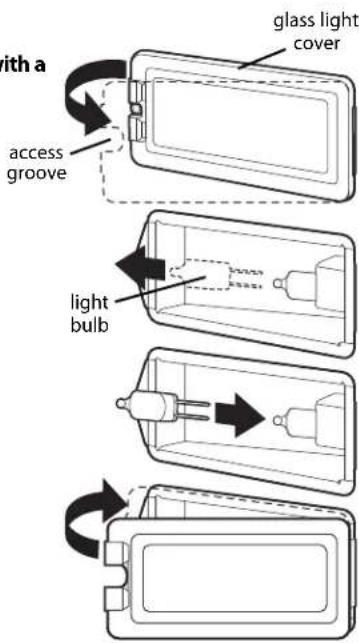
Replacing Interior Halogen Oven Lights
Do not touch bulb with bare hands. Clean off any signs of oil from the bulb and handle with a soft cloth.
- Unsnap glass light cover using a screwdriver in the access groove.
- Firmly grasp light bulb and pull out.
- Replace with halogen bulb using volt and wattage requirements listed on glass cover.
- Replace the light cover by snapping glass cover onto metal box.
- Reconnect power at the main fuse or circuit breaker.
Power Failure
Do not attempt to use during a power failure. Unit will not function.
Trouble Shooting Guide
PROBLEM POSSIBLE CAUSE AND/OR REMEDY
| 1. Oven will not function. Oven is not connected to electrical power.Have electrician check power circuit breaker,wiring and fuses. |
| 2. Oven does not Door is not shut tight enough for operate in self-clean. automatic door latch to lock. |
| 3. Oven is not clean Temperature control knob not rotated all after self-clean cycle. the way past clean until it stops. |
| 4. Broil does not work. Temperature control knob is rotated too far past broil position. |
| 5. Door will not open. Oven is still in self-clean mode. If oven is hot, door latch will release when a safe temperature is reached. |
| 6. Oven light will not work. Light bulb is burned out.Oven is not connected to power. |
| 7. Strong odor and/or smoke This is normal burn-off of insulation and is noticed first few time oven protective oils in the oven. This will go away is used. after using oven a few times. |
Service Information
If your oven should fail to operate, check to see whether the circuit breaker is open or the fuse is blown.
If service is required, call your authorized service agency.
When you call for service, have the following information readily available:
- Model number
- Serial number
- Date of purchase
• Name of dealer from whom purchased
Clearly describe the problem that you are having. If you are unable to obtain the name of an authorized service agency, or if you continue to have service problems, contact Viking Range, LLC at 1-888-845-4641, or write to:
VIKING RANGE, LLC
PREFERRED SERVICE
111 Front Street
Greenwood, Mississippi 38930 USA
Record the following information indicated below. You will need it if service is ever required. The serial number and model number for your oven is located on the identification plate mounted on the top left side of the oven door opening under the control panel.
Model Number ____ Serial Number ____
Date of Purchase Date Installed
Dealer's Name ____
Address ____ ____
If service requires installation of parts, use only authorized parts to ensure protection under the warranty.
This manual should remain with the oven for future reference.
PROFESSIONAL SERIES BUILT-IN ELECTRIC OVENS WARRANTY
TWO YEAR FULL WARRANTY
Built-in electric ovens and all of their component parts, except as detailed below*†, are warranted to be free from defective materials or workmanship in normal residential use for a period of two () years from the date of original retail purchase or closing date for new construction, whichever period is longer. Viking Range, LLC, warrantor, agrees to repair or replace, at its option, any part which fails or is found to be defective during the warranty period.
*FULL NINETY (90) DAY COSMETIC WARRANTY: Product is warranted to be free from cosmetic defects in materials or workmanship (such as scratches on stainless steel, paint/porcelain blemishes, etc.) for a period of ninety (90) days from the date of original retail purchase or closing date for new construction, whichever period is longer. Any defects must be reported to the selling dealer within ninety (90) days from date of original retail purchase. Viking Range, LLC uses high quality processes and materials available to produce all color finishes. However, slight color variation may be noticed because of the inherent differences in painted parts and porcelain parts as well as differences in kitchen lighting, product locations, and other factors. Therefore, this warranty does not apply to color variation attributable to such factors.
†FULL NINETY (90) DAY WARRANTY IN "RESIDENTIAL PLUS" APPLICATIONS: This full warranty applies to applications where use of the product extends beyond normal residential use, but the warranty period for products used in such applications is ninety (90) days. Examples of applications covered by this warranty are bed and breakfasts, fire stations, private clubs, churches, yachts, etc. Under this "Residential Plus" warranty, the product, its components and accessories are warranted to be free from defective material or workmanship for a period of ninety (90) days from the date of original retail purchase. This warranty excludes use of the product in all commercial locations such as restaurants, food service locations and institutional food service locations.
FIVE YEAR LIMITED WARRANTY ON BURNERS
Any surface bake element, broil element or convection cook element which fails due to defective materials or workmanship (excluding cosmetic failures) in normal household use during the third through fifth year from the date of original retail purchase will be repaired or replaced, free of charge for the part itself, with the owner paying all other costs, including labor. This does not include ignition systems, burner bases, etc.
TERMS AND CONDITIONS
This warranty extends to the original purchaser of the product warranted hereunder and to each transferee owner of the product during the term of the warranty and applies to products purchased and located in the United States, Canada, Mexico, and the Caribbean (excluding Cuba, Dominican Republic, and Haiti). Products must be purchased in the country where service is requested. If the product or one of its component parts contains a defect or malfunction during the full warranty period after a reasonable number of attempts by the warrantor to remedy the defect or malfunction, the owner is entitled to either a refund or replacement of the product or its component part or parts. Replacement of a component part includes its free installation, except as specified under the limited warranty. Under the terms of this warranty, service must be performed by a factory authorized Viking Range, LLC service agent or representative. Service will be provided during normal business hours, and labor performed at overtime or premium rates shall not be covered by this warranty.
Owner shall be responsible for proper installation, providing reasonable and necessary maintenance, providing proof of purchase upon request, and making the appliance reasonably accessible for service. The return of the Owner Registration Card is not a condition of warranty coverage. You should, however, return the Owner Registration Card so that Viking Range, LLC can contact you should any question of safety arise which could affect you.
This warranty gives you specific legal rights, and you may also have other rights which may vary from jurisdiction to jurisdiction.
WHAT IS NOT COVERED BY THIS WARRANTY: This warranty shall not apply to damage resulting from abuse, failure to provide reasonable and necessary maintenance, accident, delivery, negligence, natural disaster, loss of electrical power to the product for any reason, alteration, outdoor use, improper installation, improper operation, or repair or service of the product by anyone other than an authorized Viking Range, LLC service agency or representative. This warranty does not apply to commercial usage.
LIMITATION OF REMEDIES AND DURATION OF IMPLIED WARRANTY
OWNER'S SOLE AND EXCLUSIVE REMEDY FOR A CLAIM OF ANY KIND WITH RESPECT TO THIS PRODUCT SHALL BE THE REMEDIES SET FORTH ABOVE. VIKING RANGE, LLC IS NOT RESPONSIBLE FOR CONSEQUENTIAL OR INCIDENTAL DAMAGE, INCLUDING BUT NOT LIMITED TO FOOD OR MEDICINE LOSS, DUE TO PRODUCT FAILURE, WHETHER ARISING OUT OF BREACH OF WARRANTY, BREACH OF CONTRACT OR OTHERWISE. Some jurisdictions do not allow the exclusion or limitation of incidental or consequential damages, so the above limitation or exclusions may not apply to you. ANY IMPLIED WARRANTIES OF MERCHANTABILITY OR FITNESS FOR A PARTICULAR PURPOSE APPLICABLE TO THIS PRODUCT ARE LIMITED IN DURATION TO THE PERIOD OF COVERAGE OF THE APPLICABLE EXPRESS WRITTEN LIMITED WARRANTIES SET FORTH ABOVE. Some states do not allow limitations on how long an implied warranty lasts, so the above limitation may not apply to you.
WARRANTY SERVICE
To obtain warranty service, contact an authorized Viking Range, LLC service agent, or Viking Range, LLC, 111 Front Street, Greenwood, Mississippi 38930, (888) 845-4641. Provide model and serial number and date of original purchase or closing date for a new construction. For the name of your nearest authorized Viking Range, LLC service agency, call Viking Range, LLC. IMPORTANT: Retain proof of original purchase to establish warranty period.
Specifications subject to change without notice.
Viking Range, LLC
111 Front Street
Greenwood, Mississippi 38930 USA
(662) 455-1200
For product information
call 1-888-845-4641,
or visit our web site at vikingrange.com
- Congratulations
- Table of Contents
- Getting Started
- Product Controls
- Cooking Tips
- Product Care
- WARNING
- STATE OF CALIFORNIA PROP 65
- Important Safety Instructions
- SAVE THESE INSTRUCTIONS
- Digital Display (Select Models)
- Digital Display (French Door Models)
- Analog Display (Premiere Models)
- Synchronizing the analog and digital clocks:
- Setting the time-of-day:
- Oven Settings and Functions
- FRENCH DOOR MODELS
- Temperature Control
- Interior Oven Light Control
- Two-Element Bake
- TruConvec™
- Convection Bake
- Convection Roast\*
- Convection Broil\*
- High-Broil
- Medium-Broil
- Low-Broil
- Proofing
- (French Door model only)
- Steam Clean (French Door model only)
- Self-Clean (All models except French Door upper/single oven)
- Convection Dehydrate
- Convection Defrost
- Clocks and Timers
- Electronic Timing Center
- Digital Display
- Setting the Min/Sec Timer
- To program the Min/Sec Timer
- Timer Alarm
- Setting the Automatic Start Time Bake Program
- To Set The Automatic Time Bake Program:
- Set the start time:
- (Digital Display - Select / French Door Models)
- Set the desired baking time:
- Sabbath Mode (Digital Display Select models only)
- To set the Sabbath Mode
- To remove Sabbath Mode
- Night Light (French Door model only)
- (Analog Clock - Premiere Models)
- To program the Min/SecTimer
- Setting the Bake Time Program
- To Set The Bake Time Program
- To set the Automatic Time Bake Program
- Meat Probe Functions
- Probe Function
- (Premiere/French Door Models)
- To Set the Automatic Probe Function
- Cooking with your Oven
- Rack Positions
- Conventional/Convection Cooking
- Baking Tips
- Pan Placement Tips
- Preheat / No Preheat
- Preheat - Used in all Baking modes except Convection Bake
- No Preheat Option - Convection Bake Mode only
- Conventional Baking Chart
- Convection Baking Chart
- Solving Baking Problems
- Roasting Instructions
- Using the Meat Probe
- Conventional Roasting Chart
- Convection Roasting Chart
- Broiling Instructions
- To Use High-Broil:
- To Use Medium-Broil and Low-Broil:
- Broiling Tip
- Convection Dehydrate/Defrost
- \*IMPORTANT
- Cleaning & Maintenance
- Burn or Electrical Shock Hazard
- Oven Surfaces
- Control Knobs
- Stainless Steel Parts
- Oven Racks
- Meat Probe
- Steam Clean (French Door models only)
- Self-Clean Cycle
- CAUTION
- Before starting the Self-Clean cycle:
- To start the Self-Clean cycle:
- To stop the Self-Clean cycle:
- Replacing Interior Halogen Oven Lights
- Power Failure
- Trouble Shooting Guide
- Service Information
- VIKING RANGE, LLC
- PREFERRED SERVICE
- PROFESSIONAL SERIES BUILT-IN ELECTRIC OVENS WARRANTY
- TWO YEAR FULL WARRANTY
- FIVE YEAR LIMITED WARRANTY ON BURNERS
- TERMS AND CONDITIONS
- LIMITATION OF REMEDIES AND DURATION OF IMPLIED WARRANTY
- WARRANTY SERVICE
Brand : VIKING
Model : VDOE527WH
Category : Oven