ANT2407 - Uncategorized NETGEAR - Free user manual and instructions
Find the device manual for free ANT2407 NETGEAR in PDF.


User questions about ANT2407 NETGEAR
0 question about this device. Answer the ones you know or ask your own.
Ask a new question about this device
Download the instructions for your Uncategorized in PDF format for free! Find your manual ANT2407 - NETGEAR and take your electronic device back in hand. On this page are published all the documents necessary for the use of your device. ANT2407 by NETGEAR.
USER MANUAL ANT2407 NETGEAR
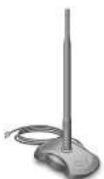
7 dBi Omni-directional Antenna ANT2407
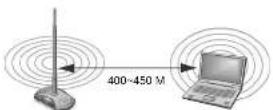
Extended wireless network coverage: 400–450 M. The actual indoor range will be affected by the local environment.
Note: For optimal results in extending wireless range with antenna installations, consult a qualified professional installer service for a site survey and proper installation. For a list of devices approved by the FCC for use with the antenna, see the NETGEAR website at http://tools.netgear.com/legal/fcc_antennas.html.
Antenna Placement and Location
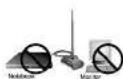
Warning: Keep the antenna 15 cm (6 in) away from notebook computers and monitors.
To maximize coverage and performance, place the antenna within the line of sight of your wireless devices. Minimize partitions and objects that block the line of sight if possible. The antenna can be placed on a flat surface, wall mounted, or magnet mounted.
- If wall-mounting, place the antenna on an interior wall above cubicles (cubicles generally include a metal foil). Ideal placement is 2 meters (6.5 feet) high.
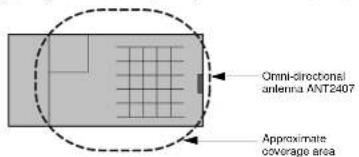
- If the wireless access point, router, or gateway, is in an IT room, place the antenna outside the room against a wall and close to the ceiling. The area close to, behind, or beside the antenna will be covered, because the dynamic range of the WLAN transmitter/receiver and antenna is approximately 100 dB. Even with 20 dB to 40 dB or attenuation, the signal strength is still strong and communication is maintained.
- The antenna has magnets in the base, which can be used to mount it on metal cabinets, white boards, or even the ceiling cross bars (the framework that holds the ceiling panels up).
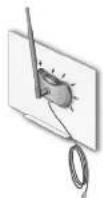
Magnet mounting on a whiteboard
Installing the Antenna
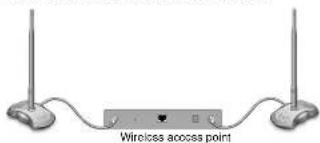
Turn off your wireless access point, and connect your ANT2407 antenna. Note that the antenna has a RP SMA female reverse connector. If your wireless access point is new, follow the access point installation instructions. If you are upgrading an existing access point, turn it on again.
Wireless Device with 1 Antenna
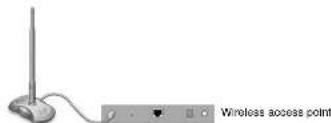
Wireless Device with 2 Antennas: Replacing the Primary Antenna
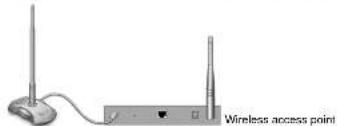
Wireless Device with 2 Antennas: Replacing Both
| NETGEAR 7 dBi Omni-directional Antenna ANT2407 Specifications | |
| Frequency range | 2.4~2.5GHz |
| Impedance | 50 Ohms |
| Gain (excluding cable loss) 7 dBi@ 2.45GHz | |
| Operating temperature | -10 to 60°C (14 to 140°F) |
| Storage temperature | -10 to 70°C (14 to 150°F) |
| Humidity | 95% RH |
| Radome material | ABS |
| HPBWH-plane | 360° |
| HPBWE-plane | 21.6° |
| Dimensions (1 x w x h) | 114 x 169 x 302 mm (4.5 x 6.7 x 12 in) |
| Wolgt | 240 pt |
| Connector | RP SMA Female Reverse |
| Warranty | 2 year |
| Impedance | 50 +/- 5 Ohms |
Radiation Patterns
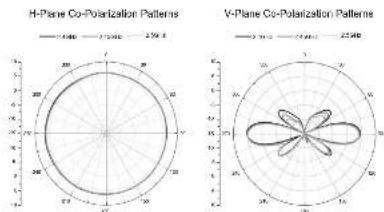
radar
| Plane | Co-Polarization Pattern | |---|---| | H-Plane | 2750° | | V-Plane | 2540° |Technical Support
Thank you for selecting NEIGHAR products.
After installing your device, locate the serial number of your product and use it to register your product at http://www.NETGEAR.com/register. Registration is required before you can use our telephone support service. Registration via our website is strongly recommended.
Go to http://kbserve.netgear.com for product updates and Web support.
Statement of Conditions
In the interest of improving internal design, operational function, and/or reliability, NETGEAR reserves the right to make changes to the products described in this document without notice. NETGEAR does not assume any liability that may occur due to the use or application of the product(s) or circuit layout(s) described herein.
Federal Communications commission (FCC) Compliance Notice: Radio Frequency Notice
This device complies with part 15 of the FCC Rules. Operation is subject to the following two conditions: 1. This device may not cause harmful interference.
- This device must accept any interference received, including interference that may cause undesired operation.
To comply with FCC regulations, the ANT2407 should only be used with devices that have been FCC approved for use with the NETGEAR ANT2407. Check the NETGEAR website at
the process is needed to consider the main result for an update list of PCC approved devices.
Notes: This equipment has been tested and found to comply with the limits for Class B digital devices, pursuant to part 15 of the FCC Rules. These limits are designed to provide reasonable protection against harmful interference in residential installation. This equipment generates, uses, and can radiate radio frequency energy and, if not installed and used in accordance with the instructions, may cause harmful
interference to radio communications. However, there is no guarantee that interference will not occur in a particular installation. If this compartment does cause harmful interference to radio or television reception, which can be determined by turning the equipment of and reo, the user is encouraged to try to extract the interference by one or more of the following measures: (1) Recent or relocate the receiving antenna; (2) Increase the separation between the equipment and receiver; (3) Connect the equipment to an outlet or circuit different from that to which the receiver is connected; (4) Consult the dealer as an experienced radio/TV technician for help.
FCC and EU Radiation Exposure Statement
This equipment complies with FCC radiation exposure limits set forth for an uncontrolled environment. To avoid the possibility of exceeding the FCC radio frequency exposure limits, human proximity to the antenna must be less than 20 cm (8 inches) during normal operation.
This device should not be co-located with other transmitters.
For EU, use of any antenna requires careful planning and extra considerations to comply with EU emissions and health standards and regulations. Antenna installation must comply with the maximum level authorized by each country.
Regional Customer Support phone numbers:
All countries 1-386-638-1327 Germany 0180 590 59 59 Mexico 1800 123 1786
Argentina 0800 666 9838 Finland 020 7328500 Netherlands 020 568 2987
Australia 1300 361 254 France 0820 887 177 New Zealand 0800 174600
Austria 0821 556 644 Hong Kong 800 964 605 Norway 800 12 500
Belgium 078 15 06 73 Hungary 1 23 55 353 Poland 22 583 4381
Brazil 0800 761 0021 India 1800 425 4327 Russia 810 800 20931032
Bulgaria: 359 2 97 444 70 Italy 0238 591 016 Singapore 800 6011 369
Canada 1 908 NETGEAR Ireland 1800 453019 Slovakia 02 5010 2649
Chile 800-172001 Japan 0120-921-080 Spain 80 099 5162
China 800-830-3915 Korea 090-838-4327 Sweden 0770-93-00-33
Columbia.01800-700-2102 Lux (Deu) 0049 180 590 59 58 Switzerland 0848 000 195
Czech Republic 296 305 655 Lux (Fra) 0000 820 86 71 77 Thailand 1900 060 013
Denmark 80 702 656 Malaysia 1800 880 023 UK 0844 875 4000
US 1 888 NETGEAR
This symbol was placed in accordance with the European Union Directive 2002/NS on the Waste Electrical and Electronic Equipment (the WEEE Directive). If disposed of within the European Union, this product should be treated and recycled in accordance with the laws of your jurisdiction implementing the WEEE Directive.
© 2009 by NETGEAR, Inc. All rights reserved. NETGEAR and the NETGEAR logo are registered trademarks of NETGEAR, Inc. in the United States and/or other countries. Other brand and product names are trademarks or registered trademarks of their respective holders. Information is subject to change without notice.
201-11536-01
CE①
February, 2009