T-BAT HS27.5 - Battery SolaX Power - Free user manual and instructions
Find the device manual for free T-BAT HS27.5 SolaX Power in PDF.


| Product Type | High Voltage Lithium-Ion Battery |
| Model | T-BAT HS27.5 |
| Brand | SolaX Power |
| Nominal Capacity | 27.5 kWh |
| Usable Capacity | 24.75 kWh (90% DoD) |
| Nominal Voltage | 400 V |
| Voltage Range | 300 V - 460 V |
| Max Charge/Discharge Power | 5 kW |
| Chemistry | LiFePO4 (Lithium Iron Phosphate) |
| Dimensions (H x W x D) | 1200 mm x 600 mm x 600 mm |
| Weight | 200 kg |
| IP Rating | IP55 |
| Operating Temperature Range | -10°C to 50°C |
| Cooling | Natural Convection |
| Communication | CAN, RS485 |
| Warranty | 10 Years |
| Safety Features | Overcharge, Overdischarge, Overcurrent, Short Circuit, Temperature Protection |
| Installation | Indoor or Outdoor (with shelter), Wall-mounted or Floor-standing |
| Maintenance | Keep clean, ensure ventilation, check connections regularly |
| Spare Parts | Communication cables, mounting brackets, fuses |
| Repairability | Serviceable by authorized technicians only |
Frequently Asked Questions - T-BAT HS27.5 SolaX Power
User questions about T-BAT HS27.5 SolaX Power
0 question about this device. Answer the ones you know or ask your own.
Ask a new question about this device
Download the instructions for your Battery in PDF format for free! Find your manual T-BAT HS27.5 - SolaX Power and take your electronic device back in hand. On this page are published all the documents necessary for the use of your device. T-BAT HS27.5 by SolaX Power.
USER MANUAL T-BAT HS27.5 SolaX Power
SolaX Power Network Technology (Zhejiang) Co., Ltd.
Add.: No. 288, Shizhu Road, Tonglu Economic Development Zone, Tonglu City, Zhejiang Province, 310000 P.R. China
Tel.: +86 (0) 571-5626 0011
E-mail: info@solaxpower.com
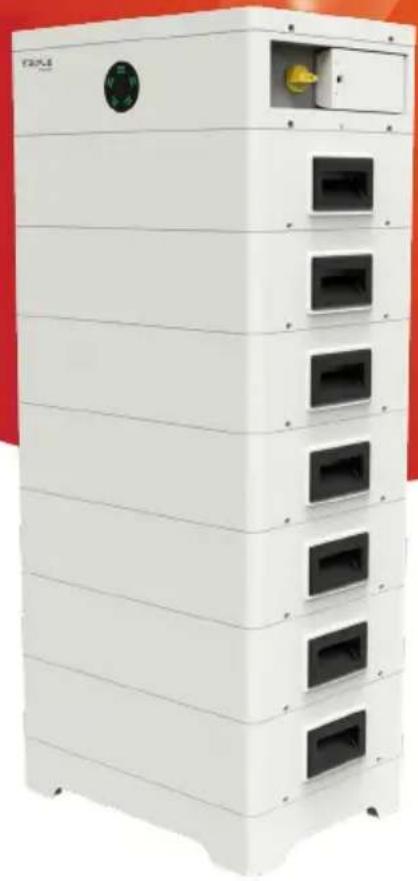
Triple Power Lithium-ion Battery
User Manual
50 Ah, 72 Ah
natural_image
Exterior view of a white industrial storage unit with multiple compartments and a circular vent (no visible text or symbols)Copyright © SolaX Power Technology (Zhejiang) Co., Ltd. All rights reserved. No part of the document may be reproduced or transmitted in any form or by any means without prior written consent of SolaX Power Technology (Zhejiang) Co., Ltd. (hereinafter referred to as SolaX). SolaX reserves the right of final interpretation.
CHNAGE HISTORY
Changes between document versions are cumulative. The latest version contains all updates made in previous versions.
Version 00 (Jan. 30, 2023)
Initial release
Version 01 (Jul. 27, 2023)
Updated 3.1 Dimensions and Weight (change of the weight of battery module)
Updated 4.4.3 Accessory (change of the packing list)
Updated 6.3 Cable Connection (added installation steps of cover plate)
Updated 7.3 Status Indicators (change of the figure of indicators)
Version 02 (Aug. 18, 2023)
Updated 3.5 Specification (change of the storage temperature)
Updated 4.4.3 Accessory (change of the power cable connecting to the inverter)
Updated 6.3 Cable Connection (change of the wiring procedure about the right side of the BMS)
Content
1 Note on this Manual....1
1.1 Scope of Validity ....1
1.2 Target Group .... 1
1.3 Symbols....1
2 Safety....2
2.1 Safety Instruction....2
2.1.1 General Safety Precautions 2
2.1.2 Explanation of Labels......3
2.2 Response to Emergency Situations....4
2.2.1 Leaking Batteries 4
2.2.2 Fire....4
2.2.3 Wet Batteries and Damaged Batteries....4
2.3 Qualified Installer 5
3 Production Information....6
3.1 Dimensions and Weight 6
3.2 Installation Space 8
3.3 Appearance....9
3.4 Basic Features ....13
3.4.1 Features ....13
3.4.2 Certifications ...... 13
3.5 Specification....14
4 Preparation before Installation....18
4.1 Prerequisites....18
4.2 Safety Gear....19
4.3 Installation Tools....19
4.4 Preparation 20
4.4.1 Check for Transport Damage....20
4.4.2 Unpacking....20
4.4.3 Accessory 21
5 Equipment Installation 24
5.1 Installation Environment Requirements....24
5.2 Installation Procedure 25
6 Wiring 31
6.1 Current Terminal Connection....31
6.2 Communication Connection (connecting to inverter)....32
6.3 Cable Connection .... 33
6.3.1 Wiring without Series Box 33
6.3.2 Wring with Series Box 36
7 Commissioning ....40
7.1 DIP Switch....40
7.2 Start and Shutdown Procedure 41
7.3 Status Indicators....42
8 Troubleshooting....45
9 Decommissioning 48
9.1 Dismantling Battery 48
9.2 Packing 48
10 Maintenance 49
11 Disclaimer .... 50
1 Note on this Manual
1.1 Scope of Validity
This manual, an integral part of T-BAT Series, contains information on assembly, commissioning, maintenance and failure of the device. Please read it carefully before operation.
BMS
TBMS-MCS0800
Battery Module
TP-HS25, TP-HS36
Note: In case of one tower, there are 3 parts of the T-BAT system, which includes BMS, battery module(s) and base. In case of two towers, there 4 parts of the system, such as, BMS, battery module(s), base and Series Box. For details, please refer to 3.3.1 Configuration List on page.
1.2 Target Group
This Manual is designed for qualified electricians. The installation procedure described in the Manual may only be performed by qualified electricians.
1.3 Symbols
There are several safety marks in the Manual. The detailed explanation is shown as follows:

DANGER!
"DANGER" indicates a hazardous situation which, if not avoided, will result in serious injury or death.

WARNING!
"WARNING" indicates a hazardous situation which, if not avoided, could result in serious injury or death.

CAUTION!
"CAUTION" indicates a hazardous situation which, if not avoided, could result in minor or moderate injury or death.

NOTE!
"NOTE" indicates that tips will be given to achieve better using effect.
2 Safety
2.1 Safety Instruction
For safety reasons, installers are responsible for familiarizing themselves with the contents of the Manual and all Warnings before performing installation.
2.1.1 General Safety Precautions

WARNING!
Do not crush or impact battery, and always dispose of it according to relevant safety regulations.
Observe the following precautions:
■ Risks of explosion:
- Do not involve the battery module in a collision;
- Do not crush or puncture the battery module;
- Do not dispose of the battery module in a fire.
■ Risks of fire:
- Do not expose the battery module to the temperature in excess of 140^ F/ 60^ C;
- Do not place the battery module near a heat source, such as a fireplace;
- Do not expose the battery module to direct sunlight;
- Do not allow the battery connectors to touch conductive objects, such as wires.
■ Risks of electric shock:
- Do not disassemble the battery module
- Do not touch the battery module with wet hands;
- Do not install or operate the battery module in places where there is excessive moisture or liquids;
- Keep children away from the battery module.
■ Risks of damage to battery module:
- Do not expose the battery module in places where there is excessive moisture or liquids;
- Do not place any objects on top of the battery module.
T-BAT SYS-HV should only be installed for residential applications and not be for commercial application.

CAUTION!
Non-operational batteries should be discarded according to the local regulations.
2.1.2 Explanation of Labels
Label Explanation

mark for conformity


mark of conformity

The battery system must be disposed of at a proper facility for environmentally-safe recycling.

not dispose of the battery together with household waste.

not dispose of the battery together with household waste.

the enclosed documentation.

the battery system away from children.

the battery system away from open flames or ignition sources.

tion, risk of danger

tion, risk of electric shock

battery module may explode.
2.2 Response to Emergency Situations
2.2.1 Leaking Batteries
In case the leakage of electrolyte solution occurs, please avoid direct contact with the electrolyte solution and the gas that may be generated by it. Direct contact may lead to skin irritation or chemical burns. If users come into contact with the electrolyte solution, please do as follows:
■ Accidental inhalation of harmful substances: Evacuate from the contaminated area, and seek medical attention immediately.
■ Eye contact: Rinse eyes with flowing water for 15 minutes, and seek medical attention immediately.
■ Dermal contact: Wash the affected area thoroughly with soap and water, and seek medical attention immediately.
■ Ingestion: Induce vomiting, and seek medical attention immediately.
2.2.2 Fire
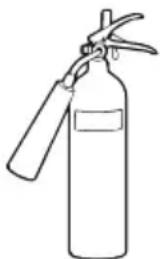
Please keep a Class ABC fire extinguisher or a carbon dioxide extinguisher near the equipment.

WARNING!
The battery module may catch fire when heated above 302^ F.
natural_image
Line drawing of a fire extinguisher with two handles and handle (no text or symbols)If a fire breaks out where the battery module is installed, please do as follows:
■ Extinguish the fire before the battery module catches fire;
■ If the battery module catches fire, please do not try to put out the fire, and evacuate immediately.

WARNING!
In case of catching fire, the battery module will produce noxious and poisonous gases, and please keep away the battery.
2.2.3 Wet Batteries and Damaged Batteries
Do not touch the battery module after being wet from and soaked in the water.
Do not use the battery module if it is damaged. Otherwise, the loss to life and property will be caused.
Please pack the battery in its original packaging, and return it to SolaX or the distributor.

WARNING!
Damaged batteries may leak electrolyte or produce flammable gas. If users suspect that the battery is damaged, please immediately contact SolaX for advice and information.
2.3 Qualified Installer

WARNING!
All operations of T-BAT SYS-HV relating to electrical connection and installation must be carried out by qualified personnel.
A skilled worker is defined as a trained and qualified electrician or installer who has all of the following skills and experience:
■ Knowledge of the functional principles and operation of grid-tied systems;
■ Knowledge of the dangers and risks associated with installing and using electrical devices and acceptable mitigation methods;
■ Knowledge of the installation of electrical devices;
■ Knowledge of and adherence to this Manual and all safety precautions and best practices.
3 Production Information
3.1 Dimensions and Weight
A battery management system (hereinafter referred to as BMS) is an electronic system that manages a rechargeable battery.
A battery module is a type of electrical battery which can charge or discharge loads.
In case of one tower, the whole system mainly comprises a BMS, battery module(s) and Base. In case of two towers, the whole system comprises a BMS, battery modules, Base and Series Box.
| TBMS-MCS0800 TP-HS25 TP-HS36 Base Series Box | |||||
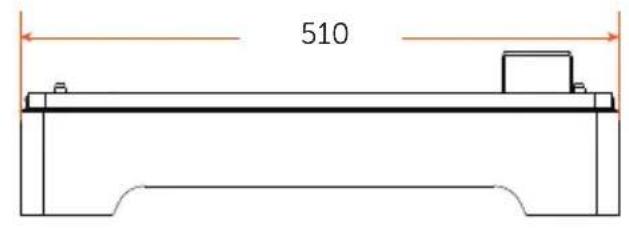
| Length (mm) | 510.00 | 510.00 | 510.00 | 510.00 | |
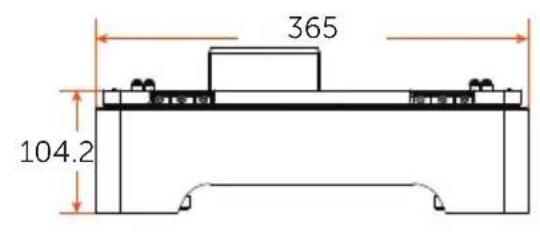
| Width (mm) | 365.00 | 365.00 | 365.00 | 365.00 | |
| Height (mm) | 157.00 | 152.00 | 152.00 | 104.2 | 157.00 |
| Weight (kg) | 13.00 | 30.00 | 34.00 | 10.10 | |
BMS (TBMS-MCS0800)
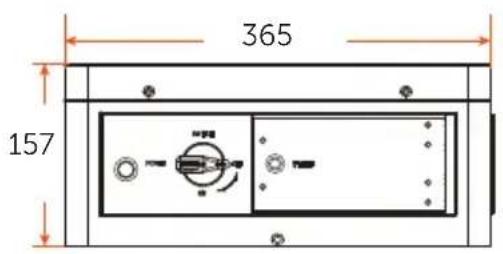
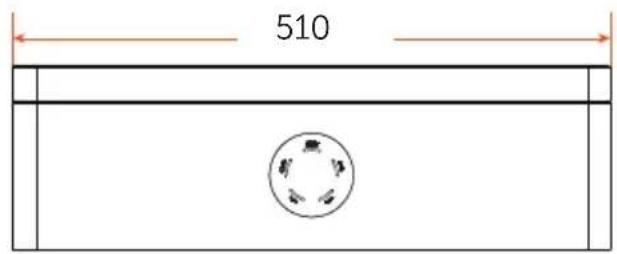
Battery module (TP-HS25/TP-HS36)
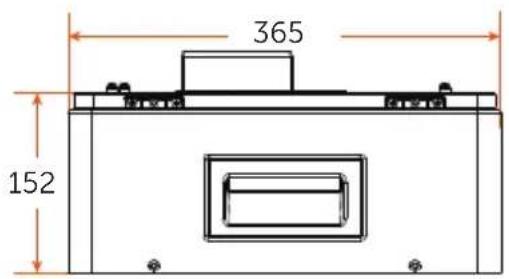
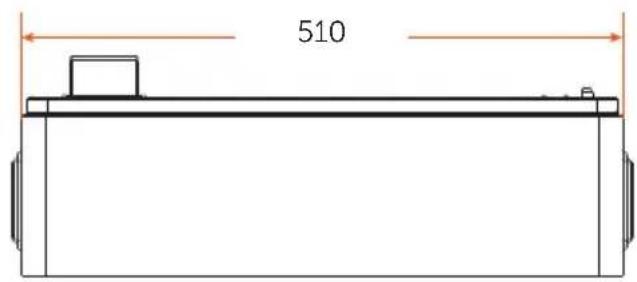
Base
Series Box
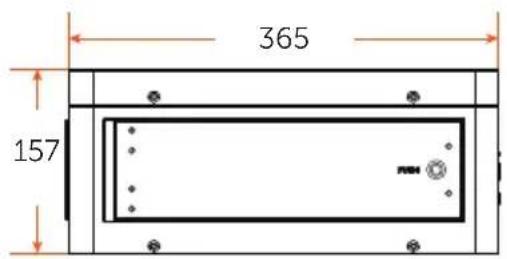
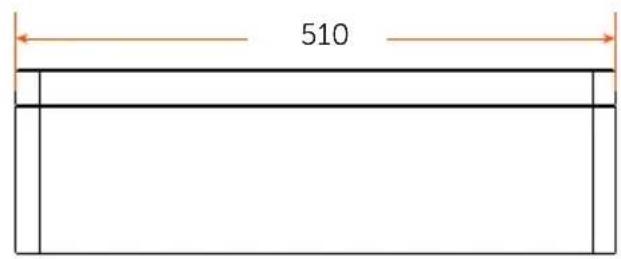
3.2 Installation Space
One Tower
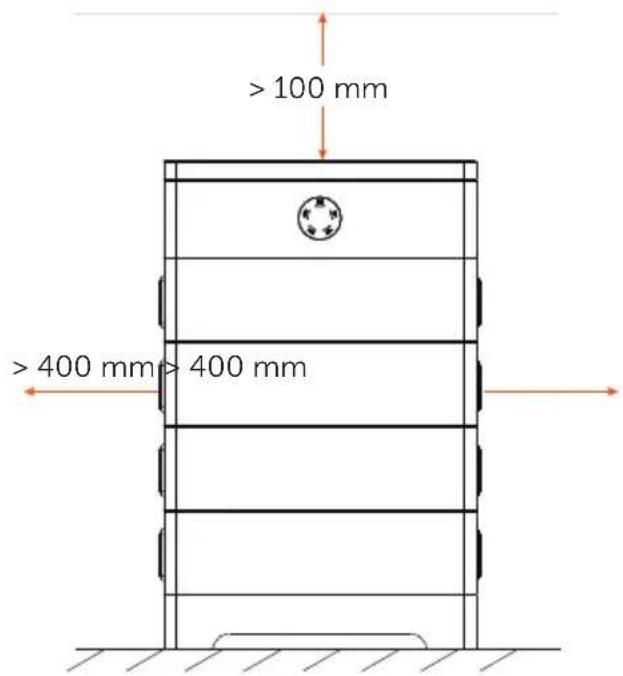
Two towers
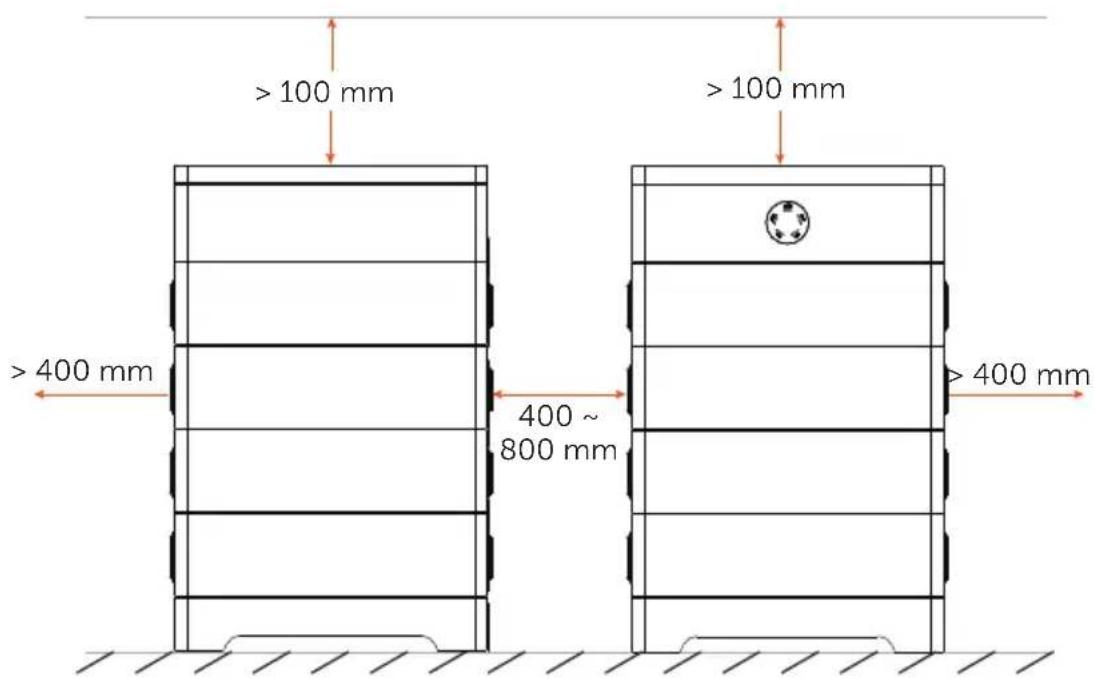
*Note: The above figures show an example of installation space of "One Tower" and "Two Towers".
3.3 Appearance
■ BMS
Left side view
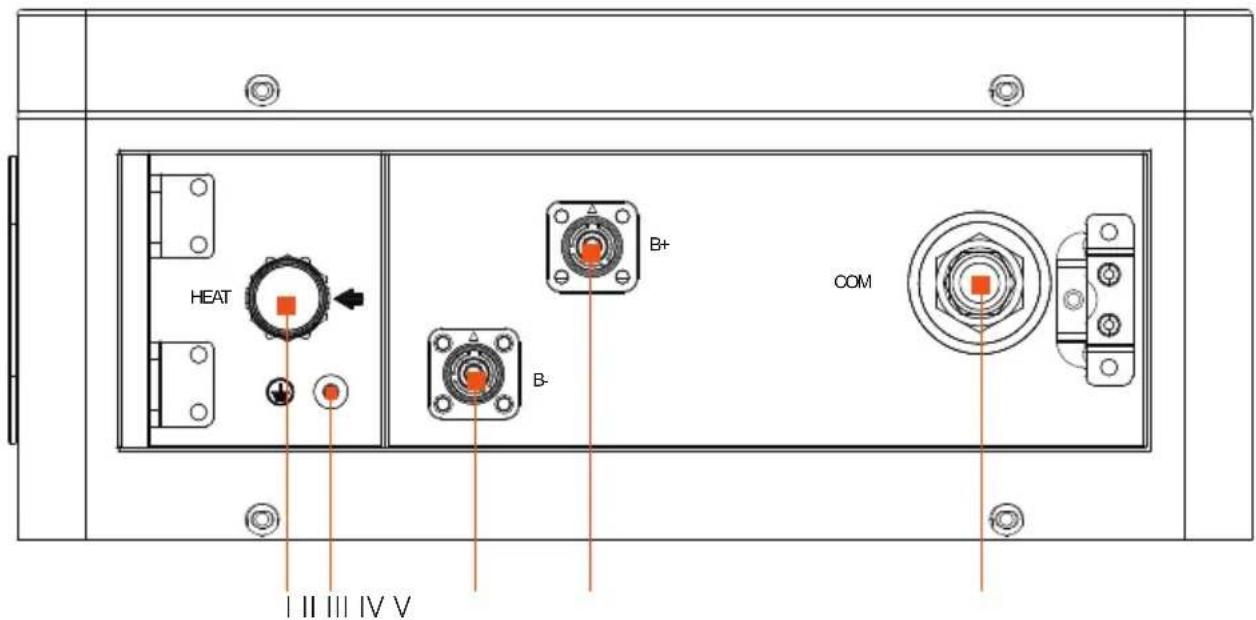
Item No. Description
| I | HEAT: Connect "HEAT" port of Series Box (if any); or, the port must be connected to a short-circuit plug.*Note: The port has been insert the short-circuit plug before delivery, DO NOT remove it. |
| II | Grounding port: Connect the Grounding port of Series Box (if any); or, the port doesn't need to be connected . |
| III | B-: Connect "B+" of Series Box (if any); or, connect the "IV B+" with short power cable. |
| IV | B+: Connect "B-" of Series Box (if any); or, connect the "III B-" with short power cable. |
| V | COM: Connect "COM" port of Series Box (if any); or, the port doesn't need to be connected.*Note: The port has been covered a waterproof cap before delivery, DO NOT remove it. |
Right side view
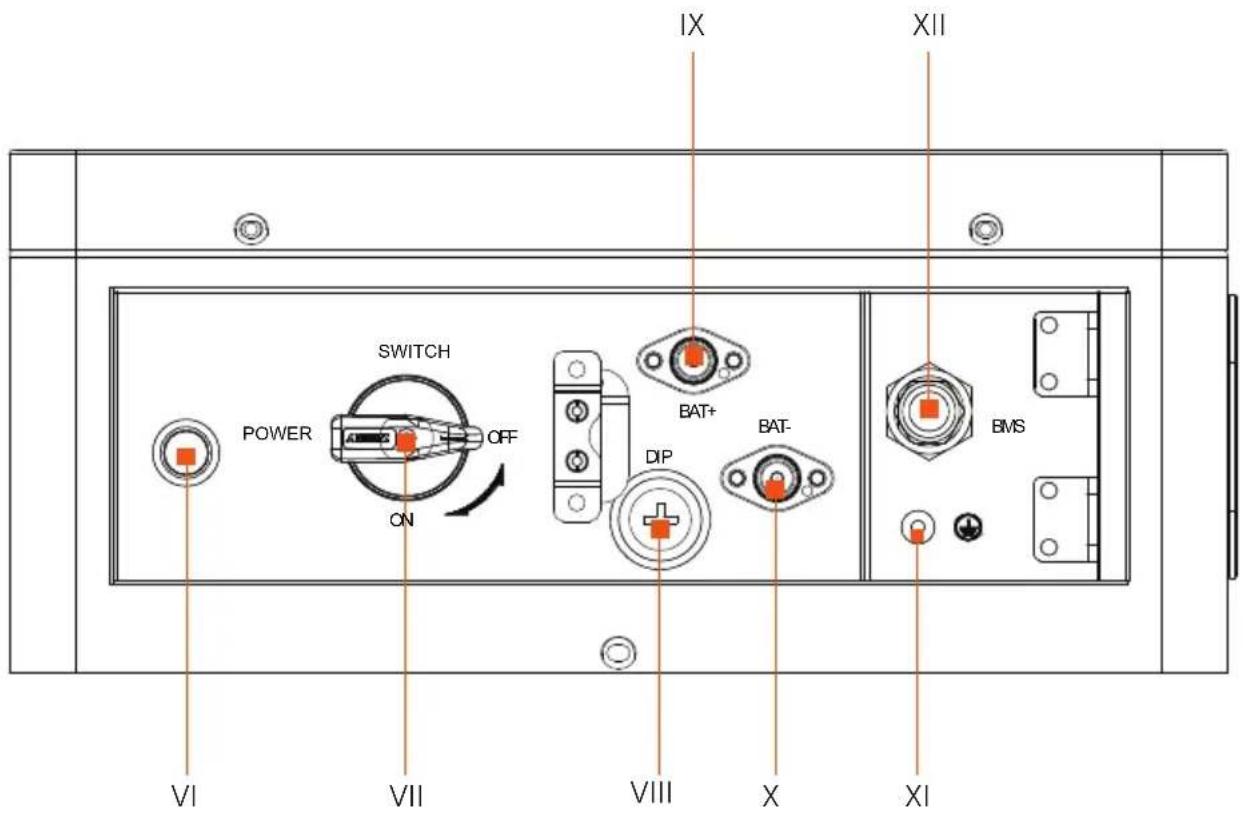
Item No. Description
VI POWER: Start system
VII SWITCH: A switch for battery's input and output
VIII DIP: Realize battery's parallel function (A reserved function)
IX BAT+: Connect BMS's BAT+ to inverter's BAT+
X BAT-: Connect BMS's BAT- to inverter's BAT-
XI GND: Grounding port of BMS to inverter's grounding port
XII BMS: Connect the "BMS" port of BMS to the "BMS" port of inverter
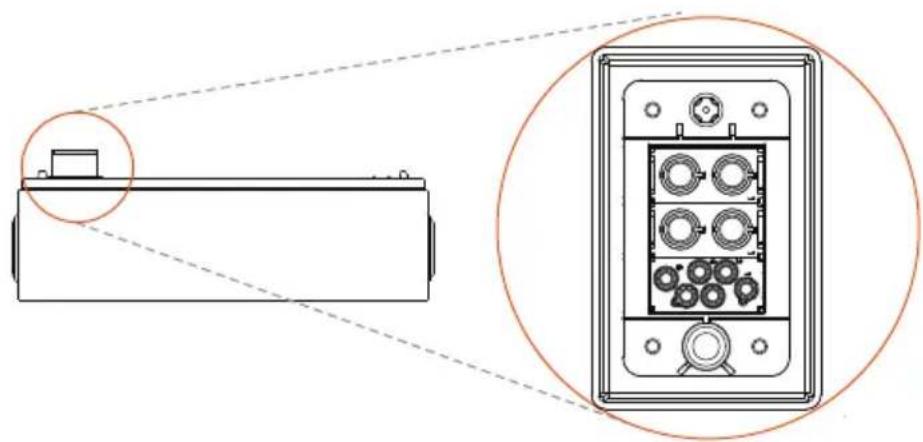
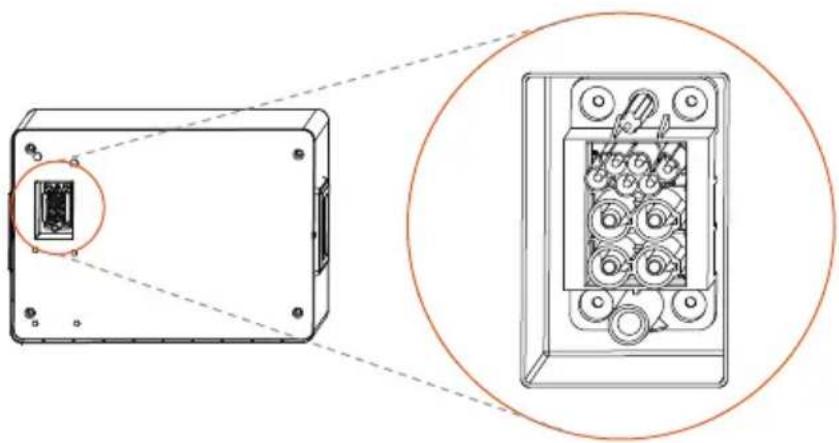
■ Battery Module
Top
natural_image
Technical diagram showing a device with a close-up view of its internal components (no text or symbols present)The hot-plug interface is connected to the bottom of battery module or BMS.
Bottom
natural_image
Technical diagram showing a device casing with internal components and a magnified view of its internal structure (no text or symbols)The hot-plug interface is connected to the top of battery module or Base.
■ Base
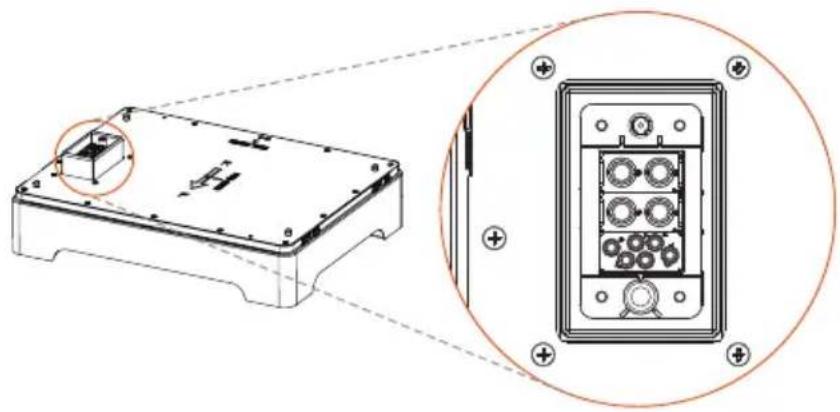
natural_image
Technical diagram showing a device housing with an inset close-up of its internal components (no text or symbols present)The hot-plug interface is connected to the bottom of battery module.
■ Series Box
Left side view
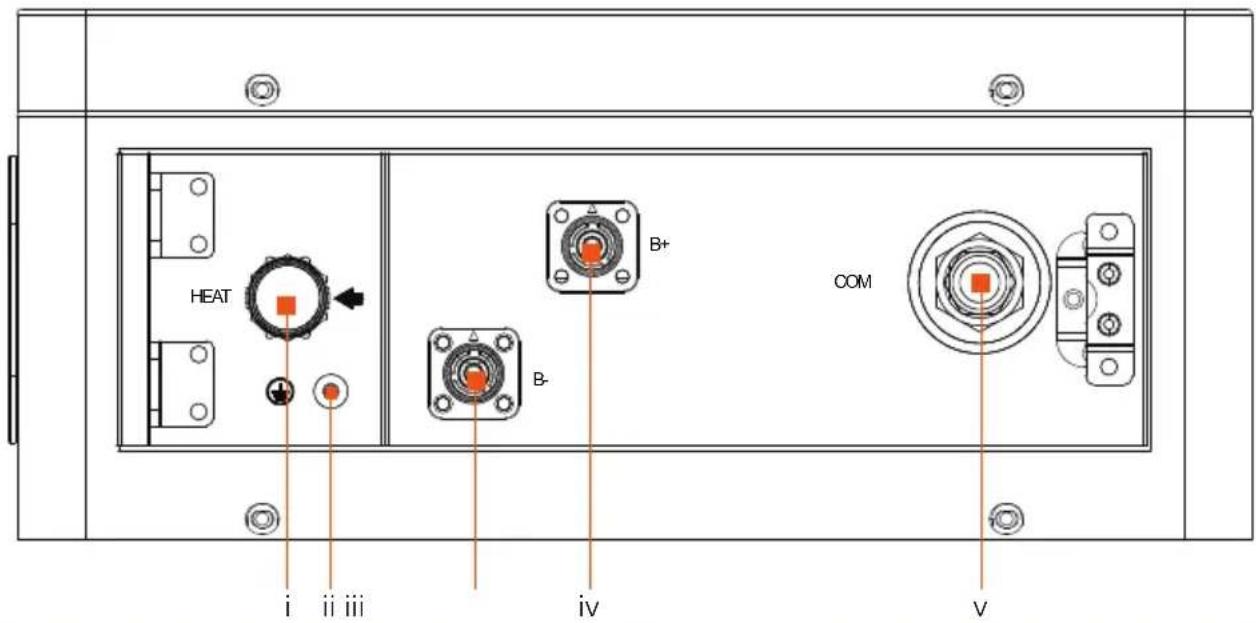
Item No. Description
i HEAT: Connect to the "HEAT" port of BMS
ii GND: Connect the grounding port to the grounding port of BMS
iii B-: Connect to the "B-" of BMS
iv B+: Connect to the "B+" of BMS
v COM: Connect to the "COM" port of BMS
3.4 Basic Features
3.4.1 Features
The T-BAT SYS-HV is one of the most advanced energy storage systems on the market today, using state-of-the-art technology, and having the characteristics of high reliability and convenient control. Characteristics are shown as follows:
■ 90% DOD;
■ 95% Battery Round-trip Efficiency;
■ Cycle Life > 6000 Cycles;
■ Secondary Protection;
■ IP65 Protection Level and Protection Class I;
■ Safety & Reliability;
■ Small Occupied Area;
■ Floor Mounting.
3.4.2 Certifications
| BAT system safety | CE, RCM, IEC 62619, IEC 62620, IEC 62477-1, IEC 60730 Annex H, IEC 62040, VDE-AR-E2510, IEC 60529, UN38.3 |
| UN number UN 3480 | |
| Hazardous materials classification Class 9 | |
| UN transportation testing requirements UN 38.3 | |
| International protection marking IP65, Protection Class I | |
3.5 Specification
Continued on the next page
| Module T-BAT HS20.0 T-BAT HS22.2 T-BAT HS25.0 T-BAT HS27.5 T-BAT HS30.0 T-BAT HS32.5 | ||||||
| Nominal Voltage (Vdc) 409.6 460.8 512 563.2 614.4 665.6 | ||||||
| Operating Voltage (Vdc) 360-465 450-522 450-580 495-636 540-695 585-750 | ||||||
| Nominal Capacity (Ah) ^1 | 50 | 50 | 50 | 50 | 50 | 50 |
| Nominal Energy (kWh) ^1 20.48 23.04 25.60 28.16 30.72 | 33.28 | |||||
| Usable Energy 90% DOD (kWh) ^2 | 18.4 | 20.7 | 23.0 | 25.3 | 27.6 | 30.0 |
| Max. Charge/Discharge Current (A) ^3 | 45 | 45 | 45 | 45 | 45 | 45 |
| Recommend Charge/ Discharge Current (A) ^5 | 45 | 45 | 45 | 45 | 45 | 45 |
| Standard Power (kW) | 12.3 | 13.8 | 15.4 | 16.9 | 18.4 | 20.0 |
| Max. Power (kW) | 18.432 | 20.736 | 23.04 | 25.344 | 27.648 | 29.952 |
| Short-circuit Current (A) | 1900 | 1900 | 1900 | 1900 | 1900 | 1900 |
| Battery Round-trip Efficiency (0.2 C, 25°C) | 95% | |||||
| Expected Lifetime (25°C) | 10 years | |||||
| Cycle Life 90% DOD (25°C) | 6000 cycles | |||||
| Charge Temperature | -30°C ~ 53°C (on heating function); 0°C ~ 53°C (off heating function) ^4 | |||||
| Discharge Temperature | -30°C ~ 53°C (on heating function); -20°C ~ 53°C (off heating function) ^4 | |||||
| Storage Temperature | -20°C ~ 30°C (12 months)30°C ~ 50°C (6 months) | |||||
| Ingress Protection | IP65 | |||||
| Protection Class | I | |||||
\*Note:
- Test conditions: 100% DOD, 0.2 C charge & discharge @ +25°C.
- 90% DOD; System usable energy may vary with inverter different setting.
- Discharge: In case of battery cell's temperature range of -20^ 10^ and 45^ 53^ , the discharge current will be reduced; Charge: In case of battery cell's temperature range of 0^ 25^ and 45^ 53^ , the charge current will be reduced. Product charge or discharge power depends on the actual temperature of battery pack.
- The battery can only be discharged and cannot be charged at the range of from -20^ to 0^ .
- In case of a rated current of 30 A, the wire size of 5.5-6.5 mm ^2 for cables (including grounding cable) is recommended; in case of a rated current of 45 A, the wire size of 8.5-9.5 mm ^2 for cables (including grounding cable) is recommend.
- In the allowable range, the relative humidity range should be between 5% and 95% RH. In the meantime, effective measures should be taken to prevent condensation.
Continued on the next page
| Module T-BAT HS28.8 T-BAT HS32.4 T-BAT HS36.0 T-BAT HS39.6 T-BAT HS43.2 T-BAT HS46.8 | ||||||
| Nominal Voltage (Vdc) 409.6 460.8 512 563.2 614.4 665.6 | ||||||
| Operating Voltage (Vdc) 360-465 450-522 450-580 495-636 540-695 585-750 | ||||||
| Nominal Capacity (Ah) 1 72 72 72 72 72 | ||||||
| Nominal Energy (kWh) 1 29.49 33.18 36.86 40.55 44.24 47.92 | ||||||
| Usable Energy 90% DOD (kWh) 2 | 26.5 | 29.9 | 33.2 | 36.5 | 39.8 | 43.1 |
| Max. Charge/Discharge Current (A) 3 | 50 | 50 | 50 | 50 | 50 | 50 |
| Recommend Charge/ Discharge Current (A) 5 | 50 | 50 | 50 | 50 | 50 | 50 |
| Standard Power (kW) | 14.34 | 16.13 | 17.92 | 19.71 | 21.50 | 23.30 |
| Max. Power (kW) | 20.48 | 23.04 | 25.6 | 28.16 | 30.72 | 33.28 |
| Short-circuit Current (A) | 1850 | 1850 | 1850 | 1850 | 1850 | 1850 |
| Battery Round-trip Efficiency (0.2 C, 25°C) | 95% | |||||
| Expected Lifetime (25°C) | 10 years | |||||
| Cycle Life 90% DOD (25°C) | 6000 cycles | |||||
| Charge Temperature | -30°C ~ 53°C (on heating function); 0°C ~ 53°C (off heating function) 4 | |||||
| Discharge Temperature | -30°C ~ 53°C (on heating function); -20°C ~ 53°C (off heating function) 4 | |||||
| Storage Temperature | -20°C ~ 30°C (12 months)30°C ~ 50°C (6 months) | |||||
| Ingress Protection | IP65 | |||||
| Protection Class | I | |||||
\*Note:
- Test conditions: 100% DOD, 0.2 C charge & discharge @ +25°C.
- 90% DOD; System usable energy may vary with inverter different setting.
- Discharge: In case of battery cell's temperature range of -20^ 10^ and 45^ 53^ , the discharge current will be reduced; Charge: In case of battery cell's temperature range of 0^ 25^ and 45^ 53^ , the charge current will be reduced. Product charge or discharge power depends on the actual temperature of battery pack.
- The battery can only be discharged and cannot be charged at the range of from -20^ to 0^ .
- In case of a rated current of 30 A, the wire size of 5.5-6.5 mm ^2 for cables (including grounding cable) is recommended; in case of a rated current of 45 A, the wire size of 8.5-9.5 mm ^2 for cables (including grounding cable) is recommend.
- In the allowable range, the relative humidity range should be between 5% and 95% RH. In the meantime, effective measures should be taken to prevent condensation.
4 Preparation before Installation
4.1 Prerequisites
When assembling the system, avoid touching the battery terminals with any metal object or bare hands. According to the design principles, T-BAT SYS-HV will provide a safe and reliable energy. Improper operation and equipment damage may cause overheating and electrolyte leakage. Therefore, the above-mentioned safety precautions and warning information mentioned in this part shall be strictly observed. If you have any question, please contact customer service. The Chapter "2 Safety" does not contain the provisions of all laws and regulations at the place where the user located.
Before installation, make sure that the installation site meets the following conditions:
■ The building can stand up to earthquakes;
■ The site shall be over 0.62 miles away from the sea, to avoid damage caused by salt water and humidity;
■ The floor shall be flat;
■ No inflammable and explosive goods are placed within at least of 3 feet;
■ The ambiance shall be shady and cool, away from heat sources and direct sunlight;
■ The temperature and humidity remain at a constant level;
■ The installation site requires less dust and dirt; and
■ There are no corrosive gases, including ammonia and acid vapor.

NOTE!
If the ambient temperature exceeds the operating range, the battery pack will stop running to protect itself. The optimal temperature range for running is 15^ C to 30^ C. In the allowable range, the relative humidity range should be between 5% and 95% RH. Frequent exposure to harsh temperatures may deteriorate the performance and lifetime of the battery.
4.2 Safety Gear
Installation and maintenance personnel must operate according to applicable federal, state, and local regulations as well as industry standards regarding product installation. Personnel must wear safety gear as indicated below in order to avoid short circuit and personal injury.
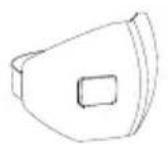
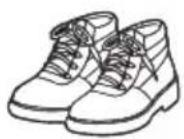

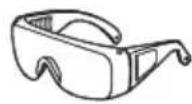
Anti-dust mask Safety boots Safety gloves Safety goggles
4.3 Installation Tools
To install the T-BAT SYS-HV system, the following installation tools are required to be prepared.
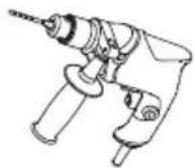
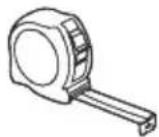
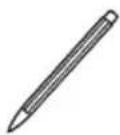
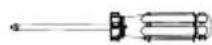
Hammer drill Measuring tape Maker Cross screwdriver
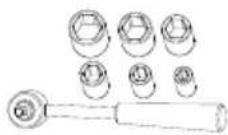

Torque wrench (M4)
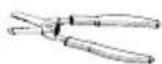
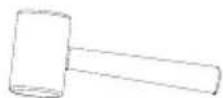
Rubber mallet
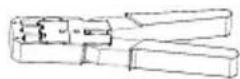
Spirit level
Wire stripper
Crimping tool for RJ45
∅6mm Heat shrink tubing
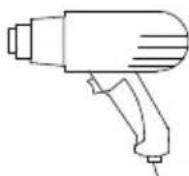
Heat gun
4.4 Preparation
4.4.1 Check for Transport Damage
Ensure that the battery is intact during and after transportation. If there are damages, such as cracks, please contact your dealer immediately.
4.4.2 Unpacking
Remove the packing tape on the carton to open the battery package. Ensure that the battery modules and relevant items are complete. Check packing lists carefully according to the detailed packaging items in the section "4.4.3 Accessories". If any accessory is missing, please immediately contact our company or your distributor.

CAUTION!
According to regional regulations, several people may be required for moving the equipment.

WARNING!
Strictly follow the installation steps. Our company will not be responsible for any injury or loss incurred by incorrect assembly and improper operation.

NOTE!
When installing the battery for the first time, the manufacturing date among battery modules should not exceed 3 months.
4.4.3 Accessory
BMS (TBMS-MCS0800)
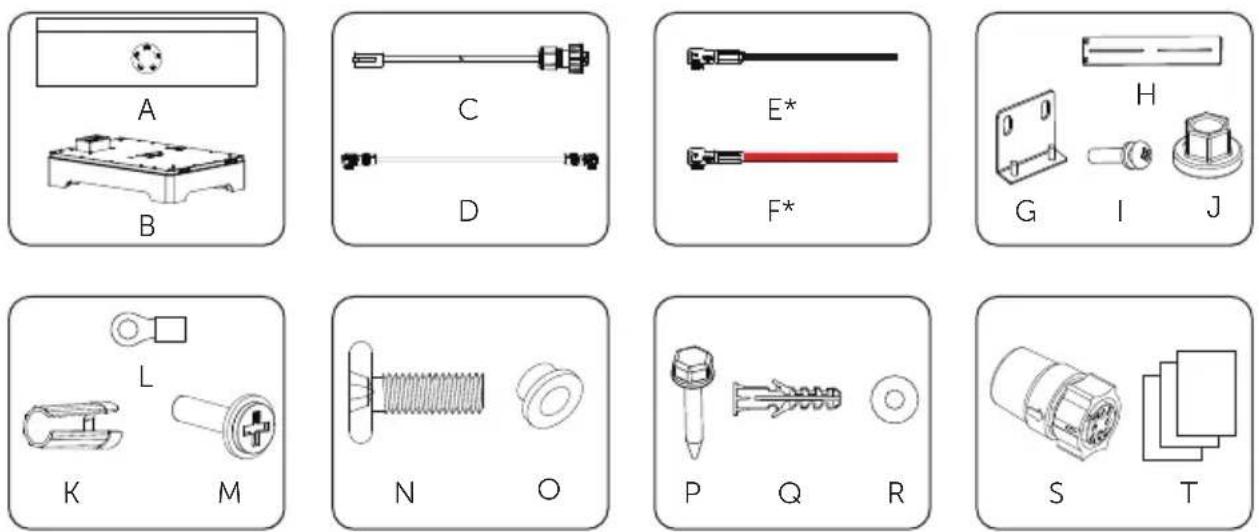
Accessories included are shown as follows:
| Item No. Description Quantity | ||
| A BMS 1 | ||
| B Base 1 | ||
| C Communication Cable (BMS port) 1 | ||
| D | Short Power Cable (is plugged into the jack of BMS before delivery) | 1 |
| E* Power Cable (Black) 1 | ||
| F* Power Cable (Red) 1 | ||
| G "L" Bracket 1 | ||
| H Adjustable Bracket 1 | ||
| I M4x10 Phillips-head Screw 2 | ||
| J M6 Flange Nut | 2 | |
| K Rotation Wrench | 1 | |
| L RNB4-5 Current Terminal | 2 | |
| M | M4x20 Phillips-head Screw | 2 |
| N M4x14 Phillips-head Screw | 4 | |
| O | Gasket | 4 |
| P Tapping Screw | 2 | |
| Q | Expansion Bolt | 2 |
| R Washer | 2 | |
| S | Short-circuit Plug (It will be installed on the HEAT port before delivery) | 1 |
| T Document | 1 | |
*Note: The mark "*" indicates that the connector connecting inverter on the power cables, connecting BMS and inverter, is delivered with the inverter's accessories kit.
Battery module (TP-HS25/TP-HS36)
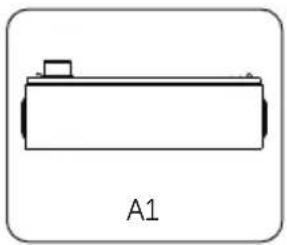
natural_image
Simple line drawing of a rectangular object with a small protrusion and label A1 below (no text or symbols on the object itself)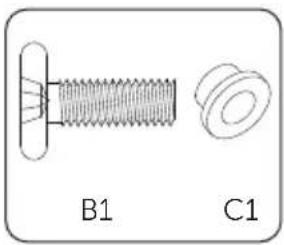
natural_image
Technical diagram of a bolt and nut assembly (no text or symbols)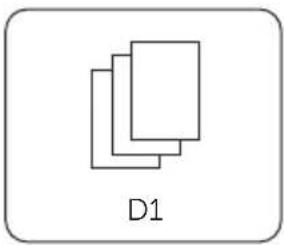
natural_image
Simple diagram with three overlapping rectangles labeled D1 (no text or symbols within the shapes)Accessories included are shown as follows:
| Item No. Description Quantity | ||
| A1 Battery Module 1 | ||
| B1 M4x14 Phillips-head Screw 4 | ||
| C1 Gasket 4 | ||
| D1 Document 1 | ||
Series Box
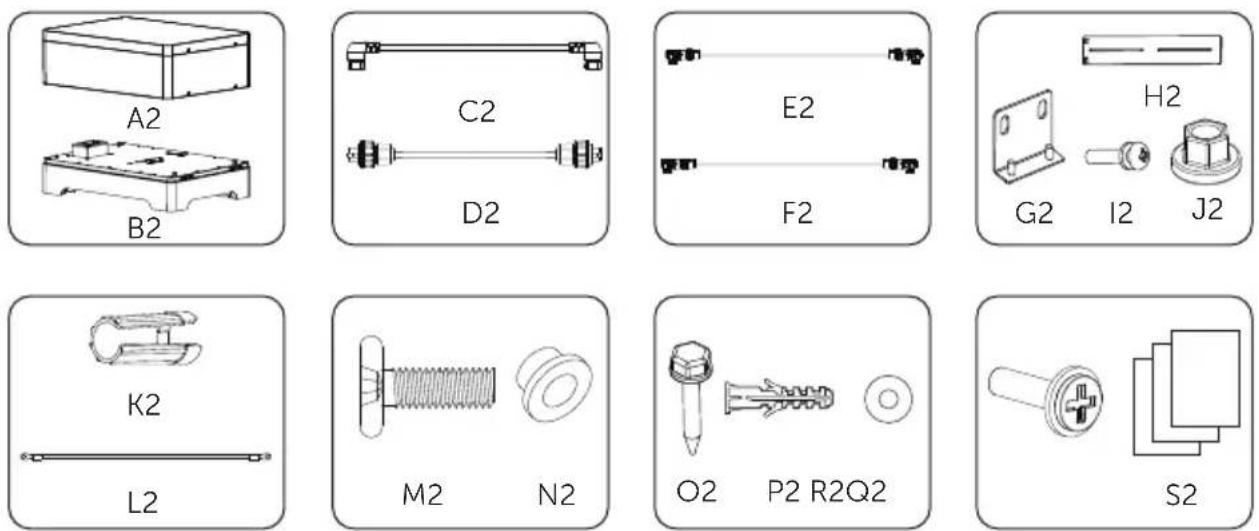
Accessories included are shown as follows:
| Item No. Description Quantity | ||
| A2 Series Box 1 | ||
| B2 Base 1 | ||
| C2 Heater Cable (HEAT port) 1 | ||
| D2 Communication Cable (COM port) 1 | ||
| E2 Power Cable (Black) 1 | ||
| F2 Power Cable (Red) 1 | ||
| G2 "L" Bracket 1 | ||
| H2 Adjustable Bracket 1 | ||
| I2 | M4x10 Phillips-head Screw | 2 |
| J2 M6 Flange Nut | 2 | |
| K2 Rotation Wrench | 1 | |
| L2 Grounding Cable | 1 | |
| M2 | M4x14 Phillips-head Screw | 4 |
| N2 Gasket | 4 | |
| O2 | Tapping Screw | 2 |
| P2 Expansion Bolt | 2 | |
| Q2 | Washer | 2 |
| R2 M4x20 Phillips-head Screw | 1 | |
| S2 Document | 1 | |
\*Note:
- If the battery module purchased excesses 10 sets (including 10), these battery modules should be installed in two towers, and the "Series Box" should be installed to connect two towers in series.
- If the battery module purchased is less than 9 sets (including 9), these battery modules may be installed in one or two towers. In case of two towers, the "Series Box" is recommended to install.
■ Additionally, the above accessories kit for "Series Box" needs to be purchased by customers themselves.
5 Equipment Installation
5.1 Installation Environment Requirements
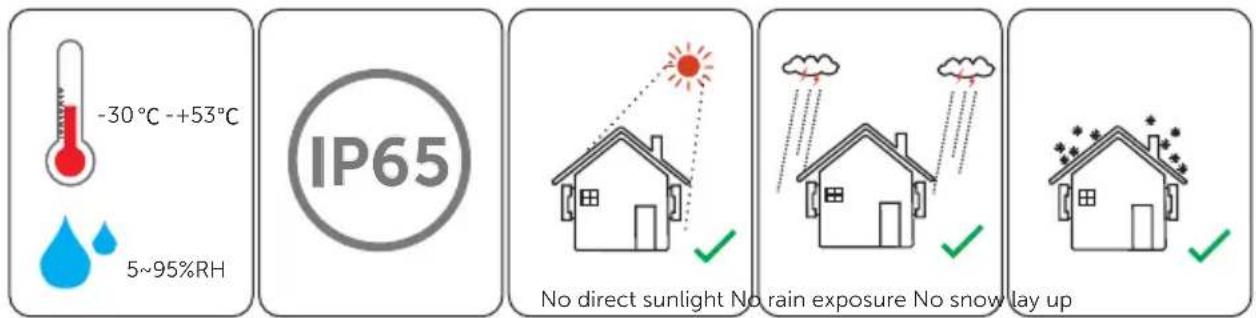
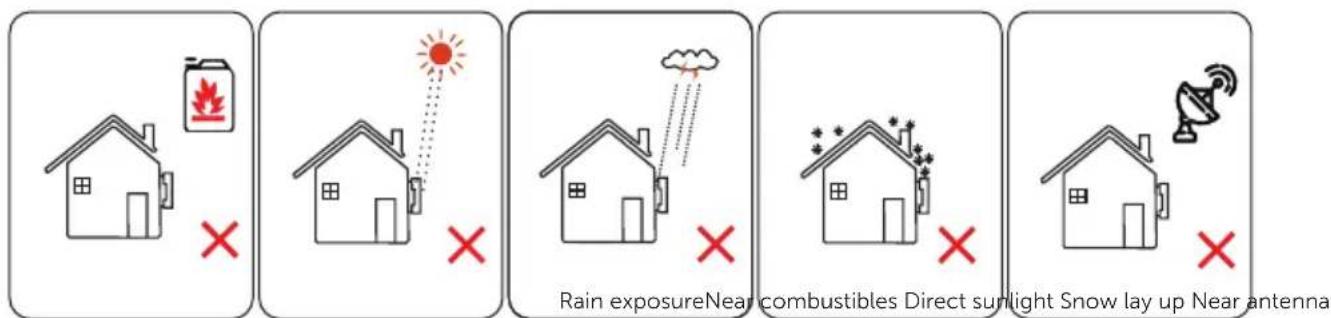
■ Ensure that the equipment is installed in a well ventilated environment;
■ To prevent fire due to high temperature, ensure that the ventilation vents or heat dissipation system are not blocked when the equipment is running;
- Do not expose the equipment to flammable or explosive gas or smoke. Do not perform any operation on the equipment in such environments;
■ Ensure that the area is completely waterproof, and the floor is flat and level; and
■ Ensure that the temperature and humidity are maintained at a constant level, and there is minimal dust and dirt in the area.
5.2 Installation Procedure
\*Note:
- Up to 9 battery modules can be installed in one tower. If the battery module users purchased excesses 10 sets (including 10), a Series Box needs to be installed to connect two towers in series.
- The bearing capacity of the ground which is used to install the whole battery system must be over 500 kg/m ^2 .
Installation steps without Series Box
Take the installation procedure for four battery modules as an example.
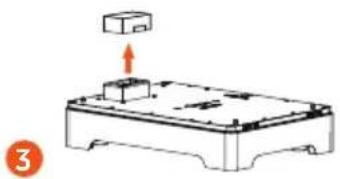
Step 1. Take out Base, and adjust it.
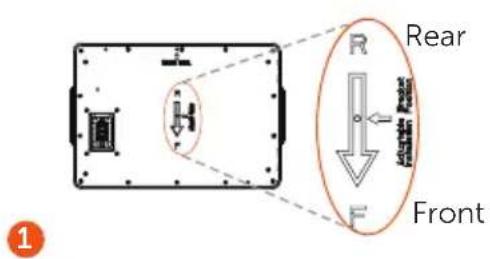
The letters "R" and "F" on the Base indicate rear and front respectively. The side with "R" shall be against the wall.
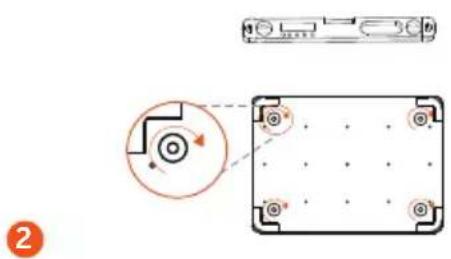
Turn clockwise, lower the Base; Turn anti-clockwise, raise the Base. A spirit level is recommended to use.
Remove dust cover
natural_image
Diagram of a device with an upward arrow and a box, no text or symbols presentStep 2. Locate Base, and accurately draw the location on both sides with a marker. A spirit level is recommended to use.
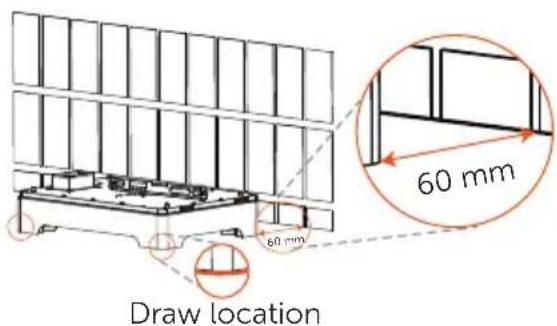
*Note: The distance between the Base and the wall can be about 20\~200 mm, but the recommended distance is 60 mm.
Step 3. Place one battery module on the Base.
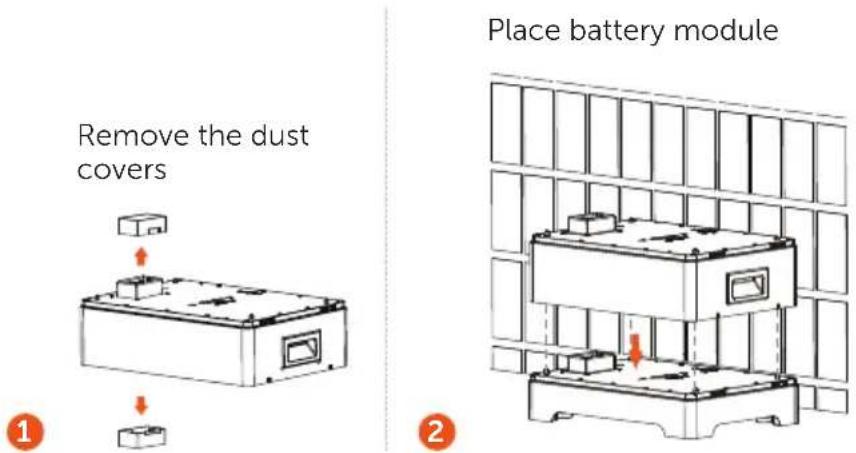
*Note: If the Base is shifted after placing battery module, move it to its original location according to the mark previously drawn.
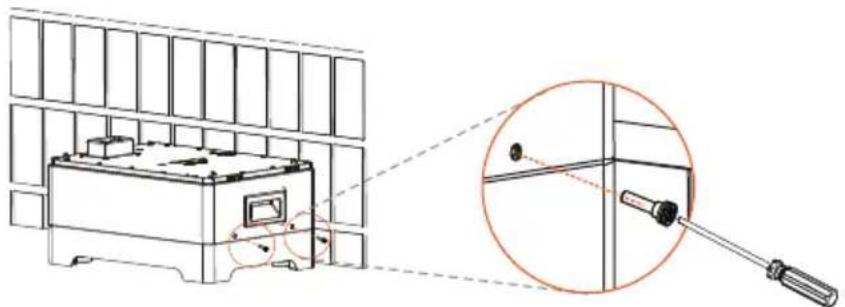
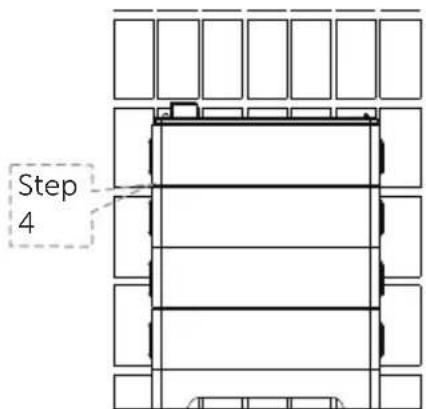
Step 4. Secure and tighten M4x20 Phillips-head screws ( × 4) on both sides (Torque: 0.9 to 1.1 N·m).
natural_image
Technical line drawing of a mechanical device with a magnified inset showing a tool interacting with a component (no text or symbols present)Torque: 0.9 to 1.1 N·m
Right Side View
Step 5. Repeat the Steps 3 and 4 to install the rest of battery modules.
Place battery modules
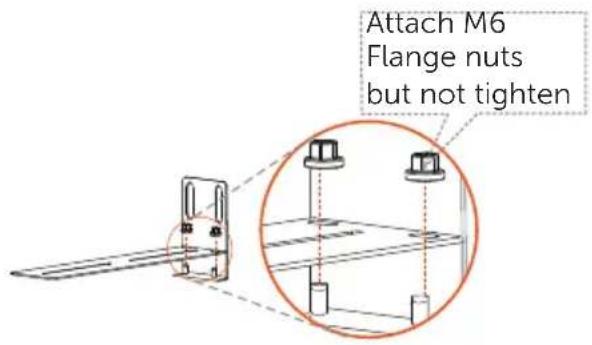
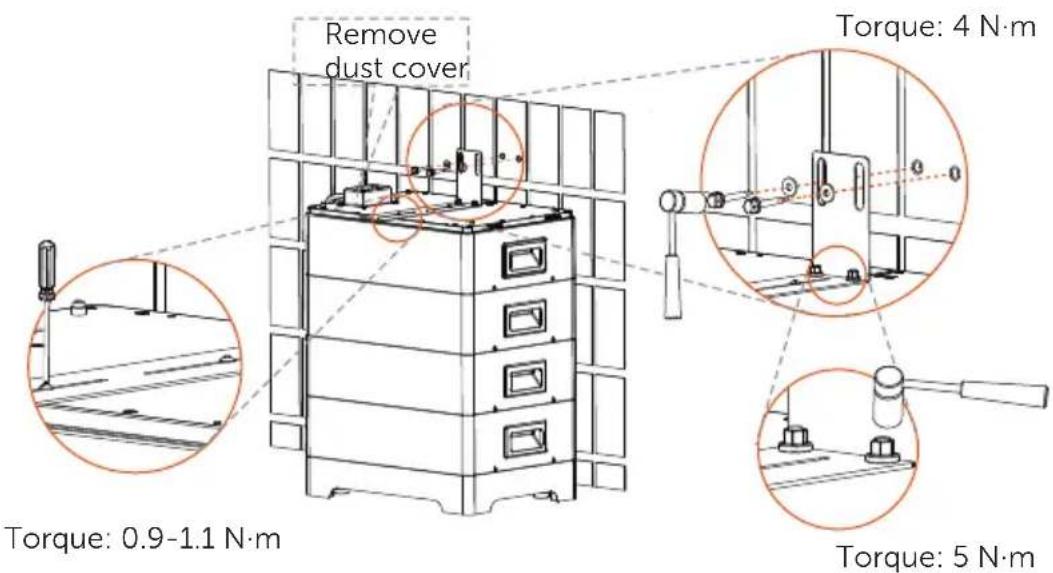
Step 6. Join Adjustable bracket and "L" bracket with M6 Flange nuts (× 2).
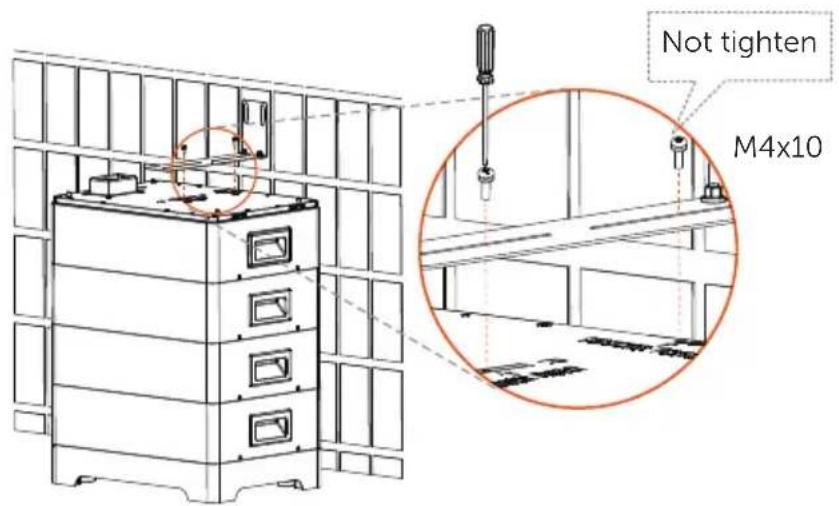
Step 7. Secure the assembled bracket on the battery module and wall.
Attach the assembled bracket on the battery module with M4x10 Phillips-head screws (× 2), but not tighten.
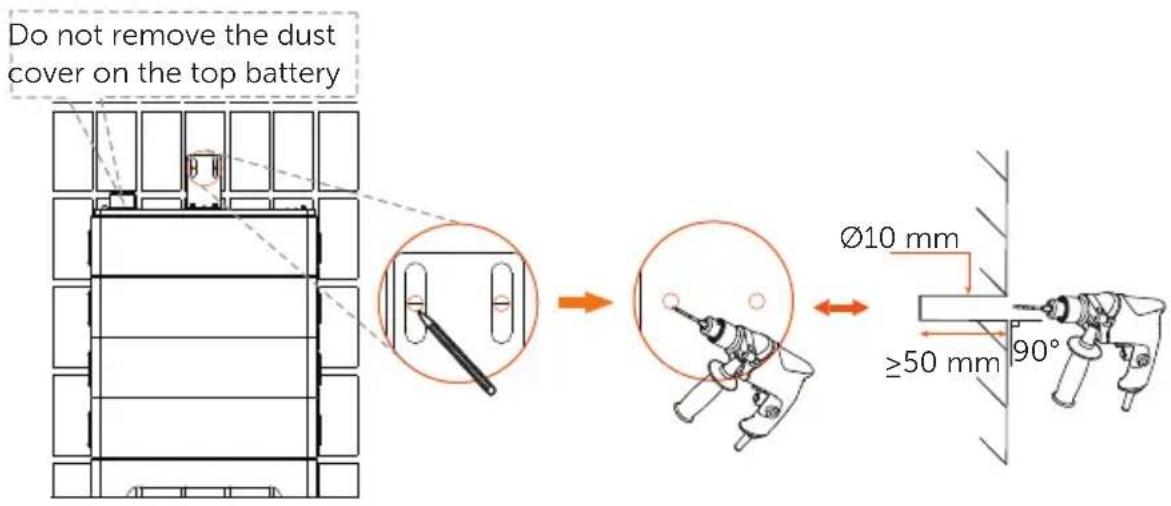
Move the assembled bracket to the wall;
Circle along the inner ring of holes;
Remove the assembled bracket, and drill the two holes (at least 50 mm) by a Drill (∅ 10 mm).
Remove the assembled bracket; Insert Expansion bolts (× 2)
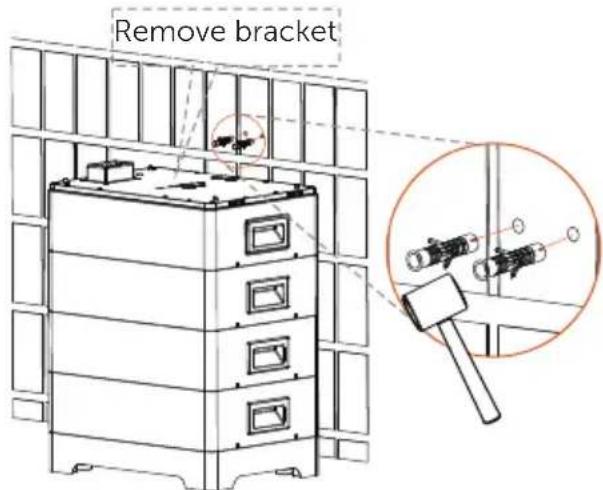
Secure the assembled bracket to the wall with Tapping screws (× 2) and Washer (× 2), and tighten them (Torque: 4 N·m);
Secure the assembled bracket on the battery module with M4x10 Phillips-head screws (× 2), and tighten them (Torque: 0.9 to 1.1 N·m); Tighten the M6 Flange nuts (× 2) (please refer to the Step 6) (Torque: 5 N·m).
Step 8. Place BMS, and tighten M4x14 Phillips-head screws (× 2) on both sides (Torque: 0.9 to 1.1 N·m)
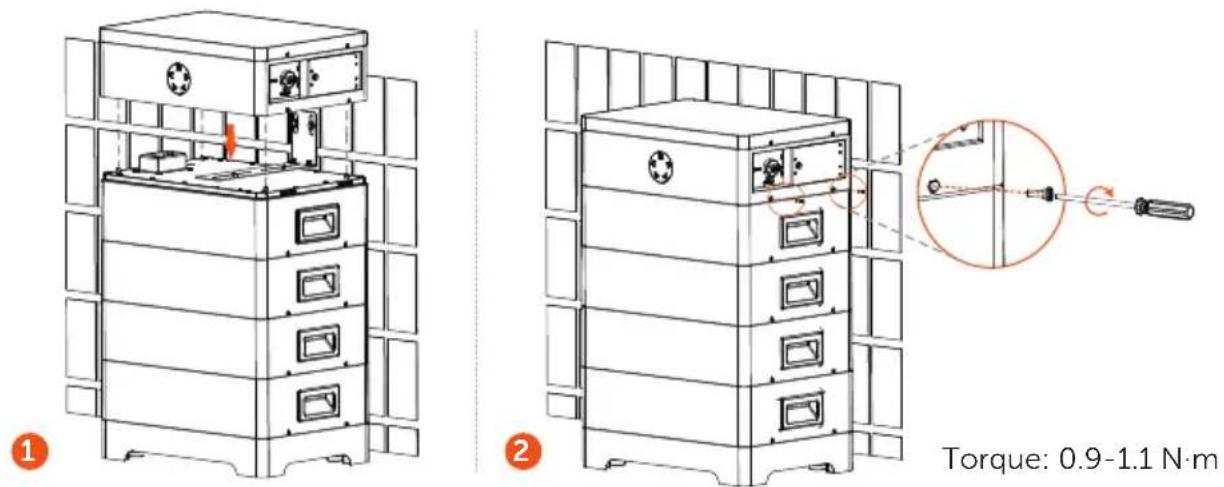
*Note: Regarding the cover plate on both sides of the BMS, they should be installed after finishing wiring.
Installation steps with Series Box
In case of more than 10 sets of battery module (including 10), a Series Box needs to be installed to connect two towers in series, and an accessories kit for Series Box will not deliver for free.
The installation procedure for these two towers is the same as that for one tower. For details, please refer to the Step 1 to 8.
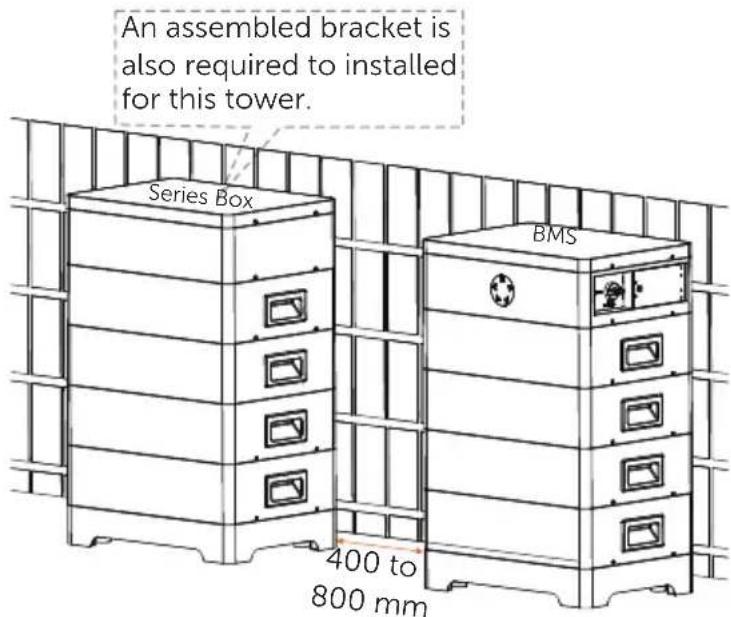
\*Note:
- The rule for the sequence of battery modules in the whole system is as follows: In the case of one tower, the battery module closest to the BMS is numbered the first battery module, followed by the second battery module, the third battery module, according to the top-down principle. If another tower exists, the battery module closest to the "Series Box" can be continued numbering based on the tower with the BMS.
- Regarding the cover plates on both sides of the BMS and the left side of the Series Box, they should be installed after finishing wiring.
6 Wiring
Current terminal connection and communication cable, connecting BMS and inverter, shall be made before conducting wiring.
6.1 Current Terminal Connection
The steps for making current terminal connection are shown as follows:
Step 1. Strip the cable jacket about 8 to 10 mm from the end;
Step 2. Cut the heat-shrink tubing to about 28 to 30 mm long, carefully slide it onto the end of the cable, and then carefully slip the wires all the way into the current terminal;
Step 3. Crimp the terminal, and heat the heat-shrink tubing after it wraps the end of terminal;
Step 4. Connect the assembled grounding cable to BMS, and then tighten the screw.
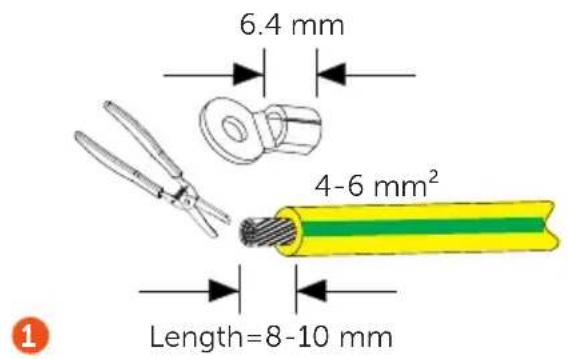
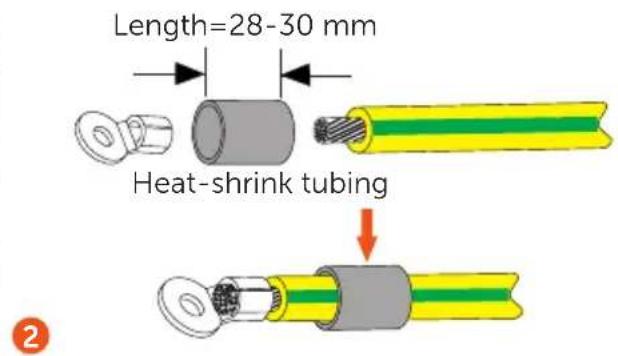
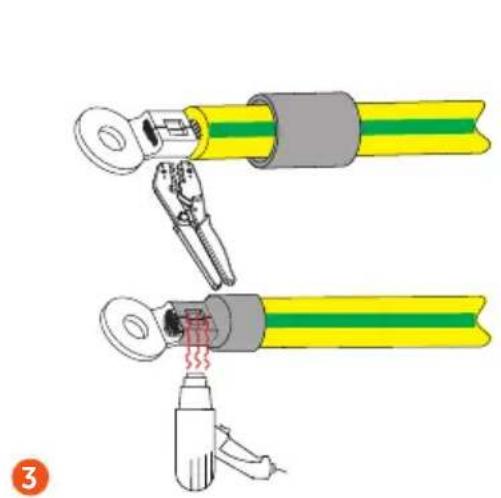
natural_image
Illustration of two cable crimping tools with yellow and green bands, one being inserted and the other holding a tool (no text or symbols)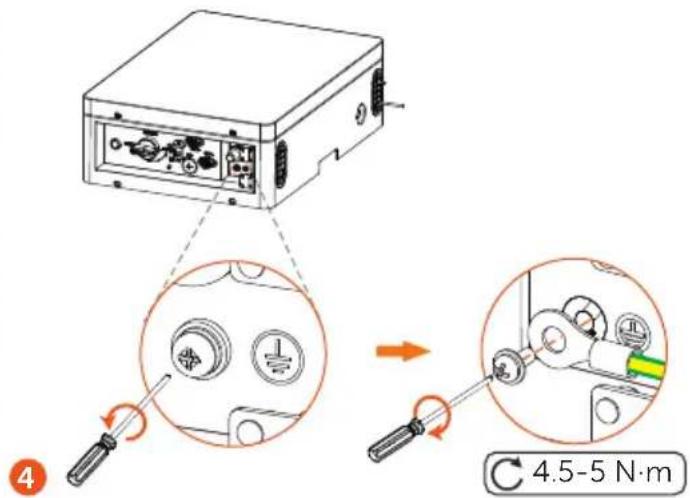
*Note: The grounding cable should be prepared by the users themselves.
6.2 Communication Connection (connecting to inverter)
To ensure normal operation of BMS and inverter, the BMS communication cable delivered with the BMS accessories kit is required to connect RJ45 connector.
The specific definition of the communication cable is shown as follows:
PIN 1 2 3 4 5 6 7 8
BMS / GND GND BMS_H BMS_L 12V A1 B1
The wire sequence of one terminal connecting to the inverter is the same as the wire sequence of the other terminal, connecting to the BMS.
The wire sequence is shown as follows:
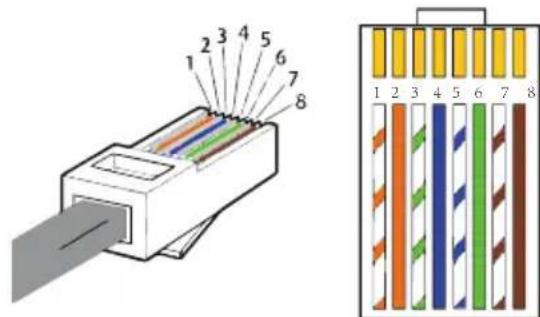
1) White with orange stripes
2) Orange
3) White with green stripes
4) Blue
5) White with blue strips
6) Green
7) White with brown stripes
8) Brown
The steps for making RJ45 connector to BMS communication cable are shown as follows:
Step 1. Strip the cable jacket about 15 mm down from the end;
Step 2. Carefully insert the wires all the way into the RJ45 connector, making sure that each wire passes through the appropriate guides inside the connector;
Step 3. Push the RJ45 inside the crimping tool and squeeze the crimper all the way down.
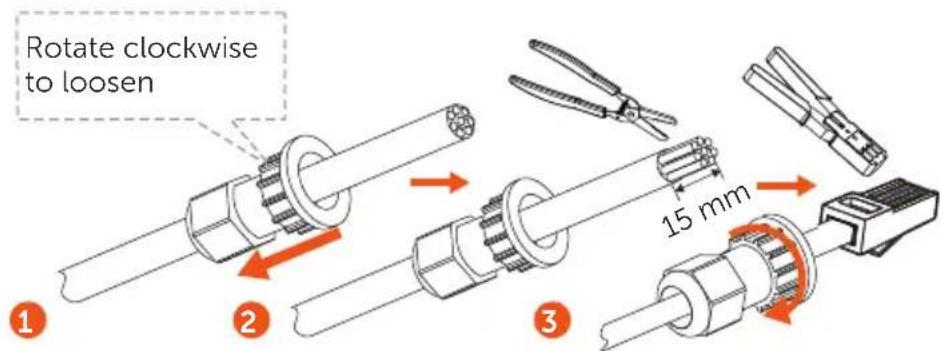
*Note: The BMS communication cable shall have a shield layer.
6.3 Cable Connection
Before wiring, please:
Step 1. Remove the screws on both covers of the BMS,
Step 2. Press the cover;
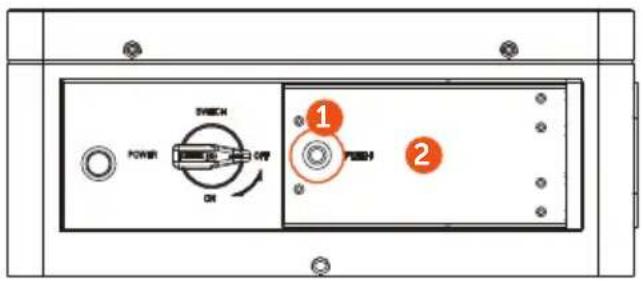
*Note: Remove the silicone sleeves from the ports of BMS and Series Box (if any).
6.3.1 Wiring without Series Box
*Note: Please remove the labels attached to both cover plates before conducting wiring.
Left side of BMS

Short power cable: Connect "B+" and "B-"
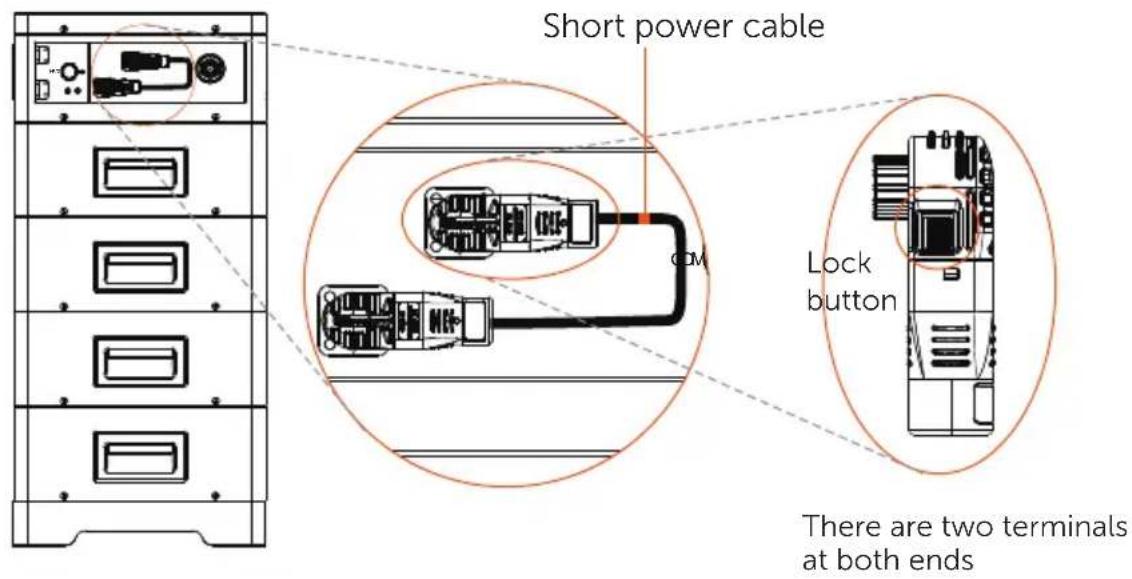
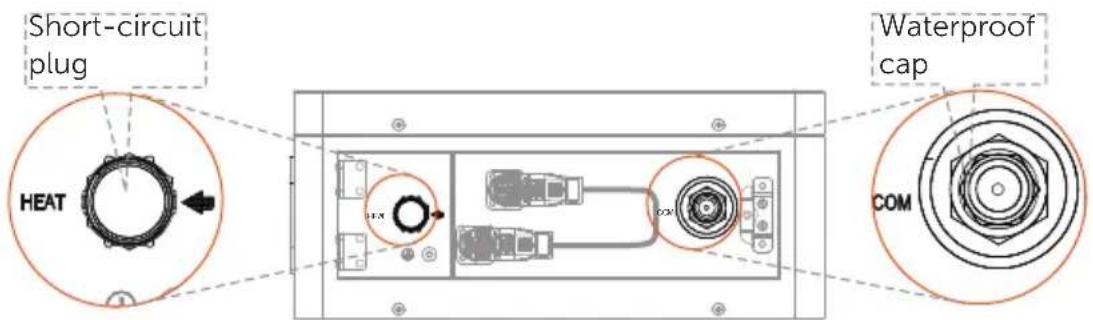
*Note: In case of one tower, a waterproof cap shall be put on the unconnected "COM" port, as well as a short-circuit plug on the unconnected "HEAT" port.
Right side of BMS (BMS to inverter)

Power cable (black): Connect "BAT-" of BMS to "BAT-" of inverter

Power cable (red): Connect "BAT+" of BMS to "BAT+" of inverter

Communication cable: Connect "BMS" port of BMS to "BMS" port of inverter
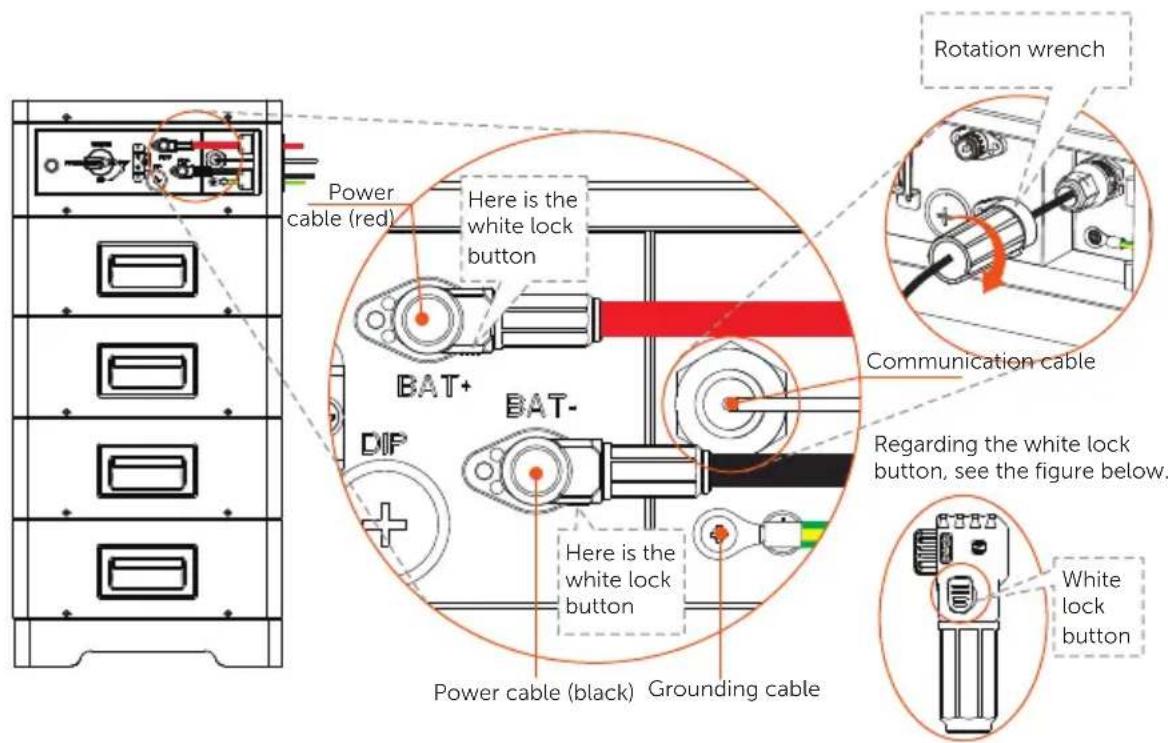
\*Note:
- Press and hold the White Lock Button while unplugging the power cable, or it cannot be pulled out.
- Use the rotation wrench to tighten the communication cable, and remove it after tightening.
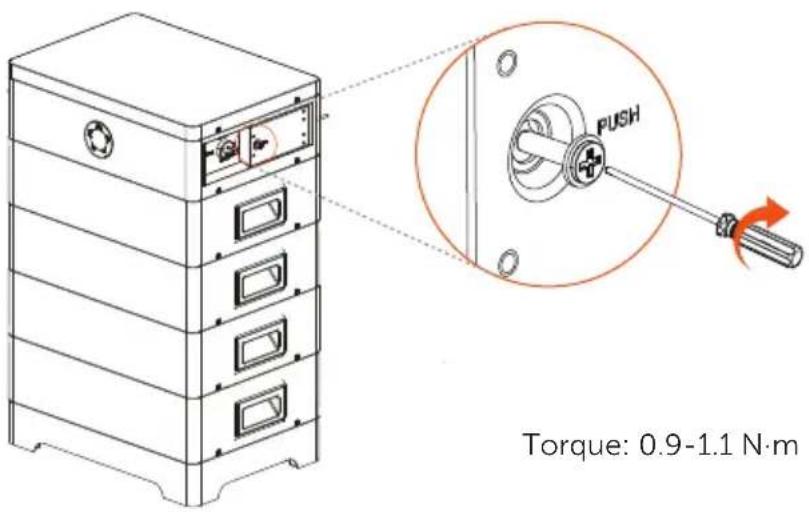
Installation of Cover Plate
After finishing wiring, there are two cover plates on both sides of the BMS that need to be secured with M4 screws ( × 2) (Torque: 0.9 to 1.1 N·m).
6.3.2 Wring with Series Box

natural_image
Pure mechanical shaft diagram without any text, numbers, or symbolsCommunication cable: There are two terminals at both ends; one connects to "COM" port of BMS, and the other connects to "COM" port of Series Box.

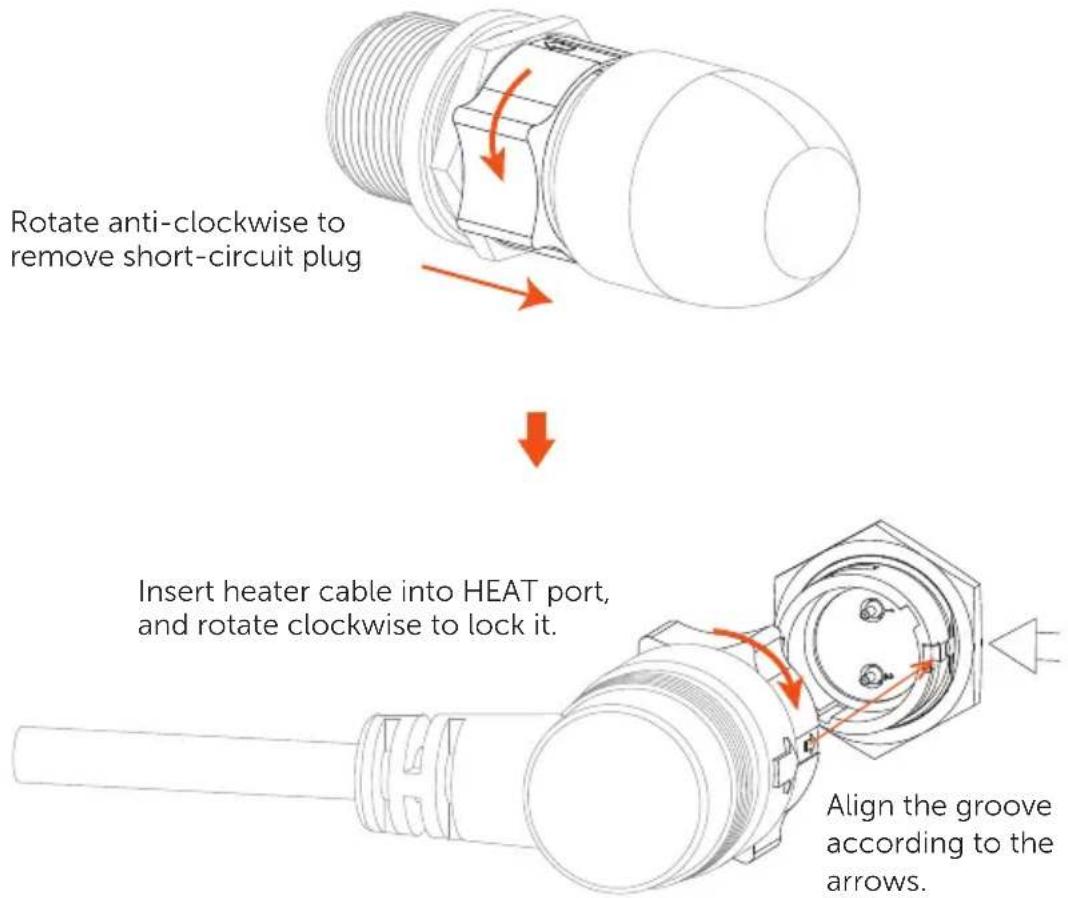
Heater cable: There are two terminals at both ends; one connects to "HEAT" port of BMS, and the other connects to "HEAT" port of Series Box.

Power cable (black): There are two terminals with the same function at both ends; one connects to "BAT-" of BMS, and the other connects to "BAT-" of Series Box.

Power cable (red): There are two terminals with the same function at both ends; one connects to "BAT+" of BMS, and the other connects to "BAT+" of Series Box.

Grounding cable: There are two terminals at both ends; one connects to a grounding port of BMS, and the other connects to the grounding port of Series Box.
Wiring between BMS and Series Box
*Note: Please remove the labels attached to both cover plates before conducting wiring.
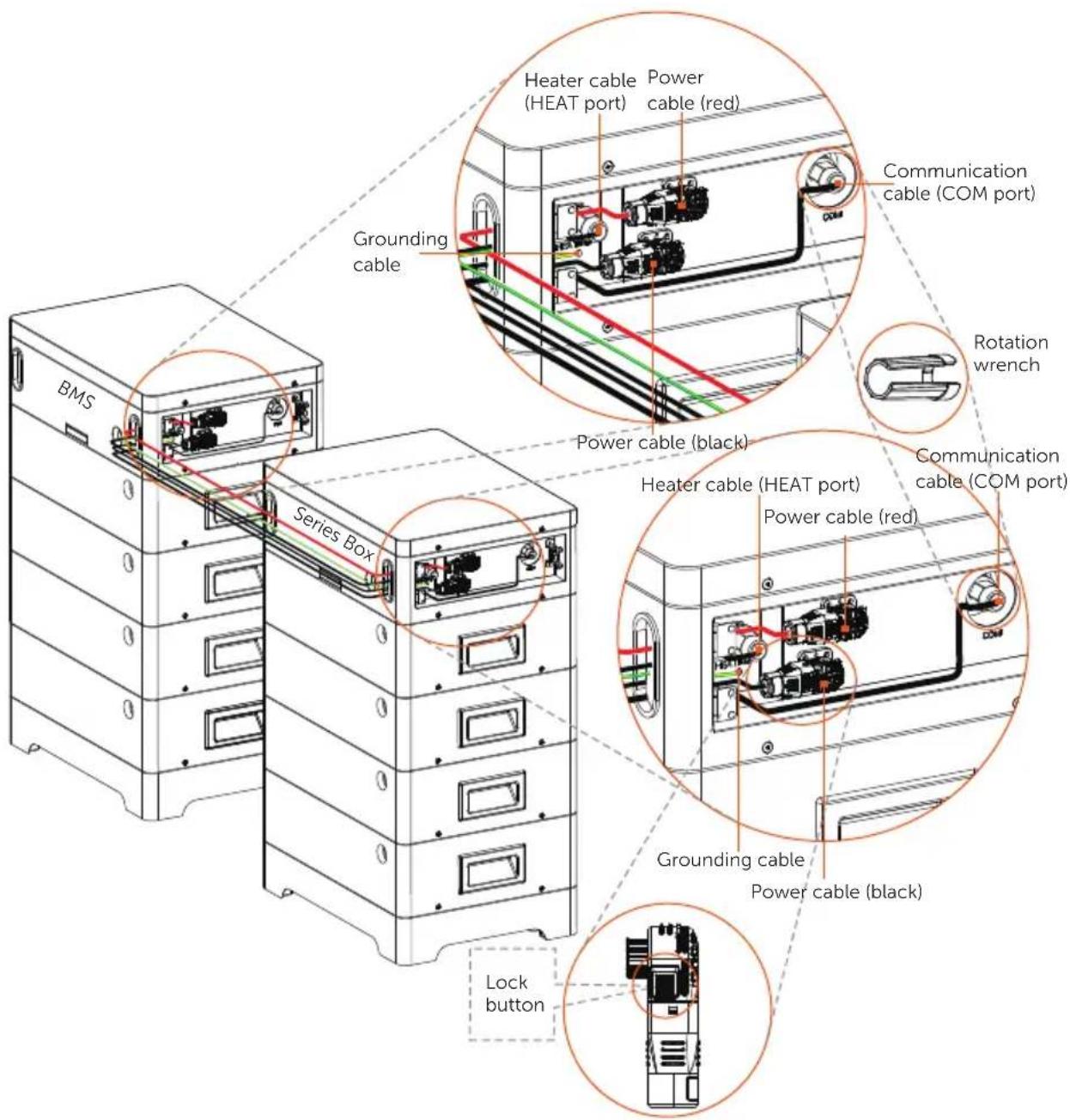
*Note: A corrugated pipe with an inner diameter of over 45 mm is recommended for use to keep cable insulation in place and avoid potential damages.
Before wiring, the short-circuit plug on the HEAT port should be removed. And after finishing wiring, please make sure that the heater cable is locked.
Right side of BMS
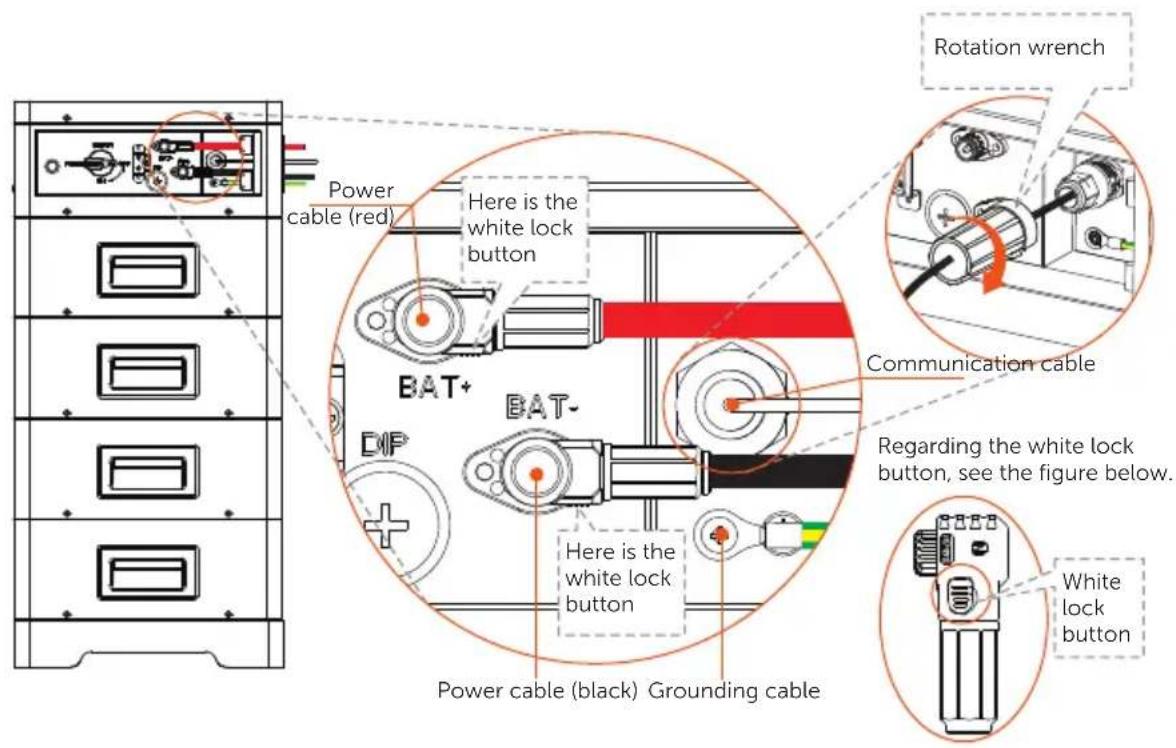
\*Note:
- Press and hold the white lock button while unplugging the power cable, or it cannot be pulled out.
- Use the rotation wrench to tighten the communication cable, and remove it after tightening.
- After finishing wiring, correctly insert and tighten M4 screws to secure cover plates on both the BMS and Series Box according to the "Installation of Cover Plate".
7 Commissioning
7.1 DIP Switch
DIP Switch is equipped on BMS. See figure below.
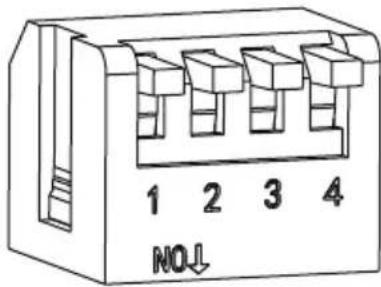
| Description | |
| DIP switch 1 A reserved function | |
| DIP switch 2 A reserved function | |
| DIP switch 3 A reserved function | |
| DIP switch 4 | Terminal resistance*Note:▪ The DIP switch 4 shall be flipped down (open the circuit) when connecting BMS to inverter;▪ In case of parallel connection, only shall be the DIP switch 4 on the last BMS be flipped down (open the circuit), and the DIP switch 4 on the rest of BMS shall be flipped up (close the circuit). |
The DIP switch 4 is pressed at the factory settings.
*Note: To adjust the DIP switch, a small flat-head screwdriver shall be prepared by users themselves.
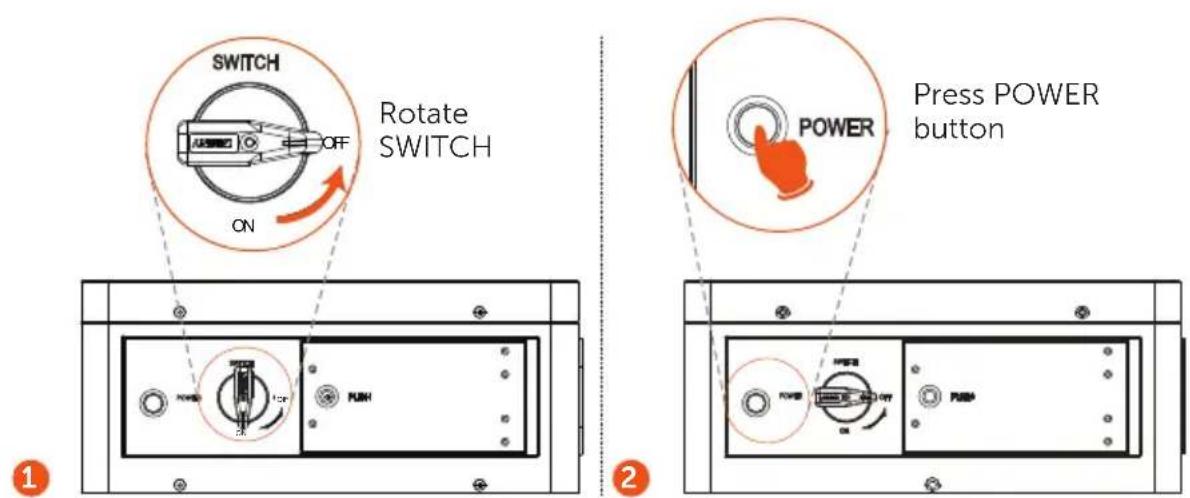
7.2 Start and Shutdown Procedure
Before commissioning, please check to ensure that, the installed battery modules are the same model, and all the grounding cables, power cables, communication cables, and heater cable are connected.
Power on
Step 1. Rotate the SWITCH to ON;
Step 2. Press the POWER button for more than 0.5 seconds to start system. See figure below.
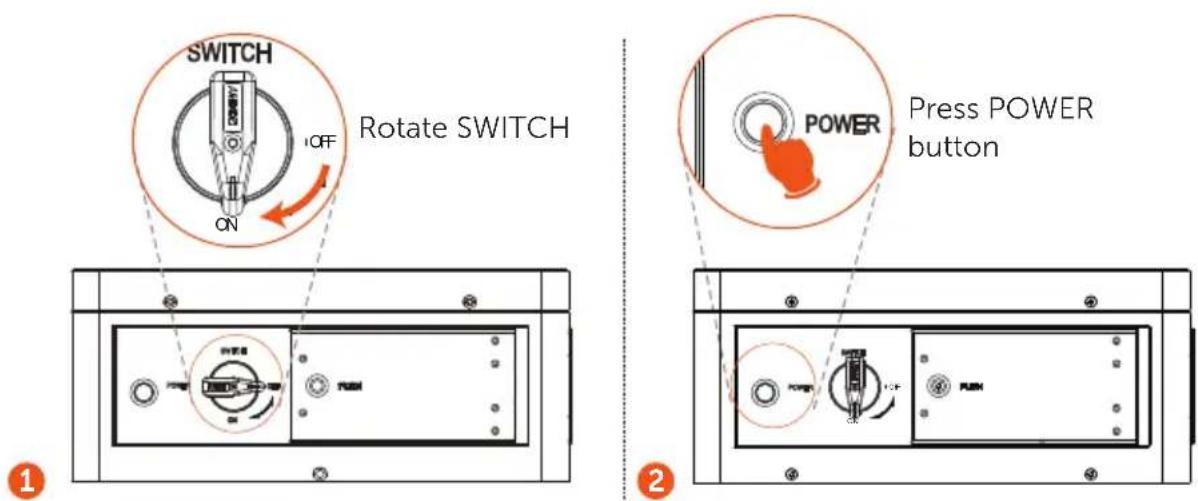
*Note:
■ Frequently pressing the POWER button may cause a system error.
■ If the system does not start after pressing POWER button, please try again in at least 10 seconds.
Power off
Step 1. Rotate the SWITCH to OFF;
Step 2. Press the POWER button for 1 second to shut down system. See figure below.
7.3 Status Indicators
The power indicators show the current battery percentage. There are five indicators on the BMS, one status light and four SOC power indicators. See figure below:
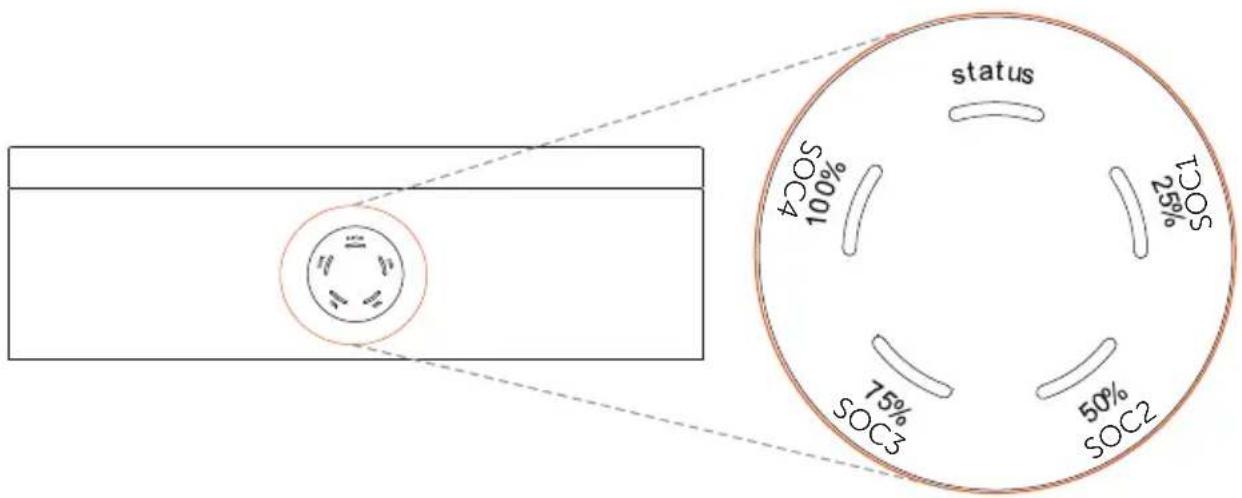
For the derailed information on indicators, see the table below:
| Status Description | |
| Startup | After pressing the POWER button to start the system, the status light flashes yellow for 0.1 second and turns off for 0.1 second, and all the SOC power indicators are off. |
| Shutdown | After pressing and holding the POWER button for more than 1 second, the status light comes on solid green light, and the SOC power indicators flash blue in turn by clockwise. Then all lights are off within 2.4 seconds after releasing the button. |
| Standby | The status light flashes green for 1 second and turns off for 4 seconds. The SOC power indicators are off. |
| Charging | The status light comes on solid green light, and the state of SOC power indicators depends on the actual situation. For details, refer to the following “Table 1 Indicator information while charging”. |
| Discharging | The status light comes on solid green light, and the state of SOC power indicators depends on the actual situation. For details, refer to the following “Table 2 Indicator information while discharging”. |
| Fault | In case of failure, the status light will remain on solid red light for 10 minutes, and then such red light will flash for 1 second and then turn off for 4 seconds. |
| Warning | In case of warning, the status light will flash yellow light for 1 second, and then turn off for 4 seconds. |
| Black Start For details, refer to the part of “Black Start”. | |
Table 1: Indicator information while charging
| SOC value Status light SOC1 SOC2 SOC3 SOC4 | ||||
| 0% ≤ SOC < 25% Green Flash Light off Light off | ||||
| SOC < 50% Green Light on Flash Light off Light off | ||||
| SOC < 75% Green Light on Light on Flash Light off | ||||
| SOC < 100% Green Light on Light on Light on Flash | ||||
| SOC ≥ 100% Green Light on Light on Light on Light on | ||||
Table 2: Indicator information while discharging
| SOC value Status light SOC1 SOC2 | SOC3 | SOC4 | |||
| SOC ≥ 75% | Green | Flash | Flash | Flash | Flash |
| SOC ≥ 50% | Green | Flash | Flash | Flash | Light off |
| SOC ≥ 25% | Green | Flash | Flash | Light off | Light off |
| SOC ≥ 0% Green | Flash Light off Light off | Light off | |||
In case of pressing and holding POWER button, there are two circumstances as follows:
- Press and hold POWER button for more than 5 seconds but not less than 20 seconds, the system will enter a startup mode of inverter.
- Press and hold POWER button for more than 20 seconds, the system will enter the Black Start.
Black Start
The equipment can provide Black Start capacity, meaning that our energy storage inverter and battery can continue to run even if the power grid and photovoltaic panel are out of service. The startup procedure for Black Start is as follows:
- In case of pressing and holding the POWER button for less than 20 seconds, the status light will flash green light for 1 second and then turn off for 4 seconds, with a period of 5 seconds.
■ After pressing and holding the POWER button for more than 20 seconds (including 20 seconds), the status light will come on solid green light, and SOC power indicators will flash as follows: - Firstly, the indicator SOC3 comes on green, and the rest of indicators are off;
- Secondly, the indicators SOC2 and SOC4 come on green, and the rest of indicators are off;
• Thirdly, the indicator SOC1 comes on green, and the rest of indicators are off;
• Finally, all power indicators are off.
The POWER button should be released at anytime in the process.
The power indicators will change according to the actual situation, with details as below:
| Fault SOC1 SOC2 SOC3 SOC4 | |||
| Huge differential pressure Flash Off Off Off | |||
| Voltage fault (undervoltage and overvoltage of unit, overvoltage and undervoltage of total voltage) | Off Flash Off Off | ||
| Temperature fault (high temperature, low temperature) | Flash Flash Off Off | ||
| Current fault (overcurrent charging, overcurrent discharging) | Off Off Flash Off | ||
| Hardware fault (MCU fault, external short circuit fault, AFE fault, voltage sampling disconnection fault, temperature sampling,or current sensor default) | Flash Off Flash Off | ||
| Relay fault Off Flash Flash Off | |||
| Insulation fault Flash Flash Flash Off | |||
| Self test fault Off Off Flash | |||
| Communication loss of inverter Flash Off Off Flash | |||
| Communication loss of battery module Off Flash Off Flash | |||
8 Troubleshooting
Check the indicators (refer to the "7.3 Status Indicators") to determine the status of T-BAT SYS-HV.
In case the following circumstance occurs, for instance, voltage or temperature exceeding the limit, a warning state will be triggered.
T-BAT system's BMS will periodically report its operating state to inverter.
In case the T-BAT SYS-HV exceeds the specific limit, it will enter a warning state.
And if the warning is reported, the inverter will stop working immediately.
Please use the monitoring software on the inverter to check the cause of warning.
The possible error information is shown as follows:
| Error Description Diagnosis & Solution | ||
| BMS_External_Err | External fault of BMS | Unable to establish communication with inverter:■ Restart BMS;■ Contact the company's after-sales personnel. |
| BMS_Internal_Err | Internal fault of BMS | Unable to establish communication with inverter:■ Restart BMS;■ Check whether the connection among batteries is normal;■ Contact the company's after-sales personnel. |
| BMS_OverVoltage BMS overvoltage | Overvoltage of single battery.■ Contact the company's after-sales personnel. | |
| BMS_LowerVolatge BMS undervoltage | Undervoltage of single battery.■ Battery is forced to charge through inverter;■ Contact the company's after-sales personnel. | |
| BMS_ChargeeOverCurrent | Overcurrent charging of BMS | Overcurrent charging of BMS.■ Restart BMS;■ Contact the company's after-sales personnels. |
| BMS_DischargeOverCurrent | Discharge overcurrent of BMS | Discharge overcurrent of BMS.■ Restart BMS;■ Contact the company's after-sales personnel. |
| BMS_TemHigh | High temperature of BMS | The temperature of BMS is too high.■ Let BMS cool down to normal temperature and restart;■ Contact the company's after-sales personnel. |
| BMS_TemLow | Low temperature of BMS | The temperature of BMS is too low.Warm up BMS and restart;Contact the company's after-sales personnel. |
| BMS_CellImbalance | Cell imbalance of BMS | Inconsistency of battery.■ Restart BMS;■ Contact the company's after-sales personnel. |
| BMS_Hardware_Protect | Hardware protection of BMS | Hardware protection of BMS.■ Restart BMS;■ Contact the company's after-sales personnel. |
| BMS_Circuit_Fault Circuit fault | Circuit fault of BMS.■ Restart BMS;■ Contact the company's after-sales personnel. | |
| BMS_Insulation_Fault Insulation fault | Insulation fault of BMS.■ Restart BMS;■ Contact the company's after-sales personnel. | |
| BMS_VoltSensor_Fault | Voltage sensor fault | Voltage sampling fault of BMS.■ Restart BMS;■ Contact the company's after-sales personnel. |
| BMS_TempSensor_Fault | Temperature sensor fault | Temperature sampling fault of BMS.■ Restart BMS;■ Contact the company's after-sales personnel. |
| BMS_TempSensor_Fault | Current sensor fault | Current sampling fault of BMS.■ Restart BMS;■ Contact the company's after-sales personnel. |
| BMS_Relay_Fault Relay fault | Relay contact adhesion fault of BMS.Restart BMS; | |
| BMS_Type_Unmatch | BMS type matching error | Different type of BMS.■ Restart BMS;■ Contact the company's after-sales personnel. |
| BMS_Version_Unmatch | BMS version matching error | Different type of BMS.■ Restart BMS;■ Contact the company's after-sales personnel. |
| BMS_Manufacturer_Unmatch | BMS manufacturer matching error | Different type of BMS.■ Restart BMS;■ Contact the company's after-sales personnel. |
| BMS_SW&HW_Unmatch | Software and hardware mismatch error of BMS | Different type of BMS.▪ Restart BMS;▪ Contact the company's after-sales personnel. |
| BMS_M&S_Unmatch | BMS and battery module mismatch error | Different type of BMS.▪ Restart BMS;▪ Contact the company's after-sales personnel. |
| BMS_CR_Unresponsive | Charging request not respond | Inverter does not respond the charging request.▪ Restart BMS or inverter;▪ Contact the company's after-sales personnel. |
| S_Software_Protect | Software protection of battery module | Software protection of battery module.▪ Restart BMS;▪ Contact the company's after-sales personnel. |
| BMS_536_Fault 536 fault of BMS | BMS voltage sampling fault.▪ Restart BMS;▪ Contact the company's after-sales personnel. | |
| BMS_Selfchecking_Fault | Self-test fault of BMS | Self-test fault of BMS.▪ Restart BMS;▪ Contact the company's after-sales personnel. |
| BMS_Tempdiff_Fault | Temperature different fault | BMS temperature varies greatly.▪ Restart BMS;▪ Contact the company's after-sales personnel. |
| BMS_Break | Disconnection fault of BMS | BMS sampling fault.▪ Restart BMS;▪ Contact the company's after-sales personnel. |
| BMS_Flash_Fault Flash fault of BMS | Memory chip fault.▪ Restart BMS;▪ Contact the company's after-sales personnel. | |
| BMS_Precharge_Fault | BMS precharge fault | External short circuit of BMS.▪ Check the external connection and restart BMS;▪ Contact the company's after-sales personnel. |
| BMS_AirSwitch_Break | Disconnection of switch break of BMS | Disconnection of switch break of BMS.▪ Restart BMS;▪ Contact the company's after-sales personnel. |
9 Decommissioning
9.1 Dismantling Battery
Shutting down battery unit:
■ Disconnect the cables between BMS and inverter;
■ Disconnect the series wiring terminal on the battery;
■ Disconnect the cables.
9.2 Packing
Pack the BMS and battery module in the original packaging.
If the original packaging is no longer available, use an equivalent carton or box that meets the following requirements:
■ Suitable for loads over 70.00 kg;
■ Properly closed and sealed.
10 Maintenance
- If the ambient temperature for storage is -20^ 30^ , recharge the batteries at least once every 12 months.
- If the ambient temperature for storage is 30°C\~50°C, recharge the batteries at least once every 6 months.
- If the battery(ies) has(have) not been used for more than 9 months, the battery(ies) must be charged to at least SOC 50% each time.
■ For the first installation, the interval among manufacture dates of batteries shall not exceed 3 months.
- If a battery is replaced or added for capacity expansion, each battery's SOC should be consistent. The max. SOC difference should be between ± 5% .
■ If users want to increase their battery system capacity, please ensure that the SOC of the existing system capacity is about 40%. The manufacturer date of the new battery shall not exceed 6 months; in case of exceeding 6 months, please charge the new battery to around 40%.
■ In the allowable range, the relative humidity range should be between 5% and 95%RH.
11 Disclaimer
Triple Power protects the product under warranty when it is installed and used as listed in the Manual. Violation of the installation procedure or use of the product in any way not described in the Manual will immediately void all warranties on the product.
Triple Power does not provide warranty coverage or assume any liability for direct or indirect damages or defects that result from the following causes:
■ Force majeure (flooding, lightning strike, overvoltage, fire, thunderstorm, etc.);
■ Improper or non-compliant use;
■ Improper installation, commissioning, start up or operation (contrary to the guidance described in the Installation Manual delivered with the product);
■ Inadequate ventilation and circulation resulting in minimized cooling and natural air flow;
■ Installation in a corrosive environment;
■ Damage during transportation;
■ Unauthorized repair attempts;
- Failure to adequately maintain the equipment. An on-site inspection should be carried out by a qualified technician after 120 months of continuous use. If more than 120 months have been passed since the date of commissioning, or the user cannot prove that the equipment has been adequately maintained, the warranty claim may be refused by the company;
■ External influence including unusual physical or electrical stress (power failure surges, inrush current, etc.);
■ Use of an incompatible inverter or devices:
■ Connect to other brands of inverter without authority from the company.
- SolaX Power Network Technology (Zhejiang) Co., Ltd.
- Triple Power Lithium-ion Battery
- User Manual
- CHNAGE HISTORY
- Content
- Note on this Manual....1
- Safety....2
- Production Information....6
- Preparation before Installation....18
- Equipment Installation 24
- Wiring 31
- Note on this Manual
- Scope of Validity
- BMS
- Battery Module
- Target Group
- Symbols
- DANGER!
- WARNING!
- CAUTION!
- NOTE!
- Safety
- Safety Instruction
- General Safety Precautions
- Explanation of Labels
- Response to Emergency Situations
- Leaking Batteries
- Fire
- Wet Batteries and Damaged Batteries
- Qualified Installer
- Production Information
- Dimensions and Weight
- Installation Space
- Appearance
- Item No. Description
- Basic Features
- Features
- Certifications
- Specification
- \*Note:
- Preparation before Installation
- Prerequisites
- Safety Gear
- Installation Tools
- Preparation
- Check for Transport Damage
- Unpacking
- Accessory
- Series Box
- Accessories included are shown as follows:
- Equipment Installation
- Installation Environment Requirements
- Installation Procedure
- Installation steps without Series Box
- Installation steps with Series Box
- Wiring
- Current Terminal Connection
- Communication Connection (connecting to inverter)
- Cable Connection
- Wiring without Series Box
- Installation of Cover Plate
- Wring with Series Box
- Right side of BMS
- Commissioning
- DIP Switch
- Start and Shutdown Procedure
- Power on
- Power off
- Status Indicators
- Black Start
- Troubleshooting
- Decommissioning
- Dismantling Battery
- Packing
- Maintenance
- Disclaimer
Brand : SolaX Power
Model : T-BAT HS27.5
Category : Battery