Barbara - Watch Pilgrim - Free user manual and instructions
Find the device manual for free Barbara Pilgrim in PDF.


User questions about Barbara Pilgrim
0 question about this device. Answer the ones you know or ask your own.
Ask a new question about this device
Download the instructions for your Watch in PDF format for free! Find your manual Barbara - Pilgrim and take your electronic device back in hand. On this page are published all the documents necessary for the use of your device. Barbara by Pilgrim.
USER MANUAL Barbara Pilgrim
natural_image
Simple black-and-white line drawing of a clock face with hour and minute hands (no numbers or text)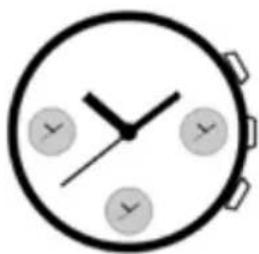
natural_image
Simple analog clock face with hour and minute hands (no numbers or text)
text_image
00.0000INSTRUCTION MANUAL FOR MIYOTA WATCH MOVEMENT
STANDARD WATCH WITH/WITHOUT SECOND HAND
DISPLAY

text_image
Hour hand Minute hand Second hand 1st position Normal crown positionSETTING THE TIME
- Pull the crown out to the 1st position.
- Turn the crown to set hour and minute hands.
- When the crown is pushed back to the normal position, second hand begins to run.
STANDARD CHRONOGRAPH WATCH MANUAL
DISPLAY

text_image
HoG hand 24 hour hand Second hand Minute hand Button A N → 1 Crown Day hand Button B Date hand| Crown position | ||
| N : normal 1 : 1st | click | |
| Crown | ||
| Button A Day change | ||
| Button B Date change | ||
HOW TO SET TIME
- Pull the crown out to the 1st click position when the second hand is at the 12 o'clock position.
- Turn the crown to set the hour and minute hands.
Take a.m./p.m. into consideration when setting the hour and minute hands to the desired time. - The 24 hour hand moves correspondingly with the hour hand.
- When setting the hour hand, check that the 24 hour hand is correctly set.
- When setting the minute hand, advance ii 4 to 5 minutes ahead of the desired time and then turn it back to the exact lime.
- Push the crown back to the normal position.
HOW TO SET DATE AND DAY OF THE WEEK
- Day Correction: With each press of button A, the day hand advances to the next day of the week.
- Date Correction: With each press of button B, the date hand advances 1 day.
- Do not set the date and the day hands between 9:00 p.m. and 4:00 a.m.. Otherwise they may not change properly.
LCD watch manual
FULL-DISPLAY CAPTION AND KEY FUNCTIONS

text_image
S1 mode :: > 00.00∞ < :: < :: S3 add/start S2 setting/reset< ::
FEATURES OVERVIEW
- six displays
- normal display mode: time, minute, second, month, week
- timing alarm and hourly reminder
- countdown function
- 1/100sec stopwatch definition, (elapsed time maximum value 59:59'59")
SWITCHING MODE
- press S1 to enter switching mode
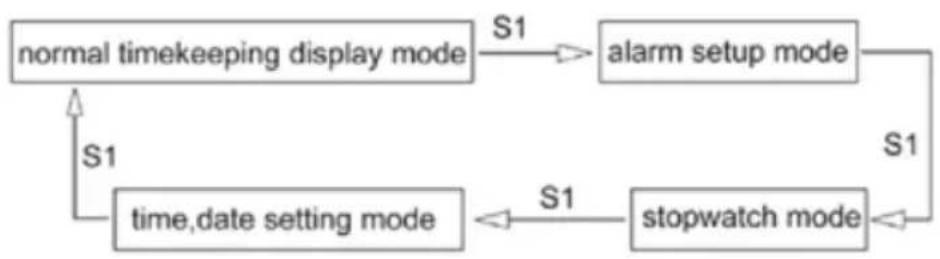
flowchart
graph TD
    A["normal timekeeping display mode"] -->|S1| B["alarm setup mode"]
    B -->|S1| C["stopwatch mode"]
    C -->|S1| D["time, date setting mode"]
    D -->|S1| A
COUNTDOWN FUNCTION
- In time mode, press S2 to start and set the countdown time.
- countdown intervals are shown as follows (from left to right):
30min, 20min, 15min, 10min, 5min, 3min, 1min.adjust sequence as follows:
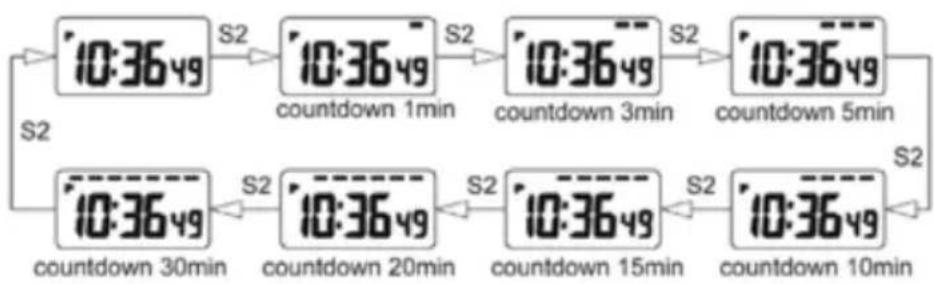
flowchart
graph LR
    A["10:3649"] -->|S2| B["10:3649"]
    B -->|S2| C["10:3649"]
    C -->|S2| D["10:3649"]
    D -->|S2| E["10:3649"]
    E -->|S2| F["10:3649"]
    F -->|S2| G["10:3649"]
    G -->|S2| H["10:3649"]
    H -->|S2| I["10:3649"]
    I -->|S2| J["10:3649"]
    J -->|S2| K["10:3649"]
    K -->|S2| L["10:3649"]
    L -->|S2| M["10:3649"]
    M -->|S2| N["10:3649"]
    N -->|S2| O["10:3649"]
    O -->|S2| P["10:3649"]
    P -->|S2| Q["10:3649"]
    Q -->|S2| R["10:3649"]
    R -->|S2| S["10:3649"]
    S -->|S2| T["10:3649"]
    T -->|S2| U["10:3649"]
    U -->|S2| V["10:3649"]
    V -->|S2| W["10:3649"]
    W -->|S2| X["10:3649"]
    X -->|S2| Y["10:3649"]
    Y -->|S2| Z["10:3649"]
    Z -->|S2| AA["10:3649"]
    AA -->|S2| AB["10:3649"]
    AB -->|S2| AC["10:3649"]
    AC -->|S2| AD["10:3649"]
    AD -->|S2| AE["10:3649"]
    AE -->|S2| AF["10:3649"]
    AF -->|S2| AG["10:3649"]
    AG -->|S2| AH["10:3649"]
    AH -->|S2| AI["10:3649"]
    AI -->|S2| AJ["10:3649"]
    AJ -->|S2| AK["10:3649"]
    AK -->|S2| AL["10:3649"]
    AL -->|S2| AM["10:3649"]
    AM -->|S2| AN["10:3649"]
    AN -->|S2| AO["10:3649"]
    AO -->|S2| AP["10:3649"]
    AP -->|S2| AQ["10:3649"]
    AQ -->|S2| AR["10:3649"]
    AR -->|S2| AS["10:3649"]
    AS -->|S2| AT["10:3649"]
    AT -->|S2| AU["10:3649"]
    AU -->|S2| AV["10:3649"]
    AV -->|S2| AW["10:3649"]
    AW -->|S2| AX["10:3649"]
    AX -->|S2| AY["10:3649"]
    AY -->|S2| AZ["10:3649"]
    AZ -->|S2| BA["10:3649"]
    BA -->|S2| BB["10:3649"]
    BB -->|S2| BC["10:3649"]
    BC -->|S2| BD["10:3649"]
    BD -->|S2| BE["10:3649"]
    BE -->|S2| BF["10:3649"]
    BF -->|S2| BG["10:3649"]
    BG -->|S2| BH["10:3649"]
    BH -->|S2| BI["10:3649"]
    BI -->|S2| BJ["10:3649"]
    BJ -->|S2| BK["10:3649"]
    BK -->|S2| BL["10:3649"]
    BL -->|S2| BM["10:3649"]
    BM -->|S2| BN["10:3649"]
    BN -->|S2| BO["10:3649"]
    BO -->|S2| BP["10:3649"]
    BP -->|S2| BQ["10:3649"]
    BQ -->|S2| BR["10:3649"]
    BR -->|S2| BS["10:3649"]
    BS -->|S2| BT["10:3649"]
    BT -->|S2| BU["10:3649"]
    BU -->|S2| BV["10:3649"]
    BV -->|S2| BW["10:3649"]
    BW -->|S2|
    A --> S2
- release S2 and the countdown starts flashing on the left side of the display. if the countdown to the next smaller time, a period of time on the display will be disappear until all time disappeared and then start to ring 10sec "beep"
DATE VIEWING
• in time mode, press S3 to view the date, week

text_image
month 10 1658A date week- release S3 to return to time mode
ALARM SETUP
- in time mode, press S1 once to enter alarm mode
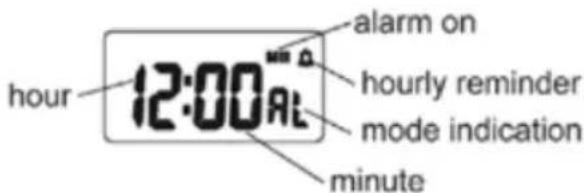
text_image
hour 12:00 AM alarm on hourly reminder mode indication minute- in alarm mode, press S3 to turn the alarm hourly reminder on/off
- in alarm mode, press S2 to select setting hour, minute
- in alarm setting press S3 to adjust; hold S3 down to adjust quickly
- press S2 to exit setting mode
• alarm duration 20sec - no button operation, automatic return to time mode after 2min
STOPWATCH MODE
- in time mode ,press S1 twice to enter stopwatch mode

text_image
mode indication minute 00:00 second 1/10second- in stop watch mode, press S2 to start/pause counter
- under pause stopwatch mode, press S2 to reset counter to zero
- elapsed time maximum value 59:59'59"
TIME/DATE SETTING
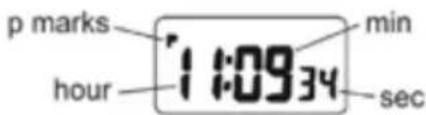
- in normal timekeeping mode, press S1 3times ,"second"is flashing, enter time/date setting mode
text_image
p marks hour min 11:0934 sec- press S3 to reset "00"
- press S2 to select settings

flowchart
graph TD
    A["sec"] -->|S2| B(hour)
    B -->|S2| C["min"]
    C -->|S2| D["month"]
    D -->|S2| E["date"]
    E -->|S2| F["week"]
    F -->|S2| A
- press S3 to adjust or hold down S3 to adjust quickly
- press S1 to confirm and exit setting mode