600-24C - Chauffe-eau et chaudières à gaz BUDERUS - Free user manual and instructions
Find the device manual for free 600-24C BUDERUS in PDF.


User questions about 600-24C BUDERUS
0 question about this device. Answer the ones you know or ask your own.
Ask a new question about this device
Download the instructions for your Chauffe-eau et chaudières à gaz in PDF format for free! Find your manual 600-24C - BUDERUS and take your electronic device back in hand. On this page are published all the documents necessary for the use of your device. 600-24C by BUDERUS.
USER MANUAL 600-24C BUDERUS
natural_image
Illustration of a server unit with a label 'Budleria' on its side panel (no other text or symbols)benchmark
Introduction
Please read these instructions and follow them carefully for a safe and economical use of your system boiler.
Important general instructions for use
This device should only be used for its intended purpose and in accordance with the regulations.
It is a requirement and in your own interest, and that of safety that this boiler must be installed by a CORGI registered installer, in accordance with the relevant requirements of the current Gas Safety (Installation and Use) Regulations, The Building Regulations, current I.E.E. Wiring Regulations and the relevant British Standard Codes of Practise.
The device may only be used in combination with the units, accessories and spare parts listed in the installation and maintenance instructions.
Other combinations of units, accessories and consumables are only to be used if they completely fulfil the specifications involved, and if system performance and safety are not affected in any way.
Subject to technical modifications
As a result of our policy of constant development, there may be small differences with respect to illustrations, functional steps and technical data.
Cleaning
For normal cleaning simply dust with a dry cloth. To remove stubborn marks and stains, wipe with a damp cloth and soap and finish off with a dry cloth.
DO NOT use abrasive cleaning materials.
G. C. Appliance No.:
Buderus 600 - 11S 41-110-16
Buderus 600 - 19S 41-110-17
Buderus 600 - 24S 41-110-18
Buderus 600 - 24C 47-110-01
Dear Customer,
Your Buderus 600 Series wall-mounted condensing gas boiler has been designed and built in accordance with state-of-the-art technological standards and the recognised safety rules. Special focus has been placed on operator convenience in this respect.
Carefully read the safety instructions and operating manual to ensure safe, economic and ecologically beneficial use of the unit.
Due to the high efficiency of the boiler a plume of water vapour may form at the terminal during operation. This is normal.
1 Safety precautions
ADANGER!
If you smell gas:
- No naked flames! Do not smoke!
- Avoid sparks!
Do not operate electrical switches.
Do not use the telephone, plug-in devices of any kind or the doorbell!
- Shut off the main gas supply!
- Open windows and doors!
- Warn building occupants and evacuate the building!
- Call TRANSCO (under 'GAS' in the telephone directory) from outside the building!
INOTE
In the event of any other type of incident, shut off the main gas supply and electric supply to the appliance and seek assistance from a CORGI registered engineer.
2 Installation area / boiler room
ADANGER!
The air intake and outlet openings must not be reduced in size or closed.
ADANGER!
Do not store or use inflammable materials or liquids near the heating boiler.
INOTE
To prevent the boiler from being damaged, care must be taken not to contaminate the combustion air with halogenated hydrocarbons (e. g. contained in aerosol sprays, solvents, detergents, paints, and adhesives), or with high quantities of dust. The room in which the boiler is installed must be frost-proof and be well ventilated.
3 Working in the heating system
ADANGER!
Only a CORGI registered Engineer is to be entrusted with the installation of this boiler, the gas supply and the flue connection.
Commissioning, Servicing and any Repairs must be carried out by a competent person i.e.: a CORGI Registered Engineer.
All CORGI Registered Installers carry a CORGI identification card and have a registration number. Both should be recorded in your boiler logbook. You can check your installer/Engineer is registered by telephoning 01256 372300 or by writing to:
CORGI, 1 Elmwood, Chineham Business Park, Crockford Lane, Basingstoke. RG24 8WG
4 Functions of the system and operating instructions
The installer should familiarize the user with the functions and operation of the heating system and ensure that a complete set of technical documentation is supplied.
5 Maintenance intervals
For optimum, long-term reliable functioning of the heating boiler, and in order to be able to claim under the terms of the manufacturer's warranty, the heating boiler must be inspected and maintained at least once a year (under normal operating conditions) by an officially recognized installation and service engineer. The term "normal operating conditions" means that the heating boiler is used to provide central heating and/or hot water to no more than one single-family dwelling.
In all other cases, the heating boiler must be inspected and maintained by an officially recognised installation service engineer every 2,500 burner operating hours.
6 Initial start-up
6.1 Preparing for operation
Please note also the operating instructions supplied with the control unit.
6.1.1 Check water pressure
- Open the control panel cover.
- Check the water pressure (fig. 1, item 1). Optimum filling pressure is 1.0 to 1.2 bar, max. water pressure is 1.5 bar.
If pressure is below 1.0 bar, proceed as described in "Topping up the heating system", otherwise continue as described in Section 6.1.3 "Temperature-setting adjustments".
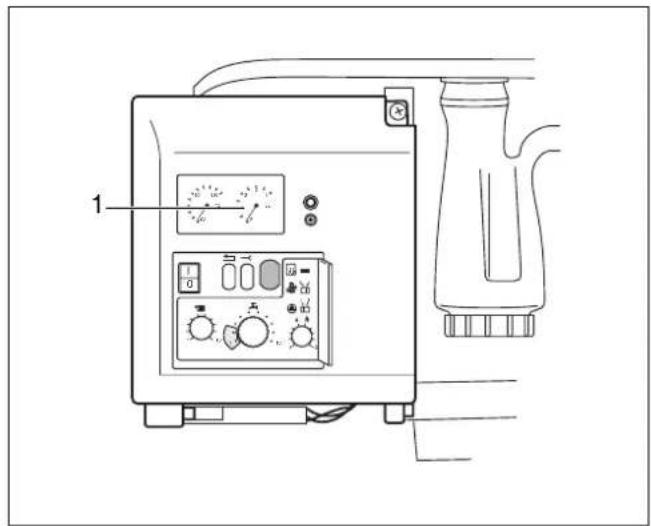
Fig. 1 Pressure display
Topping up the heating system
AWARNING!
The wall-mounted condensing gas boiler must not be activated at this stage.
The system should be filled with untreated mains water.
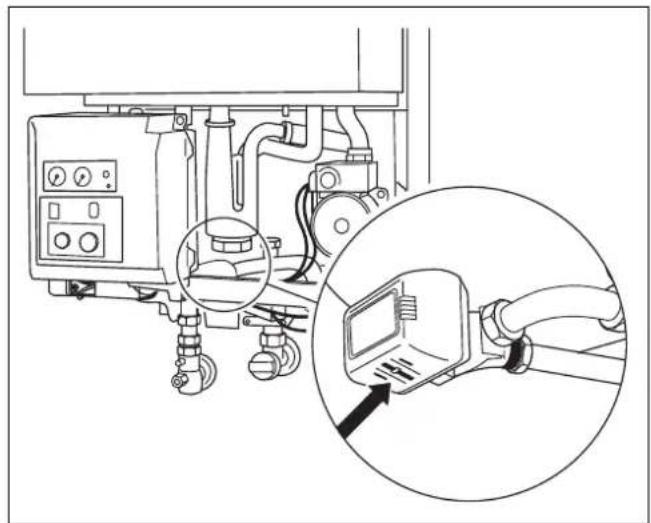
- Set three-way valve to the middle setting (applicable for 24C only). This is done by pushing the lever on the three-way valve (fig. 2) with a screwdriver to the middle setting.
natural_image
Technical line drawing of a mechanical device with an inset close-up showing a close-up of a device's cable or connector (no text or symbols present)Fig. 2 Three-way valve
- If necessary open the CH flow and CH return maintenance valves (fig. 3, item 1 and 2).
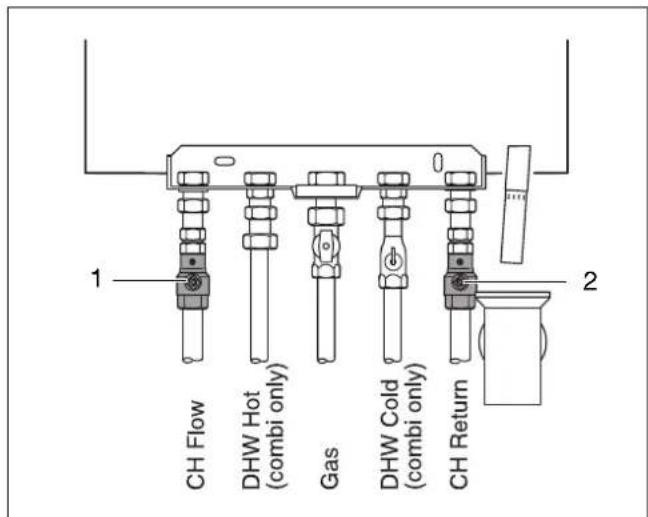
Fig. 3 Maintenance shutoff valves
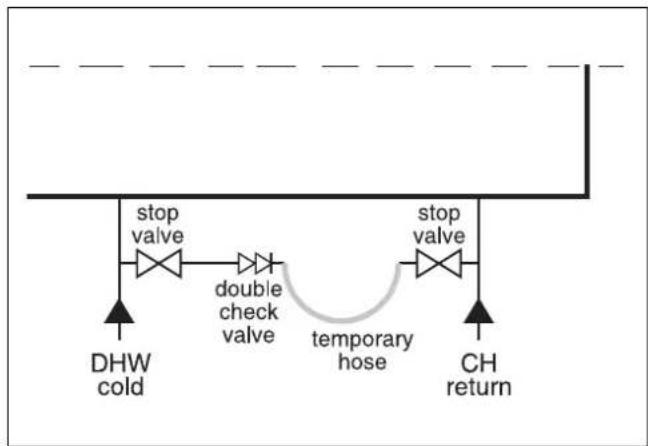
● Connect temporary hose (fig. 4).
- Open both stop valves.
flowchart
graph TD
    A["stop valve"] --> B["double check valve"]
    B --> C["temporary hose"]
    C --> D["stop valve"]
    E["DHW cold"] --> A
    F["CH return"] --> D
Fig. 4 Connecting temporary hose
- Fill the system to a pressure of 1.0 to 1.2 bar (fig. 5, item 1). Max. water pressure is 1.5 bar.
● Shut both stop valves and disconnect the filling loop. - Fill the system to a pressure of 1.0 to 1.2 bar (fig. 5, item 1). Max. water pressure is 1.5 bar.
● Shut both stop valves and disconnect the filling loop.
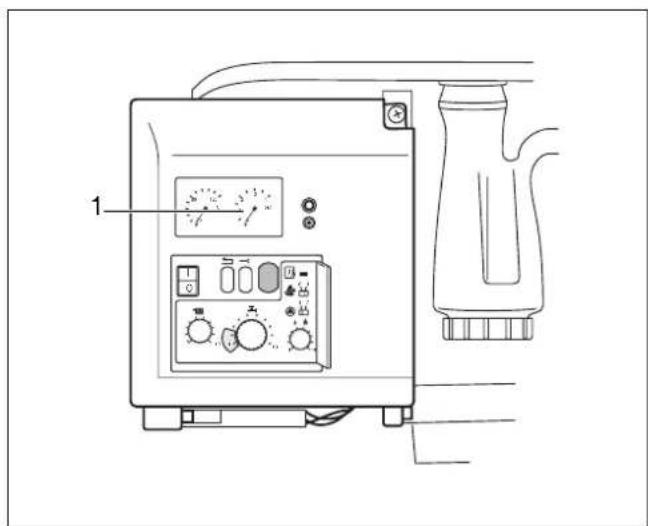
Fig. 5 Pressure display
6.1.2 Purging the heating-water circuit
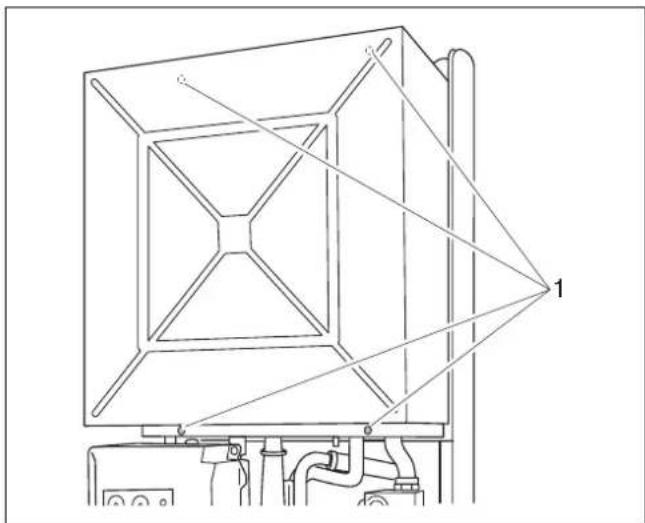
● Unscrew the four screws at the top and bottom of the ventilation cover (fig. 6, item 1) and remove the ventilation cover.
natural_image
Technical line drawing of a mechanical device with labeled components (no text or symbols present)Fig. 6 Remove ventilation cover
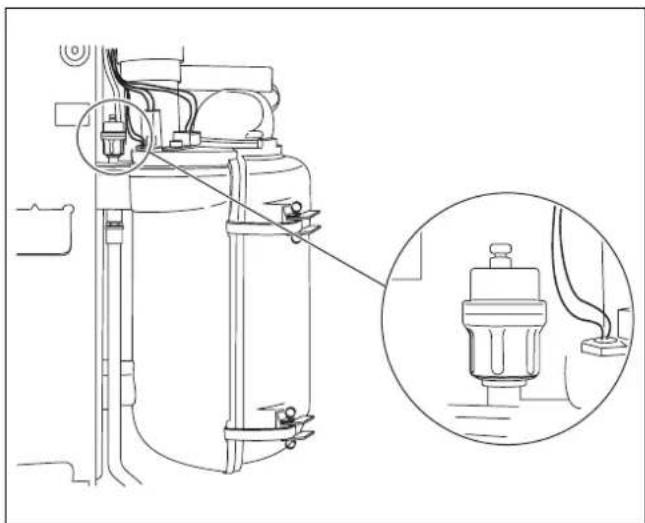
- Open the cap on the automatic vent unit (fig. 7) by one turn to allow any residual air to escape.
- If the air purging operation causes the pressure to drop, top up with water.
● Refit the ventilation cover. - Remove the hose from the filling and draining valve, unscrew the hose spigot and screw the cover cap back on.
natural_image
Technical line drawing of a mechanical device with an inset close-up showing internal components (no text or symbols)Fig. 7 Automatic air vent unit
● Purging the system at the radiator bleed-valves.
INOTE
If there are frequent water losses, have the system examined and repaired by a CORGI registered installer.
Have the inhibitor concentration checked every year.
6.1.3 Temperature-setting adjustments
- Set flow temperature at the control unit (fig. 8, item 6) (see table 1).
- Set hot-water temperature for 600 - 24 C with integrated hot-water supply at knob (fig. 8, item 3) (see table 2).
For energy saving (no heat-retention function) move knob (fig. 8, item 3) to cold-start-setting "1". Set outlet temperature, at the same time, to 60 °C.
- Set hot-water temperature for 600 Series with external tank at control unit (fig. 8, item 3) using table 3.
- Adjust room temperature to maximum setting at the control unit.
- Open the gas service valve by pushing in and turning anticlockwise into a vertical position (fig. 8, item 4).
- Push the mains power switch (fig. 8, item 1) to "I". The boiler runs through the start-up programme and the burner is ignited after approx. 30 seconds.
- Adjust room temperature to desired setting at the control unit.
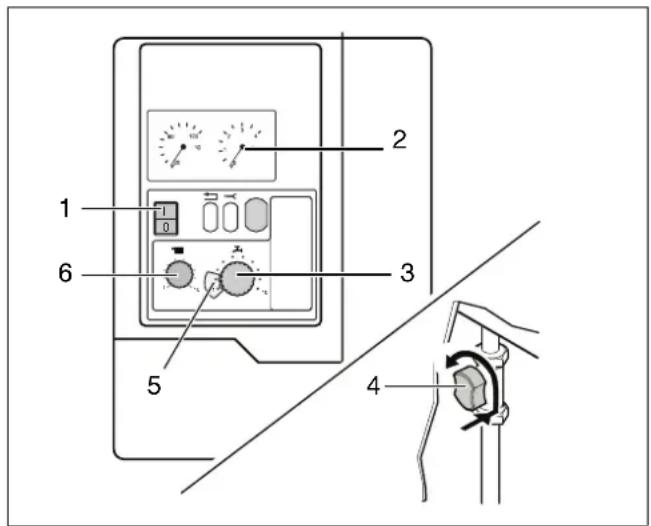
Fig. 8 Control panel, pressure display, gas service valve, temperature indicator
| Control unit | Range of application | Controller position / boiler flow temperature |
| Buderus iRT30 Floor heating | Radiator heating | 3 (48 °C, max. factory-adjusted setting for floor heating)7 (67 °C, min. factory-adjusted setting for radiator heating) |
| ON/OFF temperature controller, 24 V | Radiator heating | 5 (58 °C, new building) up to10 (80 °C, old building)* |
* Basic setting: Have the specific system settings of the Buderus control system and burner-control unit control panel adjusted by a specialist heating system company.
Table 1 Flow temperature
| Controller position | DWH-storage temperature [°C] | Outlet temperature [°C] |
| 1 | - | 60 |
| 2 – 60 | ||
| 3 | 40 | 40 |
| 4 43 | 43 | |
| 5 | 46 | 46 |
| 6 49 | 49 | |
| 7 | 52 | 52 |
| 8 55 | 55 | |
| 9 | 58 | 58 |
| 10 | 60 | 60 |
Tab. 2 Hot-water temperature for 600 - 24 C
| Range of application | Controller position | Water temperature in external tanks |
| Minor convenience, small heat losses | 1 | 27 °C |
| Average convenience, medium heat losses | 5 | 41 °C |
| Optimum convenience, normal heat losses | 10 | 60 °C |
Table 3 Hot-water temperature in external tanks
6.2 Combustion fuels
Natural gas or propane.
6.3 Frost hazard for the heating system
In the event of any risk of the heating system freezing up:
- Open the control panel cover.
- Open cover for 2nd control box (fig. 9, item 1).
- Move switch to ▲ position "2" (pump post-purge period 24 h) (fig. 9, item 5).
● Shut cover for 2nd control box and control panel.
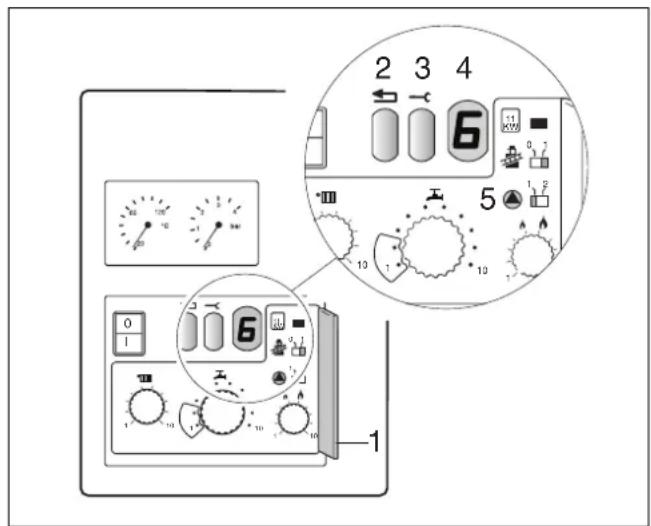
Fig. 9 2nd control box
6.4 Operational and fault codes (table 4)
Operating conditions and possible faults are shown on the display (fig. 10, item 4). The codes consists of two characters. Press the Service button (fig. 10, item 3) to display the second character.
All codes not contained in table 4 should be noted down separately. These are malfunctions that require the presence of a specialist technician.
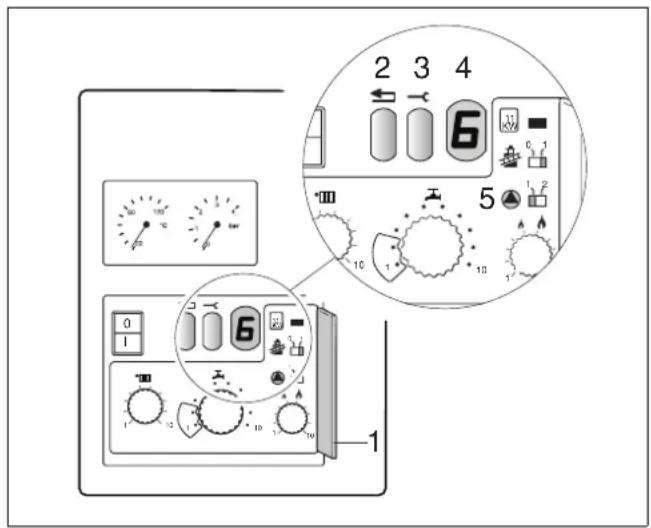
Fig. 10 Operational and fault codes
| Display Display after pressing the service button | Meaning Rectification | ||
| 0 | A , | H , L | , P , |
| 6* | A | Burner not ignited | Press reset button (fig. 10, item 2). If the burner fails to ignite after several unblocking operations, consult a specialist company. |
| -. H Normal heating mode | |||
| =. H Normal hot water mode | |||
* Flashing after three start-up attempts.
Table 4 Operational and fault codes
7 Taking the system out of service
- Open the control panel cover.
- Push the mains power switch (fig. 11, item 1) to "0".
- Close the gas service valve by turning it clockwise (fig. 11, item 2).
- Close the control panel cover.
Frost hazard for the heating system
- Turn the mains switch to "I" and leave the gas service valve open.
- Adjust room temperature to minimum (or frost-protection) setting at regulating device or on remote control unit.
INOTE
If you intend to shut down the system fully under frost hazard conditions, note that the system must be drained entirely of water.
7.1 Draining the system
- Close the DHW cold and the CH return valve.
- Connect temporary hose (fig. 12).
- Open the CH return stop valve to drain the system.
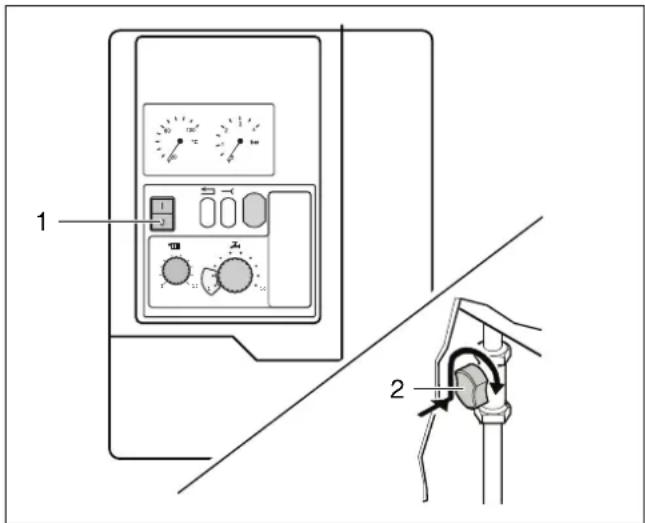
Fig. 11 Mains switch, gas service valve
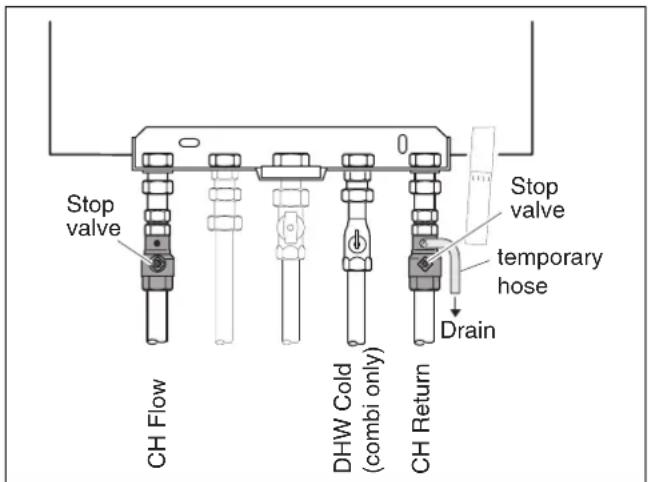
Fig. 12 Draining the system
Buderus
Heating system specialist:
Buderus
Cotswold Way
Warndon
Worcester
WR4 9SW
Telephone: 01905 - 752 936
Fax: 01905 - 753 130
Customer Services: Tel: 0870 - 421 5933
Technical Product Support: Tel: 0870 - 421 5944
Sales: Tel: 01905 - 752 640 Fax: 01905 - 456 445 / 455 394
Returns: Tel: 01905 - 752 531 Fax: 01905 - 455 392
Spares: Tel: 01905 - 752 576 Fax: 01905 - 754 620
www.buderus-domestic.co.uk
Buderus is a trading name of BBT Thermotechnology UK Ltd.