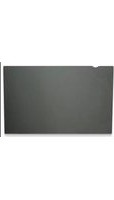
424042 - Screen filter MANHATTAN - Free user manual and instructions
Find the device manual for free 424042 MANHATTAN in PDF.


| Product Type | Privacy Screen Filter |
| Brand | MANHATTAN |
| Model | 424042 |
| Dimensions (W x H) | 27 x 34 cm (10.5 x 13 in.) |
| Material | PET plastic with privacy micro-louver film |
| Privacy Angle | 45° from center (display becomes unreadable beyond 45°) |
| Screen Protection | Helps prevent scratches and minor damage to LCD surface |
| Glare Reduction | Reduces glare and annoying reflections |
| Compatibility | Notebook and LCD monitor screens |
| Mounting Options | Clear plastic tabs (for larger screens) or adhesive strips (for smaller screens) |
| Package Contents | Privacy Filter, mounting kit (tabs/adhesive strips), cleaning cloth, reference guide |
| Installation Notes | Ensure cutout is at top right; clean screen before applying |
| Cleaning | Use included soft cloth; do not use abrasive materials or excessive force |
| Caution | Do not bend, cut or alter the filter; use only with notebook/LCD screens |
| Weight (approx.) | 0.2 kg (0.44 lbs) |
Frequently Asked Questions - 424042 MANHATTAN
User questions about 424042 MANHATTAN
0 question about this device. Answer the ones you know or ask your own.
Ask a new question about this device
Download the instructions for your Screen filter in PDF format for free! Find your manual 424042 - MANHATTAN and take your electronic device back in hand. On this page are published all the documents necessary for the use of your device. 424042 by MANHATTAN.
USER MANUAL 424042 MANHATTAN
PRIVACY FILTER REFERENCE GUIDE
Thank you for purchasing this MANHATTAN Privacy Filter.
By narrowing the field of view to approximately 45^ from the display center, it effectively discourages glances from curious onlookers and prevents the disclosure of on-screen displays to information thieves. Once installed, the Privacy Filter also helps protect fragile LCD surfaces from scratches and minor damage, and can decrease eyestrain, glare and annoying reflections.
Privacy Filter with cleaning cloth and multi-option mounting kit.
The image at far right shows how the display on the monitor screen becomes more difficult to discern through the Privacy Filter as the view approaches a 45° angle, at which point the display becomes completely "private" for the user and indiscernible to others.

natural_image
Blank whiteboard with a blue paper clip and a small grid of cubes on the left (no text or symbols visible)

natural_image
Black laptop with visible screen and keyboard (no text or symbols)MOUNTING KIT INSTALLATION
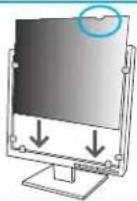
IMPORTANT: For proper product performance, do not bend, cut or otherwise alter the size or shape of the Privacy Filter. Do clean your monitor screen with the enclosed cloth before positioning the filter, and do ensure the cutout appears at the top right as you face the filter when it's in place (as highlighted in the Step 4 image below).
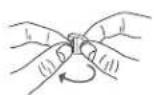
If your monitor screen is larger than the Privacy Filter, use the clear plastic tabs.
- Separate the tabs.
- Peel the protective cover from the adhesive.
- Place the tabs along the bottom and sides of your monitor.
- Slip the Privacy Filter behind the tabs so it covers the screen.


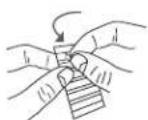
If your monitor screen is smaller than the Privacy Filter, use the adhesive strips (adhesive on both sides).
- Remove the strips one at a time from the sheet.
- Place the strips along the back edges of the filter so they line up with the outer frame of your monitor. NOTE: Be careful not to cover any control buttons on your monitor.
- Peel the remaining protective cover from the strips and press the filter in place on the monitor frame so it covers the screen.


SPECIFICATIONS
Dimensions\*
• Model 424004: 18 x 25 cm (7 x 9.8 in.)
• Model 424028: 23 x 30 cm (9 x 11.8 in.)
• Model 424035: 21 x 33 cm (8.25 x 13 in.)
• Model 424042: 27 x 34 cm (10.5 x 13 in.)
Package Contents
- Privacy Filter
- Mounting kit, cleaning cloth, reference guide
* Always measure the display first to determine compatibility. Trimming is not recommended.
CAUTIONS
- Use the filter only with notebook or LCD monitor screens.
- Do not exert excessive force or use an abrasive cloth when cleaning the surface of the filter.
- Do not bend the filter.

MANHATTAN™
BRINGING COMPUTERS TO LIFE
MANHATTAN ^® offers a complete line of PC Components, Peripherals, Cables and Accessories.
Ask your local computer dealer for more information or visit us online at
www.manhattan-products.com
Copyright © MANHATTAN
All products mentioned are trademarks or registered trademarks of their respective owners.

Brand : MANHATTAN
Model : 424042
Category : Screen filter