Mega Go Par 64E - Lighting Eliminator Lighting - Free user manual and instructions
Find the device manual for free Mega Go Par 64E Eliminator Lighting in PDF.


User questions about Mega Go Par 64E Eliminator Lighting
0 question about this device. Answer the ones you know or ask your own.
Ask a new question about this device
Download the instructions for your Lighting in PDF format for free! Find your manual Mega Go Par 64E - Eliminator Lighting and take your electronic device back in hand. On this page are published all the documents necessary for the use of your device. Mega Go Par 64E by Eliminator Lighting.
USER MANUAL Mega Go Par 64E Eliminator Lighting
natural_image
Black 3D photo of a laser beam projector with green and blue LED array (no text or symbols visible)MEGA GO PAR 64€
User Manual
©2023 Eliminator Lighting all rights reserved. Information, specifications, diagrams, images, and instructions herein are subject to change without notice. Eliminator logo and identifying product names and numbers herein are trademarks of Eliminator Lighting. Copyright protection claimed includes all forms and matters of copyrightable materials and information now allowed by statutory or judicial law or hereinafter granted. Product names used in this document may be trademarks or registered trademarks of their respective companies and are hereby acknowledged. All non-Eliminator brands and product names are trademarks or registered trademarks of their respective companies.
Eliminator Lighting and all affiliated companies hereby disclaim any and all liabilities for property, equipment, building, and electrical damages, injuries to any persons, and direct or indirect economic loss associated with the use or reliance of any information contained within this document, and/or as a result of the improper, unsafe, insufficient and negligent assembly, installation, rigging, and operation of this product.
Eliminator Lighting
6122 S. Eastern Ave. Los Angeles, CA. 90040
323-582-2650 | Fax 323-532-2941 | www.adj.com | info@adj.com
ADJ SUPPLY Europe B.V
Junostraat 2 6468 EW Kerkrade, The Netherlands
+31 (0)45 546 85 00 | Fax +31 45 546 85 99
www.americandj.eu | info@americandj.eu
ADJ PRODUCTS GROUP Mexico
AV Santa Ana 30 Parque Industrial Lerma, Lerma, Mexico 52000
+52 (728) 282-7070
DOCUMENT VERSION
Due to additional product features and/or enhancements, an updated version of this document may be available online.
Please check www.adj.com for the latest revision/update of this manual before beginning installation and/or programming.
| Date | Document Version | Software Version > | DMX Channel Mode Notes |
| 09/12/23 1 | .0 1.04 4/5/6 | 9/10 CH Initial release | |
CONTENTS
General Information 4
Limited Warranty (USA Only) 5
Warranty Registration | Features | Installation 6
Safety Guidelines 7
Battery Precautions 8
DMX Set Up 10
Operation Instructions 12
Primary-Secondary Configuration 15
ADJ LED RC2 Operation 16
UC IR Remote Control 18
DMX Traits 19
Color Macros Chart 22
Battery Status and Recharging | Power Cord Daisy Chain 24
Photometric Chart | Dimmer Curve 25
Fuse Replacement | Trouble Shooting | Cleaning 26
Specifications
27
Dimensional Drawings 28
GENERAL INFORMATION
INTRODUCTION
This device is a DMX intelligent, high powered LED par fixture which can be used in stand alone mode or connected in a Primary/Secondary configuration. It also features five operating modes: Sound Active mode, Auto mode, RGB + UV Dimmer mode, Static Color mode, and DMX control mode. To optimize the performance of this product, please read these operating instructions carefully to familiarize yourself with the basic operations of this unit. These instructions contain important safety information regarding the use and maintenance of this unit. Please keep this manual with the unit for future reference.
UNPACKING
This fixture has been thoroughly tested and has been shipped in perfect operating condition. Carefully check the shipping carton for damage that may have occurred during shipping. If the carton appears to have been damaged, carefully inspect the unit for damage and be sure all accessories necessary to operate the unit have arrived intact. In the event damage has been found or parts are missing, please contact our customer support team for further instructions. Please do not return this kit to your dealer without first contacting customer support at the number listed below. Please do not discard the shipping carton in the trash. Please recycle whenever possible.
CUSTOMER SUPPORT
Tel: (323) 213-4592 | Fax: (323) 582-2941
www.adj.com | support@eliminatorlighting.com
To purchase parts online, visit parts.adj.com.
Warning! To prevent or reduce the risk of electrical shock or fire, do not expose this unit to rain or moisture.
Caution! There are no user serviceable parts inside this unit. Do not attempt any repairs yourself, as doing so will void your manufacturer's warranty. In the unlikely event your unit may require service, please contact ADJ Products, LLC.
PLEASE recycle the shipping carton when ever possible.
LIMITED WARRANTY (USA ONLY)
A. Eliminator Lighting, an ADJ Products, LLC brand, hereby warrants, to the original purchaser, Eliminator Lighting products to be free of manufacturing defects in material and workmanship for a prescribed period from the date of purchase (see specific warranty period on reverse). This warranty shall be valid only if the product is purchased within the United States of America, including possessions and territories. It is the owner's responsibility to establish the date and place of purchase by acceptable evidence, at the time service is sought.
B. For warranty service, you must obtain a Return Authorization number (RA#) before sending back the product-please contact ADJ Products, LLC Service Department at 800-322-6337. Send the product only to the Eliminator Lighting factory. All shipping charges must be pre-paid. If the requested repairs or service (including parts replacement) are within the terms of this warranty, Eliminator Lighting will pay return shipping charges only to a designated point within the United States. If the entire instrument is sent, it must be shipped in its original package. No accessories should be shipped with the product. If any accessories are shipped with the product, Eliminator Lighting shall have no liability whatsoever for loss of or damage to any such accessories, or for the safe return thereof.
C. This warranty is void of the serial number has been altered or removed; if the product is modified in any manner which Eliminator Lighting concludes, after inspection, affects the reliability of the product, if the product has been repaired or service by anyone other than ADJ Products, LLC factory unless prior written authorization was issued to purchaser by Eliminator Lighting; if the product is damaged because not properly maintained as set forth in the instruction manual.
D. This is not a service contact, and this warranty does not include maintenance, cleaning or periodic check up. During the period specified above, Eliminator Lighting will replace defective parts at its expense with new or refurbished parts, and will absorb all expenses for warrant service and repair labor by reason of defects in material or workmanship. The sole responsibility of Eliminator Lighting under this warranty shall be limited to the repair of the product, or replacement thereof, including parts, at the sole discretion of Eliminator Lighting. All products covered by this warranty were manufactured after August 15, 2012, and bear identifying marks to that effect.
E. Eliminator Lighting reserves the right to make changes in design and/or improvements upon its products without any obligation to include these changes in any products theretofore manufactured.
F. No warranty, whether expressed or implied, is given or made with respect to any accessory supplied with products described above. Except to the extent prohibited by applicable law, all implied warranties made by Eliminator Lighting in connection with this product, including warranties of merchantability or fitness, are limited in duration to the warranty period set forth above. And no warranties, whether expressed or implied, including warranties of merchantability or fitness, shall apply to this product after said period has expired. The consumer's and/or Dealer's sole remedy shall be such repair or replacement as is expressly provided above; and under no circumstances shall Eliminator Lighting be liable for any loss or damage, direct or consequential, arising out of the use of, or inability to use, this product.
G. This warranty is the only written warranty applicable to Eliminator Lighting products and supersedes all prior warranties and written descriptions of warranty terms and conditions heretofore published.
LIMITED WARRANTY PERIODS
- All Eliminator Lighting products (except laser diodes) = 1-year (365 days) Limited Warranty (Such as: Special Effect Lighting, Intelligent Lighting, UV lighting, Strobes, Fog Machines, Bubble Machines, Mirror Balls, Par Cans, Trussing, Lighting Stands etc. excluding LED and lamps)
- Laser Products = 1 Year (365 Days) Limited Warranty (excludes laser diodes which have 6 month limited warranty)
- Batteries = 180 Day Limited Warranty (excluding batteries which have a 180 day limited warranty)
WARRANTY REGISTRATION
This device carries a 2 year (730 days) limited warranty. Please fill out the enclosed warranty card to validate your purchase and warranty. You may also register your product online at www.adj.com. The R.A. number must be clearly written on the outside of the return package. A brief description of the problem as well as the R.A. number must also be written down on a piece of paper included in the shipping carton. If the unit is under warranty, you must provide a copy of your proof of purchase invoice. You may obtain an R.A. number by contacting our customer support team on our customer support number. All packages returned to the service department not displaying an R.A. number on the outside of the package will be returned to the shipper.
FEATURES
- Five Operating Modes
• Electronic Dimming 0-100%
• 5 Selectable Dimming Curves - 64 Color Macros
• Built in Microphone - DMX-512 protocol
• 3-Pin DMX Connection - 5 DMX Modes: 4 Channel Mode, 5 Channel Mode, 6 Channel Mode, 9 Channel Mode, & 10 Channel Mode.
- ADJ LED RC2 & UC IR, (Not Included)
• Power Cord Daisy Chain (see Power Cord Daisy Chain section of this manual)
INSTALLATION
The unit should be mounted using a mounting clamp (not provided), and affixing it to the mounting bracket that is provided with the unit. Always ensure that the unit is firmly fixed to avoid vibration and slipping during operation. Always ensure that the structure to which you are attaching the unit is secure and is able to support at least 10 times the unit's weight. Also, always use a safety cable that can hold 12 times the weight of the unit when installing the fixture.
The equipment must be installed by a professional, and it must be installed in a place where it is out of the reach of the general public.
SAFETY GUIDELINES
• To reduce the risk of electrical shock or fire, do not expose this unit to rain or moisture
- Do not spill water or other liquids into or on to your unit.
- Do not attempt to operate this unit if the power cord has been frayed or broken.
- Do not attempt to remove or break off the ground prong from the electrical cord. This prong is used to reduce the risk of electrical shock and fire in the event of an internal short.
- Disconnect from main power before making any type of connection.
- Do not remove the cover for any reason. There are no user serviceable parts inside.
- Never operate this unit with the cover removed.
- Never plug this unit into a dimmer pack.
- Always be sure to mount this unit in an area that will allow proper ventilation. Allow about 6" (15cm) between this device and a wall.
- Do not attempt to operate this unit if it has been damaged in any way.
• This unit is intended for indoor use only, and use of this product outdoors voids all warranties.
- During long periods of non-use, disconnect the unit's main power.
• Always mount this unit in safe and stable matter.
- Power-supply cords should be routed so that they are not likely to be walked on or pinched by items placed upon or against them, paying particular attention to the point at which they exit from the unit.
- Cleaning - The fixture should be cleaned only as recommended by the manufacturer. See the Cleaning section of this manual for cleaning details.
- Heat - The appliance should be situated away from heat sources such as radiators, heat registers, stoves, or other appliances (including amplifiers) that produce heat.
- The fixture should be serviced by qualified service personnel when:
A. The power supply cord or plug have been damaged.
B. Objects have fallen onto, or liquids have been spilled into, the appliance.
C. The appliance has been exposed to rain or water.
D. The appliance does not appear to operate normally or exhibits a marked change in performance.
BATTERY PRECAUTIONS
1. Handling of Batteries
1.1 Do Not Short Circuit the Battery
Never short circuit the battery, as doing so generates a very high current which could cause the battery to overheat, potentially resulting in electrolyte gel leakage, harmful fumes, or explosion. The LIR tabs can be easily short-circuit when placed on a conductive surface. A short circuit may lead to heat build up and battery damage. An appropriate circuitry with PCM is employed to protect against accidental short circuit of the battery pack.
1.2 Mechanical shock
Dropping the unit, impacts, bending, etc. may cause failure or shortend life of the LIR battery.
2. Other
2.1 Battery connection
- Direct soldering of wire leads or devices to the battery is strictly prohibited.
- Lead tabs with pre-soldered wiring shall be spot welded to the batteries. Direct soldering may cause heat buildup, which can damage components, such as the separator and the insulator.
2.2 Prevention of short circuit within a battery pack
There is enough insulation layers between wiring and the batteries to provide extra safety protection. The battery pack is constructed in such a way as to prevent any short circuit that could result in smoke or fire.
2.3 Do Not Disassemble the Batteries
- Never disassemble the batteries. Doing so may cause an internal short circuit in the battery, which can result in harmful fumes, fire, explosion, or other hazards.
- Electrolyte Gel is harmful! Electrolyte Gel should not leak from the LIR battery. Should the electrolyte gel come into contact with the skin or eyes, flush the area of contact immediately with fresh water and seek medical attention immediately.
2.4 Do Not Expose the Battery to Heat or Fire
Never incinerate or dispose of the batteries in fire. Doing so creates a serious explosion risk!
2.5 Do Not Expose the Battery to water or liquids
Never soak/drop the batteries in liquids, including fresh water, seawater, soft drinks, juices, coffee or other beverages.
2.6 Battery Replacement
For battery replacement please contact ADJ customer support (323) 582-2650.
2.7 Do Not use a damaged Battery
Inspect the battery for damage that may have occurred during shipping. In the event that damage is present, including but not limited to damage to the plastic casing of the battery, deformation of the battery package, the presence of an electrolyte odor, or leakage of the electrolyte gel, DO NOT use the battery. A battery with a odor of electrolyte or a gel leakage should be placed away from fire to avoid fire or explosion.
BATTERY PRECAUTIONS
3. Battery Storage
Store the battery at room temperature, with a charge of at least 50% . During long periods of storage, it is recommended to charge the battery every 6 months. Doing so will prolong the life of the battery, and will also ensure that the battery is ready for use.
4. Other Chemical Reactions
Because batteries utilize a chemical reaction, battery performance will deteriorate over time, even if stored for a long period of time without being used. Additionally, if the various usage conditions such as charge, discharge, ambient temperature, etc. are not maintained within the specified ranges, the life expectancy of the battery may be shortened, or the device in which the battery is used may be damaged by electrolyte gel leakage. If the batteries cannot maintain a charge for long periods of time, even when they are charged correctly, this may indicate it is time to change the battery.
5. Battery Disposal
Please dispose of battery according to local regulations.
DMX SETUP
Power Supply: This device contains an automatic voltage switch, which will automatically sense the voltage when it is plugged into the power source. With this switch there is no need to worry about the correct power voltage, and this unit can be plugged in almost anywhere.
DMX-512: DMX is short for Digital Multiplex. This is a universal protocol used as a form of communication between intelligent fixtures and controllers. A DMX controller sends DMX data instructions from the controller to the fixture. DMX data is sent as serial data that travels from fixture to fixture via the DATA "IN" and DATA "OUT" XLR terminals located on all DMX fixtures (most controllers only have a DATA "OUT" terminal).
DMX Linking: DMX is a language allowing all makes and models of different manufacturers to be linked together and operate from a single controller, as long as all fixtures and the controller are DMX compliant. To ensure proper DMX data transmission, try to use the shortest cable path possible when linking several DMX fixtures. The order in which fixtures are connected in a DMX line does not influence the DMX addressing. For example, a fixture assigned a DMX address of 1 may be placed anywhere in a DMX line: at the beginning, at the end, or anywhere in the middle. When a fixture is assigned a DMX address of 1, the DMX controller knows to send DATA assigned to address 1 to that unit, no matter where it is located in the DMX chain.
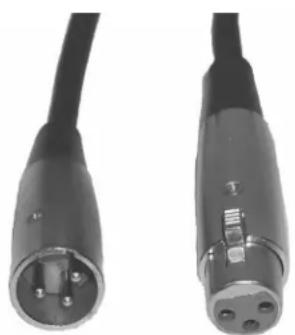
Data Cable (DMX Cable) Requirements (For DMX Operation): This device can be controlled via DMX-512 protocol, and features 5 selectable DMX modes, as detailed in the DMX Traits section of this manual. The DMX address is set on the back panel of the device. Your unit and your DMX controller require a standard 3-pin XLR connector for data input and data output (Figure 1). We recommend Accu-Cable DMX cables. If you are making your own cables, be sure to use standard 110-120 Ohm shielded cable (This cable may be purchased at almost all pro lighting stores). Your cables should be made with a male XLR connector at one end and a female XLR connector at the other. Also remember that DMX cable must be daisy chained and cannot be split.
natural_image
Close-up of two black electronic connectors with metallic pins, no visible text or symbolsFigure 1
DMX SETUP
Notice: Be sure to follow figures two and three when making your own cables. Do not use the ground lug on the XLR connector. Do not connect the cable's shield conductor to the ground lug or allow the shield conductor to come into contact with the XLR's outer casing. Grounding the shield could cause a short circuit and erratic behavior.

text_image
COMMON DMX512 OOT 3-PIN XLR 1 3 2 DMX + DMX - DMX512 IN 3-PIN XLR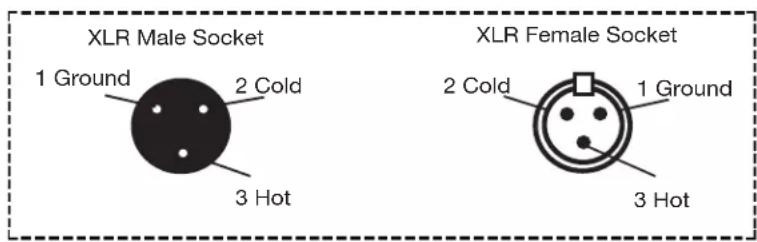
text_image
XLR Male Socket 1 Ground 2 Cold 3 Hot XLR Female Socket 2 Cold 1 Ground 3 HotFigure 2
| XLR Pin Configuration |
| Pin 1 = Ground |
| Pin 2 = Data Compliment (negative) |
| Pin 3 = Data True (positive) |
Figure 3
Special Note: Line Termination. When longer runs of cable are used, you may need to use a terminator on the last unit to avoid erratic behavior. A terminator is a 110-120 ohm 1/4 watt resistor which is connected between pins 2 and 3 of a male XLR connector (DATA + and DATA -). This unit is inserted in the female XLR connector of the last unit in your daisy chain to terminate the line. Using a cable terminator (ADJ part number Z-DMX/T) will decrease the possibilities of erratic behavior.
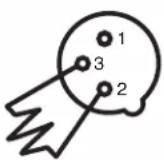
Termination reduces signal errors and avoids signal transmission problems and interference. It is always advisable to connect a DMX terminal, (Resistance 120 Ohm 1/4 W) between PIN 2 (DMX-) and PIN 3 (DMX +) of the last fixture.
Figure 4
5-Pin XLR DMX Connectors. Some manufacturers use 5-pin DMX-512 data cables for DATA transmission in place of 3-pin. 5-pin DMX fixtures may be implemented in a 3-pin DMX line by inserting an adapter into the line. These adapters are readily available at most electronics stores. The chart below details a proper cable conversion.
| 3-Pin XLR to 5-Pin XLR Conversion | ||
| Conductor 5-Pin XLR Male (In)3-Pin XLR Female (Out) | ||
| Ground/Shield | Pin 1 | Pin 1 |
| Data Compliment (- signal) | Pin 2 | Pin 2 |
| Data True (+ signal) | Pin 3 | Pin 3 |
| Not Used | Do Not Use | |
| Not Used | Do Not Use | |
OPERATING INSTRUCTIONS
System Menu: The display will lock after 30 seconds. To unlock, press and the MODE button for 3 seconds.
LED Display On/Off:
To set the display press the MODE button until "dXX" is displayed. Use the UP or DOWN buttons to select either:
- “don” = LED display on at all times.
- “doFF” = LED display shuts off after 10 seconds.
Please note, the display will turn off automatically after 10 seconds.
LED Display Inversion:
Follow these instructions to flip the display 180^ so that the display can be read upside down.
-
Plug the fixture in and press the MODE button until "dXX" is displayed. "XX" represents either "on" or "oFF".
-
Press the SET UP button until "Stnd" is displayed.
-
Press the UP or DOWN buttons to reverse the display 180°.
Operating Modes:
The Mega GO Par64 PLUS has five selectable operating modes:
- RGB+UV Dimmer Mode - Choose one of the four colors to remain static, or adjust the intensity of each color to make a custom color.
- Sound-Active mode - The unit will react to sound, chasing through the built in programs. There are 16 sound active modes.
- Auto Run Mode - In Auto Run mode, you can choose 1 of 16 color change modes, 1 of 16 color fade modes, or a combo color change & fade mode.
- Static Color Mode - There are 64 colors to choose from.
- DMX control mode - This function will allow you to control each individual fixtures traits with a standard DMX 512 controller.
RGB+UV Dimmer Mode:
-
Plug the fixture in and press the MODE button until the desired option is shown:
-
When "r.XXX" is displayed, the unit is in Red dimming mode. Press the UP and DOWN buttons to adjust intensity.
- When "G.XXX" is displayed, the unit is in Green dimming mode. Press the UP and DOWN buttons to adjust intensity.
- When "b.XXX" is displayed, the unit is in Blue dimming mode. Press the UP and DOWN buttons to adjust intensity.
-
When "u.XXX" is displayed, the unit is in UV dimming mode. Press the UP and DOWN buttons to adjust intensity.
-
After you have adjusted the RGB & UV colors to create your desired color, you can then activate strobing by pressing the SET UP button to enter the Flash (strobe) mode.
-
"FS.XX" will be displayed, indicating that the unit is in Flash mode. The Flash can be adjusted between "FS.00" (flash off) to "FS.15" (fastest flash).
OPERATING INSTRUCTIONS
Sound Active Mode:
In this mode, the unit will react to sound and chase through the different colors.
- Plug the fixture in and press the MODE button until "SoXX" is displayed. "XX" represents the current sound active mode (1-16).
- Use the UP or DOWN buttons to find your desired sound active mode.
- Press the SET UP button to enter sound sensitivity adjustment. "SJ-X" will be displayed. Use the UP or DOWN buttons to adjust the sensitivity. "SJ-1" is the lowest sensitivity, "SJ-8" is the highest.
Auto Run Mode:
There are 3 types of Auto Run Modes to choose from: Color Fade, Color Change, and both modes running together. The running speed is adjustable in all 3 modes.
- Plug the fixture in and press the MODE button until either "AFXX", "AJXX", or "A-JF" is displayed.
- AFXX = Color Fade mode. There are 16 Color Fade modes to choose from. Use the UP or DOWNbuttons to scroll through the different Auto Fade modes.
- AJXX = Color Change mode. There are 16 Color Change modes to choose from. Use the UP or DOWN buttons to scroll through the different Auto Change modes.
-
A-JF = Both Color Fade and Color Change modes running.
-
After you have chosen your desired running mode, press the SET UP button until "SP.XX" is displayed. You can now adjust the running speed of your desired program. Use the UP or DOWN button to adjust the speed between "SP.01" (slowest) and "SP.16" (fastest). Press the SET UP button to return to your desired Auto Run Mode.
Static Color Mode:
- Plug the fixture in and press the MODE button until "CLXX" is displayed.
- There are 64 colors to choose from. Select your desired color by pressing the UP and DOWN buttons.
- After you have selected your desired color, you can activate strobing by pressing the SET UP button to enter the Flash (strobe) mode. "FS.XX" will be displayed, indicating that the unit is in Flash mode. The Flash can be adjusted between "FS.00" (flash off) to "FS.15" (fastest flash).
DMX Mode:
Operating through a DMX controller gives the user the freedom to create custom programs tailored to his or her own individual needs. This function also allows you to use your fixtures as spot lights. The Mega GO Par64 PLUS has 5 DMX modes: 4 channel mode, 5 channel mode, 6 channel mode, 9 channel mode, and a 10 channel mode. See the DMX Traits section of this manual for detailed information.
- To run your fixture in DMX mode, press the MODE button until "d.XXX" is displayed. "XXX" represents the currently selected DMX address. Use the UP or DOWN buttons to select your desired DMX address, then press the SETUP button to select your DMX Channel mode.
- Use the UP or DOWN buttons to scroll through the DMX Channel modes. The available channel modes are 4-Channel Mode (Ch04), 5-Channel Mode (Ch05), 6-Channel Mode (Ch06), 9-Channel Mode (Ch09), or 10-Channel Mode (Ch10).
- After you have chosen your desired DMX Channel mode, plug in the fixture via the XLR connections to any standard DMX controller.
OPERATING INSTRUCTIONS
DMX State:
This mode determines how the unit will behave when the DMX signal is lost or interrupted. It can also be used to select the operating mode that the unit will default to when powered on.
- Plug the fixture in and press the MODE button until "d.XXX" is displayed. "XXX" represents the currently selected DMX address.
-
Press the SET UP button so that "nodn" is displayed. Use the UP and DOWN buttons to scroll through the DMX states.
-
“bLAC” (Blackout) - If the DMX signal is lost or interrupted, the unit will automatically go into stand by mode.
- “LAST” (Last State) - If the DMX signal is lost or interrupted, the fixture will stay in the last DMX set up.
-
"ProG" (Auto Run) - If the DMX signal is lost or interrupted, the unit will automatically go into Auto Run mode.
-
Press SET UP to select the option displayed and exit.
Dimmer Curve:
This is used to set the dimming curve used with DMX mode. See the Dimming Curves section of this manual for detailed information.
- Plug the fixture in and press the MODE button until "DMX MODE" is displayed.
-
Press the SET UP button until "dr-X" is displayed, where "X" represents the displayed dimmer curve (0-4).
-
0 - Standard
• 1 - Stage
• 2 - TV
• 3 - Architectural
• 4 - Theatre -
Press the UP or DOWN buttons to scroll through and select the desired dimming curve.
Activate IR Sensor:
This function is used to activate and deactivate the IR sensor. When this function is activated, you can control the fixture using the ADJ LED RC2 or UC IR. Please refer to the ADJ LED RC2 Control and UC IR Control sections of this manual for detailed information.
- Plug the fixture in and press the MODE button until "dXX" is displayed. "XX" represents either "on" or "oFF".
- Press the SET UP button until "IrXX" is displayed. "XX" represents either "on" or "oF".
- Press the UP or DOWN buttons to either activate the remote function (On) or deactivate it (Off).
Default Running Mode:
When this function is activated, all modes will return to their default settings.
- Plug the fixture in and press the MODE button until "dXX" is displayed. "XX" represents either "on" or "oFF".
- Press the SET UP button until "dEFA" is displayed.
- Press the UP and DOWN buttons simultaneously. Press the MODE button to exit.
PRIMARY-SECONDARY CONFIGURATION
This function will allows you to link units together to run in a Primary-Secondary set-up, in which one unit will act as the controlling unit and the others will react to the controlling unit's built-in programs. Any unit can act as a primary or as a secondary, but in a given system, only one unit can be programmed to act as the “primary.”
Connections and Settings:
- Daisy chain your units via the XLR connectors on the rear panel of each unit. Use standard XLR data cables to link your units together. Remember that the male XLR connector is the input, and the female XLR connector is the output. The first unit in the chain (primary) will use the female XLR connector only, while the last unit in the chain will use the male XLR connector only.
- Connect the first "secondary" unit to the "primary."
- Set the "primary" unit to your desired mode of operation, then set the "secondary" unit(s) to the DMX address setting of 001. The "secondary" unit(s) will now follow the "primary".
The ADJ LED RC2 infrared remote (sold separately) has many different functions and provides complete control of this fixture. The controller must be aimed at the front of the fixture, and the fixture's infrared sensor must be switched on, as described in the Operating Instructions section of this manual. Maximum range is 30 feet. Please note that the fixture will only respond to the remote when the fixture is set to Secondary mode.
BLACKOUT - Pressing this button will blackout the fixture.
PROGRAM SELECTION - This button will let you access color change mode, color fade mode, auto run mode, or static color mode. Each press of this button will scroll change to the next mode. Once you have selected your desired mode, use the “+” or “-” to scroll through the programs or static colors. When using the auto run, color fade, or color change, press the Speed button and use the “+” or “-” to adjust the running speed.
- If the Red LEDs flash, the fixture is in Color Fade Mode.
- If the Green LEDs flash, the fixture is in Color Change Mode.
- If the Blue LEDs flash, the fixture is in Auto Run Mode.
- If the UV LED flashes, the fixture is in Static Color Mode.
FLASH - This button will activate the strobe effect. You can control the flash rate by pressing the “+” and “-” buttons. Press this button again to exit strobe mode.
SPEED - Press this button, then use the “+” & “-” buttons to adjust the speed of the auto run, color change, and color fade, or adjust the sound sensitivity in sound active mode.
DMX MODE - Pressing his button will scroll through DMX addressing, DMX Channel mode, DMX last state setting, and dimmer curve mode. Some fixtures will come with different DMX channel modes. When your desired menu/submenu is found, use the "+" & "-" buttons to scroll through the settings. See the Operating Instructions and DMX Traits sections of this manual for detailed information.
SECD/SA (SOUND ACTIVE) - Use this button to toggle between sound active mode and secondary mode. In sound active mode, use the “+” and “-” buttons to scroll through the 16 sound active programs. Press the Speed button to and use the “+” and “-” buttons to adjust the sound sensitivity.
SET ADDRESS - Press this button to set the DMX address. Press this button first, then press the numbers to set the address.
Example: To set DMX Address = 1, press "SET ADDRESS", then key in "0-0-1". Alternately, to set DMX Address = 245, press "SET ADDRESS", then key in "2-4-5".
R G B A - Press any one of these buttons to select a color, then press the "+" or "-" to adjust the brightness. "A" selects UV dimmer mode.
“+” and “-” - Use these buttons to adjust the flash rate, speed of the built-in programs, sound sensitivity, and program selection.
ADJ LED RC2 CONTROL
DMX Control:
Operating through an DMX controller gives the user the freedom to create custom programs tailored to his or her own individual needs. Follow the directions below to set your DMX channel mode and ad-dress.
- Before connecting to an DMX controller, please select your desired DMX channel mode by pressing the DMX Mode button, then using the "+" or "-" buttons to scroll through the available options. Set the mode before you address the fixture.
- Set the DMX address for the fixture by pressing the "S" button. The LEDs will flash 2-3 times, then all the red LEDs will light. Use the number buttons to press in your desired address. Please note: When setting the DMX address, an LED color will glow each time a number is pressed, then all LEDs will flash 2-3 times when you have successfully set the DMX address.
-
Now you may connect the fixture via the XLR connections to any standard DMX controller.
-
If All LEDs flash, the fixture is in DMX Mode 1: 4 DMX Channel.
- If the Red LEDs flash, the fixture is in DMX Mode 2: 5 DMX Channels.
- If the Green LEDs flash, the fixture is in DMX Mode 3: 6 DMX Channels.
- If the Blue LEDs flash, the fixture is in DMX Mode 4: 9 DMX Channels.
- If the UV LED flashes, the fixture is in DMX Mode 5: 10 DMX Channels.

text_image
BLACK OUT SELECT PROG FLASH SPEED PROG F DMX MODE SET ADDR SP D S W SECD/SA SC/ SA A DIMMING R G B + 0 - 1 2 3 4 5 6 7 8 9UC IR REMOTE CONTROL
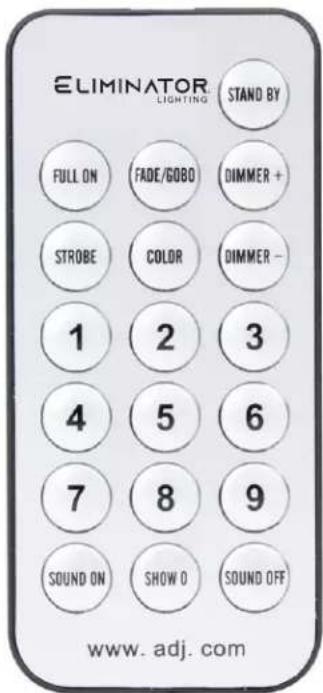
The UC-IR infrared remote gives you control of various functions. To control the fixture you must aim the remote at the front of the fixture, and the fixture's infrared sensor must be switched on, as described in the Operation Instructions section of this manual. Maximum range is 30 feet. Please note that the fixture only responds to the remote when the fixture is set to primary mode.
STAND BY - Pressing this button will blackout the fixture. Press this button again to return to original state.
FULL ON - Press and hold to fully illuminate the unit. The unit will return to its previous state when the button is released.
FADE/GOBO - Activates color fade mode.
“DIMMER +” and “DIMMER -” - Adjust the color output intensity in static color mode.
STROBE - Press and hold to activate the strobe effect.
COLOR - Press this button to activate color control. Use buttons 1-9 to select your desired color.
1-9 - These buttons will allow you to select either a particular show option or color option, depending on which operating mode the fixture is in.
SOUND ON & OFF - These buttons activate and deactivate the sound active mode.
SHOW 0 - This activates the show mode. Use buttons 1-9 to select your desired show. Press the Show 0 button twice to run show 10, and button 1 twice to run show 11.
text_image
ELIMINATOR® LIGHTING STAND BY FULL ON FADE/GOBO DIMMER + STROBE COLOR DIMMER - 1 2 3 4 5 6 7 8 9 SOUND ON SHOW O SOUND OFF www. adj. comDMX TRAITS
| CHANNEL | DMX VALUES | FUNCTION | ||||
| 4CH | 5CH 6 | CH 9C | H 10C | H | ||
| 1 1 | 1 1 0 | 00 - 2 | 55 Red, 0% to | 100% | ||
| 2 2 | 2 2 0 | 00 - 2 | 55 Green, 0% | to 100% | ||
| 3 3 | 3 3 0 | 00 - 2 | 55 Blue, 0% to | 100% | ||
| 4 4 | 4 4 0 | 00 - 2 | 55 UV, 0% to | 100% | ||
| 5 5 5 | Shutter/Strobe | |||||
| 000 - 031 LED Off | ||||||
| 032 - 063 LED On | ||||||
| 064 - 095 Strobing, slow to fast | ||||||
| 096 - 127 LED On | ||||||
| 128 - 159 Strobe Pulse, slow to fast | ||||||
| 160 - 191 LED On | ||||||
| 192 - 223 Random Strobe, slow to fast | ||||||
| 224 - 255 LED On | ||||||
| 5 6 | 6 6 00 | 0 - 255 Master Dimmer, 0% to | 100% | |||
| 7 | 7 | Program Selection Mode | ||||
| 000 - 051 Dimming Mode | ||||||
| 052 - 102 Color Macro Mode | ||||||
| 103 - 153 Color Change Mode | ||||||
| 154 - 204 Color Fade Mode | ||||||
| 205 - 255 Sound Active Mode | ||||||
| 8 | 8 | 000 - 255 | Color Macro Mode, see Color Macro Chart sec-tion of this manual for details | |||
| Color Change Programs | ||||||
| 000 - 015 Color Change 1 | ||||||
| 016 - 031 Color Change 2 | ||||||
| 032 - 047 Color Change 3 | ||||||
| 048 - 063 Color Change 4 | ||||||
| 064 - 079 Color Change 5 | ||||||
| 080 - 095 Color Change 6 | ||||||
| 096 - 111 Color Change 7 | ||||||
| 112 - 127 Color Change 8 | ||||||
| 128 - 143 Color Change 9 | ||||||
| 144 - 159 Color Change 10 | ||||||
| 160 - 175 Color Change 11 | ||||||
| 176 - 191 Color Change 12 | ||||||
| 192 - 207 Color Change 13 | ||||||
| CONTINUED ON NEXT PAGE | ||||||
DMX TRAITS
| CHANNEL | DMX VALUES | FUNCTION | ||||
| 4CH | 5CH 6 | CH 9CH | H 10CH | |||
| 8 | 8 | Color Change Programs (continued) | ||||
| 208 - 223 Color Change 14 | ||||||
| 224 - 239 Color Change 15 | ||||||
| 240 - 255 Color Change 16 | ||||||
| Color Fade Programs | ||||||
| 000 - 015 Color Fade 1 | ||||||
| 016 - 031 Color Fade 2 | ||||||
| 032 - 047 Color Fade 3 | ||||||
| 048 - 063 Color Fade 4 | ||||||
| 064 - 079 Color Fade 5 | ||||||
| 080 - 095 Color Fade 6 | ||||||
| 096 - 111 Color Fade 7 | ||||||
| 112 - 127 Color Fade 8 | ||||||
| 128 - 143 Color Fade 9 | ||||||
| 144 - 159 Color Fade 10 | ||||||
| 160 - 175 Color Fade 11 | ||||||
| 176 - 191 Color Fade 12 | ||||||
| 192 - 207 Color Fade 13 | ||||||
| 208 - 223 Color Fade 14 | ||||||
| 224 - 239 Color Fade 15 | ||||||
| 240 - 255 Color Fade 16 | ||||||
| Sound Active Programs | ||||||
| 000 - 015 Sound Active Mode 1 | ||||||
| 016 - 031 Sound Active Mode 2 | ||||||
| 032 - 047 Sound Active Mode 3 | ||||||
| 048 - 063 Sound Active Mode 4 | ||||||
| 064 - 079 Sound Active Mode 5 | ||||||
| 080 - 095 Sound Active Mode 6 | ||||||
| 096 - 111 Sound Active Mode 7 | ||||||
| 112 - 127 Sound Active Mode 8 | ||||||
| 128 - 143 Sound Active Mode 9 | ||||||
| 144 - 159 Sound Active Mode 10 | ||||||
| 160 - 175 Sound Active Mode 11 | ||||||
| 176 - 191 Sound Active Mode 12 | ||||||
| 192 - 207 Sound Active Mode 13 | ||||||
| 208 - 223 Sound Active Mode 14 | ||||||
| CONTINUED ON NEXT PAGE | ||||||
DMX TRAITS
| CHANNEL | DMX VALUES | FUNCTION | ||||
| 4CH | 5CH 6 | CH 9CH | H 10CH | |||
| 8 | 8 | Sound Active Programs (continued) | ||||
| 224 - 239 Sound Active Mode 15 | ||||||
| 240 - 255 Sound Active Mode 16 | ||||||
| 9 | 9 | 000 - 255 Program Speed, slow to fast | ||||
| Sound Sensitivity | ||||||
| 000 - 031 Off | ||||||
| 032 - 255 Least Sensitivie to Most Sensitive | ||||||
| 10 | Dimmer Curves | |||||
| 000 - 020 Standard | ||||||
| 021 - 040 Stage | ||||||
| 041 - 060 TV | ||||||
| 061 - 080 Architectural | ||||||
| 081 - 100 Theatre | ||||||
| 101 - 255 Default to Unit Setting | ||||||
- When Channel 7 is between the values of 0-51, Channels 1-4 are used, and Channel 5 will control strobing.
- When Channel 7 is between the values of 52-102, Channel 8 is in Color Macros Mode, and Channel 5 will control strobing.
- When Channel 7 is between the values of 103-153, Channel 8 is in Color Change Mode, and Channel 9 will control the color change speed.
- When Channel 7 is between the values of 154-204, Channel 8 is in Color Fade Mode, and Channel 9 will control the color fade speed.
- When Channel 7 is between the values of 205-255, Channel 8 is in Sound Active Mode, and Channel 9 will control the sound sensitivity.
COLOR MACROS CHART
| COLOR NO. D | MX VALUE | COLOR INTENSITY | |||
| RED GREEN BLUE UV | |||||
| Color 0 000 | 0 0 0 0 | ||||
| Color 1 001 | - 004 80 255 234 | 80 | |||
| Color 2 005 | - 008 80 255 164 | 80 | |||
| Color 3 009 | - 012 77 255 112 | 77 | |||
| Color 4 013 | - 016 117 | 255 83 83 | |||
| Color 5 017 | - 020 | 160 255 77 77 | |||
| Color 6 021 | - 024 | 223 255 83 83 | |||
| Color 7 025 | - 028 | 255 243 77 77 | |||
| Color 8 029 | - 032 | 255 200 74 74 | |||
| Color 9 033 | - 036 | 255 166 77 77 | |||
| Color 10 | 037 - 040 | 255 125 74 74 | |||
| Color 11 | 041 - 044 | 255 97 77 74 | |||
| Color 12 | 045 - 048 | 255 71 77 71 | |||
| Color 13 | 049 - 052 | 255 | 83 | 134 | 83 |
| Color 14 | 053 - 056 | 255 | 93 | 182 | 93 |
| Color 15 | 057 - 060 | 255 96 236 96 | |||
| Color 16 | 061 - 064 | 238 | 93 | 255 | 93 |
| Color 17 | 065 - 068 | 196 87 255 87 | |||
| Color 18 | 069 - 072 | 150 | 90 | 255 | 90 |
| Color 19 | 073 - 076 | 100 | 77 | 255 | 77 |
| Color 20 | 077 - 080 77 | 100 255 77 | |||
| Color 21 | 081 - 084 67 | 148 255 67 | |||
| Color 22 | 085 - 088 77 | 195 255 77 | |||
| Color 23 | 089 - 092 77 | 234 255 77 | |||
| Color 24 | 093 - 096 | 158 255 144 144 | |||
| Color 25 | 097 - 100 | 255 251 153 153 | |||
| Color 26 | 101 - 104 | 255 175 147 147 | |||
| Color 27 | 105 - 108 | 255 138 186 138 | |||
| Color 28 | 109 - 112 255 | 147 251 147 | |||
| Color 29 | 113 - 116 | 151 138 255 138 | |||
| Color 30 | 117 - 120 151 | 138 255 138 | |||
| Color 31 | 121 - 124 | 138 | 169 | 255 | 138 |
| Color 32 | 125 - 128 | 255 255 255 255 | |||
| Color 33 | 129 - 132 | 255 206 143 0 | |||
| Color 34 | 133 - 136 | 254 177 153 0 | |||
| Color 35 | 137 - 140 | 254 | 192 | 138 | 0 |
| Color 36 | 141 - 144 | 254 | 165 | 98 | 0 |
| CONTINUED ON NEXT PAGE | |||||
COLOR MACROS CHART
| COLOR NO. D | MX VALUE | COLOR INTENSITY | |||
| RED GREEN BLUE UV | |||||
| Color 37 145 | - 148 254 121 0 | 0 | |||
| Color 38 149 | - 152 176 17 0 0 | ||||
| Color 39 153 | - 156 96 0 11 0 | ||||
| Color 40 157 | - 160 234 139 1 | 71 0 | |||
| Color 41 161 | - 164 224 5 97 0 | ||||
| Color 42 165 | - 168 175 77 173 0 | ||||
| Color 43 | 169 - 172 | 119 | 130 | 199 | 0 |
| Color 44 173 | - 176 147 164 2 | 12 0 | |||
| Color 45 177 | - 180 88 2 63 0 | ||||
| Color 46 181 | - 184 | 0 38 86 0 | |||
| Color 47 185 | - 188 | 0 142 208 0 | |||
| Color 48 189 | - 192 52 148 209 0 | ||||
| Color 49 193 | - 196 | 1 134 201 0 | |||
| Color 50 197 | - 200 | 0 145 212 0 | |||
| Color 51 201 | - 204 255 0 0 0 | ||||
| Color 52 205 | - 208 | 0 255 0 0 | |||
| Color 53 | 209 - 212 | 0 | 83 | 115 | 0 |
| Color 54 213 | - 216 | 0 97 166 0 | |||
| Color 55 217 | - 220 | 1 100 167 0 | |||
| Color 56 221 | - 224 | 0 40 86 0 | |||
| Color 57 225 | - 228 209 219 1 | 82 0 | |||
| Color 58 229 | - 232 42 165 85 | 0 | |||
| Color 59 233 | - 236 | 0 46 35 0 | |||
| Color 60 237 | - 240 | 8 107 222 0 | |||
| Color 61 241 | - 244 107 156 2 | 31 0 | |||
| Color 62 245 | - 248 165 198 2 | 47 0 | |||
| Color 63 249 | - 252 | 0 0 255 0 | |||
| Color 64 253 | - 255 | 0 0 0 255 | |||
BATTERY STATUS AND RECHARGE
Battery Status:
This function is used to check the remaining battery life. Plug the fixture in and press the MODE button until “bXXX” is displayed. “XXX” represents an number between “000” and “100”. The number that is displayed is the remaining battery life percentage. If “b---” is displayed, it means the battery is dead, or that the unit is running on AC power. Please do not let the battery die completely, as this severely shortens the life of the battery.
Example: If "b050" is displayed, the battery is has half of its charge remaining. If "b025" is displayed, the battery has 25% of its charge remaining.
NOTE: The digital display will flash when the battery is charging, or if the battery life is below 30%.
NOTE: After 20 seconds of inactivity, the display will revert back to the battery life display.
Battery Recharging: To recharge the battery, plug the supplied AC cord into the AC input on the side of the unit, and plug the other end into a matching power supply. It takes about 4 hours for the battery to reach full charge. The display will STOP flashing when the unit reaches 100% charge.
NOTE: When unplugging the unit from charging and then applying power via battery, there will be a minimal charge drop.
For a faster recharge, put the Load Switch in the "Off" position and the Battery Switch in the "ON" position.
POWER CORD DAISY CHAIN
This feature allows the fixtures to be connected to one another using the IEC input and output sockets.
The maximum number of units that can be connected in this way is 25 fixtures. A new power outlet is required to accommodate any additional fixtures.
All linked fixtures must be of the same make and model type. DO NOT mix fixtures.
PHOTOMETRIC CHART
| R | D30 | 612 | 170.5 | 73.6 | 46.4 | 26.2 | lux |
| G | D30 | 676 | 190.3 | 90.1 | 55 | 33.8 | |
| B | D30 | 904 | 362 | 120.6 | 93.3 | 58.8 | |
| UV | D30 | 96.9 | 26.2 | 11 | 5.9 | 3.7 | |
| RGB+UV | D30 | 2250 | 438 | 332 | 172.1 | 112.7 |
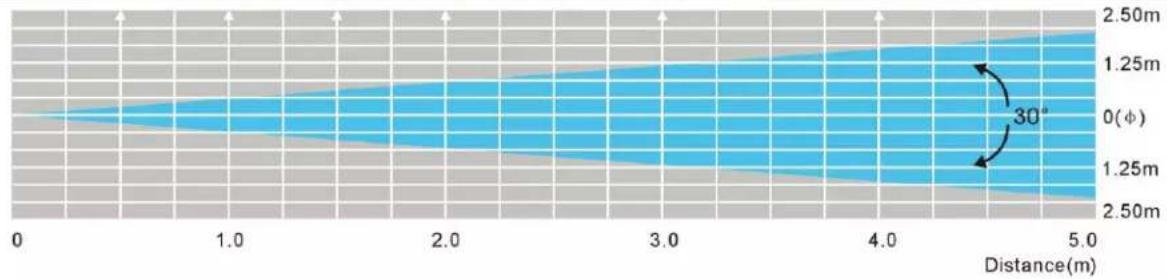
area
| Distance(m) | Value | |-------------|-----------| | 0 | 0 | | 1.0 | 1.25m | | 2.0 | 1.25m | | 3.0 | 1.25m | | 4.0 | 1.25m | | 5.0 | 2.50m |DIMMER CURVE

line
| t (ms) | Dimmer | | ------ | ------ | | 0 | 0% | | rise | 100% | | down | 100% || Ramp Effect | 0 255 OS (Fade Time) (Fade Time) 0 255 1S | |||
| T_rise (ms) | T_down (ms) | T_rise (ms) | T_down (ms) | |
| Standard | 0 | 0 | 0 | 0 |
| Stage | 780 | 1100 | 1540 | 1660 |
| TV | 1180 | 1520 | 1860 | 1940 |
| Architectural | 1380 | 1730 | 2040 | 2120 |
| Theatre | 1580 | 1940 | 2230 | 2280 |
FUSE REPLACEMENT
Disconnect the unit from its power source, then remove the power cord from the unit. Locate the fuse holder inside the power socket. Carefully insert a flat-head screw driver into the power socket and gently pry out the fuse holder. Remove the bad fuse and replace with a new one of the same rating. Please note that the fuse holder also includes a holder for a spare fuse.
TROUBLE SHOOTING
Listed below are common problems that you may encounter, along with potential solutions.
Unit does not respond to DMX:
Check that the DMX cables are connected and wired correctly (pin 3 is "hot"; it is common on some other DMX devices that pin 2 may be "hot"). Verify that all cable are connected to the correct connectors, as the way in which the input and outputs are connected can affect operation.
Unit does not respond to sound:
- Quiet or high pitched sounds may not activate the unit.
- Verify that Sound Active mode is activated.
CLEANING
Due to fog residue, smoke, and dust, cleaning of the internal and external optical lenses and mirror should be carried out periodically. Cleaning frequency depends on the environment in which the fixture operates. In heavy club use, cleaning on a monthly basis is recommended in order to ensure longevity and crisp output.
- Use normal glass cleaner and a soft cloth to wipe down the outside casing.
- Clean the external optics with glass cleaner and a soft cloth every 20 days.
• Always be sure to dry all parts completely before plugging the unit back in.
SPECIFICATIONS
- Battery powered ultra bright Par 64 with 172, 10mm, 0.07W LEDs (56 Red, 60 Green, 56 Blue and 1 x 3W UV LEDs)
- Smooth RGB+UV color mixing with rich palettes of color created by mixing the Red, Green, Blue and UV LEDs (fast or slow color change operation)
- Rechargeable Lithium battery built-in to fixture
- Long Life LEDs (Rated at approximately 50,000 hrs.)
• 5 DMX Channels: 4, 5, 6, 9 & 10 channels - 5 Operational modes: Auto Run Mode (16 Color Change Mode, 16 Color Fade Modes, & 1 Combined Mode), Sound Active Mode (16 Modes), RGB + UV Dimmer Mode, Static Color Mode (64 Colors), and DMX Controlled
- Flicker Free
• 64 built-in Color Macros
• LED pulse and strobe effect
• 30-degree beam angle
• Electronic Dimming: 0 - 100% - Linkable via 3-pin XLR cable
• With Wired Digital Communication Network - IEC AC Power In/Out on rear to daisy chain power (Up to 25 Mega Go Par64 Plus's)
• 4-button LED display on rear panel - Dual yoke system allows fixture to be hung or set on the ground
• Power Draw: 24W - Compatible with LED RC2 wireless remote control up to 30 ft./10M (sold separately), UC IR wireless remote (sold separately)
- Rechargeable Lithium battery life
• Multi-voltage Operation: AC 100V/60Hz - 240V/50Hz - Dimensions (LxWxH): 10.25" x 10.25" x 4.25"/ 261x260x110mm
• Weight: 5 lbs. /2.2 kgs.
Battery Specifications:
- Battery Life With Full Charge: 16 Hours (Single Color); 16 Hours (Sound Active); 16 Hours (Fade Mode); 5.5 Hours (Full On)
- Battery Charge Time: 4 Hours (with Load Switch Off)
- Battery Lifetime: Average Lifetime is 500 Charges (This depends on charging frequency)
- Battery Type: Fixed Lithium Battery
• Battery Energy: 48.84WH (Watt Hours)
• Battery Weight: 0.6lbs. / 0.28kg - Battery Voltage: 11.1V
• Battery Capacity: 4.4AH
• Total Lithium Ion Cells: 6pcs - Battery Wrap Material: PVC Sleeving + Highland Barley Paper
DIMENSIONAL DRAWINGS
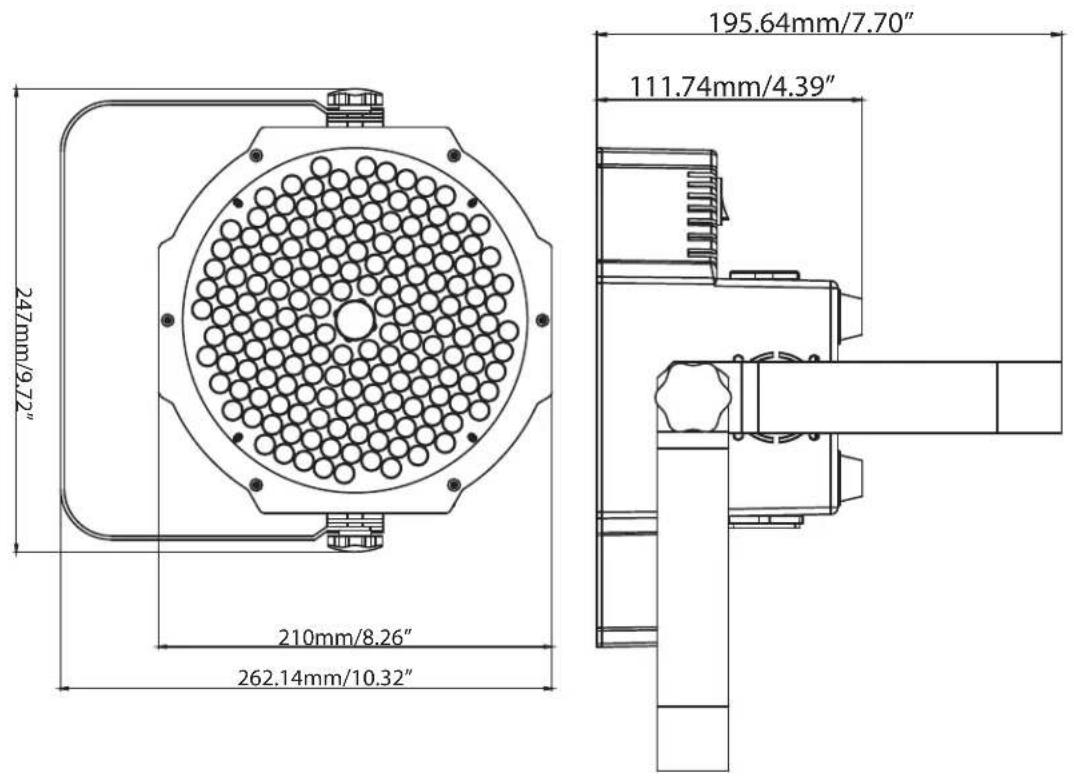
text_image
247mm/9.72" 210mm/8.26" 262.14mm/10.32" 195.64mm/7.70" 111.74mm/4.39"This page intentionally left blank.