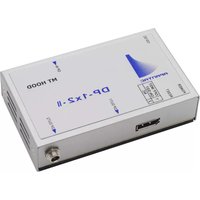
DP-1x2-II - Receiver Apantac - Free user manual and instructions
Find the device manual for free DP-1x2-II Apantac in PDF.


| Product Type | Video Distribution Amplifier (Receiver) |
| Brand | Apantac |
| Model | DP-1x2-II |
| Inputs | 1x BNC (SDI/Composite) |
| Outputs | 2x BNC (SDI/Composite) |
| Supported Resolutions | Up to 1080p (1920x1080) |
| Video Bandwidth | 1.485 Gbps (3G-SDI compatible) |
| Signal Type | SDI, HD-SDI, 3G-SDI |
| Power Supply | DC 5V, 1A (via included adapter) |
| Power Consumption | 2.5W (typical) |
| Dimensions (W x D x H) | 100mm x 65mm x 25mm |
| Weight | 180g |
| Housing Material | Aluminum alloy |
| Operating Temperature | 0°C to 50°C |
| Storage Temperature | -20°C to 70°C |
| Relative Humidity | 20% to 90% (non-condensing) |
| Certifications | CE, FCC, RoHS |
| Warranty | 1 year limited |
| Included Accessories | Power adapter, user manual, mounting brackets |
| Installation | Desktop or wall-mountable (brackets included) |
| Maintenance | Keep dry; clean with soft cloth; no user-serviceable parts inside |
| Safety | Use only provided power adapter; avoid liquids; disconnect when not in use |
| Repair & Spare Parts | Contact Apantac support for service; no spare parts available to end users |
| Compliance | Designed for professional AV use |
Frequently Asked Questions - DP-1x2-II Apantac
User questions about DP-1x2-II Apantac
0 question about this device. Answer the ones you know or ask your own.
Ask a new question about this device
Download the instructions for your Receiver in PDF format for free! Find your manual DP-1x2-II - Apantac and take your electronic device back in hand. On this page are published all the documents necessary for the use of your device. DP-1x2-II by Apantac.
USER MANUAL DP-1x2-II Apantac
2 Port DisplayPort SST DA/MST Hub USER MANUAL
DP-1x2-II USER MANUAL v.1.3

Overview
DP-1x2-II is a high-speed 2 port DisplayPort splitter/distribution amplifier targeted for audio/video de-multiplexing and in distribution for applications such as notebook computers, docking stations, video hub, 4K2K TV/displays, daisy chainable monitors, digital signages and more. It consists of one DisplayPort input and two dual mode output ports, that are configurable as either DisplayPort or HDMI.
Package Contents
1 x DP-1x2-II
- 1 x User manual
■ 1 x Power adapter DC12V with lock
- 4 x Foot pads
Features
■ Support DisplayPort 1.2a
■ Support DisplayPort HDCP1.3
■ Support Link rate HBR2/HBR/RBR.
■ Support SST and MST mode.
■ Compliant with DisplayPort 1, 2, or 4 lanes.
Specifications
| Function | DP-1x2-II |
| DisplayPort Input | 1 |
| DisplayPort Output | 2 |
| Compliance | DisplayPort 1.2a / HDCP 1.3 |
| Max. Resolution | 4Kx2K@60 |
| Max. Data Rate | 21.6Gbps |
| Link Rate | HBR2/HBR/RBR |
| DIP SWITCH | 2pin: SST/MST Selection |
| RESET Key | TACT SW x 1 |
| POWER Display | Green LED x 1 |
| Operating Temperature | 0° to 40°C |
| Storage Temperature | -20° to 60°C |
| Humidity | 0 - 80% RH, Non-Condensing |
| Power Supply | 12V/1A DC |
| Weight | 310g |
| Dimensions (LxWxH) | 156x83x25mm |
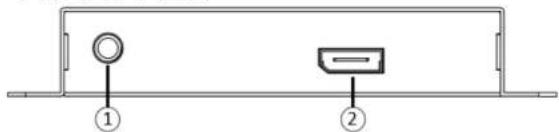
FRONT VIEW
-
POWER JACK 12V DC
-
DisplayPort IN
REAR VIEW

- DisplayPort OUT
- Reset Key
- MODE Key
- POWER LED
| DIP Switch Setting | |
| PIN1 | MODE |
| OFF | MST |
| ON | SST |
SST: All the output screen is the same single.

MST: Extend the single video source to all outputs.
※At MST mode the highest output resolution will decrease because the total bandwidth of 21.6 Gbps is shared among all monitors.

※When the mode select is ready, please restart the power or pressing Reset Key
Installation
- Connect the DP cable with the PC and the
port - Connect the DP cable with the monitor and the
ports - Connect the power cord and turn on the DP-1x2-II
- Turn on the PC and monitor
EDID
DisplayPort splitters do not have capability of storing the EDID, so EDID is passed from the display to the source. When there are two displays, it will use whichever the EDID is sent first, it will use that EDID. If you remove the displays from the splitter, the splitter will keep the last EDID until power cycle.
Compatibility Tests
Due to the different interpretations of DisplayPort modes by different major graphics accelerator companies, it is important to provide detail compatibility test data as follows,
Test Equipment
| Graphics Card 1 | GTX 1050Ti (NVIDIA, OS: WIN 10) |
| Graphics Card 2 | Radeon RX560 (AMD: OS: WIN 7) |
| Display 1 | Dell P2415Q |
| Display 2 | ASUS PB287 |
| Display 3 | AOC U2849VF |
| Display 4 | SAMSUNG LU28D590S |
| DisplayPort cable | LPC-1603 2m |
- SST connection diagram

- SST tests
DP-1x2-II (SST MODE)
| Resolutions/GFX card | OUTPUT1 | OUTPUT2 | OUTPUT1 | OUTPUT2 |
| GTX1050Ti | P2415Q | PB287 | PB287 | P2415Q |
| 4K@60Hz | Pass | Pass | Pass | Pass |
| 4K@30Hz | Pass | Pass | Pass | Pass |
| 1920x1080P@60Hz | Pass | Pass | Pass | Pass |
| Radeon RX560 | LU28D590S | U2849VF | U2849VF | LU28D590S |
| 4K@60Hz | Pass | Pass | Pass | Pass |
| 4K@30Hz | Pass | Pass | Pass | Pass |
| 1920x1080P@60Hz | Pass | Pass | Pass | Pass |
- MST connection diagram
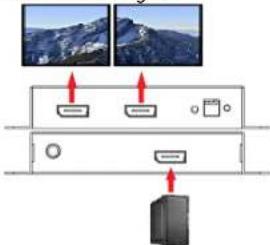
- MST testing
| DP-1x2-II (MST MODE) | ||||
| Resolutions/GFX card | OUTPUT1 | OUTPUT2 | OUTPUT1 | OUTPUT2 |
| GTX1050Ti | P2415Q | PB287 | U2849VF | LU28D590S |
| 4K@30Hz | 4K@30Hz | 4K@30Hz | 4K@30Hz | |
| LU28D590S | P2415Q | PB287 | U2849VF | |
| 4K@30Hz | 4K@30Hz | 4K@30Hz | 4K@30Hz | |
| Radeon RX560 | P2415Q | PB287 | U2849VF | LU28D590S |
| No output | No output | No output | No output | |
| Note: When Radeon RX560 in MST mode, there is no output | ||||
- DP++ testing
| INPUT | Not supported |
| Output | Not supported |

© 2019 APANTAC LLC. All rights reserved
10200 SW Allen Blvd, Suite C
Beaverton, OR 97005, USA
PHONE +1 503 968 3000, FAX +1 503 389 7921
The content of this document is provided in connection with Apantac LLC ("Apantac")
products. Apantac makes no representation or warranties with respect to the accuracy or completeness of the contents of this publication and reserves the right to make changes to specification and product descriptions at any time without notice
Brand : Apantac
Model : DP-1x2-II
Category : Receiver