S.B.G. -006 - Uncategorized ALM - Free user manual and instructions
Find the device manual for free S.B.G. -006 ALM in PDF.


| Product Type | Bluetooth Speaker |
| Model Number | S.B.G. -006 |
| Dimensions | 150 x 80 x 80 mm |
| Weight | 350 g |
| Power Source | Built-in Li-ion battery 3.7V 2000 mAh |
| Charging Time | Approx. 3 hours |
| Playback Time | Up to 10 hours at 50% volume |
| Connectivity | Bluetooth 5.0, range up to 10 m |
| Speaker Output | RMS 10 W (2 x 5 W) |
| Frequency Response | 80 Hz - 20 kHz |
| Main Functions | Wireless music streaming, hands-free calling, TF card playback, AUX input |
| Controls | Button control: power, volume, track, play/pause, call |
| Compatibility | Smartphones, tablets, laptops with Bluetooth |
| Maintenance | Wipe with soft dry cloth; avoid moisture |
| Safety Warnings | Do not disassemble, expose to water, or extreme temperatures |
| Spare Parts Available | Charging cable, battery |
| Operating Temperature | 0°C to 40°C |
| Package Contents | Speaker, Micro USB charging cable, AUX cable, User manual |
| Color Options | Black, White, Red |
| Warranty | 1 year limited warranty |
Frequently Asked Questions - S.B.G. -006 ALM
User questions about S.B.G. -006 ALM
0 question about this device. Answer the ones you know or ask your own.
Ask a new question about this device
Download the instructions for your Uncategorized in PDF format for free! Find your manual S.B.G. -006 - ALM and take your electronic device back in hand. On this page are published all the documents necessary for the use of your device. S.B.G. -006 by ALM.
USER MANUAL S.B.G. -006 ALM
- Operation Manual -
......Introduction
Features ....3
......Technical Spe
Core Operat
Panel Layout
......Pedal Effects
......Pedal Express
Bonus Patch Id
Limited War
Support....10
Introduction
The 'S.B.G' is a compact utility module intended for the interfacing of guitar effect pedals with your eurorack modular system.
It provides both attenuation and amplification of audio signals for level matching together with a crossfade control to conveniently adjust the wet/dry mix of a processed signal. The module also offers regulation of outgoing CV signals for safer use of pedal expression inputs.
Features
- Attenuation of outgoing modular audio signal sent to external effects.
- Amplification of returned audio signal to high modular signals (approx. 3db to 34db of gain)
- Clipping indication on over-amplification of returned signal.
- Manual cross fade between original 'dry' source signal and returned 'wet' signal.
- Regulation/conditioning of CV modulation signals intended for pedal expression inputs.
- Includes 'floating ring' cable for safe expression input connectivity.
- Reverse polarity protection.
- Skiff friendly
- Designed and Made in the UK.
Technical Specifications
• Supply: +/-12V
- Current Draw: \~30ma
- Size: 4 HP
• Depth: 22mm (including power header)
Core Operation
Panel Layout
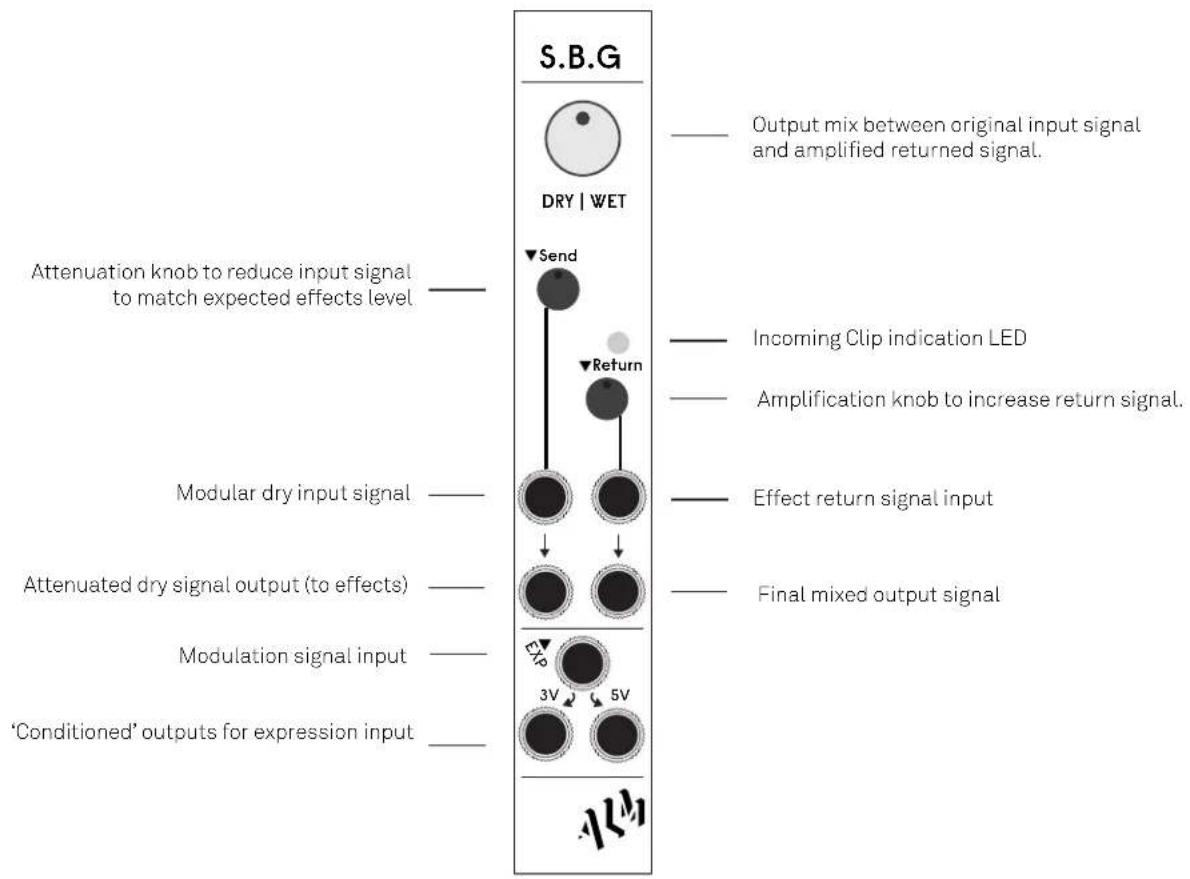
flowchart
graph TD
    A["S.B.G"] --> B["Output mix between original input signal and amplified returned signal."]
    A --> C["Attenuation knob to reduce input signal to match expected effects level."]
    A --> D["Modular dry input signal."]
    A --> E["Attenuated dry signal output (to effects)."]
    A --> F["Modulation signal input."]
    A --> G["'Conditioned' outputs for expression input."]
    A --> H["DRY | WET"]
    H --> I["Send"]
    H --> J["Return"]
    H --> K["Clip"]
    H --> L["3V"]
    H --> M["5V"]
    H --> N["Final mixed output signal."]
Pedal Effects Setup
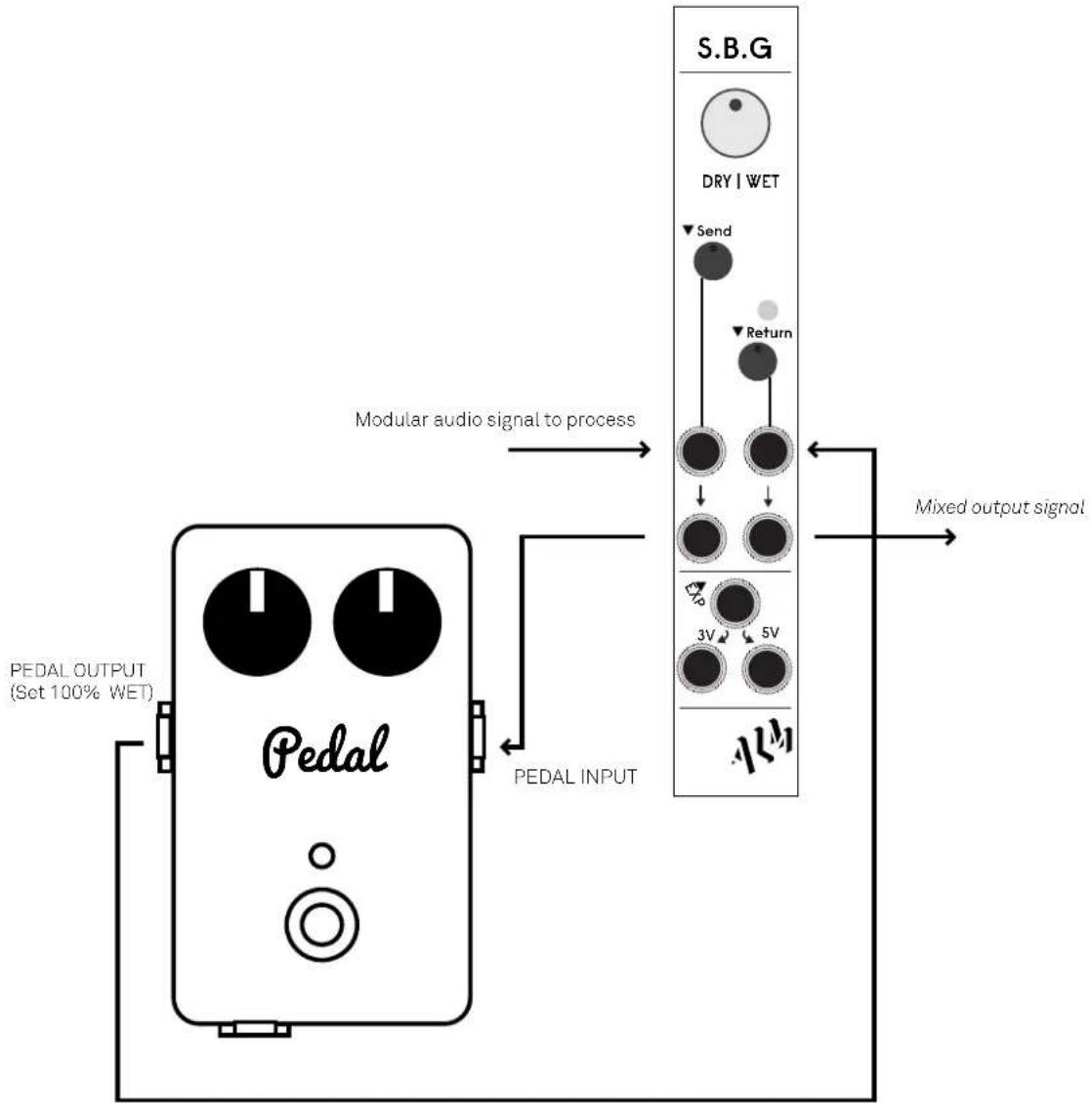
The following diagram shows how to connect an external effects pedal to the S.B.G for audio signal processing.;
flowchart
graph TD
    A["Pedal OUTPUT (Set 100% WET)"] --> B["Pedal INPUT"]
    B --> C["Modular audio signal to process"]
    C --> D["S.B.G"]
    D --> E["DRY | WET"]
    E --> F["Send"]
    E --> G["Return"]
    F --> H["3V"]
    G --> I["5V"]
    H --> J["Mixed output signal"]
    I --> J
Pedal return signal
To correctly set levels;
- Set pedal output to fully wet (mix or blend etc to maximum setting) so the pedal output is fully saturated with its effect. This is important.
- Connect pedal to SBG as indicated in the above diagram. Use 1/4" to 1/8" jack adaptors if needed to connect to pedal.
- Turn DRY|WET knob fully CW.
- Starting with both the SEND and RETURN mini potentiometers at approx 9 o'clock adjust until a clean fully wet signal is heard:
- The SEND mini pot ATTENUATES (lowers) the signal sent to the pedal. If you hear small clicks or distortion in the returned signal you likely need to INCREASE the attenuation thus lower the outgoing signal by turning the knob CCW.
- The RETURN mini pot AMPLIFIES the return signal to modular levels. If the red LED lights the signal is too loud and thus distorting. Reduce the signal level by turning CCW.
- Once you can hear a clean fully wet signal you are happy with adjust the DRY|WET knob to taste re-introducing the original dry signal. The WET|DRY knob mixes between the original non attenuated input signal and the amplified returned signal.
Pedal Expression Setup
The following diagram shows how to connect an the S.B.G to an expression input.
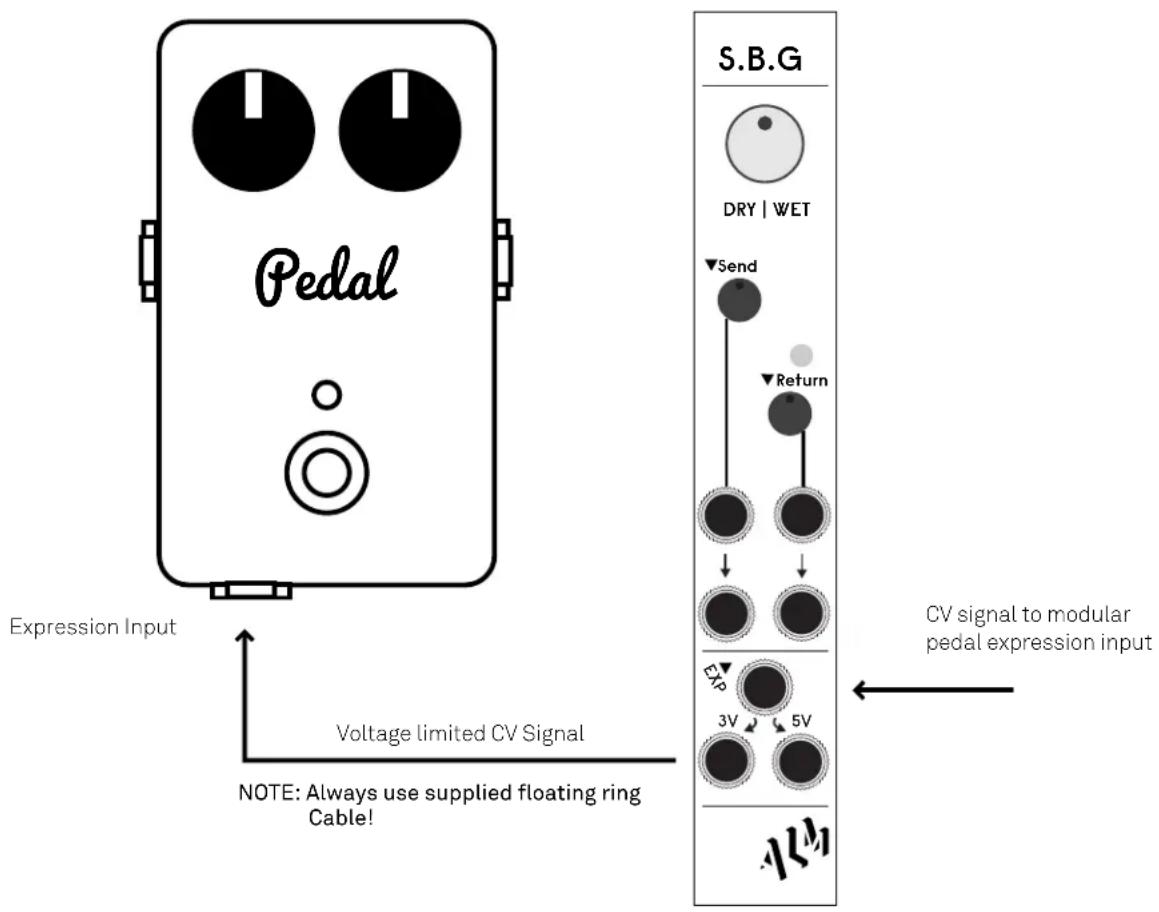
Passing a modular CV signal through the S.B.G will limit both its voltage level (as indicated) and its polarity (allowing only the positive part of the signal through). This conditions a modular CV signal to be more safely used with guitar pedal expression inputs. However for maximum safety:
- Always use the supplied ‘floating ring’ cable to connect to the pedals expression input.
- Always use the correct maximum voltage level for your pedal. Check with your pedal manufacturer if not sure.
- Only use with pedals which use cable tip for input (aka tip to potentiometer wiper or tip for return signal) not reference voltage. Most pedals are setup like this. If in doubt check with your pedal manufacturer.
ALM accepts no responsibility in damage done though mis-use!
Bonus Patch Ideas
DISTORTION - Patch the S.B.G in reverse; DRY|WET to Full CCW. Signal in to Return in, return out to send in, send out is distorted signal. Adjust RETURN knob till clip LED lights, then lower outgoing signal with SEND attenuator.
General signal amplification - With DRY|WET set to full CW use the right hand side return input and output can be used to amplify external signals to modular levels. This is also useful for amplifying Pamela firmware update audio files to expected levels.
Limited Warranty
From the date of manufacture this device is guaranteed for a period of 2 years against any manufacturing or material defects. Any such defects will be repaired or replaced at the discretion of ALM. This does not apply to;
• Physical damage arising for mistreating (i,e dropping, submerging etc).
- Damage caused by incorrect power connections.
• Overexposure to heat or direct sunlight.
- Damage caused by inappropriate or mis-use.
- Use of incorrect or non official firmware
No responsibility is implied or accepted for harm to person or apparatus caused through operation of this product.
By using this product you agree to these terms.
Support
For the latest news, additional info, downloads and firmware updates please visit the ALM website at http://busycircuits.com and follow @busycircuits on twitter.
Please send any questions or comments to info@busycircuits.com
AUM


Brand : ALM
Model : S.B.G. -006
Category : Uncategorized