FS-AC-7002-B - Uncategorized APC - Free user manual and instructions
Find the device manual for free FS-AC-7002-B APC in PDF.


User questions about FS-AC-7002-B APC
0 question about this device. Answer the ones you know or ask your own.
Ask a new question about this device
Download the instructions for your Uncategorized in PDF format for free! Find your manual FS-AC-7002-B - APC and take your electronic device back in hand. On this page are published all the documents necessary for the use of your device. FS-AC-7002-B by APC.
USER MANUAL FS-AC-7002-B APC
Publication Date: May 2017
natural_image
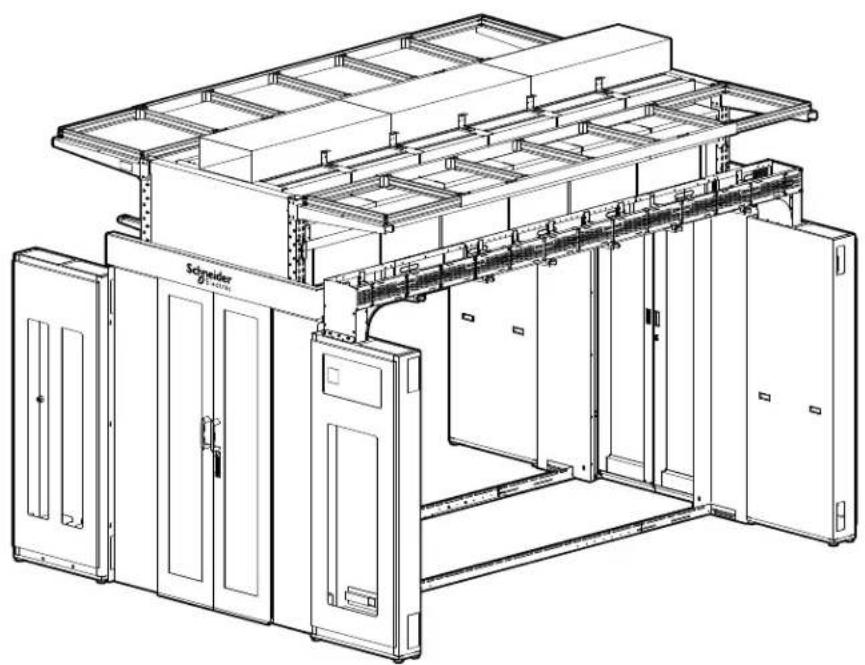
Technical line drawing of a large industrial control room with multiple compartments and a central storage unit (no text or symbols visible)Schneider Electric IT Corporation Legal Disclaimer
The information presented in this manual is not warranted by the Schneider Electric IT Corporation to be authoritative, error free, or complete. This publication is not meant to be a substitute for a detailed operational and site specific development plan. Therefore, Schneider Electric IT Corporation assumes no liability for damages, violations of codes, improper installation, system failures, or any other problems that could arise based on the use of this Publication.
The information contained in this Publication is provided as is and has been prepared solely for the purpose of evaluating data center design and construction. This Publication has been compiled in good faith by Schneider Electric IT Corporation. However, no representation is made or warranty given, either express or implied, as to the completeness or accuracy of the information this Publication contains.
IN NO EVENT SHALL SCHNEIDER ELECTRIC IT CORPORATION, OR ANY PARENT, AFFILIATE OR SUBSIDIARY COMPANY OF SCHNEIDER ELECTRIC IT CORPORATION OR THEIR RESPECTIVE OFFICERS, DIRECTORS, OR EMPLOYEES BE LIABLE FOR ANY DIRECT, INDIRECT, CONSEQUENTIAL, PUNITIVE, SPECIAL, OR INCIDENTAL DAMAGES (INCLUDING, WITHOUT LIMITATION, DAMAGES FOR LOSS OF BUSINESS, CONTRACT, REVENUE, DATA, INFORMATION, OR BUSINESS INTERRUPTION) RESULTING FROM, ARISING OUT, OR IN CONNECTION WITH THE USE OF, OR INABILITY TO USE THIS PUBLICATION OR THE CONTENT, EVEN IF SCHNEIDER ELECTRIC IT CORPORATION HAS BEEN EXPRESSLY ADVISED OF THE POSSIBILITY OF SUCH DAMAGES. SCHNEIDER ELECTRIC IT CORPORATION RESERVES THE RIGHT TO MAKE CHANGES OR UPDATES WITH RESPECT TO OR IN THE CONTENT OF THE PUBLICATION OR THE FORMAT THEREOF AT ANY TIME WITHOUT NOTICE.
Copyright, intellectual, and all other proprietary rights in the content (including but not limited to software, audio, video, text, and photographs) rests with Schneider Electric IT Corporation or its licensors. All rights in the content not expressly granted herein are reserved. No rights of any kind are licensed or assigned or shall otherwise pass to persons accessing this information.
This Publication shall not be for resale in whole or in part.
Table of Contents
General Information....1
Features....1
Loading Capacities....1
HyperPod SKU List. 2
Documentation Information ....3
Manual updates ....3
Unpacking and Inspecting 3
Safety 4
Important Safety Information ....4
Safety Recommendations for the HyperPod System ....5
Planning the Installation....6
General guidelines for installation 6
Enclosures and Power Equipment 6
Layout and Positioning ....7
List of Recommended Tools....8
Systems Overview 9
Basic configuration 9
Component Identification 10
HyperPod System Components ..... 10
Vertical Posts 11
FS-FM-1001-B - Vertical Post Assembly, 2750mm (Short) .....11
FS-FM-1002-B - Vertical Post Assembly, 3200mm (Tall) .....11
Width Beams 11
FS-FM-2001-B - Width Beam Assembly, 1200mm .....11
Telescoping Beams 12
FS-FM-3001-B - Telescoping Beam 12
End Cap Panels 13
FS-FM-4001-B - End Cap Assembly (Short)
FS-FM-4002-B - End Cap Assembly (Tall) 13
Door Frame Assembly 14
FS-DR-2001-B - Standard Door Frame 14
Door and Rail Assembly 15
FS-DR-1001-B - Door and rail assembly .....15
Windows, Rails, and Side Brushes. 16
FS-WI-1001-U - Window Assembly (270 x 600) .....16
FS-WI-1002-B - Window Rail Assembly ..... 16
FS-WI-1003-B - Window Brush Assembly 16
Row length brushes 17
FS-AC-2001-U 17
Roof Frame Assembly 18
FS-RF-2001-U - 4ft Aisle Simple Roof Panel, 300mm .....18
FS-RF-2002-U - 4ft Aisle Simple Roof Panel, 600mm .....18
FS-RF-2003-U - 4ft Aisle Simple Roof Panel for Sprinkler Option, 600mm . . . .18
Solid Roof Filler Panel Set 19
FS-RF-1001-B Solid Roof Filler Panel 19
Stop Rail 20
FS-FM-5001-B Stop Rail Assembly 20
Seal Kit 21
FS-AC-1001-U Sealing Kit . . . . . . . . . . . . . . . . . . . . . . . . . . . . . . . . . . . . . . . . . . . . . . . . . . . . . . . 21
Blanking Panels 22
FS-AC-5001-U - 300mm (12 in.) .....22
FS-AC-5002-U - 600mm (24 in.) .....22
FS-AC-5003-U - 750mm (28 in.) .....22
FS-AC-5004-U - 800mm (30 in.) .....22
Installation Procedure Overview....23
Safety 23
Customizing the Installation 24
Installation locations for width beams and telescoping beams .....24
Basic Frame Assembly 25
Frame end configuration .....25
Telescoping beam assembly 26
Temporary frame support 28
Secure the frame to the floor 29
Install the end caps ....30
Install the doors: ....32
Install frame seals 40
Install the windows 41
Row length brush installation 43
Roof panel installation 45
Stop rails 46
Install the blanking panels .....48
Accessory Kits 51
End Row Transition Cabinets....51
FS-AC-7001-B - Distribution Cabinet, MH50 ....51
FS-AC-7002-B - Distribution Cabinet, Split .....51
FS-AC-7003-B - Distribution Cabinet, Solid .....51
Drop Roof .52
FS-RF-3001-U Drop roof panel, 300mm .....52
FS-RF-3002-U Drop roof mounting rail, 300mm .....52
FS-RF-3003-U Drop roof panel, 600mm....52
FS-RF-3004-U Drop roof mounting rail, 600mm .....52
FS-RF-3005-U Drop roof panel, 750mm .....52
FS-RF-3006-U Drop roof mounting rail, 750mm .....52
Ceiling Panel Lock Systems....53
ACDC2016 Ceiling Panel Lock System, 100-120V (with power supply) .....53
ACDC2017 Ceiling Panel Lock System, 200-240V (with power supply) ..... 53
ACDC2015 Ceiling Panel Lock System, (no power supply) 54
Rack Height Adapters 55
FS-AC-8001-U - Rack Height Adapter, 300mm ..... 55
FS-AC-8002-U - Rack Height Adapter, 600mm ..... 55
FS-AC-8003-U - Rack Height Adapter, 750mm ....55
FS-AC-8004-U - Rack Height Adapter, 800mm ..... 55
Cantilever Support Arms 56
FS-AC-3001-B - Large Cantilever Support Arms 56
FS-AC-3003-B - Mini Cantilever Arms 56
FS-AC-3002-B - Overhead Support Frame, 8 - 12ft 57
Power Raceway 58
FS-AC-4001-B - Power Raceway End Module 58
FS-AC-4002-B - Power Raceway Main Module ....58
FS-AC-4003-B - 300mm Side Cover Pack .... 58
FS-AC-4004-B - 50/150mm Side Cover Pack .... 58
FS-AC-4005-B - Power Raceway Extension Module 58
Lighting kits 59
ACDC2018, ACDC2019 59
FS-AC-6001-B - Lighting Bracket Kit 60
Overhead Duct Riser 61
FS-RF-5001-B - Overhead Duct Riser, 8ft 61
FS-RF-5002-B - Overhead Duct Riser, 10ft 61
FS-RF-5003-B - Overhead Duct Riser, 12ft 61
Crossover Tray....62
FS-AC-4006-B - Aisle Crossover Tray 62
Single Swing Door Assembly 62
FS-DR-3001-B - Swing Door 62
Installation of Optional Accessories 63
Transition Cabinets 64
Crossover Tray....68
Mini Cantilever Arms 69
Power Raceway 72
Power Raceway Configuration options 72
Post Cantilevers and Suspension System 77
Possible Configurations for Post Cantilevers: 77
Standard configuration installation 78
Dropped Roof....81
Install the ceiling panels 83
Solid Roof Filler Panel for Drop Roof 84
Ceiling Panel Dropout Control System 85
System Diagram 86
Power Supply Component Identification 87
Power supply installation procedure 87
Electromagnetic locks .88
Temperature switches....89
Electrical boxes and cable routing 90
Alarm beacon installation .....91
Smoke detector installation....92
Maintenance steps for dropout ceiling system: 94
Troubleshooting diagram 95
Overhead Duct Mounting Riser Roof .96
Riser Assembly 97
Lighting Kit 101
Lighting System Setup and Operation 106
Rack Height Adapter....109
FS-AC-8001-U 109
FS-AC-8002-U 109
FS-AC-8003-U 109
FS-AC-8004-U 109
Single Swing Door 111
Features
The HyperPod ^™ is a free standing air containment system. Fully configured racks can be deployed or removed from the HyperPod as necessary. Schneider Electric racks or other EIA-310-D racks can be used in a HyperPod system.
The HyperPod includes the following features:
- Two heights available for vertical posts: Tall = 3200mm and Short = 2750mm
- Telescoping side beams can extend the HyperPod length from 8 to 12 ft.
- Additional telescoping beams can be added to the vertical posts to extend the Pod up to another 12 feet.
The basic HyperPod can be customized with the following accessories:
- Power Raceways
• Overhead ducts - Rack space blanking panels
- Cantilever support arms
• Overhead support frame - Door assemblies
• Height adapters accommodate multiple rack heights - Lighting assembly
• End Row Power Transition Cabinets - Drop roof
- Crossover tray
The HyperPod system provides a barrier between the hot exhaust and cold intake air streams in the IT environment. The separation of the hot and cold air streams in the environment increases the efficiency and effectiveness of the cooling system that supports the critical IT equipment. The separation will also allow for an elevated supply-air temperature to be provided by the cooling system since the mixing of hot and cold air is eliminated. The HyperPod System can be built using new or existing Schneider Electric equipment. This containment system is compatible with row, room, or external cooling solutions and available for cold or hot aisle containment.
This manual is a guide for the basic installation procedures for creating a HyperPod System
Loading Capacities
• End Frames (each): 550 lbs.
• Upper Telescoping Beams (each): 250 lbs.
• Large Cantilever (one side, system quantity is 2): 1500 lbs.
For balance, the load should be applied to both sides of the HyperPod. If Large Cantilevers are installed on only one side, the max loading rating is 974 lbs.
- Mini Cantilever (one side, system quantity is 6): 200 lbs.
• Total System: 4000 lbs.
HyperPod SKU List
This manual includes inventory and installation information for the following assemblies:
FS-FM-1001-B Vertical post (Short) FS-RF-1001-B Roof filler panel set
FS-FM-1002-B Vertical post (Tall) FS-RF-2001-U Simple roof panel, 300mm
FS-FM-2001-B Aisle width beam (4ft) FS-RF-2002-U Simple roof panel, 600mm
FS-FM-3001-B Aisle length beam (8-12ft) FS-RF-2003-U Simple roof panel with cutout, 600mm
FS-FM-4001-B End panel (Short) FS-RF-3001-U Drop roof mounting panel, 300mm
FS-FM-4002-B End panel (Tall) FS-RF-3002-U Drop roof mounting rail, 600mm
FS-FM-5001-B Aisle stop rail (8-12ft) FS-RF-3003-U Drop roof mounting panel, 300mm
FS-RF-3004-U Drop roof mounting rail, 600mm
FS-AC-1001-U Air sealing kit FS-RF-3005-U Drop roof mounting panel, 750mm
FS-AC-2001-U Row length brush strip FS-RF-3006-U Drop roof mounting rail, 750mm
FS-AC-3001-B Large cantilever arms FS-RF-5001-B Overhead duct mounting riser, 8ft.
FS-AC-3002-B Overhead support frame, 8-12ft. FS-RF-5002-B Overhead duct mounting riser, 10ft.
FS-AC-3003-B Mini cantilever arms FS-RF-5003-B Overhead duct mounting riser, 12ft.
FS-AC-4001-B Power raceway end module
FS-AC-4002-B Power raceway main module FS-WI-1001-U Window panel (2ft)
FS-AC-4003-B Power raceway 300mm side cover pack FS-WI-1002-B Window rail
FS-AC-4004-B Power raceway 50/150mm side FS-WI-1003-B Window frame brush strips cover pack
FS-AC-4005-B Power raceway extension module
FS-AC-4006-B Aisle crossover tray FS-DR-1001-B Dual sliding doors
FS-AC-5001-U Full rack blanking panel, 300mm FS-DR-2001-B Door frame
FS-AC-5002-U Full rack blanking panel, 600mm FS-DR-3001-B Swing door
FS-AC-5003-U Full rack blanking panel, 750mm
FS-AC-5004-U Full rack blanking panel, 800mm ACDC2015 Ceiling panel lock system (without power supply)
FS-AC-6001-B Bracket, lighting kit ACDC2016 Ceiling panel lock system 100-120V (with power supply)
FS-AC-7001-B Distribution cabinet, MH50 ACDC2017 Ceiling panel lock system 200-240V (with power supply)
FS-AC-7002-B Distribution cabinet, Split ACDC2018 Lighting kit with power supply
FS-AC-7003-B Distribution cabinet, Solid ACDC2019 Lighting kit without power supply
FS-AC-8001-U Rack height adapter, 300mm
FS-AC-8002-U Rack height adapter, 600mm
FS-AC-8003-U Rack height adapter, 750mm
FS-AC-8004-U Rack height adapter, 800mm
Documentation Information
All documentation is also available online at http://www.schneider-electric.com.
Manual updates
Check for updates to this manual on the Schneider Electric Web site, www.schneider-electric.com/support. Select the Download Documents and Software link under the Support tab and enter the manual part number or SKU for your equipment in the search field. See the back cover of this manual for the part number.
Unpacking and Inspecting
IMPORTANT: To avoid misplacing parts, do not leave boxes open following inspections. Reseal the boxes until those parts are ready to be installed. Follow the order of procedures in this manual to ensure proper installation.
If damage is noted to the shipping containers, inspect the contents for damage and notify the shipping carrier and Schneider Electric.
After opening a box, check the components in the box against the list of items in “Component Identification,” beginning on page. If any components are missing contact Schneider Electric at http://www.schneider-electric.com/support.

The shipping materials are recyclable. Save them for later use or dispose of them appropriately.
Important Safety Information
Read the instructions carefully to become familiar with the equipment before trying to install, operate, service, or maintain it. The following special messages may appear throughout this manual or on the equipment to warn of potential hazards or to call attention to information that clarifies or simplifies a procedure.
DANGER
DANGER indicates an imminently hazardous situation which, if not avoided, will result in death or serious injury.
WARNING
WARNING indicates a potentially hazardous situation which, if not avoided, can result in death or serious injury.
CAUTION
CAUTION indicates a potentially hazardous situation which, if not avoided, can result in minor or moderate injury.
NOTICE
NOTICE addresses practices not related to physical injury including certain environmental hazards, potential damage or loss of data.
Safety Recommendations for the HyperPod System
To reduce the possibility of injury or equipment damage, read and follow the safety recommendations.
Follow all local and agency safety requirements.
WARNING
TOOL USAGE HAZARD
Follow safety standards for all hand tools and power tools used. Read and follow the tool manufacturer's instructions. Follow the tool manufacturer's recommendations and recognized safety requirements for use of Personal Protection Equipment (PPE).
Failure to follow these instructions can result in death, serious injury, or equipment damage.
CAUTION
WORKING HEIGHT HAZARD
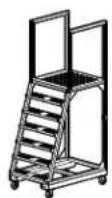
The working height for the assembly process can exceed 2.3 meters (7.5 feet). The use of stepladders or scaffolding will be required during assembly.
Failure to follow these instructions can result in serious injury or equipment damage.
CAUTION
LIFTING HAZARD
At least two people are required to install this equipment. Some parts may be heavy and/or excessive in size. For items weighing more than 25 lbs (12 kg), use more than one person.
Failure to follow these instructions can result in serious injury or equipment damage.
CAUTION
NO STEP HAZARD
Ceiling panels are not designed to support weight. Never lean or walk on the ceiling panels. DO NOT use ceiling panels to support power or data cables.
Failure to follow these instructions can result serious injury or equipment damage.
NOTE: The data center floor must be within 0.075^ from level for an 8-rack configuration, or within 0.035^ from level for a 16-rack configuration.
General guidelines for installation
Maintain a minimum clear space of 36 inches required from the top of the frame to overhead obstructions.
Maintain a minimum working space around the frame perimeter. Be sure to factor in the depth of the racks you will install. Use your deepest rack when calculating the outside aisle space around the HyperPod. (Finished size perimeter + 4 feet around all sides)
Install this equipment directly on a concrete floor.

See the documentation provided with each Schneider Electric product for additional instructions on installation. All documentation is also available on the Schneider Electric web site, www.schneider-electric.com.
Enclosures and Power Equipment

Refer to the instructions that come with your enclosures and power distribution equipment for information on how to install them.
Layout and Positioning
Referencing the ISX Designer report, determine the position of the main components, the total length of the planned Aisle Containment System and the aisle width. Using a chalk line or similar, lay out the perimeter making sure all corners are square.
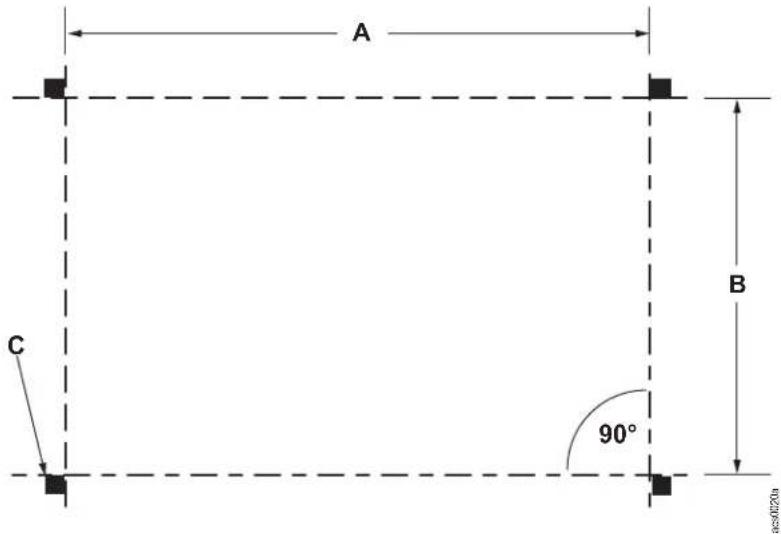
* Dimension A will vary depending on the type and number of racks installed (2421mm to 3621mm). Dimension B is equal to 1100mm. Item C notes the locations of the post feet provided in SKUs FS-FM-1001-B and FS-FM-1002-B.
Observe a four foot perimeter around the outside so that racks can be moved in and out of the pod
NOTE: A template is provided to assist proper drilling of holes into the floor to secure the vertical post feet.
List of Recommended Tools
Screwdriver
P1 and
P2 Phillips
Screwdriver
T-30, T-20, T-15
TORX
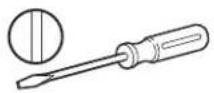
Standard screwdriver
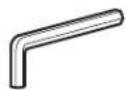
Hex wrench 3 mm, 6 mm
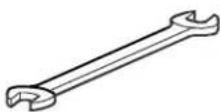
Wrench
6, 7, 8, 10, 11,
13, 14, 18, and
19mm
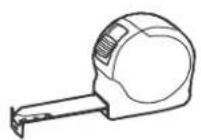
Tape measure Chalk line
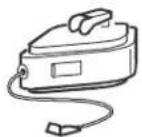
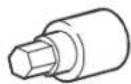
Hex socket
6.3 mm, 7 mm,
10 mm, 15 mm
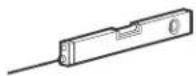
Level
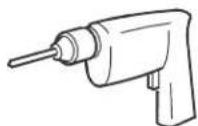
Drill with standard, Phillips, TORX bits
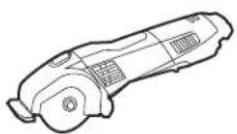
Rotary tool (e.g. Dremel®)
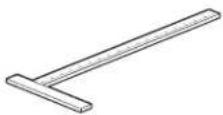
T-square
120 cm (48 in.)
minimum
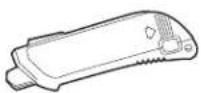
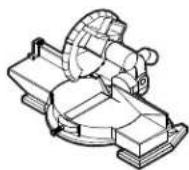
Self-retracting knife Miter saw Metal files
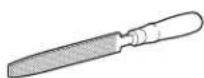
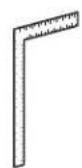
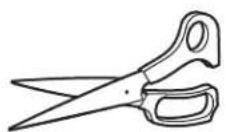
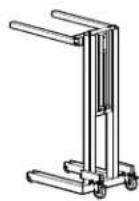
T-square Scissors Lift Ladder
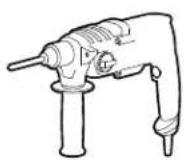
Drill and concrete bits
Systems Overview
Basic configuration
natural_image
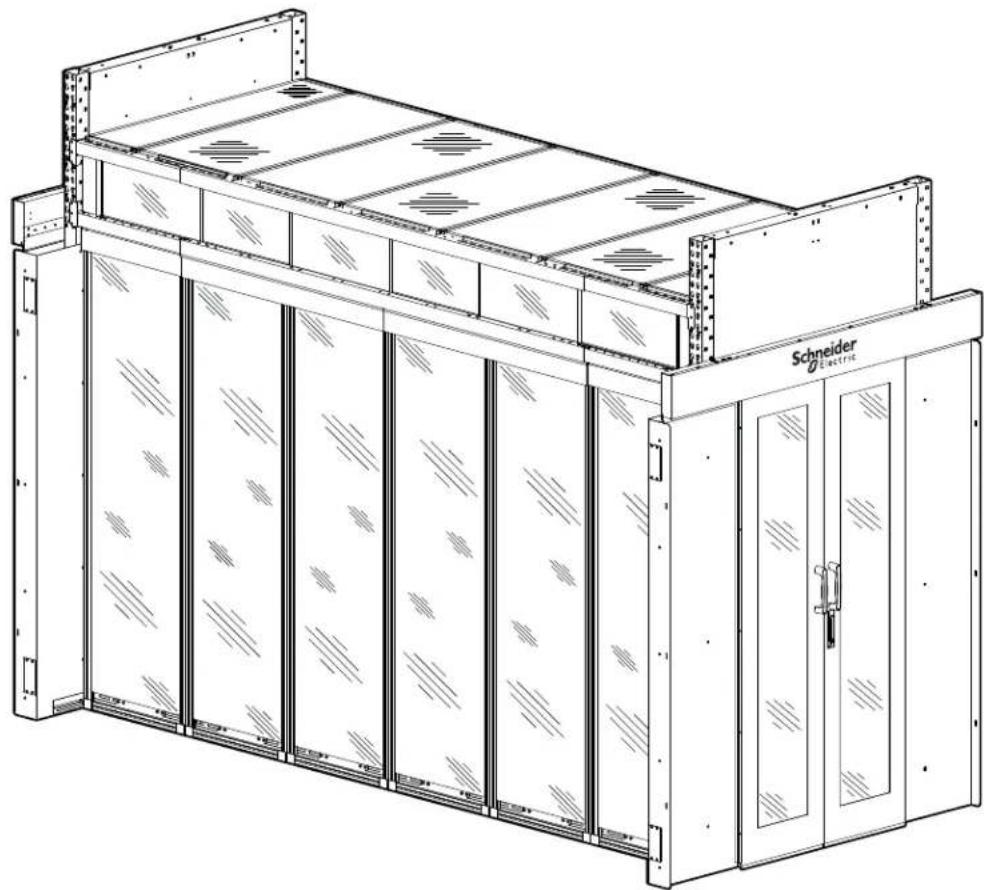
Technical line drawing of a Schneider electric storage unit with panel arrays and mounting brackets (no text or symbols)The Hyperpod ^TM is a free standing air containment system.
This manual is a guide for the basic installation procedures for assembling a HyperPod System.
Multiple configurations are possible depending on your requirements. Please contact Schneider Electric at www.schneider-electric.com or your Schneider-Electric representative to explore your options.
Component Identification
HyperPod System Components
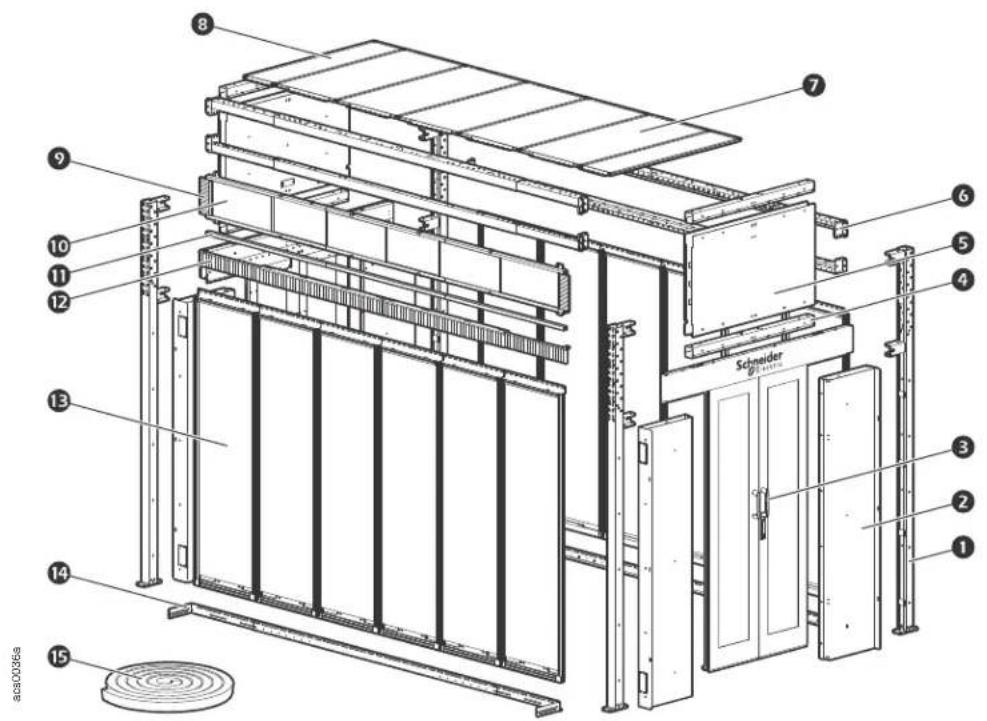
Short version shown
Item Description Quantity Required
| 1 | Vertical post | 4 |
| 2 | Door frame assembly | 4 |
| 3 | Dual sliding doors | 2 |
| 4 | 4 ft Width beam | 4 |
| 5 | 4ft aisle end cap assembly | 2 |
| 6 | 8 to 12 ft Telescoping length beam assembly | 4 |
| 7 | 4 ft simple roof panel, 600mm | 5 |
| 8 | 4ft simple roof panel, 300mm | 2 |
| 9 | Window frame brush strips | 4 |
| 10 | 2 ft Window panels (contents two panels) | 6 |
| 11 | Window rail assembly | 2 |
| 12 | Row length brush strip assembly | 2 |
| 13 | 600mm Blanking panel | * |
| 14 | 8 to 12 ft Stop rail assembly | 2 |
| 15 | Air sealing kit | 1 |
* Quantity determined by number of spaces not inhabited by racks.
Vertical Posts
FS-FM-1001-B - Vertical Post Assembly, 2750mm (Short)
FS-FM-1002-B - Vertical Post Assembly, 3200mm (Tall)
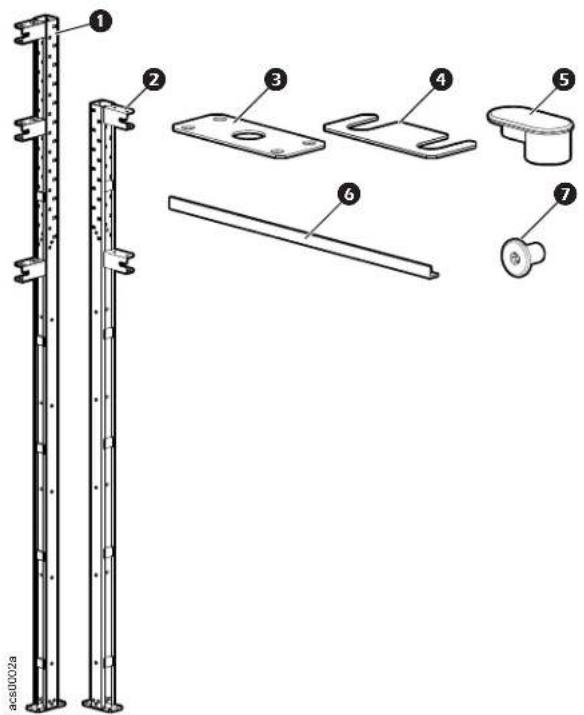
Item Description Quantity
1 Vertical Post FS-FM-1002-B (Tall) 2
2 Vertical Post FS-FM-1001-B (Short) 2
③ Template* 1
4 Shim (0.5mm thicknesses) 2
5 Hole plug
FS-FM-1001-B (Short) 48
FS-FM-1002-B (Tall) 88
6 Temporary support 1
⑦ M8 x 12 T30 Screw 8
*Template for drilling holes into floor to secure vertical posts.
NOTE: Fasteners for securing the vertical posts to your floor are not included.
Width Beams
FS-FM-2001-B - Width Beam Assembly, 1200mm
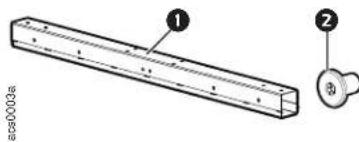
Item Description Quantity
Width Beam, 4 ft aisle 1
② M8 x 12 T30 Screw 8
Telescoping Beams
FS-FM-3001-B - Telescoping Beam
Telescoping beams are attached to Front/Rear frame assemblies to form the basic frame.
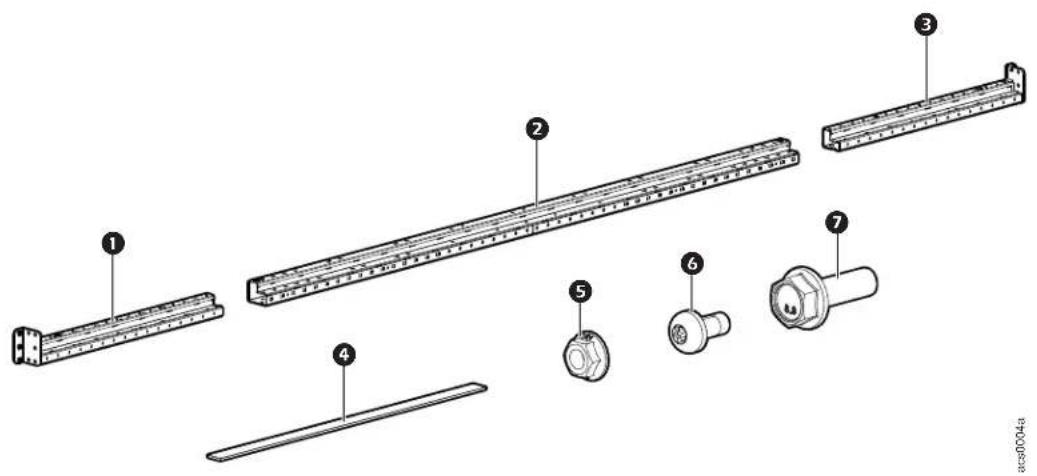
Item Description Quantity
① Telescoping beam end section 2
② Telescoping beam center section 2
3 Telescoping beam end section 2
4 Self-adhesive foam seal strip 4
5 M8 Hex nut 4
6 M6 x 12 Pan head T30 screw 8
⑦ M8 x 25 Hex head bolt 4
NOTICE
Telescoping beams are marked to note the 8 and 12 ft lengths.
End Cap Panels
FS-FM-4001-B - End Cap Assembly (Short)
FS-FM-4002-B - End Cap Assembly (Tall)
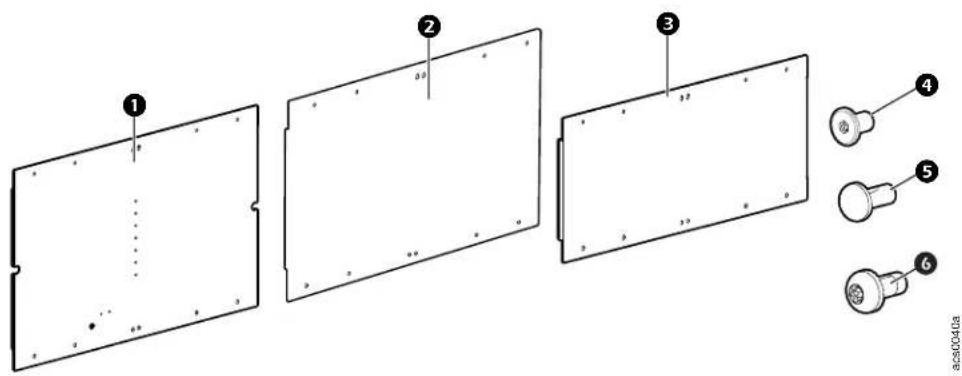
Item Description Quantity
FS-FM-4001-B
① Interior panel 1
② Exterior panel 1
6 M6 x 12 Pan head T30 screw 8
5mm Hole plug 2
4 M8 x 12 Low head Nylok T30 screw 16
FS-FM-4002-B
3 End cap panel 2
6 M6 x 12 Pan head T30 screw 8
4 M8 x 12 Low head Nylok T30 screw 16
NOTE: Two end cap panel assemblies per HyperPod required.
Door Frame Assembly
FS-DR-2001-B - Standard Door Frame
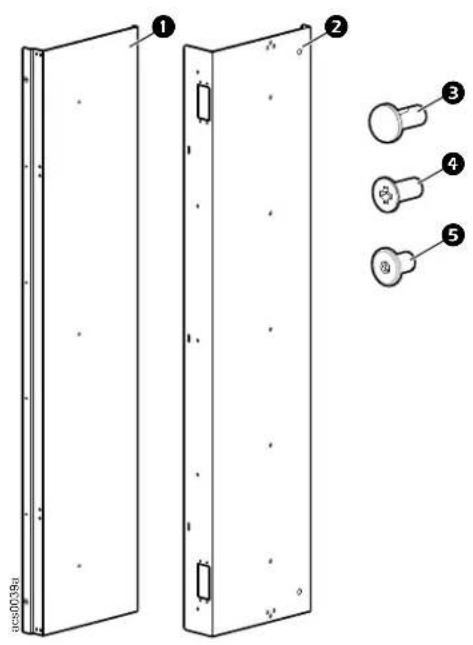
Item Description Quantity
① Door frame front panel 4
② Door frame rear panel cover 4
3 Hole plug, 5mm diameter 25
4 M5 x 12 Flat U-cut Phillips head screw 45
5 M8 x 12 low head T30 screw 33
Door and Rail Assembly
FS-DR-1001-B - Door and rail assembly
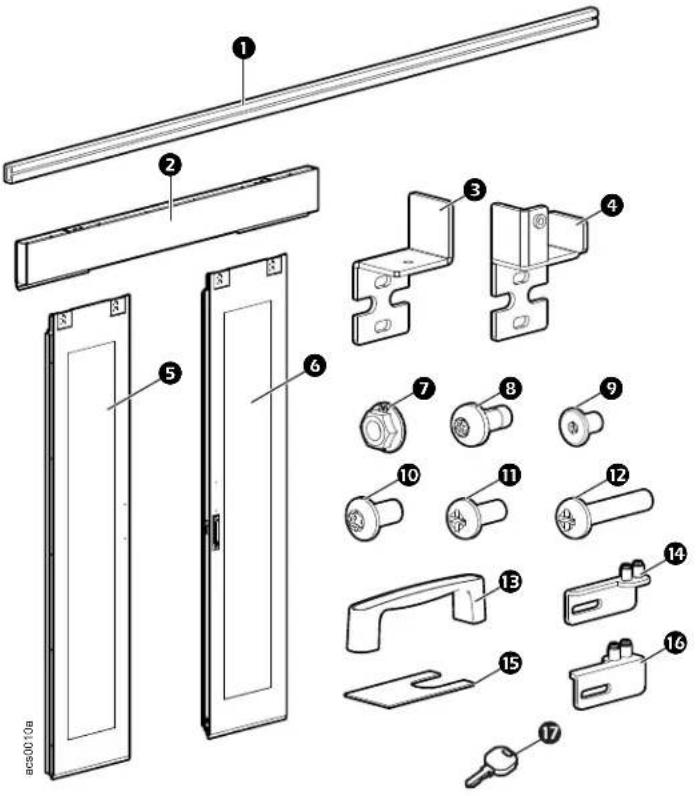
Item Description Quantity
1 36 x 4 x 1920mm door side brush 2
② Door hanging rail assembly 1
③ Bracket, Left door to reel 1
④ Bracket, Right door to dumper 1
5 Left door panel 1
6 Right door panel 1
⑦ M6 flanged hex nut 9
8 M6 x 12 Pan head T30 screw 5
9 M8 x 12 Low head screw 5
10 M4 x 8 button head Torx screw 10
⑪ M3 x 10 Phillips screw 10
12 M5 x 25 pan head #2 Phillips screw 5
13 Outside door handle 2
14 Left door bottom rail 1
15 Door leveling shim 42 x 30 x 0.6mm 4
16 Right door bottom rail 1
⑰ Key 1
Windows, Rails, and Side Brushes
FS-WI-1001-U - Window Assembly (270 x 600)
FS-WI-1002-B - Window Rail Assembly
FS-WI-1003-B - Window Brush Assembly
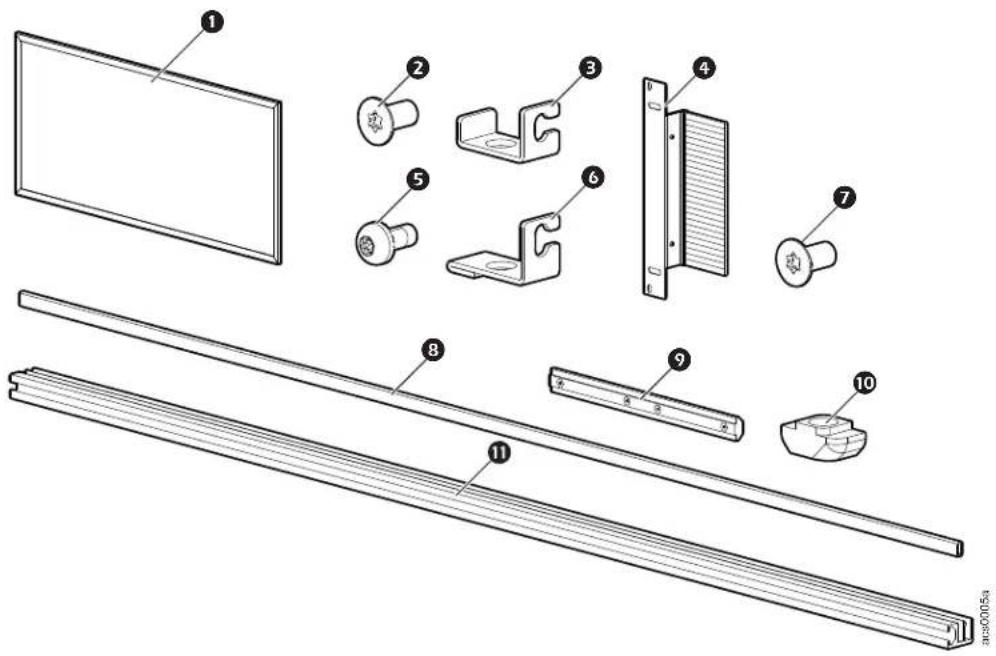
Item Description Quantity
① Ribbed 5mm Lexan window FS-WI-1001-U 2
② M6 x 12 Flat head T30 screw FS-WI-1002-B 18
Rail bracket FS-WI-1002-B 9
4 Side brush strip FS-WI-1003-B 4
5 M6 x 10 pan head T30 Screw 26
6 Long rail bracket FS-WI-1002-B 9
7 M6 x 12 Pan head T30 screw FS-WI-1003-B 8
8 Window rail block FS-WI-1002-B 12
9 Connector with four M6 set screws FS-WI-1002-B 8
10 M6 Steel hammer head nut FS-WI-1002-B 26
⑪ Window rail FS-WI-1002-B
Row length brushes
FS-AC-2001-U
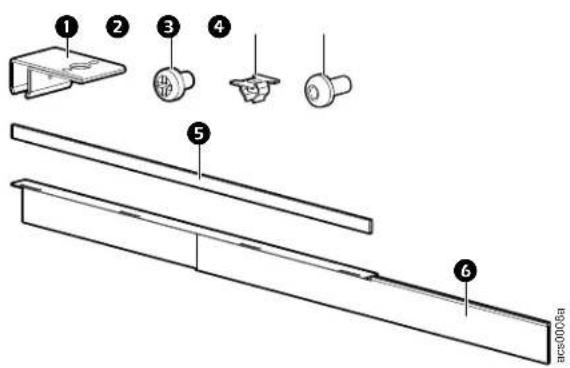
Item Description Quantity
① Clip for brush 8
② M3 x 4 Pan head Phillips screw 8
③ M6 insert nut 5
4 M6 x 16 Pan head T30 screw 17
5 Self-adhesive foam seal strip 4
6 Brush strip 4
Roof Frame Assembly
FS-RF-2001-U - 4ft Aisle Simple Roof Panel, 300mm
FS-RF-2002-U - 4ft Aisle Simple Roof Panel, 600mm
FS-RF-2003-U - 4ft Aisle Simple Roof Panel for Sprinkler Option, 600mm
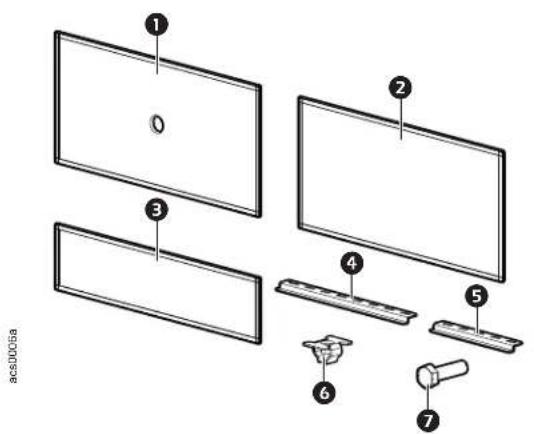
Item Description Quantity
① Roof panel FS-RF-2003-U 1
2 Roof panel 600mm FS-RF-2002-U 1
3 Roof panel 300mm FS-RF-2001-U 1
4 Long roof panel bracket FS-RF-2002-U, FS-RF-2003-U 2
5 Short roof panel bracket FS-RF-2001-U 2
6 M6 Insert nut (FS-RF-2001-U, FS-RF-2002-U, FS-RF-2003-U)
⑦ M6-1 x 16 Hex head screw (FS-RF-2001-U, FS-RF-2002-U, FS-RF-2003-U) 4
Solid Roof Filler Panel Set
FS-RF-1001-B Solid Roof Filler Panel
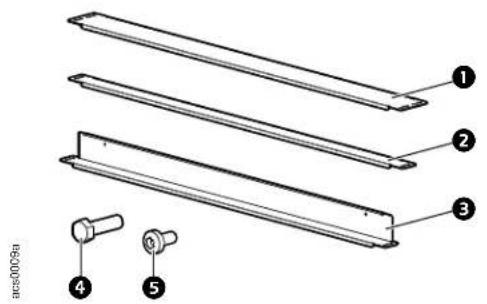
Item Description Quantity
1 Solid roof panel 4 ft, 100mm 1
2 Solid roof panel 4 ft, 50mm 3
3 Solid roof panel (drop) 4ft 50mm * 1
4 M6-1 x 16mm Hex head screw 12
5 M4 x 8 Pan head screw* 2
* Used for the drop roof option.
Stop Rail
FS-FM-5001-B Stop Rail Assembly
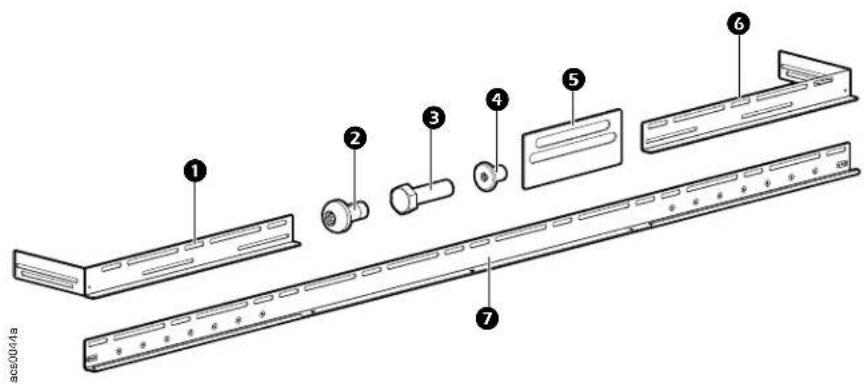
Item Description Quantity
1 Left end rail 2
② M6 x 10 Pan head T30 screw 8
③ M8 x 20 Hex head screw 9
④ M8 x 12 Low head T30 screw 9
⑤ Mylar electrical isolation plate 4
6 Right end rail 2
⑦ Stop rail middle plate 2
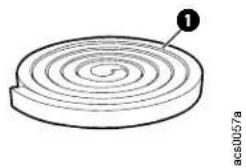
Seal Kit
FS-AC-1001-U Sealing Kit
natural_image
Diagram of a circular mechanical component with concentric rings and a labeled point (no text or symbols beyond label)Item Description Quantity
① Self adhesive foam seal, 10mm x 10mm 12M
Blanking Panels
FS-AC-5001-U - 300mm (12 in.)
FS-AC-5002-U - 600mm (24 in.)
FS-AC-5003-U - 750mm (28 in.)
FS-AC-5004-U - 800mm (30 in.)
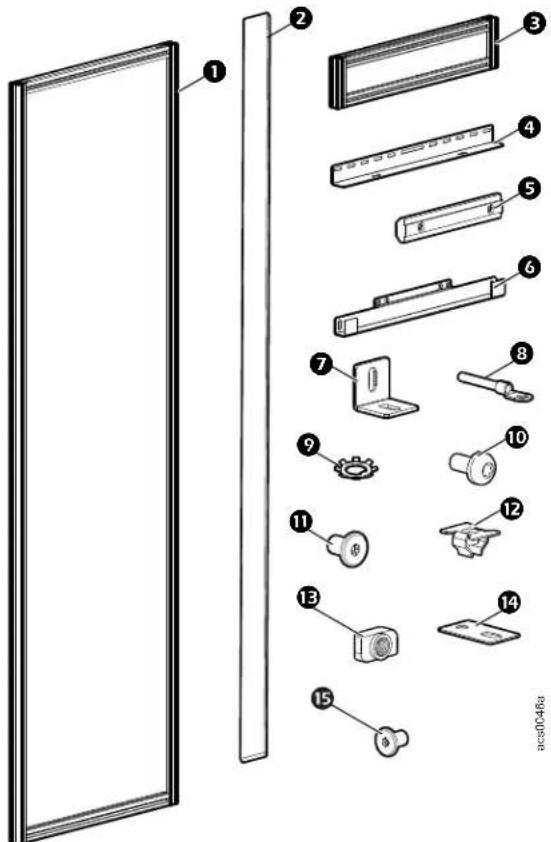
Item Description Quantity
① Blanking panel, 42U (300mm, 600mm, 750mm, 800mm)
② Duct frame seal strip 1
3 Blanking panel 3U (300mm, 600mm, 750mm, 800mm)
④ L plate 1
5 Duct connector 90mm
6 U plate 1
⑦ Angle corner 2
8 Ground wire 4 inch 1
9 M6 serrated lock washer 2
10 M6 x 10 Pan head T30 screw 14
M6 x 16 Pan head T30 screw 3
⑫ M6 Insert nut 3
13 M6 Steel hammer head nut 15
14 Dual rail joining bracket 4
15 M8 x12 Low head Nylock T30 screw 3
Safety
Read and follow safety instructions.
WARNING
TOOL USAGE HAZARD
Follow safety standards for all hand tools and power tools used. Read and follow the tool manufacturer's instructions. Follow the tool manufacturer's recommendations and recognized safety requirements for use of Personal Protection Equipment (PPE).
Failure to follow these instructions can result in death, serious injury, or equipment damage.
CAUTION
WORKING HEIGHT HAZARD
The working height for the assembly process can exceed 2.3 meters (7.5 feet). The use of stepladders or scaffolding will be required during assembly.
Failure to follow these instructions can result in serious injury or equipment damage.
CAUTION
LIFTING HAZARD
At least two people are required to install this enclosure. Some parts may be heavy and/or excessive in size. For items weighing more than 25 lbs (12 kg), use more than one person.
Failure to follow these instructions can result in serious injury or equipment damage.
CAUTION
NO STEP HAZARD
Ceiling panels are not designed to support weight. Never lean or walk on the ceiling panels. DO NOT use ceiling panels to support power or data cables.
Failure to follow these instructions can result serious injury or equipment damage.
Customizing the Installation
Installation locations for width beams and telescoping beams
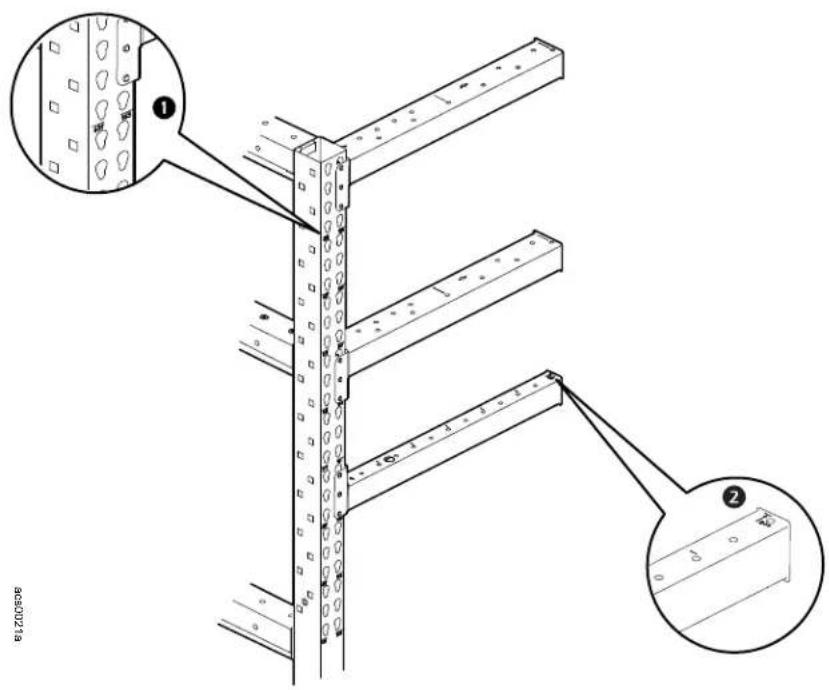
NOTICE
- Vertical posts are marked with height notation ①. (Tall vertical post shown in illustration above.)
- If 48U or shorter racks are deployed in the tall HyperPod, 6 telescoping beams are required. If racks are taller than 48U, use 4 telescoping beams.
• Tall HyperPod frames support racks up to 52U. - Telescoping rails are marked to note 8 and 12 ft lengths ^2 .
The height of the telescoping beams is selected based on the height of the racks to be installed or your roof and ducting needs. Determine these requirements prior to assembly of the frame. Once the location of the lower telescoping beam has been established, the (next) upper beam must be placed at the correct height to allow for installation of the windows.
Basic Frame Assembly
Frame end configuration
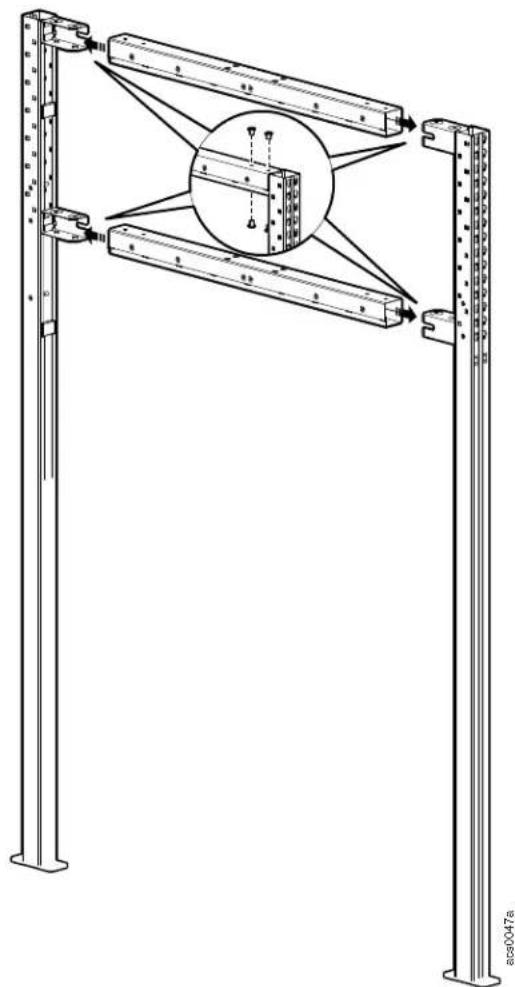
Assemble vertical posts to width beams (2 width beams for the Short HyperPod, 3 width beams for the Tall.Hyperpod) using the M8 x 12 Nylock T30 screws provided.
NOTICE
Hole plugs are included with this assembly. It is recommended to wait until the accessories are installed before installing the hole plugs.
Assemble a second set of vertical posts and width beams.
NOTE: If needed, the temporary frame support can be installed to the assembly at this time. See "Temporary frame support" on page 28 for more information.
natural_image
Technical line drawing of a structural frame with vertical supports and a circular inset showing internal components (no text or symbols)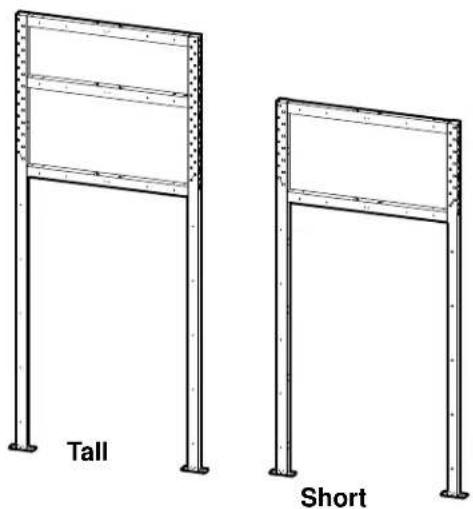
Telescoping beam assembly
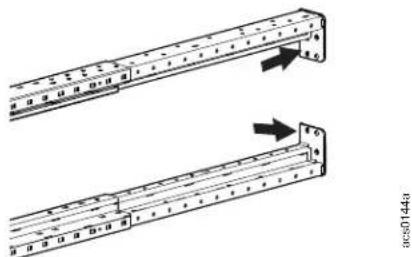
Install the telescoping horizontal beams to the vertical post assemblies.
a. Assemble the beam by sliding the end sections into the main beam. Make sure the bracket on the end is in the correct position for attaching to the vertical post.
natural_image
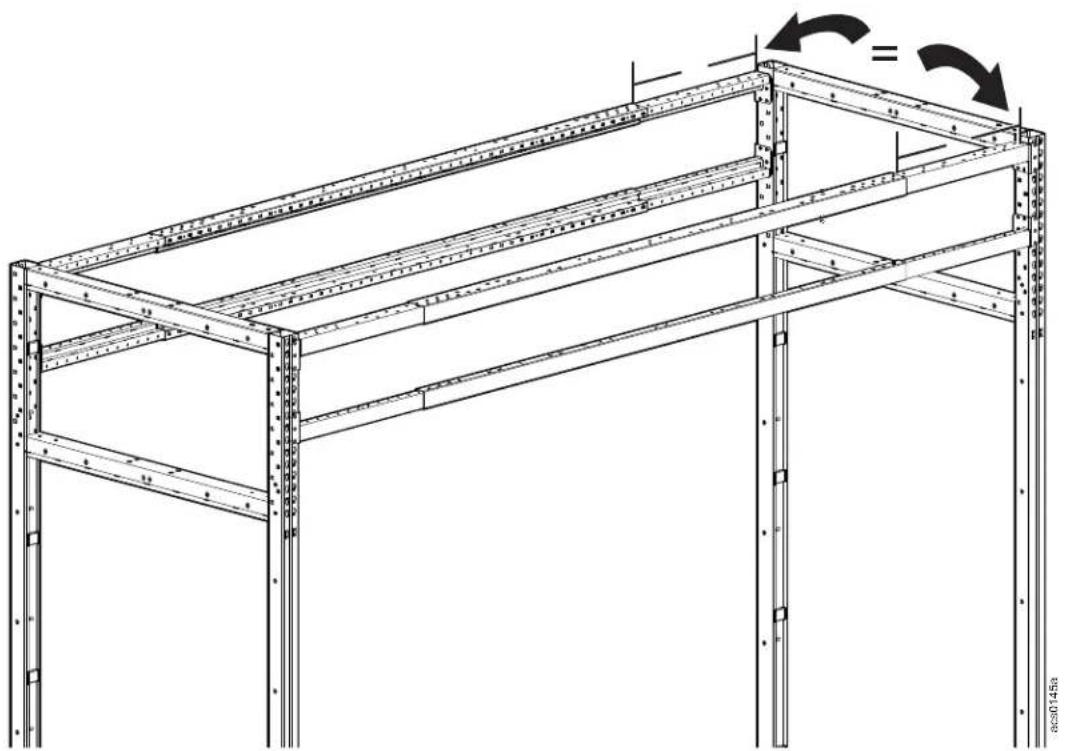
Technical diagram showing two mechanical assembly steps with arrows indicating motion direction (no text or symbols)b. Slide the telescoping beam to the desired length. The beam is marked at the 8 and 12 foot lengths. If the length of your HyperPod will be more than 8 feet but less than 12 feet, measure and mark the telescoping beams so they can be secured at the appropriate length.
NOTE: The left and right end inserts of the telescoping beam can each be extended to add 600mm. When both end inserts are fully extended, the total length of the telescoping beam is 3621mm. When setting up the telescoping beams to the calculated length of the aisle you need in your HyperPod, make sure that the inserts on both ends of the telescoping beam are extended the same length.
For example, if the left end insert is extended by 50mm, then the right end insert should also be extended by 50mm. On tall HyperPods, the upper two telescoping beams are extended as follows: if the left end insert on one telescoping beam is extended 50mm, then the right end of the other telescoping beam should be extended 50mm.
natural_image
Technical line drawing of a metal shelving unit with structural beams and supports (no text or symbols)HyperPod System Installation26
c. Secure the small beam ends in place with M6 x 12 Pan head T30 screws.
d. Secure the telescoping beams to the vertical posts with four provided M8 x 25 hex head bolts and M8 nuts at the standard 48U position or the customized position you have determined for your installation.
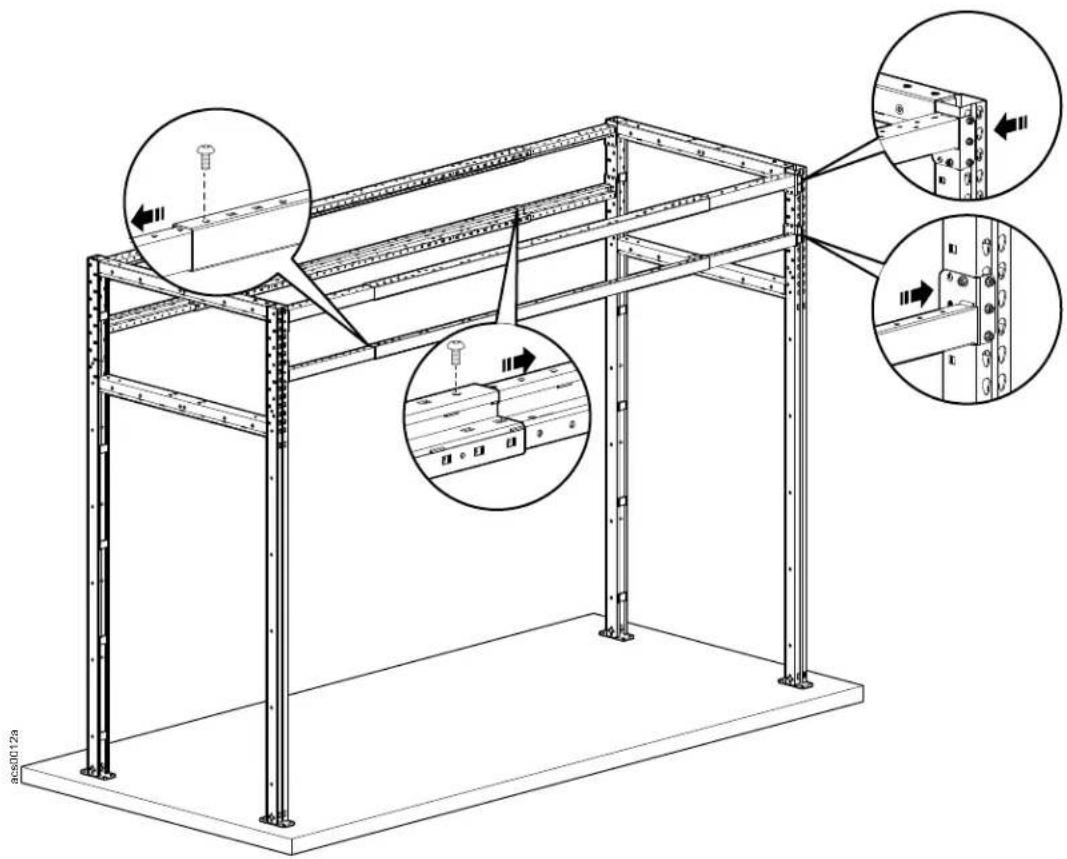
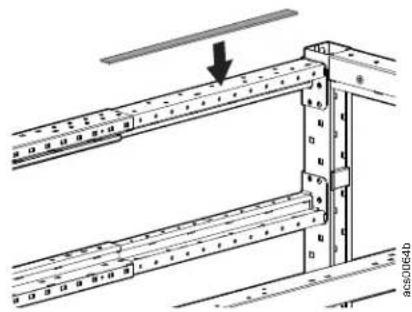
e. The end inserts of the telescoping beam are smaller than the main portion of the beam. Apply the self-adhesive foam seal to the gap on the extensions of the telescoping beam to fill the space.
natural_image
Technical diagram of a structural frame assembly with a downward arrow indicating force or direction (no text or symbols present)Temporary frame support
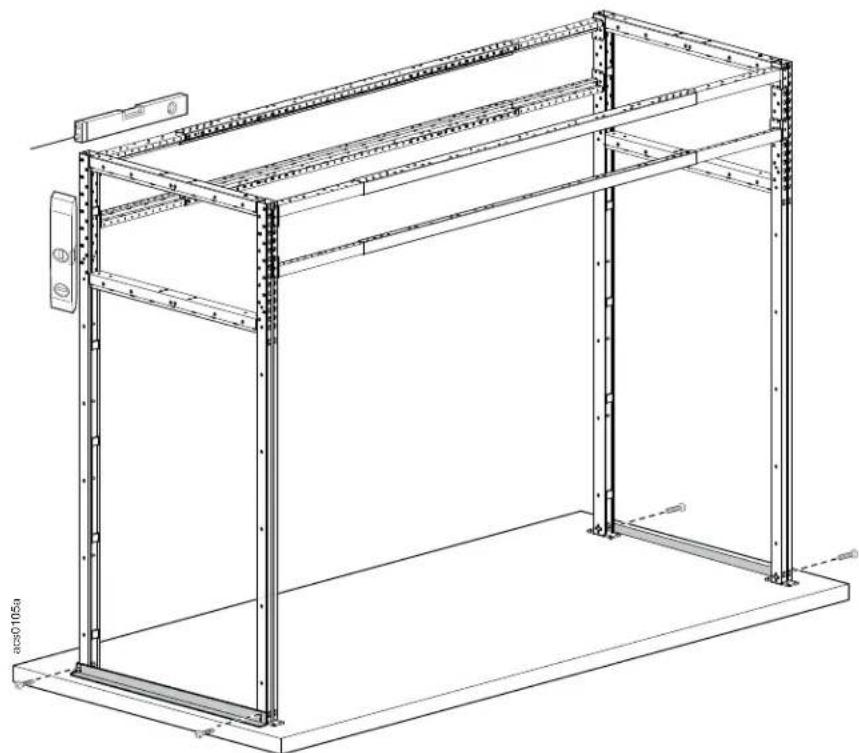
If you are not going to secure the frame to the floor at this time, attach the temporary support to the feet of the vertical posts with four M8 x 12 T30 screws per post to stabilize the frame while making sure the frame is level and plumb.
natural_image
Technical line drawing of a modular shelving unit with metal frame and support brackets (no text or symbols)Secure the frame to the floor
a. To prepare to secure the frame to the floor, adjust the frame until level and plumb. Use the supplied shims as necessary. Use the threaded screws to raise the vertical post foot plate from the floor.
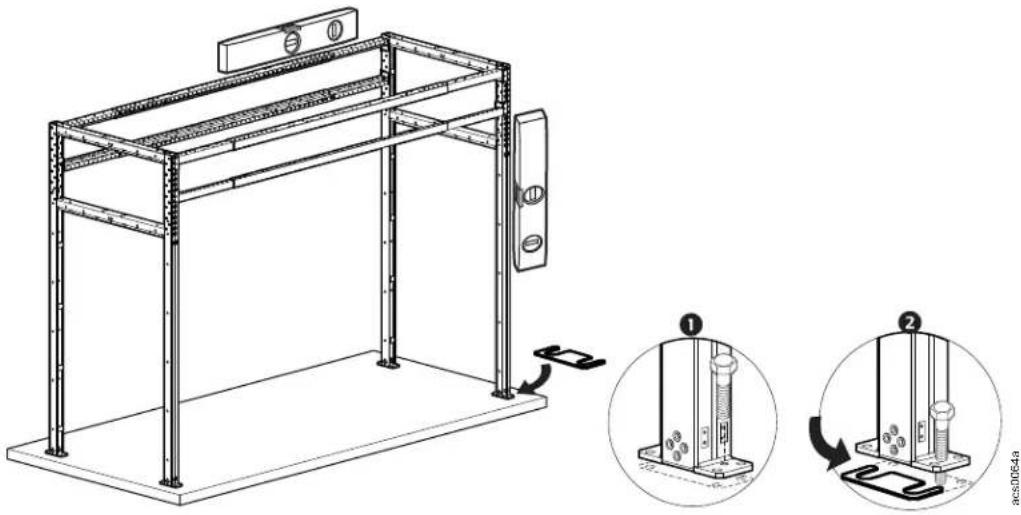
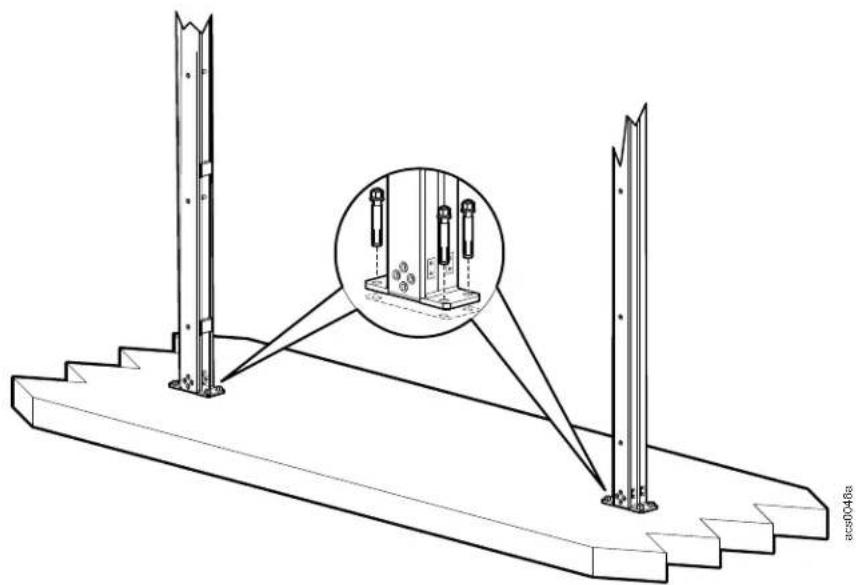
b. Attach the vertical posts at one end to the floor. Do not attach both ends of the frame to the floor until length is checked to accommodate the intended equipment and the frame is level and plumb.
natural_image
Technical line drawing of a structural support frame with two vertical posts and a close-up inset showing bolt details (no text or symbols)Install the end caps
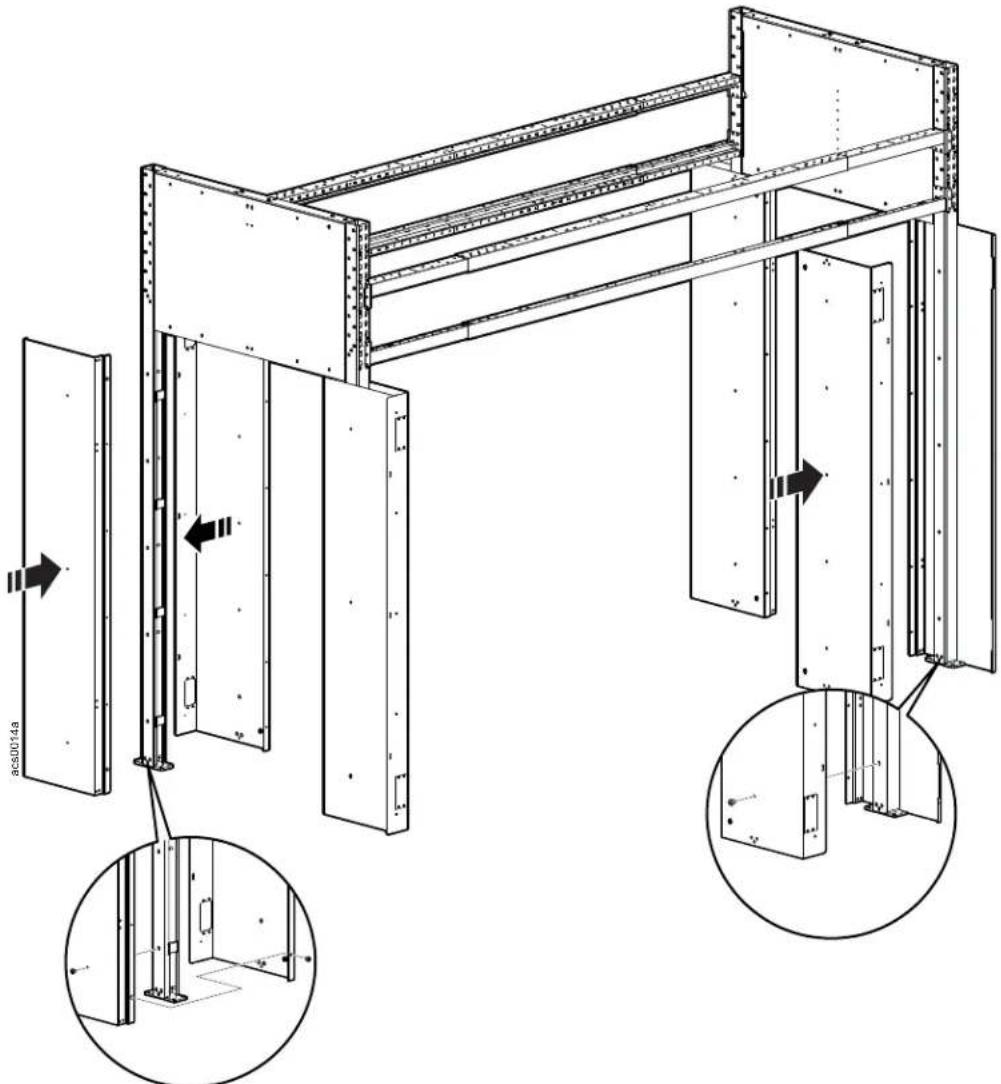
Install the end caps (exterior and interior panels) above the door area on the vertical posts. Four M6 x 12 pan head T30 screws are used to install the exterior panel at the top. Use four M8 x 12 low head Nylok T30 screws for the bottom of the exterior panel and eight M8 x 12 low head Nylok T30 screws to install each interior panel.
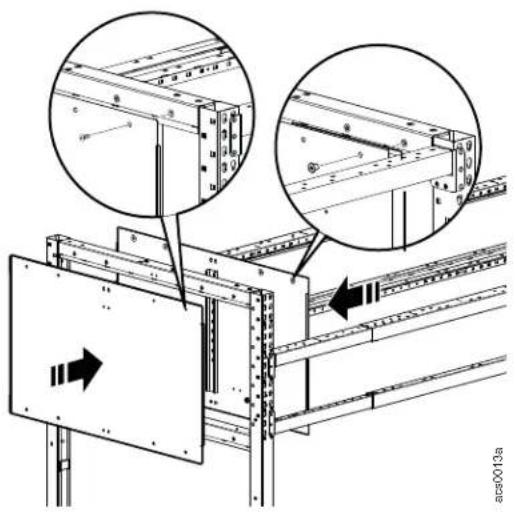
NOTICE
Hole plugs are included with this assembly. It is recommended to wait until the accessories are installed before installing the hole plugs.
Vertical posts must be secured to the floor before installing the door frames. The door frames enclose the vertical posts prohibiting access.
natural_image
Technical line drawing of a structural frame assembly with multiple components and directional arrows indicating movement (no text or symbols present)- Place the front and back panels together around the vertical support post.
- Secure the back panel to the vertical support post with the M8 x 12 T30 screws.
- Secure the front panel to the back panel and vertical posts with the M8 x 12 T30screws and M5 x 12 flat head screws.
NOTICE
Hole plugs are included with this assembly. It is recommended to wait until the accessories are installed before installing the hole plugs.
Install the doors:
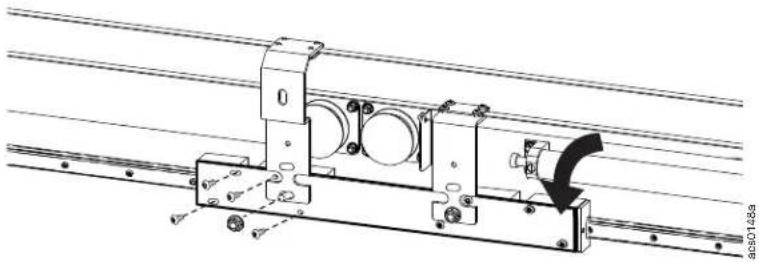
Remove the eight M4 x 8mm button head Torx screws and two M6 Hex nuts securing the shipping bracket. Discard the shipping bracket,
natural_image
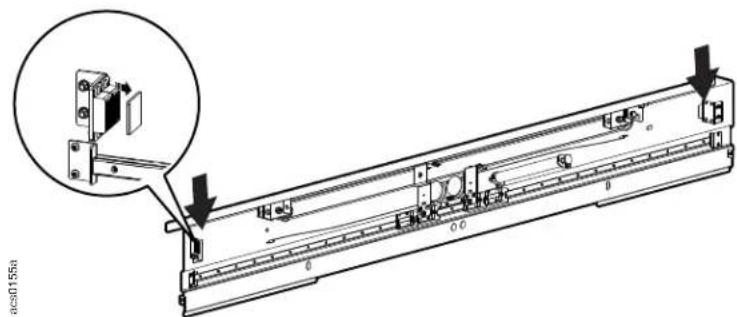
Technical line drawing of a mechanical assembly with rotating components and a directional arrow (no text or symbols)Remove the metal cover plate on the magnets.
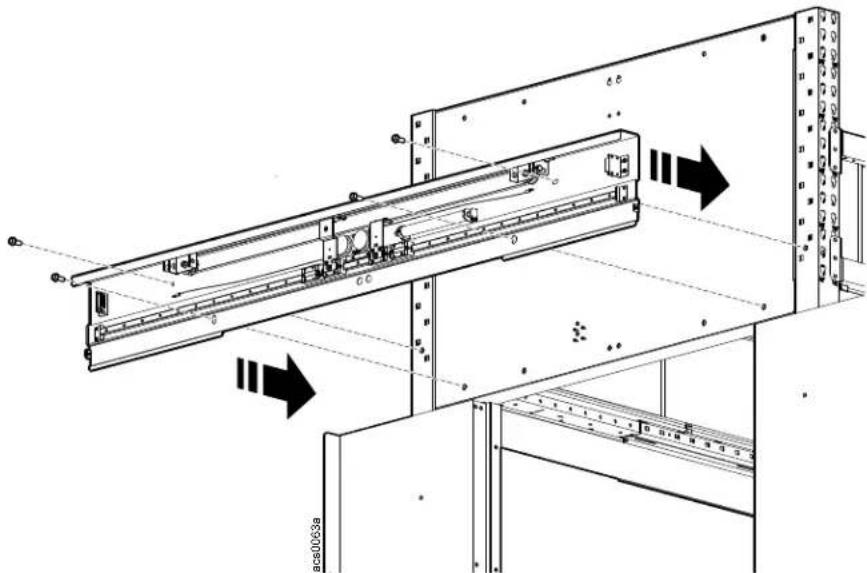
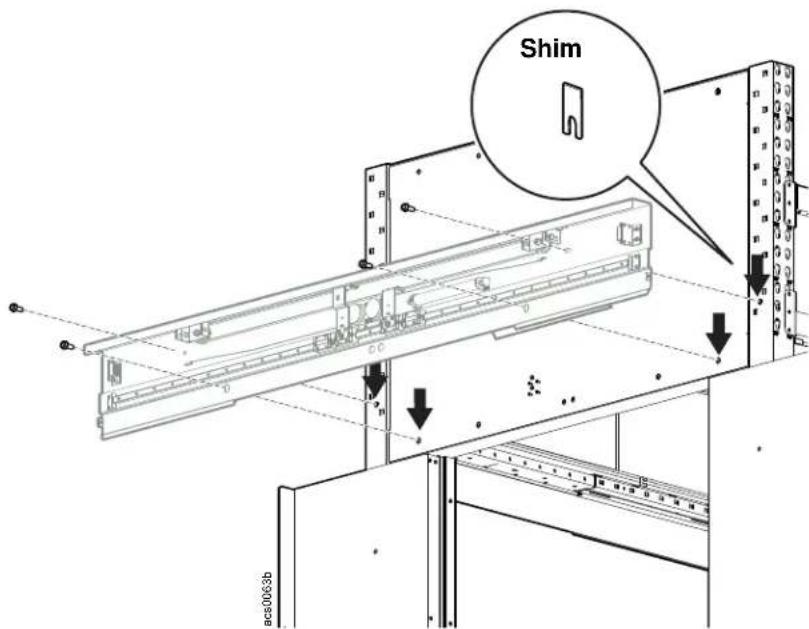
Attach the door hanging case to the frame above the top of the door opening with four M8 x 12 low head screws.
natural_image
Technical line drawing of a mechanical assembly with directional arrows indicating motion or force (no text or symbols present)- Use the shims included with the door hanging case to ensure the hanging case is level, plumb, and square to the door frame. The door hanging case must clear the door frame an equal distance on both ends to ensure the doors will move without obstruction.
Hang the doors.
CAUTION
HEAVY EQUIPMENT HAZARD
At least two people are required to perform this task.
Failure to follow these instructions can result in injury or equipment damage.
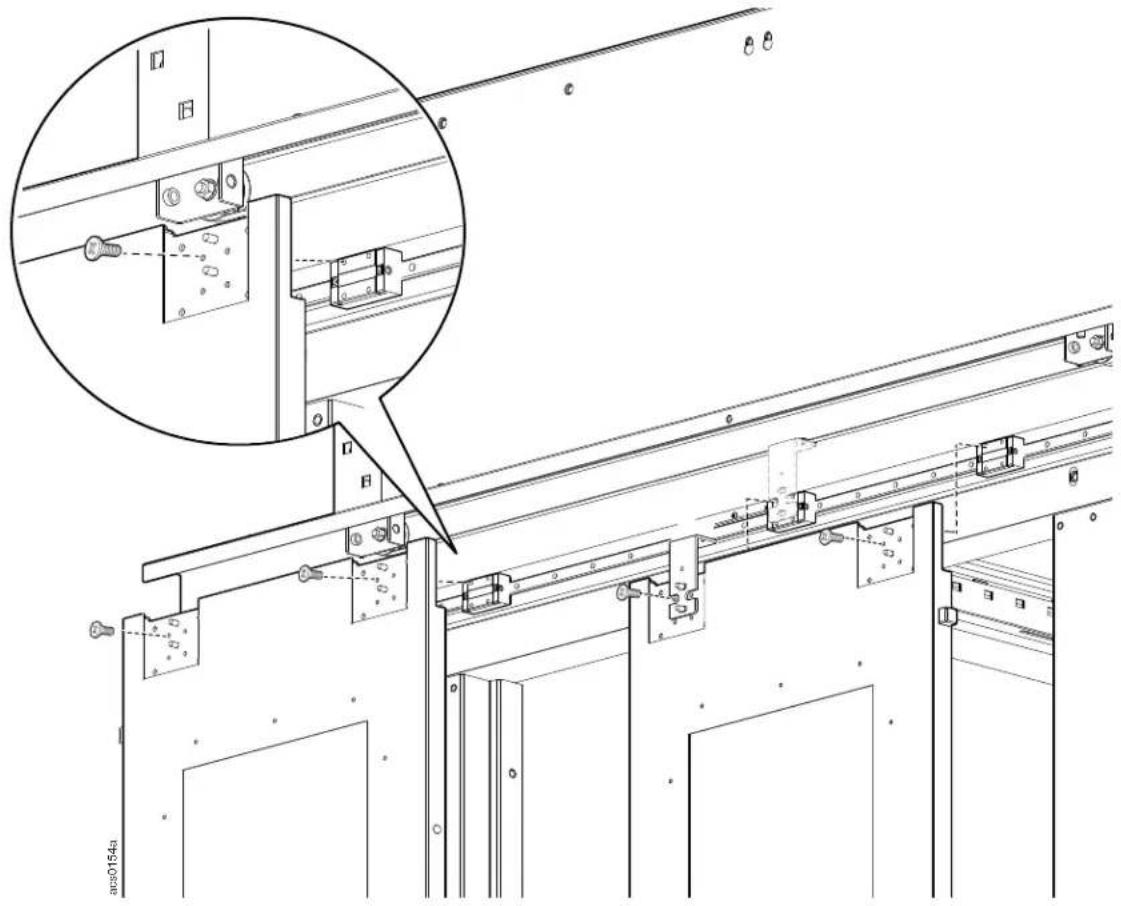
- The two locations on the doors for the brackets must be lined up with the sliding blocks.
- The inside most brackets are already attached to the reel. The two posts on the door fit through the slotted holes on the bracket.
- At least one person must hold a door up to the sliding blocks while another person installs four M4 x 8 screws to each of the two blocks.
natural_image
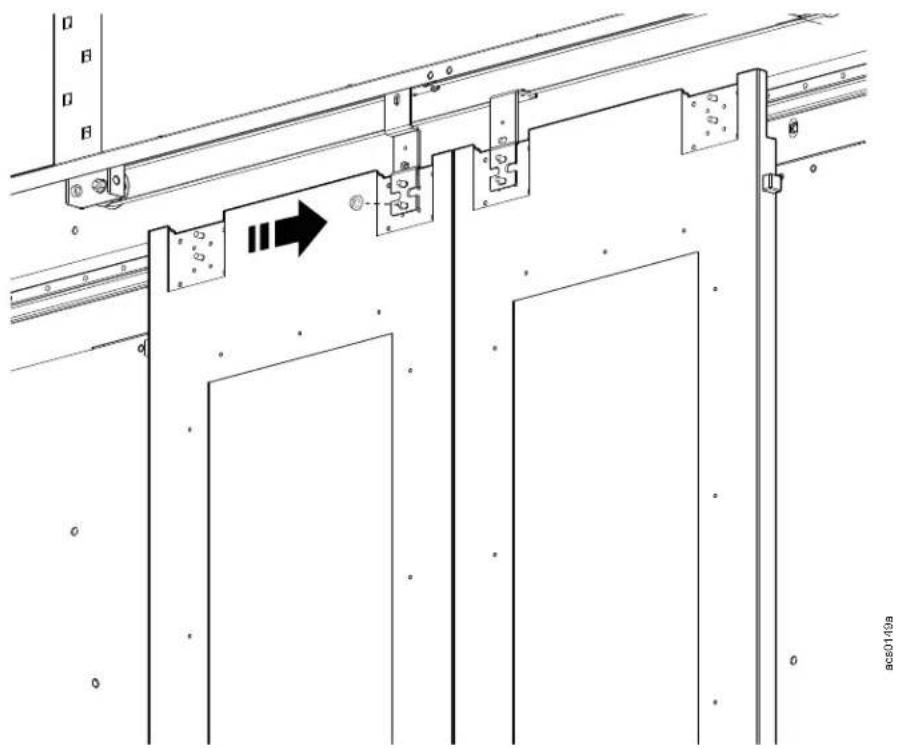
Technical line drawing of a mechanical assembly with mounting brackets and structural supports (no text or symbols)• Install an M6 hex nut to each threaded post on the two innermost brackets, securing them to the doors.
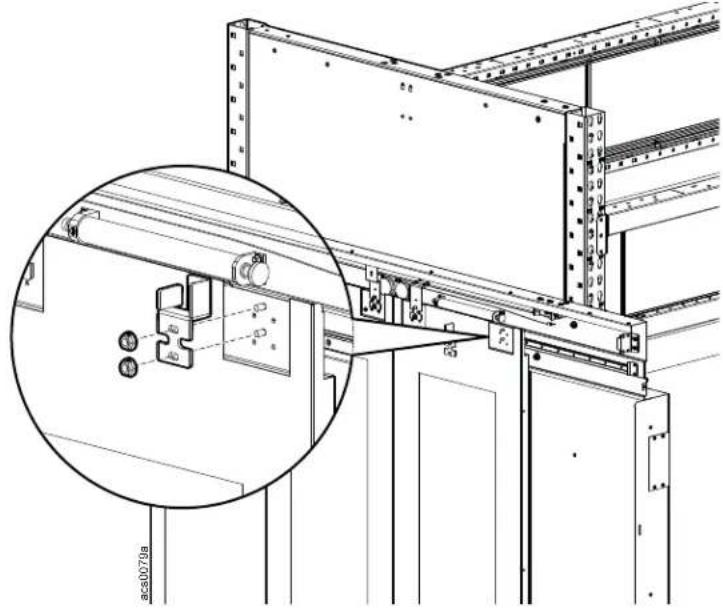
- Install the outermost left and right door hanging brackets to the threaded posts on the doors with the M6 flanged hex nuts.
natural_image
Technical line drawing of a structural frame assembly with an inset magnified detail (no text or symbols)- Pull the end of the cable and attach one end to each of the outermost brackets with one M6 x 8 screw.
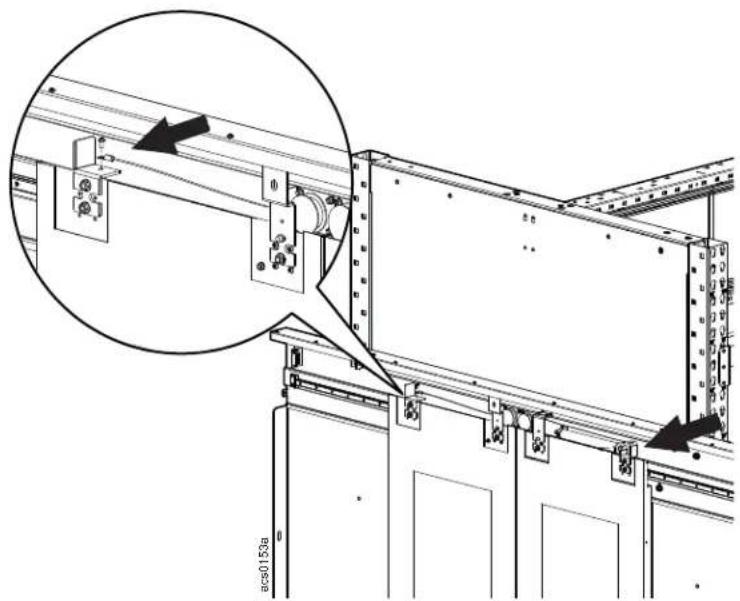
natural_image
Technical diagram of a mechanical assembly with mounting brackets and structural supports (no text or symbols)- Attach the bottom rails to the doors and secure them to the door frames with the provided M6 x 12 pan head screws.
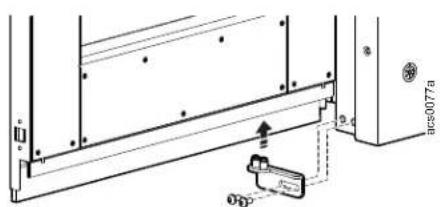
- Attach the door handles to the door with two M5 x 25 screws..
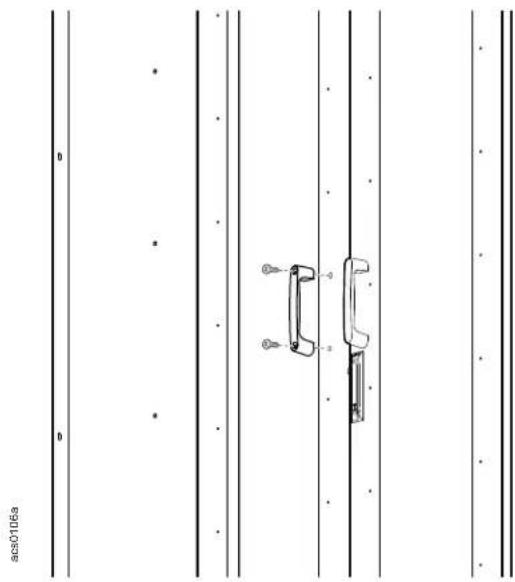
natural_image
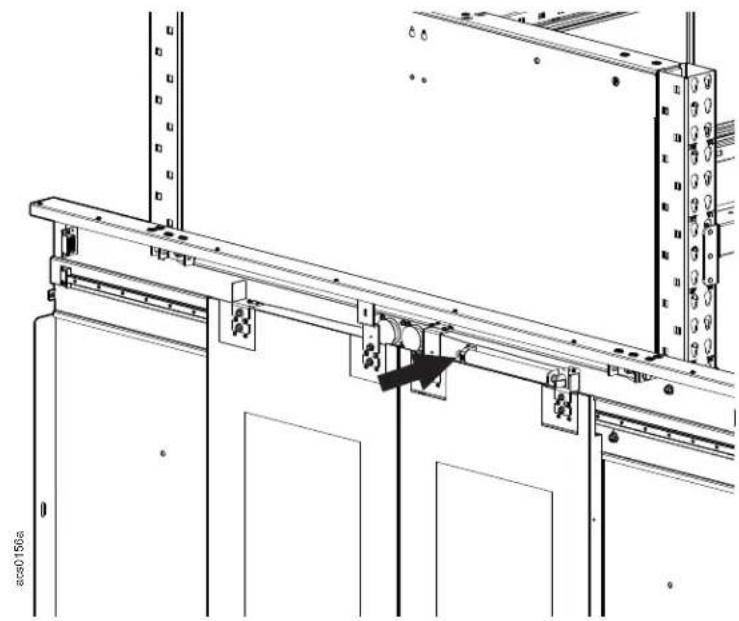
Technical line drawing of a mechanical component with two views (no text or symbols)- Install a brush to the outside edges of each door with four M3 x 8mm Phillips head screws and adjust, using the slotted holes of the brush strip, to cover the gap between the frame and the door.
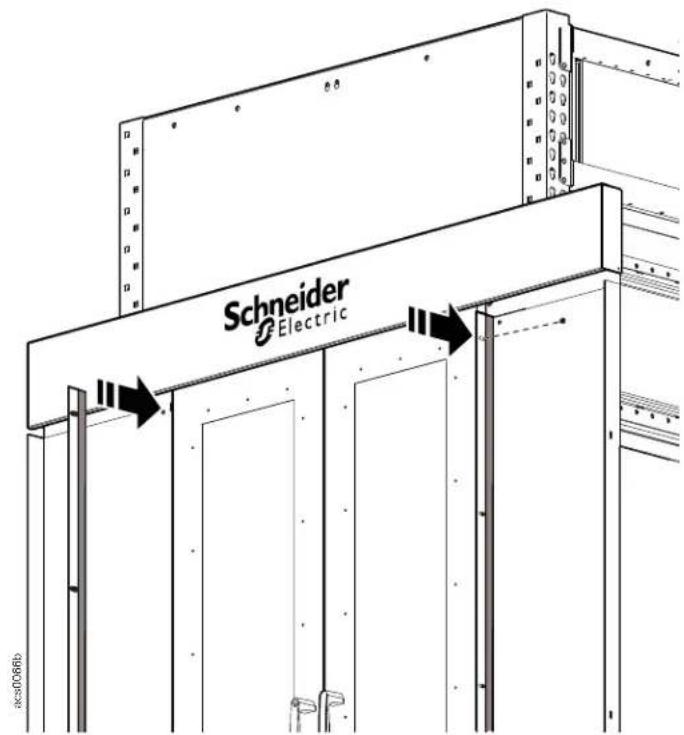
- Adjust the door closure to keep them from slamming by turning the adjustment screw clockwise slightly to increase the dampening.
natural_image
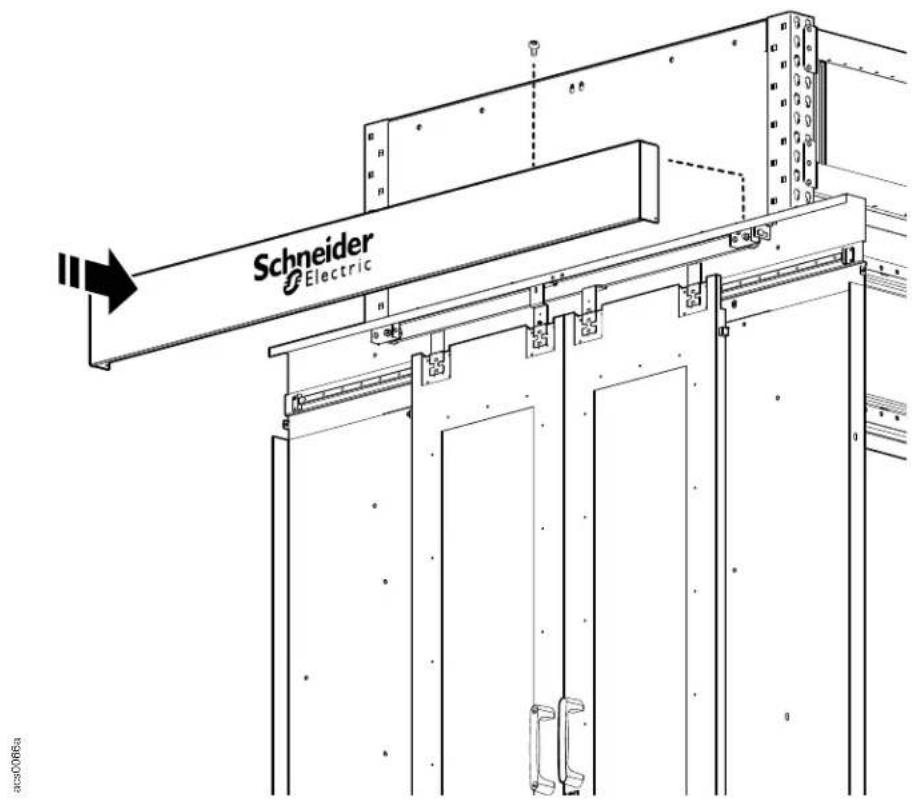
Technical line drawing of a mechanical assembly with mounting brackets and structural supports (no text or symbols)- Install the cover to the door rail assembly with eight M4 x 8 button head Torx screws..
Install frame seals
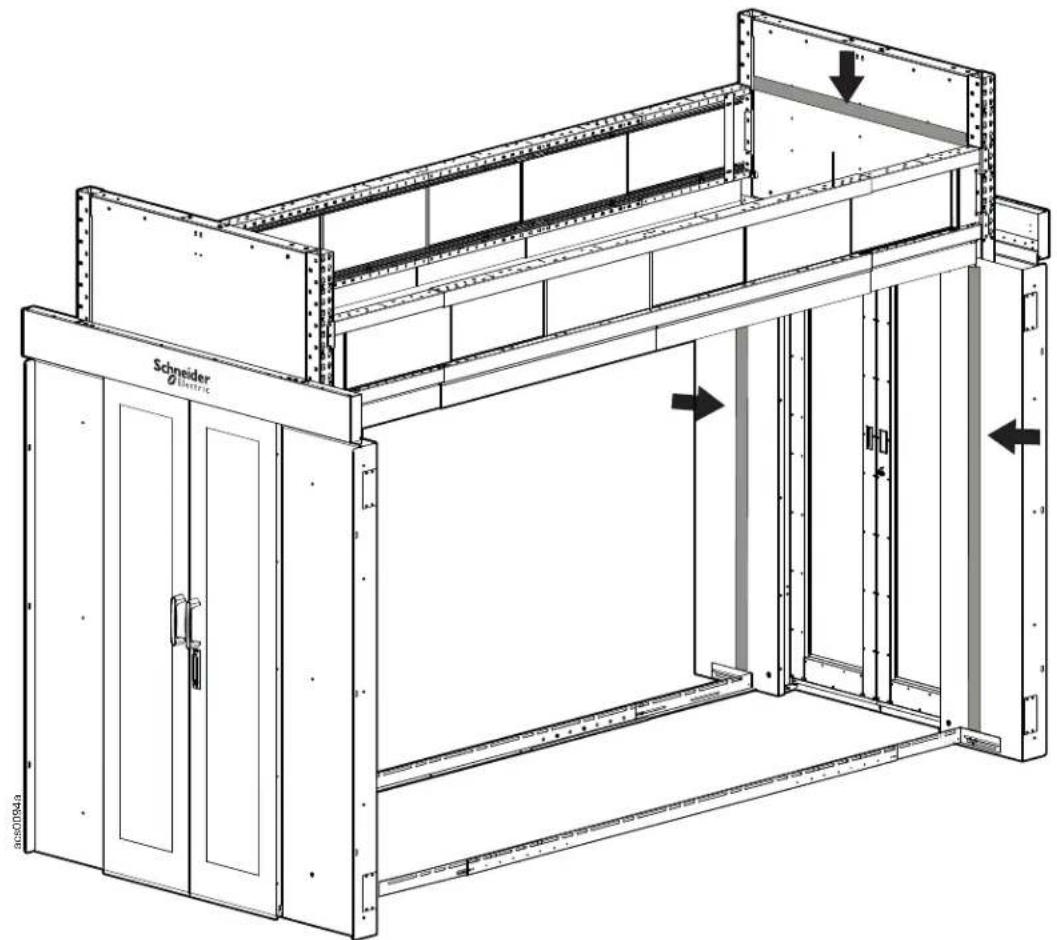
Attach the self-adhesive foam seal strips from the seal kit to the backs of the door frame where they will meet the rack or blanking panel and to the inside end caps where they will meet the roof panel.
natural_image
Technical line drawing of a mechanical assembly with labeled components and directional arrows (no text or symbols beyond labels)NOTICE
You may want to wait until a rack, blanking panel, or roof panel is installed in order to place the frame seals in the optimal locations.
Install the windows
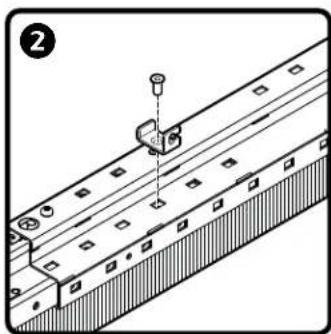
Window rails are installed to the underside of the top telescoping beam and the top of the lower telescoping beam.
a. Starting at one end of the frame, install the window side brush to the telescoping beams with two M6 x12 screws to fill the area between the back of the door frame and the starting edge of the window assembly.
b. Install two rail brackets to the telescoping beam with M6 x 10 screws for each four foot section of rail.
c. Join two four foot window rails using the connector with its four M6 set screws.
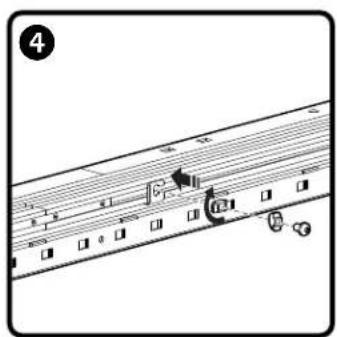
d. To secure the window rail to the window rail brackets, slide a hammer head nut into the rail and behind the bracket. Once an M6 x 10 screw is inserted through the bracket to the nut, rotate the nut 90 degrees to secure the nut in the rail.
e. Insert the rail blocks into the bottom rails.
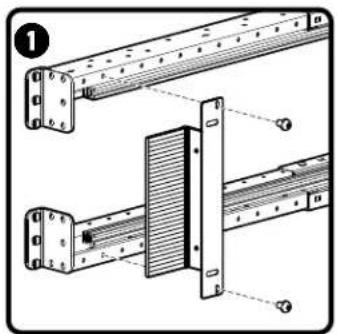
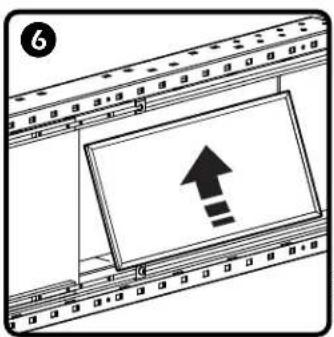
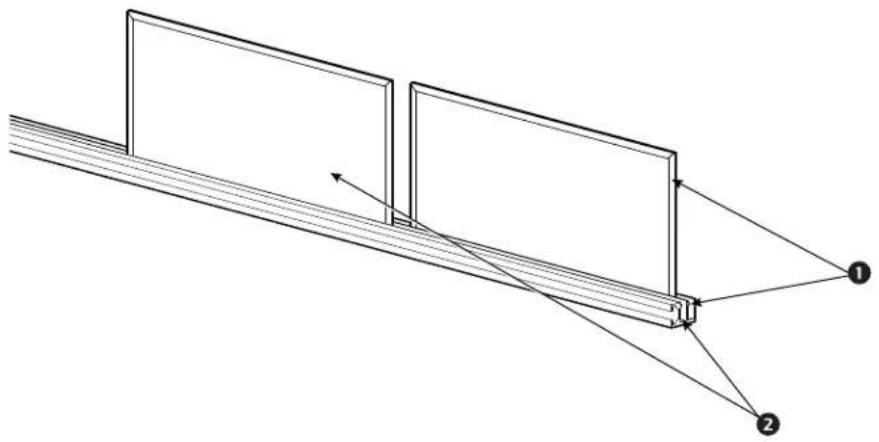
f. Install the window panels to the window rails by sliding the panel up into the top rail and then allowing the bottom edge of the rail to drop down into the bottom rail.
natural_image
Technical line drawing of a mechanical assembly with no visible text or symbols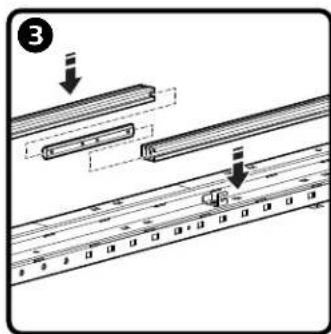

NOTE: Eight foot HyperPod frames require two 4 ft. rails along the length of the telescoping beam. Window rails may require cutting to size if the aisle length is longer than 8 feet and shorter than 12 feet.
NOTE: There are two tracks in the window rail. Alternate tracks when installing the windows.
natural_image
Pure technical diagram of a mechanical assembly with two rectangular components and connecting rods, no text or symbols present.Row length brush installation
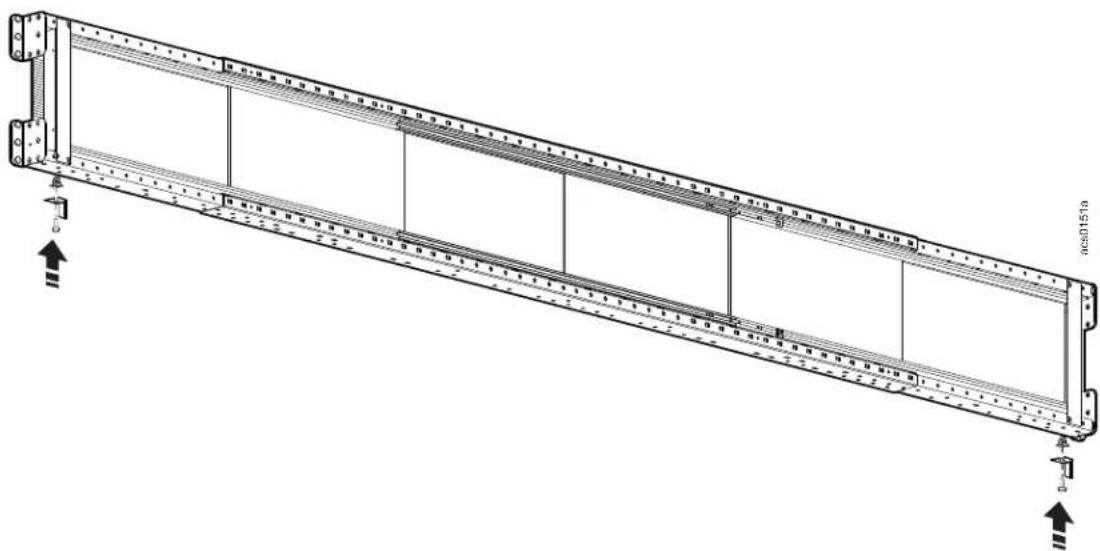
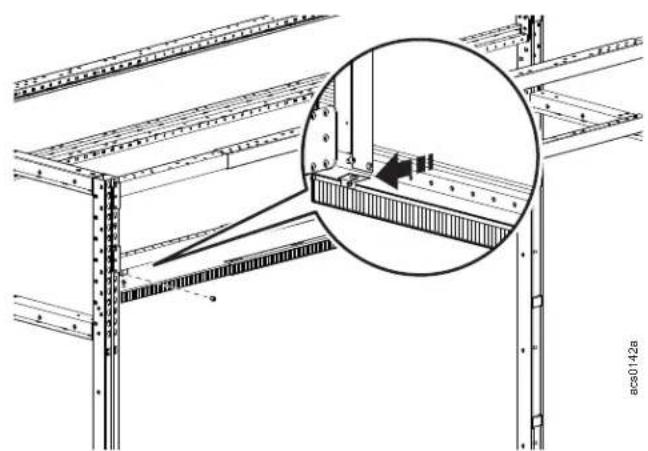
Each row length brush has a slide out extension brush on one end. Install the row length brush with the extension brush end toward the vertical post. The left and right brushes with extension brushes fully deployed measure12 feet. With the end of each row length brush meeting at the center of the telescoping beam, slide out each end of the brush strip until it meets the end of the frame.
a. Install the brush extension clips at each end of the telescoping beam with an M6 x 16 pan head T30 screw.
natural_image
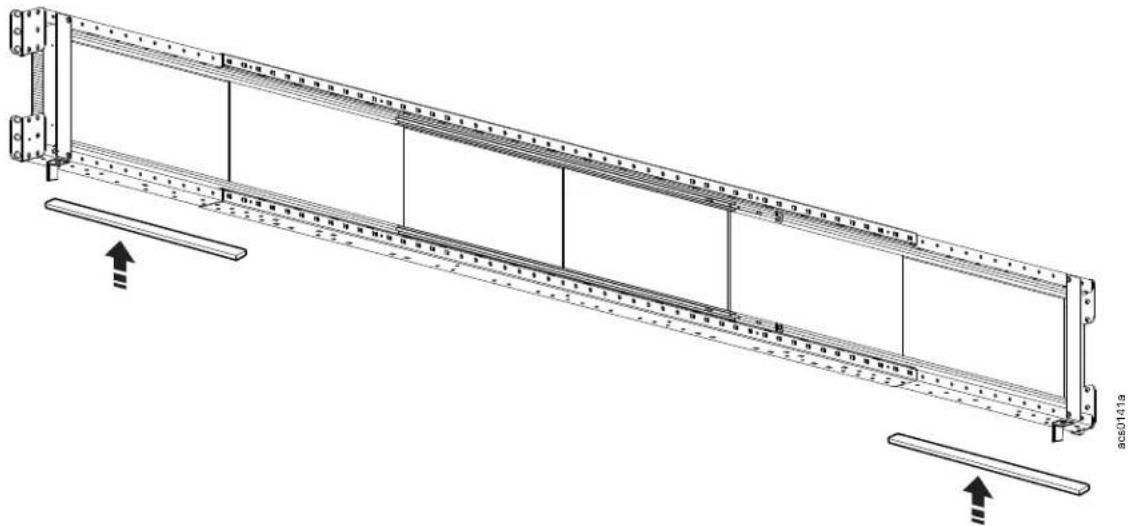
Technical line drawing of a long structural frame with vertical supports and horizontal beams (no text or symbols)b. Apply the self-adhesive foam strip to the bottom of the slide out extension of the telescoping beam.
natural_image
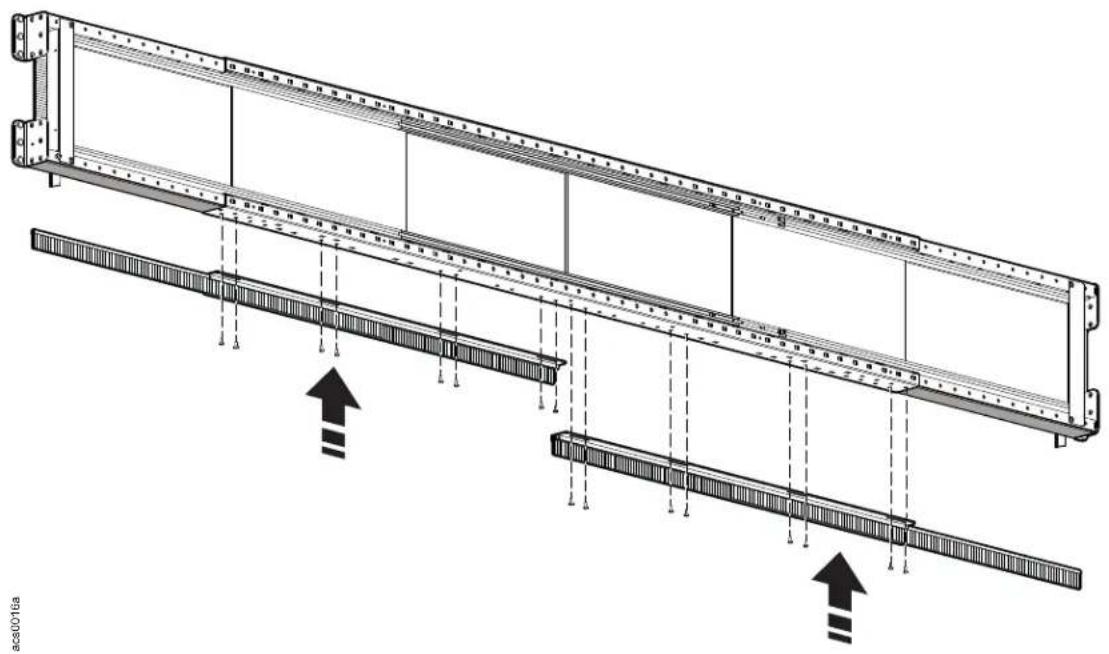
Technical line drawing of a structural frame with supports and load indicators (no text or symbols)c. Hold the row length brush up to the telescoping beam and note the hole locations. Install the insert nuts to the bottom of the telescoping beams at the appropriate locations. Install the brush strip to the bottom of the telescoping beam with the provided M6 x 16 pan head T30 screws.
natural_image
Technical diagram of a structural beam with support beams and load arrows, no text or symbols presentd. Insert the top edge of the brush extension into the clip. Secure the brush extension in the clip with a M3 x 4 pan head Phillips screw.
natural_image
Technical diagram of a structural frame assembly with an inset magnified detail showing internal components (no text or symbols)Roof panel installation
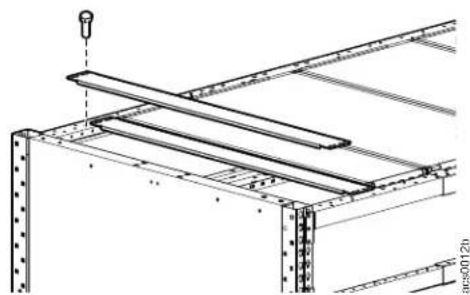
Install the roof panels to the top of the horizontal telescoping beams using the insert nuts, hold down brackets and M6 x 16 hex head screws.
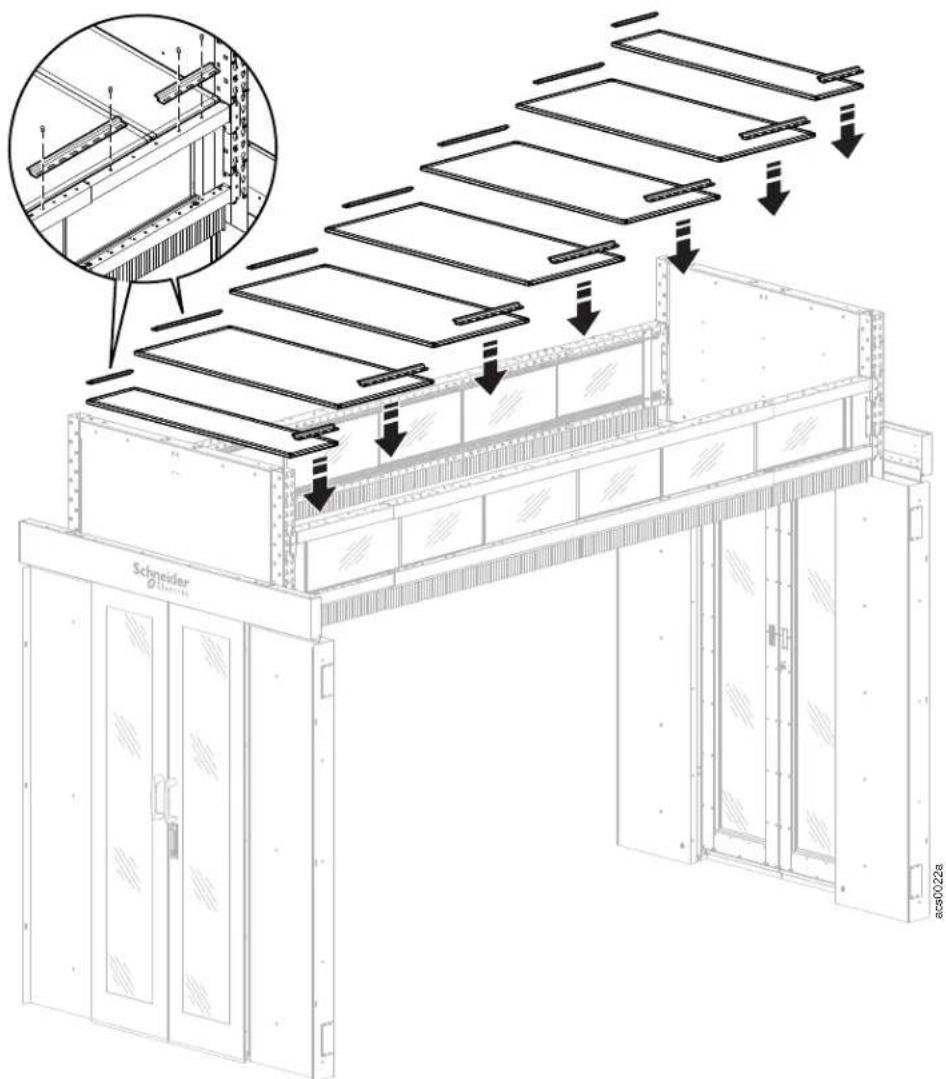
Use the 50mm or 100mm roof filler panels and 4 hex head screws to fill in the extra space at the end of the aisle, if any. The roof filler panels have slotted holes to allow for adjustment.
natural_image
Technical line drawing of a structural frame assembly (no text or symbols)Stop rails
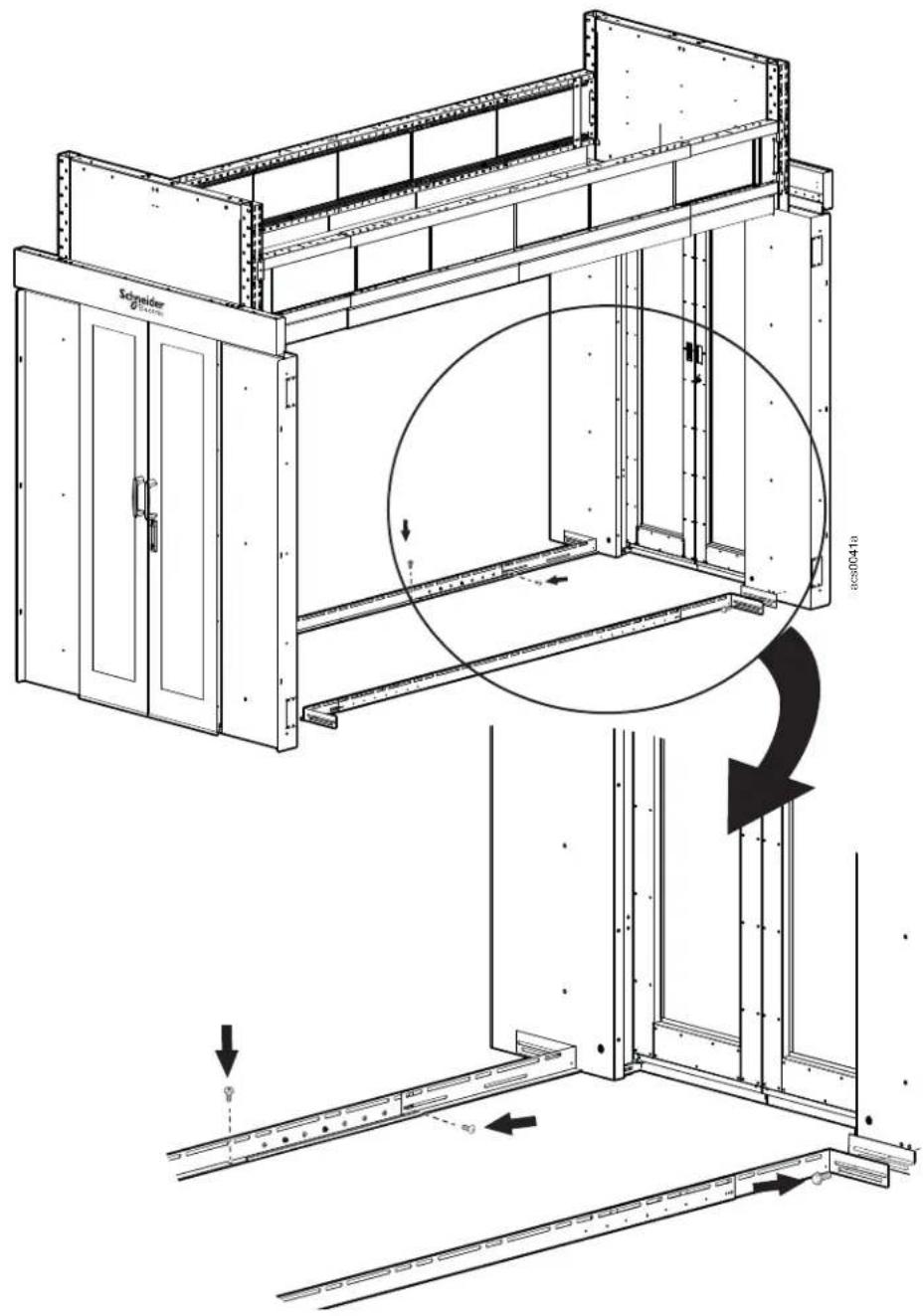
a. Measure from front to back of the aisle to make sure the stop rails are straight. Dropping a chalk line will help with installation.
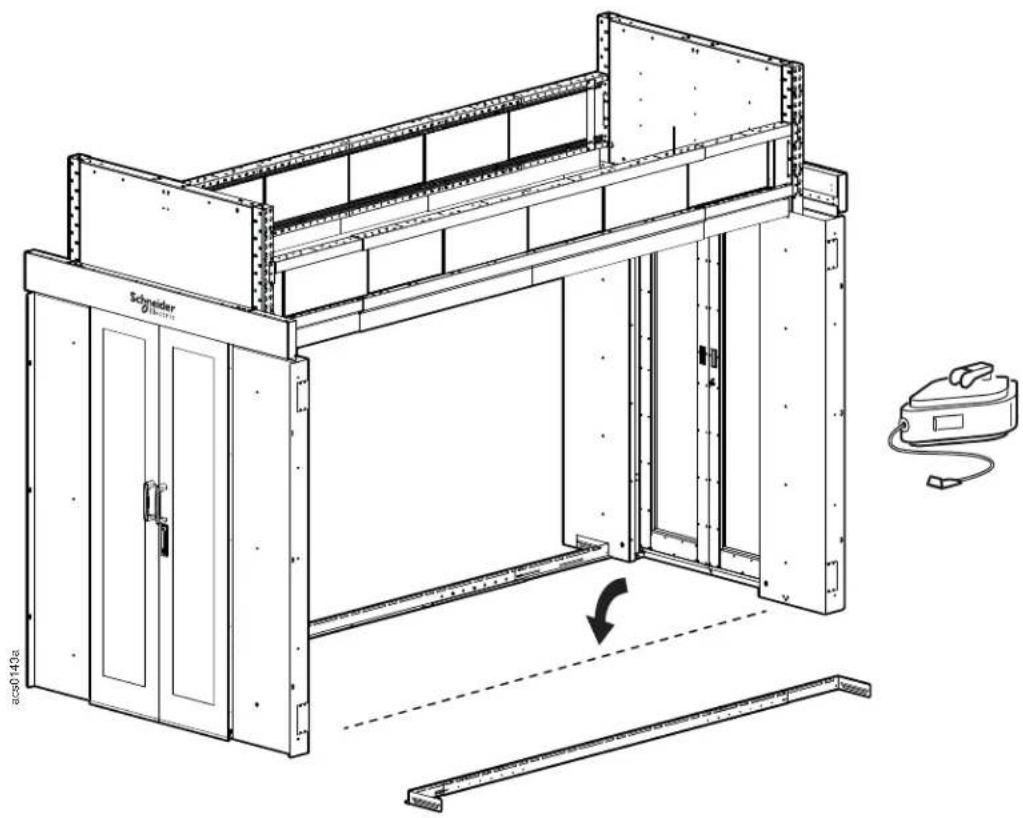
b. Install the stop rails to the bottom of the door frames with the Mylar electrical isolation plate between. Secure the stop rail to the door frame with two M8 x 20 Hex head screws at each end. Use the slots to adjust the rail in or out. When the stop rails are in the correct position, secure the extensions to the center rail with the M6 x 10 Pan head T30 screws along the sides of the rails and use anchor bolts (not provided) to secure the rail assembly along the edge that sits flush to the floor.
Install the blanking panels
If the rack space is taller than the 42U blanking panel, install the 3U blanking panels to the top bracket first. Multiple 3U blanking panels can be attached together and then to the 42U blanking panel.
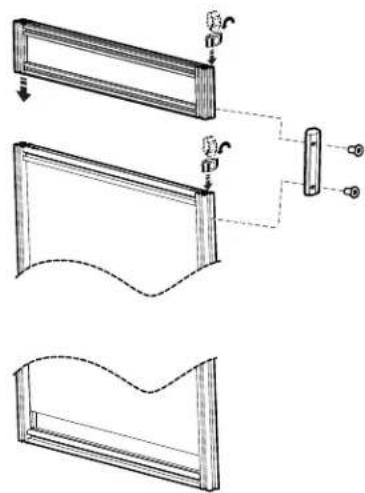
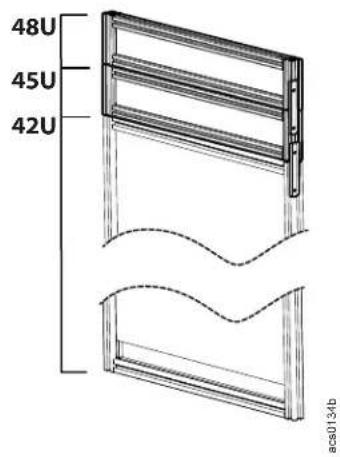
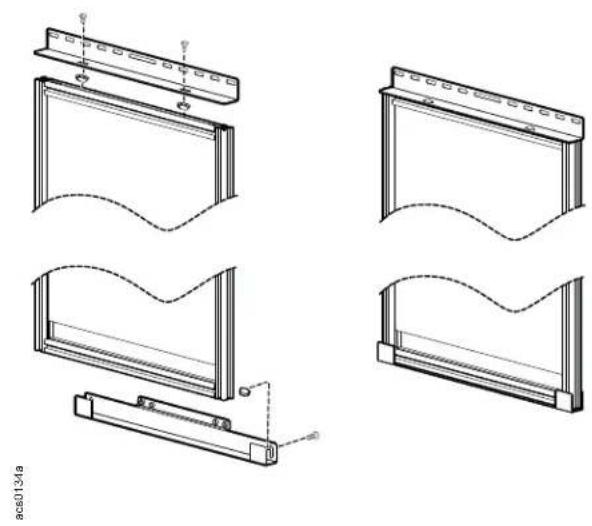
a. Attach the top blanking panel bracket to the blanking panel with two M6 x 10 pan head screws.
b. Attach the bottom blanking panel bracket to the blanking panel with two M6 x 10 pan head screws.
c. Install insert nuts to the telescoping beam. Attach the top blanking panel bracket to the horizontal telescoping beam with two M6 x 16 Pan head screws.
d. Attach the bottom blanking panel bracket to the stop rail. Attach the ground wire and serrated washer.
NOTE: The blanking panels may also be attached to the floor with provided brackets.
natural_image
Technical line drawings of four different window frame structures with no visible text or symbols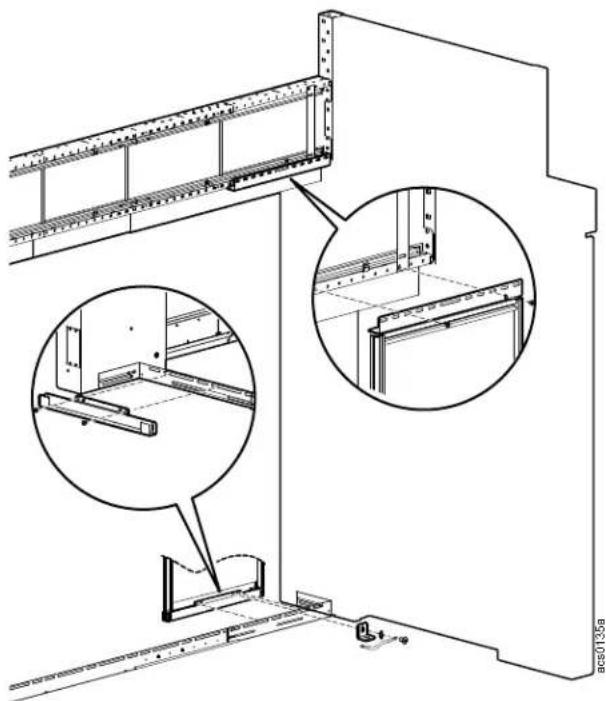
natural_image
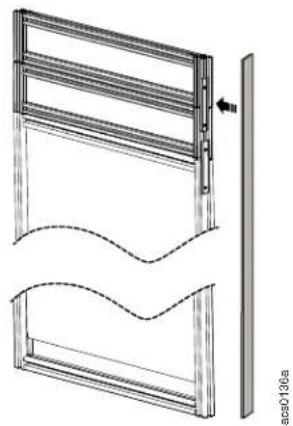
Technical line drawing of a structural panel assembly with two views of a frame (no text or symbols present)Apply the self adhesive seal to the side of the blanking panels.
natural_image
Technical line drawing of a window frame structure with no visible text or symbolsEnd Row Transition Cabinets
FS-AC-7001-B - Distribution Cabinet, MH50
FS-AC-7002-B - Distribution Cabinet, Split
FS-AC-7003-B - Distribution Cabinet, Solid
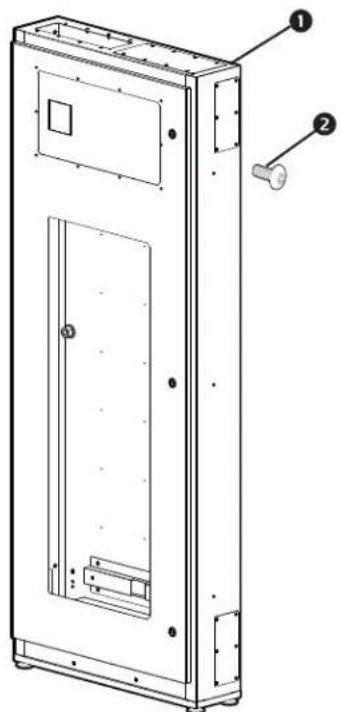
FS-AC-7001-B
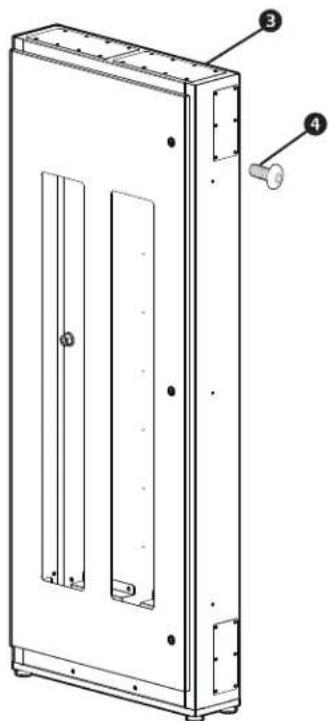
FS-AC-7002-B
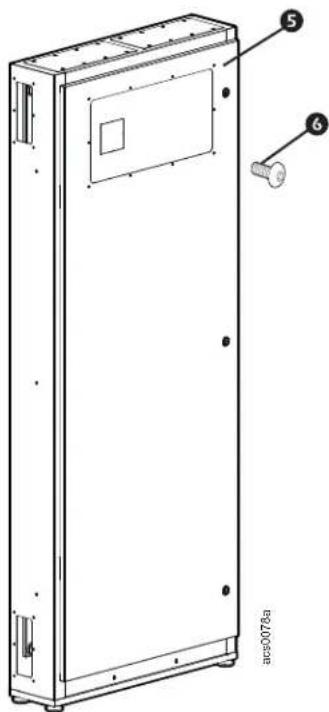
FS-AC-7003-B
Item Description Quantity
① Transition cabinet FS-AC-7001-B 1
② M6 x 12 pan head T30 screw 3
3 Transition cabinet FS-AC-7002-B 1
4 M6 x 12 pan head T30 screw 3
5 Transition cabinet FS-AC-7003-B 1
6 M6 x 12 pan head T30 screw 3
Drop Roof
FS-RF-3001-U Drop roof panel, 300mm
FS-RF-3002-U Drop roof mounting rail, 300mm
FS-RF-3003-U Drop roof panel, 600mm
FS-RF-3004-U Drop roof mounting rail, 600mm
FS-RF-3005-U Drop roof panel, 750mm
FS-RF-3006-U Drop roof mounting rail, 750mm
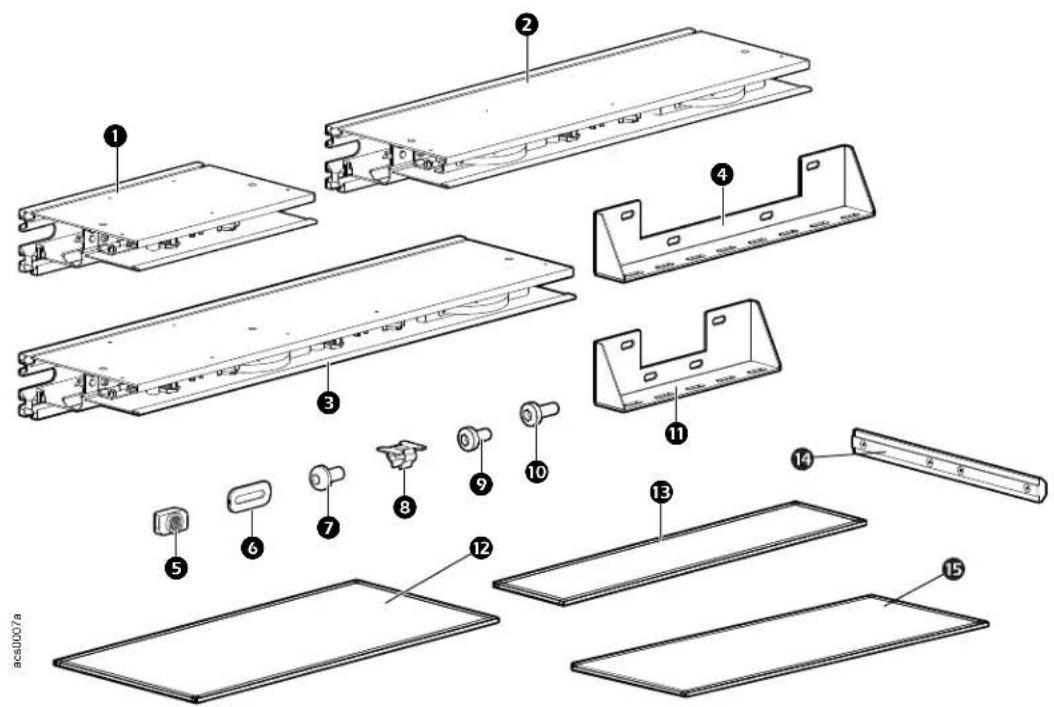
Item Description Quantity
① Ceiling support assembly 300mm 1
② Ceiling support assembly 600mm 1
3 Ceiling support assembly 750mm 1
4 Bracket (for 600mm and 750mm panel) 1
5 M6 Hammer head nut 8
6 Baying hinge bracket 2
⑦ M4 x 8 Torx pan head screw 4
8 M6 Insert nut 4
9 M6 x10 Pan head T30 screw 8
10 M6 x16 Pan head T30 screw 4
⑪ Bracket (for 300mm panel) 1
12 Roof panel 750mm 1
⑬ Roof panel 300mm 1
14 Connector
15 Roof panel 600mm 1
4
Ceiling Panel Lock Systems
ACDC2016 Ceiling Panel Lock System, 100-120V (with power supply)
ACDC2017 Ceiling Panel Lock System, 200-240V (with power supply)
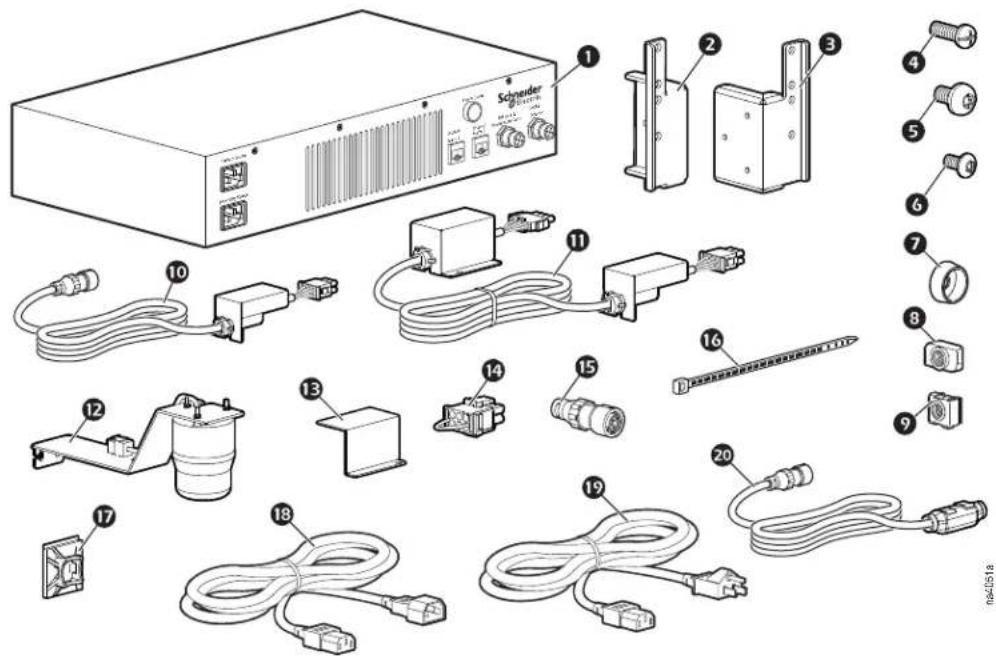
Item Description Quantity
① Dropout power supply control box, 110V (ACDC2016) 1
Dropout power supply control box, 220V (ACDC2017) 1
② Bracket for power supply box, left 1
3 Bracket for power supply box, right 1
4 M6 × 16 pan head Phillips screw 4
5 M6 × 12 pan head T30 screw 4
6 M4 × 8 mm button head T15 screw 6
⑦ M6 plastic cup washer 4
8 M6 channel nut 4
9 M6 caged nut 4
10 Wire harness—power supply to wiring box, 3.6m (12 ft.) 1
⑪ Across aisle wiring assembly, 4m (13.1 ft.) 2
12 Alarm beacon 2
⑬ Wiring box cover 1
14 Terminal jumper 1
15 4-pin jumper 1
16 Wire tie 55
17 Cable holder 55
18 Power cord—CEE22 jump 2M 10A ROHS (ACDC2017) 2
19 Power cord—6 ft. C13/15 DELL ROHS compliant (ACDC2016) 2
20 Smoke detector cable 1
ACDC2015 Ceiling Panel Lock System, (no power supply)
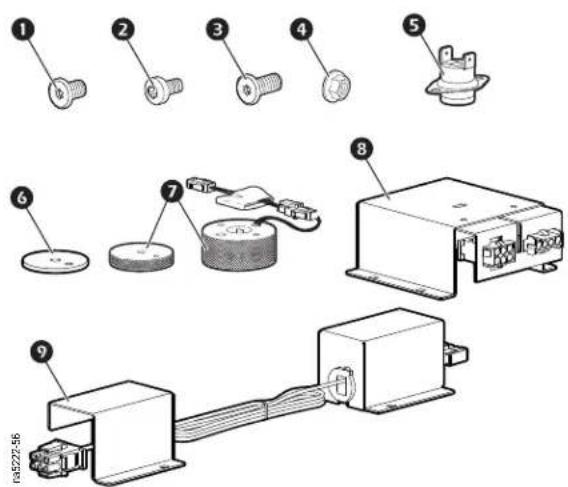
Item Description Quantity
① M5 x 8 Flat head Torx Screw 8
2 M4 x 8 Pan head Torx screw 24
3 M5 x 10 Flat head Torx screw 4
4 M4 serrated hex flange nut 8
5 135F (57C) temperature switch 24VDC 3A 4
6 Electromechanical lock spacer 4
⑦ Electromechanical lock assembly, 24V 50MA 4
8 Wiring box 4
9 Box-to-box wire assembly 4
Rack Height Adapters
FS-AC-8001-U - Rack Height Adapter, 300mm FS-AC-8002-U - Rack Height Adapter, 600mm FS-AC-8003-U - Rack Height Adapter, 750mm FS-AC-8004-U - Rack Height Adapter, 800mm
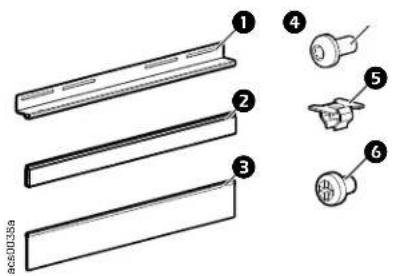
Item Description Quantity
① Bracket for brush/filler panel 1
2 Panel, 1U, plastic, height filling, (length: 300, 600, 750, 800mm) 6
③ Brush, short, height filling, (length: 300, 600, 750, 800mm)
4 M6 x 16 Pan head T30 screw 4
5 M6 insert nut 4
6 10-32 x 5/16 Pan head Phillips screw 2
Cantilever Support Arms
FS-AC-3001-B - Large Cantilever Support Arms
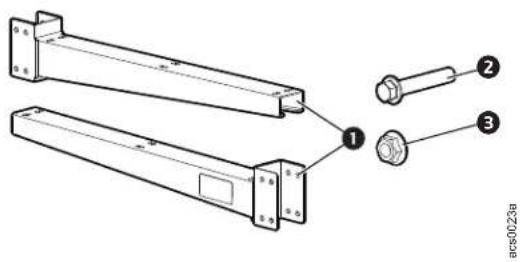
Item Description Quantity
① Cantilever Arm 2
② M12 x 100 Hex head bolt 4
③ M12 Hex head nut 4
FS-AC-3003-B - Mini Cantilever Arms
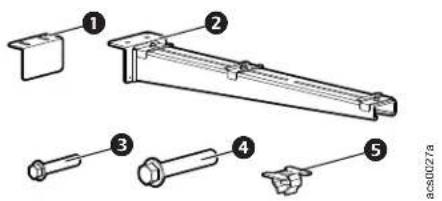
Item Description Quantity
① Leveling pad 2
② Mini Cantilever arm 2
③ M4 x 10 Hex socket bolt 4
4 M6 x 20 Hex head bolt 4
5 M6 Insert nut 4
FS-AC-3002-B - Overhead Support Frame, 8 - 12ft
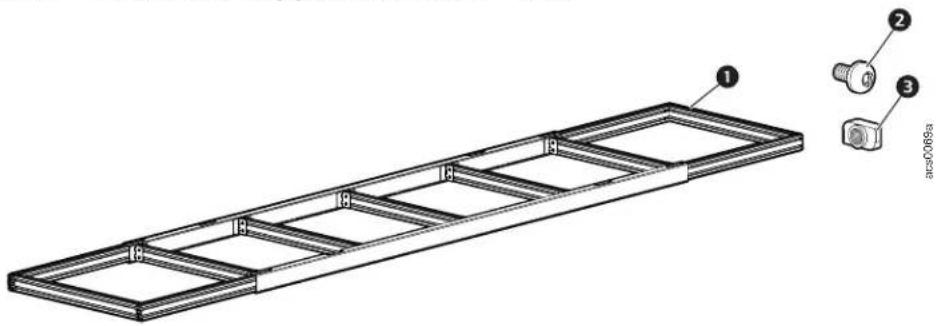
Item Description Quantity
① Aluminum frame 1
② M6 x 12 pan head T30 screw 17
③ M6 hammer head nut 17
Power Raceway
FS-AC-4001-B - Power Raceway End Module
FS-AC-4002-B - Power Raceway Main Module
FS-AC-4003-B - 300mm Side Cover Pack
FS-AC-4004-B - 50/150mm Side Cover Pack
FS-AC-4005-B - Power Raceway Extension Module
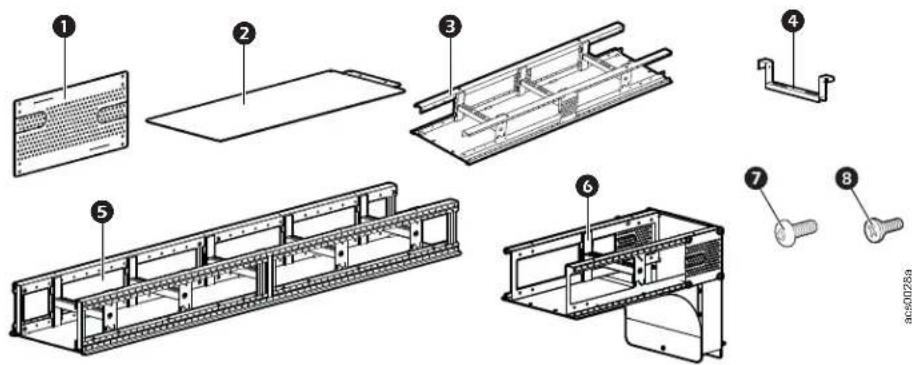
Item Description Quantity
| 1 | Side cover 300mm (FS-AC-4003-B) | 4 |
| Side cover 150mm (FS-AC-4004-B) | 2 | |
| Side cover pack 50mm (FS-AC-4004-B) | 2 | |
| 2 | Base tray (FS-AC-4002-B) 2 | |
| 3 | Extension module* (FS-AC-4005-B) 1 | |
| 4 | Rung of cable ladder (FS-AC-4002-B) 4 | |
| 5 | Main module (FS-AC-4002-B) 3 | |
| 6 | End module/end cap (FS-AC-4001-B) 1 | |
| 7 | M6 x 12 pan head T30 screw(FS-AC-4005-B) | 13 |
| (FS-AC-4002-B) | 29 | |
| 8 | M5 x 12 flat head screw 8 |
* Extension module is used with double HyperPod.
Lighting kits
ACDC2018, ACDC2019
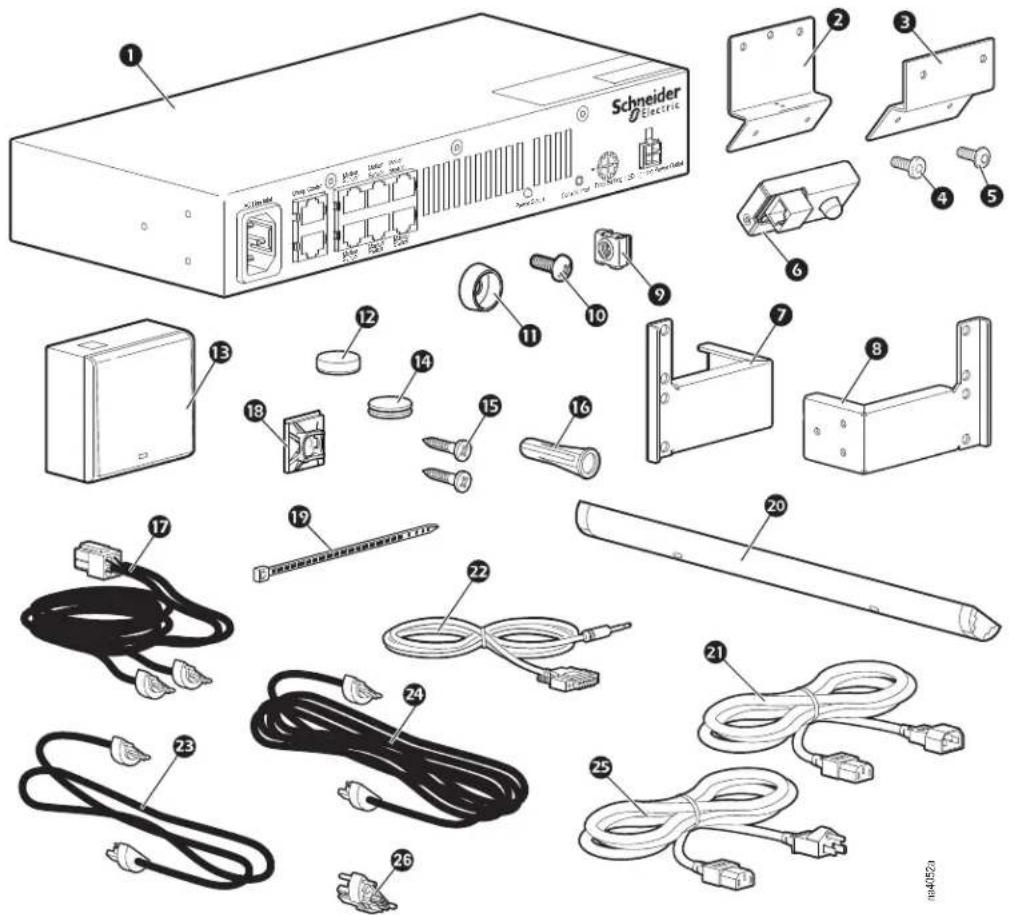
Item Description Quantity Item Description Quantity
| 1 | Lighting control unit | 1 14 | Hook and loop fastener, manual switch | 8 | |
| 2 | Motion sensor mounting bracket | 2 | 15 | Wood screw - #6 × 3/4 - Phillips | 4 |
| 3 | Motion sensor mounting bracket, sliding door | 2 16 | Wall anchor 4 | ||
| 4 | M4 × 8mm TORX screw, thread forming | 6 17 | Wire assembly, 24 V power 1 | ||
| 5 | M4 × 8 mm TORX screw | 8 | 18 | Wire tie cable holder | 45 |
| 6 | Motion sensor | 2 | 19 | Wire tie | 45 |
| 7 | Lighting control unit mounting bracket, left | 1 | 20 | LED light assembly module, 6W | 6 |
| 8 | Lighting control unit mounting bracket, right | 1 | 21 | Power cord, 15A 250V, C13 to C14 | 1 |
| 9 | M6 caged nut | 4 | 22 | 2.5mm to DB9F cable, console port | 1 |
| 10 | M6 × 16 Phillips screw | 4 | 23 | Light-to-light wire assembly | 5 |
| 11 | Cup washers | 4 | 24 | Light-to-light wire assembly, across aisle | 1 |
| 12 | Magnets, manual switch | 8 | 25 | Power Cord, 15A 125V, C13 to 5-15P | 1 |
| 13 | Manual switch | 2 | 26 | Light-to-light connector, end-to-end | 5 |
FS-AC-6001-B - Lighting Bracket Kit
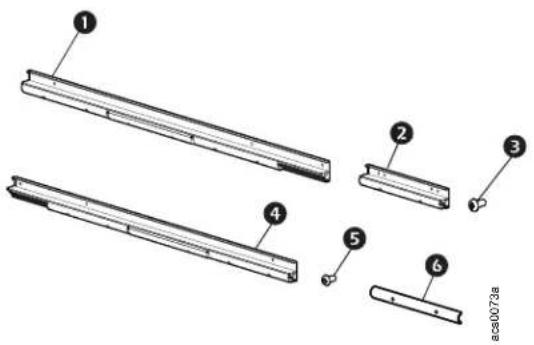
Item Description Quantity
1 Left hand rail 2
② Extra rail 8
3 M6 x 16 Pan head T30 screw 29
4 Right hand rail 2
5 M4 x 12 Torx pan head screw 33
6 Channel cover 16
Overhead Duct Riser
FS-RF-5001-B - Overhead Duct Riser, 8ft
FS-RF-5002-B - Overhead Duct Riser, 10ft
FS-RF-5003-B - Overhead Duct Riser, 12ft
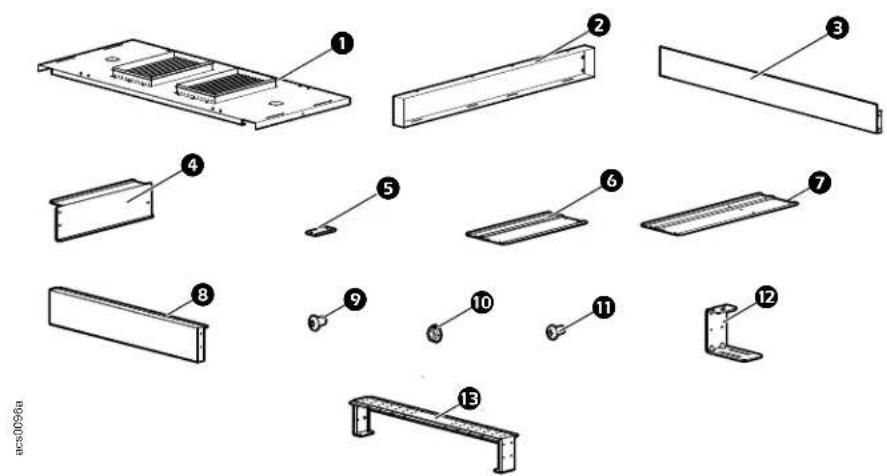
Item Description Quantity Item Description Quantity
| 1 | Roof Panel with diffuser | |
| RS-RF-5001-B | 4 | |
| RS-RF-5002-B | 5 | |
| RS-RF-5003-B | 6 | |
| 2 | Main riser | |
| RS-RF-5001-B | 4 | |
| RS-RF-5002-B | 4 | |
| RS-RF-5003-B | 6 | |
| 3 | Frame end duct riser | |
| 2 | ||
| 4 | Side riser panel | |
| RS-RF-5001-B | 4 | |
| RS-RF-5002-B | 5 | |
| RS-RF-5003-B | 6 | |
| 5 | Pad raiser 8 12 Duct fixture bracket. 10 | |
| 6 | Removable duct riser cover (3 in.) | |
| RS-RF-5001-B | 8 | |
| RS-RF-5002-B | 10 | |
| RS-RF-5003-B | 12 | |
| 7 | Removable duct riser cover (6 in.) | |
| RS-RF-5001-B | 16 | |
| RS-RF-5002-B | 20 | |
| RS-RF-5003-B | 24 |
8 Cap end 2
9 M6 x 12 pan head T30 screw RS-RF-5001-B 145 RS-RF-5002-B 181 RS-RF-5003-B 216
10 M5 Flanged serrated hex nut RS-RF-5001-B 21 RS-RF-5002-B 25 RS-RF-5003-B 28
M6 x 12 flat head T30 screw 16
Support bracket RS-RF-5001-B 3 RS-RF-5002-B 4 RS-RF-5003-B 5
Crossover Tray
FS-AC-4006-B - Aisle Crossover Tray
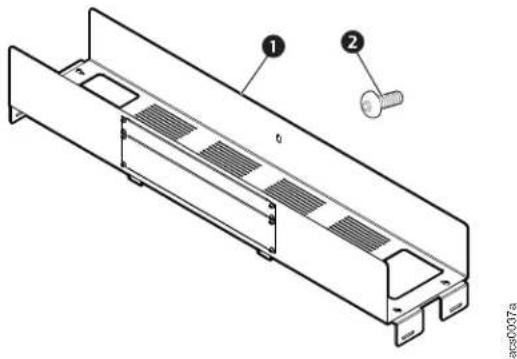
Item Description Quantity
① Crossover tray 1
② M6 x 12 flat head T30 screw 8
Single Swing Door Assembly
FS-DR-3001-B - Swing Door
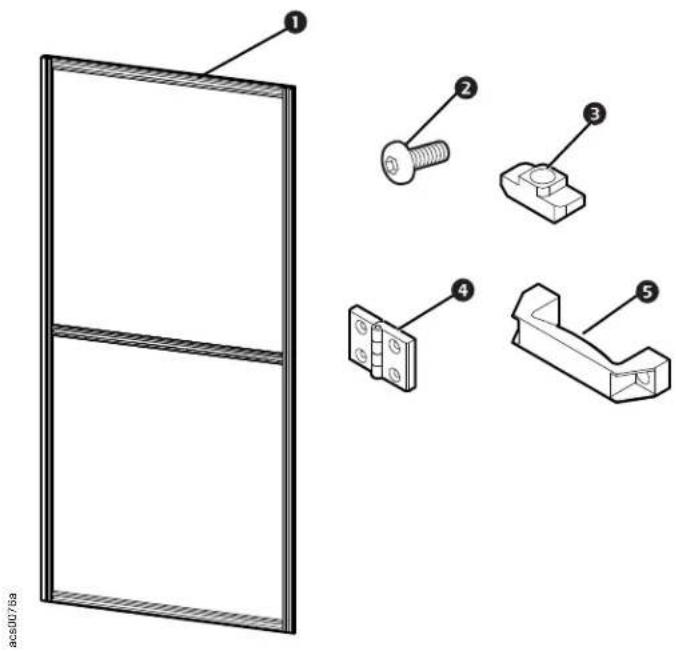
Item Description Quantity
1 Door 1
② M6 x 16 pan head screws 16
③ M6 Hammer head nut 8
4 Hinges 3
5 Door handle
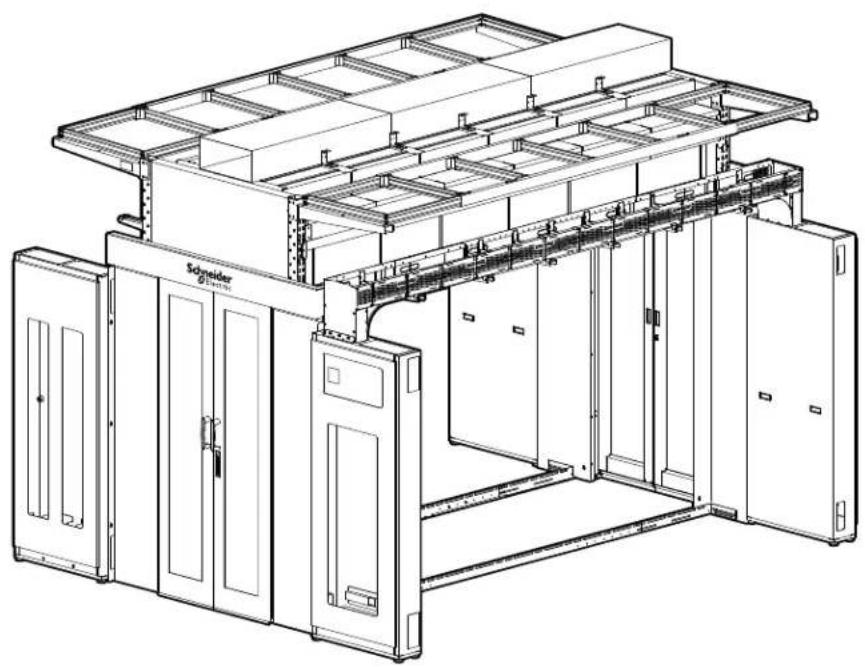
Installation of Optional Accessories
CAUTION
WORKING HEIGHT HAZARD
The working height for the assembly process can exceed 2.3 meters (7.5 feet). The use of stepladders or scaffolding will be required during assembly.
Failure to follow these instructions can result in serious injury or equipment damage.
natural_image
Technical line drawing of a server rack unit with multiple compartments and mounting doors (no text or symbols)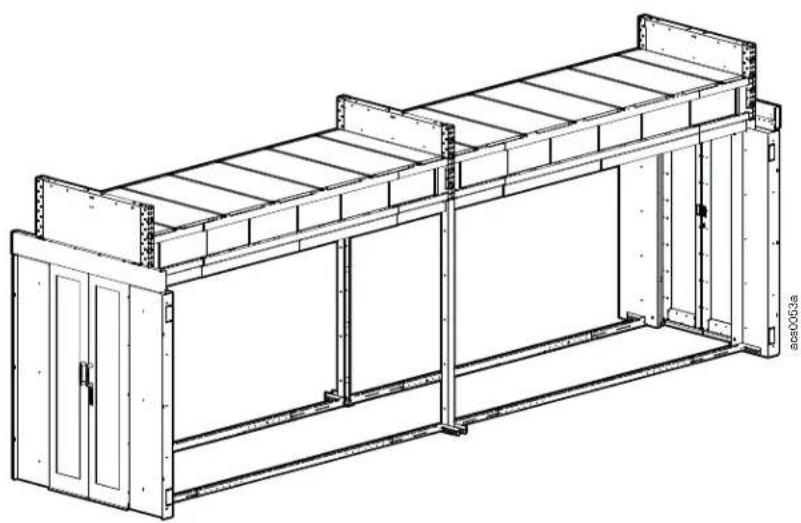
natural_image
Technical line drawing of a modular industrial or warehouse structure with metal framework and doorways (no text or symbols)Transition Cabinets
CAUTION
LIFTING HAZARD
At least two people are required to install this enclosure. Use appropriate equipment to move cabinets into position.
Failure to follow these instructions can result in serious injury or equipment damage.
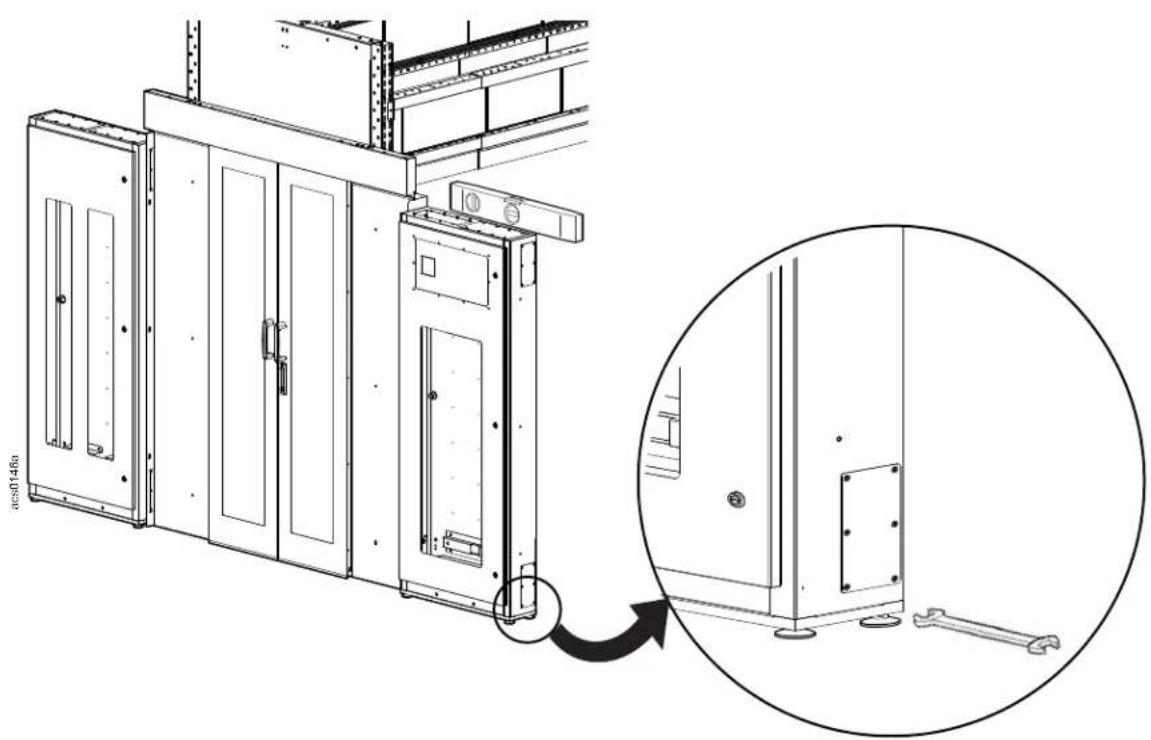
Two transition cabinets can be installed at each end of the aisle. One transition cabinet is shown installed on either side of the door frame in the illustration below.
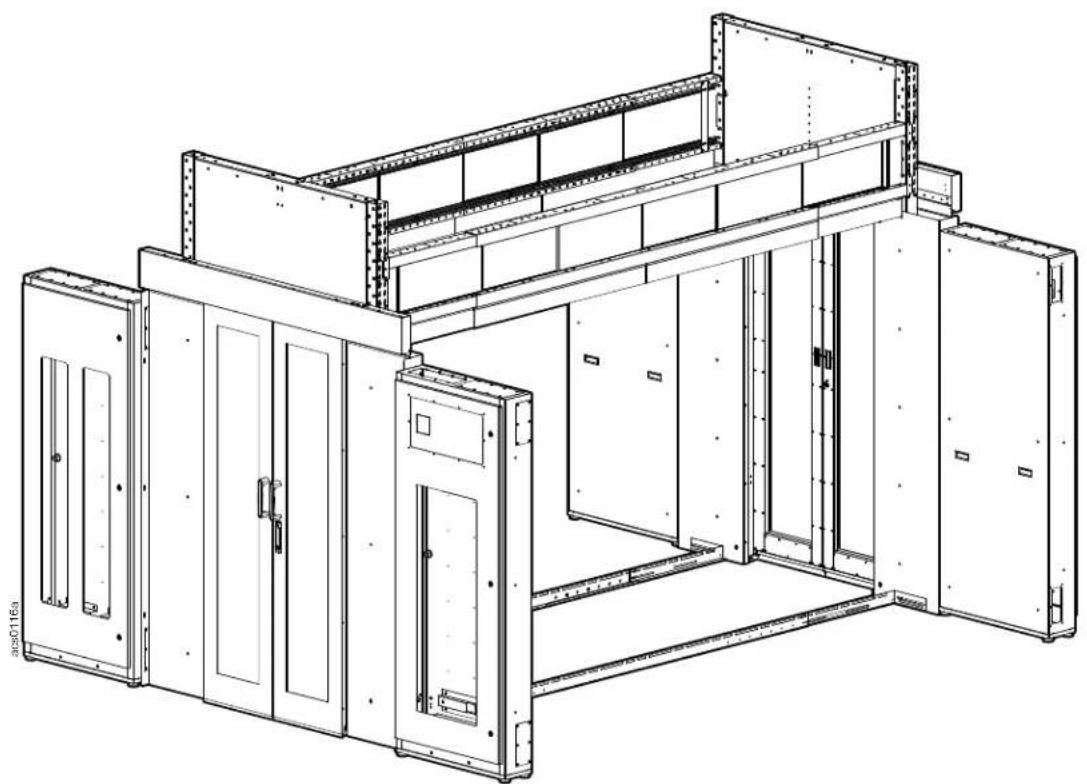
natural_image
Technical line drawing of a modular electrical enclosure or enclosure unit (no text or symbols visible)NOTICE
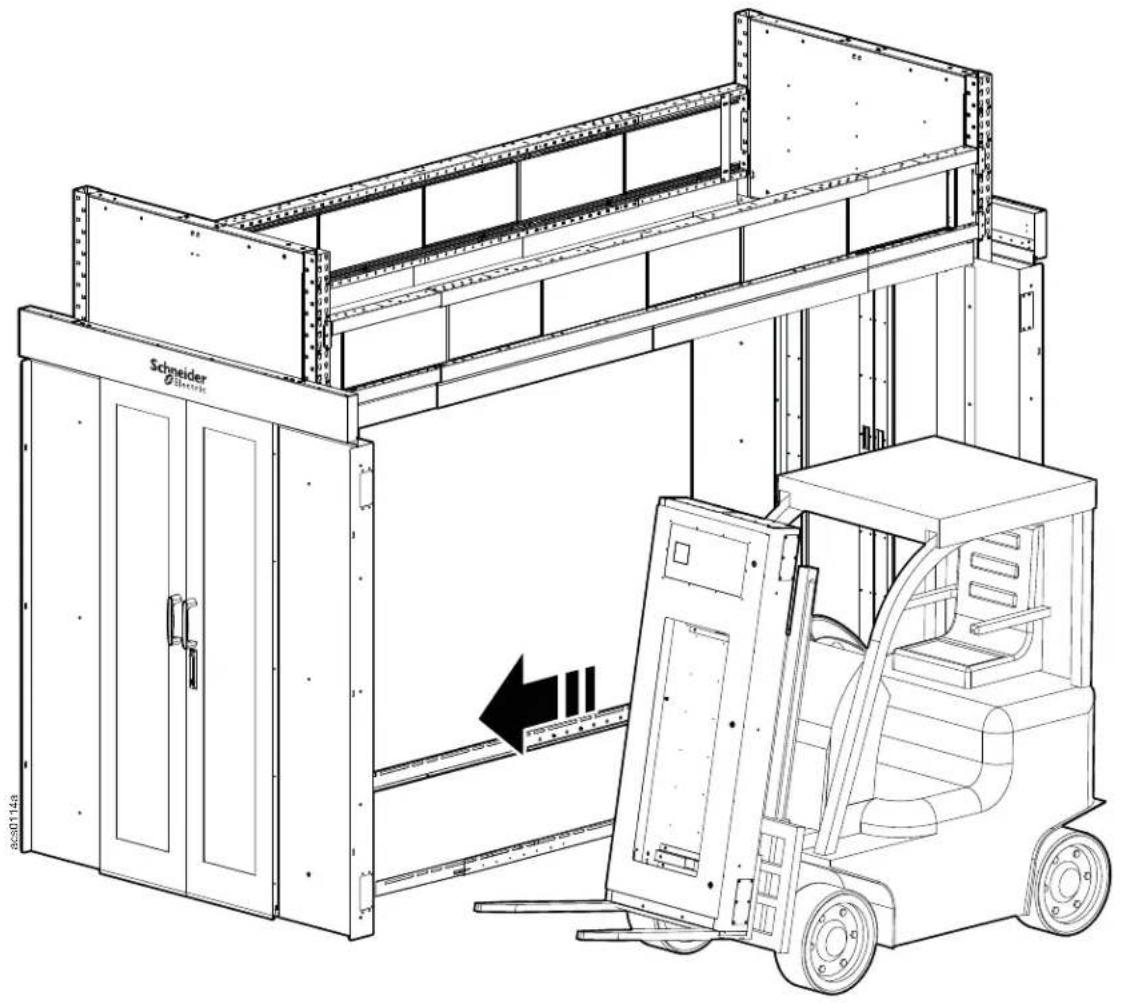
Empty transition cabinets can weigh from 215 to 230 lbs. and much more if equipment has been installed. Consider the weight of your cabinet to choose the appropriate method of moving the transition cabinets.
Access panels on the sides of the door frames should be removed prior to installing the transition cabinet.
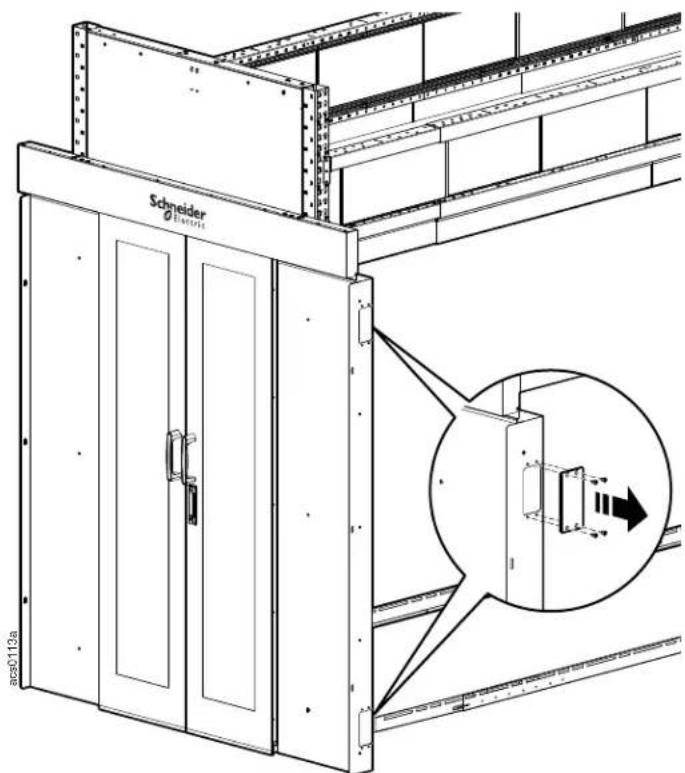
Move the transition cabinet into position.
natural_image
Technical line drawing of a mechanical lifting device with a forklift, showing structural components and a directional arrow (no text or symbols)CAUTION
LIFTING HAZARD
Transition cabinets are very heavy, The use of mechanical lifting machinery such as a forklift is recommended
Failure to follow these instructions can result in serious injury or equipment damage.
The transition cabinet is attached to the door frame with three M6 x 12 pan head T30 screws.
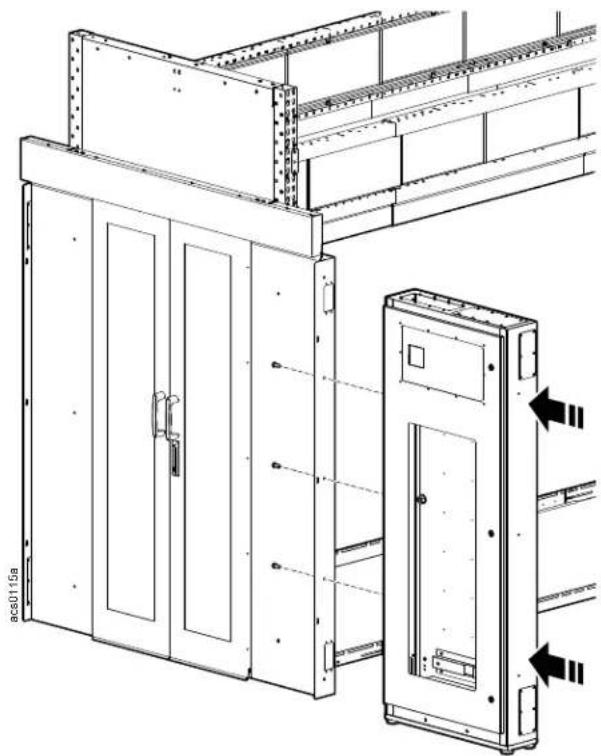
natural_image
Technical line drawing of an electrical cabinet assembly with mounting brackets and doorways (no text or symbols)Adjust the leveling feet until the transition cabinet is level and plumb.
natural_image
Technical line drawing of a cabinet or enclosure with an inset close-up showing internal components (no text or symbols)Crossover Tray
NOTICE
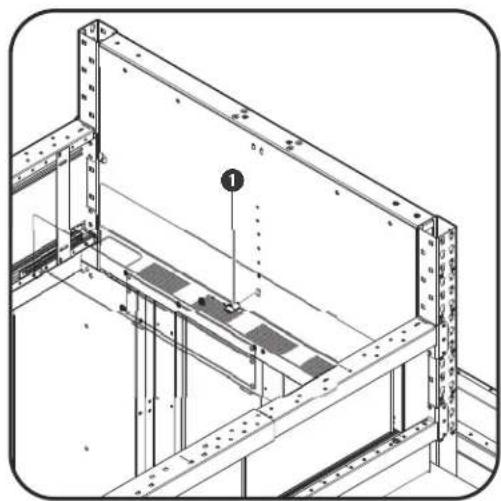
The location of the telescoping beams will be a determining factor when installing the crossover tray. The location of the holes at the center of the interior end cap panel start at 42U and continue vertically up to 48U. In the illustrations for this example, the screw is located at the 42U position
natural_image
Technical line drawing of a structural frame with reinforcement bars and a numbered component (no text or symbols)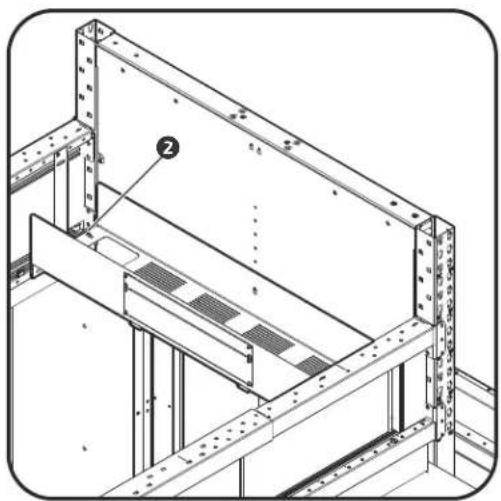
natural_image
Technical line drawing of a structural frame with metal beams and supports (no text or symbols)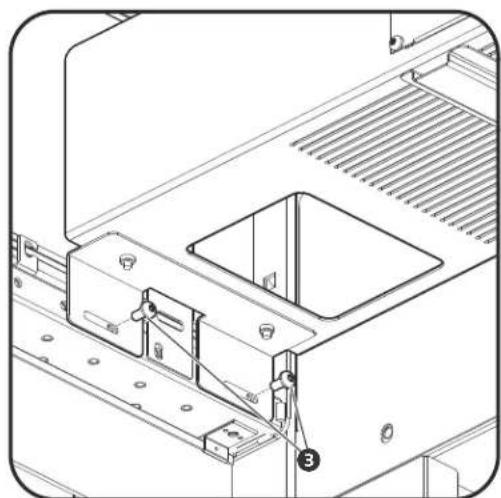
natural_image
Technical line drawing of a mechanical assembly with mounting bracket and clamping mechanism (no text or symbols)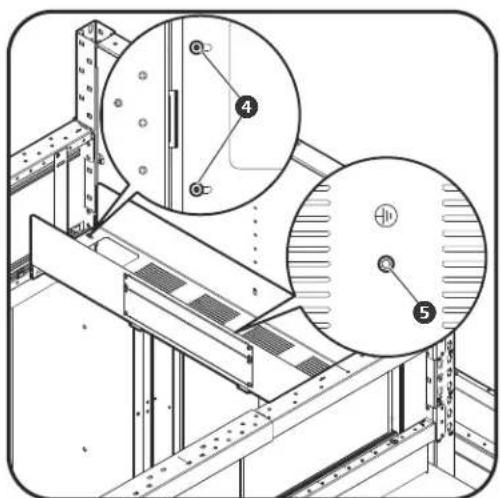
- Install an M6 T30 screw ① to the hole on the inside panel of the end cap. Do not fasten the screw tightly
- Hang the crossover tray on the screw. Loosen the four screws ② inside the crossover tray but do not remove them.
- Slide out the brackets on the bottom of the crossover tray and secure each side to the telescoping beams with four screws ③ in each bracket.
- Fasten the screws ④ loosened in step 2.
- Connect the grounding wire to the grounding nut ⑤ before using the crossover tray.
Mini Cantilever Arms
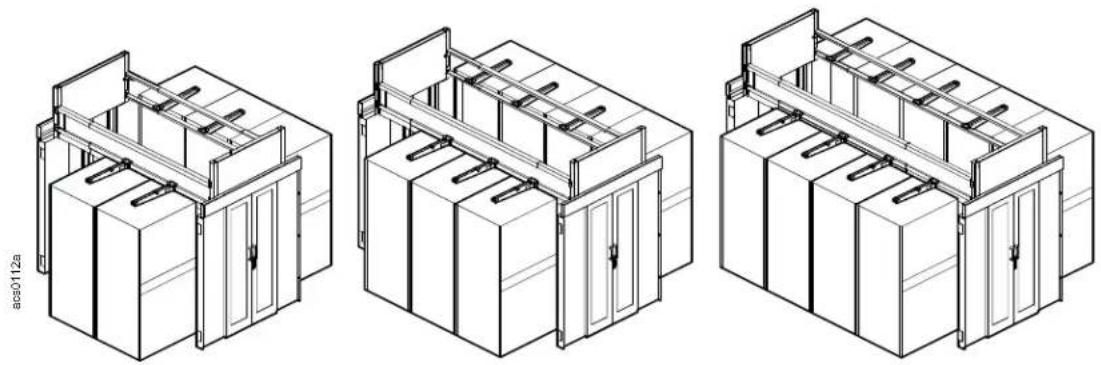
The number of cantilever arms needed to support the power raceway will depend on the aisle length.
natural_image
Three technical line drawings of server rack or cabinet units with mounting brackets and doorways (no text or symbols)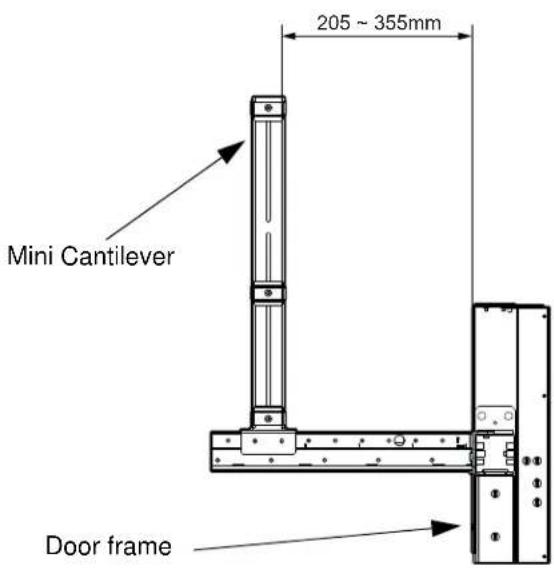
The mini cantilevers are installed equally spaced along the telescoping beams leaving from 205 to 355mm (8 - 14 inches) between the end of the first and last mini cantilever and the door frame.
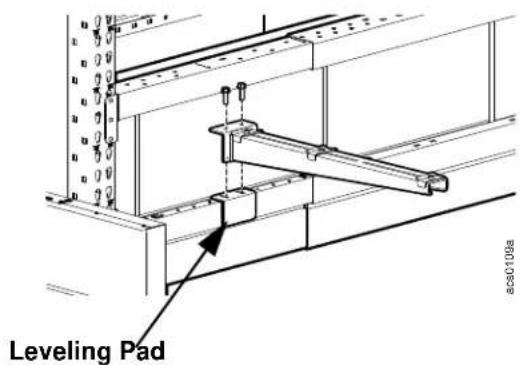
The leveling pads position the mini cantilever arms on the small ends of the telescoping beam level with the mini cantilever arms installed on the larger middle portion of the telescoping beam.
Secure the mini cantilever arm and leveling pad with two M6 x 20 Hex socket bolts.
Install the insert nuts to the holes in the middle portion of the telescoping beam where you have determined to locate the mini cantilever arms.
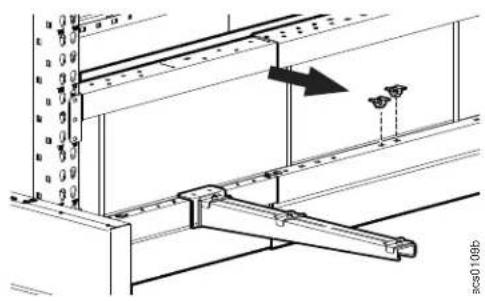
natural_image
Technical diagram of a structural support frame with mounting fixtures and an arrow indicating direction (no text or symbols)Install the mini cantilever arms over the insert nuts on the middle portion of the telescoping beam and secure with two M6 x 20 hex head bolts.
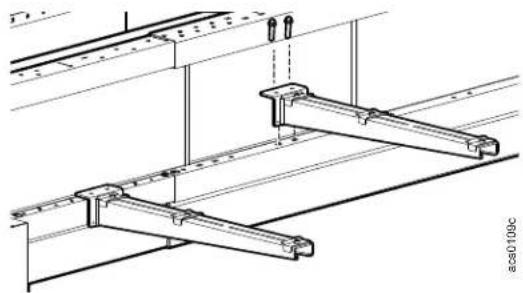
natural_image
Technical line drawing of a mechanical assembly with beams and supports (no text or symbols)Use two M4 x 10 screws to adjust the leveling of the cantilever arm.
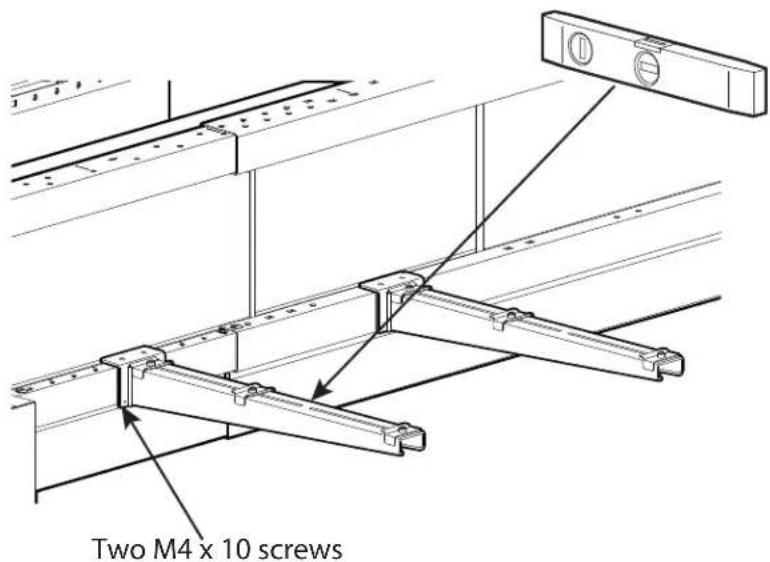
Install the mini cantilevers equally along the telescoping beam.
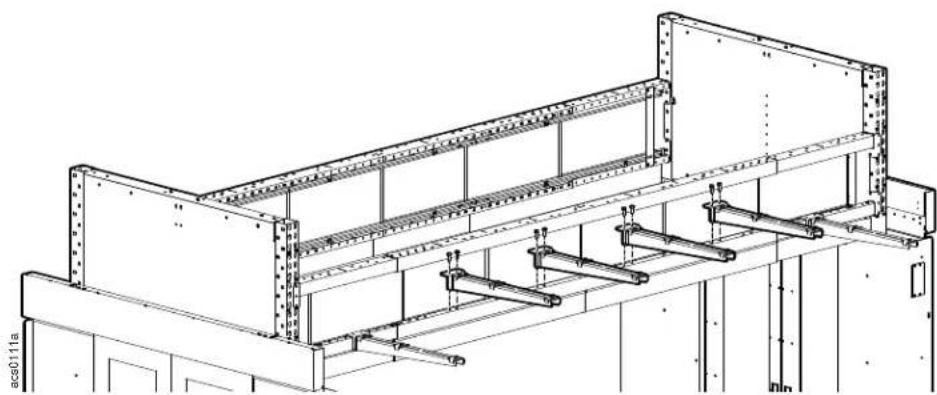
natural_image
Technical line drawing of a structural frame assembly (no text or symbols)Power Raceway
Power Raceway Configuration options
The transition cabinet and mini cantilevers must be installed before the power raceway is installed.
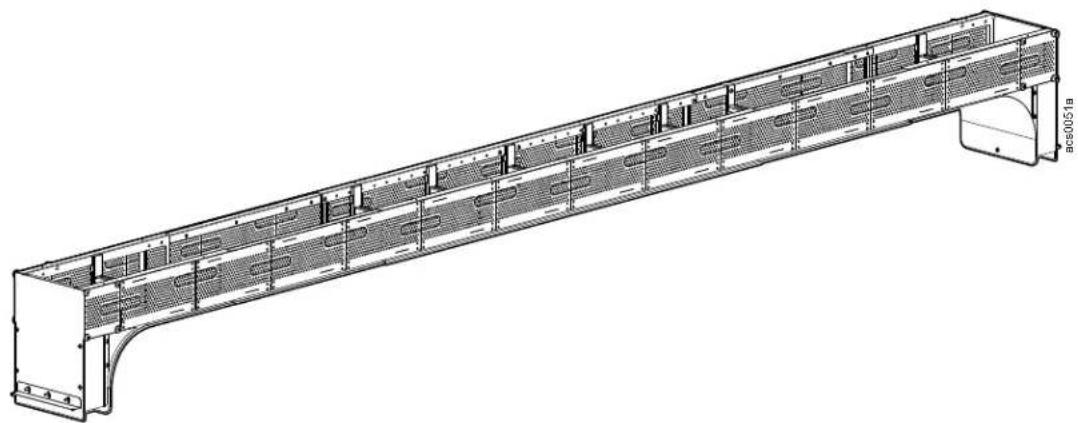
natural_image
Technical line drawing of a long structural beam with internal grid patterns and mounting brackets (no text or symbols)Remove the top cover of the transition cabinet and insert the end module into the hole.
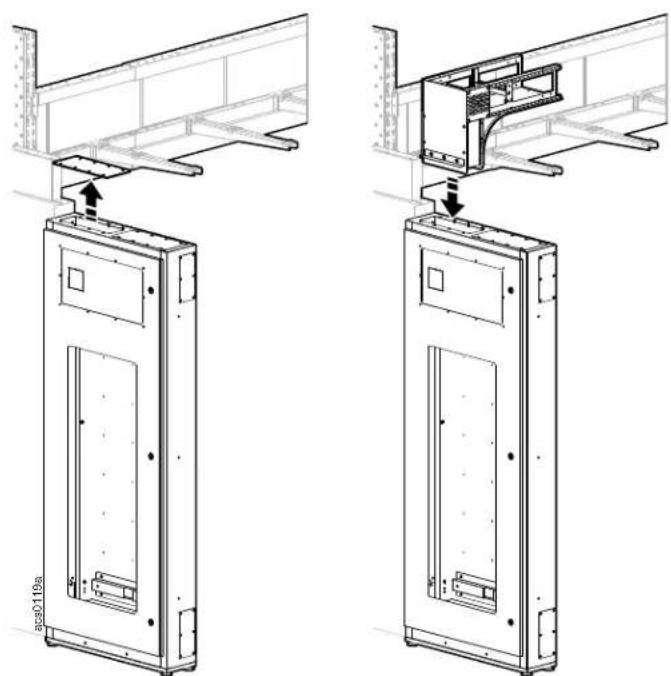
natural_image
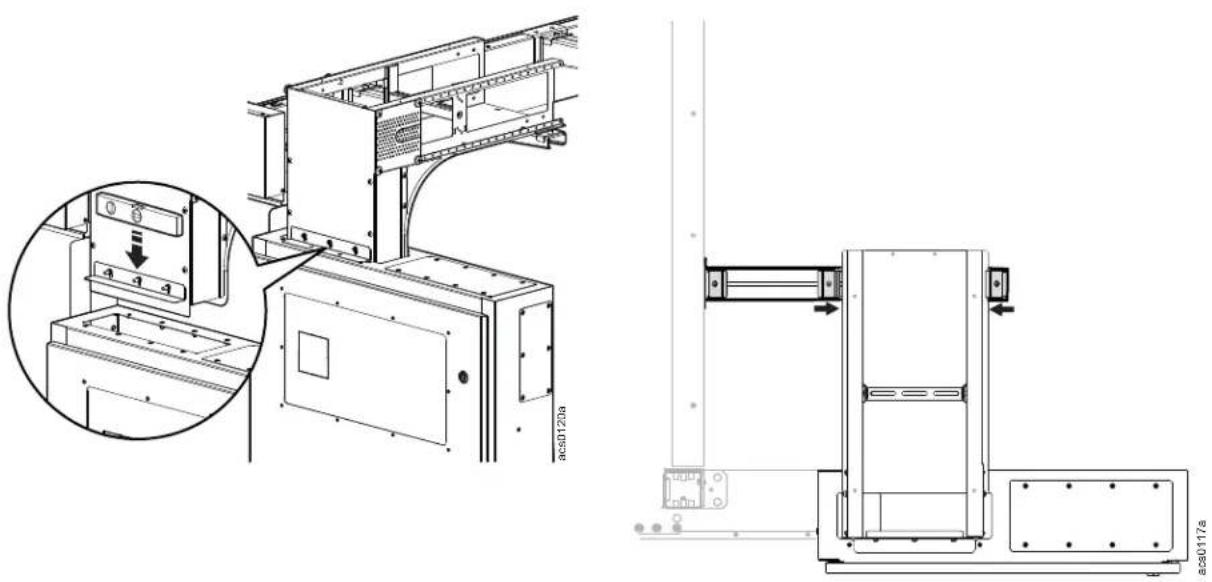
Technical line drawing of two mechanical assembly components with mounting brackets and structural details (no text or symbols)Secure the support bracket on the end module to the top of the transition cabinet. The support bracket has slotted holes on the side attached to the end module. The end module can be leveled by loosening the M5 nuts and adjusting the support bracket up or down.
The end module can be secured to the cantilever arm by loosening the fasteners holding the clips in place and sliding the clips toward the end module. The lip of the clip is slightly raised and will slide over the edge of the end module. Tighten the clip fasteners once they are in position.
natural_image
Technical line drawing of a mechanical assembly with an inset close-up showing a control panel and a side-view detail (no text or symbols present)Insert the sliding base into the body module. Slide the base out far enough to reach the end module.
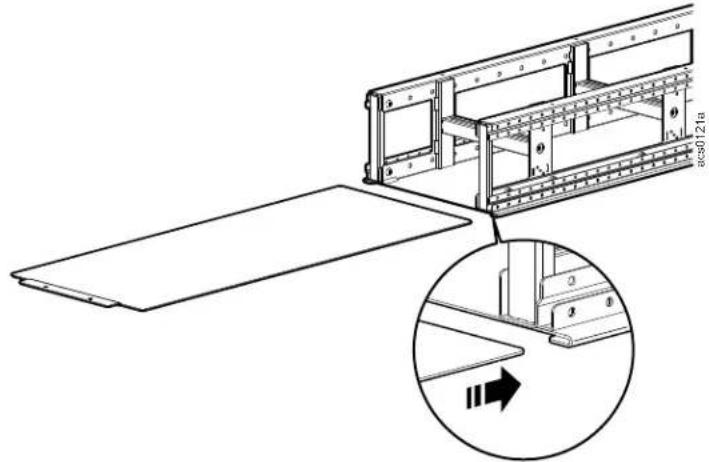
Place the body module on the mini cantilevers at the center of the pod aisle.
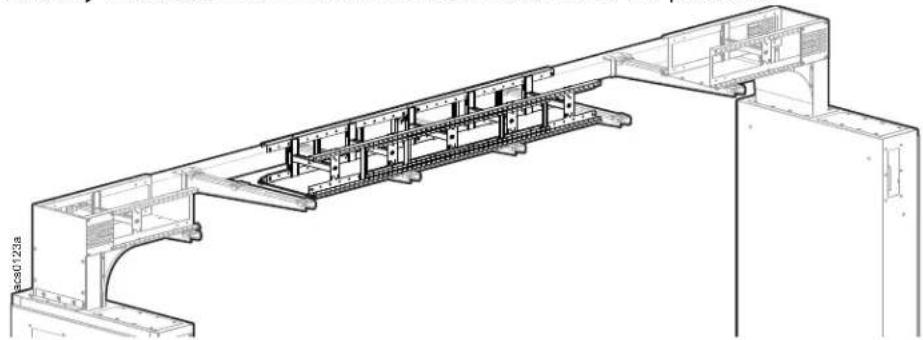
natural_image
Technical line drawing of a structural frame assembly (no text or symbols)Attach base to the end module with two M6, T30 screws.
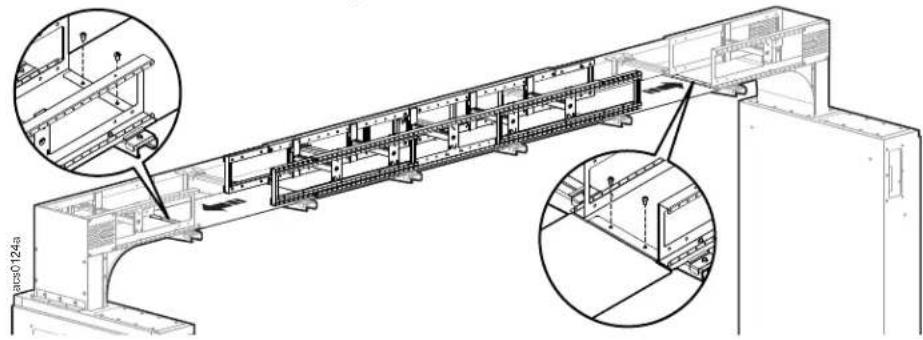
natural_image
Technical line drawing of a structural frame assembly with two magnified insets showing internal components (no text or symbols present)Remove the two M6 T30 screws from the end of the body module and slide out the extension to reach the end module.
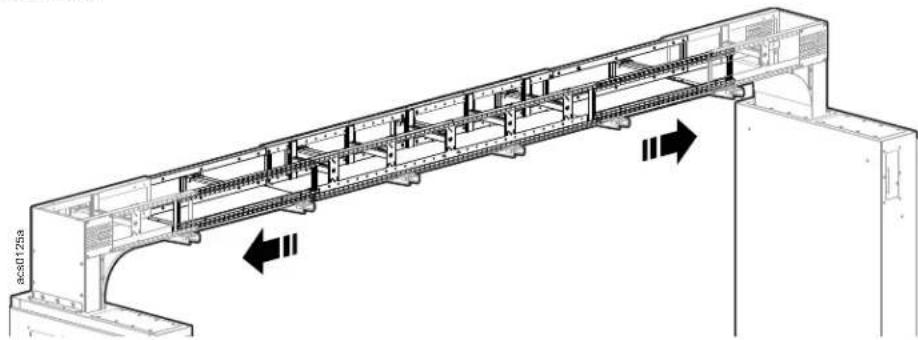
natural_image
Technical line drawing of a structural beam or bridge assembly with internal components and directional arrows (no text or symbols)Tighten the screws to secure the extension in its position.
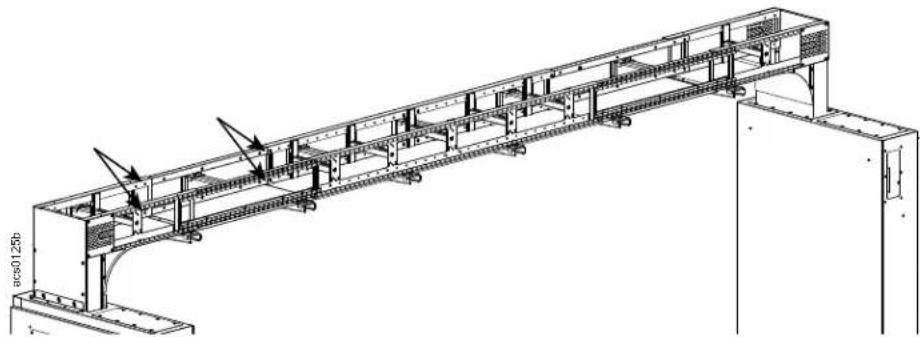
natural_image
Technical line drawing of a structural steel truss bridge with support beams and internal components (no text or symbols)Loosen and then slide the clips on the mini cantilevers toward the power raceway and secure by tightening the clip fasteners.
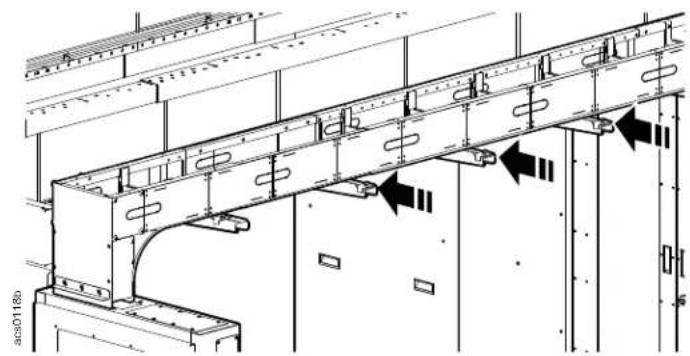
natural_image
Technical line drawing of a structural frame with rebar and supports, showing directional arrows indicating movement (no text or symbols present)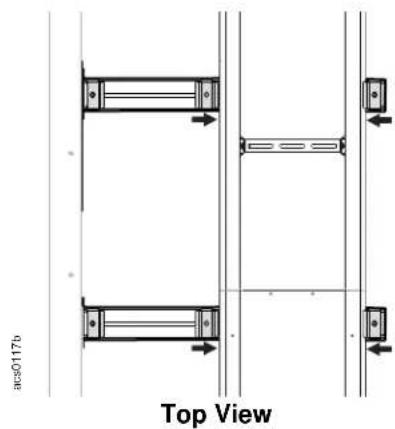
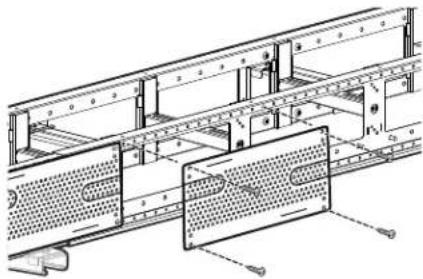
Attach the side covers with four Phillips head 10-32 self tapping screws. Torque 2-2.5 N-m.
natural_image
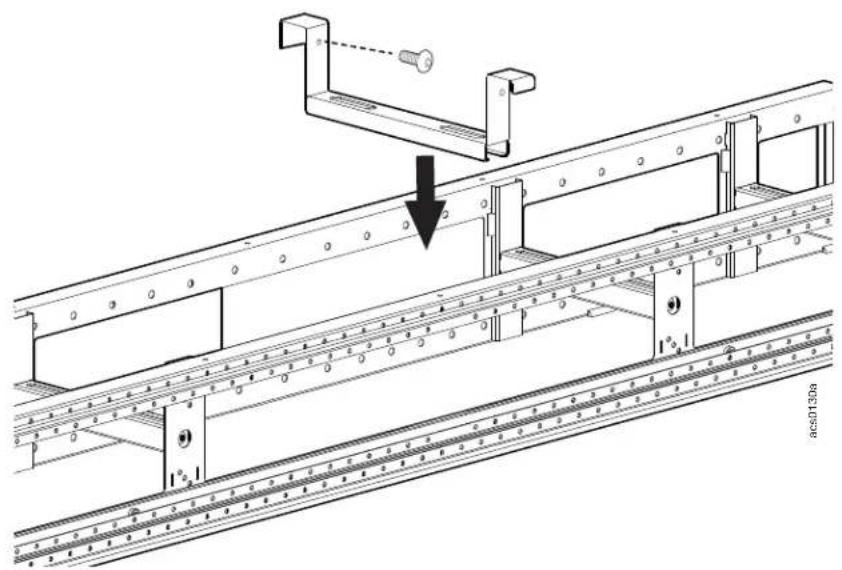
Technical line drawing of a mechanical assembly with no visible text or symbolsIf more stability is required, install the additional cable rung on the sliding frame with two T30 M6 screws.
natural_image
Technical line drawing of a structural assembly with a downward arrow indicating a component (no text or symbols present)Post Cantilevers and Suspension System
Possible Configurations for Post Cantilevers:
The square holes on the vertical posts are used for cantilever installation. The cantilevers can be installed at the top of the vertical post ①, just above the top telescoping beam ②, or between the telescoping beams ③.
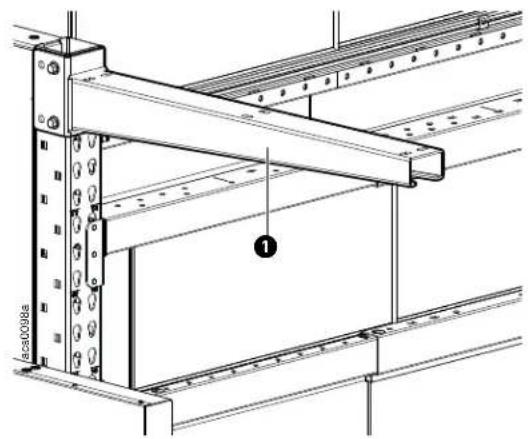
natural_image
Technical line drawing of a structural frame with metal beams and bolts, no text or symbols present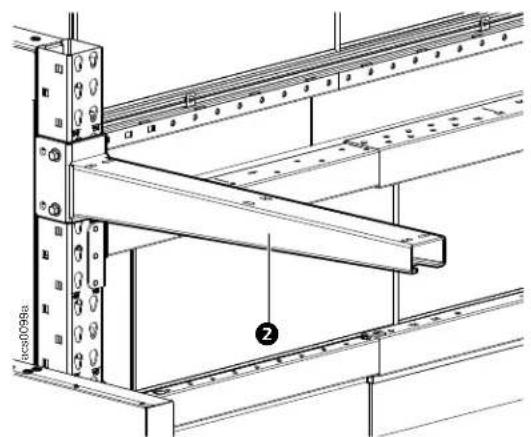
natural_image
Technical line drawing of a structural frame assembly with no visible text or symbols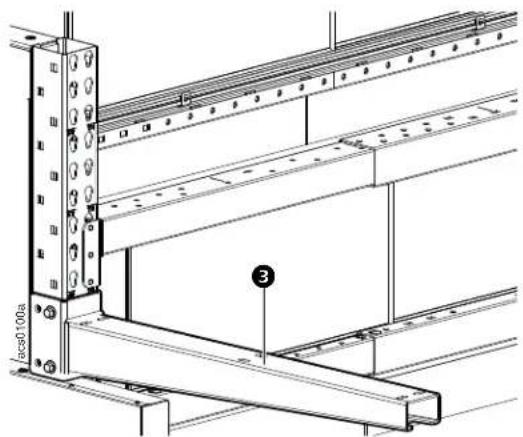
Standard configuration installation
Install one cantilever to each of the corner vertical posts as shown using two M12 x 100 hex head bolts and M12 nuts.
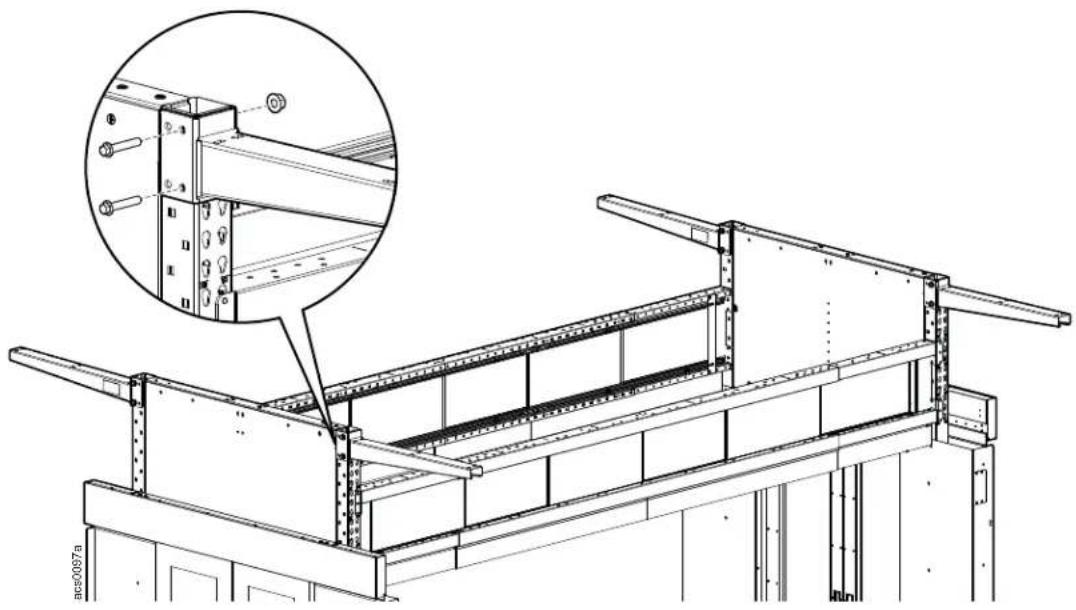
natural_image
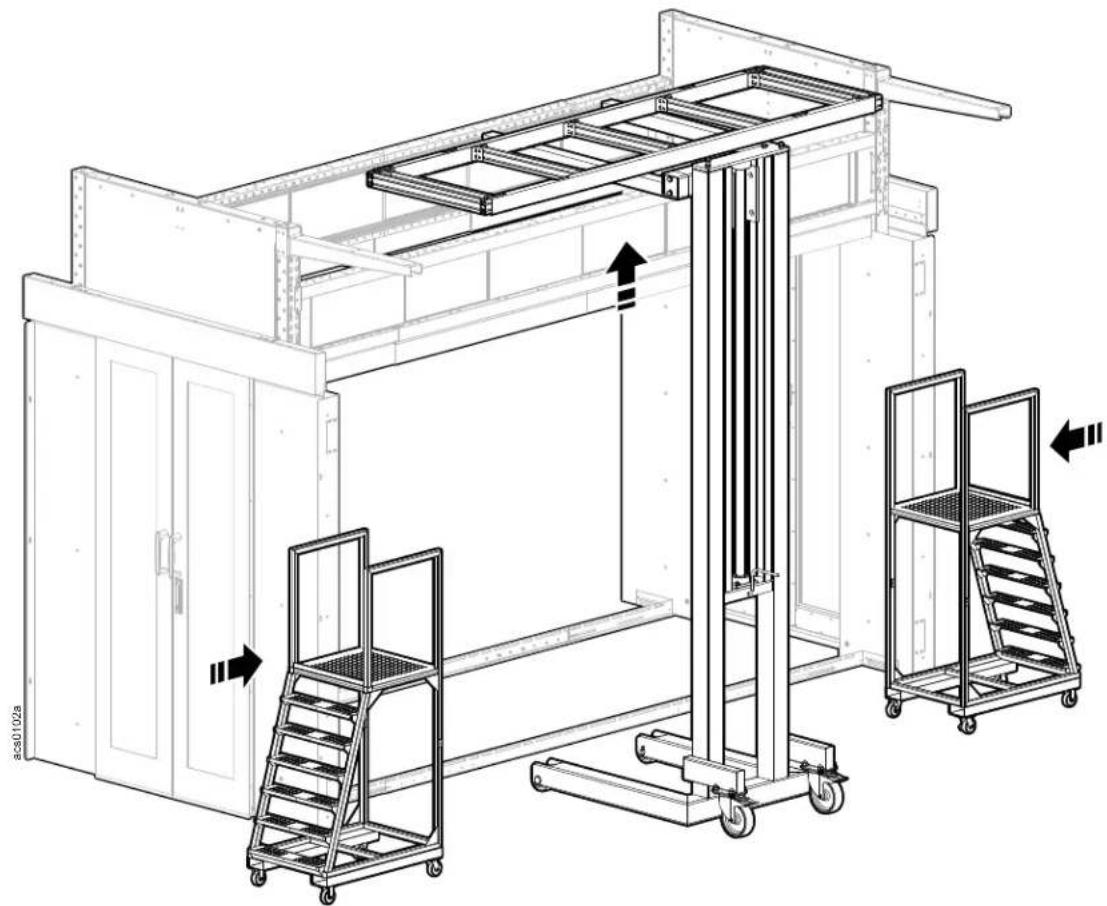
Technical line drawing of a structural framework with an inset showing a detailed detail of a metal frame assembly (no text or symbols present)Using appropriate lifting equipment and ladders, install the overhead support frame.
CAUTION
LIFTING HAZARD
At least two people are required to install this enclosure. Some parts may be heavy and/or excessive in size. For items weighing more than 25 lbs (12 kg), use more than one person.
Failure to follow these instructions can result in serious injury or equipment damage.
natural_image
Technical line drawing of a warehouse or industrial facility with lift, railings, and storage racks (no text or symbols)CAUTION
WORKING HEIGHT HAZARD
The working height for the assembly process can exceed 2.3 meters (7.5 feet). The use of stepladders or scaffolding will be required during assembly.
Failure to follow these instructions can result in serious injury or equipment damage.
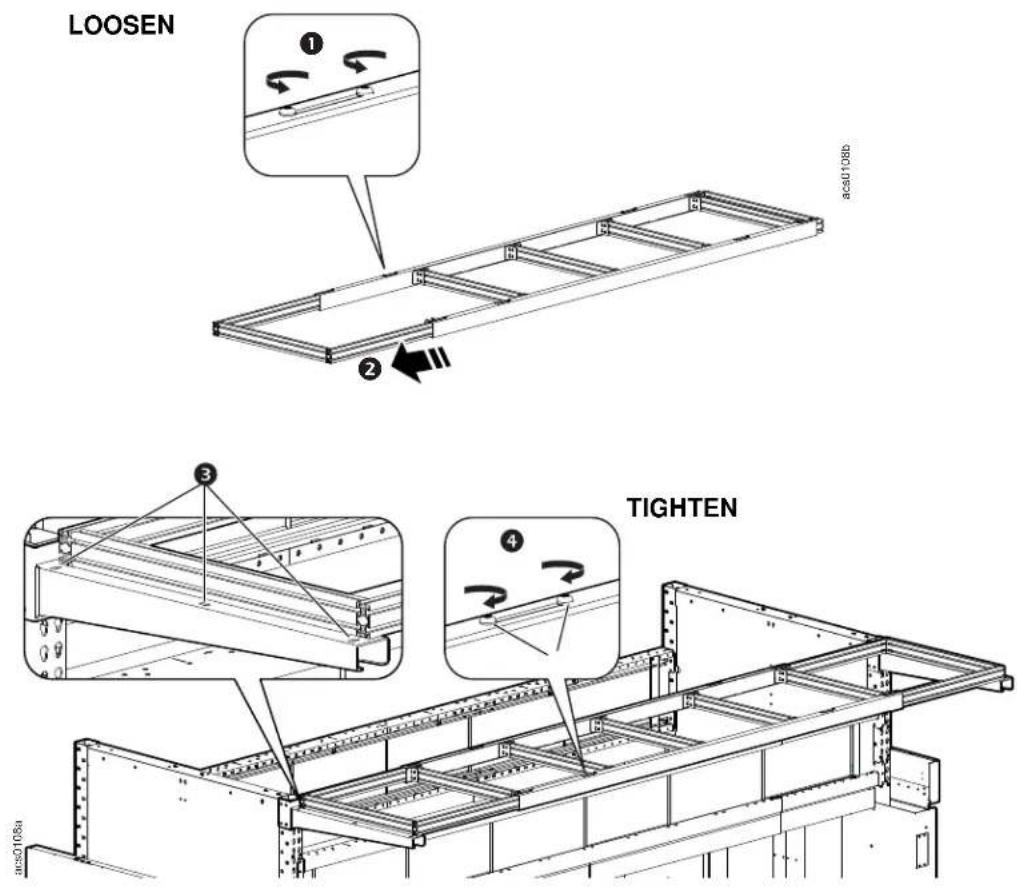
Loosen the two screws ① on the support frame and slide the ends ② out to reach the desired length.
Secure the support frame to the cantilevers with M6 x 12 pan head T30 screws and M6 nuts ③.
Tighten the screws ④ to secure the support frame ends.
Dropped Roof
NOTICE
If a rack door is open when the dropout ceiling system activates, ceiling panels may be blocked by the rack door and not drop completely.
• Make sure the hinge flaps are in the locked position
- Attach the rail sections together on the ground first, then lift into place.
NOTE: To prevent damage or warping do not exceed a length of 3600 mm for any pre-assembled section.
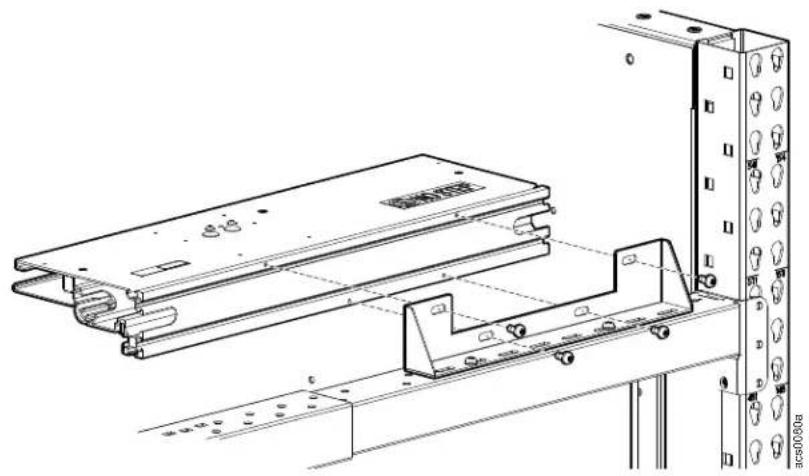
The bracket for the support assembly is attached to the top of the telescoping beam with insert nuts and M6 x 16 pan head screws. Attach the ceiling support assembly to the bracket with four M6 x 10 pan head screws.
natural_image
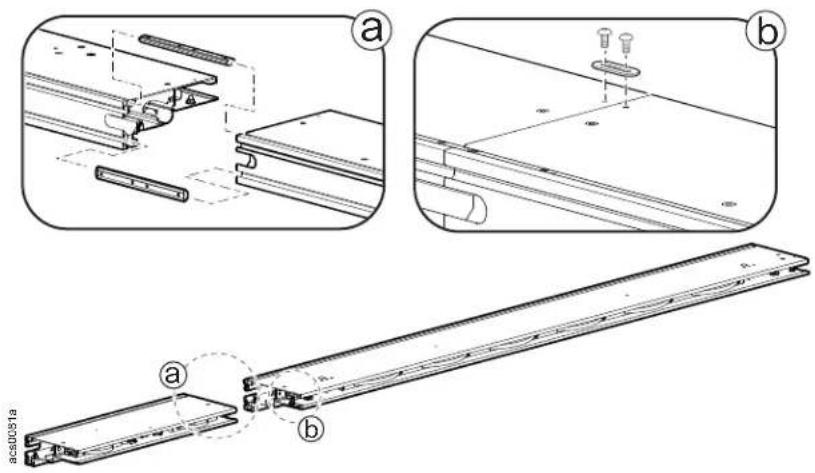
Technical line drawing of a mechanical assembly with mounting brackets and a vertical panel (no text or symbols)a. Install connectors to two sections of ceiling support assembly to connect them together.
b. Secure with the baying bracket and two M4 x 8 pan head screws.
Install the ceiling panels
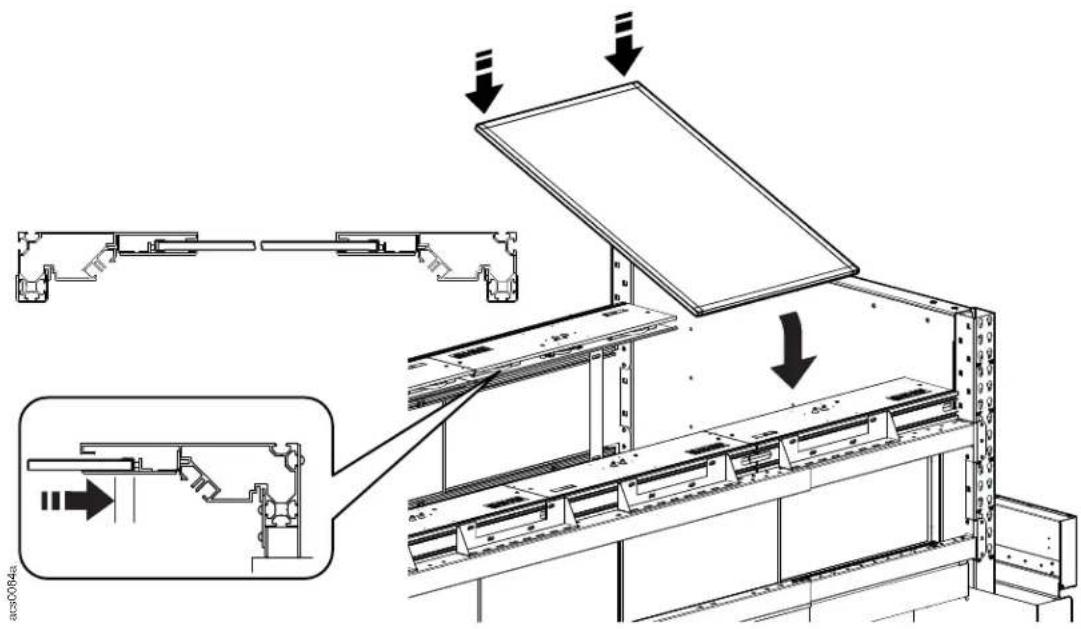
IMPORTANT: Before proceeding, ensure that the hinge flaps are locked in place before installing the ceiling panels.
Install the ceiling panels:
-
Remove the protective plastic.
-
Slide one edge into one of the mounting rails.
-
Push the panel in and compress the springs allowing room to insert the opposite end of the panel in the mounting rail on the opposite row.
-
Release the panel. The spring retainers will automatically center the panels within the aisle.
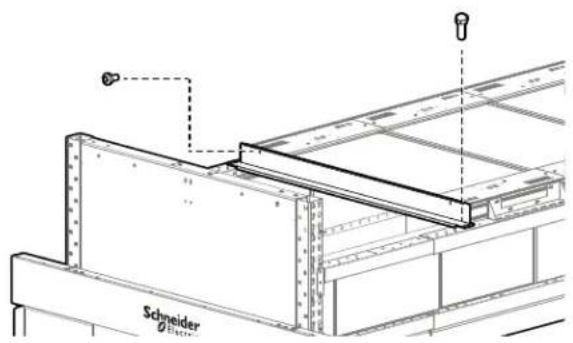
Solid Roof Filler Panel for Drop Roof
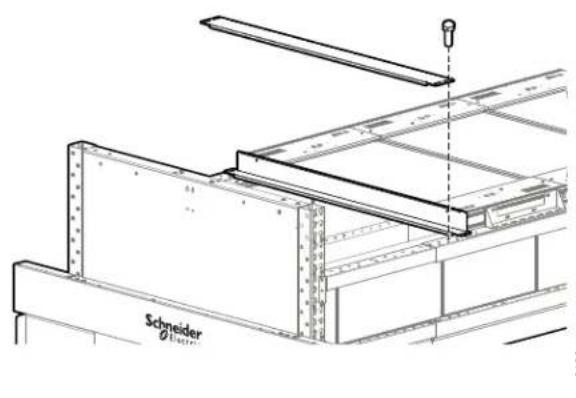
Solid roof panels are used to fill in any space between the drop roof panels and the end of the frame. Use the 50mm solid roof panel for the drop roof first. Attach this panel to the drop roof panel with the pan head screws. Attach the panel to the telescoping beam with the hex head screws.
Continue to add more 50mm or 100mm solid roof panels until all the space between the last drop roof panel and the end of the aisle is covered.
Ceiling Panel Dropout Control System
IMPORTANT: This system is designed to work with standard response sprinklers only.
natural_image
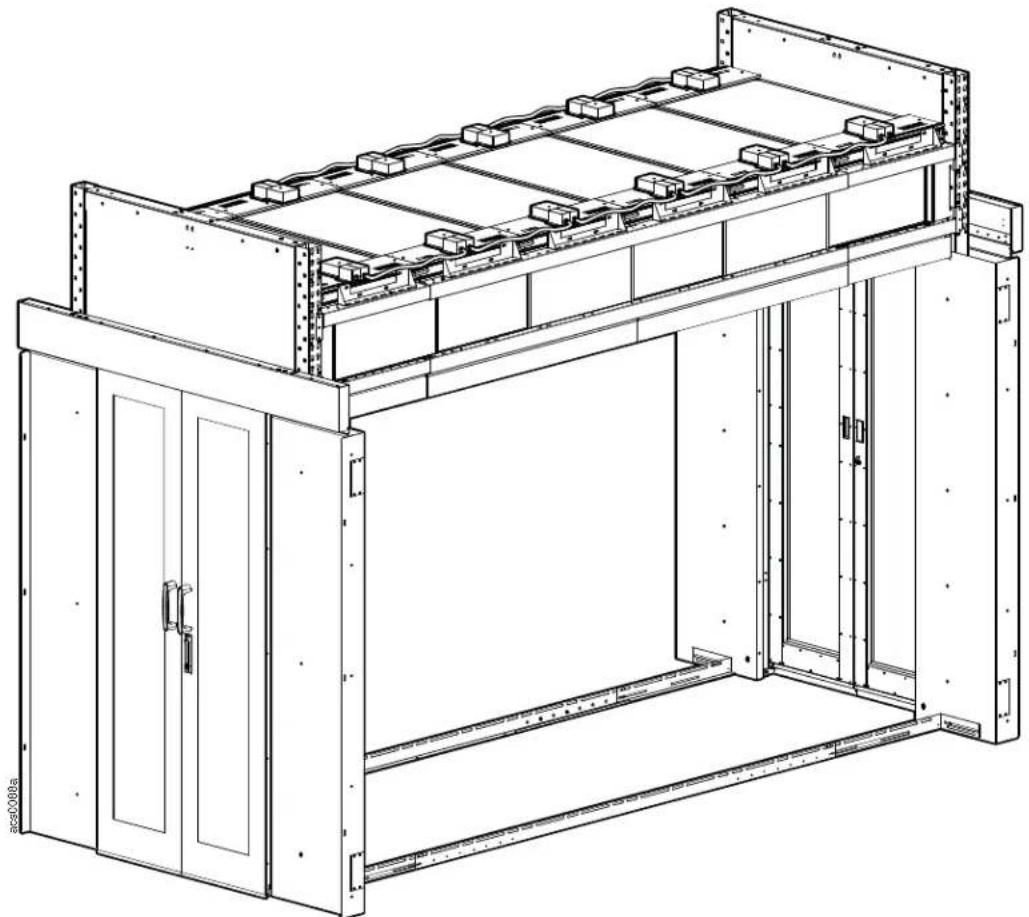
Technical line drawing of a multi-level battery storage unit with mounting brackets and internal compartments (no text or symbols)System Diagram
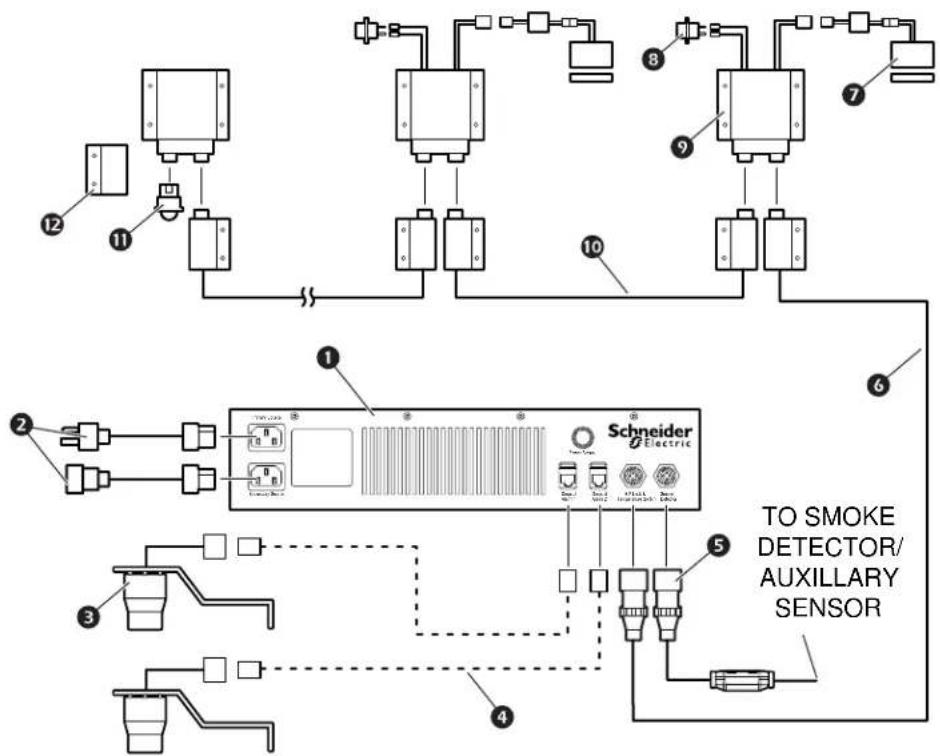
flowchart
graph TD
    A["Sensor 1"] --> B["Component 2"]
    C["Sensor 2"] --> D["Component 3"]
    E["Sensor 3"] --> F["Component 4"]
    G["Sensor 4"] --> H["Component 5"]
    I["Sensor 5"] --> J["Component 6"]
    K["Sensor 6"] --> L["Component 7"]
    M["Sensor 7"] --> N["Component 8"]
    O["Sensor 8"] --> P["Component 9"]
    Q["Sensor 9"] --> R["Component 10"]
    S["Sensor 10"] --> T["Component 11"]
    U["Sensor 11"] --> V["Component 12"]
    W["Sensor 12"] --> X["Component 1"]
    Y["Sensor 1"] --> Z["Schneider Electric Sensor"]
    AA["Sensor 2"] --> AB["Schneider Electric Sensor"]
    AC["Sensor 3"] --> AD["Schneider Electric Sensor"]
    AE["Sensor 4"] --> AF["Schneider Electric Sensor"]
    AG["Sensor 5"] --> AH["Schneider Electric Sensor"]
    AI["Sensor 6"] --> AJ["Schneider Electric Sensor"]
    AK["Sensor 7"] --> AL["Schneider Electric Sensor"]
Item Description Item Description
① Dropout power supply control box
2 Power cord
3 Alarm beacon
Field supplied CAT-5 cable Box-to-box wire harness, across aisle
5 4-pin jumper (if no smoke detector is in use)
Smoke detector cable (if smoke detector is in use)
6 Wire assembly - power supply to wiring box
⑦ Electromagnetic lock—up to 30 per control box
8 Temperature switch
9 Wiring box
10 Box-to-box wire harness
⑪ Terminal jumper
⑫ Wiring box cover
Power Supply Component Identification
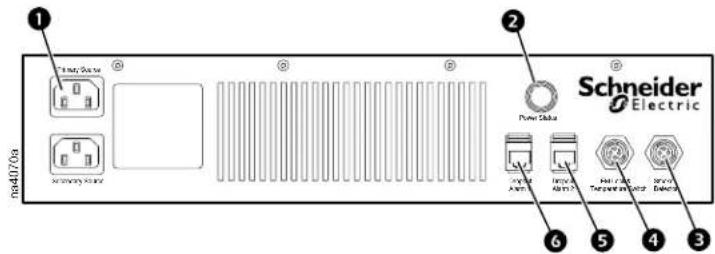
Item Description Item Description
① AC line, primary/secondary
② Power status indicator light
③ Smoke detector connection
4 Electromagnetic lock temp. switch connection
5 Dropout alarm 2
6 Dropout alarm 1
Power supply installation procedure
- Attach the mounting brackets to the sides of the power supply.
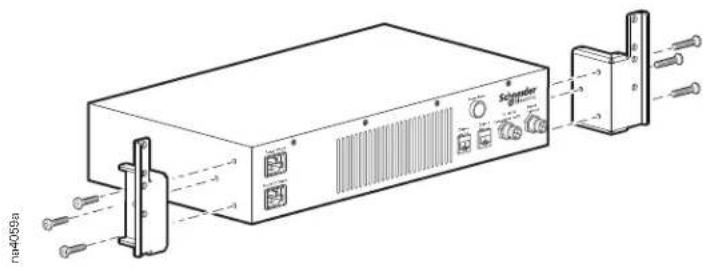
natural_image
Technical line drawing of a device with labeled ports and connectors (no readable text or symbols)- Install the power supply onto the mounting rails of the enclosure using four caged nuts, cup washers, and M6 × 16 screws.
Electromagnetic locks
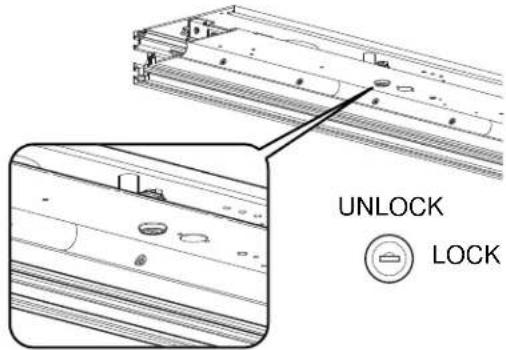
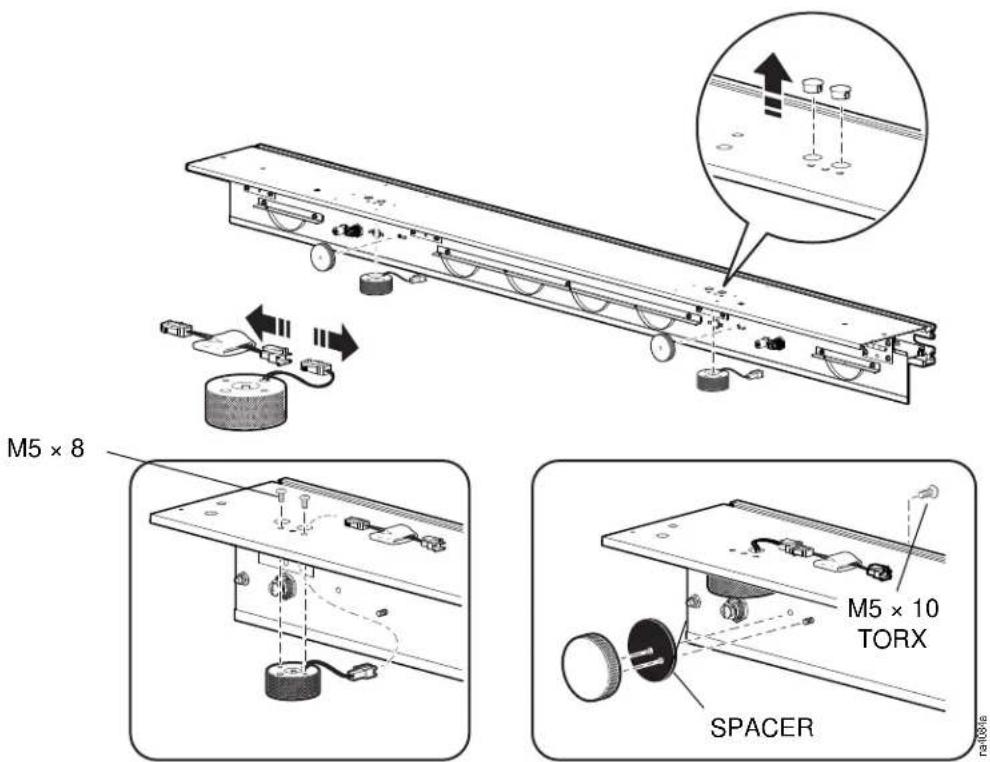
Attach the electromechanical lock onto the ceiling panel support rails.
-
Remove the two large hole plugs from the top of the ceiling panel supports.
-
Disconnect the electromechanical lock from the printed circuit board assembly.
-
Guide the wire connector from electromechanical lock through the hole in the top of the ceiling panel support.
-
Install the top half of the electromechanical lock to the top of the ceiling panel support rail with two M5 × 8 screws each. Place the printed circuit board assembly on top of the ceiling panel support rail and reconnect to the electromechanical lock.
-
Install the lower half of the electromechanical lock and spacer to the ceiling panel support rail hinged flap using one M6 × 10 screw each.
Temperature switches
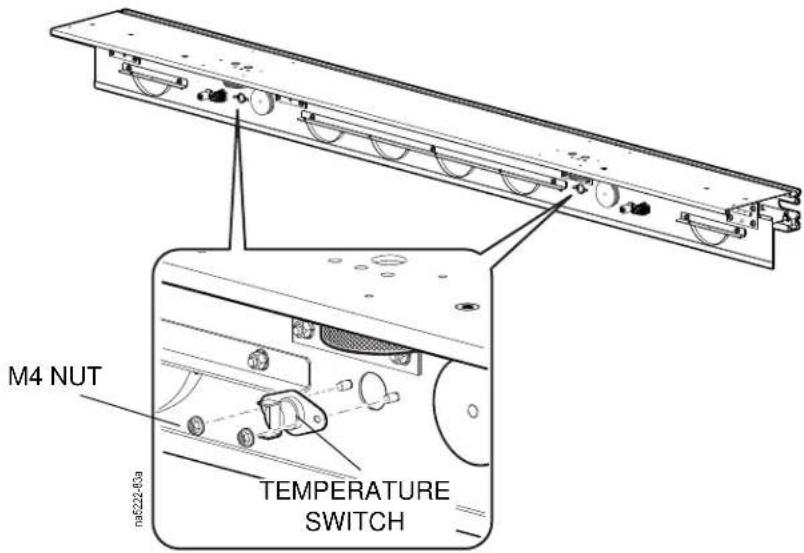
Using two M4 nuts each, install the temperature switches to the ceiling panel support rail hinged flap.
Electrical boxes and cable routing
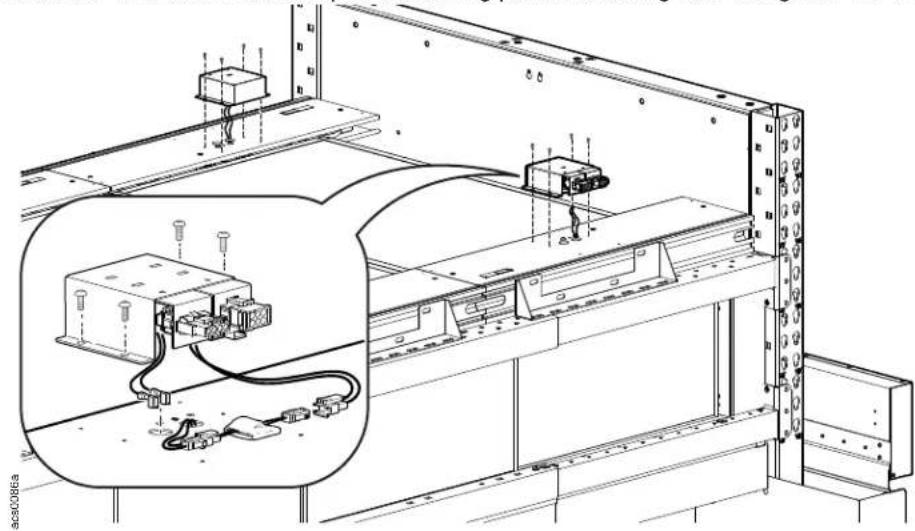
- Make the connection to the electromagnetic locks and temperature switches.
IMPORTANT: Position wires so they do not interfere with the closing of the hinge flap.
- Install the wire boxes to the top of the ceiling panel mounting rails using four M4 × 8 screws each.
natural_image
Technical line drawing of an electrical enclosure with wiring and components, no visible text or symbols- Connect the wiring boxes together with box-to-box wire assemblies and the cross-aisle wiring assembly.
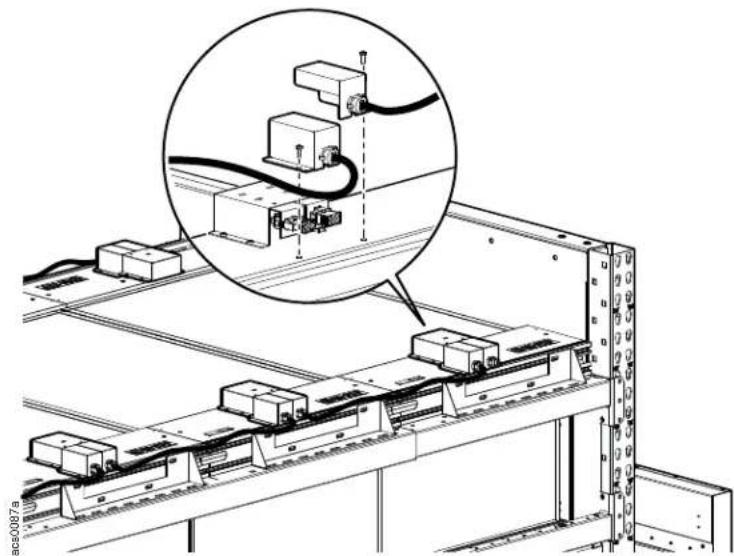
natural_image
Technical line drawing of a mechanical assembly with zoomed-in detail view (no text or symbols)Alarm beacon installation
- Using two M6 × 12 and channel nuts each, install two alarm beacons per power supply control box positioning them at opposite corners of the aisle.
NOTE: For clarity electrical boxes and wires are not shown.
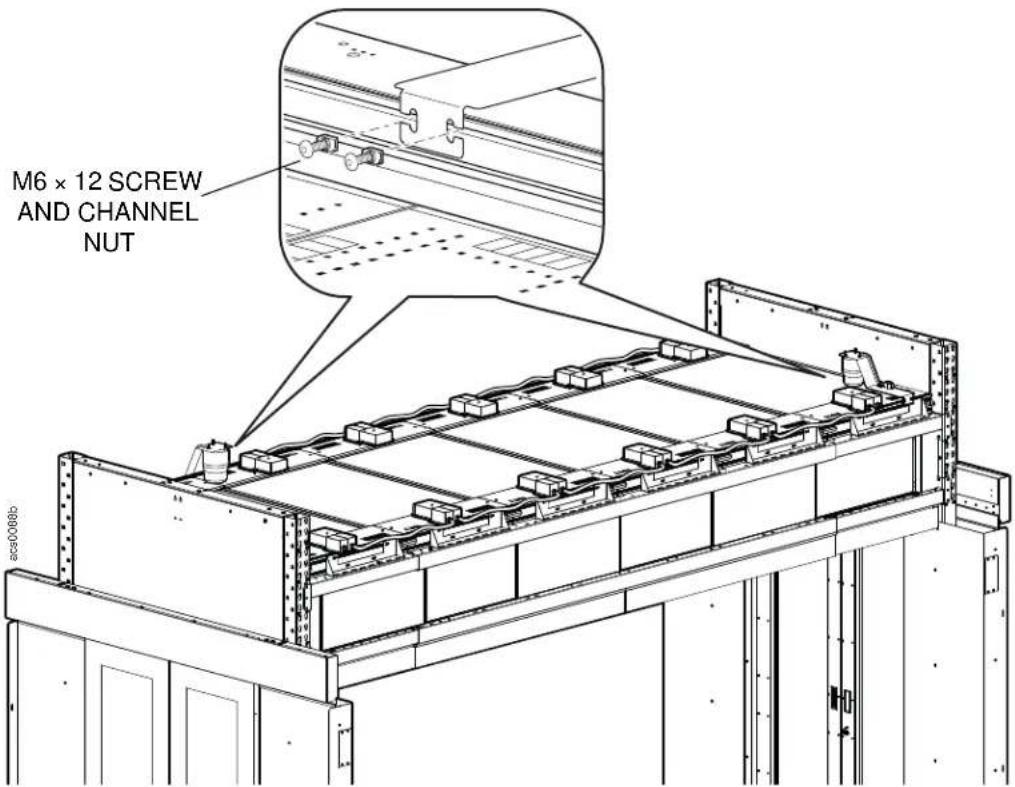
- Connect the alarm beacons to the power supply control box using field supplied CAT-5 cable.
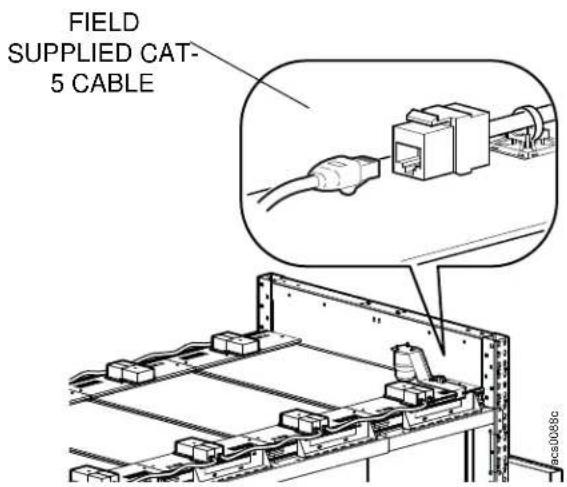
Smoke detector installation
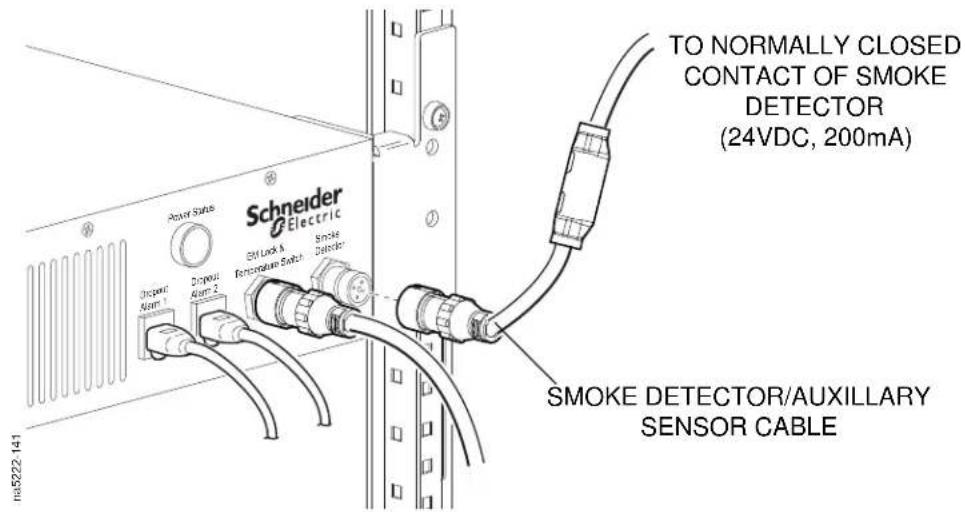
Connect the 4-pin jumper to the Smoke Sensor connector if an external smoke detector is not being used.
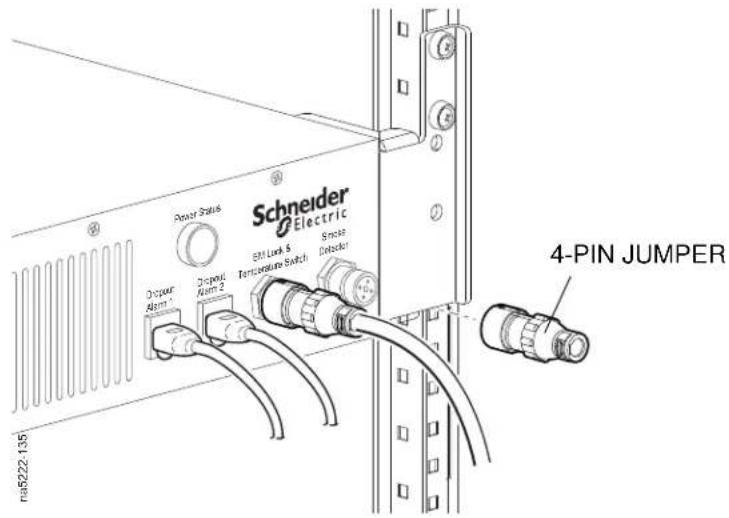
If an external smoke detector is being used:
-
Strip the field-supplied wire to be used to connect to the building smoke detector. Leave a minimum of 15 mm of exposed wire.
-
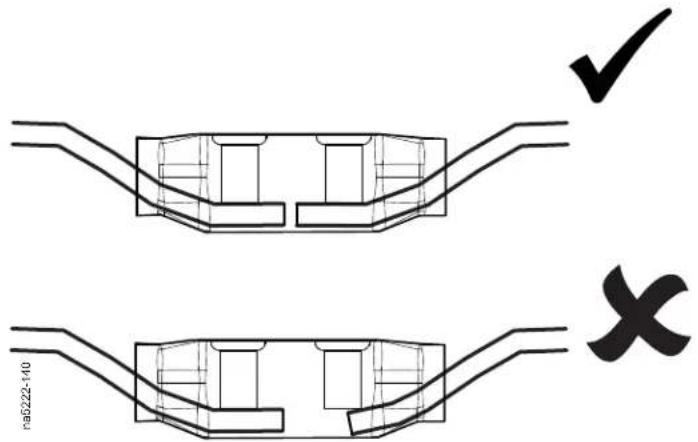
Insert the wire into the open end of the smoke detector cable. Make sure the button on the connection end is in the open position.
NOTE: Field-supplied wire needs to be shielded 20 AWG or network cable that is grounded at the customer end connection point. Maximum routing distance for the wire is 76 m (250 ft.). For best performance, avoid interference from high-voltage cables and devices such as a UPS or PDU.
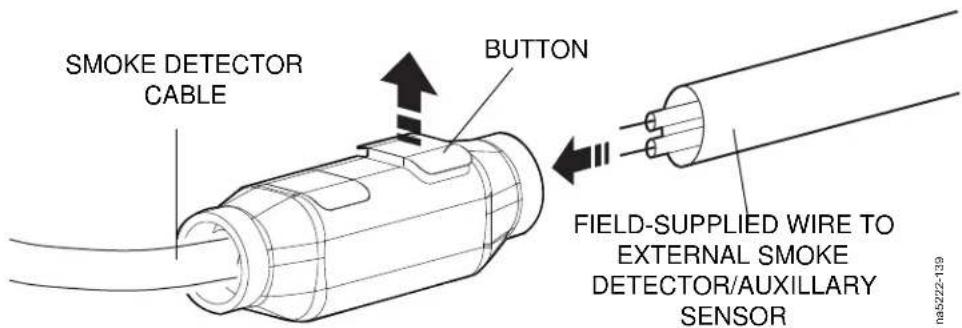
- Use pliers to close the button and terminate the wires.
- Connect the smoke detector cable to the Smoke Sensor connector.
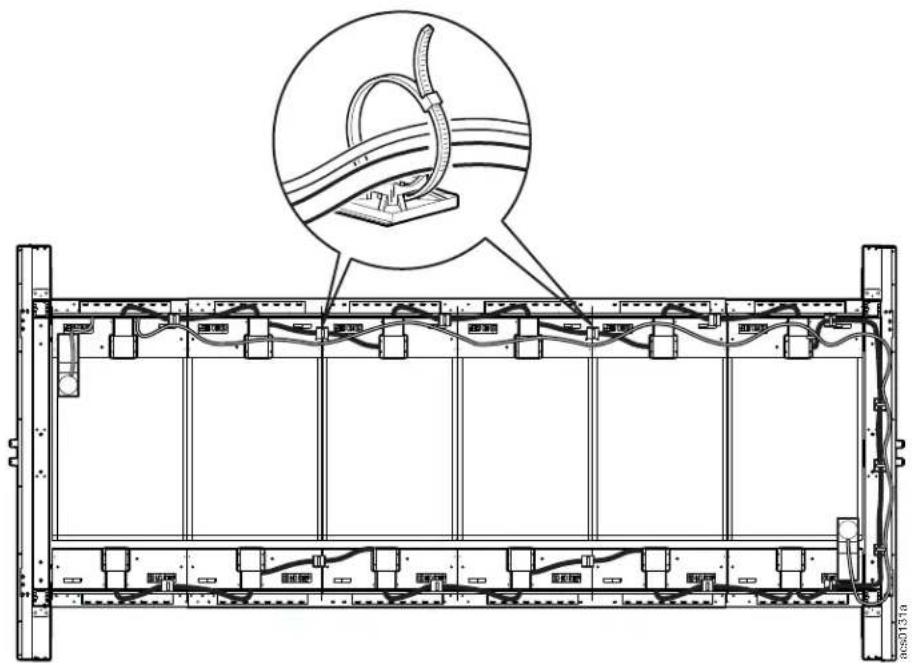
Neatly bundle all cabling using tie wraps and cable holders.
natural_image
Technical line drawing of a server rack frame with cable routing and a magnified inset showing cable attachment (no text or symbols)Maintenance steps for dropout ceiling system:
- Lock hinge flaps using mechanical locks.
- Turn OFF or remove power to the electromechanical locks.
- Perform necessary maintenance.
- Turn ON or provide power to the electromechanical locks.
- Push each hinge flap upwards so that the lower half of the electromagnetic lock engages with the upper half. A clicking sound will be heard when fully engaged.
- Unlock the mechanical lock on hinge flaps.
Troubleshooting diagram
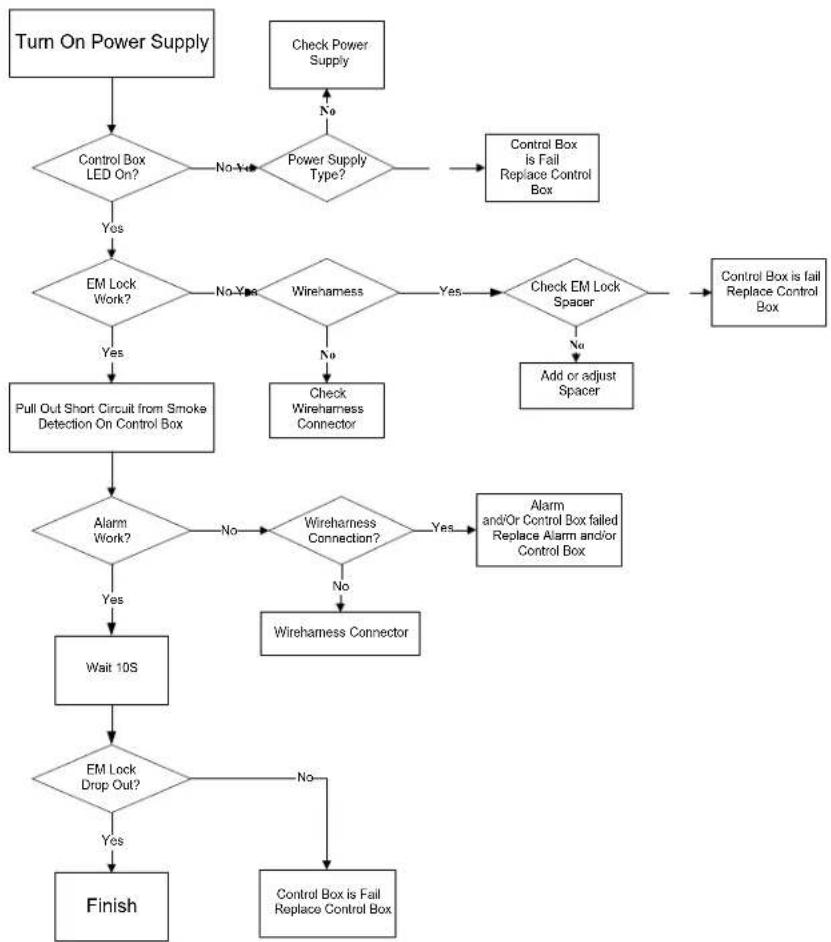
flowchart
graph TD
    A["Turn On Power Supply"] --> B{Control Box LED On?}
    B -->|No Yes| C{Power Supply Type?}
    C -->|No| D["Check Power Supply"]
    C -->|Yes| E{EM Lock Work?}
    E -->|No Yes| F{Wireharness}
    F -->|Yes| G{Check EM Lock Spacer}
    G -->|No| H["Add or adjust Spacer"]
    G -->|Yes| I["Control Box is Fail Replace Control Box"]
    E -->|Yes| J["Pull Out Short Circuit from Smoke Detection On Control Box"]
    J --> K{Alarm Work?}
    K -->|No| L{Wireharness Connection?}
    L -->|Yes| M["Alarm and/or Control Box failed Replace Alarm and/or Control Box"]
    L -->|No| N["Wireharness Connector"]
    K -->|Yes| O["Wait 10S"]
    O --> P{EM Lock Drop Out?}
    P -->|No| Q["Control Box is Fail Replace Control Box"]
    P -->|Yes| R["Finish"]
Overhead Duct Mounting Riser Roof
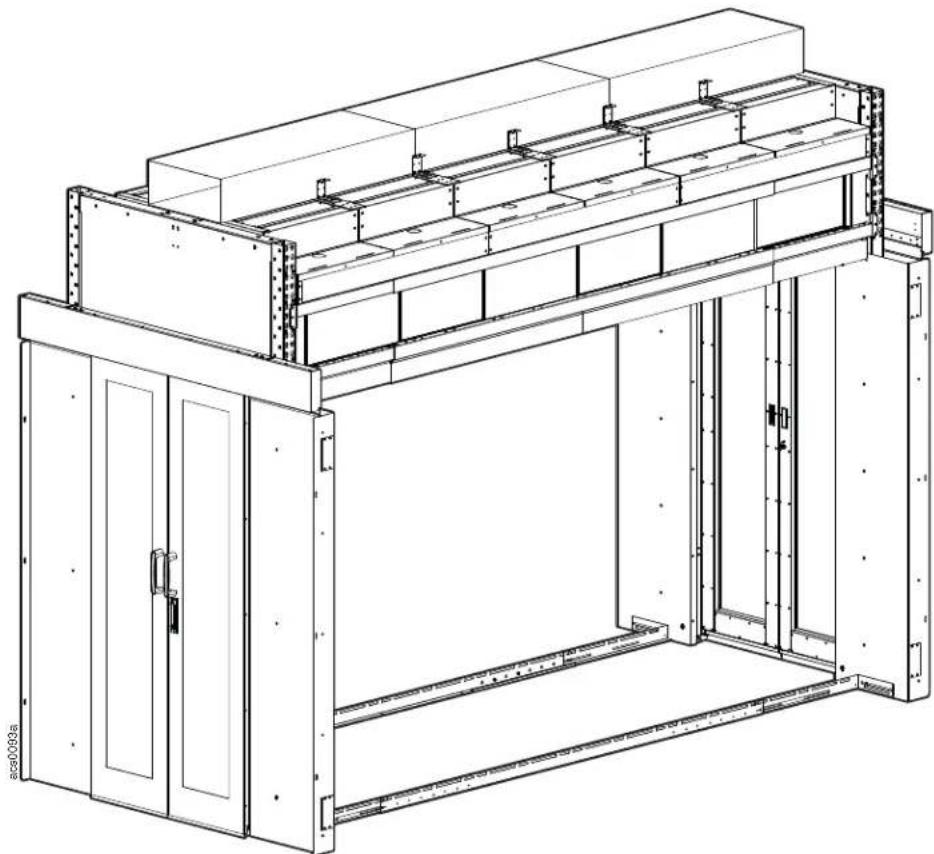
natural_image
Technical line drawing of a multi-level industrial or warehouse structure with no visible text or symbolsRiser Assembly
NOTE: If the lower telescoping beams are installed higher than 45U, the duct riser assembly is not required.
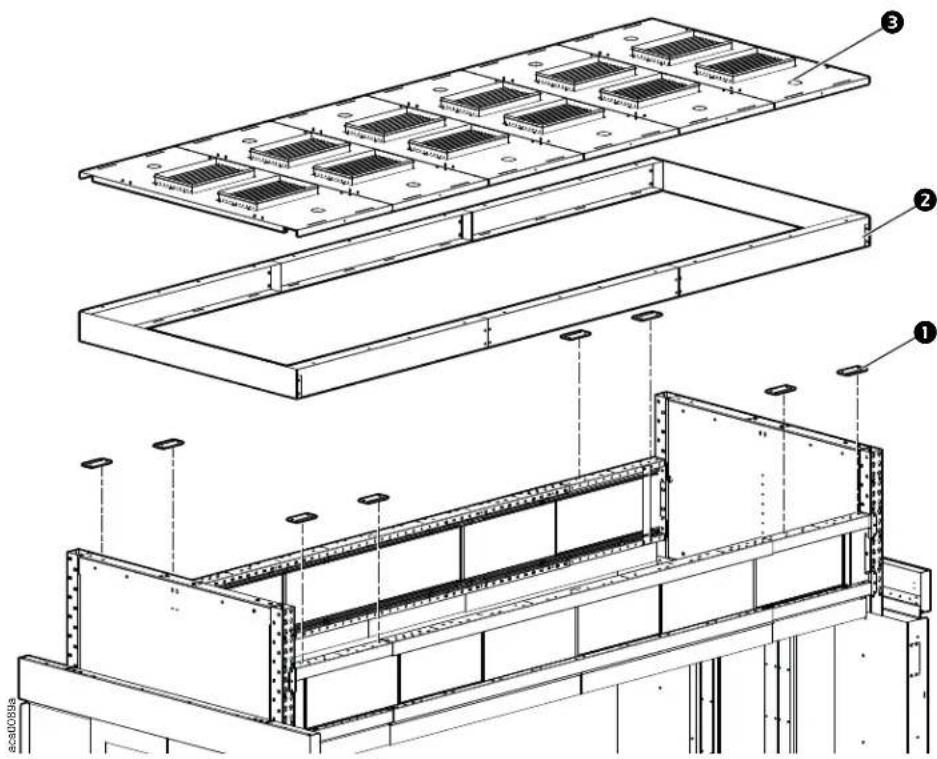
Install the raising pads ① with M6 x 12 flat head T30 screws on the small ends of the telescoping beams to level them with the main section of the telescoping beam.
Assemble the riser side panels and end panels ② with the M6 x 12 pan head T30 screws and attach the assembly to the telescoping beams with M6 x 12 pan head T30 screws.
Install the roof panel with diffuser ③ with four M6 x 12 pan head T30 screws per panel to the top of the riser panels.
NOTE: If the riser panels are not used, install the roof panels with diffusers to the telescoping beams.
Attach the duct support brackets to the threaded posts on the roof panels with diffusers with four M5 hex nuts for each bracket. Install the end caps to the first and last roof panel with four M5 hex nuts.
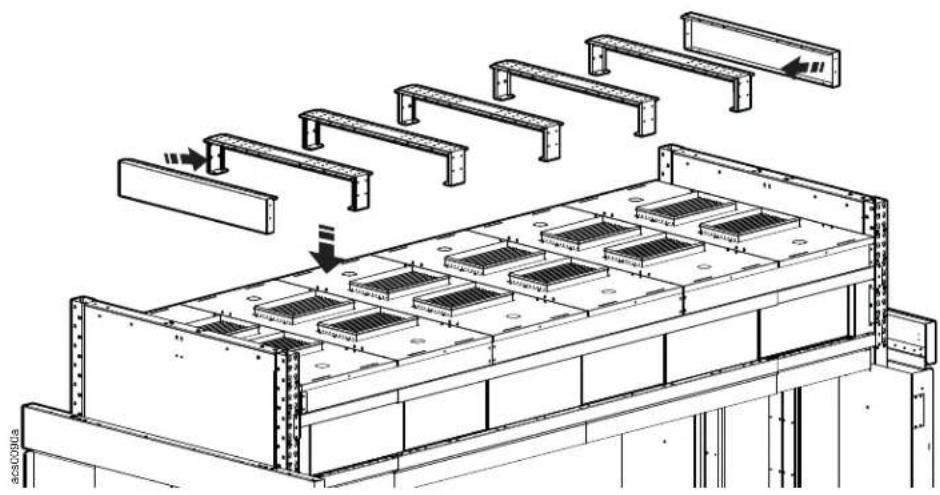
natural_image
Technical line drawing of a structural assembly with multiple beams and grid panels, no text or symbols present.Duct riser covers: The side duct riser covers are first installed on either side of the duct riser support brackets.
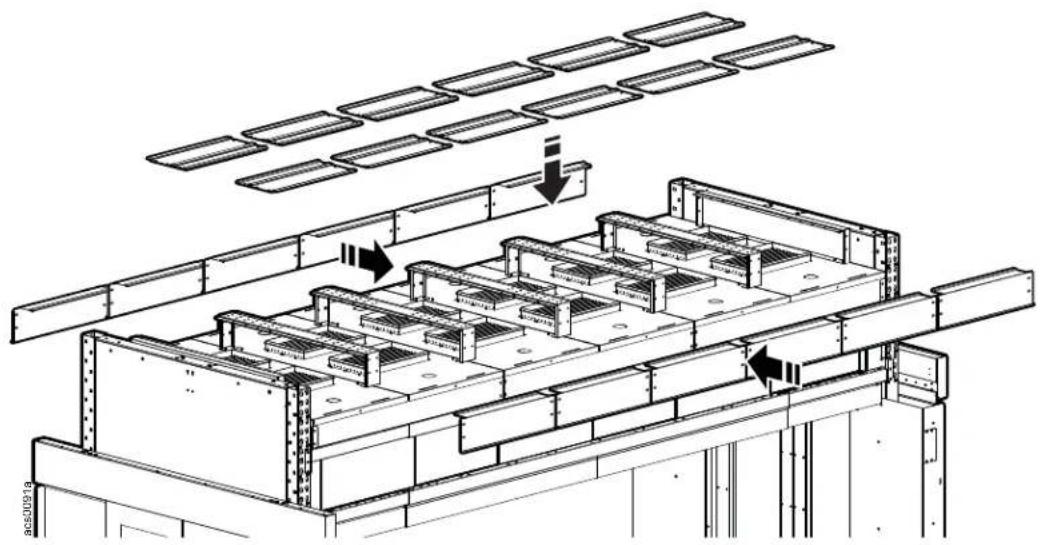
natural_image
Technical line drawing of a structural framework with grid-like components and overhead panel arrays (no text or symbols)Top covers are installed next to cover the top of the support bracket and overlap the side covers.
Opening sizes can be adjusted by installing different size top covers.
Install the side duct riser covers to the sides of the duct riser support brackets with four M6 x 12 pan head T30 screws per cover.
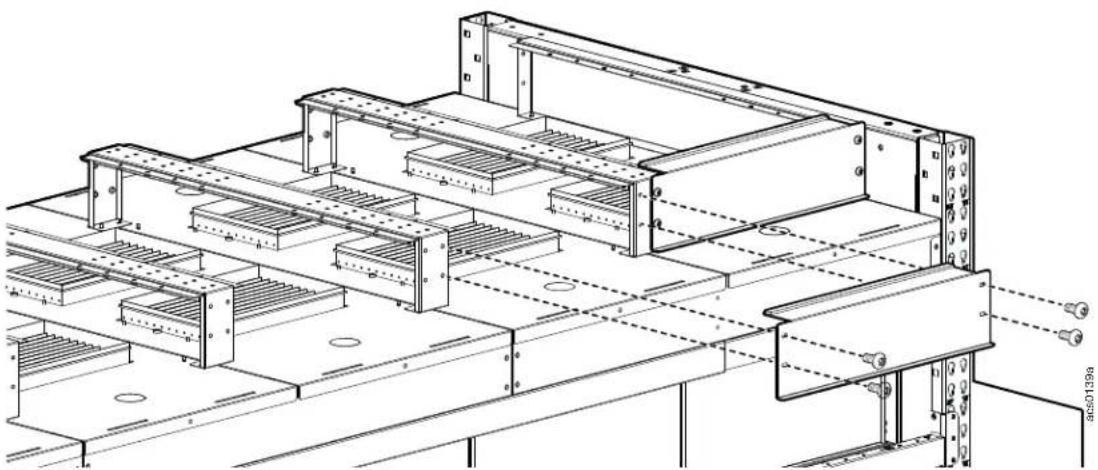
natural_image
Technical line drawing of a structural steel frame assembly with multiple supports and mounting brackets (no text or symbols)Install the top duct riser covers to either side of the top of the duct riser support brackets with four M6 x 12 pan head T30 screws per cover. The lip of the top cover will overlap the edge of the side cover as shown in the illustration.
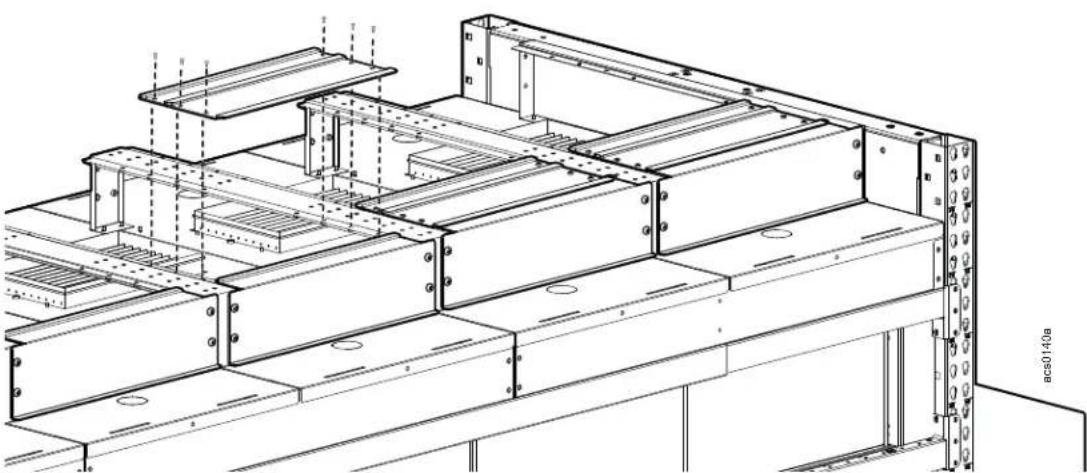
natural_image
Technical line drawing of a structural steel frame assembly (no text or symbols)Install different size top covers to adjust the opening size.
The duct fixture brackets are used to secure the Customer Supplied duct. The brackets have slotted holes to allow for width adjustment to accommodate some range in duct width. There are holes in the bracket's sides and top to allow options for securing the duct to the bracket. Install the duct fixture brackets to the top of the support brackets with the M6 x 12 pan head T30 screws
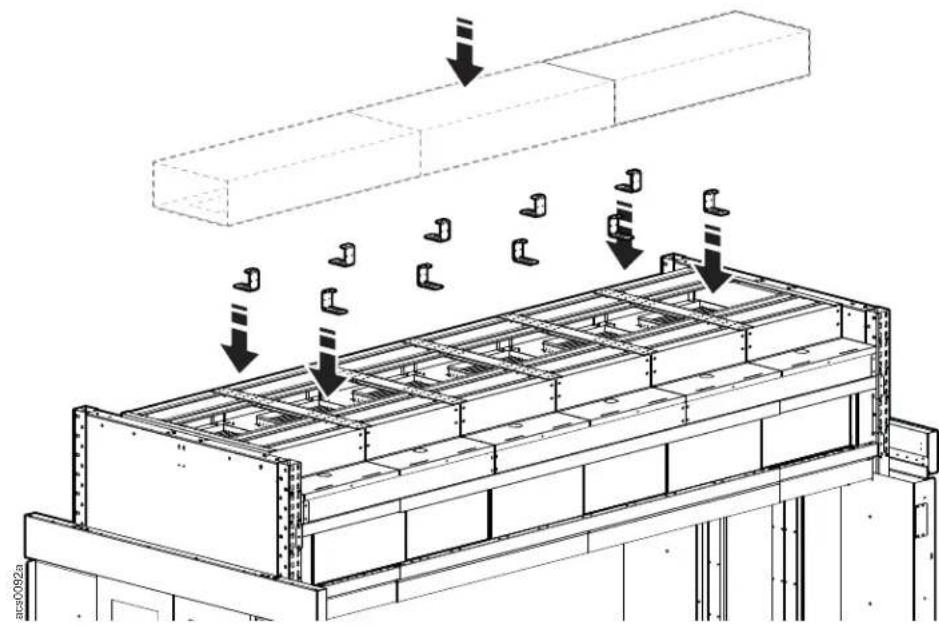
natural_image
Technical diagram of a structural frame with load arrows and a 3D block assembly (no text or symbols)Lighting Kit
WARNING
ELECTRIC SHOCK HAZARD
Do not use an extension cord with this product.
Failure to follow these instructions can result in death, serious injury, or equipment damage.
Lighting control unit component identification
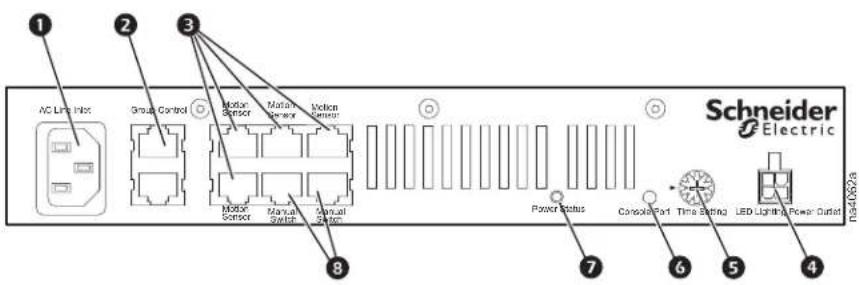
Item Description Item Description
| 1 | AC line inlet | 5 | Time setting |
| 2 | Control group | 6 | Console port |
| 3 | Motion sensor input (4) | 7 | Power status |
| 4 | LED light power outlet | 8 | Manual switch input (2) |
Install the mounting brackets onto the lighting control unit.
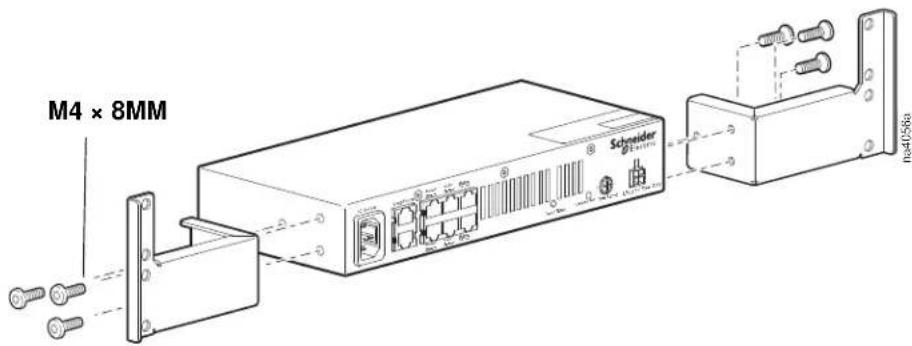
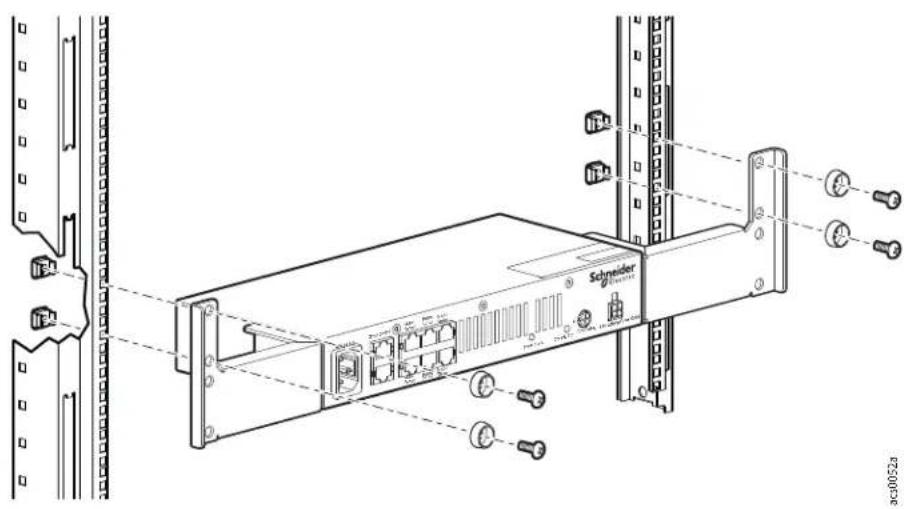
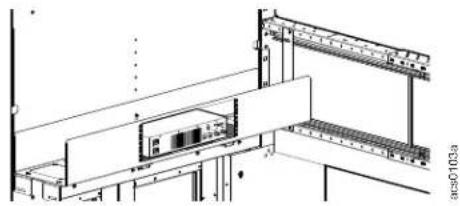
Lighting Control Unit Installation Options. The lighting control unit can be installed in a rack or in the crossover tray accessory if you have that option.
To install the lighting control to the mounting rails of the enclosure, use four caged nuts, cup washers, and M6 × 16 screws.:
To install the lighting control inside the crossover tray, remove the cover plate on the crossover tray and attach the lighting control mounting brackets with four M6 × 16 screws.
natural_image
Technical line drawing of a mechanical assembly or enclosure with no visible text or symbolsThe lighting brackets consist of long and short pieces and mounting hardware. One of the long brackets is for the left and the other long bracket is for the right. Use two 4 foot long brackets (one left and one right) for an eight foot long aisle. If your aisle is longer, add short brackets to reach the end of your aisle.
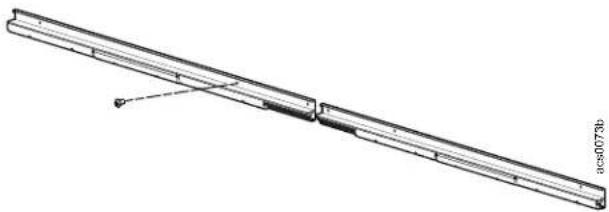
natural_image
Technical line drawing of a long rectangular mechanical component with internal components and a small inset detail (no text or symbols)Connect the lighting brackets to the telescoping beam on both sides of the aisle.
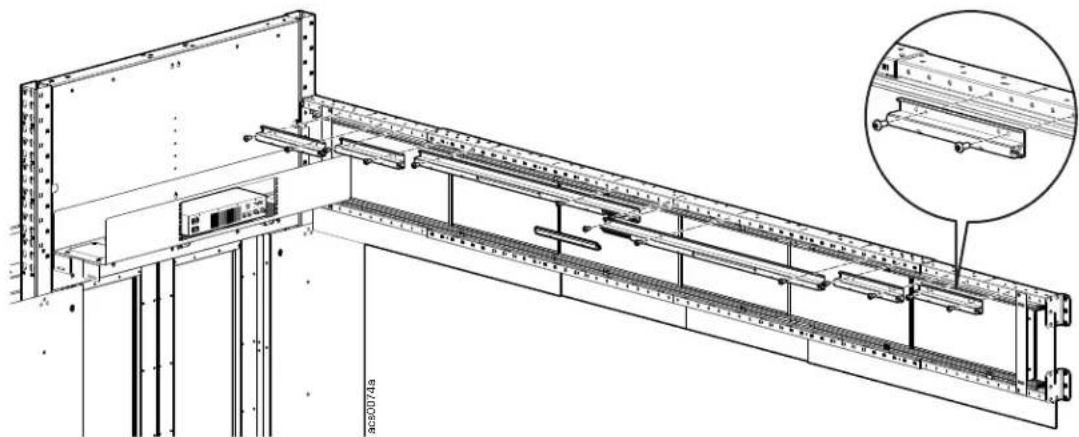
natural_image
Technical line drawing of a structural beam assembly with mounting brackets and internal supports (no text or symbols)Route the lighting cable through the crossover tray at the end of the aisle and across to the telescoping beam on the other side of the aisle. Continue the installation of the lights on this side of the aisle.
NOTE: A maximum of twelve lights can be installed per lighting control unit.
Arrange LED lights evenly on each side of the row. Install channel covers to fill in space between each light.
NOTE: The provided cable only supports a maximum length of two channel covers.
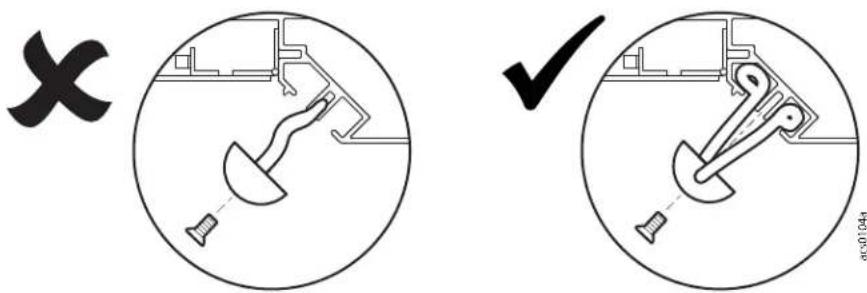
Starting on the right side and working to the left, install the LED lights alternating with channel covers (when appropriate). Place any wires used in the upper and lower channels of the extrusion.
CAUTION
WIRE PINCH HAZARD
Do not use the center channel to route wire. This is reserved for the lighting and wire cover fasteners.
Failure to follow these instructions can result in equipment damage.
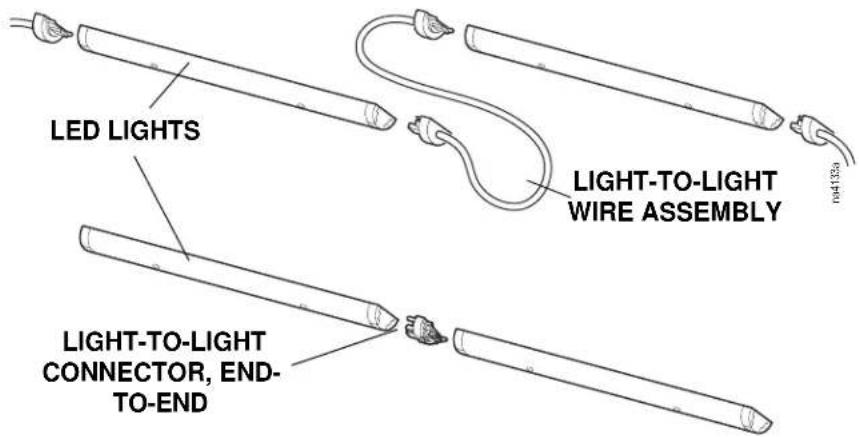
LED lights can be connected together as shown.
Locate the wire covers. Install the wire covers, filling in the gaps on either side of the LED lights.
NOTE: A maximum of twelve lights can be installed per lighting control unit.
Arrange LED lights evenly on each side of the row. Install channel covers to fill in space between each light. Start on one end and work down one side to the other end. Install the LED lights alternating with channel covers (when appropriate). Place any wires used in the upper and lower channels of the extrusion.
NOTE: The provided cable only supports a maximum length of two channel covers.
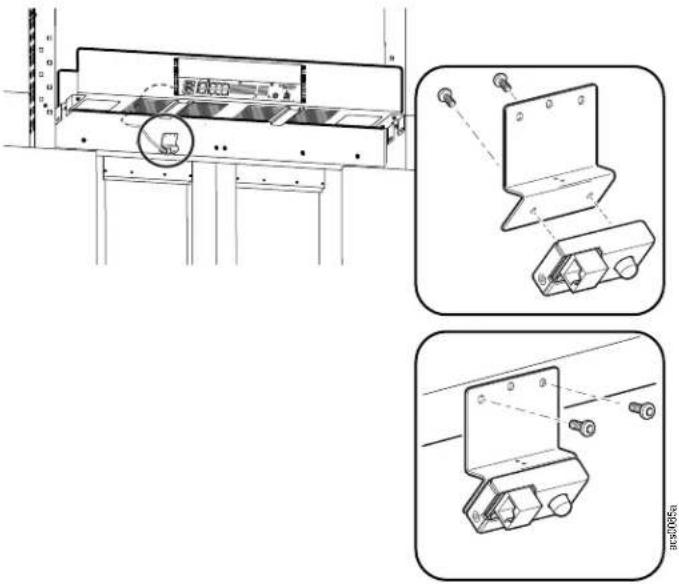
Install the motion sensor to the inside end cap panel, at the center of the doorway.
The bracket is attached to the motion sensor with two M4 x 8 Torx screws.
The bracket with motion sensor is installed to the end cap with two M4 x 8 Torx pan head, thread forming screws.
natural_image
Technical line drawing of a mechanical assembly with three orthographic views (no text or symbols)Lighting System Setup and Operation
Motion detection. One lighting control unit can support four motion sensors. If any of the sensors detect movement, the lighting control unit will turn on its LED lighting bank.
NOTE: The motion sensors range, or sensitivity, cannot be adjusted
Time setting. The time setting control is used to control the length of time the LED lighting bank will be ON. If the motion sensor is triggered during the ON cycle, the timer will be restarted. The LED lights can be turned OFF using the manual switch.
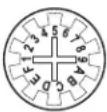 | Time Setting 0 1 2 3 4 5 6 | 7 | 8 | 9 | A | B | C | D | E | F | |||||||||
| LED ON delay (minutes) | 1 | 5 | 10 | 15 | 20 | 25 | 30 | 35 | 40 | 45 | 50 | 55 | 60 | 65 | 70 | 75 |
Manual switch. Pressing a manual switch will turnoff the lights in its group, and the motion sensor function becomes inactive for 10 seconds. After 10 seconds, the motion sensor function will once again become active and take over the control.
Power status indicator. The power status indicator illuminates when power is supplied to the unit and it is functioning normally.
Lighting Kit Schematic overview.
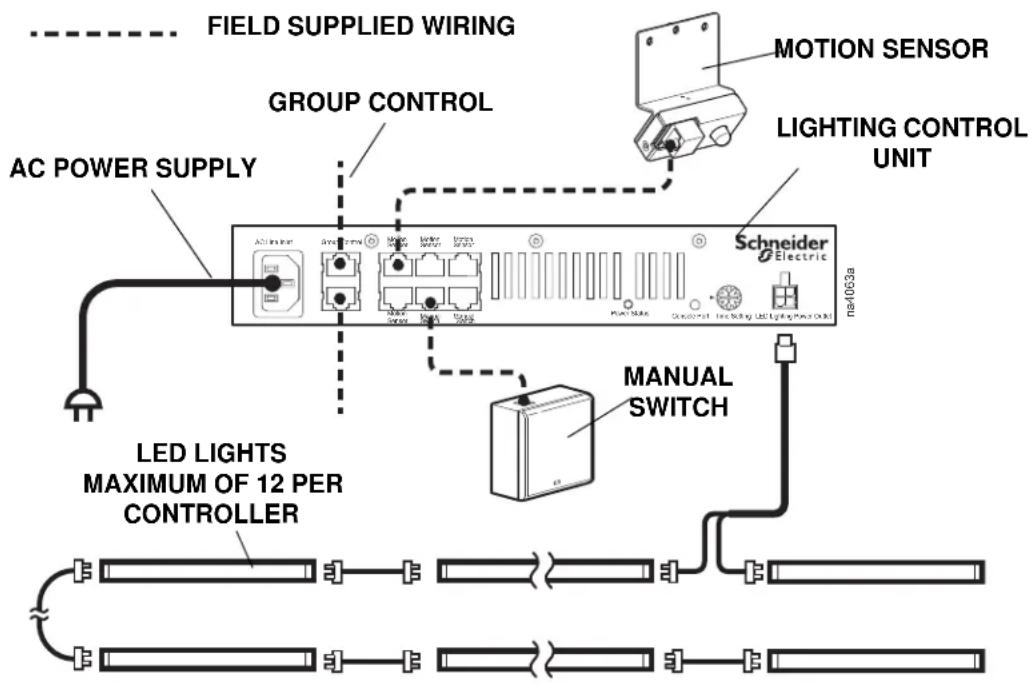
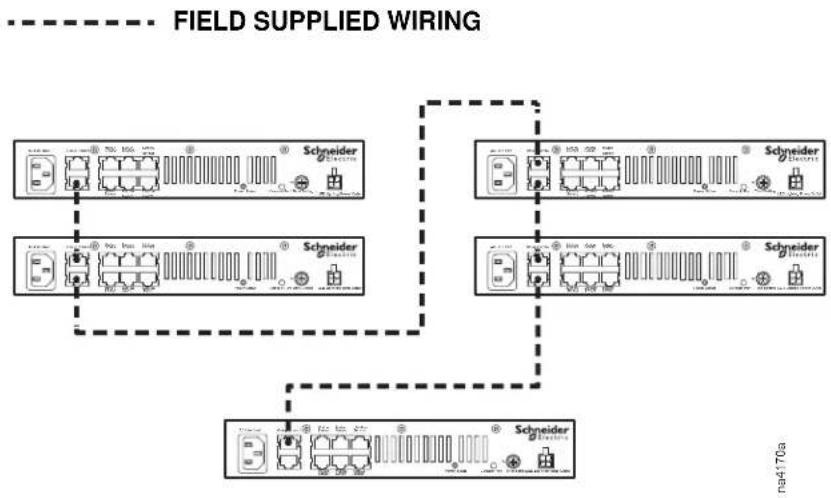
A maximum of five controllers can be connected together via the Group Control connection ports.
flowchart
graph TD
    A["Field Supplied Wiring"] --> B["Switchgear 1"]
    A --> C["Switchgear 2"]
    A --> D["Switchgear 3"]
    B --> E["Power Line 1"]
    B --> F["Power Line 2"]
    C --> G["Power Line 3"]
    D --> H["Power Line 4"]
    E --> I["Grid 1"]
    F --> J["Grid 2"]
    G --> K["Grid 3"]
    H --> L["Grid 4"]
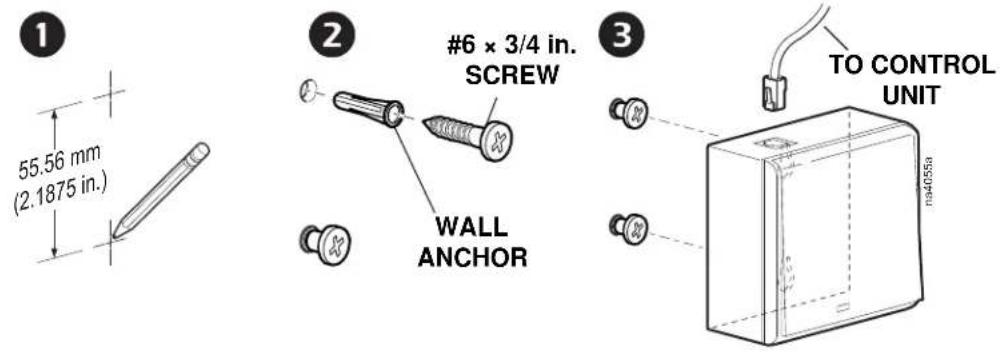
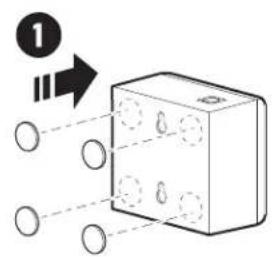
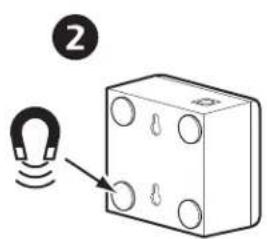
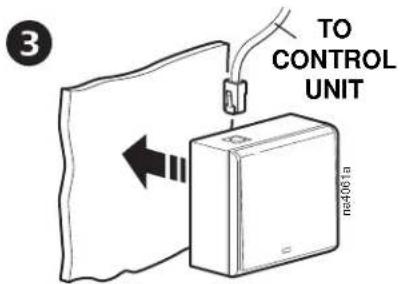
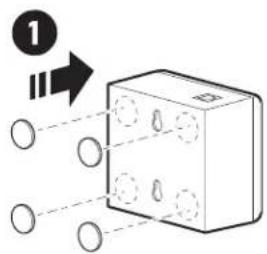
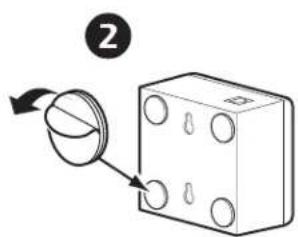
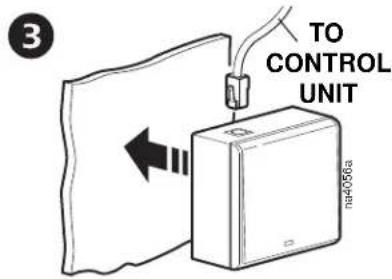
The manual switch can be located inside or outside of the containment area and should be attached to a surface using one of the three methods shown below.
Fastener method:
Magnet method:
Hook-and-loop method:
Rack Height Adapter
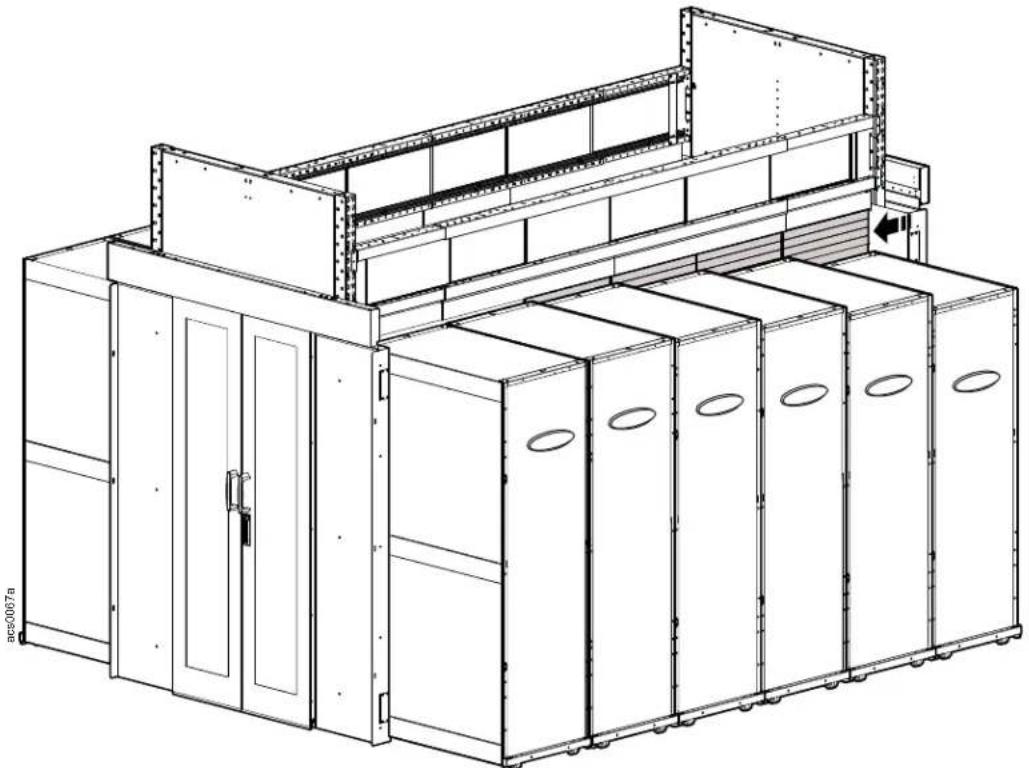
FS-AC-8001-U
FS-AC-8002-U
FS-AC-8003-U
FS-AC-8004-U
natural_image
Technical line drawing of a multi-level industrial machine with control panel and storage unit (no text or symbols)Add rack height adapter brush panels to the bottom of the telescoping beam. Attach the height adapter bracket to the small ends of the telescoping beam with the 10-32 x 5/16 Pan head Phillips screws. To attach the height adapter bracket to the middle portion of the telescoping beam, first insert M6 insert nuts into the square holes, then use the provided M6 x 16 Pan head T30 screws to install the bracket.
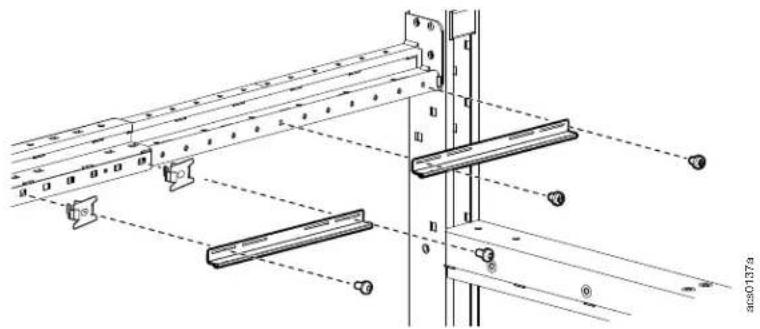
Add additional height adapter brushes by sliding the top edge of the height adapter you are adding to the bottom of the previous height adapter until the area between the top of the rack and the telescoping beam is completely enclosed.
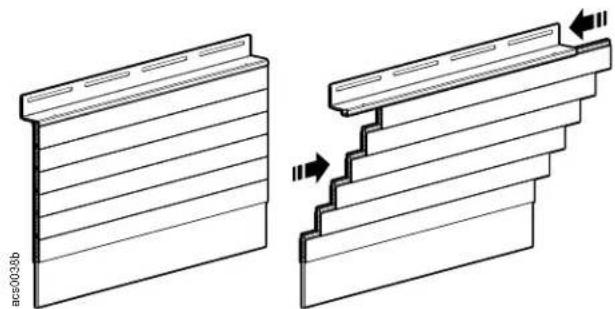
natural_image
Technical illustration of two mechanical component assemblies with fasteners, showing front and side views (no text or symbols)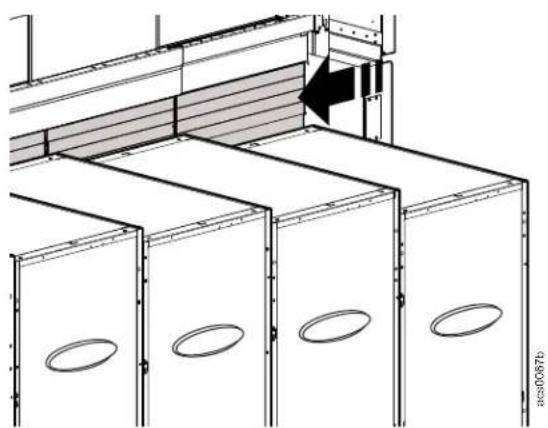
natural_image
Architectural diagram of a building facade with structural ribs and ventilation grilles (no text or symbols)Single Swing Door
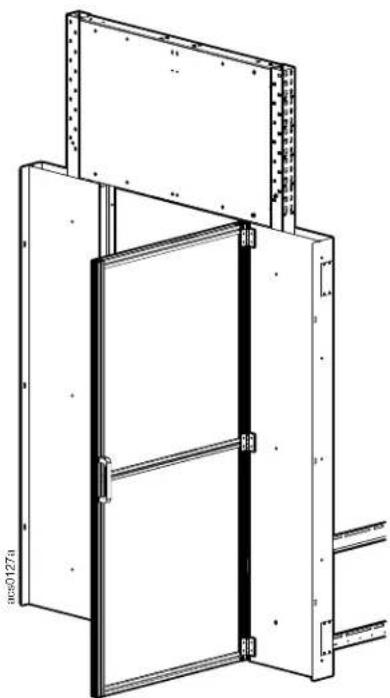
natural_image
Technical line drawing of a door frame assembly with metal framing and mounting brackets (no text or symbols)Insert hammer head nuts into the outside channel of the door.
Insert two M6 x 16 pan head screws through the door handle and into the hammer head nuts and tighten. Allow the hammer head nuts to rotate 90 degrees in the channel while tightening the screws.
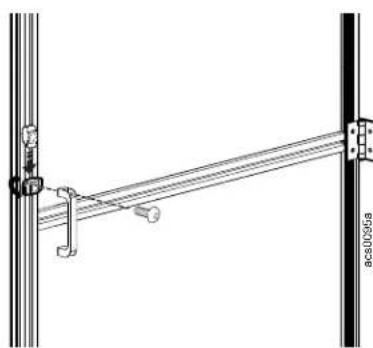
natural_image
Technical line drawing of a mechanical linkage assembly (no text or symbols)Install hinges to the door at the top, bottom and middle of the door. Match up the hinge location with the corresponding holes in the door frame cover.
Slide two hammer head nuts into the door channel opposite the door handle.
Insert two M6 x 16 pan head screws through the hinge and into the hammer head nuts. Tighten the screws into the nuts allowing the nuts to rotate 90 degrees in the channel.
Attach the other side of the hinge with M6 x 16 pan head screws to the corresponding holes with weld nuts in the door frame cover.
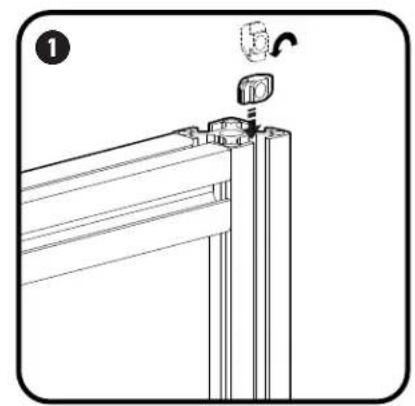
natural_image
Technical line drawing of a mechanical assembly with a bracket and mounting bracket (no text or symbols)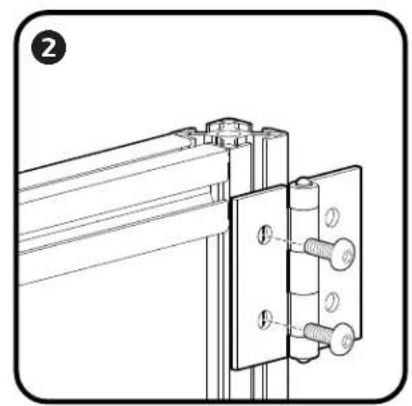
natural_image
Technical line drawing of a mechanical bracket assembly with bolts and mounting holes (no text or symbols)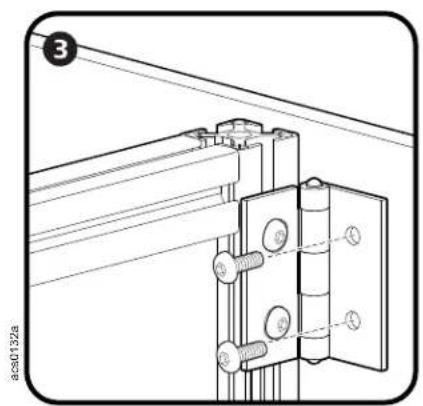
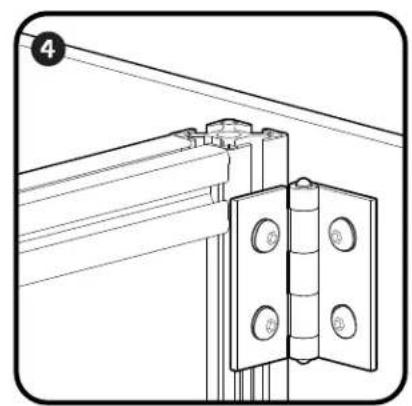
natural_image
Technical line drawing of a mechanical bracket assembly with mounting holes and a vertical hinge (no text or symbols)Worldwide Customer Support
Customer support for this product is available at www.schneider-electric.com.