IFTA-6 - Uncategorized Middle Atlantic - Free user manual and instructions
Find the device manual for free IFTA-6 Middle Atlantic in PDF.


User questions about IFTA-6 Middle Atlantic
0 question about this device. Answer the ones you know or ask your own.
Ask a new question about this device
Download the instructions for your Uncategorized in PDF format for free! Find your manual IFTA-6 - Middle Atlantic and take your electronic device back in hand. On this page are published all the documents necessary for the use of your device. IFTA-6 by Middle Atlantic.
USER MANUAL IFTA-6 Middle Atlantic
INSTALLATION INSTRUCTIONS
FAN TRAY SYSTEM IFTA-3/IFTA-6
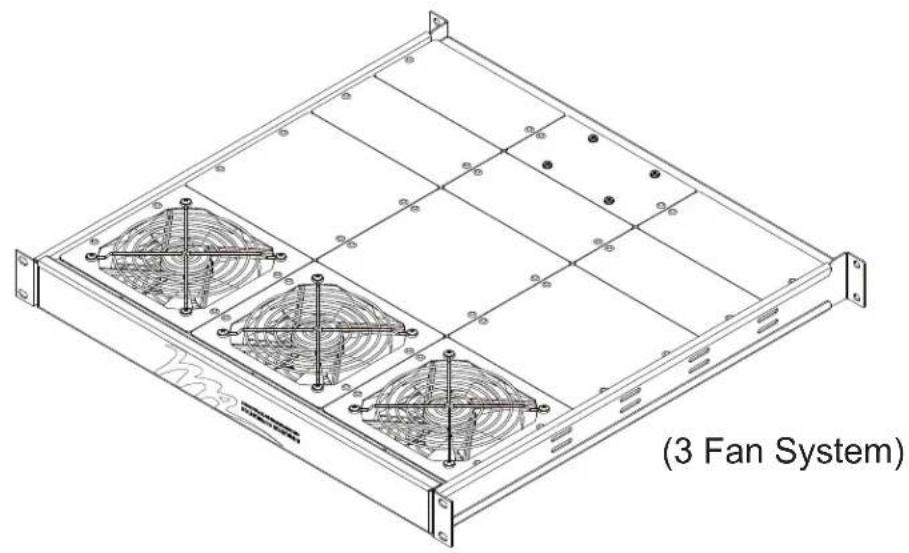
natural_image
Isometric technical drawing of a server rack with four fans and grid panels, labeled (3 Fan System) at bottom (no text or symbols on diagram itself)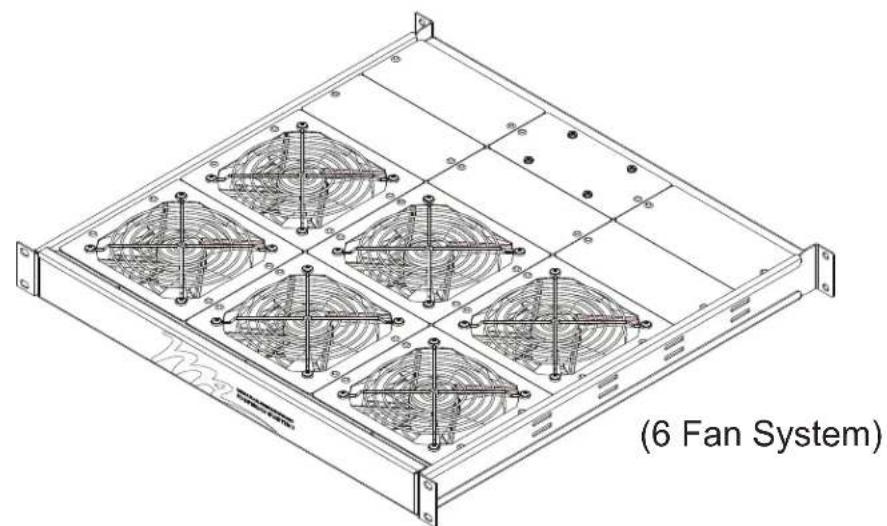
natural_image
Technical line drawing of a 6 fan system with six circular fans arranged in a grid (no text or symbols on the fan structure itself)THANK YOU
Thank you for purchasing the Fan Tray System. Please read these instructions thoroughly before installing this product
This Fan Tray is designed to work in conjunction with your overall thermal management system by moving hot air away from hot spots.
PRODUCT FEATURES
- Occupies one rackspace
- Fans can be placed anywhere on tray body, adjustable in half or full fan-width increments
- Adjustable depth allows fan tray to be adjusted from front to rear, 457 mm to 812 mm depth
- Energy-saving thermostatic control for automatic on/off when needed
FAN TRAY OPERATION
Versatile chassis allows fans to be locacted exactly where the heat is by mounting the chassis in the front or rear, and/or by moving fans within the grid provided.
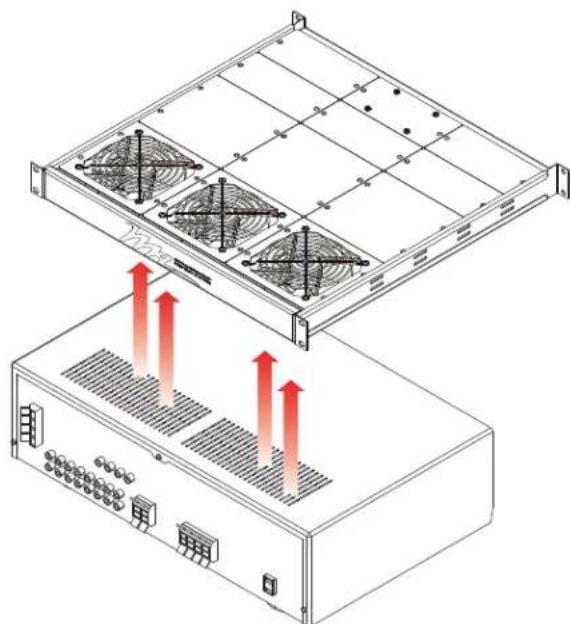
natural_image
Technical diagram of a server rack with heat exchangers and ventilation grilles (no text or symbols)RELOCATION OF FANS AND CONTROL MODULE
After determining desired fan locations, adjust the positions of fans and panels as needed. Fans and panels are removable by pushing rivets out from bottom as shown. (FIGURE A)
NOTE: If a fan is needed in the same location as the fan controller, it can be relocated as needed. All spaces MUST be occupied by fans or filler panels to achieve proper thermal management
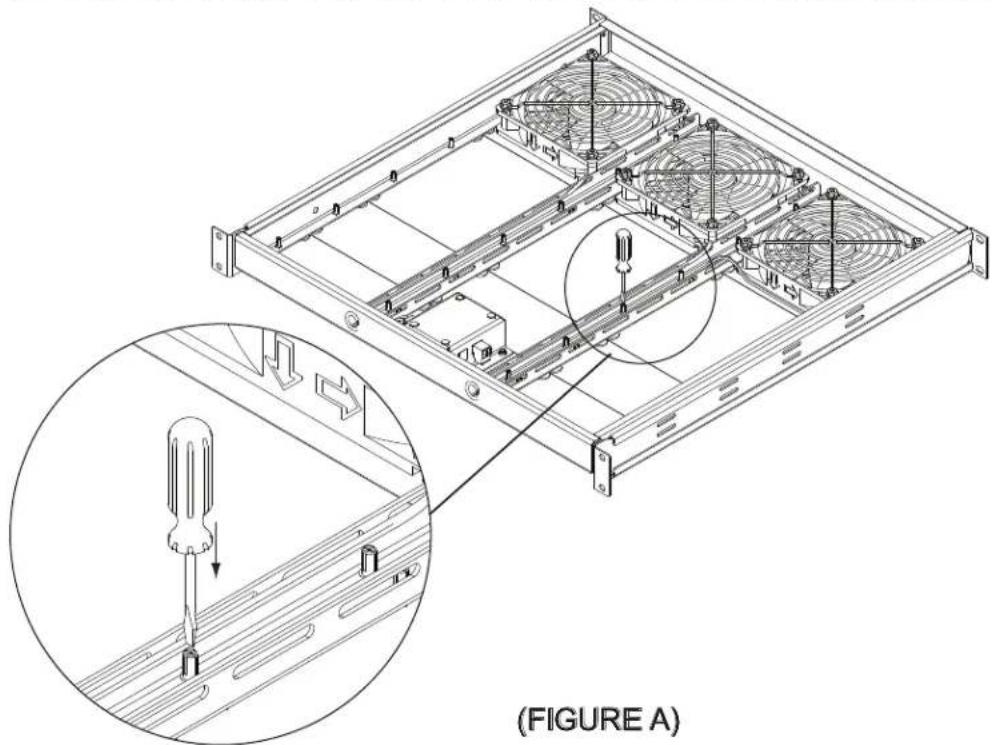
natural_image
Technical line drawing of a server rack with mounting hardware and screwdriver insertion (no text or symbols)FAN TRAY INSTALLATION
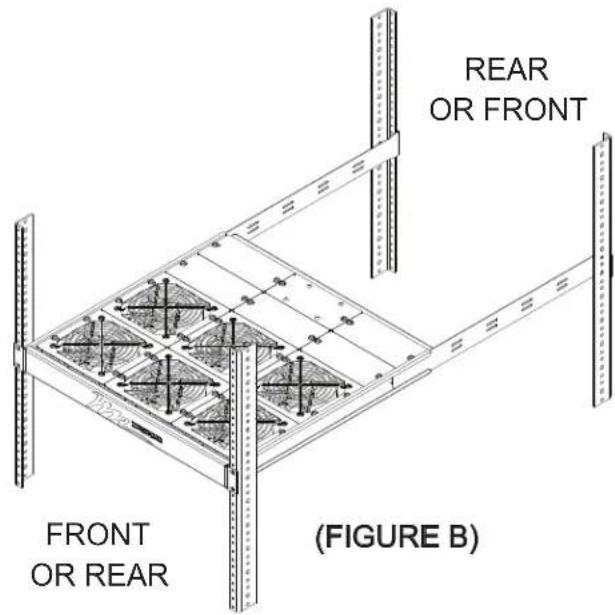
The Fan Tray can be installed in one of 2 orientations depending on heat source. (FIGURE B)
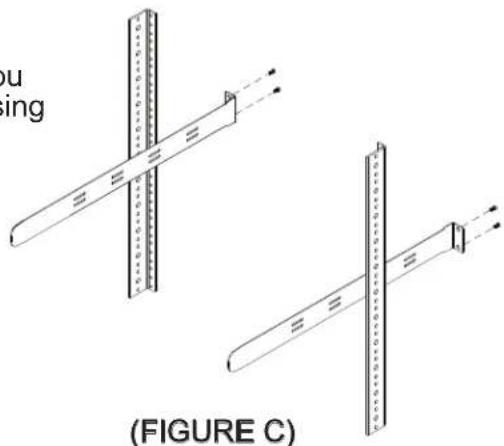
1) After determining the rackspace and direction in which you are mounting the fan tray, mount the support ears first using four rack screws (four places). (FIGURE C)
natural_image
Technical diagram showing two mechanical assembly configurations with cross-bracing and alignment marks, labeled (FIGURE C) — no text or symbols present.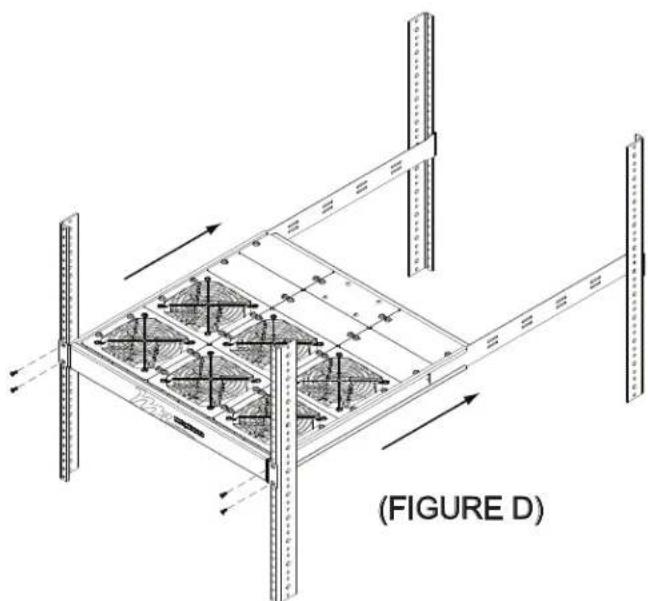
natural_image
Isometric technical diagram of a structural frame assembly with vertical supports and internal grid patterns, labeled (FIGURE D) at bottom (no text or symbols on the diagram itself)2) Slide the Fan Tray onto the ears from the other side, then add four rack screws, securing the unit in place. (FIGURE D)
FAN CONTROL MODULE
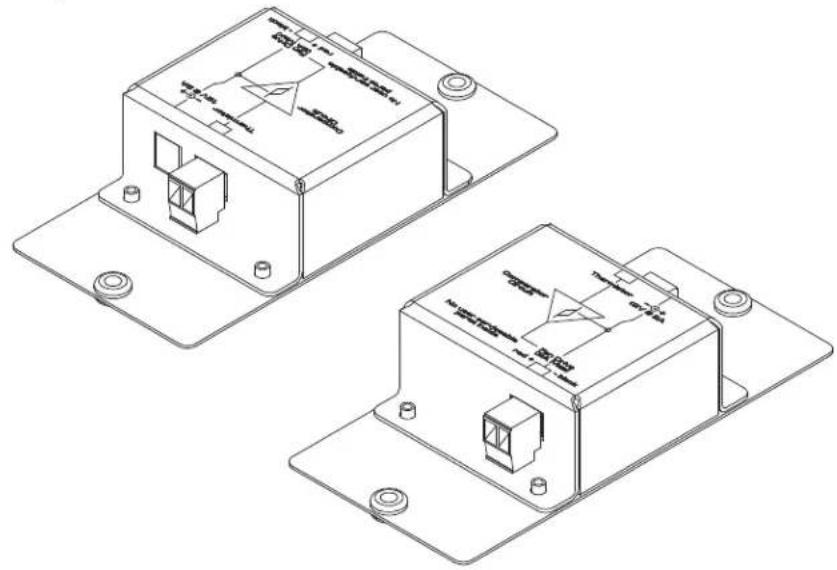
Fans are pre-wired to Control Module as shown, labeled directly on top of Module. (FIGURE E)
NOTE: Location of wires to Control Module are specific to polarity which is shown on the top of the Module
natural_image
Technical line drawing of two identical electronic device modules with mounting flanges and internal components (no text or symbols)(FIGURE E)
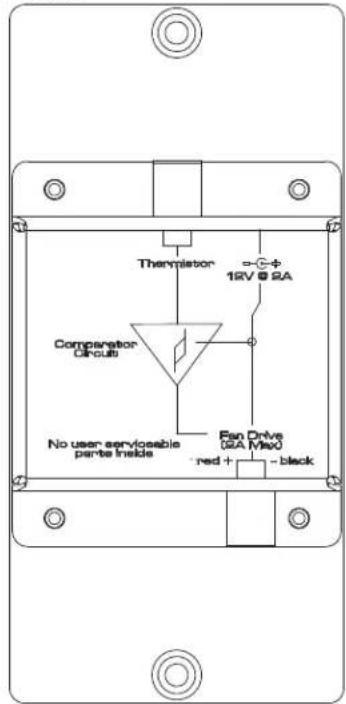
Top View
NOTE: Select the appropriate wall plug adapter supplied with the power supply for your region, and install into the power supply. Connect power supply to power source.
To remove a wall plug adapter, press tab labeled PUSH while simultaneously turning plug counterclockwise and lift out. To install a wall plug adapter, properly orient the wall plug adapter and insert into the power supply, and turn plug slightly clockwise until a clicking sound is heard.
"ALWAYS ON" FAN OPTION
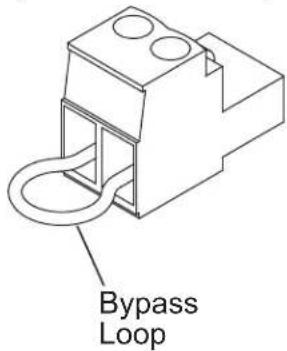
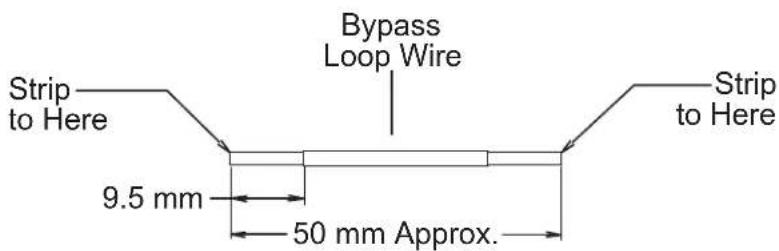
To have your fan tray power run at all times (regardless of the temperature), remove the temperature probe/thermistor, and replace it with a bypass loop as shown. The unit will then run whenever it is connected to a power supply. Save temperature probe/thermistor for later use. (FIGURE F)
NOTE: If the tray is used in the rear of the rack to reduce static pressure, the temperature probe/thermistor should be placed near the top of the rack where the heat rises
(FIGURE F)
OPTIONAL FAN KIT
Additional fans may be added to have a total of 8 fans in tray. Part Number: FT-FAN
NOTES
WARRANTY
Middle Atlantic Products, Inc. (the "Company") warrants the Fan Tray System to be free from defects in material or workmanship under normal use and conditions for three (3) years from the date of shipment from the company.
The Company's entire liability to the purchaser, and the purchaser's (or any other party's) sole and exclusive remedy, under this warranty shall be limited, at the Company's option, to either (a) return of and refund of the price paid for, or (b) repair or replacement at the Company's factory of the products purchased, or any part or parts thereof, which the Company has determined to be defective after inspection thereof at the Company's factory. This warranty does not cover damage due to acts of God, accident, misuse, abuse or negligence by parties other than the Company, or any modification or alteration of the products. In addition, this warranty does not cover damage due to improper handling, assembly, installation or maintenance.
THIS WARRANTY IS IN LIEU OF ALL OTHER WARRANTIES OF ANY KIND, EITHER EXPRESSED OR IMPLIED, INCLUDING, BUT NOT LIMITED TO, IMPLIED WARRANTIES OF MERCHANTABILITY AND FITNESS FOR A PARTICULAR PURPOSE.
TO THE MAXIMUM EXTENT PERMITTED BY APPLICABLE LAW, IN NO EVENT SHALL THE COMPANY BE LIABLE FOR ANY SPECIAL, INCIDENTAL, INDIRECT, OR CONSEQUENTIAL DAMAGES WHATSOEVER (INCLUDING, WITHOUT LIMITATION, DAMAGES FOR LOSS OF BUSINESS PROFITS, BUSINESS INTERRUPTION OR ANY OTHER PECUNIARY LOSS) ARISING OUT OF THE USE OF THE PRODUCTS PURCHASED, EVEN IF THE COMPANY HAS BEEN ADVISED OF THE POSSIBILITY OF SUCH DAMAGES. THE COMPANY'S LIABILITY TO THE PURCHASER (OR ANY OTHER PARTY) HEREUNDER, IF ANY, SHALL IN NO EVENT EXCEED THE PURCHASE PRICE OF THE PRODUCTS PAID TO THE COMPANY.
Corporate Headquarters
Corporate Voice 973-839-1011 - Fax 973-839-1976 / International Voice +1 973-839-8821 - Fax +1 973-839-4982
middleatlantic.com - info@middleatlantic.com
Middle Atlantic Canada
Voice 613-836-2501 - Fax 613-836-2690 / middleatlantic.ca - customerservicecanada@middleatlantic.ca
Factory Distribution
USA: NJ - CA - IL Canada: ON - BC
At Middle Atlantic Products we are always listening. Your comments are welcome.
Middle Atlantic Products Is an ISO 9001 and ISO 14001 Registered Company.

30% Recycled Paper
