EN-9260TX-E - Carte/adaptateur réseau Edimax - Free user manual and instructions
Find the device manual for free EN-9260TX-E Edimax in PDF.


User questions about EN-9260TX-E Edimax
0 question about this device. Answer the ones you know or ask your own.
Ask a new question about this device
Download the instructions for your Carte/adaptateur réseau in PDF format for free! Find your manual EN-9260TX-E - Edimax and take your electronic device back in hand. On this page are published all the documents necessary for the use of your device. EN-9260TX-E by Edimax.
USER MANUAL EN-9260TX-E Edimax
Copyright © Edimax Technology Co., Ltd. all rights reserved. No part of this publicaon may be reproduced, transmied, transcribed, stored in a retrieval system, or translated into any language or computer language, in any form or by any means, electronic, mechanical, magnec, opcal, chemical, manual or otherwise, without the prior written permission from Edimax Technology Co., Ltd.
Edimax Technology Co., Ltd. makes no representaons or warranes, either expressed or implied, with respect to the contents hereof and specifically disclaims any warranes, merchantability, or tness for any parcular purpose. Any soware described in this manual is sold or licensed as is. Should the programs prove defecve following their purchase, the buyer (and not this company, its distributor, or its dealer) assumes the enre cost of all necessary servicing, repair, and any incidental or consequential damages resulting from any defect in the soware. Edimax Technology Co., Ltd. reserves the right to revise this publicaon and to make changes from me to me in the contents hereof without the obligaon to nofy any person of such revision or changes.
The product you have purchased and the setup screen may appear slightly dierent from those shown in this QIG. For more informaon about this product, please refer to the user manual on the CD-ROM. The soware and specicaons are subject to change without noce. Please visit our website www.edimax.com for updates. All brand and product names menoned in this manual are trademarks and/or registered trademarks of their respective holders.
Edimax Technology Co., Ltd.
Add: No. 3, Wu-Chuan 3rd Rd., Wu-Ku Industrial Park, New Taipei City, Taiwan Tel: +886-2-77396888
Chapter 1: Introducon ....4
1.1 Model no....4
1.2 Package Contents....4
1.4 Product Features....5
1.5 System Requirements ....5
Chapter 2: Installaon ....6
2.1 Hardware Installaon....6
2.2 Driver Installaon 7
2.2.1 Windows: Setup Wizard 7
2.2.2 Windows : CD Drivers ......9
2.2.3 Novell and Linux: CD Drivers....13
Chapter 3: Troubleshoong ....14
Chapter 1: Introducon
1.1 Model no.
EN-9260TX-E: Gigabit Ethernet PCI Express Adapter
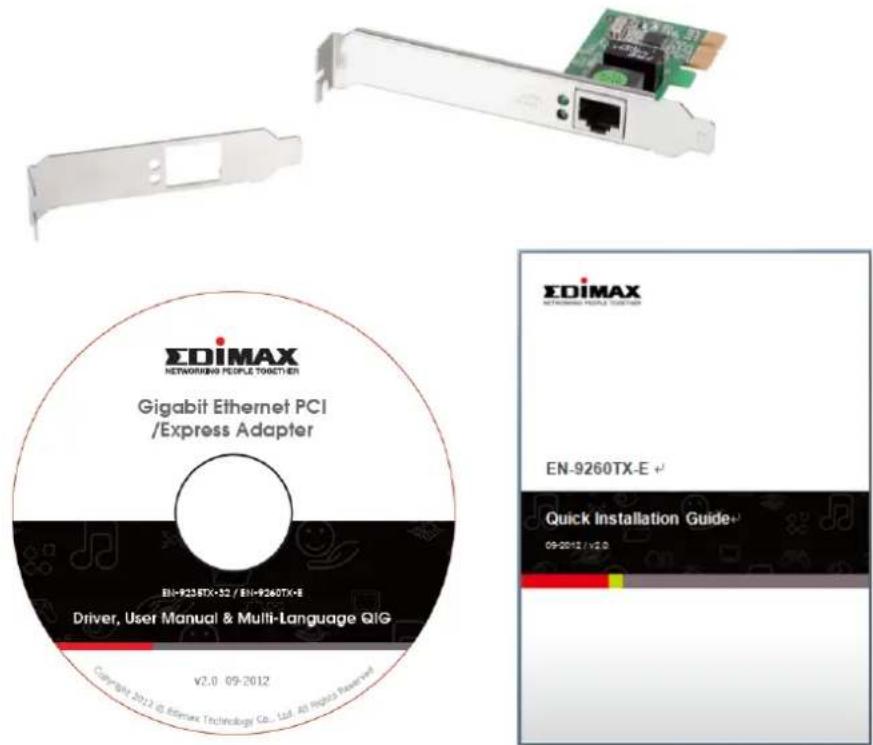
1.2 Package Contents
Before you start using this product, please check if there is anything missing in the package, and contact your dealer to claim the missing item(s):
● Gigabit Ethernet PCI Express Adapter x 1
● Low-prole bracket x 1
- Quick installaon guide x 1
- CD containing setup wizard, user manual & mul-language QIG x 1
text_image
EDiMAX NETWORKING PEOPLE TOGETHER Gigabit Ethernet PCI /Express Adapter EN-9260TX-E + Driver, User Manual & Multi-Language QIG V2.0 09-2012 Copyright: 2012 @ IBMAX Technology Co., Ltd. All rights reserved EDiMAX NETWORKING NETWORKS EN-9260TX-E + Quick Installation Guide+ 09-2012 / V2.01.3 LED Status:
There are two LED indicators on the adapter:
- LINK /ACT Indicator
This indicator lights green when the Gigabit Adapter is connected to a Gigabit Ethernet Network device, and blinks green when transming or receiving data on the network.
- 1000M
This indicator lights green when the Gigabit Adapter is connected at 1000Mpbs.
1.4 Product Features
- Complies with PCI Express 1.1 – x1 PCI Express standard
- IEEE 802.3, 802.3u, 802.3ab and 802.3x standards
● Supports 10/100/1000Mbps Auto Negoaon and Jumbo Frame
● Supports IEEE802.3x full-duplex Flow Control
● Supports IEEE802.1Q VLAN Tagging and IEEE802.1P Layer2 Priority Encoding
● Supports Wake on LAN and ACPI power management
● Supports IEEE802.3az energy ecient Ethernet funcon - Includes a low-prole bracket
- Plug-and-Play
● Supports drivers for Novell 5.X/6.X, Windows 98/ME/NT4.0/2000/XP/Vista/7, Linux 2.4.x
1.5 System Requirements
● PCI Express 1.1 Slot
- CD-ROM Drive
● CPU: Penum III 1G above or similar
● Memory size: 256MB RAM or above
● Hard Disk: Min. of 100MB disk space
● OS: Novell 5.X/6.X, Windows 98/ME/NT4.0/2000/XP/Vista/7, Linux 2.4.x
● RJ-45 Ethernet cable
Chapter 2: Installaon
2.1 Hardware Installaon
To install the adapter, please follow the steps listed below:
A. Turn o your computer and unplug/disconnect all cables, including the power supply.
B. Remove your computer's case cover.
C. Locate an available PCI Express slot.
D. Remove the screw that secures the back plate (the small piece of metal that covers the opening for a PCI Express card on the back panel of your computer), then remove the back plate.
E. Carefully insert the adapter into the PCI Express slot. Do not touch the metal connector on the adapter.
F. Secure the adapter to the case using the screw you removed from the back plate.
G. Reach your computer's case cover.
H. Reconnect the power cord and all other cables to your computer, and then turn on your computer.
When the hardware has been successfully installed in your computer, you will be prompted on-screen to follow the “Found New Hardware Wizard”; please click “Cancel” and follow 2.2 Driver Installaon to install the driver for your adapter.
For Windows XP
Found New Hardware Wizard

Welcome to the Found New Hardware Wizard
This wizard helps you install software for:
Ethernet Controller

If your hardware came with an installation CD or floppy disk, insert it now.
What do you want the wizard to do?
Install the software automatically (Recommended)
○ Install from a list or specific location (Advanced)
Click Next to continue.
< Back
Next >
Cancel
2.2 Driver Installaon
The included CD contains a setup wizard which will guide Windows users through the installaon process, as explained in the next secon. You can also install the drivers manually. Please follow the instrucons appropriate for your operang system.
2.2.1 Windows: Setup Wizard
Windows 7/Vista/98SE/ME/2000/XP
A. Please insert the Driver CD-ROM into your computer's CD-ROM drive.
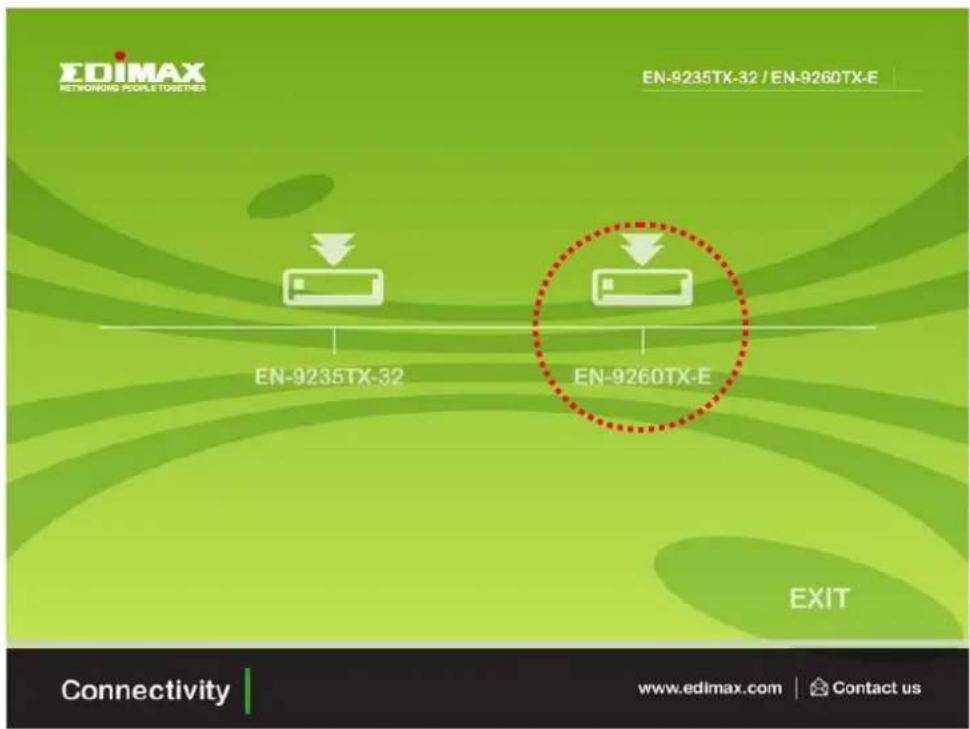
B. Find the product model "EN-9260TX-E".
text_image
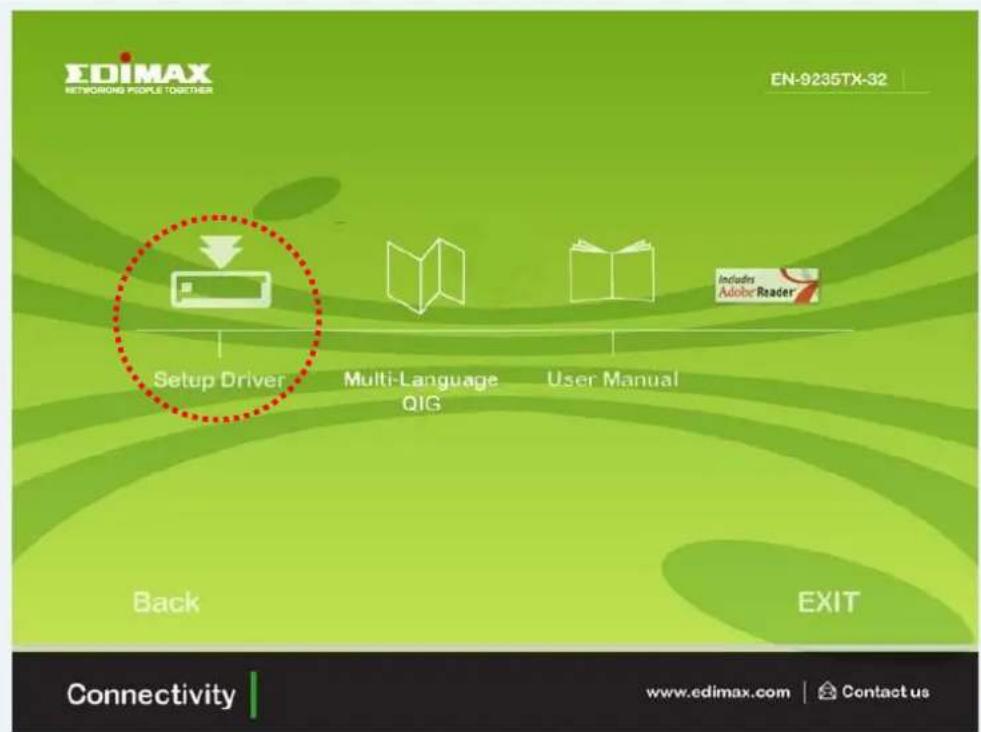
EDIMAX NETWORKING PEOPLE TOGETHER EN-9235TX-32 / EN-9260TX-E EN-9235TX-32 EN-9260TX-E EXIT Connectivity www.edimax.com | Contact usC. Click "Setup Driver".
text_image
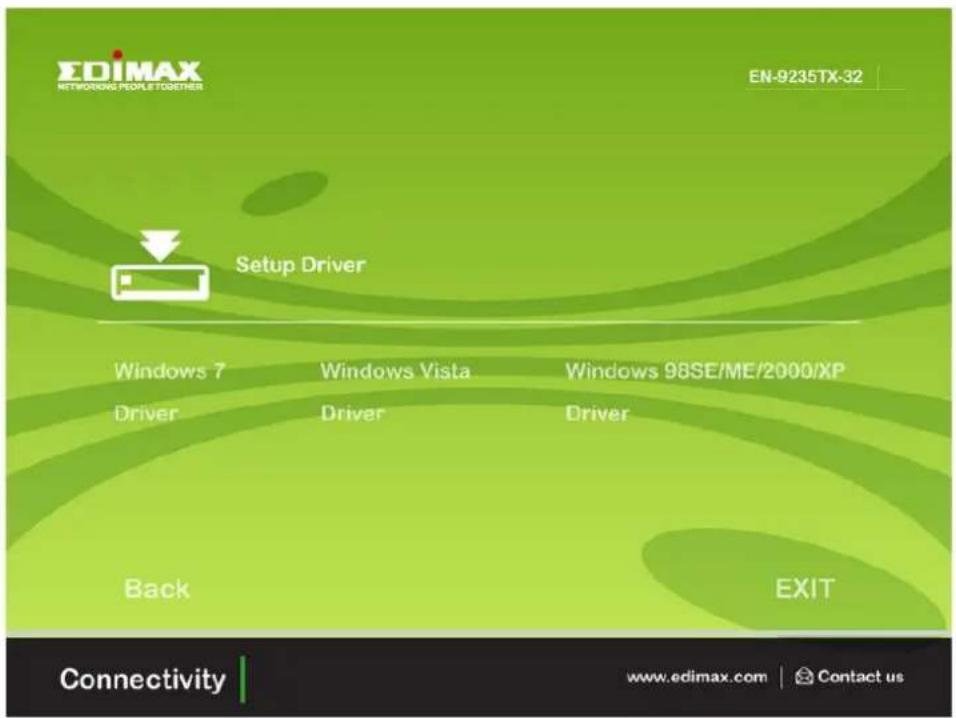
EDIMAX NETWORKING PEOPLE TOGETHER EN-9235TX-32 Setup Driver Multi-Language QIG User Manual Back EXIT Connectivity www.edimax.com | Contact usD. The wizard will help you install the driver for Windows 7/Vista/98SE/ME /2000/XP.
text_image
EDIMAX NETWORKING PEOPLE TOGETHER EN-9235TX-32 Setup Driver Windows 7 Driver Windows Vista Driver Windows 98SE/ME/2000/XP Driver Back EXIT Connectivity www.edimax.com | Contact usE. Restart Windows to complete the installaon.
2.2.2 Windows : CD Drivers
Windows 7/Vista/98SE/ME/2000/XP
Windows 7/Vista/98SE/ME/2000/XP users can alternatively install the drivers manually. The following instrucons will guide you through the CD Drivers installaon procedure.
A. Insert the Edimax Resource CD into the CD-ROM drive.
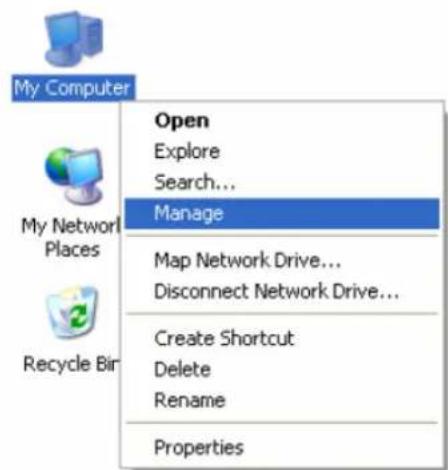
B. Right-click the icon "My Computer" on the desktop, and then click "Manage".
text_image
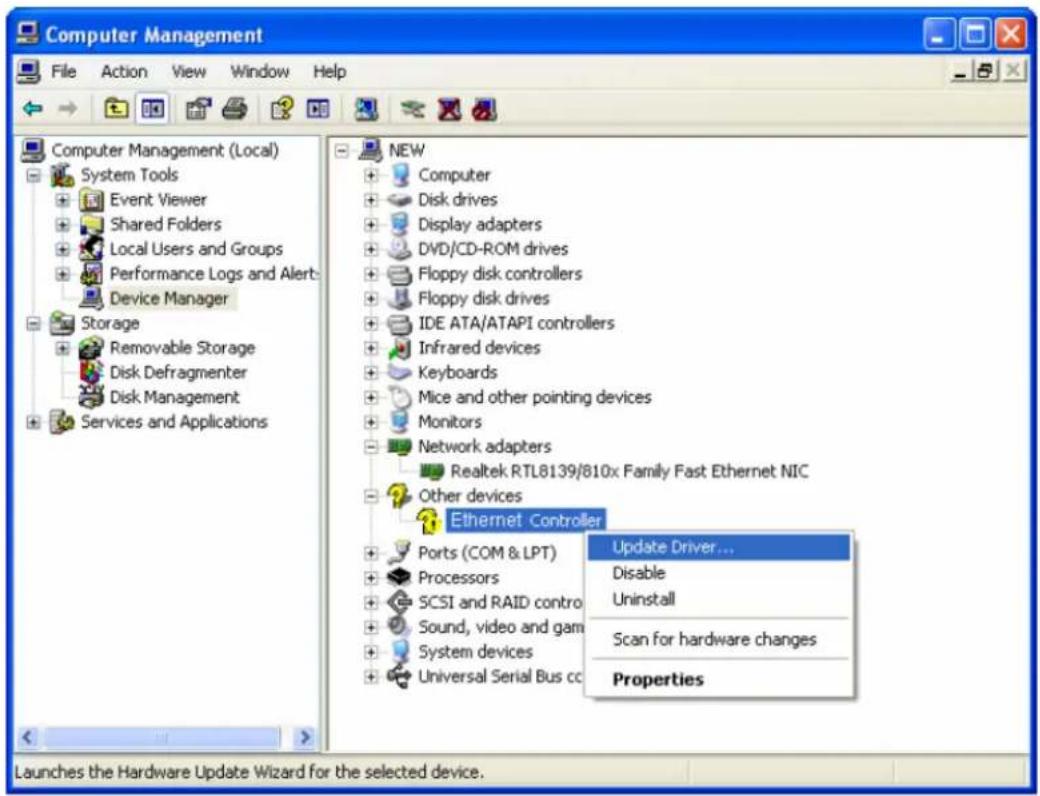
My Computer Open Explore Search... Manage My Network Places Map Network Drive... Disconnect Network Drive... Recycle Bir Create Shortcut Delete Rename PropertiesC. The “Computer Management” screen will appear as shown. Click “Device Manager”, and you will see various opons on the right. Click “Other devices”, and then from the drop-down list please nd “Ethernet Controller” you have installed. Right-click it, and then select “Update Driver”.
text_image
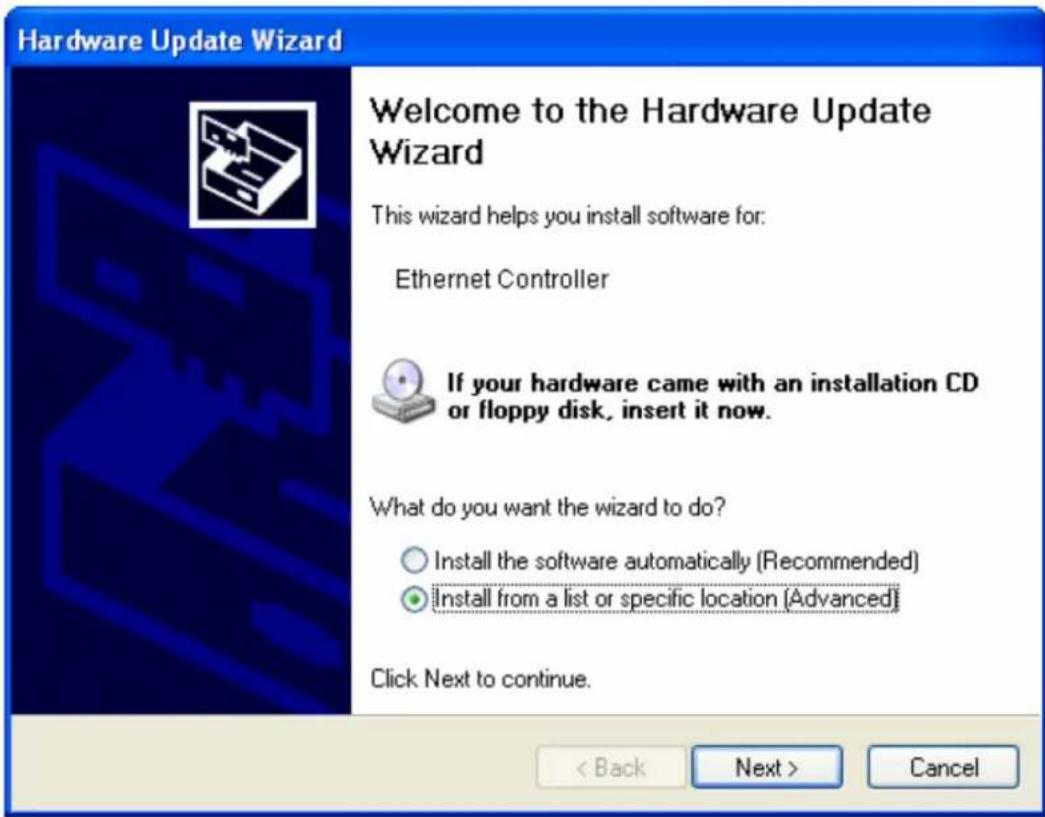
Computer Management File Action View Window Help Computer Management (Local) System Tools Event Viewer Shared Folders Local Users and Groups Performance Logs and Alerts Device Manager Storage Removable Storage Disk Defragmenter Disk Management Services and Applications NEW Computer Disk drives Display adapters DVD/CD-ROM drives Floppy disk controllers Floppy disk drives IDE ATA/ATAPI controllers Infrared devices Keyboards Mice and other pointing devices Monitors Network adapters Realtek RTL8139/810x Family Fast Ethernet NIC Other devices Ethernet Controller Ports (COM & LPT) Processors SCSI and RAID contro Sound, video and gam System devices Universal Serial Bus cc Update Driver... Disable Uninstall Scan for hardware changes Properties Launches the Hardware Update Wizard for the selected device.D. The "Hardware Update Wizard" window will show up. Select "Install from a list or specic locaon [Advanced]", and then click "Next".
text_image
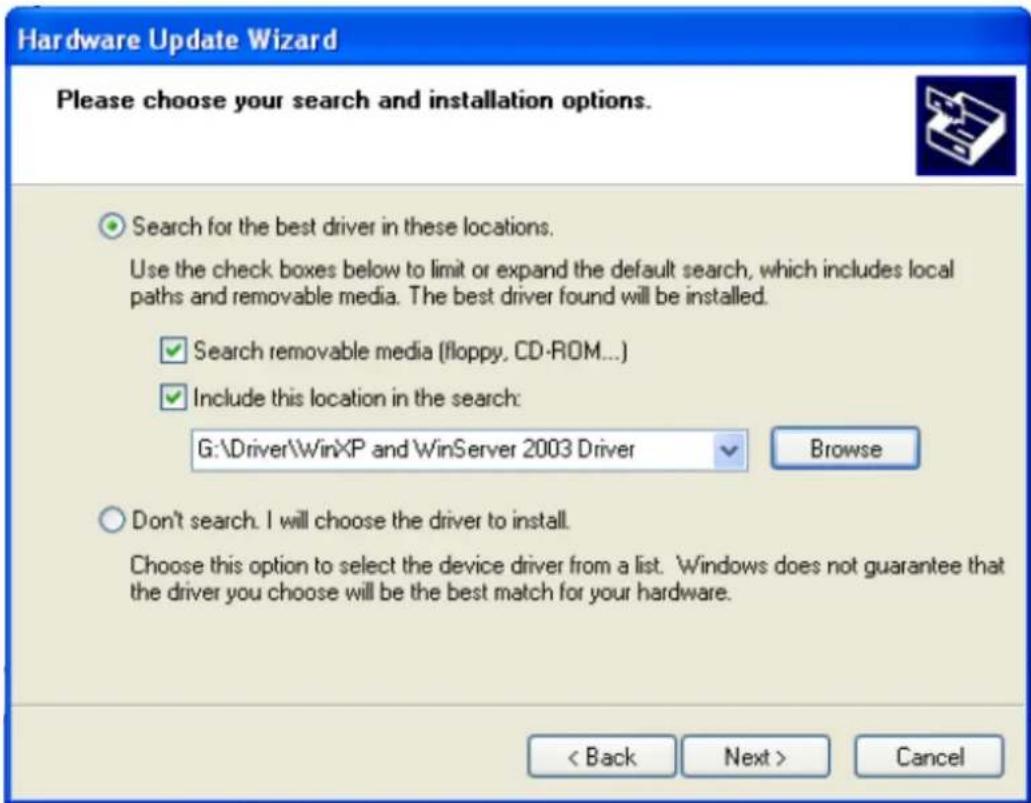
Hardware Update Wizard Welcome to the Hardware Update Wizard This wizard helps you install software for: Ethernet Controller If your hardware came with an installation CD or floppy disk, insert it now. What do you want the wizard to do? Install the software automatically (Recommended) Install from a list or specific location (Advanced) Click Next to continue. < Back Next > CancelE. Select "Search for the best driver in these locaons", and then click "Browse" and choose the system driver locaon of the disk, and then click "Next".
text_image
Hardware Update Wizard Please choose your search and installation options. Search for the best driver in these locations. Use the check boxes below to limit or expand the default search, which includes local paths and removable media. The best driver found will be installed. ✓ Search removable media (floppy, CD-ROM...) ✓ Include this location in the search: G:\Driver\WinXP and WinServer 2003 Driver Browse Don't search. I will choose the driver to install. Choose this option to select the device driver from a list. Windows does not guarantee that the driver you choose will be the best match for your hardware. < Back Next > CancelF. Wait a few seconds for the installaon.

text_image
Hardware Update Wizard Please wait while the wizard installs the software... Realtek PCIe GBE Family Controller RTNUinst64.dll To C:\WINDOWS\system32 < Back Next > CancelG. Click "Finish" to complete the installaon.

text_image
Hardware Update Wizard Completing the Hardware Update Wizard The wizard has finished installing the software for: Realtek PCIe GBE Family Controller Click Finish to close the wizard. < Back Finish CancelH. Restart Windows to complete the installaon.
2.2.3 Novell and Linux: CD Drivers
Novell and Linux
Novell and Linux users need to install the drivers manually. The drivers for Novell and Linux operang systems can be found in the CD at the following locaon:
- /Drivers/Linux/
- /Drivers/Novell/
Please follow the usual driver installaon procedure for your operang system. Contact our technical support team, or the vendor of your operang system for further help.
Chapter 3: Troubleshoong
- What should I do if my PC cannot nd the new hardware?
Check to see if the network adapter is inserted in the PCI slot properly. Otherwise, please reinsert the adapter.
- What should I do if my PC cannot identify the new hardware?
Check if you can nd the network adapter you've installed in the following locaon:
/My Computer/Manager/Device Manager/Network Adapter/..
If not, please follow the instrucons in 2.2 Driver Installaon to update the driver.
- Why am I only geng a network conncon speed of 100Mbps instead of 1000Mbps?
Check your Ethernet cable, and make sure you are using CAT-5e or CAT-6 Ethernet cables. Some CAT-5 cables are not capable of running at 1000Mbps.
Ensure that you are connected to a 1000Mbps switch.
Contact your dealer if problems persist.
Federal Communicaon Commission Interference Statement
This equipment has been tested and found to comply with the limits for a Class B digital device, pursuant to Part 15 of FCC Rules. These limits are designed to provide reasonable protecon against harmful interference in a residential installaon. This equipment generates, uses, and can radiate radio frequency energy and, if not installed and used in accordance with the instrucons, may cause harmful interference to radio communicaons.
However, there is no guarantee that interference will not occur in a particular installaon. If this equipment does cause harmful interference to radio or television recepon, which can be determined by turning the equipment o and on, the user is encouraged to try to correct the interference by one or more of the following measures:
- Reorient or relocate the receiving antenna.
- Increase the separaon between the equipment and receiver.
- Connect the equipment into an outlet on a circuit dierent from that to which the receiver is connected.
- Consult the dealer or an experienced radio technician for help.
FCC Cauon
This device and its antenna must not be co-located or operang in conjuncon with any other antenna or transmier.
This device complies with Part 15 of the FCC Rules. Operaon is subject to the following two conditions: (1) this device may not cause harmful interference, and (2) this device must accept any interference received, including interference that may cause undesired operaon.
Any changes or modicaons not expressly approved by the party responsible for compliance could void the authority to operate equipment.
CE Mark Warning
This is a class B product. In a domesc environment this product may cause radio interference in which case the user may be required to take adequate measures.

text_image
CE FC N20379 PCT A446ΣDIMAX
NETWORKING PEOPLE TOGETHER
Edimax Technology Co., Ltd.
No.3, Wu-Chuan 3rd Road, Wu-Gu, New Taipei City 24891, Taiwan
Edimax Technology Europe B.V.