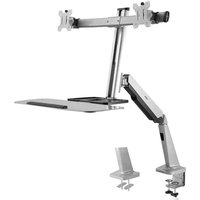
ErgoCenter ED6 - Flat Screen Mount Rocstor - Free user manual and instructions
Find the device manual for free ErgoCenter ED6 Rocstor in PDF.


| Product Type | Flat Panel Monitor Arm |
| Brand | Rocstor |
| Model | ErgoCenter ED6 |
| VESA Compatibility | 75x75mm and 100x100mm |
| Max. Screen Size | Up to 32 inches |
| Max. Weight Capacity | 20 kg (44 lbs) |
| Tilt Range | +90° / -20° |
| Swivel Range | 180° |
| Rotation | 360° |
| Material | Steel and Aluminum |
| Color | Black |
| Installation Type | Desk clamp or grommet mount |
| Included Hardware | M4 and M5 screws, spacers, tools |
| Warranty | 5 years limited factory warranty |
| Safety Note | Stored energy risk; follow manual instructions |
Frequently Asked Questions - ErgoCenter ED6 Rocstor
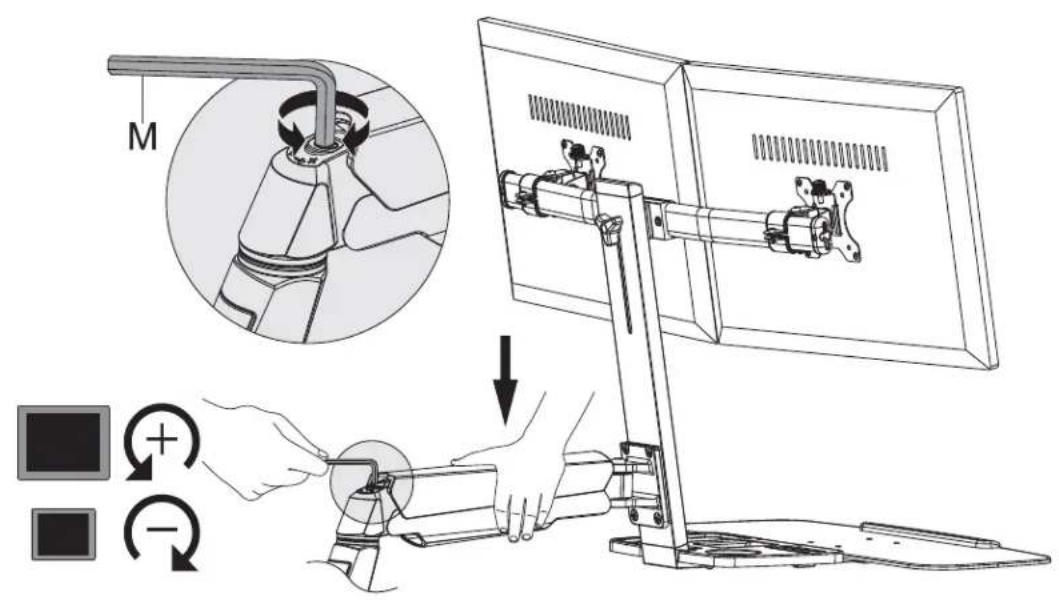
Note: The arm is under tension; never disengage equipment unless the arm is in its utmost position.
Warning: Verify the surface strength to avoid damage or injury.
Phone: +1 (818) 727-7000 (Mon-Fri, 9am-5pm PST, excluding holidays)
Email: support@Rocstor.com
Corporate address: 12979 Arroyo Ave, San Fernando, CA 91340, USA. Have your serial number ready.
User questions about ErgoCenter ED6 Rocstor
0 question about this device. Answer the ones you know or ask your own.
Ask a new question about this device
Download the instructions for your Flat Screen Mount in PDF format for free! Find your manual ErgoCenter ED6 - Rocstor and take your electronic device back in hand. On this page are published all the documents necessary for the use of your device. ErgoCenter ED6 by Rocstor.
USER MANUAL ErgoCenter ED6 Rocstor
natural_image
Technical line drawing of a mechanical arm with articulated joints and a base mount (no text or symbols)User Manual
Y10N029-S1
VESA Compatible 75x75 100x100


Package Content
| 1x A | x1 B | x1 C |
| x1 D | x1 E | x1 F |
| x1 G | x2 H | x4 I |
| x4 J | x2 K | x1 - 4mm L |
| x1 - 6mm M | x1 N | x2 O |
| x2 P | x2 Q | x1 R |
Package Content
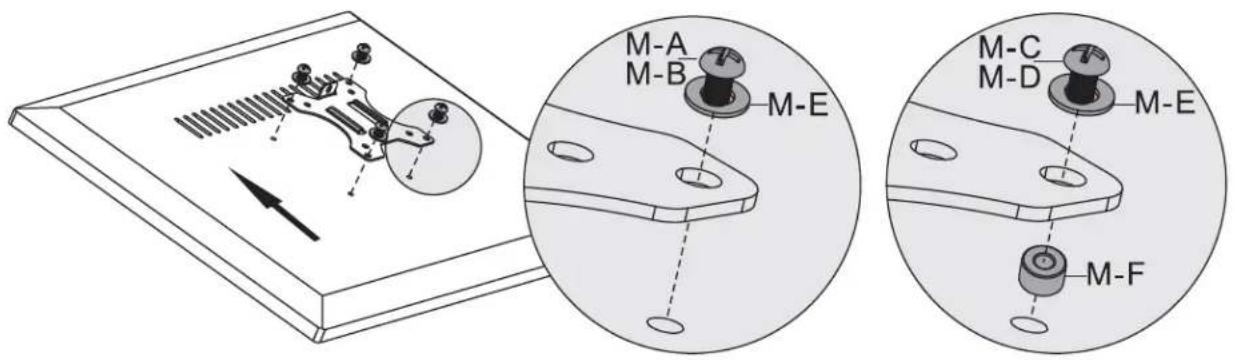
 M4x12 (x8)M-A M4x12 (x8)M-A |  M5x12 (x8)M-B M5x12 (x8)M-B |  M4x16 (x8)M-C M4x16 (x8)M-C |
 M5x16 (x8)M-D M5x16 (x8)M-D |  D5 (x8)M-E D5 (x8)M-E |  (x8)M-F (x8)M-F |

The following tools are required for proper installation:

Phillips Screwdriver
1
1a-1

1a-2a
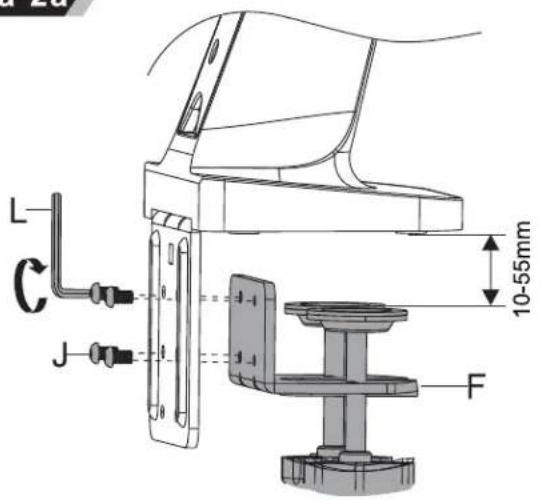
1a-2b
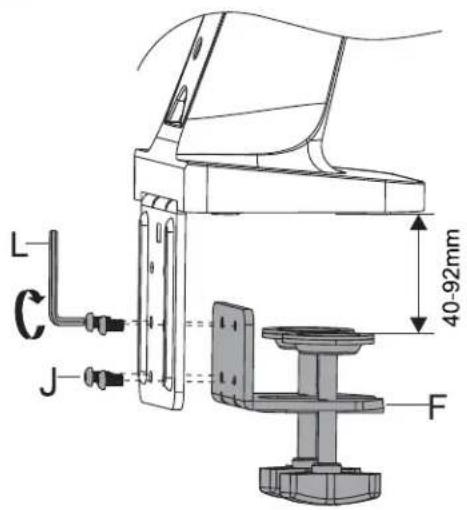
1a-3

natural_image
Technical line drawing of a mechanical device with a labeled component 'G' and directional arrow (no text or symbols beyond label)1

natural_image
Technical line drawing of a mechanical assembly with no visible text or symbols1b-1
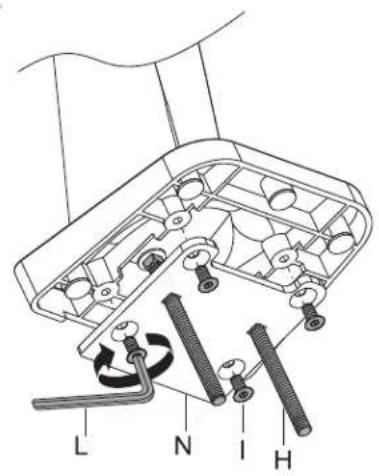

2
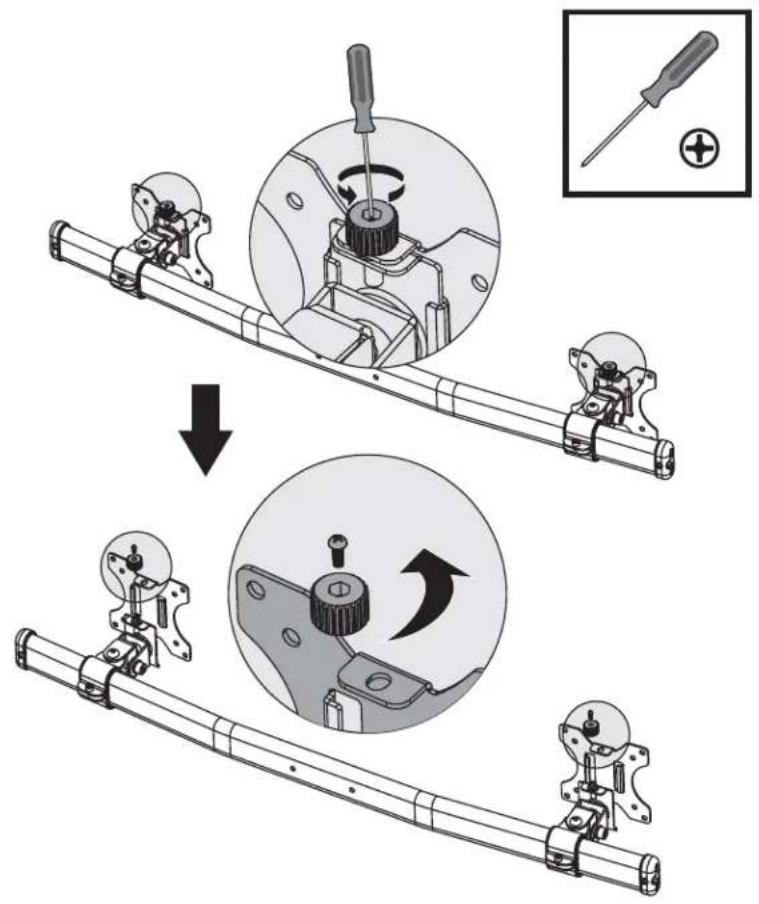
3
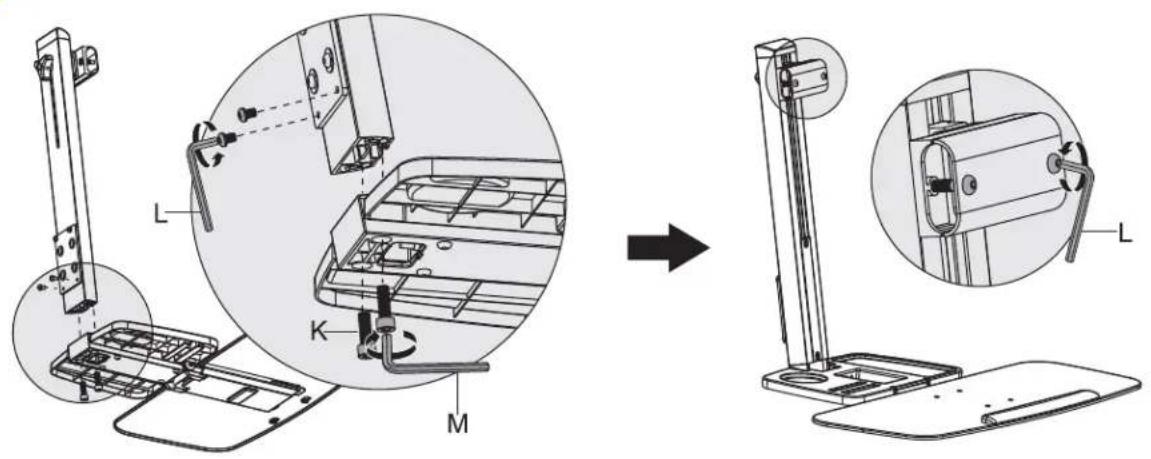
4
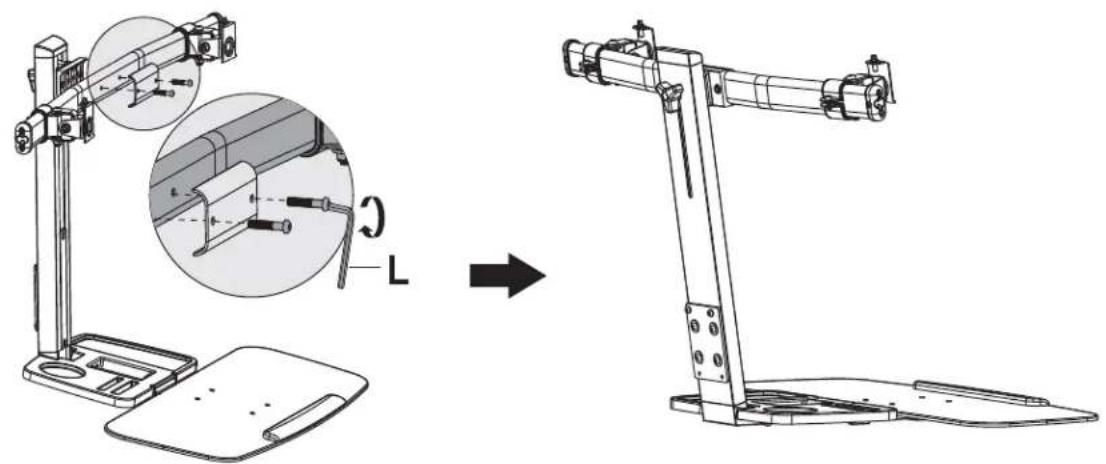
natural_image
Technical line drawing of a mechanical device with an inset showing a close-up of a component (no text or symbols present)5

6

7

natural_image
Two-panel image: left shows a screwdriver icon with plus sign; right shows two stylized human figures holding a rectangular object (no text or symbols)
natural_image
Technical illustration of a mechanical assembly with a computer monitor and a close-up view of a disassembled component (no text or symbols present)










Safety Seguridad Sécurité SicurezzaSicherheitVeiligheid

EN WARNING: Given the potential variability of mounting surface materials, it is crucial to verify that the mounting surface is sufficiently robust to support the installed product and equipment.
ES ¡Advertencia: Dada la posible variabilidad de los materiales de la superficie de montaje, es fundamental verificar que la superficie de montaje sea lo suficientemente resistente para soportar el producto y el equipo instalados.
FR Avertissement : En raison de la variabilité potentielle des matériaux de surface de montage, il est impératif de vérifier que la surface de montage est suffisamment solide pour supporter le produit et l'équipement installés.
DE Warnung: Aufgrund der möglichen Unterschiede in den Materialien der Montageoberfläche ist es unerlässlich zu überprüfen, ob die Montagefläche ausreichend stabil ist, um das installierte Produkt und die Ausrüstung zu tragen.
JA 警告: 取り付け面材料の変動が広範囲にわたる可能性があるため、取り付けられた製品と機器をサポートできるだけの十分な強度があるかどうかを確認することが極めて重要です。
ZH **警告:**由于安装表面材料可能存在广泛差异,务必验证安装表面足够坚固,以支撑安装的产品和设备。
NL Waarschuwing: Gezien de potentiële variabiliteit van de materialen van het montagesoppervlak, is het van cruciaal belang om te controleren of het montagesoppervlak voldoende sterk is om het geïnstalleerde product en de apparatuur te ondersteunen.
IT Avvertenza: Date le potenziali variazioni dei materiali della superficie di montaggio, è cruciale verificare che la superficie di montaggio sia sufficientemente robusta per sostenere il prodotto e l'attrezzatura installati.
Turkish (TR):
TR Uyarı: Montaj yüzey malzemelerinin geniş bir şekilde değişebileceği göz önüne alındığında, montaj yüzeyinin monte edilen ürünü ve ekipmanı taşımak için yeterince güçlü olduğunu doğrulamanız gerekmektedir.
Safety Seguridad Sécurité SicurezzaSicherheitVeiligheid

EN
WARNING! Stored Energy Risk. The arm mechanism is under tension and will autonomously elevate when attached equipment is detached. Consequently, NEVER disengage equipment unless the arm has reached its utmost position! Neglecting this directive could lead to severe personal injury and/or equipment damage.
CAUTION: Ensure that the bolt is perfectly centered in the hole. To securely attach the arm and prevent equipment damage, the plate must make contact with the underside of the desk on both sides of the hole.
Note: For support and warranty information, when contacting Rocstor customer service, please reference the serial number.
natural_image
Diagram of a desktop computer stand with an inset close-up showing the front panel and base panel (no text or symbols present)Five-Year Factory Warranty
Rocstor provides a Limited Factory Warranty which applies to products you have purchased for commercial Household use in the ordinary course of your business.
Terms of warranty
Rocstor warrants its ErgoReach and ErgoCenter product series to be free from defects in materials and workmanship for a period of five years from the date of purchase. Rocstor's obligation under this warranty coverage is limited to repairing or replacing, at its sole discretion, any such defective products. This warranty does not apply to equipment that has been damaged by accident, negligence, or misapplication or has been altered or modified in any way. In the event Rocstor repairs or provide a replacement of a defective product or part, the warranty does not extend the original warranty period. Rocstor reserves the right to repair or replace any parts under warranty as new or factory re manufactured.
Non-transferable warranty
This warranty extends only to the original purchaser who must have properly registered the product. The product may be registered at the Rocstor Web site, https://rocstor.com/customer-support/warranty registration.
Exclusions
If Rocstor tests or examines the alleged defect in the product and finds that the damages or defects do not exist or were caused by a third party or an end user's misuse, improper installation or testing, or negligence, then Rocstor shall not be liable under the warranty. Furthermore, unauthorized attempts to repair or modify the product by wrong or inadequate electrical connection or voltage, inadequate or inappropriate site operation conditions, repair, installation corrosive area or atmosphere, a change in location or operating conditions or use, repair by non-Rocstor designated personnel, exposure to the elements, fire, Acts of God, theft, or equipment installation not recommended or contrary to Rocstor's specifications or recommendations. Warranties will be void and Rocstor will not be liable if the product serial number is tampered with, altered, removed, defaced or any other cause beyond the range of intended use.
Contact Information
Corporate Headquarters
12979 Arroyo Ave
San Fernando, CA 91340 - USA
Office: +1 (818) 727-7000
Email: info@Rocstor.com
Technical Support / RMA
Hours: 9:00 am - 5:00 pm PST
Mon - Fri (excluding holidays)
Tell: +1 (818) 727-7000 (Domestic and Internationals)
Email: support@Rocstor.com
Sales Info
Hours: 8:00 am - 5:00 pm PST
Mon - Fri (excluding holidays)
Tell: +1 (818) 727-7000 (Domestic and Internationals)
Email: support@Rocstor.com
Corporate, Government and Academic Customers
Our Corporate Sales Team's goal is to help our U.S.A. and Canadian customers find a storage solution that best serves their needs. We will help you determine your best purchasing options. For more information please contact the appropriate department below or call us at +1 (818) 727-7000.
General sales information: sales@Rocstor.com
Corporate sales information: corporate_sales@Rocstor.com
Educational sales information: academic_sales@Rocstor.com
Federal, State & Local government sales information: government_sales@Rocstor.com
Resellers/Business Development/OEM Partners
All Channel National and International Resellers, VARs, Consultants ...
contact Rocstor Channel Sales: call: +1 (818) 727-7000
Email: reseller_info@Rocstor.com
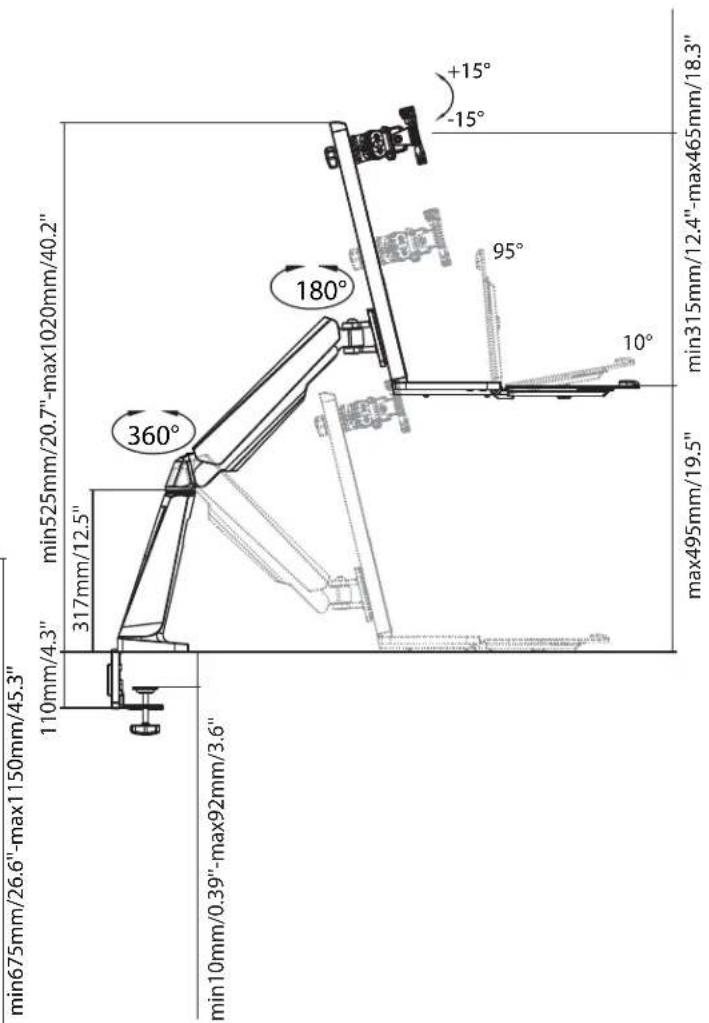
Dimension (mm)



- Package Content
- 1
- Safety Seguridad Sécurité SicurezzaSicherheitVeiligheid
- EN
- Five-Year Factory Warranty
- Terms of warranty
- Non-transferable warranty
- Exclusions
- Contact Information
- Corporate Headquarters
- Technical Support / RMA
- Sales Info
- Corporate, Government and Academic Customers
- Resellers/Business Development/OEM Partners
- Dimension (mm)
Brand : Rocstor
Model : ErgoCenter ED6
Category : Flat Screen Mount