CP-269D - Uncategorized CYP - Free user manual and instructions
Find the device manual for free CP-269D CYP in PDF.


User questions about CP-269D CYP
0 question about this device. Answer the ones you know or ask your own.
Ask a new question about this device
Download the instructions for your Uncategorized in PDF format for free! Find your manual CP-269D - CYP and take your electronic device back in hand. On this page are published all the documents necessary for the use of your device. CP-269D by CYP.
USER MANUAL CP-269D CYP
Using a copper-based DVI cable to extend a DVI display for a long distance will cause signal degradation.
Our CP-269D provides 8 dB input equalization to compensate for long DVI cable loss, it will eliminate digital noise (sparkles) to ensure you to receive perfect HD resolutions up to UXGA or 1080p .
This package includes
- The DVI equalizer box.
- 5V DC power adaptor.
- User manual.
Features
* Provides 8 dB input equalization to compensate for long DVI cable loss.
* Extend cable reach to 40 meters- 20 meters from the source to the equalizer plus 20 meters from the equalizer to the projector, TV/monitor.
* Maintains high DVI single link video resolution up to UXGA/1080p.
* HDCP compliant.
* Plug and play, easy to install.
* Can be powered directly from the cable.
However it is recommended to use external power adaptor for long cable application.
Operation Controls and Functions
Front Panel Rear Panel
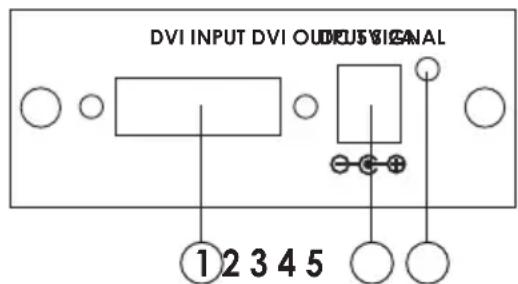
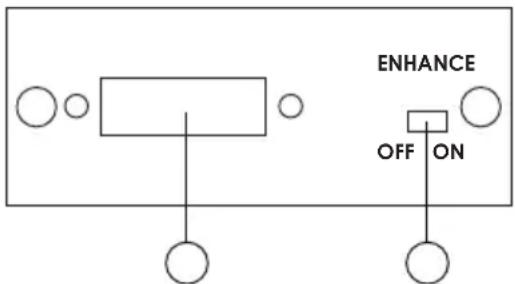
- DVI Input: Connects to the DVI output connector of your source equipment.
- DC power plug.
- Power LED.
- DVI output: Connects to the DVI input connector of your display unit.
- Signal Enhance: After long distance transmission you can press this button to enhance the signal.
DVI-I Pin Configuration
DVI-Integrated(DVI-I): Supports both analog and digital connections to the display. This 29-pin connector can carry single or dual-link all-digital video/data signals on 24 pins and uses 5 pins to carry analog video/data signals and ground.
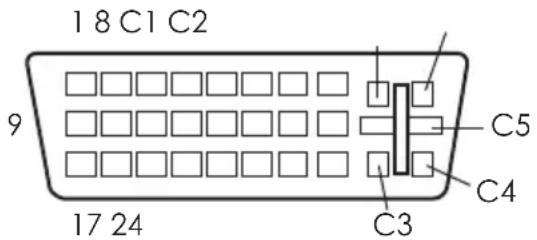
| Combined Analog and Digital Connector Pin Assignments | |||||
| Pin | Signal Assignment Pin | Signal | Assignment | Pin | Signal Assignment |
| 1 | T.M.D.S Data2- | 9 | T.M.D.S Data1- | 17 | T.M.D.S Data0- |
| 2 | T.M.D.S. Data2+ | 10 | T.M.D.S. Data1+ | 18 | T.M.D.S. Data0+ |
| 3 | T.M.D.S. Data2/4 Shield | 11 | T.M.D.S. Data1/3 Shield | 19 | T.M.D.S. Data0/5 Shield |
| 4 | T.M.D.S. Data4- | 12 | T.M.D.S. Data3- | 20 | T.M.D.S. Data5- |
| 5 | T.M.D.S. Data4+ | 13 | T.M.D.S. Data3+ | 21 | T.M.D.S. Data5+ |
| 6 | DDC Clock | 14 | +5V Power | 22 | T.M.D.S. Clock Shield |
| 7 | DDC Data | 15 | Ground (Return for +5V, Hsync, and Vsync) | 23 | T.M.D.S. Clock+ |
| 8 | Analog Vertical Sync | 16 | Hot Plug Detect | 24 | T.M.D.S. Clock- |
| C1 | N.C. | C2 | N.C. | C3 | N.C. |
| C4 | N.C. | C5 | N.C. | ||
Specifications
* Compliant with DVI 1.0
* HDCP is compliant with HDCP 1.1 downward compatible HDCP 1.0
* HDCP pass through.
* Operation frequency: Up to 165 MHz.
* DVI data rate: 1.65Gbps (single link)
* Input/Output resolutions:
PC: VGA, SVGA, XGA, SXGA, UXGA up to 165 MHz.
HD: 480i/576i, 480p/576p, 720p, 1080i, 1080p
* Power: 5V 2A Center-positive
Note: Connect the long DVI cable from the source to the input of CP-269D and place the box next to your display.
Installation
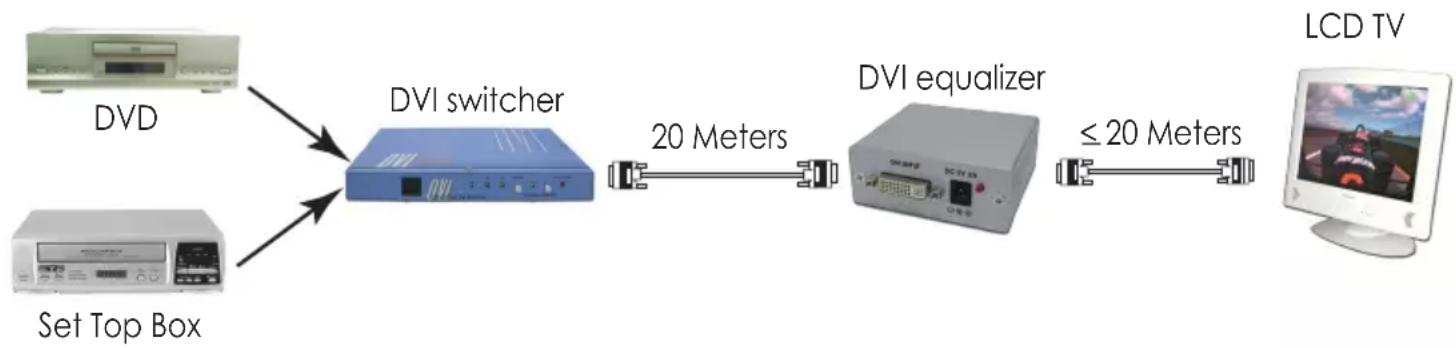
flowchart
graph LR
    A["Set Top Box"] --> B["DVI switcher"]
    C["DVD"] --> B
    B --> D["20 Meters"]
    D --> E["DVI equalizer"]
    E --> F["≤ 20 Meters"]
    F --> G["LCD TV"]