IZ-8003 - Oven Izzy - Free user manual and instructions
Find the device manual for free IZ-8003 Izzy in PDF.


| Product Type | Oven with 2 Hotplates |
| Brand | Izzy |
| Model | IZ-8003 |
| Oven Capacity | 38 Liters |
| Voltage / Frequency | AC 220-240V ~ 50 Hz |
| Oven Power Output | 1500W |
| Large Hotplate Power Output | 1000W |
| Small Hotplate Power Output | 600W |
| Oven Temperature Range | 90°C – 230°C |
| Oven Functions | Upper heating element, Lower heating element, Upper & Lower heating elements |
| Hotplate Temperature Settings | 1 – MAX |
| Control Knobs | Large hotplate, Small hotplate, Oven temperature, Oven function |
| Indicator Lights | Hotplates power indicator, Oven function indicator |
| Accessories Included | Baking tray, Wire rack, Fat collection tray, Tray handle |
| Safety Features | Safety interlocks, automatic power-off when door opened (not specified), overheat protection (not specified), child safety lock (not specified) |
| Minimum Installation Height | 100 cm |
| Required Clearances | At least 10 cm from rear, 5 cm from sides |
| Housing Material | Not specified (likely metal and glass) |
| Cleaning Instructions | Wipe with damp cloth and mild detergent; do not use abrasive cleaners; do not immerse in water |
| Warranty Period | 2 years from date of purchase |
| Spare Parts Policy | Only use original spare parts from authorized service centers |
| Intended Use | Indoor domestic use only |
| Certifications | CE (EMC 2014/30/EU, LVD 2014/35/EU, RoHS 2011/65/EU, ErP 2009/125/EC) |
Frequently Asked Questions - IZ-8003 Izzy
User questions about IZ-8003 Izzy
0 question about this device. Answer the ones you know or ask your own.
Ask a new question about this device
Download the instructions for your Oven in PDF format for free! Find your manual IZ-8003 - Izzy and take your electronic device back in hand. On this page are published all the documents necessary for the use of your device. IZ-8003 by Izzy.
USER MANUAL IZ-8003 Izzy
natural_image
Exterior view of a modern kitchen appliance with two top ovens and a closed oven (no visible text or symbols)Thank you for having chosen an appliance from the IZZY range.
Safety interlocks

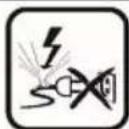
Please read these instructions carefully before using the appliance and save them for future reference. Please keep the sales receipt for guarantee purposes (pls see below “Guarantee and Customer Service”) Any use which does not conform to the instructions will absolve IZZY from any liability.
- Before connecting the appliance, check if the voltage indicated on the appliance, corresponds with the mains voltage in your home.
• Always plug your device into an outlet that is earthed. Failure to comply with this requirement may result in electric shock and possible serious injury.
- Never leave the appliance unattended when in operation.
- Close supervision is necessary when your appliance is being us near children. Ensure that they do not play with the appliance.
- This appliance is not intended for use by people with reduced physical sensory or mental capabilities, children or those with lack of experience and knowledge, unless they have been given supervision or instruction concerning use of the appliance by a person responsible for their safety
- Disconnect the power cord from the supply mains:
- When you do not use the appliance
– Before cleaning and maintenance operations
- Never use the appliance for any other use than indicated.
- The device is intended for indoor use. Do not use the device outdoors.
- Do not store the appliance outdoors.
- The device is intended only for domestic use. Any other use will cancel the warranty.
- Check the power cord periodically for possible damages. If the power cord or the plug of the appliance has been damaged, do not use the appliance and contact an authorized BENRUBI Service Center.
- Make sure that the power cord does not come into contact with the hot parts of the appliance or comes into contact with sharp corners.
- Do not place the appliance near heat sources, on or next gas or electric hobs.
- Always use the appliance on a dry, flat surface, resistant to hig temperatures.
- Do not operate or place the device or parts in places of high humidity or where it may get wet. Do not immerse the appliance in water or any other liquid.
- The appliance should not get in contact with flammable material, as curtains, draperies, walls and the like, when in operation.
- Only use metal pans or heat-resistant glass pans.
- Do not place any of the following materials in the oven: cardboard, plastic, paper, or anything similar.
- Do not store any materials other than manufacturer's recommended accessories in this oven when not in use.
- Always use the appliance on a dry, flat surface, resistant to high temperatures. Particular attention is required on surfaces where the temperature can cause problems. In these cases, it is recommended to use additional heat-resistant surface.
- Any error in connection cancels the warranty.
- Do not place the oven inside or under cabinets. You should not build in the oven.
- Do not let the power cord of the appliance hang over the edge of a table or bench top or where a child could grab it. Do not let the power cord to touch any hot surface.
- Do not use the device and its accessories for other than the appropriate or recommended use by the manufacturer.
- Do not attempt to operate the oven with the door open.
- Do not cover the appliance or place any objects above.
- The oven must have sufficient air flow. Keep at least 10cm space at the back, 5cm from the sides and 100cm from the floor.
- If smoke is observed, switch off or unplug the appliance and keep the door closed in order to stifle the flames.
- Never use highly corrosive or abrasive cleaning agents.
- The oven should be cleaned regularly and any food deposits should be removed.
- Failure to maintain the oven clean could lead to deterioration of the surface that could adversely affect the life of the appliance and possibly result in a hazardous situation.
- Avoid scratching door surface or nicking edges.
Attention: The surface of the oven could is hot during operation. Attention: Do not operate the oven when it is empty.
- This appliance is not intended to be operated by means of an external timer or separate remote control system.
- The door or the outer surface may get hot when the appliance operating.
- Never leave the power cable wrapped during use. Unwind it completely.
- Do not move the appliance when it is in operation.
- Do not touch the appliance with wet or damp hands.
- If the appliance does get wet, immediately remove the power cord from the wall outlet and contact one of the authorized BENRUBI servic centers.
- In case of a possible damage, do not attempt to repair the appliance by yourself. Please contact one of the authorized BENRUBI service centers. Any repair made by an unauthorized BENRUBI Service Center CANCELS THE GUARANTEE.
- Any misuse of the device cancels the warranty.
- Only use original spare parts.
- The appliance conforms to EU directive 2014/30/EU on Electromagnetic Compatibility, the 2014/35/EU Low Voltage Directive, the 2011/65/EU RoHS Directive, the directive 2009/125/ EC for ec design and the EC regulation no. 1935/2004 on materials intended to contact with food.
SAVE THESE INSTRUCTIONS
Parts of the Appliance
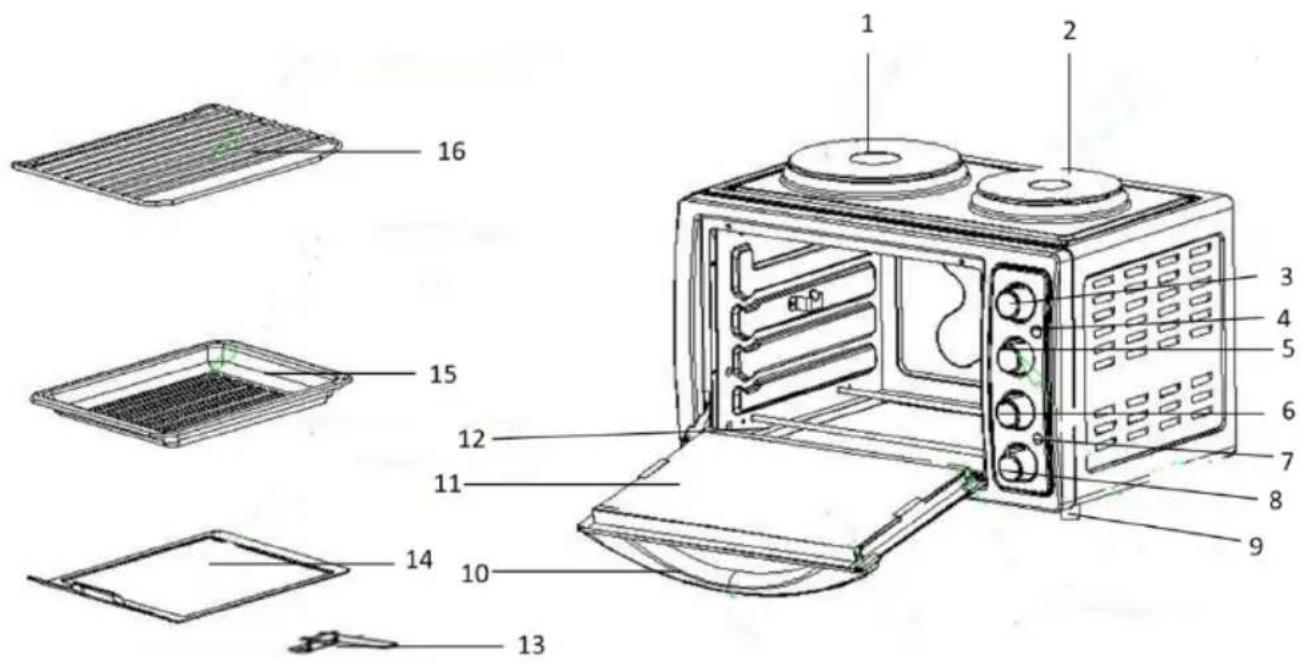
- Large hotplate (1000W)
- Small hotplate (600W)
- Small hotplate temperature adjustment knob
- Hotplates power indicator light
- Large hotplate temperature adjustment knob
- Oven temperature adjustment knob
- Oven function indicator light
- Oven function knob
- Anti-slip feet
- Door handle
- Glass door
- Heating elements
- Tray handle
- Fat collection tray
- Baking tray
- Wire rack
Control panel
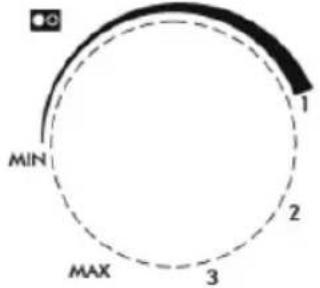 | Small hotplate adjustment knobAdjust the temperature of the large hotplate by turning the knob clockwise to select the desired temperature (1 - MAX) depending on the food of your choice | |
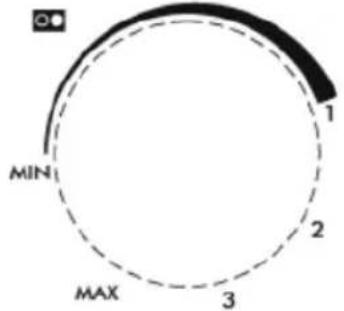 | Large hotplate adjustment knobAdjust the temperature of the small hotplate by turning the knob clockwise to select the desired temperature (1 - MAX) depending on the food of your choice | |
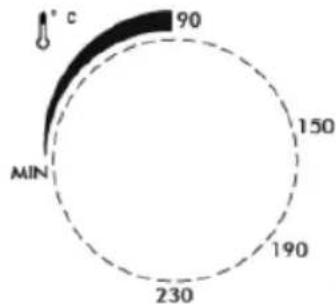 | Oven temperature adjustment knobSet the oven temperature by turning clockwise the knob to select the appropriate temperature according to the food of your choice. The gradation of temperature is from 90°C to 230°C. | |
Oven function knob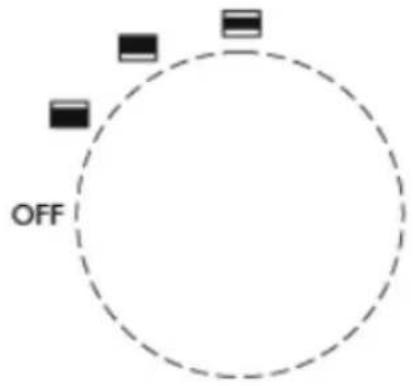 | OFF | Oven is off |
 | Upper heating element | |
 | Lower heating element | |
 | Upper & lower heating elements | |
Installation of Oven
Install this oven only in accordance to the installation instructions provided.
- Make sure that all the packing materials are removed.
- Inspect the oven after unpacking for any visual damage such as misaligned or damaged door, dents or holes in the door window, dents in the cavity. If any of the above are visible, DO NOT INSTALL the oven and contact the dealer immediately.
- Place the device on a stable, flat surface. Minimum installation height: 100 cm.
- The oven must have sufficient airflow. Leave more than 10 cm from the rear, 5 cm gap from the side.
- Do not place the oven in or under cabinets.
- When you choose where you will install the oven, make sure it is away from hot air, steam or where it might get wet, otherwise the oven function may be affected.
- Make sure the oven door is opened freely without being restricted by any objects.
- Do not place any object on the oven. Follow all the necessary ventilation conditions. If the device is not ventilated properly during operation may overheat and eventually fail.
- Do not remove the legs from the bottom of the device.
- Do not cut off the mains plug because the device is not designed for permanent connection to the mains.
Attention: The rear surface of the appliance should be put against the wall.
Before First Use
NOTE: Smoke and odors may occur on the first use.
- Ensure that all 4 switches are set to "MIN" and "OFF".
- Clean the parts with hot water and soap. Rinse and dry thoroughly the components (see section "Care and Cleaning"). Wipe the inside of the oven with a dry cloth.
- Place the accessories in the oven.
- Plug the device into the socket.
- Turn the oven function knob (8) to "upper-lower heating element" indication knob (8).
- Turn clockwise the oven temperature adjustment knob (6) to 23°C. The oven function indication light (7) will turn on.
- Keep the oven on without any food for 15 minutes. This is done to eliminate any packing residue that may have remained.
- Turn both knobs (6 & 8) to "MIN" and "OFF" position.
- Unplug your device from the mains.
How to Use the Oven
- Ensure that all 4 switches are set to "MIN" and "OFF".
- Plug your device into the wall socket.
-
Turn clockwise the oven temperature adjustment knob (6) to the desired temperature (90°C - 230°C). The oven function indication light (7) will turn on.
-
Turn the oven function knob (8) to the desired function (upper heating element, lower heating element, upper-lower heating elements).
- Place the pan with the food at the desired height into the oven.
- When finished cooking, turn both switches (6 & 8) to "MIN" and "OFF" position. The oven function indication light (7) will turn off.
- Remove the pan from the oven.
CAUTION: Always use special oven mitts.
- Unplug the device from the mains.
Notes:
- When the temperature is set at 90^ , the heating element will be gray (this is normal). When the temperature set at 230^ , the heating element will turn red.
- Do not touch the heating element while operating the oven even if it looks grey.
- Do not place food that touches or is too close to the upper heating elements.
How to Use the Hotplates (Large & Small Hotplates)
- Ensure that all 4 switches are set to "MIN" and "OFF".
- Plug the device into the socket.
- Turn clockwise the small/large hotplate function knob(s) (3 or/and 5) to the desired temperature (1-MAX). The hotplate(s) power indicator light (4) will turn on.
- Place the cookware on the hob/s.
- When finished cooking, turn the small/large hotplate function knob(s) (3 or/and 5) to "MIN" position. The hotplate(s) power indicator light (4) will turn off.
- Remove the pot from the hob.
CAUTION: Always use special oven mitts.
- Unplug the device from the mains.
Note:
- The hotplates power indicator light will turn on shortly before the “1” temperature indicator and not from the “MIN”.
• The hotplates can both work together. - The hotplates can be operated with the oven.
Recommended Baking Instructions
| Type of food | Recommended temperature |
| Meat with potatoes | 190°C |
| Fish | 190°C - 230°C |
| Cake | 150°C |
| Steak | 230°C |
| Chicken | 190°C - 230°C |
| Meat with pasta | 190°C - 230°C |
| Cookies | 150°C - 190°C |
Care and Cleaning
Warning: Be sure to unplug the oven and cool it before cleaning.
- Wipe inside the oven with a damp sponge, cloth or nylon scouring pad with mild detergent. All accessories should be washed in hot soapy water. The glass door can be wiped with a damp sponge and wiped dry with a paper or cloth towel. Clean the outside with a damp sponge. Wipe the baking tray, wire rack and tray handle with absorbent paper, a towel or a soft cloth.
- Never immerse the appliance in water or any other liquids for cleaning.
- Store the appliance in a safe clean place.
DO NOT USE ABRASIVE CLEANING AGENTS!
Technical Characteristics
Model: Oven with 2 hotplates IZ-8003
Voltage/Frequency: AC 220 - 240V \~ 50 Hz
Large hotplate output: 1000W
Small hotplate output: 600W
Oven output: 1500W
Oven capacity: 38 liters
Safe Appliance Disposal
At the end of its working life, the product must not be disposed of as urban waste. It must be taken to a special local authority differentiated waste collection centre or to a dealer providing this service. Disposing of a household device separately avoids possible negative consequences for the environment and health deriving from inappropriate disposal and enables the constituent materials to be recovered to obtain significant savings in energy and resources.
As a reminder of the need to dispose of household devices separately, the product is marked with a crossed-out wheeled dustbin.
Guarantee & Customer Service
- BENRUBI Company guarantees its products for any manufacturing defect or defective materials for a period of two (2) years from the date of purchase or delivery by present purchase receipt. If your product malfunctions or you find any defects, please revert to the retail location you have purchased it from or contact an authorized BENRUBI Service Centre. To find the nearest authorized BENRUBI Service Centre, visit our website www.benrubi.gr. It is in the discretion of BENRUBI Company to replace or repair the defective product.
- The warranty does not cover damages resulting from normal wear, breakage, improper installation or maintenance of the product, mishandling, abnormal working conditions, failure to implement the instructions, conversion or repair of the product by an unauthorized technician who does not belong to the BENRUBI Service Centers.
Also, the warranty does not cover the following indicative factors:
• Stains, discoloration or scratches.
- Burns due to exposure to heat or flame.
- Damage from thermal shock (sudden temperature change or change of voltage).
FOR MORE INFORMATION PLEASE CONTACT:
(NEW) H. BENRUBI & FILS SA
27 Aghiou Thoma str, GR15124, Maroussi – Athens,
Tel.: 210 6156400
e-mail: benrubi-sda@benrubi.gr


- Safety interlocks
- Attention: The surface of the oven could is hot during operation. Attention: Do not operate the oven when it is empty.
- SAVE THESE INSTRUCTIONS
- Parts of the Appliance
- Control panel
- Installation of Oven
- Before First Use
- How to Use the Oven
- CAUTION: Always use special oven mitts.
- Notes:
- How to Use the Hotplates (Large & Small Hotplates)
- Note:
- Recommended Baking Instructions
- Care and Cleaning
- Warning: Be sure to unplug the oven and cool it before cleaning.
- DO NOT USE ABRASIVE CLEANING AGENTS!
- Technical Characteristics
- Safe Appliance Disposal
- Guarantee & Customer Service
- FOR MORE INFORMATION PLEASE CONTACT:
- (NEW) H. BENRUBI & FILS SA
Brand : Izzy
Model : IZ-8003
Category : Oven