BP4001 - Microphone Audio-Technica - Free user manual and instructions
Find the device manual for free BP4001 Audio-Technica in PDF.


User questions about BP4001 Audio-Technica
0 question about this device. Answer the ones you know or ask your own.
Ask a new question about this device
Download the instructions for your Microphone in PDF format for free! Find your manual BP4001 - Audio-Technica and take your electronic device back in hand. On this page are published all the documents necessary for the use of your device. BP4001 by Audio-Technica.
USER MANUAL BP4001 Audio-Technica
ATW-901a/G
Guitar System
ATW-901a/H
Headworn Microphone System
ATW-901a/L
Lavalier Microphone System
ATW-902a
Handheld Microphone System
This device complies with part 15 of the FCC Rules. Operation is subject to the condition that this device does not cause harmful interference.
A copy of the declaration of conformity can be found on the internet at www.audio-technica.com.
This device complies with Industry Canada license-exempt RSS standard(s). Operation is subject to the following two conditions: (1) this device may not cause interference, and (2) this device must accept any interference, including interference that may cause undesired operation of the device.
CAUTION! Electrical shock can result from removal of the receiver cover. Refer servicing to qualified service personnel. No user-serviceable parts inside. Do not expose to rain or moisture.
The circuits inside the receiver and transmitter have been precisely adjusted for optimum performance and compliance with federal regulations. Do not attempt to open the receiver or transmitter. To do so will void the warranty, and may cause improper operation.
Notice to individuals with implanted cardiac pacemakers or AICD devices:
Any source of RF (radio frequency) energy may interfere with normal functioning of the implanted device. All wireless microphones have low-power transmitters (less than 0.05 watts output) which are unlikely to cause difficulty, especially if they are at least a few inches away. However, since a "body-pack" mic transmitter typically is placed against the body, we suggest attaching it at the belt, rather than in a shirt pocket where it may be immediately adjacent to the medical device. Note also that any medical-device disruption will cease when the RF transmitting source is turned off. Please contact your physician or medical-device provider if you have any questions, or experience any problems with the use of this or any other RF equipment.
Thank you for choosing an Audio-Technica professional wireless system. You have joined thousands of other satisfied customers who have chosen our products because of their quality, performance and reliability. This wireless microphone system is the successful result of years of design and manufacturing experience.
Audio-Technica's System 9 is a four-channel frequency-agile wireless system designed to provide rock-solid performance along with easy setup and clear, natural sound quality. Featuring stackable, contemporary styling, System 9 is available in handheld, headworn, guitar, lavalier and body-pack configurations. The system offers four compatible user-switchable channels in one of four available VHF frequencies (169.505, 170.245, 171.045, and 171.905 MHz).
Each System 9 professional VHF wireless system includes a receiver and either a body-pack transmitter or a handheld microphone/transmitter. ATW-901a UniPak® body-pack transmitter systems include models pre-packaged with either an AT-GCW guitar cable (/G), a PRO 8HEcW headworn microphone (/H), or a lavalier mic (/L) for particular applications. All A-T Wireless Essentials® microphones and cables, available separately, are pre-terminated for use with any ATW-901 system.
Because System 9 packaging is designed to hold all versions of the system, some compartments in the carton may be intentionally left empty.
The ATW-R900a receiver includes a switching power supply that automatically adapts to changes in mains voltage.
The versatile ATW-T901a UniPak body-pack transmitter has both a high-impedance input for instruments, and a low-impedance input with bias connection for use with dynamic and electret condenser microphones. The ATW-T902a handheld transmitter features a unidirectional dynamic microphone element.
Both the body-pack and handheld transmitters use internal AA batteries and have Power/Mute switches and input Trim (level) adjustments.
Receiver Installation
Location
For best operation the receiver should be at least 3' (1 m) above the ground and at least 3' (1 m) away from a wall or metal surface to minimize reflections. Keep the receiver antennas away from noise sources such as digital equipment, motors, automobiles and neon lights, as well as away from large metal objects. In multi-channel systems, position receivers at least 3' (1 m) apart and keep operating transmitters at least 6' (2 m) from the receivers to help assure maximum RF performance.
Output Connections
There are two audio outputs on the back panel: balanced and unbalanced. Use shielded audio cable for the connection between the receiver and the mixer. If the input of the mixer is a 14 " jack, connect a cable from the 14 " unbalanced audio output on the back of the receiver housing to the mixer. If the input of the mixer is an XLR-type input, connect a cable from the balanced XLR-type audio output on the back panel to the mixer.
Power Connection
Connect the DC plug on the included AC power adapter to the DC power input on the back of the receiver. Secure the cord over the cord hook on the back of the receiver, to keep the plug from being detached by an accidental tug on the cord. Then plug the adapter into a standard 120 Volt 60 Hz AC power outlet.
(Note that the receiver has no power Off/On switch. The receiver will be energized whenever the power adapter is connected and plugged into the AC outlet. Unplug the power supply from the AC outlet when the system is not in use — both for safety, and to conserve energy.)
Antennas
A novel "dipole" antenna system on the receiver improves operation by providing a "ground" element in addition to the usual "signal" element. Position the two antennas at 90° in the form of a "V," or position the left ("signal") antenna vertically and the right ("ground") antenna horizontally, in the shape of an "L" (Fig. A). Use the position that performs better in your operating environment. Be certain to extend both antennas to their full 15" (38 cm) length by holding them at their bases and pulling out on their caps. Both antenna elements may be swiveled to the left and right, but do not attempt to rotate them in a screwing/unscrewing motion. To do so may damage the antenna and/or receiver. For best performance, locate the receiver so its antennas are in direct line-of-sight to the transmitter's likely operating position.
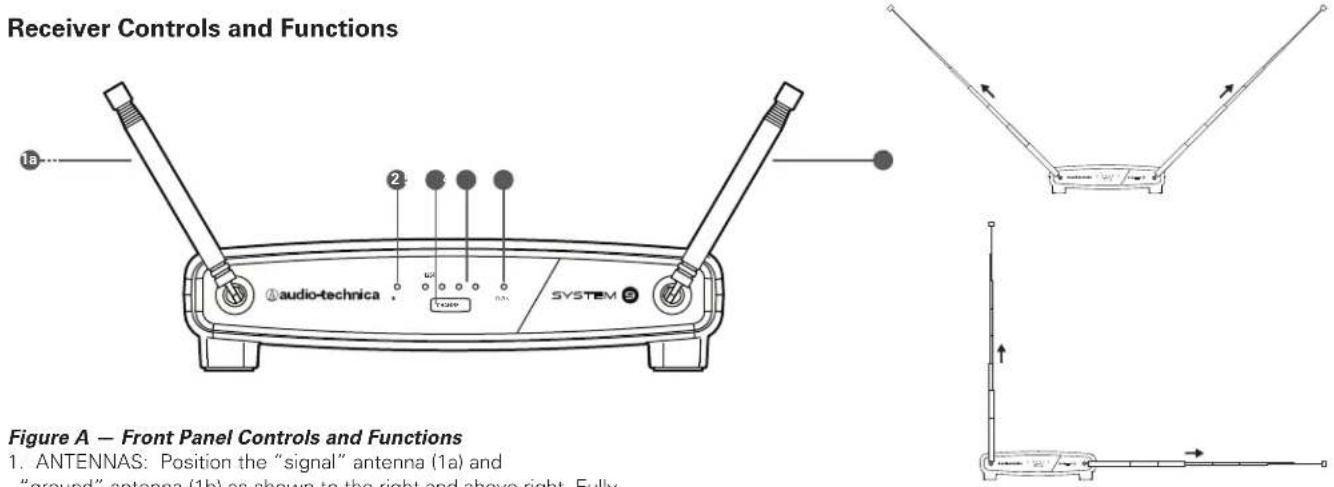
- ANTENNAS: Position the "signal" antenna (1a) and "ground" antenna (1b) as shown to the right and above right. Fully extend both antennas by pulling on the endcaps.
- RF INDICATOR: Lights to show presence of transmitter signal.
- CHANNEL SELECT BUTTON: Soft-touch button selects channel.
- CHANNEL INDICATOR LIGHTS: Lights to show which channel is selected. A channel indicator LED will light when power is applied to the receiver.
- AF PEAK INDICATOR: Only lights when audio distortion is present at maximum modulation. Not affected by position of Volume control.
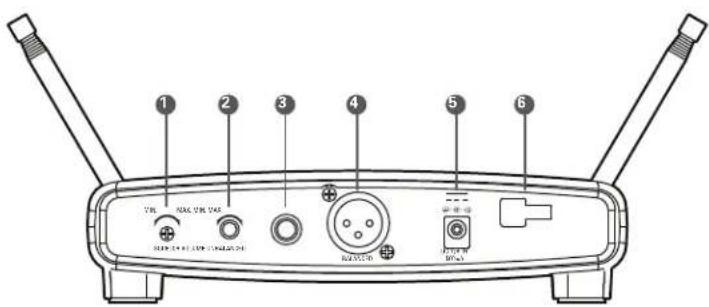
Figure B — Rear Panel Controls and Functions
- SQUELCH CONTROL: Adjusts level of noise-muting circuit (preset at factory but can be adjusted as circumstances warrant).
- VOLUME CONTROL: Adjusts the audio level at the 14 " and XLRM output jacks. Does not affect AF Peak indicator.
- UNBALANCED AUDIO OUTPUT JACK: 1/4" TS (Tip-Sleeve) or "mono" phone jack. Use a shielded cable to connect to an unbalanced aux-level input of a mixer or amplifier.
- BALANCED AUDIO OUTPUT JÄCK: XLRM-type connector. A standard 2-conductor shielded cable can be used to connect the receiver output to a balanced microphone-level input on a mixer or integrated amplifier.
- POWER INPUT JACK: Connect the DC plug from the included AC adapter.
- CORD HOOK: Loop the cord around the cord hook to keep the DC plug from pulling out accidentally.
Transmitter Setup Controls and Functions
Battery Selection and Installation
Two alkaline AA batteries are recommended. When inserting the battery, observe correct polarity as marked inside the battery compartment.
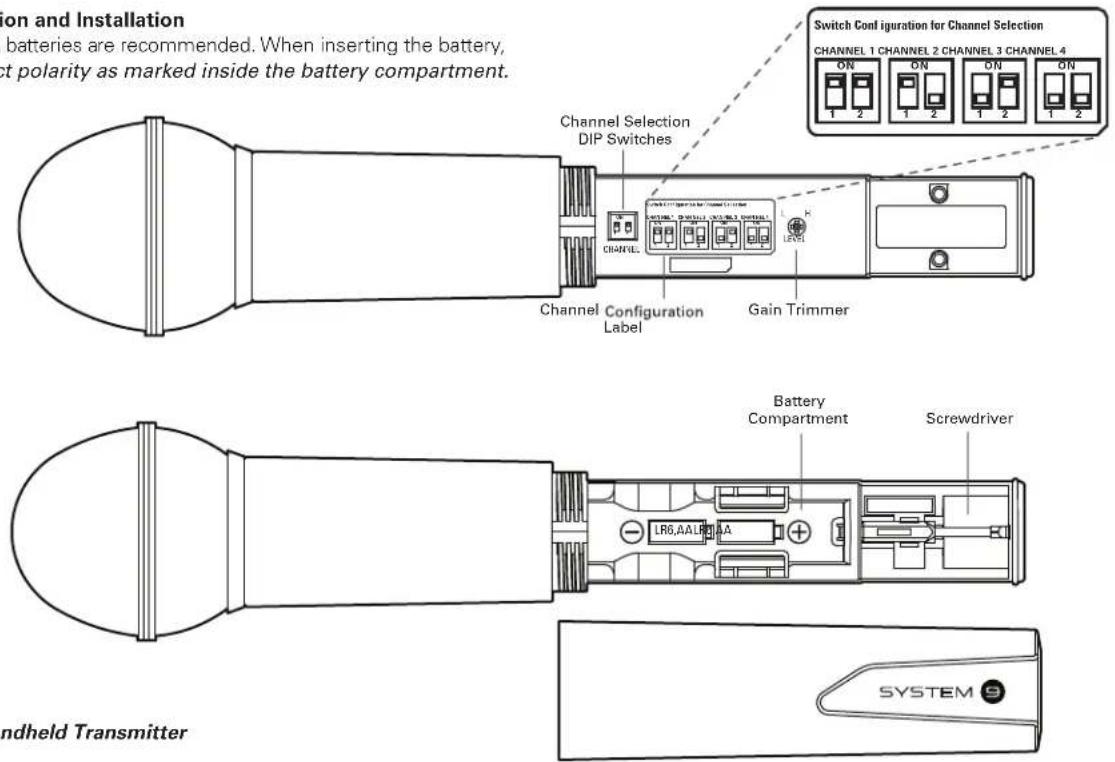
Figure C - Handheld Transmitter
Handheld Transmitter Battery Installation
- While holding the upper part of the transmitter body just below the ball-screen, unscrew the lower body cover and slide it off to expose the battery compartment (Fig. C).
- Carefully insert two fresh AA alkaline batteries, observing polarity markings.
- Screw the body back together. Do not overtighten.
Handheld Transmitter Battery Condition Indicator
After the batteries are installed, press and hold the Power/Mute switch on the bottom of the handheld transmitter until the indicator LED turns green. If the indicator LED does not light up when the Power/Mute switch is pressed, the batteries are installed incorrectly or they are dead. The indicator LED will flash to show low-battery condition.
Handheld Transmitter Channel Selection
Before turning on the transmitter, use DIP Switches 1 and 2, located inside the Handheld Transmitter, to select the desired channel.
- To access the DIP Switches, hold the upper part of the transmitter body just below the ball-screen, and unscrew the lower body cover and slide it off.
- To achieve the desired channel, use the provided screwdriver to change the DIP switch configurations as follows:
Channel 1: Switches 1 and 2 "up"
Channel 2: Switch 1 "up"; Switch 2 "down"
Channel 3: Switch 1 "down"; Switch 2 "up"
Channel 4: Switches 1 and 2 "down"
- Screw the body back together. Do not overtighten.
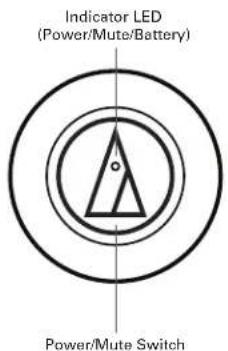
Handheld Transmitter Mute Function
With the transmitter on, a slight touch of the power switch will toggle between muted and unmuted operation. Red indicator LED shows muted operation. Green indicator LED shows unmuted operation.
UniPak ^® Transmitter Battery Installation
- Slide off the battery cover as shown in Figure D.
- Carefully insert two fresh AA alkaline batteries, observing polarity markings.
- Replace the battery cover (Fig. D).
UniPak ^® Transmitter Power/Mute/Battery Indicator
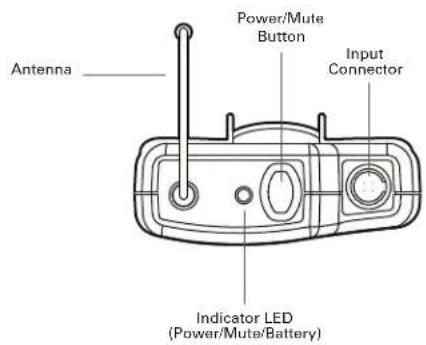
After the battery is installed, press and hold the power button until the indicator LED turns green (Fig. E). If the indicator LED does not light up when the power button is pressed, the batteries are installed incorrectly or they are dead. The indicator LED will flash to show low-battery condition.
UniPak® Transmitter Channel Selection
Before turning on the transmitter, use DIP Switches 1 and 2, located inside the UniPak® Transmitter, to select the desired channel.
- To access the DIP Switches, slide off the battery cover.
-
To achieve the desired channel, use the provided screwdriver to change the DIP switch configurations as follows:
Channel 1: Switches 1 and 2 "up" Channel 2: Switch 1 "up"; Switch 2 "down"
Channel 3: Switch 1 "down"; Switch 2 "up" Channel 4: Switches 1 and 2 "down" -
Replace the battery cover.
UniPak ^® Transmitter Mute Function
With the transmitter on, a slight touch of the Power/Mute button will toggle between muted and unmuted operation. Red indicator LED shows muted operation. Green indicator LED shows unmuted operation.
UniPak ^® Transmitter Input Connection
Connect an audio input device (microphone or guitar cable) to the audio input connector on the top of the transmitter. A number of Audio-Technica professional microphones and cables are available separately, pre-terminated with a UniPak® input connector (see www.audio-technica.com).
UniPak® Transmitter Antenna
The UniPak ^® transmitter includes a permanently-attached flexible antenna. For best results, allow the antenna to hang freely and full length from the transmitter. If the received signal is marginal, experiment with different transmitter positions on your body or instrument; or try repositioning the receiver. Do not attempt to remove, replace or change the length of the transmitting antenna.
Figure D - UniPak® Transmitter
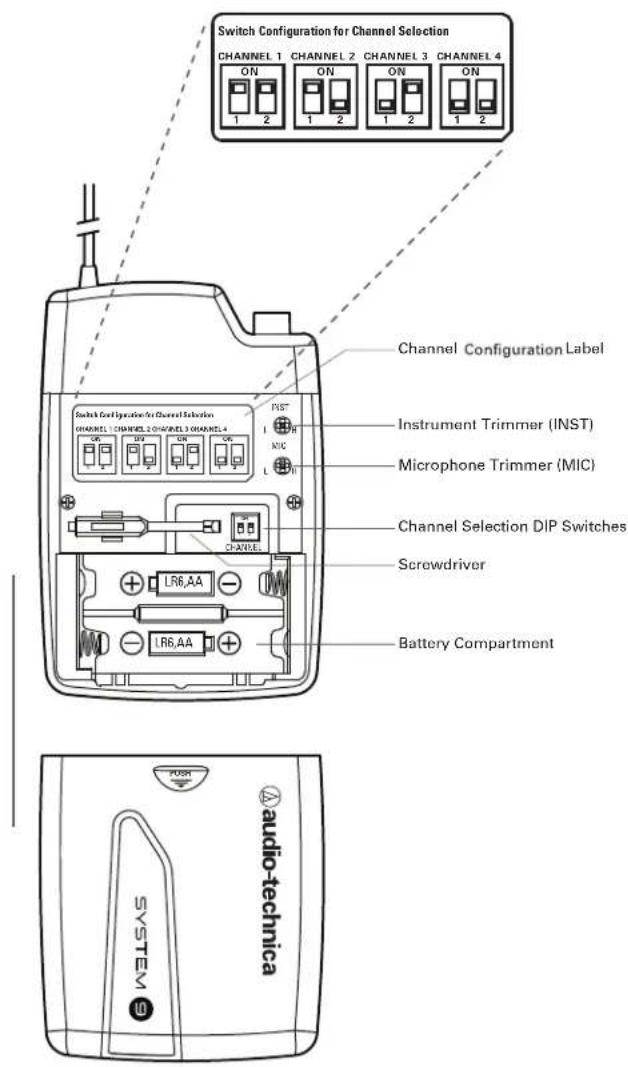
Figure E - UniPak® Transmitter
System Operation
Turn down the receiver volume control and the mixer/amplifier level before starting up the wireless system. Do not switch on the transmitter yet.
Receiver on...
Plug the power supply into an AC power source. The green Power indicator on the front panel will light.
How to Make Operating Channel Changes
Press the receiver's Channel Select Button repeatedly until the desired channel is reached.
Before turning on the transmitter, use the provided screwdriver to set the transmitter channel selector DIP switches (Fig. C on page 4 and Fig. D on page 5) to the same number that is displayed on the receiver. (If transmitter channels are changed while the transmitter is on, the transmitter must be muted to confirm selection.)
Transmitter on...
When the transmitter is switched on, the receiver's amber RF signal indicator will light. The transmitters have a soft-touch power switch. When the switch is set to "Mute" (red indicator LED), the transmitter produces RF with no audio signal. When the switch is "On" (green indicator LED) the transmitter produces both RF and audio. Excessive audio input to the transmitter will cause the receiver's red AF Peak indicator to light.
Receiver Volume
Under typical operating conditions, the receiver's volume control should be turned all the way up, with overall system audio gain adjusted at the mixer or amplifier.
Input Level Adjustment
Input trimmer controls in the transmitters enable you to maximize performance for a particular microphone or guitar sensitivity, or to adjust for different acoustic input levels.
Adjusting Input Level - UniPak Transmitter
Slide the battery cover off the top part of transmitter and remove the screwdriver from its clip (Fig. D). Gently turn both the "MIC" (Mic Trimmer) and "INST" (Instrument Trimmer) controls to their full counterclockwise positions (toward "L").
- Microphone: Adjusting input level
Gently turn only the "MIC" (Mic Trimmer) control all the way up (clockwise, toward "H"). Check for excessive gain by speaking/singing into the microphone at typically loud levels while watching the receiver's AF Peak indicator. If the AF Peak indicator does light, turn the "MIC" control slightly counterclockwise until the AF Peak indicator no longer lights with maximum audio input to the transmitter.
• Guitar/Instrument: Adjusting input level
Gently turn only the "INST" (Instrument Trimmer) control all the way up (clockwise, toward "H"). Check for excessive gain by playing at typically loud levels while watching the receiver's AF Peak indicator. If the AF Peak indicator does light, turn the "INST" control slightly counterclockwise until the AF Peak indicator no longer lights with maximum instrument input to the transmitter. After adjusting input level, return the screwdriver to its clip and reinstall the battery cover. No further transmitter gain adjustments should be needed, as long as the input device and the acoustic input level are not changed.
Adjusting Input Level - Handheld Transmitter
Unscrew the lower body cover and slide it off, exposing the screwdriver and "LEVEL" (Gain Trimmer) control (Fig. C). Remove the screwdriver from its clip. Gently turn the "LEVEL" control to its full clockwise position (toward the side marked "H"), the factory setting. Check for excessive gain by speaking/singing into the microphone at typically-loud levels while watching the receiver's AF Peak indicator. If the AF Peak indicator does light, turn the "LEVEL" control slightly counterclockwise until the AF Peak indicator no longer lights with maximum audio input to the mic/transmitter.
Return the screwdriver to its clip and close and secure the lower body. No further transmitter gain adjustments should be needed, as long as the acoustic input does not change significantly.
CAUTION! The small trimmer controls are delicate; use only the supplied screwdriver. Do not force the trimmers beyond their normal 190° range of rotation.
Return the screwdriver to its storage clip when not in use.
Ten Tips to Obtain the Best Results
- Use only fresh alkaline batteries. Do not use "general purpose" (carbon-zinc) batteries.
- Position the receiver so that it has the fewest possible obstructions between it and the normal location of the transmitter. Line-of-sight is best.
- The transmitter and the receiver should be as close together as conveniently possible, but not less than 6' (2 m).
- Do not place the receiver antennas within 3' (1 m) of another receiver or antenna.
- The receiver antennas should be kept away from any metal.
- A receiver cannot receive signals from two transmitters on the same frequency at the same time.
- In the UniPak transmitter, the "MIC" or "INST" input control not in use should be set to minimum.
- If the receiver output is set too low, the overall signal-to-noise ratio of the system may be reduced. Conversely, if the volume control of the receiver is set too high, it may over-drive the input of the mixer/amplifier, causing distortion. Adjust the output level of the receiver so the highest sound pressure level going into the microphone (or the loudest instrument playing level) causes no input overload in the mixer, and yet permits the mixer level controls to operate in their "normal" range (not set too high or too low). This provides the optimum signal-to-noise for the entire system.
- Turn the transmitter off when not in use. Remove the battery if the transmitter is not to be used for a period of time.
- Unplug the receiver from the AC outlet when the system is not in use.
System Operating Frequencies
System Operating Frequencies
Each transmitter/receiver system operates on a choice of four switch-selected frequencies. Available frequencies are shown below. All frequencies may be combined for up to 4 simultaneous operating channels.
Traveling frequencies normally work anywhere in the USA and Canada. Not all frequencies available in all areas outside the US. Please check with local regulations.
System 9 Operating Frequencies/Channels
| Channel | Frequency – MHz | Frequency Code |
| 1 | 169.505 | T2 |
| 2 | 170.245 | T3 |
| 3 | 171.045 | T5 |
| 4 | 171.905 | T8 |
RF Interference
Please note that wireless frequencies are shared with other radio services. According to Federal Communications Commission regulations, "Wireless microphone operations are unprotected from interference from other licensed operations within the band. If any interference is received by any Government or non-Government operation, the wireless microphone must cease operation..."
If you need assistance with operation or frequency selection, please contact your dealer or the Audio Solutions at Audio-Technica U.S.
Extensive wireless information also is available on the A-T Web site at www.audio-technica.com.
For future reference, please record your system information here. The serial number appears inside the battery compartment in each transmitter, and on the bottom of each receiver.
Receiver
Model ATW-R900a Serial Number
Transmitter
Model ATW-T90 Serial Number 1a or 2a
Specifications
OVERALL SYSTEM
| Operating Frequencies VHF highband, 169 MHz to 172 MHz | |
| Modulation Mode FM | |
| Maximum Deviation ±10 kHz | |
| Dynamic Range ≥90 dB (A-weighted), typical | |
| Total Harmonic Distortion <1.5% (at 1 kHz, ±10 kHz deviation) | |
| Operating Range 200° (60 m) typical | |
| Open range environment with no interfering signals | |
| Operating Temperature Range 40°F (4°C) to 110°F (43°C)Battery performance may be reduced at very low temperatures | |
| Frequency Response 80 Hz to 13 kHz |
RECEIVER
| Receiving System | Non-diversity, single-channel,dual antenna system |
| Image Rejection | 50 dB minimum |
| RF Sensitivity | 20 dBuV at 60 dB S/N ratio(50 ohms termination) |
| Normal Output Level | |
| XLR, balanced: | 350 mV (1 kHz modulation, 10 kHz deviation, 100k ohm load) |
| _4'' (6.3 mm), unbalanced: | 700 mV (1 kHz modulation, 10 kHz deviation, 100k ohm load) |
| Power Supply | 100-240V AC (50/60 Hz) to 12V DC .5A(center positive) switched mode externalpower supply |
| Dimensions | 7.48" (190.0 mm) W x 1.82" (46.2 mm) H x 5.06" (128.5 mm) D |
| Net Weight | 12.0 oz (337 grams) |
| Accessory Included | Power supply |
UNIPAK® TRANSMITTER
| RF Output Power | 10 mW |
| Spurious Emissions | Following federal and national regulations |
| Input Connection | Four-pin Locking ConnectorPin 1: GND, Pin 2: INST INPUT,Pin 3: MIC INPUT, Pin 4: DC BIAS +9V |
| Batteries (not included) | Two 1.5V AA |
| Battery Life | 8 hours (alkaline)Depending on battery type and use pattern |
| Dimensions | 2.76" (70.2 mm) W x 4.08" (103.7 mm) Hx 0.98" (24.9 mm) D |
| Net Weight (without batteries) | 2.8 oz (80.0 grams) |
HANDHELD TRANSMITTER
| RF Output Power | 10 mW |
| Spurious Emissions | Following federal and national regulations |
| Batteries (not included) | Two 1.5V AA |
| Battery Life | 8 hours (alkaline)Depending on battery type and use pattern |
| Dimensions | 9.91" (251.8 mm) long,2.11" (53.5 mm) diameter |
| Net Weight (without batteries) | 9.2 oz (260 grams) |
| Accessory Included | AT8456a Quiet-Flex" stand clamp |
In the interest of standards development, A.T.U.S. offers full details on its test methods to other industry professionals on request.
System 9 Installation and Operation
To reduce the environmental impact of a multi-language printed document, product information is available online at www.audio-technica.com in a selection of languages.
Audio-Technica Corporation (Headquarters)
2-46-1 Nishi-naruse, Machida, Tokyo 194-8666, Japan
Audio-Technica U.S., Inc.
1221 Commerce Drive, Stow, Ohio 44224, USA
www.audio-technica.com
© 2017 Audio-Technica Corporation P52391-01