Theft Aware 2.00 - Antivirus AVAST - Free user manual and instructions
Find the device manual for free Theft Aware 2.00 AVAST in PDF.


User questions about Theft Aware 2.00 AVAST
0 question about this device. Answer the ones you know or ask your own.
Ask a new question about this device
Download the instructions for your Antivirus in PDF format for free! Find your manual Theft Aware 2.00 - AVAST and take your electronic device back in hand. On this page are published all the documents necessary for the use of your device. Theft Aware 2.00 by AVAST.
USER MANUAL Theft Aware 2.00 AVAST
natural_image
Blue shield emblem with white letter 'T' in center, no text or symbols presentTHEFT AWARE 2.00

for Android™
USER GUIDE
hp://www.avast.com
hp://www.theaware.com
Table of Contents
The Aware Execute Summary....5
WHATS NEW IN VERSION 2.00....5
THEFT AWARE BASICS....5
Unveil the Thief's Identy....5
Send SMS Commands to the Phone 6
Stealth Mode....7
Get The Aware 2.00....8
DOWNLOAD AND/OR PURCHASE THEFT AWARE 8
INSTALLATION PROCESS 8
Use The Aware 2.00....9
System Enabled....9
BASIC SETTINGS....10
Owner....10
Access Code 10
Nocaon 1....10
Check for Updates....10
ADVANCED SETTINGS....10
Nocaon 2 ....10
Lock Phone Sengs....10
Allow SMS Commands 11
Phone Lock Behaviour....11
Custom Lock Text....11
Siren When Locked 11
Siren Sound 11
Auto-Enable GPS....11
SMS Map Type 12
Gps Query Timeout....12
SMS on Low Baery....12
Thorough Wipe 12
Lock USB-Debugging 12
Force Data Connecon....12
Back Up Sengs....12
HELP INTERFACE....14
LICENSING THEFT AWARE....14
Website Purchase 14
Android Market Purchase....15
Acvate License 15
Consume Coupon....15
ACCESS CONFIGURATION IN STEALTH MODE....16
ACCEPT ANOTHER SIM CARD....16
THEFT AWARE 2.00 SMS COMMANDS....17
Remote Command Authorizaon....17
Mark the Mobile Phone as Lost 18
Mark the Mobile Phone as Found....18
Lock the Mobile Phone ....18
Unlock the Mobile Phone 18
Turn Siren on Mobile Phone On....18
Turn Siren on Mobile Phone O 19
Update Mobile Phone Informaon (One-Time) 19
Initiate a Call 19
Wipe the Phone 19
SMS Forwarding....20
SMS Carbon Copy....20
Call Carbon Copy 20
Call and SMS Carbon Copy 21
Back Up Important SMS....21
Back Up Contacts 22
Get Recent Log Entries....22
Launch and Shut Down Conguraon Interface....22
Reboot Phone 22
Change The Aware Conguraon....22
Implement Own Remote Commands ....25
USE THEFT AWARE ADVANCED OPTIONS....26
Send Test SMS....26
Simulate The Event....26
Simulate Lock 26
Clear SIM List....26
Appendix A - Supported Phones 27
Appendix B - Languages....27
Appendix C - Technical Support 27
Appendix D – Aliate Program 27
Theft Aware Executive Summary
The Aware provides data protecon and the recovery for smartphones. It enables you to control and nd your device in the event of loss or the.
"A mobile phone gets stolen in the UK every 45 seconds. Thats nearly 800,000 handsets a year." (uknetguide.co.uk)
"If your phone is stolen and a thief changes the SIM card, it usually is gone forever as the phone changes its identity... The Aware enables you to stay in contact with your phone even aer that event." (Reinhard Holzner, Managing Director AVAST)
WHATS NEW IN VERSION 2.00
Please nd the news about The Aware 2.00 at hp://www.theftaware.com/?step=whats_new.
THEFT AWARE BASICS
Unveil the Thief's Identity
To enable communicaon to your phone you will register up to two nocation numbers with The Aware (i.e. friends of yours, or your second phone). Those friends will then receive all The Aware messages for you. Now, if the thief changes the SIM card of the phone, The Aware will invisibly send the phone number of the thief to those recipient numbers. By using the phone number of the thief you can stay in contact with your phone.
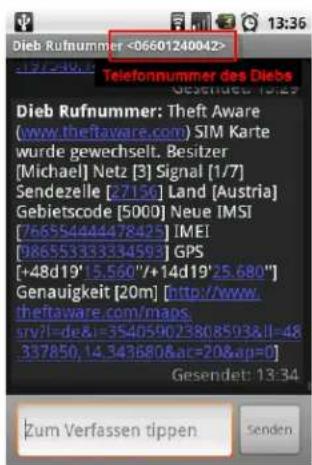
Figure 1: Example of Nocaon SMS
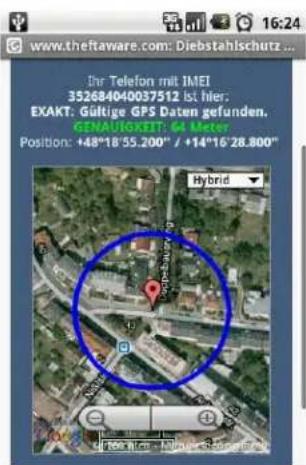
The nocaon SMS contains:
- Phone number of the thief
- Network specic informaon
- GPS coordinates if available
- Link to online map service

Contact the police to get your phone back or remote control the phone to protect your data.
Send SMS Commands to the Phone
Get the current locaon of your phone: If the phone has GPS built in and GPS data is available it will send you its GPS coordinates. The updates also can be congured to be sent connuously.
Lock the phone: The device will not be usable by the thief anymore as the screen will be blocked by The Aware. This opon can also be set to be enabled automatically upon SIM card change.
Acvate a loud siren sound: The phone will start to emit a loud siren sound that can only be turned o again by an authorized user. You are even able to customize the siren sound by specifying own sound les or by recording a customized siren sound.
Wipe the phone and erase all private data stored on it: Remove Contacts, Call-Log, Sms/MMS, Media les, Calendar Entries and Browsing History from your phone. Delete les on the memory card to protect your privacy.
SMS Forwarding (new since build 1710): The Aware is able to forward SMS silently to another phone if you wish to do so.
Call Forwarding (new since Build 1710): The Aware is now able to inform you about incoming calls by text message. Note: We did not implement direct forwarding of the calls as this works dierently in the networks around the world. Also it is not possible to hide the forwarding sengs from the thieves eyes reliably.
Back up all your contacts: Before you wipe the phone you can back up your contacts, they will be transmied via SMS to the other device.
Back up SMS that are important to you: Just tell The Aware which SMS you want to rescue, they will be forwarded to the other device.
Let the phone call you or other phone numbers: Your phone is able to phone independently upon SMS command. The calls will be hidden as good as possible. This enables you to listen to what happens at the other side of the line without anybody recognizing it.
Query Call or SMS protocol data: By sending a simple SMS command you can query call or SMS protocols on the target phone.
Change The Aware sengs: most of the sengs of The Aware can be changed by SMS.
Remote command plugin interface: Implement your own SMS commands.
Stealth Mode
Aer the, thieves usually check the mobile phone for applicaons that could unveil their identity. Thiefs will look for applicaon icons and will check the applicaon manager. If the thief is able to nd suspicious traces it is very likely that the phone will be turned o and will be subject to disposal. This usually results in the phone being lost forever.
All of the an the soluon providers tried to solve this problem. But with their soluons it is either not possible to change the tool's conguraon (e.g. uninstall is not possible) or the tool provides visible traces to a thief – causing all the consequences lined out above.
We managed to create the perfect soluon. The Aware is also the only soluon in the marketplace that will be completely invisible on the phone, in order to give you the best chances to either catch the thief or get your device back.
Get Theft Aware 2.00
DOWNLOAD AND/OR PURCHASE THEFT AWARE
The Aware is available either via our website hp://www.theftaware.com or via Google's Android Market.
INSTALLATION PROCESS
When you downloaded your installer package you can launch the The Aware setup program. This is the The Aware setup program icon:

Figure 3: The Aware Setup Icon
Start the setup program. Now Setup will check for some system prerequisites to use our advanced Stealth Mode technology. Follow the instrucons. The next screen will allow you to set an application name for your The Aware installaon:
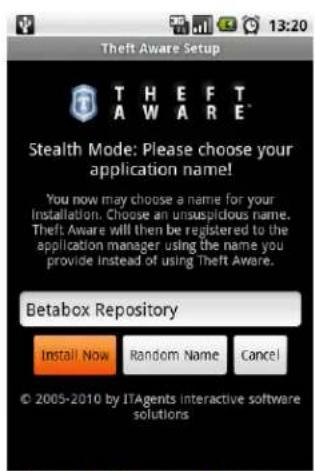
Figure 4: Choose applicaon name
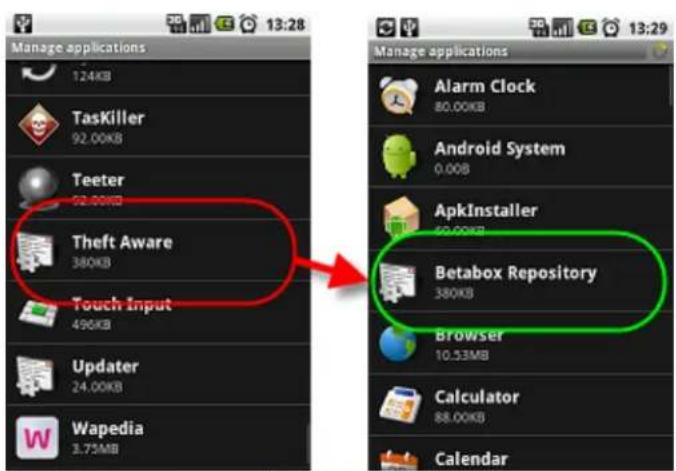
Figure 5: Name is changed
In Android it is not possible to completely hide an installaon entry of an applicaon within the applicaon manager. While other vendors simply ignore this fact and keep their applicaons visible there, we will package a customized The Aware installer package for you which is labeled with the applicaon name that you give here. As a result it is very hard for thieves to find out if The Aware is installed on the phone or not – as the name of the applicaon is completely unsuspecng.
Setup will then help you download and install your customized package. Simply follow the instrucons. Once The Aware is installed successfully you may safely remove the setup program from your phone and proceed with launching The Aware.
LAUNCH THEFT AWARE
Congratulations! At this point in me you got The Aware 2.00 successfully installed on your mobile phone. Now, launch the The Aware program from within the applicaon menu of your phone.

Figure 6: The Aware Icon
Use Theft Aware 2.00
When starng The Aware, the Main Menu Interface will be the rst thing you'll see. In order to setup The Aware for acve use you will have to specify the The Aware sengs.
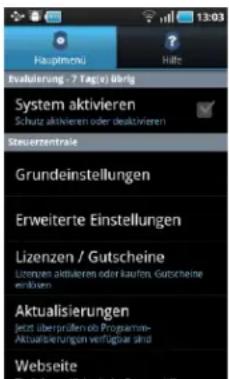
Figure 7: Sengs Interface
System Enabled
By using this opon you can enable or disable the The Aware protecon system. Note that no SMS commands nor any the protecon will work if the system is disabled.
Once the The Aware protecon is enabled, The Aware will be put to Stealth Mode automacally. In Stealth Mode the The Aware icon in the applicaon launcher will be hidden.
If you disable the system The Aware will be switched to Visible Mode again. Then the The Aware icon will be restored in the applicaon launcher.
BASIC SETTINGS
To setup The Aware for acve use you HAVE TO specify the The Aware basic sengs:
Owner
Please enter your name here.
Access Code
Enter your access code here. This access code is used to authorize access to the The Aware conguraon interface. Please do NOT forget your access code. You will not be able to reconfigure The Aware without the access code. The standard access code is 0000. You have to change the access code before you are allowed to acvate the The Aware system.
Notification 1
Please choose one of your contacts with an internaonal phone number here. Any The Aware SMS will be sent to that contact.
Check for Updates
Using this seng you can enable an automac check for soware updates which will be done weekly. If an soware update is found, you will get a nocaaon on your phone. The check will only be performed, if a trusted SIM card is present in the phone.
ADVANCED SETTINGS
The advanced sengs are already opmally precongured and MAY be changed on demand:
Notification 2
You may choose a second contact here. Copies of all The Aware SMS will be sent to that phone contact for safety.
Lock Phone Settings
The Aware oers the possibility to lock access to the phone or program manager sengs. Whenever a thief accesses the sengs those will be shut down again immediately. So it is impossible for a user to uninstall The Aware by using the applicaon manager. This seng increases baery usage of The Aware but also increases the phone protecon significantly.
If you enabled this opon but you want to change sengs by yourself, disable The Aware, change the sengs and then enable The Aware again.
Allow SMS Commands
The Aware enables you to remotely control the phone by using SMS commands. You can disable the feature here. If you set the value to From Nocaon Numbers, SMS commands will only be accepted if they are sent from one of the nocaon numbers given above. The opon From All Numbers lis that restricon.
Phone Lock Behaviour
If this opon is set to SIM Change, SMS Command the phone will be locked automacally upon SIM card change or by SMS command. If the opon is set to Only upon SMS Command, the phone can only be locked by SMS command. The phone can also be unlocked by entering a valid access code in the lock screen.
Custom Lock Text
You may enter a custom text here, that will be shown on the screen if the phone is locked. If you give no text here, a standard text will be shown.
Siren When Locked
If this opon is enabled, every me the phone is locked a loud siren alarm sound will be played. The siren sound will only stop if the phone is unlocked again. There is also a SMS command to start/stop the siren.
Siren Sound
The Aware enables you to customize your siren sound. The opon Select Sound File lets you select a sound le from your phone. Also you can record a new sound sample by using the opon Record Siren Sound. Use the Play Siren Sound opon to listen to the currently acve siren. Use the Reset To Default opon to reset the siren sound to the original one delivered with The Aware.
⇒ On some devices (e.g. the Samsung Galaxy S) the default sound recording utility (Sound Recorder) is not present. Because of this you can not record own siren sounds on those devices.
Auto-Enable GPS
If enabled, The Aware will try to enable GPS on non-rooted phones if GPS is disabled in the system sengs. This only works from Android 1.6 up to Android 2.2 (in Android 2.3 Google removed the interfaces to implement this funconality) and might cause unwanted popup dialogs to occur depending on the device model. If The Aware is installed as system applicaon, GPS will be automacally enabled regardless of this seng.
Aer enabling the seng it is recommended to disable GPS in the system sengs and to test if popups occur (eg. by pressing the menu key and selecng Advanced -> Simulate The Event>). If popups occur it is recommended to keep the seng disabled.
SMS Map Type
The The Aware nocacn SMS contains a link to view the locaon of your phone by using online map services. This opon lets you choose which online map service you want to use (The Aware, Google Maps, Yahoo! Maps, Microsoft Bing Maps). The Aware Maps is new in 2.0 – those maps links will forward you to our servers for advanced mapping funconality (e.g. the link will also work on mobile phones and provide cell ID posion tracking if no GPS data was available).
Gps Query Timeout
Here you can set the meout in minutes aer which GPS locaon requests will be cancelled automacally.
Tracking on SIM Change
This opon was removed in build 1652 as it can happen due to system issues within Android that valid SIM cards are idened as non-trusted SIM cards. This would result in potenally huge amounts of SMS that would be sent without the agreement of the phone owner. We ask for your understanding.
SMS on Low Battery
Set this opon to Always to always receive nocaon SMS once the baery state of the phone is low. Use Upon SIM Card Change to get those SMS only if an unknown SIM is present in the phone. A nocaon means that the phone probably will go oine soon.
Thorough Wipe
If this opon is set, upon wipe the SD-card will be overwritten with random data to prevent restore of the wiped data. This will take up to 10 minutes and therefore will cause the wipe to take a longer me to nish.
Lock USB-Debugging
(only for rooted devices, new since build 1732)
If you set this opon, USB debugging will be locked immediately if a non trusted SIM card is present. The lock also is enabled if the device is marked as LOST. Thieves are then unable to access the phone using special tools.
Force Data Connection
(only for rooted devices, new since build 1795)
If you set this opon, data connecvity will be forced to stay enabled if a non trusted SIM card is present. The feature also is enabled if the device is marked as LOST.
Back Up Settings
(only for rooted devices)
This will store the The Aware sengs to a place that will even survive a hard reset on a phone. This only makes sense if you installed The Aware as a system applicaon to make it hard-reset-proof. If you
have some super-user whitelist program installed, this will cause a popup asking for super-user permission.
⇒ If you installed The Aware as a system applicaon and want to uninstall The Aware, please follow this guide.
HELP INTERFACE
The help system also contains informaon about the system state:
| Property | Descripon |
| System Applicaon | Indicates if The Aware is installed as system program (on “rooted” phones) |
| Net Available | Indicates if a telephone network is available (Yes / No) |
| Network | If a telephone network is available, gives the name of the telephone network |
| Cell ID | If a telephone network is available, gives the phone network cell idener or the network the phone is currently connected to |
| Country | If a telephone network is available, this gives you the name of the country the phone is currently located in |
| Country Code | If a telephone network is available, this gives you a numeric representaon of the country the phone is currently located in |
| Area Code | If a telephone network is available, gives the current area code |
| IMSI | The IMSI (Internaonal Mobile Subscriber Identy) number is the world-wide unique idener of the SIM card inserted to your phone |
| IMEI | The IMEI (Internaonal Mobile Equipment Identy) number (or serial number) is the world-wide unique idener of your mobile phone hardware |
| Tracking | Indicates if locaon tracking data is available |
| Internet Remong | Indicates if Internet Remote Control was congured correctly. For more details on that check hps://internet.theaware.com |
LICENSING THEFT AWARE
If you install The Aware in the rst place you'll install the trial version. This trial version oers full funconality but will disable itself aer a certain me period. To connue using The Aware aer your trial period is over you'll have to purchase a full license.
You can do that by:
- vising our website hp://www.theaware.com and choosing the PURCHASE menu or by
- using the menu Licenses / Coupons in the The Aware main sengs menu. It oers you dierent purchase opons:
Website Purchase
This opon will forward you to our website for license purchase. You will be able to pay for your license by using PayPal or bank transfer.
Once you completed the license purchase, you will connue using the opon Acvate License from the same menu (see below).
Android Market Purchase
Since Build 1715: This opon enables you to purchase your license by using the new Android In-App payment system. There you can buy your license by using the Google Checkout payment method. This opon is only available if your device is running Android 1.6 or higher and is having version 2.3.4 (or higher) of the Android Market applicaon installed.
Aer nishing the purchase by using this method your license will be acvated instantly. No additional license acvaon is necessary anymore.
Activate License
This opon will check our servers for your purchased license and will convert your trial version into the unlimited version of The Aware. You can also use this opon if you had to re-setup your phone and you want to acvate another copy of The Aware using a license purchased before.
Note that this process needs internet access on the phone. If you have NO internet access, please contact support@theaware.com and we'll help you acvang the license without internet access.
Consume Coupon
If you purchased or received a coupon code granng you a free license for The Aware, you'll not have to purchase and acvate the license as described above. Just select this opon and enter your coupon code and your email address. Aer consuming the coupon you're all set and The Aware will be converted to a full version automacally.
ACCESS CONFIGURATION IN STEALTH MODE
In Stealth Mode it is not possible to start The Aware in the usual way because The Aware is invisible. This brings up the next innovaon that The Aware oer: the The Aware conguraon interface can be started by CALLING the ACCESS CODE. If your access code is set to 2222, just make a CALL to 2222. The call will be cancelled immediately without any cost to you and the The Aware conguraon interface will start up immediately.
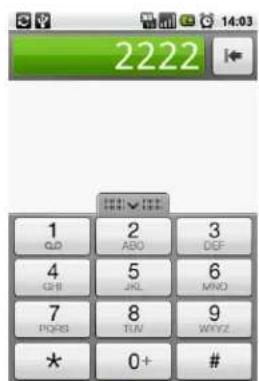
Figure 8: Typing 2222
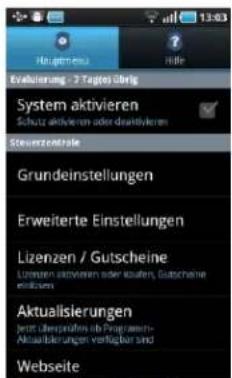
Figure 9: The Aware Opens
The Aware also takes care that no trace of the dialed access code is le in the phone's call logs by removing that call log entries immediately aer the dialing process.
ACCEPT ANOTHER SIM CARD
By default, The Aware sends the nocaoon SMS as soon as your trusted SIM card is removed from the phone and another one is inserted instead. However, from version 2.0 on you can trust more than one SIM card. The currently inserted SIM card will be accepted every me you access your The Aware conguraon interface.
- turn o the The Aware auto-lock feature if it is acvated
- turn o the phone
- remove the old SIM card
- insert the new SIM card
- turn the phone on again
- start the The Aware user interface
At this point in me on The Aware will add the currently inserted SIM card to the trusted SIM card list. You'll be informed by that by a short nocacn.
It is also possible to clear the list of trusted SIM cards from Build 1755 on. Just press the menu key, open the Advanced menu and select Clear SIM List.
THEFT AWARE 2.00 SMS COMMANDS
The Aware can be remotely controlled by using simple SMS commands. For this, the System and Allow SMS Commands properes in the Sengs Interface need to be enabled. Please refer to chapter Sengs Interface for details on that.
If the opon Allow SMS Commands is set to From Nocaon Numbers, SMS commands are only accepted if their sender phone number that matches one of the nocaon numbers congured. All SMS commands sent from other numbers are ignored. Please refer to chapter Sengs Interface for details on that.
An properly authorized remote SMS command will not cause any ring tone, signal, ambient light acvaon or other indicaon of SMS arrival on the target phone. Also the SMS will not be visible in the SMS inbox of the target phone. SMS replies sent back to you by The Aware also will not cause any aenon when being sent and are not stored in the SMS outbox of the target phone.
Remote Command Authorization
All SMS commands must begin with your The Aware access code. For example, if the access code is set to 2222, a lock command should look like this:
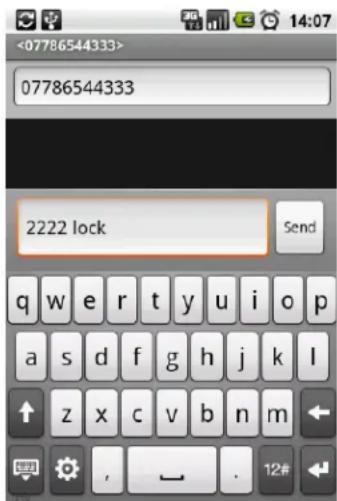
Figure 10: All SMS Start With The Access Code
If the access code does not match, the command is ignored and the SMS will be forwarded to the normal SMS inbox on the phone, triggering all SMS arrival nocaons.
New since build 1654: SMS commands now can be terminated by typing ##. Somemes e.g. web SMS tools append adverse text to sent SMS. This results in The Aware being not able to interpret the received SMS correctly. If you now terminate the command by ##, The Aware will ignore that additional text and your command will then work correctly.
Example: 2222 LOCK ## sms.at some additional text... → The Aware will only process 2222 LOCK
Mark the Mobile Phone as Lost
(New since build 1732)
SMS command: LOST
Sample: 2222 LOST
Marks the mobile phone as LOST. This command initiates the same acons as a SIM card change (depending on the sengs: tracking, lock, siren, disable USB debugging ...).
Mark the Mobile Phone as Found
(New since build 1732)
SMS command: FOUND
Sample: 2222 FOUND
Marks the mobile phone as FOUND. This command disables the phone lock as well as the siren alarm.
Lock the Mobile Phone
This command will lock the mobile phone. It then will not be possible to perform any acons on the phone anymore. Note that this will drag aenon of the thief upon The Aware. The phone can be unlocked by
a) sending the UNLOCK SMS command or
b) entering the valid access code while the lock screen is acve
SMS command: LOCK
Sample: 2222 LOCK
Unlock the Mobile Phone
This command will unlock the mobile phone again.
SMS command: UNLOCK
Sample: 2222 UNLOCK
Turn Siren on Mobile Phone On
This command will acvate the phone siren. Note that this will drag aenon of the thief upon The Aware.
You can stop the siren by sending the SIREN OFF command. The siren can also ALWAYS be stopped by disabling the The Aware system.
Turn Siren on Mobile Phone Off
This command will deacvate the phone siren.
Update Mobile Phone Information (One-Time)
This command will cause The Aware to send a the nocaon SMS to the sender number of the remote command SMS, containing up-to-date data about your mobile phone.
SMS command: UPDATE
Sample: 2222 UPDATE
Update Mobile Phone Information (Continuous)
A special version of the UPDATE command lets you get connuous nocaoon updates.
SMS command: UPDATE
Sample: 2222 UPDATE 60
Descripon: Will send you phone nocao data every
You can stop the updates by sending the UPDATE STOP command. Updates can also ALWAYS be stopped by disabling the The Aware system.
Initiate a Call
This command will cause the mobile phone to initiate a a phone call. By using this command you can listen to what happens on the other side of the line. The call will be hidden as much as possible.
SMS command: CALL [phone number]
Sample: 2222 CALL, 2222 CALL +4355003938833
If [phone number] is not specied, the target phone will call back the sender number of the remote control SMS. If [phone number] is specied, the target phone will call the given phone number.
Wipe the Phone
This command will cause removal of sensitive data on the target phone. Remove Contacts, Call-Log, Sms/MMS, Media les, Calendar Entries and Browsing History from your phone. Delete les on the memory card to protect your privacy. Aenon: the data can NOT be restored!
SMS command: WIPE
Sample: 2222 WIPE
SMS Forwarding
(New since build 1710)
This command will cause the mobile phone to silently forward all incoming SMS messages to another phone. Note: The Aware SMS commands will sll be processed even if SMS forwarding is enabled.
SMS command: FORWARD SMS [phone number]
Sample: 2222 FORWARD SMS, 2222 FORWARD SMS +4355003938833
If no phone number is given, incoming SMS will silently be forwarded to the phone that sent the command. If a phone number is given, incoming SMS will be forwarded to the given phone number. This command overrides all previously issued forward- and CC-sengs.
The forwarding can be cancelled by issuing the FORWARD SMS STOP command or by launching the The Aware user interface.
SMS Carbon Copy
(New since build 1710)
SMS command: CC SMS [phone number]
Sample: 2222 CC SMS, 2222 CC SMS +4355003938833
Same as FORWARD SMS, but will not delete the SMS aer forwarding which means that the forwarded SMS will sill be delivered to the target phone (CC means carbon copy). This command overrides all previously issued forward- and CC-sengs.
The forwarding can be cancelled by issuing the CC SMS STOP or by launching the The Aware user interface.
Call Carbon Copy
(New since build 1710)
SMS command: CC CALLS [phone number]
Sample: 2222 CC CALLS, 2222 CC CALLS +4355003938833
By issuing this command you can request SMS nocaons about incoming calls. The nocaons will be sent to the phone that issued the command if no other phone number is given. This command overrides all previously issued call-forwarding-sengs.
Note: We did not implement direct forwarding of the calls as this works dierently in the networks around the world. Also it is not possible to hide the forwarding sengs from the thieves eyes reliably.
The forwarding can be cancelled by issuing the CC CALLS STOP or by launching the The Aware user interface.
Call and SMS Carbon Copy
(New since build 1710)
SMS command: CC ALL [phone number]
Sample: 2222 CC ALL, 2222 CC ALL +4355003938833
Combines the CC SMS and the CC CALLS command. This command overrides all previously issued SMS- and call-forwarding-sengs.
The forwarding can be cancelled by issuing the CC ALL STOP or by launching the The Aware user interface.
Back Up Important SMS
This command will cause The Aware to forward SMS messages stored on the target phone to you. By using this command you can rescue SMS that are important to you, even when the phone is lost or stolen.
SMS command: GET
Sample: 2222 GET 5 SMS
Descripon: Will forward the newest SMS stored in the Inbox and Sent Folders. The query limit is mandatory. A maximum of
SMS command: GET
Sample: 2222 GET 5 INBOX SMS
Descripon: Will forward the newest SMS stored in the Inbox Folder. The query limit is mandatory. A maximum of
SMS command: GET
Sample: 2222 GET 5 SENT SMS
Descripon: Will forward the newest SMS stored in the Sent Folder. The query limit is mandatory. A maximum of
SMS command: GET
Sample: 2222 GET 5 SMS FOR 436502111555
Descripon: Will forward the newest SMS stored in the Inbox and Sent Folders which are related to the given phone number. The query limit is mandatory. A maximum of
SMS command: GET
Sample: 2222 GET 5 INBOX SMS FOR 436502111555,
Descripon: Will forward the newest SMS stored in the Inbox Folder which are related to the given phone number. The query limit is mandatory. A maximum of
SMS command: GET
Sample: 2222 GET 5 SENT SMS FOR 436502111555
Descripon: Will forward the newest SMS stored in the Sent Folder which are related to the given phone number. The query limit is mandatory. A maximum of
© by AVAST Soware 2011. All rights reserved.
hp://www.avast.com; hp://www.theaware.com
Back Up Contacts
This command will cause The Aware to forward primary phone numbers and email addresses of all phone book contacts stored on the target phone to you. One SMS will be sent per contact.
SMS command: GET CONTACTS
Samples: 2222 GET CONTACTS, 2222 get contacts
Descripon: Will forward all contacts stored on the phone to you
Get Recent Log Entries
This command will allow you to query the call and SMS events that happened on your phone.
SMS command: GET LOG
Sample: 2222 GET LOG 10
Descripon: Will forward the last
Each call or SMS event will be forwarded as one SMS. Call events will be forwarded containing the related phone number and the call duraon in seconds. SMS events will be forwarded containing the related phone number and a short version of the message text.
Launch and Shut Down Configuration Interface
SMS command: LAUNCH or SHUTDOWN
Sample: 2222 LAUNCH
Descripon: Will launch or shut down the The Aware conguraon interface via SMS.
Reboot Phone
(only for rooted devices, new since build 1732)
SMS command: REBOOT
Sample: 2222 REBOOT
Descripon: Reboots the phone.
Change Theft Aware Configuration
This group of commands lets you change the The Aware conguraon parameters.
SMS command: SET OWNER
Sample: 2222 SET OWNER Charles Chaplin
Descripon: Will set the owner entry of The Aware to
SMS command: SET CODE
Sample: 2222 SET CODE 3333
Descripon: Will set the access code of The Aware to
© by AVAST Soware 2011. All rights reserved.
hp://www.avast.com; hp://www.theaware.com
SMS command: SET NOTIFICATION 1
Sample: 2222 SET NOTIFICATION 1 +43660122220192
Descripon: Will set the rst nocaon number of The Aware to
SMS command: SET NOTIFICATION 2
Sample: 2222 SET NOTIFICATION 2 +43660122220192
Descripon: Will set the second nocaon number of The Aware to
SMS command: SET APPLOCK
Sample: 2222 SET APPLOCK 1
Descripon: This will congregate if The Aware locks access to certain phone sengs. If you give an
SMS command: SET LOCK
Sample: 2222 SET LOCK 1
Descripon: Will set The Aware's autolock mode. If
SMS command: SET TEXT
Sample: SET TEXT Please call me back at +4313283483
Descripon: Will set the The Aware custom lock text.
SMS command: SET SMS
Sample: 2222 SET SMS 1
Cauon: By using this command you could disable SMS remote control completely and this will render the The Aware SMS remote control feature useless.
Descripon: Will set The Aware's SMS conguraon. If
Descripon: Will set The Aware's siren mode. If
SMS command: SET AUTOGPS
Sample: 2222 SET AUTOGPS 1
Descripon: If Auto-GPS is enabled, The Aware will try to enable GPS on non-rooted phones if GPS is disabled in the system sengs. This only works from Android 1.6 on and might cause unwanted popup
dialogs to occur depending on the device model. If you give a
SMS command: SET MAPTYPE
Sample: 2222 SET MAPTYPE 2
Descripon: Will set The Aware's map type seng. If
SMS command: SET BATTERY
Sample: 2222 SET BATTERY 1
Descripon: Will set The Aware's baery mode seng. If
SMS command: SET WIPEMODE
Sample: 2222 SET WIPEMODE 1
Descripon: Will set the thorough wipe mode to the desired value (0 for o, 1 for on).
SMS command: SET GPS TIMEOUT
Sample: 2222 SET GPS TIMEOUT 5
Descripon: Will set The Aware's GPS meout seng. If
SMS command: SET DEBUGLOCK
New since build 1732, only for rooted devices. Descripon: This command sets the USB-debugging lock upon SIM change or device loss. If you set the
SMS command: SET FORCEDATA < mode>
New since build 1795, only for rooted devices. Descripon: This command sets the force data connecn seng. If you set the
SMS command: SET TRACKING
Sample: 2222 SET TRACKING 1
Descripon: This opon was removed in build 1652 as it can happen due to system issues within Android that valid SIM cards are idened as non-trusted SIM cards. This would result in potenally huge amounts of SMS that would be sent without the agreement of the phone owner. We ask for your understanding.
SMS command: SET SYSTEM
Sample: 2222 SET SYSTEM 0
Cauon: By using this command you will completely disable the The Aware system thus rendering the The Aware protecon useless.
Descripon: Will set The Aware's system enabled seng. Set
Implement Own Remote Commands
The Aware is able to launch any programs on the phone and pass data to the launched program. Note, this command interface is valid from build 526 on (nd the build number on the About-tab).
SMS command:
Samples:
2222 at.domain.package.Acvity Test → this will start the acvity OR service at.domain.package.Acvity and pass Test as an parameter to it.
2222 at.domain.package.Acty This is my command line → this will start the acvity OR service at.domain.package.Acty and pass This is my command line as an parameter to it.
The acvity or service needs to be posioned on TOP of the package (sub-packages are NOT supported).
Data transfer is done via Intent:
Intent i = new Intent();
i.setFlags(Intent.FLAG_ACTIVITY_NEW_TASK);
i.putExtra("number", origNumber);
i.putExtra("cmd", data);
i.setComponent(cName);
This means you can then read (in your service or acvity) the sender number in the String extra "number" and the command from the String extra "cmd".
The Aware always tries to start an Acvity rst, if none is found it tries to start a Service, if this fails it will reply with an error SMS. Have fun publishing apps based on this. Tell us and we will promote it for you! Suggesons for enhancing the interface send to support@theaware.com.
USE THEFT AWARE ADVANCED OPTIONS
The The Aware advanced opons oer some special opons to do some diagnosc tests.
You can access the The Aware advanced opons in the menu Advanced.
Send Test SMS
This will test if the SMS sending facility on the phone is working correctly. It will send invisible test SMS to all given nocaaon numbers.
Simulate Theft Event
This will simulate a the event. This means that if everything works correctly, The Aware will send the nocaons to all given nocaon numbers. This can take some me as during that operaon The Aware will also query GPS locaon data.
Simulate Lock
This will simulate the LOCK SMS command. Note: On success this will lock the phone for 10 seconds.
Clear SIM List
(new since build 1755)
This opon will clear the list of trusted SIM cards. The SIM card currently present in the phone will be kept as the only trusted SIM card aer selecng this opon.
Appendix A - Supported Phones
The Android version of The Aware currently supports all Android devices running on Android version 1.5 or greater.
The Aware is also available for Nokia Symbian phones. Please visit hp://www.theaware.com for further details on this.
Appendix B - Languages
The Symbian version of The Aware is available in the following languages:
- English
- German
Appendix C - Technical Support
You can reach our technical support by sending an email to support@theaware.com. We handle customer emails between 09:00 - 18:00 CET (GMT +1). We will try to take care of your problem and respond to you within one business day.
Appendix D - Affiliate Program
Do you want to earn money by becoming an aliate of AVAST Soware? Then please visit hp://partners.theaware.com and register yourself.