Diamond - Smartwatch Galesto - Free user manual and instructions
Find the device manual for free Diamond Galesto in PDF.


User questions about Diamond Galesto
0 question about this device. Answer the ones you know or ask your own.
Ask a new question about this device
Download the instructions for your Smartwatch in PDF format for free! Find your manual Diamond - Galesto and take your electronic device back in hand. On this page are published all the documents necessary for the use of your device. Diamond by Galesto.
USER MANUAL Diamond Galesto
SPORTS SMARTWATCH USER MANUAL
natural_image
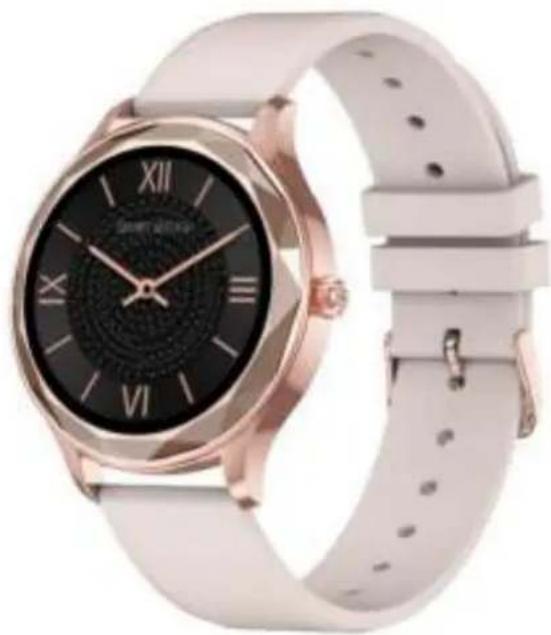
Modern wristwatch with pink and white design, featuring a black dial and Roman numerals (no visible text or symbols on the watch face)Thank you for choosing our company's smartwatch. You can fully understand the use and operation of the device by reading this manual. Our company reserves the right to revise this manual at any time without prior notice.
Smartwatch client download
Scan the QR code below to download and install the watch client

text_image
QR code image containing encoded data, no visible human-readable textScan the code to download the mobile client
Charging and activation required for first use
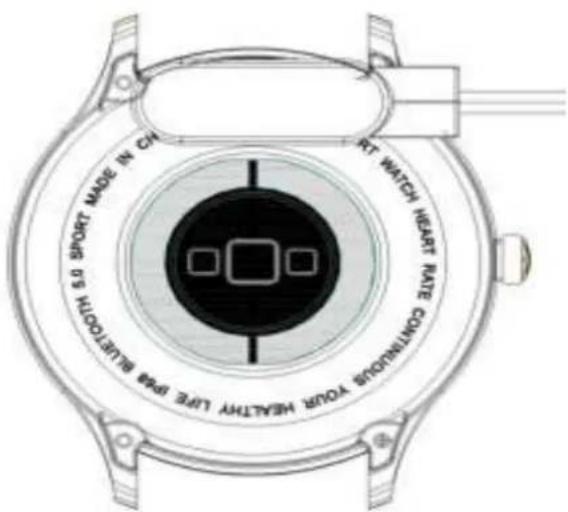
Use the equipped magnetic charger to attach to the metal shock on the back of the watch, just use the USB charging head on the other end of the charger or the computer USB port.
text_image
SPORT MADE IN CH RT WATCH HEART RATE CONTINUOUS POWER MEATRY LIME DPG BLETIONThe product includes: a packing box, a manual, a host and a charger.
1. Smartwatch connecting
Open the APP>click to bind the bracelet>search for the bracelet>click to pair;
Slide down from top to bottom on the watch interface, the Bluetooth name and MAC address will be displayed. You can find the corresponding Bluetooth name and MAC address when searching through the APP to bind the watch
After the phone and the watch are successfully bound, each time the APP is opened, the watch and the phone will automatically connect, and the data can be synchronized by pulling down on the APP page
2. Smartwatch shortcut function
Swipe left and right on the watch interface to enter the step count/sleep/multi-sports data shortcut function.
2-1 Steps (the watch can record and display the number of steps you walk every day, calories consumed and mileage information)
2-2 Sleep (the watch can record and display the total length of sleep and the length of deep sleep and light sleep last night)
2-3 Exercise (the watch can record and display the data of the last exercise)
3.Multi-sport mode
3-1 Steps (recordable steps/heart rate/calorie consumption/mileage)

3-2 Running (recordable steps/heart rate/calorie consumption/mileage)

3-3 Riding (heart rate/calorie consumption)

3-4 Rope skipping (heart rate/calorie consumption)

3-5 Badminton (recordable steps/heart rate/calorie consumption)

3-6 Basketball (can record steps/heart rate/calorie consumption/mileage)

3-7 Football (recordable steps/heart rate/calorie consumption/mileage)
At the end of the above exercise, you can swipe from left to right or from right to left to tap
the icon and to keep records (Exercise less than five minutes/less than 200 steps will prompt that this exercise does not meet the standard and will not be saved) For more records, please check the APP
4·Health data
4-1 Heart rate: enter the heart rate interface, click to start measurement, you can measure a single data;
4-2 Blood pressure: enter the blood pressure interface, click to start measurement, you can measure a single data;
4-3Blood oxygen: enter the blood oxygen interface, click to start measurement, you can measure a single data:
5.News push
The watch can receive push messages displayed on the mobile phone, and can open the push message in the APP (phone/message/Facebook/Twitter/WhatsAPP/WeChat/Line, etc.). The watch can save 3 messages, swipe left and right to view, the latest one covers the last A message.
6.Weather information
The weather interface will display the current weather and tomorrow's weather conditions.
7. Remote photo
After connecting to the APP, open the "Remote Camera" interface of the APP, the watch interface will display Tap the screen to control the phone to take pictures
8.Remote music
Connect to the APP, turn on the music on the phone, and click icon, Enter the music control interface, the watch can control the phone's (previous/next/pause/start) music.
9.Breathe
Click enter the breathing interface and follow the icon to display the information to breathe deeply (exit after 15 cycles).
10. Dial selection
Dial interface long press to enter the dial selection interface, slide left and right to select the dial
3-1 Dial 1 is the default dial;
3-2 Dial 2 is the pushed default dial, you can open the APP to enter the dial selection interface · find more dials to choose the dial you want;
3-2 Dial 3 is a custom default dial, you can open the APP to enter the dial selection interface · dial 3. Select the picture · switch the picture you want as the dial;
11. Stopwatch

Short press to enter the stopwatch, you can pause and start, single recording, and swipe from left to right to exit.
12. Setting

Mute: Click the icon to turn on or off the watch vibrating sound;

Dimming: Short press to adjust the brightness (6 levels in total, the default is the third level)

About: can check the Bluetooth name/version number/Bluetooth address/battery/whether
connected with Bluetooth(the connection will have an icon display);

Factory reset: short press to restore factory settings

Shutdown: Shutdown shortcut function, short press to shut down.
13. Reminder mode
Smart alarm clock: After connecting to the APP, click the daily alarm clock in the APP to debug, the watch will display the alarm clock icon and vibrate;
Sedentary reminder: After connecting to the APP, set the reminder time in the other settings of the APP and the sedentary reminder (remind once an hour).
●Frequently asked questions and answers
*Please avoid exposing the device to extreme temperatures that are too cold or too hot for a long time, which may cause permanent damage.
*Why can't I take a hot bath with my watch?
The temperature of the bathwater is relatively high, it will produce a lot of water vapor. The water vapor is in the gas phase, and its molecular radius is small, and it is easy to seep in from the gap of the smartwatch case. When the temperature drops, it re-forms into liquid water droplets, which is easy to cause The internal circuit of the smartwatch is short-circuited, which damages the circuit board of the smartwatch and damages the smartwatch.
*No power on, no charging
If you receive the smartwatch that does not turn on, it may be that a collision occurred during the transportation of the smartwatch and the battery Seiko board was protected, so plug in the charger to activate it.
If the battery is too low, or the smartwatch does not turn on after a long time without using the smartwatch, please plug in the charger and charge for more than half an hour to activate.
Warranty description:
- When this product is in normal use, if there are product quality problems caused by manufacturing, materials, design, etc.,
Starting from the date of purchase, the motherboard is guaranteed for free within one year, and the battery and charger are guaranteed for half a year.
- No free warranty is provided for failures caused by the user's personal reasons, as follows:
1). Failure caused by unauthorized disassembly or modification of the watch.
2). Failure caused by accidental falls during use.
3). All person-made, faults and misuses of a third party (such as water in the host, external force cracks, scratches, damage to peripheral components, etc.) are not covered by the warranty.
-
When requesting a free warranty, please provide a warranty card with the date of purchase and the stamp of the place of purchase.
-
When the user repairs the product, please take the product to our company or our company's dealership.
-
All functions of the product are based on physical objects.
Purchase date:
IMEI code:
Purchase store
Customer signature: Sales clerk signature : Store stamp: