KSIN012-H115 - Air-conditioner Klimaire - Free user manual and instructions
Find the device manual for free KSIN012-H115 Klimaire in PDF.


User questions about KSIN012-H115 Klimaire
0 question about this device. Answer the ones you know or ask your own.
Ask a new question about this device
Download the instructions for your Air-conditioner in PDF format for free! Find your manual KSIN012-H115 - Klimaire and take your electronic device back in hand. On this page are published all the documents necessary for the use of your device. KSIN012-H115 by Klimaire.
USER MANUAL KSIN012-H115 Klimaire
Before using your air conditioner, please read this manual carefully and keep it for future reference.
INVERTER SPLIT TYPE- ROOM AIR CONDITIONER
USER'S MANUAL
Klimaire®
KSIN Series
Read This Manual
Keep this manual where the operator can easily find them. Inside you will find many helpful him on how to use and maintain your air condition properly. Just a little preventative care on your part can save you a great deal of time and over the life of your air conditioner. You'll find answers to common problems in the chart of troubleshooting tips. If you review the chart of Troubleshooting Tips first, you may not need to call for service.
CONTENTS
SOCIABLE REMARK
Sociable remark....2
SAFETY PRECAUTIONS
Warning 3
Caution 4
OPERATING INSTRUCTIONS
Parts names ....5
Special functions 6
Operating temperature....7
Manual operation 7
Airflow direction control 8
How the air conditioner works 9
CARE AND MAINTENANCE
Care and maintenance ....10
OPERATION TIPS
Operation tips .... 12
TROUBLESHOOTING TIPS
Troubleshooting tips 14

C AUITION
- Contact the authorized installer for installation of this unit.
- Contact an authorized service technician for repair or maintenance of this unit.
- This appliance is not intended for use by persons(including children) with reduced physical, sensory or mental capabilities, or lack of experience and knowledge, unless they have been given supervision or instruction concerning use of the appliance by persons responsible for their safety.
- Young children should be supervised to ensure that they do not play with the air conditioner.
- If the power cord is to be replaced, replacement work shall be performed by authorized personnel only.
- Installation work must be performed in accordance with the national wiring standards by authorized personnel only.
When using this air conditioner in the European countries, please read the following information:
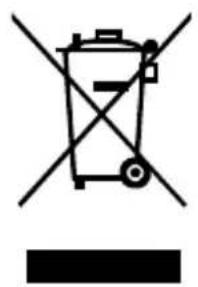
DISPOSAL: Do not dispose of this product as unsorted municipal waste. Collection of such waste separately for special treatment is necessary.
It is prohibited to dispose of this appliance in domestic household waste.
For disposal, there are several possibilities:
A) The municipality has established collection systems, where electronic waste can be disposed of at least free of charge to the user.
B) When buying a new product, the retailer will take back the old product at less free of charge.
C) The manufacture will take back the old appliance for disposal at least free of charge to the user.
D) As old products contain valuable resources, they can be sold to scrap metal dealers.
Wild disposal of waste in forests and landscapes endangers your health when hazardous substances leak into the ground-water and find their way into the food chain.
natural_image
Pure electrical circuit lines without any symbolsTo prevent injury to the user or other people and property damage, the following must be followed. Incorrect operation due to ignoring of instructions may cause harm. The seriousness is classified by the following indications.
 WARNING WARNING | This symbol indicates the possibility of death or serious |
 CAUTION CAUTION | This symbol indicates the possibility of injury or damage |
■ Meanings of symbols used in this manual are as shown below.
| Never do this. | |
| Always do this. |

WARNING
Connect with the pow properly.
- Otherwise, it may cause el shock or fire due excess heat generation.
Do not operate or stop unit by switching on the power.
• electritt may cause electric shock due to heat generation.
Do not damage or u r offspecified power core
- Orlt firmay cause electric shock or fire.
Do not modify power length or share the o with other appliances
- It may cause electric sl or fire due to heat ge
Do not operate with tlet hands or in damp environment.
lockt may cause electric s iteration.
Do not direct airflow room occupants only.
This could damage your health.
Always ensure effective grounding.
- No grounding may cause electric shock.
Do not allow water to into electric parts.
e- It may cause failure of machine or electric shock
Always install circuit breaker and a dedicated power circuit.
- No installation may cause k. fire and electric shock.
①Disconnect the power strange sounds, smell, smoke comes from it.
- It may cause fire and electric shock.
Do not drink water dr or from air conditioner.
- It contains contaminants could make you sick.
in do not open the uni during operation.
and may cause electric shock.
Use the correctly rate breaker or fuse.
- There is risk of fire or electric shock.
Do not use the power close to heating applian
● It may cause fire and electric shock.
do not disassemble es.modify unit.
- It may cause failure and electric shock.
① Ventilate room before operating a conditioner if there is a gas leaf from another appliance.
- It may cause explosion, fire and
Do not use the power cord near ageflammable gas or combustibles, as gasoline, benzene, thinner, etc.
burns.It may cause explosion or fire.
CAUTION
When the air filter is to remove, do not touch metal parts of the unit.
• It may cause an injury.
Do not put objects like rods into the panel of and suction side.
- The high-speed fan inside may cause danger.
in Ventilate the room when used together with a stove, etc.
- An oxygen shortage may occur.
When the unit is to be cleaned, switch off, and off the circuit breaker.
- Do not clean unit when power is on as it may ca fire, electric shock or injury.
Do not put a pet or h rn plant where it will be exposed to direct air flo
- This could injure the pet causant.
Do not use for special purposes.
Do not use this air conditioner to preserve precision devices, food, pets, plants, and art objects. It may cause deterioration of quality, etc.
Stop operation and close the window in storm or hurricane.
- Operation with windows opened may cause wetting of indoor and soaking of household furniture.
Do not place obstacles around air-inlets or inside of air-outlet.
- It may cause failure of appliance or accident.
①Turn off the main switch when not sin the unit for a long
- It may cause failure of product or fire.
Do not use strong deter such as wax or thinner. a soft cloth for cleaning
- Appearance may be deteriorated due to change of product color or scratching of its surface.
to Ensure that the installation brad sethe outdoor appliance is not d due to prolonged exposure.
- If bracket is damaged, thereOperation without filters is concern of damage due to may cause failure. falling of unit.
Always insert the fi age securely. Clean filter once every two weeks
Do not place heavy object power cord and take care the cord is not compressed
- There is danger of fire or electric shock.
Chese caution when unpac thand installing. Sharp edg could cause injury.
golf water enters the unit, turn the unit and disconnect the power , contact a qualified service technician.
Do not clean the air conditioner with water.
● Water may enter the unit and degrade the insulation. It may cause an electric shock.
text_image
Air i (nade) Air inlet(rear) Air outlet 8 ① ② ③ ④ ⑤ ⑥ ⑦
text_image
Signal receive iver (A)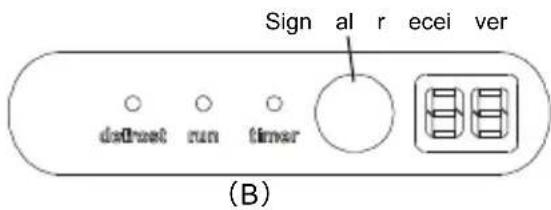
text_image
Sign al r ecei ver do direct run timer (B)Model Name And Dimensions
| MODEL | WIDTH (mm) | HEIGHT(mm) | DEPTH(mm) |
| 9000 Btu | 680 | 255 | 180 |
| 12000 Btu | 770 | 255 | 188 |
| 18000 Btu | 905 | 275 | 198 |
| 24000 Btu | 1030 | 315 | 220 |
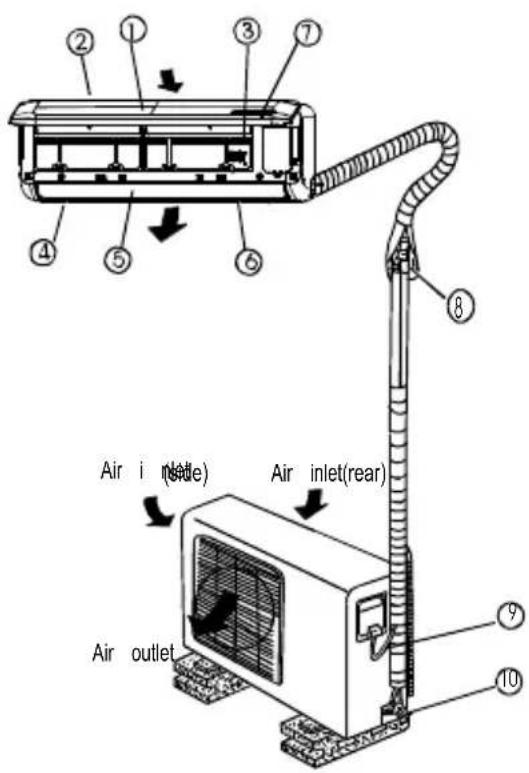
Indoor unit
- Front panel
- Air inlet
- Air filter
- Air outlet
- Horizontal air flow grille
- Vertical air flow louver(inside)
- Display panel
NOTE: T he actual shape of the indoor you purchased may be slight different on front panel and display window.
Outdoor unit
- Connecting pipe
- Connecting cable
- Stop valve
NOTE:
All the pictures in this manual are for explanation purposes only. Your air condition may be slightly different. The actual shape shall prevail.
VLED Display Window

OPERATION indication lamp
This lamp illuminates when the air conditioner is in operation.

TIMER indication lamp
Lights up during Timer operation.

DEFROST indication lamp
(Enabled on cooling & heating models Lights up when the air conditioner starts defrosting automatically or when the wall air control feature is activated in heating operation.

Temperature indicator
•Displays the temperature settings when 1 air conditioner is operational.
•Displays the malfunction code.
Special functions
Refrigerant Lea kage Detection
With this new technology, the dipsplay area will appear EC and the indication la continue flashing when the outdoor unit detects refrigerant leakage.
Louver Angle Memory Function(optional):
Within the s cope of safety angle, it will memorize the open angle of horizontal. If it exceeds, it will memorize the boundary of safety angle. In the following c it will return to standard angle: 1) p ressing the turbo or manual control button and then plug in the machine. So we strongly suggest that the open angle of louver should not be set too small, in case the condens ed water forms a nd horizontal louver.
SELF CL EAN function ( ) Optional
- Function used after the Shut Down of cooling operation to clean the Ev a and keep it as fresh for the next operation.
- The unit wi ll operate as follo wing sequence : FAN ON LY mode at Low fan operation with LOW fan spee d(applicable to cooling & heating modles only) operation--Stop Ope ration-- -Turn off .
Note:
● This function is only available under COOL(A UTO COOL, FORCED COOL) a
- Bef ore sele ct the fun ction, it is recom mended to run th e air conditioner u operation fo r about half an hour. Once the Se If Clean function is activa ted, setting will be cance lled.
- During Self Clean operation, when press the SELF C LEAN button on the r con troller a gain will stop the operation and turn off the unit automatically.
CLEAN AIR function (on some mode ls)
Improving the quality of indoor air is one of the purposes of an air conditioner. conditioner is equipped with ionizer or Plasma Dust Collector(Depen ding on specific configuration of the model). With the anions generated by ionizer, the air circulation of the air conditioner fills the room with refreshing, natura I and healthy air. The Dust Collector generates a high voltage ionization zone, through which the air is converted to plasma. Inside the air most of the dust, smoke, and pollen particle captured by the electrostatic filter.
Anti-mi Idew function ( ) Optiona I
When turns off the unit on COOL, DRY, AUTO (Cool) mode, the air conditioner operating for about 7-10 minutes (depending on models) with soft wind. This will help dry up the condensed water inside the evaporator, and prevent the breeding of m Under Anti-mildew operation, do not restart the air conditioner until the unit is complet
NOTE: This manual does not include Remote Controller Operations, see the <
Operating temperature
| ModeTemperature | Cooling operation | Heating operation | Drying operation |
| Room temperature | ≥slant 17^(62^) | ≤slant 30^(86^) | >10^(50^) |
| Outdoor tempera ture | 0^ 50^ (32^ 122^) | -15^ 30^ (5^ 86^) | 0^ 50^ (32^ 122^) |
| (-15^ 50^ / 5^ 122^: For the models with low temperature cool ing system | |||
| NOTE:1. Optimum performance will be achieved within these operating temper atures.If conditioner is used outside of the above conditions, certain safety protection might come into o peration and cause the unit to function abnormally.2.Room relative hum idity less than 80%. If the air conditioner operates in figure, the surface of the air conditioner may attract condensation. Please sets air flow louver to its maximum angle (vertica lly to the floor), and set HIG Suggestio n: For the unit adopts an Electric Heater, w hen the outside amb is below ^0 C(32^) , we strongly recommend you to keep the machine plugge guarantee it running smoothly. | |||
NOTE:
- Optimum performance will be achieved within these operating temperatures. If air conditioner is used outside of the above conditions, certain safety protection features might come into operation and cause the unit to function abnormally.
- Room relative humidity less than 80%. If the air conditioner operates in excess figure, the surface of the air conditioner may attract condensation. Please set the air flow louver to its maximum angle (vertica lly to the floor), and set HIG H
Manual operation
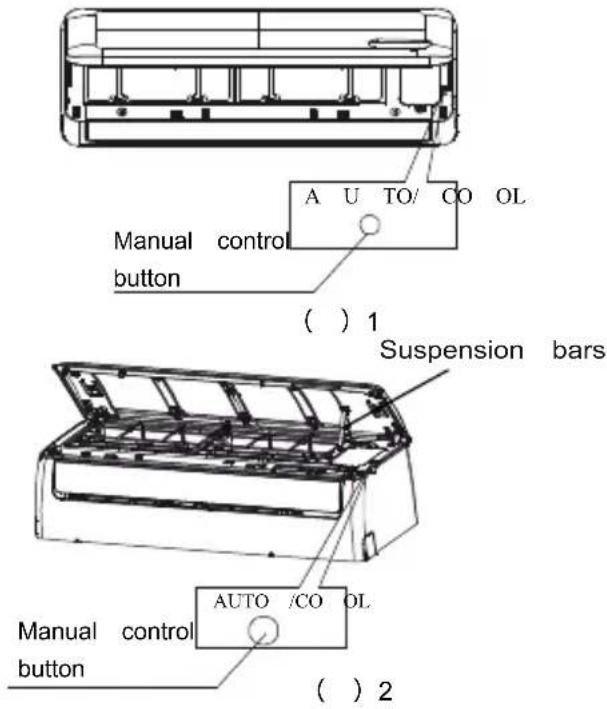
Manual operation can be used temporarily in case the remote controller is dis at the unit requires maintenance.
text_image
A U TO/ CO OL Manual control button ( ) 1 Suspension bars Manual control button AUTO /CO OL ( ) 2NOTE: T he unit must be turned off before operating the ma nual control button. If the unit is operation al, continue pressing the manual control b utton until the unit is off.
① Open and lift the front panel up to an until it remains fixed with a clicking sound
② For 24K Btu model, please u se suspend bars to prop up the p anel.
③ One press of the manual control button lead to the forced AUTO operation. If pre the button twice within five seconds, the will operate under forced COOL operation. Close the panel firmly to its original position.
CAUTION:
● This button is used for testing purposes only. You had better not choose it.
● To restore t he remote controller operation use the remote control ler directly.
Airflow direction control

text_image
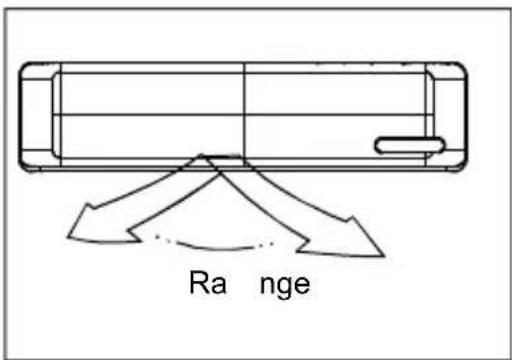
RangeAdjust the air flow direction properly otherwise it might cause discomfort or cause uneven room temperatures.
Adjust the horizontal louver using the remote controller.
Adjust the vertical louver manually.
To set the vertical air flow(Up--Down) direction
Perform this function while the unit is in operation. Use the remote controller to adjust the air flow direction. The horizontal louver can be moved at a range of 6 for each press, or swing up and dc automatically. Please refer to "the REMOTE CONTROLLER OPERATION MANUAL for details.
text_image
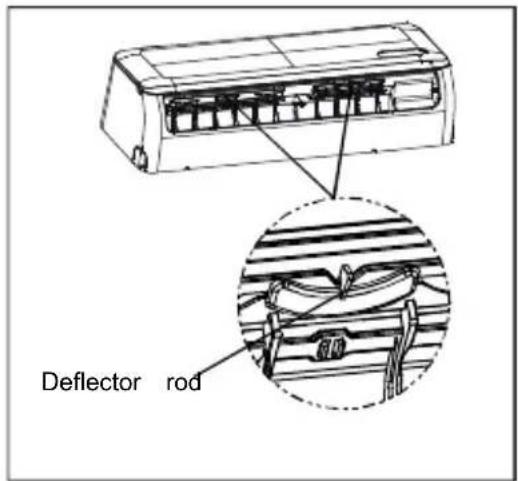
Deflector rodTo set the horizontal air flow direction (left - rig
- Move the deflector rod manually to adjust the air fl in the direction you prefer.
IMPORTANT: Do not put your fingers into the panel blower and suction side. high-speed fan inside may cause danger.
text_image
R a nge
CAUTION
- Do not operate the air conditioner for long periods; the air flow direction set downward in cooling or dehumidifying mode. Otherwise, condensation may occur on the surface of the horizontal louver cause moisture to drop on to the floor or on furnishing
- When the air conditioner is started immediately after was stopped, the horizontal louver might not move approximately 10 seconds.
- Open angle of the horizontal louver should not be too small, as COOLING or HEATING performance be impaired due to too restricted air flow area.
- Do not move the horizontal louver manually, otherwise the horizontal louver will be out of sync. Please operating, unplug power for a few seconds, then rest the air conditioner.
- Do not operate unit with horizontal louver in close position.
How the air conditioner works
text_image
SLEEP operation 7 hour s time Set Temper atu 1°C/2°F 1°C/2°F 1eC/2°F our1 hourCooling

text_image
SLEEP operation 7 hours timer Set Temperature 1°C/2°F 1°C/2°F 1 hour 1 hourHea ting
AUTO operation
- When you set the air conditioner in AUTO mode, or automatically select cooling, heating(cooling/heating models only), or fan only operation depending on temperature and the room temperature.
- The air conditioner will control room temperature automatically to the temperature point you set.
- If you feel uncomfortable in the AUTO mode, you your desired temperature.
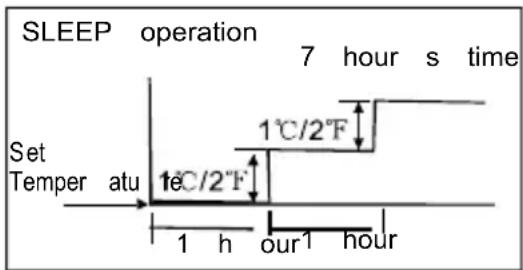
SLEEP operation
When you push SLEEP button on remote controlleduring cooling, heating(cooling & heating models onloff or AUTO operation , the air conditioner willautomatically increase (cooling) or decrease (heating) 1^ / 2^ per hour for the first 2 hours, then holdsteadily for the next 5 hours, after that it will sThis mode saves you energy and brings you comat night.
DRYING operation
- The fan speed will be automatically controlled under dry operation.
- During the dry operation, if the room temperature lower than ^10 C(50 F), the compressor stops ope and restarts until the room temperature is above 12^ C(54 F).
Optimal operation
- To achieve optimal performance, please note the following:
- Adjust the air flow direction correctly so that it is forwards people.
- Adjust the temperature to achieve the highest comi level. Do not adjust the unit to excessive tempera levels.
- Close doors and windows on COOL or HEAT mo or performance may be reduced.
- Use TIMER ON button on the remote controller to select a time you want to start your air condition
- Do not put any object near air inlet or air outlet efficiency of the air conditioner may be reduced at the air conditioner may stop running.
- Clean the air filter periodically, otherwise cooling or heating performance may be reduced.
Do not operate unit with horizontal louvre in close position.
Care and Maintenance
natural_image
Diagram of a mechanical device with hands holding a tray and a handle, showing internal components (no text or symbols)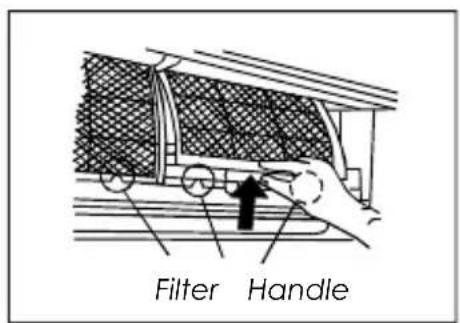
text_image
Filter Handle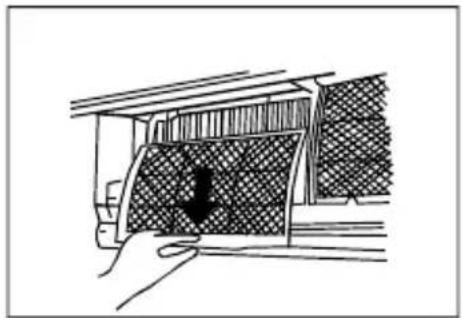
natural_image
Hand holding a car interior panel with a black arrow pointing to the cover (no text or symbols visible)Cleaning the Grille, Case and Remote Controller
- Turn the system off before cleaning. To clean, wipe a soft, dry cloth. Do not use bleach or abrasives.
NOTE: Power supply must be disconnected before cleaning the indoor unit.

CAUTIONS
- A cloth dampened with cold water may be used on the indoor unit if it is very dirty. Then wipe with a dry cloth.
- Do not use a chemically treated cloth or duster clean the unit.
- Do not use benzine, thinner, polishing powder, or similar solvents for cleaning. These may cause the plastic surface to crack or deform.
- Never use water hotter than 40 C/104 F to clear the front panel, it could cause deformation of discoloration.
Cleaning the air filter
NOTE: Power supply must be disconnected before cleaning the indoor unit.
A clogged air filter reduces the cooling efficiency this unit. Please clean the filter once every 2 w
-
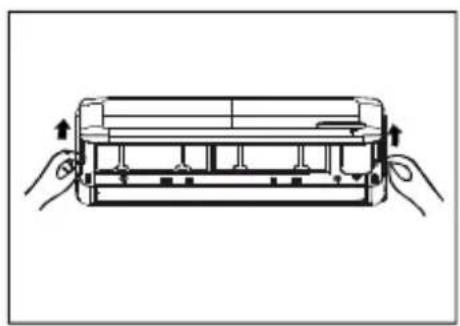
Lift the indoor unit panel up to an angle un stops with a clicking sound. For 24K Btu model, please use suspension bars to prop up the pa
-
Take hold of the handle of the air filter and up slightly to take it out from the filter holder then pull it downwards.
-
Remove the AIR FILTER from the indoor unit Clean the AIR FILTER once two weeks.
Clean the AIR FILTER with a vacuum cleaner or water, then dry it up in cool place.
text_image
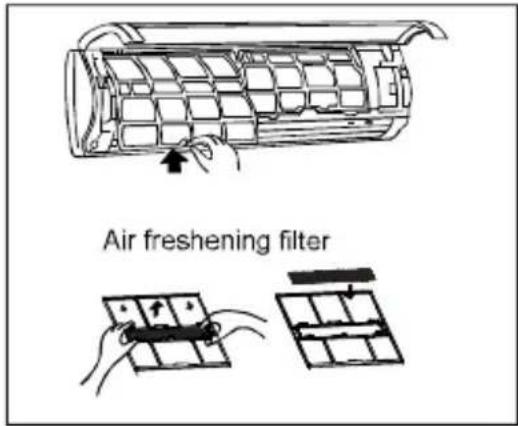
Air freshening filter
natural_image
Illustration of two hand-drawn panels with various internal compartments, no text or symbols present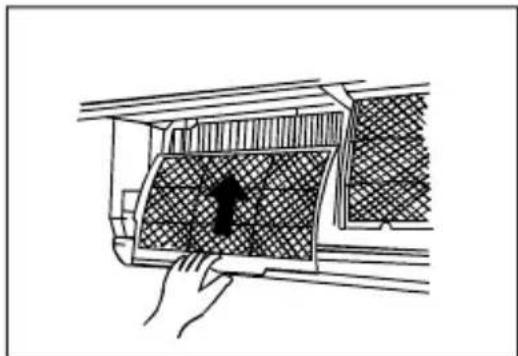
natural_image
Line drawing of a hand opening a car air vent with a mesh grille and a black arrow indicating the vent (no text or symbols)- Remove the Air Freshening Filter from its sup frame (on some models).
■Clean the air freshening filter at least once a month, and replace it every 4-5 months.
■Clean it with vacuum cleaner, then dry it in place.
-
Install the air freshening filter back into positio
-
Insert the upper portion of air filter back into unit, taking care that the left and right edges up correctly and place filter into position.
Maintenance
If you plan to idle the unit for a long time, p the following:
(1) Clean the indoor unit and filters.
(2) Operate the fan for about half a day to dry inside of the unit.
(3) Stop the air conditioner and disconnect power.
(4) Remove the batteries from the remote controller. The outdoor unit requires periodic maintenance and cleaning. Do not attempt to do this your Contact your dealer or service provider.
Checks before operation
- Check that the wiring is not broken off or disconnected.
- Clean the indoor unit and filters.
- Check that the air filter is installed.
- Check if the air outlet or inlet is blocked aft air conditioner has not been used for a long

Cau tion
- Do not touch the metal parts of the unit whe removing the filter. Injuries can occur when handling sharp metal edges.
- Do not use water to clean inside the air coExposure to water can destroy the insulation, leading to possible electric shock.
- When cleaning the unit, first make sure that the power and circuit breaker are turned off.
- Do not wash with hot water at more than 40 Shake off moisture completely and dry it in the shade; do not expose it directly to the sun. The filter may shrink.
The following events may occur during normal operation.
1. Protection of the air conditioner.
Compressor protection
- The compressor can't restart for 3 minutes after it stops.
- The unit is designed not to blow cold air on HEAT mode, when the indoor h one of the following three situations and the set temperature has not been read
A) When heating has just started.
B) Defrosting.
C) Low temperature heating.
Anti-cold air (Cooling and heating models only)
- The indoor or outdoor fan stop running when defrosting (Cooling and heating model Defrosting (Cooling and heating models only))
- Frost may be generated on the outdoor unit during heat cycle when outdoor temperature and humidity is high resulting in lower heating efficiency of the air conditioner.
- During this condition air conditioner will stop heating operation and start defrosting
- The time to defrost may vary from 4 to 10 minutes according to the outdoor the amount of frost built up on the outdoor unit.
2. A white mist coming out from the indoor unit
- A white mist may generate due to a large temperature difference between air in on COOL mode in an indoor environment that has a high relative humidity.
- A white mist may generate due to moisture generated from defrosting process w conditioner restarts in HEAT mode operation after defrosting.
3. Low noise of the air conditioner
- You may hear a low hissing sound when the compressor is running or has just. It is the sound of the refrigerant flowing or coming to a stop.
- You can also hear a low "squeak" sound when the compressor is running or I running. This is caused by heat expansion and cold contraction of the plastic p when the temperature is changing.
- A noise may be heard due to louver restoring to its original position when pow
4. Dust is blown out from the indoor unit.
This is a normal condition when the air conditioner has not been used for a long use of the unit.
5. A peculiar smell comes out from the indoor unit.
This is caused by the indoor unit giving off smells permeated from building material or smoke.
6. The air conditioner turns to FAN only mode from COOL or HEAT (For cooling air heating models only) mode.
When indoor temperature reaches the temperature setting on air conditioner, the compress stop automatically, and the air conditioner turns to FAN only mode. The compressor will when the indoor temperature rises on COOL mode or falls on HEAT mode (For cooler models only) to the set point.
7. The air conditioner Anti-mflection after turning off the unit.
When turning off the unit under COOL(AUTO COOL, FORCED COOL) and DRY n conditioner will Anti-function for 7-10 minutes, then stop the operation and turn off the unit automatically.
- Dripping water may generate on the surface of the indoor unit when cooling in a relatively humidity (relative humidity higher than 80%). Adjust the horizontal louver to the maximum air outlet position and select HIGH fan speed.
- Heating mode (For cooling and heating models only)
The air conditioner draws in heat from the outdoor unit and releases it via the indoor during heating operation. When the outdoor temperature falls, heat drawn in by the a conditioner decreases accordingly. At the same time, heat loading of the air conditione increases due to larger difference between indoor and outdoor temperature. If a comfortable temperature can't be achieved by the air conditioner, we suggest you use supplementary heating device.
- Auto-restart function
● Power failure during operation will stop the unit completely.
- For the unit without Auto-restart feature, when the power restores, the OPERATION in on the indoor unit starts flashing. To restart the operation, push the ON/OFF button remote controller. For the unit with Auto-restart feature, when the power restores, the restarts automatically with all the previous settings preserved by the memory function.
11. Lightning or a car wireless telephone operating nearby may cause the unit to malfunction. Disconnect the unit with power and then re-connect the unit with power again. Push ON/OFF button on the remote controller to restart operation.
Troubleshooting Tips
| If one of the following faults occurs, stop the air conditioner immediately, disc and then connect it in again. If the problem still exists, disconnect the power nearest customer service center. | |
| Trouble | OPERATION indicator or other indicators continue flashing. |
| Fuse blows frequently or circuit breaker trips frequently. | |
| Other objects or water fall into the air conditioner. | |
| The remote controller won't work or works abnormally. | |
| If one of the following code appears on the display area : E0,E1,E2,E3......or P0,P1,P2,P3...... | |
| Malfunctions | Cause | What should be done? |
| Unit does not start | Power cut | Wait for power to be restored. |
| Unit may have be clmplugged. | Check that plug is securely in receptacle. | |
| Fuse may have blown. | Replace the fuse. | |
| Battery in Remote controller may have been exhausted. | Replace the battery. | |
| The time you have set with time is incorrect. | Wait or cancel timer setting. | |
| Unit not cooling or heating (Cooling/ heating models only) room very well while air flowing out from the cond tioneri | Inappropriate temperature setting. | Set temperature correctly. For detailed method please refer to " Using remote control section. |
| Air filter is blocked. | Clean the air filter. | |
| Doors or Windows are open. | Close the doors or windows. | |
| Air inlet or outlet of indoor or outdoor unit has been blocked. | Clear obstructions away first, the restart the unit. | |
| Compressor 3 or 4 minutes protection has been activated. | Wait. | |
| If the trouble has not been corrected, please contact a local dealer or the service center. Be sure to inform them of the detailed malfunctions and unit m | ||
Notes: Do not attempt to repair the unit yourself.
Always consult an authorized service provider.
Klimaire®
The design and specifications are subject to change with out prior no product improvement. Consult with the sale's agency or manufacture