F60D - SLR camera NIKON - Free user manual and instructions
Find the device manual for free F60D NIKON in PDF.


| Product type | 35mm autofocus SLR camera |
| Model | Nikon F60D |
| Lens mount | Nikon F mount |
| Dimensions (W x H x D) | 148.5 x 96 x 70 mm |
| Weight (without batteries) | Approx. 585 g |
| Power supply | Two lithium batteries CR123A or DL123A |
| Exposure modes | AUTO (general program), P (auto-multi program), S (shutter priority), A (aperture priority), M (manual), Vari-Program (portrait, landscape, macro, sports, night) |
| Autofocus | TTL phase detection autofocus with EV range -1 to 19 (ISO 100) and autofocus assist illuminator |
| Light metering | 6-segment matrix (3D with D/G lenses) or center-weighted |
| Shutter | Electronically controlled vertical travel focal plane, 30 to 1/2000 s, bulb |
| Built-in flash | Guide number 15 (ISO 100, m), coverage 28 mm, modes normal sync, red-eye reduction, slow sync |
| Date/time imprinting | Yes (F60D model): year/month/day, day/hour/minute, etc. – dedicated CR2025 battery |
| Viewfinder | Fixed pentaprism, 90% coverage, diopter adjustment -1.5 to +1.0 m^-1 |
| Film loading | Automatic on closing back, advance to first frame |
| Film advance | Single-frame or continuous approx. 1 fps (Sports mode) |
| Rewinding | Automatic at end of roll, approx. 17 s for 36 exposures; manual rewind possible |
| Lens compatibility | CPU Nikkor lenses (except IX-Nikkor) – D and G recommended for full functionality |
| Care and cleaning | Clean with blower and soft cloth; do not use solvents; store in cool, dry place |
| Safety | Keep batteries away from children; do not throw into fire or short-circuit; have camera checked every 2 years at an authorized service center |
| Optional accessories | Cases CF-49/CF-50, straps, AF Nikkor lenses, filters, SB flashes, remote control |
Frequently Asked Questions - F60D NIKON
User questions about F60D NIKON
0 question about this device. Answer the ones you know or ask your own.
Ask a new question about this device
Download the instructions for your SLR camera in PDF format for free! Find your manual F60D - NIKON and take your electronic device back in hand. On this page are published all the documents necessary for the use of your device. F60D by NIKON.
USER MANUAL F60D NIKON
F60D only: Data imprint LCD/buttons
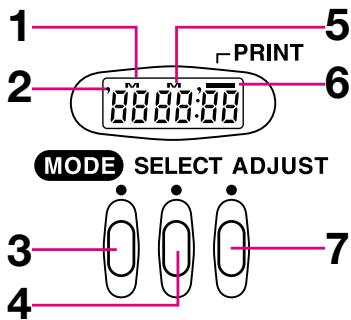
- Date/time display LCD
- Year indicator
- MODE button: Push to select one of five available displays.
- SELECT button: Push to select date/time to be adjusted.
- M: Month indicator
- Data imprint indicator: Blinks approx. 2 sec. when data is imprinted.
- ADJUST button: Push to adjust date/time.
LCD/Viewfinder Displays
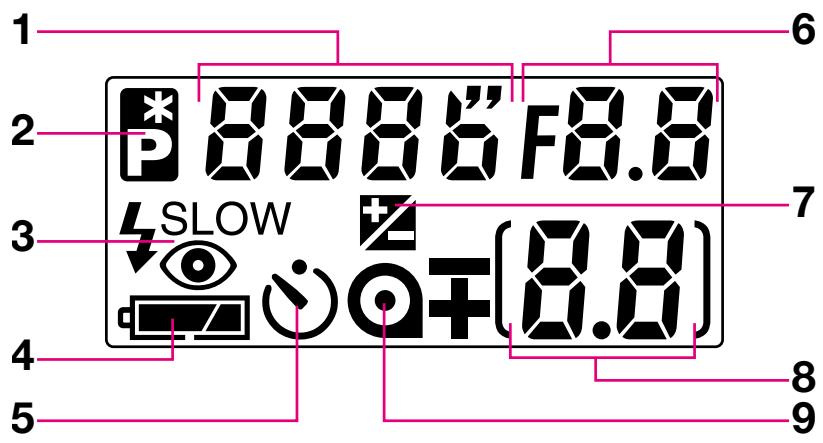
1.Shutter speed
2. Flexible program (page 40)
3. Flash sync mode (page 59)
4. Battery power (page 15)
5. Self-timer (page 55)
- Aperture
- Exposure compensation (page 50)
- Frame counter/exposure compensation value (page 19, 50)
- Film (page 19)
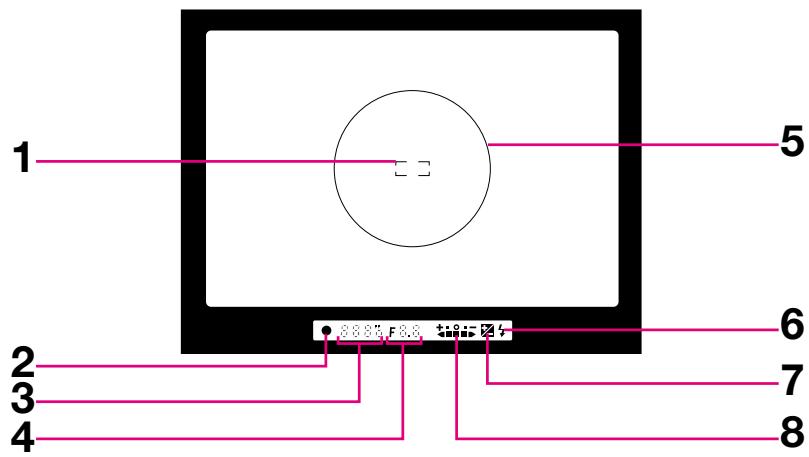
- Focus brackets (page 25)
- Focus indicator (page 25)
3.Shutter speed -
Aperture
-
12mm-dia. reference circle for Centre-Weighted Metering (page 48)
- Flash ready-light (page 28)
- Exposure compensation mark (page 50)
- Electronic analogue display (page 43)
About LCD
- At high temperatures of 60^ or above, the display turns black, making it impossible to read. It returns to normal when the temperature drops to 20^ .
- At temperatures below freezing, the LCD's response time slows; when the temperature rises, it returns to normal.
Introduction
Thank you for purchasing the Nikon F60/F60D camera. We are sure that you will enjoy using this camera and that it will make photography a bigger part of your life.
Get to know your F60/F60D camera, but before using it, be sure to read this manual thoroughly. Also, we recommend that you keep this manual handy.
Main features of the F60/F60D:
- SLR camera with built-in Speedlight makes taking pictures easy and enjoyable, even for the most inexperienced beginner.
- The individual exposure modes are displayed on the exposure modal dial for one-touch change of modes and quick set-up for advanced picture-taking.
- The F60/F60D's new Auto-Servo AF is so advanced that it can detect whether a subject is stationary or moving, and also detects direction. According to the detected information, it automatically chooses to lock focus or activate focus tracking—either way, you're assured autofocusing that works fast, accurately, and easily.
Take trial shots
Take trial shots before shooting at important occasions like wedding or graduations.
Have Nikon spot check your camera regularly
Nikon recommends that you have your camera serviced by an authorised dealer or service centre at least once every two years.
Using your camera correctly
The Nikon F60/F60D's performance has been optimised for use with Nikon brand accessories. Accessories made by other manufacturers may not meet Nikon's criteria for specifications, and nonconforming accessories could damage the F60/F60D's components. Nikon cannot guarantee the F60/F60D's performance when it is used with other than Nikon brand accessories.
The "Basic Operation" section introduces battery, lens, film, focusing, exposure and shooting in basic steps for easy picture-taking even for SLR camera beginners.
"Detailed Operation" explains each function, from lens to exposure, in detail, in approximately the same order as the steps in the "Basic Operation" section.
After becoming familiar with basic shooting, refer to the detailed explanation of each operation/function to step up to advanced shooting that requires more advanced techniques.
"Flash Photography" introduces flash photography using the F60/F60D's built-in Speedlight and optional Speedlight in the dark, as well as other flash-shooting situations in bright conditions.
Please read this manual thoroughly and carefully to get the most out of your Nikon F60/F60D.
PREPARATION. 2-11
Nomenclature 2-3
LCD/Viewfinder Displays. 4-5
Introduction 6-7
About This Manual 10-11
- Install Batteries and Check Battery Power.. 14-15
- Mount Lens. 16-17
3.Load Film. 18-19 - Set Focus Mode Selector to AF 20-21
- Set Exposure Mode Dial to Auto 22-23
6.Hold Camera and Focus. 24-25 - Confirm Indications in Viewfinder and Release Shutter 26-27
- Using Built-In Speedlight 28-29
About Focus and Exposure 30
Lens Compatibility. 32-33
Film 34-35
Focus Mode 36-37
Focus Lock 38
Shooting in Each Exposure Mode 39-44
Vari-Program 45-47
Exposure Metering System 48
Auto Exposure Lock 49
Exposure Compensation. 50-51
Imprinting Date/Time (for F60D only) 52-54
Self-Timer Operation 55
Dioptre Adjustment/Eyepiece Cap 56
Two-Button Reset. 57
Flash Photography 58-63
Built-in Speedlight and Matrix Balanced Fill-Flash. 58
Flash shooting distance range. 58
Flash sync mode features 59
Using built-in Speedlight 60-61
Usable lenses with built-in Speedlight. 61
Useable Optional Speedlights 62-63
Available Mode Combinations. 64
MISCELLANEOUS 65-77
Optional Accessories 66
Camera Care 67-68
Notes on Batteries 69
Troubleshooting 70-71
Specifications 72-75
Index. 76-77
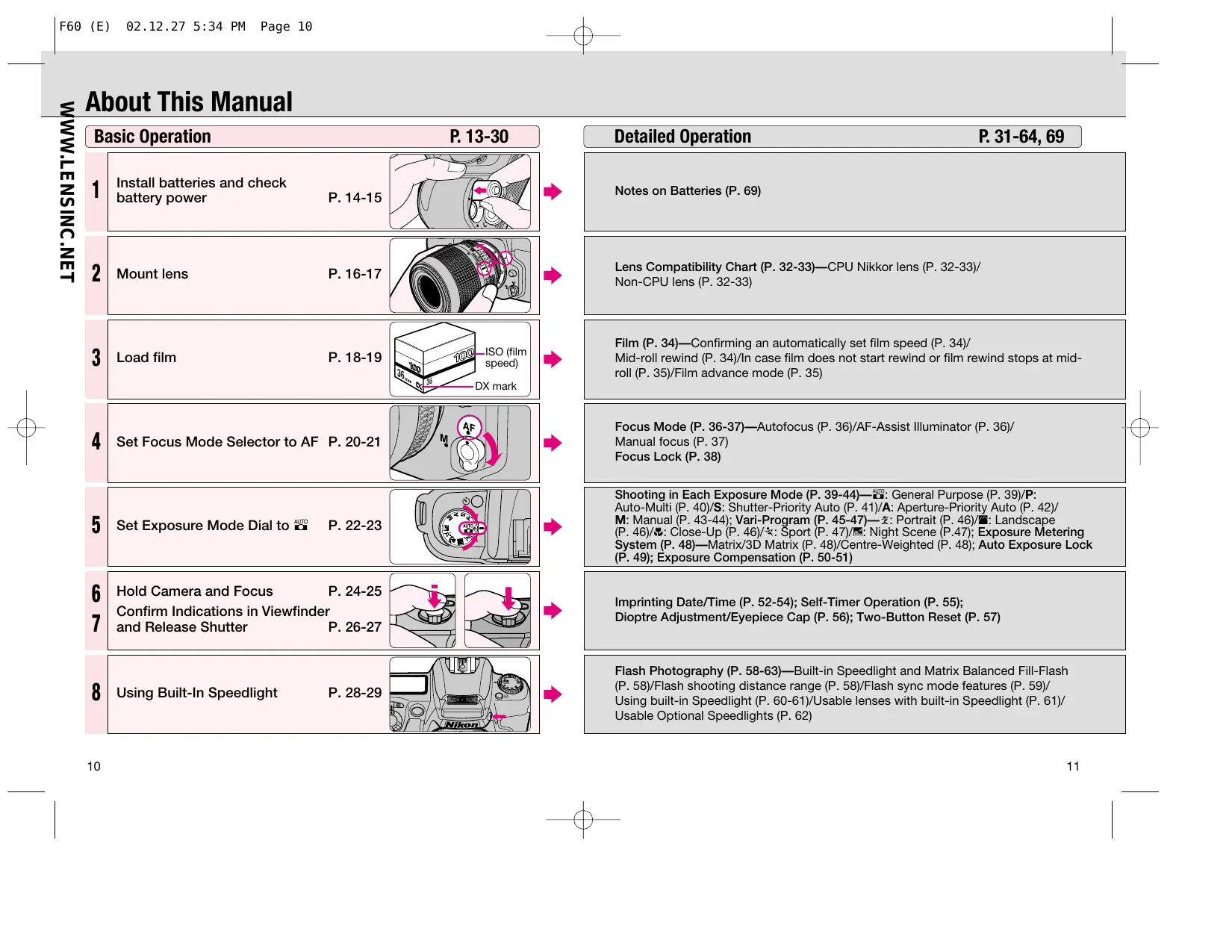
About This Manual
| Basic Operation P. 13-30 | ||
| 1 | Install batteries and check battery power P. 14-15 | → |
| 2 | Mount lens P. 16-17 | → |
| 3 | Load film P. 18-19 | → |
| 4 | Set Focus Mode Selector to AF P. 20-21 | → |
| 5 | Set Exposure Mode Dial to AUTO P. 22-23 | → |
| 6 | Hold Camera and Focus P. 24-25 | → |
| 7 | Confirm Indications in Viewfinder and Release Shutter P. 26-27 | → |
| 8 | Using Built-In Speedlight P. 28-29 | → |
| Detailed Operation P. 31-64, 69 |
| Notes on Batteries (P. 69) |
| Lens Compatibility Chart (P. 32-33)—CPU Nikkor lens (P. 32-33)/Non-CPU lens (P. 32-33) |
| Film (P. 34)—Confirming an automatically set film speed (P. 34)/Mid-roll rewind (P. 34)/In case film does not start rewind or film rewind stops at mid-roll (P. 35)/Film advance mode (P. 35) |
| Focus Mode (P. 36-37)—Autofocus (P. 36)/AF-Assist Illuminator (P. 36)/Manual focus (P. 37)Focus Lock (P. 38) |
| Shooting in Each Exposure Mode (P. 39-44)—General Purpose (P. 39)/P: Auto-Multi (P. 40)/S: Shutter-Priority Auto (P. 41)/A: Aperture-Priority Auto (P. 42)/M: Manual (P. 43-44): Vari-Program (P. 45-47)—z: Portrait (P. 46)/#/Landscape (P. 46)/#/Clos-Up (P. 46)/#/Sport (P. 47)/#/Night Scene (P. 47); Exposure Metering System (P. 48)—Matrix/3D Matrix (P. 48)/Centre-Weighted (P. 48); Auto Exposure Lock (P. 49); Exposure Compensation (P. 50-51) |
| Imprinting Date/Time (P. 52-54); Self-Timer Operation (P. 55); Dioptre Adjustment/Eyepiece Cap (P. 56); Two-Button Reset (P. 57) |
| Flash Photography (P. 58-63)—Built-in Speedlight and Matrix Balanced Fill-Flash (P. 58)/Flash shooting distance range (P. 58)/Flash sync mode features (P. 59)/Using built-in Speedlight (P. 60-61)/Usable lenses with built-in Speedlight (P. 61)/Usable Optional Speedlights (P. 62) |
BASIC OPERATION
This section guides you through basic operations with the camera set to AUTO mode.
Settings are as follows:
| Attached lens | D-type AF Nikkor |
| Focus mode | Autofocus |
| Exposure mode | AUTO (General-Purpose Program) |
| Exposure metering | 3D Matrix Metering* |
| Built-in Speedlight | Normal sync* |
- Automatically set when exposure mode is set to AUTO.
1.1
1.2
Install Batteries and Check Battery Power
Use two CR123A or DL123A-type lithium batteries with this camera. (Other batteries cannot be used.)
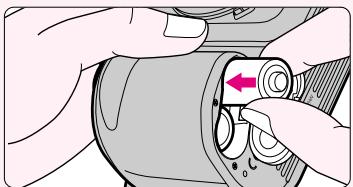
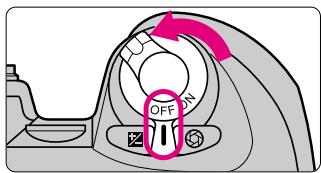
Turn off the main switch and open the battery chamber cover.
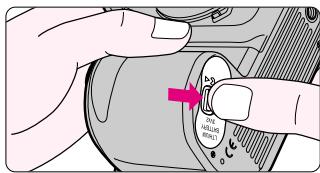
Insert batteries with the “ ” and “ ” ends positioned as marked inside the battery chamber cover, then firmly close the battery chamber cover.
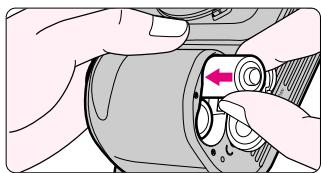
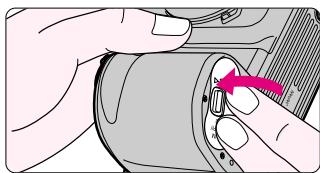
- Incorrect positioning of and poles may cause damage to the camera.
Check points
- Keep the batteries out of children's reach. If swallowed, contact a doctor immediately. (For "Notes on Batteries", see page 69.)
- When replacing batteries, be sure to turn the main switch off and replace both batteries at the same time. Always use fresh batteries of the same brand.
□ We recommend that you take spare batteries with you, especially when traveling, since the batteries used may be difficult to obtain in some areas.
1.3
Turn on the main switch and confirm battery power with the indication.
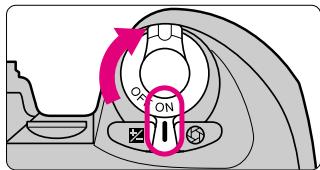
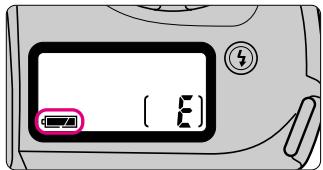
- Shutter speed and aperture indications in the LCD panel and viewfinder automatically turn off 5 sec. after turning the main switch on and camera is left unused.
- Battery power
appears: Sufficient battery power.
appears: Batteries are nearing exhaustion. Have a fresh set ready.
blinks: Batteries are exhausted. Replace batteries. (No indication appears in the viewfinder and shutter locks.)
1.4
Lightly press the shutter release button to activate the exposure meter.
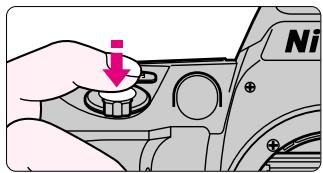
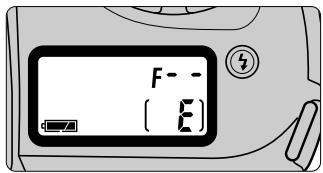
- Lightly pressing the shutter release button reactivates the exposure meter and shutter speed and aperture indications in the LCD panel and viewfinder. The indications automatically turn off 5 sec. after you remove your finger from the shutter release button.
2.1
2.2
Mount Lens
Mount the lens to the camera body.
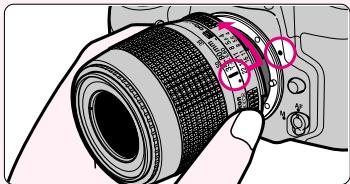
Check the lens type.
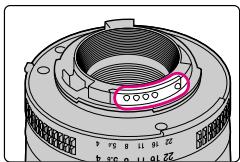
CPU contacts of CPU Nikkor lens
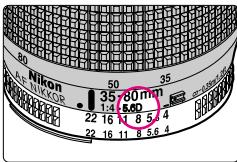
① CPU Nikkor lens other than G-type
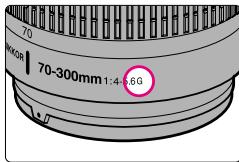
② G-type Nikkor lens
①CPU Nikkor lenses other than G-type (Illustration is D-type Nikkor lens), with aperture ring
(2)G-type Nikkor lens, without aperture ring
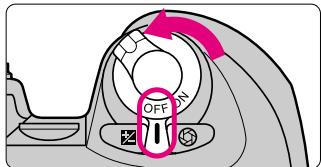
Turn the main switch off and mount lens to the camera body.
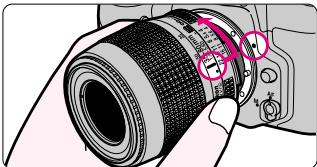
- Position lens in the camera's bayonet mount so that the mounting indexes on lens and camera body are aligned, then twist lens counterclockwise until it locks into place. (Be sure not to touch the lens release button.)
- When the lens is not attached or when a non-CPU lens is attached and the main switch is turned on, F - - blinks in the LCD panel and viewfinder and the shutter cannot be released. (F - - does not blink and shutter can be released when the exposure mode is set to manual.)
Check points
- Use D-or G-type AF Nikkor lens to utilize all the functions of this camera. (See page 32 for Lens Compatibility.)
- Make sure to turn the main switch off when attaching/detaching the lens.
□ When attaching the lens, take care not to press the lens release button.
□ When attaching/detaching the lens, make sure to avoid direct sunlight.
2.3
With CPU Nikkor lens with aperture ring (other than G-type), set the lens' aperture to its minimum and lock.
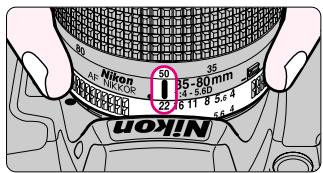
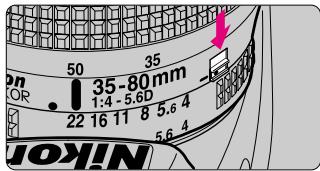
- When CPU Nikkor lens other than G-type is not set to its minimum aperture setting and the main switch is turned on, FEE blinks in the LCD panel and viewfinder and the shutter cannot be released.
- The G-type Nikkor lens has no aperture ring; aperture should be selected from camera body. Unlike other CPU Nikkor lenses, aperture does not need to be set to minimum.
2.4
Detaching the lens.
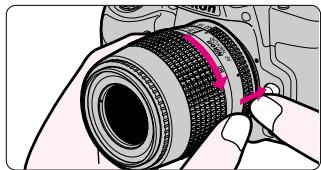
- Push and hold the lens release button, then turn the lens clockwise.
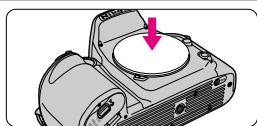
When camera is left unattended without lens
When you leave the camera unattended without a lens attached, be sure to attach the supplied body cap, or optional body cap BF-1A. (BF-1 body cap cannot be used.)
3.1
3.2
Load Film
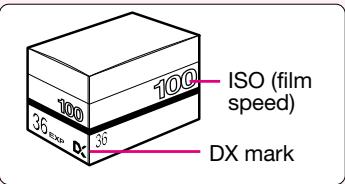
Use a DX-coded film. Film speed is set automatically (ISO25-5000).
When the camera is turned on, film is loaded and the camera back is closed, the film automatically advances to the first frame.
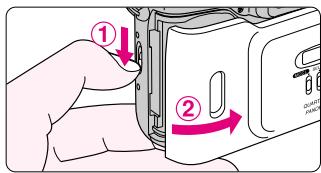
Turn on the main switch, then open the camera back and insert film.
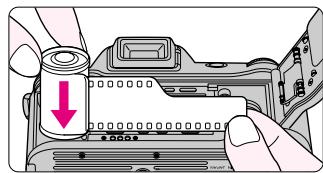
- Insert from the bottom of the film cartridge.
Pull film leader out to red index mark.
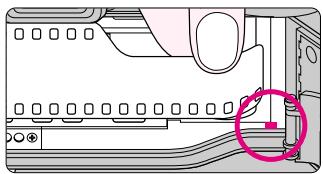
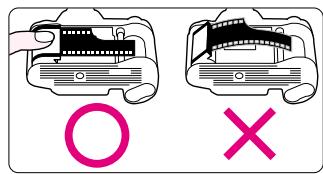
- Do not insert the film leader beyond the red index mark.
- Hold the film cartridge and ensure film is properly positioned with no slack.

Check points
□ Only DX-coded film can be used with this camera. When film other than DX-coded film is inserted, blinks and appears on the LCD panel.
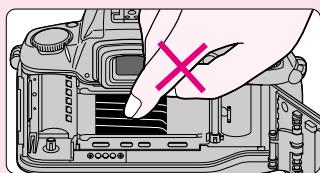
Shutter curtains are very thin. Make sure not to touch the shutter curtains with your finger or film leader.
- Film load can be confirmed on the LCD panel.
□ When changing film outdoors, avoid direct sunlight.
3.3
Gently close the camera back until the lock release snaps closed. Film automatically advances to first frame.
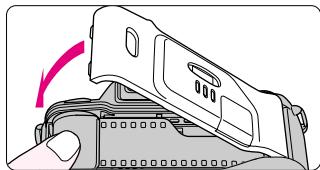
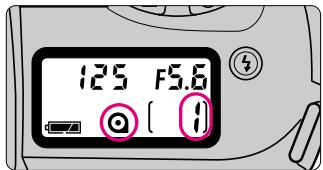
- When and appear on the LCD panel, the film has advanced to the first frame.
- When _rr and blink on the LCD panel, film is not properly installed. Open the camera back again and reload film.
- Film is automatically rewound when the film reaches the end of the roll. (See page 27.)
- Number of available exposures of the film roll can be checked through the film cartridge confirmation window.
NOTE: Loading/removing film
Shutter curtains are very thin. Make sure not to touch the shutter curtains with your finger or film leader.
When the focus mode selector is set to AF (autofocus), the camera focuses automatically.
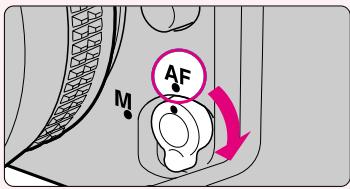
□ Do not attempt to rotate the lens' focus ring manually with the focus mode set to AF.
□ With the focus mode set at AF, the shutter cannot be released when the subject is out of focus. For details on focus mode, see page 36.
Set the focus mode selector to AF (autofocus).
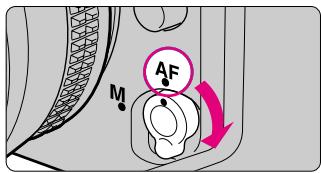
- Make sure to turn the focus mode selector until it clicks into position.
- To focus, lightly press the shutter release button. (See page 24.)
Situations where autofocus may not work as expected:
- Autofocus may not work as expected in the following situations. In such situations, focus on a different subject located at the same distance, use focus lock (page 38) then recompose.
- When you are unable to perform focus lock, set the focus mode selector to M (manual) and focus manually using the clear matte field.
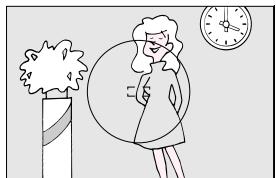
Low contrast scenes
For example, where the subject is wearing the same colour clothing as a wall or other background.
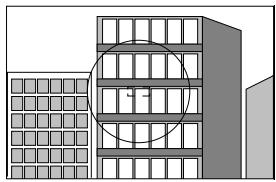
Patterned subject or scene For example, building windows.
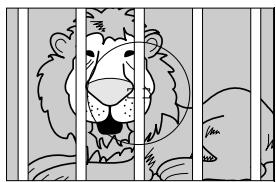
Scenes with the subject located at different distance within the focus brackets
For example, when shooting an animal inside a cage or a person in a forest.
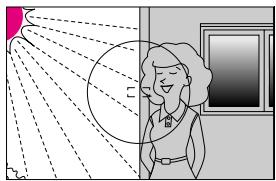
Scenes in which there is pronounced difference in brightness within the focus brackets
For example, when the sun is in the background and your main subject is in shadow.
With the exposure mode set to AUTO (General-Purpose Program), the camera will automatically control your exposure.
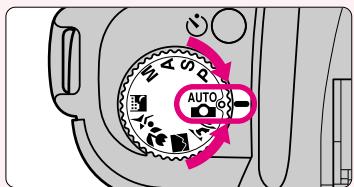
Set the exposure mode dial to AUTO.
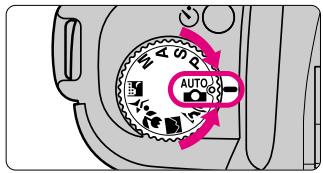
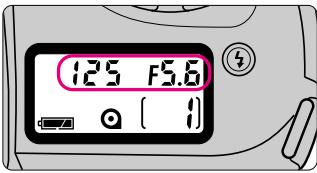
- Shutter speed and aperture appear in the LCD panel and viewfinder when shutter release button is lightly pressed.
About exposure mode and type of program
| Symbol | Exposure mode/Type of program | Characteristics/shooting situations |
| AUTO | General-Purpose Program P. 39 | The easiest exposure mode for general shooting. Suitable for portraits and other general pictures, or when you want to take pictures first-hand. |
| P | Auto-Multi Program P. 40 | Camera controls exposure automatically, while allowing you to make other settings, such as Flexible Program or exposure compensation. |
| S | Shutter-Priority Auto P. 41 | You set your desired shutter speed, and the camera selects the correct aperture. You can “stop” the motion of a moving subject with a fast shutter speed or create blur with a slower speed. |
- Ten exposure modes are available with this camera. Five types of VariPrograms enable you to easily choose proper exposure controls in various shooting situations.
See step 5.2 for the summary of each exposure mode and each reference page for the operating instructions and details.
| Symbol | Exposure mode/Type of program | Characteristics/shooting situations | |
| A | Aperture-Priority AutoP. 42 | You set the desired aperture, and based on that, the camera selects the correct shutter speed. Lets you determine the depth of the in-focus area; near and far subjects can be sharply focused or the background can be blurred. | |
| M | ManualP. 43-44 | Shutter speed and aperture are setmanually. Suited to situations where it isdifficult to attain your desired effect withother exposure modes. | |
| Vari-Program | K | Portrait ProgramP. 46 | Use this program to take portraits. With ashallow depth of field (in-focus area), itcreates a blurred background to accentuateyour main subject. |
| ■ | LandscapeProgramP. 46 | Use this program to take pictures of distantscenes. With a deep depth of field, theoverall landscape will be sharply focused. | |
| ● | Close-Up ProgramP. 46 | Use this program to take up-close pictures.With a shallow depth of field, your close-ups will be taken with an artistically blurredbackground. | |
| × | Sport ProgramP. 47 | Use this program to take sports pictures.USing a fast shutter speed, it freezes themotion of fast-moving subjects to createexciting action photos. | |
| ■ | Night SceneProgramP. 47 | Use this program in the evening or at night. Even a very dark subject will be exposed so it captures the beauty of all the lightavailable in your night scene. | |
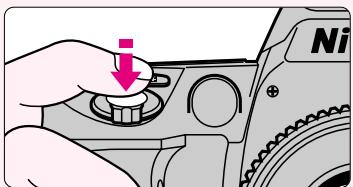
Lightly pressing the shutter release button automatically focuses the camera on the subject and when the subject is in focus, causes to appear in the viewfinder.
Hold the camera properly.
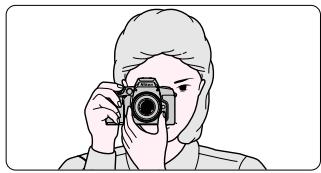
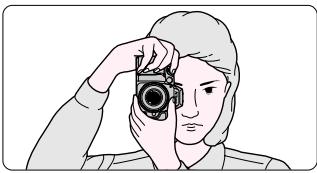
- Keep your elbow propped against your body for support.
- Stand with one foot forward a half step and keep your upper body still.
- Grasp the camera handgrip with your right hand and use your left hand to cradle the camera (or lens).
Camera shake and shutter speed
Preventing camera shake is crucial when taking photographs. In general, you should set the shutter speed faster than '1/focal length of your lens' sec. (Example: when using a 50mm lens, set the shutter speed faster than 1/50 sec.) Use of a tripod is recommended for shooting at slower shutter speeds.
NOTE: Composing frame
The frame coverage of the finder of this camera is approximately 90% of the actual exposed frame on the film. Therefore, the actual exposed frame is somewhat larger than the image you see through the viewfinder. Note that the edges of a negative film are partially cropped by most labs.
- Dioptré adjustment (page 56) is available to enable you to see through the viewfinder more clearly.
To take a picture of a off-centre subject, use focus lock (page 38).
For F60D only: Date or time can be imprinted on your photos/negatives (page 52).
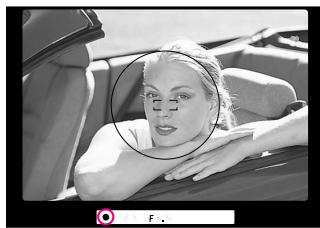
6.2 Compose frame and focus by lightly pressing the shutter release button.
-
Centre the focus brackets on your subject and lightly press the shutter release button. The camera focuses automatically and focus indicator appears or blinks.
-
appears: Subject is in focus. Automatically tracks moving subject.
- blinks: Unable to focus with autofocus.
When the subject is dark, the camera's AF-Assist Illuminator is activated to achieve correct focus. For details on focusing, see page 36.
- To take a picture of a subject outside the focus brackets, use focus lock (page 38).
- In situations where autofocus may not work as expected, see page 20.
7.1
Confirm Indications in Viewfinder and Release Shutter
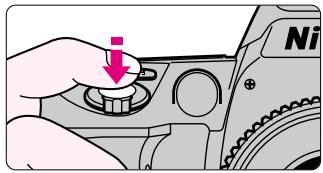
Confirm that (focus indicator) appears in the viewfinder, then release the shutter by slowly and fully depressing the shutter release button.
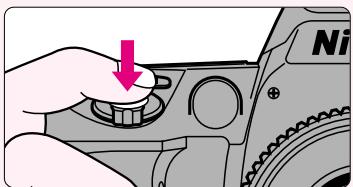
Confirm indications in the viewfinder while lightly pressing the shutter release button.
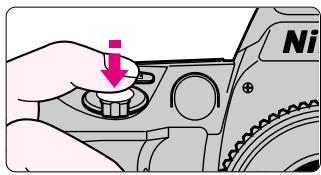
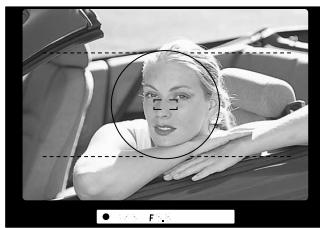
- When (ready-light indication) blinks, use the built-in Speedlight. (See page 28/58.)
- If a warning indication appears in the viewfinder, see page 70.
7.2
Confirm focus indicator appears without blinking and slowly depress the shutter release button.
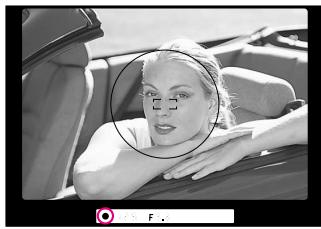
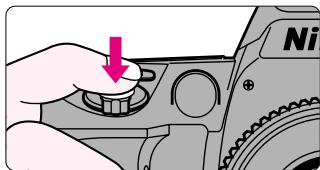
- After shutter is released, the film automatically advances to the next frame and the next shot can be taken.

Check points
Focus, shutter speed and aperture can be confirmed in the viewfinder. If any other indications appear, see page 70.
□ When you reach the end of the film roll, the film starts to rewind automatically.
For mid-roll rewind, see page 34.
For self-timer operation, see page 55.
7.3
Film starts to rewind automatically when film reaches the end of the roll.
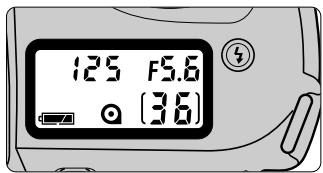
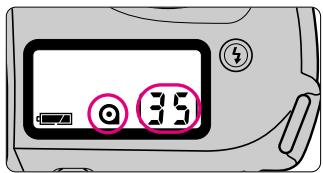
- When you reach the end of the film roll, the film starts to rewind automatically. appears in the LCD panel during film rewind and the frame counter counts backwards until rewind is complete. Pictures taken on frames beyond the indicated number of the exposures for the film roll may be discarded due to development procedures.
7.4
Confirm film is completely rewound, then remove film cartridge.
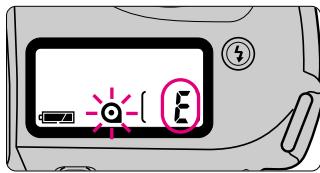
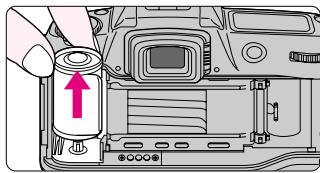
- Film is completely rewind when the frame counter shows “£” and @ blinks. Open the camera back away from sunlight and remove the film cartridge by tilting it to one side. If the shutter release button is depressed when rewind film is still in the camera back, “@” blinks. Remove film cartridge.
8.1
Using Built-In Speedlight
If 4 (ready-light indication) blinks in the viewfinder when you lightly press the shutter release button, use the built-in Speedlight.
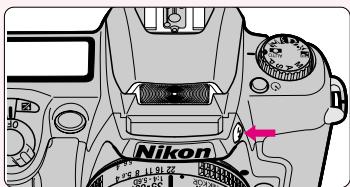
Press the Speedlight lock-release button to release the Speedlight.
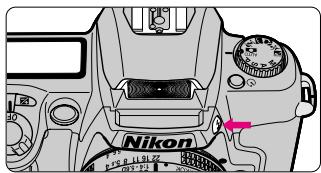
- As soon as the Speedlight is released it starts recharging, and when the Speedlight is ready to fire appears without blinking in the viewfinder (when the camera's meter is on).
- To close the Speedlight, press gently until it clicks shut. (To conserve power, keep the Speedlight closed when it is not in use.)
Matrix Balanced Fill-Flash
Matrix Balanced Fill-Flash enables proper evaluation of exposure for the main subject and background, and ensures adequate flash output. (For details, see page 58.)
NOTE: Continuous use of built-in Speedlight
After continuous use of the built-in Speedlight, it may stop firing to protect the firing tube. Wait for a while before using the Speedlight again.
Check points
The built-in Speedlight offers an angle of coverage of 28mm lens with a guide number of 15 (ISO100, m).
□ Using a CPU lens enables to perform Matrix Balanced Fill-Flash shooting. (For details, see page 58.)
- Be sure to remove (or store) the lens hood before flash shooting.
Some zoom lenses have limitations using Speedlight and may cause vignetting. (For details, see page 61.)
8.2 Confirm in viewfinder, then compose, focus and take the picture.
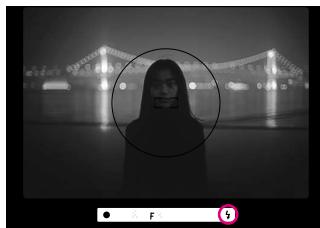
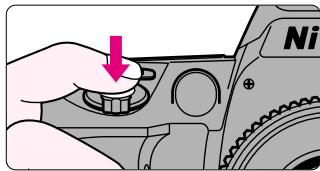
- 4 blinks in the viewfinder approx. 3 sec. after full flash output. If this happens, under exposure may have occurred. Check the flash shooting distance range (page 58) and shoot again.
- Normal Sync flash mode is introduced in this section. Flash with Red-Eye Reduction, which reduces the "red-eye" effect with a person or animal, and Slow Sync flash, which brings out the background details, are also available. For details, see page 59.
- With dark subjects (within 0.5m to 3m ), the camera's AF-Assist Illuminator (page 36) is automatically activated to guide autofocus.
About Focus and Exposure
Focus, exposure and metering system are important factors for taking pictures. Knowing the characteristics of each factor helps you widen your photographic expression.
Focus and depth of field
When focusing, depth of field should be considered. Depth of field is the zone of sharpest focus in front of and behind the subject on which the lens is focused. It varies according to shooting distance, focal length and, above all, aperture. Smaller apertures (larger f-numbers) will produce a deeper depth of field where the background and foreground become sharper; larger apertures (smaller f-numbers) will produce a shallower depth of field where the background becomes blurred.
Exposure
Light from the subject passes through the lens and is sensed by the film. Light reaching the film is controlled by the shutter speed and aperture. The proper combination of shutter speed and aperture for subject brightness and film sensitivity results in the correct exposure.
The F60/F60p's General-Purpose Program, Auto-Multi Program and Vari-Program automatically control shutter speed and aperture. In Shutter-Priority Auto exposure mode, you can manually set shutter speed and the camera automatically sets the proper aperture. In Aperture-Priority Auto exposure mode, you can manually set aperture and the camera automatically sets the proper shutter speed. In Manual exposure mode, you manually set both shutter speed and aperture.
Metering System
As the proper combination of shutter speed and aperture for correct exposure is determined according to subject brightness and film sensitivity, measuring subject brightness is very important.
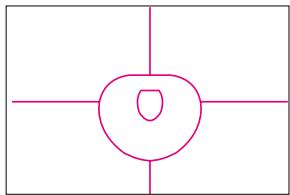
In general, brightness inside the viewfinder is not uniform. The F60/F60D provides two metering systems: Matrix Metering and Centre-Weighted Metering. With Matrix Metering, data on scene brightness is detected by the six-segment Matrix sensor. With Centre-Weighted Metering, most of the meter's sensitivity is concentrated on the 12mm-diameter centre circle in the viewfinder. (With D- or G- AF Nikkor lenses, the F60/F60D camera performs 3D Matrix Metering. See page 48.)
DETAILED OPERATION
This section features detailed descriptions of all camera functions — including lens, film, focus, exposure and others.
Lens Compatibility
Use a CPU lens (except IX-Nikkor) with this camera. D- or G-type AF lenses give you access to all available functions.
G-type Nikkor and other CPU Nikkor lens
- The G-type Nikkor lens has no aperture ring; aperture should be selected from camera body. Unlike other CPU Nikkor lenses, aperture does not need to be set to minimum (largest f-number).
- CPU Nikkor lenses other than G-type Nikkor lens have an aperture ring. Set the lens aperture to its minimum and lock. When the lens is not set to its minimum aperture setting and the power switch is turned on, F - · · · blinks in the LCD panel and viewfinder and the shutter cannot be released.
When a non-CPU lens is attached
- Usable exposure modes are limited.
A non-CPU lens can be used only when the exposure mode is set to M (manual). (Shutter cannot be released with other modes.) With a non-CPU lens, the exposure meter cannot be activated and the aperture cannot be set using the aperture button and Command Dial. F -- appears in place of the aperture indication in the LCD panel and viewfinder; set/confirm aperture using the lens' aperture ring.
CAUTION: Nikkor lenses/accessories that cannot be attached to the F60/F60D
The following Nikkor lenses/accessories cannot be attached to the F60/F60D (camera body or lens may be damaged):
- AF Teleconverter TC-16A
Non-AI lenses - 400mm f/4.5 and 600mm f/5.6 with Focusing Unit AU-1
Fisheye 6mm f/5.6, Fisheye 7.5mm f/5.6 and Fisheye OP 10mm f/5.6
ED 180-600mm f/8 (No. 174166 or smaller)
ED 360-1200mm f/11 (No. 174087 or smaller)
200-600mm f/9.5 (No. 300490 or smaller) - 80mm f/2.8, 200mm f/3.5 and TC-16 Teleconverter for F3AF
PC 28mm f/4 (No. 180900 or smaller) - PC 35mm f/2.8 (No. 906200 or smaller)
- Reflex 1000mm f/11 (No. 142361 to 143000)
- Reflex 2000mm f/11 (No. 200310 or smaller)
Medical-Nikkor 200mm f/5.6 (can be used in combination with Sync Terminal Adapter AS-15.) - K1, K2 ring, Auto Extension Ring PK-1, PK-11, Auto Ring BR-2, BR-4
Types of CPU lenses and other usable lenses/accessories
| Mode Lens/accessories | Focus mode | Exposure mode | Metering system | ||||||
| Autofocus | Manual with electronic rangefinder | Manual | Any mode other than M | M | Matrix | Centre-Weighted*1 | |||
| 3D 6-segment | 6-segment | ||||||||
| CPU Nikkor*2 | D-type AF Nikkor*3G-type AF Nikkor | ○ | ○ | ○ | ○ | ○ | ○ | — | ○ |
| AF-S, AF-I Nikkor | — | ○ | ○ | ○ | ○ | ○ | — | ○ | |
| PC Micro 85mm f/2.8D*4 | — | ○*5 | ○ | — | ○ | — | — | ○ | |
| AF-I Teleconverter | — | ○*6 | ○ | ○ | ○ | ○ | — | ○ | |
| Non-D/G-type AF Nikkor (except AF Nikkor for F3AF) | ○ | ○ | ○ | ○ | ○ | — | ○ | ○ | |
| AI-P Nikkor | — | ○*7 | ○ | ○ | ○ | — | ○ | ○ | |
| Non-CPU Nikkor*8 | AI-S or AI type Nikkor, Series-E, Al-modified Nikkor | — | ○*7 | ○ | — | △*9 | — | — | — |
| Medical-Nikkor 120mm f/4 | — | ○ | ○ | — | △*9 | — | — | — | |
| Reflex-Nikkor | — | — | ○ | — | △*9 | — | — | — | |
| PC Nikkor | — | ○*5 | ○ | — | △*9 | — | — | — | |
| AI-S or AI type Teleconverters | — | ○*6 | ○ | — | △*9 | — | — | — | |
| Bellows Focusing Attachment PB-6*10 | — | ○*6 | ○ | — | △*9 | — | — | — | |
| Auto Extension Rings (PK-11A, PK-12, PK-13 and PN-11) | — | ○*6 | ○ | — | △*9 | — | — | — | |
1 Metering system automatically switches to Centre-Weighted Metering when the exposure mode is set to M or when you use the Auto Exposure Lock function.
2 IX-Nikkor lenses cannot be attached.
3 This camera is not compatible with the Vibration Reduction function of the VR Nikkor lens. Make sure to set the vibration reduction mode switch of the VR Nikkor lens to OFF position.
4 The camera's exposure metering and flash control system do not work properly when shifting and/or tilting the lens, or when using an aperture other than the maximum aperture.
5 Without shifting and/or tilting the lens.
6 With maximum effective aperture of f/5.6 or faster.
7 With maximum aperture of f/5.6 or faster.
8 Some lenses/accessories cannot be attached. (See page 32.)
9 The shutter can be released but the electronic analogue display cannot be used.
10 Attach the PB-6 vertically. (PB-6 can be set to horizontal position after attaching.)
Confirming an automatically set film speed
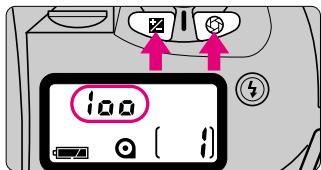
- To confirm the automatically set film speed of your loaded DX-coded film, press the 2 and buttons simultaneously. Note that pressing the 2 and buttons for more than 2 sec. resets all of the functions. (For “Two-Button Reset”, see page 57.)
Mid-roll rewind
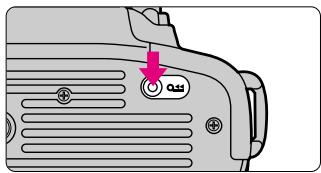
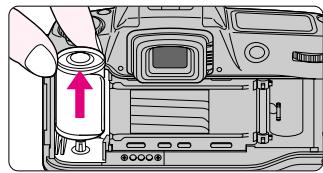
- To rewind film at mid-roll, press the (mid-roll rewind) button with a pointed object. When film is completely rewound, appears and blinks in the LCD panel. Open the camera back and remove the film cartridge.
In case film does not start to rewind or film rewind stops at mid-roll
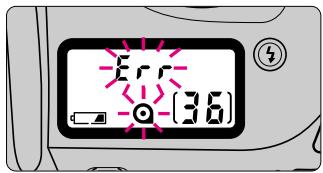
- When battery power is very low, or in low temperatures, film may not start rewinding or film rewind may stop at mid-roll, and and _rr will blink in the LCD panel. In this case, turn off the main switch, change batteries, then turn on the main switch to rewind film again.
Film advance mode
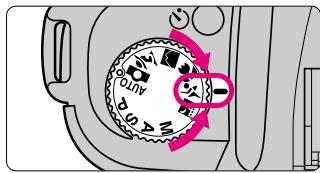
- Film advance mode is normally set to single-frame shooting, where the film is advanced one frame after you release the shutter. Selecting Sport Program automatically switches the film advance mode to continuous shooting, where the shutter is continuously released and the film continues to advance (approx. 1 frame/sec.) for as long as the shutter release button remains depressed.
Focus Mode
Autofocus
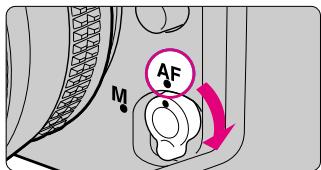
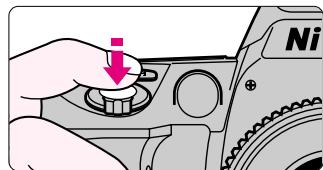
- With the focus mode selector set to AF, lightly pressing the shutter release button automatically focuses the camera on the subject and causes to appear in the viewfinder.
Auto-Servo AF:
Camera automatically chooses Single Servo AF or Continuous Servo AF operation according to the subject status, i.e. stationary or moving (including directional information).
- Single Servo AF: Once focused on a subject, focus is locked.
- Continuous Servo AF: The camera continuously focuses on a moving subject.
- When Sport Program is selected, the camera automatically switches to Continuous Servo AF and the camera continuously focuses on the subject.
- In either case, the shutter will not be released until the subject is in focus and appears in the viewfinder.
AF-Assist Illuminator
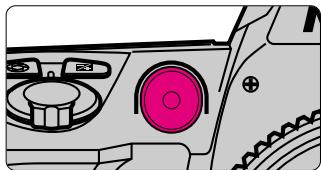
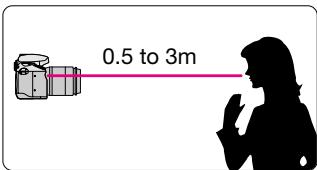
- The AF-Assist Illuminator provides the necessary illumination to focus on dark subjects. The camera activates the AF-Assist Illuminator in the following conditions:
- When a AF Nikkor lens is attached, the focus mode is set to AF, and the subject is dark.
- When exposure mode is not set to Landscape or Sport Program.
The AF-Assist Illuminator is activated automatically and cannot be cancelled. It is effective for lenses with a focal length of 24mm to 200mm , and the effective focus distance is 0.5 to 3m .
NOTE: Continuous use of AF-Assist Illuminator
After continuous use of the AF-Assist Illuminator, it may stop emitting light to protect the firing tube. Wait for a while before using the Illuminator again.
AF-Assist Illuminator with optional Speedlight
When an optional Speedlight with the AF-Assist Illuminator is attached and TTL Auto Flash is selected, the AF-Assist Illuminator on the Speedlight unit emits light. See page 62 for "Usable Optional Speedlights".
Manual focus

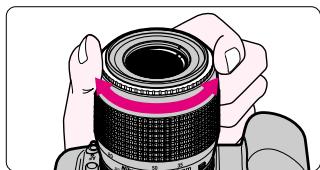
- Set the focus mode selector to M. Look through the viewfinder and rotate the lens focusing ring until the image appears sharp on the clear matte field in the viewfinder. The shutter can be released whether or not the subject is in focus, and does not appear in the viewfinder.
Use Manual focus in situations where autofocus may not work as expected (page 20) or lens other than AF Nikkor (page 32) is attached.
Electronic Rangefinder
Lightly pressing the shutter release button and rotating the lens focusing ring activates the Electronic Rangefinder to indicate the focus status in the viewfinder. When the subject is in focus, appears in the viewfinder. In manual focus, shutter can be released anytime. The Electronic Rangefinder works with most Nikkor lenses (including AF Nikkors when operated manually) having a maximum aperture of f/5.6 or faster.
Focus Lock
Focus Lock proves useful in autofocus shooting when you want to capture off-centre subject. It is also effective in situations where autofocus may not work as expected (page 20).
Position the focus brackets on the subject and lightly press the shutter release button.
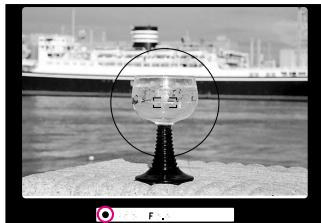
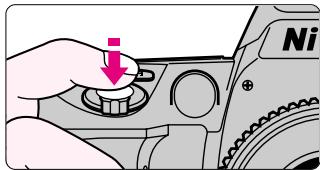
- appears when the subject is in focus. The focus remains locked as long as the shutter release button is lightly pressed.
- Focus Lock cannot be used when the exposure mode is set to Sport Program.
- When you want to lock focus on a stationary subject that has been moving and tracked with Continuous Servo AF (changed to Single Servo AF from Continuous Servo AF), remove your finger from the shutter release button once and focus again.
2 Confirm focus indicator ● then (while keeping shutter release button lightly pressed) recompose and shoot.
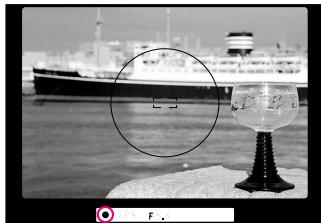
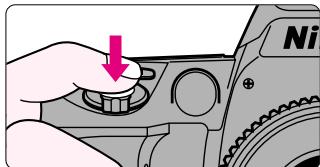
- After you have locked the focus, do not change the camera-to-subject distance. If you keep the shutter release button lightly pressed after releasing the shutter, the shutter can be released repeatedly with the same focusing.
Shooting in Each Exposure Mode
AUTO: General-Purpose Program
Simplest exposure mode with this camera. The camera automatically controls your exposure. Recommended for beginner SLR camera users.
For available mode combinations, see page 64.
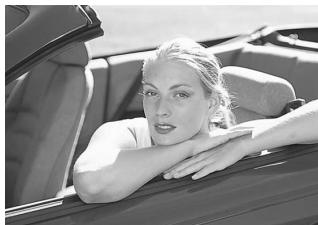
1 Set the exposure mode dial to AUTO.
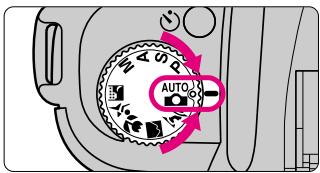
- With exposure mode set to AUTO, other modes are set as follows: Exposure metering: Matrix (page 48)
Flash: Normal sync
Flexible Program, Exposure compensation and Slow Sync flash cannot be used.
1 Confirm focus indicator and shoot.
-
When the subject is too dark or too bright, one of the following warning indications will appear in the viewfinder or LCD panel.
-
H: Use ND filter.
- L: Use Speedlight.
Difference between AUTO (General-Purpose Program) and P (Auto-Multi Program)
Although exposure controls are the same, with Auto-Multi Program, you can select functions such as Flexible Program (page 40), exposure compensation (page 50) or Slow Sync (page 59) flash for more flexible shooting.
Shooting in Each Exposure Mode—continued
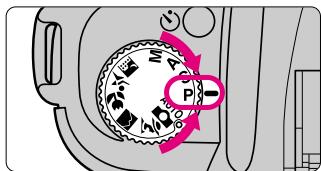
P: Auto-Multi Program
The camera automatically controls your exposure to achieve a correct exposure in any shooting situation. For more complex shooting, use Flexible Program (below) or exposure compensation (page 50). For other available mode combinations, see page 64.
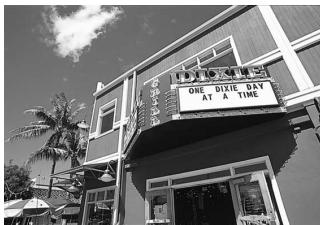
1 Set the exposure mode dial to P.
2 Confirm focus indicator and shoot.
-
When the subject is too dark or bright, one of the following warning indications will appear in the viewfinder or LCD panel.
-
H: Use ND filter.
- Use Speedlight.
NOTE: Flexible Program
In Auto-Multi Program, by rotating the Command Dial you can change the combination of shutter speed and aperture while maintaining a correct exposure. With this function, you can shoot in Auto-Multi Program as though shooting in Shutter-Priority Auto or
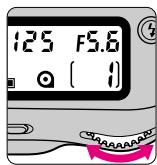
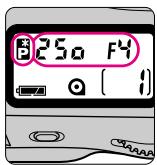
Aperture-Priority Auto. appears in the LCD panel when the Flexible Program is used. To cancel the Flexible Program, reset the shutter speed-aperture combination to the original value, change the exposure mode, turn off the main switch, or use the built-in Speedlight (page 28) or perform Two-Button Reset (page 57).
S:Shutter-Priority Auto
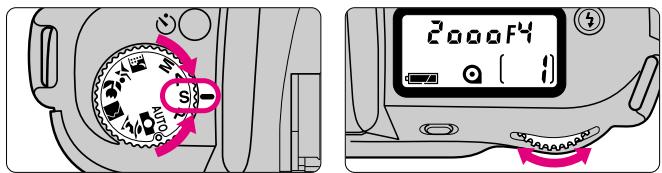
Enables you to manually set your desired shutter speed (30-1/2000 sec.); the camera automatically selects the proper aperture to provide a correct exposure. With high shutter speeds, you can freeze the motion of a fast-moving subject; with slower speeds, you can create a motion effect. For available mode combinations, see page 64.
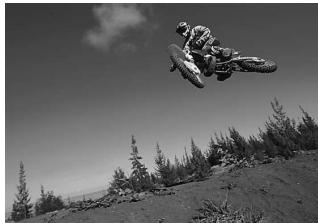
1 Set the exposure mode dial to S and set the shutter speed (30-1/2000 sec.) with the Command Dial.
1 Confirm focus indicator and shoot.
- When the subject is too dark or bright, one of the following warning indications will appear in the LCD panel or viewfinder.
- H: Select higher shutter speed. If the warning indication still remains on, use ND filter.
- Lα: Select a slower shutter speed. If the warning indication still remains on, use Speedlight.
- When -- blinks in the LCD panel and viewfinder, shutter speed is set to Long Time Exposure. Change the shutter speed from Long Time Exposure. For Long Time Exposure, see page 44.
Shooting in Each Exposure Mode—continued
A: Aperture-Priority Auto
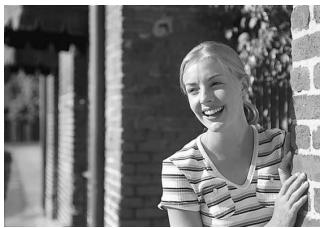
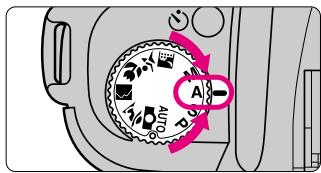
Enables you to set your desired aperture manually. The camera automatically selects a suitable shutter speed to give you a correct exposure. By varying the aperture, and thus controlling the depth of field, you can make the background and foreground sharper, or blur the background. In flash photography, varying the aperture changes the flash shooting distance.
For available mode combinations, see page 64.
1 Set the exposure mode dial to A, then set the aperture using the Command Dial.
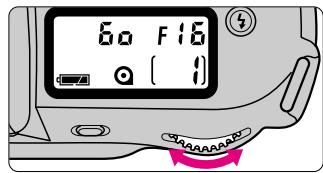
2 Confirm focus indicator in the viewfinder and shoot.
- When the subject is too dark or too bright, one of the following warnings will appear in the viewfinder or LCD panel.
- H: Select smaller aperture (larger f-number). If the warning indication persists, use an ND filter.
- L: Select larger aperture (smaller f-number). If the warning indication persists, use the Speedlight.
M: Manual
Enables you to set both shutter speed and aperture manually. You can produce various creative effects by adjusting the exposure. Long Time Exposure, which allows shutter speeds greater than 30 sec., is also possible in this mode. For other available mode combinations, see page 64.
1 Set the exposure mode dial to M and compose.
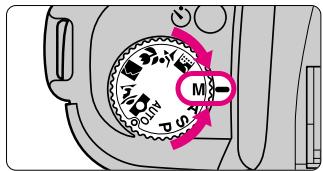
- Metering system automatically switches to Centre-Weighted from Matrix in Manual exposure mode. (Page 48.)
2 Set the shutter speed and aperture and confirm by looking at the electronic analogue display in the viewfinder.
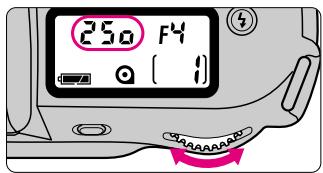
250 F
+·0-
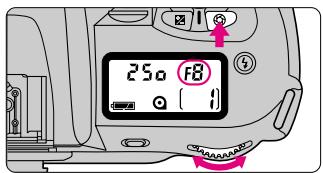
250 F8
+·0-
- Set the shutter speed (30-1/2000 sec.) by rotating the Command Dial.
- Set the aperture by rotating the Command Dial while pressing the button.
- These functions can be set independently.
Shooting in Each Exposure Mode—continued
Electronic analogue display
The electronic analogue display in the viewfinder indicates the difference between the selected exposure (shutter speed and aperture), and the correct exposure Not available with Long Time Exposure.
Correct exposure or ± 0.5EV
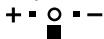
Under -0.5EV to -1.5EV
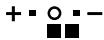
Over +1.5EV
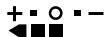
3 Confirm focus indicator in the viewfinder and shoot.
- A Non-CPU lens works only with Manual exposure mode. However, the camera's meter will be disabled. Furthermore, the aperture cannot be set with the button and the Command Dial. Use lens' aperture ring. See page 32 on "Lens Compatibility".
Long Time Exposure
This function is useful for shooting nighttime scenes or stars. Select Long Time Exposure (of more than 30 sec.) by rotating the Command Dial until --- appears in the viewfinder and LCD panel. Pressing the shutter release button once opens the shutter (LCD indications will turn off). Press the shutter release button again to close the shutter. Camera shake can be reduced by using the self-timer (page 55) and tripod. Continuous exposure is possible for approx. 15 hours with a fresh set of lithium batteries. Note that continuous exposure time is reduced when shooting in low temperatures.
Vari-Program
Vari-Program
Vari-Program gives you the option to choose from five different programs designed for specific picture-taking situations. For other available mode combinations, see page 64.
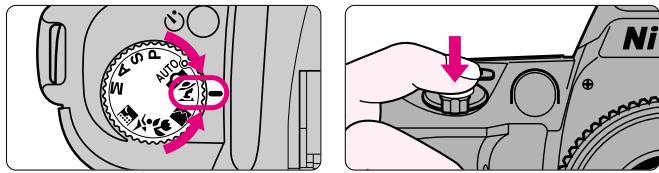
Shooting with Vari-Program
Set the exposure mode dial to the desired Vari-Program, confirm focus indicator in the viewfinder and shoot.
-
The following warning indications appear in the viewfinder or LCD panel when the subject is too dark or bright.
-
H: Use ND filter.
- La: Use Speedlight.
NOTE: Vari-Program
Flexible Program (page 40) and exposure compensation (page 50) are cancelled in Vari-Program. When using the flash in Vari-Program, the Flash Sync modes (page 59) automatically change according to each program selected.
Vari-Program selection
: Portrait Program
Use this program whenever you are taking pictures of people. It uses a relatively large aperture (smaller f-number) and shallow depth of field to create a blurred background to accentuate your main subject. Recommended AF Nikkor lenses: 85mm to 200mm telephoto lenses with large maximum apertures.

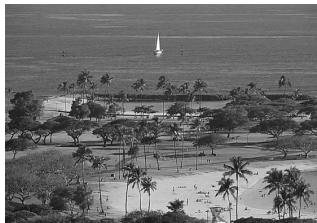
: Landscape Program
Use this program whenever you're taking a picture of a distant scene. It generally selects a smaller aperture to assure sharply focused landscape pictures.
Recommended lenses: you can use the full range of lenses (wideangle to telephoto) to achieve different effects.
- To avoid camera shake, use a tripod.
: Close-Up Program
Use this program when you are taking pictures up close. It uses a larger aperture (smaller f-number) and a shallow depth of field to create a blurred background that accentuates your main subject. Recommended AF Nikkor lenses: AF Micro-Nikkor lenses.
- To avoid camera shake, use a tripod.

:Sport Program
Use this program to freeze action. It uses a fast shutter speed suitable for stop-action photography.
Recommended AF Nikkor lenses: 80mm to 300mm telephoto lenses
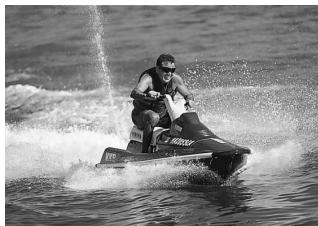
- In X Sport Program, focus detection continues as long as the shutter release button is lightly pressed. By fully depressing the shutter release button and holding it in, you can perform continuous shooting.
: Night Scene Program
Use this program in the evening or at night. It allows you to capture the beauty of nighttime scenes.
You can also use it with the flash when you want to include portraits in a night scene composition. Recommended lenses: you can use the full range of lenses (wideangle to telephoto) to achieve different effects.
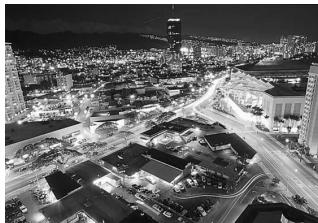
- To avoid camera shake, use a tripod.
Exposure Metering System
The exposure metering system of this camera is normally set to Matrix Metering. It automatically switches to Centre-Weighted Metering when the exposure mode is set to Manual or when the Auto Exposure Lock function (page 49) is used.
Matrix Metering/3D Matrix Metering
Matrix Metering provides correct exposure control using a six-segment Matrix Sensor. With D- or G-type AF Nikkor lenses, 3D Matrix Metering automatically activates to use scene brightness, scene contrast and subject distance information to ensure even more accurate exposure control. All exposure modes except Manual exposure and the Auto Exposure Lock function (page 49) employ Matrix Metering.
Centre-Weighted Metering
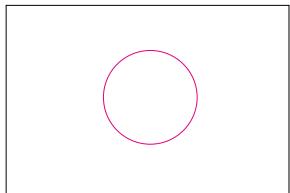
Centre-Weighted Metering places special emphasis on brightness within the 12mm-diameter circle in the viewfinder and is thus useful for basing exposure on a specific area of the scene. The metering system automatically switches to Centre-Weighted Metering when exposure mode is set to Manual (page 43) or when the Auto Exposure Lock function (page 49) is used.
Auto Exposure Lock
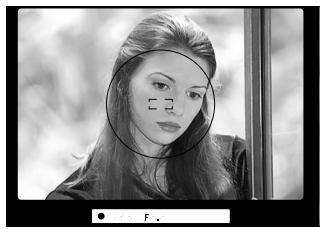
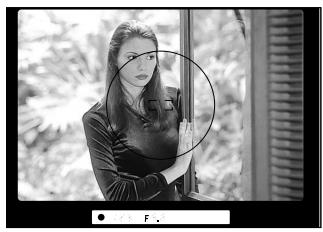
■ When using the auto exposure modes, you can control the exposure based on the brightness of a specific area within the scene using the Auto Exposure Lock function. The metering system automatically switches to Centre-Weighted Metering when this function is used.
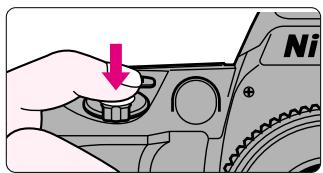
1 Centre the main subject inside the viewfinder and zoom-in. Press the AE-L button while lightly pressing the shutter release button.
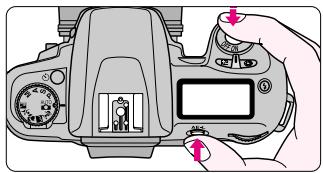
2 Keeping the AE-L button pressed, recompose, focus and shoot.
Exposure Compensation
To modify exposure control (i.e. from the ISO standard), use the exposure compensation function. This can be useful when the subject has pronounced contrast or when bracketing exposure with colour slide film (where the latitude of the proper exposure is minimal). You can modify exposure control from -3EV to +3EV in 1/2 steps (except in AUTO mode and Vari-Program).
Compensate exposure by rotating the Command Dial while pressing the button until the desired compensation value appears.
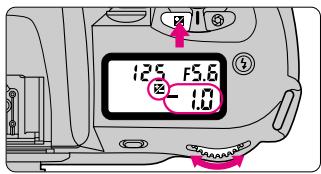


-0.5EV compensation

+2EV compensation
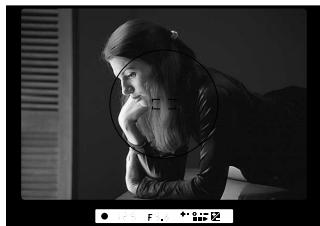
- When the exposure compensation is set, 2 appears in the viewfinder and LCD panel. The compensation value can be checked by pressing the 2 button (it is also indicated in the viewfinder's electronic analogue display). In flash photography, the flash output level is also compensated.
- Normally, you should compensate exposure to the + side when the background is brighter than your main subject or to the - side when the background is darker.
2 Compose picture and shoot.
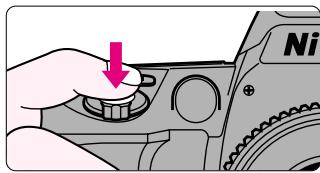
- To cancel exposure compensation, rotate the Command Dial while pressing the 2 button to reset the compensation value to 0. Or you can perform Two-Button Reset (page 57). (Turning the camera off does not cancel the exposure compensation function.)
Imprinting Date/Time (for F60D only)
You can imprint the following date information on your picture (in any exposure mode): Year/Month/Day, Day/Hour/Minute, Month/Day/Year or Day/Month/Year.
Imprinted date/time
The illustration at right indicates the position of the imprinted date/time. It may be difficult to read against bright colors such as white or reddish hues.
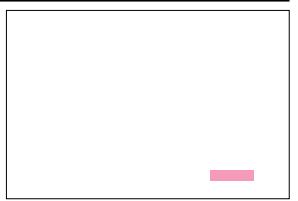
NOTE: Battery requirements for imprinting
Imprinting of date/time requires one CR2025 3V lithium battery separate from the batteries required for the camera body. Battery life is approx. 3 years. When the imprinting on the photo appears faded and/or the display of the data imprint on the LCD becomes faint or disappears, this indicates low battery power. Replace the battery (making sure to set correct date/time after changing battery, page 53).
Changing battery for imprinting
Open camera back, remove the screw on the inside of the camera back. Remove the battery chamber cover and then remove the used battery.
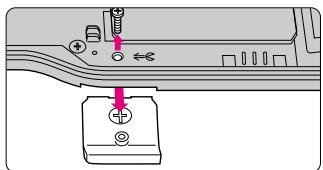
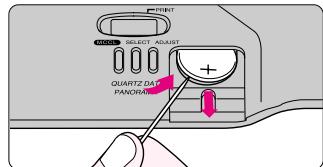
- Insert a new CR2025 3V lithium battery with + side facing up. Attach the battery chamber cover and tighten the screw on the inside of the camera back.
Adjusting date and time
1 Press MODE button to select available displays. Press SELECT button to select date/time to be adjusted.
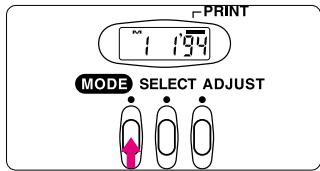
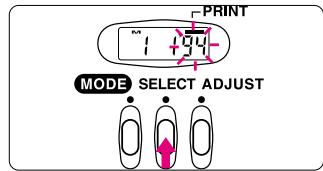
- Date adjustment cannot be performed with the Day/Hour/Minute display. To do so, you must select Year/Month/Day, Month/Day/Year or Day/Month/Year displays.
2 Press ADJUST button to set the correct number. Then press SELECT button until the number stops blinking.
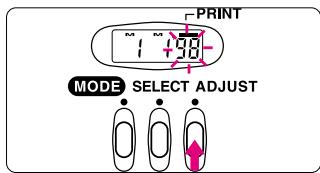
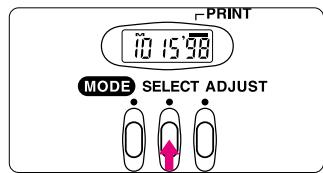
- To change the numerical indication rapidly, hold the ADJUST button down. The years are numbered 1 to 19, 87 to 99 and 00 in that order. To complete adjustment, press SELECT button so the number stops blinking and — (data imprint indicator) appears.
Taking pictures with imprinted date/time
1 Push MODE button to select available imprinting displays.
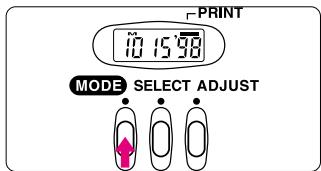
Each time you push the MODE button the display changes as follows:
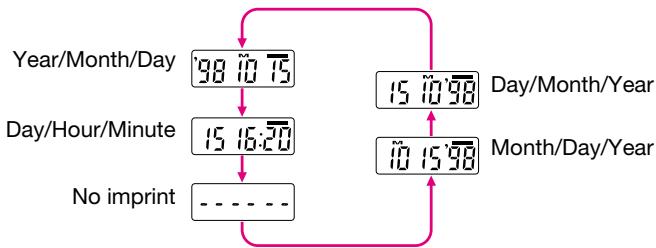
- The data displayed on the data imprint LCD will be imprinted on the picture. Select - - - (no imprint) to cancel data imprint. Compatible film speeds for data imprinting are ISO32-3200.
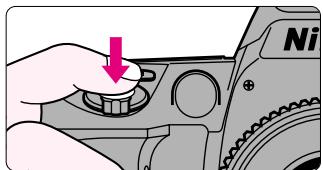
2 Fully depress the shutter release button to take a picture with the imprinted date/time.
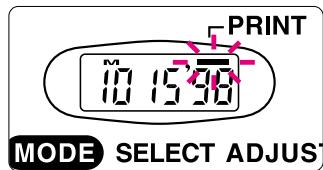
- To confirm whether date/time is imprinted, check that the imprint indicator
blinks for approx. 2 sec. immediately after taking a picture.
Self-Timer Operation
You can use the self-timer when you want to be in the photograph. Use a tripod or place the camera on a stable surface before using the self-timer.
Press (self-timer) button and confirm that appears on the LCD panel.
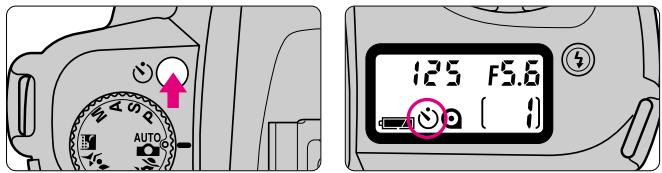
- When button is pressed, duration of camera's meter changes to 30 sec. Press the shutter release button within 30 sec. of pressing the button.
- The self-timer cannot be performed unless the camera's shutter can be released (i.e. when subject cannot be in focus with autofocus).
- To shoot in an exposure mode other than Manual, cover the eyepiece with the supplied eyepiece cap (page 56) or hand before pressing the shutter release button to prevent interference to achieve correct exposure from stray light.
- Do not stand in front of the lens when setting the self-timer in autofocus mode.
2 Compose picture, focus and fully depress the shutter release button.
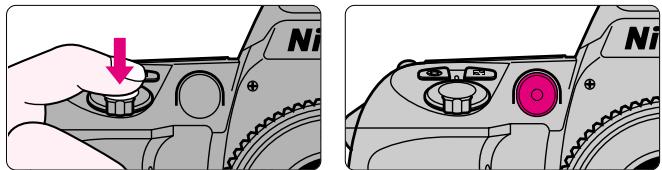
- When the self-timer is activated, the shutter will release in 10 seconds. The self-timer/red-eye reduction lamp and in the LCD panel blink for 8 sec. and then stop blinking for 2 sec. before the shutter is released. When Red-Eye Reduction (page 59) is set, the self-timer/red-eye reduction lamp lights for 2 sec. before the shutter releases at the same output level as the normal Red-Eye Reduction function.
- To cancel the self-timer (before or during self-timer operation), press button again, turn the main switch off or perform Two-Button Reset (page 57). The self-timer can also be cancelled by leaving the camera untouched for more than 30 sec. after setting the function.
Dioptre Adjustment/Eyepiece Cap
The finder dioptre enables near- or far-sighted photographers to adjust the eyepiece dioptre to suit their vision.
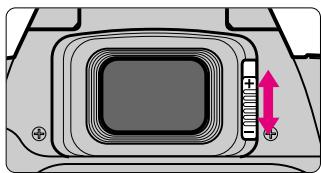
- Slide the dioptre adjustment lever while looking through the viewfinder until the focus brackets in the viewfinder appear sharp. The adjustable range of the finder dioptre is -1.5m^-1 to +1.0m^-1 . Nine optional eyepiece correction lenses provide viewfinder dioptre of -5.0m^-1 to +3.0m^-1 .
NOTE: Using the dioptrc adjustment lever
Since the dioptre adjustment lever is located next to the viewfinder, be careful not to poke your eyes with your finger or fingernail while sliding the lever.
Using the eyepiece cap or optional eyepiece correction lens
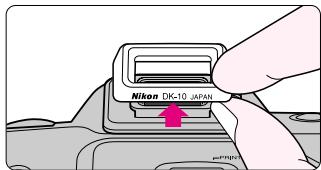
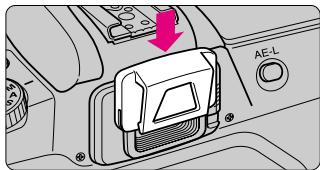
- To attach an eyepiece cap or optional eyepiece correction lens, remove the rubber eyecup and slide down the eyepiece cap or eyepiece correction lens. To reattach the rubber eyecup, make sure the "Nikon DK-10 JAPAN" stamp is at the bottom.
Two-Button Reset
- Two-Button Reset lets you instantly reset specified settings to their original default settings.
Press the and buttons simultaneously for more than 2 sec.
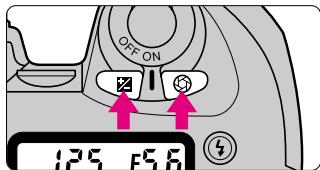
- The following functions are reset to their original settings:
Flexible Program:
Cancelled
Exposure Compensation:
Cancelled
Flash sync mode:
Slow Sync with exposure mode set to or normal sync with other exposure modes
Self-timer:
Cancelled
- See page 64 for the camera's default setting and available mode combinations.
- When the 2 and 3 buttons are pressed for less than 2 sec., automatically set film speed of loaded DX-coded film appears in the LCD panel. (Page 34.)
Flash Photography
Built-in Speedlight and Matrix Balanced Fill-Flash
This camera is equipped with built-in Speedlight that provides an angle of coverage for a 28mm lens with a guide number of 15 (ISO100, m).
Matrix Balanced Fill-Flash ensures proper exposure of the main subject and background, and controls adequate flash output to create natural-looking flash photography (with CPU lens).
In addition to shooting in dim light, the flash can be used in daylight to reduce shadows on the main subject or to put catchlights in your subject's eyes.
Four flash sync modes—Normal Sync, Red-Eye Reduction, Slow Sync and RedEye Reduction with Slow Sync—are available with this camera.
- When using a non-CPU lens, standard TTL flash is the only flash mode available. To ensure optimum performance, use of CPU lenses is recommended.
Flash shooting distance range
Flash shooting distance changes according to the film speed in use and aperture setting.
| ISO Film speed | 25 | 50 | 100 | 200 | 400 | 800 | Flash shooting distance range m |
| Guide number m | 8 | 11 | 15 | 21 | 30 | 42 | |
| Aperture value | — | — | 1.4 | 2 | 2.8 | 4 | 2-10.6 |
| — | 1.4 | 2 | 2.8 | 4 | 5.6 | 1.4-7.5 | |
| 1.4 | 2 | 2.8 | 4 | 5.6 | 8 | 1-5.3 | |
| 2 | 2.8 | 4 | 5.6 | 8 | 11 | 0.7-3.8 | |
| 2.8 | 4 | 5.6 | 8 | 11 | 16 | 0.6-2.7 | |
| 4 | 5.6 | 8 | 11 | 16 | 22 | 0.6-1.9 | |
| 5.6 | 8 | 11 | 16 | 22 | 32 | 0.6-1.3 | |
| 8 | 11 | 16 | 22 | 32 | — | 0.6-0.9 |
- The flash shooting distance range can also be calculated by dividing the guide number by the aperture value selected.
Example: when f/2.8 is selected with ISO 100 film using this camera's built-in Speedlight, the maximum flash shooting distance will be;
$$ \frac {1 5}{2 . 8} = \text {a p p r o x .} 5. 3 \mathrm {m} $$
Flash sync mode features
4: Red-Eye Reduction
The Red-Eye Reduction lamp lights for approx. 1 sec. before the flash fires to reduce the red-eye effect in photos of people or animals.
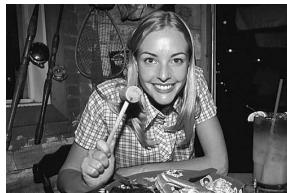
SLOW: Slow Sync
Normally, the camera's shutter speed is automatically set to 1/125 sec. with flash photography. But for shooting nighttime scenes, Slow Sync uses a slower shutter speed to bring out background details using all of the available light.
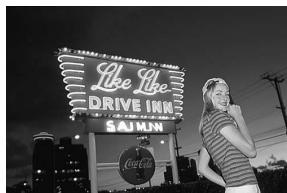
- Red-Eye Reduction and Slow Sync can be set simultaneously by selecting _SLOW . See page 60.
- Selectable flash sync modes depends on the exposure mode selected. See page 64 for the available combinations of flash sync modes and exposure modes.
NOTE: Flash Sync Modes
- When Red-Eye Reduction or Red-Eye Reduction with Slow Sync is set, RedEye Reduction lamp (page 2) lights for approx. 1 sec. before the flash fires. Do not move the camera or let the subject move until shutter is released.
- With some lenses, light from the Red-Eye Reduction lamp may not reach the subject's eyes. In some cases, red-eye effect may not be reduced effectively due to the location of main subject.
- With Slow Sync and Red-Eye Reduction with Slow Sync, keep the camera steady to prevent picture blur since the shutter speed is slow. Use of a tripod is recommended.
Flash Photography—continued
Using built-in Speedlight
1 Release the built-in Speedlight by pressing the Speedlight lock-release button, and set the flash sync mode by rotating the Command Dial while pressing 4 button.
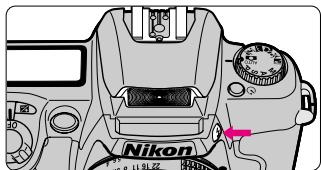
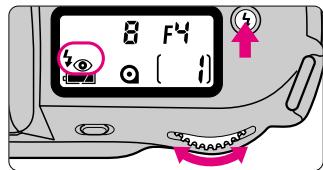
- Flash starts to charge when it is released and appears in the viewfinder when Speedlight is fully charged.
- (normal sync) disappears from the LCD panel when Normal Sync is set and button is released.
- Press down gently on the Speedlight to retract.
2 Set exposure mode and confirm shutter speed and aperture.
Available shutter speed and aperture in each exposure mode
| Exposure mode | Available shutter speed | Available aperture | Page |
| General-Purpose Program Auto-Multi Program Vari-Program | Automatically set to 1/125 sec.*1 | Automatically set | 39 |
| 40 | |||
| 45 | |||
| Shutter-Priority Auto | 1/125-30 sec.*2 | 41 | |
| Aperture-Priority Auto | Automatically set to 1/125 sec.*1 | Desired setting*3 | 42 |
| Manual | 1/125-30 sec.*2, Long Time Exposure | 43 |
1 Except when Slow Sync or Red-Eye Reduction is set in Auto-Multi Program, Night Scene Program (in Vari-Program) or Aperture-Priority Auto exposure mode. (1/125 sec. or slower shutter speed is selected.)
2 Shutter speed shifts automatically to 1/125 sec. when the shutter speed is set to 1/125 sec. or faster and the flash is fired (or attached optional Speedlight is turned on).
*3 Flash shooting distance range depends on the ISO film speed of film in use and aperture selected. In Aperture-Priority Auto or Manual exposure mode, set the aperture according to the flash shooting distance range table on page 58.
3 Confirm appears in viewfinder and make sure the subject is within the flash shooting distance range (page 58).
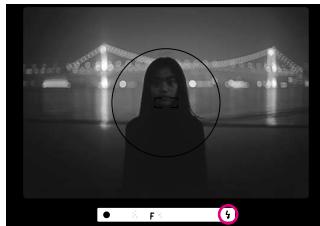
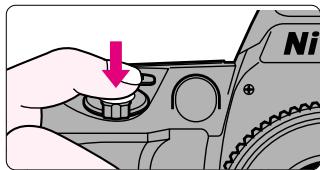
- 4 in viewfinder blinks approx. 3 sec. after full flash output. This may indicate underexposure has occurred. Check the focus distance, aperture or flash shooting distance range and shoot again.
- When the subject is dimly lit, the AF-Assist Illuminator automatically emits (page 36) to guide autofocus.
- In General-Purpose or Auto-Multi Program exposure mode, camera automatically controls maximum available aperture according to the film speed. See page 63.
Usable lenses with built-in Speedlight
28mm to 200mm CPU lenses and AF 300mm f/4 can be used with the built-in Speedlight. However, AF-S 17-35mm f/2.8, AF 18-35mm f/3.5-4.5 ED and AF 20-35mm f/2.8 cannot be used.
- Vignetting occurs at the edges of the frame resulting in underexposure with the following zoom lenses, which have limitations in usable focal length or shooting distance:
| Lens | Limitations |
| AF 24-50mm f/3.3-4.5 | 35mm or longer focal length. |
| AF 24-85mm f/2.8-4 | 50mm focal length at 0.7m or longer shooting distance or 70mm at 0.6m or longer. |
| AF 24-120mm f/3.5-5.6 | 35mm focal length at 1.5m or longer shooting distance or 50-70mm at 1m or longer. |
| AF-S 28-70mm f/2.8 ED | 70mm focal length at 1.2m or longer shooting distance. |
| AF 28-80mm f/3.5-5.6D | 28mm focal length at 1m or longer shooting distance. |
| AF 28-85mm f/3.5-4.5 | 35mm focal length at 1.5m or longer shooting distance. |
| AF 28-200mm f/3.5-5.6 | 35mm or longer focal length. |
| AF 35-70mm f/2.8 | 50mm or longer focal length. |
| AF Micro 70-180mm f/4.5-5.6 ED | 70mm focal length at 1.5m or longer shooting distance or 85mm at 1m or longer. |
| AF-S 80-200mm f/2.8 ED | 105mm or longer focal length (not usable at 105mm focal length when the shooting distance is 2m or less). |
- Do not set the zoom lens to Macro in wideangle and always remove the lens hood when using the built-in Speedlight.
Usable Optional Speedlights
■ Usable optional Speedlights and available flash modes are listed in the following table. (The built-in Speedlight and optional Speedlight cannot be used together.) Available modes are listed assuming a CPU lens is attached. (Non-CPU lenses are not recommended.)
| Flash mode Speedlight | Matrix Balanced Fill-Flash*1 | Non-TTL Auto Flash | Manual | Repeating Flash | Wireless Slave Flash |
| SB-28/28DX | ○ | ○ | ○ | ○ | — |
| SB-27 | ○ | ○ | ○ | — | — |
| SB-26 | ○ | ○ | ○ | ○ | ○ |
| SB-25, SB-24 | ○ | ○ | ○ | ○ | — |
| SB-29*2, SB-23, SB-21B*2 | ○ | — | ○ | — | — |
| SB-22, SB-22s, SB-20, SB-16B SB-15 | ○ | ○ | ○ | — | — |
| SB-11*3, SB-14*3 SB-140*3 | ○ | ○ | ○ | — | — |
1 When the exposure mode is set to Manual, the flash mode switches to Centre-Weighted Fill-Flash.
2 With SB-29 and SB-21B, autofocus can only be used when an AF Micro-Nikkor (60mm, 105mm, 200mm and 70-180mm) is attached.
*3 TTL Auto Flash is possible with TTL Remote Cord SC-23. In A or M exposure mode, attach SU-2 to SC-13 with SB-11 and SB-14 or attach SU-3 to SC-13, SC-11 or SC-15 to AS-15 with SB-140 in conjunction with SC-23.
- Ultraviolet and infrared photography can be performed only when SB-140 is set to M .
- See your Speedlight manual for details. If the camera groups are defined in the manual of the Speedlight with TTL auto flash, see the section for camera group IV.
Notes on using the optional Speedlight
- Flash sync speed is 1/125 sec. or slower when using an optional Speedlight.
Available film speeds for TTL Auto Flash are ISO 25 to ISO 800. - When the Red-Eye Reduction function is used, the Red-Eye Reduction lamp on the camera body (not on Speedlight unit) illuminates.
- The AF-Assist Illuminator on the Speedlight unit usually emits light. However, when a non-TTL Auto Flash or manual flash is selected, the AF-Assist Illuminator on the camera body lights up instead.
- Set the exposure mode to A or M when shooting with the Speedlight in mode other than TTL Auto Flash.
- In General-Purpose or Auto-Multi Program exposure mode, camera automatically controls maximum available aperture as follows in relation to the film speed.
| ISO film speed | 25 | 50 | 100 | 200 | 400 | 800 |
| Maximum available aperture (built-in Speedlight) | f/2 | f/2.4 | f/2.8 | f/3.3 | f/4 | f/4.8 |
| Maximum available aperture (optional Speedlight) | f/2.8 | f/3.3 | f/4 | f/4.8 | f/5.6 | f/6.7 |
- When film speed increases by one step, the maximum available aperture is stopped down by 1/2 f/stop. If you are using a lens with a maximum aperture smaller than that listed above, automatically controlled aperture range is from the lens' maximum to minimum aperture.
- Attach the optional Sync Terminal Adapter AS-15 when a sync terminal is needed.
- Use only Nikon Speedlights. Other units may damage the camera's electrical circuit due to incompatible voltage requirements (not compatible with 250V or higher), electric contact alignment or switch phase.
Available Mode Combinations
The following chart lists available modes when an AF Nikkor is attached (except IX-Nikkor, AF-S or AF-I lens).
| Exposure mode | AF mode | AF-Assist Illuminator | Flexible Program | Exposure compensation | Metering system+1 | Normal sync | Red-Eye Reduction | Red-Eye Reduction with Slow Sync | Slow Sync | |
| AUTO | Auto-Servo AF | ○ | — | — | Matrix | ◎ | ○ | — | — | |
| P | Auto-Servo AF | ○ | ○ | ○ | Matrix | ○ | ○ | ○ | ○ | |
| S | Auto-Servo AF | ○ | — | ○ | Matrix | ○ | ○ | — | — | |
| A | Auto-Servo AF | ○ | — | ○ | Matrix | ○ | ○ | ○ | ○ | |
| M*2 | Auto-Servo AF | ○ | — | ○ | Centre-Weighted | ○ | ○ | — | — | |
| X | Auto-Servo AF | ○ | — | — | Matrix | ◎ | ○ | — | — | |
| ■ | Auto-Servo AF | — | — | — | Matrix | ◎ | ○ | — | — | |
| ▲ | Auto-Servo AF | ○ | — | — | Matrix | ◎ | ○ | — | — | |
| × | Continuous Servo AF | — | — | — | Matrix | ◎ | ○ | — | — | |
| ■ | Auto-Servo AF | ○ | — | — | Matrix | — | — | ○ | ◎ | |
: Can be set.
: Automatically selected when the exposure mode is set. (Can be changed to another flash sync mode.)
—:Cannot be set.
1 When Auto Exposure Lock (page 49) is used, Centre-Weighted Metering is selected in any exposure mode.
2 Only Manual exposure mode can be used when a non-CPU lens is attached. Camera's exposure meter cannot be used and aperture cannot be set with camera's aperture button and Command Dial. (Select the aperture using the lens' aperture ring.) See "Lens Compatibility" on page 32.
- With built-in Speedlight, each flash sync mode is controlled with the Matrix Balanced Fill-Flash (page 58); however, flash sync mode changes to Centre-Weighted Fill-Flash with Manual exposure mode.
MISCELLANEOUS
The Nikon F60/F60D is a high-performance, precision instrument, designed to give you superior pictures. You'll want to take good care of your camera to ensure the best performance. Take time to review this section thoroughly, as doing so will add to your picture taking pleasure. We've also included information about optional accessories and a detailed section with technical specifications. Please read them carefully.
Optional Accessories
Soft Case
Two camera cases are available for this camera.
- CF-49: Camera body fits inside case with AF 28-80mm f/3.5-5.6D or AF 28-105mm f/3.5-4.5D or smaller lens attached.
- CF-50: Camera body fits inside case with AF 35-70mm f/2.8D or AF 70-300mm f/4-5.6D ED or smaller lens attached.
Straps
Nikon offers a variety of camera straps.
AN-4B (black), AN-4Y (yellow): Braid-type neckstrap
- AN-6Y (yellow), AN-6W (Burgundy): Wide braid-type neckstrap
AF Nikkor lens
Various AF Nikkor lenses, from 14mm to 600mm telephoto, are available. Most AF Nikkor lenses can be used with this camera.
Filters
Nikon offers a range of filters including NC filter for lens protection, and Soft Filter Soft 1, 2 or Circular Polarizing Filter C-PL for special effects.
Nikon Speedlight
Flash photography with a wider range or greater focus distance is possible since the optional Speedlights offer larger guide numbers than the built-in Speedlight. For usable optional Speedlight and available flash modes, see page 62.
Camera Care


Do NOT ever use organic solvents like thinner or benzene. It causes fire or health hazard. It damages the camera.
- Cleaning camera body
Use a blower brush to remove dirt and dust from the camera body and clean it with a soft, clean cloth. After using the camera near sea water, wipe the camera body with a soft, clean cloth slightly moistened with pure water to remove salt, and then dry it with a dry cloth.
- Cleaning mirror and lens
Use a blower brush to remove dirt and dust from the mirror or lens. To remove fingerprints or smudges from the lens' surface, use a soft, clean cotton cloth or lens tissue moistened with ethanol (alcohol) or lens cleaner.
- Do not subject the camera or lens to strong vibration or shock
Do not drop the camera body and lens or hit them against a hard surface as this may damage their precision mechanism.
- Do not touch the shutter curtains
The shutter is made of very thin curtains. Do not hold, poke, or blow strongly with a blower brush. Doing so may scratch, deform or tear the shutter curtains.
- Avoid strong electric or magnetic fields
The camera may not function properly in strong electric or magnetic fields such as near a transmitter tower. Avoid using the camera in such locations.
- Store the camera in a cool, dry place
Store the camera in a cool, dry place to prevent mold and mildew. Keep it away from naphthalene or camphor (moth repellent), electrical appliances that generate magnetic fields or an excessively hot place such as inside a vehicle during the summer or near a heater.
- Avoid extreme temperature change
An extreme temperature change can cause condensation inside the camera body. When taking the camera to a very hot place from a very cold place or vice versa, place it inside an airtight container such as a plastic bag and leave it inside a while to expose the camera gradually to the temperature change.
- Remove the batteries and store the camera with a desiccant
If you do not intend to use the camera for a long time, remove the batteries to protect the camera from battery leakage.
- In a humid environment, store the camera inside a plastic bag with a desiccant to keep out dust, moisture and salt. Note, however, that storing leather cases in vinyl bags may cause the leather to deteriorate. Keep the batteries in a cool, dry place away from heat or humidity.
- Change the desiccant occasionally since it does not absorb moisture effectively after using it for a while.
- Leaving the camera unused for a long period of time may cause mold to grow and result in malfunction. Turn the power on and release the shutter a few times once per month.
- To maintain the built-in Speedlight in peak condition, fire it a few times every month. This will enable you to use the flash for many years.
Notes on Batteries


Keep batteries out of children's reach. If someone accidentally swallows batteries, call a doctor immediately.
- Use two CR123A or DL123A lithium batteries
Use two CR123A or DL123A lithium batteries.
-
Change the batteries well before the end of their life and prepare spare batteries before important photographic occasions.
-
Turn the camera power off when changing batteries
Turn the camera power off before changing batteries and insert the batteries with and ends positioned correctly.
- Stains on the battery poles may cause lack of contact. Wipe the batteries well with a dry cloth before installing.
- Use fresh batteries at low temperatures
Battery power diminishes at extremely low temperatures and the camera may not function properly with old batteries. Use a fresh set of batteries at low temperatures, keep spare batteries warm, and use them alternately.
-
Film advance speed lowers and number of usable film roll becomes less at low temperatures. However, battery power may recover when the temperature returns to normal.
-
Do not throw batteries into a fire or short circuit batteries
Do not throw batteries into a fire. Do not short, disassemble, heat or charge batteries.
Nikon cannot be held responsible for any malfunction resulting from the use of the camera other than as specified in this manual.
Troubleshooting
| LCD panel | Viewfinder | Cause | Remedy | Page |
| FEE blinks | FEE blinks | CPU Nikkor lens (other than G-type) is not set to its minimum aperture. | Set lens to minimum aperture. | 16 |
| appears | — | Batteries are nearing exhaustion. | Have fresh ones ready. | 15 |
| blinks | — | Batteries are just about exhausted. | Turn the power off and replace batteries with new ones. | 15 |
| F-- blinks (F-- appears without blinking in M mode) | F-- blinks (F-- appears without blinking in M mode) | Non-CPU lens is attached or lens is not attached. | Attach CPU lens (except IX-Nikkor) correctly. (Or set the exposure mode to Manual.) | 16 |
| Err and @ blink and E appears | Err blinks | Film is not correctly positioned. | Reload film. | 19 |
| @ blinks and E appears | — | Non-DX-coded film is loaded. | Load DX-coded film. | 19 |
| @ blinks | — | An exposed film remains in the film cartridge chamber. | Remove film cartridge. | 27 |
| Err and @ blink | — | Battery power is low or temperature is too low to rewind film. | Turn the power off and replace batteries with new ones. Then, turn the power on and rewind film again. | 35 |
In certain cases, due to static electricity or poorly loaded batteries, the F60/F60D camera's microcomputer may turn the camera off, even with fresh properly installed batteries. For the same reason, film may not advance properly. In each of these cases, to resume operation, simply turn the power off, then turn it on again, or remove batteries and install them again.
| LCD panel | Viewfinder | Cause | Remedy | Page |
| — | ●blinks | ●Autofocus is not possible. | ●Focus manually. | 37 |
| H1appears | H1appears | ●Overexposure possible. | ●In S mode, select faster shutter speed.●In A mode, select smaller aperture (larger f-number).●In other exposure modes, use ND filter. | 414328 |
| L0appears | L0appears | ●Underexposure possible. | ●In S mode, select slower shutter speed.●In A mode, select larger aperture (smaller f-number).●In other exposure modes, use Speedlight. | 414328 |
| -- blinks | -- blinks | ●Shutter speed is set to Long Time Exposure in S mode. | ●Set the shutter speed or switch to M mode. | 41 |
| — | ★blinks | ●Speedlight recommended. | ●Use built-in Speedlight. | 28 |
| — | ★blinks for 3 sec. after flash | ●Flash has fired at full output and underexposure may have occurred. | ●Shoot again after confirming focus distance, aperture or flash shooting distance range. | 61 |
| Err and ◆ blink | Err and ◆ blink | ●In exposure mode other than A or M, flash mode selector on the optional Speedlight is not set to ◆. | ●Set the Speedlight's flash mode selector to ◆ or switch exposure mode to A or M. | 63 |
Specifications
| Type of camera | Integral-motor autofocus 35mm single-lens reflex |
| Exposure modes | AUTO: General-Purpose Program P: Auto-Multi Program (Flexible Program possible) S: Shutter-Priority Auto A: Aperture-Priority Auto M: Manual Vari-Program (♀: Portrait,♂: Landscape,♀♀: Close-Up,♂: Sport,night Scene) |
| Picture format | 24 x 36mm (standard 35mm film format) |
| Lens mount | Nikon F mount |
| Lens | Nikkor and Nikon lenses having Nikon F mount* * With limitation; see chart on p. 32. |
| Viewfinder | Fixed eyelevel pentaprism high-eyepoint type |
| Focusing screen | Clear Matte Screen II (with focus frame) |
| Viewfinder frame coverage | Approx. 90% |
| Finder magnification | Approx. 0.69X to 0.74X with 50mm lens set at infinity |
| Dioptré adjustment | -1.5m-1to +1.0m-1 |
| Viewfinder information | Focus indication (in-focus indication and AF impossible warning), FEE warning, ER-R warning, F-- warning, exposure value (shutter speed, aperture), exposure warning, electronic analogue display, exposure compensation, focus brackets, Centre-Weighted Metering area, flash ready-light (charged indication, full output warning and flash recommended) |
| Autofocus | • TTL phase detection AF system with AF-Assist Illuminator • Activated by lightly pressing the shutter release button • Detection range: EV-1 to EV 19 (at ISO 100, normal temperature) |
| Lens servo | AF: Auto-Servo AF : Camera automatically chooses Single Servo AF or Continuous Servo AF operation according to the subject status, i.e. stationary or moving (including directional information). • Single Servo AF: Once focused on a subject, focus is locked • Continuous Servo AF: The camera continuously focuses on a moving subject M: Manual |
| Focus lock | Focus is locked when shutter release button is lightly pressed and subject is in focus in Single Servo AF |
| Exposure metering | 3D Matrix: with D- or G-type AF Nikkor Six-segment Matrix: with non-D/G-type AF Nikkor (except AF lens for F3AF and IX-Nikkor), AI-P Nikkor Centre-Weighted: in Manual exposure mode or with Auto Exposure Lock |
| Metering range | EV 1 to EV 20 at ISO 100, 50mm f/1.4 lens |
| Film speed setting | Automatically set to ISO speed of DX-coded film used; film speed range: ISO 25 to 5000 |
| Exposure meter | Activated by turning on power, lightly pressing shutter release button; stays on for 5 sec. after removing finger from button, or 2 sec. after releasing shutter |
| Exposure compensation | With exposure compensation button; ±3 EV range, in 1/2 steps (in P, S, A and M mode) |
| Auto exposure lock | By pressing AE-L (auto exposure lock) button while exposure meter is activated (Centre-Weighted Metering is automatically selected.) |
| Shutter | Electromagnetically controlled vertical-travel focal-plane shutter |
| Shutter speeds | • In Auto, P, A, Z, R, S, T: 30 to 1/2000 sec. automatically set • In S, M: 30 to 1/2000 sec., Long Time Exposure (only be selected in M) |
| Self-timer | Electronically controlled; timer duration: 10 sec.; cancelable |
| Sync contact | • X-contact only (semiconductor-type); flash synchronisation up to 1/125 sec. • Automatically set to 1/125 sec. when shutter speed is set to 1/2000 to 1/180 sec. |
Specifications—continued
| Built-in Speedlight | Activated by pressing Speedlight lock-release button, guide number: 15 (at ISO 100, m); flash coverage: 28mm or longer lens; film speed range: ISO 25 to ISO 800 (same range as optional Speedlight) |
| Flash control | Controlled by TTL Sensor • Matrix Balanced Fill-Flash: possible with CPU lens and built-in Speedlight or optional Speedlight • Centre-Weighted Fill-Flash: in M exposure mode, Centre-Weighted Metering • Standard TTL: non-CPU lens |
| Flash sync mode | Normal, Red-Eye Reduction, Red-Eye Reduction with Slow Sync, Slow Sync |
| Flash recommended indication | Blinks in low brightness or when flash is recommended |
| Ready light | • Flash fully charged: lights (minimum charging time: approx. 4 sec.) • Full output warning: blinks (3 sec. after flash) |
| Accessory shoe | Standard ISO-type hot-shoe contact; ready-light contact, TTL flash contact, monitor contact; mount receptacle for Posi-Mount system |
| Film loading | Film automatically advances to first frame when camera back is closed |
| Film advance | Film automatically advances one frame when shutter is released; in exposure mode, shots are taken as long as shutter release button is depressed; shooting speed: approx. 1 fps |
| Frame counter | Digital display in LCD panel; additive type; counts back while film is being rewound |
| Film rewind | Film automatically starts to rewind at the end of the film roll; rewind speed: approx. 17 sec. with 36-exposure film or approx. 14 sec. with 24-exposure film; mid-roll rewind possible |
| Number of 36-exposure (24-exposure) film rolls per set of fresh batteries | At 20°C | At -10°C | |
| Without flash | Approx. 65 (85) | Approx. 38 (50) | |
| With flash for half of all exposures | Approx. 16 (21) | Approx. 10 (13) | |
| * For autofocus operation using an AF Zoom-Nikkor 35-80mm f/4-5.6D lens, covering the full range from infinity (∞) to the closest distance and back to infinity (∞) before each shot, with a shutter speed of 1/125 sec. or faster. | |||
| LCD panel information | Shutter speed, aperture, flash sync mode, film speed, exposure compensation, frame counter/compensation value, F&E warning, E-r warning, F-- warning, film loading, self-timer, battery power and Flexible Program | ||
| Date/time imprint function (For F60D only) | Display mode: Year/Month/Day, Day/Hour/Minute, No Imprint, Month/Day/Year and Day/Month/Year Built-in clock: 24-hour type with timing accuracy within ±90 seconds a month; leap year adjustment until 2019 Usable film: ISO 32 to 3200 DX-coded film Power source: One 3V lithium battery (CR2025 type) Battery life: Approx. 3 years* * May vary depending on extent of imprint use, film speed in use, etc. | ||
| Camera back | Hinged back with film cartridge confirmation window; unchangeable | ||
| Power source | Two CR123A or DL123A-type lithium batteries | ||
| Battery power confirmation | for sufficient power; indicates batteries are nearing exhaustion; blinking indicates batteries are just about exhausted; no indication/ symbol appears when batteries are completely exhausted or improperly installed | ||
| Tripod socket | 1/4 (diameter, JIS standard) | ||
| Dimensions (WxHxD) | F60: Approx. 148.5 x 96 x 69mm F60D: Approx. 148.5 x 96 x 70mm | ||
| Weight (without batteries) | F60: Approx. 575g F60D: Approx. 585g | ||
All specifications apply when fresh CR123A-type batteries are used at normal temperature (20^) .
Specifications and design are subject to change without notice.
A
AF-Assist Illuminator...25,36-37,63-64
Aperture-Priority Auto exposure mode 23,42,64
Auto Exposure Lock. 49
Autofocus. 20, 33, 36
Auto-Multi Program. 22, 40, 64
Auto-Servo AF. 36
B
Built-in Speedlight. 28, 58, 60
C
Centre-Weighted Metering. 30, 33, 48, 64
Close-Up Program. 23, 46, 64
Continuous Servo AF. 36
CPU Nikkor lens. 32, 58, 62, 70
D
Depth of field. 30, 42
Dioptre adjustment. 56
Distance information 48
D-type Nikkor lens. 16-17, 32-33
DX-coded film 19,34
E
Exposure compensation 50, 64
Exposure metering system ....30, 48, 64
Exposure mode.....22-23, 33, 39-44, 64
F
Flash shooting distance range.....29, 58
Flash sync mode. 58-60
Flexible Program 40,64
Focus Lock. 20, 25, 38
Focus mode. 20, 36-37
G
General-Purpose Program.....22, 39, 64
G-type Nikkor lens 16-17,32-33
Guide number 58
L
Landscape Program. 23, 46, 64
Long Time Exposure. 43-44
M
Manual exposure mode 33,43,64
Manual focus. 33, 37, 71
Manual focus with electronic rangefinder 33, 37
Matrix Balanced Fill-Flash. 58, 62
Matrix Metering. 30, 33, 48, 64
Mid-roll rewind 34
Minimum aperture. 16, 70
N
Night Scene Program. 23, 47, 64
Normal Sync flash. 29, 58, 60, 64
P
Portrait Program. 23, 46, 64
R
Red-Eye Reduction. 59, 64
Red-Eye Reduction with Slow Sync .59,64
s
Self-timer. 55
Shutter-Priority Auto exposure mode 22,41,64
Single Servo AF. 36
Slow Sync flash 58-59, 64
Sport Program. 23, 47,64
Standard TTL flash. 58
Sync shutter speed 60, 63
T
3D Matrix Metering 30, 33, 48
Two-Button Reset. 57
V
Vari-Program 45-47
No reproduction in any form of this manual, in whole or in part (except for brief quotation in critical articles or reviews), may be made without written authorisation from NIKON CORPORATION.
Nikon
NIKON CORPORATION
FUJI BLDG., 2-3, MARUNOUCHI 3-CHOME,