MCF8723GR - Fridge Atosa - Free user manual and instructions
Find the device manual for free MCF8723GR Atosa in PDF.


| Product Type | Reach-In Refrigerator |
| Model | MCF8723GR |
| Brand | Atosa |
| Overall Dimensions (W x D x H) | 30 x 30 x 55 inches |
| Capacity | 23 cubic feet |
| Weight | 210 lbs |
| Power Supply | 115V / 60Hz / 15A |
| Energy Consumption | 600 kWh/year (est.) |
| Refrigerant | R-290 (Propane) |
| Temperature Range | 33°F to 38°F |
| Control Type | Digital thermostat with LED display |
| Door Type | Solid self-closing with recessed handle |
| Shelving | 4 adjustable wire shelves |
| Interior Lighting | LED interior light |
| Condenser | Forced air, rear mounted |
| Defrost | Automatic (hot gas) |
| Castors | 4 swivel castors with brakes |
| Construction | Stainless steel exterior and interior |
| Certifications | ETL, NSF-7, cETLus |
| Spare Parts | Thermostat, door gasket, fan motor, shelf clips available |
| Repairability Index | 7.0 / 10 (based on component accessibility) |
| Cleaning | Wipe with mild detergent; clean condenser coils quarterly |
| Warranty | 1 year parts and labor, 5 years compressor |
Frequently Asked Questions - MCF8723GR Atosa
User questions about MCF8723GR Atosa
0 question about this device. Answer the ones you know or ask your own.
Ask a new question about this device
Download the instructions for your Fridge in PDF format for free! Find your manual MCF8723GR - Atosa and take your electronic device back in hand. On this page are published all the documents necessary for the use of your device. MCF8723GR by Atosa.
USER MANUAL MCF8723GR Atosa
In order to provide the best service, ATOSA
requests that please register your warranty online
at www.atosausa.com
For any service issues, please kindly contact us at
Email:warranty@atosausa.com
or
Toll Free:+1-800-683-8660
Please clean the filter frequently!
Please do not overload the unit!
INSTRUCTION MANUAL DISPLAY FRIDGE
natural_image
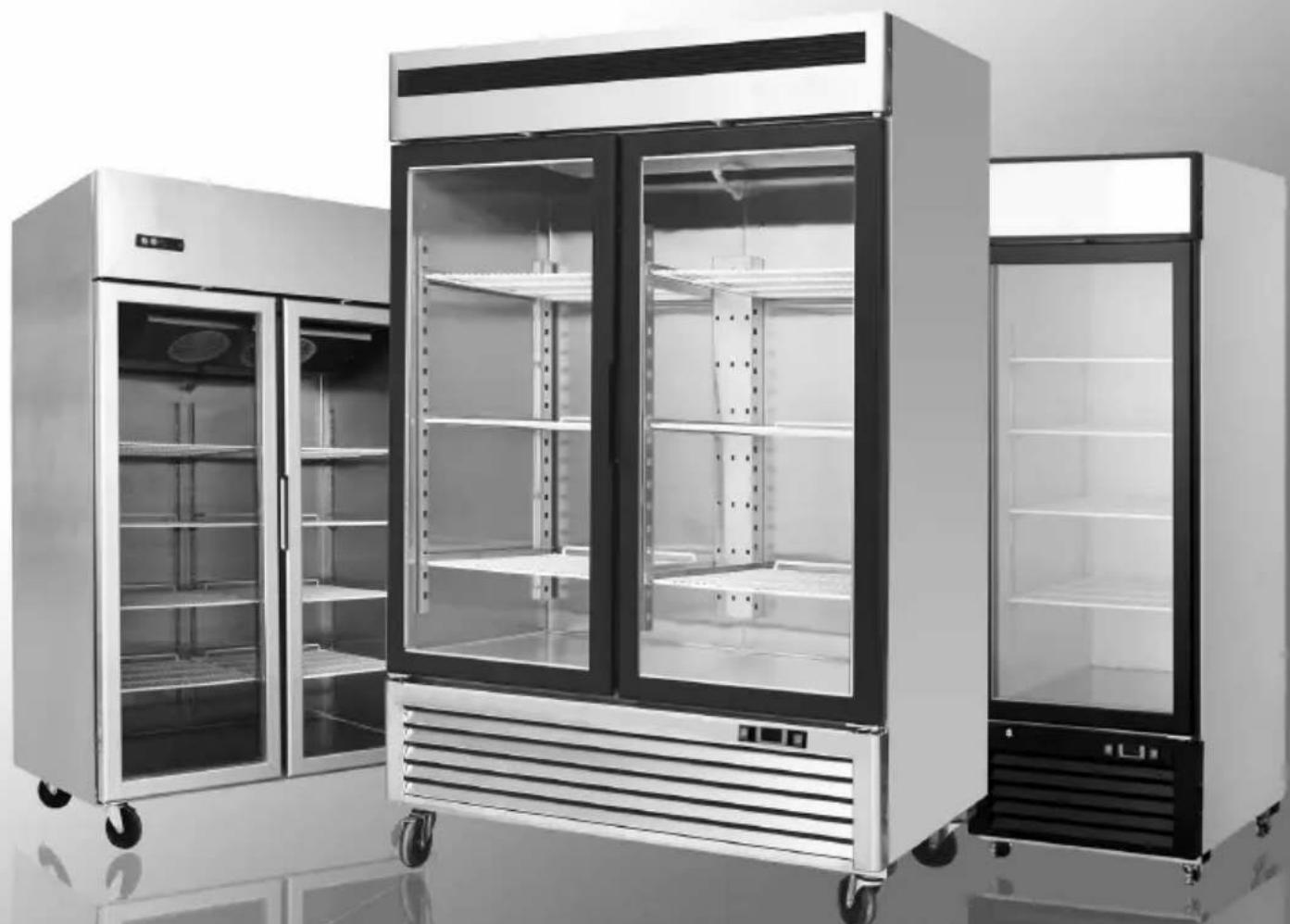
Exterior view of a modern stainless steel multi-decker refrigerator with closed doors and wheels (no visible text or symbols)Please read the user's manual before you use this product. If you request unnecessary services, you may waste money. Thus, fix simple troubles by yourself which you have found.
Content:
- Terms and conditions....2
2.Preface....6 - Use of the equipment....9
- Technical features....9
5.Operation....9
6.Control unit....10 - Handling....10
- Installation procedure....11
- Connecting to the main power supply......11
- Maintenance instructions....12
Cleaning....12
Cleaning the refrigerator surface....12
Cleaning the inside of the refrigerator....13
Cleaning the condenser....13
11.Troubleshooting....13
12.Technical service....13
13.Configuration Sketch Map....14
Operating Instruction....14
Technical Parameters....19
Official Approval And Rules....22
1 TERMS AND CONDITIONS:
Refrigeration
2 YEAR WARRANTY
All claims for parts or labor must be made directly through Atosa. All claims must include: model number of the unit, the serial number, proof of purchase, date of installation, and all pertinent information supporting the alleged defect. In case of compressor replacement under warranty, either compressor or compressor tag must be returned to Atosa along with above listed information. Failure to comply with warranty policies will result in voiding claims.
Two Year Parts & Labor Warranty
Atosa warrants all new refrigerated components, such as the cabinet and all parts, to be free from defects in materials or workmanship.
Atosa 's obligation under this warranty is limited to a period of two (2) years from the date of original installation or 27 months after shipment date from Atosa, whichever occurs first. All parts covered under this warranty that are defective within two (2) years of original installation or twenty seven (27) months after shipment date from manufacturer, whichever occurs first, are limited to repair or replacement (including labor charges, of defective parts or assemblies). The labor warranty shall include standard straight time labor charges only and reasonable travel time, as determined by Atosa.
Additional Three Year Compressor Warranty
In addition to the two (2) year warranty stated above, Atosa warrants its sealed compressor to be free from defects in both material and workman ship under normal and proper use and maintenance service for a period of three (3) additional years from the date of original installation, but not to exceed five (5) years. Compressors that have been determined to be defective from Atosa within this extended period will be either repaired or replaced with a compressor or compressor parts of similar design and capacity according to Atosa ‘s discretion. The three (3) year extended compressor warranty applies only to sealed parts of the compressor and does not apply to any other parts or components. This includes, the cabinet, paint finish, temperature control, refrigerant, metering device, motor starting equipment, fan assembly, and other electrical components, etc.
R290 Compressor Warranty
The five-year compressor warranty detailed above will be void if the following procedure is not carefully adhered to:
- This system contains R290 refrigerant and lubricant. The lubricant has rapid moisture absorbing qualities.
- Drier replacement is very important and must be changed when a system is opened for servicing.
- Micron level vacuums must be achieved to insure low moisture levels in the system.
- Compressor must be obtained through Atosa, unless otherwise specified in writing, through Atosa's warranty department.
What is Not Covered by This Warranty
Atosa 's sole obligation under this warranty is limited to either repair or replacement of parts, subject to the additional limitations below. This warranty neither assumes nor authorizes any person to assume obligations other than those expressly covered by this warranty.
NO CONSEQUENTIAL DAMAGES: ATOSA IS NOT RESPONSIBLE FOR ECONOMIC LOSS; PROFIT LOSS; OR SPECIAL,INDIRECT, OR CONSEQUENTIAL DAMAGES, INCLUDING WITHOUT LIMITATION, LOSSES, OR DAMAGES ARISING FROMFOOD OR PRODUCT SPOILAGE, REGARDLESS OF WHETHER OR NOT THEY RESULT FROM REFRIGERATION FAILURE.
WARRANTY IS NOT TRANSFERABLE: This warranty is not assignable and applies only in favor of the original purchaser/user to whom delivered. ANY SUCH ASSIGNMENT OR TRANSFER SHALL VOID THE WARRANTIES HEREIN AND SHALL VOID ALL WARRANTIES, EXPRESS OR IMPLIED, INCLUDING ANY WARRANTY OF MERCHANTABILITY OR LABOR COVERAGE FORCOMPONENT FAILURE OR OTHER THE WARRANTY PACKET PROVIDED WITH THE UNIT.
ALTERATION, NEGLECT, ABUSE, MISUSE, ACCIDENT, DAMAGE DURING TRANSIT OR INSTALLATION, FIRE, FOOD, OR ACTSOF GOD: Atosa is not responsible for the repair or replacement of any parts that are determined to have been subjected afterthe date of manufacture to alteration, neglect, abuse, misuse, accident, damage during transit or installation, fire, flood, or act of God.
IMPROPER ELECTRICAL CONNECTIONS: Atosa IS NOT
RESPONSIBLE FOR THE REPAIR OR REPLACEMENT OF FAILED OR DAMAGED COMPONENTS RESULTING FROM ELECTRICAL POWER FAILURE, THE USE OF EXTENSION CORDS, LOW VOLTAGE, OR VOLTAGE DROPS TO THE UNIT. THE TWO (2) YEAR PARTS & LABOR WARRANTY AND THE ADDITIONAL THREE (3) YEAR COM-PRESSOR WARRANTY ARE AS DESCRIBED ABOVE. THESE WARRANTIES ARE EXCLUSIVE AND IN LIEU OF ALL OTHER WARRANTIES, INCLUDING IMPLIED WARRANTY AND MERCHANTABILITY OR FITNESS FOR A PARTICULAR PURPOSE. THERE ARE NO WARRANTIES WHICH EXTEND BEYOND THE DESCRIPTION ON THE FACE HEREOF.
Outside U.S. and Canada: This warranty does not apply to areas outside the continent of the United States. Atosa is not responsible for any warranty claims made on products sold or used in such areas.*In some cases, a 25% restocking fee may be charged to a buyer for returned items.*Atosa may at any time modify our equipment in order to provide and insure a superior product. Change is sometimes necessary to keep up with today's high standards in our industry. Atosa reserves the final interpretation of all public materials.
2. Preface
Please read instructions before using this appliance.
IMPORTANT SAFETY INSTRUCTION
▲ To reduce the risk of fire, electric shock, or injury to persons when using your product, basic safety precautions should be followed, including the following.
▲ This appliance must be properly installed and located in accordance with the Installation Instruction before it is used.
▲ Before the appliance is plugged in, ensure that the rated voltage corresponds to the voltage of the electrical system in your home. The power plug should have its own independent socket. Using adapters may cause overheating or burning.
▲ This appliance can be used by children aged from 8 years and above and persons with reduced physical, sensory or mental capabilities or lack of experience and knowledge if they have been given supervision or instruction concerning use of the appliance in a safe way and understand the hazards involved.
▲ Children shall not play with the appliance.
▲ Cleaning and user maintenance shall not be made by children without supervision.
▲ If the supply cord is damaged, it must be replaced by the manufacturer or its service agent or a similarly qualified person in order to avoid a hazard.
▲ Connect to properly grounded outlets only. Avoid the use of extension cords. Do not run cord under carpeting, runners or the like. Arrange cord away from traffic area and where it will not create a tripping hazard.
▲ Always unplug appliance when not in use and before cleaning, adjusting or maintaining this machine. To disconnect appliance, turn switch off and remove plug from power source.
▲ Do not disconnect by pulling on the cord. Always disconnect by grasping and pulling on the plug top.
▲ Do not pull out the cord or touch the power plug with wet hands. Clean water or dust from the power plug and insert it with the ends of the pins securely connected.
▲ Do not use outdoors.
▲ Do not splash water on the appliance. It may cause a malfunction or electric shock.
▲ Do not disassemble, repair or alter the appliance. It may cause fire or abnormal operations, which may lead to injury.
▲ After your fridge-freezer is in operation, do not touch the cold surfaces in the freezer compartment, particularly when hands are damp or wet. Skin may adhere to these extremely cold surfaces.
▲ Never place glass products in the freezer because they may be broken when their inner contents are frozen.
▲ The refrigerant and insulation blowing gas used in the appliance require special disposal procedures. When disposal, please consult with service agent or a similarly qualified person.
▲ Do not store explosive substances such as aerosol cans with a flammable propellant in this appliance.
▲ WARNING: Keep clear of obstruction all ventilation openings in the appliance enclosure or in the structure for building-in.
▲ WARNING: Do not use mechanical devices or other means to accelerate the defrosting process, other than those recommended by the manufacturer.
▲ WARNING: Do not damage the refrigerant circuit.
▲ WARNING: Do not use electrical appliances inside the food storage compartments of the appliance, unless they are of the type recommended by the manufacturer.

text_image
Warning sign depicting a flame symbol in a triangular frame, indicating hazard or hazard status.Warning: Risk of fire / flammable materials
CAUTION: RISK OF FIRE AND EXPLOSION WITH FLAMMABLE REFRIGERANT R290.
▲ If you need the electronic version instruction manual, please ask the manufacturer or its service agent.
▲ Max. Load of shelf is 176 LBS.
This instruction manual provides all the necessary information regarding:
▲ use of the refrigerator
▲ technical specifications
▲ installation and handling
▲ operator procedures and instructions
▲ maintenance operation
The manual is to be considered an integral part of the refrigerator and should be stored in a safe place for father consult to permit a good working life of the refrigerator.
The appliance is intended for commercial use only.
■ Component parts shall be replaced with like components and that servicing shall be done by factory authorized service personnel.
The manufacturer cannot be held liable in the following cases:
■ improper installation (not in accordance with the guidelines indicated herein)
■ misuse of the refrigerator
■ power supply defects
■ improper or inadequate maintenance
■ unauthorised modification or tampering
■ use of non-original spare parts
■ partial or total failure to comply with the instructions
All electrical equipment can be hazardous to health. Current standards and legal requirements must be complied with during the installation and use of any equipment.
3. Use of the equipment
The refrigerator are for preserving fresh perishable foodstuffs, with an in-built refrigerated unit.
Do not utilise the equipment to store medical supplies.
The optimum operational ambient temperatures are between +10°C / +40°C.
4. Technical features
The refrigerator is a ventilated system, the evaporator is in a separate insulated box on the top. All the materials used in the manufacture of this unit are guaranteed to be suitable for use with foodstuffs. The gases used in produces is R290. The refrigerating circuit are in compliance with the current normative.
5. Operation
The gas in the refrigerating circuit is in the first time compressed, liquefied and then evaporated in the ventilated evaporator, situated on the top of the container.
This cycle involves the absorption of heath from the air in the refrigerator compartment and the reason is cooled. The heat produced is then dissipated to the outside environment by a condenser unit located on the top of the refrigerator.
6. Control unit
The refrigerator is command from a "digital control unit" and a "main switch pilot light" in the top panel of the refrigerator.
The "main switch pilot light" is for turning on the power supply.
The red pilot light comes on to indicate that the unit is connected to the main electricity and to start work.
The red pilot light comes off to indicate that the unit is disconnected and don't work. The "digital control unit" is for the regulation of all parameters to provide the correct working of the refrigerator. Please consult all parameters in the attachment manual of the "digital control unit".
This manual is part of the instruction manual and is very important in case of service.
Applied refrigerant belong to non-flammable refrigerant.
7. Handling
The refrigerator arrive in PET film and packed in cardboard box on a wood pallet.

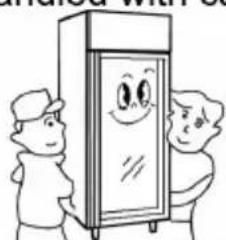
The refrigerator must be transported and handled with care to avoid posing a hazard to persons or property.
Never place a refrigerator with an in-built refrigerated unit on its side or turn it upside
natural_image
Cartoon illustration of two people standing beside a smiling refrigerator (no text or symbols)down as this may damage or impair operation of the refrigerated unit. We can not held liable for any damage or defects arising directly or indirectly from improper handling of the equipment or non-compliance with the safeguards illustrated above.
8. Installation procedure
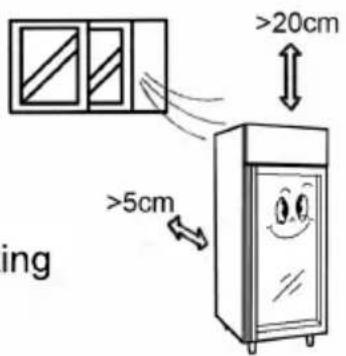
▲ Place the refrigerator in the coolest and best ventilated part of the room. Don't install the refrigerator in the near of heat and direct sunlight sources.
▲Remove the straps securing the cardboard packing
Remove the cardboard. Covering
Remove the PET protection film
▲ Clean the refrigerator with mild detergent and then dry it with a soft cloth.
9. Connecting to the main power supply

This operation must be carried out by professionally and qualified persons.
The refrigerator are supplied complete with a power supply cable for the connection to the main power supply. A thermomagnetic circuit breaker (not supplied) must be installed between the mains power point and the power supply cable of the refrigerator.
text_image
ing >5cm >20cm
natural_image
Cartoon illustration of a smiling refrigerator with arms and legs, showing a sad face (no text or symbols)
text_image
NOBefore proceeding make sure that:
▲ the mains voltage corresponds to the voltage on the refrigerator 115V/60Hz/1Ph; to ensure proper operation it is essential for the power supply voltage to come within a range of +/- 6% of the unit's rated voltage

text_image
on 115V▲ the electric system to which the refrigerator is sized to cater for the rated electric output of the buffet unit being installed
▲ the electronic system to which the refrigerator is connected is made in compliance with current standard requirements
▲ the electric connections and the installation of the thermomagnetic circuit breaker have been done by qualified person.
Connecting steps:
▲ Install a thermomagnetic circuit breaker suited to the rated output of the unit being installed
▲ Connect the refrigerator unit to the thermomagnetic circuit breaker outlet
▲ Check that the refrigerator is in order as demonstrated by the pilot light incorporated in the main switch coming on
10. Maintenance instructions
The smooth operation and life of the equipment are mainly determined by correct and regular maintenance
Cleaning:
Regular cleaning of the refrigerator unit is strongly recommended each month. Please follow the instructions below.

Disconnect the refrigerator power supply cable from the mains prior to carrying out any type of cleaning operation.
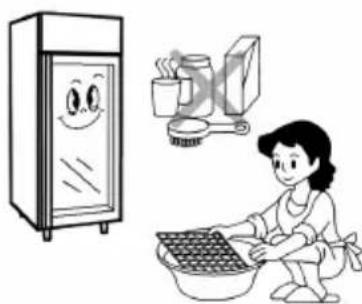
Cleaning the refrigerator surface:
Clean the refrigerator with mild detergent and then dry it with a soft cloth. Do not use abrasive detergents!
natural_image
Illustration of a kitchen scene with a smiling refrigerator, a person washing dishes, and a stove (no text or symbols)Cleaning the inside of the refrigerator:
Clean the inside area min. each month with a detergent suitable for use with foodstuffs.
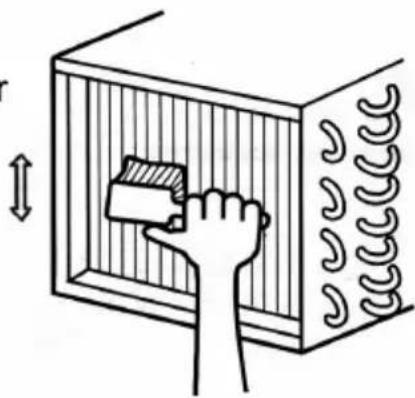
Cleaning the condenser:
For an efficient operation of the refrigerator it is advisable to clean the condenser regularly approx. every 4 months with a dry brush or vacuum cleaner.
natural_image
Simple line drawing of a hand placing a block into a rectangular container with coiled tubing (no text or symbols)11. Troubleshooting
Refrigerator stops working (light off):
☆ Power supply failure
▲ Remedies:
☆ Check that the plug is inserted properly in the socket
☆ Check that the switch on/off
☆ Check that the mains voltage powers the plug
Refrigerator temperature go up:
☆ Unit to near to a heat source
☆ Condenser dirty or close
▲ Remedies:
☆ Move the counter or the heat source further away
☆ Clean the condenser
When replace the lamp, please turn off the power, and remove the screw of the lampshade with a screwdriver and replace the broken bulb with a new one which applies the same electrical parameter.
12. Technical service
For technical service please contact the dealer technical department and give him the serial n°, and the date of buy.
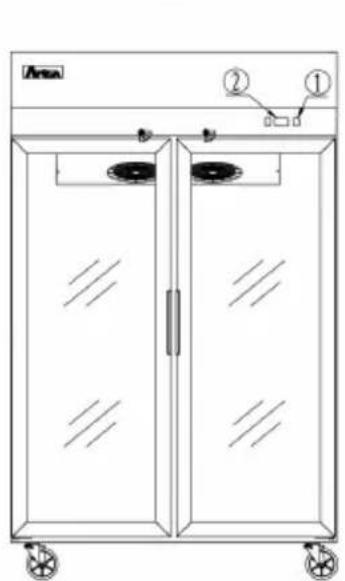
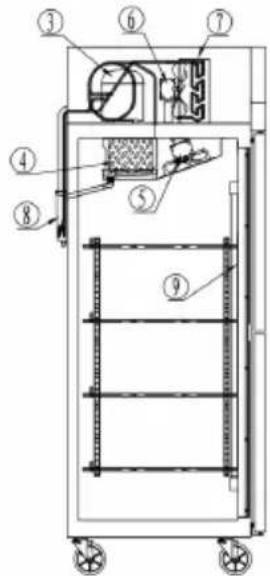
13. Configuration Sketch Map
Top Mount Serise Reach-Ins
natural_image
Line drawing of a two-decker refrigerator with labeled components (no text or symbols beyond labels)- Power switch
- Evaporator
- Condenser
text_image
Technical diagram of an industrial furnace or oven with numbered components for identification- Microcomputer controller
- Evaporator fan
- Downcomer for condensing water
Bottom Mount Serise Reach-Ins
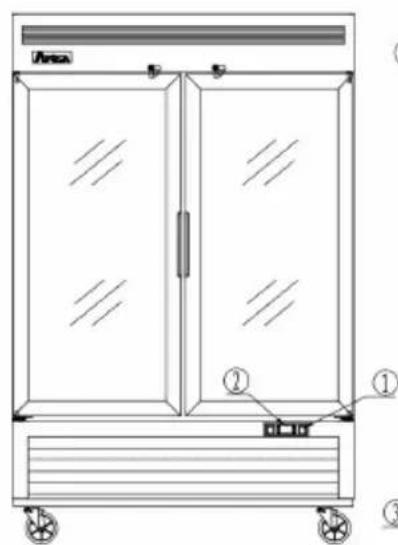
text_image
Area ① ② ③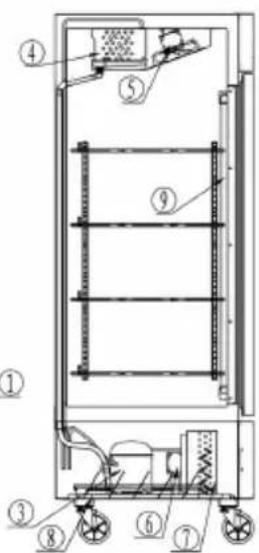
text_image
Technical diagram of a vertical industrial or storage unit with numbered components, likely an oven or control cabinet.- Compressor
- Condenser fan
- Lamp
Operating Instruction
- New upright air-cooling refrigerator should be opened and ventilate it before it is in use. After that, users should use warm water clean its inside.
- After connecting the power supply, press the "POWER" switch on the controller keyboard (Green Indicator Light ON), the fridge will come to work. The microcomputer controller, installed in the controller keyboard, could automatically adjust the temperature ranges. This intelligent digital controller works as: if the temperature increases and reaches set point plus differential the compressor is started and then turned off when the temperature reaches the set point value again.
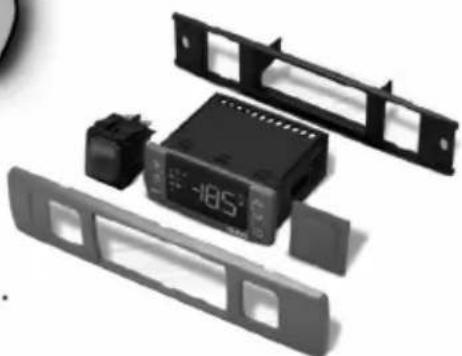
natural_image
Disassembled electronic device with front panel, display screen, and control buttons (no visible text or symbols)-
Microcomputer Controller Operation Instruction:
-
Microcomputer panel sketch map, meanings of running indicator light and LED showing.
-
SET To display target set point, in programming mode it selects a parameter or confirm an operation.
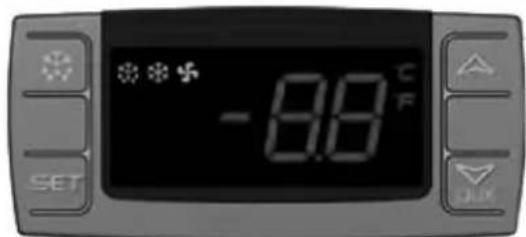
text_image
*** -8.8 °C F SET OK(Mod. XR06CX)
To start a manual defrost.
In programming mode it browses the parameter codes or increases the displayed value.
In programming mode it browses the parameter codes or
decreases the displayed value.
+ To lock or unlock the keyboard SET+ To enter in programming mode SET+ To return to room temperature display.
| LED | MODE | SIGNIFICATO |
| On | Compressor enabled | |
| Flashing | Anti short cycle delay enabled (AC parameter) | |
| On | Defrost in progress | |
| Flashing | Dripping in progress | |
| On | Fans output enabled | |
| Flashing | Fans delay after defrost | |
| On | Measurement unit | |
| Flashing | Programming mode | |
| On | Measurement unit | |
| Flashing | Programming mode |
- How to see the point.
Push and immediately release the SET key, the set point will be showed; Push and immediately release the SET key or wait about 5s to return to normal visualisation.
- How to change the setpoint.
Push the SET key for more than 2 seconds to change the Set point value; The value of the set point will be displayed and the “°C” or “°F” LED starts blinking;
To change the Set value push the △ or ▽ _AUX arrows.
To memorise the new set point value push the SET key again or wait 10s.
- How to start a manual defrost.
Push the DEF ✦ key for more than 2 seconds and a manual defrost will start.
- How to change a parameter value
To change the parameter's value operate as follows:
Enter the Programming mode by pressing the SET+▼ keys for 3s ("°C" or "°F" LED starts blinking).
Select the required parameter. Press the "SET" key to display its value Use △ or ▽_aux to change its value.
Press "SET" to store the new value and move to the following parameter.
To exit: Press SET+△ or wait 15s without pressing a key.
NOTE: the set value is stored even when the procedure is exited by waiting the time-out to expire.
- To lock the keyboard.
Keep pressed for more than 3s the ▽+△ keys.
The "OF" message will be displayed and the keyboard will be locked. If a key is pressed more than 3s the "OF" message will be displayed.
- To unlock the keyboard.
Keep pressed together for more than 3s the ▽+△ keys till the "on" message will be displayed.
- Alarm signalling.
| Mess. | Cause | Outputs |
| "P1" | Room probe failure | Compressor output according to “Cy” e “Cn” |
| "P2" | Evaporator probe failure | Defrost end is timed |
| "HA" | Maximum temperature alarm | Outputs unchanged |
| "LA" | Minimum temperature alarm | Outputs unchanged |
| “EA” | External alarm | Outputs unchanged |
| “CA” | Serious external alarm | All outputs OFF |
| “dA” | Door Open | Compressor and fans restarts |
CAREL: PJEZ*
Display and functions:

text_image
16.9 TAXADuring normal operation, the controller displays the value of the probe set using parameter/4(=1 ambient probe, default, =2 second probe, =3 third probe). In addition, the display has LEDs that indicate the activation of the control functions (see Table 1), while the 3 buttons can be used to activate/deactivate some of the functions (see table 2).
LEDs and associated functions Tab.1
| icon | function | normal operation | start up | ||
| ON | OFF | blink | |||
 | Compressor | on | off | request | ON |
 | fan | on | off | request | ON |
 | defrost | on | off | request | ON |
 | aux | output on | output off | - | ON |
 | alarm | all | no alarm | - | ON |
 | clock | RTC fitted and enabled,at least 1 time band set | RTC not fitted or disabled,not even 1 time band set | - | ON if RTC fitted |
Table of functions activated by the buttons Tab.2
| button | normal operation | start up | ||||
| pressing the button alone | pressed together | |||||
 | upON/OFF | more than 3s toggleON/OFF | pressedtogether start/stop continuouscycle | - | ||
 | downdefrost | more than 3s:start/stop defrost | Pressedtogetherstartparameterresetprocedure | for 1s displayfirmware vers.code | ||
 | setmute | -1s: display/set the set point-more than 3s: access parametersetting menu(enter password 22)-mute audible alarm (buzzer) | - | for 1s RESETcurrent EZYset | ||
Setting the set point(desired temperature)
- press SET for 1s the set value will start flashing after a few moments;
- increase or decrease the value using UP or DOWN;
- press SET to confirm the new value.
Switching the device ON/OFF
Press UP for more than 3s. the control and defrost algorithms are now disabled and the instrument displays the message "OFF" alternating with the temperature read by the set probe.
Manual defrost
Press for DOWN more than 3s (the defrost starts only the temperature conditions are valid).
Continuous cycle
Press UP and DOWN together for more than 3s.
Table of alarms
| Alam code | buzzer and alarm relay | LED | Description | Parametri coninvolti |
| E0 | active | ON | probe 1 error=control | - |
| E1 | inactive | ON | probe 2 error=defrost | [d0=0/1] |
| E2 | inactive | ON | probe 3 error=condenser | [A4=10] |
| IA | active | ON | external alarm | [A4=10][+A7] |
| dOr | active | ON | open door alarm | [A4=7/8][+A7] |
| LO | active | ON | low temperature alarm | [AL][Ad] |
| HI | active | ON | high temperature alarm | [Ah][Ad] |
| EE | inactive | ON | unit parameter error | - |
| EF | inactive | ON | operating parameter error | - |
| Ed | inactive | ON | defrost ended by timeout | [dP][dt][d4][A8] |
| dF | inactive | ON | defrost running | [d6=0] |
| cht | inactive | ON | condenser dirty pre-alarm | [A4=10] |
| CHT | active | ON | condenser dirty alarm | [A4=10] |
| EtC | inactive | ON | clock alarm |
Our products have been modified precisely before leaving factory, so to avoid damaging compressor unit or other malfunctions, users mustn't modify the microcomputer parameters privately.
Technical Parameters
Top Mount Reach-Ins
| Model code | Power source (V) | Rating frequency(Hz) | Input power (w) | Rated current(A) | Temperature range (°F) | Refrigerant | Amount(oz) | Dimension (in) | Volume (cu.ft) |
| MCF8601GR | 115 | 60 | 610 | 6.3 | -8~-1 | R290 | 4.2 | 28.7×33.3×81.3 | 21.4 |
| MCF8602GR | 115 | 60 | 935 | 8.6 | -8~-1 | R290 | 5.3 | 51.7×33.3×81.3 | 43.16 |
| MCF8603GR | 115/208-230 | 60 | 1360 | 6.2 | -8~-1 | R290 | 5.3 | 77.8×33.3×81.3 | 64.88 |
| MCF8604GR | 115 | 60 | 250 | 2.1 | +33~+45 | R290 | 3.9 | 28.7×33.3×81.3 | 21.4 |
| MCF8605GR | 115 | 60 | 370 | 3.2 | +33~+45 | R290 | 4.9 | 51.7×33.3×81.3 | 43.16 |
| MCF8606GR | 115 | 60 | 470 | 4.2 | +33~+45 | R290 | 5.3 | 77.8×33.3×81.3 | 64.88 |
NOTES : If the technical data has any changes, we will not notify you any longer.
Bottom Mount Reach-Ins
| Model code | Power source (V) | Rating frequency(Hz) | Input power (w) | Rated current(A) | Temperature range (°F) | Refrigerant | Amount(oz) | Dimension (in) | Volume (cu.ft) |
| MCF8701GR | 115 | 60 | 610 | 6.3 | -8~-1 | R290 | 4.2 | 27×31.5×84 | 19.1 |
| MCF8702GR | 115 | 60 | 935 | 8.6 | -8~-1 | R290 | 5.3 | 39.5×31.5×84 | 28.5 |
| MCF8703GR | 115 | 60 | 935 | 8.6 | -8~-1 | R290 | 5.3 | 54.5×31.5×84 | 44.77 |
| MCF8703ES | 115 | 60 | 935 | 8.6 | -8~-1 | R290 | 5.3 | 54.5×31.5×84 | 44.77 |
| MCF8704GR | 115/208-230 | 60 | 1360 | 6.2 | -8~-1 | R290 | 5.3 | 81.9×31.5×84 | 67.99 |
| MCF8705GR | 115 | 60 | 250 | 2.1 | +33~+45 | R290 | 3.9 | 27×31.5×84 | 19.1 |
| MCF8706GR | 115 | 60 | 370 | 3.2 | +33~+45 | R290 | 4.9 | 39.5×31.5×84 | 28.5 |
| MCF8707GR | 115 | 60 | 370 | 3.2 | +33~+45 | R290 | 4.9 | 54.5×31.5×84 | 44.77 |
| MCF8708GR | 115 | 60 | 470 | 4.2 | +33~+45 | R290 | 5.3 | 81.9×31.5×84 | 67.99 |
| MCF8709GR | 115 | 60 | 470 | 4.2 | +33~+45 | R290 | 5.3 | 54.5×29.2×84 | 44.85 |
| MCF8710GR | 115 | 60 | 610 | 6.3 | -8~-1 | R290 | 4.2 | 27×31.5×84 | 19.15 |
| MCF8712GR | 115 | 60 | 935 | 8.6 | -8~-1 | R290 | 5.3 | 54.5×31.5×84 | 43.46 |
| MCF8712ES | 115 | 60 | 935 | 8.6 | -8~-1 | R290 | 5.3 | 54.5×31.5×84 | 43.46 |
| MCF8713GR | 115/208-230 | 60 | 1360 | 6.2 | -8~-1 | R290 | 5.3 | 54.5×31.5×84 | 44.77 |
| MCF8714GR | 115 | 60 | 250 | 2.1 | +33~+45 | R290 | 3.9 | 27×31.5×84 | 19.39 |
| MCF8716GR | 115 | 60 | 370 | 3.2 | +33~+45 | R290 | 4.9 | 54.5×31.5×84 | 43.95 |
| MCF8717GR | 115 | 60 | 470 | 4.2 | +33~+45 | R290 | 5.3 | 81.9×31.5×84 | 69.54 |
| MCF8718GR | 115 | 60 | 250 | 2.1 | +33~+45 | R290 | 3.9 | 24.3×24.1×74.5 | 11.1 |
| MCF8719GR | 115 | 60 | 250 | 2.1 | +33~+45 | R290 | 3.9 | 24.3×24.1×61.5 | 8.3 |
| MCF8720GR | 115 | 60 | 610 | 6.3 | -8~-1 | R290 | 4.2 | 27×31.5×84 | 19.15 |
| MCF8721GR | 115 | 60 | 935 | 8.6 | -8~-1 | R290 | 5.3 | 54.5×31.5×84 | 43.46 |
| MCF8721ES | 115 | 60 | 935 | 8.6 | -8~-1 | R290 | 5.3 | 54.5×31.5×84 | 43.46 |
| MCF8722GR | 115 | 60 | 250 | 2.1 | +33~+45 | R290 | 3.9 | 27×31.5×84 | 19.39 |
| MCF8723GR | 115 | 60 | 370 | 3.2 | +33~+45 | R290 | 4.9 | 54.5×31.5×84 | 43.95 |
| MCF8724GR | 115 | 60 | 470 | 4.2 | +33~+45 | R290 | 5.3 | 81.9×31.5×84 | 69.54 |
| MCF8725GR | 115 | 60 | 250 | 2.1 | +33~+45 | R290 | 3.9 | 24.3×24.1×74.5 | 11.1 |
| MCF8726GR | 115 | 60 | 250 | 2.1 | +33~+45 | R290 | 3.9 | 24.3×24.1×61.5 | 8.3 |
| MCF8727GR | 115 | 60 | 470 | 4.2 | +33~+45 | R290 | 5.3 | 54.5×29.2×84 | 44.85 |
| MCF8728GR | 115/208-230 | 60 | 1360 | 6.2 | -8~-1 | R290 | 5.3 | 54.5×31.5×84 | 44.77 |
| MCF8730GR | 115 | 60 | 935 | 8.6 | -8~-1 | R290 | 5.3 | 39.5×31.5×84 | 28.5 |
| MCF8731GR | 115 | 60 | 370 | 3.2 | +33~+45 | R290 | 4.9 | 39.5×31.5×84 | 28.5 |
| MCF8732GR | 115 | 60 | 935 | 8.6 | -8~-1 | R290 | 5.3 | 39.5×31.5×84 | 28.5 |
| MCF8733GR | 115 | 60 | 370 | 3.2 | +33~+45 | R290 | 4.9 | 39.5×31.5×84 | 28.5 |
NOTES : If the technical data has any changes, we will not notify you any longer.
OFFICIAL APPROVAL AND RULES
CONFORMS TO UL STD.471
CERTIFIED TO CSA STD.C22.2 NO.120
CONFORMS TO NSF/ANSI STD. 7

text_image
ETV CM C LISTED USIntertek 4003935
CONFORMS TO UL STD.471
CERTIFIED TO CSA STD.C22.2 NO.120

text_image
ETV CM SANITATION LISTEDIntertek 4003935
CONFORMS TO NSF/ANSI STD.7