XB8273 - Toaster Coline - Free user manual and instructions
Find the device manual for free XB8273 Coline in PDF.


| Product Type | 2-slice toaster |
| Model Number | XB8273 |
| Brand | Coline |
| Power Rating | 850 W |
| Voltage / Frequency | 230 V AC, 50 Hz |
| Cord Length | 80 cm |
| Controls | Cancel, Defrost, Reheat, Variable browning (1-5) |
| Crumb Tray | Removable at the back |
| Auto Shut-off | Yes, when toasting finishes |
| Defrost Function | Yes, press Defrost button after starting |
| Reheat Function | Yes, press Reheat button after starting |
| Safety Features | Auto shut-off, do not immerse, unplug before cleaning |
| Cleaning Instructions | With damp cloth only; empty crumb tray regularly |
| Material | Stainless steel (exterior) |
| Housing | Stainless steel |
| Width | Approx. 25 cm |
| Depth | Approx. 18 cm |
| Height | Approx. 19 cm |
| Weight | Approx. 1.2 kg |
| Color | Stainless steel / Silver |
| Usage | Indoor household use only |
Frequently Asked Questions - XB8273 Coline
User questions about XB8273 Coline
0 question about this device. Answer the ones you know or ask your own.
Ask a new question about this device
Download the instructions for your Toaster in PDF format for free! Find your manual XB8273 - Coline and take your electronic device back in hand. On this page are published all the documents necessary for the use of your device. XB8273 by Coline.
USER MANUAL XB8273 Coline
natural_image
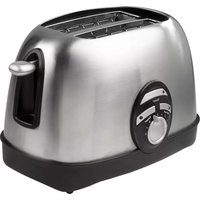
Exterior view of a stainless steel toaster with control panel (no visible text or symbols)Art. No: Model. No:
18-4025 XB8273
34-7341
English 3
Svenska 6
Norsk 9
Suomi 12
2-slice Toaster
Art.no: 18-4025, 34-7341 Model: XB8273
Please read the entire instruction manual before using and save it for future use. We apologise for any text or photo errors and any changes of technical data. If you have any questions concerning technical problems please contact our Customer Service Department (see address on reverse.)
Safety
The appliance is not intended for use by persons (including children) with reduced physical, sensory or mental capabilities, or lack of experience and knowledge, unless they have been given supervision or instruction concerning use of the appliance by a person responsible for their safety.
This appliance is intended to be used in household and similar applications such as: Staff kitchen areas in shops, offices and other working environments; farm houses; by clients in hotels, motels and other residential type enviroments; bed and breakfast type enviroments.
Children should be supervised to ensure that they do not play with the appliance.
- Warning: Do not touch the metal parts of the toaster when in use because they can become very hot. Only carry it using the handle to avoid burns.
- The toaster must not be used with a timer switch or other form of remote control.
- Place the toaster on an even, fireproof and hard surface.
- Due to the risk of fire, never place the toaster close to or under flammable material such as curtains.
- Do not place the toaster so that it can fall down in water or other liquids.
- Make sure that the voltage in the electric mains is 230 V and that you connect the toaster to an earthed outlet.
- Make sure that the cord does not come in contact with hot surfaces such as a hot plate for example.
- Use the toaster only in the way as described in this user manual.
- Supervise the toaster, when being used around children.
- Always unplug the appliance from the wall socket before cleaning. Dry the toaster using a soft, moist cloth. Never immerse the toaster in water. Remove the bread crumbs by withdrawing the crumb tray on the back of the toaster.
- If a slice of bread gets stuck in the toaster, unplug the toaster before trying to remove the bread. Do not use a sharp object such as a knife, as this could damage the toaster's heating element.
- Do not expose the toaster to blows or thrusts.
- Do not pull or carry the toaster by the cord. Do not use the cord as a handle and do not clamp it in a door. Do not pull it around sharp corners or edges.
- May only be used and stored indoors.
- Do not use the toaster if the cord or plug are damaged. Do not use it, if you have dropped it on the floor or in water.
- Do not open the protective covering. There are exposed, dangerous voltages on some components inside the product's protective covering. Contact with these can lead to electric shock.
- The toaster may only be repaired by qualified service professionals.
- The toaster may not be changed or unassembled.
Buttons and functions
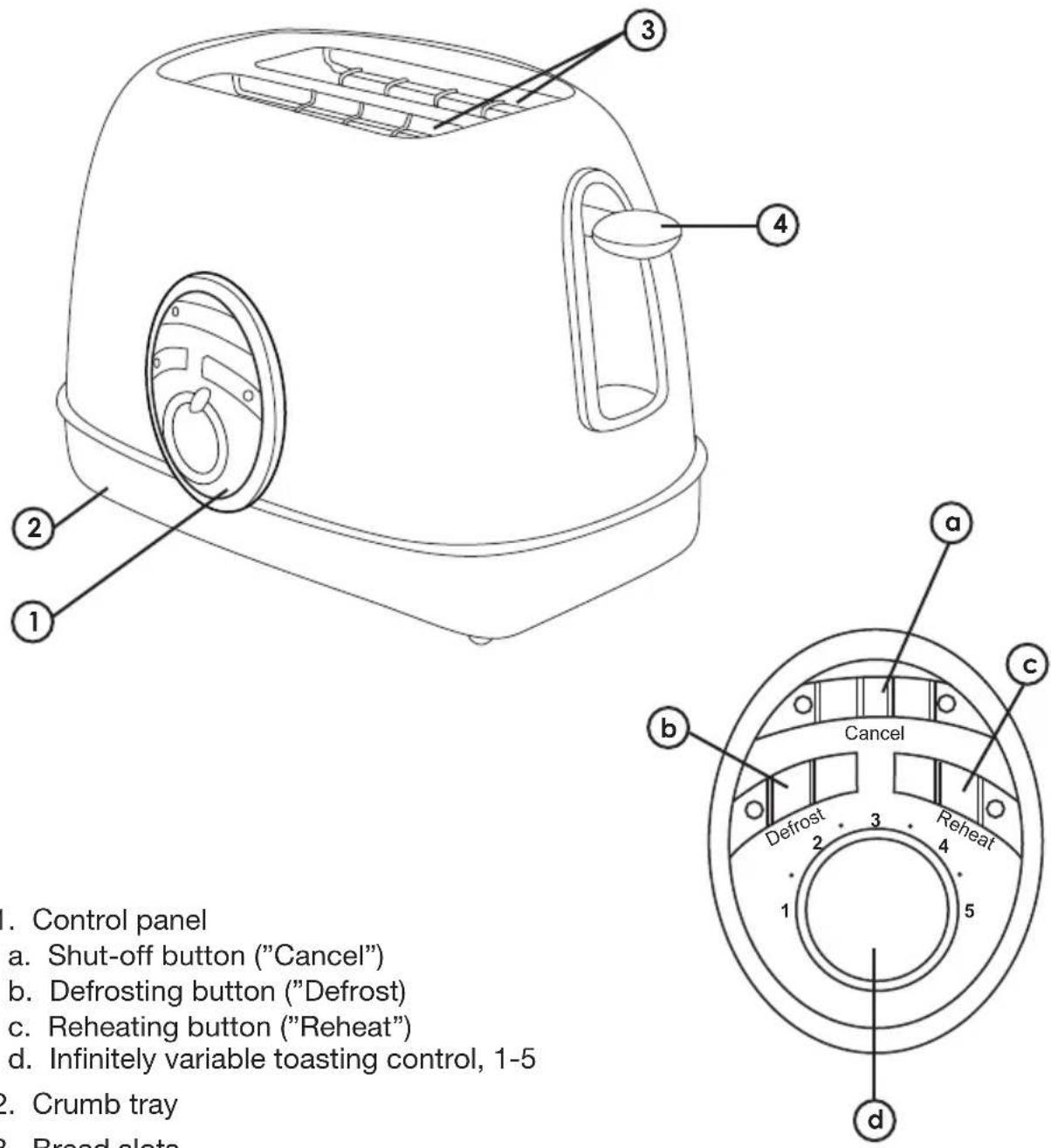
- Control panel
a. Shut-off button ("Cancel")
b. Defrosting button ("Defrost")
c. Reheating button ("Reheat")
d. Infinitely variable toasting control, 1-5
- Crumb tray
- Bread slots
- Toasting lever
Before first use
Run the toaster at the highest level without bread in a well-ventilated space a couple of times as it can emit certain smells, when it is new. This is completely normal and occurs when eventual residues from manufacturing are heated up and burned.
Use
Toasting
- Make sure that the toasting lever is in the raised position.
- Connect the plug to a grounded outlet (230 V AC).
- Place the bread slices in the bread slots.
- Select the desired toasting level, 1 (lightest) to 5 (darkest) by turning on the wheel for the toasting control. Try out a few to achieve the correct setting.
- To start toasting, press down on the toasting lever until to stays. The toasting lever stays down only if the toaster is plugged into an electrical outlet.
- The toaster turns off automatically, when toasting is finished, and the bread slices pop up. Toasting can be cancelled manually ahead of time by pressing on the shut-off button ("Cancel").
- Make sure that the toasting lever is in the top position before the toaster is unplugged.
Note. Toasting of only one piece of bread will give a darker colour than when toasting two pieces of bread.
Defrosting
Follow steps 1-5 above and then press the defrosting button ("Defrost").
Reheating
Bread toasted previously can be reheated by following steps 1-5 above and then pressing on the reheating button ("Reheat"). The bread is reheated for a moment before the toaster turns off. Keep an eye on the bread so that it does not burn.
Care and maintenance
Always remove the plug from the wall socket before cleaning. Never lower the toaster into water or other liquids, only use a soft, lightly moistened rag and a mild cleaning agent. Avoid solvents and polishing agents. Empty the crumb tray often.
Disposal
Follow local ordinances when disposing of this product. If you are unsure about how to dispose of this product contact your municipality.
Specifications
Supply voltage 230 V AC, 50 Hz
Output 850 W
Cord length 80 cm
Brödrost, 2-skivors
Art.nr: 18-4025, 34-7341 Modell: XB8273
For consumer contact, please visit
www.clasohlson.co.uk and click on
customer service.
INTERNET www.clasohlson.co.uk
Brand : Coline
Model : XB8273
Category : Toaster