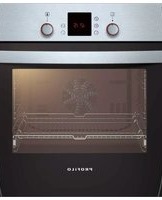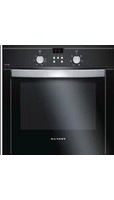
Profilo

FRMA702S - Oven Profilo - Free user manual and instructions

Find the device manual for free FRMA702S Profilo in PDF.

📄 2 pages English EN Download 💬 AI Question 10 questions ⚙️ Specs
Notice Profilo FRMA702S - page 1
Pick your language and provide your email: we'll send you a specifically translated version.
Product Type Built-in Electric Oven
Brand Profilo
Model FRMA702S
Energy Source Electric
Oven Capacity 65 L
Dimensions (HxWxD) 595 x 595 x 560 mm
Weight 30 kg
Power Consumption 3000 W
Temperature Range 50 - 250 °C
Heating Methods Conventional, Grill, Fan-Forced
Control Type Rotary + Timer
Inner Light Yes
Cooling System Cool Door
Cleaning Easy-clean enamel interior
Safety Features Child Lock, Auto Shut-off
Installation Type Built-in
Energy Efficiency Class A
Number of Functions 5
Oven Type Multifunction
Door Type Drop-down
Tray and Grid Included Yes
Self-Cleaning No (manual)
Spare Parts Availability Through authorized service
Repairability Index Class 7.5

Frequently Asked Questions - FRMA702S Profilo

How do I set the timer on my Profilo FRMA702S oven?
Turn the timer knob clockwise to the desired cooking time. The oven will automatically shut off when the time elapses. For detailed steps, refer to the timer setting section in the manual.
What oven functions are available?
The oven offers 5 functions: conventional heat, grill, fan-forced, defrost, and light. Use the function selector knob to choose the appropriate mode for your dish.
How do I clean the oven interior?
Wipe the interior with a damp cloth and mild detergent after each use. For baked-on residues, use a non-abrasive cleaner. Avoid using harsh scouring pads to protect the enamel.
Why is my oven not heating up?
Check if the oven is properly connected to the power supply and the timer is set. If the problem persists, the heating element may be faulty. Contact authorized service for inspection.
Can I use aluminum foil in the oven?
Yes, but avoid covering the entire rack or blocking airflow. Place foil on a tray to catch drips, and ensure it does not touch the heating elements. Never line the oven floor with foil.
How do I replace the oven light bulb?
Disconnect the oven from the power supply. Remove the glass cover by turning it counterclockwise, replace the bulb with a 25W halogen bulb (type G9), and reattach the cover.
What is the correct installation clearance?
Ensure a minimum gap of 5 mm around the oven for ventilation. The oven must be installed into a heat-resistant cabinet and secured with screws provided in the installation kit.
The oven door is misaligned, how to adjust?
Open the door fully and locate the hinge screws. Use a screwdriver to slightly loosen them, adjust the door height, then retighten. Refer to the door adjustment guide in the manual.
How can I improve energy efficiency?
Preheat only when necessary, use the fan-forced function for even heat distribution, and avoid opening the door frequently. Clean the door seal regularly to maintain efficiency.
Where can I find spare parts for my oven?
Spare parts are available through authorized Profilo service centers. When ordering, provide the model number FRMA702S and the part name. You can also check the official website for a list of service points.

User questions about FRMA702S Profilo

0 question about this device. Answer the ones you know or ask your own.

Ask a new question about this device

The email remains private: it is only used to notify you if someone responds to your question.

No questions yet. Be the first to ask one.

Download the instructions for your Oven in PDF format for free! Find your manual FRMA702S - Profilo and take your electronic device back in hand. On this page are published all the documents necessary for the use of your device. FRMA702S by Profilo.

USER MANUAL FRMA702S Profilo

natural_image Illustration of a kitchen oven with a hand applying powder to the lid (no text or symbols)

Profilo FRMA702S - 1

natural_image Line drawing of a microwave oven with ventilation slots and a checkmark indicating inspection (no text or symbols)

Profilo FRMA702S - 2

text_image 2b

Profilo FRMA702S - 3

natural_image Line drawing of a kitchen appliance with a door, drawer, and scroll (no text or symbols)

Profilo FRMA702S - 4

Profilo FRMA702S - 5

Profilo FRMA702S - 6

Profilo FRMA702S - 7

text_image 2c induction

Profilo FRMA702S - 8

Profilo FRMA702S - 9

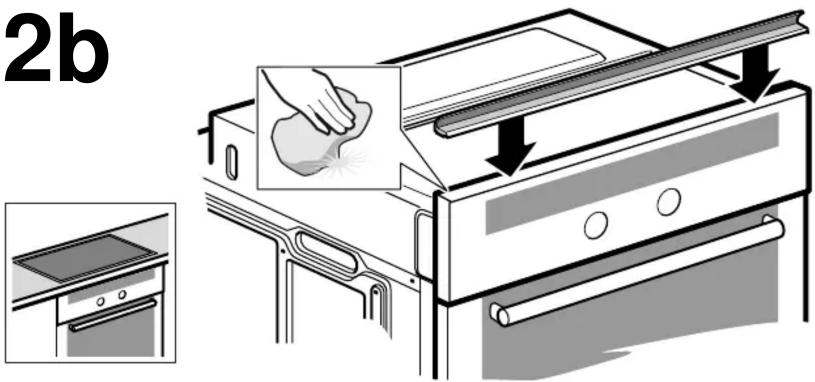
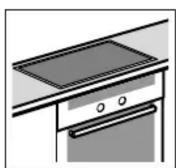
When installing appliances beneath the worktop, always fit the seal. Clean and degrease the surface beforehand.

es Observaciones
Table of contents Click a title to access it
Manual assistant
Powered by Anthropic
Waiting for your message
Product information

Brand : Profilo

Model : FRMA702S

Category : Oven