GP-101SF - Switch Edimax - Free user manual and instructions
Find the device manual for free GP-101SF Edimax in PDF.


| Product Type | Unmanaged Gigabit Ethernet Switch |
| Model | GP-101SF |
| Ports | 5x RJ45 10/100/1000 Mbps |
| Switching Capacity | 10 Gbps |
| MAC Address Table | 2K entries |
| Jumbo Frame Support | Up to 9K bytes |
| Dimensions (W x D x H) | 140 x 80 x 30 mm |
| Weight | 0.2 kg |
| Power Supply | External adapter, 5V DC, 1A |
| Power Consumption | Max 5W |
| Cooling | Fanless, passive |
| LED Indicators | Power, Link/Activity per port |
| Mounting | Desktop or wall-mountable (brackets included) |
| Operating Temperature | 0°C to 40°C |
| Storage Temperature | -10°C to 70°C |
| Humidity | 10% to 90% non-condensing |
| Certifications | FCC, CE |
| Warranty | 2 years |
| Package Contents | Switch, power adapter, user manual |
Frequently Asked Questions - GP-101SF Edimax
User questions about GP-101SF Edimax
0 question about this device. Answer the ones you know or ask your own.
Ask a new question about this device
Download the instructions for your Switch in PDF format for free! Find your manual GP-101SF - Edimax and take your electronic device back in hand. On this page are published all the documents necessary for the use of your device. GP-101SF by Edimax.
USER MANUAL GP-101SF Edimax
No.3, Wu-Chuan 3rd Road, Wu-Gu, New Taipei City 24891, Taiwan
Email: support@edimax.com.tw
Edimax Technology Europe B.V.
Fijenhof 2, 5652 AE Eindhoven, The Netherlands
Email: support@edimax.nl
Edimax Computer Company
3350 Scott Blvd., Bldg.15 Santa Clara, CA 95054, USA
Live Tech Support: 1(800) 652-6776
Email: support@edimax.com
COPYRIGHT
Copyright © Edimax Technology Co., Ltd. all rights reserved. No part of this publicaon may be reproduced, transmied, transcribed, stored in a retrieval system, or translated into any language or computer language, in any form or by any means, electronic, mechanical, magnec, opcal, chemical, manual or otherwise, without the prior written permission from Edimax Technology Co., Ltd.
Edimax Technology Co., Ltd. makes no representaons or warranes, either expressed or implied, with respect to the contents hereof and specifically disclaims any warranes, merchantability, or tness for any parcular purpose. Any soware described in this manual is sold or licensed as is. Should the programs prove defecve following their purchase, the buyer (and not this company, its distributor, or its dealer) assumes the enre cost of all necessary servicing, repair, and any incidental or consequential damages resulting from any defect in the soware. Edimax Technology Co., Ltd. reserves the right to revise this publicaon and to make changes from me to me in the contents hereof without the obligaon to nofy any person of such revision or changes.
The product you have purchased and the setup screen may appear slightly dierent from those shown in this QIG. For more informaon about this product, please refer to the user manual on the CD-ROM. The soware and specicaons are subject to change without noce. Please visit our website www.edimax.com for updates. All brand and product names menoned in this manual are trademarks and/or registered trademarks of their respective holders.
Edimax Technology Co., Ltd.
Add: No. 3, Wu-Chuan 3rd Rd., Wu-Ku Industrial Park, New Taipei City, Taiwan Tel: +886-2-77396888
PRODUCT INTRODUCTION
Thanks for purchasing the GP-101SF Gigabit PoE Splier. The PoE Splier fully complies with IEEE 802.3af standard, and can work with all IEEE 802.3af PoE compliant PSE (Power Source Equipment) or PoE Injector, to deliver 12V, 9V or 5V DC power to the device which do not support PoE. PoE (Power over Ethernet) technology allows the exisng Ethernet infrastructure to transmit electrical power, along with data, to remote IP endpoints over the Ethernet cables, which can greatly save the cost of the external power cables. Your network can be net from PoE technology for it will ensure the normal working status of your network while keep the exisng Ethernet infrastructure secure.
Note:
GP-101SF is applicable to the device that has no external connections other than the Ethernet cables.
Please follow the steps in this guide to set up the network.
Package Contents
Before you start using this product, please check if anything is missing from the packaging, and contact your dealer to claim the missing item(s):
GP-101SF
The following items should be found in your package
● GP-101SF PoE Splier
● One DC power Y Cable (Inner 2.5∅/outer 5.5∅ and inner 2.0∅/outer 5.5∅ DC plug)
- Quick installaon guide
Features
● Complies with IEEE 802.3, IEEE 802.3u, IEEE 802.3af standards
● Data and Power carried over the same cable
● Supports oponal 5VDC, 9VDC or 12VDC power supply
● Supports Plug-and-Play without any conguraon
Idenfying External Components
text_image
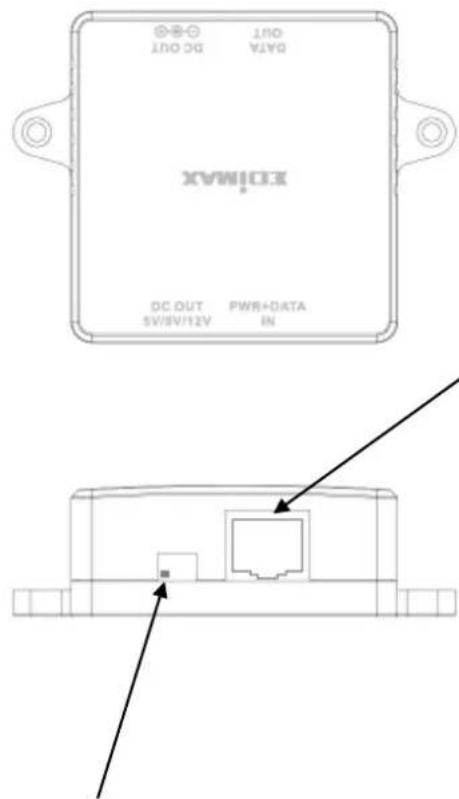
DATA DC OUT OUT EXIMAX DC OUT PWR+DATA IN SV/SV/12VPOWER+DATA IN: Connect to the PSE or PoE Injector with a CAT5 UTP cable.
DC OUT 5V/9V/12V: You can choose the DC output of 5V, 9V or 12V by adjusng the slide switch to the le or right.
▲ Please make sure that the DC output power is correct, a dierent voltage may destroy the device.
text_image
EDIMAX DATA OUT DC OUT SW/INT2V DWR+DATA IN DC OUT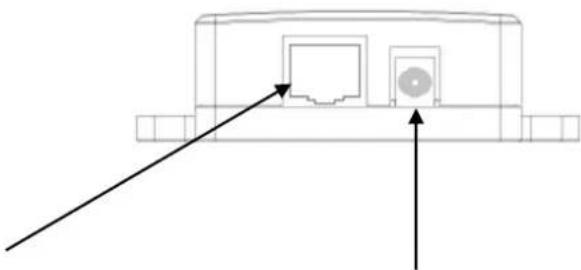
natural_image
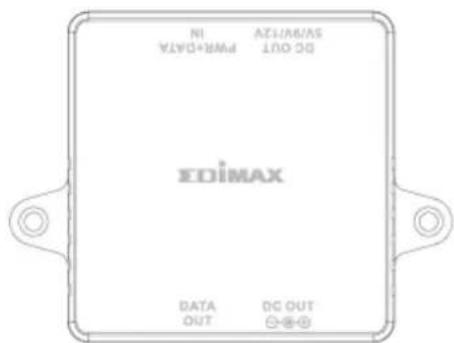
Technical line drawing of a device rear panel with two arrows pointing to internal components (no text or symbols)DATA OUT: Connect to the Ethernet device with CAT5 UTP cable to transmit data.
DC OUT: Connect to the power port of the Ethernet device with the provided power cable to supply the power of 5V, 9V or 12V DC
Connecng the PoE Splier
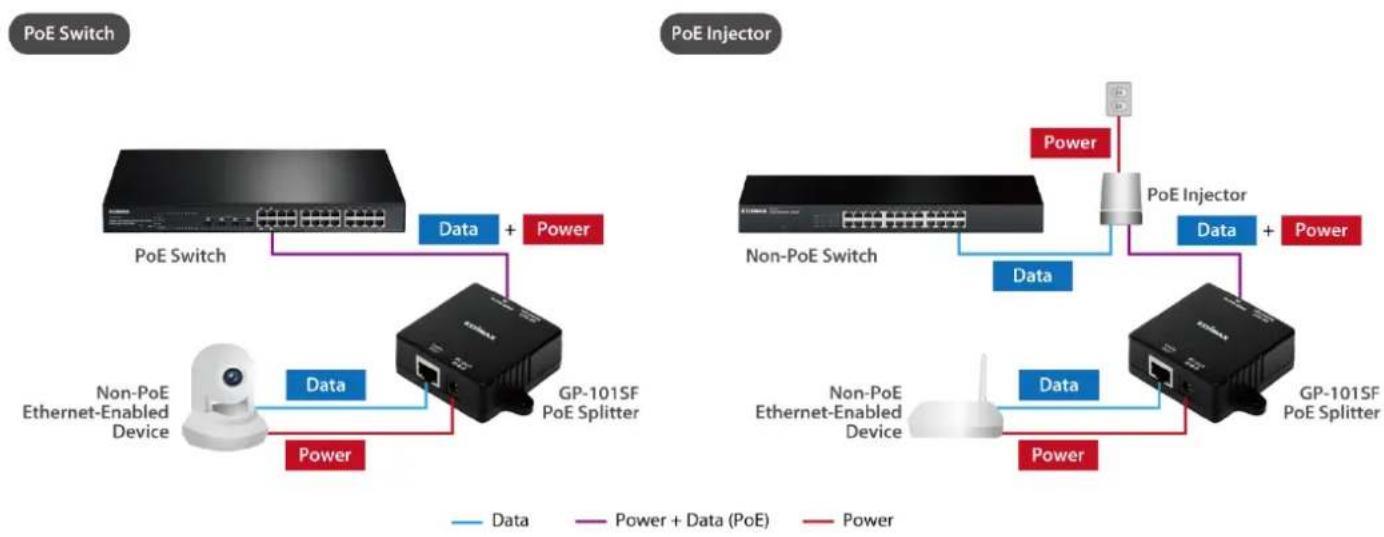
You can use GP-101SF PoE Splier with PSE or PoE Injector to expand your network to somewhere that has no power line or outlet but you wish to install a device such as APs, IP Cameras or IP Phones, etc. The following steps will tell you how to connect the PoE Splier correctly.
- Use a CAT5 UTP cable to connect a PoE port of the PSE (e.g. PoE Switch) to the POWER+DATA IN port.
- Choose the appropriate DC output by the Power-mode switch.
Note:
Please make sure that the output is correct, a different voltage may destroy the device.
-
Connect the LAN OUT port to the Ethernet device with CAT5 UTP cable for data transming.
-
Connect the DC OUT port to the power port of the same Ethernet device with the provided power cable.
Note:
The power of Ethernet device is suggested to be under 10W.
Now, the Ethernet device can work normally with data and power. The topology of this network is as follows.
flowchart
graph TD
    subgraph_PoE_Switch["PoE Switch"]
        A["Router"] -->|Data + Power| B["GP-101SF PoE Splitter"]
        C["Non-PoE Ethernet-Enabled Device"] -->|Data| B
        D["Power"] --> B
    end

    subgraph_PoEInjector["PoE Injector"]
        E["Router"] -->|Data + Power| F["GP-101SF PoE Splitter"]
        G["Non-PoE Switch"] -->|Data + Power| F
        H["Power"] --> F
    end

    style PoE_Switch fill:#f9f,stroke:#333
    style PoEInjector fill:#bbf,stroke:#333
Federal Communicaon Commission Interference Statement
This equipment has been tested and found to comply with the limits for a Class B digital device, pursuant to Part 15 of FCC Rules. These limits are designed to provide reasonable protecon against harmful interference in a residential installaon. This equipment generates, uses, and can radiate radio frequency energy and, if not installed and used in accordance with the instrucons, may cause harmful interference to radio communicaons.
However, there is no guarantee that interference will not occur in a parcular installaon. If this equipment does cause harmful interference to radio or television recepon, which can be determined by turning the equipment o and on, the user is encouraged to try to correct the interference by one or more of the following measures:
- Reorient or relocate the receiving antenna.
- Increase the separaon between the equipment and receiver.
- Connect the equipment into an outlet on a circuit dierent from that to which the receiver is connected.
- Consult the dealer or an experienced radio technician for help.
FCC Cauon
This device and its antenna must not be co-located or operang in conjuncon with any other antenna or transmier.
This device complies with Part 15 of the FCC Rules. Operaon is subject to the following two conditions: (1) this device may not cause harmful interference, and (2) this device must accept any interference received, including interference that may cause undesired operaon.
Any changes or modicaons not expressly approved by the party responsible for compliance could void the authority to operate equipment.
CE Mark Warning
This is a class B product. In a domesc environment this product may cause radio interference in which case the user may be required to take adequate measures.
EU Declaraon of Conformity
English: This equipment is in compliance with the essenal requirements and other relevant provisions of Direcve 2004/108/EC, 2009/125/EC.
WEEE Directive & Product Disposal

At the end of its serviceable life, this product should not be treated as household or general waste. It should be handed over to the applicable collecon point for the recycling of electrical and electronic equipment, or returned to the supplier for disposal.
Declaraon of Conformity
We, Edimax Technology Co., Ltd., declare under our sole responsibility, that the equipment described below complies with the requirements of the European EMC directive (2004/108/EC).
Equipment: Gigabit PoE Splier
Model No.: GP-101SF
The following European standards for essenal requirements have been followed:
EN 55022: 2010/AC: 2011
EN 55024:2010
EN 61000-3-2:2006+A1:2009+A2:2009
IEC 61000-4-2:2008
EN 61000-3-3:2013
IEC 61000-4-3:2006+A1:2007+A2:2010
IEC 61000-4-4:2012
IEC 61000-4-5:2005
IEC 61000-4-6:2013
IEC 61000-4-8:2009
IEC 61000-4-11:2004
Edimax Technology Co., Ltd.
No. 3, Wu Chuan 3 ^rd Road,
Wu-Ku Industrial Park,
New Taipei City, Taiwan
CE
Date of Signature: June, 2014
Signature:

Printed Name:
Albert Chang
Title:
Director
Edimax Technology Co., Ltd.
ΣDIMAX
NETWORKING PEOPLE TOGETHER