
461831 - Tachometer Extech - Free user manual and instructions
Find the device manual for free 461831 Extech in PDF.


| Product Type | Digital Stroboscope Tachometer |
| Brand | Extech |
| Model | 461831 |
| Measurement Range | 100 to 10,000 RPM/FPM |
| Resolution | 0.1 (<1000 RPM), 1 (1000-9999 RPM), 10 (10,000 RPM) |
| Accuracy | ±(0.05% + 1 digit) |
| Display | 4-digit (10,000 count) LED display |
| Flash Tube Type | Xenon lamp |
| Flash Energy | 4 Watt-Seconds (Joules) |
| Flash Duration | 60 to 1000 microseconds |
| Flash Color | White 6500°K |
| Beam Angle | 80° |
| Range Selection | LOW (100-1000 RPM) and HIGH (1000-10,000 RPM) |
| Adjustment Controls | COARSE and FINE knobs |
| Power Supply | 220VAC, 50/60Hz ±10% |
| Power Consumption | Less than 25 watts at 115V |
| Operating Temperature | 32 to 122°F (0 to 50°C) |
| Operating Humidity | Less than 80% RH |
| Dimensions | 8.3 x 4.8 x 4.8 inches (21 x 12 x 12 cm) |
| Weight | 2.2 lbs (1 kg) |
| Housing Material | Impact resistant plastic with plastic lens and mirrored reflectors |
| Circuit | Exclusive one-chip LSI with crystal time base |
| Sampling Time | 1 second |
| Usage Limits | 30 min max below 3000 rpm, 5 min max above 3000 rpm; 10 min cool-down |
| Warranty | One year from shipment (6 months on sensors and cables) |
Frequently Asked Questions - 461831 Extech
User questions about 461831 Extech
0 question about this device. Answer the ones you know or ask your own.
Ask a new question about this device
Download the instructions for your Tachometer in PDF format for free! Find your manual 461831 - Extech and take your electronic device back in hand. On this page are published all the documents necessary for the use of your device. 461831 by Extech.
USER MANUAL 461831 Extech
Digital Stroboscope Tachometer
Model 461830 and Model 461831
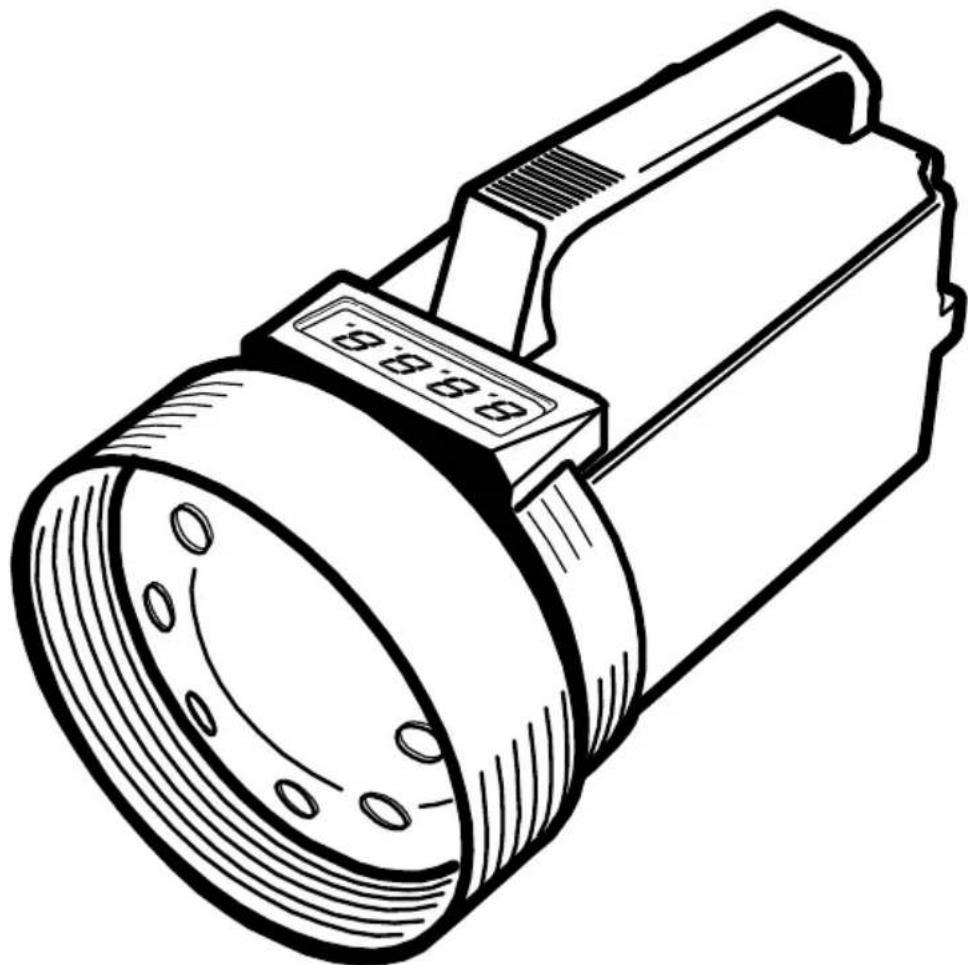
natural_image
Line drawing of a handheld device with a circular lens and attached rectangular casing (no text or symbols)Warranty
EXTECH INSTRUMENTS CORPORATION warrants this instrument to be free of defects in parts and workmanship for one year from date of shipment (a six month limited warranty applies on sensors and cables). If it should become necessary to return the instrument for service during or beyond the warranty period, contact the Customer Service Department at (781) 890-7440 ext. 210 for authorization or visit our website at www.extech.com (click on 'Contact Extech' and go to 'Service Department' to request an RA number). A Return Authorization (RA) number must be issued before any product is returned to Extech. The sender is responsible for shipping charges, freight, insurance and proper packaging to prevent damage in transit. This warranty does not apply to defects resulting from action of the user such as misuse, improper wiring, operation outside of specification, improper maintenance or repair, or unauthorized modification. Extech specifically disclaims any implied warranties or merchantability or fitness for a specific purpose and will not be liable for any direct, indirect, incidental or consequential damages. Extech's total liability is limited to repair or replacement of the product. The warranty set forth above is inclusive and no other warranty, whether written or oral, is expressed or implied.
Introduction
Congratulations on your purchase of the Extech Digital Stroboscope Tachometer. This device measures the speed of moving parts such as gears, fans, propellers, centrifuges, and pumps. The stop-motion action of this instrument permits the visual inspection of moving parts. Careful use of this instrument will provide years of reliable service.
Safety

This symbol, adjacent to another symbol or terminal, indicates the user must refer to the manual for further information.
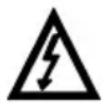
This symbol, adjacent to a terminal indicates that, under normal use, hazardous voltages may be present
WARNING: Do not look directly at the Strobe's Xenon lamp or its reflector.
WARNING: This device causes moving objects to appear still. Take precautions against accidental contact with moving objects.
CAUTION: Do not touch the flash tube.
General Specifications
| Circuit Exclusive one-chip | LSI circuit with crystal time base |
| Display | 4-digit (10,000 count; 0 to 9999) LED display |
| Measurement unit | RPM (revolutions or rotations per minute) is the speed of the moving device under test which equals the FPM rate (strobe flashes per minute) |
| Operating Temperature 32 to 122°F (0 to 50°C) | |
| Operating Humidity < 80% RH | |
| Power Supply | 110VAC (461830) or 220VAC (461831) 50/60Hz ±10% |
| Power Consumption <25 watts @ 115V | |
| Weight 2.2 lbs. (1kg) | |
| Dimensions | 8.3 x 4.8 x 4.8" (21 x 12 x 12cm) |
| Housing construction | Impact resistant plastic with plastic lens and mirrored reflectors |
Electrical Specifications
| Measurement Range 100 to 10,000 | RPM/FPM |
| Resolution 0.1 (<1000 RPM/FPM) | 1 (1000 to 9999 RPM/FPM)10 (10,000 RPM/FPM) |
| Accuracy ± (0.05% + 1 digits) | |
| Sampling Time 1 second | |
| Strobe Flash adjust range | LOW: 100 to 1,000 RPM/FMPHIGH: 1000 to 10,000 RPM/FPM |
| Strobe Flash tube type | Xenon lamp |
| Strobe Flash duration | 60 to 1000 microseconds |
| Strobe Flash Energy | 4 Watt-Seconds (Joules) |
| Strobe Beam Angle | 80° |
| Strobe Flash Color | White 6500°K |
Notes: Replace the Xenon lamp when readings appear irregular. To prolong the Xenon lamp life and ensure safe operation, please adhere to the following recommendations.
-
A 30-minute use limit < 3000rpm and 5-minute use limit > 3000rpm exists. Do not use the instrument for periods longer than specified otherwise damage to the instrument may result.
• Always permit a 10-minute cool-down between cycles.
• Do not touch the Xenon flash tube. -
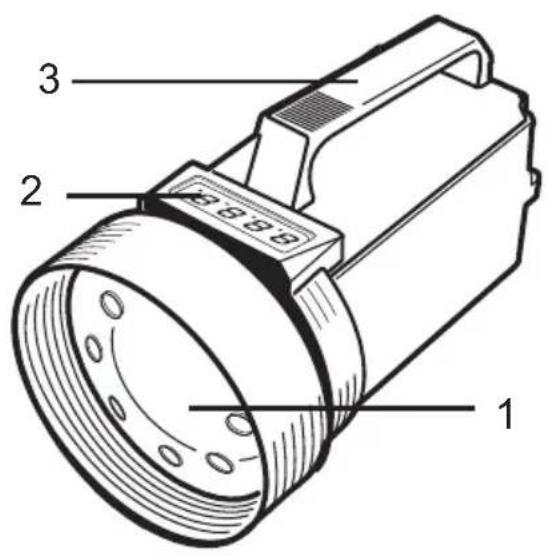
Xenon lamp
- LED Display
- Grip handle
-
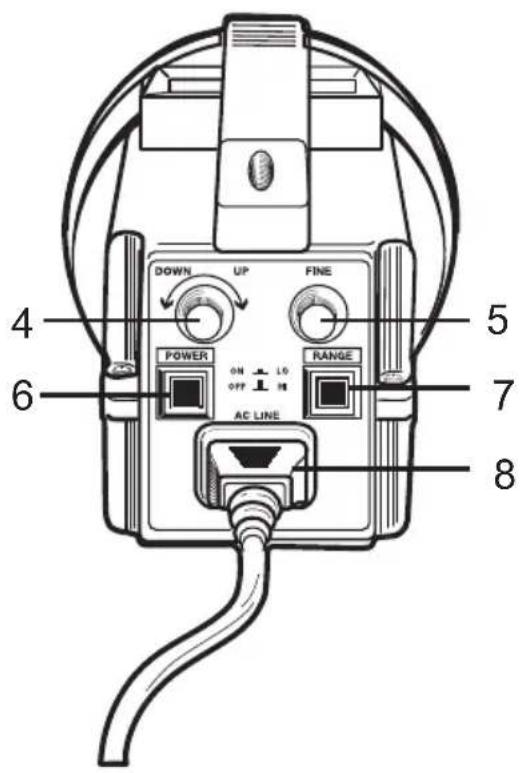
COARSE adjust knob
-
FINE adjust knob
- Power ON/OFF switch
- Range Select Switch
- AC power cord and jack
Powering the instrument
- Plug the supplied power cable into the instrument's power cable jack.
- Plug the other end of the cable into an appropriate AC power source. The Model 461830 requires 110VAC and the 461831 requires 220VAC. Do not plug the device into an incorrect power source otherwise damage to the instrument will result.
- Use the ON/OFF switch to turn the instrument on or off.
Speed (RPM) Measurements
- Remove power to the device under test so that it is stationary.
- Affix a reflective mark or place a small piece of the supplied reflective tape on the device under test.
- Point the Stroboscope's beam toward the reflective mark.
- Use the 'FINE' and 'COARSE' adjustment knobs to synchronize or "stop" the motion of the reflective mark (read the 'Display Notes' section below).
- Read the RPM value on the LED display.
Range Adjustments
- While measuring, use the RANGE button to select the range as desired
- The LOW range is used for measurements below 1,000 RPM. The HIGH range is used for measurements above 1,000 RPM.
Display Notes for Speed Measurements
Care must be taken to ensure that the reflective mark is providing a 1:1 measurement.
Check that there is only one mark and not two, four, or more stationary marks on the object under test.
Two or more stopped marks indicate a 'harmonic' measurement (2:1, 3:1, 4:1 etc.) and the instrument will display double, triple, or quadruple the actual speed. A useful method of avoiding harmonic measurements is to adjust the FINE/COARSE knobs until two images (reflective marks) appear and then lower the flash rate (via COARSE/FINE knobs) until a single, stationary image appears. This will be the actual speed.
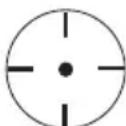
In the example below, a rotating shaft is affixed with one piece of reflective tape. The illustrations below represent several possible images that would appear when the strobe beam is pointed to the shaft.
If more than one reflective mark appears (as in columns 3, 4, and 5 below) the image is showing a 'harmonic'. The bold column (column 2) shows the actual speed of the shaft.
Column 1 shows a harmonic whereby the actual speed is divided in half. Because of this, it is good practice to adjust the 'FINE' and 'COARSE' knobs until you can see the 'doubled harmonic' (Column 3) and then the 'halved harmonic' (Column 1) and then find the setting in-between (Column 2 in bold).
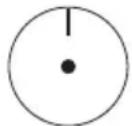
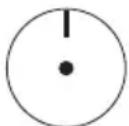
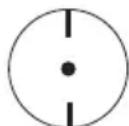
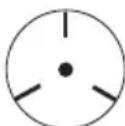
Note that the LED display has an AUTO RANGE INDICATOR (flashing decimal at the far right) that appears when the readings are over 10,000 RPM. In these cases, multiply the displayed reading by 10.
Visually inspecting a moving object (stop-motion)
When the speed of the moving object matches the flash rate of the stroboscope, the moving object appears still. Measure the speed of a moving object as described in the previous sections to obtain a stop-motion. Once stop-motion is achieved, the FINE adjust knob is used to vary the viewing perspective of the object under test for visual inspection.
Important note on Test Durations
The Xenon lamp used in this instrument has time restrictions on usage. If the specified test times and cool-off periods (shown in the table below) are not observed, damage to the instrument can result and the life span of the lamp can be shortened.
| RPM Max. | Operating Time Cool-Off | Time |
| < 3,000 rpm 30 | minutes | 10 minutes |
| > 3,000 rpm 5 | minutes |
Extech offers repair and calibration services for the products we sell. Extech also provides NIST certification for most products. Call the Customer Service Department for information on calibration services available for this product. Extech recommends that annual calibrations be performed to verify meter performance and accuracy.

Support Hotline (781) 890-7440
Tech support: Ext. 200; Email: support@extech.com
Repair/Returns: Ext. 210; Email: repair@extech.com
Website: www.extech.com
Copyright © 2003 Extech Instruments Corporation
All rights reserved including the right of reproduction in whole or in part in any form.

- Digital Stroboscope Tachometer
- Model 461830 and Model 461831
- Warranty
- Introduction
- Safety
- Powering the instrument
- Speed (RPM) Measurements
- Range Adjustments
- Display Notes for Speed Measurements
- Visually inspecting a moving object (stop-motion)
- Important note on Test Durations
- Support Hotline (781) 890-7440
- Copyright © 2003 Extech Instruments Corporation
Brand : Extech
Model : 461831
Category : Tachometer