Premier

CTM-MS2 - Support de panneau plat Premier - Free user manual and instructions

Find the device manual for free CTM-MS2 Premier in PDF.

📄 2 pages English EN Download 💬 AI Question 10 questions ⚙️ Specs
Notice Premier CTM-MS2 - page 1
Pick your language and provide your email: we'll send you a specifically translated version.
Product TypeFlat Panel Wall Mount
BrandPremier
ModelCTM-MS2
VESA Compatibility75x75mm to 200x200mm
Maximum TV Size42 inches
Maximum Weight Capacity25 kg (55 lbs)
Tilt Range+5° / -15°
Swivel Range±90°
Profile Depth1.5 inches (38 mm) from wall
MaterialCold rolled steel
FinishBlack powder coating
Installation TypeWall mount with included hardware
Included AccessoriesScrews, wall anchors, bubble level, drilling template
Cable ManagementYes, integrated clips
Safety FeaturesLocking bracket, anti-tip design
Tools RequiredDrill, screwdriver (not included)
WarrantyLimited lifetime warranty
MaintenanceWipe with dry cloth
CleaningMild detergent if needed; avoid abrasives
RepairabilityNot user-serviceable; replace if damaged

Frequently Asked Questions - CTM-MS2 Premier

Is the Premier CTM-MS2 mount compatible with my TV?
Check your TV's VESA pattern (the distance between mounting holes) and weight. This mount supports VESA 75x75mm to 200x200mm and up to 25 kg. If your TV's VESA pattern and weight are within these ranges, it is compatible.
How do I install the CTM-MS2 wall mount?
1. Attach the mounting brackets to the TV using the provided screws. 2. Use the drilling template to mark holes on the wall. 3. Drill holes and insert wall anchors. 4. Secure the wall plate to the wall. 5. Hang the TV on the wall plate and secure the locking brackets. For full instructions, refer to the manual.
What tools are needed for installation?
You will need a drill, a screwdriver (Phillips), a stud finder (recommended), and a level. All necessary screws and anchors are included.
Can I install this mount on drywall?
Yes, but you must use the provided wall anchors and ensure the mount is attached to wall studs for maximum safety. For drywall without studs, the included anchors are required and the weight capacity may be reduced.
What if my TV's VESA holes do not align with the mount?
The CTM-MS2 has adjustable brackets that accommodate VESA patterns from 75x75mm up to 200x200mm. If your TV's pattern is within this range, it should fit. If not, you may need an adapter plate (not included).
How do I level the TV after mounting?
The mount includes a bubble level and the brackets allow for post-installation adjustment. Loosen the tilt adjustment screws slightly, level the TV, then retighten. Some models also have lateral leveling features.
Can I tilt or swivel the TV after installation?
Yes, the CTM-MS2 allows tilt adjustment from +5° to -15° and swivel up to ±90° after installation. Simply loosen the adjustment knobs, position the TV, and retighten.
Is this mount safe for a 55-inch TV?
No, this mount is designed for TVs up to 42 inches and 25 kg. A 55-inch TV typically exceeds these limits. Check your TV's weight and choose a mount with higher capacity.
How do I clean the mount?
Clean the mount with a soft, dry cloth. If necessary, use a mild detergent diluted with water. Avoid abrasive cleaners or solvents that could damage the powder coating.
What warranty does the Premier CTM-MS2 come with?
Premier offers a limited lifetime warranty on the CTM-MS2 mount. This covers defects in materials and workmanship. For warranty claims, contact Premier customer support with proof of purchase.

User questions about CTM-MS2 Premier

0 question about this device. Answer the ones you know or ask your own.

Ask a new question about this device

The email remains private: it is only used to notify you if someone responds to your question.

No questions yet. Be the first to ask one.

Download the instructions for your Support de panneau plat in PDF format for free! Find your manual CTM-MS2 - Premier and take your electronic device back in hand. On this page are published all the documents necessary for the use of your device. CTM-MS2 by Premier.

USER MANUAL CTM-MS2 Premier

Tilting Mount for Flat-Panels up to 63"

Tilting Multipurpose Mounts

Premier CTM-MS2 - Tilting Multipurpose Mounts - 1

Premier CTM-MS2 - Tilting Multipurpose Mounts - 2

Premier CTM-MS2 - Tilting Multipurpose Mounts - 3

Premier CTM-MS2 - Tilting Multipurpose Mounts - 4

Premier CTM-MS2 - Tilting Multipurpose Mounts - 5

37"-63" 2.45" (62mm) 12°175 lbs. (79 kg) 800 x 505mm

Premier CTM-MS2 - Tilting Multipurpose Mounts - 6

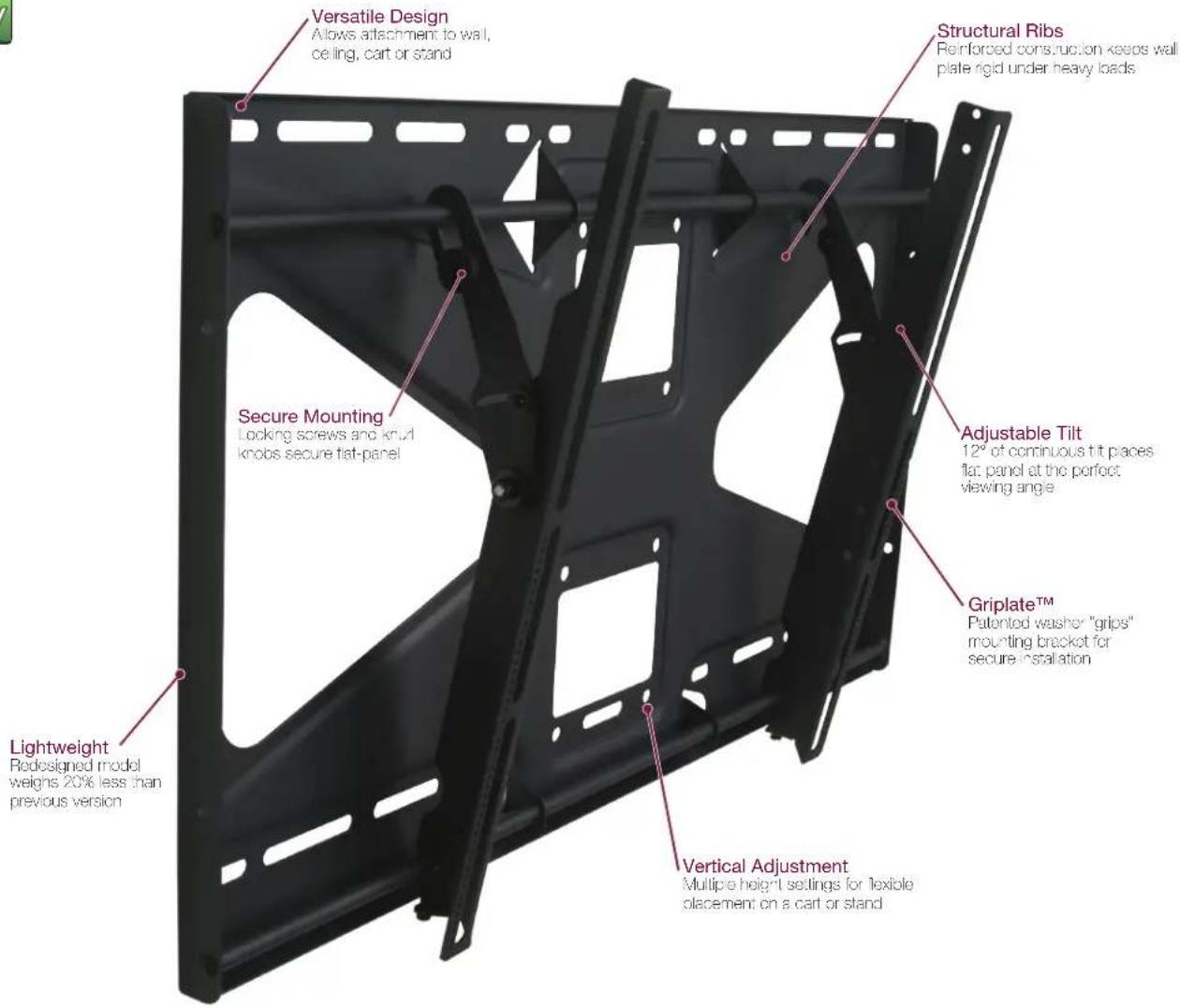
Versatile Design Allows attachment to wall, ceiling, cart or stand Structural Ribs Reinforced construction keeps wall plate rigid under heavy loads Secure Mounting Locking screws and knut knobs secure flat-panel Adjustable Tilt 12" of continuous tilt places flat panel at the perfect viewing angle Griplate™ Patented washer "grips" mounting bracket for secure installation Lightweight Redesigned model weighs 20% less than previous version Vertical Adjustment Multiple height settings for flexible placement on a cart or stand

FEATURES

  • Mounts to walls, floor stands, carts and ceiling adapters
  • Features patented Clevis™ technology for effortless tilt
  • Three vertical height mounting options for carts and stands
  • Patented Griplate™ system holds display securely in place
    • Built-in lateral shift
  • Extensive hardware pack including exclusive universal spacers
    • Cable and power box access
  • Now includes PANELOCK™ theft-resistance system

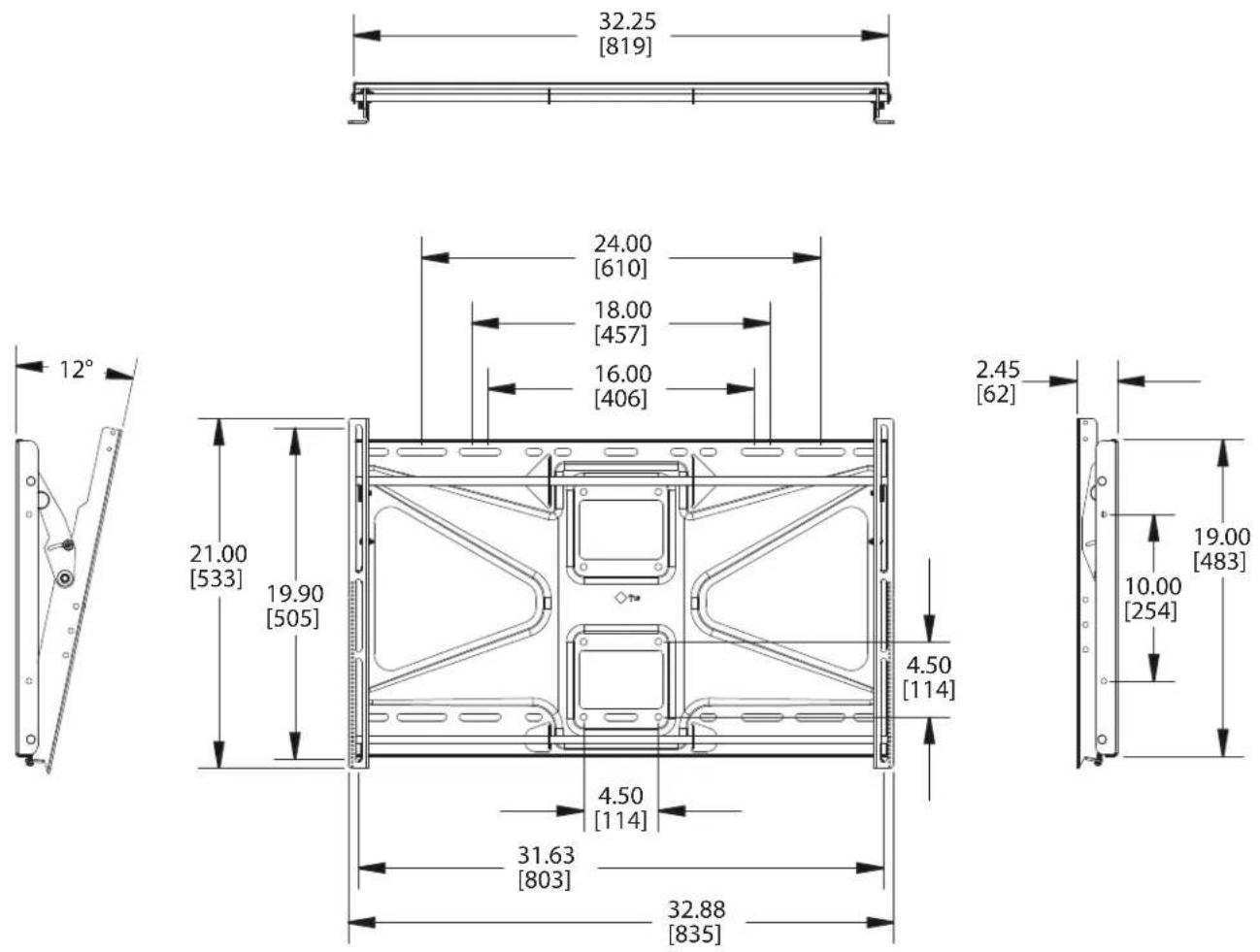
Model CTM-MS2

Display Range 37"-63"

Weight Capacity 175 lbs. (79 kg)

Depth 2.45" (62mm)

Tilt 12°

Mounting Patterns 200 x 200mm (Min) - 800 x 505mm (Max)
Premier CTM-MS2 - FEATURES - 1
Dimensions in inches and millimeters [mm]. Drawings subject to change without notice.

ACCESSORY OPTIONS

PSD-S Ceiling Adapter

Premier CTM-MS2 - ACCESSORY OPTIONS - 1

PCB-CSL1 Cable Lock

Premier CTM-MS2 - ACCESSORY OPTIONS - 2

What if I don't know my mounting pattern?

Check the mount locator tool on www.mounts.com to see a list of compatible mounts or select a universal mount, which fits a broader range of mounting points.

How does this mount to a ceiling?

Use of a PSD-S coiling adaptor allows you to attach to any length of 1.5" NPT or adjustable height suspension adapters.

Why would I pick this over the P4263T?

The unique bolt pattern found in the center of each CTM Series allows for installation on walls, ceiling adapters or floor stands. The P4263T is meant for wall installation only.

Manual assistant
Powered by Anthropic
Waiting for your message
Product information

Brand : Premier

Model : CTM-MS2

Category : Support de panneau plat