
VCP-2 - Controller Polsen - Free user manual and instructions
Find the device manual for free VCP-2 Polsen in PDF.


| Product Type | Passive Monitor Controller |
| Channels | 2 |
| Input Connectors | XLR/TRS Combo (x2) |
| Output Connectors | 1/4" TRS (x2) |
| Frequency Response | 20 Hz – 20 kHz |
| Distortion (THD) | <0.005% |
| Input Impedance | 600 Ω |
| Output Impedance (Balanced) | 10 kΩ |
| Output Impedance (Unbalanced) | 5 kΩ |
| Attenuation Range | ∞ to 0 dB |
| Controls | Volume Knob, Mute Button |
| Dimensions (H × W × D) | 2 × 5.3 × 3.5 in (5.1 × 13.5 × 8.9 cm) |
| Weight | 11.8 oz (335 g) |
| Housing Material | Steel |
| Design | Passive (no power required) |
| Warranty | 1 Year Limited |
| Recommended Use | Studio monitor control, volume attenuation |
| Compatibility | Computers, audio interfaces, mixers |
Frequently Asked Questions - VCP-2 Polsen
User questions about VCP-2 Polsen
0 question about this device. Answer the ones you know or ask your own.
Ask a new question about this device
Download the instructions for your Controller in PDF format for free! Find your manual VCP-2 - Polsen and take your electronic device back in hand. On this page are published all the documents necessary for the use of your device. VCP-2 by Polsen.
USER MANUAL VCP-2 Polsen
The Polsen VCP-2 is a passive monitor controller that's an effective and dependable addition to any pro, project, or home studio. This monitor controller adjusts the level of the audio signal that travels between a computer and powered monitors. It offers a convenient way to control the volume of your speakers without accessing the computer's or sound card's volume controls. The VCP-2 is equipped with XLR/TRS combo inputs for compatibility with a variety of pro and consumer equipment, and it can be used anywhere a separate volume controller is needed. The passive design will not alter or color the sound originating on your computer or other device. With its steel housing, the VCP-2 will stand up to constant and demanding use.
PRECAUTIONS

- Please read and follow these instructions, and keep this manual in a safe place.
- Keep this unit away from water and any flammable gases or liquids.
- Clean the unit with only a soft, dry cloth.
- Do not attempt to disassemble or repair the equipment. Doing so will void the warranty, and Polsen will not be responsible for any damage.
- All images are for illustrative purposes only.
OVERVIEW
Front
- Volume control knob
- Mute button
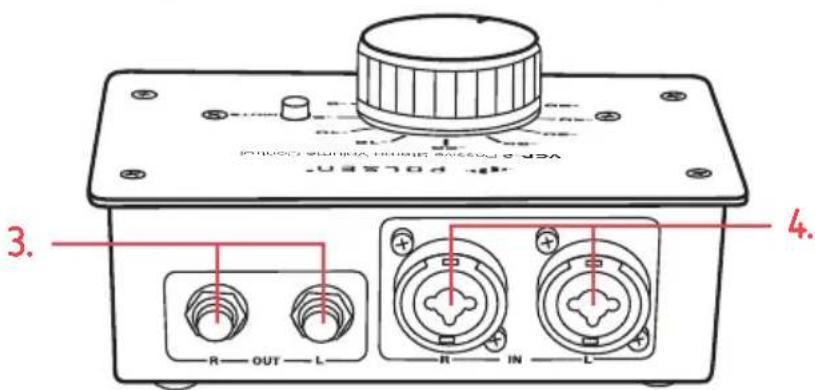
Back
- 1/4 in. TS/TRS outputs
- XLR/TRS combo inputs

CONNECTING THE VCP-2 TO A COMPUTER
To connect the VCP-2 to a device with a 1/8 in. (3.5 mm) TRS stereo output, follow these steps:
- Connect the audio output of your computer or device to the two XLR/TRS combo inputs of the VCP-2. Use a 1/8 in. stereo to two XLR male cable or a 1/8 in. stereo to two 1/4 in. TRS cable.
- Connect the 1/4 in. TRS outputs of the VCP-2 to your monitors.
- Set the sound output of your computer to its maximum volume.
- Turn the VPC-2's volume control knob to full attenuation (all the way to the left).
- Turn on the monitors.
- Start playing audio on your computer or device, and turn up the volume control knob to the desired level.
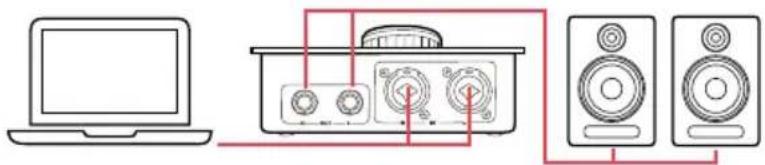
CONNECTING THE VCP-2 TO AN AUDIO INTERFACE OR SOUND CARD
To connect the VCP-2 to a device with XLR or 1/4 in. TRS outputs, such as an audio interface or sound, follow these steps:
- Connect the outputs of your interface or sound card to the inputs of the VCP-2. The VCP-2 will accept XLR or 1/4 in. TRS plugs.
- Connect the 1/4 in. TRS outputs of the VCP-2 to your monitors.
- Set the sound output of your computer to its maximum level.
- Turn the VPC-2's volume control knob to full attenuation (all the way to the left).
- Turn on the monitors.
- Start playing audio on your computer or device, and turn up the volume control knob to the desired level.

flowchart
graph LR
    A["Laptop"] --> B["Control Panel"]
    B --> C["Speaker 1"]
    B --> D["Speaker 2"]
    B --> E["Speaker 3"]
    C --> F["Speaker 4"]
    D --> G["Speaker 5"]
MUTE BUTTON
The mute button quickly silences the sound output. To mute the sound, press the mute button. To unmute, press the mute button again.
SPECIFICATIONS
| DESIGN Passive | |
| CHANNELS 2 | |
| INPUT CONNECTORS | XLR/TRS combo (×2) |
| OUTPUT CONNECTORS | 1/4 in. TRS (×2) |
| OUTPUT IMPEDANCE | Balanced: 10 kΩUnbalanced: 5 kΩ |
| INPUT IMPEDANCE | 600 Ω |
| FREQUENCY RESPONSE | 20 Hz to 20 kHz |
| DISTORTION | <0.005% |
| ATTENUATION | Volume knob: ∞ to 0 dB |
| CONTROLS | Volume knob, mute button |
| DIMENSIONS (H × W × D) | 2 × 5.3 × 3.5 in. (5.1 × 13.5 × 8.9 cm) |
| WEIGHT | 11.8 oz. (335 g) |
TROUBLESHOOTING
| Problem Solution | ||
| No sound is coming from the speakers. | If the sound is coming directly from the computer's audio output: | Check the sound preferences on your computer to ensure the master volume is at its highest level.Make sure your speakers are correctly connected to the VCP-2.Make sure the volume knob of the VCP-2 is turned up.Make sure the mute button is not engaged. |
| If the sound is coming from your audio interface: | Check your settings in the Sound and Audio Devices control panel (Windows) or the Sound Preferences (Mac OS). Make sure you have selected the appropriate default output device, and that the output volume is turned up to the highest volume.Make sure your speakers are correctly connected to the VCP-2.Make sure the volume knob of the VCP-2 is turned up.Make sure the mute button is not engaged. | |
ONE-YEAR LIMITED WARRANTY
This Polsen product is warranted to the original purchaser to be free from defects in materials and workmanship under normal consumer use for a period of one (1) year from the original purchase date or thirty (30) days after replacement, whichever occurs later. The warranty provider's responsibility with respect to this limited warranty shall be limited solely to repair or replacement, at the provider's discretion, of any product that fails during normal use of this product in its intended manner and in its intended environment. Inoperability of the product or part(s) shall be determined by the warranty provider. If the product has been discontinued, the warranty provider reserves the right to replace it with a model of equivalent quality and function.
This warranty does not cover damage or defect caused by misuse, neglect, accident, alteration, abuse, improper installation or maintenance. EXCEPT AS PROVIDED HEREIN, THE WARRANTY PROVIDER MAKES NEITHER ANY EXPRESS WARRANTIES NOR ANY IMPLIED WARRANTIES, INCLUDING BUT NOT LIMITED TO ANY IMPLIED WARRANTY OF MERCHANTABILITY OR FITNESS FOR A PARTICULAR PURPOSE. This warranty provides you with specific legal rights, and you may also have additional rights that vary from state to state.
To obtain warranty coverage, contact the Polsen Customer Service Department to obtain a return merchandise authorization ("RMA") number, and return the defective product to Polsen along with the RMA number and proof of purchase. Shipment of the defective product is at the purchaser's own risk and expense.
For more information or to arrange service, visit www.polsenaudio.com or call Customer Service at 212-594-2353.
Product warranty provided by the Gradus Group.
www.gradusgroup.com
Polsen is a registered trademark of the Gradus Group. © 2018 Gradus Group LLC. All Rights Reserved.

POLSEN® A Gradus Group Brand
Brand : Polsen
Model : VCP-2
Category : Controller