Techly ICA-TB ESG03 - Office

ICA-TB ESG03 - Office Techly - Free user manual and instructions

Find the device manual for free ICA-TB ESG03 Techly in PDF.

📄 4 pages English EN Download 💬 AI Question 10 questions ⚙️ Specs
Notice Techly ICA-TB ESG03 - page 2
Pick your language and provide your email: we'll send you a specifically translated version.
Product Type Manual Height-Adjustable Desk
Brand Techly
Model ICA-TB ESG03
Category Office
Height Adjustment Mechanism Spring bolt lock for manual height adjustment
Cable Management Cable hole (4 pcs), cable clamps (4 pcs), plug board holder (1 pc)
Leveling Feet Swirl adjustable pads (4 pcs) for uneven floors
Included Parts Left leg, right leg, cross-bar, baffle, desktop, screws, allen key
Assembly Required Yes, with included instructions
Power Supply None (manual operation)
Care and Cleaning Wipe with soft damp cloth; avoid abrasive cleaners
Safety Tighten all screws; do not overload; keep children away during assembly
Spare Parts Availability Contact Techly customer support for spare parts
Repairability Use only original parts; refer to manual for repairs

Frequently Asked Questions - ICA-TB ESG03 Techly

How to assemble the Techly ICA-TB ESG03 desk?
Follow the steps in the manual: 1) Insert cable hole and swirl adjustable pads. 2) Connect left and right legs with the cross-bar using the provided allen key. 3) Attach the plug board holder and cable clamps to the cross-bar. 4) Press the spring bolt lock to install the desktop. 5) Tighten all screws. Ensure all parts are included before starting.
How to adjust the desk height?
To adjust the height, locate the spring bolt lock under the desk. Press the lock to release the mechanism, then lift or lower the desktop to your desired height. Release the lock to secure the position. Ensure both sides are locked evenly.
What is the weight capacity of the desk?
The weight capacity is not specified in the manual. However, typical desks of this type support up to 50 kg (110 lbs). For exact capacity, contact Techly customer support.
How to clean the desk?
Use a soft damp cloth to wipe the surface. Avoid using abrasive cleaners, solvents, or harsh chemicals that may damage the finish. For stubborn stains, mild soap and water are recommended. Dry immediately with a soft cloth.
Can the desk be used for both sitting and standing?
Yes, the height-adjustable feature allows you to switch between sitting and standing positions. Adjust the height to your comfort level using the spring bolt lock mechanism.
What cable management accessories are included?
The desk includes cable hole caps (4 pcs), cable clamps (4 pcs), and a plug board holder to organize and route cables neatly. These help reduce clutter and keep your workspace tidy.
How to level the desk on an uneven floor?
Use the swirl adjustable pads at the bottom of each leg. Rotate them to raise or lower the leg until the desk is stable and level. Check stability from side to side.
What tools are needed for assembly?
An allen key is provided in the box. Additionally, you may need a screwdriver for tightening some screws (if not using the allen key). Ensure you have a clean, flat work surface.
Is the desk easy to disassemble?
Yes, disassembly is the reverse of assembly. Remove the desktop by pressing the spring bolt lock, then unscrew the legs and cross-bar. Keep all screws and components in a safe place for future use.
Where can I get spare parts for this desk?
Contact Techly customer support directly or visit their official website. Use the model number ICA-TB ESG03 when inquiring. Genuine spare parts ensure safety and compatibility.

User questions about ICA-TB ESG03 Techly

0 question about this device. Answer the ones you know or ask your own.

Ask a new question about this device

The email remains private: it is only used to notify you if someone responds to your question.

No questions yet. Be the first to ask one.

Download the instructions for your Office in PDF format for free! Find your manual ICA-TB ESG03 - Techly and take your electronic device back in hand. On this page are published all the documents necessary for the use of your device. ICA-TB ESG03 by Techly.

USER MANUAL ICA-TB ESG03 Techly

MOUNTING INSTRUCTIONS

1200mm/47.2" 600mm/23.6" 733mm/28.9" ≤80kg (≤176.4lbs) kg LB CAUTION : DO NOT EXCE MAXIMUM LISTED WEIGHT CAPACITY. SERIOUS INJU OR PROPERTY DAMAGE OCCUR.

PARTS LIST
Techly ICA-TB ESG03 - MOUNTING INSTRUCTIONS - 2

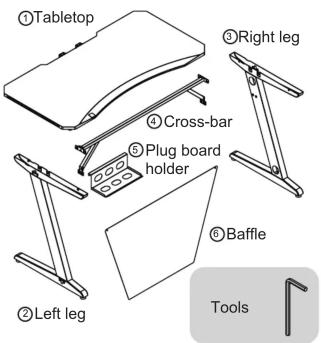
①Tabletop ②Left leg ③Right leg ④Cross-bar ⑤Plug board holder ⑥Baffle Tools

Put cable hole Ⓐ (x4) into the hole
Swirl adjustable pad Ⓑ (x4) into the hole

6
⑥ D×2

Use(D)(×2) to install baffle 6
Then the desk is ready to use.

5
E ×2

Tighten Ⓔ (x2) to fix the cross bars and the tabletop

2 ④ ③ ② ① D ×4

Use(D)(x4) to connect the left leg ② & right leg ○ with cross-bar ○ Tighten the screws on the cross-bar with an allen key

3
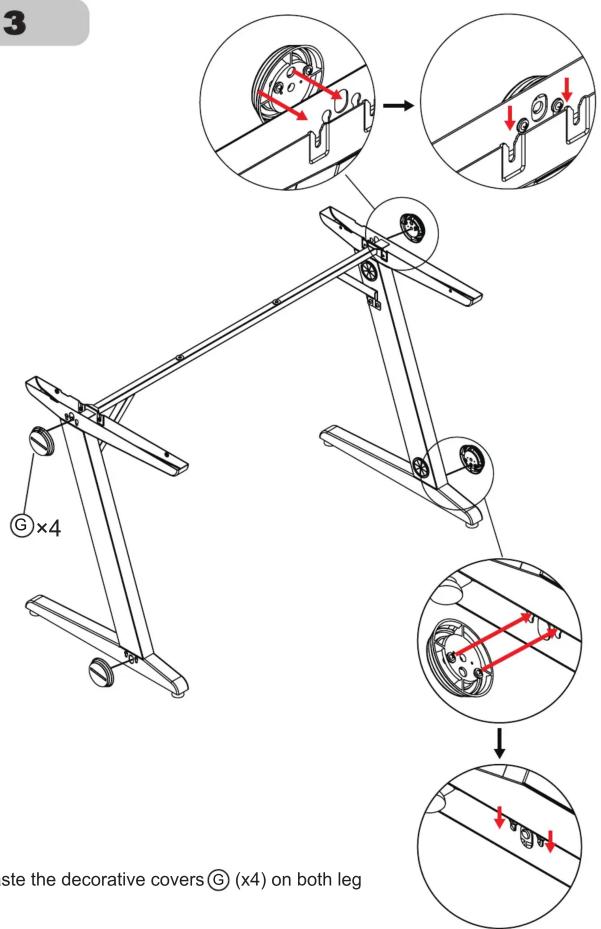
3 G×4 ste the decorative covers G (x4) on both leg

4
R ① ⑤ ④ ④ C ×4 L

Hang plug board holder ⑤ and cable clamps ©(x4)on cross-bar ④ Gently press the spring bolt lock, the desktop can be installed

Table of contents Click a title to access it
Manual assistant
Powered by Anthropic
Waiting for your message
Product information

Brand : Techly

Model : ICA-TB ESG03

Category : Office