
TX-5500 - Computing Posiflex - Free user manual and instructions
Find the device manual for free TX-5500 Posiflex in PDF.


| Product Type | Point-of-Sale (POS) Terminal |
| Display | 15.6-inch TFT LCD with projected capacitive touchscreen |
| Resolution | 1920 x 1080 (Full HD) |
| Processor | Intel Celeron J1900 (2.0 GHz up to 2.42 GHz) |
| RAM | 4 GB DDR3L (expandable up to 8 GB) |
| Storage | 128 GB SSD (mSATA) |
| Operating System | Windows 10 IoT Enterprise or Linux |
| Dimensions (W x H x D) | 366 x 310 x 50 mm (14.41 x 12.20 x 1.97 in) |
| Weight | 5.5 kg (12.13 lb) |
| Power Supply | 24V DC, 90W external adapter |
| Connectivity | 2x USB 2.0, 2x USB 3.0, 1x RJ45 (Gigabit Ethernet), 1x VGA, 1x HDMI, 1x RS232, audio jacks |
| Wireless | Wi-Fi 802.11 b/g/n, Bluetooth 4.0 (optional) |
| Expansion Slots | 1x mPCIe for peripherals |
| Touch Technology | Projected capacitive (10-point multi-touch) |
| Printer Support | Compatible with Epson and Star thermal printers (via USB/Serial) |
| Customer Display | Optional 2x20 VFD or 15.6-inch secondary screen |
| Security | Kensington lock slot, TPM 2.0 |
| Environmental | 0°C to 40°C (32°F to 104°F), 20% to 80% RH non-condensing |
| Maintenance | Clean with a soft dry cloth; avoid solvents or abrasive cleaners |
| Spare Parts / Repairability | Replaceable fan, RAM, SSD; authorized service centers available |
| Regulatory Approvals | FCC, CE, UL, RoHS |
Frequently Asked Questions - TX-5500 Posiflex
User questions about TX-5500 Posiflex
0 question about this device. Answer the ones you know or ask your own.
Ask a new question about this device
Download the instructions for your Computing in PDF format for free! Find your manual TX-5500 - Posiflex and take your electronic device back in hand. On this page are published all the documents necessary for the use of your device. TX-5500 by Posiflex.
USER MANUAL TX-5500 Posiflex
natural_image
Black rectangular electronic device with ports and indicator lights (no visible text or symbols)TX-5300/5500
natural_image
Front view of a black power drive unit with ports and indicator lights (no readable text or symbols)TX-5300E/5500E
Package Contents
√ TX-5300, TX-5300E,
TX-5500 or TX-5500E POS box....(x1)
√ 12VDC/84W power adaptor (TX-5300/5500) or 12VDC/150W power adaptor (TX-5300E/5500E).....(x1)
√ Power cord....(x1)
√ Wall-mount bracket (optional)....(x1)
Revision History
| Date | Version | Description |
| 2020/08/03 | A0 | For Preliminary Release |
| 2020/08/14 | B0 | 1. System Memory Max. 16GB change to Max. 32GB2. Add driver download information |
TX-5300(E)/5500(E) Ver. B0
SOME IMPORTANT NOTES
FCC NOTES
This equipment has been tested and found to comply with the limits for a Class A digital device, pursuant to part 15 of the FCC Rules. These limits are designed to provide reasonable protection against harmful interference when the equipment is operated in a commercial environment. This equipment generates, uses, and can radiate radio frequency energy and, if not installed and used in accordance with the instruction manual, may cause harmful interference to radio communications. Operation of this equipment in a residential area is likely to cause harmful interference in which case the user will be required to correct the interference at his own expense.
This device complies with part 15 of the FCC Rules. Operation is subject to the following two conditions: (1) This device may not cause harmful interference, and (2) this device must accept any interference received, including interference that may cause undesired operation.
CE CLASS A WARNING
This equipment is compliant with Class A of CISPR 32. In a residential environment this equipment may cause radio interference.
AVERTISSEMENT CE CLASSE A
Warranty will terminate automatically when the machine is opened by any person other than the authorized technicians. The user should consult his/her dealer for the problem happening. Warranty voids if the user does not follow the instructions in application of this merchandise. The manufacturer is by no means responsible for any damage or hazard caused by improper application.
LIMITES DE GARANTIE
This equipment is not suitable for use in locations where children are likely to be present.
CONSIGNES DE SÉCURITÉ
Power cord shall be connected to a socket-outlet with earthing connection
ATTENTION
Risk of explosion if battery is replaced by an incorrect type. Dispose of expended battery in accordance with local disposal regulations.
AVERTISSEMENT DE BATTERIE
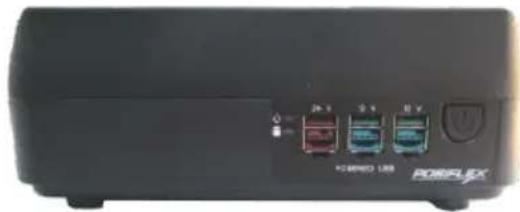
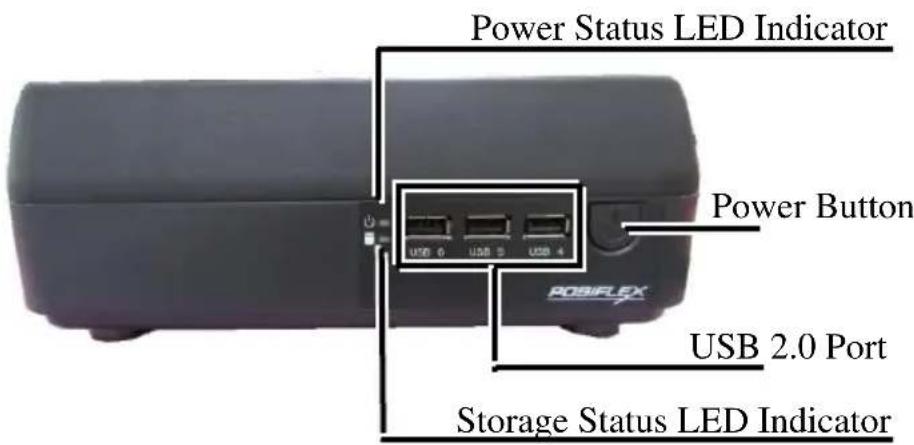
Front View of TX-5300/5500
Front View of TX-5300E/5500E

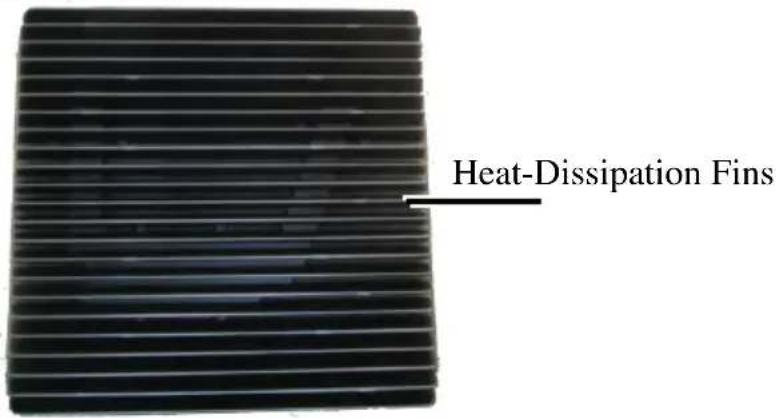
Top View of TX-5300/5300E/5500/5500E
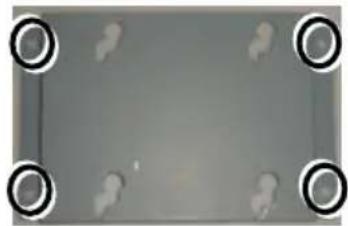
Bottom View of TX-5300/5300E/5500/5500E

Rear I/O Ports
TX-5300/5300E/5500/5500E

1 USB 3.0 port
3 VGA port
5 LPT port
7 COM port
9 Mic-in / line-out combo jack
2 RJ45 LAN port
4 RJ11 cash drawer (CR) port
6 HDMI port
8 12VDC-IN power jack
Connecting Power Adapter and I/O Cables
To have the terminal ready for operation, please connect the connector of power adapter and all of the connectors of required I/O cables respectively to the 12VDC-IN power jack and appropriate I/O ports. Please make sure that each of the cables is fully connected to the correct port. Damages due to incorrect connection or orientation are not covered by product warranty!
Some cable connectors like the connectors of LAN or cash drawer (CR) cables have to be gently inserted until a click is heard. It is recommended that the I/O ports, such as COM port, parallel port, and VGA port, should be screwed after the I/O cable connectors are completely connected. And please make sure that each connector has to be connected to the right peripheral device in the right way.
CAUTION: On doing insertion or extraction of a cable connector, please always hold the connector head itself instead of pulling the cable wire. Doing this could damage the cables and ports, which is considered as an artificial damage and is not covered by the warranty. The means of power cord should be connected to a socket-outlet with earthing connection.
Note: The COM ports of TX-5300/5300E/5500/5500E do not supply power by default. To make the COM ports supply power, you can set up the COM ports through the dedicated settings listed in the table below.
| TX-5300/5300E/5500/5500E | |||||
| COM1/2/3/4 | COM5/6 | VGA | |||
| 5VDC | 12VDC | 5VDC | 12VDC | 12VDC | |
| BIOS Setting | V | V | V | ||
| Jumper Setting | V | V | |||
The VGA port of TX-5300/5300E/5500/5500E can supply +12VDC power through system BIOS setting for Posiflex LCD monitor. Nevertheless, except Posiflex VGA monitor, do not connect any other monitor to this port with VGA power enabled.
Installing Optional Peripheral Devices
Posiflex TX-5300/5300E/5500/5500E can work with multiple optional peripheral devices, such as LCD monitor, cash drawer and the like.
Before installing an optional peripheral device, make sure that the system is powered off and the external power source is removed from the POS box to prevent electric hazard! Failure to follow the warning description will void the product warranty!
For the detailed instruction, refer to each of the user manuals of the optional peripheral devices.
Installing an Optional Second Storage (SSD)
The TX-series system is provided with a second storage bracket for you to install an optional second storage. To avoid users from damaging the main board of the system, it is highly recommended that the optional second storage installation is implemented by professional technicians.
Installing a Memory Upgrade Module
The TX-series system is provided with two DRAM slots for you to expand or replace memory. Before shipping, one memory has been inserted into one socket of the main board. To expand or replace memory, follow the two steps below.
- Loosen and remove the screw from the service door.

natural_image
Close-up of a mechanical or electronic component with internal slots and mounting holes (no visible text or symbols)- Remove the service door.

natural_image
Close-up of a metallic electronic component with ventilation slots and mounting holes (no visible text or symbols)To avoid users from damaging the main board of the system, it is highly recommended that the memory expansion and replacement are implemented by professional technicians.
Mounting the TX-5300/5300E/5500/5500E on the Wall (Optional)
- Fix the wall mount bracket onto the wall by using attached plastic anchors and four M3.5-16L screws.
natural_image
Gray rectangular frame with four black circular corner markers, no text or symbols present.- Do spiral insertion of 4 M4-7L screw bolts into the 4 screw bolt holes.

natural_image
Top-down view of a computer monitor with four circular buttons on its surface (no text or symbols visible)- Lineup the 4 screw bolts to be inserted into the 4 tracks. Then slide downwards the system along the track until a click sound is given for completely mounting the system with the bracket on the wall.

natural_image
Four square frames with small circular cutouts on a dark background, no text or symbols visibleFor detailed installation description, please refer to the WB-4200 bracket installation guide.
Powering ON/OFF the POS Box
Power ON TX-5300/5300E/5500/5500E
Press down the power button to power on the TX-5300/5300E/5500/5500E.
Power OFF TX-5300/5300E/5500/5500E
In most cases, push the power button again to power the system off. However, if the POS box halts for unknown reasons, please be advised to hold the power more than 10 seconds to initiate a forced shutdown.

natural_image
Close-up of a black electronic device with a circular button and power symbol (no readable text or labels)Status LED Indicator
There are two status LED indicators, power status LED indicator and SSD status LED indicator, on the front side of the TX-5300/5300E/5500/5500E. After powering ON the POS system, you can read the system operation status from the power and SSD status LED indicators. The LED status is described below.
| LED | Status | Description |
| POWER | Solid green | System power ON |
| Solid red | System standby | |
| SSD | Flash green | Data access |
Installing an Operating System
This product is highly professional equipment. Therefore, we do NOT encourage you to install any operating system into this machine without professional assistance. Posiflex Technology, Inc. shall not be responsible for any technical support to questions on this aspect. We suggest that you contact your dealer for OS installation.
Operating System Recovery
For the TX-5300/5300E/5500/5500E main system preloaded with an operating system, Posiflex provides a recovery DVD shipped with the main system for the preloaded operating system. The system integrator shall take care of software restoration after the OS is recovered.
If you plan to recover your operating system, we do NOT encourage you to recover any operating system. Please contact your service center for operating system recovery.
Operation Environment
This terminal must NOT be operated in an environment with restricted ventilation. There must be at least 25 mm air clearance around any top or side ventilation holes with a free flow of air around the unit at all times for system operation.
Specifications
| TX-5300 | TX-5300E | TX-5500 | TX-5500E | |
| CPU | Intel Coffee Lake-S CPU Core-i3 | Intel® Coffee Lake-S CPU Core-i5, Core-i7 | ||
| Chipset | H310 | Q370 | ||
| Memory | DDR4 SO-DIMM x2, Max. 32GB | |||
| OS | Windows 10 IoT / Linux (by request) | |||
| VGA Port | VGA(DB15 pin) x 1 , supporting +12V/2.5A | |||
| HDMI Port | HDMI x 1 | |||
| Serial Port | DB9 pin x 4 for COM1 ~ COM4COM5 & COM6 pin header through service door5 x RS-232(COM1, COM3~COM6) + 1 x RS-232/422/485(COM2) | |||
| Ethernet Port | 10/100/1000 Mb x 2 | |||
| Wireless Com. | Optional, 802.11 b/g/n with integrated antenna, M.2 module | |||
| Power Supply | 12VDC power adaptor, 84W12VDC power adaptor, 150W | |||
| Parallel Port | Parallel port(DB26 pin) x 1 | |||
| CR Port | CR port x 1, controlling 2 cash drawers | |||
| USB Port | TX-5300/5500:USB3.0 x 4 (on the rear I/O side)USB2.0 x 3 (on the front side)TX-5300E/5500E:USB3.0 x 4 (on the rear I/O side)24V Powered USB port x 1 (on the front side)12V Powered USB port x 2 (on the front side) | |||
| Audio Port | MIC-in / line-out x 1 & 1 internal speaker | |||
| Storage | SATA x 2M.2 2280 x 1 (SATA only) | SATA x 2M.2 2280 x 1 (PCIe or SATA) | ||
| RAID Support | N/A | Yes, supporting for at least two SSDs (Q370 only) | ||
| vPro Support | N/A | Yes (Q370 only) | ||
| Extension Slot | M.2 2230, reserved for M.2 WIFI w/external di-pole antenna | |||
| Power Switch | Soft switch | |||
| Mechanical Installation | Desktop or wall mount, VESA mount 75 x 75 | |||
| Wall-Mount Bracket | Optional, WB-4200 | |||
| LED Indicator | Front Panel:Power on/ standby, bi-color LED indicators and storage LED indicatorRear Panel:Ethernet link LED on Ethernet connector | |||
| COM 5/6 Extension Cable | Optional for COM 5/6 pin header inside service door | |||
| Operating Condition | 0°C - 40°C, 20%RH - 90%RH | |||
| Storage Condition | -20°C - 70°C, 10%RH - 90%RH | |||
※ The product information and specifications are subject to change without prior notice. To get the detailed information on TX-5300/5300E/5500/5500E, please check this model from Posiflex Global Website (http://download.posiflex.com/en-global/Download/download).

- Package Contents
- SOME IMPORTANT NOTES
- FCC NOTES
- CE CLASS A WARNING
- AVERTISSEMENT CE CLASSE A
- LIMITES DE GARANTIE
- CONSIGNES DE SÉCURITÉ
- ATTENTION
- AVERTISSEMENT DE BATTERIE
- Rear I/O Ports
- Connecting Power Adapter and I/O Cables
- Installing Optional Peripheral Devices
- Installing an Optional Second Storage (SSD)
- Installing a Memory Upgrade Module
- Mounting the TX-5300/5300E/5500/5500E on the Wall (Optional)
- Powering ON/OFF the POS Box
- Status LED Indicator
- Installing an Operating System
- Operating System Recovery
- Operation Environment
Brand : Posiflex
Model : TX-5500
Category : Computing