USB-10DL - Subwoofer Soundstream - Free user manual and instructions
Find the device manual for free USB-10DL Soundstream in PDF.


| Product Type | Subwoofer |
| Brand | Soundstream |
| Model | USB-10DL |
| Driver Size | 10 inches |
| Impedance | 4 ohms |
| RMS Power Handling | 300 Watts |
| Peak Power Handling | 600 Watts |
| Frequency Response | 25 Hz - 250 Hz |
| Sensitivity | 90 dB |
| Mounting Depth | 5.5 inches |
| Cutout Diameter | 9.25 inches |
| Cone Material | Polypropylene |
| Surround Material | Rubber |
| Voice Coil Configuration | Single 4 ohms |
| Magnet Weight | 40 oz |
| Recommended Enclosure Volume (Sealed) | 1.0 - 1.5 cubic feet |
| Recommended Enclosure Volume (Ported) | 1.5 - 2.0 cubic feet |
| Dimensions (Diameter x Height) | 11.2 x 6.5 inches |
| Weight | 12 lbs |
| Cleaning | Wipe with a dry microfiber cloth |
| Safety Instructions | Ensure proper ventilation and avoid clipping the amplifier |
| Repairability | Recone kits available; consult a professional |
| Included Accessories | User manual, mounting hardware |
Frequently Asked Questions - USB-10DL Soundstream
User questions about USB-10DL Soundstream
0 question about this device. Answer the ones you know or ask your own.
Ask a new question about this device
Download the instructions for your Subwoofer in PDF format for free! Find your manual USB-10DL - Soundstream and take your electronic device back in hand. On this page are published all the documents necessary for the use of your device. USB-10DL by Soundstream.
USER MANUAL USB-10DL Soundstream
Before attempting to conncet, operate or adjust this product, please read there instructions completely please save this manual.
Panel controls and features
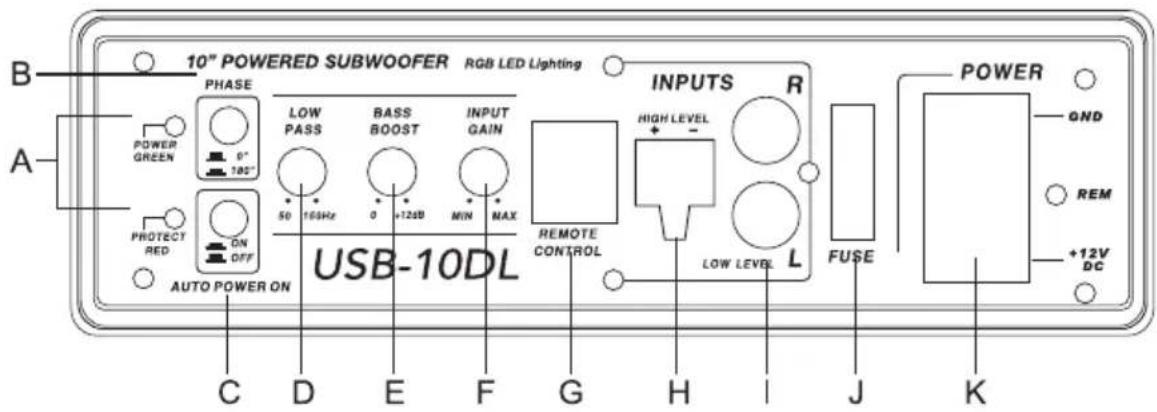
A. POWER STA, US LED
This bi-color LED glows green when power is on and no problems are present. If one of the protection circuits comes on, it will change to red.
B.PHASE SHIFT
Use this switch to help compensate for time alignment problems in the system. Such problems usually result from having the subwoofer at a different distance from the listener than the other speakers in the system.
C. AUTO POWER ON
This switch controls the use of RGB lights. Press the switch and it will remain in constant light mode when no music signal is connected. Input music signal, the color of the LED light and the light flashing mode will change with the music. When the switch is turned off, the LED light stops working.
Warning: This product has RGB light flickering effect, please do not stare directly at the light for a long time, so as to avoid eye discomfort
D.LOW PASS FILTER
This control permits you define the frequency range you want the subwoofer amplifier to receive. The subwoofer will reproduce all sound BELOW the frequency you set.
Note: The low pass filter frequency can be higher or lower than the standard. There have +/-20% tolerance.
E.BASS BOOST
The BASS BOOST feature will increase the sound level in the bass frequencies.
F. INPUT GAIN CONTROL
After you have installed your system, turn this control to minimum.
Turn the head unit on (and the subwoofer will turn on via the remote connection). Turn the head unit volume to about 2/3 full level.
Slowly turn up the subwoofer input gain control until you hear a small amount of distortion. Then reduce the level until the distortion is completely gone. Level the control at this setting.
G.REMOTE LEVEL CONTROL PORT
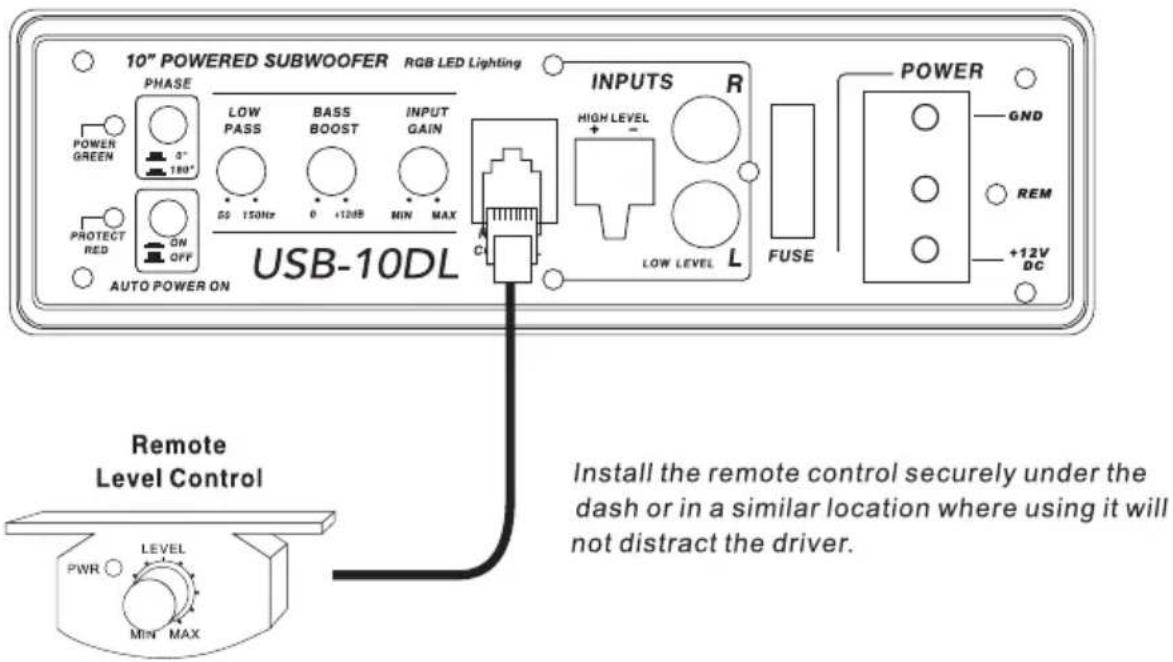
Attach the included remote level control to control the volume level of the subwooer independently.
H.HIGH LEVEL (speaker level) INPUTS
If your head unit does not have RCA outputs you can use the speaker outputs for the audio source for the subwoofer. Use the supplied cable and wire harness and connect the outputs properly as shown in the connection diagram in this manual.
I. LOW LEVEL RCA INPUTS
Low level inputs are the recommended way to introduce the audio signal to the subwoofer if RCA outputs are present on your head unit or other signal source (such as a sound processor).
J.FUSE
Do not use a fuse with a different value and NEVER replace the fuse with a wire or coin.
K.POWER INPUT TERMINAL
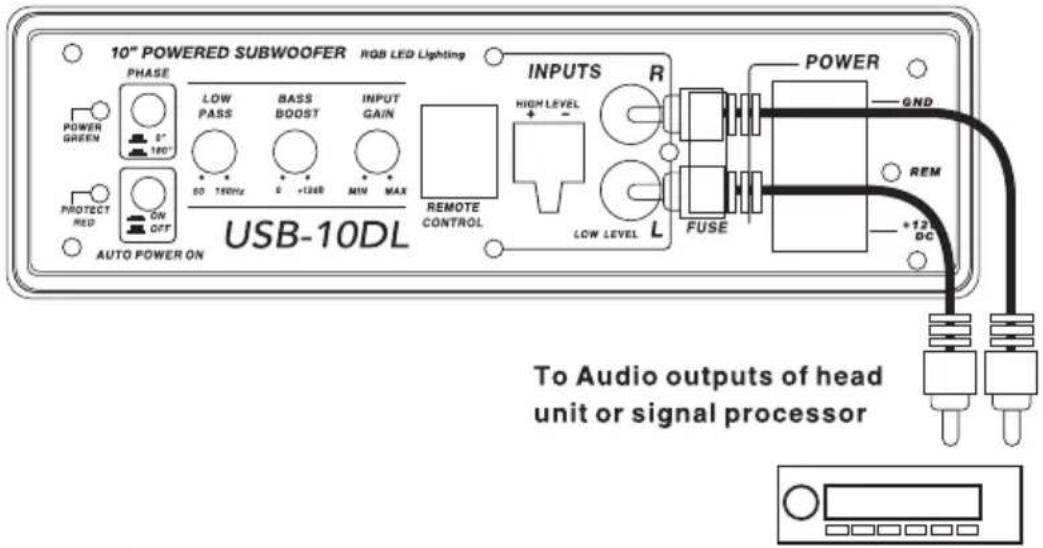
Low Level Input Wiring
Low-level (RCA) input wiring is preferred for best audio performance. Most trunk or hatchback installations will require a 15-20 feet RCA cable, while pickup trucks and under-seat installations will require a 6-12 feet RCA cable. Always use a high quality cable.
NOTE: Do not connect BOTH the high level and low level inputs from your receiver to your amplifier at the same time!
Fig.1
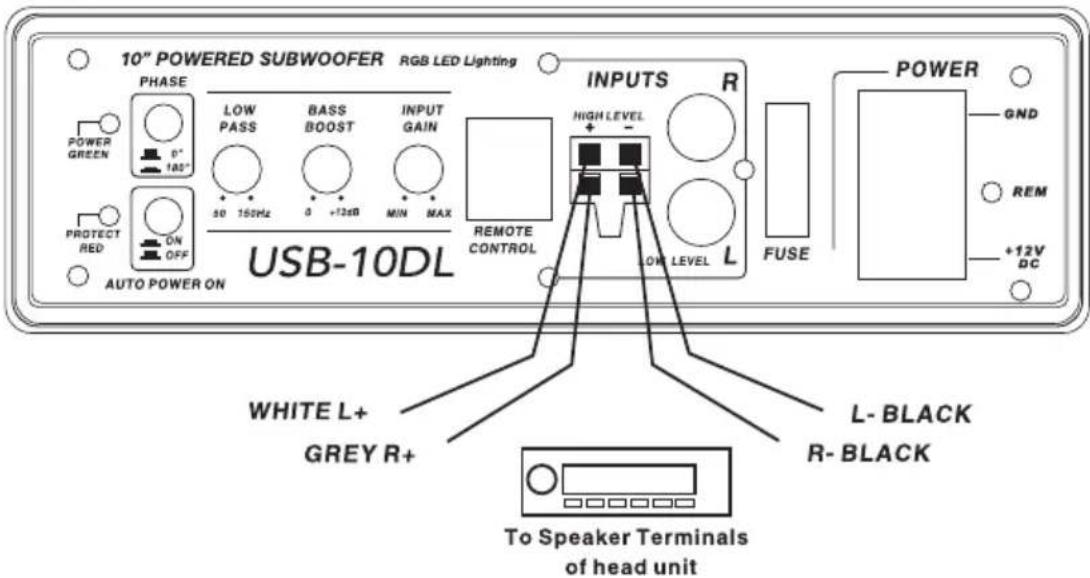
High Level Input Wiring
The high level input(s) should only be used when your receiver lacks RCA outputs. If the RCA outputs are not present, connect the speaker outputs from the receiver to the high level input connector of the amplifier. Be sure to observe polarity to avoid audio phase problems.
NOTE: Do not connect BOTH the high level and low level inputs from your receiver to your amplifier at the same time!
Fig.2
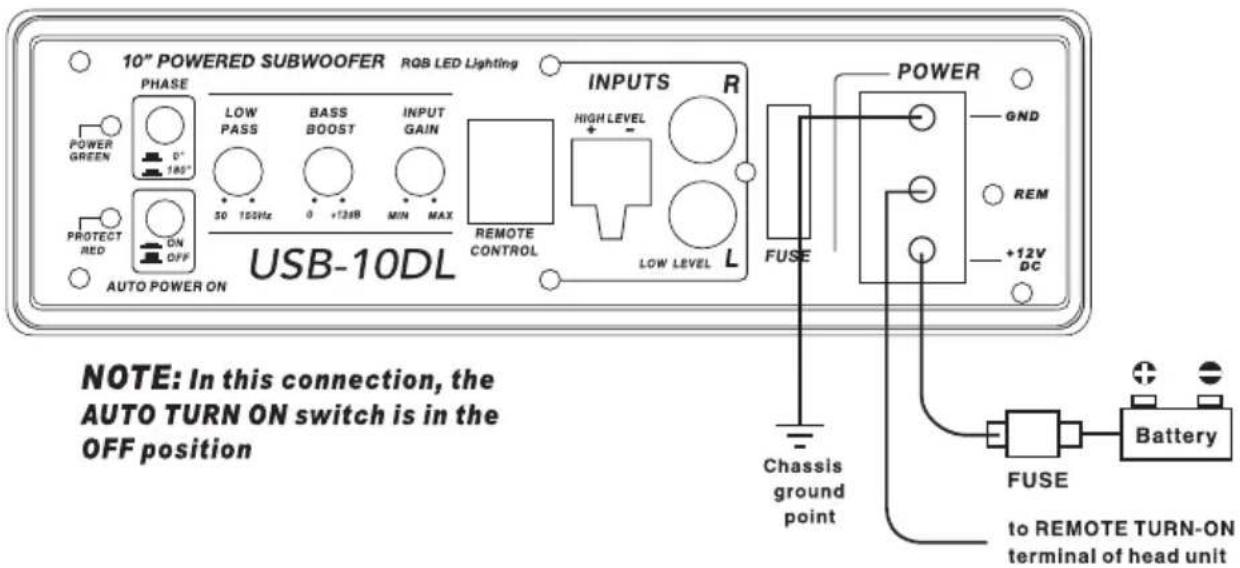
Power Connections
Connect the ground terminal to the closest point on the chassis of the vehicle. Keep this ground wire to less than 39" (100 cm) in length. Use 8 gauge (or heavier) wire.
Connect the remote terminal to the remote output of head unit using 16 gauge (or heavier) wire.
Connect an empty fuse holder within 18" (45 cm) of the car battery, and run 8 gauge (or heavier) cable from this fuse to the amplifier location. Then connect the fuse holder to the "BATT+" (+12V) connection on the subwoofer rear panel.
Fig.3
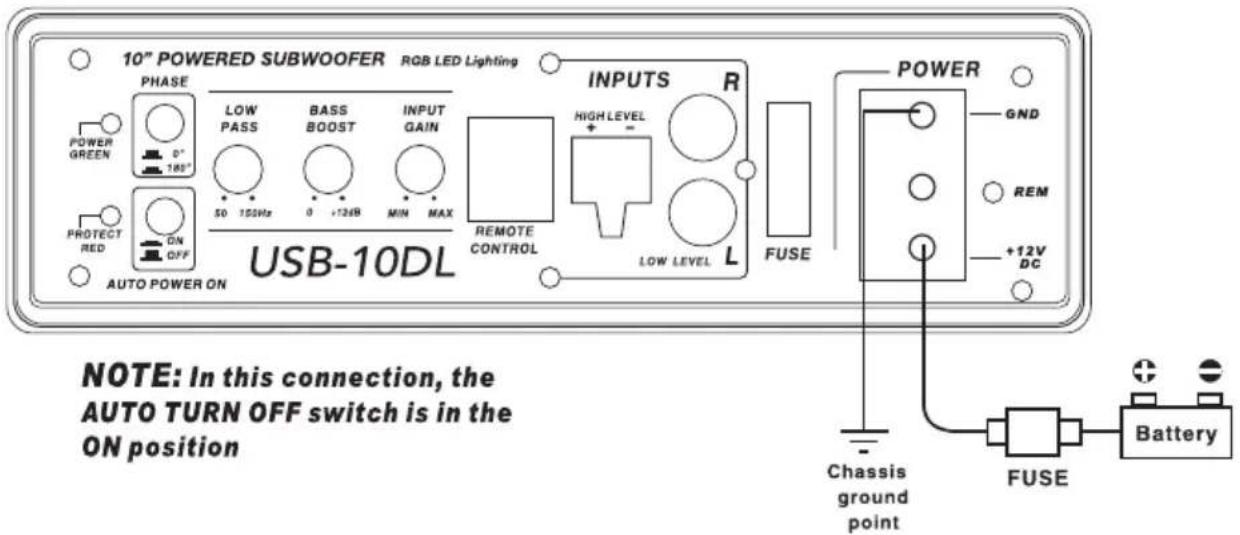
Fig.4
Remote Level Control Connection
Fig.5
Specifications
| MODEL: | USB-10DL |
| RMS power | 10" -Inch Low Profile 800 W |
| THD | <0.4% |
| Signal-to-noise ratio | >90dB |
| Frequency response | 20Hz - 150Hz |
| Input sensitivity, high level | 0.9V |
| Input sensitivity, low level | 300mV |
| Low Pass Filter | 50Hz - 150Hz |
| Bass Boost | 0 to + 12dB |
| Subsonic Filter | 20Hz |
| Fuse rating | 25A |
| Subwoofer | 10"-inch,4ohm |
| Dimensions(L x W x H) mm | 345 × 260 × 68 |
All specifications subject to change without notice.
Troubleshooting
If you experience operation or performance problems with this product, compare your installation with the electrical wiring diagram on the previous pages. If problems persist, read the following troubleshooting tips which may help eliminate the problems.
SYMPTOM
POSSIBLE REMEDY
| Amplifier will not power up. | Check to make sure you have a good ground connection.Check that the Remote Input (Turn-On) has at least 5VDC.Check that there is battery power on the (+) terminal.Check that there is at least 12v.Check all fuse, replace if necessary.Make sure that the Protection LED is not illuminated. If it is lit, shut off the amplifier briefly, and then repower it. |
| Protection LED comes on when amplifier is powered up | Check for short circuits on speaker leads.Turn down the volume control on the head unit to prevent overdriving.Remote speaker leads, and reset the amplifier. If the Protection LED still comes on, then the amplifier is faulty and needs servicing. |
| No output. | Check that all fuses are OK.Check that unit is properly grounded.Check that the Remote Input (Turn-On) has at least 5VDC.Check that the RCA audio cables are plugged into the proper inputs.Check all speaker wiring. |
| Low output. | Reset the Level ControlCheck the Crossover Control settings. |
| High hiss in the sound. | Disconnect all RCA inputs to the power sub's control panel. If the hiss disappears, then plug in the component driving the amplifier and unplug its inputs. If the hiss disappears at this point, go on until the faulty/noisy component is found.It is best to set the amplifier's input level control as low as possible. The best subjective signal-to-noise ratio is achieved in this manner. Try to set the head unit as high as possible (without distortion) and the amp input level as low as possible. |
| Squealing noise is present. | Check for improperly grounded RCA interconnects. |
| Distorted sound. | Check that the Input Level Control is set to match the signal level of the head unit. Always try to set the Input Level as low possible.Check that all crossover frequencies are properly set.Check for short circuits on the speaker leads. |
| Amplifier gets very hot. | Check that the minimum speaker impedance for the amp model is correct.Check that there is good air circulation around the amp. In some applications, it may be necessary to add and external cooling fan. |
| Engine noise (static type) | This is usually caused by poor quality RCA cables, which can pick up radiated noise. Use only the best quality cables, and route them away from power cables. |
| Engine noise (alternator whine) | Check that the RCA grounds are not shorted to the vehicle chassisCheck that the head unit is properly grounded. |
LIMITED 90-DAY CONSUMER WARRANTY
LIMITED TWO-YEAR CONSUMER WARRANTY WITH PURCHASE AND INSTALLATION BY A SOUNDSTREAM AUTHORIZED RETAILER
Soundstream promises to the original purchaser, to repair or replace this product with a new or refurbished unit (at Soundstream's sole and absolute discretion) should it prove to be defective in workmanship or material under normal use, for a period of two-years from the date of purchase from the Soundstream authorized retailer, PROVIDED the product was purchased and installed by a Soundstream authorized retailer. During this two-year period, there will be no charge for product repair or replacement, PROVIDED the unit is returned to Soundstream, return shipping pre-paid, along with the required proof of installation, the bill of sale or other dated proof of purchase, and the consumer's contact information.
If the unit is installed by anyone other than a Soundstream authorized retailer, the warranty period will be 90-days from the date of purchase. This warranty is nontransferable and does not apply to any unit that has been modified or used in a manner contrary to its intended purpose, and does not cover damage to the unit caused by installation or removal of the unit. During this 90-day period, there will be no charge for the repair or replacement PROVIDED the unit is returned to Soundstream, return shipping prepaid, along with the bill of sale or other dated proof of purchase and the consumer's contact information.
This warranty is void if the product has been damaged by accident or unreasonable use, neglect, improper service or other causes not arising out of defects in materials or damage due to environmental causes such as floods, airborne fallout, chemicals, salt, hail, lightning or extreme temperatures, damage due to accidents, road hazards, fire, theft, loss or vandalism, damage due to improper connection to equipment of another manufacturer, modification of existing equipment, or Product which has been opened or tampered for any reason. Units which are found to be damaged by abuse resulting in thermally damaged voice coils are not covered by this warranty but may be replaced at the absolute and sole discretion of Soundstream. Unit must be returned to Soundstream, postage pre-paid, with bill of sale or other dated proof of purchase bearing the following information: consumer's name, telephone number, and address, authorized retailer's name and address, and product description. Please contact Soundstream warranty office at 800-724-1377, email to repairs@soundstream.com, or visit Soundstream.com/warranty to obtain a Return Authorization Number prior to shipping the product.
Note: This warranty does not cover labor costs for the removal and reinstallation of the unit. IN ORDER FOR THE TWO-YEAR WARRANTY TO BE VALID, YOUR UNIT MUST BE SHIPPED WITH PROOF OF PURCHASE & INSTALLATION BY A SOUNDSTREAM AUTHORIZED RETAILER. ALL UNITS RECEIVED BY SOUNDSTREAM FOR WARRANTY REPAIR WITHOUT PROOF OF SOUNDSTREAM AUTHORIZED DEALER INSTALLATION AND PURCHASE WILL BE COVERED BY THE LIMITED 90-DAY WARRANTY.
BY PURCHASING THIS PRODUCT, ALL WARRANTIES INCLUDING BUT NOT LIMITED TO EXPRESS WARRANTY, IMPLIED WARRANTY, WARRANTY OF MERCHANTABILITY, FITNESS FOR PARTICULAR PURPOSE, AND WARRANTY OF NON-INFRINGEMENT OF INTELLECTUAL PROPERTY ARE EXPRESSLY EXCLUDED TO THE MAXIMUM EXTENT ALLOWED BY LAW, AND SOUNDSTREAM NEITHER ASSUMES NOR AUTHORIZES ANY PERSON TO ASSUME FOR IT ANY LIABILITY IN CONNECTION WITH THE SALE OF THE PRODUCT. SOUNDSTREAM HAS ABSOLUTELY NO LIABILITY FOR ANY AND ALL ACTS OF THIRD PARTIES INCLUDING ITS AUTHORIZED DEALERS OR INSTALLERS. BY PURCHASING THIS PRODUCT, THE CONSUMER AGREES AND CONSENTS THAT ALL DISPUTES BETWEEN THE CONSUMER AND SOUNDSTREAM SHALL BE RESOLVED IN ACCORDANCE WITH CALIFORNIA LAWS IN LOS ANGELES COUNTY, CALIFORNIA. Some states do not allow limitation on how long an implied warranty lasts. In such states, the limitation or exclusions of this Limited Warranty may not apply. Some states do not allow the exclusion or limitation of incidental or consequential damages. In such states, the exclusion or limitation of this Limited Warranty may not apply to you. This Limited Warranty gives you specific legal rights, and you may have other rights which vary from state to state.
SOUNDSTREAM
TECHNOLOGIES
Please Keep This Information For Your Records
Product Model:
Serial Number:
Date Purchased:
Name of Dealer:
Dealer Address:
City: ____ State: ____ Zip: ____

Owners Registration Card.
Please complete and return immediately to the address on the reverse side
Name:
Address:
City: ____ State: ____ Zip: ____
Phone: ____ E-mail: ____
Vehicle Make/Model:
Product Model:
Serial Number:
Date Purchased:
Name of Dealer:
Dealer Address:
City: ____ State: ____ Zip: ____

- Panel controls and features
- POWER STA, US LED
- B.PHASE SHIFT
- AUTO POWER ON
- D.LOW PASS FILTER
- E.BASS BOOST
- INPUT GAIN CONTROL
- G.REMOTE LEVEL CONTROL PORT
- H.HIGH LEVEL (speaker level) INPUTS
- LOW LEVEL RCA INPUTS
- J.FUSE
- K.POWER INPUT TERMINAL
- Low Level Input Wiring
- High Level Input Wiring
- Power Connections
- Remote Level Control Connection
- Troubleshooting
- LIMITED 90-DAY CONSUMER WARRANTY
- LIMITED TWO-YEAR CONSUMER WARRANTY WITH PURCHASE AND INSTALLATION BY A SOUNDSTREAM AUTHORIZED RETAILER
- SOUNDSTREAM
- TECHNOLOGIES
- Please Keep This Information For Your Records
- Owners Registration Card.
Brand : Soundstream
Model : USB-10DL
Category : Subwoofer