SSW-102 - Uncategorized Crestron - Free user manual and instructions
Find the device manual for free SSW-102 Crestron in PDF.


User questions about SSW-102 Crestron
0 question about this device. Answer the ones you know or ask your own.
Ask a new question about this device
Download the instructions for your Uncategorized in PDF format for free! Find your manual SSW-102 - Crestron and take your electronic device back in hand. On this page are published all the documents necessary for the use of your device. SSW-102 by Crestron.
USER MANUAL SSW-102 Crestron
Room Availability Hallway Sign, Wall Mount
DO Connect the Device
The Crestron ^® SSW room availability hallway sign may be powered and controlled by a Crestron TSS-7, TSS-10, TSW-760 or TSW-1060 touch screen via USB, or by a Crestron control system or DMPS3 device via a Cresnet ^® network connection. Both connection methods are described below.
NOTE: All cable connections must be made prior to installing the SSW.
- USB: Use the included USB cable to connect the SSW to the touch screen. Connect the cable's USB A connector to the touch screen and the micro USB connector to the SSW assembly. Out-of-the-box functionality is established via the touch screen room scheduling application, with no programming required.
NOTE: The TSS-7 and TSW-760 may use either PoE (Power over Ethernet) or PoE+ to supply power to the SSW over USB, but the TSS-10 and TSW-1060 must use only PoE+ to supply power to the SSW.
- Cresnet: Use any standard Cresnet cable and the Included 4-pin terminal block to connect the SSW to a Crestron control system or DMPS3 device. The SSW is powered and controlled over Cresnet via programming in SIMPL Windows or Crestron Studio "software.
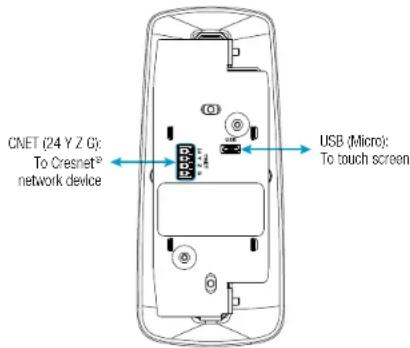
NOTE: The CNET ID button on the front of the assembly is used to identify the device on the network using the Network Device Tree View in Crestron Toolbox™ software. For more information, refer to the embedded Crestron Toolbox help file.

Check the Box
QTY ITEM PART NUM.
| 1 Bezel, Wall Sign 4525866 | |
| 1 Cable, USB 2.0, A - micro B, 6 ft (1.83 m) 2038114 | |
| 1 Connector, 4-Pin 2003576 | |
| 2 Screw, 4-40 x 1/2 in, SEMS, Pan Head, Phillips 2011592 | |
| 2 Screw, 6-32 x 5/16 in, Pan Head, Phillips 2007221 |
The brightness of the SSW may be custom programmed as follows:
- If the SSW is connected to a touch screen, brightness is controlled by sending a custom property to the touch screen in Crestron Fusion ^® software. For more information, refer to the embedded Crestron Fusion help file.
- If the SSW is connected to a control system, brightness is controlled via custom programming in SIMPL Windows or Crestron Studio. For more information, refer to the embedded SIMPL Windows or Crestron Studio help files.
DO Install the Device
The SSW installs over a standard 1-gang U.S. electrical box. Once installed, the touch screen protrudes 8.43 in (214 mm) from the mounting surface.
To install the SSW:
- Once all cable connections have been made, attach the device assembly to the electrical box using the two included 6-32 x 5/16 in screws and a Phillips screwdriver.
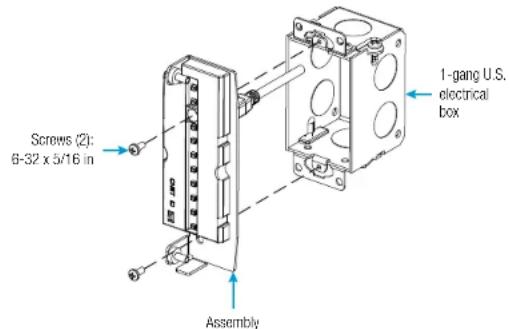
NOTE: For retrofit installations, the SSW may be installed over a 1-gang plaster ring using the same installation method described above.
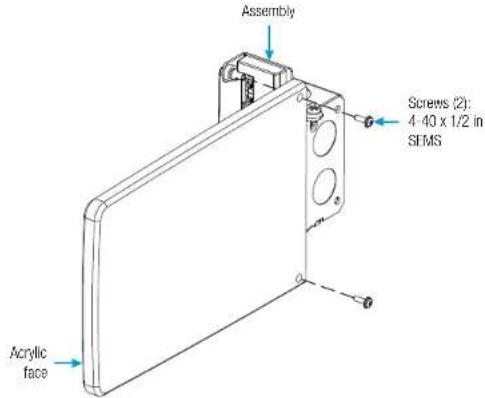
- Align the two mounting holes on the acrylic face (included with the SSW kit or purchased separately) with the mounting posts on the assembly.
- Attach the acrylic face to the assembly so that the posts on the assembly engage the holes on the acrylic face. The acrylic face stays in place after it is attached to the assembly.
- Using a Phillips screwdriver, secure the acrylic face to the assembly with the two included 4-40 x 1/2 in screws.
The illustration below depicts the procedure for attaching an SSW-ACR series acrylic face face to the assembly. The same attachment procedure applies to other acrylic faces that are compatible with the SSW.
- Remove the plastic film from the acrylic face once it is secured.
- Slide the included bezel carefully over the acrylic face until the magnets on the bezel snap into place against the assembly.
DO Learn More
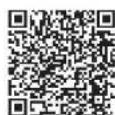
Visit the website for additional information and the latest firmware updates. To learn more about this product, use a QR reader application on your mobile device to scan the QR image.
Crestron Electronics
15 Volvo Drive, Rockleigh, NJ 07647
888.CRESTRON | www.crestron.com

This product is listed to applicable UL * Standards and requirements tested by Underwriters Laboratories Inc. Ce produit est homologue selon les normes et les exigences UL applicables par Underwriters Laboratories Inc.
Federal Communications Commission (FCC) Compliance Statement
This device complies with part 15 of the FCC Rules. Operation is subject to the following two conditions:
(1) This device may not cause harmful interference, and (2) this device must accept any interference received, including interference that may cause undesired operation.
CAUTION: Changes or modifications not expressly approved by the manufacturer responsible for compliance could void the user's authority to operate the equipment.
NOTE: This equipment has been tested and found to comply with the limits for a Class B digital device, pursuant to part 15 of the FCC Rules. These limits are designed to provide reasonable protection against harmful interference in a residential installation. This equipment generates, uses and can radiate radio frequency energy and, if not installed and used in accordance with the instructions, may cause harmful interference to radio communications. However, there is no guarantee that interference will not occur in a particular installation.
If this equipment does cause harmful interference to radio or television reception, which can be determined by turning the equipment off and on, the user is encouraged to try to correct the interference by one or more of the following measures:
• Heorient or relocate the receiving antenna.
- Increase the separation between the equipment and receiver
- Connect the equipment into an outlet on a circuit different from that to which the receiver is connected.
- Consult the dealer or an experienced radio/TV technician for help.
Industry Canada (IC) Compliance Statement
CAN ICES-3(B)/NMB-3(B)
The specific patents that cover Creation products are listed at www.creston.com/legal patent.
The product warranty can be found at www.credits.com/legal/sales-farms-conditions-warranties.
Certain Creshon products costs in open source software. For specific information, please visit www.creshon.com/legal/open-source-software.
Crestron, the Crestron logo, Cresnel, Crestron Fusion, Crestron Studio, and Crestron Toolbox are either trademarks or registered trademarks of Crestron Electronics, Inc. in the United States and/or other countries. UL and the UL logo are either trademarks or registered trademarks of Underwriters Laboratories, Inc., in the United States and/or other countries. Other trademarks, registered trademarks, and track names may be used in this document to refer to either the and its underlying the marks and names of their products. Crestron disclaims any proprietary interest in the marks and names of others. Crestron is not responsible for any use in typography or photography.
This document was written by the Technical Publications department at Creatin
©2018 Creed on Electronics, Inc.

CRESTRON. DO GUIDE
DOC. 7969G (2048129) 07.18
Specifications subject to change without notice.