
MOV-048 - Tripod Steren - Free user manual and instructions
Find the device manual for free MOV-048 Steren in PDF.


| Brand | Steren |
| Model | MOV-048 |
| Product Type | Mini Tripod for Smartphones and Digital Cameras |
| Material | Plastic and metal |
| Dimensions (approx.) | Height: 15 cm (folded), 25 cm (extended) |
| Weight (approx.) | 0.2 kg |
| Compatibility | Smartphones with clip; cameras with 1/4"-20 universal screw |
| Mounting Options | Vertical and horizontal positions |
| Feet Type | Flexible, adjustable legs |
| Usage | Indoor/outdoor photography, video recording, live streaming |
| Setup | Extend legs, place on surface, attach device |
| Maintenance | Wipe with dry cloth; avoid liquids |
| Safety Warnings | Not a toy; keep away from children; use on stable surfaces |
| Included Accessories | Smartphone clip, universal screw |
| Warranty | Refer to manufacturer |
Frequently Asked Questions - MOV-048 Steren
User questions about MOV-048 Steren
0 question about this device. Answer the ones you know or ask your own.
Ask a new question about this device
Download the instructions for your Tripod in PDF format for free! Find your manual MOV-048 - Steren and take your electronic device back in hand. On this page are published all the documents necessary for the use of your device. MOV-048 by Steren.
USER MANUAL MOV-048 Steren
natural_image
Simple line drawing of a mechanical device with three articulated arms (no text or symbols)
STEREN
MOV-048
MINI TRIPIÉ PARA SMARTPHONES Y CÁMARAS DIGITALES
natural_image
Diagram of a coiled structure with blue arrows indicating direction, no text or symbols presentflowchart
graph LR
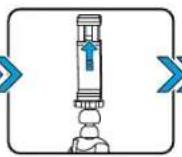
    A["Device with Position vertical"] --> B["Apcrete"]
    B --> C["Device with Arrow pointing inward"]
    C --> D["Device with Arrow pointing inward"]
    D --> E["Device with Arrow pointing inward"]
flowchart
graph LR
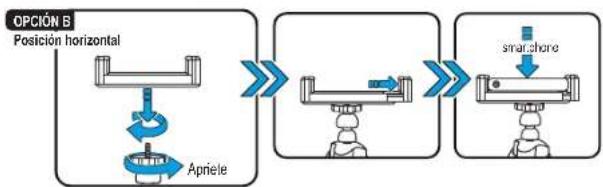
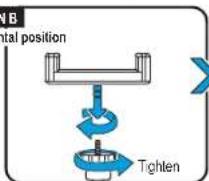
    A["Posición horizontal"] --> B["Apniete"]
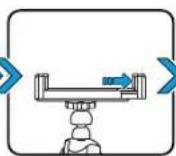
    B --> C["→"]
    C --> D["→"]
    D --> E["smartphone"]
flowchart
graph LR
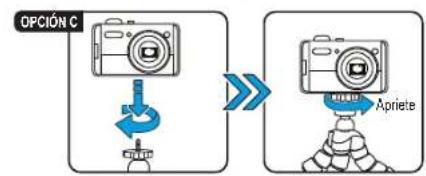
    A["OPCIÓN C"] --> B["Device Icon"]
    B --> C["Apriete"]

natural_image
Diagram of a mechanical or robotic device with three articulated arms and a central hub (no text or symbols)
STEREN
MOV-048
MINI TRIPOD FOR SMARTPHONES AND DIGITAL CAMERAS
Instruction manual
V9.6 0717m
IMPORTANT
Read these manual to avoid any damage.
The instructions of these manual are for reference about the product.
There may be differences due to update.
Please check our web site www.steren.com to obtain the latest version of the instruction manual.
CAUTIONS △
• This product is not a toy; keep out of reach of children.
- Don't place the tripod on unstable places.
• This product is not intended for use by persons with different abilities, unless that are supervised or instructed by a person responsible for its safety.
- Any unauthorized repair may cause malfunction and void the warranty.
PARTS
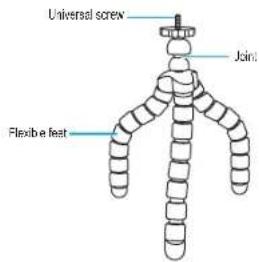
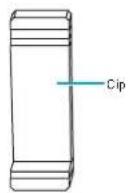
INSTALLATION
1
Extend the flexible feet and fold in the desired position.

natural_image
Diagram of a mechanical or electrical component with three curved arms and blue directional arrows indicating motion (no text or symbols)2
Place the mini tripod on the desired surface.

3
Place the smartphone clip or a camera into the universal screw.
OPTION A
Vertical position


OPTION B
Horizontal position

OPTION C


Brand : Steren
Model : MOV-048
Category : Tripod