KSB900BIS - Soundbar EKO - Free user manual and instructions
Find the device manual for free KSB900BIS EKO in PDF.


| Product Type | Soundbar |
| Brand | EKO |
| Model | KSB900BIS |
| Dimensions (W x H x D) | 90 x 6 x 8 cm |
| Weight | 2 kg |
| Power Supply | AC 100-240V, 50/60Hz via external adapter |
| Power Consumption | 30W |
| Bluetooth Version | 5.0 |
| Supported Audio Formats | MP3, WMA, WAV |
| Input Connectors | Bluetooth, USB, AUX 3.5mm, Optical |
| Output Power | 40W RMS |
| Frequency Response | 40Hz - 20kHz |
| Remote Control | Included |
| Wall Mountable | Yes (with included brackets) |
| Cleaning | Wipe with a soft, dry cloth |
| Safety | Do not expose to water, direct sunlight, or extreme temperatures |
| Spare Parts | Not user-serviceable; contact authorized service center |
| Repairability | For repairs, contact qualified personnel |
| Included Accessories | Remote control, power adapter, AUX cable, user manual |
| Warranty | 1 year |
| Speaker Drivers | Full-range drivers |
| Standby Power Consumption | <1W |
Frequently Asked Questions - KSB900BIS EKO
User questions about KSB900BIS EKO
0 question about this device. Answer the ones you know or ask your own.
Ask a new question about this device
Download the instructions for your Soundbar in PDF format for free! Find your manual KSB900BIS - EKO and take your electronic device back in hand. On this page are published all the documents necessary for the use of your device. KSB900BIS by EKO.
USER MANUAL KSB900BIS EKO
natural_image
Exterior view of a black rectangular electronic device labeled 'EKO' with a red indicator light at center (no other text or symbols visible)INSTRUCTION MANUAL
Please read this manual carefully before using, and keep it for future reference.
CONTENTS
| General | Safety | Instructions |
| Remote | Control | |
| Product | Overview | |
| Controls | and | Connections |
| First | Time | Setup |
| General | Operations | |
| Pairing | your | soundbar |
| Troubleshooting | ||
| Specifications | ||
| Specifications | ||
GENERAL SAFETY INSTRUCTIONS
Read this manual thoroughly before you start using the Soundbar.
Store this manual, the completed warranty card, your receipt and the product packaging.
The safety precautions instructions reduces the risk of fire, electric shock and injury when correctly complied to.
Please follow all instructions and take notice of all warnings.
IMPORTANT INFORMATION
- Only using furniture that can safely support the Products.
- Ensure the Product is not overhanging the edge of the supporting furniture.
- Do not place the product on a high furniture without securing both the furniture and the product to a stable support.
- Do not place the product on cloth or other conductive materials.
- Warn children of the dangers of climbing on furniture to reach the soundbar or its controls and to call for an adult to assist.
- Do not expose this product to rain or moisture as it may result in fire or an electric shock hazard
- Do not temper or change or modify the product in any way.
- Only use Accessories outlined and recommended by the manufacturer.
- Please do not expose the product to splashing or water contact
- Please do not place any object on top of the product
GENERAL SAFETY INSTRUCTIONS (Cont.)
Please follow instruction when installing this product in accordance with the instruction manual. This product must be positioned in a sufficiently stable location, it can be potentially hazardous due to falling when mounted and can cause injury, particularly to children if it positioned incorrectly.
- Before installing this Soundbar, make sure your outlet voltage corresponds to the voltage stated on the power supply rating label
- The apparatus shall not be exposed to dripping or splashing and no objects filled with liquids, such as vases, shall be placed on the product. Dry location use only.
- No naked flame source, such as candles, should be placed on the product.
- Ventilation should not be impeded by covering the ventilation openings.
- Do not plug several devices into the same outlet. Doing so may cause the outlet to overheat and start a fire. Make sure the outlet is readily accessible during operation of the equipment.
- No naked flame source, such as candles, should be placed on the product.
- Unplug the Soundbar during lightning storms or when unused for long periods of time. Not doing so may result in fire or electric shock.
- Do not cover the ventilation openings of the product with items such as newspapers, tablecloths, curtains etc. Do not insert objects into the slots available on the products. As this could result in the product being damaged and could cause a fire.
GENERAL SAFETY INSTRUCTIONS (Cont.)
- If you notice any unusual odors or smoke around the unit, immediately disconnect the unit from the outlet and contact the service center. Failure to do so may result in fire or electric shock.
- When not using the unit for long periods of time or when you are moving the unit please ensure to disconnect the power supply from the wall socket.
- Please beware that dust could accumulate over time on the unit and cause it to generate heat and or deteriorate insulation, which in turn may result in an electrical fire.
- The product is not intended for use by persons (including children) with reduced physical, sensory or mental capabilities, or young children of any age. They must be supervised product by a person responsible for their safety.
- Batteries from the remote control must be only removed by an adult, the adult must ensure to keep them out of reach of infants and children. Seek medical attention immediately if a child has swallowed a battery.
- To maintain the product do not use any chemical or cleaning agent or wet cloth, please only ensure to utilize a dry cloth to wipe it down from marks or dust and only after unplugging the product from the power socket.
- Please ensure to contact our call center for any repair or service required for the products.
Please make sure upon positioning this product, the place is:
- Not wet or damp and Well ventilated
- Away from direct sunlight or heaters.
- Away from splashes or food.
- Protected from excessive dust or grease.
- Do not place this equipment in a confined space such as a bookcase or similar unit. Allow 20cm above and 5cm spacing on both sides for proper ventilation.
- Do not place the Soundbar near heat sources such as radiators, stoves or other audio visual equipment that produce heat.
- Do not place containers with liquids, if liquid falls inside the products it may result in short-circuit, fire or electric shock.
- Do not place small metallic objects on top of the unit.
- Do not use or store flammable or combustible materials near the unit. Doing so may result in fire or explosion. Do not place any naked flame sources, such as lit candles, cigarettes or incense sticks on top of the soundbar.
REMOTE CONTROL
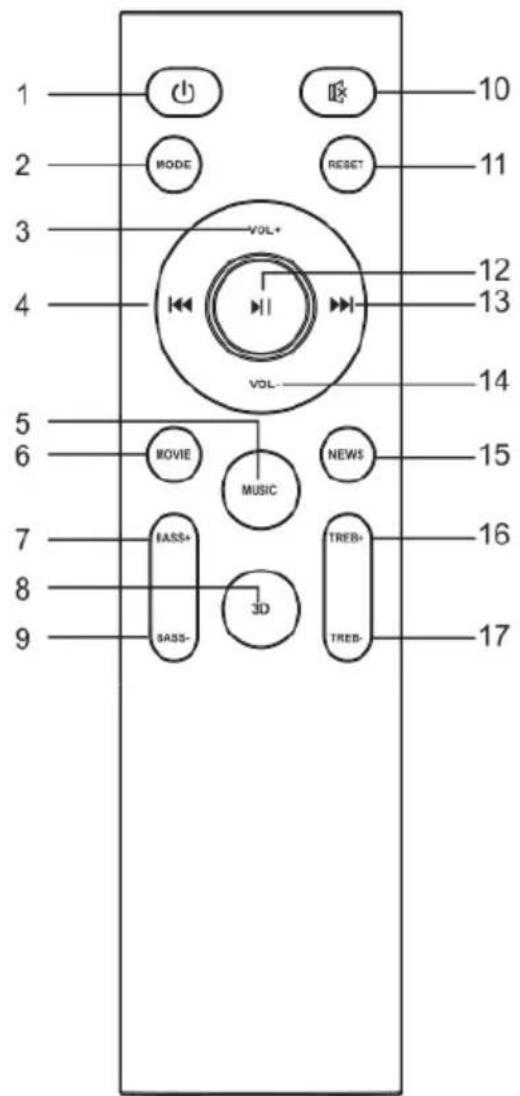
- ⏻: standby mode for power ON/OFF
- MODE : switch to different mode (Bluetooth, Aux, Optical, HDMI)
- VOL+: press to increase the sound volume
- : previous program (only work under USB & BT mode)
- Music: select the Music EQ effect
- Movie: select the Movie EQ effect
- Bass+: press to increase the Bass effect
- 3D: select the 3D EQ effect
- Bass-: press to decrease the Bass effect
-
⏻: mute mode
-
Reset: press and hold the button more than 2 seconds to restore factory default settings
- ▶I : play/pause (only work under USB and BT mode)
- : next program (only work under USB and BT mode)
- VOL-: press to decrease the sound volume
- NEWS: select the News EQ effect
- Treble-: press to decrease the treble effect
- : Treble+: press to increase the treble effect
REMOTE CONTROL (Cont.)
CAUTION!
Battery Precautions
- Do not use other batteries other than the one specified in this manual.
- Danger of explosion if incorrectly replaced by a battery other than the one specified.
- Do not store battery with other metallic objects, doing so can cause the battery to short-circuit, leak or explode.
- Ensure the battery is not exposed to excessive heat, direct sunlight or fire.
- Do not try to short-circuit, disassemble or throw the battery into a fire.
- Dispose of batteries promptly and correctly, observing any local hazardous waste regulations.
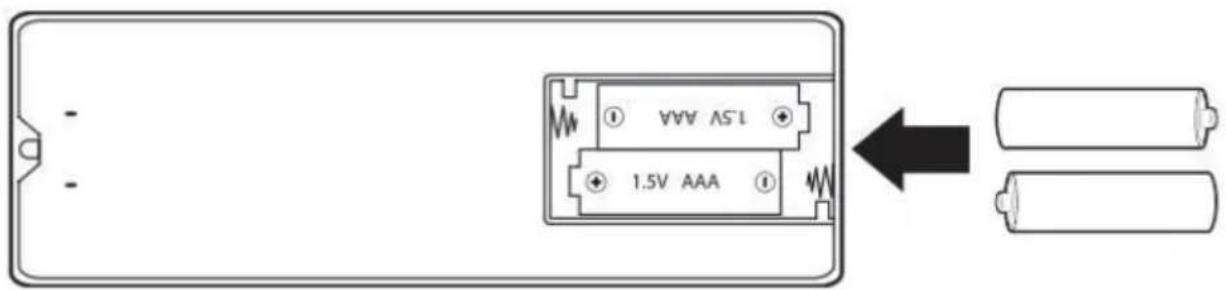
Remote Control: requires 2 AAA batteries (included)
PRODUCT OVERVIEW

natural_image
Pure schematic diagram of a rectangular container with side supports and a central label (no text or symbols)FRONT VIEW

TOP VIEW

natural_image
Front view of a server rack with two control panels and indicator lights (no text or symbols visible)REAR BACK VIEW

natural_image
Technical line drawing of a rectangular mechanical component with two side holes and a central mounting bracket (no text or symbols)BOTTOM VIEW
PRODUCT OVERVIEW (Cont.)
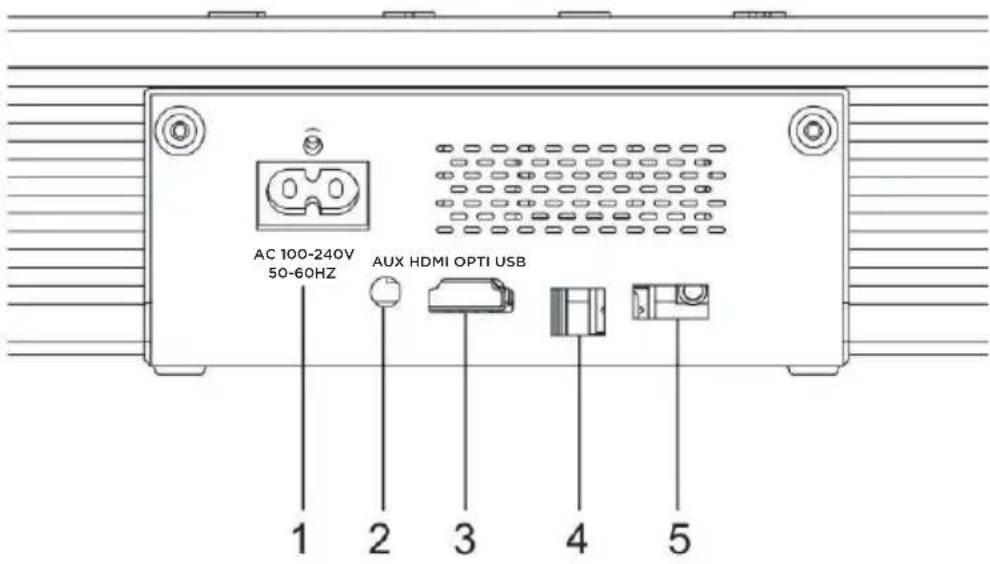
1: AC 100-240V POWER PORT: Connect to power supply
2: AUX IN: Auxiliary audio input from mp3/phone/set-top box devices
3: HDMI ARC
4: OPTICAL IN
5: USB: Audio input from a USB storage device, upgrade software of this product
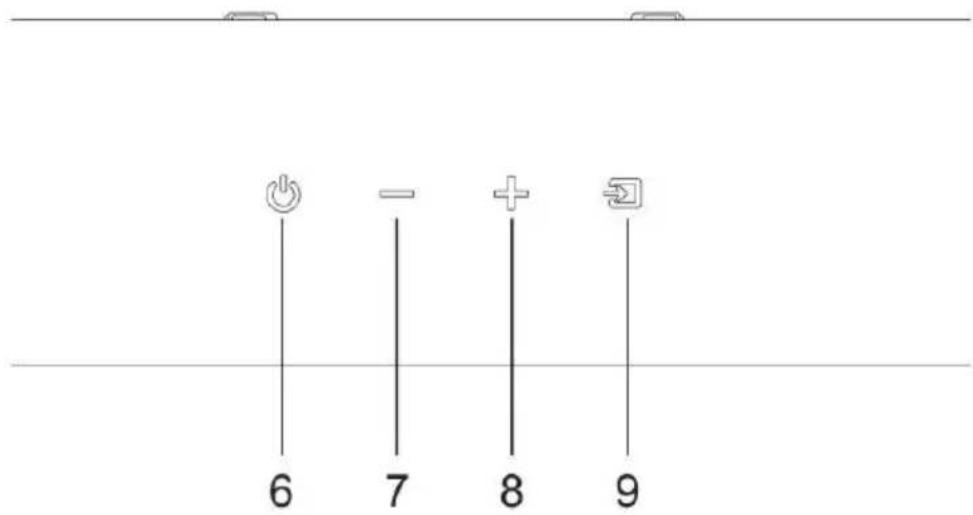
6: ☺ : Switch the soundbar on or to standby
7: — : Decrease the volume
8: + : Increase the volume
9: ☐: Select an input source for the soundbar
GENERAL OPERATION
POWER ON & OFF
- Plug in the power cord with one side of AC IN on soundbar and the other side to an AC wall outlet. When you connect the soundbar to the main socket, the unit will be in STANDBY mode, firstly its light will on in red.
- Switch on the sound bar by short-pressing ⏻ button on top of the soundbar or on remote control, then it will enter into bluetooth mode automatically.
- Press and hold the ⏻ button on sound bar or on the remote control for 2 seconds to switch it off, and then disconnect the main plug from the main socket if you want to switch the unit off completely.
SELECT MODES
Press the ☑ input button on the top of the soundbar or press the MODE button on the remote control to select the BT, AUX, OPTICAL, HDMI Arc in, USB mode. The selected mode will show by the different light indication and the voice prompts.
PLAYING AUDIO VIA BT CONNECTION
Turn on the sound bar and then the soundbar will enter into bluetooth mode automatically, or if it's on other mode, short-press the 📋 button on sound bar or remote control to switch it to Bluetooth mode and the blue LED light on the sound bar will flicker in the Bluetooth pairing mode.
Activate the pairing function on your phone or other compatible device & select "KSB900BIS" by BT connection.
- When successfully paired, you will hear a voice prompt "bluetooth connected" and the LED turn to solid blue light. Then music on your phone or other compatible device that you selected can be played on the sound bar.
- You can use the volume buttons on the sound bar or on the remote control to adjust the volume to your requirements
- If you wish, you can change the audio settings by using the relevant buttons on the remote control.
Notes:
- If your pairing device gets switched off or gets manually disconnected, the sound bar will automatically enter pairing mode.
- A successful connection will be re-established with the already paired device(s) once you re-enter wireless range (10m). To connect to other devices, repeat the above pairing steps.
- There is no automatic shutdown in pairing mode. The sound bar will remain in pairing mode even if no device is paired, so switch off if not in use.
This soundbar has a last-function-used memory; it will resume using the last mode before it was turned OFF after it is turned ON again.
Requires a 3.5mm audio cable (not included).
- Connect a 3.5mm audio cable to the Aux In on the unit and the audio output/headphone jack on an audio device.
- Power ON the soundbar and press 📄 on the soundbar or switch "MODE" button to select Aux in Mode. A voice will announce "Auxiliary" and the indicator will turn green.
- Use the controls on the connected device to select and play audio. Be sure the volume on your connected device is audible when you begin playing.
CONNECTING A TV BY USING A HDMI CABLE (NOT SUPPLIED)
HDMI ARC
HDMI offers superior sound and picture quality when compared to other AV connection types, and is the easiest way to connect your media devices to the soundbar.
- Press the 📋 button on the soundbar or the "MODE" button on the remote to select HDMI mode.
- Use the HDMI Cable (not supplied) to connect to the TV with the HDMI ARC port,
- Use the volume buttons on the TV's remote control to change the volume on the Soundbar.
OPTICAL INPUT
Requires an audio source with an Optical Audio Output and a Digital Optical Audio Cable (not included).
- Using a Digital Optical Audio Cable, connect the Optical Input on the soundbar to the Optical Output on your audio source (TV, amplifier, etc.)
- Power ON the soundbar and press Optical on the remote or ☑ on the soundbar to select Optical Mode. A voice will announce the source mode and the indicator will turn orange.
- On the connected audio source (TV, amplifier, etc.), be sure the audio settings are set to PCM or Optical Audio.
- Audio played through the connected audio source (TV, amplifier, etc.) should now be heard through the speaker.
- Use the correct optical audio cable and make sure that it is firmly seated in both source and soundbar sockets.
- Optical audio output is activated from the audio source (a red light should be visible from the optical socket). It may be labeled SPDIF in the settings menu of the source.
The optical output source should be set to output PCM and not Dolby Digital.
USB PLAYING
- Short press the ⏻ button to turn on the soundbar, insert the USB to the USB card slot, and the soundbar will play the music in the USB drive, short press ▶ to play/pause the music.
- Short press ◀◀ or ▶▶ to play the previous/next music.
TROUBLESHOOTING
| Troubles Solutions | |
| Pairing connection via Bluetooth cannot be completed | Other mobile device has connected before use and the mobile device has not left as well as its Bluetooth is not off. When it connects, Bluetooth of this device will automatically find the Bluetooth device and connect. First, turn off Bluetooth of the connected Bluetooth devices, then the next Bluetooth device can be found and normally paired to connect. |
| Volume of playback via Bluetooth is small | After connections with mobile devices, volume of Bluetooth device is not up but at the default output level. Turn on the mobile device output. Output volume of Bluetooth device is low itself. |
| Connection distance via Bluetooth is short | Obstruction exists between mobile devices and Bluetooth device. Remove obstructions. |
| Connection via Bluetooth right, sometimes not work properly | Obstruction exists between mobile devices and Bluetooth device. Remove obstructions. Too far away from Bluetooth device to connected mobile devices, beyond the connection range. Shorten the distance between the Bluetooth device and mobile devices. |
SPECIFICATIONS
| Power Supply 100-240V, 50-60Hz | |
| Frequency Response Soundbar: 50Hz to 15kHz | |
| Bluetooth 5.1, A2DP, AVRCP | |
| Bluetooth Range Up to 10m | |
| Dimensions Soundbar: 940 (w) x | 96.8 (h) x 61.5 (d) mm |
| What's In The Box | Soundbar, Remote Control, AC Power Cable, 3.5mm to RCA Cable, Instruction Manual |

Bluetooth®
The Bluetooth® word mark and logos are registered trademarks owned by the Bluetooth SIG, Inc. and any use of such marks by Ayonz Pty Ltd is under license. Other trademarks and trade names are those of their respective owners.
EKO
CUSTOMER HELPLINE:
help@eko-entertainment.com.au
DISTRIBUTED BY:
Ayonz Pty Ltd