Mynute 10e - Central heating boiler Vokèra - Free user manual and instructions
Find the device manual for free Mynute 10e Vokèra in PDF.


User questions about Mynute 10e Vokèra
0 question about this device. Answer the ones you know or ask your own.
Ask a new question about this device
Download the instructions for your Central heating boiler in PDF format for free! Find your manual Mynute 10e - Vokèra and take your electronic device back in hand. On this page are published all the documents necessary for the use of your device. Mynute 10e by Vokèra.
USER MANUAL Mynute 10e Vokèra
natural_image
Line drawing of a refrigerator with no text or symbolsUser Instructions
CE
THESE INSTRUCTION TO BE RETAINED BY USER
benchmark™
The code of practice for the installation, commissioning & servicing of central heating systems
INTRODUCTION
Contents
| Page | ||
| Introduction | Dear customer 2 | |
| Do's and don't's 2 | ||
| Things you should know | 1.1 gas appliances 3 | |
| 1.2 electrical supply 3 | ||
| 1.3 guarantee registration card 3 | ||
| 1.4 appliance log book 3 | ||
| 1.5 how does it work? 3 | ||
| 1.6 dimensions 3 | ||
| 1.7 clearances 3 | ||
| Getting started | 2.1 before switching on 4 | |
| 2.2 appliance controls 4 | ||
| 2.3 lighting the boiler 4 | ||
| How to.... | 3.1 top-up the system 5 | |
| 3.2 reset the appliance 5 | ||
| 3.3 shut down the system for short periods 5 | ||
| 3.4 shut down the system for long periods 5 | ||
| 3.5 care for the appliance | 5 | |
| What if.... | 4.1 I suspect a gas leak | 6 |
| 4.2 I frequently have to top-up the system | 6 | |
| 4.3 the reset light is on | 6 | |
| 4.4 the appliance is due its annual service | 6 | |
| 4.5 I need to call an engineer | 6 | |
| Setting the Vokera... | 5.1 Mechanical clock | 7 |
| 5.2 Digital clock | 8 | |
| 5.3 Twin channel programmer | 10 | |
INTRODUCTION
Dear Customer
Your Mynute boiler has been designed to meet and exceed the very latest standards in gas central heating technology, and if cared for, will give years of reliable use and efficiency. Please therefore take some time to read these instructions carefully.
Do's and Don'ts
- Do ensure that the system pressure is periodically checked
• Do ensure that you know how to isolate the appliance in an emergency
• Do ensure that you are familiar with the appliance controls
• Do ensure that your installer has completed the appliance log book
• Do not attempt to remove the appliance casing or gain internal access
. Do not hang clothes etc. over the appliance
• Do not forget to have the appliance serviced annually.
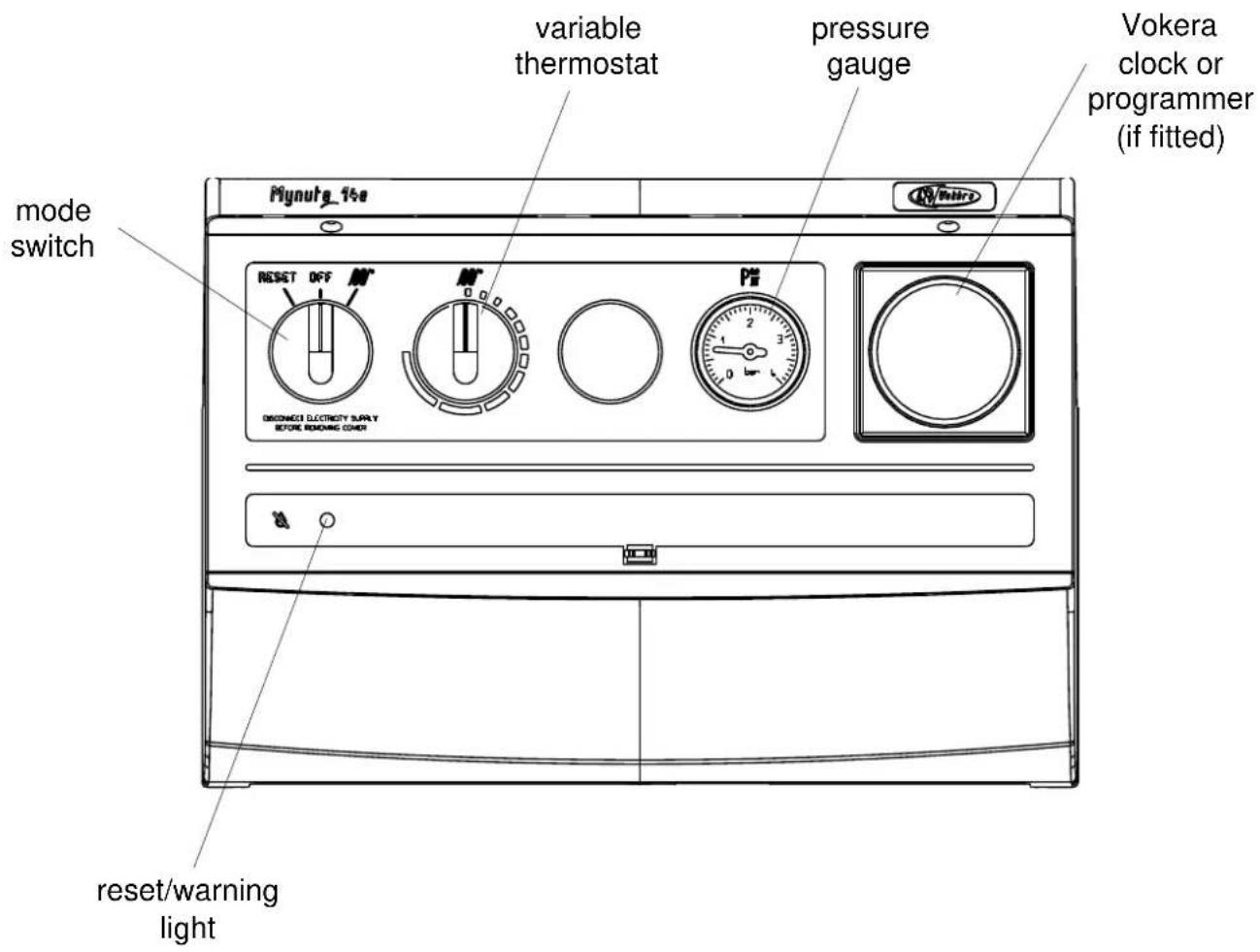
Fig. 1
THINGS YOU SHOULD KNOW
1.1 GAS APPLIANCES
Gas Safety (Installations and Use) Regulations In the interests of your safety and that of others it is a legal requirement that all gas appliances are installed and correctly maintained by a competent person and in accordance with the latest regulations.
1.2 ELECTRICAL SUPPLY
Please ensure that this appliance has been properly connected to the electrical supply by means of a double pole isolator or un-switched socket, and that the correct size of fuse (3 AMP) has been fitted.
Warning: This appliance must be earthed!
1.3 GUARANTEE REGISTRATION CARD
Please take the time to fill out your guarantee registration card. The completed warranty card should be posted within 30 days of installation.
1.4 APPLIANCE LOG BOOK
A logbook is supplied with the boiler. This important document must be completed during the installation/commissioning of your boiler. Failure to install and commission the appliance in accordance with the manufacturers instructions may invalidate the warranty. This does not affect your statutory rights.
1.5 HOW DOES IT WORK?
Your Mynute boiler is a central heating boiler, which supplies heated water to your radiators and hot water cylinder.
It is controlled by the time clock or programmer and any thermostats that your installer may have fitted.
The Mynute lights electronically and does not have a pilot light.
In the unlikely event of a fault developing with your boiler, the supply of gas to the burner will be terminated automatically.
1.6 DIMENSIONS
| HEIGHT 740mm | |
| WIDTH 366mm | |
| DEPTH 315mm |
1.7 CLEARANCES REQUIRED
| ABOVE 150mm | |
| BELOW 150mm | |
| SIDES 12mm | |
| FRONT 600mm |
GETTING STARTED
2.1 BEFORE SWITCHING ON
Before switching the appliance on please familiarise yourself with:
- How to isolate the appliance from the gas, water, and electricity supplies.
- How to check and top-up – if necessary – the system water pressure.
• The time clock or programmer.
• Any external thermostats and their functions.
• The appliance controls.
2.2 APPLIANCE CONTROLS (see fig. 1)
The appliance controls are concealed behind the front flap. To gain access to the controls simply press the bottom centre of the flap and lift upward to engage the holding clip.
The appliance has a mode switch, variable thermostat, system pressure gauge, and an aperture for an integral clock or programmer. The mode switch has three positions:
- Reset
• Off
. On
The variable thermostat allows you to set the temperature of the water to your radiators and hot water cylinder (not the hot water to your taps!) between 40^ C (min) and 80^ C (max).
The pressure gauge shows the current pressure of the system, the gauge should be set between 1 and 1.5 BAR. When the appliance is operating the gauge may rise or fall slightly, this is quite normal. The minimum permissible level for the safe and efficient operation of the appliance is 0.5 BAR. Should the pressure fall below 0.5 BAR, the boiler shuts off automatically.
Depending on the type of controls specified by your installer you may have an integral Vokera time clock or programmer fitted to the appliance, if so, instructions can be found on pages 6-10. If an external time clock or programmer has been fitted, please refer to the instructions supplied with such.
Ensure the gas and electrical supply to the boiler are turned on.
Turn the mode switch to the 'on' position. Refer to the particular instructions for the type of programmer or time clock fitted and ensure there is a demand for heating and/or hot water. If there is a room thermostat and/or hot water cylinder thermostat you should ensure these are also calling for heat.
When there is a demand for heating and/or hot water via the above controls the boiler will go through an ignition sequence, whereby the burner will light.
If the appliance fails to ignite during the ignition sequence, allow a period of two minutes before re-setting.
To adjust the output temperature of the appliance turn the thermostat knob clockwise to increase or anti-clockwise to decrease.
When the appliance reaches the set temperature, the burner will go off for minimum period of approximately 3 minutes.
When the programmer/time clock or external thermostats heating request has been satisfied, the appliance will switch off automatically.
HOW TO...
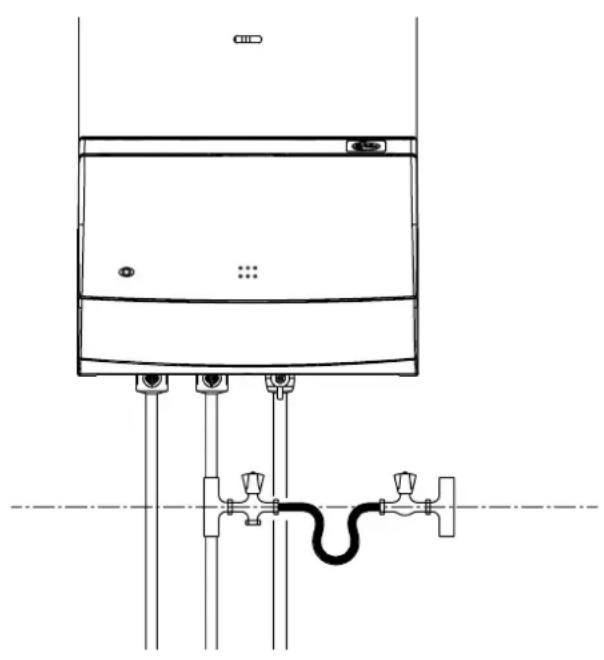
3.1 HOW TO TOP-UP THE SYSTEM PRESSURE (fig. 2)
The system pressure must be checked periodically to ensure the correct operation of the boiler. The needle on the gauge should be reading between 1 and 1.5 BAR when the boiler is in an off position and has cooled to room temperature. If the pressure requires 'topping-up' use the following instructions as a guide.
- Locate the filling valve connections (external to the boiler).
- Attach the filling loop to both connections.
- Open the filling valve slowly until you hear water entering the system.
- Close the filling valve when the pressure gauge (on the boiler) reads between 1 and 1.5 BAR.
- Remove the filling loop from the connections.
3.2 HOW TO RESET THE APPLIANCE
When the reset light is illuminated the appliance will require to be reset manually. Using the mode switch, turn it two clicks to the left (reset position) then turn it back to the 'on' position.
Allow a period of two minutes to elapse before turning the mode switch to the reset position.
IMPORTANT
If the appliance requires to be reset frequently, it may be indicative of a fault, please contact your installer or Vokera Customer Services for further advice.
3.3 HOW TO SHUT DOWN THE SYSTEM FOR SHORT PERIODS
The system and boiler can be shut down for short periods by simply turning the programmer or time clock to the off position (see pages 6-10 or the instructions supplied). It is also advisable to turn off the main water supply to the house.
3.4 HOW TO SHUT DOWN THE SYSTEM FOR LONG PERIODS
If the house is to be left unoccupied for any length of time – especially during the winter – the system should be thoroughly drained of all water. The gas, water, and electricity supply to the house should also be turned off. For more detailed advice contact your installer.
3.5 HOW TO CARE FOR THE APPLIANCE
To clean the outer casing use only a clean damp cloth. Do not use any scourers or abrasive cleaners.
Fig. 2
natural_image
Technical line drawing of a mechanical or electrical component with no visible text, numbers, or symbols.WHAT IF...
4.1 WHAT IF I SUSPECT A GAS LEAK
If you suspect a gas leak, turn off the gas supply at the gas meter, and contact your installer or local gas supplier. If you require further advice please contact your nearest Vokera office.
4.2 WHAT IF I HAVE TO FREQUENTLY TOP-UP THE SYSTEM
If the system regularly requires topping-up, it may be indicative of a leak. Please contact your installer and ask him to inspect the system.
4.3 WHAT IF THE RESET LIGHT IS ON
If the reset light is on it indicates that the boiler has failed to ignite or has overheated, when this happens the boiler automatically shuts down and requires to be reset manually (see 3.2).
4.4 WHAT IF THE APPLIANCE IS DUE ITS ANNUAL SERVICE
Advice for tenants only
Your landlord should arrange for servicing.
Advice for homeowners
Please contact Vokera Customer Services (0870333 0220 (UK) or 05655057 (ROI) if you would prefer a Vokera service engineer or agent to service your appliance. Alternatively your local CORGI registered engineer may be able to service the appliance for you.
4.5 WHAT IF I NEED TO CALL AN ENGINEER
If you think your boiler may have developed a fault please contact your installer or Vokera Customer Services (0870 333 0220 (UK) or 05655057 (ROI) have all your details to hand including full address and postcode, relevant contact numbers, and your completed appliance log book.
VOKERA TIMECLOCKS
5.1 SETTING THE MECHANICAL CLOCK
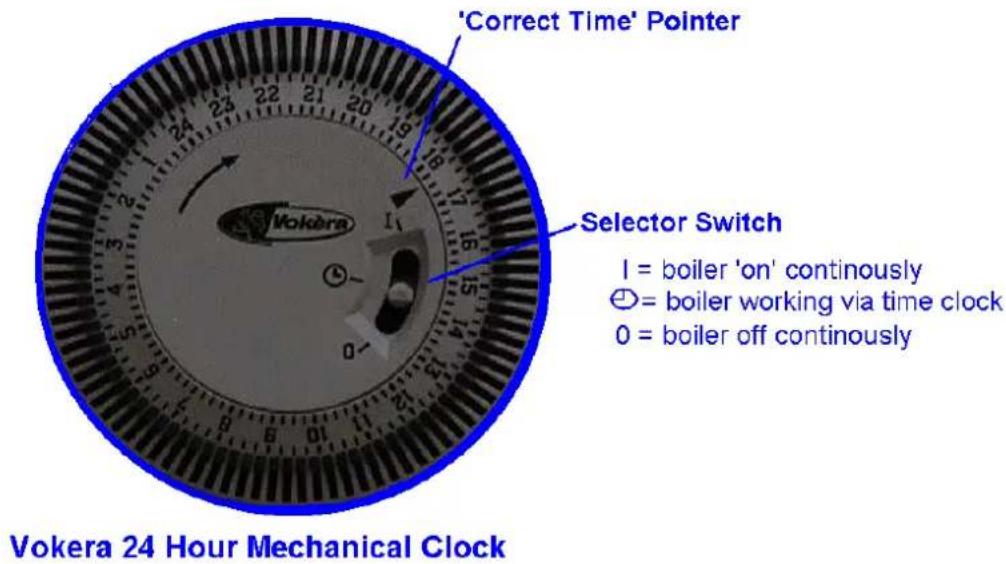
The Vokera mechanical time clock can automatically switch your boiler on and off at the same time every day of the week. The minimum 'on' or 'off' period can be as little as 15 minutes.
The outer clock face consists of 96 black pins. Each pin represents a time period of fifteen minutes. When a pin is pushed towards the outside of the clock face, the time clock is in an 'on' position, consequently when it is pushed towards the inner part of the clock face it is in an 'off' position.
5.1.1 SETTING THE 'ON' & 'OFF' TIMES
Push the necessary amount of pins towards the outer clock face for the time period that you want the boiler to be 'on' (for example if you wanted the boiler to be on between 4.00PM and 8.00PM, push out the 16 pins located between 16 and 20 on the clock face).
5.1.2 SETTING THE 'TIME OF DAY'
Grasp the outer clock face and turn clock-wise until the correct 'time of day' is opposite the black pointer.
5.1.3 SELECTOR SWITCH
The time clock has a three-position switch. This switch over-rides the timed settings ('on' & 'off' times) of the clock.
VOKERA PROGRAMMERS
5.2 SETTING THE DIGITAL CLOCK
The Vokera digital time clock will automatically switch your boiler on and off. It has a total of twenty different switching commands, consisting of ten 'on' commands and ten 'off' commands. Each 'on' or 'off' command can be used to switch the boiler 'on' or 'off' at the same time:
• Every day of the week
• Monday to Saturday
• Monday to Friday
• Saturday and Sunday
• Any particular day
Example
| Group of days On Off Commands | used | ||
| Mon. to Fri. 06.00 | 09.00 2 | ||
| Mon. to Fri. 16.00 | 21.00 2 | ||
| Sat. & Sun. 08.30 | 10.30 2 | ||
| Sat. & Sun. 17.00 | 23.00 2 | ||
| Total 8 used | |||
| Commands ‘free’ 12 unused | |||
5.2.1 BEFORE PROGRAMMING
Gently press and release the 'Res.' button with a pencil or similar, this will clear the memory of all information. This should only be done when you want to change or insert a complete new programme.
5.2.2 SETTING THE TIME OF DAY
The ‘real time’ clock has to be set to the actual day of the week and time of day, to do this:
- Press and hold the button (see fig 2).
- Press the 'Day' button until the actual day shows in the display (1= Monday, 2= Tuesday, 3= Wednesday, etc.).
- If setting the clock during 'British summertime' press the '+/-1h' button once (use a pencil or similar).
- Press the 'h' button until the actual hour is shown in the display.
- Press the 'm' button until the actual minutes are showing in the display.
- Now release the button.
- The ‘:’ symbol between the hours and minutes display will start to flash, this indicates that the clock is now keeping time (see fig. 3).
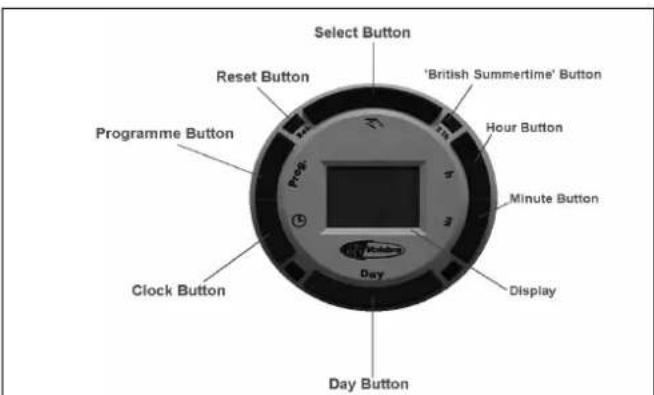
Fig. 1
Vokera Digital Time Clock
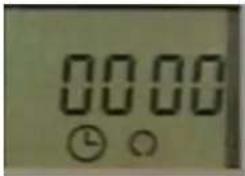
Fig. 2
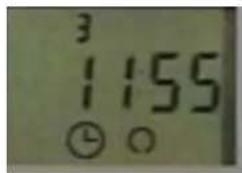
Fig. 3
5.2.3 ENTERING (on) COMMANDS
• Repeatedly press the Prog. Button until the —:— symbol appears in the clock display (see fig. 4).
- Press the Day button until the desired group of days or desired day is shown.
- Press the 'h' button until the desired hour for switching the boiler on is shown.
- Press the 'm' button until the desired minutes are shown.
- Press the Select button until the Ⓢ symbol is shown (see fig. 5).
- Press the button.
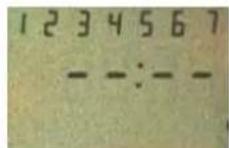
Fig. 4
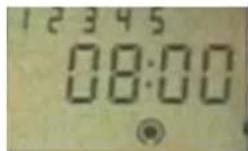
Fig. 5
5.2.4 ENTERING (off) COMMANDS
• Repeatedly press the Prog. Button until the —:— symbol appears in the clock display (fig. 4).
- Press the Day button until the desired group of days or desired day is shown.
- Press the 'h' button until the desired hour for switching the boiler off is shown.
- Press the 'm' button until the desired minutes are shown.
- Press the Select button until the ○ symbol is shown (see fig. 6).
- Press the button.
VOKERA PROGRAMMERS
Once the programming has been completed you will have to press the Select button – once only – to the ☐(on) position if the boiler has been programmed to be 'on' at that particular time.
5.2.5 ADVANCING OR LOCKING PROGRAMME COMMANDS
By pressing the Select button you can advance the time clock to the next command setting (from 'on' to 'off' or 'off' to 'on') or lock the time clock to a particular command ('on' continuously or 'off' continuously).
• ON
• OFF
• [ ] ⊙ ON CONTINUOUSLY
• [ ]∅ OFF CONTINUOUSLY
NOTE
The actual time can be changed to account for British summertime by simply pressing then releasing the +/- 1h button.
HELPFUL HINTS
- You can check and/or alter the programme settings at any time by pressing the Prog button.
•The number of unused 'commands' can be checked by pressing the Prog button until FR is displayed alongside the number of unused commands.
• In the event of a power failure, the clock has a battery back-up. The programme will be held in the memory for approximately 2 weeks. Charging time is 70 hours.
• Take a note of the settings you have programmed, as local power surges can sometimes reset the memory of the clock.
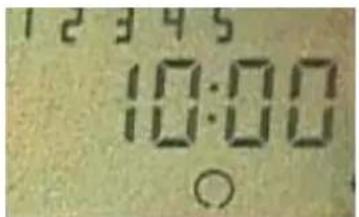
Fig. 6
SETTING INSTRUCTIONS FOR THE VOKERA 7 DAY 2 CHANNEL PROGRAMMER
The Vokera 2 channel 7 day programmer will automatically switch your central heating system ON and OFF once, twice or three times a day, whichever you wish and at whatever times you choose each day of the week.
It incorporates a rechargeable battery back-up system to protect the programme during power cuts of up to 24 hours, even though display will go blank.
The clock in the programmer has to be set to the actual day of the week and time of day.
It must then be told at what times you want it to switch your Central Heating (CH) and Hot Water (HW) system ON and OFF for each day of the week. This set of switching times is known as a programme.
The programmer has an in-built programme of standard switching times. They may well be right for you, but if they are not exactly what you want you can change them.
The standard programme is shown in the table on the following page, and, for simplicity, the switching operations are described as ON1, OFF1, ON2, OFF2, ON3, OFF3 from now on.
SETTING THE CLOCK
Use the chart to plan your own programme before proceeding.
Switch on the mains supply to the boiler, then switch the mode selector switch (1) ON. Press and release the button marked SET.
The display will show
SET
CLOCK?
Press and release the button marked YES to answer the question and the day part of the display will flash. Use + and - buttons to change to the correct day then press SET again.
This will cause the hour part of the display to flash. Use the + and - buttons to change to the correct hour (check AM or PM) then press SET again. This will cause the minutes part of the display to flash. Again use the + and - buttons to change the minutes as required, then press SET again.
The display will now show
SET
PROG ?
(see later instructions for changing your programme).
Press the SET again
The display will now show
TEST?
(again see later instructions)
Press the SET button again.
The display will show
SET
H'DAY ?
(again see later instructions about this holiday setting feature). Press SET once again and the display will show actual time of day and day of the week you have set.
PROGRAMME TEST
As described earlier, there is a place in the programming sequence where you will be given the opportunity to press YES when the display shows TEST? This feature is available so you can quickly run through the ON and OFF times set to make sure they are what you want.
Answer YES and the display will show a time just past midnight on the morning of the day of the week you are actually in. Now press and hold down the YES button again. The time display will start to "run" and will pause for 2-3 seconds when it reaches the ON1 time for that day, the ON indicator light will be energised as will the circuit being controlled. If you release the YES button the display will stop running and give you more than 2-3 seconds to think about a switching time.
Continue pressing YES and the display will now "run" to the OFF1 time when it will pause again and the time switch will switch off. It will then "run" to the ON and OFF times in turn, pausing at each before moving to the next day and identifying the ON and OFF times in the same way.
The programmer will continue identifying the ON and OFF times in this way for each day in sequence until you press the SET button when it changes to the holiday setting mode. Pressing SET button again returns the module to normal operating mode.
HOLIDAY SETTING
Note: This useful feature allows you to set the number of days you want your system to be permanently off before automatically switching on at the programmed time.
The programmer counts each pass through mid-night as one day, so if on Saturday morning you don't want the system on again until Tuesday morning you set the counter to 3. If when the display shows SET H'DAY? you press the YES button the display will show OO. By using the + and - buttons you can now set the number of days you want the system to be off, a maximum of 99 days is possible.
Now press SET again and the display will be blank apart from H'DAY. Having counted down to zero, the programmer will switch the system on at the times set for that day. If you wish to cancel the H'DAY setting, press any button and normal operation will be resumed. Your module is now in the operating mode and ready to work using the built-in standard programme times.
SETTING INSTRUCTIONS FOR THE VOKERA 7 DAY 2 CHANNEL PROGRAMMER
PROGRAMME OPTIONS
Hot water and central heating can be operated independently.
The programmer gives you 4 options for both CH and HW:
OFF - Off all the time
TIMED - On/Off at all periods set in programme
ONCE - On for one period each day (ON1 >> OFF3)
ON - On all the time
Obtain the options you require by using the SELECT buttons to move the arrows in the display to the appropriate positions. Your module is now working using the standard programme times. If these suit your needs there is nothing else to do.
You can temporarily override the normal switching times by pushing a button marked ADVANCE. This switches ON to OFF to ON as you require, but the normal programme switching times will not be permanently affected. If you want to make changes to the programme, it is suggested you write them down before making the changes.
CHANGING YOUR PROGRAMME
With the module in the operating mode and the display showing the actual time of day, press the SET button. The display will again show SET CLOCK ? but this has already been done so push the SET button again.
The display will again show SET PROG? and as it is the programme settings which are to be changed press the YES button.
The display will show
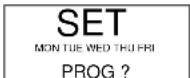
NOTE: The grouping of days in this way is to enable timings which apply to each and all of the weekdays to be set first, followed by the opportunity to change one or more timings for any single day.
If you wish to set timings which will be the same for each weekday press the YES button.
The display will show
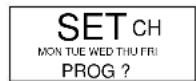
press YES and make the changes or press SET if no changes are required. SETHW
The display will now show
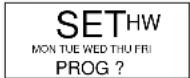
press YES to make changes or SET if no changes are required.
The display will now show
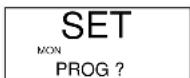
press YES if you wish to make changes to Monday timings or press SET to change the display to SET TUE PROG? Again press YES to make changes to Tuesday timings or continue to operate the SET button to access each weekday in turn.
If you press YES to make changes to the settings for a particular day, the display will firstly show SET CH
Press YES will allow changes to be made to the central heating settings, but pressing SET will cause the display to show SET HW. Press YES will allow the changes to be made to the hot water settings, a further press of SET will move the display on the next day.
After any Friday changes have been made press SET The display will show
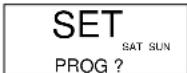
This gives you the chance to set timings which will apply to both weekend days by answering YES. Further operation of the SET button accesses SAT and SUN for individual timing changes.
Pressing SET after finishing any weekend programme changes, or pressing SET in answer to SET PROG ? returns the module to TEST ? Pressing SET again display SET HOL ? Pressing SET again returns the module to the normal operating mode.
| SWITCHING | MONDAY - FRIDAY SATURDAY - SUNDAY | |||
| H/W C/H H/W | C/H | |||
| ON1-Start of first timed period of day (ON) | 6.30am | 6.30am | 6.30am | 6.30am |
| OFF1-End of first timed period (OFF) | 8.30am 8.30am | 9.00am 9.00am | ||
| ON2-Štart of second timed period (ON) | 12 noon | 12 noon | √ | 12 noon |
| OFF2-End of second period (OFF) | 12 noon | 12 noon | 12 noon | 12 noon |
| ON3-Start of third period (ON) | 4.30pm | 4.30pm 4.00pm | 4.00pm | |
| OFF3-Final switch 'OFF' | 10.30pm | 11.00pm10.30pm | ||
SETTING INSTRUCTIONS FOR THE VOKERA 7 DAY 2 CHANNEL PROGRAMMER
If you answer YES to any of the detailed programming questions the following steps will apply.
The display will show the time set for the first switch on (ON1) to occur for the day(s) concerned. This can be altered in steps of 10 minutes by use of the + and - buttons. When the display is showing the time you want, press SET and the OFF1 time will be seen.
Again changes may be made with the + and - buttons before pressing SET to show the time for ON2 to occur. After making any adjustments press SET again to get the OFF2 time displayed. Repeat this operation for the ON3 and OFF3 settings. This may be set up to 23 hours 50 minutes after the first switch on time.
Further operations of the SET button will take you through any remaining days of the week to be programmed before arriving at the operating mode and ready to work at the times you have set.
HELPFUL HINTS
- The + and - buttons are used to change times. Press and release for small changes; press and hold down and the time will 'run'.
- You cannot set the first switch on time (ON1) before mid-night but you can set the OFF3 after midnight so long as you don't try to exceed 23 hour 50 mins after ON1.
- The switching times have to be in sequence (ON1, OFF1, ON2, OFF2, ON3 and OFF3) if you try to set OFF1 earlier than ON1 the display will stop at the ON1 time with the OFF symbol flashing. The same thing will happen with other switching times e.g. between OFF1 and ON2, this time the ON symbol will flash.
- If you attempt to set the ON1 after the OFF1 time, the ON symbol will flash and the OFF1 setting will follow the ON1 time being set to prevent incorrect programming. The same feature applies with the other ON and OFF times and also between the OFF and ON times.
- To use only two switching per day set the ON2 & OFF2 times both to 12.00
-
If you get confused and wish to start the whole programming procedure again, press the SET and + buttons together for a moment. The module will revert to a mid-night time display and the built-in standard programme. You will now have to set the clock again and then enter the programme you want.
-
When you are making adjustments to timings, if no button is pressed for 1 to 2 minutes, the module will automatically revert to the normal operating mode.
- To shut the CH down for the Summer simply select the OFF option by means of the CH SELECT button.
SETTING INSTRUCTIONS FOR THE VOKERA 24HR 2 CHANNEL PROGRAMMER
The Vokera 2 channel 24hr programmer will automatically switch your central heating system ON and OFF once or twice a day, whichever you wish and at whatever times you choose. You also have the option to obtain continuous ON or OFF operation.
It incorporates a rechargeable battery back-up system to protect the programme during power cuts of up to 24 hours, even though display will go blank.
The clock in the programmer has to be set to the actual time of day.
It must then be told at what times you want it to switch your Central Heating (CH) and Hot Water (HW) system ON and OFF. This set of switching times is known as a programme.
The programmer has an in-built programme of standard switching times. They may well be right for you, but if they are not exactly what you want you can change them.
The standard programme is shown in the table overleaf, and, for simplicity, the switching operations are described as ON1, OFF1, ON2, OFF2 from now on.
SETTING THE CLOCK
Use the chart overleaf to plan your own programme before proceeding.
Switch on the mains supply to the boiler, then switch the mode selector switch ON. Press and release the button marked SET.
The display will show
SET
CLOCK?
Press and release the button marked YES to answer the question and the hour part of the display will flash. Use the + and - buttons to change to the correct hour (check AM or PM) then press SET again.
This will cause the minutes part of the display to flash. Use the + and - buttons to change the minutes as required, then press SET again.
The display will now show
SET
PROG?
(see later instructions for changing your programme). Press the SET button again and the display will now show the time of day you have set.
Your programmer is now in the operating mode and ready to work using the built-in standard programme times.
CHANGING YOUR PROGRAMME
With the module in the operating mode and the display showing the actual time of day, press the SET button. The display will again show SET CLOCK ? but this has already been done so push the SET button again.
The display will now show SET PROG ? and as it is the programme settings which are to be changed press the YES button.
The display will show
SET CH
PROG ?
NOTE: If you wish to make changes to the ON or OFF timings for CH you press the yes button, if not you press the SET button again and this will change the display question to SET HW PROG ?.
Again you have to answer the question either with the YES button or by pressing the SET button which returns the programmer to the normal operating mode with the time of day displayed.
If you answer YES to SET CH PROG ? the display will show the time set for the first CH ON (ON1). This can be altered in steps of 10 minutes by the use of the + & - buttons. When the display is showing the time you want, press SET and the CH OFF (OFF1) time will be seen.
Again changes can be made using the + & - buttons before pressing SET to display the time for CH ON (ON2). After making any adjustments press SET again to get the CH OFF (OFF2) time displayed. This may be adjusted up to 23hrs & 50 mins. after the first switch on time.
Press the SET button again and the question SET HW PROG ? will be displayed.
SET HW
PROG ?
By answering YES, the same procedure can be followed for adjusting the HW timings before pressing SET one final time to go back to the time of day.
HELPFUL HINTS
- The + and - buttons are used to change times. Press and release for small changes; press and hold down and the time will 'run'.
- You cannot set the first switch on time (ON1) before mid-night but you can set the (OFF2) after midnight so long as you don't try to exceed 23 hour 50 mins after (ON1).
- The four switching times have to be in sequence (ON1, OFF1, ON2, OFF2) if you try to set OFF1 earlier than ON1 the display will stop at the ON1 time with the OFF symbol flashing. The same thing will happen with other switching times e.g. between OFF1 and ON2, this time the ON symbol will flash.
- If you attempt to set the ON1 after the OFF1 time, the ON symbol will flash and the OFF1 setting will follow the ON1 time being set to prevent incorrect programming. The same feature applies with the other ON and OFF times and also between the OFF and ON times.
- If you get confused and wish to start the whole programming procedure again, press the SET and + buttons together for a moment. The module will revert to a mid-night time display and the built-in standard programme. You will now have to set the clock again and then enter the programme you want.
- When you are making adjustments to timings, if no button is pressed for 1 to 2 minutes, the module will automatically revert to the normal operating mode.
- To shut the CH down for the Summer simply select the OFF option by means of the CH SELECT button.
SETTING INSTRUCTIONS FOR THE VOKERA 24HR 2 CHANNEL PROGRAMMER
PROGRAMMER OPTIONS
Hot water and central heating can be operated independently.
The programmer gives you 4 options for both CH & HW:
OFF - Off all the time.
TIMED - On/Off at all periods set in programme.
ONCE - On for one period each day (ON1 > OFF2).
ON - On all the time.
Obtain the options you require by using the SELECT buttons for CH & HW to move the arrows in the display to the appropriate position.
Press the SET button again and the question SET HW PROG ? will be displayed.
| SWITCHING | STANDARD PROG. | |
| H/W | C/H | |
| ON 1 - Start of first timed period of day (ON) | 6.30am | 6.30am |
| OFF 1 - End of first timed period (OFF) | 8.30am | 8.30am |
| ON 2 - Start of second timed period (ON) | 4.30pm | 4.30pm |
| OFF 2 - Final switch (OFF) | 10.30pm | 10.30pm |
STANDARD PROGRAM FOR 24HR 2 CHANNEL PROGRAMMER

energizing home heating
Vokéra Ltd.
4th Floor, Catherine House, Boundary Way, Hemel Hempstead, Herts, HP2 7RP
Email: enquiries@vokera.co.uk Web: www.vokera.co.uk
General Enquiries - Tel: 01442 281400 Fax: 01442 281460
Technical Advice - Tel: 0141 945 6810
Spare Parts - Tel: 0141 945 68"0
After Sales Service - Tel: 0870 333 0220
Vokèra Ireland
West Court, Callan, Co Kilkenny
Tel: 056 55057 Fax: 056 55060
Vokera Ltd. reserve the right to change the specifications without prior notice. Consumers' statutory rights are not affected.
A Riello Group Company

"Vokèra"
supports Benchmark