
WRR-5501 - Video recorder SAMSUNG - Free user manual and instructions
Find the device manual for free WRR-5501 SAMSUNG in PDF.


| Product Type | Network Video Recorder (NVR) |
| Brand | Samsung (Hanwha Techwin) |
| Model | WRR-5501 |
| Ports (Front) | 2x USB 3.0 |
| Ports (Rear) | Power, 2x NIC, USB 3.0, DVI, HDMI, Audio, SPDIF, PS2, Wi-Fi Antenna, USB 3.0 Type C, Display Port |
| Operating System | Compatible with Wisenet WAVE Video Management System on Ubuntu or Windows |
| Network Features | Supports static IP configuration, DHCP, dual NIC |
| Mobile App | WAVE Mobile app for Android and iOS |
| Video Tutorials | Available via QR codes for setup, adding devices, recording profiles |
| Package Contents | 1x WRR appliance, 2x power cables, 1x sliding rack rail, 1x mouse, 1x keyboard, 1x quick guide |
| Form Factor | Rack-mountable (1U, 19-inch) |
| Dimensions (Approx.) | 1.75 x 17.2 x 14.0 inches (HxWxD) |
| Weight (Approx.) | 12 lbs (5.4 kg) |
| Power Supply | 100-240V AC, 50/60 Hz |
| Warranty | 3 years for recorders (Hanwha Techwin) |
| Maintenance | Wipe with dry cloth; avoid liquids and harsh chemicals |
| Safety | Use grounded outlet; do not expose to moisture or extreme temperatures |
| Spare Parts & Repairability | Contact technical support for authorized service; warranty void if tampered |
Frequently Asked Questions - WRR-5501 SAMSUNG
User questions about WRR-5501 SAMSUNG
0 question about this device. Answer the ones you know or ask your own.
Ask a new question about this device
Download the instructions for your Video recorder in PDF format for free! Find your manual WRR-5501 - SAMSUNG and take your electronic device back in hand. On this page are published all the documents necessary for the use of your device. WRR-5501 by SAMSUNG.
USER MANUAL WRR-5501 SAMSUNG
Thank you for selecting Wisenet WAVE Video Management System! For assistance or questions regarding the setup of your WAVE server or client, please contact one of our technical support specialists, or visit our website.
Technical Support: 877-213-1222
Web: www.hanwhasecurity.com
Contents
License Key 1
Ports and Package Contents 2
WAVE Video Tutorial Library and Mobile Application 3
Configuring System Network Settings 4
Warranty 6
PORTS AND PACKAGE CONTENTS
WRT/WWT Series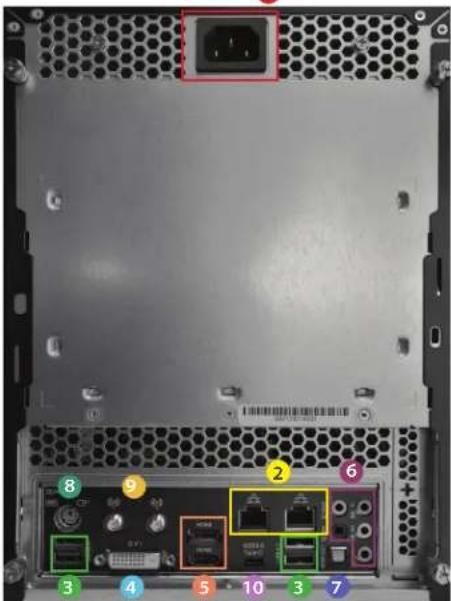
*2x USB 2.0 ports in the front panel
WRR Series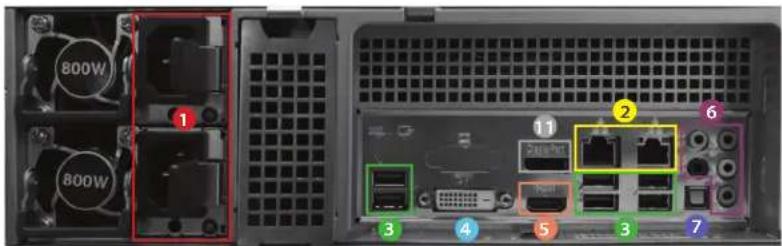
*2x USB 3.0 ports in the front panel
1 Power
2 NIC
3 USB 3.0
4 DVI
8 PS2
5 HDMI 6 Audio 7 SPDIF 9 Wi-Fi Antenna 10 USB 3.0 Type C 11 Display Port
• Package Contents
WRR Series
· 1x WRR appliance · 2x power cables · 1x sliding rack rail · 1x mouse and keyboard · 1x quick guide
WRT/WWT Series
· 1x WRT or WWT appliance - 1x power cable · 2x Wi-Fi antennas · 1x mouse and keyboard - 1x quick guide
WAVE VIDEO TUTORIAL LIBRARY AND MOBILE APPLICATION
Use the QR codes below to visit our extensive video tutorial library and to install your WAVE Mobile app to always stay connected.
- Setting up WAVE software https://wavevms.com/wave_qg_1

- WAVE software may be downloaded by following this QR code or by visiting the link below: https://wavevms.com/download/

- Adding devices to WAVE https://wavevms.com/wave_qg_2
Download the WAVE Mobile App for Android
- Setting camera recording profiles https://wavevms.com/wave_qg_3



- Playlist for WAVE tutorial videos https://wavevms.com/wave_qg_4

Download the WAVE Mobile App for iOS

CONFIGURING SYSTEM NETWORK SETTINGS
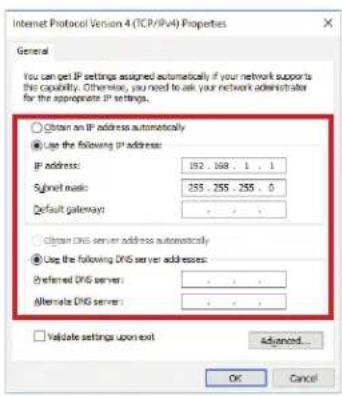
In certain cases, it may be necessary for your WAVE server to use a static IP address. Follow the steps outlined below to configure your WAVE server to use a static network IP address.
Ubuntu
- Click the

icon to enter the System Settings window
- Click the

icon to enter the Network Settings window
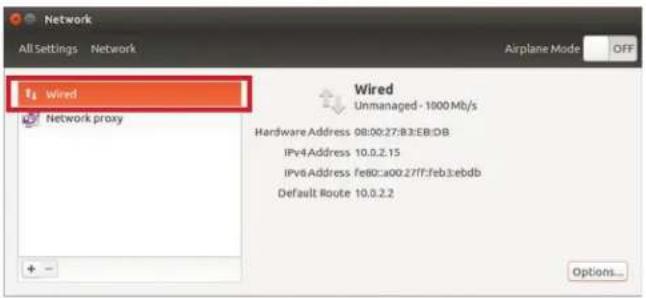
Network
- Select "Wired" and click "Options..."
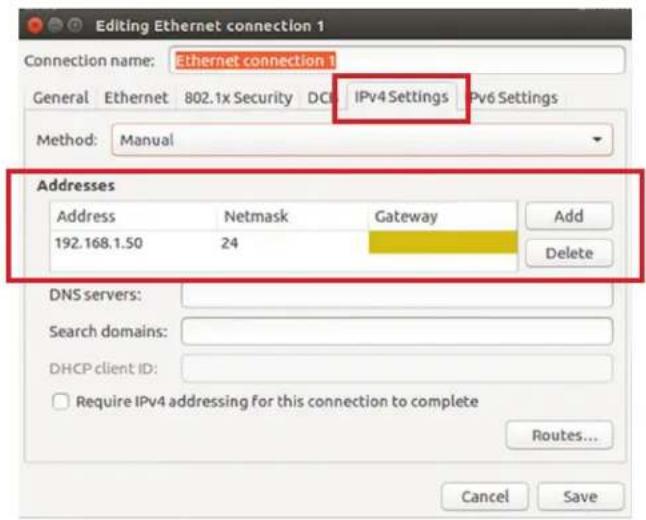
- Go to the "IPv4 Settings" tab and input the IP configuration required for your network
Windows
- Click the icon to enter the Start menu
- Click to access your system Control Panel
- Click the "Networking & Internet" icon
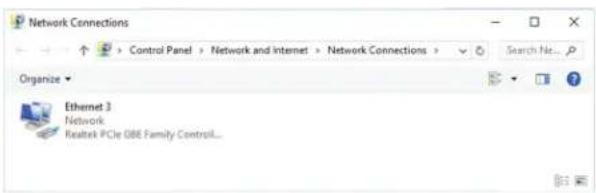
- Click "Change Adapter Options"
- Click on "Properties" 7. Double-click on the Internet Protocol
Version 4 (TCP/IPv4)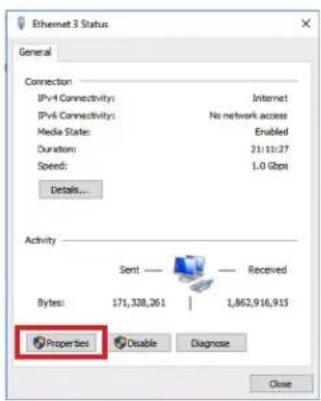
Technical Support (877) 213-1222 www.HanwhaSecurity.com
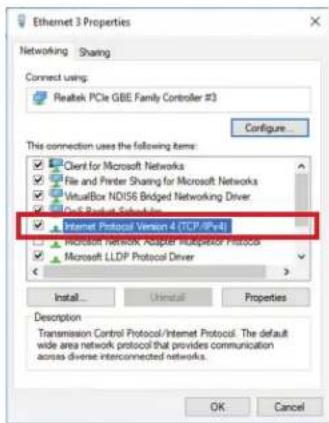
- Double-click the icon for the network card used to connect to your local network to view its properties window
- Set network properties according to your requirements
WARRANTY
All Hanwha Techwin products are guaranteed for a below period from the date of purchase against defects in workmanship and materials. This warranty is valid only on Hanwha Techwin Products and it shall be limited to the repair and / or adjustment. Exceptions to this warranty are as noted below;
| Product Category Warranty Period Exceptions | ||
| Cameras (Analog/Network) | 3 Years | |
| Network Products (Server/Switch/etc) | 3 Years | |
| Monitors (CRT/LCD/LED) | 3 Years | CRT Module (1 Year)LCD/LED Panel (2 Years) |
| Recorders (DVR/NVR/Storage) | 3 Years | |
| Accessories (Housing/Matrix/etc) | 3 Years Brackets No Warranty | |
| Lens/Controller 3 Years | ||
| Access Control 2 Years | ||
When service is required, the warranty is validated by the submission of a fully completed warranty card which was marked with Model Name, Serial No, Date of Purchase & Price, Purchaser's Name & Address, and Place of purchase & Address. Hanwha Techwin does not warrant the repair of any product where the serial number has been altered or removed.
The service will be performed by one of the Hanwha Techwin service agents listed on this card.
This warranty becomes void if there is any malfunction, defect or failure caused by or resulting from the evidence of impact, mishandling, tampering, use contrary to the applicable instruction manual, incorrect power line voltage, fire, flood or other Acts of God, shipping damage or damage resulting from repairs performed by unauthorized personnel. Routine cleaning, normal cosmetic and mechanical wear and tear are not covered under the terms of this warranty.
When returning the product for warranty service, please pack it carefully, insure the product and enclose your warranty card, original receipt or copy, brief explanation of the problem.
This warranty card does not cover the postal cost, insurance and any other incidental charges.
| Product Name CCTV Products | Purchaser | Name | |||
| Model Name Phone | |||||
| Serial No. | Address | ||||
| Warranty Period | Seller | Name | |||
| Purchase | Date Phone | ||||
| Price | Address | ||||
WISENet

Hanwha
Techwin America
© 2018 Hanwha Techwin Co., Ltd. All rights reserved.
DESIGN AND SPECIFICATIONS ARE SUBJECT TO CHANGE WITHOUT NOTICE. Under no circumstances, this document shall be reproduced, distributed or changed, partially or wholly, without formal authorization of Hanwha Techwin Co., Ltd.
REVISED 02-2018
Hanwha Techwin America
500 Frank W. Burr Blvd. Suite 43 Teaneck, NJ 07666
Toll Free: 877.213.1222 Direct: 201.325.6920
Fax: 201.373.0124
www.hanwhasecurity.com


Brand : SAMSUNG
Model : WRR-5501
Category : Video recorder