VRS-2400 - Radio Victrola - Free user manual and instructions
Find the device manual for free VRS-2400 Victrola in PDF.


User questions about VRS-2400 Victrola
0 question about this device. Answer the ones you know or ask your own.
Ask a new question about this device
Download the instructions for your Radio in PDF format for free! Find your manual VRS-2400 - Victrola and take your electronic device back in hand. On this page are published all the documents necessary for the use of your device. VRS-2400 by Victrola.
USER MANUAL VRS-2400 Victrola
by innovative technology.

natural_image
Vintage Victrola radio console with four dials labeled FM RADIO, TUNING, AUX, and VOLUME (no visible text beyond branding)Bluetooth Stereo
Model: VRS-2400
Instruction Manual
PLEASE READ THIS INSTRUCTION MANUAL CAREFULLY BEFORE USE AND KEEP IT FOR FUTURE REFERENCE.
Important Safety Instructions....1
Product Overview....3
Basic Operation....4
Listening to a FM Radio....5
Listening to an External Audio Device (AUX Mode)......5
Listening to an External Audio Device (Bluetooth Mode)......6
Specifications....7
Troubleshooting Guide......8

The lightning flash with arrowhead within an equilateral triangle is intended to alert the user to the presence of uninsulated "dangerous voltage" within the product's enclosure that may be of sufficient magnitude to constitute a risk of electric shock to persons.
CAUTION
RISK OF ELECTRIC SHOCK DO NOT OPEN
CAUTION: TO PREVENT RISK OF ELECTRIC SHOCK, DO NOT REMOVE COVER (OR BACK). NO USER-SERVICEABLE PARTS INSIDE REFER SERVICING TO QUALIFIED SERVICE PERSONNEL.

The exclamation point within an equilateral triangle is intended to alert the user to the presence of important operating and maintenance (servicing) instructions in the literature accompanying the appliance.
CAUTION: To reduce the risk of fire or electric shock, do not expose this appliance to rain or moisture. WARNING: To prevent electric shock, do not use this (polarized) plug with an extension cord, receptacle or other outlet unless the blades can be fully inserted to prevent blade exposure
Important Safety Instructions
- Read these instructions – All the safety and operating instructions should be read before this product is operated.
- Keep these instructions- The safety and operating instructions should be retained for future reference.
- Heed all warnings – All warnings on the appliance and in the operating instructions should be adhered to.
- Follow all instructions – All operating and use instructions should be followed.
- Do not use this apparatus near water – The appliance should not be used near water or moisture – for example, in a wet basement or near a swimming pool, and the like.
- Clean only with dry cloth.
- Do not block any ventilation openings. Install in accordance with the manufacturer's instructions.
- Do not install near any heat sources such as radiations, heat registers, stoves, or other apparatus (including amplifiers) that produce heat.
- Do not defeat the safety purpose of the polarized or grounding plug. A polarized plug has two blades with one wider than the other. A grounding plug has two blades and a third grounding prong. The wide blade or the third prong is provided for your safety. If the provided plug does not fit into your outlet, consult an electrician for replacement of the obsolete outlet.
- Protect the power cord from being walked on or pinched particularly at the plugs, convenience receptacles, and at the point where they exit from the apparatus.
- Only use attachments/accessories specified by the manufacturer.
- Use only with the cart, stand, tripod, bracket, or table specified by the manufacturer, or sold with the apparatus. When a cart or rack is used, use caution when moving the cart/apparatus combination to avoid injury from tip-over.
- Unplug the apparatus during lighting storms or when unused for long periods of time.
- Refer all servicing to qualified personnel. Servicing is required when the apparatus has been damaged in any way, such as power supply cord or plug is damaged, liquid has been spilled or objects have fallen into the apparatus has been exposed to rain or moisture, does not operate normally, or has been dropped.
15.

natural_image
Symbolic icon of a person using a device to stop a large block, enclosed in a circle with no text or symbols.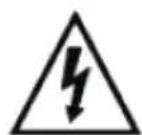
CAUTION
RISK OF ELECTRIC SHOCK DO NOT OPEN

AVERTISSEMENT:
RISQUE DE CHOC ÉLECTRIQUE—NE PAS OUVRIR.
- This lightning flash with arrowhead symbol within an equilateral triangle is intended to alert the user to the presence of non-insulated "dangerous voltage" within the product's enclosure that may be of sufficient magnitude to constitute a risk of electric shock.
- Warning: To reduce the risk of electric shock, do not remove cover (or back) as there are no user-serviceable parts inside. Refer servicing to qualified personnel.
- The exclamation point within and equilateral triangle is intended to alert the user to the presence of important operating and maintenance instructions in the literature accompanying the appliance.
16.

This equipment is a Class II or double insulated electrical appliance. It has been designed in such a way that it does not require a safety connection to electrical earth.
- The mains plug is used as disconnect device, the disconnect device shall remain readily operable.
- WARNING
To reduce the risk of fire or electric shock, do not expose this apparatus to rain or moisture. The apparatus shall not be exposed to dripping or splashing and that no objects filled with liquids, such as vases, shall not be placed on apparatus.
- The use of the equipment in moderate climate.
- The ventilation should not be impeded by covering the ventilation openings with items, such as newspapers, table-cloths, curtains, etc.
- No naked flame sources, such as lighted candles, should be placed on the apparatus.
- The symbol with ∼ Indication AC voltage.
- CAUTION, These servicing instructions are for use by qualified service personnel only. To reduce the risk of electric shock do not perform any servicing other than that contained in the operating instructions unless you are qualified to do so.
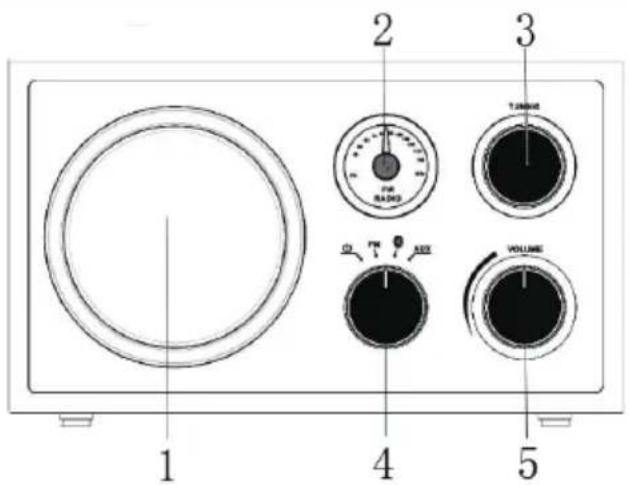
Product Overview
text_image
1 2 3 TURNO 4 VOLUME 5Front View
- SPEAKER
- FM SCALE
- RADIO TUNER KNOB In FM mode, turn to tune into a station.
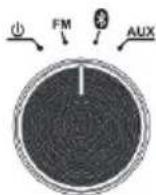
- FUNCTION ROTARY SELECTOR (POWER / FM / BLUETOOTH / AUX)
Turn to select Function mode.
Turn to POWER mode to turn the unit off.
Turn to FM mode to listen to the FM radio.
Turn to BLUETOOTH mode to listen to Bluetooth.
Turn to AUX mode to listen to an external device connected to the AUX-IN jack.
- "VOLUME" KNOB Turn to adjust volume.

text_image
ACR IN CAUTION 6 7 8 9Rear View
- AUX-IN Jack
When connecting a device that has a headphone jack, use a 3.5mm cable to connect to the AUX-IN jack.
- Headphones Jack
To listen to the unit using headphones, insert headphones into the Headphone jack.
- FM Telescopic Antenna
While tuned to a station in FM mode, extend the Telescopic Antenna and reposition to adjust for best reception.
- AC Power Cord
Plugs into a wall outlet.
Basic Operation
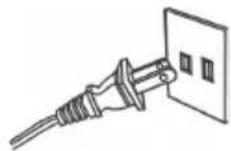
- Power on.
Connect the power plug into the wall outlet.
- Rotate the Function Rotary selector to select a source.
- Rotate the VOLUME knob to adjust to desired sound level.
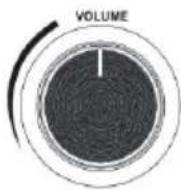
- Power off
Rotate the Function Rotary selector on POWER ( ⏻ ) position
- Standby mode
The main unit will turn off when the speaker is idle for approximately 15 minutes (not while in Radio Mode). Once the unit turns off, rotate the Function Rotary selector to turn the unit on again.
- Listening through Headphones (not included)
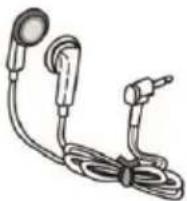
For private listening, first reduce the volume level to the minimum. Insert your headphones' plug into the HEADPHONES Jack, then adjust the volume up by turning the VOLUME knob.
Note: The speakers will automatically be deactivated while headphones are plugged in. When you switch to a different mode, make sure to unplug your Headphones.
CONDENSATION WARNING:
When the unit is moved from a cold or warm place, or is used following a sudden temperature change, there is the danger that water vapor in the air may condense on the unit, preventing proper operation. In such cases, leave the unit for 1-2 hours after plugging it into an AC outlet to allow it to stabilize at the temperature of its surroundings.
Listening to a FM Radio
Turn the unit on.
- Rotate the Function Rotary Selector to FM position and the dial scale will light up orange.
- Rotate the VOLUME knob to adjust the volume level you desired.
- Rotate the TUNING knob to select your desired station.
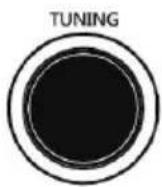
- Pull out the Telescopic Antenna and adjust its length and angle for optimum reception.
Listening to an External Audio Device (AUX Mode)
In AUX (auxiliary) mode, this unit can play audio from an external audio device (iPod, MP3 Player, Portable CD Player, etc.)
When connecting a device that has a headphone jack, use a 3.5mm AUX cable and connect to the AUX-IN jack located on the back of the unit.
- Plug one end of the AUX-IN cable (not included) into the AUX-IN (on the back of the unit).
- Plug the other end of the cable into the headphone jack of the external audio device.
- Rotate the Function Rotary Selector to AUX position and the dial scale will light up Green.
- Turn your external device on to start playback.
- Rotate the VOLUME knob to adjust the sound level.
- Adjust the volume level on your device if necessary.
- You can control playback through your external device.
NOTE: All playback operations are only accessible on your external device.
Listening to an External Audio Device (Bluetooth Mode)
In Bluetooth mode, this unit can play music from external devices that are Bluetooth compatible.
GETTING CONNECTED USING BLUETOOTH
- Rotate the Function Rotary Selector to Bluetooth ( ⚙ ) position and the dial scale will flash blue.
- Set the Bluetooth function of your external device when the apparatus is on.
- Open Bluetooth Settings on your external device.
NOTE: The effective distance between your external device and this apparatus is 10 meters (33ft). - Wait a few seconds for "VRS-2400" to appear on the device list of your external device's Bluetooth settings and select "VRS-2400". If your device asks for a password enter "0000" then press "OK".
- When the Bluetooth connection has been established successfully you will hear an audible beeping and the dial scale will stop flashing.
- Start playback through your external device.
Specifications
GENERAL
Power Requirements AC 120 V \~ 60 Hz
Power Consumption 15W
Dimensions (L x H x D) 227mm (9") x 135mm (5") x 161mm (6") (approx.)
Weight 1.3 kg. (2.9 lbs.) (approx.)
SPEAKER SYSTEM
Type 1-way
Impedance 8 ohms
Output Power 10W
FM Radio
Range 88 to 108 MHz
BLUETOOTH
Bluetooth Version Bluetooth V2.1+EDR
Bluetooth Profiles A2DP, AVRCP
Bluetooth Frequency range 2.402GHz-2.480GHz
Operating Distance 10 meters (33 ft.)
Troubleshooting Guide
| GENERAL | Symptom | Possible Cause | Solution |
| ·Unit will not power on. | ·Unit is unplugged. | ·Connect the unit to the AC power supply. | |
| ·No sound output from speakers. | ·The volume level is set too low.·The input selector does not match the playback source. | ·Adjust the volume.·Select the correct input source. | |
| ·Noise/Distortion in sound output. | ·The unit is too close to a TV set or another interfering device. | ·Turn off the TV or other appliance, and relocate the unit. | |
| ·Unit fails to respond. | ·It might result from external factors such as ESD (Electro-static discharge). | ·Disconnect the power cord and external audio device. Re-plug the power cord after one minute. | |
| FMRADIO | ·Cannot listen to any station, or signal appears weak. | ·The station is not tuned-in properly.·A TV set is being used nearby and is interfering with the radio reception. | ·Properly tune-in the desired station.·Turn-off the interfering TV set. |
| ·The sound is distorted. | ·The antenna is not oriented properly. | ·Re-orient the antenna until reception improves. | |
| AUX | ·No sound output with external audio device plugged into rear AUX-IN jack. | ·AUX-IN Cable is plugged in. | ·Unplug the AUX-IN Cable. |
| BLUETOOTH | ·No sound | ·The unit is not switched to Bluetooth mode.·Your device's and/or the unit's volume is too low.·Your device is too far from the unit or there is some obstacle between your device and the unit. | ·Ensure the unit is switched to Bluetooth mode.·Move your Bluetooth device closer to unit.·Turn up the volume on your portable device and/or the unit.·Turn OFF your Bluetooth device and unit. Then power them both back ON |
| ·Sound has a lot of static | ·Your device is too far away. | ·Bring your device closer to the turntable. | |
| ·Unable to pair with a Bluetooth device. | ·Your device doesn't have Bluetooth connectivity.·The Bluetooth pairing is not successful. | ·Confirm that your device is Bluetooth compatible.·Re-pair the unit and device again. |
For further assistance with your product, call Innovative Technology at TOLL FREE# 1-877-ITECH-97 (1-877-483-2497).
Please note: As a result of continual improvements, the design and specifications of this product are subject to change without notice.
Bluetooth is a registered trademark of Bluetooth SIG, Inc. Other trademarks and trade names are those of their respective owners.
Made in China.
FCC Statement
This device complies with Part 15 of the FCC Rules. Operation is subject to the following two conditions: (1) This device may not cause harmful interference, and (2) this device must accept any interference received, including interference that may cause undesired operation.
NOTE: This equipment has been tested and found to comply with the limits for a Class B digital device, pursuant to Part 15 of the FCC Rules. These limits are designed to provide reasonable protection against harmful interference in a residential installation. This equipment generates uses and can radiate radio frequency energy and, if not installed and used in accordance with the instructions, may cause harmful interference to radio communications. However, there is no guarantee that interference will not occur in a particular installation. If this equipment does cause harmful interference to radio or television reception, which can be determined by turning the equipment off and on, the user is encouraged to try to correct the interference by one of the following measures:
- Reorient or relocate the receiving antenna.
- Increase the separation between the equipment and receiver.
- Connect the equipment into an outlet on a circuit different from that to which the receiver is connected.
- Consult the dealer or an experienced radio/TV technician for help.
WARNING: Any changes or modifications not expressly approved by the party responsible for compliance could void the user's authority to operate this equipment.
The device must not be co-located or operating in conjunction with any other antenna or transmitter.
This device complies with FCC and IC radiation exposure limits set forth for an uncontrolled environment.
The device should be installed and operated with a minimum distance of 20cm between the radiator and your body.
California PROP 65 Warning
"WARNING" This product contains chemicals known to the State of California to cause birth defects or other reproductive harm. For more information on these regulations and a list of chemicals, log on the following website address: http://www.oehha.ca.gov/prop65.html
Victrola is a registered trademark of Innovative Technology Electronics LLC.
Innovative Technology Electronics LLC.
Limited Warranty: 90 Days Labor, One Year Parts
Innovative Technology Electronics LLC. (IT) warrants the product to be free from "Defects" in materials under normal use for a period of "One Year" from the date of the original purchase. The Warranty is "Not" transferable. IT agrees, within the initial "90 Day" period, to repair or replace the product if it is determined to be defective at "No Charge". It is further agreed that IT will cover the cost to repair or replace damaged "Parts" only for a total period of "One Year" from the date of the original purchase. The warranty does not cover cosmetic damage, antennas, AC cords, cabinets, headbands, ear-pads, or damage due to line power surges, connection to improper voltage supply or settings, misuse, mishandling, accident, acts of God or attempted repair by an unauthorized service agent.
To obtain service, the purchaser MUST present an original sales receipt / proof of purchase. Please contact us at www.ithomeproducts.com to request an RMA (Return Material
Authorization) number to return products for service or replacement. Returns without an RMA number on the package will be refused and returned to sender. Upon receipt of the returning item and our full inspection (IT) may issue a replacement to customer for the same item or of one that has equivalent value and features. To return an item, supply full name, return address, phone number, item purchased, receipt of purchase and reason for return to obtain RMA number.
All returns must be in the original packaging or reasonable substitute to prevent damage.
Customer "Must" include full name, shipping address and telephone number inside of package. No return will be shipped back to a PO Box or APO address.
Please include your check or money order in the amount of
- USD \5.00 for items \10.00 to \$39.99 (Price Paid Per Unit)
- USD \10.00 for items \40.00 to \$99.99 (Price Paid Per Unit)
- USD \16.00 for items \100.00 and up (Price Paid Per Unit)
• Shipping fees are non-refundable
to be payable to Innovative Technology Electronics LLC. (for handling and return shipping charges) (IT) will not be responsible for delays or unprocessed claims resulting from a purchaser's failure to provide any / all of the necessary information.
Send all inquiries or RMA request via our website www.ithomeproducts.com/support.
Innovative Technology Electronics LLC.
1 Channel Drive
Port Washington, NY 11050
Toll free: 1-877-483-2497
Website for support: www.ithomeproducts.com/support
There are no express warranties except as listed above.
REPAIR OR REPLACEMENT AS PROVIDED UNDER THIS WARRANTY IS THE EXCLUSIVE REMEDY OF THE CUSTOMER, (IT) SHALL NOT BE LIABLE FOR ANY INCIDENTAL OR CONSEQUENTIAL DAMAGES FOR BREACH OF ANY EXPRESS OR IMPLIED WARRANTY ON THIS PRODUCT EXCEPT TO THE EXTENT PROHIBITED BY APPLICABLE LAW. ANY IMPLIED WARRANTY OF MERCHANTABILITY OR FITNESS FOR A PARTICULAR PURPOSE ON THIS PRODUCT IS LIMITED IN DURATION TO THE DURATION OF THIS WARRANTY.
Some states do not allow the exclusion or limitation of incidental or consequential damages, or limitations on how long an implied warranty lasts, so the above exclusions or limitations may not apply to you. This warranty gives you specific legal rights and you may also have other rights, which vary from state to state.
V2400170502E