
DXI 5586-3 - Phone UNIDEN - Free user manual and instructions
Find the device manual for free DXI 5586-3 UNIDEN in PDF.


| Product Type | Cordless telephone system |
| Model | DXI 5586-3 (3-handset version) |
| Frequency Band | 5.8GHz Extended Range (925-927 MHz and 5739-5746 MHz) |
| Number of Handsets | 3 (expandable up to 4 with DXI5586-4) |
| Display | 3-line backlit LCD with trilingual menu (English, French, Spanish) |
| Caller ID Memory | 30 entries (name & number) |
| Speed Dial Memory | 10 numbers per handset (up to 20 digits each) |
| Channels | 20 auto-scan |
| Talk Time | Approximately 6 hours |
| Standby Time | Approximately 10 days |
| Battery | Rechargeable Ni-Cd, 3.6V 600mAh (BT-905) |
| AC Adapter (Main Base) | AD-314: Input 120V AC 60Hz, Output 9V DC 350mA |
| AC Adapter (Charging Cradle) | AD-310 or AD-1010: Input 120V AC 60Hz, Output 9V DC 210mA |
| Ringer Options | 5 tones/volume combinations plus off |
| Key Features | AutoTalk, Call Transfer between handsets, Voice Mail Waiting Indicator, Page/Find, Headset jack, Beltclip, Hearing Aid Compatible, Wall mountable |
| Dialing Modes | Tone/Pulse (switchable during call) |
| Warranty | 1 year limited |
| Care & Maintenance | Clean charging contacts monthly with a damp cloth; avoid moisture |
| Safety Precautions | Use only specified Uniden batteries and adapters; do not dispose of batteries in fire; keep away from water |
| Spare Parts | Replacement battery (BT-905), optional headset (order from Uniden) |
| Customer Support | 1-800-297-1023 (Mon-Fri 7am-7pm, Sat/Sun 9am-5pm CST) |
Frequently Asked Questions - DXI 5586-3 UNIDEN
User questions about DXI 5586-3 UNIDEN
0 question about this device. Answer the ones you know or ask your own.
Ask a new question about this device
Download the instructions for your Phone in PDF format for free! Find your manual DXI 5586-3 - UNIDEN and take your electronic device back in hand. On this page are published all the documents necessary for the use of your device. DXI 5586-3 by UNIDEN.
USER MANUAL DXI 5586-3 UNIDEN
DXI5586-3 / DXI5586-4
SERIES
OWNER'S
MANUAL
OWNER'S MANUAL
Contents
Welcome/Features 3
Controls and Functions 4
Terms Used in this Manual 6
Accessibility 6
Installing the Phone 7
A. Choose the Best Location 7
B. Install the Rechargeable Battery Packs into the Handsets 8
C. Connect the Main Base and Charging Cradle, and Charge the Handsets 9
D. Mount the Main Base on a Wall 11
Installing the Beltclip 12
Headset Installation 13
Register Handsets to the Main Base before Using! 13
When to Re-register Handsets 14
Basic Setup 15
Activating AutoTalk 15
Activating Caller ID on Call Waiting (Handset 1 only) 15
Entering Your Area Code 16
Choosing the Dialing Mode (Handset 1 only) 16
Setting the Language 17
Selecting the Ring Tone and Volume 17
Using Your Phone
Making and Receiving Calls 18
Transferring a Call 19
Redialing the Last Dialed Number 19
Adjusting the Earpiece Volume 20
Tone Dialing Switch-over 20
Traveling Out-of-Range 21
Selecting a Different Channel 21
Find Handset 21
Using Call Waiting 22
Voice Mail Waiting Indicator 22
Using the Speed Dial Memory
Storing Names and Numbers in Speed Dial Memory 23
Storing Caller ID Messages in Speed Dial Memory 26
Making Calls from Speed Dial Memory 27
Caller ID and CIDCW (Caller ID on Call Waiting)
Viewing the Caller ID Message List 29
Deleting Information from the Caller ID List 30
Making a Call from the Caller ID List 31
Caller ID on Call Waiting (CIDCW) 31
Changing the Digital Security Code
Note on Power Sources 33
General Information 35
Troubleshooting 36
Liquid Damage 39
Precautions & Warranty
I.C. Notice 42
Index 43
Memory List 46
Welcome
Congratulations on your purchase of the Uniden multi-handset cordless telephone. This cordless phone is designed and engineered to exacting standards for reliability, long life, and outstanding performance.
Note: Illustrations in this manual are used for explanation purposes. Some illustrations in this manual may differ from the actual unit. The color of your cordless telephone may vary.
Features
• 5.8GHz Extended Range Technology
• Multi-Handset System (Extra Handsets & Chargers Included)
- Call Transfer from Handset to Handset
- Caller ID/Caller ID on Call Waiting
• 3-Line Backlit LCD
- Trilingual Menu Displays
• 30 Caller ID Memory
• 10 Number Memory Dialing
- Last Number Redial
• Voice Mail Waiting Indicator - Tone/Pulse Dialing
• Page/Find Handset Key - Earpiece/Ringer Volume Controls
- Mute or Turn Ringer Off
• Hearing Aid Compatible
• 20 Channel Auto Scan - Desk or Wall Mountable
If you have any trouble with your phone, call our Customer Hotline at 1-800-297-1023, Mon-Fri 7 am to 7 pm, Sat/Sun 9 am to 5 pm, CST. (Phone support is closed on holidays.) For more information on Uniden products and accessories, be sure to visit our web site: www.uniden.com
Uniden ^® is a registered trademark of Uniden America Corporation.
AutoTalk, AutoStandby, UltraClear Plus, Random Code and AutoSecure are trademarks of Uniden America Corporation.
Controls and Functions
Handsets
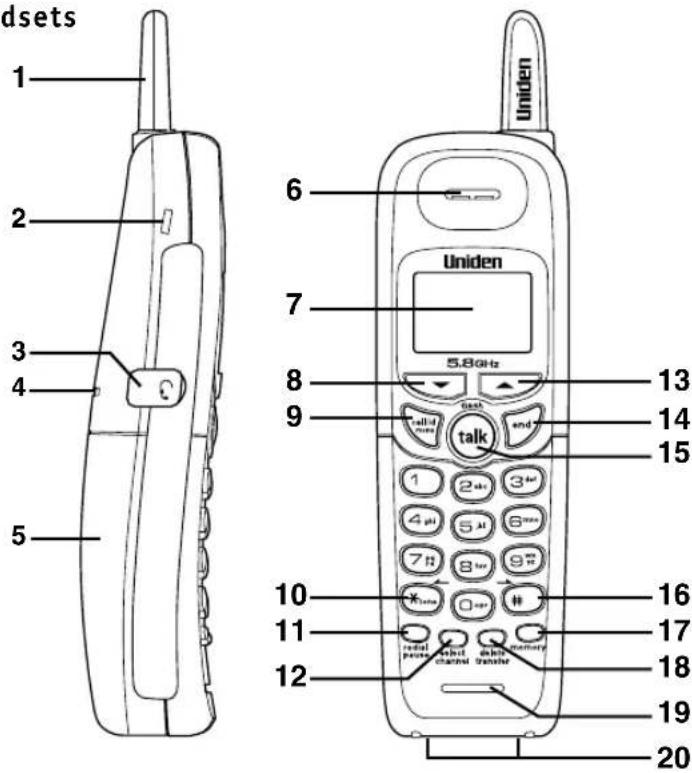
[4] CONTROLS AND FUNCTIONS
- Handset antenna
- Beltclip hole
- Jack for optional headset
- Handset ringer speaker
- Handset battery compartment
- Handset earpiece
- LCD display
- ▼(volume & scroll down) key
- Call id (Caller ID)/menu key
- /tone/ (left cursor) key
- Redial/pause key
- Select/channel key
- ▲(volume & scroll up) key
- End key
- Talk/flash key
-
/(right cursor) key
- Memory key
- Delete/transfer key
- Handset microphone
- Handset charging contacts
Main Base
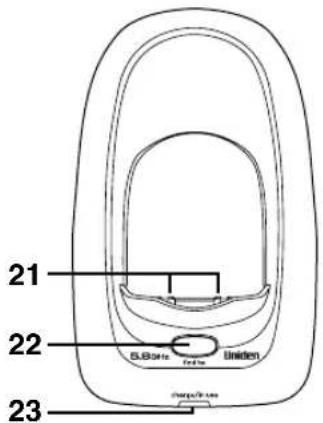
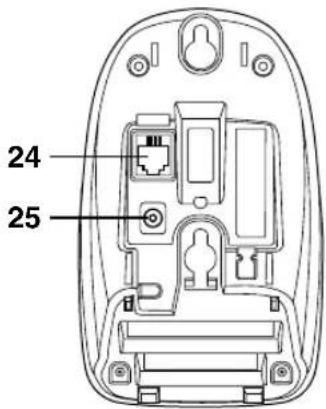
- Main base charging contacts
- Find hs key
- Charge/in use and VMWI (Voice Mail Waiting Indicator) LED
- Telephone line jack
- DC IN 9V jack
- Charging contacts
- Charge LED
- DC IN 9V jack
Extra Charging Cradle
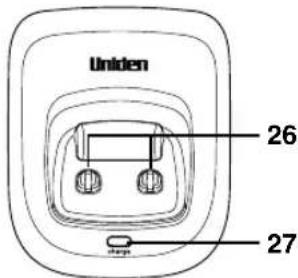
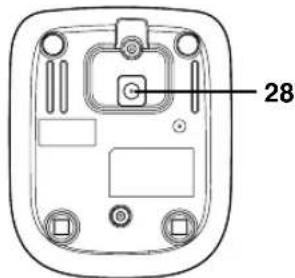
CONTROLS AND FUNCTIONS [5] www.unid
Terms Used in this Manual
- Standby Mode - The handset may be sitting in or off the cradle, but is NOT in use. The talk/flash key has not been pressed and there is no dial tone.
- Talk Mode - The handset is off the cradle and the talk/flash key has been pressed, enabling a dial tone.
- CID - Caller ID
- CIDCW - Caller ID on Call Waiting
Accessibility
Uniden provides a customer service hotline for accessibility questions. If you have a disability and need customer service assistance or if you have any questions about how Uniden's products accommodate persons with disabilities, please call the accessibility voice/TTY line:
1-800-874-9314
A representative is available to talk to you M-F, 8:00 am to 5:00 pm, CST. After hours, you can leave a message, and we will call you back. Information is also available on our web site, www.uniden.com, under the "Accessibility" link.
[6] TERMS USED IN THIS MANUAL / ACCESSIBILITY
www.uniden.com
Installing the Phone
Do the following steps:
A. Choose the Best Location
B. Install the Rechargeable Battery Packs into the Handsets
C. Connect the Main Base and Charging Cradle, and Charge the Handsets
D. Mount the Main Base on a Wall
A. Choose the Best Location
Before choosing a location for your new phone, here are some important guidelines you should consider:
Avoid heat sources, such as radiators, air ducts, and sunlight
Avoid television sets and other electronic equipment
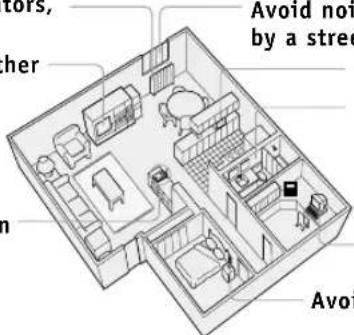
Avoid noise sources such as a window by a street with heavy traffic
Avoid microwave ovens
Avoid excessive moisture, extremely low temperatures, dust, mechanical vibration, or shock
Avoid personal computers
Avoid other cordless telephones
- The location should be close to both a phone jack and a continuous power outlet (one which is not connected to a switch).
- The main base and each handset should be kept away from sources of electrical noise such as motors, microwave ovens, and fluorescent lighting.
- The cradle can be placed on a desk, tabletop, or mounted on a standard wall plate. For better reception, place the main base as high as possible.
- The main base should be placed in an open area for optimum range and reception.

If your home has specially wired alarm equipment connected to the telephone line, be sure that installing the system does not disable your alarm equipment.
If you have questions about what will disable your alarm equipment, contact your telephone company or a qualified installer.

Use only the Uniden (BT-905) rechargeable battery pack supplied with your phone.
B. Install the Rechargeable Battery Packs into the Handsets
All handsets are powered by rechargeable battery packs. The battery recharges automatically when the handset is placed in the main base or charging cradle.
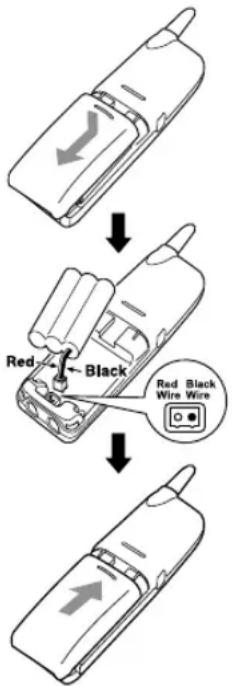
1) Press down on the handset battery case cover (use the finger indentation for a better grip) and slide the cover downward to remove.
2) Plug the battery pack connector (red & black wires) into the small jack inside the battery compartment.
(The connector notches fit into the grooves of the jack only one-way.) Match the wire colors to the polarity label in the battery compartment, connect the battery, and listen for a click to insure connection.
3) Make sure you have a good connection by slightly pulling on the battery wires. If the connection is secure, the battery jack will remain in place.
4) Place the battery case cover back in the handset by sliding it upwards until it clicks into place.
C. Connect the Main Base and Charging Cradle, and Charge the Handsets
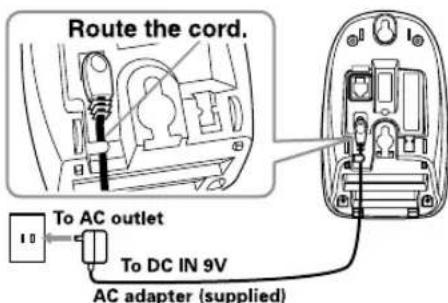
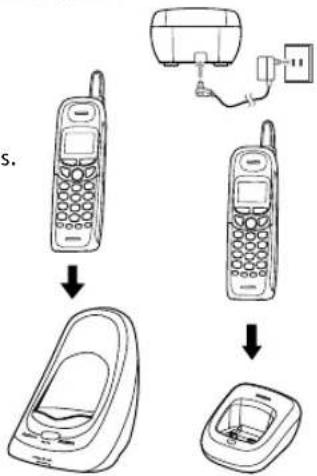
1) Connect each AC adapter to the DC IN 9V jack and to each standard 120V AC wall outlet.
2) Place one handset in the main base and the other in the charging cradle with the keypad facing forward.
3) Make sure that the charge/in use LED and charge LED illuminate. If the LED does not illuminate, check to see that the AC adapter is plugged in and that the handset makes good contact with the cradle's charging contacts.

- Connect the AC adapter to a continuous power supply.
- Place each cradle close to the AC outlet to avoid long extension cords.
4) Charge your handsets at least 15-20 hours before plugging the phone line.
flowchart
graph TD
    A["Top Mobile Phone"] --> B["Insertion"]
    B --> C["Base Case with Carrier"]
    C --> D["Terminal Device"]

- Use only the supplied AD-314 AC adapter for the main base and AD-310 or AD-1010 for the charging cradle. Do not use any other AC adapter.
- Do not place the power cord where it creates a trip hazard or where it could become chafed and create a fire or electrical hazard.
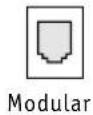
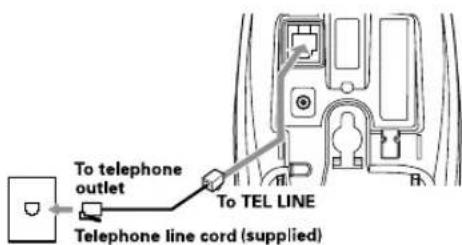
5) Once the handset battery packs are fully charged, connect the telephone line cord to the TEL LINE jack and a telephone outlet. If your telephone outlet isn't modular, contact your telephone company for assistance.
[10] INSTALLING THE PHONE
www.uniden.com
D. Mount the Main Base on a Wall
Standard wall plate mounting
This phone can be mounted on any standard wall plate.
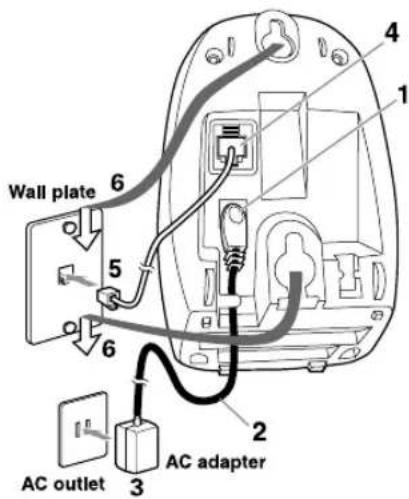
1) Plug the AC adapter to the DC IN 9V jack.
2) Route the AC adapter cord through the molded wiring channel as shown.
3) Plug the AC adapter into a standard 120V AC wall outlet.
4) Plug the telephone line cord into the TEL LINE jack.
5) Plug the telephone line cord into the telephone outlet.
6) Align the mounting slots on the main base with the mounting posts on the wall. Then push in and down until the phone is firmly seated.
INSTALLING THE PHONE [11] www.uni
Direct wall mounting
If you don't have a standard wall plate, you can mount your phone directly to the wall. Before doing this, consider the following:
- Avoid electrical cables, pipes, or other items behind the mounting location that could cause a hazard when inserting screws into the wall.
- Try to mount your phone within 5 feet of a working phone jack to avoid excessive lengths.
- Make sure the wall material is capable of supporting the weight of the main base and handset.
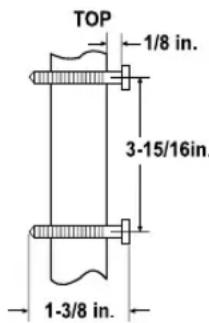
- Use #10 screws (minimum length of 1-3/8 inches) with anchoring devices suitable for the wall material where the main base will be placed.
1) Insert two mounting screws into the wall (with their appropriate anchoring device), 3-15/16 inches apart.
Allow about 1/8 of an inch between the wall and screw heads for mounting the phone.
2) Refer to steps 1 through 6 on page 11 to mount the telephone.
Installing the Beltclip
To attach the beltclip
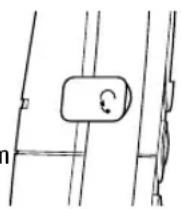
Insert the beltclip into the holes on each side of the handset. Press down until it clicks.
To remove the beltclip
Pull both sides of the beltclip to release the tabs from the holes.
Headset Installation
Your phone may be used with an optional headset. To use this feature, insert the headset plug into the headset jack.
Your phone is ready for hands-free conversations.
(Headsets may be purchased by visiting our website at www.uniden.com or by calling our Parts Department. See page 35.)
Register Handsets to the Main Base before Using!
Whichever handset you choose to charge in the main base will automatically register to the main base.
The handsets charging in the extra charging cradle MUST also be registered to the main base before use. Follow the steps below to register all handsets.
1) Be sure all handsets are fully charged.
2) Remove the handset from the charging cradle, and place it in the main base. The charge/in use LED light on the main base will begin to flash, indicating that the registration is taking place.
3) Wait for at least 5 seconds, then remove the handset from the main base.
4) Repeat step 2 - 3 for the rest of handsets.
5) Press the talk/flash key on one handset. If "Talk" appears on the display, the handset is registered, press the end key. Then try with all other handsets. If each handset displays "Talk", the handset has been registered to the base. Otherwise, return to step 1 and try again.
6) Once all handsets are registered, it doesn't matter which handset is placed in the main base or the charging cradle.

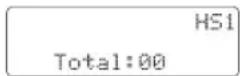
- When you charge the handsets, Caller ID summary screen and the name of the handset appears. Following display is the example of handset No.1 (HS1).
- The charging cradle can be used to charge any handset.
INSTALLING THE PHONE [13] www.uni

Make sure to return the handsets to the cradles after each phone call.
When to Re-register Handsets
1) You'll need to re-register all handsets (follow steps on page 13) each time the digital security code is changed. Refer to page 32 for details regarding the Digital Security Code.
2) When there is a power failure for more than one hour:
If power failure occurs (e.g. due to electrical storm or if the unit is unplugged during a move), all handsets will need to be re-registered. To re-register, follow the same registration process on page 13.
3) If any handset's battery becomes very low, the handset must be recharged for 15-20 hours and re-registered to the main base unit.
Basic Setup
There are five basic options that you will need to set up: AutoTalk, CIDCW (Caller ID on Call Waiting), Area Code, Dial Mode and Language. CIDCW and Dial Mode options can only be set by using Handset 1.
If you try to set by using other handset, you will not see these options listed on the LCD screen. (Handset 1 shows HS1 in the display while the phone is charging.) AutoTalk, Area Code and Language options can be set by using any handset.
Activating AutoTalk
AutoTalk allows you to answer the phone simply by removing the handset from the cradle. You do not have to press any keys.
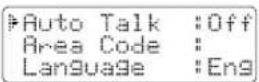
1) When the phone is in standby mode, press and hold the call id/menu key. The following screen appears.
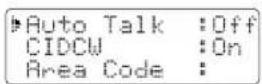
2) Press the select/channel key to turn AutoTalk on.
3) Press the end key or return the handset to the charging cradle to complete the setting. The handset returns to standby mode.
Activating Caller ID on Call Waiting (Handset 1 only)
Caller ID allows you to see the name and number of the calling party before you answer the phone. Caller ID on Call Waiting (CIDCW) lets you see the name and
number of a call that comes in when you are on the line. You must subscribe to Caller ID service through your local telephone provider to use this feature.
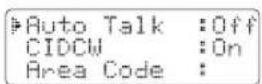
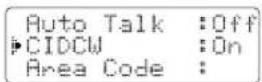
1) When the phone is in standby mode, press and hold the call id/menu key. The following screen appears.
2) Press the ▼ key to move the pointer to select CIDCW.
BASIC SETUP [15] www.uni

- To enable the setting change of CIDCW or Dialing Mode, you need to return the handset to the base unit when you complete the setting.
- If your phone system requires pulse dialing and you need to send the DTMF tones during a call, you can temporarily switch over to tone dialing. (Refer to "Tone Dialing Switch-over" on page 20.)
3) Press the select/channel key to toggle and turn on Caller ID on Call Waiting.
4) Press the end key and return the handset to the main base to complete the setting. The handset returns to standby mode.
Entering Your Area Code
If you can make a call by dialing only 7 digits (instead of 10), you can program your local area code in your phone. If you get a call from within your area code, you'll only see the 7-digit phone number. If you get a call from outside your area code, you'll see all 10 digits.
1) When the phone is in standby mode, press and hold the call id/menu key. The following screen appears.
2) Press the ▼ key to move the pointer to select Area Code.
3) Press the select/channel key. If an area code was already stored, the phone will display it.
4) Use the number keys (0 - 9) to enter the 3-digit area code. If you make an error, use the delete/transfer key to backspace.
5) Press the select/channel key. A confirmation tone sounds.
6) Press the end key or return the handset to the charging cradle to complete the setting. The handset returns to standby mode.
Choosing the Dialing Mode (Handset 1 only)
Your phone can communicate with the telephone network in two different ways: tone dialing and pulse dialing. These days, most phone networks use a method called tone dialing, so your phone comes programmed for tone dialing.
If your phone company uses pulse dialing, you'll need to change your phone's dial mode. There's an easy way to tell: try making a call. If your call connects, your phone's setting is fine. If not, follow the steps below:
BASIC SETUP[16] www.uniden.com
| Auto Talk | :Off |
| CIDCW | :On |
| Area Code |
| Auto Talk | :Off |
| CIDCW | :On |
| Area Code |
| Auto Talk | :Off |
| CIDCW | :On |
| Area Code | : |
1) When the phone is in standby mode, press and hold the call id/menu key. The following screen appears.
2) Press the ▼ key to move the pointer to select Dial.
3) Press the select/channel key to set the phone to pulse dialing.
4) Press the end key and return the handset to the main base to complete the setting. The handset returns to standby mode.
| Auto Talk | :Off |
| CIDCW | :On |
| Area Code |
| CIDCW | :On |
| Area Code : | |
| #Dial | :Tone |
Setting the Language
You can change the language the menu display uses. Choose from English, French, or Spanish.
1) When the phone is in standby mode, Press and hold the call id/menu key. The following screen appears.
2) Press the ▼ key to move the pointer to select Language.
3) Press the select/channel key to select Eng, Fr, or Esp.
4) Press the end key or return the handset to the charging cradle to complete the setting. The handset returns to standby mode.
| Auto Talk | :Off |
| CIDCW | :On |
| Area Code |
| Area Code : |
| Dial :Tone |
| Language :Eng |
Selecting the Ring Tone and Volume
Your phone has five different ringer tone/volume combinations you can choose from.
1) With the phone in standby mode, press the▲or▼key.
2) The phone will sound the different ring tones at different volumes. To turn the ringer off, select Ringer Off.
3) When the phone sounds the ring tone and volume you wish to use, press the end key.

To turn on the AutoTalk feature, see "Activating AutoTalk" on page 15.
Using Your Phone
Making and Receiving Calls
Making a call
1) Remove the handset from the cradle.
2) Press the talk/flash key.
3) Listen for the dial tone.
4) Dial the number.
OR
1) Remove the handset from the cradle.
2) Dial the number.
3) Press the talk/flash key.
Receiving a call
1) Remove the handset from the cradle. (If AutoTalk is on, the phone will automatically answer the call when you pick it up.)
2) Press the talk/flash key.
OR
1) If the handset is off the cradle, press the talk/flash, */tone/←, #/→ or any number key. (AutoTalk is on.)
Hanging up
Press the end key or return the handset to the cradle.
Transferring a Call
Your cordless phone allows you to transfer outside calls from handset to handset, only one handset at a time can talk with an outside caller. While one handset is in use, other handsets cannot go off hook to listen to conversations or make an outgoing call.
To transfer a call
1) During a call, press the delete/transfer key. The call will automatically be placed on hold.
2) Press a number key (1 - 3 for 3-handset model, 1 - 4 for 4-handset model) to select from the Handset No., and the transfer tone sounds.
3) When the other handset receives the call, the transfer tone stops. To cancel the transfer and return to the caller, press the delete/transfer or talk/flash key on the handset.
To receive a transfer call
Pick up the handset from the cradle (when AutoTalk is set to on), or pick up the handset and press the talk/flash key to answer the transferred call. Additionally, you can answer the transferred call by pressing any number key, the */tone/ or #/ key (when AutoTalk is set to on).
Redialing the Last Dialed Number
1) Remove the handset from the cradle.
2) Press the talk/flash key.
3) Listen for the dial tone.
4) Press the redial/pause key.
OR
Select Handset No.
Hold Transfer to HS3
Transfer Call

If you transfer a call and it is not picked up after 5 minutes, the call will be disconnected.

You can only mute the handset ringer if the handset is off the cradle when the phone starts ringing.
1) Remove the handset from the cradle.
2) Press the redial/pause key.
3) Press the talk/flash key.
Adjusting the Earpiece Volume
To change the earpiece volume, press the ▲ or ▼ key during a call.
Temporarily Mute Ringer
If the handset is off the cradle while an incoming call is ringing, simply press the end key to mute the incoming ring. The ringer will sound with the next incoming call.
Tone Dialing Switch-over
If your telephone company requires pulse dialing, you can switch over to tone dialing after the call connects. This feature is useful when you need tone dialing to use automated such as telephone bank tellers, telephone prescription refills, customer support menus, etc.
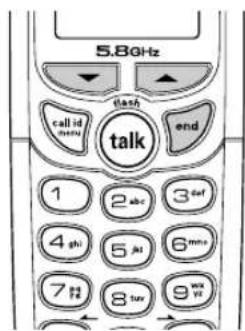
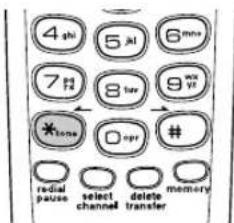
If your phone is set to pulse dialing mode, make your call normally. Once your call connects, press the */tone/ key. Any digits you enter from then on will be sent as tone dialing. When this particular call ends, the phone automatically returns to pulse dialing mode.
USING YOUR PHONE[20] www.uniden.com
Traveling Out-of-Range
During a call, as you begin to move your handset too far from your main base, noise increases. If you pass the range limits of the main base, your call will terminate within one minute.
Selecting a Different Channel
If you encounter interference while using your phone, you can manually change the phone's channel for clear operation. While using your phone, press the select/channel key. Scanning appears on the display, indicating the phone is changing to another channel. For more information on interference, refer to "Radio Interference" on page 41.
Find Handset
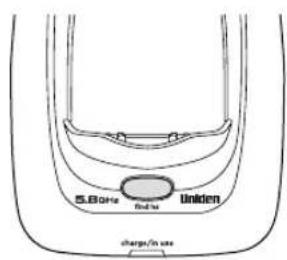
To locate the handset, press the find hs key on the main base. The handsets beep for 60 seconds.
To cancel paging, press any key on a handset or the find hs key on the main base.
Paging is also canceled when the phone receives an incoming call.

The UltraClear Plus™ true compander circuitry virtually eliminates background noise. This innovative technology, together with 20 different channels, provides you with the best possible reception during all your conversations.
USING YOUR PHONE [ 21 ]www

You must subscribe to voice mail service from your telephone company in order to use this feature. The voice mail company will provide you with the access number.
Using Call Waiting
If you have Call Waiting, you can receive calls while on the line.
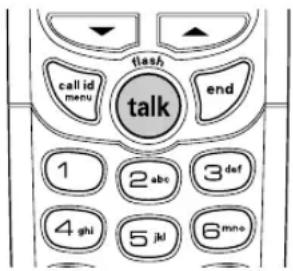
1) If a call comes in while you are on the phone, you will hear a call waiting tone. If you have CIDCW activated, you will see the name and number of the incoming caller.
2) Press the talk/flash key to accept the waiting call. After a short pause, you will hear the new caller.
3) To return to the original caller, press the talk/flash key again.

You must subscribe to Call Waiting through your local telephone company.
Voice Mail Waiting Indicator
If you subscribe to voice mail service, you can use your cordless telephone to access your voice mailbox. The charge/in use LED on the main base of your phone flashes whenever you have messages waiting in your voice mailbox.
Just dial the access number supplied by your voice mail provider to enter your mailbox.
You can program your voice mail access number to a speed dial number.
If the voice mail waiting indicator remains on after you have retrieved your messages, press and hold the find hs key for 5 seconds. This will reset the indicator.
Using the Speed Dial Memory
The speed dial memory allows you to store up to 10 names and numbers in each handset. You can dial these numbers with just a few key presses.
The speed dial memory is not limited to phone numbers. You can store any number (up to 20 digits) that you need to enter once your call connects. This is referred to as Chain Dialing. For example, you can save your bank account number to speed dial memory. When you call your bank's telephone teller service and are prompted to enter your account number, simply press the memory key and the speed dial number where you stored your account number. Then press the select/channel key.
Storing Names and Numbers in Speed Dial Memory
1) With the phone in standby mode, press the memory key.
2) Enter 0-9 to select the speed dial number where you would like to store this entry. You can also scroll through the list with the ▲ and ▼ keys. Press the select/channel key twice.
3) Store Name appears and a cursor flashes indicating that the phone is ready for the name to be entered.
If the selected speed dial number is already assigned, the Edit screen appears. You can select Edit Memory to edit this entry, select Delete Memory to erase this entry, or select Go Back to choose another speed dial number.
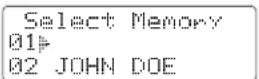
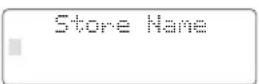
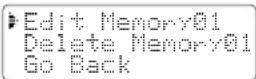

When editing the speed dial memory, you must press a key within 30 seconds or the phone will return to standby mode. If you return the handset to the cradle, the phone will return to standby mode also.

If the next character uses the same number key, you must press the #/key to move the cursor over. Otherwise the next time you press the number key, it changes the character that was previously set.
4) Enter a name according to the instructions below, then press the select/channel key. If no name is required, go to step 5.
- The name can be up to 13 characters.
- Use the #/ and /tone/ ← keys to move the cursor to the desired location.
- Use the delete/transfer key to delete characters as needed.
- Press and hold the delete/transfer key to delete all the characters.
Refer to the letters on the number keys to select the desired characters. With each press of a numeric key, the displayed character appears in the following order: upper case letters first, lower case letters next and finally the number corresponding to the key.
If you make a mistake while entering a name
Use the tone/ or # / key to move the cursor to the incorrect character. Press the delete/transfer key to erase the wrong character. Then enter the correct character. To delete all characters, press and hold the delete/transfer key.
For example, to enter Movies.
1) Press 6 once. Then press the #/ key to move the cursor to the right.
2) Press 6 six times.
3) Press 8 six times.
4) Press 4 six times.
5) Press 3 five times.
6) Press 7 eight times.
| Number of times key is pressed | ||||||||||
| k | e | y | s | 1 | 2 | 3 | 4 | 5 | 6 | |
| 7 | 1 | |||||||||
| 2abc | B | B | C | a | b | c | 2 | |||
| 3det | D | E | F | d | e | f | 3 | |||
| 4qui | G | H | I | g | h | i | 4 | |||
| 5wi | J | K | L | j | k | l | 5 | |||
| 6mow | M | N | O | n | n | o | 6 | |||
| 7paw | P | Q | R | S | P | q | r | s | 7 | |
| 8wv | T | U | U | t | u | u | 8 | |||
| (9wyz) | W | X | Y | Z | w | x | y | z | 3 | |
| (0_nw) | * | # | - | & | < | > | (blank) | @ | ||
5) Store Number is displayed. The cursor flashes indicating that the phone is ready for the number to be entered.
6) Use the keypad to enter the phone number; each number can be up to 20 digits.
If you need the phone to pause during the dialing sequence, press the redial/pause key to insert a two-second delay between the numbers. You can enter multiple pauses to increase the delay. Each pause counts as a digit. The display shows a P for every pause.

When storing numbers into memory, if the handset is idle (i.e., no key is pressed) for more than 30 seconds, it will beep rapidly, and the phone will return to standby mode.
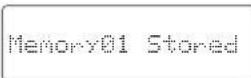
7) Press the memory key. You will hear a confirmation tone, and the following screen appears.
Memory storage is complete.
After about 2 seconds, the following screen displays all the speed dial memory entries.
8) Press the end key to exit memory setup mode. The phone returns to standby.
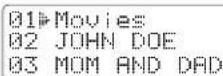

You cannot store a Caller ID message if no phone number appears in the message.
Storing Caller ID Messages in Speed Dial Memory
Messages (Caller ID names/numbers) shown in the Caller ID list can be stored in memory dialing. For instructions on viewing the Caller ID Message list, see page 29.
1) Press the call id/menu key. Select the phone number to be stored from the Caller ID list by pressing the ▲or ▼key.
2) Press the memory key.
3) Enter a number (0 - 9) or press the ▲ or ▼ key to select the memory location to be stored.
4) Press the select/channel key. You hear a confirmation tone, and the number is stored in memory. The display returns to the Caller ID list.

If a number has already been stored in the selected memory number location, a confirmation screen is displayed. Press the ▲ key to select YES. Press the select/channel key to overwrite. The display returns to the Caller ID list.
5/17 12:30PM 03 Jane Smith 214-555-1234
Select Memory 01 02 JOHN DOE
5/17 12:30PM Jane Smith 214-555-1234
Replace Memory? Yes NO
Making Calls from Speed Dial Memory
1) Press the memory key. The handset displays your programmed speed dial number.
2) Enter the number (0 - 9), or press the ▲ or ▼ key to select the speed dial number you would like to dial.
3) Press the talk/flash key. Connecting changes to Talk, and the volume setting and the number selected appear on the display. Then the displayed number is dialed.
Select Memory 01 Movies 02 JOHN DOE
Talk 07303456
To cancel speed dialing
Press the end key to cancel speed dialing. The handset returns to standby mode. Also, if the handset is idle (e.g., no key is pressed) for 30 seconds, the phone returns to standby mode.
USING THE SPEED DIAL MEMORY [27] www.uni

- If you answer a call before the Caller ID message is received (for example, before the second ring), the Caller ID message will not appear.
- When the call is received via a telephone company that does not offer Caller ID service, the caller's phone number and name do not appear. (This includes international calls.)
- When the call is received via a private branch exchange (PBX), the caller's phone number and name may not appear.
Caller ID and CIDCW (Caller ID on Call Waiting)
You must subscribe to Caller ID services through your local telephone provider to use these features. When the telephone rings, the Caller ID feature allows you to view the caller's name, phone number, date and time of call. The incoming call information is stored in the Caller ID record. If the Caller ID service includes the caller's name, the caller's name appears on the display (up to 15 letters).
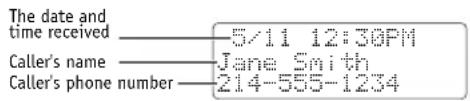
You may receive any one of the following messages:
When invalid data is received Incomplete Data When a private name is received Private Name When a private number is received Private Number When an unknown name is received Unknown Name When an unknown number is received Unknown Number

Data errors appear as “■”.
Viewing the Caller ID Message List
The Caller ID list stores information for up to 30 incoming calls - even unanswered calls. You can also view the Caller ID list during a call.
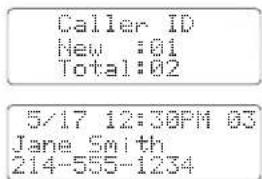
1) Press the call id/menu key. The summary screen displays the number of new messages and total messages.
2) Use the ▼key to scroll through the messages from the latest to the earliest, or use the ▲key to scroll through the messages from the earliest to the latest.
3) Press the call id/menu key to return to talk mode, or press the end key to return to standby mode.

- In Caller ID operation, if no key is pressed for more than 30 seconds, an error tone sounds and the handset returns to standby mode.
• Each message can be up to 15 characters for the name and 15 digits for the phone number.
- The number of calls from the same Caller ID appears next to the received time. Once you view the new message, the number will be cleared and disappear.
- During a call, don't press the end key, or the call will be disconnected.

- While using the Delete All? or Delete Message? screen, if no key is pressed for more than 30 seconds, an error tone sounds, and the handset returns to standby mode.
- If you get an incoming call or page, the deleting operation is canceled and you can answer the call or page.
Deleting Information from the Caller ID List
If the phone receives more Caller ID messages than it can store, the oldest one in the list is automatically deleted. Caller ID data can also be deleted manually.
Deleting a Caller ID message
1) Press the call id/menu key in standby mode. Find the message to be deleted from the Caller ID list by pressing the ▲or ▼key.
2) Press the delete/transfer key.
3) Press the ▲ or ▼ key to select Yes, and then press the select/channel key.
5/17 12:30PM 03 Jane Smith 214-555-1234
Delete Message? Yes No
Deleting all Caller ID names/numbers
1) With the phone in standby mode, press the call id/menu key.
2) Press the delete/transfer key.
3) Press the ▲ or ▼ key to select Yes, and then press the select/channel key.
You hear a confirmation tone and all stored Caller ID messages are deleted.
Caller ID New :01 Total:02
Delete All? Yes No
Caller ID Total:00
Making a Call from the Caller ID List
You can place a call from the Caller ID list.
1) Press the call id/menu key in standby mode. Select the phone number that you want to dial by pressing the ▲or▼key.
2) To have the phone dial a1 before the displayed Caller ID number, press 1. To have the phone dial the stored area code before the displayed Caller ID number, press 3.
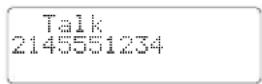
3) Press the talk/flash key. The displayed phone number dials automatically.
Caller ID on Call Waiting (CIDCW)
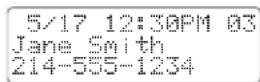
With CIDCW, you will hear a Call Waiting tone while you are on a call, and the Caller ID data is displayed. To accept the waiting call, press the talk/flash key (see page 22).

You cannot make a call from the Caller ID list if your cordless telephone is connected to a private branch exchange (PBX).
Changing the Digital Security Code
To protect you against misbilled calls which might result from your phone being activated by other equipment, the cordless phone provides AutoSecure ^™ (which electronically locks your phone when each handset is in the cradle) and Random Code ^™ digital security which automatically selects one of over 262,000 digital security codes for each handset and the main base.
If the handset battery pack is completely discharged or the battery pack is removed, the digital security code will be lost. If this happens, a new security code is set automatically the next time the battery pack is charged. In the rare situation that you suspect another cordless telephone is using the same security code, you can change the code.
1) Remove the handset from the cradle. Press and hold the find hs key on the main base.
2) While holding the find hs key, place the handset in the main base, and leave the handset in the main base for more than 3 seconds.
3) Remove the handset from the main base. Then place the second handset in the main base and wait for more than three seconds. No need to holding the find hs key this time.
4) Repeat step 3 for the rest of handsets.
5) Press the talk/flash key on one handset. Once you make sure Talk appears on the display, press the end key. Then, try with the all other handsets. If each handset displays Talk, a new security code is set. Otherwise, return to step 1 and try again.
Note on Power Sources
Low battery alert
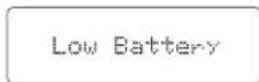
When the battery pack is very low and needs to be charged, the phone is programmed to eliminate functions in order to save power. If the phone is not in use, Low Battery appears on the LCD and none of the keys will operate. During a call, Low Battery flashes and the handset beeps. Complete your conversation as quickly as possible and return the handset to the cradle for charging.

Information stored in the phone's memory will be retained for 30 minutes after the battery pack is removed. This includes all setup information, last number dialed, speed dial memory, and the CID list.
Even when the battery pack is not being used, it will gradually discharge over a long period of time. For optimum performance, be sure to return the handset to the cradle after a telephone call.
Talk and Standby Times
With average use, your handset battery provides approximately 6 hours of talk time and approximately 10 days of standby time. When your handsets are not being used and are left off of their charging cradles, the battery will gradually discharge. You can achieve optimum battery life and performance by returning the handset to the charging cradle after each use. If the handset is left off of the charging cradle, the actual talk time duration will be reduced respective to the amount of time the handset is off of the charging cradle.
NOTE ON POWER SOURCES [33] www
Battery replacement and handling
When the operating time becomes short even after a battery is recharged, please replace the battery. With normal usage, your battery should last about one year. A replacement battery may be purchased by calling 1-800-554-3988 (Mon - Fri 8 am to 5 pm, CST).
Warning: To avoid the risk of personal injury or property damage from fire or electrical shock, only use the Uniden battery model and Uniden adapter model specifically designated for this product.
Power Failure
During the period that the power is off, you will not be able to make or receive calls with the telephone.
Caution
- Use only the specified Uniden battery pack (BT-905).
- Do not remove the battery from the handset to charge it.
- Never throw the battery into a fire, disassemble it, or heat it.
- Do not remove or damage the battery casing.
Cleaning the battery charging contacts
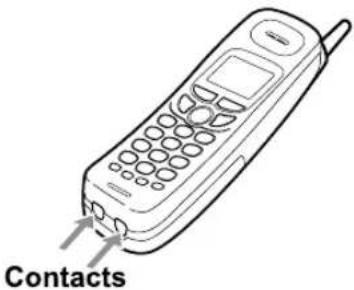
To maintain a good charge, clean the charging contacts on the handset once a month.
Dampen a cloth with plain water. Gently rub the damp cloth over the charging contacts until all visible dirt is removed. Dry the contacts thoroughly before returning the handset to the cradle.
Caution
Do not use paint thinner, alcohol, or other chemical products. Doing so may discolor the surface of the telephone and damage the finish.
NOTE ON POWER SOURCES[34] www.uniden.com
General Information
The phone complies with FCC Parts 15 and 68.
Operating temperature: -10^ to 50^ (+14°F to +122°F)
AC Adapter Information
(For the main base) (For the charging cradle)
AC Adapter part number: AD-314 AD-310 or AD-1010
Input Voltage: 120V AC 60Hz 120V AC 60Hz
Output Voltage: 9V DC 350mA 9V DC 210mA
Battery Information
Battery part number: BT-905
Capacity: 600mAh, 3.6V
Frequency
925.181-927.451 MHz
5739.320-5746.130 MHz

• To avoid damage to the phone use only Uniden AD-314, AD-310 or AD-1010 and BT-905 with your phone.
- If the handset is left off the cradle, the actual Talk Mode duration will be reduced respective to the amount of time the handset is off the cradle.
Recharge your phone on a regular basis by returning the handset to either cradle after each phone call. When the operating time becomes short, even after the battery is recharged, please replace the battery. With normal usage, the battery should last about one year.
A replacement Uniden adapter or battery may be purchased by calling 1-800-554-3988 (Mon - Fri 8 am to 5 pm, CST).
Specifications, features, and availability of optional accessories are all subject to change without prior notice.
GENERAL INFORMATION [35] www.un
Troubleshooting
If your phone is not performing to your expectations, please try these simple steps first. If these simple steps do not solve your problem, please call our Customer Hotline at 1-800-297-1023. (Mon - Fri 7 am to 7 pm, Sat/Sun 9 am to 5 pm, CST. Phone support is closed on holidays.)
| Symptom | Suggestion |
| The charge/in use LED or charge LED won't illuminate when the handset is placed in the cradle. | Make sure the AC adapter is plugged into the cradle and wall outlet.Make sure the handset is properly seated in the cradle.Make sure the charging contacts on the handsets are clean. |
| The audio sounds weak and/or scratchy. | Move the handset and/or main base away from metal objects or appliances and try again.Press the select/channel key in the talk mode to help eliminate background noise.Make sure that the handset is not too far from the main base. |
| Can't make or receive calls.The handset doesn't ring or receive a page. | Re-register all handsets (see page 13).Check both ends of telephone line cord.Make sure the AC adapter is plugged into the main base and wall outlet.Disconnect the AC adapter for a few minutes, then reconnect it.Change the digital security code (see page 32).Make sure that the handset is not too far from the main base.Check the dialing mode used by your telephone company.Re-register all handsets (see page 13).The battery pack may be weak. Charge the battery for 15-20 hours.The handset may be too far away from the main base.Place the main base away from appliances or metal objects.Change the digital security code (see page 32).Check the battery pack to ensure there is a secure connection.Make sure ringer volume isn't set to "off." |
| Severe noise interference. | Keep all handsets away from microwave ovens, computers, remote control toys, wireless microphones, alarm systems, intercoms, room monitors, fluorescent lights, and electrical appliances.Move the main base to another location or turn off the source of interference. |
| The Caller ID does not display. | The call was answered before the second ring.The call was placed through a switchboard.Charge the handset.Your Caller ID service may not be active; contact your local telephone service provider. |
| A handset is not working. | Make sure the battery pack is connected to the handset and fully charged.Re-register the non-functional handset. |
| Unavailable message is displayed on the LCD screen of the handset. | Make sure the other handset is not already in use. Two or more handsets cannot be in talk mode at the same time.Place the handset in the main base for at least 5 seconds to re-register to the main base.Make sure the handset is not too far from the main base when trying to use. |
TROUBLESHOOTING [37] www.unid
| Symptom | Suggestion |
| The handset doesn't communicate with the main base or the other handset. | •Re-register all handsets (see page 13). |
| No 3- way conversation. | •Only one handset at a time can talk with an outside caller. To allow the other handset to talk to the caller, transfer the call. |
| Voice Message Indication does not work. | •Contact your local telephone company to make sure that your telephone receives FSK message signaling.• Reset the indicator by pressing and holding the find hs key for 5 seconds. |
Liquid Damage
Moisture and liquid can damage your cordless phone. In case of accidental submersion, please read the following steps.
| Case | Action |
| If the handset or base is exposed to moisture or liquid, but it only affects the exterior plastic housing. | Wipe off the liquid, and use as normal. |
| If moisture or liquid has entered the plastic housing (i.e. liquid can be heard in the phone or liquid has entered the handset battery compartment or vent openings on the base). | Handset:1. Remove the battery cover and leave it off for ventilation.2. Remove the battery pack by disconnecting.3. Leave the battery cover off and the battery pack disconnected for at least 3 days.4. Once the phone is completely dry, reconnect the battery pack and the battery cover.5. Recharge the handset's battery pack for 20 hours before using again.Base:1. Disconnect the AC adapter from the base unit, cutting off electrical power.2. Disconnect the telephone cord from the base unit.3. Let dry for at least 3 days.IMPORTANT: You must unplug the telephone line while recharging the battery pack to avoid charge interruption.CAUTION:DO NOT use a microwave oven to speed up the drying process. This will cause permanent damage to the handset, base and the microwave oven.After following these steps, if your cordless telephone does not work, please call our Customer Service Hotline at 1-800-297-1023. |
Precautions!
Before you read anything else, please observe the following:
Warning!
Uniden America Corporation DOES NOT represent this unit to be waterproof. To reduce the risk of fire, electrical shock, or damage to the unit, DO NOT expose this unit to rain or moisture.
Rechargeable Nickel-Cadmium Battery Warning
- This equipment contains a rechargeable nickel-cadmium battery.
- Cadmium is a chemical known to the State of California to cause cancer.
- The rechargeable nickel-cadmium battery contained in this equipment may explode if disposed of in a fire.
• Do not short-circuit the battery. - Do not charge the rechargeable nickel-cadmium battery used in this equipment in any charger other than the one designed to charge this battery as specified in the owner's manual. Using another charger may damage the battery or cause the battery to explode.
Rechargeable Nickel-Cadmium Batteries Must Be Recycled or Disposed of Properly

- Uniden voluntarily participates in an RBRC® industry program to collect and recycle nickel-cadmium batteries at the end of their useful life, when taken out of service within the United States. The RBRC® program provides a convenient alternative to placing used nickel-cadmium batteries into the trash or municipal waste stream, which is illegal in some areas.
- Through the RBRC® program, Uniden makes it easy for you to drop off the used battery at local retailers of replacement nickel-cadmium batteries. You may also contact your local recycling center for information on where to return the used battery. Please call 1-800-8-BATTERY for information on Ni-Cd battery recycling in your area. Uniden's involvement in this program is part of its commitment to protecting our environment and conserving natural resources.
- RBRC® is a registered trademark of the Rechargeable Battery Recycling Corporation.

The exclamation point within an equilateral triangle is intended to alert the user to the presence of important operating and maintenance (servicing) instructions in the literature accompanying the appliance.
Uniden works to reduce lead content in our PVC coated cords in our product and accessories.
Warning!
The cords on this products and/or accessories contain lead, a chemical known to the State of California to cause birth defects or other reproductive harm. Wash hands after handling.
Important Safety Instructions
When using your telephone equipment, basic safety precautions should always be followed to reduce the risk of fire, electric shock and injury to persons, including the following:
-
Do not use this product near water, for example, near a bath tub, wash bowl, kitchen sink or laundry tub, in a wet basement or near a swimming pool.
-
Avoid using a telephone (other than a cordless type) during an electrical storm. There may be a remote risk of electric shock from lightning.
-
Do not use the telephone to report a gas leak in the vicinity of the leak.
- Use only the power cord and batteries indicated in this manual. Do not dispose of batteries in a fire. They may explode. Check with local codes for possible battery disposal instructions.
- Do not disassemble any component of this product.
SAVE THESE INSTRUCTIONS!
CAUTION
Risk of explosion if battery is replaced by an incorrect type. Dispose of used batteries according to the instructions. Do not open or mutilate the battery, and disconnect the battery before shipping this product.
The FCC Wants You To Know
This equipment complies with Part 68 of the FCC rules and the requirements adopted by the ACTA. On the bottom of this equipment is a label that contains, among other information, a product identifier in the format US:AAAEQ##TXXXX. If requested, this number must be
provided to the telephone company.
An applicable Universal Service Order Codes (USOC) certification for the jacks used in this equipment is provided (i.e., RJ11C) in the packaging with each piece of approved terminal equipment.
A plug and jack used to connect this equipment to the premises wiring and telephone network must comply with the applicable FCC Part 68
rules and requirements adopted by the ACTA. A compliant telephone cord and modular plug is provided with this product. It is designed to be connected to a compatible modular jack that is also compliant. See installation instructions for details.
The REN is used to determine the number of devices that may be connected to a telephone line. Excessive RENs on a telephone line may result in the devices not ringing in response to an incoming call. In most but not all areas, the sum of RENs should not exceed five (5.0). To be certain of the number of devices that may be connected to a line, as determined by the total RENs, contact the local telephone company. For products approved after July 23, 2001, the REN for this product is part of the product identifier that has the format US:AAAEQ##TXXXXX. The digits represented by ## are the REN without a decimal point (e.g., 03 is a REN of 0.3). For earlier products, the REN is separately shown on the label. If this equipment causes harm to the telephone network, the telephone company will notify you in advance that temporary discontinuance of service may be required. But if advance notice isn't practical, the telephone company will notify the customer as soon as possible. Also, you will be advised of your right to file a complaint with the FCC if you believe it is necessary.
The telephone company may make changes in its facilities, equipment, operations or procedures that could affect the operation of the equipment. If this happens the telephone company will provide advance notice in order for you to make necessary modifications to maintain uninterrupted service.
Please follow instructions for repairing, if any (e.g. battery replacement section); otherwise do not substitute or repair any parts of the device except as specified in this manual.
Connection to party line service is subject to state tariffs. Contact the state public utility commission, public service commission or corporation commission for information. This equipment is hearing aid compatible.
Should you experience trouble with this equipment, please contact Uniden customer service at 800-297-1023. If the equipment is causing harm to the telephone network, the telephone company may request that you disconnect the equipment until the problem is resolved.
NOTICE: According to telephone company reports, AC electrical surges, typically resulting from lightning strikes, are very destructive to telephone equipment connected to AC power sources. To minimize damage from these types of surges, a surge arrest or is recommended.
Changes or modifications to this product not expressly approved by Uniden, or operation of this product in any way other than as detailed by the owner's manual, could void your authority to operate this product.
This device complies with part 15 of the FCC rules. Operation is subject to the following two conditions: (1) This device may not cause harmful interference, and (2) This device must accept any interference received, including interference that may cause undesired operation. Privacy of communications, may not be ensured when using this phone.
To insure the safety of users, the FCC has established criteria for the amount of radio frequency energy various products may produce depending on their intended usage. This product has been tested and found to comply with the FCC's exposure criteria. For body worn operation, the FCC RF exposure guidelines were also met when used with the Uniden accessories supplied or designed for this product. Use of other accessories may not ensure compliance with FCC RF exposure guidelines and should be avoided.
Radio Interference
Radio interference may occasionally cause buzzing and humming in your cordless handset, or clicking noises in the base. This interference is caused by external sources such as TV, refrigerator, vacuum cleaner, fluorescent lighting, or electrical storm. Your unit is NOT DEFECTIVE. If these noises continue and are too distracting, please check around your home to see what appliances may be causing the problem. In addition, we recommend that the base not be plugged into a circuit that also powers a major appliance because of the potential for interference. Be certain that the antenna on the unit is fully extended when needed. In the unlikely event that you consistently hear other voices or distracting transmissions on your phone, you may be receiving radio signals from another cordless telephone or other source of interference. If you cannot eliminate this type of interference, you need to change to a different channel.
Finally, it should be noted that some cordless telephones operate at frequencies that may cause interference to nearby TVs and VCRs. To minimize or prevent such interference, the base of the cordless telephone should not be placed near or on top of a TV or VCR. If interference is experienced, moving the cordless telephone farther away from the TV or VCR will often reduce or eliminate the interference.
Cordless Telephone Privacy
Cordless telephones are radio devices. Communications between the handset and base of your cordless telephone are accomplished by means of radio waves which are broadcast over the open airways. Because of the inherent physical properties of radio waves, your communications can be received by radio receiving devices other than your own cordless telephone unit. Consequently, any communications using your cordless telephone may not be private.
One Year Limited Warranty
Important: Evidence of original purchase is required for warranty service. WARRANTOR: UNIDEN AMERICA CORPORATION ("Uniden")
ELEMENTS OF WARRANTY: Uniden warrants, for one year, to the original retail owner, this Uniden Product to be free from defects in materials and craftsmanship with only the limitations or exclusions set out below.
WARRANTY DURATION: This warranty to the original user shall terminate and be of no further effect 12 months after the date of original retail sale. The warranty is invalid if the Product is (A) damaged or not maintained as reasonable or necessary, (B) modified, altered, or used as part of any conversion kits, subassemblies, or any configurations not sold by Uniden, (C) improperly installed, (D) serviced or repaired by someone other than an authorized Uniden service center for a defect or malfunction covered by this warranty, (E) used in any conjunction with equipment or parts or as part of any system not manufactured by Uniden, or (F) installed or programmed by anyone other than as detailed by the owner's manual for this product.
STATEMENT OF REMEDY: In the event that the product does not conform to this warranty at any time while this warranty is in effect, warrantor will either, at its option, repair or replace the defective unit and return it to you without charge for parts, service, or any other cost (except shipping and handling) incurred by warrantor or its representatives in connection with the performance of this warranty. Warrantor, at its option, may replace the unit with a new or refurbished unit. THE LIMITED WARRANTY SET FORTH ABOVE IS THE SOLE AND ENTIRE WARRANTY PERTAINING TO THE PRODUCT AND IS IN LIEU OF AND EXCLUDES ALL OTHER WARRANTIES OF ANY NATURE WHATSOEVER, WHETHER EXPRESS, IMPLIED OR ARISING BY OPERATION OF LAW, INCLUDING, BUT NOT LIMITED TO ANY IMPLIED WARRANTIES OF MERCHANTABILITY OR FITNESS FOR A PARTICULAR PURPOSE. THIS WARRANTY DOES NOT COVER OR PROVIDE FOR THE REIMBURSEMENT OR
PAYMENT OF INCIDENTAL OR CONSEQUENTIAL DAMAGES. Some states do not allow this exclusion or limitation of incidental or consequential damages so the above limitation or exclusion may not apply to you.
LEGAL REMEDIES: This warranty gives you specific legal rights, and you may also have other rights which vary from state to state. This warranty is void outside the United States of America and Canada. PROCEDURE FOR OBTAINING PERFORMANCE OF WARRANTY: If, after following the instructions in the owner's manual you are certain that the Product is defective, pack the Product carefully (preferably in its original packaging). Disconnect the battery from the Product and separately secure the battery in its own separate packaging within the shipping carton. The Product should include all parts and accessories originally packaged with the Product. Include evidence of original purchase and a note describing the defect that has caused you to return it. The Product should be shipped freight prepaid, by traceable means, to warrantor at:
Uniden America Service
4700 Amon Carter Blvd.
Fort Worth, TX 76155
(800) 297-1023, 7:00 a.m. to 7:00 p.m. CST, Monday through Friday; 9:00 a.m. through 5:00 p.m. CST, Saturday and Sunday (phone support is closed on holidays).
PRECAUTIONS & WARRANTY [ 41 ]www
I.C. Notice
TERMINAL EQUIPMENT
NOTICE: This equipment meets the applicable Industry Canada Terminal Equipment Technical Specifications. This is confirmed by the registration number. The abbreviation, IC, before the registration number signifies that registration was performed based on a Declaration of Conformity indicating that Industry Canada technical specifications were met. It does not imply that Industry Canada approved the equipment.
NOTICE: The Ringer Equivalence Number (REN) for this terminal equipment is marked on the equipment itself. The REN assigned to each terminal equipment provides an indication of the maximum number of terminals allowed to be connected to a telephone interface. The termination on an interface may consist of any combination of devices subject only to the requirement that the sum of the Ringer Equivalence Numbers of all the devices does not exceed five.
RADIO EQUIPMENT
The term "IC:" before the radio certification number only signifies that Industry Canada technical specifications were met.
Operation is subject to the following two conditions: (1) this device may not cause interference, and (2) this device must accept any interference, including interference that may cause undesired operation of the device. "Privacy of communications may not be ensured when using this telephone".
Index
A
AC adapter information ....35
B
Basic setup....15
Battery pack
Information 35
Installing 8
Preparing and charging ....8
Replacement and handling .....34
Beltclip installation .....12
C
Call transfer feature ....19
Caller ID service 28
Call waiting 22
Deleting 30
Making a call 31
Viewing....29
Channel 21
Charging the battery pack ......9
Cleaning contacts ....34
Connect the cradle....9
Controls and functions .....4, 5
D
Dialing mode....16
Digital security code ......32
E, F, G, H, I, J, K, L
Earpiece volume....20
Find handset....21
General information ....35
Headset installation 13
I.C. Notice 42
Installing the phone ....7
Interference ....41
Liquid damage....39
M, N, O, P, Q
Making a call ....18
Precautions....40
R
Receiving a call....18
Redial 19
Register handsets to the main base before using ....13
Ringer tone ....17
S
Speed dial memory
Making calls from
speed dial memory ......27
Storing names and numbers
in speed dial memory ......23
T, U
Talk and standby times ....33
Technical information 35
Tone dialing switch-over .....20
Transferring a call 19
Traveling out-of-range .....21
Troubleshooting....36
V, W, X, Y, Z
Voice mail waiting indicator.....22
Volume control
Handset 17, 20
Wall mounting 11
Warranty 41
Memo
Memo
[45]www.unic
Memory List
MEMORY LOCATION MEMO
| Memory Location | Name | Phone Number | Memory Location | Name | Phone Number |
| 1 | 6 | ||||
| 2 | 7 | ||||
| 3 | 8 | ||||
| 4 | 9 | ||||
| 5 | 10 |
CUT
CUT
MEMORY LOCATION MEMO
| Memory Location | Name | Phone Number | Memory Location | Name | Phone Number |
| 1 | 6 | ||||
| 2 | 7 | ||||
| 3 | 8 | ||||
| 4 | 9 | ||||
| 5 | 10 |
MEMORY LOCATION MEMO
MEMORY LIST[46] www.uniden.com
At Uniden, we'll take care of you!
Thank you for purchasing a Uniden product. If you have any questions or problems, please do not return this product to the place of purchase.
Having Trouble?
Our customer care specialists are here to help you! Visit our website at www.uniden.com or call our Customer Hotline at 1-800-297-1023, Mon-Fri, 7 a.m. to 7 p.m. or Sat/Sun, 9 a.m. to 5 p.m. CST. (Phone support is closed on holidays.)
Need a Part?
To order headsets, additional handsets, replacement batteries or other accessories, visit our website at www.uniden.com or call 1-800-554-3988, Mon-Fri, 8 a.m. to 5 p.m. CST.
Help for our Special Needs Customers
If you need special assistance due to a disability or have questions on the accessibility features of this product, please call 1-800-874-9314 (voice or TTY)
Uniden®
May be covered under one or more of the following U.S. patents:
4,797,916 5,426,690 5,434,905 5,491,745 5,493,605 5,533,010
5,574,727 5,581,598 5,650,790 5,660,269 5,661,780 5,663,981
5,671,248 5,696,471 5,717,312 5,732,355 5,754,407 5,758,289
5,768,345 5,787,356 5,794,152 5,801,466 5,825,161 5,864,619
5,893,034 5,912,968 5,915,227 5,929,598 5,930,720 5,960,358
5,987,330 6,044,281 6,070,082 6,125,277 6,253,088 6,314,278
6,418,209 6,618,015 6,671,315 6,714,630 6,782,098 6,788,920
6,788,953 6,839,550 6,889,184 6,901,271 6,907,094 6,914,940
6,953,118 7,023,176
Other patents pending.

FOR ACCESSORIES, GO ONLINE @ WWW.UNIDEN.COM
REGISTER ONLINE TODAY!
THANK YOU FOR BUYING A UNIDEN PRODUCT.
A World Without Wires
Uniden®
©2006 Uniden America Corporation, Fort Worth, Texas. Contains additional foreign articles. Printed in China.
UCZZ01029EA(0)
- OWNER'S MANUAL
- Contents
- Welcome/Features 3
- Controls and Functions 4
- Terms Used in this Manual 6
- Accessibility 6
- Installing the Phone 7
- Register Handsets to the Main Base before Using! 13
- When to Re-register Handsets 14
- Basic Setup 15
- Using Your Phone
- Using the Speed Dial Memory
- Caller ID and CIDCW (Caller ID on Call Waiting)
- Changing the Digital Security Code
- Note on Power Sources 33
- General Information 35
- Troubleshooting 36
- Precautions & Warranty
- I.C. Notice 42
- Index 43
- Memory List 46
- Welcome
- Features
- Controls and Functions
- /(right cursor) key
- Terms Used in this Manual
- Accessibility
- Installing the Phone
- Do the following steps:
- Choose the Best Location
- Install the Rechargeable Battery Packs into the Handsets
- Connect the Main Base and Charging Cradle, and Charge the Handsets
- Mount the Main Base on a Wall
- Standard wall plate mounting
- Direct wall mounting
- Installing the Beltclip
- Headset Installation
- Register Handsets to the Main Base before Using!
- When to Re-register Handsets
- Basic Setup
- Activating AutoTalk
- Activating Caller ID on Call Waiting (Handset 1 only)
- Entering Your Area Code
- Choosing the Dialing Mode (Handset 1 only)
- Setting the Language
- Selecting the Ring Tone and Volume
- Making and Receiving Calls
- Making a call
- Receiving a call
- Hanging up
- Transferring a Call
- To transfer a call
- To receive a transfer call
- Redialing the Last Dialed Number
- Adjusting the Earpiece Volume
- Temporarily Mute Ringer
- Tone Dialing Switch-over
- Traveling Out-of-Range
- Selecting a Different Channel
- Find Handset
- Using Call Waiting
- Voice Mail Waiting Indicator
- Storing Names and Numbers in Speed Dial Memory
- If you make a mistake while entering a name
- Storing Caller ID Messages in Speed Dial Memory
- Making Calls from Speed Dial Memory
- To cancel speed dialing
- Viewing the Caller ID Message List
- Deleting Information from the Caller ID List
- Deleting a Caller ID message
- Deleting all Caller ID names/numbers
- Making a Call from the Caller ID List
- Caller ID on Call Waiting (CIDCW)
- Note on Power Sources
- Low battery alert
- Talk and Standby Times
- Battery replacement and handling
- Power Failure
- Caution
- Cleaning the battery charging contacts
- General Information
- AC Adapter Information
- Battery Information
- Frequency
- Troubleshooting
- Liquid Damage
- Precautions!
- Warning!
- Rechargeable Nickel-Cadmium Battery Warning
- Rechargeable Nickel-Cadmium Batteries Must Be Recycled or Disposed of Properly
- Important Safety Instructions
- SAVE THESE INSTRUCTIONS!
- The FCC Wants You To Know
- Radio Interference
- Cordless Telephone Privacy
- One Year Limited Warranty
- Uniden America Service
- I.C. Notice
- TERMINAL EQUIPMENT
- RADIO EQUIPMENT
- Index
- A
- B
- C
- D
- E, F, G, H, I, J, K, L
- M, N, O, P, Q
- R
- S
- T, U
- V, W, X, Y, Z
- Memo
- Memory List
- At Uniden, we'll take care of you!
- Having Trouble?
- Need a Part?
- Help for our Special Needs Customers
- Uniden®
- REGISTER ONLINE TODAY!
- THANK YOU FOR BUYING A UNIDEN PRODUCT.
Brand : UNIDEN
Model : DXI 5586-3
Category : Phone